Créer un blog gratuit avec GitHub Pages en 2026 : guide complet

Pourquoi GitHub Pages ?

  • 100% gratuit — hébergement, SSL, bande passante

  • Performant — CDN mondial de GitHub

  • Versionné — chaque modification est tracée dans Git

  • Domaine personnalisé supporté (optionnel)

  • Aucun serveur à gérer

L’inconvénient : pas de contenu dynamique (base de données, commentaires natifs). Mais pour un blog, c’est parfait.

Étape 1 — Créer un compte GitHub

Rendez-vous sur github.com/signup et créez un compte. Choisissez votre nom d’utilisateur avec soin — il deviendra l’URL de votre blog : votrenom.github.io .

Étape 2 — Créer le repo

Dans GitHub, créez un nouveau repository avec ce nom exact : votrenom.github.io (remplacez “votrenom” par votre username exact).

Cochez “Add a README file” pour l’initialiser.

Étape 3 — Créer votre première page

Créez un fichier index.html dans le repo :

<!DOCTYPE html>
<html lang=”fr”>
<head>
<meta charset=”UTF-8″>
<title>Mon blog</title>
</head>
<body>
<h1>Bienvenue sur mon blog !</h1>
<p>Premier article en cours…</p>
</body>
</html>

Étape 4 — Activer GitHub Pages

  • Allez dans Settings de votre repo

  • Section “Pages” dans le menu gauche

  • Source : “Deploy from a branch”

  • Branch : main / (root)

  • Cliquez Save

Après 1-2 minutes, votre site est accessible sur https://votrenom.github.io .

Étape 5 — Ajouter un domaine personnalisé (optionnel)

Si vous voulez monblog.fr plutôt que votrenom.github.io :

  • Achetez un domaine (~10€/an)

  • Dans votre registrar, ajoutez un CNAME : www → votrenom.github.io

  • Dans GitHub Pages Settings, entrez votre domaine

  • GitHub génère automatiquement un certificat SSL

Où acheter un domaine pas cher ?

Registrar Prix .fr/an Prix .com/an Note

OVH ~7€ ~10€ Français, fiable
Hostinger ~3€ (promo) ~10€ Bon rapport qualité/prix
Namecheap — ~10€ Interface simple
Infomaniak ~7€ ~12€ Suisse, éco-responsable

Aller plus loin : générateur de site statique

Écrire chaque article en HTML pur devient fastidieux. Pour un blog avec beaucoup d’articles, utilisez un générateur de site statique :

  • Jekyll — nativement supporté par GitHub Pages, articles en Markdown

  • Hugo — ultra-rapide, thèmes nombreux

  • Eleventy (11ty) — flexible, facile pour les devs JS

Ces outils convertissent vos fichiers Markdown en HTML automatiquement à chaque push.

Récapitulatif

Étape Action Temps Coût

1 Créer compte GitHub 2 min Gratuit
2 Créer repo 1 min Gratuit
3 Créer index.html 5 min Gratuit
4 Activer Pages 1 min Gratuit
5 (opt.) Domaine personnalisé 10 min ~10€/an

Des questions sur votre setup ? Décrivez votre cas en commentaire.

Article original: Créer un blog gratuit avec GitHub Pages en 2026 : guide complet

Beautiful Perl feature: “heredocs”, multi-line strings embedded in source code

Beautiful Perl series

This post is part of the beautiful Perl features series. See the introduction post for general explanations about the series.

Previous posts covered random topics ranging from fundamental concepts like blocks or list context and scalar context to sharp details like reusable subregexes. Today’s topic is neither very fundamental nor very sharp: it is just a handy convenience for managing multi-line strings in source code, namely the heredoc feature. This is not essential, because multi-line strings can be expressed by other means; but it addresses a need that is quite common in programming, so it is interesting to compare it with other programming languages.

“Heredocs”: multi-line data embedded in source code

A “here document”, abbreviated as “heredoc”, is a piece of multi-line text embedded in the source code. Perl borrowed the idea from Unix shells, and was later imitated by other languages like PHP or Ruby (discussed below). So instead of concatenating single lines, like this:

my $email_template
  = "Dear %s,n"
  . "n"
  . "You just won %d at our lottery!n"
  . "To claim your prize, just click on the link below.n";

one can directly write the whole chunk of text, with a freely-chosen final delimiter, like this:

my $email_template = <<~_END_OF_MAIL_;
  Dear %s,

  You just won %d at our lottery!
  To claim your prize, just click on the link below.
  _END_OF_MAIL_

The second version is easier to write and to maintain, and also easier to read.

Perl heredoc syntax

General rules

A piece of “heredoc” data can appear anywhere in a Perl expression. It starts with an initial operator written either << or <<~. The second variant with an added tilde ~, available since Perl v5.26, introduces an indented heredoc, where initial spaces on the left of each line are automatically removed by the interpreter; thanks to this feature the inserted text can be properly indented within the Perl code, as illustrated in the example above. The amount of indent removed from each data line is determined by the indent of the final delimiter.

The heredoc operator must be immediately followed by a delimiter string freely chosen by the programmer. Lines below the current line will be part of the heredoc text, until the second appearance of that delimiter string which closes the heredoc sequence. The delimiter string can be any string enclosed in double quotes or in single quotes1; the double quotes can be omitted if the string would be valid as an identifier (if the string only contains letters, digits and underscores). Indeed, the most common practice is to use unquoted strings in capital letters, often surrounded by underscores – but there is no technical obligation to do so.

When explicit or implicit double quotes are used for the delimiter string, the content of the heredoc text is subject to variable interpolation, like for a usual double-quoted string, whereas with single quotes, no interpolation is performed.

The heredoc content only starts at the line after the << symbol; before that next line, the current line must properly terminate the current expression, i.e. close any open parentheses and terminate the current statement with a final ;. For example, it is perfectly legal (and quite common) to have heredoc data within a subroutine call:

my $html = htmlize_markdown(<<~_END_OF_MARKDOWN_);
  # Breaking news

  ## Perl remontada

  After many years of Perl bashing, the software industry 
  slowly rediscovers the beauty of Perl design. Many indicators ... 
  _END_OF_MARKDOWN_

Arbitrary string as delimiter

As stated above, the delimiter string can be any string, even if it includes special characters or spaces, provided that the string is explicitly quoted:

my $ordinary_liturgy = <<~ "Ite, missa est";
  Kyrie
  Gloria
  Credo
  Sanctus
  Agnus dei
  Ite, missa est

say $ordinary_liturgy;

Empty string as delimiter

The delimiter string can also be .. an empty string! In that case the heredoc content ends at the next empty line; this is an elegant way to minimize noise around the data. I used it for example for embedding Template toolkit fragments in the test suite for my Array::PseudoScalar module:

  my $tmpl = Template->new();
  my $result = "";
  $tmpl->process(<<"", %data, $result); # 1st arg: reference to heredoc string
     [% obj.replace(";", " / ") ; %]

  like($result, qr[^s+FOO / BAR / BUZ$], "scalar .replace()");

  $result = "";
  $tmpl->process(<<"", %data, $result);
     size is [% obj.size %]
     last is [% obj.last %]
     [% FOREACH member IN obj %]member is [% member %] [% END; # FOREACH %]

  like($result, qr/size is 3/,     "array .size");

or for embedding SQL fragments in my Lingua::Thesaurus module:

  $dbh->do(<<"");
    CREATE $term_table;

  $dbh->do(<<"");
    CREATE TABLE rel_type (
      rel_id      CHAR PRIMARY KEY,
      description CHAR,
      is_external BOOL
    );

  # foreign key control : can't be used with fulltext, because 'docid'
  # is not a regular column that can be referenced
  my $ref_docid = $params->{use_fulltext} ? '' : 'REFERENCES term(docid)';

  $dbh->do(<<"");
    CREATE TABLE relation (
      lead_term_id  INTEGER NOT NULL $ref_docid,
      rel_id        CHAR    NOT NULL REFERENCES rel_type(rel_id),
      rel_order     INTEGER          DEFAULT 1,
      other_term_id INTEGER          $ref_docid,
      external_info CHAR
    );

  $dbh->do(<<"");
    CREATE INDEX ix_lead_term  ON relation(lead_term_id);

...

While it is technically possible to write my $content = <<~ ""; for an indented heredoc ending with an empty string (notice the ~), this requires that the blank line at the end be indented accordingly. In that case the fact that the blank line is composed of initial indenting spaces followed by a newline character is not visible when reading the source code, so this is definitely not something to recommend!

Several heredocs on the same line

Several heredocs can start on the same line, as in this example:

my @blogs = $dbh->selectall_array(<<~END_OF_SQL, {}, split(/n/, <<~END_OF_BIND_VALUES));
  select d_publish, title, content
  from blog_entries
  where pseudo=? and d_publish between ? and ?
  END_OF_SQL
  chatterbox
  01.01.2023
  30.06.2024
  END_OF_BIND_VALUES

The first heredoc is the SQL request, and the second heredoc is a piece of text containing the bind values; the split operation on the first line transforms this text into an array.

Other Perl mechanisms for multi-line strings

Heredocs are not the only way to express multi-line strings in Perl. String concatenation in source code, as shown in the initial example of this article, is of course always possible, albeit not very practical nor elegant. Yet another way is to simply insert newline characters inside an ordinary quoted string, like this:

my $str1 = "this is
            a multi-line string";
my $str2 = qq{and this
              is another multi-line string};

but in that case the indenting spaces at the beginning of each line are always part of the data. So Perl offers more that one way to do it, it is up to the programmer to decide what is most appropriate according to the situation.

Perl’s acceptance of literal newline characters inside ordinary quoted strings is sometimes very handy, and therefore was also adopted in PHP and Ruby; but the majority of other languages, like Java, JavaScript, Python and C++, do not allow it – this is why they needed to introduce other mechanisms, as we will see later.

Other programming languages

As mentioned in the introduction, the idea of heredocs originated in Unix shells and later percolated into general-purpose programming languages. Some of them, inspired by Perl, adopted the shell-style heredoc syntax; other languages preferred the more familiar syntax of quoted strings, but with variants for supporting multi-line strings. This section will highlight the main differences.

Languages with heredoc syntax

PHP

The syntax for heredocs in PHP is very close to Perl, except that it uses three less-than signs (<<<) instead of two (<<). Like in Perl, the heredoc content is usually subject to variable interpolation, unless when the delimiter string is enclosed in single quotes; in that latter case, PHP uses the name “nowdoc” instead of “heredoc”.

There are a couple of technical differences with Perl’s heredocs, however:

  • the ending delimiter, even if enclosed in double or in single quotes, must be a proper identifier, not an arbitrary string – so it cannot contain space or special characters .. and obviously it cannot be an empty string!
  • the PHP expression is interrupted at line where the heredoc starts, and must be properly terminated after the final heredoc delimiter. Here is an example from the official documentation:
<?php
$values = [<<<END
a
  b
    c
END, 'd e f'];
var_dump($values);

So the reader must mentally connect the lines before and after the heredoc to understand the structure of the complete expression, which might be difficult if the heredoc content spans over many lines.

Ruby

There is little to say about heredocs in Ruby: they work almost exactly like in Perl, with the same syntax, the same variants regarding interpolation of variables or regarding indented content, and the same possibility to use arbitrary quoted strings (including the empty string) as delimiters. Multiple heredocs starting on the same line are also supported.

There is however a minor difference in the interpretation of indented content: in presence of an indented heredoc, called “squiggly heredoc” in Ruby, the interpreter considers the least indented line to be the basis for indentation; the number of spaces before the delimiter string is irrelevant. So in

text = <<~END
    foo
  bar
       END

the value is `” foonbarn” (two spaces before “foo”, no spaces before “bar”). In Perl this would raise an exception because the indentation level is determined by the number of spaces before the terminating delimiter string and it is illegal to have content lines with less spaces.

Languages with quoted multi-line strings

Expressing multi-line strings in source code is quite a common need, so programming languages that support neither heredocs nor literal newline characters inside ordinary quoted strings had to offer something. A commonly adopted solution is triple-quoted strings as special syntax for multi-line string literals.

Python

Python was probably the inventor of triple-quoted strings. These solved two problems at once:

  • embedded double-quote or single-quote characters need not be escaped
  • embedded newline characters are accepted and retained in the string value

as shown in this example:

str = """this is a triple-quoted string
         with embedded "double quotes"
         and embedded 'single quotes'
         and also embedded newlines""";

Triple-quoted literals have no syntactic support for handling indented content, so in the example above, initial spaces at lines 2, 3 and 4 are part of the data. Removing indenting spaces must be explicitly performed at runtime, usually through the textwrap.dedent() function.

Like for regular string literals, interpolation of expressions within triple-quoted strings can be performed through a f prefix, a feature introduced in 2017 in Python 3.6.

JavaScript

Originally JavaScript had no support neither for multi-line strings nor for variable interpolation within string literals. Both features were simultaneously introduced in 2015 through the new construct of template literals: instead of single or double quotes, the string is enclosed in backticks, and it may contain newline characters and interpolated expressions of form ${...}. Those two behavioural aspects always come together, there are no syntactic variants for using them independently.

Java

Java introduced triple-quoted strings as late as 2020, under the name text blocks. The compiler automatically removes “incidental spaces”, i.e. indentation spaces at the beginning of lines, and trailing spaces at the end of lines. This mechanism has no basic support for variable interpolation; if needed, programmers have to use other classes like MessageFormat or StringSubstitutor.

Conclusion

Today many programming tasks need to handle some polyglot aspects: besides the main source code, fragments of other languages must be included, like HTML, CSS, XML, SQL, templates, etc. Therefore the need to embed multi-line strings in the main source code is quite frequent.

Surprisingly, some popular languages took a very long time before proposing that kind of feature, and it is not always possible to freely decide some options, like removing indentation or applying variable interpolation. By contrast, Perl always had a rich spectrum of mechanisms, including but not limited to heredoc documents. Various options can be chosen with great flexibility, allowing the programmer to be creative in crafting legible and elegant source code. Yet another example of Perl’s beautiful features!

About the cover picture

This score excerpt is taken from Luciano Berio’s Sinfonia, written in 1968. In the third movement, Berio makes ample citations of Mahler’s Symphony N° 2, a kind of “musical heredoc” inside the new composition.

  1. a third possibility is to enclose the string in backticks, but this will not be covered here. ↩

Every MCP Browser Tool Uses Chromium. That’s a Problem.

The Model Context Protocol has a browser monoculture problem, and nobody’s talking about it.

I just searched the MCP server registry. There are at least 13 browser automation servers listed. Every single one requires Chromium — Chrome DevTools Protocol, Puppeteer, Playwright with Chromium, or some wrapper around them. If your AI agent needs to interact with a web page, your only option has been “launch Chrome.”

This matters more than you think. Not because of some abstract browser diversity argument, but because Chrome is the single biggest resource drain in most developers’ MCP setups — and it’s completely unnecessary for 95% of browser automation tasks.

The Realization That Started This

I run an automation business. My daily workflow involves Claude Code connected to 6-7 MCP servers simultaneously. One day I noticed my M2 MacBook Pro fans spinning up during what should have been a simple task — the AI agent was just reading a dashboard and filling a form.

I opened Activity Monitor. Chrome (spawned by the browser MCP server) was using 38% CPU. Just sitting there. With a debug port open. Waiting for commands.

Meanwhile, Safari — the browser where I was already logged into everything I needed — was using 0.3% CPU with 11 tabs open.

That’s when it clicked: why am I running two browsers when the one I already have open does everything I need?

Introducing Safari MCP

Safari MCP is a native MCP server that controls Safari directly through AppleScript and JavaScript. No Chrome. No Puppeteer. No WebDriver. No headless browser process.

# Install from npm
npm install -g safari-mcp

# Or clone the repo
git clone https://github.com/achiya-automation/safari-mcp.git
cd safari-mcp
npm install

Enable Safari’s JavaScript bridge (one-time setup):

  1. Safari -> Settings -> Advanced -> Show features for web developers
  2. Safari -> Develop -> Allow JavaScript from Apple Events

Add to your MCP client config (~/.mcp.json for Claude Code, .cursor/mcp.json for Cursor):

{
  "mcpServers": {
    "safari": {
      "command": "npx",
      "args": ["-y", "safari-mcp"]
    }
  }
}

That’s it. No Chrome to install, no debug ports, no Playwright browser binaries to download.

The Dual-Engine Architecture

Most people look at this project and assume it’s “just AppleScript.” It’s not. Safari MCP runs a dual-engine architecture where two completely different execution paths compete for the best way to handle each command:

AI Agent (Claude Code / Cursor / Windsurf)
        |
        v  MCP Protocol (stdio)
   Safari MCP Server (Node.js)
        |                    |
   Safari Extension      AppleScript + Swift daemon
   (HTTP, ~5-20ms)       (~5ms, always available)
        |                    |
   Content Script        do JavaScript in tab N
        |                    |
        +---> Page DOM <-----+

Engine 1: AppleScript + Swift Daemon (always available)

This is the foundation. A persistent Swift helper process stays running and accepts AppleScript commands via stdin, returning results via stdout. Instead of spawning a new osascript process for every command (~80ms overhead each), the daemon keeps one process alive. Result: ~5ms per command.

Engine 2: Safari Extension (optional, for advanced scenarios)

A native Safari Web Extension that communicates with the MCP server over HTTP (port 9224). This engine handles things AppleScript fundamentally cannot:

  • Closed Shadow DOM — Reddit, Web Components, Shoelace UI. AppleScript’s do JavaScript runs in the page context and can’t pierce shadow boundaries. The extension’s content script runs in an isolated world with access to element.shadowRoot.
  • Strict CSP sites — Sites with script-src Content Security Policy headers block injected JavaScript. The extension executes in the MAIN world, bypassing CSP entirely.
  • Deep framework state — React Fiber tree traversal, ProseMirror editor manipulation, Vue reactivity system hooks. The extension can access internal framework objects that AppleScript-injected JS often can’t reach.

The server automatically uses the Extension when it’s connected, falling back to AppleScript seamlessly. You don’t configure anything — it just works.

80 Tools Across 20 Categories

Safari MCP isn’t a proof of concept with 5 navigation tools. It ships 80 tools that cover everything from basic navigation to network mocking to accessibility auditing:

Navigation & Reading — safari_navigate, safari_read_page, safari_navigate_and_read (combines both in one round-trip), safari_go_back, safari_go_forward, safari_reload

Interaction — safari_click (CSS selector, visible text, or coordinates), safari_double_click, safari_right_click, safari_hover, safari_drag, safari_click_and_wait

Forms — safari_fill (React/Vue/Angular compatible), safari_fill_form (batch), safari_fill_and_submit, safari_select_option, safari_type_text, safari_press_key, safari_clear_field

Screenshots & PDF — safari_screenshot (viewport or full page), safari_screenshot_element, safari_save_pdf

Network — safari_start_network_capture, safari_network_details (headers, timing, bodies), safari_mock_route (intercept fetch/XHR), safari_throttle_network (simulate 3G/4G/offline)

Storage — Full cookie, localStorage, sessionStorage, and IndexedDB access. Plus safari_export_storage / safari_import_storage for backing up and restoring entire browser sessions as JSON.

Accessibility — safari_accessibility_snapshot returns the full a11y tree with roles, ARIA attributes, and focusable elements.

Data Extraction — safari_extract_tables (structured JSON), safari_extract_meta (OG, Twitter, JSON-LD), safari_extract_links, safari_extract_images

Advanced — safari_css_coverage (find unused CSS), safari_analyze_page (full analysis in one call), safari_emulate (device emulation), safari_run_script (batch multiple actions)

The React Form Problem Everyone Hits

If you’ve automated browser forms with any tool, you’ve probably hit this wall:

// This doesn't work in React
document.querySelector('#email').value = '[email protected]';

React’s synthetic event system doesn’t see direct value assignments. The component state doesn’t update. Validation doesn’t run. The submit button stays disabled.

Safari MCP handles this correctly by default using native property setters:

// What safari_fill actually does under the hood
const nativeSetter = Object.getOwnPropertyDescriptor(
  window.HTMLInputElement.prototype, 'value'
).set;
nativeSetter.call(element, value);
element.dispatchEvent(new Event('input', { bubbles: true }));
element.dispatchEvent(new Event('change', { bubbles: true }));

This approach works with React, Vue, Angular, Svelte, Solid — any framework that uses synthetic event listeners or intercepted property setters. When the Extension is active, it goes even deeper: it can reset React’s internal _valueTracker to ensure the framework truly sees the new value.

You don’t think about any of this. You just call safari_fill and it works.

Head-to-Head: Safari MCP vs The Alternatives

Here’s an honest comparison. I use all three of these regularly and each has legitimate strengths:

Feature Safari MCP Chrome DevTools MCP Playwright MCP
Engine WebKit (native) Chromium (CDP) Chromium/WebKit/FF
CPU idle ~0.1% ~8-15% (observed, M2) ~3-8%
CPU active ~2-5% ~25-40% (observed, M2) ~10-25%
Memory ~30MB (Node only) ~200-400MB (Chrome+Node) ~150-300MB
Command latency ~5ms ~15-30ms ~20-50ms
Startup <1s 3-5s 2-4s
Your logins/cookies Yes (real Safari) Yes (your Chrome) No (clean profile)
Tool count 80 ~30 ~25
Network mocking Yes No Yes
Lighthouse No Yes No
Performance traces No Yes No
Cross-platform macOS only Any OS Any OS
Headless mode No Yes Yes
Shadow DOM Yes (with Extension) Yes Yes
Dependencies None Chrome + debug port Playwright runtime

Where each tool wins:

  • Safari MCP: Daily workflow automation, anything involving your existing browser sessions, long-running agent tasks where CPU/battery matters, Mac-native development
  • Chrome DevTools MCP: Lighthouse audits, Performance traces, CPU profiling, memory snapshots — the debugging tools Chrome pioneered
  • Playwright MCP: Cross-platform CI/CD, testing across multiple browser engines, headless server environments

The CPU/memory numbers above are what I observed on my M2 MacBook Pro running each server. Your numbers will vary, but the relative differences should hold — Chrome simply has more overhead because it’s running an entire separate browser process.

Real-World Agent Workflow: Why Sessions Matter

Here’s something the comparison table doesn’t capture: authenticated sessions.

When I ask Claude to “check my Google Search Console rankings,” Safari MCP just… does it. Because I’m already logged into GSC in Safari. The agent navigates to the page, reads the data, done.

With Playwright MCP, I’d need to either:

  1. Store credentials and log in every time (security concern)
  2. Export cookies and import them (fragile, expires)
  3. Use a persistent browser context (more complexity)

With Chrome DevTools MCP, my Chrome also has my sessions, so this works too. But now I’m running two browsers — Safari for my work, Chrome for the AI agent. That’s 400MB+ of RAM and 15% CPU for the privilege.

Safari MCP sidesteps all of this. One browser. One set of sessions. Zero extra overhead.

Setup for Every MCP Client

Claude Code (~/.mcp.json):

{
  "mcpServers": {
    "safari": {
      "command": "npx",
      "args": ["-y", "safari-mcp"]
    }
  }
}

Claude Desktop (claude_desktop_config.json):

{
  "mcpServers": {
    "safari": {
      "command": "npx",
      "args": ["-y", "safari-mcp"]
    }
  }
}

Cursor (.cursor/mcp.json):

{
  "mcpServers": {
    "safari": {
      "command": "npx",
      "args": ["-y", "safari-mcp"]
    }
  }
}

All of these work identically. The server communicates over stdio using the standard MCP protocol.

The Honest Tradeoffs

Safari MCP is not a drop-in replacement for everything:

  1. macOS only — If you’re on Linux or Windows, this doesn’t exist for you. Safari is a macOS application.
  2. No headless mode — Safari is always “real.” You can’t run it on a CI server without a display.
  3. No Lighthouse — Performance auditing is Chrome’s crown jewel. I still use Chrome DevTools MCP for that.
  4. No CDP — We use AppleScript, not Chrome DevTools Protocol. This is both a limitation and the reason it’s so lightweight.
  5. Extension requires Xcode — The optional Safari Extension needs a one-time Xcode build. AppleScript mode works without it.

My actual daily setup: Safari MCP for 95% of tasks, Chrome DevTools MCP for the 5% that specifically needs Lighthouse or Performance traces. They coexist peacefully.

What’s Next

The project is MIT-licensed, open source, and actively maintained. The codebase is deliberately small — two main files (index.js for MCP tool definitions, safari.js for the AppleScript bridge) totaling about 5,000 lines.

Some things I’m working on:

  • Better tab management for multi-window workflows
  • Improved network capture with response body access
  • More device emulation presets

PRs are welcome. The architecture is simple enough that most contributors can get productive within an hour of reading the source.

GitHub: github.com/achiya-automation/safari-mcp
npm: npmjs.com/package/safari-mcp

The Question I Actually Want Answered

I built Safari MCP because Chrome’s overhead drove me crazy. But I’m genuinely uncertain about something:

How many MCP servers are you running simultaneously in your daily workflow, and what’s the total memory footprint?

I run 6-7 and it adds up fast. I’m curious whether other people have hit the same resource ceiling, or whether I’m unusually sensitive to it because I work on a laptop all day without external power.

If you’re running Chrome DevTools MCP or Playwright MCP alongside 4+ other MCP servers, I’d love to know: what does your Activity Monitor (or Task Manager) look like right now? Screenshot it. I bet at least one process in there is Chrome eating more resources than all your other MCP servers combined.

Vertical Slice: Speech-to-Markdown Editor, LLVM UI Codegen, and Landscape Split – in Our Own Language

We’re building SMS – a statically-typed language that compiles to native ARM via LLVM. The runtime is ForgeRunner (C++ / Godot). The editor is ForgeStudio, which is itself written in SMS.

Today we shipped a vertical slice that touches every layer of the stack simultaneously. That’s the point of a vertical slice: prove that the whole column works, not just one tier.

Here’s what we built.

🎙️ Continuous Dictation in SMS

The new SpeechRecognizer component looks like this in SML (our declarative UI language):

SpeechRecognizer {
    id: mic
    language: "de-DE"
    mode: clean
    filters: "zdf,wdr,applaus,musik"
}

mode: clean activates post-processing: filler words, broadcast noise artifacts, and applause markers are stripped before the text reaches your app logic.

The dictation flow works like this:

  1. mic.listen() starts recognition
  2. mic.result fires with a partial result
  3. SMS accumulates it into pendingText and immediately calls mic.listen() again – continuous dictation
  4. A confirmRow appears the moment dictation starts: Stop / Confirm / Cancel
  5. Each action sets isDictating = false before calling mic.stop() – no race conditions

The previewLabel uses wrap: true so long dictated text wraps instead of stretching the confirm buttons off-screen. Small detail, big UX difference.

Build 28.

🖥️ Landscape Auto-Split

ForgeRunner now listens to mainWindow.orientationChanged. When the device rotates to landscape, the editor automatically splits into two panes: raw SMS/Markdown on the left, live preview on the right.

In portrait mode, toggle buttons let you switch between edit and preview. In split (landscape) mode, the toggle buttons hide themselves – because they’re redundant.

The toolbar is compact: fontSize between 14–18. Everything stays reachable with one thumb.

Build 34.

⚙️ LLVM Codegen: UI Property Assignment

This is the layer most people don’t see, but it’s the one that makes everything else possible.

SMS now generates native LLVM IR for integer and boolean member assignment on UI objects:

sms_native_llvm_set_ui_int_prop

When your SMS code writes label.fontSize = 16, it doesn’t go through an interpreter. It emits LLVM IR that gets compiled to a native ARM instruction. The UI property is set at the machine level.

This is how ForgeStudio runs on Android without a JVM.

📝 Live Markdown Preview

The editor now renders a live Markdown preview on every textChanged event. Split mode shows both panes simultaneously. Portrait mode lets you toggle between them.

The preview is rendered natively inside ForgeRunner – no WebView, no Electron, no browser engine.

🔧 Infrastructure

run.sh: FORGE_ANDROID_JAVA_HOME and adb PATH fix

This one line represents about two hours of debugging. Android toolchain path resolution on Linux is a special kind of suffering. It’s fixed now.

One clarification worth making: Java is only a build-time bridge. The Android SDK requires a JDK present to package and sign the APK, that’s it. There is no JVM at runtime, no Kotlin, no Compose. The app runs as native ARM code via ForgeRunner (C++/Godot). Java touches the build pipeline and nothing else.

Why vertical slices?

A vertical slice is a complete feature that works end-to-end: from the user’s voice, through SMS logic, through LLVM codegen, through the native UI layer, rendered on an Android device.

It’s the opposite of building layers in isolation. It’s proof that the full stack is alive.

We’re on Codeberg. Build something weird.

Part of the Forge 4D ecosystem – declarative UI, native compilation, no cloud required.

Save money on AI using those permanent free LLM APIs

Those LLM APIs offer permanent free tiers for text inference (no trial or initial credits, permanent tier only).

Contents

  • Provider APIs
  • Inference providers

Provider APIs

APIs run by the companies that train or fine-tune the models themselves.

  • Cohere 🇺🇸 – Command A, Command R+, Aya Expanse 32B +9 more. 20 RPM, 1K/mo.
  • Google Gemini 🇺🇸 – Gemini 2.5 Pro, Flash, Flash-Lite +4 more. 5-15 RPM, 100-1K RPD.
  • Mistral AI 🇪🇺 – Mistral Large 3, Small 3.1, Ministral 8B +3 more. 1 req/s, 1B tok/mo.
  • Zhipu AI 🇨🇳 – GLM-4.7-Flash, GLM-4.5-Flash, GLM-4.6V-Flash. Limits undocumented.

Inference providers

Third-party platforms that host open-weight models from various sources.

  • Cerebras 🇺🇸 – Llama 3.3 70B, Qwen3 235B, GPT-OSS-120B +3 more. 30 RPM, 14,400 RPD.
  • Cloudflare Workers AI 🇺🇸 – Llama 3.3 70B, Qwen QwQ 32B +47 more. 10K neurons/day.
  • GitHub Models 🇺🇸 – GPT-4o, Llama 3.3 70B, DeepSeek-R1 +more. 10-15 RPM, 50-150 RPD.
  • Groq 🇺🇸 – Llama 3.3 70B, Llama 4 Scout, Kimi K2 +17 more. 30 RPM, 1K RPD (14,400 for Llama 3.1 8B).
  • Hugging Face 🇺🇸 – Llama 3.3 70B, Qwen2.5 72B, Mistral 7B +many more. $0.10/mo in free credits.
  • Kluster AI 🇺🇸 – DeepSeek-R1, Llama 4 Maverick, Qwen3-235B +2 more. Limits undocumented.
  • LLM7.io 🇬🇧 – DeepSeek R1, Flash-Lite, Qwen2.5 Coder +27 more. 30 RPM (120 with token).
  • NVIDIA NIM 🇺🇸 – Llama 3.3 70B, Mistral Large, Qwen3 235B +more. 40 RPM.
  • Ollama Cloud 🇺🇸 – DeepSeek-V3.2, Qwen3.5, Kimi-K2.5 +17 more. 1 concurrent model, light usage.
  • OpenRouter 🇺🇸 – DeepSeek R1, Llama 3.3 70B, GPT-OSS-120B +29 more. 20 RPM, 50 RPD (1K with $10+ in purchased credits).
  • SiliconFlow 🇨🇳 – Qwen3-8B, DeepSeek-R1-Distill-Qwen-7B, GLM-4.1V-9B-Thinking +10 more. 1K RPM, 50K TPM.

Contributing

This list changes fast. Star the GitHub repo to get notified when we add providers, and open a PR if you spot one we missed.

Cheers!

Aurora PostgreSQL Serverless (Express configuration) with CDK and Drizzle

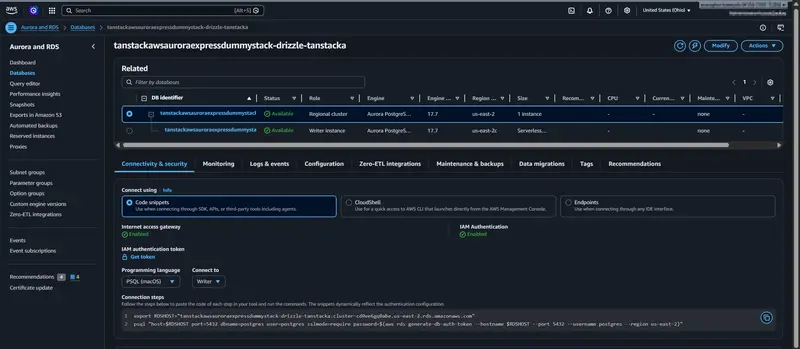
Aurora cluster deployed with express configuration

Introduction

This post documents a setup for Aurora PostgreSQL express configuration with:

  • AWS CDK deployment
  • an AWS SDK-based custom resource (because CloudFormation support is not available yet)
  • Drizzle Kit and Drizzle Studio for schema and data verification

The setup is not production-ready, but it can be used as a starting point for further development.

AWS launch post:
Announcing Amazon Aurora PostgreSQL Serverless database creation in seconds

CDK Custom Resource

Aurora express configuration currently requires calling the RDS API directly. In this setup, CDK uses AwsCustomResource with CreateDBCluster and cleanup calls.

API reference:
CreateDBClusterCommand

import { Names, Stack } from "aws-cdk-lib";
import { Effect, PolicyStatement } from "aws-cdk-lib/aws-iam";
import {
  AwsCustomResource,
  AwsCustomResourcePolicy,
  PhysicalResourceId,
} from "aws-cdk-lib/custom-resources";
import { NagSuppressions } from "cdk-nag";
import { Construct } from "constructs";

export type DbAuroraExpressDummyProps = {
  databaseName: string;
  maxCapacity: number;
  minCapacity: number;
  schemaName: string;
};

const toIdentifier = (value: string, maxLength: number): string => {
  const normalized = value.toLowerCase().replace(/[^a-z0-9-]/g, "-");
  const compacted = normalized.replace(/-+/g, "-").replace(/^-|-$/g, "");
  if (compacted.length <= maxLength) {
    return compacted;
  }
  return compacted.slice(0, maxLength).replace(/-+$/g, "");
};

export class DbAuroraExpressDummy extends Construct {
  public readonly clusterArn: string;
  public readonly databaseName: string;
  public readonly schemaName: string;

  constructor(scope: Construct, id: string, props: DbAuroraExpressDummyProps) {
    super(scope, id);

    this.databaseName = props.databaseName;
    this.schemaName = props.schemaName;
    const minCapacity = props.minCapacity;
    const maxCapacity = props.maxCapacity;

    const stack = Stack.of(this);
    const baseIdentifier = toIdentifier(`${Names.uniqueId(this)}`, 63);
    // Aurora Express creates an instance identifier from the cluster identifier
    // (suffix like "-instance-1"), so keep the cluster id shorter than 63 chars.
    const clusterIdentifier = toIdentifier(`${baseIdentifier}-aurora`, 52);

    const instanceIdentifier = `${clusterIdentifier}-instance-1`;

    const clusterResource = new AwsCustomResource(this, "ExpressClusterFallback", {
      policy: AwsCustomResourcePolicy.fromStatements([
        new PolicyStatement({
          effect: Effect.ALLOW,
          actions: [
            "ec2:DescribeAvailabilityZones",
            "iam:CreateServiceLinkedRole",
            "rds:CreateDBCluster",
            "rds:CreateDBInstance",
            "rds:DeleteDBCluster",
            "rds:DeleteDBInstance",
            "rds:DescribeDBClusters",
            "rds:EnableInternetAccessGateway",
          ],
          resources: ["*"],
        }),
      ]),
      installLatestAwsSdk: true,
      onCreate: {
        action: "createDBCluster",
        service: "RDS",
        ignoreErrorCodesMatching: "DBClusterAlreadyExistsFault",
        physicalResourceId: PhysicalResourceId.of(clusterIdentifier),
        parameters: {
          DBClusterIdentifier: clusterIdentifier,
          Engine: "aurora-postgresql",
          WithExpressConfiguration: true,
          // Keep explicit ACU limits while using Aurora express defaults.
          ServerlessV2ScalingConfiguration: {
            MinCapacity: minCapacity,
            MaxCapacity: maxCapacity,
          },
        },
      },
      onUpdate: {
        action: "describeDBClusters",
        service: "RDS",
        physicalResourceId: PhysicalResourceId.of(clusterIdentifier),
        parameters: {
          DBClusterIdentifier: clusterIdentifier,
          Engine: "aurora-postgresql",
          WithExpressConfiguration: true,
          // Keep explicit ACU limits while using Aurora express defaults.
          ServerlessV2ScalingConfiguration: {
            MinCapacity: minCapacity,
            MaxCapacity: maxCapacity,
          },
        },
      },
      onDelete: {
        action: "deleteDBCluster",
        service: "RDS",
        ignoreErrorCodesMatching: "DBClusterNotFoundFault",
        parameters: {
          DBClusterIdentifier: clusterIdentifier,
          DeleteAutomatedBackups: true,
          SkipFinalSnapshot: true,
        },
      },
    });

    const clusterLookupResource = new AwsCustomResource(this, "ExpressClusterLookup", {
      policy: AwsCustomResourcePolicy.fromStatements([
        new PolicyStatement({
          effect: Effect.ALLOW,
          actions: ["rds:DescribeDBClusters"],
          resources: ["*"],
        }),
      ]),
      installLatestAwsSdk: true,
      onCreate: {
        action: "describeDBClusters",
        service: "RDS",
        physicalResourceId: PhysicalResourceId.of(`${clusterIdentifier}-lookup`),
        parameters: {
          DBClusterIdentifier: clusterIdentifier,
        },
      },
      onUpdate: {
        action: "describeDBClusters",
        service: "RDS",
        physicalResourceId: PhysicalResourceId.of(`${clusterIdentifier}-lookup`),
        parameters: {
          DBClusterIdentifier: clusterIdentifier,
        },
      },
    });
    clusterLookupResource.node.addDependency(clusterResource);

    const instanceCleanupResource = new AwsCustomResource(this, "ExpressInstanceCleanup", {
      policy: AwsCustomResourcePolicy.fromStatements([
        new PolicyStatement({
          effect: Effect.ALLOW,
          actions: ["rds:DeleteDBInstance", "rds:DescribeDBInstances", "rds:DescribeDBClusters"],
          resources: ["*"],
        }),
      ]),
      installLatestAwsSdk: true,
      onCreate: {
        action: "describeDBClusters",
        service: "RDS",
        physicalResourceId: PhysicalResourceId.of(`${clusterIdentifier}-instance-cleanup`),
        parameters: {
          DBClusterIdentifier: clusterIdentifier,
        },
      },
      onUpdate: {
        action: "describeDBClusters",
        service: "RDS",
        physicalResourceId: PhysicalResourceId.of(`${clusterIdentifier}-instance-cleanup`),
        parameters: {
          DBClusterIdentifier: clusterIdentifier,
        },
      },
      onDelete: {
        action: "deleteDBInstance",
        service: "RDS",
        ignoreErrorCodesMatching: "DBInstanceNotFoundFault|InvalidDBInstanceStateFault",
        parameters: {
          DBInstanceIdentifier: instanceIdentifier,
          DeleteAutomatedBackups: true,
          SkipFinalSnapshot: true,
        },
      },
    });
    instanceCleanupResource.node.addDependency(clusterResource);

    this.clusterArn = clusterLookupResource.getResponseField("DBClusters.0.DBClusterArn");
  }
}

Aurora deployment observations

From Aurora PostgreSQL express configuration documentation and deployment output:

  • The cluster is created without VPC association.
  • Internet access gateway is enabled for connectivity.
  • IAM authentication is required for gateway-based access.
  • Encryption uses an AWS/RDS managed key (a customer-managed KMS key cannot be selected at create time in this flow).
  • Data API is disabled by default at create time; it can be enabled later, with authentication constraints documented by AWS (Express configuration settings, enabling, usage and auth model). I have not managed to get Data API working with this express setup yet.

Aurora cluster deployed with express configuration

Teardown behavior

The custom resource includes explicit delete calls for both cluster and instance identifiers. During stack deletion, the cluster and instance cleanup sequence is visible in the AWS console. This is useful for ephemeral feature stacks where database infrastructure should be created and removed per branch or short-lived environment.

Aurora cluster deletion state

Drizzle integration

Drizzle is used for schema push, local studio inspection, and a simple seed script. Environment variables in this setup are managed with Varlock.

Varlock documentation

Drizzle ORM documentation

This setup was tested with the Drizzle beta track, which is expected to become v1 soon.

Required packages

Install these npm packages before running the examples:

  • Runtime dependencies:
    vp add @aws-sdk/rds-signer drizzle-orm pg varlock
  • Dev/tooling dependencies:
    vp add -D drizzle-kit @types/pg

Note: this repository uses Vite+, so commands in this post use vp wrappers (such as vp add, vp exec, and vp run) instead of direct npm or pnpm commands.

Configuration (drizzle-kit)

import { Signer } from "@aws-sdk/rds-signer";
import { defineConfig } from "drizzle-kit";
import { ENV } from "varlock/env";

const hostname = ENV.HOSTNAME;
const port = 5432;
const username = "postgres";
const database = "postgres";

const signer = new Signer({
  region: ENV.AWS_REGION,
  hostname,
  port,
  username,
});

const password = await signer.getAuthToken();

export default defineConfig({
  dialect: "postgresql",
  schema: "dummySchema.ts",
  dbCredentials: {
    host: hostname,
    port,
    user: username,
    password,
    database,
    ssl: true,
  },
});

Schema

import { integer, pgSchema, text } from "drizzle-orm/pg-core";

export const DUMMY_SCHEMA_NAME = "dummy";
export const dummySchema = pgSchema(DUMMY_SCHEMA_NAME);

export const dummyTable = dummySchema.table("dummy_table", {
  id: integer("id").primaryKey(),
  name: text("name").notNull(),
});

Run this command to apply schema changes:
vp exec varlock run -- vp exec drizzle-kit push --config=drizzle-user-password.config.ts

Run this command to open Drizzle Studio:
vp exec varlock run -- vp exec drizzle-kit studio --config=drizzle-user-password.config.ts

Studio before seeding (table exists, no rows):

Drizzle Studio before seeding

Seeding script

#!/usr/bin/env node
/* oxlint-disable no-console */

import { Signer } from "@aws-sdk/rds-signer";
import { drizzle } from "drizzle-orm/node-postgres";
import { ENV } from "varlock/env";
import { dummyTable } from "../dummySchema.ts";

const hostname = ENV.HOSTNAME;
const port = 5432;
const username = "postgres";
const database = "postgres";

const signer = new Signer({
  region: ENV.AWS_REGION,
  hostname,
  port,
  username,
});

const password = await signer.getAuthToken();

console.log(ENV.HOSTNAME);
console.log(ENV.AWS_REGION);

const db = drizzle({
  connection: {
    host: hostname,
    port,
    user: username,
    password,
    database,
    ssl: true,
  },
});

await db.delete(dummyTable);

const insertResult = await db.insert(dummyTable).values([
  { id: 1, name: "Dummy 1" },
  { id: 2, name: "Dummy 2" },
  { id: 3, name: "Dummy 3" },
]);

console.log(insertResult);

vp exec varlock run -- node scripts/seed-dummy.ts

Result

  • Schema dummy.dummy_table is created successfully via Drizzle Kit.
  • Seed script inserts three rows (id 1..3).
  • Drizzle Studio confirms data visibility through the IAM-authenticated Aurora Express connection.

Drizzle Studio after seeding with three rows

Conclusion

Aurora PostgreSQL express configuration can be integrated into a CDK workflow today by using AWS SDK custom resources for create/delete operations. Drizzle works with this setup when authentication tokens are generated through the RDS signer and passed to Drizzle tooling/runtime.

Sources and References

Our Go CMS now speaks 5 languages, themes itself, and meditates on 404s

We’ve been building ForgeCMS – a Go-based CMS that pulls content from a Codeberg repo and serves it from a €1/month VPS. No database. No WordPress. No regrets.

Today we shipped a release that felt like crossing a threshold: the CMS stopped being a prototype and started feeling like a real product.

Here’s what landed.

🌍 Proper i18n – without a framework

We didn’t reach for go-i18n or any translation library. Instead, we built language resolution directly into the SML page system:

  • Accept-Language header detection on first visit
  • /lang switcher endpoint that sets a lang cookie
  • Per-page language override via Page{lang: "es"}
  • Fallback chain: atesti/es/index.sml → atesti/index.sml

The result: a visitor from Barcelona lands on the Spanish page automatically. A visitor from Cataluña sees Català. No JavaScript required.

lang-specific SML pages (atesti/es/index.sml fallback to index.sml)
Page{lang:} override for per-page content language
Markdown{src:} with lang injection and no-lang fallback

We also added a new Markdown{src:} syntax that injects the current language into the source path – so content.md becomes content-es.md when available, with silent fallback to the default.

🎨 Theme system via SML

Theming is now first-class. Two files control everything:

  • theme.sml – light mode CSS custom properties
  • theme-dark.sml – dark mode overrides

The entire site color palette, spacing, and typography flow from these two files. No hardcoded hex values scattered across templates. It’s the same philosophy as our SML declarative UI: declare the intent, let the system do the rest.

🔗 OG meta tags + Image path resolution

Every page now emits proper OpenGraph tags:

og:title, og:description, og:url, og:image

And Image{src:} now resolves relative paths to full Codeberg raw URLs automatically – so content authors don’t have to think about where images live on the CDN.

💀 Guru Meditation Error Pages

This is the one people will remember.

404 and 500 pages now render as Amiga-style Guru Meditation screens:

Software Failure. Press left mouse button to continue.

Guru Meditation

#00000404.DEADBEEF

← back to safety

It’s a love letter to the Amiga. It’s also completely on-brand for a CMS built by someone who learned to code from Toolbox magazine in the 80s.

🏗️ Under the hood

A few infrastructure improvements that matter:

  • ETagFor() – proper cache fingerprinting for assets
  • Stale cache fallback – if Codeberg is unreachable, serve the last known good content
  • ErrNotFound sentinel – clean error type propagation instead of string matching
  • Asset fingerprinting fix – the favicon (a sprouting seed 🌱 SVG) now busts cache correctly
  • Site-wide Menu{} and Footer{} – defined once in app.sml, rendered everywhere

⚖️ Dual license

The project now ships under GPL v3 + commercial license, mirroring the Qt model.

Open source for open source. Commercial license for commercial use. Revenue funds land purchase for intentional community infrastructure – but that’s a different post.

What’s next

The live proof-of-concept is atesti.crowdware.info – the home of Atesti para Dana, a gift-first alternative currency built on the Minuto framework.

Next up: SMS/WASM search index with persistent IndexedDB, so the CMS can search its own content without a backend query.

If you’re building something small, human-scale, and weird – we’re on Codeberg.

Part of the Forge 4D ecosystem – declarative UI, native compilation, no cloud required.

Azure DevOps Code Review: Tools and Setup Guide (2026)

CodeRabbit screenshot

Why Azure DevOps for code review

Azure DevOps remains one of the most widely used development platforms in enterprise software, and its code review capabilities are a major reason why. Microsoft reports over 100,000 organizations use Azure DevOps, with particularly strong adoption in finance, healthcare, government, and any industry where the Microsoft ecosystem is already deeply embedded. If your team runs Visual Studio, .NET, SQL Server, or Azure cloud infrastructure, Azure DevOps is the natural home for your repositories, CI/CD pipelines, and code review workflows.

Yet Azure DevOps code review is frequently misunderstood. Teams coming from GitHub assume the pull request experience will be identical. Teams evaluating platforms often dismiss Azure DevOps because they associate it with the legacy Team Foundation Server era. The reality is that Azure DevOps offers a pull request review system that is more configurable than GitHub’s in several important ways – particularly around branch policies, vote-based approvals, and work item integration – while trailing GitHub in third-party tool ecosystem size.

This guide covers everything you need to set up a production-grade code review workflow in Azure DevOps: the built-in Azure Repos features, the third-party AI and static analysis tools that integrate with the platform, step-by-step branch policy configuration, Azure Pipelines integration for automated analysis, and a detailed comparison with GitHub and GitLab so you can make an informed platform decision.

Azure Repos vs GitHub – the platform question

Before diving into configuration, it is worth addressing the most common question teams ask: should we use Azure Repos or GitHub for code review?

Both platforms are owned by Microsoft, and there is significant feature overlap. But they serve different audiences:

  • Azure Repos is part of the Azure DevOps suite and integrates tightly with Azure Boards (work item tracking), Azure Pipelines (CI/CD), Azure Test Plans, and Azure Artifacts. It is designed for enterprise teams that want a single, integrated platform for the entire development lifecycle. Branch policies are more granular, and the connection between work items and pull requests is first-class.
  • GitHub has a larger open-source community, a broader ecosystem of third-party integrations, GitHub Actions for CI/CD, and GitHub Copilot for AI-assisted development. It is the default choice for open-source projects and increasingly popular in enterprise settings since Microsoft’s acquisition.

If your organization is already invested in the Azure ecosystem, Azure DevOps is the path of least resistance. If you are starting fresh and want the widest range of third-party tools, GitHub has the edge. Many large enterprises use both – GitHub for open-source and community-facing projects, Azure DevOps for internal enterprise applications.

The rest of this guide assumes you are using or evaluating Azure DevOps, and focuses on getting the most out of its code review capabilities.

Azure Repos built-in code review features

Azure Repos provides a full-featured pull request workflow out of the box. Understanding what is available natively is important before layering on third-party tools, because many teams add external tools for capabilities that Azure Repos already provides.

Pull request workflow

The core pull request workflow in Azure Repos follows a familiar pattern:

  1. A developer creates a feature branch and pushes changes to Azure Repos
  2. The developer opens a pull request targeting the main branch (or any configured target branch)
  3. Reviewers are assigned – either manually or automatically through branch policies
  4. Reviewers examine the diff, leave comments, and cast votes
  5. The author addresses feedback, pushes additional commits, and responds to comments
  6. Once all policies are satisfied (votes, builds, work items, comment resolution), the PR is completed and the branch is merged

What distinguishes Azure Repos from other platforms is the depth of configuration available at each step. Let us walk through the key features.

Vote-based approval system

Azure DevOps uses a five-level vote system for pull request reviews, which is more nuanced than the binary approve/reject model used by GitHub:

  1. Approve – The reviewer is satisfied with the changes and explicitly approves the PR
  2. Approve with suggestions – The reviewer approves but has optional recommendations that the author may or may not address
  3. No vote – The reviewer has not yet cast a vote (the default state)
  4. Wait for author – The reviewer has concerns that need to be addressed before approval; this is a soft block that signals the PR is not ready
  5. Reject – The reviewer believes the changes should not be merged; this is a hard block

This five-level system provides more flexibility than GitHub’s three-state model (approve, request changes, comment). The “approve with suggestions” vote is particularly useful – it lets a reviewer say “this is fine to merge, but consider these improvements” without blocking the PR. The “wait for author” vote creates a middle ground between approving and rejecting that GitHub does not have.

You can configure branch policies to require a specific number of approvals and to define how “reject” votes are handled. For example, you can require at least two approvals and configure the policy so that a single rejection blocks the merge regardless of how many approvals exist.

Comment resolution tracking

Every comment thread on an Azure DevOps pull request has an explicit status: Active or Resolved. This is a significant difference from GitHub, where comment resolution is informal and there is no built-in way to track whether feedback has been addressed.

In Azure DevOps, you can configure a branch policy that requires all comment threads to be resolved before a PR can be completed. This ensures that no reviewer feedback is accidentally ignored. Reviewers can mark their own comments as resolved if they are satisfied with the author’s response, or the author can resolve comments and let reviewers verify during their next review pass.

The comment resolution requirement can be set to one of three modes:

  • Required – All comments must be resolved before the PR can complete
  • Required for code reviewers – Only comments from designated code reviewers must be resolved
  • Optional – Comment resolution is encouraged but not enforced

Auto-complete

Azure DevOps supports an auto-complete feature that GitHub does not have natively. When a PR author sets auto-complete, the pull request will automatically merge as soon as all branch policies are satisfied – required reviewers have approved, builds have passed, work items are linked, and comments are resolved.

This is particularly useful for large teams where a PR might be waiting on the final reviewer in a different time zone. Instead of the author having to come back and click “Complete” after the last approval, the merge happens automatically. The author can also configure merge strategy (merge commit, squash, rebase) and whether the source branch should be deleted on completion as part of the auto-complete settings.

Iteration tracking

Azure DevOps tracks each push to a pull request as a numbered “iteration.” Reviewers can compare any two iterations side by side, seeing exactly what changed between review rounds. This is a feature that GitHub introduced later with its “Changes since last review” option, but Azure DevOps has had it from the beginning and the implementation is more robust.

Iteration tracking is valuable because it lets reviewers focus on only the new changes in each review round, rather than re-reviewing the entire diff. For large PRs that go through multiple rounds of feedback, this saves significant reviewer time.

Draft pull requests

Like GitHub, Azure DevOps supports draft pull requests. Draft PRs do not trigger automatic reviewer assignments, do not run branch policy evaluations, and cannot be completed until they are published. They are useful for getting early feedback on work-in-progress without creating noise for the full review team.

Third-party AI and analysis tools for Azure DevOps

The built-in Azure Repos features handle the workflow and process aspects of code review. For automated code analysis – catching bugs, security vulnerabilities, code smells, and logic errors – you need third-party tools. Here are the tools that work with Azure DevOps, along with their integration methods and trade-offs.

CodeRabbit

CodeRabbit screenshot

CodeRabbit is the most widely adopted AI code review tool, with over 13 million reviews completed across GitHub, GitLab, Bitbucket, and Azure DevOps. It uses large language models to analyze pull requests and post inline review comments, walkthrough summaries, and interactive chat responses.

Azure DevOps integration method: CodeRabbit connects to Azure DevOps through a personal access token (PAT) rather than a native OAuth app. You install the CodeRabbit extension from the Azure DevOps Marketplace, generate a PAT with Code (Read) and Pull Request Threads (Read and Write) permissions, and enter it in the CodeRabbit dashboard. Once connected, CodeRabbit automatically reviews every new pull request.

What it does on Azure DevOps:

  • Posts a walkthrough summary at the top of each PR describing all changes across files
  • Leaves inline comments on specific lines pointing out bugs, security issues, performance problems, and logic errors
  • Supports interactive chat – you can reply to CodeRabbit’s comments to ask follow-up questions
  • Respects .coderabbit.yaml configuration for custom review instructions, path filters, and language settings
  • Supports 30+ programming languages

Pricing: Free tier available (200 files/hour rate limit, 4 reviews/hour). Pro plan at $24/user/month removes limits and adds auto-fix suggestions.

For a detailed setup walkthrough, see our CodeRabbit Azure DevOps integration guide.

CodeAnt AI

CodeAnt AI screenshot

CodeAnt AI is one of the few AI code review platforms built from the ground up with multi-platform support. It natively supports GitHub, GitLab, Bitbucket, and Azure DevOps without any platform being treated as a second-class citizen. This makes it particularly compelling for enterprises that use multiple Git platforms across different teams or divisions.

Azure DevOps integration method: CodeAnt AI connects directly to Azure DevOps through its dashboard. You authorize the connection, select your repositories, and CodeAnt AI begins reviewing PRs automatically.

What it does on Azure DevOps:

  • AI-powered pull request reviews with inline comments
  • Built-in SAST (Static Application Security Testing) scanning
  • Secret detection to prevent credentials from being committed
  • DORA metrics tracking (deployment frequency, lead time, change failure rate, mean time to recovery)
  • Code quality scoring and trend tracking across repositories

Pricing: Plans range from $24 to $40 per user/month depending on features.

CodeAnt AI is a strong alternative to CodeRabbit for teams that want consolidated tooling – AI review, SAST, secret detection, and engineering metrics in a single platform – rather than stitching together separate tools.

SonarQube

SonarQube screenshot

SonarQube is the most established static analysis platform and has native Azure DevOps integration through its extension in the Visual Studio Marketplace. Unlike AI review tools, SonarQube uses deterministic rules – over 5,000 of them across 30+ languages – to detect bugs, vulnerabilities, code smells, and security hotspots.

Azure DevOps integration method: Install the SonarQube extension from the Visual Studio Marketplace. Add SonarQube analysis tasks to your azure-pipelines.yml file. SonarQube posts analysis results as a PR decoration (comments and status) directly on the pull request.

What it does on Azure DevOps:

  • Runs rule-based analysis during Azure Pipelines builds
  • Posts inline comments on new issues directly on the PR
  • Enforces quality gates – configurable thresholds for code coverage, duplications, reliability, security, and maintainability ratings
  • Tracks technical debt over time with a project dashboard
  • Supports 30+ languages with deep rules for Java, C#, JavaScript/TypeScript, Python, and C/C++

Pipeline configuration example:

# azure-pipelines.yml
trigger:
  - main

pool:
  vmImage: 'ubuntu-latest'

steps:
  - task: SonarQubePrepare@6
    inputs:
      SonarQube: 'SonarQubeServiceConnection'
      scannerMode: 'CLI'
      configMode: 'manual'
      cliProjectKey: 'my-project-key'
      cliProjectName: 'My Project'
      cliSources: 'src'

  - script: |
      npm install
      npm run build
    displayName: 'Build'

  - task: SonarQubeAnalyze@6
    displayName: 'Run SonarQube analysis'

  - task: SonarQubePublish@6
    inputs:
      pollingTimeoutSec: '300'

Pricing: Community Build is free and open source for self-hosted use. Developer Edition starts at $150/year. Enterprise Edition pricing is custom.

For a full SonarQube setup guide, see How to set up SonarQube.

Semgrep

Semgrep screenshot

Semgrep is a fast, lightweight static analysis tool focused on security and correctness. It uses a pattern-matching approach that lets you write custom rules in a syntax similar to the source code itself, making it more accessible than traditional SAST tools. Semgrep supports 25+ languages and has a community-maintained registry of over 3,000 rules.

Azure DevOps integration method: Semgrep does not have a native Azure DevOps Marketplace extension. Instead, you run it as a script task in your Azure Pipeline. The Semgrep CLI runs inside the pipeline agent, scans the code, and outputs results. You can post results as PR comments through additional scripting or by using Semgrep’s managed platform (Semgrep AppSec Platform) which has Azure DevOps support.

Pipeline configuration example:

# azure-pipelines.yml
trigger:
  - main

pr:
  - main

pool:
  vmImage: 'ubuntu-latest'

steps:
  - script: |
      python3 -m pip install semgrep
    displayName: 'Install Semgrep'

  - script: |
      semgrep ci --config auto --json --output semgrep-results.json
    displayName: 'Run Semgrep scan'
    env:
      SEMGREP_APP_TOKEN: $(SEMGREP_APP_TOKEN)

  - task: PublishBuildArtifacts@1
    inputs:
      PathtoPublish: 'semgrep-results.json'
      ArtifactName: 'semgrep-results'
    condition: always()

For differential scanning (only scanning changed files in a PR), use the semgrep ci command which automatically detects the PR context in Azure Pipelines and only reports findings on changed lines.

Pricing: Free for up to 10 contributors. Team plan starts at $40/month per contributor. For details, see our Semgrep setup guide.

PR-Agent (Qodo)

PR-Agent is an open-source AI code review tool by Qodo that can be self-hosted and integrated with Azure Pipelines. Unlike CodeRabbit which runs on the vendor’s infrastructure, PR-Agent runs inside your pipeline using your own LLM API keys, meaning your code never leaves your infrastructure.

Azure DevOps integration method: PR-Agent can be deployed as a Docker container inside an Azure Pipeline task. You provide your OpenAI (or other LLM provider) API key as a pipeline secret variable, and PR-Agent analyzes the PR diff and posts comments via the Azure DevOps API.

Pipeline configuration example:

# azure-pipelines.yml
trigger: none

pr:
  branches:
    include:
      - main
      - develop

pool:
  vmImage: 'ubuntu-latest'

steps:
  - script: |
      docker run --rm 
        -e AZURE_DEVOPS_ORG="$(System.CollectionUri)" 
        -e AZURE_DEVOPS_PROJECT="$(System.TeamProject)" 
        -e AZURE_DEVOPS_REPO="$(Build.Repository.Name)" 
        -e AZURE_DEVOPS_PR_ID="$(System.PullRequest.PullRequestId)" 
        -e AZURE_DEVOPS_TOKEN="$(AZURE_DEVOPS_PAT)" 
        -e OPENAI.KEY="$(OPENAI_API_KEY)" 
        -e CONFIG.GIT_PROVIDER="azure" 
        codiumai/pr-agent:latest 
        --pr_url "$(System.CollectionUri)$(System.TeamProject)/_git/$(Build.Repository.Name)/pullrequest/$(System.PullRequest.PullRequestId)" 
        review
    displayName: 'Run PR-Agent review'

Pricing: Open source and free (you pay for your LLM API keys, typically $0.05-$0.15 per review). Qodo Merge (the hosted version) starts at $19/user/month.

Combining tools for comprehensive coverage

The most effective approach is layering tools that serve different purposes:

  • AI review (CodeRabbit or CodeAnt AI) for logic errors, missing edge cases, and context-aware suggestions
  • SAST (Semgrep) for security vulnerabilities using deterministic rules
  • Code quality (SonarQube) for maintainability, technical debt tracking, and quality gate enforcement

This layered approach ensures that your code review pipeline catches different categories of issues at different levels of analysis. AI tools are probabilistic and catch semantic issues that rules miss. Rule-based tools are deterministic and have zero false negatives on the patterns they are designed to detect.

Setting up branch policies in Azure DevOps

Branch policies are the enforcement mechanism that makes code review mandatory. Without branch policies, developers can push directly to main, bypass reviewers, and skip quality gates. With them, every change goes through a structured review process.

Here is how to configure branch policies step by step.

Step 1 – Navigate to branch policy settings

  1. Open your Azure DevOps project
  2. Go to Project Settings (gear icon in the bottom-left corner)
  3. Under the Repos section, click Repositories
  4. Select the repository you want to configure
  5. Click the Policies tab
  6. Under “Branch Policies,” select the branch you want to protect (typically main or develop)

You will see a configuration page with several policy sections. Each can be enabled and configured independently.

Step 2 – Configure minimum number of reviewers

This is the most fundamental policy. It specifies how many reviewers must approve a PR before it can be completed.

Configuration options:

  • Minimum number of reviewers: Set this to at least 1 for small teams, 2 for most production branches. Do not set it higher than 3 unless you have a specific regulatory requirement – excessive reviewer requirements slow down development without proportional quality improvement.
  • Allow requestors to approve their own changes: Disable this for production branches. You do not want the author of a change approving their own PR.
  • Prohibit the most recent pusher from approving their own changes: Enable this. It prevents the scenario where a developer pushes a fix in response to review feedback and then immediately approves the PR themselves.
  • Allow completion even if some reviewers vote “Wait for author” or “Reject”: Disable this for production branches. If a reviewer has explicitly voted to wait or rejected the changes, the PR should not be completable.
  • When new changes are pushed, reset all approval votes: Consider enabling this. It forces reviewers to re-review after new changes are pushed, preventing the scenario where a developer gets an approval and then pushes additional unreviewed changes before merging.

Step 3 – Require linked work items

Enabling this policy requires that every PR has at least one linked Azure Boards work item (user story, task, bug, etc.). This creates traceability between code changes and the business requirements that drove them.

Configuration options:

  • Required: The PR cannot be completed without a linked work item
  • Optional: A warning is displayed but the PR can still be completed

For most teams, set this to “Required” for production branches. This ensures that every change has a documented reason and can be traced back to a specific requirement or bug report. It also enables reporting on engineering velocity and work item completion rates.

Step 4 – Configure comment resolution

Under the comment resolution policy, you specify whether comment threads must be resolved before the PR can be completed.

Recommended setting: Set this to “Required.” This is one of Azure DevOps’ strongest features compared to GitHub and GitLab. It ensures that no reviewer feedback is accidentally overlooked. Reviewers post comments, the author addresses them, and the reviewer (or author, depending on your team conventions) marks the thread as resolved.

Step 5 – Add build validation

Build validation runs your CI pipeline when a PR is created or updated and blocks the merge if the build fails. This is the Azure DevOps equivalent of GitHub’s required status checks.

To add build validation:

  1. Click Add build policy
  2. Select the pipeline to run (e.g., your main build and test pipeline)
  3. Set the Trigger to “Automatic” to run on every push
  4. Set the Policy requirement to “Required”
  5. Set the Build expiration – how long a passing build remains valid before re-running. “Immediately when the source branch is updated” is the strictest and most common setting
  6. Optionally set a display name for the policy

You can add multiple build validation policies. For example, one for your main build/test pipeline and another for your Semgrep security scan or SonarQube quality gate.

Example multi-pipeline validation:

Build Policy 1: "Build and Test" (required, automatic)
Build Policy 2: "SonarQube Quality Gate" (required, automatic)
Build Policy 3: "Semgrep Security Scan" (required, automatic)

Step 6 – Configure automatic reviewers

Automatic reviewers let you assign specific people or groups to review PRs based on the files changed. This is similar to GitHub’s CODEOWNERS file but configured through the Azure DevOps UI rather than a file in the repository.

To add automatic reviewers:

  1. Click Add automatic reviewers
  2. Enter the reviewer (person or team)
  3. Set the Path filter – a regex or glob pattern that matches file paths. For example:
    • */src/security/* – any changes to security-related code
    • *.sql – any SQL file changes
    • /docs/* – any documentation changes
  4. Set the Policy requirement to “Required” if this reviewer must approve, or “Optional” if they are added as a suggestion
  5. Set the Minimum number of reviewers within this group who must approve

Example automatic reviewer configuration:

Reviewer Path filter Requirement
Security Team */security/*, */auth/* Required (1 approval)
DBA Team *.sql, */migrations/* Required (1 approval)
Senior Architect */infrastructure/*, */core/* Optional
QA Lead */tests/* Optional

This configuration ensures that security-related changes are always reviewed by the security team, database changes are reviewed by a DBA, and infrastructure changes are visible to the senior architect.

Azure Pipelines integration for code review

Azure Pipelines is where automated code analysis tools run. This section provides complete, production-ready pipeline configurations for integrating review tools.

Basic review pipeline structure

A well-structured review pipeline separates concerns into distinct stages:

# azure-pipelines.yml
trigger:
  branches:
    include:
      - main
      - develop

pr:
  branches:
    include:
      - main
      - develop

pool:
  vmImage: 'ubuntu-latest'

stages:
  - stage: Build
    displayName: 'Build and Test'
    jobs:
      - job: BuildJob
        steps:
          - task: NodeTool@0
            inputs:
              versionSpec: '20.x'
            displayName: 'Install Node.js'

          - script: |
              npm ci
              npm run build
              npm run test -- --coverage
            displayName: 'Build and test'

          - task: PublishTestResults@2
            inputs:
              testResultsFormat: 'JUnit'
              testResultsFiles: '**/junit.xml'
            condition: always()

          - task: PublishCodeCoverageResults@2
            inputs:
              summaryFileLocation: '**/coverage/cobertura-coverage.xml'

  - stage: CodeQuality
    displayName: 'Code Quality Analysis'
    dependsOn: Build
    jobs:
      - job: SonarQubeAnalysis
        displayName: 'SonarQube Scan'
        steps:
          - task: SonarQubePrepare@6
            inputs:
              SonarQube: 'SonarQubeServiceConnection'
              scannerMode: 'CLI'
              configMode: 'manual'
              cliProjectKey: 'my-project'
              cliSources: 'src'
              extraProperties: |
                sonar.javascript.lcov.reportPaths=coverage/lcov.info
                sonar.coverage.exclusions=**/*.test.ts,**/*.spec.ts

          - script: npm ci && npm run build
            displayName: 'Build for analysis'

          - task: SonarQubeAnalyze@6
            displayName: 'Run analysis'

          - task: SonarQubePublish@6
            inputs:
              pollingTimeoutSec: '300'

  - stage: SecurityScan
    displayName: 'Security Scanning'
    dependsOn: Build
    jobs:
      - job: SemgrepScan
        displayName: 'Semgrep SAST Scan'
        steps:
          - script: |
              python3 -m pip install semgrep
              semgrep ci --config auto
            displayName: 'Run Semgrep'
            env:
              SEMGREP_APP_TOKEN: $(SEMGREP_APP_TOKEN)

This pipeline runs three stages: a build/test stage that must pass first, followed by parallel code quality and security scanning stages. The pr trigger ensures this pipeline runs on every pull request targeting main or develop.

Adding PR-Agent to the pipeline

If you want AI-powered review through your pipeline rather than through a third-party service like CodeRabbit, add PR-Agent as an additional job:

  - stage: AIReview
    displayName: 'AI Code Review'
    dependsOn: []
    condition: eq(variables['Build.Reason'], 'PullRequest')
    jobs:
      - job: PrAgentReview
        displayName: 'PR-Agent Review'
        pool:
          vmImage: 'ubuntu-latest'
        steps:
          - script: |
              pip install pr-agent
              python -m pr_agent.cli 
                --pr_url "$(System.CollectionUri)$(System.TeamProject)/_git/$(Build.Repository.Name)/pullrequest/$(System.PullRequest.PullRequestId)" 
                review
            displayName: 'Run PR-Agent'
            env:
              OPENAI__KEY: $(OPENAI_API_KEY)
              AZURE_DEVOPS__ORG: $(System.CollectionUri)
              AZURE_DEVOPS__PAT: $(AZURE_DEVOPS_PAT)
              CONFIG__GIT_PROVIDER: 'azure'

The condition: eq(variables['Build.Reason'], 'PullRequest') ensures the AI review only runs on pull requests, not on direct pushes to branches.

Pipeline variables and secrets

Store sensitive values as pipeline variables marked as secrets:

  1. In your Azure DevOps project, go to Pipelines > Library
  2. Create a new variable group (e.g., “Code Review Secrets”)
  3. Add variables:
    • SONARQUBE_TOKEN (mark as secret)
    • SEMGREP_APP_TOKEN (mark as secret)
    • OPENAI_API_KEY (mark as secret, only if using PR-Agent)
    • AZURE_DEVOPS_PAT (mark as secret, only if using PR-Agent)
  4. Link the variable group to your pipeline:
variables:
  - group: 'Code Review Secrets'

Never hard-code tokens, API keys, or credentials in your pipeline YAML file. Azure DevOps pipeline variables marked as secret are encrypted at rest and masked in pipeline logs.

Comparison with GitHub and GitLab

Choosing between Azure DevOps, GitHub, and GitLab for code review depends on your team’s existing infrastructure, workflow preferences, and tooling requirements. Here is a detailed comparison across the dimensions that matter most for code review.

Feature comparison table

Feature Azure DevOps GitHub GitLab
Approval system 5-level vote (approve, approve with suggestions, no vote, wait for author, reject) 3-state (approve, request changes, comment) 3-state (approve, request changes, comment)
Branch policies UI-based with fine-grained options (minimum reviewers, build validation, work item linking, comment resolution, automatic reviewers by path) CODEOWNERS file + branch protection rules Push rules + approval rules + CODEOWNERS
Comment resolution Built-in with required/optional enforcement No native enforcement (third-party apps available) Resolvable threads with merge check option
Auto-complete Built-in (merge when all policies pass) Built-in auto-merge (requires branch protection) Built-in auto-merge
Draft PRs Yes Yes Yes
Iteration tracking Built-in (compare any two iterations) “Changes since last review” button Version-based comparison
Work item integration Native Azure Boards integration with required linking Issues linking (no requirement enforcement natively) Native issue linking with closing patterns
AI review tools ecosystem CodeRabbit, CodeAnt AI, PR-Agent, SonarQube, Semgrep CodeRabbit, GitHub Copilot, PR-Agent, Codacy, DeepSource, SonarQube, Semgrep, Snyk, and many more CodeRabbit, PR-Agent, SonarQube, Semgrep, GitLab Duo
CI/CD integration Azure Pipelines (YAML-based) GitHub Actions (YAML-based) GitLab CI/CD (YAML-based)
Code search Basic search within repos Advanced code search (public + private repos) Advanced search with Elasticsearch
Merge strategies Merge commit, squash, rebase, semi-linear Merge commit, squash, rebase Merge commit, squash, fast-forward, semi-linear
CODEOWNERS equivalent Automatic reviewers (UI-configured, path-based) CODEOWNERS file in repo CODEOWNERS file in repo
Pricing (code review relevant) Free for up to 5 users, Basic plan free for Visual Studio subscribers Free for public repos, Team at $4/user/month Free tier available, Premium at $29/user/month

When to choose Azure DevOps

Azure DevOps is the strongest choice when:

  • Your organization is in the Microsoft ecosystem. If you run .NET, Visual Studio, Azure cloud, SQL Server, and Active Directory, Azure DevOps integrates with all of these natively. Single sign-on through Azure Active Directory, built-in Azure deployment tasks, and native Visual Studio integration make it the lowest-friction option.
  • You need granular branch policies. Azure DevOps branch policies are more configurable than GitHub’s branch protection rules. The ability to require work item linking, enforce comment resolution, add path-based automatic reviewers through the UI, and configure vote requirements at a granular level is valuable for regulated industries where compliance requires documented review processes.
  • You want a single platform for the full development lifecycle. Azure Boards, Azure Repos, Azure Pipelines, Azure Test Plans, and Azure Artifacts are all integrated. You do not need separate tools for project management, source control, CI/CD, testing, and package management.
  • You are in a regulated industry. Finance, healthcare, government, and defense organizations often choose Azure DevOps because of its compliance certifications (SOC 2, ISO 27001, FedRAMP), audit logging, and the ability to host on Azure Government cloud.

When to choose GitHub

GitHub is the stronger choice when:

  • You need the widest third-party tool ecosystem. GitHub has significantly more integrations for code review, security scanning, project management, and deployment than Azure DevOps. The GitHub Marketplace has thousands of apps and actions.
  • You work with open-source communities. GitHub is the default home for open-source software. If your project accepts community contributions, being on GitHub reduces friction for external contributors.
  • You want GitHub Copilot integration. GitHub Copilot’s code review feature is tightly integrated with GitHub’s PR workflow and is not available on Azure DevOps.
  • Your team prefers file-based configuration. GitHub’s CODEOWNERS file and .github/ directory-based configuration is version-controlled and reviewed through PRs. Azure DevOps’ UI-based policy configuration is easier to set up initially but harder to track changes over time.

When to choose GitLab

GitLab is the strongest choice when:

  • You want a self-hosted, all-in-one platform. GitLab’s self-managed option gives you full control over your infrastructure, which is important for organizations with strict data sovereignty requirements.
  • You need built-in security scanning. GitLab Ultimate includes SAST, DAST, dependency scanning, container scanning, and secret detection as part of the platform. On Azure DevOps and GitHub, these require third-party tools.
  • You want GitLab Duo AI features. GitLab’s native AI assistant covers code review, code generation, and vulnerability explanation within the platform.

Best practices for Azure DevOps code review

After years of working with Azure DevOps across enterprise teams, here are the practices that consistently lead to effective code review workflows.

1. Start with branch policies, not process documents

Do not write a wiki page about code review rules that nobody reads. Configure branch policies that enforce the rules automatically. Required reviewers, build validation, comment resolution, and work item linking should all be set as required policies on your main and release branches. If it is important enough to be a rule, it is important enough to be enforced by the platform.

2. Use the vote system intentionally

Agree as a team on what each vote level means. A common convention:

  • Approve = “I have reviewed every file and am confident this is ready to merge”
  • Approve with suggestions = “This is safe to merge, but I have improvements the author should consider for follow-up work”
  • Wait for author = “I have specific concerns that need to be addressed before this should merge”
  • Reject = “This approach has fundamental problems and should be reworked significantly”

Without shared conventions, different reviewers use the same votes to mean different things, which creates confusion about whether a PR is actually ready.

3. Keep pull requests small

This is universal advice, but it is worth repeating because large PRs are the single biggest cause of review quality degradation. Research consistently shows that review effectiveness drops sharply beyond 200-400 lines of changes. On Azure DevOps specifically, the iteration tracking feature works best with small, focused PRs where each iteration represents a clear response to feedback.

Target 200-400 lines of meaningful changes per PR. If a feature requires more, break it into a chain of smaller PRs with clear dependencies.

4. Layer your tools

Do not rely on a single tool for all review automation. Use the layered approach:

  • Layer 1: Linting – ESLint, Ruff, or your language-specific linter running as a pipeline step. This catches style and syntax issues before anyone reviews the code.
  • Layer 2: Static analysis – SonarQube or Semgrep running as a pipeline step with quality gates. This catches bugs, security vulnerabilities, and code smells deterministically.
  • Layer 3: AI review – CodeRabbit or CodeAnt AI reviewing every PR. This catches logic errors, missing edge cases, and provides context-aware suggestions that rule-based tools cannot.

Each layer catches different categories of issues. Together, they cover significantly more ground than any single tool alone.

5. Configure automatic reviewers by path

Use Azure DevOps’ automatic reviewer feature to ensure domain experts review changes in their area. Database changes should be reviewed by a DBA. Security-related code should be reviewed by the security team. Infrastructure-as-code changes should be reviewed by a platform engineer. This is more reliable than hoping the PR author remembers to tag the right people.

6. Require comment resolution

Enable the “Required” comment resolution policy on all protected branches. This single setting eliminates the most common code review failure mode: feedback that is posted but never addressed. It forces a completion loop on every review conversation.

7. Use auto-complete to reduce merge latency

Encourage developers to set auto-complete on their PRs after addressing all feedback. This is especially important for distributed teams across time zones. A developer in London should not have to wait until morning in San Francisco to click “Complete” after the final approval comes in at the end of the San Francisco workday.

8. Do not over-gate

It is tempting to add every possible quality gate to your branch policies. Resist this temptation. Every required check adds latency to the merge process. If a check frequently produces false positives or provides low-value feedback, it erodes developer trust in the review system and creates pressure to bypass it.

Start with the essentials: required reviewers, build validation, and comment resolution. Add additional gates (security scanning, AI review status checks) only when you have confidence that they provide consistent value with acceptable false positive rates.

9. Review your review process quarterly

Set a quarterly reminder to evaluate your code review process. Look at these metrics:

  • Average time to first review – If this is growing, you may need to add reviewers or adjust workload distribution
  • Average time to merge – If this is excessive, check whether policies or tool configurations are creating unnecessary friction
  • Number of review iterations – High iteration counts may indicate unclear requirements or PRs that are too large
  • Defect escape rate – If bugs are making it to production despite review, your review coverage may have gaps

Azure DevOps provides analytics through Azure Boards and Azure DevOps Analytics that can help track these metrics. For DORA metrics specifically, tools like CodeAnt AI provide automated tracking.

10. Document review expectations in the repository

Create a CONTRIBUTING.md file in each repository that documents your team’s review expectations: what constitutes a “complete” review, when to use each vote level, how to handle disagreements between reviewers, and what the automated tools are expected to catch so human reviewers can focus elsewhere.

Conclusion

Azure DevOps provides a code review system that is more configurable than most teams realize. The five-level vote system, enforced comment resolution, automatic reviewers by path, and tight work item integration make it particularly well-suited for enterprise teams that need structured, auditable review processes.

The built-in features handle the process and workflow side well. For automated code analysis, you need third-party tools. CodeRabbit and CodeAnt AI provide AI-powered review with Azure DevOps support. SonarQube adds deterministic quality gates. Semgrep covers security scanning. Layer these together in your Azure Pipelines configuration, enforce the results through branch policies, and you have a comprehensive code review pipeline that catches issues at every level.

The platform choice between Azure DevOps, GitHub, and GitLab is ultimately about ecosystem fit rather than code review capability. All three platforms support effective code review workflows. Azure DevOps wins for teams already in the Microsoft ecosystem. GitHub wins for ecosystem breadth and open-source workflows. GitLab wins for self-hosted, all-in-one deployments. Regardless of which platform you choose, the fundamentals remain the same: small PRs, layered tooling, enforced policies, and a team culture that values review as a quality investment rather than a bureaucratic hurdle.

Frequently Asked Questions

Does Azure DevOps have built-in code review?

Yes. Azure Repos provides pull request reviews with required reviewers, branch policies, comment resolution tracking, vote-based approvals (approve, approve with suggestions, wait for author, reject), and auto-complete options. You can also enforce build validation and linked work items before merging.

What AI code review tools work with Azure DevOps?

CodeRabbit supports Azure DevOps with PR review integration. PR-Agent can be configured with Azure Pipelines. SonarQube has native Azure DevOps integration through its extension in the Visual Studio Marketplace. Semgrep can be added as an Azure Pipeline task.

How do I set up branch policies in Azure DevOps?

Go to Project Settings > Repos > Policies, select your branch, and configure: minimum number of reviewers, linked work items requirement, comment resolution, build validation, and automatic reviewers. These policies enforce quality gates before any PR can be merged.

How does Azure DevOps code review compare to GitHub?

Azure DevOps offers more granular branch policies and tighter Jira/Azure Boards integration. GitHub has a larger ecosystem of third-party review tools and GitHub Actions. Azure DevOps uses a vote-based approval system (5 levels) vs GitHub’s simpler approve/request changes model. For enterprises in the Microsoft ecosystem, Azure DevOps is the natural choice.

Originally published at aicodereview.cc

5 outils IA qui vont transformer votre productivité en 2026

1. Claude (Anthropic)

Claude est probablement le modèle de langage le plus nuancé disponible aujourd’hui. Contrairement à ChatGPT, il excelle dans les tâches longues et complexes.

Points forts :

  • Fenêtre de contexte de 200K tokens

  • Excellent pour l’analyse de code et les tâches de raisonnement

  • Plan gratuit disponible

Cas d’usage idéaux : Analyse de documents longs, refactoring de code, rédaction technique.

2. Cursor (éditeur de code IA)

Cursor a transformé ma façon de coder. C’est VS Code + un copilote IA ultra-intégré.

Points forts :

  • Complétion de code contextualisée

  • Chat avec votre codebase entière

  • Supporte tous les modèles (Claude, GPT-4, Gemini)

Prix : Plan gratuit limité, Pro à 20$/mois.

3. Perplexity AI

Pour la recherche en ligne, Perplexity est devenu mon moteur par défaut. Il cite ses sources et synthétise l’information en temps réel.

Points forts :

  • Recherche web en temps réel avec citations

  • Interface claire et rapide

  • Plan gratuit très généreux

4. Make (ex-Integromat)

Pour l’automatisation sans code, Make est ma référence. Plus puissant que Zapier, moins cher, et avec une logique visuelle intuitive.

Points forts :

  • 1000+ intégrations

  • Plan gratuit avec 1000 opérations/mois

  • Logique conditionnelle avancée

Essayer Make gratuitement
1000 opérations/mois offertes — aucune carte bancaire requise

Démarrer →

5. Notion AI

Notion a intégré l’IA directement dans son workspace. Pour prendre des notes, rédiger des docs, et organiser ses projets, c’est imbattable.

Points forts :

  • Génération et résumé de contenu dans le contexte de vos notes

  • Templates IA intégrés

  • Collaboration en temps réel

Tableau comparatif

Outil
Prix
Cas d’usage principal
Plan gratuit

Claude Gratuit / 20€ LLM général, analyse ✅
Cursor Gratuit / 20$ Développement ✅ limité
Perplexity Gratuit / 20$ Recherche ✅
Make Gratuit / 9€ Automatisation ✅
Notion AI +10$/mois Productivité ❌

Conclusion

Ces 5 outils couvrent 90% de mes besoins au quotidien. Si vous deviez n’en choisir qu’un pour commencer : Perplexity pour la recherche et Claude pour la rédaction et le code.

Vous utilisez d’autres outils IA que vous adorez ? Partagez-les en commentaire !

Cet article contient des liens partenaires. Je recommande uniquement des outils que j’utilise personnellement — votre soutien via ces liens me permet de continuer à publier du contenu gratuit.

Article original: 5 outils IA qui vont transformer votre productivité en 2026

Getting prepared for LPI certifications with LPI Lab

I’m glad to introduce the LPI Lab, the ultimate app designed to help you master your Linux Professional Institute (LPI) exams. Whether you’re aiming for Linux Essentials, LPIC-1, or LPIC-2 certifications, LPI Lab is your daily go-to tool for comprehensive and effective preparation.

The idea for LPI Lab came from a real need during my own certification journey. While studying for LPIC-1, I relied on official documentation, man pages, and books. Those resources are essential, but I felt there was still something missing: a fast and convenient way to practice every day, especially during small breaks in a busy routine.

That’s exactly why LPI Lab was built: to make certification prep more practical and help learners feel ready to pass on their first attempt.

Features at a Glance

Here’s a quick overview of what LPI Lab offers to support your certification journey:

  • Practice Mode: Customize your study sessions with specific question counts and time limits.
  • Simulation Mode: Experience the real exam environment with timed, realistic conditions.
  • Interactive Questions: Tackle multiple question types with instant feedback and detailed explanations.
  • Comprehensive Support: Full coverage for Linux Essentials (010-160), LPIC-1 (101-500, 102-500), and LPIC-2 (201-450, 202-450).
  • Offline Access: All practice questions are available offline, ensuring you never have to stop learning.

Roadmap for 2026

Thinking about the next steps and evolution of the app, a roadmap has been prepared to introduce new features, including:

  • LPIC-3: Full support for all 4 most advanced exams from LPI
  • Security Essential: Second new exam covering the Essentials certifications
  • New Language Support: Add Spanish and Portuguese, including for all questions
  • Performance Tracking: Interactive graphs showing your score improvement over time.

To obtain more details, check the Complete Roadmap

Get Started Today

Ready to take your Linux skills to the next level? Download LPI Lab from the Google Play Store and start your journey towards becoming a certified Linux professional.

Download LPI Lab on Google Play

For more information, visit the official website: LPI Lab

Let’s achieve our certification goals together!