Unlock Local AI: Ollama, Llamafile, and Building Responsive Apps

I created a new website: Free Access to the 8 Volumes on Typescript & AI Masterclass, no registration required. Choose Volume and chapter on the menu on the left. 160 Chapters and hundreds of quizzes at the end of chapters.

The world of Artificial Intelligence is rapidly shifting. Forget expensive cloud APIs – the future is running powerful Large Language Models (LLMs) directly on your machine. This guide dives deep into the tools making that possible: Ollama and Llamafile. We’ll explore the underlying technology, and then build a practical, production-ready chat application using a local Ollama instance, demonstrating how to create a responsive user experience even with the complexities of local inference.

From Cloud to Core: The Rise of Local AI

For years, accessing LLMs meant relying on cloud services like OpenAI or Google AI. While convenient, this approach comes with drawbacks: cost, latency, data privacy concerns, and dependency on internet connectivity. The ability to run these models locally represents a paradigm shift, offering greater control, privacy, and potentially lower costs. But achieving this requires new architectural approaches. This is where Ollama and Llamafile come into play, offering distinct methods for deploying and interacting with LLMs on your hardware. Understanding these differences is crucial for choosing the right tool for your project.

Ollama vs. Llamafile: A Deep Dive into Local Inference Engines

The transition to local execution isn’t just about downloading a model; it’s about how that model is run. Two dominant paradigms have emerged: containerized orchestration (Ollama) and single-file executables (Llamafile). These aren’t merely installation methods; they represent fundamentally different philosophies regarding resource management, portability, and hardware abstraction.

The Abstraction of the Model Runtime

Raw model files (typically .gguf files) contain the model’s weights and metadata, but they aren’t runnable applications. They require a runtime environment – a computational engine capable of interpreting those weights and executing the Transformer architecture. Model Quantization, reducing the precision of model weights to decrease memory footprint and increase speed, is a key optimization, but it’s only the first step.

Ollama and Llamafile both act as the “browser” for your local model, but they “render” the output (the LLM’s response) using vastly different mechanisms.

Containerized Inference: The Ollama Paradigm

Ollama operates on the principle of orchestrated abstraction. Think of it as a local microservice manager. It treats the LLM as a containerized workload, requiring specific dependencies and a dedicated server process. This design prioritizes consistency and ease of management, mirroring the benefits of Docker in web development.

When you ollama pull llama3, you’re not just downloading weights; you’re downloading a pre-configured environment definition (a Modelfile) that specifies the base image, model file, and system prompts. Ollama then spins up a lightweight container (or a process that mimics containerization) exposing an HTTP server adhering to the OpenAI API specification. This allows standard tools to interact with it seamlessly.

Under the Hood:

  1. The Daemon: Ollama runs as a background service, analogous to a Node.js server.
  2. Dynamic Loading: It loads model weights into VRAM (GPU memory) or RAM (CPU memory) on demand, reusing existing contexts to reduce latency.
  3. Inference Engine: Ollama utilizes llama.cpp (a C++ implementation of the Transformer architecture) wrapped in a Go-based management layer for HTTP routing, model lifecycle, and concurrency.

Ollama is essentially “Docker for Models,” isolating the execution environment and providing a RESTful interface.

Single-File Executables: The Llamafile Paradigm

Llamafile takes a diametrically opposed approach, focusing on extreme portability and zero-dependency execution. It combines the model weights and the inference engine (a modified version of llama.cpp) into a single, self-contained executable binary.

This prioritizes democratization and frictionless distribution, akin to compiling a JavaScript application into a static bundle. Llamafile aims to make AI models as easy to run as a standard .exe file, removing the need for package managers or background services.

Under the Hood:

  1. Static Linking: llama.cpp and the model weights are statically linked into the executable.
  2. Embedded Web Server: Like Ollama, Llamafile exposes an HTTP server, often using a minimal implementation optimized for size and speed.
  3. No State Persistence: A Llamafile process is ephemeral; memory is freed when the application closes.

Llamafile is the ultimate “batteries-included” distribution method, allowing you to share an AI model as easily as an email attachment.

Architectural Trade-offs: Resource Lifecycle and System Integration

Choosing between Ollama and Llamafile depends on your needs.

  • Ollama (Daemon Model): Maintains a “warm” state, keeping models loaded in memory for faster subsequent requests, but consuming resources continuously. Ideal for multi-user environments.
  • Llamafile (Process Model): Operates on a “cold start” basis, mapping weights from disk each time. Initial latency is higher, but performance is identical to Ollama once running.

Ollama acts as a platform managing multiple models, while Llamafile is a singular application focused on running one specific model.

Building a Responsive Chat Interface with Ollama and Next.js

Let’s put theory into practice. This example demonstrates a Next.js component that connects to a local Ollama instance, providing a responsive chat interface.

// app/components/LocalAIChat.tsx
'use client';

import React, { useState, useRef, useEffect } from 'react';

interface ChatMessage {
  role: 'user' | 'assistant';
  content: string;
}

interface OllamaRequest {
  model: string;
  messages: ChatMessage[];
  stream: boolean;
}

interface OllamaResponse {
  choices: Array<{
    delta: {
      content?: string;
      role?: string;
    };
    finish_reason: string | null;
  }>;
}

export default function LocalAIChat() {
  const [messages, setMessages] = useState<ChatMessage[]>([]);
  const [inputValue, setInputValue] = useState('');
  const [loading, setLoading] = useState(false);
  const lastMessageRef = useRef<HTMLDivElement>(null);

  useEffect(() => {
    if (lastMessageRef.current) {
      lastMessageRef.current.scrollIntoView({ behavior: 'smooth' });
    }
  }, [messages]);

  const sendMessage = async () => {
    if (inputValue.trim() === '') return;

    setMessages([...messages, { role: 'user', content: inputValue }]);
    setInputValue('');
    setLoading(true);

    try {
      const response = await fetch('http://localhost:11434/v1/chat/completions', {
        method: 'POST',
        headers: { 'Content-Type': 'application/json' },
        body: JSON.stringify({
          model: 'llama2', // Ensure you have this model pulled in Ollama
          messages: [{ role: 'user', content: inputValue }],
          stream: false,
        }),
      });

      if (!response.ok) {
        throw new Error(`HTTP Error: ${response.status}`);
      }

      const data: any = await response.json();
      const assistantMessage = { role: 'assistant', content: data.choices[0].message.content };
      setMessages([...messages, assistantMessage]);

    } catch (error) {
      console.error("Error fetching from Ollama:", error);
      setMessages([...messages, { role: 'assistant', content: 'Error communicating with the AI.' }]);
    } finally {
      setLoading(false);
    }
  };

  return (
    <div className="flex flex-col h-full">
      <div className="flex-grow p-4 overflow-y-auto">
        {messages.map((message, index) => (
          <div key={index} ref={index === messages.length - 1 ? lastMessageRef : null} className={`flex ${message.role === 'user' ? 'justify-end' : 'justify-start'} items-end mb-2`}>
            <div className="bg-gray-200 p-2 rounded-md max-w-3/4">
              {message.content}
            </div>
          </div>
        ))}
      </div>
      <div className="flex items-center p-4">
        <input
          type="text"
          value={inputValue}
          onChange={(e) => setInputValue(e.target.value)}
          className="flex-grow p-2 rounded-md border"
          placeholder="Type your message..."
          disabled={loading}
        />
        <button onClick={sendMessage} className="ml-2 p-2 rounded-md bg-blue-500 text-white" disabled={loading}>
          {loading ? 'Sending...' : 'Send'}
        </button>
      </div>
    </div>
  );
}

This component demonstrates a basic chat interface. Key features include:

  • State Management: useState manages the chat history (messages), input value (inputValue), and loading state (loading).
  • Ollama API Integration: The sendMessage function fetches data from the local Ollama API.
  • Error Handling: A try...catch block handles potential errors during the API call.
  • Loading State: The loading state disables the input and button while the AI is processing.
  • Scrolling: useEffect and useRef ensure the latest message is always visible.

Conclusion: The Future is Local

Ollama and Llamafile are powerful tools that are democratizing access to AI. By running LLMs locally, you gain control, privacy, and potentially lower costs. While Llamafile excels in portability, Ollama provides a robust platform for managing and scaling local AI applications. As hardware continues to improve and tools like WebGPU mature, the possibilities for local AI are limitless. The code example provided is a starting point – a foundation for building innovative and responsive applications powered by the intelligence of tomorrow, running right on your machine. Experiment with different models, explore streaming responses, and unlock the potential of local AI today!

The concepts and code demonstrated here are drawn directly from the comprehensive roadmap laid out in the book The Edge of AI. Local LLMs (Ollama), Transformers.js, WebGPU, and Performance Optimization Amazon Link of the AI with JavaScript & TypeScript Series.
The ebook is also on Leanpub.com: https://leanpub.com/EdgeOfAIJavaScriptTypeScript.

👉 Free Access now to the TypeScript & AI Series on Programming Central, it includes 8 Volumes, 160 Chapters and hundreds of quizzes for every chapter.
I Tried Replacing GitHub Copilot with Local AI — Here’s What Happened (Docker + GPU)

Docker Models showing qwen2.5 variants with pull options

A practical guide to running a private, GPU-accelerated coding assistant locally using Docker Desktop — no API costs, no data leaving your machine.

⏱️ Setup time: ~30–60 minutes

My Story

I’m a professional Django developer based in India.

Like most developers, I was using cloud-based AI tools for coding assistance — paying for API credits, sending my code to third-party servers, and depending on a stable internet connection just to get a code suggestion.

Then one day I was exploring Docker Desktop and noticed two new things in the sidebar — Models and MCP Toolkit.

I had no idea what they were.

A few hours of tinkering later, I had a fully local AI coding assistant running on my laptop:

  • ✅ Free
  • ✅ Private (no code leaves my machine)
  • ✅ Works offline
  • ✅ GPU-accelerated (~273ms response time)

No GitHub Copilot subscription. No API costs.

This is exactly how I built it — including all the mistakes I made along the way.

⚠️ Before We Start (Important Reality Check)

Let’s be honest:

This is NOT a perfect replacement for GitHub Copilot.

Cloud models (like GPT-4/5-level) are still:

  • better at reasoning
  • better at large codebases
  • more consistent

But…

👉 For most day-to-day coding tasks, a local setup like this is:

  • fast enough
  • smart enough
  • and WAY more private

Think of this as a practical alternative, not a 1:1 replacement.

🧠 Why Run AI Locally?

Problem with Cloud AI Local AI Solution
💸 Costly at scale ($10–30/million tokens) ✅ Completely free
🌐 Needs internet ✅ Works offline
🔒 Code sent to third-party servers ✅ Stays on your machine
⚡ Network latency ✅ GPU-accelerated (~273ms)

🖥️ My Setup

This guide is based on my machine — adjust based on your hardware.

Component Spec
💻 Laptop Lenovo IdeaPad Pro 5
🧠 CPU Intel Core Ultra 9 185H
🎮 GPU 6GB NVIDIA
💾 RAM 32GB
🪟 OS Windows 11

Minimum Setup Recommendation

Hardware What to Expect
No GPU Works, but slow (~2–5s responses)
8GB RAM Very limited models only
16GB RAM Usable
32GB + GPU 🔥 Ideal

📦 Step 1 — Install Docker Desktop

Install Docker Desktop with AI features enabled:

👉 https://www.docker.com/products/docker-desktop

Make sure you see Models and MCP Toolkit in the left sidebar.

🤖 Step 2 — Understanding Model Selection

Before pulling any model, you need to understand three things. This took me a while to figure out — so I’ll keep it quick.

🔢 Parameters = Brain Size

7B  → Good for most coding tasks ✅
30B → Needs 16GB+ VRAM
70B → High-end machines only

📦 Quantization = Compression

Think of it like image compression — smaller file, slight quality trade-off.

F16  → Full precision, largest file
Q4_0 → 4x compressed, best balance ✅
Q2   → Smallest, noticeable quality loss

💡 The Golden Rule — RAM vs VRAM

Fits in VRAM (6GB)?  → GPU  ⚡ ~273ms
Spills to RAM?       → CPU  🐢 ~3000ms
Too big for RAM?     → ❌ Won't run

🏆 Step 3 — Pull the Right Model

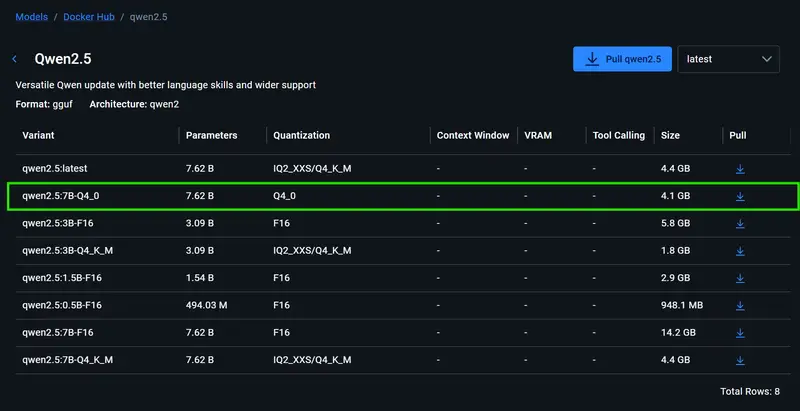
My Pick: qwen2.5:7B-Q4_0

Property Value Why
Parameters 7.62B Smart enough for coding
Quantization Q4_0 4x compressed, great quality
Size 4.12 GiB Fits perfectly in 6GB VRAM ✅

Steps:

  1. Docker Desktop → Models
  2. Search qwen2.5
  3. Find qwen2.5:7B-Q4_0 → click Pull

Docker Models showing qwen2.5 variants with pull options

⏳ ~4GB download. Grab a coffee.

⚡ Step 4 — Enable GPU-Accelerated Inference (CRITICAL)

Most guides miss this step entirely.

By default Docker Model Runner uses CPU only. One checkbox changes everything.

Go to: Docker Desktop → Settings → AI

Enable all three:

  • ✅ Enable Docker Model Runner
  • ✅ Enable host-side TCP support → Port: 12434
  • ✅ Enable GPU-backed inference

Click Apply.

⚠️ GPU inference downloads additional components — takes a few minutes the first time.

Verify It’s Working

Open your browser:

http://localhost:12434/engines/v1/models

You should see:

{
  "object": "list",
  "data": [
    {
      "id": "docker.io/ai/qwen2.5:7B-Q4_0",
      "object": "model",
      "owned_by": "docker"
    }
  ]
}

Check Response Speed

Go to Docker Desktop → Models → Requests tab after sending a prompt:

Docker Models Requests tab showing 273ms GPU response time

Mode Speed
GPU ⚡ ~273ms
CPU 🐢 ~3000ms

That’s a 10x speedup from one checkbox.

🔌 Step 5 — Connect VS Code via Continue.dev

Docker Models exposes a local OpenAI-compatible API at:

http://localhost:12434/engines/v1

👉 Key insight: any tool that supports OpenAI’s API works here — just change the URL from OpenAI’s server to localhost.

Install Continue.dev

  1. VS Code → Extensions (Ctrl+Shift+X)
  2. Search Continue
  3. Install Continue – open-source AI code agent

Configure It

Open C:Users<yourname>.continueconfig.yaml and paste:

name: Local Config
version: 1.0.0
schema: v1
models:
  - name: Qwen2.5 Coder Local
    provider: openai
    model: ai/qwen2.5:7B-Q4_0
    apiBase: http://localhost:12434/engines/v1
    apiKey: docker

💡 Why provider: openai? Docker’s API speaks the OpenAI protocol — same language, different address.

💡 Why apiKey: docker? Just a placeholder — localhost needs no real auth.

Windows PowerShell Fix (if needed)

If you hit a script execution error:

Set-ExecutionPolicy -ExecutionPolicy RemoteSigned -Scope CurrentUser

Test It!

Continue.dev working with local Qwen model in VS Code

✅ If it responds — you’re done.

🧪 Real Comparison — Copilot vs Local AI

Prompt I tested:

Write a Django REST Framework viewset for a User model
with JWT authentication and permission classes

GitHub Copilot output:

Clean, complete, production-ready code with proper imports, docstrings, and edge case handling. Roughly 60 lines, zero follow-up needed.

Local Qwen 7B output:

from rest_framework import viewsets, permissions
from rest_framework_simplejwt.authentication import JWTAuthentication
from .models import User
from .serializers import UserSerializer

class UserViewSet(viewsets.ModelViewSet):
    queryset = User.objects.all()
    serializer_class = UserSerializer
    authentication_classes = [JWTAuthentication]
    permission_classes = [permissions.IsAuthenticated]

    def get_queryset(self):
        # Users can only see their own data
        return User.objects.filter(id=self.request.user.id)

Solid, functional, correct — but less complete than Copilot. Needed a follow-up prompt for edge cases.

Verdict:

Feature Copilot Local Qwen 7B
Speed Fast Fast (GPU ⚡)
Boilerplate Excellent Good
Reasoning Strong Moderate
Multi-file context Better Limited
Cost $10–19/mo FREE
Privacy External servers Your machine

🏗️ Architecture (Mental Model)

┌─────────────────────────────────────────────┐
│              YOUR MACHINE                    │
│                                              │
│  ┌─────────────────┐                         │
│  │  Docker Models  │  ← qwen2.5:7B-Q4_0     │
│  │  (AI Brain) 🧠  │    runs on your GPU     │
│  └────────┬────────┘                         │
│           │ exposes                          │
│           ▼                                  │
│  ┌─────────────────┐                         │
│  │  localhost:12434│  ← OpenAI-compatible    │
│  │  REST API  🔌   │    just like -p 8080    │
│  └────────┬────────┘                         │
│           │ connects to                      │
│           ▼                                  │
│  ┌─────────────────┐                         │
│  │  VS Code        │  ← Continue.dev         │
│  │  (Your IDE) 💻  │    extension            │
│  └─────────────────┘                         │
└─────────────────────────────────────────────┘

No internet. No API costs. No data leaks.

⚠️ Where This Falls Short

Be honest with yourself:

  • ❌ Not as smart as GPT-4-level models
  • ❌ Limited context window (struggles with large codebases)
  • ❌ Needs decent hardware for best results
  • ❌ Setup takes 30–60 minutes vs just paying for Copilot

❌ When You Should NOT Use This

  • Working on large enterprise codebases
  • Need best-in-class reasoning (GPT-4 level)
  • Want zero setup / plug-and-play
  • Low-end hardware (<16GB RAM, no GPU)

❓ Troubleshooting

Issue Cause Fix
Connection error TCP not enabled Docker Desktop → Settings → AI → Enable host-side TCP
Slow responses (>2s) GPU not enabled Docker Desktop → Settings → AI → Enable GPU-backed inference
npx script error PowerShell policy Run Set-ExecutionPolicy RemoteSigned as Admin
Model not showing Not pulled Docker Desktop → Models → Pull qwen2.5:7B-Q4_0

🚀 What’s Next?

This is just the foundation.

Docker’s MCP Toolkit can let your local AI actually act — read your codebase, modify files, understand requirements. That’s a full agent setup, and I’ll cover it in Part 2.

💬 Final Thoughts

This setup won’t replace Copilot for everyone.

But if you care about privacy, cost, and full control over your tools — it’s absolutely worth the 30 minutes to set up.

If you’re running this setup (or planning to), I’d love to hear:
👉 What hardware are you using?

Let’s compare setups 👇

Check out my knowledge vault where I document everything I learn hands-on:
👉 https://github.com/Riju007/dev-knowledge-vault

March 2026 | 🐳 Docker Desktop AI features

An AI Agent Found 20 ML Improvements Karpathy Had Missed in 20 Years

Andrej Karpathy released autoresearch on GitHub last week, and the results are worth understanding carefully. Not because of the hype, but because of how the architecture actually works.

The framework is 630 lines of Python. It runs an AI agent in a loop: read a training script, form a hypothesis, modify the code, run a short training job (five minutes), evaluate results against a scalar metric, repeat. On Karpathy’s own ML training setup, the agent ran 700 experiments over two days on a single GPU and found an 11% training speedup through 20 optimizations he says he hadn’t discovered in 20 years of working on the same codebase.

Then Shopify’s CEO ran the same approach on internal data. 37 overnight experiments. 19% performance gain. Applied to their Liquid templating engine: 53% faster rendering, 61% fewer memory allocations, 93 automated commits, all 974 unit tests passing. The repo hit 42,000 GitHub stars in its first week.

The Architecture Is the Lesson

The design is deliberately minimal. The entire agent contract lives in one file: program.md. That file carries:

  • What to optimize (the objective, stated in natural language)
  • Constraints (what the agent must not do: break tests, increase memory footprint, etc.)
  • Stopping criteria (when to declare success or give up)

The agent reads program.md, modifies the training script, runs the job, parses the metric from the output, logs the result, and loops. No external tool calls. No internet access. No vector database of prior experiments. Just: read, modify, train, evaluate, repeat.

Karpathy’s phrase for this pattern is “program synthesis via experiment.” The agent isn’t writing the optimizer from scratch. It’s running empirical search over the space of code modifications, guided by a metric signal.

The Constraint That Actually Matters

Here’s where a lot of the coverage has been imprecise: autoresearch only works where quality is measurable with a single scalar value.

Training loss, rendering time, memory allocations, test pass rate. These are scalar metrics. You can compare them across runs. An agent can know unambiguously whether run N+1 was better than run N.

Natural language quality isn’t scalar. Alignment properties aren’t scalar. Whether a piece of code is readable isn’t scalar. Whether a product decision is the right one isn’t scalar.

This constraint is the boundary condition for the entire framework. Karpathy acknowledges it: “It works best on problems where you have a clear eval.” The framing in some coverage (“AI will now do all research autonomously”) misses this. Autonomous research works for ML training, hyperparameter optimization, compiler tuning, and similar problems with quantifiable objectives. It doesn’t yet work for the domains where human judgment is most irreplaceable.

That said, Shopify’s result is a useful demonstration that the “clear eval” bar isn’t as narrow as it might seem. Rendering time for a templating engine is a straightforward metric, but deriving a 53% improvement from 37 overnight experiments against that metric is genuinely impressive.

What to Take From This

If you’re doing any ML work that involves iterative training runs, autoresearch is now the default first step before manual hyperparameter search. The framework is on GitHub. Read program.md specifically. The single-file design for agent instructions + constraints + stopping criteria is a pattern worth stealing for any iterative agent task, not just ML optimization.

Karpathy’s framing of the bigger picture: “Humans are now the bottleneck in AI research with easy-to-measure results.” That’s precise language. For the domains where measurement is hard, humans remain central. For the domains where it’s easy, the leverage has shifted.

This story is from Edge Briefing: AI, a weekly newsletter curating the signal from AI noise. Subscribe for free to get it every Tuesday.

I built a Norton Commander clone in Go for my dev ecosystem — and I’m looking for a maintainer

Some tools you build because you need them. Some tools you build because they need to exist.

ForgeCommander is both.

What it is

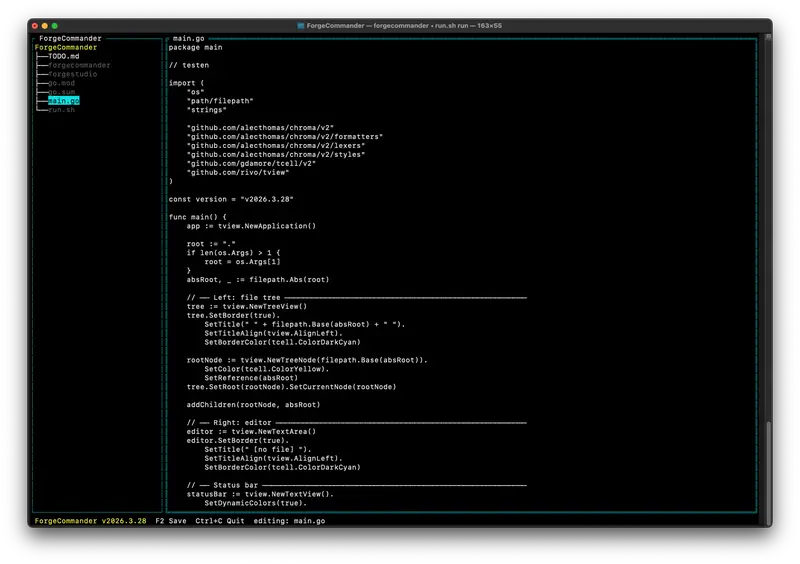
A terminal UI file manager and editor, built in Go with tview and Chroma for syntax highlighting.

If you ever used Norton Commander, Total Commander, or Midnight Commander – you already know the feeling. File tree on the left, editor on the right, everything keyboard-driven. SAA-style. Fast. No mouse required.

ForgeCommander v2026.3.28   F2 Save   Ctrl+C Quit   editing: main.go

Written in Go. No Electron. No framework. Starts instantly.

Why it exists

I’m building the Forge 4D ecosystem: a declarative UI language (SML), a compiled language (SMS → LLVM → native ARM), and a runtime (ForgeRunner in C++/Godot).

The files at the center of everything are .sml, .sms, and .md. Books, apps, UI layouts, CMS pages – all of it is text.

I needed an editor that:

  • Feels like home (Commander-style, keyboard-first)
  • Understands the file types I work with
  • Can reach into a remote Codeberg repo without a local clone
  • Can launch ForgeRunner as a live preview

ForgeCommander is that editor. The core works. You can open files, edit them, save them. The editor is already better than what Jetpack Compose ships as a basic text field.

The vision

This is what the roadmap looks like:

Startup modes

./forgecommander                          # current directory
./forgecommander /path/to/project         # given path
./forgecommander manifest.sml             # virtual tree from SML manifest
./forgecommander codeberg.org/CrowdWare/sites  # remote repo as tree

That last one is the interesting one. Browse a remote Codeberg repo as if it were a local filesystem. Open a file, edit it, write it back via the Git API. No clone required.

Virtual tree via manifest.sml

Folder {
    name: "My Workspace"
    File { url: "codeberg.org/CrowdWare/atesti/index.sml" }
    File { url: "ipfs://Qm.../chapter1.md" }
    File { url: "/local/notes.md" }
}

Mix local files, remote git files, and IPFS content in one tree. Edit any of them. Save back to origin.

ForgeRunner integration

Press F5. ForgeRunner opens with the current file as input. Live preview of your SML layout or SMS app – without leaving the terminal.

Also planned

  • Syntax highlighting (Chroma is already imported, just needs wiring)
  • Git status indicators in the tree
  • Speech-to-text input
  • Configurable key bindings

Why I’m not the right person to maintain it

My focus is on the Forge 4D Core and the Forger Poser app.

ForgeCommander is a desktop tool. It deserves someone who loves the terminal, loves Go, and wants to own something from the beginning.

The skeleton is clean. The editor works. The vision is clear.

What you’d be taking on

  • A working Go TUI app (~200 lines of main.go to start)
  • A clear TODO with concrete next steps
  • A real use case: editing SML/SMS/MD files for the Forge ecosystem
  • Freedom to design the UX – key bindings, workspace config, everything
  • A community of builders around Forge 4D to give you feedback

Want to own this?

Repo: codeberg.org/CrowdWare/ForgeCommander

Open an issue, introduce yourself, or just send a pull request. The TODO.md is your starting point.

If you’ve ever wanted to build a tool that developers actually use every day – this is it.

Part of the Forge 4D ecosystem – declarative UI, native compilation, no cloud required.

How I Built a Health Data API With Zero Dependencies (And Why You Should Too)

Every health app I’ve seen follows the same pattern: user enters data → data goes to server → server queries database → response comes back. But what if your health tool didn’t need a server at all?

I built an herb-drug interaction checker that runs entirely in the browser. 592 interactions, autocomplete search, severity ratings — all client-side. Zero API calls. Zero backend. Zero privacy concerns.

Here’s what I learned building it, and why this architecture makes sense for health tools specifically.

Why Client-Side for Health Data?

Health data is sensitive. When someone searches “metformin + St. John’s Wort,” they’re telling you they take metformin (diabetes) and are considering St. John’s Wort (depression). That’s two diagnoses revealed in one query.

With a server-side API, you’re collecting that data whether you want to or not. Server logs, analytics, database queries — all contain sensitive health information subject to regulations you probably don’t want to deal with.

Client-side means the query never leaves the browser. No HIPAA concerns. No GDPR health data processing. No breach notification obligations. The user’s health data stays on their device, period.

The Architecture

The entire database lives in a single JavaScript constant:

const INTERACTIONS = [
  {
    id: "int-001",
    substance_a: { id: "warfarin", name: "Warfarin", type: "drug" },
    substance_b: { id: "ginkgo", name: "Ginkgo biloba", type: "herb" },
    severity: "high",
    effect: "Increased bleeding risk",
    mechanism: "Ginkgo inhibits platelet-activating factor (PAF)",
    evidence: "clinical",
    sources: ["Bent et al. 2005", "WHO Monographs"]
  },
  // ... 591 more
];

When the user types a substance name, the autocomplete searches this array with a fuzzy matcher:

function fuzzyMatch(query, items) {
  const q = query.toLowerCase().normalize("NFD")
    .replace(/[u0300-u036f]/g, ""); // strip accents

  return items
    .map(item => {
      const name = item.name.toLowerCase().normalize("NFD")
        .replace(/[u0300-u036f]/g, "");

      // Exact prefix match scores highest
      if (name.startsWith(q)) return { item, score: 100 };

      // Contains match
      if (name.includes(q)) return { item, score: 80 };

      // Word-start match (e.g., "john" matches "St. John's Wort")
      const words = name.split(/[s.-]+/);
      if (words.some(w => w.startsWith(q))) return { item, score: 60 };

      return { item, score: 0 };
    })
    .filter(r => r.score > 0)
    .sort((a, b) => b.score - a.score)
    .slice(0, 8)
    .map(r => r.item);
}

The accent normalization is crucial for a Spanish-language tool. Users type “maca” or “máca” interchangeably — both need to match.

Performance: 592 Interactions in <1ms

You might think searching 592 records on every keystroke would be slow. It’s not. JavaScript engines are ridiculously fast at iterating small arrays.

I benchmarked it:

Operation Time
Full array scan (592 items) 0.08ms
Fuzzy match + sort + slice 0.12ms
DOM update (8 suggestions) 0.3ms
Total per keystroke ~0.5ms

For context, a 200ms API round-trip would be 400x slower. And that’s on a good connection. On a 3G connection in rural Peru (where many of our users are), the API approach would take 800ms+.

The threshold where you need server-side search is roughly 50,000+ records with complex queries. For a curated medical database? Client-side wins every time.

The Data Pipeline

The hardest part wasn’t the code — it was the data. Building a reliable herb-drug interaction database from scratch required:

  1. PubMed search — queried 250+ herb names × “drug interaction” → 1,200 papers
  2. WHO Monographs — 92 monographs on medicinal plants, each with an interactions section
  3. Natural Medicines Comprehensive Database — gold standard for evidence ratings
  4. Manual review — every interaction cross-referenced with at least 2 sources

Each interaction gets an evidence level:

  • Clinical — randomized controlled trials or systematic reviews
  • Pharmacological — mechanism understood, case reports exist
  • Theoretical — based on known pharmacology, no human data
  • Traditional — based on traditional medicine practice only

This matters. Telling someone “Ginkgo + Warfarin = bleeding risk” backed by clinical trials is very different from “Cat’s Claw might theoretically affect immunosuppressants.”

Lessons for Developers Building Health Tools

1. Evidence levels are your liability shield

If you present health information without evidence context, you’re implicitly telling users it’s all equally reliable. It’s not. Label everything.

2. Disclaimers aren’t just legal boilerplate

Our disclaimer explicitly states: “This tool is for educational purposes. Always consult your healthcare provider.” But more importantly, we show it before results appear, not buried in a footer. Users should know the limitations before they act on the information.

3. Offline-first is a feature, not a limitation

Health information is most needed in places with bad internet: rural clinics, pharmacies in developing countries, field research. A tool that works offline is genuinely more useful than one that requires connectivity.

// Service worker for offline support (optional but valuable)
self.addEventListener('install', event => {
  event.waitUntil(
    caches.open('health-tools-v1').then(cache =>
      cache.addAll(['/interacciones/', '/interacciones/index.html'])
    )
  );
});

4. Embed-ready tools get organic backlinks

We added an embed feature that generates an iframe snippet:

<iframe
  src="https://botanicaandina.com/herramientas/interacciones/?embed=true"
  width="100%" height="600" frameborder="0"
  title="Herb-Drug Interaction Checker">
</iframe>

Health blogs and university sites can embed the tool directly. Each embed is a backlink. This is how open-source health tools grow organically.

5. Internationalization from day one

Our tool supports Spanish and English. The data model stores both:

{
  effect: "Increased bleeding risk",
  effect_es: "Mayor riesgo de sangrado",
}

For LATAM health tools, Spanish-first with English fallback serves 95% of users. But don’t auto-translate medical terms — “anticoagulante” and “blood thinner” aren’t perfectly equivalent in clinical context.

What I’d Do Differently

More structured data from the start. I initially stored interactions as flat text. Switching to structured objects (substance IDs, severity enums, evidence enums) made the tool 10x more powerful but required a painful migration.

Test with real pharmacists earlier. A pharmacist found 3 severity misclassifications in the first week. Domain experts catch things that unit tests never will.

Schema.org markup. Adding WebApplication + FAQPage structured data increased our visibility in Google rich results. Do this from the start, not as an afterthought.

The Stack

  • HTML/CSS/JS — single file, no build tools
  • No frameworks — vanilla JS is fast enough for this scale
  • No backend — all data embedded in the page
  • Hosting — GitHub Pages (free, fast, global CDN)
  • Total size — 127KB gzipped (entire app + 592 interactions)

The entire tool is one HTML file. You can save it to your desktop and it works.

Try It

The Herb-Drug Interaction Checker is live and free. Search any supplement or herb name to see known interactions with medications.

If you’re building health tools, consider whether your data really needs a backend. For curated, reference-style databases (drug interactions, dosing calculators, symptom checkers), client-side architecture gives you better performance, zero privacy concerns, and offline capability — at the cost of a larger initial page load.

The tradeoff is worth it.

I’m building open-source health tools for the Latin American market at Botanica Andina. If you’re interested in health data, NLP for medical Spanish, or client-side tool architecture, let’s connect.

GitOps for Homelabs: How ArgoCD App-of-Apps Scales Your Cluster

Managing a homelab Kubernetes cluster by hand eventually breaks you. Not in a dramatic way — in a slow, grinding way. You tweak a deployment to fix something urgent, forget to commit the change, and three months later you can’t reproduce your own setup. A node dies and you’re reverse-engineering what was running on it from kubectl get output and fuzzy memory.

I hit that wall. The fix was GitOps, specifically ArgoCD’s app-of-apps pattern. This post is about how I structured it, what I got wrong the first time, and what actually works in a homelab context where you’re the only engineer and iteration speed matters.

Why App-of-Apps and Not Just Helm

ArgoCD has several ways to manage applications. The simplest is pointing ArgoCD at a single app manifest — done. That works fine for three apps. It doesn’t scale when you have fifteen namespaces and forty-plus workloads, each with their own sync policies, health checks, and override values.

The app-of-apps pattern solves this with a hierarchy: one parent Application that ArgoCD watches. That parent’s source is a directory of child Application manifests. When ArgoCD syncs the parent, it discovers and creates all the children. Each child then manages its own workload independently.

The result: your entire cluster state is defined in Git. Adding a new app is a git push. Removing one is a git rm and a sync. Disaster recovery becomes argocd app sync root-app instead of a weekend of YAML archaeology.

Repo Structure That Actually Works

I tried a few layouts before settling on one I could actually navigate. The key insight is separating “ArgoCD app definitions” from “workload manifests”:

kubernetes/
├── apps/              # ArgoCD Application CRDs (the app-of-apps layer)
│   ├── root-app.yaml  # Parent: points to kubernetes/apps/
│   ├── monitoring.yaml
│   ├── ingress.yaml
│   ├── ai-llm.yaml
│   └── media.yaml
└── workloads/         # Actual manifests (what ArgoCD deploys)
    ├── monitoring/
    │   ├── prometheus/
    │   └── grafana/
    ├── ingress/
    │   └── traefik/
    └── ai-llm/
        ├── ollama/
        └── qdrant/

apps/ is what ArgoCD watches to discover applications. workloads/ is what those applications deploy. They live in the same repo, which keeps everything together and simplifies access control.

The Root App

The parent application is the entry point. You create this one manually (or via CLI), and from then on ArgoCD takes over:

# kubernetes/apps/root-app.yaml
apiVersion: argoproj.io/v1alpha1
kind: Application
metadata:
  name: root-app
  namespace: argocd
  finalizers:
    - resources-finalizer.argocd.argoproj.io
spec:
  project: default
  source:
    repoURL: https://github.com/your-org/homelab
    targetRevision: main
    path: kubernetes/apps
  destination:
    server: https://kubernetes.default.svc
    namespace: argocd
  syncPolicy:
    automated:
      prune: true
      selfHeal: true

The prune: true flag is important — it means if you delete a child Application manifest from Git, ArgoCD removes the app (and its resources) from the cluster. Without it, stale apps accumulate. selfHeal: true means ArgoCD will revert manual cluster changes back to Git state, which is the whole point.

Child App Manifests

Each child Application points to a workload directory. Here’s what a typical one looks like:

# kubernetes/apps/monitoring.yaml
apiVersion: argoproj.io/v1alpha1
kind: Application
metadata:
  name: monitoring
  namespace: argocd
  finalizers:
    - resources-finalizer.argocd.argoproj.io
spec:
  project: default
  source:
    repoURL: https://github.com/your-org/homelab
    targetRevision: main
    path: kubernetes/workloads/monitoring
  destination:
    server: https://kubernetes.default.svc
    namespace: monitoring
  syncPolicy:
    automated:
      prune: true
      selfHeal: true
    syncOptions:
      - CreateNamespace=true

CreateNamespace=true means ArgoCD creates the namespace if it doesn’t exist. This matters for bootstrapping — you shouldn’t need to pre-create namespaces manually.

The workload directory can contain raw YAML manifests, a kustomization.yaml, or a Helm chart (via the helm source type). I use raw YAML for most things and Helm where upstream charts make it the obvious choice.

Workload Layout Inside Each App

For a typical workload like a deployment + service + ingress, I keep files flat within the app directory:

kubernetes/workloads/ai-llm/ollama/
├── namespace.yaml
├── deployment.yaml
├── service.yaml
├── ingress.yaml
└── pvc.yaml

ArgoCD will discover and apply all YAML files in the path recursively. You don’t need a kustomization file unless you want explicit ordering or overlays. For simple workloads, flat files are easier to navigate and less to maintain.

One practical note: if you need a specific apply order (like a Namespace before a Deployment), ArgoCD respects resource sync waves via annotation:

metadata:
  annotations:
    argocd.argoproj.io/sync-wave: "0"  # Lower = applies first

Namespaces get wave 0, CRDs wave 1, everything else default (0 or unset). I only bother with this when ArgoCD actually complains about ordering.

Ingress Health: The “Progressing” Trap

One gotcha I hit: ArgoCD was stuck showing Progressing for any app with an Ingress, even when the workload was fully running. The health check for Ingress resources checks whether the status.loadBalancer.ingress field is populated — and if your ingress controller doesn’t write that field, ArgoCD waits forever.

The fix for Traefik is to set the publishedService argument so Traefik copies its LoadBalancer status into Ingress objects:

# In your Traefik Helm values or deployment args
args:
  - --providers.kubernetesIngress.publishedService=traefik/traefik

Once that’s set, Ingress objects get a populated status.loadBalancer and ArgoCD’s health check passes. This is a common gotcha with any ingress controller that doesn’t do this automatically.

Bootstrapping a New Cluster

The real test of GitOps is: “Can I rebuild this from scratch?” With app-of-apps, the bootstrap sequence is short:

# 1. Install ArgoCD
kubectl create namespace argocd
kubectl apply -n argocd -f https://raw.githubusercontent.com/argoproj/argo-cd/stable/manifests/install.yaml

# 2. Apply the root app
kubectl apply -f kubernetes/apps/root-app.yaml

# 3. Trigger initial sync
argocd app sync root-app

ArgoCD discovers all child apps from the apps/ directory, creates them, and syncs each one. Within a few minutes the cluster converges to Git state. There’s no manual “now deploy this, then that” orchestration.

The parts that aren’t in Git — cluster-level things like StorageClasses, TLS issuers, sealed secrets — I handle as prerequisites documented separately. But application workloads: fully reproducible.

Dealing With Secrets

The one thing you cannot just commit is secrets. I use SealedSecrets for this. The workflow:

  1. Create a regular Kubernetes Secret manifest
  2. Encrypt it with kubeseal against the cluster’s public key
  3. Commit the SealedSecret manifest — it’s safe to store in Git
  4. ArgoCD deploys the SealedSecret; the controller decrypts it into a real Secret in-cluster
# Seal a secret for a specific namespace
kubectl create secret generic my-app-secret 
  --from-literal=password=supersecret 
  --dry-run=client -o yaml | 
  kubeseal --namespace my-app --format yaml > sealed-secret.yaml

The sealed output looks like garbage — it’s just an encrypted blob. Commit that. The actual credentials never touch your repo.

Back up the SealedSecrets controller’s encryption key somewhere safe (I use a password manager). If you lose it and need to rebuild, you’ll have to re-seal everything.

Sync Policies: Auto vs. Manual

Not everything should auto-sync. I use automated sync for stateless workloads and anything where drift is actively bad. For databases and stateful workloads I prefer manual sync, so I have to explicitly approve changes before they apply:

syncPolicy:
  # No 'automated' block = manual sync only
  syncOptions:
    - CreateNamespace=true

This way a bad migration doesn’t auto-apply at 2am. ArgoCD will still tell you the app is OutOfSync, but it won’t act without you.

The general rule I follow: if the app has a PVC or database, manual sync. If it’s stateless and idempotent, auto-sync.

Repo Connection and Auth

ArgoCD needs read access to your Git repo. For a private repo, you add credentials via the CLI or UI:

argocd repo add https://github.com/your-org/homelab 
  --username your-user 
  --password your-pat

Use a Personal Access Token with minimal scope — read-only on the repo contents is sufficient. ArgoCD only reads from Git; it doesn’t push anything back.

What I’d Do Differently

Start with the structure, not the apps. I initially just pointed ArgoCD at whatever manifests I had lying around, then retrofitted the directory layout. It would have saved me several frustrating syncs to design the apps/+workloads/ split upfront.

Don’t skip health checks. ArgoCD has good default health checks for standard Kubernetes resources, but custom CRDs need custom health check scripts. I spent time wondering why a Kustomization from Flux (leftover from an experiment) showed as Healthy when it wasn’t — ArgoCD had no idea how to check it. If you’re managing CRDs, define health checks for them.

Prune with caution at first. prune: true is powerful and will delete things. Make sure your Git state is actually authoritative before enabling it. I once accidentally pruned a deployment I thought was in Git but wasn’t. It came back up in seconds, but it was a good reminder to verify before trusting.

Watch the sync wave ordering for CRDs. If you’re deploying operators and their CRDs in the same sync, the CRDs need to apply before the custom resources that use them. Without sync waves, ArgoCD applies everything in parallel and you get no matches for kind errors. Wave 0 for CRDs, wave 1 for the operator deployment, wave 2 for custom resources.

Use the UI for debugging, Git for everything else. The ArgoCD UI is genuinely good for understanding what’s drifted and why. But the source of truth is always Git. I make the change in Git, let ArgoCD sync it, and only use the UI to observe — never to make direct changes.

App-of-apps isn’t complicated, but it requires committing to the discipline: everything goes through Git, every change is a commit, every rollback is a revert. Once that click happens, the homelab stops feeling like an untracked collection of running things and starts feeling like a system you actually understand. That’s worth the initial setup investment.

Context Engineering vs Prompt Engineering: the shift in how we build AI systems.

You receive a pull request coming from an AI. The code looks clean, follows the prompt, and all unit tests pass. Then you notice it uses a library the team deprecated last quarter. And a design pattern that violates the service’s architecture document. The code looks right, but it is completely wrong in the context of your system. This is the absolute limit of prompt engineering. The whole “context engineering vs. prompt engineering debate” comes down to a practical problem: our AI tools keep delivering code that requires careful manual fixes.

Prompt engineering works well for isolated tasks. Building software is not a sequence of isolated tasks. It is a chain of decisions constrained by existing code, team habits, and business rules. The problem is not a poorly written prompt. The problem is that the model has no idea what is happening outside its small window. Asking a better question does not help when the model cannot see the rest of the codebase.

The costs of prompt engineering at scale

Using prompt engineering for anything larger creates a fragile, high-maintenance system. You get stuck in a loop of tweaking prompts to fill gaps in the model’s knowledge, and then everything breaks when the model gets updated or the problem becomes harder.

A maintenance nightmare

When an AI system depends only on the prompt, the system becomes hard to maintain and easy to break. Engineers write absurdly complex prompts to get the right behavior, and those prompts turn into a mess that is impossible to maintain, full of assumptions about how the model “thinks”.

This fails in a few ways. A small change in the output means you have to go hunting for which prompt to modify, which is even worse when prompts are chained. When a provider releases a new model version, your carefully tuned prompts can break. An instruction that worked perfectly yesterday can produce a completely different format or a logical error today. And when something fails, it is hard to debug. You end up guessing whether the problem was the prompt or the lack of context, because you cannot easily reproduce the exact state the model was in.

You can only optimize a prompt so far

There is a limit to what you can achieve by only refining a text prompt. Building software requires awareness, not just a good instruction. A prompt cannot contain a project’s dependency graph, the reasoning behind an old architectural decision, or how the team prefers to handle asynchronous operations.

You end up with code that is technically correct, but in practice is useless. Error handling is a perfect example. A model will generate generic `try/catch` blocks because it knows nothing about structured logging, error types, or the system’s metrics patterns. The code works, but it is incomplete and does not fit, which means a developer will need to fix it. Without system awareness, AI produces unpredictable results that make people lose trust in the tool.

Context Engineering vs. Prompt Engineering: a different way to think

We need to stop trying to cram everything into the prompt. We should focus on designing the environment the model works in, not just optimizing the instruction. This means building systems to provide the model with the specific and explicit information it needs to make decisions that actually fit.

Context engineering is the work of designing, building, and maintaining the systems that collect, filter, and provide this information to the model.

More than just a prompt

An interaction with an LLM should not be `prompt -> output`. It should be `(context + prompt) -> output`. The prompt is just a small part of a much larger package. This operational context can include data, like relevant code from other files, database schemas, or API contracts. It can also include tools, which are functions the model can call to get more information (like running a linter or checking user permissions). It can even include state, like which files the user has open or which commands they just ran.

This completely changes the work. We are architecting an AI environment, not just writing prompts. The real work is deciding which information needs to be explicitly provided and what the model can be expected to know. A code style guide is explicit context. Python syntax is implicit knowledge.

Context engineering is system design

This approach changes how we build with AI. Instead of endlessly tweaking text, we move to building structured and predictable components. A context engineer thinks about the whole system, while a prompt engineer focuses on a single interaction.

A prompt engineer tries to improve a response. They might change a prompt from “write a function that does X” to “acting as a senior software engineer, write a pure function that does X, follow functional programming principles, and include property-based tests.” This might give you a better answer in that specific case.

A context engineer wants to make the entire system more consistent and reliable. They build the infrastructure that automatically finds the team’s functional programming principles in the wiki, pulls examples of existing property-based tests from the code, and provides all of that as context. The prompt can stay simple. The system becomes more reliable because the model’s decisions are now based on real project data.

The real intelligence is not in the model. It is in the system that feeds it. Building AI products that are sustainable depends on this.

Principles for building with context engineering

This requires a more disciplined way of passing information to models. It looks a lot like system design, which is a good sign.

Design your system to deliver context

The first step is to treat context as a core part of your system architecture. The code that fetches the database schema should not be mixed with the code that formats the prompt. You should create separate modules or services that only provide specific pieces of context. This makes the system much easier to test and maintain.

Whenever possible, provide context as JSON or YAML, not just as a large block of text. This helps the model interpret the information more reliably. For example, provide the style guide as a JSON object of lint rules instead of pasting raw text.

You also need versioning for your context. API schemas change, documents get updated. Your system should be able to point to specific versions of these sources. This is the only way to reliably reproduce a past generation for debugging.

Thinking in layers of context

It helps to think of context as a stack of layers. Each layer provides a different type of information. This helps prioritize and filter what you send to the model, which matters for staying within token limits and avoiding noise.

A context stack for a coding task could look like this:

  • Layer 0 (Global): The model’s built-in knowledge of a programming language.
  • Layer 1 (Organization): Company engineering standards or preferred libraries.
  • Layer 2 (Project): Architecture patterns for this project, lint rules, and dependency list.
  • Layer 3 (Local): The content of the current file and other related files the user has open.
  • Layer 4 (Dynamic): Real-time feedback from a compiler or test runner.

A feedback loop is already embedded in this idea. If the model generates code that fails a lint check, that failure becomes dynamic context for the next attempt. The system can self-correct using immediate and factual feedback.

Applying context engineering in practice

To make this work, you need to build the infrastructure to manage context as code.

Managing context with code

Orchestration tools can help, but a well-defined set of functions or microservices also works. The point is to have a programmable way to assemble and provide context. An orchestrator can call different context providers depending on the user’s request, assemble the final package of information, and send it to the model.

You also need to validate and monitor your context. Before sending information to the model, check it. Does the API schema parse? Does the file path exist? Keep an eye on the quality of your context sources. Outdated or incorrect context is worse than no context.

Finally, the system needs to adapt the context to the task. A request to refactor a function needs different information than a request to write a new database migration. Your code needs to be smart enough to fetch the right context for each type of work.

A checklist for building with context

When you are designing a new AI feature, ask these questions:

  • What information is needed? Identify every piece of information the model needs to make a good decision (source code, docs, schemas, git history, team patterns).
  • What is the scope? For a specific task, what is the boundary of the context? The current file, the package, the entire repository? How do you define this in code?
  • How do we know the context is good? How do you ensure the context is correct and up to date? What is the fallback if a source is unavailable?
  • How does it stay updated? When and how is the context updated? On every request, on a time interval, or after an event like a git commit?
  • Can we debug it? Are you logging exactly which versioned context was sent to the model along with the prompt? Can you perfectly reproduce a past generation

Answering these questions shifts the work from guessing the magic words in a prompt to building a software system that is reliable and easy to debug. Small improvements in a prompt lead to small improvements in the output. Improving the context changes the reliability of the entire system.

The Day I Realized It Wasn’t Just About Skills

This is a submission for the 2026 WeCoded Challenge: Echoes of Experience

I used to believe something very simple.

If I learn enough, build enough projects, and keep improving…

I’ll get my place in tech.

That’s what we’re told, right?

Work hard. Stay consistent. Results will come.

But somewhere along the way, I noticed something that didn’t sit right.

Not Everyone Starts at the Same Line

In college, I saw people who were incredibly talented —

people who could build things I couldn’t even understand at that time.

And still… they hesitated.

Not because they lacked skills.

But because they lacked confidence to be seen.

Some thought:

  • “My English isn’t that good.”
  • “I’m not from a big college.”
  • “People like me don’t usually get these opportunities.”

And honestly… I’ve felt that too.

There were moments I questioned:

“Am I really good enough, or am I just trying?”

The Quiet Bias We Don’t Talk About

Nobody says it openly, but it’s there.

Sometimes people are judged before they even speak.

By their:

  • Name
  • Accent
  • Background
  • College

And the worst part?

You start judging yourself the same way.

You hold back.

You don’t apply.

You don’t share your work.

Not because you can’t…

But because you feel like you don’t belong.


The Thought That Changed Everything

One night, while thinking about all this, a simple idea came to me:

What if people saw your work before they saw you?

No name.

No background.

No labels.

Just:

  • What you’ve built
  • What you’ve learned
  • What you’ve overcome

Just your story and your skills.

That’s How “The Invisible Resume” Was Born

I imagined a platform where:

  • You don’t enter your name first
  • You don’t show your college first
  • You don’t get filtered before being understood

Instead, you show:

  • Your projects
  • Your journey
  • Your growth

And only after someone connects with your work…

they get to see you.

Why This Matters

Because talent is everywhere.

But visibility is not.

Because sometimes, the hardest part is not learning…

it’s being seen.

And maybe, just maybe,

if we delay identity for a moment…

We give people a fair chance.

A Small Hope

This isn’t just an idea for a project.

It’s a reminder.

That behind every profile…

there’s a story.

And behind every story…

there’s someone who just wants a chance.

Final Thought

This is not about hiding identity.

It’s about letting talent speak before bias begins.

If you’ve ever felt unseen in tech,

this is for you.

And if you’ve never noticed this before,

maybe now you will.

AI-Powered Data Science Team for Accelerated Task Completion

Empowering Data Science with an AI-Powered Agent Team: A 10X Speed Boost

We’re thrilled to introduce an innovative open-source project: an AI-powered team of agents designed to dramatically accelerate common data science tasks. This initiative aims to equip the developer and data science community with tools that can deliver up to 10X faster performance.

What is the AI Data Science Team?

This is not just another library; it’s a collaborative framework where AI agents work together to perform complex data science operations. From data preprocessing to model deployment, these agents are engineered to streamline the entire workflow. We envision a future where AI significantly augments human capabilities in data science, making advanced analytics accessible to a wider audience.

Key Benefits:

  • Unprecedented Speed: Accomplish tasks in a fraction of the time.
  • Intelligent Automation: Reduce manual effort and minimize errors.
  • Collaborative Environment: Foster innovation and knowledge sharing within the #BuilderCommunity.
  • Open-Source & Accessible: Empowering everyone to leverage cutting-edge AI.

Who is this for?

  • Data Scientists seeking to optimize their workflow.
  • Researchers looking for faster data analysis.
  • Developers aiming to integrate advanced AI capabilities into their applications.
  • Anyone passionate about the intersection of AI and data science.

Get Involved!

This project is a testament to the power of open-source collaboration. We invite you to explore the codebase, experiment with the agents, and contribute your expertise. Your feedback and contributions are vital in shaping the future of AI in data science.

Join us in building a more efficient and innovative data science ecosystem.

Stelixx #StelixxInsights #IdeaToImpact #AI #DataScienceTeam