Docker v29.5.x Operator Upgrade Checklist

Originally published on TechSaaS Cloud

Originally published on TechSaaS Cloud

Docker v29.5.x Operator Upgrade Checklist

Docker upgrades should not be driven by release headlines. They should be driven by an operator test matrix. That is especially true for v29.x environments where engine behavior, client libraries, BuildKit, Compose, networking, and host security settings can all interact with real workloads.

If your feed says Docker v29.5.2, v29.5.x, or another patch in the same line is ready, do not turn that into a fleet-wide upgrade. Turn it into a canary.

This article deliberately avoids pretending that every patch note can be summarized safely from memory. The useful operator action is stable: test the parts of Docker your production systems depend on before the shared hosts move.

Start With Inventory

Before upgrading, list what actually runs on the hosts:

  • Docker Engine version
  • Docker CLI version
  • Compose plugin version
  • Buildx version
  • storage driver
  • cgroup mode
  • host kernel
  • AppArmor or SELinux mode
  • rootless usage
  • private registries
  • CI jobs that build images

Most upgrade incidents come from assumptions. Inventory removes assumptions.

Canary One Real Stack

Create a canary host or canary VM that matches production closely. Do not test with a hello-world container and call it done.

Run one representative stack:

  • one web container
  • one worker
  • one database or stateful dependency in non-production mode
  • one published port
  • one internal network
  • one bind mount or named volume
  • one health check
  • one image build

Then test startup, restart, log collection, DNS resolution, network connectivity, volume persistence, and graceful shutdown.

Validate Networking

Networking regressions hurt quickly because they look like application failures.

Check:

docker network ls
docker network inspect <network>
docker compose up -d
docker compose exec api getent hosts worker
docker compose exec api curl -fsS http://worker:8080/health

Also test published ports from outside the host. Many teams only test container-to-container traffic and miss host ingress behavior.

Validate Storage And Backups

Storage tests should be boring.

Write data, restart the container, recreate the container, and confirm data remains where expected. Then confirm backups still see the paths they expect.

If your production stack uses bind mounts, test ownership and permissions. If it uses named volumes, test restore procedures. If it uses a database container, test backup hooks before upgrading the host that runs it.

Validate Build And CI

Docker upgrades often affect developers and CI before they affect runtime services.

Run:

docker build .
docker buildx version
docker compose config
docker compose build

If CI uses Docker-in-Docker or remote builders, test those separately. A successful runtime upgrade does not guarantee the build pipeline is safe.

Keep A Rollback Pin

Do not upgrade without knowing how to roll back. Keep the previous package versions, repository pin, and service restart plan ready.

The rollback plan should include:

  • package downgrade command
  • Compose plugin version
  • Buildx plugin version
  • daemon config backup
  • data directory backup decision
  • owner and communication channel

Rollback is not a failure. It is part of the upgrade plan.

Watch The First 24 Hours

The upgrade is not done when the service starts. Watch the first day of real workloads.

Track:

  • container restart count
  • image pull failures
  • DNS lookup failures
  • network timeout rate
  • disk usage
  • log driver behavior
  • build job duration
  • registry auth errors
  • daemon warnings

Compare those numbers with the previous day. A small increase in restart count or build time can be the first signal of a compatibility issue.

Communicate The Change

Developers need to know what changed before their builds fail.

Send a short note:

  • target Docker version
  • affected hosts
  • upgrade window
  • known behavior changes to watch
  • rollback contact
  • how to report build or runtime issues

This is especially important for startups where CI, staging, preview environments, and shared development hosts often depend on the same container toolchain.

Do Not Mix Too Many Changes

Avoid upgrading Docker, Compose, Buildx, host kernel, registry configuration, and application stacks in one maintenance window unless you have no choice. If something breaks, the search space becomes too large.

Make one layer boring before changing the next. Operators win by reducing unknowns.

A Minimal Command Checklist

Keep a short command list in the runbook:

docker version
docker info
docker compose version
docker buildx version
docker network ls
docker volume ls
journalctl -u docker --since "1 hour ago"

Those commands will not catch every issue, but they create a common language for the first triage call.

Service CTA

TechSaaS helps teams run container platforms with practical upgrade, rollback, and observability discipline. If Docker upgrades are risky because the current stack is undocumented, start here: https://techsaas.cloud/services

Coding-Agent Instruction Design: The CLAUDE.md File That Prevents Rework

Originally published on TechSaaS Cloud

Originally published on TechSaaS Cloud

Coding-Agent Instruction Design: The CLAUDE.md File That Prevents Rework

The fastest way to waste a coding agent is to ask it to infer your repository rules from scattered files. It will usually find the package manager. It may find the test command. It will not reliably infer which migration tool is safe, which Docker Compose file is production, which Kubernetes namespace is shared, or which files are generated and should not be edited.

That is why a small CLAUDE.md or equivalent repo instruction file is useful. It turns tribal knowledge into a contract the agent can read before touching code.

This is not executive AI strategy. It is a hands-on habit for developers running real systems with tight budgets: SaaS teams in Bengaluru, Singapore fintech teams, and small APAC platform groups that cannot afford long review loops after every automated change.

What The File Should Do

The file should answer six operational questions:

  • What does this repo own?
  • Where are the main services?
  • Which commands are allowed?
  • Which commands are expensive or forbidden?
  • Which tests must pass before a change is considered done?
  • What should the agent never edit without asking?

Keep it short. A useful file is not a wiki. It is a guardrail.

A Practical Skeleton

Start with this structure:

# Repository Instructions

## Scope
This repo owns the API service, worker, Docker image, and Helm chart.

## Commands
- Install: npm ci
- Unit tests: npm test
- Type check: npm run typecheck
- Build image: docker build -t local/api:test .

## Do Not Edit
- generated/
- migrations already applied in production
- secrets, .env files, or deployment credentials

## Before Finishing
- run unit tests
- mention any tests not run
- list config or migration changes

That small template prevents several common failures: editing generated files, inventing test commands, modifying secrets, or shipping a migration without calling it out.

Add Docker And Kubernetes Boundaries

For infrastructure-heavy repos, add the local runtime rules. A coding agent that sees docker-compose.yml, compose.prod.yml, and a Helm chart may choose the wrong path unless you tell it the intended workflow.

Example:

## Runtime
- Local development uses docker-compose.dev.yml.
- Production deployment uses charts/api, not compose.prod.yml.
- Never change resource requests without explaining expected CPU and memory impact.
- Never create a new namespace; use existing namespace labels.

This matters for cost optimization. A casual CPU request change can raise monthly cluster spend. A missing readiness probe can slow rollouts. A generated manifest edit can vanish in the next build.

Use Concrete Examples

Good instruction files include examples from the repo. If your team uses Prisma, mention the migration command. If the service uses Alembic, mention how migrations are generated and reviewed. If your team has a canary namespace, name it.

Bad:

Run the usual tests.

Good:

Run `npm test -- --runInBand` for unit tests. Run `npm run test:integration` only when API routes, database queries, or queue handlers change.

The second version saves time because the agent does not need to guess.

The Review Payoff

A repo instruction file does not make an agent perfect. It makes reviews smaller. The reviewer can ask, “Did it follow the contract?” instead of reverse-engineering every decision.

For small teams, that matters more than a fancy agent stack. You get fewer surprise edits, clearer test reports, and a cleaner handoff between human and tool.

The file also helps new developers. The same map that guides an agent helps a new engineer understand where the boundaries are.

What To Avoid

Do not put broad philosophy in the file. Do not add long motivational sections. Do not include secrets. Do not make the file so long the important rules disappear.

The best version is boring:

  • exact commands
  • exact paths
  • exact ownership
  • exact test gates
  • exact escalation rules

Add A Change Report Contract

The most useful final section tells the agent how to report work back to the reviewer. This is where many teams lose time. The agent makes a reasonable change, but the summary hides the operational detail the reviewer needs.

Add a required handoff format:

## Final Response Format
- Files changed
- Tests run
- Tests not run and why
- Runtime or config impact
- Migration or data impact
- Rollback notes

That format is especially useful in repositories with Docker images, Kubernetes manifests, queue workers, and database migrations. It forces the agent to separate “code changed” from “system behavior changed.”

Keep It Close To The Code

Do not bury these instructions in a Notion page or chat thread. Keep them in the repository. Review them like code. When the deployment flow changes, update the instruction file in the same pull request.

This also helps with onboarding. New developers can read the same operating manual as the agent. That creates a shared baseline: commands, boundaries, deployment assumptions, and the definition of done.

A Weekly Maintenance Habit

Once a week, check whether the file is still true.

Look for drift:

  • a test command changed
  • a new service was added
  • the Compose file was renamed
  • the deployment moved from one namespace to another
  • a generated directory changed
  • a migration rule became stricter

Instruction drift is dangerous because it creates confidence without accuracy. A wrong instruction file is worse than no instruction file because the agent will follow it with conviction.

How This Saves Money

This is not only about code quality. It is also cost control. Every confused agent run burns review time. Every unnecessary rebuild burns CI minutes. Every wrong Kubernetes edit risks cloud spend or availability. A small instruction file reduces that waste without buying another platform.

For small teams, that is the practical win: better automation from the tools already available.

Service CTA

TechSaaS helps teams build practical AI-assisted engineering workflows around Docker, Kubernetes, CI, and self-hosted infrastructure. If you want the workflow without the review churn, start here: https://techsaas.cloud/services

When I Finally Realized My Runtime Was Holding Me Back

The Problem We Were Actually Solving

I was tasked with optimizing the performance of our treasure hunt engine, a complex system that relied on a multitude of parameters to function correctly. As a Veltrix operator, my primary concern was ensuring that the engine could handle a large volume of concurrent users without significant latency or memory issues. However, as I delved deeper into the system, I realized that our chosen runtime was becoming a major bottleneck. The engine’s performance was suffering due to the runtime’s inability to efficiently manage memory and handle concurrent requests. I spent countless hours poring over profiler output, allocation counts, and latency numbers, trying to identify the root cause of the issue. One particular metric that stood out to me was the average latency of 500ms, which was unacceptable for a real-time system like ours.

What We Tried First (And Why It Failed)

Initially, I attempted to optimize the engine’s performance by tweaking the existing runtime configuration. I tried adjusting the garbage collection settings, increasing the heap size, and even experimenting with different concurrency models. However, despite my best efforts, the engine’s performance remained subpar. The latency numbers refused to budge, and the allocation counts continued to climb. It was clear that I needed to take a more drastic approach. I tried using tools like jemalloc and tcmalloc to optimize memory allocation, but they only provided marginal improvements. I also experimented with different programming languages, including Java and C++, but they introduced their own set of problems. For instance, Java’s garbage collection pauses were causing significant latency spikes, while C++’s manual memory management was prone to errors.

The Architecture Decision

After weeks of frustration and disappointing results, I made the decision to migrate the treasure hunt engine to Rust. I knew that Rust’s focus on memory safety and performance would be a good fit for our system. However, I was also aware of the steep learning curve associated with Rust, and the potential risks of introducing a new language into our tech stack. Despite these concerns, I was convinced that the benefits of using Rust would outweigh the costs. I spent several weeks learning Rust and evaluating its suitability for our use case. I was impressed by Rust’s ownership model and borrow checker, which ensured memory safety at compile-time. I also appreciated Rust’s performance characteristics, which were on par with C++.

What The Numbers Said After

The results of the migration were nothing short of astonishing. The average latency dropped to 50ms, a 90% reduction from the previous value. The allocation counts plummeted, and the engine’s overall performance increased significantly. The profiler output showed a significant reduction in memory allocation and deallocation, which was a major contributor to the improved performance. I also noticed a significant decrease in the number of errors and crashes, which was a testament to Rust’s memory safety features. For instance, I no longer had to worry about null pointer dereferences or data corruption, which were common issues in our previous implementation.

What I Would Do Differently

In retrospect, I would have liked to have made the switch to Rust earlier. The learning curve was steeper than I anticipated, and it took several weeks to get up to speed. However, the benefits of using Rust far outweighed the costs. If I had to do it again, I would invest more time in learning Rust and evaluating its suitability for our use case before making the switch. I would also ensure that our team had the necessary skills and expertise to support a Rust-based system. Additionally, I would have liked to have done more extensive testing and benchmarking before deploying the new system to production. This would have helped identify potential issues earlier and reduced the risk of errors. For example, I would have liked to have tested the system under heavy load and simulated various failure scenarios to ensure that it was robust and reliable.

Ekobilim Kolejinin genç kaşifleri buluşlarıyla göz doldurdu

Denizli’deki Ekobilim Koleji’nde düzenlenen Bilim Günü etkinliğinde öğrencilerin yıl boyu hazırladığı özgün projeler sergilendi. Öğrenciler, bilim ve teknoloji alanındaki yeteneklerini gösterirken, okul müdürü Cemal Keskin bilimsel çalışmaların önemine vurgu yaptı.

GnokeOps: Host Your Own AI House Party

The Council: robed figures channeling energy

Do you still build your legacy on rented land? 🙄

Cursor, Replit, and the endless wave of “AI-native” platforms offer convenience — but convenience is not ownership.

You write code in their environment. You run agents on their infrastructure. You adapt your workflow around their limitations. And over time, your entire development process starts orbiting their platform instead of your own systems.

The modern AI ecosystem keeps teaching developers the same habit:

Depend first. Own later.

GnokeOps rejects that model completely.

Don’t go to the AI. Invite the AI to your house.

The Council: robed figures channeling energy

The Thesis: The API-Agnostic Host

GnokeOps turns your domain into a sovereign AI host.

Not a cloud IDE. Not a dependency subscription. Not another vendor-controlled workspace. A host.

You are not building around one model. You are building an environment where models become replaceable workers. That distinction matters.

Model Agnostic by Design

Today it’s Claude. Tomorrow it’s Gemini. Next month some unknown open-weight model could outperform both at one-tenth the cost. GnokeOps does not care.

Swap the endpoint. Update the adapter. Keep shipping.

The model is not your foundation. Your infrastructure is. The vendors are guests at your party — not landlords of your workflow.

The Bouncer

Every sovereign system needs enforcement.

GnokeOps introduces a security boundary layer that acts like a bouncer at the door. The AI operates strictly inside permissions you define — allowed directories, writable scopes, execution boundaries, protected secrets. The model is not trusted because it is intelligent. It is constrained because systems survive through boundaries.

Your house. Your rules.

Advanced: The Bouncer doesn’t have to be a ruleset. It can be a locally-running AI (Llama, Qwen via Ollama) — a permanent, on-premise intelligence that reads every Guest request and validates intent before anything touches your filesystem. No cloud call. No token cost. No foreign eyes. Your own model, judging your own house. That’s not a bouncer anymore. That’s a Sheriff.

Stateless Visitors

This is where most AI tooling gets the relationship backwards.

Your project should not live inside the AI platform. The AI should temporarily enter your project. Your files stay local. Your database stays local. Your environment stays yours. The model arrives, reads context, performs the work, and leaves.

You own the history. They execute. That single inversion changes everything.

The Blueprint: Closing the Loop

Step 1 — The Setup (Entry)

Sovereign Host Config:

You establish the guest list first.

Your API keys live inside your own configuration — not inside a vendor dashboard wrapped around your workflow. The AI enters only when you open the door. No hidden sync layer. No mystery permissions. No platform dependency disguised as convenience.

Your key. Your host. Your authority.

Advanced: The key doesn’t have to be a cloud vendor’s API key. It can be a locally-running model — replacing the external API entirely with on-premise intelligence that never leaves your server.

Step 2 — The Alarm Clock (The Trigger)

A lightweight server-side trigger monitors incoming requirements and dispatches them to whichever model you’ve invited. No bloated always-on cloud session. No permanent AI process idling in the background.

The host wakes the guest only when work exists. The task arrives. The model executes. The process sleeps again.

Lean systems survive longer.

Step 3 — The File-System Bridge (The Staff)

Sovereign Host Dashboard: Claude, Llama, Gemini operating on local filesystem

This is where the relationship becomes real.

The model is no longer trapped behind a chatbox making suggestions. It works directly on the filesystem you authorized — creating files, modifying code, refactoring structures, updating configurations, managing project state. Claude. Gemini. Llama. Whatever model earns a seat at the table.

But only within the boundaries you defined.

The AI is not the operating environment. It is a temporary worker operating inside your environment. That distinction is the entire philosophy.

Convenience Built the Cage

The industry keeps normalizing dependence because dependence scales subscriptions.

“Just use our editor.” “Just move your workflow to the cloud.” “Just trust the hosted agent.”

Convenience slowly becomes architecture. Architecture becomes lock-in. Lock-in becomes identity. Suddenly developers cannot function without somebody else’s infrastructure stack wrapped around their entire workflow.

GnokeOps pushes in the opposite direction.

Own the host. Own the runtime. Own the orchestration layer. Treat AI models as interchangeable execution engines. Nothing more.

Models will change. APIs will change. Vendors will rise and disappear.

Your infrastructure should survive all of them.

Build It. Own It.

This is not a convenience product. It is for developers who understand that ownership outlasts dependency.

The stack is intentionally lean — PHP, SQLite, local filesystem operations, model adapters, standard infrastructure. Nothing exotic. Nothing requiring a billion-dollar cloud stack. Nothing forcing your workflow into somebody else’s ecosystem.

Stop being a guest in someone else’s cloud.

Deploy it. Test it. Break it. Fix it. Ship it. 🚀

If I can breathe, I can think, if I can think, I can win

AI Agents in Practice — Part 2: What Makes Something an Agent

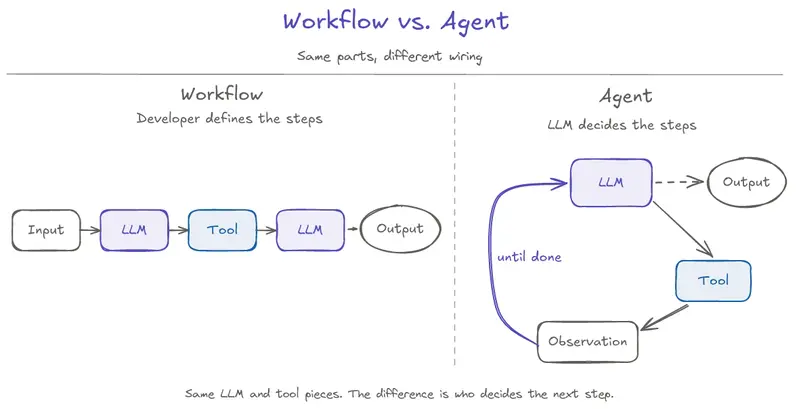
Workflow vs. Agent — Same parts, different wiring. The workflow shows a fixed path from input to LLM, tool, LLM, and output, where the developer defines the steps. The agent shows an LLM calling a tool, receiving an observation, and looping back until done, with a dashed exit to output. The same LLM and tool pieces can exist in both systems; the difference is who decides the next step.

Part 1 ended with Priya’s order shipped and the agent confidently refunding her anyway.

Here’s the same request, in a system that’s been built differently:

“Hi, I’d like to cancel order #4471 and get a refund.”

The system reads the order status — shipped. It sees that the cancellation procedure requires the order not to be shipped. It doesn’t try to cancel. It doesn’t apologize and ask if there’s anything else. It says:

“Order #4471 already shipped yesterday. Automatic cancellation only applies before shipment. I can start a return when it arrives, or connect you with a human agent right now. Which would you prefer?”

Then it stops and waits.

Nothing about that response required a smarter model. The model is the same one that confidently refunded Priya in Part 1. What changed is the system around the model.

This article is about what that system actually is.

Same Request, Different System

The Part 1 cancellation case wasn’t a story about a bad agent. It was a story about a system that didn’t have the right pieces in the right places.

Walk through what the “different system” did, without naming the pieces yet:

  • Before acting, it checked the actual state of the order.
  • It compared that state against the procedure that governed what’s allowed — and “don’t cancel” was a legitimate path, not an exception.
  • It offered the customer alternatives that fit the actual situation.
  • It stopped and waited for the customer to choose, instead of confidently picking one.

Notice what’s not in that list: smarter natural language, better wording in the system prompt, a more advanced model. Every difference is structural. The system made room for the right decision to be made.

Part 1’s three gaps — state awareness, stopping condition, and escalation path — all had structural answers here.

How those pieces actually compose into a working agent is Part 6’s full build. For now, the point is just: the system did things in the right order, with the right checks, and used composition where the broken agent used prompt stuffing.

What Changed Is the Loop, Not the Model

The model is one component. The agent is the system you build around it.

The simplest accurate way to describe an agent is: a loop that runs the model multiple times, with state that carries across turns and tools that let the model do things in the world.

The loop has five recognizable steps:

Observe → decide → act → check → repeat.

Step What happens
Observe Gather the current state — request, prior turns, last tool result, what’s known.
Decide The model picks the next step: call a tool, ask the user, or stop.
Act The chosen step runs — a tool fires, a message goes out, a decision is recorded.
Check The result comes back. The next observation includes it.
Repeat Until done, blocked, or escalated.

That’s the shape. It’s not exotic. The loop itself is simple.

What makes an agent an agent is not the cleverness of the loop. It’s the fact that the model gets to decide which step to take on every iteration. That’s the move. Not a fixed script. Not a hard-coded flow. The model decides — within the boundaries the system gave it.

(The mechanics of how the loop actually works — state, stopping conditions, context as a finite resource — is Part 3. For now, just hold the shape.)

The “different system” from earlier was running this kind of loop. The loop created room to read state before attempting cancellation. In some systems, the model may choose that step. In others, the system may require it as a gate. Either way, the important point is that the agent does not jump straight from request to action.

For contrast: a workflow runs steps the developer wrote in advance. An agent decides each step at runtime. Same pieces — different wiring. The diagram makes the difference visible.

Workflow vs. Agent — Same parts, different wiring. The workflow shows a fixed path from input to LLM, tool, LLM, and output, where the developer defines the steps. The agent shows an LLM calling a tool, receiving an observation, and looping back until done, with a dashed exit to output. The same LLM and tool pieces can exist in both systems; the difference is who decides the next step.

Workflow vs. Agent — Same parts, different wiring.

Agents Compose Three Practical Primitives

An agent doesn’t need to invent its capabilities from scratch. It composes three primitives that you’ve probably already encountered:

MCP — for acting.
Standardized way for the agent to call tools that do things in the world: query a database, call an API, run a calculation, send an email. The agent’s “verbs.”

This is the same MCP covered in the MCP in Practice series. New to MCP? You do not need that background to follow this article. For now, the mental model is enough: MCP helps the agent invoke tools through a clean protocol.

RAG — for knowing.
Retrieval that brings outside knowledge into the agent’s context when it needs it: company policies, product documentation, historical case notes, eligibility rules.

This is the same RAG covered in the RAG in Practice series. New to RAG? Same here — this article is self-contained. For now, the mental model is enough: RAG helps the agent ground decisions in retrieved facts instead of relying only on what the model was trained on.

Skills — for following reusable procedures.
A markdown file that names a procedure the agent can apply repeatedly: when to use it, the steps, the failure modes, the approval rule. Instead of stuffing “if the order is shipped, escalate to a human” into the system prompt every turn, the skill file holds the procedure and the agent loads it when relevant.

For example, a cancel-order skill might say: check status first, refuse if shipped, offer the customer a return when applicable, and escalate if the customer asks for an exception. That keeps procedures versioned, reviewable, and loaded only when relevant instead of buried in one growing prompt. Skills become more important later when we talk about patterns, control surfaces, and production builds.

The agent’s job is to decide when to use which.

That decision — which primitive applies right now — is the central agent move. Not all three on every turn. Often just one. Sometimes none, and the agent answers directly.

The cancellation system from earlier used a skill to name the procedure and MCP tools to read state and act. RAG can supply the policy details when the system needs the exact return policy text. The model didn’t have to invent any of that — it picked from what the system already had, in the right order. Part 6 walks through the full composition end-to-end.

Three Primitives an Agent Composes — Acting, knowing, and following reusable procedures. An Agent container box sits at the top, with arrows descending into three columns: MCP for acting (when the agent needs to do something, example: call cancel_order), RAG for knowing (when the agent needs outside facts, example: retrieve return policy), and Skills for procedures (when the agent needs a reusable playbook, example: cancel-order/SKILL.md). Caption: The agent decides when to use which.

Three Primitives an Agent Composes — Acting, knowing, and following reusable procedures.

From Manual ReAct to Native Tool Calling

Manual ReAct treats the model’s output as text your code has to parse. Native tool calling treats the model’s output as structured intent your code can run. That single contract change is what this section is about.

Part 1 showed a manual ReAct prompt with a STRICT RULES section growing as the developer discovered new edge cases. That prompt was doing manual ReAct: the model returns a string in a specific format, regex extracts an “Action:” line, the system calls the named tool, the result gets stuffed back into the prompt as an “Observation:” line, and the cycle continues.

Manual ReAct is useful because it is easy to prototype and great for demos — you can see the model thinking and acting in one place, all in plain text. But in production, that same simplicity becomes brittle.

Three things break:

  1. The model has to format its output as a string the regex can parse. If the model phrases the action slightly differently — different capitalization, an extra word, a typo — the regex misses it and the agent stalls.

  2. Every rule about how the model should behave lives in the prompt. “Don’t cancel shipped orders” is English. “Use the exact format Action: tool_name” is English. “Stop after final answer” is English. The model sometimes follows English rules and sometimes ignores them.

  3. Tool descriptions are part of the prompt text. Add a tool, the prompt gets longer. Change a tool, the prompt has to be edited. The prompt is doing the job of a schema, a parser, a state machine, and a procedure manual — all in one block.

Native tool calling is the production move. It’s not a new model capability; it’s a different contract between the application and the model.

It does not fix Priya’s refund failure by itself. But it gives the system a structural place to enforce “do not cancel shipped orders” as a check, instead of leaving it as one more sentence in a prompt.

In native tool calling:

  • Tool definitions live as structured schemas the model is given as a parameter to the API call, not as English in the prompt.
  • When the model wants to call a tool, it returns a structured tool-use block — not a string the application has to parse.
  • The application sees {"tool": "cancel_order", "arguments": {"order_id": "4471"}} directly. No regex. No format brittleness.
  • The system prompt shrinks. Format rules go away. Tool descriptions are no longer prose.

Structured tool calls don’t enforce policy by themselves — the application or tool server still validates arguments, checks permissions, and rejects unsafe actions. The improvement is that those checks now happen at a structured boundary instead of being buried as another English rule in the prompt.

In plain language: instead of the model writing Action: cancel_order in text and your code parsing it, the model returns a structured object your app can read directly. The “schema” is the formal description of what tools exist and what arguments they take; the “tool-use block” is what the model returns when it wants to call one. Both are objects, not text.

That structural change is where the fix starts — not where it ends.

MCP fits into this picture as the protocol layer.

Native tool calling is the contract between one model and one application. MCP is the standardized contract between the application and many tool servers. Native tool calling structures the model-to-app boundary; MCP structures the app-to-tool-server boundary.

Critically: native tool calling and MCP compose. They are not competitors. A production agent uses native tool calling on the model side and MCP on the tool-server side. The series will use both throughout, in Part 6’s build.

(If MCP or RAG is new, I have separate series on both; here we only need the mental model: MCP helps the agent act, RAG helps it know. The agent uses each the same way a non-agent system would.)

Manual ReAct vs. Native Tool Calling — Same agent, same task, different contract. The left panel labeled Manual ReAct shows everything in the prompt: one tall gray-tinted box with a stuffed system prompt containing tools described in prose, format spec for Thought/Action/Action Input cycles, a STRICT RULES section, and a stopping rule. Below it, the Model outputs raw text like Action: cancel_order, passes through a parse/regex step with dashed outline signaling fragility, then reaches a tool call. A dashed arrow drops to a label reading parse failure if format slips. The right panel labeled Native tool calling shows three separate stacked boxes: a short purple system prompt with just role and tone, a blue tool schemas box with structured tool definitions, and a tool call box showing the structured emission. Below it, the Model outputs a structured JSON object that passes through a runtime validates step with solid outline signaling stability, then reaches a tool call — no failure fork. Caption: Same task. Different contract: parse text vs. run structured intent.

Manual ReAct vs. Native Tool Calling — Same agent, same task, different contract.

Agents vs Chatbots vs Workflows

The word “agent” gets used for several different things. Some of them are agents. Some of them are not. The distinction isn’t snobbery — different systems have different failure modes, and confusing them leads to building the wrong thing.

Chatbot.
Reply-only. The user says something; the model replies. It may remember conversation history, but it does not call tools, take actions in the world, or run a control loop.
Failure mode: makes things up confidently when it doesn’t know.

Workflow.
A controller (not the model) decides which step happens next, based on conditions. The model is called inside specific steps to do specific work, but the model isn’t choosing what step to take. A prompt chain is the simplest case: a workflow with one fixed path, where every step always runs in the same order.
Failure mode: edge cases the controller’s branching logic didn’t anticipate fall through.

Agent.
The model decides what step to take on each turn, within designed boundaries. State persists across turns. Tools are available. The loop continues until done, blocked, or escalated.
Failure mode: confident-and-wrong decisions, and the failure modes Part 1 named.

Workflows are not lesser agents. For many production problems, a workflow is the right answer — the path is well-known, the steps are stable, the model doesn’t need to decide what comes next. Part 5 of this series is about when to choose which.

The line is not “smart vs dumb.” The line is who decides what happens next — and how much room the system gives the model to be wrong.

The Line That Defines an Agent

The important design question is not which model you picked. It is what the system allows the model to decide.

That’s the identity move of this series.

Bounded autonomy: model-driven choice inside designed boundaries. The boundaries are real engineering — what tools the agent has, what state it can read, what state it can write, what actions require approval, what escalation paths exist, what the stopping condition is. The system composes three primitives (MCP, RAG, Skills) and gives the model the room to choose between them — and the room to say “I shouldn’t be the one to do this.”

What makes something an agent isn’t how smart the model is. It’s what the system lets the model decide.

That decision shows up across the rest of the series. Part 3 opens the loop: state, stopping, and context as production concerns. From there, the series builds outward into patterns, tradeoffs, the TechNova build, diagnostics, evaluation, and guardrails.

Three takeaways

  1. An agent is a control loop with tools, knowledge, and a stopping condition. Five words: observe → decide → act → check → repeat. The model chooses the step. The system gives it room and limits.

  2. Agents compose MCP for acting, RAG for knowing, and Skills for following reusable procedures. The agent decides when to use which.

  3. What makes something an agent isn’t how smart the model is. It’s what the system lets the model decide.

We have the components. We have the primitives. We have the boundary between manual ReAct and native tool calling. What we do not have yet is the actual loop — what happens turn by turn when the agent runs. That is where state, stopping, and context become engineering problems instead of definitions. That is Part 3.

Stop scattering LLM SDK/API calls across your codebase. Here is the 2-file rule that fixed mine

I upgraded an LLM SDK and expected a routine version bump.

Instead I had to touch 15+ files, fix breaking changes across four providers, and spend the rest of the day hoping I had not missed one. That was the second time it happened. I knew there would be a third.

If you have ever shipped a production LLM system, you probably recognize the smell:

  • An SDK minor version renames maxTokens to maxOutputTokens and now 15 files break at runtime, not compile time.
  • Switching one classification task from Claude to a cheaper model means editing import paths and type signatures in business logic.
  • You have written classifyEmail, scoreLead, triageTicket, and categorizeRequest, and they are all the same function with a different prompt string.

This is not an SDK problem. It is an architecture problem. Here is how I fixed it, and the open-source library that came out of it.

The 2-file rule

I made one rule: only two files in the entire codebase are allowed to import the LLM SDK. One adapter that translates my interface into SDK calls, and one provider registry that creates clients from config. Everything else talks to a typed interface and has no idea which provider, model, or SDK is in play.

This is just hexagonal architecture (ports and adapters, per Alistair Cockburn) applied to LLMs. You already do this for databases and message queues. Nobody scatters raw SQL across business logic. LLM providers belong in the same category. They are infrastructure, not application logic.

The dependency flow goes from this:

Application code
  ├─ direct SDK call
  ├─ direct SDK call
  └─ model router leaking SDK types

To this:

Application code
  ↓  llmClassify(), llmDraft(), llmScore() ...
Capabilities
  ↓
LLM Port  (TypeScript interface, zero SDK imports)
  ↓
Adapters + Provider Registry  (the only 2 files that touch the SDK)
  ↓
OpenAI / Anthropic / Gemini / Ollama / Vercel AI SDK

The caller says what it wants (taskType: "triage"). The infrastructure decides how. No model name parameter. No provider parameter. Policy is deferred to config.

The proof: an SDK upgrade that did not hurt

The real test came during a major SDK version jump with breaking changes (maxTokens to maxOutputTokens, CoreMessage to ModelMessage, and more). Here is what the migration commit looked like:

  • 2 files changed (the adapter and the agent runtime), plus 1 minor fix.
  • All 18 activity files unchanged.
  • All 10 agent files unchanged.
  • The final migration deleted more code than it added: 192 insertions, 688 deletions.

28 out of 31 files did not change, because they do not know the SDK exists. If a core dependency upgrade touches your business logic, your boundaries are wrong.

The part that surprised me: the same 7 operations, everywhere

I started this to isolate the SDK. Then I noticed the bigger problem. I was not calling LLMs in 21 different places. I was reimplementing the same seven cognitive operations with slight variations:

Capability What you give it What you get back
Classify content + rubric one label from an enum + reasoning
Score content + rubric + axes numeric ratings per axis
Draft persona + situation longer text in a chosen tone
Summarize long content + length target shorter content, key points kept
Extract unstructured text + schema a typed structured object
Plan goal + constraints an ordered list of steps
Analyze evidence + question recommendation with caveats

Five activities classified content with five different prompt structures. Nine drafted messages with nine different tone injections. Same operation, no shared implementation. When I improved one classification prompt, I had to remember to update four other places. I usually forgot.

You are not writing 47 prompts. You are writing 7 prompts, 47 times, with slightly different ingredients.

So I extracted them into capability factories. A factory takes the invariant parts (schema, rubric, model routing, observability hooks) and returns a function that takes only the varying part (the content):

import { createClassifier } from "@llm-ports/capabilities";
import { z } from "zod";

const IntentSchema = z.object({
  intent: z.enum(["question", "request", "complaint", "feedback", "other"]),
  urgency: z.enum(["low", "normal", "high"]),
  reasoning: z.string(),
});

export const classifyIntent = createClassifier({
  port: llm,                 // your provider-agnostic port
  schema: IntentSchema,
  schemaName: "user-intent",
  rubric: `
    question: asking for information
    request: wants something done
    complaint: reports a problem
    feedback: opinion only
    other: anything else
  `,
});

Then every call site, across all your files, is the same shape:

const result = await classifyIntent({ content: userMessage });
// { intent: "request", urgency: "high", reasoning: "..." }  fully typed

Improve the rubric once, and every classifier in the system gets better. Prompt engineering stops being scattered strings and becomes a reusable system asset.

llm-ports

I pulled this pattern out of my production system and shipped it as an open-source, MIT-licensed TypeScript library: llm-ports.

60 second setup

Configure providers in .env:

LLM_PROVIDER_FAST=anthropic|<model>|cost:50/day
LLM_PROVIDER_SMART=anthropic|<model>|cost:200/day
LLM_TASK_ROUTE_TRIAGE=fast,smart

Create the port once:

import { createRegistryFromEnv } from "@llm-ports/core";
import { createAnthropicAdapter } from "@llm-ports/adapter-anthropic";

export const llm = createRegistryFromEnv({
  adapters: {
    anthropic: createAnthropicAdapter({ apiKey: process.env.ANTHROPIC_API_KEY! }),
  },
}).getPort();

Use it anywhere, with no SDK imports:

const result = await llm.generateText({
  taskType: "triage",
  prompt: "Classify this email...",
});

The registry selects the right model for the task, enforces cost limits, falls back through the provider chain on budget exhaustion, and records usage, cost, and latency.

What you get

  • Multi-provider routing across OpenAI, Anthropic, Google Gemini, Ollama, and the Vercel AI SDK.
  • Fallback chains when a provider exceeds budget.
  • USD-based cost gating with hourly, daily, and monthly limits. Budget exhaustion is a typed exception, not a surprise invoice.
  • The 7 capability factories: createClassifier, createScorer, createDrafter, createSummarizer, createExtractor, createPlanner, createAnalyzer.
  • Validation recovery for structured output. If a model returns invalid JSON or a wrong enum, it auto-retries with a correction prompt. Bad output stops at the capability boundary instead of leaking downstream.
  • Tool-use safety primitives: destructive markers, confirmation-required actions, max output byte limits.
  • Observability hooks for cost, latency, quality, and outcomes.
  • No runtime dependency on LangChain or LlamaIndex. Core plus one adapter plus capabilities is a small install footprint, strict TypeScript throughout.

How it compares

  • Vercel AI SDK unifies provider calls. llm-ports adds the registry, fallback chains, USD cost gating, validation recovery, and capability factories on top. There is an adapter to migrate from it incrementally.
  • LiteLLM is a Python-first HTTP proxy. llm-ports is TypeScript and runs in-process, no extra network hop.
  • Portkey is a commercial hosted gateway. llm-ports is MIT and has no hosted dependency.
  • LangChain.js is a framework. llm-ports is a lightweight architecture and control layer, not a framework you build your whole app inside.

When to use it (and when not to)

Use it if you run 2+ providers (or might switch later), have 5+ call sites, keep getting bitten by SDK upgrades, or need cost control and centralized quality tracking.

Skip it if you have 1 or 2 LLM calls, you are just prototyping, or you want a full agent framework with a built-in memory and RAG layer.

Honest status

llm-ports is pre-release, currently at 0.1.0-alpha.5. The core architecture is stable with 250+ offline regression tests, but some adapter and agent paths are still being hardened (multi-turn agent in the Vercel adapter and retry-on-runtime-error both land in v0.2). The per-surface status is documented openly so you know what is solid before you adopt it.

Try it

npm install @llm-ports/core @llm-ports/adapter-anthropic @llm-ports/capabilities

If the capability-factory pattern matches how you are building, I would genuinely like feedback in GitHub Discussions. What shapes are you reimplementing that are not on the list of seven? What knobs do the capabilities need that they do not have yet?

The LLM stops being a dependency you manage. It becomes infrastructure you configure. Once you make that shift, everything else gets simpler.

Based on two longer write-ups: Ports and Adapters for AI and The 7 LLM Capabilities Every Production AI System Reimplements.

Beyond Prompts: Structuring AI Workflows for Real Frontend Engineering

This is a field-tested workflow for using AI effectively in production-grade, enterprise level React codebases in a monrepo setup — beyond toy Todo apps.

Everyone is using AI to boost development productivity these days and organization also pushing the developers to use more and more AI to increase productivity and efficiency. But after weeks of trial and error in a, I cab sat I I have sort of discovered that the real gains don’t only come from better prompts or fancier models. They come from structured workflows.

This isn’t a theoretical guide. It’s my actual day-to-day workflow inside Visual Studio Code using GitHub Copilot (Enterprise version) on a production codebase with multiple apps, shared UI packages, and messy state flows. I use it for bug fixing, root cause analysis, feature addition, refactoring, and navigating codebases where “finding where this logic lives” used to take hours.

Here’s how I made AI actually useful for real frontend engineering.

The Biggest Mistake: One Chat For Everything

The most common anti-pattern I see? Using a single chat session to debug, generate features, refactor, and ask architecture questions all at once.

In large codebases, this destroys context. The AI gets confused, starts hallucinating, and loses track of the actual problem. The fix is simple but powerful: separate agent-style workflows — not necessarily official Copilot Agents, but mentally distinct sessions with singular purposes.

And Yes — It’s Cheaper Too

Here’s something that everyone should be carefull of: running everything in one massive chat is actually more expensive.

When you dump investigation, debugging, refactoring, and implementation into the same conversation, the context window balloons. Every subsequent prompt carries the entire history — failed hypotheses, wrong turns, tangential questions, and code snippets from three different problems. You’re paying tokens for noise.

With separate chats:

  • Investigation and planning chats are short and focused. Once you get your RCA, you close it. Those tokens don’t follow you into implementation.
  • Implementation starts with only relevant context. No baggage from the five wrong theories the AI explored during debugging.
  • You avoid the “spiral” effect. One-chat workflows often devolve into 20+ message threads trying to course-correct a confused AI. That’s 20x the tokens for worse output.
  • Skills and Hooks reduce prompt size. Persistent instructions mean you don’t need to repeat your team’s rules every single message.

In practice, I have increased tickets resolution with same amount of tokens monthly.

My Multi-Agent Workflow

I run three distinct mental “agents.” Each gets its own chat context, its own rules, and its own goal.

1. The Investigation Agent (Most Used)

Purpose: Understand context or logic before start fixing.

This agent is not allowed to write code initially. Its only job is to trace, analyze, and explain to me whats going on.

Example Prompt:

You are a debugging assistant.
Do not suggest a fix immediately.
First, understand the issue deeply.

Trace:
- Where state originates from
- Where state updates happen
- Are there any Async flow that and what are they
- Component re-renders
- API calls, where, when and how
- Memoizations
- Stale closure possibilities

Then explain possible root causes ranked by probability.

Why this works: Default AI behavior is to suggest a fix without completely understanding the problem and then will to multiple iteration to make that write and so many changes. That’s dangerous in production for an enterprise grade app. By forcing investigation first, the AI behaves like an actual engineer.

Lets take a real Real Example:

Issue: Table not updating after mutation.

Bad prompt: “Why is the table not updating? Fix this.”

Good prompt:

After a successful mutation response, the UI does not update until page refresh.

Stack:
- React Query
- Shared table component
- Optimistic updates disabled

Investigate:
- Cache invalidation flow
- Stale query possibilities
- Memoized rows
- Dependency issues
- Selector issues

Do not suggest a fix immediately.

Now the AI starts reasoning instead of guessing.

2. The Fix Implementation Agent

Once root cause is clear, I start a new chat. Fresh context. No baggage from the investigation.

Example Prompt:

Implement a minimal fix only.

Constraints:
- Preserve existing architecture
- No large refactors
- Maintain strict TypeScript typings
- Avoid changing shared components
- Keep the PR small and reviewable

Issue: React Query cache invalidation is missing after mutation success.

This gives dramatically better output than mixing investigation and implementation in one giant prompt.

3. The Refactor Agent

Another fresh chat. Used for cleanup, not fixes.

Example Prompt:

Refactor this component carefully.

Goals:
- Reduce unnecessary re-renders
- Avoid unnecessary useEffect
- Preserve exact behavior
- Improve readability
- Keep the same public API

Do not rewrite the entire component.

This is critical because AI loves rewriting entire files. In production apps, that’s a recipe for regressions.

The Most Underrated Feature: Skills

Copilot’s “Skills” (or custom instructions) let you define persistent behavior. Instead of repeating rules every session, you teach the AI how your team works.

My React Skill

# React Frontend Rules

- Prefer derived state over useEffect syncing
- Avoid unnecessary useEffect
- Keep components pure where possible
- Preserve existing architecture
- Use existing shared UI components
- Maintain strict TypeScript typings
- Avoid introducing new libraries
- Follow current folder structure
- Prefer composition over prop drilling
- Avoid premature memoization
- Preserve accessibility attributes

With this, the AI stops generating tutorial-level React code. Production React and YouTube React are quite a different thing.

My Debugging Skill

# Debugging Rules

- Investigate before fixing
- Explain root cause clearly
- Rank possible issues by probability
- Preserve current architecture
- Avoid speculative fixes
- Mention edge cases
- Mention async timing issues
- Analyze re-render behavior

I also maintain skills for TypeScript, API integration, and PR review rules. Think of it as onboarding the AI to your engineering culture.

Hooks: Automatic Context Injection

Hooks automatically inject context when AI touches specific file types. This saves enormous time.

React Component Hook:

Whenever editing a React component, automatically remind:
- Preserve TypeScript typings
- Avoid unnecessary re-renders
- Use existing hooks and patterns
- Follow shared component conventions

API File Hook:

When touching API files:
- Preserve API contract
- Don't break response typing
- Maintain error handling structure
- Preserve retry logic

Individually, these are tiny reminders. Together, they compound into a massive productivity boost and far fewer review comments.

Model Selection Matters

Copilot Enterprise gives access to multiple models. I don’t use one for everything.

Claude

  • Understanding huge files
  • Root cause analysis
  • Architecture reasoning
  • Debugging messy logic

Claude excels at reading ugly production code, especially large React components with tangled state.

GPT Models

  • Implementation and repetitive coding
  • Refactoring
  • TypeScript-heavy generation
  • Utility creation

GPT is usually faster during active feature implementation. I also use Copilot’s auto model selection to save tokens on simpler tasks.

Lets take a full Real-World Workflow

Issue: Search filters reset randomly.

Step 1 — Investigation (Claude)

Investigate:
- Where filter state lives
- Persistence flow
- what triggering re-render
- URL sync behavior
- Async effects
- Remount possibilities

Step 2 — Root Cause Analysis

AI identifies:

  • Component remounts on route change
  • Local state resets
  • Missing URL persistence

Step 3 — Implementation (Fresh Chat, GPT)

Implement minimal fix.
Persist filters through URL query params.

Constraints:
- Preserve current architecture
- Avoid global state
- Maintain backward compatibility
- Avoid affecting other pages

Result: Scoped, reviewable, correct. No accidental refactors. No mystery bugs.

The Real Productivity Gain

It’s not autocomplete. It’s faster understanding.

In large codebases, the hardest problem is often: “Where is this logic even coming from?”

With a structured AI workflow, I can:

  • Trace state flows in minutes, not hours
  • Summarize sprawling files instantly
  • Find impact areas before touching code
  • Understand old, undocumented code

That alone saves an insane amount of time for me.

What’s your AI workflow? I’d love to hear how others are structuring context in there apps.