From an Abandoned Hackathon Project to an AI Study Workspace 🚀

There’s a strange feeling that comes with opening an old project folder again.

You look at the messy files, random commits, unfinished components, and half-working features… and instantly remember the excitement you had when you first started building it.

That’s exactly what happened to me.

A few months ago, during a hackathon, I started building an AI-powered study assistant for students. The idea sounded exciting at 2 AM with coffee in one hand and deadlines in the other ☕💀

The goal was simple:

“Create a smart workspace where students can upload notes, generate summaries, create quizzes, and stay productive.”

At that time, it honestly felt like my best idea.

But like many hackathon projects, reality hit hard.

The UI was incomplete.
The backend was breaking.
Authentication barely worked.
And the AI responses were inconsistent.

The hackathon ended… and so did the project.

Or at least, that’s what I thought.

💭 The Problem With Unfinished Projects

I think every developer has that one project.

The one you genuinely believed in… but never finished.

Not because the idea was bad.
Not because you stopped caring.
But because life, deadlines, burnout, and complexity slowly pushed it aside.

For me, this project became exactly that.

Every time I opened the repository, I’d tell myself:

“I’ll complete it someday.”

Someday finally became now.

And honestly, this challenge gave me the perfect reason to revive it.

🛠️ The “Before” Version

The original version was rough 😭

Here’s what it had:

Basic PDF upload
A simple AI summary feature
Unresponsive layout
Broken navigation
No mobile support
Poor folder structure
Duplicate code everywhere

The app technically worked…

…but it definitely didn’t feel like a real product.

The biggest issue was that the project had grown too messy for me to continue confidently.

That’s where GitHub Copilot genuinely changed the experience for me.

🤖 How GitHub Copilot Helped Me Finish It

I didn’t use Copilot as a “shortcut.”

I used it like a coding partner.

And surprisingly, it helped most in the areas where I usually lose motivation while rebuilding old projects.

✨ Refactoring Old Code

Some of my components were huge and difficult to manage.

Copilot helped me:

Split components cleanly
Reuse UI sections
Improve readability
Remove repetitive logic

It saved me from spending hours rewriting boilerplate code manually.

🎨 Improving the UI

One thing I learned:

A project feels alive again when the UI starts looking polished.

I rebuilt the dashboard with:

Better spacing
Cleaner cards
Dark mode
Responsive layouts
Smooth animations

Copilot even suggested cleaner Tailwind structures while I was redesigning pages.

🧠 AI Features That Finally Worked

This time, I didn’t want the app to just “look cool.”

I wanted it to actually help students.

So I added:

AI-generated summaries
Flashcard creation
Quiz generation
Study roadmap suggestions
Smart productivity tracking

One of my favorite additions was a GitHub-style study consistency heatmap 📈

It visually tracks how consistently a student studies every day.

That feature made the project finally feel complete.

🚀 The “After” Version

The final product became something far beyond the original hackathon demo.

Now the platform includes:

✅ AI note summarization
✅ Quiz generation
✅ Flashcards
✅ Authentication
✅ Mobile responsiveness
✅ Dark mode
✅ Productivity analytics
✅ Better accessibility
✅ Cleaner backend structure

More importantly…

It finally feels usable.

Not just “another unfinished side project.”

📚 What I Learned From Reviving This Project

Finishing a project feels very different from starting one.

Starting is exciting.
Finishing requires patience.

This experience taught me:

Old projects still have potential
Small improvements compound over time
Clean code matters more than fast code
Good developer tools reduce burnout
Sometimes all a project needs is a second chance

And honestly?

Reviving something unfinished felt more rewarding than starting something new.

❤️ Final Thoughts

I used to think abandoned projects were failures.

Now I see them differently.

Sometimes they’re just unfinished stories waiting for the right moment.

This challenge pushed me to stop chasing “new ideas” for once and finally complete something I already believed in.

And thanks to GitHub Copilot, rebuilding this project felt less overwhelming and far more creative than I expected.

Maybe the best projects aren’t always the ones we start perfectly.

Maybe they’re the ones we refuse to give up on

I Let Hermes Agent Handle Real Work for 24 Hours — Here’s What Surprised Me 🚀

Google Docs summaries, task planning, research help, workflow automation… I wanted to know whether Hermes Agent was actually useful or just another flashy AI demo. 👀

Like many developers, I’ve seen countless “AI agents” online recently. Most of them look impressive for five minutes and then fall apart the moment you give them real work.

So instead of watching another demo video, I decided to do something more interesting:

👉 I gave Hermes Agent actual tasks for an entire day.

Not toy prompts.
Not “write me a poem.”
Real tasks that I normally do myself.

And honestly? Some of the results genuinely surprised me.

First Impressions 💡

The first thing that stood out to me about Hermes Agent was that it didn’t feel like a normal chatbot.

Most AI assistants wait for instructions. Hermes Agent felt more like a system that wanted to figure things out step-by-step.

That difference became obvious very quickly.

What also caught my attention was the flexibility. Unlike many closed AI systems, Hermes Agent can run on your own infrastructure and connect with different models and tools. That open-source approach already makes it interesting for developers who like control and customization.

You can explore the project here:

Hermes Agent Official Website
Hermes Agent GitHub Repository
The Experiment 🧪

I decided to treat Hermes Agent like an AI intern for one full day.

Here were the tasks I gave it:

✅ Research assistance
✅ Summarizing long information
✅ Planning workflows
✅ Multi-step reasoning tasks
✅ Organizing ideas
✅ Helping with coding-related work
✅ Remembering context between tasks

I wasn’t expecting perfection.
I mainly wanted to see one thing:

Could this agent actually reduce my workload in a meaningful way?

Task 1: Research and Summarization 📚

I started with something simple.

I gave Hermes Agent a large amount of information and asked it to summarize the key points and organize them clearly.

This is where I noticed the first major difference compared to normal chatbots.

Instead of giving a quick surface-level answer, Hermes Agent tried to break the task into smaller reasoning steps. It felt more structured and intentional.

And surprisingly, the summaries were actually useful — not just random bullet points copied from the input.

That immediately made me think:

“Okay… this might be more powerful than I expected.” 👀

Task 2: Multi-Step Workflow Planning ⚙️

Next, I tested something harder.

I asked Hermes Agent to help plan a small workflow involving multiple steps and dependencies.

This is where many AI tools usually struggle. They often lose context or generate inconsistent steps halfway through.

Hermes Agent handled this much better than I expected.

It broke the task into:

goals,
subtasks,
logical sequences,
and execution ideas.

It genuinely felt like the agent was thinking through the process instead of just predicting the next sentence.

That distinction matters a lot.

The Most Interesting Part: It Felt Persistent 🧠

One of the biggest reasons Hermes Agent stood out to me was its approach to memory and persistence.

Most AI chats feel temporary. You ask something, get a response, and everything disappears into the void.

Hermes Agent feels different because it’s designed around:

learning,
memory,
skills,
and long-term improvement.

That changes the experience completely.

At one point, I noticed it referencing earlier context more naturally than I expected, and that small moment honestly made the system feel far more “agentic” than typical AI assistants.

Not magical.
Not perfect.
But definitely different.

Where Things Got Messy 😅

Of course, not everything worked perfectly.

There were moments where:

outputs became repetitive,
reasoning drifted slightly,
or tasks required clearer instructions than I initially gave.

And honestly, I’m glad those moments happened.

Because it made the experience feel real.

One thing I’ve realized while testing AI systems is that the most trustworthy reviews are the ones that include failures too.

Hermes Agent is powerful, but it’s still a tool that benefits from good prompting, structured tasks, and realistic expectations.

What Actually Impressed Me Most 🚨

It wasn’t the speed.

It wasn’t flashy outputs.

It was the feeling that Hermes Agent was trying to operate through tasks rather than simply answer prompts.

That sounds like a small difference, but it changes everything.

For the first time in a while, I felt like I was interacting with something closer to an AI workflow system rather than a standard chatbot interface.

And I think that’s exactly why so many developers are paying attention to agentic AI right now.

Open-Source AI Feels Important Again 🌍

Another thing that made this experience exciting was the open-source side of Hermes Agent.

In a world where most advanced AI systems are becoming increasingly closed and centralized, there’s something refreshing about tools that developers can actually:

run themselves,
customize,
inspect,
and experiment with freely.

That openness creates room for innovation.

And honestly, some of the most interesting AI experiments in the next few years might come from open communities rather than giant corporations alone.

Final Thoughts 💭

After spending a day testing Hermes Agent with real work, I don’t think AI agents are just hype anymore.

Are they perfect? No.

Are they fully autonomous replacements for humans? Definitely not.

But systems like Hermes Agent show where things are heading:

persistent AI,
tool-using AI,
self-improving workflows,
and agents that can genuinely assist with complex tasks.

The most surprising part?

For the first time, I stopped feeling like I was “chatting with AI” and started feeling like I was coordinating with a system that could actually help manage work.

And that shift feels important. 🚀

Thanks for Reading 🙌

If you’ve experimented with Hermes Agent or other agentic systems, I’d genuinely love to hear your experience too.

The AI agent space is evolving incredibly fast, and it feels like we’re only beginning to see what these systems might eventually become.

Debiasing Graph Neural Networks for Recommendation with Causal RL

As part of my undergraduate research in Graph Neural Networks (GNNs) and Causal Inference, I’ve been exploring a major flaw in modern recommender systems: observational bias.

Standard recommendation algorithms—even state-of-the-art GNNs like LightGCN and NGCF—learn from biased data. Popular items get shown more often, which leads to more clicks, creating a feedback loop that reinforces popularity bias and buries niche items.

To solve this, I built an open-source framework that combines GNNs with Causal Reinforcement Learning to debias recommendations.

Here is how I approached it.

👋 Hi, I’m Tasfin Mahmud! I’m a CS Researcher at BRAC University and an open-source contributor. You can learn more about my work on my portfolio website or my GitHub.

🏗️ The Baseline GNNs

I started by implementing three solid baseline architectures in PyTorch Geometric (PyG):

  1. LightGCN: The minimalist approach that drops non-linear transformations.
  2. NGCF (Neural Graph Collaborative Filtering): Explicitly models high-order connectivities with feature interaction terms.
  3. GAT-CF: Graph Attention Networks adapted for collaborative filtering.

These models perform incredibly well on standard metrics. But there is a catch: if you evaluate them on observational data, the metrics look great only because the test data shares the same exposure bias as the training data.

🧪 Injecting Causal RL

To break the popularity loop, I implemented four complementary causal debiasing techniques.

1. Inverse Propensity Scoring (IPS)

The simplest way to fix exposure bias is to reweight the Bayesian Personalised Ranking (BPR) training loss. IPS divides the loss for each item by its exposure probability. Rarely shown items receive a higher gradient signal, while mega-popular items are scaled down.

2. Causal Embeddings (CausE)

Here, the model maintains two separate embedding spaces:

  • A factual space (learned from the biased data)
  • A counterfactual space (representing uniform exposure)

A discrepancy regularizer pulls the factual representations toward the unbiased counterfactual ones, preventing the model from overfitting to the exposure distribution.

3. Causal Policy Gradient

Treating recommendations as a sequential decision-making problem, I used the REINFORCE algorithm. The core innovation here is Causal Reward Shaping: decomposing observed rewards into the “true preference” (causal component) and the “popularity bias” (confounding component). Using Doubly Robust (DR) estimation makes learning from logged data much more stable.

4. Causal Discovery

How do we know what the confounders are if they aren’t explicitly measured? I implemented a causal discovery module using Truncated SVD on the exposure matrix to automatically identify latent confounding factors, which are then integrated into the reward shaping process.

📊 The Results

I benchmarked these approaches using LightGCN on the MovieLens 100k dataset:

Model Mode Recall@20 NDCG@20 Notes
Standard (Baseline) 0.1676 0.1624 Standard biased observational learning
IPS Debiasing 0.1453 0.1543 Re-weights rare items; expected to drop on biased test data
CausE 0.1675 0.1625 Regularized against uniform exposure
Causal PG (DR) 0.1593 0.1602 Doubly robust policy gradient

(Note: Evaluating debiased models on standard biased test sets results in lower raw metric scores because the test set shares the exposure bias. Unbiased logging data is required to see the true lift).

💡 The Takeaway

GNNs are powerful tools for recommendation, but without causal inference, they are simply learning to amplify existing biases in your dataset. By utilizing techniques like IPS and Causal Policy Gradients, we can build recommendation systems that truly understand user preference rather than just popularity.

🔗 Check out the full framework on my GitHub:
gnn-collaborative-filtering

🔗 Learn more about my research and open-source work:
tasfinmahmud.github.io

Let me know in the comments if you’ve worked with Causal Inference for recommendation systems!

Terraform with AI: Build AWS Infra (Cursor + MCP)

Why Terraform with AI Matters in Modern DevOps

Writing Terraform for anything beyond a small setup quickly becomes tedious.
Once you start dealing with multiple modules, cross-resource dependencies, and AWS-specific quirks, the workflow slows down. Most of the time isn’t spent writing code — it’s spent checking documentation, fixing edge cases, and rerunning terraform apply.
Many teams are now experimenting with Terraform with AI to speed this up.
In practice, that only works partially — unless the AI has proper context.

Build Complete AWS Infrastructure with Terraform MCP Server and Cursor AI – Full Tutorial

How Terraform workflows traditionally worked

A typical workflow looks like this:
Read Terraform docs
Write modules and resources manually
Run terraform plan
Fix errors
Repeat
For small setups, this is manageable.
For production infrastructure, it becomes repetitive and slow. Most engineers end up switching between Terraform registry docs, AWS docs, and their codebase constantly.

Limitations of Using Terraform with AI Without Context

The obvious idea is to use AI to generate Terraform.
In most cases, it starts like this:

“Generate Terraform for a VPC with public and private subnets”
You do get output. But:

It may use outdated arguments
It ignores your module structure
Dependencies are incomplete
It often fails during terraform apply
👉 The core issue: AI does not understand your infrastructure context

Our First Attempt (RAG Failure) (Late 2024 – before advent of modern agents)

To solve this, we built an internal tool using:

Vector database
RAG (Retrieval-Augmented Generation)
The idea was to fetch Terraform documentation and index it in a vector database and provide it to an agent
It helped slightly — but failed in practice:

Iteration was difficult – terraform plan and apply loop – fix errors
Context size limitations
No awareness of project structure
Could not refine outputs
It generated code, but only for simple infrastructure. For complex ones it used to fail after a few iterations.

We didn’t try to optimise it further because while we were in middle of it – cursor agents became extremely powerful and they pretty much solved this iteration problem.

What changed with MCP Server + Cursor

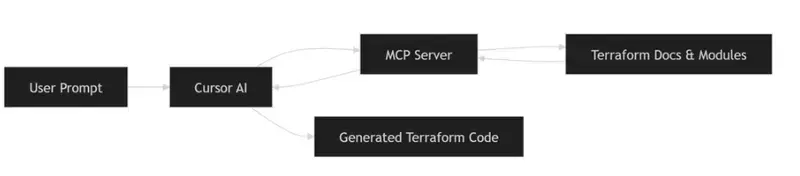
The behavior changed once we introduced Terraform MCP Server and used it with Cursor.
Instead of generating code blindly, the system now had access to:

Terraform module documentation
Input/output structures
Resource relationships
The difference was noticeable.
The output was not perfect — but much closer to something usable.

How MCP actually changes the workflow

At a high level, MCP acts as a bridge between the editor (Cursor) and Terraform context.
Instead of guessing, the AI can:

Look up module definitions
Understand required inputs
Follow dependencies across resources

This is the key difference from standard AI usage.

⚙️ What MCP Server Actually Does Internally

The improvement with MCP is not just better prompting — it’s access to structured Terraform knowledge.
The MCP server exposes tools that allow the AI to query real Terraform data:

Key MCP Capabilities:

Provider Documentation Lookup

Fetches full documentation for resources, data sources, and functions

Module Discovery

Finds Terraform modules from the registry with usage examples

Module Details

Retrieves inputs, outputs, and configuration patterns

Policy Search

Helps identify best practices and security policies
👉 In simple terms:
Instead of guessing, the AI can look things up like an engineer would.

Terraform with AI vs Manual vs MCP (Comparison)

In practice, most teams try AI first, then realize that without context, results are unreliable. MCP fixes that gap.

A practical example: building AWS infrastructure

Let’s take a realistic setup:

VPC with public and private subnets
NAT Gateway and Internet Gateway
Application Load Balancer
Auto Scaling group (EC2)
CloudFront distribution
Cloudflare DNS
Jump box for access
This is a typical production-style setup.
Writing this manually takes time — especially when wiring dependencies correctly.

How we approached it

Instead of writing everything manually, we broke the problem into smaller steps and guided the AI.

🧠 Full Prompt Used for Infrastructure Generation

Instead of vague prompts, we used a structured, step-by-step approach to guide the AI.

Start code generation. Do it step by step. Move to next step only after the current step is complete.

Step: Create VPC and Network Infrastructure - use vpc module
- Create VPC with appropriate CIDR block
- Create public and private subnets across 2 AZs
- Set up Internet Gateway
- Configure NAT Gateways in public subnets
- Configure route tables for public/private subnets

Step: Create Security Groups
- ALB security group (allow HTTP/HTTPS inbound)
- EC2 security group 
    - allow traffic from ALB
    - allow ssh from the vpc
- Allow all outbound traffic

Step: Create Auto Scaling Group - use autoscaling module
- Create launch template for EC2 instances
- Use ubuntu ami for the instances
- Configure ASG across private subnets
- Use keypair named "vikas-aws"
- Add a user data script to install nginx and create a simple html page

Step: Create a jumpbox
- Create a jumpbox in the public subnet
- Ensure it has a public IP
- Allow SSH from internet

Step: Create Application Load Balancer - use alb module
- Create ALB in public subnets
- Configure HTTP listener
- Attach to autoscaling group

Step: CloudFront Distribution
- Configure CloudFront with ALB as origin
- Set caching TTL to 0

Step: DNS Configuration
- DNS handled via Cloudflare (no route53)

In practice, breaking the problem into steps like this improves output quality significantly compared to single prompts.

What the generated Terraform looked like

A simplified example:

module "vpc" {
  source  = "terraform-aws-modules/vpc/aws"
  version = "5.0.0"

  name = "demo-vpc"
  cidr = "10.0.0.0/16"

  azs             = ["us-east-1a", "us-east-1b"]
  public_subnets  = ["10.0.1.0/24", "10.0.2.0/24"]
  private_subnets = ["10.0.3.0/24", "10.0.4.0/24"]

  enable_nat_gateway = true
  single_nat_gateway = true
}

This wasn’t perfect out of the box, but:

Structure was correct
Inputs were mostly valid
Dependencies were aligned
That already saves a significant amount of time.

What actually improved (based on usage)

From real usage:

Before:

2–4 hours to assemble infra
Multiple documentation lookups
Several failed applies

After:

Initial setup generated in minutes
Fewer structural errors
Faster iteration
In most teams, the biggest gain is reduced context switching.

Operational considerations

This approach still requires discipline:

Always run terraform plan
Review changes carefully
Do not trust generated code blindly
IAM policies and security configurations must always be reviewed manually.

When Terraform with AI Works Best

In most teams, this approach works well when:

You are building new infrastructure
You need to scaffold modules quickly
You want to reduce repetitive work
It is less effective when used blindly or without validation.

When not to use this approach

Avoid relying on it when:

Infrastructure requires strict compliance
You don’t understand the generated code
You need deterministic, audited configurations
This is not a replacement for Terraform expertise.

Where this fits in a DevOps workflow

This approach integrates naturally with:

Git-based workflows
CI/CD pipelines
Infrastructure reviews
The deployment process does not change — only the way code is written.

FAQ

What is Terraform with AI?

Terraform with AI refers to using AI tools to generate and manage infrastructure code more efficiently.

What is Terraform MCP Server?

It provides AI tools with Terraform context, including modules and documentation.

Is AI-generated Terraform safe for production?

Yes, but only after proper validation and review.

Conclusion

Terraform itself hasn’t changed.
What’s changing is how engineers interact with it.
Using Terraform with AI + MCP Server reduces friction in writing infrastructure — especially for repetitive setups.
It doesn’t replace engineering judgment, but it does make the workflow more efficient.

Related reading

https://www.kubeblogs.com/how-civo-kubernetes-routes-pod-traffic-single-egress-ip-explained/
https://www.kubeblogs.com/gp3-vs-gp2-ebs-volume-aws/

What If AI Didn’t Need the Internet?

*How Gemma 4 Could Bring Powerful AI Closer to People, Not Just Servers

For a long time, using powerful AI has felt a bit like borrowing someone else’s computer from far away. Every question, image, or request had to travel through the internet to massive cloud servers before coming back with an answer. It worked, but it also came with limits — slow connections, privacy concerns, expensive APIs, and the constant need to stay online.

But recently, that idea started to change for me.

When I explored Google’s Gemma 4 models, I realized something important: the future of AI may not live only in giant data centers. It may live on our own devices.

And honestly, that feels like a breath of fresh air.

Why Local AI Feels Different

Most conversations around AI focus on bigger models, faster responses, or smarter chatbots. But what excited me most about Gemma 4 was something simpler — accessibility.

Gemma 4 introduces powerful capabilities like multimodal understanding, advanced reasoning, and a huge 128K context window, while also supporting local deployments across different kinds of devices. That means AI is no longer only for companies with huge budgets and powerful servers. In many ways, it levels the playing field.

For students, creators, and independent developers, that matters a lot.

Sometimes the best ideas come from people who do not have unlimited resources. Gemma 4 feels like a tool that opens doors instead of building walls.

A Future Beyond Constant Connectivity

In many places, stable internet is still not guaranteed. Even today, students often struggle with weak networks, limited data plans, or shared devices. Cloud-based AI can become difficult to rely on in those situations.

Now imagine this instead:

A student sitting in a small town using an offline AI tutor on a low-cost laptop.

A medical worker accessing a private assistant without uploading sensitive information to external servers.

A creator brainstorming ideas while traveling without worrying about internet speed.

That is where local AI starts to shine.

As the saying goes, “necessity is the mother of invention.” Sometimes limitations push technology in the right direction. Local AI is not just about convenience — it is about making intelligence more available to ordinary people.

What Makes Gemma 4 Exciting

One thing I appreciate about Gemma 4 is that it does not feel like a one-size-fits-all solution. The different model sizes make it flexible enough for different needs, from lightweight experiments to larger applications.

The multimodal capability is especially interesting because it allows AI to work with more than just text. That opens the door for tools that can understand images, documents, notes, and visual information in a much more natural way.

The long context window also caught my attention. Anyone who has worked with AI knows how frustrating it can be when a model “forgets” earlier parts of a conversation or document. With 128K context support, Gemma 4 can handle much larger amounts of information at once, making interactions feel smoother and more useful.

And then there is reasoning.

We are slowly moving from AI that simply responds to AI that can genuinely assist with problem-solving and deeper thinking tasks. That shift could change how students learn, how developers build, and how small teams innovate.

Why This Matters to Me as a Student Developer

As a student developer, what inspires me most is not just the technology itself — it is the possibility behind it.

Powerful AI often feels out of reach for many learners. Either the hardware is expensive, the APIs cost too much, or the tools require constant internet access. It can feel like the cards are stacked against small creators.

But local AI changes the conversation.

It gives students the freedom to experiment, build, and learn without depending entirely on cloud platforms. Even simple projects can become meaningful. An offline study assistant, a note summarizer, a multilingual learning tool — these ideas suddenly feel possible.

That is exciting because innovation should not belong only to large companies. Sometimes a small idea in the right hands can punch above its weight.

The Bigger Picture

I do not think the future will be “cloud AI versus local AI.” Both will continue to exist and grow together.

But I do believe local AI will become increasingly important.

People care more about privacy now. Developers want flexibility. Students want affordable tools. And many communities still need technology that works even with limited connectivity.

Gemma 4 feels like a step toward that future — one where AI becomes more personal, more accessible, and more adaptable to real-world situations.

Not every technological shift changes who gets to participate.

This one just might.

Final Thoughts

The most impressive thing about Gemma 4 is not only its capabilities. It is the idea behind it.

Powerful AI is slowly moving closer to people instead of farther away behind massive infrastructure. And that could make all the difference.

We often say technology should make life easier, but the best technology also makes opportunities wider. In many ways, Gemma 4 feels like a glimpse of that future.

And for students, builders, and curious minds everywhere, that future looks incredibly promising.

750,000 Chips, 140 Trillion Tokens: The Math Behind DeepSeek’s Permanent Price Cut

DeepSeek made its V4-Pro 75% price cut permanent on May 22. The conventional read: “they got cheaper hardware.” The real story is more interesting — and it’s about a gap that’s not closing fast enough.

What Happened

On May 22, 2026, DeepSeek announced that the 75% discount on its V4-Pro API would become permanent. The new pricing:

Metric Before After Cut
Input (cache miss) ¥12 / 1M tokens ¥3 / 1M tokens 75%
Output ¥24 / 1M tokens ¥6 / 1M tokens 75%
Input (cache hit) ¥0.1 / 1M tokens ¥0.025 / 1M tokens 75%

At current exchange rates, that’s roughly $0.44/M input and $0.87/M output — making V4-Pro one of the cheapest frontier-class models on the market, on par with DeepSeek’s own V4-Flash but with significantly more capability.

The move came exactly four weeks after V4’s launch on April 24, and coincided with growing user frustration over rate limits at Google Gemini and Anthropic Claude.

The Standard Narrative

The surface-level story has three parts:

1. Architectural efficiency. V4 uses a Mixture-of-Experts architecture with 1.6 trillion parameters, but only activates a fraction per token. This gives it a structural cost advantage over dense models of comparable capability — roughly 30% of the gap.

2. Supply chain scaling. Huawei’s Ascend 950PR entered mass production in April 2026. Huawei plans to ship ~750,000 units through the year — a 2.5x increase over 2025’s 910C output. DeepSeek specifically optimized V4 for the Ascend architecture. More chips → lower unit cost → lower API pricing.

3. Competitive positioning. Western AI providers (Google, Anthropic) have been quietly tightening rate limits as demand overwhelms their GPU supply. DeepSeek is exploiting the backlash, offering unlimited usage at a fraction of the cost to capture disgruntled developers.

All three are true. But none of them fully explains the magnitude of the cut — or why it’s permanent rather than promotional.

The Math That Changes Everything

Let’s check the numbers.

Demand Side

China’s daily token consumption hit 140 trillion in March 2026, according to the National Data Administration. The growth trajectory:

  • Early 2024: 0.1 trillion/day
  • End of 2025: 100 trillion/day
  • March 2026: 140 trillion/day

That’s a 1,000x increase in two years, and a 40% jump in just the last quarter — implying ~13% month-over-month growth.

Supply Side

Huawei’s mass-produced chip for 2026 is the Ascend 950PR (Prefill-optimized, 1 PFLOPS FP8), with the higher-end 950DT (2 PFLOPS FP8) coming in Q4. The numbers:

Chip FP8 Memory Bandwidth Inference Throughput (est.)
950PR 1 PFLOPS 128GB HBM 1.6 TB/s ~1,200 tokens/sec
950DT 2 PFLOPS 144GB HBM 4 TB/s ~2,400 tokens/sec

(Throughput derived from Huawei’s published Atlas 950 SuperNode benchmark: 19.6M tokens/sec across 8,192 cards.)

Now the arithmetic:

Item Value
Total chips (2026 target) 750,000 (70% PR + 30% DT)
Raw daily throughput 85.7 trillion tokens/day
Inference-allocated (60%) 51.4 trillion tokens/day
vs Current demand (140T) 37% coverage
vs Demand in 6 months (~291T) 18% coverage

Even in the most optimistic scenario — every single chip dedicated to inference at 100% utilization:

Scenario vs Current vs +6 months
100% inference, 100% utilization 61% coverage 29% coverage

The conclusion is stark: 750,000 Ascend 950 chips can’t cover today’s demand — let alone the demand in six months.

So Why Cut Prices?

If supply is still a fraction of demand, permanent price cuts don’t make sense in a normal market. But this is not a normal market.

The Real Logic: Pre-Commitment, Not Surplus

DeepSeek is not cutting prices because it has spare compute. It’s cutting prices to lock in routing commitments before the hardware arrives.

Here’s the timeline:

April 24:  V4 launched, optimized for Ascend
April 24+: ByteDance orders 350,000 Ascend 950 chips (~¥40B)
May 4:     Ascend 950PR mass production confirmed
May 22:    DeepSeek makes V4-Pro 75% cut permanent

The critical insight: DeepSeek’s price cut is not a cost pass-through. It’s a market share pre-commitment — using the promise of future Ascend supply to grab developer mindshare now, before Western competitors can resolve their own capacity issues.

The Numbers Behind the Strategy

Western providers are capacity-constrained:

Provider Constraint Signal
Google Gemini TSMC CoWoS capacity Rate limits tightened, user backlash
Anthropic Claude H100/B200 availability API throttling, compute-use monitoring
OpenAI Inference cluster rollout Delayed GPT-5 token limits

DeepSeek’s bet: “Spend the next 6 months building developer dependency on V4-Pro’s API — by the time Ascend supply catches up in H2 2026, those developers won’t switch back.”

This is AWS in 2006. AWS wasn’t cheaper than running your own servers in 2006. But it would be once scale kicked in. AWS priced for the scale it planned to have, not the scale it had. DeepSeek is doing the same.

What 750,000 Chips Actually Buys

The popular framing in Chinese media is “75万颗昇腾950产能大爆发.” But as the math shows, 750,000 chips isn’t abundance — it’s barely adequacy.

Think of it this way: China’s token demand is growing at roughly 0.5 trillion tokens per day every single month (the monthly increment itself is larger than the entire market 18 months ago). By year-end, demand will be 300-400+ trillion. Against that, 750K chips at the 950PR/DT mix buy roughly 50-85T/day of inference capacity.

Timeframe Demand (est.) Inference Supply Gap
March 2026 140T ~50T 90T
June 2026 ~200T ~50T 150T
September 2026 ~290T ~55T (DT ramp) 235T
December 2026 ~420T ~65T 355T

The gap is growing, not shrinking. Even with 75万 chips fully deployed, the supply-demand deficit more than triples over nine months.

This means DeepSeek’s price cut isn’t a sign of market saturation. It’s a sign of exactly the opposite: a market so unsaturated that the winner gets to define the default API for an entire generation of developers, if they can lock them in before the hardware arrives.

Three Counter-Arguments (And Why They’re Weak)

“But cache hits reduce the effective compute needed”

True — cache-hit tokens cost ~1/100th of miss tokens. And DeepSeek’s cache hit rates can be high for workloads with stable system prompts. But cache hits are mostly in the input direction. Output tokens — the expensive ones — still need full compute. And as agentic workloads grow (multi-turn, chain-of-thought), output-to-input ratios increase, making cache less effective.

“But not all 140T tokens need 950-class inference”

Also true. Many tokens are generated by smaller models (Flash variants, Qwen, etc.) that don’t need 950-level compute. But the growth is in the frontier-class tokens — longer context, more complex reasoning, higher quality requirements. That’s exactly where 950-class chips are needed.

“But they can still buy H20 / smuggled H100”

H20 is less capable than 950PR per chip (the US-designed it to be worse). And the CHIPS Act + export controls have made H100 procurement increasingly difficult. Relying on smuggled hardware is not a supply chain strategy.

What This Means

For Developers

Your inference costs are likely going down over the next 12 months, not up — even though demand is exploding. That’s unprecedented in any computing market. The driver isn’t efficiency gains or manufacturing scale. It’s a strategic subsidy by Chinese AI firms betting that locking in your API calls today is worth negative margins for a year.

Take the subsidy. But don’t assume today’s prices reflect tomorrow’s costs — they reflect tomorrow’s hopes.

For the Industry

The AI API market has entered a phase that looks like price war but functions like infrastructure land-grab. The playbook is AWS 2006, DoorDash 2019, Uber 2015: lose money on every transaction to own the default routing.

When the hardware does catch up — when Ascend 960 (2027) or 970 (2028) ships with 3-5x the throughput — the providers with the largest captive developer bases will convert negative margins to positive ones. Everyone else will be competing on price against incumbents they can’t dislodge.

The Bottom Line

DeepSeek’s permanent price cut is not evidence that Chinese AI compute supply has caught up with demand. The math shows it hasn’t — and won’t for at least 12-18 months. It’s evidence that DeepSeek is playing the long game: use today’s negative margins to own tomorrow’s default inference route, and trust that Huawei’s future chips will eventually close a gap that’s currently 3-5x wider than headlines suggest.

The 75% cut isn’t a cost breakthrough. It’s a bet that developer lock-in is worth more than current margins — and that the 75万 Ascend 950 chips shipping this year are just the beginning.

Numbers sourced from: National Data Administration (China daily token data, March 2026), Huawei Connect 2025 (Ascend 950 specs and roadmap), SCMP/DW (ByteDance order volume), DeepSeek official pricing page (May 2026). Throughput calculations based on published Atlas 950 SuperNode benchmarks. Growth projections assume continuation of 40%/quarter rate per published data.

You’re Renting Someone Else’s Compute — And It’s Costing You More Than You Think

Your Claude response comes back in 800 milliseconds. You’re on a roll. Three features shipped before lunch. And somewhere, silently, your debugging intuition is going to sleep.

I’ve been tracking a pattern across developer forums — not just V2EX, but in the back-channels of engineering team chats: developers who live in network-restricted regions are increasingly “renting” computational presence elsewhere. A computer in a data center, a VM in Singapore, a colleague’s spare workstation. They connect, they code, they use AI tools that would otherwise be unreachable. Problem solved.

Except it’s not solved. It’s deferred. And the cost is accumulating in a place most devs never check: the gap between what they can describe doing and what they can actually do.

The Compute Rental Economy

The V2EX discussion that triggered this article described a developer’s setup: living abroad, rented room with a desktop computer inside China, wants to remotely access that machine to use Claude’s web interface and write code. The comments branched into VPN recommendations, remote desktop protocols, browser-based solutions, and one or two voices asking the question nobody else wanted to answer — why?

The why matters. If you’re routing through a remote machine just to access an AI assistant, you’re not solving a network problem. You’re renting computational sovereignty. And like all rentals, you’re paying for access without building ownership.

Here’s what that looks like in practice, from a commenter’s description that stuck with me: a developer in Shanghai spends 4 hours daily on a remote desktop session to a machine in Tokyo. The latency hovers between 40-80ms — annoying but workable. The AI tools load. The code ships. And every evening, the developer closes the session knowing they built something without ever touching the actual hardware that built it.

That distinction — built on versus built with — is where the skill erosion starts.

Skeleton Implementation Syndrome

I need to coin a term here, because the existing vocabulary doesn’t capture this:

Skeleton Implementation Syndrome — the tendency to ship code you could describe but couldn’t write from scratch. You understand the architecture. You can explain why the service mesh routes requests the way it does. But when the AI is gone and the remote session drops, the gap between concept and implementation becomes a chasm you didn’t notice until you had to cross it alone.

This is different from normal abstraction. Normal abstraction is healthy — you don’t need to remember register allocation when writing Python. Skeleton Implementation Syndrome is pathological: you’ve delegated so much implementation to AI assistance that your mental model of how things actually work has decayed faster than your ability to ship features.

The ratio of regret here is asymmetric in a way that hurts quietly: AI assistance accelerates feature delivery (OPTIMIZED FOR) while accelerating capability decay (SACRIFICED). You win the sprint. You lose the skill. And the debt compounds invisibly because nobody measures “debugging intuition remaining” in your quarterly review.

The Local Environment Learning Tax

Here’s where I need to make an unpopular argument, and I want you to stay with me:

Running AI tools locally — even with degraded performance — produces better engineers than accessing them remotely on optimized infrastructure.

Before you close this tab: I’m not saying remote access doesn’t work. I’m saying the learning tax of renting compute is asymmetrically borne by the developer’s capability, not by their feature velocity.

When you run a model locally (even a quantized 7B parameter model that takes 45 seconds to warm up on your M2 Max), you’re forced to develop intuition about:

  • Token budgets and context windows — because you see the cost in real time, not abstracted away
  • Prompt sensitivity — because small changes produce observable differences without a slick web interface smoothing the edges
  • Failure modes — because local models fail in ways remote APIs don’t (OOM crashes, context truncation, hallucination patterns specific to your hardware)
  • System integration — because getting a local model to talk to your IDE requires actual configuration work, not just clicking “authorize”

The V2EX developer’s setup — remote machine, AI through a browser, code in a remote session — sidesteps all of this. The AI becomes a utility, like electricity. And like electricity, you stop thinking about how it works.

The Infrastructure You’re Betting On

There’s a second-order risk nobody talks about in these remote access discussions: you’re building workflow dependencies on infrastructure you don’t control.

Your remote machine exists because someone else maintains it. The network path between you and it exists because someone else routes it. The AI service you’re accessing exists because a company decided it should, and can decide otherwise.

In my local environment (M2 Max, 32GB RAM), I’ve been running a mix of local models and API access for two years. The local models are slower. They have smaller context windows. They fail in embarrassing ways. And they have never, not once, changed their terms of service, raised their prices, or decided my use case wasn’t “enterprise enough.”

The developers routing through Tokyo data centers to access Claude? They’re one corporate decision away from rebuilding their entire workflow. That’s not paranoia — that’s operational risk with a specific name: vendor dependency disguised as infrastructure convenience.

What Actually Survives

If you’re in a network-restricted region and remote access is genuinely your only option, I’m not here to tell you to suffer. Suffering isn’t a virtue. But here’s what I’d ask you to track, because I’ve watched this pattern destroy capable engineers:

Track your AI dependency score. After every coding session, ask yourself: could I have solved this without the AI? If the answer is “no, and I couldn’t have solved it six months ago either,” that’s data. That’s the gap growing.

The developers who survive this environment — who maintain capability while using AI as a multiplier — are the ones who treat AI as a colleague who happens to be infinitely patient, not a replacement for the thinking that made them dangerous in the first place.

They ask AI for second opinions, not first drafts. They use it to explore unfamiliar territory, not to avoid territory they should have mapped already. They keep a “dumb project” — something they code without AI, where inefficiency is the point, where the slow path is the learning path.

The Question I Can’t Answer For You

Here’s what I keep coming back to: the V2EX developer asked how to access Claude from their remote setup. Nobody asked what you’ll lose by making it this easy.

I don’t know your specific context. Maybe the feature velocity matters more than the debugging intuition. Maybe you’re in a sprint that doesn’t have room for the local model learning curve. Maybe the tradeoff is genuinely worth it.

But I know this: the engineers who lasted 15 years in this industry didn’t do it by shipping faster. They did it by being the person who could debug what everyone else gave up on. That capability doesn’t come from prompt engineering courses. It comes from struggling through problems without a safety net — and your remote setup, however clever, is a very comfortable safety net.

What’s the last thing you debugged without AI assistance? Not without searching the internet — without AI generating the answer for you. Go remember what that felt like. That’s the skill you might be renting away.

What’s your take?

Has your team noticed developers becoming less capable of independent debugging without AI? What’s your experience been — are you moving faster, or just shipping more?

I’d love to hear how this plays out in your specific context. Drop a comment below — I respond to every one.

Discussion on V2EX about remote access solutions for China-based developers wanting to use Claude web interface

Discussion: What’s the last thing you debugged without AI assistance — not without searching, but without AI generating the answer? How did it feel compared to using AI?

CSS :has() Selector: The Layout Trick I Wish I Knew 5 Years Ago

CSS :has() is not just a fancy :parent

When :has() started popping up in specs and tweets, I mentally filed it under “cool, but not for shipping work.” I was wrong.

Now it is in Chrome, Safari, Edge, and Firefox. I use it in real projects. It has removed entire JavaScript files and a pile of .is-active classes that I was embarrassed to maintain.

If you are a working frontend dev, the shorthand is this: :has() turns CSS from “style what is there” into “style this thing if it contains that thing”. That one capability changes layout, state, and validation flows.

I will walk through three places where it made a real difference for me:

  • Parent styling without JS
  • Sibling state UIs without wiring events
  • Form validation UI that reacts to the DOM, not a framework

All of this shipped with zero additional JavaScript.

Quick mental model of :has()

The syntax looks like a pseudo class on a selector:

.card:has(img.hero) {
  /* styles here */
}

Read it as: “select .card elements that have a descendant img.hero somewhere inside.” It is a conditional filter on the left side of the selector.

You can also scope it more tightly:

.tabs:has(> .tab.is-active) {
  /* direct children only */
}

Or use it with relational selectors like siblings:

.field:has(+ .field--error) {
  /* this .field is followed by an error field */
}

Once that clicks, you start seeing places to remove JS.

1. Parent styling in a content-heavy project

First real use: a content-heavy marketing site for a biohacking brand I work with. Editors can drop components in any order with a CMS. Sometimes a card has an image, sometimes it is text-only. The layout should adapt.

Previously I solved this with modifier classes from the CMS, or a hydration script that scans the DOM and adds classes like .card--with-media. Boring, fragile, and slightly gross.

With :has() I deleted that script.

Image-aware cards

The card markup is boring on purpose:

<article class="card">
  <img class="card__media" src="hero.jpg" alt="">
  <div class="card__body">
    <h2>Title</h2>
    <p>Some text...</p>
  </div>
</article>

<article class="card">
  <div class="card__body">
    <h2>Another Card</h2>
    <p>Text-only card.</p>
  </div>
</article>

Now the CSS decides layout based on presence of media.

.card {
  display: grid;
  gap: 1rem;
}

.card:has(.card__media) {
  grid-template-columns: minmax(0, 2fr) minmax(0, 3fr);
  align-items: center;
}

.card:not(:has(.card__media)) {
  padding: 2rem;
  background: #111;
  color: #eee;
}

Result: if marketing drops in an image, the card becomes a two-column layout. If not, it becomes a full-width text block. No new class. No CMS configuration. No JS.

I like this because the markup stays semantic and dumb. The layout is a true function of the content, which is what CSS was always supposed to do but rarely could at the parent level.

Auto-promoting “hero” sections

Same project. Editors could add a .section stack: some had a prominent CTA, some were just copy. If a section had a primary CTA, design wanted extra padding and a gradient background.

<section class="section">
  <h2>Get early access</h2>
  <p>Short description.</p>
  <a class="btn btn--primary" href="#">Join the beta</a>
</section>

<section class="section">
  <h2>What you get</h2>
  <p>More text...</p>
</section>

With :has() I treat any section with a primary button as a pseudo hero.

.section {
  padding: 2rem 1.5rem;
  background: #050505;
}

.section:has(.btn--primary) {
  padding: 4rem 1.5rem;
  background: radial-gradient(circle at top, #2f80ed, #050505);
  color: #fff;
}

.section:has(.btn--primary) h2 {
  font-size: 2.25rem;
}

That tiny selector replaced a custom “hero” block type in the CMS that content editors kept misusing. I stopped explaining “use the hero component for this” and just let the CSS infer intent from presence of a primary CTA.

You can do similar things with :has(video), :has(.badge--new), etc. It is a good fit for messy CMS content where you want layout to respond to what your editors actually do, not what the schema designer hoped they would do.

2. Sibling state UIs without event listeners

Second use case: stateful UIs that I used to wire up with click handlers. Tabs, disclosure panels, navigation highlights, that stuff.

Yes, you can still do it in JS. But if the state is already visible in the DOM, :has() lets CSS own more of the behavior. That means less code, fewer states to sync, and fewer bugs.

Tabs powered by :target and :has()

On a little side project for baseball drills, I built a tabbed interface where each tab is actually a link to an anchor. I wanted a sticky tab bar that changes style when any tab content is active.

<div class="tabs">
  <nav class="tabs__nav">
    <a href="#hitting">Hitting</a>
    <a href="#pitching">Pitching</a>
    <a href="#fielding">Fielding</a>
  </nav>

  <section id="hitting" class="tabs__panel">...</section>
  <section id="pitching" class="tabs__panel">...</section>
  <section id="fielding" class="tabs__panel">...</section>
</div>

The panels show / hide with a regular :target trick.

.tabs__panel {
  display: none;
}

.tabs__panel:target {
  display: block;
}

Old me would now add JS to toggle classes on the nav. Instead I lean on :has().

.tabs {
  border-bottom: 1px solid #333;
}

.tabs__nav a {
  padding: .5rem 1rem;
  text-decoration: none;
  color: #888;
}

.tabs__nav a:is(:hover, :focus-visible) {
  color: #fff;
}

/* highlight the active tab label */
.tabs__nav a[href^="#"] {
  position: relative;
}

.tabs:has(#hitting:target) .tabs__nav a[href="#hitting"],
.tabs:has(#pitching:target) .tabs__nav a[href="#pitching"],
.tabs:has(#fielding:target) .tabs__nav a[href="#fielding"] {
  color: #fff;
  font-weight: 600;
}

/* make the whole tabs block look active if any panel is targeted */
.tabs:has(.tabs__panel:target) {
  border-color: #2f80ed;
}

I am not pretending this scales to 50 tabs. For most content UIs, 3 to 5 tabs is realistic. Writing those few selectors is still cheaper than adding a tab manager, handling history state, and worrying about hydration.

The key pattern is: some child panel already has state via :target or [aria-selected="true"]. Let :has() bubble that state up to parents and siblings.

Accordion with native <details> and :has()

I use <details> a lot. It is surprisingly powerful with :has(). On a settings panel I wanted the container to visually compress when no section was open, then expand once any accordion entry was open.

<section class="settings">
  <details class="settings__item">
    <summary>Profile</summary>
    <div>...</div>
  </details>
  <details class="settings__item">
    <summary>Privacy</summary>
    <div>...</div>
  </details>
</section>

CSS:

.settings {
  padding: 1rem;
  border-radius: .75rem;
  border: 1px solid #333;
  max-height: 60vh;
  overflow: auto;
  transition: box-shadow .2s ease, border-color .2s ease;
}

.settings:has(.settings__item[open]) {
  border-color: #2f80ed;
  box-shadow: 0 16px 40px rgba(0, 0, 0, .55);
}

.settings__item + .settings__item {
  border-top: 1px solid #222;
}

.settings__item summary {
  cursor: pointer;
}

Once any <details> is open, the whole settings block feels “in focus”. No JS to listen for the toggle event, no syncing of .is-active classes. The HTML already has [open]. CSS reacts.

3. Form validation UI with zero JavaScript

The biggest win for me: form UI that uses :has() with built-in browser validation. No client-side validation library. No “touched” state juggling.

On my own site I revamped a contact form and a simple experiment log form. I wanted:

  • Parent field wrappers that highlight error or success
  • Inline messages that only show when actually invalid
  • Submit button that changes state based on form validity

Browser validation already tracks validity. The DOM knows. :has() lets CSS hook into that.

Field states from input validity

Markup:

<form class="form" novalidate>
  <div class="field">
    <label>
      Email
      <input type="email" name="email" required>
    </label>
    <p class="field__error">Please enter a valid email.</p>
  </div>

  <div class="field">
    <label>
      Message
      <textarea name="message" minlength="10" required></textarea>
    </label>
    <p class="field__error">Write at least 10 characters.</p>
  </div>

  <button type="submit">Send</button>
</form>

You can bind field styling to the input inside, purely with CSS.

.field {
  margin-bottom: 1.5rem;
}

.field input,
.field textarea {
  width: 100%;
  padding: .6rem .75rem;
  border-radius: .4rem;
  border: 1px solid #444;
  background: #050505;
  color: #eee;
}

.field__error {
  display: none;
  margin-top: .35rem;
  font-size: .8rem;
  color: #ff6b6b;
}

/* highlight when invalid and touched (using :user-invalid where supported) */
.field:has(input:user-invalid),
.field:has(textarea:user-invalid) {
  color: #ff6b6b;
}

.field:has(input:user-invalid) input,
.field:has(textarea:user-invalid) textarea {
  border-color: #ff6b6b;
  box-shadow: 0 0 0 1px rgba(255, 107, 107, .6);
}

.field:has(input:user-invalid) .field__error,
.field:has(textarea:user-invalid) .field__error {
  display: block;
}

/* success state */
.field:has(input:user-valid),
.field:has(textarea:user-valid) {
  color: #4caf50;
}

.field:has(input:user-valid) input,
.field:has(textarea:user-valid) textarea {
  border-color: #4caf50;
}

No custom event handlers. The browser decides when the input is valid or invalid. CSS uses :has() to move that state to the wrapper and the message.

If you want broader support than :user-invalid, you can fall back to :invalid and accept that some browsers show the state earlier.

Form-level feedback and submit button state

Now zoom out one level. The entire <form> element also exposes validity via :valid and :invalid. Combine that with :has() and your submit button can react.

.form button[type="submit"] {
  padding: .7rem 1.25rem;
  border-radius: .4rem;
  border: none;
  background: #333;
  color: #aaa;
  cursor: not-allowed;
  transition: background .15s ease, color .15s ease, transform .05s;
}

/* any invalid field keeps button in "disabled" style */
.form:has(:invalid) button[type="submit"] {
  background: #333;
  color: #777;
}

/* all fields valid, button goes live */
.form:has(:valid) button[type="submit"] {
  background: #2f80ed;
  color: #fff;
  cursor: pointer;
}

.form:has(:valid) button[type="submit"]:active {
  transform: translateY(1px);
}

If you want to actually disable the button, you still need a tiny bit of JS to toggle the disabled attribute. I usually do not bother for simple forms; the button just looks inactive until the browser considers the form valid.

The nice part is that the logic lives where it belongs. The browser enforces constraints. CSS reads that state. JS, if present at all, sends the request and displays a toast.

4. Layout tweaks based on children, not breakpoints

One more pattern that has crept into my “default toolkit”: adjusting layout based on how many items a container has.

On my baseball drills page, each drill has one or more tags. I wanted single-tag drills to show the tag inline next to the title, and multi-tag drills to move them into a separate row. Doing that in JS felt silly.

<article class="drill">
  <header class="drill__header">
    <h3 class="drill__title">Front toss</h3>
    <div class="drill__tags">
      <span class="tag">Hitting</span>
    </div>
  </header>
</article>

<article class="drill">
  <header class="drill__header">
    <h3 class="drill__title">Relay race</h3>
    <div class="drill__tags">
      <span class="tag">Fielding</span>
      <span class="tag">Conditioning</span>
    </div>
  </header>
</article>

With :has() and the :nth-child() selector you can treat the two cases differently.

.drill__header {
  display: flex;
  gap: .5rem;
  align-items: baseline;
  flex-wrap: wrap;
}

/* one tag only: keep inline */
.drill__tags:has(.tag:nth-child(1):last-child) {
  order: 0;
}

/* more than one tag: push tags to next line */
.drill__tags:has(.tag:nth-child(2)) {
  flex-basis: 100%;
  order: 1;
}

No JavaScript counting nodes. No data attributes. Just “if there is at least a second tag, change layout”. If product decides to add a third or fourth tag, the CSS keeps working.

Reality check: performance and support

I am not going to pretend :has() is free. The browser has to do more work, because selectors now depend on what is inside elements and how that changes.

My take after profiling a few real pages: do not go wild with global *:has(...) selectors. Scope them. Prefer direct children or close relationships.

/* Bad idea */
*:has(.error) { ... }

/* Reasonable */
.form:has(.field__error) { ... }

/* Even better */
.form:has(.field > .field__error) { ... }

Support is good now. Chrome, Edge, Safari, Firefox all ship :has(). Old Safari versions are the main risk. If you work on something critical for a weird enterprise fleet, check caniuse and add progressive enhancement.

Most of my patterns above fail gracefully. You lose a highlight or a layout tweak, not core functionality. That is a good bar to aim for.

How I think about :has() now

I used to reach for JavaScript whenever a parent needed to know about a child, or a sibling needed to react to state. That felt normal. It also created a lot of glue code that did not age well.

Now my filter is simple:

  • Is the state already visible in the DOM? (attribute, pseudo class, anchor, etc.)
  • Can that state reasonably drive styling only?

If the answer is yes, I try :has() first. JS comes later, if at all.

Five years ago I was writing tab managers and form validators by hand. I would not go back. :has() is the layout trick that finally lets CSS act on the structure we already have, instead of the utility classes we wish we had planned better.

If you have a component that keeps growing event listeners and state flags, look at the HTML for five minutes. There is a decent chance :has() can take some of that weight off.

Five Clusters. Five Lessons. One Production System.

Most engineers talk about Kubernetes like it’s something you set up once and forget. I set it up five times. Each time because the last version taught me something I couldn’t have learned any other way.

This is that story.

The honest version of each stage:

Stage 1. I just need HA.

Stage 2. I just need cheaper HA.

Stage 3. I just need multi-cloud ARM scheduling.

Stage 4. I just need BGP mesh ingress.

Stage 5. I have achieved zero trust enlightenment.

Every stage felt like a small reasonable ask. The cluster had other ideas.

Stage 1: The Naive But Functional Cluster

The first cluster wasn’t elegant. It wasn’t supposed to be.

Three to five Hetzner dedicated nodes running k3s. Three DigitalOcean VPS running nginx as a makeshift load balancer. A DigitalOcean cloud load balancer sitting in front of those three VPS.

I followed Techno Tim’s k3s HA install guide as the foundation. Solid starting point for getting a highly available cluster off the ground. Replaced his default Traefik ingress with nginx and added Rancher dashboard on top for visibility. Everything after that was documentation and experimentation.

Before this everything ran on plain VPS. Individual servers. No orchestration. Moving to Kubernetes meant migrating workloads one by one. Old VPS running stable, new cluster being tested in parallel, services moved gradually. If something broke I reverted. Nothing burned.

The cluster itself was stable. No memorable incidents with the nodes or networking. The one persistent irritation was MongoDB. Running Bitnami’s MongoDB HA chart. One write replica, two read replicas. Randomly and without warning one of the pods would enter a crashloop. Logs pointed vaguely at lock contention but nothing actionable. A restart brought it back clean every time.

The read heavy workload saved me. A local cache layer absorbed most requests so when a replica went down users barely felt it. I’d notice eventually. Not through alerts, just observation. Restart the StatefulSet and move on.

It happened often enough to be annoying. Never often enough to be a crisis. The cluster was otherwise stable. This was just a ghost that came with the Bitnami chart.

It followed me into the next stage. And the one after that.

Cost pressure eventually killed this setup.

Stage 2: The WireGuard Mesh

Three DigitalOcean VPS plus one cloud load balancer to serve less than a thousand requests a month. Those thousand requests were me hitting the Rancher dashboard. Every actual workload was outbound only. Bots, task processors, queue consumers. Nothing needed to receive HTTP from the internet. Kubernetes was not there to serve traffic. The nginx tier existed for one admin panel. The math didn’t make sense.

I wanted to move to Contabo. Not cheaper in absolute terms but more efficient for my actual workload requirements. Hetzner dedicated nodes were sitting with RAM mostly idle. I was paying for resources I wasn’t using.

The problem was Contabo had no private network at the time.

So I built one.

WireGuard. I found it while researching private networking options. I looked at Kilo as well, a Kubernetes-native WireGuard mesh operator, but it felt too complex for what I needed. Netclient handled mesh generation automatically. WireGuard configurations for multiple peers without the manual key exchange headache.

A single DigitalOcean VPS became the entry point. Running the Netclient server and dashboard. All the Contabo nodes connected through it via mesh. First try. Everything came up clean.

The three nginx VPS and the cloud load balancer disappeared. Previously traffic flowed from Klipper through three nginx VPS to a DigitalOcean cloud load balancer before reaching users. An entire layer of infrastructure serving as a middleman. Replaced now by Klipper speaking directly to users. The elaborate routing chain had been architectural overkill from the start.

Contabo had weird reliability. Nodes would occasionally behave unexpectedly in ways that didn’t make sense on paper. But the workload was tolerant to disruption and the cost saving from eliminating the most expensive components made the occasional weirdness acceptable.

The MongoDB crashloop followed. Still there. Still managed by cache and manual restarts. Not catastrophic. Just persistent.

Stage 3: ARM Workers and the First Multi-Cloud Cluster

ARM compute is cheap. Oracle’s free tier ARM instances are extremely cheap. As in free.

A Network Chuck video appeared in my YouTube recommendations one day. Kubernetes on Raspberry Pi. Watched it casually. The part that stuck was his explanation of why he ran the Rancher dashboard on an amd64 node rather than the ARM64 ones. The reasoning was practical. Certain workloads and management tooling simply behaved better on amd64. That one observation shaped the architecture before I’d even started.

Master nodes stayed on amd64. Workers went on ARM64. Clean separation from the beginning.

I extended the Netclient WireGuard mesh to include Oracle ARM nodes in a different region. Multi-cloud before that was a common thing to talk about. Not for ideological reasons. Purely because free ARM compute was sitting there unused. The scale didn’t justify multi-cloud architecture. The price did. Free compute is free compute.

Multi-arch builds handled through GoReleaser. On every GitHub commit, GitHub Actions triggered GoReleaser. Publishing multi-arch Docker images and binaries as releases automatically. Services with amd64-only dependencies got node affinity rules keeping them on the Contabo nodes. Cross-architecture scheduling handled through proper affinity configuration rather than hoping things landed in the right place.

Oracle’s networking was strange. Occasionally a worker node would drift out of WireGuard mesh sync and require a restart. Never more than one at a time. Enough redundancy that it didn’t cause visible issues. Whether that was a free tier limitation or something inherent to their networking I never definitively determined.

The MongoDB crashloop was still there. Quietly persistent across three different infrastructure setups now.

What ended it was a new client. Twenty Discord bots. Each one 512MB RAM at startup, 2GB at peak load. Discord.js cache is RAM hungry by design. The library caches guild members, messages, and state aggressively. Twenty bots at peak meant up to 40GB of RAM requirement for workloads that could not be disrupted.

Oracle free tier ARM nodes are not where you run non-disruptable RAM-intensive production workloads.

Time to go back to dedicated hardware.

Stage 4: Real High Availability

Five Hetzner nodes. Dual network. This is where the cluster started looking like something serious.

The private VLAN handled all internode communication. k3s configured via args to bind to the private IP. Not 0.0.0.0. Cluster join happened over private IPs not public ones. The public interface existed for egress only at the node level.

The goal with CNI was specific. Klipper, k3s’s default service load balancer, requires port 80 and 443 open on every node to function. I didn’t want that. I wanted a single advertised IP for ingress, not ports splayed across every node in the cluster.

Calico with BGP was the answer. Or so I thought.

The setup was architecturally sound. Five Hetzner dedicated nodes running a BGP mesh via Calico. MetalLB advertising a private IP range for load balancer services. That private range connected to Hetzner’s cloud network via static routes. Each node acting as a router. A Hetzner cloud load balancer sitting in front, pointing to the MetalLB advertised IP. Clean. No ports open on individual nodes. Exactly what I wanted.

Keepalived handled the cluster join entry point. A floating IP that survived node failures. I tested this manually during bootstrap. Simulated a node failure. Keepalived moved the IP cleanly to a healthy node. That part worked exactly as expected.

The BGP setup worked too. Technically. I ran it for a month.

Then I measured HTTP latency.

The requests going through the Hetzner cloud network into the BGP mesh and back out were noticeably slow. Not broken. Just slow in a way that didn’t make sense given the hardware. I only had ingress exposed so I couldn’t measure other protocols. Whether it was Hetzner Cloud’s routing adding overhead or something in the mesh I never definitively diagnosed.

I reverted. Wrote it off as a cloud networking quirk. The internode BGP mesh stayed. Calico peers between all five nodes remained stable. But MetalLB and the cloud LB routing experiment went back to Keepalived managing a floating IP with Hetzner API hooks for failover.

Something else happened at this stage. The MongoDB crashloop stopped. I don’t know exactly when. I don’t know exactly why. It had followed me through three different infrastructure setups. Different providers, different CNIs, different everything. Then somewhere around moving to Calico it just stopped. Never diagnosed. Never explained. Just gone.

Around a hundred workloads running at this point. Bots, websites, the WebSocket infrastructure, client services accumulated over years.

What ended Stage 4 wasn’t a failure. It was a conference.

Interlude: The Homelab Test

Before this I validated experiments on DigitalOcean VPS. Spin one up, test the idea, tear it down. Clean. Disposable. No commitment.

But before committing rke2 and Cilium to production I wanted to test on real hardware. Not a cloud VM. Actual bare metal.

I had an old PC. Booted Ventoy, loaded a gparted live image, used dd to write Debian directly to the disk. Configured SSH and networking. Came back to my main machine and SSHed in. Bare metal provisioning the old fashioned way. No cloud console, no managed image, just a disk, Ventoy, and a Debian ISO.

Installed rke2. Installed Cilium. Configured BGP and set static routes in my home router to expose services publicly. Ran a PostgreSQL instance. One database per project, cleaner than running everything on my main machine. Threw a Minecraft server and an Ark Survival server on it so friends could connect.

It worked. Everything I planned for Stage 5 behaved the way I expected on real hardware before I committed it to production.

That’s the point of a homelab. Not to show off. Not to run unnecessary infrastructure. To answer the question before production has to.

Stage 5 wasn’t a leap of faith. It was a validated decision.

Stage 5: Zero Trust and the Hardened Cluster

The current cluster. OVH this time, not Hetzner.

OVH has better DDoS protection. Their uptime guarantees are stronger.

rke2 replaced k3s as the distribution. The operational feel is similar. rke2 is heavier. Larger resource footprint. But for a cluster running serious production workloads that weight is appropriate.

Cilium replaced Calico as CNI.

I saw Cilium at KubeCon. But the real reason was simpler. I had never successfully run a firewall alongside Kubernetes. Every attempt broke with CNI changes. iptables rules conflicting with CNI networking. Configurations that worked until a CNI update silently invalidated them. I gave up trying to run a traditional firewall on Kubernetes nodes entirely.

Cilium’s host firewall was different. It runs at the eBPF layer, below where CNI conflicts happen. That was the actual problem I needed solved. KubeCon introduced me to the solution. The L2 load balancer announcement was a bonus.

L2 announcement for load balancer IPs. A few YAML manifests and the cluster manages IP assignment itself. The goal from Stage 4 finally solved. Differently than expected but solved. Keepalived still exists for the cluster join endpoint but the complex API hook dance for floating IP management is gone.

Host firewall via CiliumClusterwideNetworkPolicy. The public IP of every node is egress only. Nodes can initiate connections to the world. The world cannot initiate connections to nodes. Not even ping. Except from monitoring systems and my static IP for SSH. Enforced at the kernel level on every node via eBPF. Not a firewall rule sitting in front of the infrastructure. The infrastructure itself is the firewall.

Ingress hardened to Cloudflare only. Traefik as the ingress controller. Cilium network policy restricts ingress traffic to Cloudflare IP ranges only at the network level. Traefik middleware handles mTLS authenticated pull on top of that. Two layers of verification before any request reaches a service.

Namespace isolation by default. Network policies deny all ingress by default. Services explicitly whitelist what they need. DNS, shared resources, specific cross-namespace communication. The model is incoming-decides. Each namespace declares what it accepts rather than what it sends. No traffic sniffing between namespaces is possible by policy.

The cluster currently runs bots, websites, and accumulated client workloads. It is boring in the useful sense. Deployable, diagnosable, recoverable.

What Five Clusters Taught Me

Cost pressure is a better architect than planning. Every significant change in this infrastructure happened because something was too expensive relative to its value. The nginx VPS layer. The idle Hetzner RAM. The Oracle free tier nodes that couldn’t handle non-disruptable workloads. Cost pressure forced clarity about what the infrastructure actually needed to do.

The first version is supposed to be wrong. One video and documentation got the first cluster running. That was enough. The wrongness of the first version taught me what the second version needed to be.

Persistent problems have hidden causes. MongoDB crashed across three different providers, two different CNIs, and multiple cluster rebuilds. Then stopped. I never found the root cause. Sometimes production systems have ghosts you learn to live with until they quietly leave on their own.

Security is a journey not a configuration. Stage 1 had no meaningful firewall story. Stage 5 has host-level eBPF enforcing zero trust at the kernel. That’s not a single decision. That’s five iterations of failing to run a firewall properly until the right tool existed.

Simplicity compounds. Every stage removed something. The nginx VPS layer. The cloud load balancer. The WireGuard entry point VPS. The Keepalived API hooks. Each removal made the system more reliable not less. The most complex part of Stage 1 was the load balancing layer doing the least important work.

Context beats technology. Multi-cloud sounds impressive. The reality was free Oracle ARM compute that cost nothing to add. Cilium sounds cutting edge. The reality was a persistent firewall problem that nothing else solved cleanly. The technology follows the problem. Not the other way around.

Validate before you migrate. I didn’t move production to rke2 and Cilium based on a KubeCon talk. I went home, provisioned a bare metal server from scratch, and ran the stack on real hardware first. The homelab wasn’t a hobby. It was due diligence.

Security – Five Stage Evolution

Stage Security Posture
Stage 1 No meaningful firewall · MongoDB on crashloop · Manual restart as incident response
Stage 2 WireGuard mesh · First network isolation layer · Removed public-facing VPS middlemen
Stage 3 Node affinity arch-based isolation · Multi-cloud scheduling boundaries · GoReleaser controlled build pipeline
Stage 4 Private VLAN for internode comms · Public interface egress only · Keepalived tested at bootstrap
Stage 5 eBPF host firewall nodes egress only · Cloudflare-only ingress + mTLS · Namespace isolation by default · No traffic sniffing between namespaces

Stage 1 ░░░░░░░░░░░░░░░░░░░░

Stage 2 ████░░░░░░░░░░░░░░░░

Stage 3 ████████░░░░░░░░░░░░

Stage 4 ████████████░░░░░░░░

Stage 5 ████████████████████

Security is a journey not a configuration. Five iterations of failing to run a firewall properly until the right tool existed.

Available — Senior platform / SRE roles. Remote.

[email protected]

Synaptic: A Local-First AI Dev Companion That Remembers How You Think

This is a submission for the Gemma 4 Challenge: Build with Gemma 4

What I Built

Three weeks into learning Rust, I had Copilot open and Stack Overflow in the next tab. I was making progress — or so I thought. I’d ask Copilot how to handle an error, paste the answer in, the compiler would go green, and I’d move on.

Six days in, I realised I had no idea what I was doing.

I could produce Rust. I couldn’t think in Rust. Copilot was making me a faster copy-paster. It wasn’t making me a developer.

What I needed wasn’t more autocomplete. I needed something to stop me before I typed and ask: “Do you actually understand what you’re about to do?”

That question became Synaptic.

Synaptic is a local-first AI dev companion powered entirely by Gemma 4. It watches your entire development environment — files, terminal, errors, shell history — and builds a persistent model of how you specifically think and solve problems. When you’re stuck or learning a new language, it surfaces your own past solutions rather than generic documentation pulled from the internet.

The centrepiece is the Socratic gate.

When you open a code file, Synaptic reads your last few hours of activity, identifies what concept is most at stake in that file, and streams a targeted question into a HUD overlay within seconds:

“You’ve been writing JavaScript closures recently. Before you edit this Rust file: how are you thinking about ownership and when values go out of scope?”

The question isn’t generic. It’s built from your actual history. Gemma 4 evaluates your answer and either lets you through or asks a sharper follow-up targeting exactly what you glossed over. Over time, your explanations get sharper — because the bar doesn’t lower.

Beyond the Socratic gate:

  • Ambient memory pipeline — every file save and terminal command is compressed by Gemma 4 into a structured memory (summary, concepts, significance score, verbatim error text) every 3 seconds, stored locally in SQLite and indexed for semantic search

  • Vision error pipeline — on macOS, when a terminal error fires, Gemma 4 reads a screenshot of your actual screen to extract the full stack trace, not the truncated shell history
  • Four query modes — Translate (JS patterns to Rust), Explain (grounded in your own history), Map Concept (to what you already know), Find Solution (have I solved this before?)

  • Habit mismatch detection — runs continuously, warns when you apply patterns from your old language that will break in your new one

  • Stuck detection — watches for compound signals (repeated errors, thrashing, excessive app switches) and auto-surfaces the HUD with relevant context before you ask
  • Electron HUD overlay — always-on-top, appears uninvited when it has something worth saying
    Everything runs on your machine. No API keys required. No data leaves without your permission.

Live site: https://synaptic-ebon.vercel.app

Docs: https://synaptic-ebon.vercel.app/docs

Demo

Quick start to try it yourself:

git clone https://github.com/cybort360/synaptic
cd synaptic && npm install
ollama pull gemma4:e4b
ollama pull nomic-embed-text
cp synaptic.config.example.json synaptic.config.json
# Edit synaptic.config.json and add a directory to watchPaths
npm run launch

Open a .rs, .ts, .py, or .go file in a watched directory. The HUD will appear within seconds with a question grounded in your recent activity.

Code

GitHub: https://github.com/cybort360/synaptic

The full pipeline in one view:

Files / Terminal / Shell history
        ↓
    Observer (chokidar + history polling + stuck detector)
        ↓
    Archivist
      ├─ Compressor: gemma4:e4b (every 3s, with vision on errors)
      ├─ Embedder: nomic-embed-text (semantic search vectors)
      └─ SQLite (local, persistent, yours)
        ↓
    Connector
      ├─ Semantic search over history
      ├─ Prompt builder (4 modes)
      └─ Reasoner: gemma4:e4b (streaming)
        ↓
    Socratic Engine
      ├─ Fires on file open for recognised code files
      ├─ Streams question word-by-word to HUD
      └─ Evaluates answer, asks follow-up or passes
        ↓
    Dashboard (http://localhost:3777) + HUD Overlay (Electron)

Stack: Node.js 20, TypeScript, Express, WebSocket, Electron, chokidar, sql.js (SQLite), Ollama. No frameworks. No bundler. Around 5,700 lines of original code.

How I Used Gemma 4

I used gemma4:e4b — the 4B effective parameter model — and the choice was deliberate at every level.

Why E4B specifically

Speed is the constraint. Synaptic compresses every file save and terminal command into a structured memory on a 3-second batch cycle. That cycle is a constraint, not a goal — if compression falls behind, the memories become stale. The Socratic question about your Rust ownership file would be grounded in something you did yesterday rather than what you were doing five minutes ago.

I tested gemma4:26b for this. The batches piled up. The tool became a liability. At 4B effective parameters, gemma4:e4b compresses an event in under 2 seconds on a MacBook. The 3-second cycle stays clean. Memories are always fresh.

Multimodal was the unlock. When you hit a terminal error, your shell history often truncates it. The important part — the line number, the variable name, the exact constraint violated — is three screens down.

Gemma 4 is natively multimodal. When Synaptic detects a terminal error, it captures a screenshot of your screen and sends it to Gemma before compression. Gemma reads the actual stack trace off your screen, not the truncated history. This is only possible with a vision-capable model. A text-only 4B model cannot do it. A vision-capable model too large to run locally cannot do it either. gemma4:e4b is the exact intersection: small enough to run constantly, fast enough for real-time use, and genuinely multimodal.

The Socratic gate depends on first-token latency. The gate fires when you open a code file. The HUD slides up. The question starts streaming in word by word while Gemma is still generating. With gemma4:e4b, the first token arrives in under 3 seconds on a MacBook M-series. The question types itself in as the developer reads it. With a larger model, the developer is already ten lines deep before the question finishes generating — and the gate becomes noise.

What breaks with a different model

Alternative What fails
A 27B local model Compression batches pile up. The 3-second cycle becomes 30+ seconds and memories fall behind real activity
A non-multimodal 4B Vision pipeline silently degrades. Errors are compressed without reading the actual screen output
A cloud-only model The entire privacy guarantee breaks. Code, errors, and history leave your machine
No local model at all Socratic gate cannot fire on every file open. Latency makes it unusable as a real-time feature

The three tiers Gemma 4 powers

Task When Why Gemma 4
Event compression Every 3 seconds Speed. Needs to complete before the next event arrives.
Vision error analysis On terminal errors (macOS) Multimodal. Reads the actual stack trace off the screen.
Reasoning + Socratic evaluation On every query and file open Quality. Generates personalised questions and evaluates answers.

A separate nomic-embed-text model handles embeddings for semantic search — it outperforms a generalist 4B model at this specific task, so I kept it.

What Gemma 4 made possible that wasn’t before

The core thesis of Synaptic is that local AI is now capable enough to be the primary intelligence of a real product — not just a demo. gemma4:e4b can read screenshots, generate coherent structured analysis, evaluate the quality of a developer’s reasoning, and do all of this on a consumer laptop in real time.

That’s new. Six months ago you had to choose between capable and local. With Gemma 4 you don’t.