Accounting Made Simple: AI-Powered Financial Insights of Japanese companies with Gemma 4

GitHub logo

This is a submission for the Gemma 4 Challenge: Build with Gemma 4

What I Built

Accounting Made Simple is a modern and very simple, work in progress, financial web app that helps users track organisations and evaluate the core accounting equation: Assets = Liabilities + Owner’s Equity. It combines Japanese financial data sources (EDINET and J-Quants) with Gemini-powered AI analysis to give users quick insights into a company’s financial health, trends, and potential red flags.

Key capabilities:

  • Organisation search and equity data lookup (currently targetting Japanese companies only)
  • Persistent organisation/accounting equation storage with Prisma + PostgreSQL
  • Magic-link authentication via Better Auth and Resend email
  • Financial analysis generated by Gemma 4 from real balance sheet data
  • Responsive UI built with Next.js 16, React 19, Tailwind CSS, and shadcn-inspired components

Demo

Code

Accounting Made Simple

A modern and simple web app for managing organisations and tracking the core accounting equation: Assets = Liabilities + Owner’s Equity.

Built with:

  • Next.js 16 + React 19
  • Tailwind CSS v4 and shadcn/ui-inspired components
  • Prisma 7 + PostgreSQL
  • Better Auth with magic link login and Resend email delivery
  • EDINET and J-Quants financial data sources for Japanese companies
  • Gemini-powered financial analysis and insights
  • Zod / Prisma Zod generator for typed schema validation
  • Recharts for simple financial charts

Features

  • Search organisations and equity data from EDINET/J-Quants
  • Gemini-based analysis for selected financial data
  • Store organisations, accounting equations, and user sessions in PostgreSQL
  • Email-based magic link authentication via Resend
  • Responsive, utility-first UI with custom components
  • Prisma-generated types and database access layer

Getting Started

1. Clone the repository

git clone https://github.com/your-repo/accounting-made-simple.git
cd accounting-made-simple

2. Install dependencies

npm install

The repo runs prisma generate after install via postinstall.

3. Create .env

…

How I Used Gemma 4

I used Gemma 4 via the Google GenAI SDK to power the financial analysis experience in GeminiFinancialAnalysis.tsx.

  • Model used: gemma-4-31b-it
  • Reason: I chose the 31B Dense variant because it provides strong instruction-following and financial reasoning for structured company balance sheet data, while still being efficient enough for a production-style analysis flow.
  • Role in the app: Gemma 4 reads balance sheet data fetched from EDINET/J-Quants, then generates plain-language insights about company health, trends, and risk signals that are rendered directly in the UI.
  • This makes the app more than an accounting tracker — it becomes a finance assistant that helps users understand what the numbers mean.

The append-only AST trick that makes Flutter AI chat actually smooth

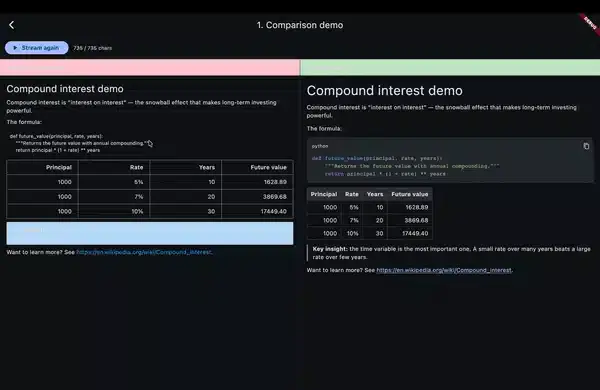
streamdown vs flutter_markdown — split screen demo

— flutter_markdown re-parses the entire response string on every streamed token. The fix is an append-only AST with monotonic node IDs used as Flutter widget keys. I packaged it as streamdown — a drop-in replacement that’s 188× faster on chunked input and produces zero visible flicker. Live on pub.dev today.

streamdown vs flutter_markdown — split screen demo

The problem

Every ChatGPT-style Flutter app I built had the same broken-feeling moment: code blocks flashing unstyled → styled → unstyled, tables jittering as new cells arrive, scroll position breaking, and the cursor jumping around like the UI is fighting itself.

The root cause is one line, repeated thousands of times during a single streamed response:

StreamBuilder<String>(
  stream: openai.responseStream,
  builder: (_, snap) => Markdown(data: snap.data ?? ''),
)

flutter_markdown does exactly what its API promises — it takes a complete string and renders it. The problem is that every new chunk produces a new data value, and the entire string gets re-tokenized, re-parsed, and re-rendered from scratch. That O(n²) work is invisible on a 200-char response; on a 5KB code-heavy answer it’s the source of every visible glitch.

You can confirm this in five minutes: feed an OpenAI completion into flutter_markdown with chunk_size=1 and watch a syntax-highlighted code block strobe like it’s having a seizure.

The three tricks (and why all three are needed)

Fixing this needs three changes that have to land together — fixing only one or two doesn’t move the needle.

Trick 1 — Incremental token-level parser (append-only)

Instead of re-tokenizing the full buffer on every chunk, keep the tokenizer’s state machine alive across chunks. New characters extend the trailing token; characters already emitted as tokens are never revisited.

class Tokenizer {
  final List<Token> _tokens = [];
  _State _state = _State.start;
  String _buffer = '';

  void feed(String chunk) {
    _buffer += chunk;
    while (_canEmit()) {
      _tokens.add(_emit()); // never touches _tokens already emitted
    }
  }

  void complete() { /* flush trailing token if any */ }
}

The block tokenizer is line-based and stateful — fences, lists, blockquotes, and tables all need to know “are we still inside the previous structure?” The inline tokenizer (emphasis, links, code spans) is pure and runs on short paragraph text, so it’s fine to re-run from scratch when a paragraph’s text changes.

Trick 2 — Append-only AST construction

The parser converts tokens into AST nodes — but only ever mutates the trailing path. A closed paragraph becomes immutable. A new paragraph node gets appended. A list keeps growing items until a blank line closes it.

sealed class AstNode { final int id; ... }
class Paragraph extends AstNode { final List<InlineSpan> spans; ... }
class CodeBlock extends AstNode { final String? lang; final String code; final bool isComplete; }
// ...

class Parser {
  int _nextId = 0;
  final List<AstNode> _nodes = [];

  void feed(Token token) {
    // Mutate ONLY the trailing node, or append a new node.
    // Closed nodes never get their `id` reassigned.
  }
}

This is also where provisional rendering falls out for free: an unclosed code block becomes a CodeBlock(isComplete: false) node immediately. The renderer sees it, picks up the language from the fence info string, and starts syntax-highlighting in real time. No flash of unstyled content.

Trick 3 — Diff-stable widget keys

Here’s the part that makes Flutter actually behave. Every AST node carries a monotonically increasing id. The renderer uses ValueKey(node.id) for the widget at each AST position:

ListView(
  children: [
    for (final node in nodes) _buildBlock(node, key: ValueKey(node.id)),
  ],
)

Closed nodes never have their id reassigned. So when a new chunk arrives, Flutter’s element diff sees the same key in the same slot and reuses the existing element. No teardown, no rebuild, no flicker. Only the trailing (open) node’s widget rebuilds — which is exactly the work we wanted to do anyway.

This is the line that turns “incremental parser” into “actually smooth UI.” Without it, even a perfect parser still gets all its widgets thrown away on every frame.

The benchmark

Test rig: 5KB markdown response with a mix of paragraphs, two code blocks, a table, and bold/italic — chunked at 4 characters per delivery (about OpenAI’s typical streaming cadence). 100 trials, median time.

Approach Time to render full stream
Naive flutter_markdown re-parse 940 ms
streamdown (incremental + stable keys) 5 ms

That’s a 188× speedup end-to-end. The bigger story isn’t the raw number — it’s that the cost stops scaling with response length the way the naive approach does. A 100KB response parsed end-to-end in under 10ms.

The micro-benchmark is in test/perf_benchmark_test.dart if you want to reproduce or tweak the chunk size.

What it looks like to use

The whole point was a drop-in replacement, so here’s the entire common-case usage:

import 'package:streamdown/streamdown.dart';

Streamdown(stream: openai.responseStream)

For static content:

Streamdown.text(fullMarkdown)

Options you’ll actually reach for:

Streamdown(
  stream: chunks,
  syntaxTheme: SyntaxTheme.githubDark,
  latex: true,                    // enables $..$ / $$..$$ via flutter_math_fork
  selectable: true,               // default
  onLinkTap: (uri) => launchUrl(uri),
  codeBlockBuilder: (lang, code, isComplete) => MyCustomCodeBlock(...),
)

Streaming semantics: chunks are deltas (newly arrived tokens), not cumulative — matching OpenAI/Anthropic/Gemini SDK conventions and the entire point of not re-parsing. If you need cumulative mode, that’s a v0.2 constructor.

Things I cut from v0.1 on purpose

Shipping in 5 days meant being honest about scope:

  • Loose-list distinction — any blank line closes a list. Predictable, easy to mentally model, and AI markdown uses blank lines liberally anyway.
  • Nested blockquotes — flattened to depth=1 in the AST. The tokenizer captures depth, so v0.2 can add this without a breaking change.
  • CommonMark “process emphasis” algorithm — stack-based delimiter pairing instead. Pathological cases like *foo**bar*baz** aren’t spec-compliant, but real-world AI markdown always nests cleanly.
  • Mermaid, footnotes, definition lists — all v0.2+ candidates.

These were deliberate tradeoffs documented in the decision log, not oversights. Predictable behavior on the 95% case beats half-implemented spec compliance.

What’s next

I’m tracking ideas and edge cases in GitHub Discussions. The v0.2 list right now:

  1. Nested blockquotes
  2. Loose-list distinction
  3. Mermaid diagrams behind a flag
  4. Per-line span caching for code blocks (the OPEN code block currently re-highlights on every chunk — fine for ~50-line code blocks, worth caching for longer)
  5. Golden-file tests for visual regression

If you’re building AI features in Flutter and hit edge cases — markdown that flickers, breaks, or renders wrong — drop them in Discussions with the input and what you expected. That feedback shapes v0.2 more than my roadmap does.

Try it

dependencies:
  streamdown: ^0.0.1

If this saves your week, ⭐ the repo. If it doesn’t, open an issue and tell me what broke.

From Legacy to Live — Reviving XMLPayments with GitHub Copilot

Introduction

Every developer has that one project that started with excitement but stalled before completion. For me, it was XMLPayments — a prototype designed to orchestrate XML-based financial flows. The GitHub Finish‑Up‑A‑Thon Challenge gave me the push I needed to finally polish it up, and GitHub Copilot became my silent co‑developer.

This is the story of how XMLPayments went from legacy fragments to a live orchestration engine.

🕰️ Before: The Stalled Prototype

The original XMLPayments repo was functional but fragile:

  • Fragmented XML flows with no orchestration.
  • Manual reconciliation that took days.
  • Brittle scripts prone to breaking under load.
  • Documentation incomplete, onboarding unclear.

It was a proof of concept, but not production‑ready.

🚀 After: A Polished Framework

Reviving the project meant transforming it into something usable:

  • Automated orchestration of XML flows.
  • Real‑time compliance dashboards for auditors.
  • CI/CD pipelines for deployment and testing.
  • Developer‑friendly onboarding with examples and diagrams.

Now, XMLPayments isn’t just a repo — it’s a framework ready to deploy.

🤖 Copilot in Action

GitHub Copilot played a crucial role in the revival:

  • Generated async handlers for XML ingestion.
  • Suggested error handling patterns for resilience.
  • Autocompleted schema validation functions.
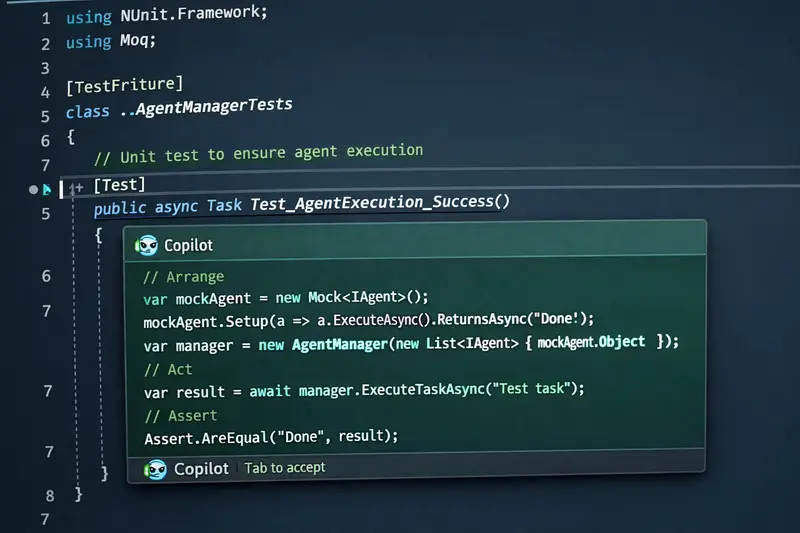
  • Helped write unit tests that covered edge cases.

Copilot didn’t just save time — it unlocked momentum.

🏗️ Architecture Snapshot

The revived XMLPayments repo now follows a microservice design:

  • Event‑driven ingestion of XML files.
  • Validation layer enforcing schema compliance.
  • Persistence layer for audit trails.
  • Monitoring dashboard for real‑time visibility.

This architecture ensures scalability, compliance, and developer usability.

📈 Impact

The transformation was tangible:

  • Reconciliation time reduced from days to seconds.
  • Developers can onboard in minutes instead of hours.
  • Compliance reporting is automated and auditable.
  • The repo is now production‑ready and open for contributions.

AI Agents in Practice — Read from the beginning

A practical, production-oriented guide to building AI agents — patterns over products, anti-hype, vendor-neutral.

The Series

Part 1: The Demo Worked. Production Didn’t.
Priya’s refund went through on a shipped order. The model was right. The system around it wasn’t. Why agent demos break the moment they meet production — and what the demo hid that production reveals.

Part 2: What Makes Something an Agent
Define what an agent actually is in engineering terms — a control loop with tools, state, and boundaries. The three primitives an agent composes (MCP for acting, RAG for knowing, Skills for following reusable procedures). The bridge from manual ReAct to native tool calling.

Part 3: How the Loop Actually Works
Coming soon. What happens turn by turn when the agent runs. State that carries across turns, stopping conditions as real decisions, and context as a finite engineering resource — not just a bigger window.

This series is actively maintained. New parts will be linked here as they publish.

Related Series in the AI in Practice Hub

MCP in Practice — Read from the beginning
The Model Context Protocol from first principles — what MCP is, why it exists, and how to build production-grade tool servers and clients.

RAG in Practice — Read from the beginning
Retrieval-augmented generation from first principles — why AI gets things wrong, what RAG fixes, and how the full pipeline works.

Reviving My Gemma Agentic Framework: From Prototype to Polished Repo

Introduction

During my exploration of agentic AI systems, I started building a framework around Gemma models to demonstrate how lightweight LLMs can orchestrate tasks in enterprise workflows. The idea was strong, but the repo stalled before reaching a usable state. The GitHub Finish-Up-A-Thon Challenge gave me the perfect push to finish what I started.

Before Snapshot

  • Repo link (before): https://github.com/printotomp/Gemma-agentic-framework.git
  • State of the project:

    • Initial scaffolding for agent orchestration
    • Basic task routing, but no persistence or error handling
    • Documentation incomplete, no examples for developers
  • Why it stalled:

    • Competing priorities and lack of time to polish usability
    • Architecture decisions left unresolved

How GitHub Copilot Helped

  • Suggested async patterns (Task.WhenAll) for parallel agent execution
  • Generated boilerplate for missing modules (logging, error handling)
  • Helped write unit tests faster
  • Improved documentation with inline comments and example snippets

After Snapshot

  • Repo link (after): https://github.com/printotomp/Gemma-agentic-framework.git
  • What’s new:

    • Completed orchestration layer with persistence
    • Added developer-friendly examples (e.g., “build-your-first-agent”)
    • Wrote comprehensive tests for reliability
    • Improved README and onboarding guide
  • Usability improvements:

    • Clearer architecture diagrams
    • One-click setup with GitHub Actions CI/CD
  • Creative additions:

    • Acronym-based design principle (WET: Write Everything Twice) for independence in microservice design
    • Demo workflow showing Gemma agents coordinating tasks

Completion Arc

This challenge wasn’t just about finishing code — it was about rediscovering momentum. The “before and after” journey shows how Copilot can transform abandoned ideas into finished frameworks ready for the community.

Conclusion

Thanks to GitHub and Copilot, I finally shipped something I had left behind. The Finish-Up-A-Thon reminded me that completion is just as important as innovation.

🏆 Judging Criteria Checklist

  • Underlying technology: Gemma models, .NET async programming, microservice architecture
  • Usability & UX: Clear onboarding, examples, CI/CD pipeline
  • Originality & Creativity: Agentic orchestration with WET principle
  • Completion Arc: Before vs. after repo transformation

Smart Contracts Demand Better Infrastructure: Building on contract.dev

Contract.dev Dashboard

When you first start writing smart contracts on the EVM chains, your journey usually begins in Remix. It is a powerful, open-source web and desktop application for writing, compiling, testing, and deploying code, making it a fantastic tool for quick iterations and local simulations. But eventually, you outgrow it. Even with its robust features, a localized environment does not perfectly replicate how your contract will interact with live mainnet state.

To truly test a protocol, you move to a public testnet. This is where the engineering friction begins.

You suddenly need to set up an Alchemy or Infura account just to get an RPC URL. Then comes the faucet fatigue. You scour Discord or click traffic lights on web pages just to beg for a fraction of Sepolia ETH. Many faucets now require a minimum mainnet balance to prevent spam. This is a massive roadblock if you are following basic security practices.

To protect your real-world funds, you should never paste your primary wallet’s private key into a local .env file where an accidental GitHub push or a malicious package could expose it. Instead, you use fresh, $0-balance “dummy” accounts. But when a faucet requires a mainnet balance, it breaks this safety measure, forcing you to either risk your real wallet or fund a dummy account with real money just to get testnet tokens. Others force you to connect your personal social media and tweet just to get a single drop.

If you are designing a system that requires multiple actors like a Client, a Provider, and an Arbiter in an Escrow, this friction multiplies. You either have to repeat this frustrating process for three separate wallets, or manually transfer tokens between them. And ironically, those manual transfers still cost you the precious testnet gas you just spent time trying to collect.

The testing infrastructure quickly becomes more exhausting than writing the actual architecture.

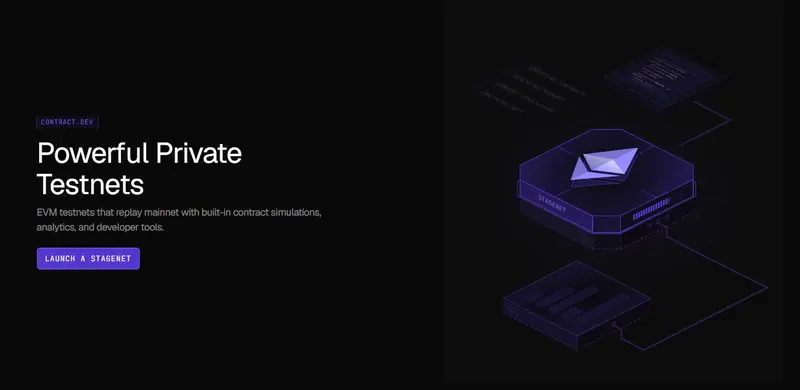
Recently, I began exploring ways to reduce this environmental friction and found a highly practical workflow using contract.dev. It provides the visual simplicity of a tool like Remix, but on a globally accessible, private EVM testnets that replay mainnet state and come with built-in tools for testing, analysing, and simulating smart contracts before launch.

Contract.dev Dashboard

Here is a look at how I approach testing a 3-actor Escrow system visually, eliminating local node overhead and faucet fatigue so I can focus purely on protocol behavior.

The Architecture: A Trust-Minimized Escrow

To demonstrate this workflow, I built TrustEscrow.sol. The architecture is designed to be reusable and relies on strict access control across three distinct roles:

  • Client: Funds the escrow.
  • Provider: Executes the work and receives the funds.
  • Arbiter: A neutral third party that resolves disputes.

Because the state transitions depend entirely on who is calling the function, verifying role transitions is critical. I explicitly designed this contract with a resetEscrow function to allow continuous lifecycle testing without needing to redeploy the contract. Here is the core state machine governing the escrow:

enum Stage {
    AwaitingFunding, // 0 - deployed or reset, waiting for client
    Funded,          // 1 - ETH held; work in progress
    Completed,       // 2 - client released funds; ready for reset
    Disputed,        // 3 - either party raised a dispute; arbiter needed
    Resolved         // 4 - arbiter settled dispute; ready for reset
}
Stage public stage;

(Note: Making the state explicitly public is a deliberate choice here, it allows visual dashboards to read and display the exact stage of the protocol later in the workflow).

Normally, verifying these transitions requires writing extensive .t.sol files with heavy vm.prank() overhead. Here is how we can verify them visually on a live network instead.

Step 1: The Instant Environment (No Alchemy, No Faucets)

The immediate relief of this workflow is the infrastructure. By creating a project on contract.dev, I was instantly handed a live Stagenet RPC URL. No third-party node providers required.

To test this escrow, I needed three distinct, funded wallets. Instead of configuring these locally or begging a public faucet, I used the platform’s Wallet Generator to spin up accounts for the Client, the Provider, and the Arbiter.

Using the built-in Stagenet Faucet, I funded the Client’s wallet with 100 ETH instantly. This is a live RPC that anyone in the world can interact with. You get the freedom of a public testnet without the artificial scarcity of testnet tokens.

The Wallet Generator showing the 3 distinct addresses and the Client's 100 ETH balance

Step 2: CI/CD Sync and Deployment

Unlike local nodes, the platform doesn’t just guess your contract’s ABI. By linking my GitHub repository, the platform’s CI/CD pipeline automatically synced and compiled my Foundry project.

To deploy, I didn’t have to learn a new framework. I simply opened my terminal and ran my standard Foundry deployment script (forge script), pointing it to the new Stagenet RPC and my newly funded wallet private key.

The moment the transaction confirmed on the network, the platform detected the deployed contract and automatically generated a Workspace: a dedicated visual dashboard perfectly mapped to my Solidity code.

The CI/CD dashboard or the Workspace activating after running the forge script

(Crucial note for advanced developers: Unlike a local simulation, this Stagenet utilizes Mainnet Replay. It actively mirrors live mainnet state. If your contract interacts with live Uniswap liquidity or Chainlink oracles, you can test against those live states immediately without writing complex fork scripts).

Step 3: Verifying State Transitions

When testing architecture, immediate feedback is invaluable. Using the Account Impersonation feature directly from the dashboard UI, I impersonated the Client and executed the fundEscrow() transaction with 1 ETH.

The Workspace updated in real-time to reflect the new reality. Instead of relying on terminal queries or cast call commands, the dashboard visually confirmed that the contract balance was strictly locked at 1 ETH, and the stage variable had transitioned correctly from AwaitingFunding to Funded.

The Workspace dashboard showing the 1 ETH balance and the state variable changed to Funded - 1

The Workspace dashboard showing the 1 ETH balance and the state variable changed to Funded - 2

Continuing the simulation, I impersonated the Provider to raise a dispute, and finally the Arbiter to resolve it. The entire lifecycle of a complex 3-actor protocol was verified in seconds.

Step 4: Automating the Ecosystem (AI User Activity)

Manually clicking through a happy path is great for an initial sanity check. But what if you want to simulate a living, breathing protocol under continuous load? Normally, this requires writing complex Hardhat scripts or custom bots to continuously fire transactions and redeploy contracts.

This is where my workflow completely changed.

The platform includes an Activity Scheduler powered by AI. Instead of writing mock scripts, the AI reads your contract’s source code, ABI, and storage layout, and designs realistic user personas for your specific protocol.

Because I built TrustEscrow to be reusable via the resetEscrow function, the AI was able to create infinite, continuous testing loops. With one click, it generated new dummy wallets, funded them, and scheduled recurring transaction workflows. In my Workspace, it automatically created two distinct, recurring timelines:

  1. The Happy Path: It scheduled the Client to fundEscrow, releaseFunds, and resetEscrow every 20 blocks.

  2. The Dispute Path: It scheduled a complex continuous workflow of fundEscrow -> raiseDispute -> resolveDispute -> resetEscrow every 30 blocks.

The AI Activity Scheduler showing the Happy Path and Dispute Path running on autopilot

I didn’t have to write a single line of testing script. I was able to sit back and watch the Stagenet process concurrent, multi-actor state transitions continuously.

Bridging the Frontend Gap

Beyond testing smart contract logic, this approach solves a very real integration problem.

When you build in Remix or on a local Anvil node, handing the protocol off to a frontend developer usually requires them to recreate your local environment just to build the UI.

Because a Stagenet is a persistent, globally accessible network, you can simply share the RPC URL with your frontend team. You hand them a live, fully-funded sandbox where the AI Activity Simulator is already generating realistic background traffic. They can begin building the interface immediately against predictable, living data.

Final Thoughts

Smart contracts handle real value, so engineering them requires a deep focus on security, invariants, and mathematical correctness. Testing infrastructure should support that focus, not distract from it.

While robust local environments are great for early iterations, serious architecture requires a production-like setting. Visual testing on a Stagenet makes it easier to observe protocol behavior, simulate concurrent user activity, and collaborate with your team without getting bogged down in RPC setups and faucet fatigue.

If you are tired of fighting local nodes to test multi-wallet architecture, I highly recommend integrating a visual Stagenet into your workflow.

You can view the full TrustEscrow architecture on my GitHub here: github.com/obinnafranklinduru/trust-escrow

📚 Glossary of Terms (For the Curious)

  • EVM (Ethereum Virtual Machine): The underlying engine that processes and executes smart contracts on Ethereum and other compatible blockchains. Web2 Analogy: Think of it like the global operating system or server environment (like Node.js or AWS) that runs your code.
  • RPC URL: The digital bridge that allows your interface to communicate with the blockchain. Web2 Analogy: Just like an API endpoint connects a frontend web app to a backend database.
  • Faucet: A developer service that provides free test tokens. Web2 Analogy: Like getting free “sandbox credits” in Stripe to test payments without using real credit cards.
  • Mainnet vs Testnet: Mainnet is the live network with real financial value. A testnet is a public sandbox with zero-value tokens. Web2 Analogy: Mainnet is your live “Production” environment. A testnet is your “Staging” environment.
  • Stagenet: A private testing environment that actively mirrors the live mainnet state. Web2 Analogy: A high-fidelity staging server that has been perfectly synced with a live copy of your production database.
  • Private Key: The secret cryptographic password that grants total control over a wallet and its funds. Web2 Analogy: The root password to your bank account.
  • .env File: A hidden local file used to store sensitive information securely. Web2 Analogy: It serves the exact same purpose in Web2—keeping API keys and passwords out of public GitHub repositories.
  • ABI (Application Binary Interface): A file that acts as a translation manual telling a frontend exactly how to interact with a compiled smart contract. Web2 Analogy: Like an OpenAPI/Swagger document that defines the endpoints and expected payloads for a REST API.
  • State Machine: An architectural pattern where a contract can only exist in one specific stage at a time (e.g., AwaitingFunding or Completed). Web2 Analogy: Like an e-commerce order that must strictly move from ‘Pending’ -> ‘Shipped’ -> ‘Delivered’ without skipping steps.
  • Foundry: A fast, specialized command-line toolkit used for compiling, testing, and deploying smart contracts. Web2 Analogy: A mix between a build tool (like Webpack) and a testing framework (like Jest).
  • vm.prank(): A specific testing command used to impersonate a different user to verify access controls. Web2 Analogy: Like a “Login as User” feature in an admin dashboard to test what a specific customer sees.


Self-Hosted LLM Tool Calling: Forge and the Build-vs-Buy Decision

Originally published on TechSaaS Cloud

Originally published on TechSaaS Cloud

Self-Hosted LLM Tool Calling: Forge and the Build-vs-Buy Decision

Self-hosted LLM tool calling is easy to demo and hard to operate. The demo shows a model calling a tool, fetching data, and completing a task. Production asks harder questions: what happens when the model emits malformed tool calls, repeats a step, exhausts context, blocks the shared GPU, or touches the wrong business object?

Forge is interesting because it focuses on the reliability layer around tool calling: guardrails, retries, context management, backend adapters, and workflow structure. That is the right conversation for VP Engineering, directors, and founders.

The production question is not “Can we run an agent locally?” The production question is “Can we measure the cost and risk of every successful workflow?”

The Three Numbers That Matter

Before deciding to build or buy, define three numbers.

First, monthly workflow volume. A low-volume workflow rarely justifies custom orchestration unless the data boundary is unusually sensitive.

Second, cost per successful completion. This includes model runtime, infrastructure, retries, human review, failed attempts, queue time, and engineering maintenance.

Third, downside exposure. A workflow that drafts an internal summary is different from one that updates billing, sends a customer message, changes entitlement state, or touches a renewal forecast.

If the workflow has low volume and low risk, keep it simple. If it has high volume and sensitive data, self-hosting may be worth it. If it has high risk and unclear recovery, do not automate it yet.

Build When Control Creates Advantage

Building around a tool-calling framework can make sense when the company has a real operational reason:

  • data cannot leave a defined boundary
  • latency matters and local inference is acceptable
  • internal tools are too specific for a vendor template
  • workflow volume is high enough to amortize engineering time
  • failure recovery must match internal audit rules

For finance and enterprise SaaS teams, this often appears in renewal research, support triage, invoice classification, compliance evidence lookup, and account risk summaries.

The competitive edge is not “we have agents.” The edge is that the company can automate repeatable internal workflows without leaking data or losing observability.

Buy When The Margin Buys Focus

Managed platforms can be the better choice when they remove operational drag. Vendor margin may be cheaper than building dashboards, queue controls, monitoring, auth, and audit trails yourself.

Buy when:

  • workflow volume is uncertain
  • the team lacks infra capacity
  • compliance review accepts the vendor
  • integrations are standard
  • executive urgency is higher than customization need

The common mistake is treating vendor spend as waste while ignoring internal engineering cost. A self-hosted pilot that consumes six senior engineer weeks has a real price.

The 30-Day Pilot

Run a constrained pilot before a platform decision.

Pick one workflow with measurable volume. Add a manual approval step. Log every tool call. Track retries, malformed outputs, human corrections, queue time, and successful completions. Assign one owner for production readiness.

At the end of 30 days, calculate:

  • total workflows attempted
  • successful completions
  • exception rate
  • average review minutes
  • infrastructure cost
  • engineering maintenance time
  • estimated time saved
  • risk events or near misses

This gives leadership a business decision instead of a taste test.

Failure Replay Is The Product

The most important feature is not the successful demo. It is the failure replay.

For every failed workflow, the team should see:

  • input
  • selected tools
  • tool arguments
  • tool response
  • retry decision
  • final state
  • human intervention
  • business impact

Without that replay, the workflow cannot be trusted in finance, support, or customer operations. It may still be useful, but it is not production-grade.

Observability Requirements

Treat each workflow like a production service. It needs dashboards and alerts.

At minimum, track:

  • workflow attempts
  • successful completions
  • failed completions
  • retry count
  • tool-call latency
  • queue wait time
  • model runtime
  • human review minutes
  • exception reasons
  • cost per workflow

The dashboard should be useful to engineering and leadership. Engineering needs traces and error categories. Leadership needs volume, cost, time saved, and risk events.

The Kill Criteria

Every pilot needs kill criteria before it starts.

Examples:

  • exception rate stays above 10 percent after two weeks
  • review time erases more than half of the expected savings
  • the workflow cannot produce a reliable audit trail
  • users bypass the workflow because output quality is inconsistent
  • the team cannot explain a failure from logs

These criteria protect the team from sunk-cost automation. A stopped workflow is not a failure if it prevents a quarter of unnecessary platform work.

Security And Data Boundaries

Self-hosting does not automatically make a workflow safe. You still need secret handling, tool allowlists, network egress controls, prompt logging policy, and access controls around replay data.

The riskiest pattern is giving an agent broad internal access because it is running “inside the boundary.” Internal access still needs least privilege. A renewal-summary workflow should not be able to update billing state. A support-draft workflow should not be able to change entitlements.

The build-vs-buy decision is strongest when it includes those boundaries from day one.

Service CTA

TechSaaS helps founders and engineering leaders turn AI workflow experiments into measurable production systems with cost, risk, and recovery controls. If you are deciding whether to build, buy, or stop, start here: https://techsaas.cloud/contact

ORA-00072 오류 원인과 해결 방법 완벽 가이드

ORA-00072란?

ORA-00072 에러는 “process is not active”라는 메시지와 함께 발생하며, Oracle이 특정 프로세스에 접근하거나 해당 프로세스와 통신을 시도할 때 그 프로세스가 이미 종료되었거나 비활성 상태임을 감지할 때 발생합니다. 주로 DBA가 ALTER SYSTEM KILL SESSION 명령을 실행하거나, 백그라운드 프로세스 상태를 조회하는 과정에서 대상 프로세스가 이미 사라진 경우에 이 에러를 마주치게 됩니다. 실무에서는 비정상 종료된 세션 처리, RAC 환경에서의 노드 간 프로세스 통신 실패, 또는 장시간 대기 중이던 프로세스가 OS 레벨에서 강제 종료된 직후에 빈번히 발생합니다.

주요 발생 원인

1. 이미 종료된 세션에 대한 KILL SESSION 시도

가장 흔한 원인으로, DBA가 V$SESSION 뷰를 조회하여 세션 정보를 확인한 후 ALTER SYSTEM KILL SESSION 명령을 실행하는 사이에 해당 세션이 자연적으로 종료되는 경우 발생합니다. 특히 오래된 쿼리를 통해 세션 정보를 조회한 뒤 시간이 지나 명령을 실행할 때 자주 발생하므로, 명령 실행 직전에 세션 상태를 반드시 재확인해야 합니다.

2. OS 레벨에서 강제 종료된 Oracle 프로세스

운영체제 관리자가 kill -9 명령으로 Oracle 서버 프로세스(Shadow Process)를 강제 종료했을 때, Oracle 인스턴스는 해당 프로세스가 사라졌음을 즉시 인지하지 못하고 내부적으로 통신을 시도하다가 이 에러를 발생시킵니다. PMON(Process Monitor) 백그라운드 프로세스가 죽은 프로세스를 정리하기 전까지 짧은 시간 동안 V$PROCESS나 V$SESSION에 좀비 세션으로 남아 있어 DBA를 혼란스럽게 만들 수 있습니다.

3. RAC(Real Application Clusters) 환경에서의 인터-노드 통신 실패

RAC 환경에서는 서로 다른 노드의 프로세스 간 통신이 빈번하게 발생하는데, 한 노드가 네트워크 단절이나 노드 장애로 인해 응답하지 못할 경우 상대 노드에서 ORA-00072 에러가 발생할 수 있습니다. 이는 단순한 세션 에러로 그치지 않고 클러스터 전체의 안정성에 영향을 줄 수 있기 때문에, RAC 환경에서는 Interconnect 네트워크 상태 모니터링이 특히 중요합니다.

해결 방법

원인 1: 이미 종료된 세션 KILL SESSION 시도

먼저 세션이 실제로 활성 상태인지 확인합니다.

-- 현재 활성 세션 목록 확인 (STATUS = 'ACTIVE' 또는 'INACTIVE')
SELECT s.sid,
       s.serial#,
       s.username,
       s.status,
       s.machine,
       s.program,
       s.last_call_et AS elapsed_seconds,
       p.spid          AS os_pid
FROM   v$session s
JOIN   v$process p ON p.addr = s.paddr
WHERE  s.username IS NOT NULL
  AND  s.type     = 'USER'
ORDER BY s.last_call_et DESC;

세션이 KILLED 상태로 남아 있는 경우를 확인합니다.

-- KILLED 상태로 남아있는 세션 조회
SELECT sid,
       serial#,
       username,
       status,
       last_call_et
FROM   v$session
WHERE  status = 'KILLED';

세션이 존재하고 아직 ACTIVE/INACTIVE 상태라면 즉시 종료합니다.

-- 정상적인 세션 종료 (권장)
ALTER SYSTEM KILL SESSION '&sid,&serial#' IMMEDIATE;

-- 세션이 응답하지 않을 경우 DISCONNECT SESSION 사용
ALTER SYSTEM DISCONNECT SESSION '&sid,&serial#' POST_TRANSACTION;

-- 즉시 강제 종료
ALTER SYSTEM DISCONNECT SESSION '&sid,&serial#' IMMEDIATE;

세션 종료 후 KILLED 상태가 지속된다면 OS 레벨에서 직접 처리합니다.

-- OS PID 확인
SELECT p.spid,
       s.sid,
       s.serial#,
       s.username,
       s.status
FROM   v$process p
JOIN   v$session s ON s.paddr = p.addr
WHERE  s.status = 'KILLED';
# Linux/Unix 환경에서 OS 프로세스 확인 및 종료
ps -ef | grep <spid>

# Oracle 권장: kill -9 대신 정상 종료 시도 후 필요 시 강제 종료
kill -15 <spid>
# 위 명령이 효과 없을 경우
kill -9 <spid>

원인 2: PMON 정리 전 좀비 프로세스 처리

PMON이 자동으로 정리할 때까지 잠시 대기하거나, 아래 쿼리로 실제 OS 프로세스 존재 여부를 먼저 확인합니다.

-- V$PROCESS와 실제 OS PID 비교를 위한 상세 조회
SELECT p.pid,
       p.spid,
       p.program,
       p.background,
       s.sid,
       s.serial#,
       s.status    AS session_status,
       s.username
FROM   v$process p
LEFT JOIN v$session s ON s.paddr = p.addr
WHERE  p.spid IS NOT NULL
ORDER BY p.pid;
-- PMON 프로세스 정상 동작 여부 확인
SELECT name, description
FROM   v$bgprocess
WHERE  name = 'PMON'
  AND  paddr <> '00';
-- 인스턴스 전체 프로세스 현황 요약
SELECT status,
       COUNT(*) AS cnt
FROM   v$session
GROUP  BY status
ORDER  BY cnt DESC;

원인 3: RAC 환경 인터-노드 통신 장애

-- RAC 환경 노드 상태 확인
SELECT inst_id,
       instance_name,
       host_name,
       status,
       active_state
FROM   gv$instance
ORDER BY inst_id;
-- 각 노드별 활성 세션 수 비교 (비정상 노드 탐지)
SELECT inst_id,
       COUNT(*) AS active_sessions
FROM   gv$session
WHERE  type = 'USER'
  AND  status = 'ACTIVE'
GROUP  BY inst_id
ORDER  BY inst_id;
-- RAC Interconnect 관련 통계 확인
SELECT name,
       value
FROM   gv$sysstat
WHERE  name LIKE '%gc%'
  AND  inst_id = 1  -- 조회할 노드 번호로 변경
ORDER BY name;
-- 글로벌 세션 정보에서 KILLED 상태 세션 전체 노드 조회
SELECT inst_id,
       sid,
       serial#,
       username,
       status,
       machine
FROM   gv$session
WHERE  status = 'KILLED'
ORDER BY inst_id, sid;

예방 방법

1. 세션 종료 전 상태 검증 자동화 스크립트 운영

수동으로 세션을 종료할 때 발생하는 실수를 줄이기 위해, 아래와 같이 세션 상태를 먼저 확인하고 조건부로 종료하는 표준 스크립트를 팀 내 공통 절차로 정착시키는 것이 중요합니다. 특히 배치 작업이나 정기 점검 시 스크립트화된 절차를 따르면 ORA-00072와 같은 불필요한 에러 발생을 사전에 차단할 수 있습니다.

-- 안전한 세션 종료 표준 스크립트 (세션 존재 확인 후 종료)
DECLARE
    v_count NUMBER;
    v_sid   NUMBER := &target_sid;
    v_ser   NUMBER := &target_serial;
BEGIN
    SELECT COUNT(*)
    INTO   v_count
    FROM   v$session
    WHERE  sid     = v_sid
      AND  serial# = v_ser
      AND  status  NOT IN ('KILLED');

    IF v_count > 0 THEN
        EXECUTE IMMEDIATE
            'ALTER SYSTEM KILL SESSION ''' || v_sid || ',' || v_ser || ''' IMMEDIATE';
        DBMS_OUTPUT.PUT_LINE('세션 종료 완료: SID=' || v_sid || ', SERIAL#=' || v_ser);
    ELSE
        DBMS_OUTPUT.PUT_LINE('대상 세션이 이미 종료되었거나 존재하지 않습니다.');
    END IF;
EXCEPTION
    WHEN OTHERS THEN
        DBMS_OUTPUT.PUT_LINE('에러 발생: ' || SQLERRM);
END;
/

2. 장기 실행 세션 및 유휴 세션 자동 관리를 위한 Profile 설정

DBA가 수동으로 세션을 종료하는 상황 자체를 줄이려면, Oracle Profile을 활용하여 유휴 세션과 장기 실행 세션을 자동으로 관리하는 정책을 수립해야 합니다. IDLE_TIME과 CONNECT_TIME 파라미터를 업무 특성에 맞게 설정하면 좀비 세션 누적을 예방하고, 결과적으로 ORA-00072 발생 빈도를 크게 낮출 수 있습니다.

-- 유휴 세션 자동 관리를 위한 Profile 생성
CREATE PROFILE app_user_profile LIMIT
    IDLE_TIME          30     -- 30분 유휴 시 자동 종료 (분 단위)
    CONNECT_TIME        480   -- 최대 8시간 연결 허용 (분 단위)
    SESSIONS_PER_USER   10    -- 사용자당 최대 세션 수 제한
    FAILED_LOGIN_ATTEMPTS 5;

-- 특정 사용자에게 Profile 적용
ALTER USER app_user PROFILE app_user_profile;

-- Profile 적용 현황 확인
SELECT username,
       profile,
       account_status
FROM   dba_users
WHERE  username = 'APP_USER';

-- 현재 Profile 파라미터 상세 확인
SELECT profile,
       resource_name,
       limit
FROM   dba_profiles
WHERE  profile        = 'APP_USER_PROFILE'
  AND  resource_name IN ('IDLE_TIME', 'CONNECT_TIME', 'SESSIONS_PER_USER')
ORDER BY resource_name;

관련 에러

  • ORA-00031: session marked for kill — ALTER SYSTEM KILL SESSION 실행 후 세션이 즉시 종료되지 않고 KILLED 상태로 마킹될 때 발생하며, ORA-00072와 함께 연속으로 나타나는 경우가 많습니다.
  • ORA-00055: maximum number of DML locks exceeded — 프로세스 관련 리소스 한계 초과 에러로, 비정상 프로세스 누적 시 함께 발생할 수 있습니다.
  • ORA-03113: end-of-file on communication channel — 서버 프로세스가 예기치 않게 종료될 때 클라이언트 측에서 발생하며, OS 레벨 강제 종료 직후 ORA-00072와 거의 동시에 나타납니다.
  • ORA-03114: not connected to ORACLE — 세션이 강제 종료된 후 클라이언트가 계속 통신을 시도할 때 발생하며, ORA-00072와 밀접하게 연관됩니다.
  • ORA-00060: deadlock detected while waiting for resource — 교착 상태로 인해 Oracle이 세션을 강제 롤백한 직후, 해당 세션 프로세스 상태가 불안정해지면서 ORA-00072로 이어지는 경우가 있습니다.

OpenWA for CTOs: Self-Hosted WhatsApp Gateway Trade-Offs

Originally published on TechSaaS Cloud

Originally published on TechSaaS Cloud

OpenWA for CTOs: Self-Hosted WhatsApp Gateway Trade-Offs

OpenWA is interesting because it brings a familiar self-hosting argument into a channel that many SaaS companies already depend on: WhatsApp. The pitch is attractive. Run your own gateway, keep more control, avoid a black-box vendor layer, and own the logs.

For a CTO, that is not enough. A self-hosted messaging gateway is not a weekend automation script. It becomes customer communication infrastructure.

The right question is not “Can we host it?” The right question is “Are we prepared to own delivery behavior, abuse handling, uptime, evidence, and compliance boundaries?”

Where Self-Hosting Helps

Self-hosting can be valuable when the team needs visibility into message flows. Support queues, transaction alerts, onboarding reminders, and internal operations messages all benefit from clean logs and predictable routing.

For Indian SaaS teams, the appeal is obvious. WhatsApp is not a side channel for many customers. It is the workflow. A Zoho-style product suite, a Freshworks-like support operation, or a Razorpay-style operations team may need tighter control than a generic vendor dashboard provides.

Self-hosting can also simplify integration with internal systems:

  • route messages through existing queues
  • store delivery events in your own database
  • connect webhooks to support or CRM workflows
  • apply internal audit and retention rules
  • separate environments for staging and production

That control is useful if the engineering team already has platform ownership discipline.

Where Self-Hosting Hurts

The same control creates risk. A managed provider absorbs a lot of messy operational work: throughput policies, abuse response, vendor changes, status pages, support escalation, and infrastructure patching.

If you self-host, those become your job.

Before using a self-hosted gateway in production, answer these questions:

  • Who owns incidents after business hours?
  • What happens when message delivery drops by 20 percent?
  • Where are logs stored, and for how long?
  • Can support staff see sensitive message bodies?
  • How are API keys rotated?
  • How do you prove deletion or retention policy compliance?
  • What is the rollback plan if the gateway breaks during a campaign?

This is where German and UK teams often have a sharper filter. GDPR, data residency, fintech audit trails, and support access controls are not optional details.

A CTO Decision Matrix

Use this simple rule:

Choose managed if you need speed, vendor support, and low internal operations load.

Choose self-hosted if you need control, observability, custom routing, and can staff the operational responsibility.

Avoid both if the use case violates consent, retention, or customer expectation boundaries.

The trade-off is not open source versus vendor. The trade-off is control versus operational load.

What A Production Design Needs

A credible production design needs more than a container.

You need:

  • API key lifecycle and rotation
  • queue depth alerts
  • message retry policy
  • webhook signature verification
  • audit logs with access controls
  • dashboard permissions
  • data retention policy
  • dead-letter queue for failed messages
  • incident runbook
  • upgrade window and rollback plan

If those items feel heavy, that is the point. Customer messaging infrastructure should feel heavy before production, not after the first outage.

When Not To Self-Host

Do not self-host if nobody owns the operational calendar. Do not self-host to avoid paying a vendor while silently moving the cost into engineering weekends. Do not self-host if compliance needs are unclear. Do not self-host if the business cannot tolerate message delays while the team debugs the gateway.

Self-hosting is a good fit when infrastructure ownership is already a strength. It is a poor fit when the team is trying to hide missing process behind open source.

The First 30 Days

If the decision is still attractive, run a limited pilot before production.

Start with non-critical messages. Do not begin with OTPs, payment failures, legal notices, or high-value support escalations. Pick a workflow where delayed delivery is inconvenient but not business-breaking.

Measure:

  • successful sends
  • failed sends
  • retry count
  • average queue delay
  • webhook processing time
  • operator interventions
  • support tickets caused by messaging
  • API key rotation time

The pilot should also include an incident drill. Disable an upstream dependency, pause a worker, fill a queue, and confirm that the team notices before customers do.

Compliance Evidence

For regulated or enterprise customers, the architecture diagram is not enough. You need evidence.

Keep records for:

  • who can access message bodies
  • who can export logs
  • which systems receive webhook payloads
  • how long delivery events are retained
  • how deletion requests are handled
  • how production credentials are rotated

This is where self-hosting can help or hurt. It can help because evidence is inside your systems. It can hurt because nobody else is packaging the evidence for you.

Staffing Reality

A CTO should ask one hiring question: who owns this platform when it becomes boring?

The first week of a self-hosted gateway is exciting. The sixth month is patching dependencies, reviewing logs, adjusting alerts, handling a vendor-side behavior change, and explaining delivery anomalies to customer success.

If the team has a platform owner, clear runbooks, and observability, that is manageable. If not, the managed provider may be cheaper even when the invoice looks larger.

Service CTA

TechSaaS helps CTOs evaluate self-hosted infrastructure decisions with the operational reality included: reliability, compliance, cost, and staffing. If you need a production-grade review before moving customer messaging in-house, start here: https://techsaas.cloud/contact

NotebookLM Automation With notebooklm-py: Useful, But Classify Data First

Originally published on TechSaaS Cloud

Originally published on TechSaaS Cloud

NotebookLM Automation With notebooklm-py: Useful, But Classify Data First

Programmatic access to NotebookLM is useful for engineers who need repeatable research workflows: create a notebook, add sources, ask questions, generate artifacts, download outputs, and wire the result into an internal process. Projects such as notebooklm-py show why developers want this layer.

For senior developers and staff engineers in Europe, the interesting part is not the CLI. It is the boundary.

If the API is unofficial, if authentication relies on browser-derived state, and if the workflow touches customer or employee data, the engineering review must start with privacy and operability.

Start With Data Classification

Classify sources before automating ingestion.

Use a simple four-level model:

  • public: documentation, public reports, published research
  • internal: non-sensitive internal docs
  • confidential: customer, financial, legal, strategy, or personnel material
  • regulated: data with explicit legal or contractual handling requirements

Public and low-risk internal sources are reasonable candidates for experimentation. Confidential and regulated sources require a formal review before they enter any external or semi-external workflow.

This is especially important for GDPR-focused teams in Germany, the UK, the Netherlands, and the Nordics. The question is not only “Does the tool work?” It is “Can we prove what data entered it, who accessed it, and where outputs went?”

Treat Auth Storage As Sensitive

Automation often makes authentication convenient by storing browser login state, cookies, or local credentials. That convenience creates risk.

Engineers should answer:

  • Where is auth state stored?
  • Is it encrypted at rest?
  • Who can read it on the host?
  • Can it be rotated?
  • Can it be revoked?
  • Does CI ever touch it?
  • Is it tied to a personal account or service account?

If the answer is unclear, the workflow is not ready for shared use.

Review The Unofficial API Risk

Unofficial APIs can break without notice. That does not make them useless, but it changes the operating model.

Use them for:

  • personal productivity
  • internal research experiments
  • low-risk automation
  • repeatable artifact generation from approved sources

Avoid them for:

  • customer-facing production paths
  • regulated evidence workflows
  • irreversible business decisions
  • anything with strict support expectations

The more important the workflow, the more you need a fallback path.

Build A Safe Automation Pattern

A safe pattern has five controls:

  1. Approved source folder.
  2. Explicit data classification label.
  3. Local audit log of source IDs and output files.
  4. Manual review before sharing generated artifacts.
  5. Deletion process for temporary files and exports.

That may sound conservative. It is still faster than explaining later why sensitive board notes, customer contracts, or employee documents were processed without a record.

Where It Is Genuinely Useful

There are good uses:

  • turn public research into internal briefings
  • summarize release notes for engineering teams
  • generate study materials from approved docs
  • create draft FAQs from public product documentation
  • build repeatable research workflows for analysts

The common thread is controlled input and reviewed output.

Operational Guardrails

Treat the workflow like any other internal automation.

Define:

  • allowed source locations
  • owner for the automation
  • review step before sharing output
  • retention period for downloaded artifacts
  • deletion process
  • incident contact
  • fallback if the unofficial API changes

The fallback matters. If a workflow depends on an unofficial interface, assume it can break. The safe design is one where a break causes a missed convenience task, not a missed customer commitment.

CI And Shared Hosts

Be careful about running this kind of automation in CI or on shared developer hosts. Browser-derived auth state and generated artifacts can leak through caches, logs, home directories, or misconfigured workspaces.

If the workflow must run on shared infrastructure, isolate it:

  • dedicated service account where allowed
  • locked-down workspace
  • no broad home-directory mounts
  • secret scanning on logs
  • explicit artifact cleanup

Do not let convenience turn a research helper into an untracked data processor.

A Review Checklist For Staff Engineers

Before approving team usage, ask:

  1. Which data classes are allowed?
  2. Where is auth state stored?
  3. Who can run the workflow?
  4. Where are outputs stored?
  5. Who reviews outputs before sharing?
  6. How are temporary files deleted?
  7. What happens if the API breaks?

If those answers are clear, the automation can be useful. If they are vague, keep it personal and experimental.

The Sensible Position

NotebookLM-style automation is not something to hype or dismiss. It is a tool. Used with public or approved internal sources, it can save research time. Used casually with confidential files, it can create governance problems that are far more expensive than the time saved.

Service CTA

TechSaaS helps teams design AI automation that respects privacy, data residency, and engineering reliability. If you want useful automation without compliance surprises, start here: https://techsaas.cloud/services