
 Mert
Mert
How I Built a Simple UMAC Tracking Tool for Balikbayan Box Shipments
As someone interested in logistics tracking systems and SEO-focused web projects, I recently started working on a small project around UMAC Tracking for balikbayan box shipments.
If you are from the Philippines or have family abroad, you probably already know how important package tracking becomes when waiting for a balikbayan box delivery. The problem I noticed was that many users struggle to quickly find shipment updates, especially on mobile devices.
So I started experimenting with a lightweight tracking-focused website that simplifies the process.
What I’m Working On
The idea is simple:
- A clean shipment tracking interface
- Fast mobile-friendly search
- Simple status checking
- SEO optimization around logistics-related keywords
- Helpful guides for users who are confused about shipment statuses
The project is still evolving, but I’ve already learned a few interesting things during development.
Challenges I Faced
1. Logistics Data Structure
Shipment statuses are not always standardized.
For example:
- In Transit
- Forwarded to Delivery Team
- Container Received
- Out for Delivery
Different logistics companies use different wording, which makes normalization tricky.
2. SEO for Tracking Keywords
One surprising thing I discovered:
Tracking-related keywords can have huge search demand, especially country-specific searches.
Keywords like:
- UMAC Tracking
- Balikbayan Box Tracking
- Cargo Tracking Philippines
…often have highly targeted intent because users urgently need shipment updates.
That means user experience matters a lot.
3. Mobile Optimization Matters More Than Fancy Design
Most tracking users simply want:
- Fast loading
- Easy tracking input
- Clear status results
Complicated UI actually hurts usability here.
Tech Stack
Currently experimenting with:
- PHP
- WordPress
- Lightweight custom tracking forms
- Basic caching optimization
- SEO-focused content structure
What’s Next
I’m planning to:
- Improve shipment status explanations
- Add tracking-related FAQs
- Optimize Core Web Vitals
- Test multilingual support
If anyone here has worked on logistics APIs, shipment systems, or SEO for tracking platforms, I’d genuinely love to hear your experience.
Have you ever built something related to shipment tracking or logistics tech?
I got tired of setting up SSL for every side project, so I made a 60-second Docker deploy kit
You know the drill.
Your app runs perfectly on localhost:3000. Time to deploy it. So you rent a cheap VPS, SSH in, and then the fun begins:
- Configure Nginx as a reverse proxy
- Install Certbot
- Request a Let’s Encrypt certificate
- Set up a cron job for renewals
- Debug why the certificate didn’t apply
- Google “nginx ssl redirect loop” at 11pm
Two hours later, you still don’t have HTTPS working.
I’ve done this dance at least a dozen times. Last week I finally got fed up and packaged the whole thing into a reusable kit that takes 60 seconds instead of 2 hours.
The idea: replace Nginx + Certbot with Caddy
The secret is Caddy. Unlike Nginx, Caddy handles SSL automatically — it requests certificates from Let’s Encrypt and renews them without any configuration. The entire reverse proxy config is 3 lines:
yourdomain.com {
reverse_proxy app:3000
}
No ssl_certificate paths. No certbot renew. No cron jobs. It just works.
What I built
I wrapped this into a small Docker Compose setup that anyone can use:
docker-compose.yml — runs Caddy as a reverse proxy alongside your app container
Caddyfile — 3 lines, automatic SSL
.env — the only file you edit:
DOMAIN=myapp.com
APP_IMAGE=my-dockerhub-user/my-app:latest
APP_PORT=3000
setup.sh — a one-command script that installs Docker on a fresh Ubuntu VPS and launches everything
README — step-by-step instructions with examples for Node.js, Python, Go, and static sites
The buyer experience
- Rent a cheap VPS ($4-6/month on Hetzner, DigitalOcean, etc.)
- Point your domain’s A record to the server IP
- Upload the files and run
bash setup.sh - Edit 3 lines in
.env - Run
docker compose up -d - Visit
https://yourdomain.com— it’s live with a real SSL certificate
That’s it. No Nginx. No Certbot. No DevOps experience needed.
Why I’m selling it instead of open-sourcing it
I wanted to experiment with selling a small digital product. The kit is $10 — cheap enough to be an impulse buy, expensive enough to be worth packaging properly with good documentation and examples.
The configs themselves aren’t rocket science. What you’re paying for is the tested, documented, ready-to-go package that saves you an afternoon of Googling and debugging.
If you’re interested: Docker Deploy Kit on Gumroad
What I learned building my first digital product
- Scope matters. A product this small (5 files) can be built and shipped in one afternoon. Don’t overthink it.
- Test it for real. I spun up a Hetzner VPS and ran through the entire buyer experience. Found a bug (environment variables weren’t being passed to the Caddy container) and fixed it before anyone paid for it.
- The README is the product. The config files are simple. The value is in clear, step-by-step documentation that makes the buyer feel confident.
- Free DNS services are unreliable. DuckDNS didn’t work with Let’s Encrypt during testing. Proper domain registrars (Namecheap, Porkbun, Cloudflare) are worth the few dollars.
If you have any questions about Caddy, Docker deployment, or selling digital products, happy to answer in the comments.
Portfolio Website
Just launched my futuristic developer portfolio 🚀
Built with:
• Next.js
• TypeScript
• Framer Motion
• Three.js/WebGL inspired interactions
• AWS + CloudFront deployment
The goal was to create something beyond a traditional portfolio — a cinematic and immersive experience exploring the intersection of AI, Machine Learning, and modern frontend engineering.
Features:
✨ Smooth scroll-driven animations
✨ Futuristic UI/UX
✨ Fully responsive design
✨ Optimized SEO + performance
✨ Custom domain + AWS deployment
Would love feedback from the community 🙌
🔗 https://www.narendrasaraf.in
webdev #nextjs #portfolio #frontend #aws #typescript #threejs #javascript #ai #machinelearning
Getting on to the vibe coding train…in a hackathon
The Idea
It all started with a Hackathon. A no-code Hackathon with a no-code builder I had never heard of, MeDo. Oh, well I’d been looking for a nice excuse to properly try out this version of vibe coding, so I was in. Although, the prize money also played a role…a small role.
So the next question was, what to build? I went into my notes app and found the page on ideas. I like to jot down ideas, many silly, some good, and a few great. My only criteria for selecting an idea were: it had to be different/novel and involve AI(we all chase trends after all)
Armed with these constraints I went through my ideas and landed on 2, an ad network for digital communities eg. Discord or WhatsApp, and AI native checklists. I threw both of them into ChatGPT and it gave its totally unbiased opinion. AI native checklists it was!
The What
I built Checkyard, a way to standardise and operationalise recurring business workflows via executable, AI-native checklists. It facilitates the execution of playbooks, with the ability for both humans and AI agents to work in concert; offloading repetitive, boring tasks to agents, leaving employees to perform better suited functions.
The Build
I built it using MeDo, which allowed for the translation of natural language into a web app. The build process itself looked something like this:
- I first wrote down a product brief outlining what I wanted to build, the core action and goals, desired features, a few expected user flows, and possible use cases
- I used this brief to generate a comprehensive initial prompt using ChatGPT. Notably, I emphasised function over form; with the only design cues being the colour palette to use. I also explicitly excluded the landing page creation.
- I then fed the ready prompt into MeDo, using it to generate a requirements doc, which I edited to meet my own requirements and views. Once I was satisfied with the requirements doc, I hit generate…and watched the magic.
- With each output generated, I’d go through each requested feature one by one, noting down into a separate doc, any issues/bugs encountered along with relevant additions, removals, or enhancements.
- I would then feed the collected issues/bugs back into MeDo for fixes and enhancements.
- I repeated the above 2 steps until all features worked as expected.
- Once functionality was satisfactory, I moved on to UI/UX and finally the landing page.
The Challenges
My initial idea was too broad and needed narrowing down of features for an MVP. I therefore wrote out a brief and used Chatgpt to first expound on it and then review the features. Results of which I used to select “V1” features
Working with the MeDo requirements doc editor was a bit buggy, ie. I was unable to make multiple edits before saving, since it kept exiting edit mode before submission
Code editor view is readonly preventing direct, quick changes to the code. Some changes were small and could have been easily done directly in the code editor. Maybe this is available in the paid tier(we can only hope)
The Likes
MeDo does not immediately go into build mode, it first generates an editable requirements.md doc to ensure everything is accurately covered before the actual build begins.
The credit usage) is a bit more predictable with each action requiring a corresponding credits amount, eg. 15 credits /query(actually 30 from experience), 2/app/day to enable backend, 5/plugin use/generation
The Learnings
When making changes, it’s best to collect all requests/changes into a single, well-structured prompt to save on credits. Charging is per query not per token count.
How to effectively and efficiently create comprehensive feature and product specs
Some cool CSS “tricks”
The Future
- Strengthen the AI agent task execution
- Add a marketplace to allow for users to easily add or share ready made checklist templates
- UI/UX improvements
- Have fun with it
BuiltWithMeDo
My first wordpress plugin
I built a free WordPress plugin to solve my content discovery problem – here’s what it does
Context: I run a PHP programming blog. Content discovery was taking 2-3 hours daily. I wanted something that lived inside WordPress, pulled from trusted sources, and gave me drafts to work from – not auto-published garbage.
So I built RSS Content Curator and published it on WordPress.org.
What it does:
• Pulls from 24+ curated RSS feeds across 7 categories (Technology, Business, Science, Health, Sports, Entertainment, General News)
• Lets you add custom keywords to target specific topics via Google News
• Rewrites content for uniqueness before saving
• Adds source attribution to every generated post
• Saves EVERYTHING as drafts – you review before anything goes live
• Generates SEO meta descriptions automatically
• Auto-skips code-heavy articles (important for dev blogs)
• Zero API keys, zero external accounts required
The Technology category alone includes TechCrunch, The Verge, Wired, PHP.net, Laravel News, Dev.to, CSS-Tricks, and Smashing Magazine.
What’s coming next:
• Scheduled auto-generation
• 19 language support
• Custom RSS feed import
• Duplicate detection
• PRO version launching soon
Free on WordPress.org right now.
Full story + download: https://phpspiderblog.com/rss-content-curator-plugin/
Happy to answer any questions about how it works or the development process.
AI Coding Is Fast Now. Engineering Trust Still Has to Be Earned.
AI tools have dramatically increased the speed of software development.
That is a fact.
Today, a model can write a function or method in minutes, sketch out tests, suggest a migration, explain an error, propose a refactoring plan, or draft an initial architecture decision.
This no longer feels like magic.
It is becoming a normal part of engineering work.
But speed has introduced another problem:
we have lost confidence.
And I do not mean only confidence in code quality.
I mean confidence that the code will actually work correctly and reliably.
A team receives an AI-generated answer: confident, coherent, often useful.
But the main question for developers is no longer whether AI can suggest something.
It can.
The real question is different:
Can we trust that suggestion?
The problem is not that AI makes mistakes
Everyone makes mistakes:
- people;
- tests;
- documentation;
- static analyzers;
- models.
The problem with AI-generated answers is different:
they often make mistakes beautifully.
An answer can look logically structured, well-written, and very convincing. It may use the right terminology, sound professional, and even include code snippets that look completely valid.
But that is not always enough for a reliable engineering decision.
A developer or tech lead still needs to understand:
- which files the model actually considered;
- which facts from the codebase the answer is based on;
- which assumptions were made without evidence;
- which hypotheses were considered and rejected;
- which checks are still open;
- whether this can be merged, or whether it is only a diagnostic conclusion.
Without that visibility, an AI answer becomes a new kind of technical debt.
The model saved time by producing the first version.
But it pushed the verification burden back onto the team: figuring out where the answer contains facts, where it contains assumptions, where the risks are, and where it is simply a confident guess.
A confident answer is not the same as a verified answer
In a regular chat interface, the final answer often looks like the final truth.
The model says:
Here is the root cause.
Here is the fix.
Here are the tests.
And for simple cases, that may be enough.
But in a real project, details matter:
- Was a neighboring call-site missed?
- Did a contract change in another module?
- Is the fix based on a file the model never read?
- Did the model mix existing code with code it invented itself?
- Did it present an assumption as a confirmed fact?
- Was important criticism lost on the way to the final answer?
These are not edge cases.
This is everyday engineering work.
That is why the problem with AI coding in teams is not only the quality of the model.
The bigger problem is the lack of a verifiable process around the answer.
What a good AI engineering artifact should contain
If an AI answer is used in engineering work, it should look more like a reviewable artifact than a polished chat message.
A useful artifact should show the following.
1. What is being proposed
Not a vague statement like:
improve validation
But specific files, functions, tests, and the boundaries of the change.
2. What evidence from the codebase supports the answer
The model should show which files or code fragments confirm its conclusions.
3. Which assumptions are still assumptions
If behavior was not confirmed by the code that was actually read, this must be stated clearly.
4. Which hypotheses were rejected
This is just as important as the final conclusion.
A good investigation shows not only what turned out to be true, but also what was checked and ruled out.
5. Which checks remain open
Some things cannot be honestly closed without additional files, tests, running the project, or a human decision.
That is not a failure if the system says it explicitly.
6. Trust status
The result should distinguish between:
- this can be considered a patch candidate;
- this is useful diagnostics, but not a merge-ready patch.
This kind of format changes the role of an AI answer.
It stops being just generated text and becomes an engineering decision that can be reviewed.
Verification should be part of generation
One might say:
Fine, let the model write the answer first, and then we’ll ask it to check itself.
For small tasks, that works.
Sometimes.
But once the task becomes more serious, post-fact verification quickly runs into limitations:
- the model may defend its own previous answer;
- some evidence may already be lost from the context;
- criticism may remain as prose, but never affect the final result;
- open checks may be softened to make the final answer look cleaner;
- generated code may not make it into the final answer in full.
That is why verification should be part of the process, not an optional step at the end.
Especially not something a developer only remembers after the problem has already happened.
We need a process where different agents or model roles do different things:
- some propose a solution;
- others criticize it;
- a separate step synthesizes the overall conclusion;
- the system checks evidence and open items;
- the final answer receives a trust status.
What matters is this:
using multiple AI roles does not automatically make the answer correct.
The value is not in:
models argued, so now it must be right
The value is that the argument, evidence, risks, rejected hypotheses, and limitations do not disappear.
They become part of the final artifact.
This is exactly why I am building Undes
Undes is a local-first AI engineering CLI that does not simply generate an engineering answer.
It generates the answer together with verification.
The idea is simple:
AI generates.
Undes verifies.
A single prompt should not produce just “a model answer”.
It should produce a verifiable engineering result:
- proposed implementation or diagnostic answer;
- evidence from the codebase;
- assumptions;
- rejected hypotheses;
- risks;
- open checks;
- trust / patch-safety status.
Undes builds a structured workflow around the task:
- proposal;
- critique;
- synthesis;
- evidence checks;
- risk review;
- final artifact.
It is not trying to replace Cursor, Claude Code, Copilot, or other AI coding tools.
Those tools are useful.
They accelerate generation.
Undes focuses on a different layer:
making AI-generated engineering answers more trustworthy and more useful for teams.
Why local-first matters
For an engineering trust tool, it matters where the code lives.
The community version of Undes is designed as a local-first CLI:
- the code is read locally;
- the user configures access to model providers;
- the result stays on the developer’s machine.
This does not mean there are no calls to LLMs, whether cloud-based or local.
But the process itself runs locally on the developer’s machine.
For many teams, this is an important boundary.
A trust-focused engineering tool should not begin with:
Upload your entire codebase to us.
What Undes does not promise
There is an important point here.
Undes does not promise magical correctness.
It does not turn AI into a formal verifier.
It does not replace:
- tests;
- code review;
- CI;
- security review;
- engineering responsibility.
In fact, the strength of this approach is honesty:
- if there is not enough evidence, the result should be diagnostic;
- if there is an unresolved risk, it should be visible;
- if generated code is based on an assumption, that should be stated;
- if the task requires a human decision, the system should not pretend everything is closed.
For a team, this is more practical than a polished but overconfident answer.
Where this is especially useful
This approach is not needed for every small question.
If you just need to quickly recall syntax or draft a throwaway script, a regular chat is enough.
Undes makes sense where the cost of a mistake is higher:
- feature implementation;
- bug fixes in an unfamiliar part of the project;
- migration planning;
- architecture decision review;
- incident investigation;
- refactoring that may break neighboring contracts;
- codebase onboarding, where it is important to separate facts from assumptions.
In these cases, a fast answer is only half of the value.
The other half is understanding how well that answer is proven.
What should the next step in AI coding look like?
The first wave of AI coding tools made generation accessible.
The next step is to make AI-generated engineering work verifiable.
Not because models are bad.
But because good engineering teams do not trust a result just because it sounds confident.
They look at:
- evidence;
- risks;
- contracts;
- tests;
- open checks;
- boundaries of applicability.
AI tools should help us not only write faster, but also make fewer mistakes.
That is the direction I want to move Undes in.
Try it
I am exploring this direction in the community version of Undes, an experimental local-first AI engineering CLI.
The most useful first test is simple:
take a small real task in your repository and look not only at the final answer, but also at the trust signals around it:
- which evidence was used;
- which assumptions remain;
- which hypotheses were rejected;
- which checks are still open;
- what trust status the result received.
For me, the most valuable feedback is whether the artifact exposes enough signal for a real engineering review before merge.
Because the goal is not just another polished AI answer.
The goal is an AI-generated engineering answer you can actually trust.
Disclosure: this article is based on my own experience building Undes. I used AI assistance for English translation and editing, and reviewed the final text before publishing.
DevOps Security Gaps in Startups: What Fast-Growing Teams Keep Getting Wrong
I’ve had this conversation more times than I can count.
Someone from a startup reaches out. They’ve just had an incident — a public S3 bucket, leaked API keys, a production database getting hammered from an IP in a country no one on the team has ever visited. And the first thing they say is some version of: “We always knew we’d fix this eventually.”
Eventually has a way of showing up uninvited.
Here’s what’s frustrating about DevOps security gaps in startups: they’re not mysterious. They’re not caused by nation-state hackers or zero-day exploits. They’re caused by the same boring decisions made at hundreds of companies — credentails committed “just for now,” IAM roles copy-pasted from Stack Overflow, a CI pipeline that’s never had a single security check added to it.
The gap between “we’ll fix that later” and “we’re dealing with a breach” is a lot smaller than it looks from inside a fast-moving team.
Nobody writes bad security on purpose
That’s the thing that gets lost when people talk about startup security. Engineers aren’t lazy or reckless. They’re just operating inside a set of incentives that actively punish slowdown.
You’re three days from a demo. Your lead investor is watching the sprint. The PR is ready to merge but your database URL is sitting in the .env file you forgot to .gitignore. You fix the immediate problem and move on. Ticket gets filed. Ticket ages. Quarter closes. Nobody revisits it.
This is how six months go by with production secrets sitting in a Git repo that three contractors also had access to.
The stuff that actually bites people
Secrets in code. Still the most common one. AWS keys, Stripe tokens, database passwords — committed directly, often in a moment of “I’ll clean this up later.” Tools like gitleaks or GitHub’s built-in secret scanning exist precisely because this keeps happening at companies of every size. Pre-commit hooks are a five-minute fix that saves enormous pain. Most teams don’t have them.
IAM roles that grew without anyone noticing. You give a developer broad access to unblock something urgent. That access never gets narrowed. Now your Lambda has permissions it has no business having, and a misconfiguration somewhere upstream could let an attacker pivot through your entire cloud account. The Capital One breach — while not a startup — is the textbook example of what an overly permissive IAM role actually enables at scale.
A CI/CD pipeline with no security gates at all. Code merges, tests pass, goes to prod. That’s a lot of startups. No SAST, no dependency scanning, no container checks. Supply chain attacks are increasingly targeting build pipelines directly because that’s where the trust lives. SolarWinds was an extreme case, but the attack surface it exposed exists in some form at most early-stage companies.
Dependencies that nobody’s looked at since the MVP. That Docker image you’re running? It was probably last updated before half your team joined. Log4Shell hit so hard because companies had no idea where Log4j was running — buried in transitive dependencies, invisible until it wasn’t. Running trivy or snyk in your pipeline is not a big lift, and it tells you what you’re actually shipping.
No incident response plan. The first breach should not also be the first time your team figures out who’s in charge, who calls the lawyers, and whether you have 72 hours or 30 days to notify users. Under GDPR you have 72 hours. Under some US state laws, even less. Write the runbook before you need it — even a scrappy one in Notion beats improvising under pressure.
You don’t need a security team to close most of these
That’s the honest answer people don’t hear enough.
Pre-commit hooks for secret detection: an afternoon. Quarterly IAM audit: a few hours with AWS Access Analyzer. Adding Trivy to your pipeline: one config change. Incident response doc: a morning, if you timebox it.
None of this requires a dedicated security hire. It requires deciding that security is part of the definition of done — not a separate track that runs “when we have more bandwidth.”
The math is pretty straightforward. Retrofitting security onto a complex, two-year-old codebase costs more than building it in. A breach costs more than all of it combined. The tradeoff only looks reasonable if you assume the breach won’t happen to you.
Most startups that get hit thought the same thing.
Start somewhere. Secrets management, then IAM hygiene, then pipeline scanning. One sprint item at a time. You won’t fix everything at once, and that’s fine — consistent progress beats a one-time security sprint followed by eighteen months of nothing.
Just don’t wait for eventually.
I Built a Programming Language from Scratch — No C, No LLVM, Just Raw Assembly
TL;DR
I spent the last several months building Jda — a self-hosted systems programming language bootstrapped entirely from raw x86-64 assembly. No C. No Rust. No LLVM. The compiler compiles itself, and it beats C on 3 of 5 benchmarks while compiling 33x faster than Rust.
👉 jdalang.org | GitHub
Why Build Yet Another Language?
Most “new” languages are built on top of existing infrastructure — LLVM, GCC, or at minimum a C runtime. That’s totally valid, but it always felt like a shortcut to me.
I wanted to understand what a language actually is at the lowest level. So I started from scratch: raw x86-64 assembly, no external dependencies, no C library, nothing. Just me, the CPU manual, and a lot of patience.
The result is Jda — a fast, modern systems language where the compiler:
- Is written in Jda itself (self-hosted)
- Produces a ~1 MB static binary with zero external dependencies
- Compiles in an average of 43ms
Performance: Does It Actually Work?
I benchmarked Jda against C (gcc -O2), Rust, Go, and Python in the same Docker environment.
Runtime (lower is better)
| Benchmark | C | Jda | Rust | Go | Python |
|---|---|---|---|---|---|
| sieve 1M | 27ms | 24ms | 31ms | 32ms | 416ms |
| sum 100M | 57ms | 49ms | 30ms | 80ms | 8,183ms |
| json parse 50K | 32ms | 31ms | 33ms | 90ms | 159ms |
| matmul 200×200 | 30ms | 37ms | 32ms | 40ms | 2,265ms |
| fib(35) | 40ms | 148ms | 62ms | 126ms | 2,826ms |
Jda beats C on 3 of 5 benchmarks. 54x faster than Python on average.
Compile Time (lower is better)
| Benchmark | C (gcc) | Jda | Rust | Go |
|---|---|---|---|---|
| sieve 1M | 479ms | 45ms | 1,579ms | 658ms |
| sum 100M | 434ms | 40ms | 1,209ms | 678ms |
| fib(35) | 495ms | 42ms | 1,269ms | 746ms |
11x faster than gcc, 33x faster than Rust, 16x faster than Go.
What Does Jda Look Like?
It’s clean and familiar — think Go meets Rust without the boilerplate.
// A ripgrep-style file searcher in ~20 lines
import "file_io"
import "string"

fn search_file(path: &i8, pattern: &i8, pat_len: i64) -> i64 {
    let fd = file_open(path, 0)
    defer file_close(fd)
    let buf = file_read_all(fd)
    let matches = 0
    for i in range(str_len(buf)) {
        if substr_match(buf, i, pattern, pat_len) {
            print_match(path, line_num, buf, i)
            matches += 1
        }
    }
    ret matches
}
Structs and traits follow a Rust-style model:
trait Shape {
    fn area(self: &Self) -> i64
}

struct Circle { radius: i64 }

impl Shape for Circle {
    fn area(self: &Circle) -> i64 {
        ret self.radius * self.radius * 3
    }
}
And concurrency uses Go-style green threads with typed channels:
fn producer(ch: Channel<i64>) {
    for i in range(100) {
        channel_send(ch, i)
    }
    channel_close(ch)
}

fn main() -> i64 {
    let ch = channel_new<i64>()
    spawn producer(ch)
    ret 0
}
What’s in the Box?
Jda ships with 117 stdlib packages including:
- Networking, HTTP client/server, WebSockets
- Crypto, JSON, regex, archives (tar/zip/gzip)
- Tensors, autograd, and neural networks — ML built right in
- GPU acceleration via AVX-512, PTX (NVIDIA), and ROCm (AMD)
- Full toolchain: formatter, LSP, doc generator, REPL, fuzzer, race detector, package manager
There’s also JDA Forge — a full-stack web framework in the style of Rails, built entirely in Jda.
The Bootstrap Story
The hardest part wasn’t the language features — it was the bootstrap.
Every self-hosted compiler faces the chicken-and-egg problem: you need the compiler to compile the compiler. My solution was to write the first version of the Jda compiler in raw x86-64 assembly. From there, I rewrote it in Jda itself, verified the output was byte-identical, and the bootstrap was complete.
The compiler now compiles itself. Every release is verified to produce the same binary.
Current Status
- ✅ Jda v1.0.0 released (MIT license)
- ✅ v1.1.0 shipped last week with a macOS native backend
- ✅ VS Code + JetBrains plugins with full LSP support
- ✅ 388 tests passing
- 🔜 ARM/AArch64 native backend
- 🔜 Windows support
I’d Love Your Feedback
This is still early days and I’m actively looking for feedback on:
- Language design — anything that feels off or missing?
- Stdlib gaps — what packages do you need?
- Tooling — what would make your workflow better?
- Documentation — what’s unclear or missing?
👉 Try it: jdalang.org/docs/getting-started
👉 GitHub: github.com/jdalang/jda-lang
👉 Discussions: github.com/jdalang/jda-lang/discussions
Drop your thoughts in the comments — I read everything. 🙏
Agentic Conversational FAQ Assistant with Memory using LangGraph + AWS Bedrock AgentCore
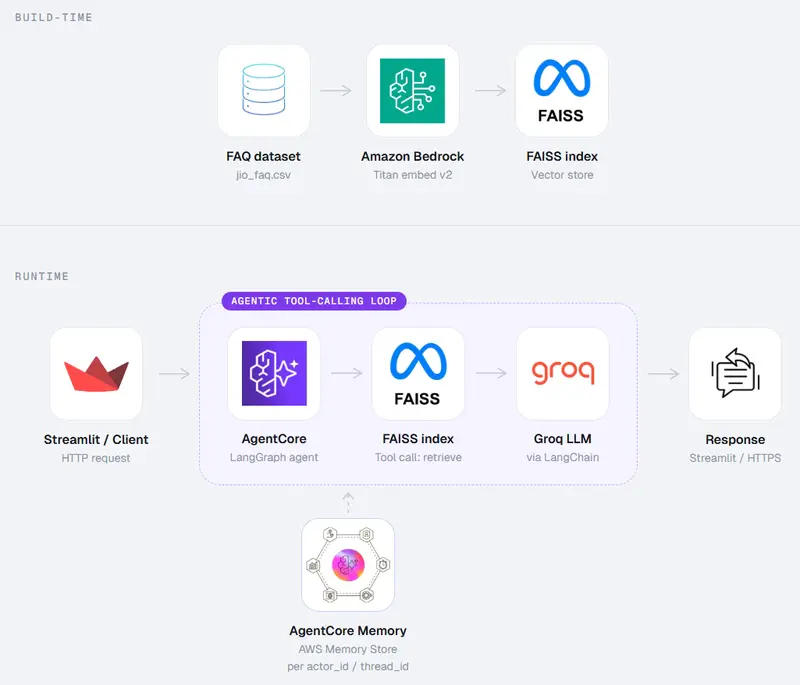
Recently, I built an end-to-end Agentic Conversational FAQ Assistant.
A few things worth sharing from the process:
• The agent can work on any dataset and maintains contextual awareness and memory while answering user queries.
• It retrieves information using an FAISS vector index built over the dataset.
• To separate the knowledge layer from the LLM layer, I designed the system so the index can be updated independently without changing the model itself.
• One of the main challenges in development was memory management. Multi-turn conversations become meaningless if the agent forgets what the user said two messages ago, but you can’t send the full history on every call.
• To solve this, I used AWS Bedrock AgentCore’s memory layer, which scopes context per actor and session, allowing the agent to continue conversations without reloading everything.
• Orchestration is handled using LangGraph because the logic is not always linear. Depending on the retrieval results, the agent can dynamically choose different tool paths, which is difficult to manage cleanly using a simple linear chain.
• I also built a Streamlit-based interface to interact with the assistant and test multi-turn conversational behavior.
• For the knowledge base, I extracted and prepared the dataset from Jio’s official website.
Code: Agentcore-Project

