Day 6 – Embedding – RAG

In the previous post, we saw what chunking is and the various methdologies of chunking. In this post, we are going to see the next stage of the RAG pipeline – Embedding.

What is Embedding ?
For each chunk, a vector will be generated. Vector is nothing but a list of numbers. Vector denotes a point in three dimensional space. This process is called embedding.

Why we need to generate a list of numbers in the first place ?
The whole idea of RAG is to enable semantic search.
Lets consider the following word pairs
1.Feline & cat
2.King & Queen
Although words in each pair are different, meaning wise, words of the respective pairs are related to each other.
Now let’s consider another term, similarity. It means how close two items are in nature. Combining semantic and similarity we get semantic similarity. It refers to how close two items are related to each other in terms of intent, meaning and context. So in RAG,words which are semantic in nature(meaning is similar) occurs closer in multi dimensional space as vectors.

Vectors are generated for each chunk and stored in vectorDB. User query will also be converted to vector. To return a relevant answer for the query, vector points which are of at close proximity to the query vector will be chosen. among them top n close points will be returned.By means of vectorisation, we can find and return the relevant information. This answers our earlier question, why vectors.

*How close proximity vector points are determined for the user query vector ?
*
There are several metrics to determine this:
1. Cosine similarity
2. Euclidean distance
Most commonly used is cosine similarity. Now you may get another question, why cosine ? not Sin or Tan ?

We basically need to find the points that are closer to each other i.e distance between them should be less. If the angle between is small, obviously distance between them will also be less. Cosine helps to achieve identify this notion.

If the angle is almost 0 deg then the cos(0) is 1. This means vectors are nearer to each other and are highly related to each other If the angle is 90, then cos(90) is 0, vectors are not situated nearer. If the angle is 180 deg, cos(180) is -1. They are situated at opposite ends, not related to each other at all. Should not be taken into consideration.

When seeing sine, it does not provide clear distinction. For 0 degree, it returns 0 and for 90 deg also returns zero. We cannot distinguish whether the points are near or far as it returns same 0 value. Tan provides unpredictable values like infinity. Because of this, cosine is preferred.

So in essence, vector is list of numbers that denotes a point in a n- dimensional space. Dimension can be of 256,…, 3000 +. i.e single point is list of 256 values or more.

For the query vector, we can either find the distance between each vector and query – this is called KNN algorithm. Suppose if the data is really huge and if we can’t afford to find the distance between each of the query, we can choose approximate number of points. This is called ANN. This is all about the need for vectorisation.

Now, lets see how we can choose a embedding model
Some common categories to choose a embedding models are:

1. By query type
a. Symmetric model
search query is identical to the provided documents.
Example: If i ask to return other news article similar to the one that i provide, then we can use this model.
Ex: Nomic-embed-text, qwen-3

b. Asymmetric model
Shorter query for longer documents.
Ex: HR documents are stored. If we ask a query like, how many leaves are allowed ? we can go with this model type
Ex: Gemini

2. By Retrieval type
a. Dense embedding
To have more semantic understanding, we can go with this model.
Ex: cohere embed models, chatgpt oss 120b

b. Sparse embedding
Does a exact keyword search. Won’t have semantic understanding at all.
Ex: BM- 25. This is based on term frequency (TF) and inverse document frequency (IDF)
Term frequency: Frequency of a word in a text. This can fail, if someone spams same word over and over.
Inverse term frequency : It considers How important a word is in the given text. It ignores the frequency of word.
Ex: is, and will be repeated but not much important.

We can also use transformers to generate embeddings.
Transformers are made up of encoders and decoders. From transformers LLMs are built.

The CDN Logging Crisis

CDN logging landscape

Authored by Benoit Gaudin

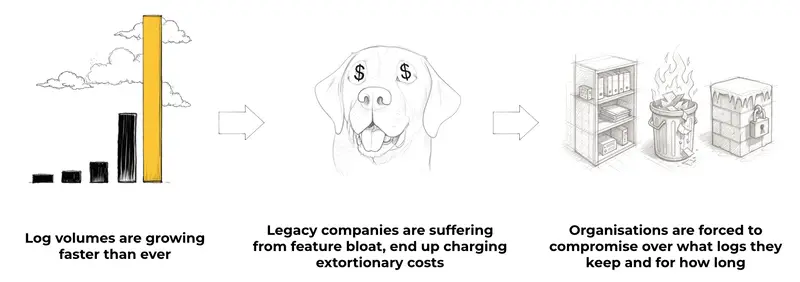
Every second, your CDN is generating thousands of logs that tell a critical story about your application’s performance, security, and user experience. For large enterprises, this can mean terabytes of log data every day — data that contains invaluable insights about your business.

But here’s the uncomfortable truth: most organizations capture only a small fraction of their CDN logs, and retain that limited data for just days or weeks. This isn’t because engineering teams don’t understand the value. It’s because the economics of traditional logging solutions make comprehensive CDN logging prohibitively expensive.

The result? Critical blind spots that can be extremely costly during outages, security breaches, or major events.

Welcome to the flywheel of compromises:

  1. Cost — Traditional logging vendors charge egregious per-GB rates that make comprehensive CDN logging unaffordable
  2. Coverage — Companies respond by severely limiting what logs they collect and how long they retain them
  3. Complexity — To compensate for coverage gaps, teams cobble together 5–8 different logging solutions, creating a management nightmare

The Current State of CDN Logging

CDN logging landscape

The observability sector today resembles markets before transformative innovation — vacuum cleaners before Dyson, mobile phones before iPhone, electric cars before Tesla. Existing solutions were designed for a completely different era: before the separation of compute and storage, before the explosion of log data volumes, and certainly before the demands of the AI era.

Consider how most logging vendors operate today:

  • Datadog charges around $2–5 per GB for log ingestion with 15-day retention. A company generating 10TB of CDN logs daily could pay upwards of $600,000 per month
  • Splunk forces customers into complex licensing schemes that effectively limit how much data they can realistically log
  • New Relic and other vendors offer marginally better pricing but still force unacceptable trade-offs between cost and coverage

What’s most frustrating is that these pricing models persist despite dramatic changes in the underlying technology. The separation of compute and storage has revolutionized data economics across virtually every other category of software, yet logging vendors continue to operate on business models created 15 years ago.

A Hypothetical (But Entirely Plausible) Scenario

To illustrate the real-world impact of incomplete CDN logging, consider this:

A week before a major live streaming event, a provider’s engineering team makes a routine CDN configuration change. Under normal traffic loads, the misconfiguration goes unnoticed — cache hit ratios remain stable and performance appears normal.

After a week, any trace of the configuration change disappears from their logs due to their 7-day retention policy. Capacity planning teams review infrastructure and assume current backend capacity can handle the anticipated load — after all, it worked fine during the last similar event. Unfortunately, the now-invisible change makes that assumption dangerously wrong.

During the live event, CDN cache efficiency plummets under heavy load. Backend servers get hit much harder than expected. Users experience buffering and connection problems, but the operations team struggles to diagnose the root cause.

By the time they identify the issue — tracing it back to the forgotten configuration change — the damage is done. Over a million viewers have abandoned the stream, social media is flooded with complaints, and the company’s stock takes a hit.

With complete CDN logging and longer retention, they could have:

  • Identified when the degradation trend first appeared, correlating it to the configuration change
  • Maintained visibility throughout the planning period
  • Quickly correlated the performance issues with the earlier change during the incident

Limited logging coverage transformed a minor configuration error into a major business incident. The cost of their logging “savings”? Potentially millions in lost ad revenue and subscription cancellations.

The Three Horsemen of the Logging Apocalypse

Cost Explosion

Traditional logging vendors price their products based on data volume, charging premium rates for both ingestion and storage. This pricing model was created when storage was genuinely expensive. In 2025, with cloud storage costs continuing to plummet, this model serves primarily to protect vendor margins.

For CDN logs — which are high-volume by nature — this creates an impossible equation. When faced with estimates of $500,000+ monthly for complete CDN logging, even the most data-driven organizations are forced to compromise.

Coverage Sacrifice

Coverage gaps diagram

The inevitable result of cost pressure is reduced coverage. Organizations typically:

  • Ingest only a sample of the data
  • Limit retention to days instead of months
  • Exclude high-volume CDNs or regions entirely
  • Drop detailed fields that would aid troubleshooting

These compromises create dangerous blind spots. Intermittent issues, security threats that develop over time, and regional performance problems remain invisible. When an incident occurs, teams often discover they’re missing exactly the data they need.

Complexity Creep

To compensate for coverage limitations, organizations implement a patchwork of supplementary solutions:

  • Self-hosted ELK stacks for longer-term storage (with all the maintenance overhead)
  • Cloud provider-specific logging solutions (AWS CloudWatch, GCP Logging)
  • Custom scripts to archive logs to object storage with rehydration workflows
  • Open-source tools for log analysis and visualization

The result is a Frankenstein’s monster of logging infrastructure that no one fully understands, requires constant maintenance, and still fails to provide comprehensive visibility.

CDN Logging for the AI Era

These challenges are escalating as we enter the AI era:

  • Exploding volumes — Microservices, containers, and edge computing are all contributing to the data deluge
  • AI-powered analysis — ML systems require comprehensive, long-term data to identify patterns and anomalies effectively
  • Agentic applications — Autonomous applications require complete historical data to make intelligent decisions

Legacy logging business models simply cannot accommodate these realities. They weren’t designed for terabytes of daily log ingestion, years of retention, or a world where AI agents might need to analyze months of historical CDN patterns.

A Different Approach

Bronto CDN logging dashboard

Solving the CDN logging crisis requires rebuilding the logging stack from the ground up — not incremental improvements on broken foundations. Three core principles drive the right approach:

1. Economics Aligned with Modern Infrastructure

Leveraging the separation of compute and storage to deliver CDN logging at a fraction of traditional costs:

  • 90% cost reduction compared to Datadog and similar vendors
  • 12-month retention by default
  • No charges for search or compute resources

2. Lightning-Fast Search Across Petabytes

“Tracey’s Law”: the faster you make log search, the more valuable logging becomes to an organization.

  • Sub-second search across terabytes of CDN logs
  • Seconds-long queries across petabytes
  • No rehydration from cold storage, ever
  • Fast dashboards even across months of data

When queries return in seconds instead of minutes (or timing out entirely), teams use logging data proactively rather than as a last resort.

3. A Single Unified Logging Layer

Eliminating the patchwork by providing one comprehensive logging layer:

  • All CDN providers in one place
  • Drop-in replacement for existing solutions
  • Two-line configuration change for implementation
  • Automatic parsing and PII removal

Breaking Free from the Flywheel

The CDN logging crisis isn’t just a technical problem — it’s a business problem with real implications for reliability, security, and user experience. For too long, organizations have accepted a dysfunctional status quo because there seemed to be no alternative.

“Every single word about the logging crisis resonates. We were spending over $400,000 monthly on CDN logging with Datadog, and still only capturing about 20% of our logs. With Bronto, we now have 100% coverage, 12-month retention, and our bill is under $40,000.”

This isn’t an incremental improvement — it’s a fundamental reinvention of how logging works. Just as Apple reinvented the smartphone, Dyson reinvented the vacuum cleaner, and Tesla reinvented the electric car, the logging industry is overdue for the same transformation.

Bronto is reinventing logging from the ground up for the AI era. The team brings 150+ years of collective logging domain expertise, with previous experience building and scaling logging platforms at IBM, Rapid7, and Logentries.

See What 100% CDN Log Coverage Looks Like

The 4 Levels of AI Agents: Why Most Service AIs Still Feel Dumb (Part 1)

TL;DR

  1. AI agents in real products fall into 4 levels: LLM wrapper → intent classifier → context-aware → agent loop.
  2. Most “AI agents” you meet in production are stuck at level 1 or 2, which is why they feel dumb on top of very smart models.
  3. The gap between levels is rarely the model. It’s context management and the agent loop. Part 2 covers how to climb the levels — this post is about what the levels are and why most products stall.

Last month I tried to cancel an order through a SaaS company’s shiny new “AI agent.”

Me: “Cancel my latest order if it hasn’t shipped yet.”
Agent: “Here is our refund policy: [link]. Is there anything else I can help with?”

Then I asked a customer-support bot a follow-up referencing my previous message. It had already forgotten.

We are in the middle of an AI boom. Frontier models can write production code and reason through multi-step problems. And yet the AI agents shipped inside real products often feel like 2018-era chatbots in a new costume.

Here is the part I find funny. After two messages with one of these things, you can usually guess the architecture from the outside. The second message reveals the architecture, every time.

Why? Because most of what people call an “AI agent” is not one. It is an LLM API call wearing the word as a marketing label.

A note before we start: classifications of agents already exist — Anthropic’s workflows vs. agents, Harrison Chase’s cognitive architectures, Lilian Weng’s planning / memory / tool use decomposition, and a handful of “SAE-style autonomy levels” posts. The four levels below are not new theory. They are the four shapes I keep seeing when I poke at real production agents from the outside.

Level 1 — The LLM API Chatbot

The most basic form.

User input → LLM API call → Response

System prompt, maybe. No tools. No memory. No retrieval. No state.

I am honestly not sure this should be called an agent at all. It is an LLM API wrapper with a friendly UI on top. But at the product level, plenty of teams still call this “our AI agent.”

It can handle FAQ-style questions. The moment a user says something like:

“Can you do the same thing with the settings I mentioned earlier?”

…or:

“Check my latest order and cancel it if it hasn’t shipped yet.”

…the seams show immediately. Nothing is connected to anything. The model is guessing.

This is the level most “AI features bolted onto an existing SaaS” sit at. And it is exactly why users walk away thinking AI is overhyped.

Level 2 — Intent Classification Agent

Probably the most common level in production today.

User input
  → Intent classification
  → Intent-specific handler
  → Response

For a customer-support bot the intents might look like:

  • Refund request
  • Shipping question
  • Payment issue
  • Account problem
  • Escalate to human

Within a tightly scoped domain this works surprisingly well. If you know your user requests fall into a small number of buckets, intent classification is cheap, fast, and easy to monitor.

The weakness shows up the moment users do what users actually do: combine intents.

“I want to cancel the thing I paid for yesterday, but I think it may have already shipped.”

That is payment, cancellation, refund, and shipping in one sentence. A classic single-intent classifier routes this to one handler and ignores the rest. The user gets half an answer and gives up.

Modern multi-intent classifiers help. They do not fix the ceiling: the agent is only as good as the intents you predefined. Anything outside the schema falls off a cliff.

If you ask Claude or Codex to “build me an AI agent,” there is a good chance you will end up here. It is a fine starting point. It is not a high-level agent.

Level 3 — Context-Aware Agent

Level 3 is the first level where the user stops feeling like they are filling out a form.

User input
  + Previous conversation context
  + Stored facts / preferences
  → Reasoning
  → Response

By “context” here I mean conversational memory across turns. What the user said two messages ago. Their stated preferences. The entities they already referred to. Not the runtime working context an agent loop carries between tool calls. (That shows up in Level 4.)

The agent maintains state across the conversation. “Use the option I mentioned earlier” actually works. The user does not have to repeat themselves every turn.

The prompt is the easy part. Context management is where it gets ugly. LLMs do not have infinite memory, and naively stuffing the full history into every call breaks cost and quality at the same time.

The usual strategies:

  • Keep the most recent N messages verbatim
  • Summarize older messages into a compact form
  • Extract durable facts (“user prefers email over Slack”, “ordered SKU 1042”) and store them separately
  • Slide the context window: keep the head (system + key facts) and the tail (recent turns), compress the middle

A Level 3 agent feels like it remembers you. A Level 2 agent feels like every message is its first day on the job.

Level 4 — Agent Loop

This is where an agent becomes an actual agent.

The model does not just generate a reply. It decides what action to take, executes a tool, observes the result, and decides again — until the task is done or a budget is hit.

flowchart TD
    A[User request] --> B[Inspect current state]
    B --> C[Choose a tool]
    C --> D[Execute tool]
    D --> E[Observe result]
    E --> F{Task complete?}
    F -- No --> B
    F -- Yes --> G[Final response]

Say the user asks:

“Find and fix the login bug in this project.”

A Level 1 chatbot guesses. A Level 4 agent does something like:

  1. Inspect the project structure
  2. Search for login-related files
  3. Read the relevant code
  4. Check error logs or failing tests
  5. Hypothesize the root cause
  6. Edit the code
  7. Run tests
  8. If tests fail, loop back to step 3
  9. Report

At this point the agent is no longer answering questions. It is doing work.

The part nobody warns you about when you start building one: the model matters, but tools matter at least as much. A great model with badly designed tools will pick the wrong one, pass the wrong arguments, or loop forever. A merely-good model with well-designed tools punches far above its weight.

That is the topic of Part 2.

A Note on the “Levels”

These are not strict maturity levels. Memory (Level 3) and the agent loop (Level 4) are independent axes, not stacked floors. A stateless coding agent can run a strong Level 4 loop inside a single task with almost no conversational memory. A customer support assistant can have rich user memory and no autonomous loop at all. I am using “levels” as shorthand for product behavior the user perceives, not a formal architecture ladder where each rung technically depends on the one below.

If you take only the ladder away from this post, you took the wrong thing. Take the four shapes.

Why Most Products Stall at Level 1–2

If Level 4 is so clearly better, why are most shipped “AI agents” stuck on the bottom two rungs?

A few honest reasons:

  • Level 1 is one weekend of work. A system prompt and a chat.completions call. Demos beautifully. Falls over the moment a real user shows up.
  • Level 2 fits how PMs already think. Intents map cleanly onto support tickets, KPIs, and existing decision trees. The org chart pulls toward Level 2.
  • Level 3 requires unsexy infra. Context summarization, fact extraction, durable per-user state. None of it is one prompt away. All of it is operationally annoying. (Note: this is conversational memory, not RAG. Retrieval is a separate axis, not a prerequisite.)
  • Level 4 requires real tools. A loop is meaningless without things to call. Building, scoping, and securing tools that touch your production systems is the part that scares teams — so they ship the chatbot version and call it a day.

The result is a market full of “AI agents” that share the badge but not the behavior. The badge is cheap. The badge has been cheap for two years. The behavior is what users are still waiting for.

Part 2 — “How to actually design a Level 4 agent” — covers tool design, a reasonable starting architecture, and the mistakes that make agents loop forever. Coming next.

If this matched your experience building or using AI agents, I’d love to hear which level your current project is at — and what broke when you tried to climb to the next one.

“I Made Hindsight Ask Before It Remembered”

## I Made Hindsight Ask Before It Remembered

The hard part of building a clinical memory system was not storing what a doctor said. The hard part was deciding when the system should ask one more question before committing that memory.

Shift handoff software usually treats the handoff as a document problem: capture a note, file it, maybe make it searchable. I found that framing too weak. The clinically interesting data often lives in phrases that look imprecise to software but meaningful to a doctor: “something feels off,” “guarded on paper,” “not fully comfortable,” “oxygen dipped but recovered with support.” Those are not clean fields. They are uncertainty signals.

ShiftBrain is my attempt to build around that reality. It combines voice capture, structured handoff extraction, patient-specific memory retrieval, cross-shift pattern detection, and runtime model routing. The two ideas that shaped the architecture were Hindsight agent memory and cascadeflow model routing. Hindsight gave me the mental model for persistent patient memory. cascadeflow gave me the runtime pattern: do the cheap, fast thing first, then escalate when the input deserves it.

The opinionated part is this: I do not want an agent that only answers questions. For handoffs, I want an agent that interrupts politely before it stores a dangerously vague memory.

What ShiftBrain Does

ShiftBrain has two primary workflows.

The outgoing doctor uses a voice bot to create a handoff. They select a patient, click “Start Handoff Conversation,” and speak naturally. The browser records audio with MediaRecorder, the backend transcribes it with Groq Whisper, then /api/handoffs/extract-draft turns the transcript into structured fields:

  • formal note
  • gut concern
  • things not in the chart
  • watch-outs
  • shift
  • follow-up questions

The incoming doctor uses a separate voice bot or patient Q&A page. They select the same patient and ask a question like, “Anything unusual I should watch for tonight?” The backend fetches the patient row, saved handoffs, extracted memories, and cross-shift patterns, then asks Groq for a patient-grounded answer through /api/memory/ask.

The architecture is deliberately boring in the best way:

  • FastAPI backend
  • Next.js frontend
  • Supabase for relational data and pgvector memory lookup
  • Groq for LLM calls and Whisper transcription
  • browser-native speech synthesis for TTS
  • Hindsight-style memory storage
  • cascadeflow-style runtime routing and audit logging

I did not want a pile of agent abstractions hiding the control flow. In clinical handoff, the boring path is often the path you can debug at 3 AM.

The Real Problem Was Ambiguity

My first version had a predictable flaw. It could fill the fields, then confidently say:

Thanks. I’ve structured the handoff. Please review and save.

That looked good until I tried a handoff like this:

45 year old male with pulmonary tuberculosis, currently guarded on paper, somewhat stable, but I am not fully comfortable with how he looks. His breathing pattern seemed more labored in the last hour. Oxygen saturation dipped but recovered with support.

The structured output had values. formal_note was non-empty. gut_concern was non-empty. things_not_in_chart had the oxygen dip. watch_outs mentioned respiratory monitoring.

But clinically, the handoff was not done.

“Oxygen saturation dipped” is not enough. What was the low? What is it now? What support helped? Oxygen? nebulization? positioning? Should the incoming doctor check respiratory rate and saturation in the first 30 minutes?

The mistake was treating “field is non-empty” as “field is adequate.” That is a classic software bug when the domain has tacit meaning. Clinical ambiguity is not null. It is often a phrase with just enough information to be dangerous.

So I added an explicit risk clarification layer.

Hindsight Is Memory, Not Just Storage

The Hindsight layer is small, but it carries a lot of the system’s intent. When a handoff is saved, extraction produces tacit memories and stores them against the patient. Retrieval is scoped by patient and department, and it tries semantic search first with a recent-memory fallback.

class HindsightService:
    def store_memory(
        self,
        patient_id: str,
        author_id: str,
        department: str,
        memory_type: str,
        content: str,
        importance: float = 0.5,
        confidence: float = 0.5,
        tags: list[str] = None,
        handoff_id: Optional[str] = None,
        metadata: dict = None,
    ) -> dict:
        try:
            vec = embed(content)
        except Exception as exc:
            logger.warning("Embedding failed while storing memory; using zero fallback vector: %s", exc)
            vec = [0.0] * EMBEDDING_DIM

        row = {
            "patient_id": patient_id,
            "author_id": author_id,
            "department": department,
            "memory_type": memory_type,
            "content": content,
            "embedding": vec,
            "importance": importance,
            "confidence": confidence,
            "tags": tags or [],
            "handoff_id": handoff_id,
            "metadata": metadata or {},
        }

This is intentionally not just “chat history.” A memory has type, confidence, importance, tags, author, patient, department, and source handoff. That matters because incoming questions need provenance. “Dr. Patel had a gut concern last night” is more useful than “the model thinks there may be a concern.”

The Hindsight documentation helped clarify that memory should be a retrieval substrate, not a transcript dump. The broader concept is described well in Vectorize’s write-up on what agent memory is and why retrieval matters. In ShiftBrain, I used that idea to keep each handoff connected to future bedside questions.

cascadeflow Is Where Runtime Judgment Lives

For extraction, I wanted a runtime that could start with a fast model and escalate when the input looked risky, long, or hard to parse. That is the cascadeflow-shaped part of the system.

MODELS = {
    "fast": {
        "provider": "groq",
        "name": "llama-3.1-8b-instant",
        "in": 0.05,
        "out": 0.08,
    },
    "balanced": {
        "provider": "groq",
        "name": "llama-3.3-70b-versatile",
        "in": 0.59,
        "out": 0.79,
    },
    "premium": {
        "provider": "openrouter",
        "name": "anthropic/claude-3.5-sonnet",
        "in": 3.00,
        "out": 15.00,
    },
}

CRITICAL_KEYWORDS = [
    "cardiac arrest", "stroke", "hemorrhage", "sepsis", "code blue",
    "anaphylaxis", "respiratory failure", "unstable", "deteriorating",
]

The router is not magic. It checks the prompt, picks a tier, requires JSON when the caller needs a schema, and writes audit logs with tokens, latency, model, provider, and estimated cost.

def _route_tier(self, prompt: str) -> str:
    lower = prompt.lower()
    if any(k in lower for k in CRITICAL_KEYWORDS):
        return "premium"
    if len(prompt) > 2000:
        return "balanced"
    return "fast"

That style maps closely to the ideas in cascadeflow docs: runtime decisions belong close to the work, not buried in prompts. The cascadeflow GitHub project is useful because it treats model choice as an engineering control surface. I wanted that same property here. If a handoff contains “respiratory failure” or “deteriorating,” the system should not pretend every input has the same risk profile.

The Follow-Up Loop That Broke My Assumptions

The outgoing voice bot exposed the most interesting failure.

At first, I had a simple loop:

  1. transcribe audio
  2. extract draft
  3. ask first follow-up question if one exists
  4. listen again
  5. re-run extraction

Then I hit a repeat bug. The bot kept asking, “Is patient’s oxygen saturation stable?” even after the doctor answered. The backend did not know which question had already been asked, and the frontend did not attach the doctor’s next utterance to that question.

The fix was not a bigger prompt. It was state.

const [askedQuestions, setAskedQuestions] = useState<string[]>([])
const [answeredFollowups, setAnsweredFollowups] = useState<AnsweredFollowup[]>([])

const askedQuestionsRef = useRef<string[]>([])
const answeredFollowupsRef = useRef<AnsweredFollowup[]>([])
const currentFollowupRef = useRef<string | null>(null)

function captureFollowupAnswer(answer: string) {
  const question = currentFollowupRef.current
  if (!question) return answeredFollowupsRef.current
  const next = [...answeredFollowupsRef.current, { question, answer }]
  answeredFollowupsRef.current = next
  setAnsweredFollowups(next)
  currentFollowupRef.current = null
  return next
}

The frontend now sends the full conversation context:

const data = await api.post<Draft>('/api/handoffs/extract-draft', {
  patient_id: patientId,
  transcript: nextTranscript,
  previous_draft: draftRef.current,
  asked_followup_questions: askedQuestionsRef.current,
  answered_followup_questions: answeredOverride,
})

That one change made the bot feel less like a form generator and more like an interview loop. It also made the backend responsible for a stricter contract: never repeat a question, cap follow-ups at two, and decide whether the handoff is ready to save.

The backend response now includes risk_clarifications_needed and ready_to_save. That is a small schema change with a big behavioral effect.

Return JSON only with:
{
  "formal_note": "",
  "gut_concern": "",
  "things_not_in_chart": "",
  "watch_outs": "",
  "shift": "day|night|swing",
  "missing_fields": ["formal_note", "gut_concern", "watch_outs"],
  "risk_clarifications_needed": true,
  "followup_questions": ["one or two concise questions"],
  "ready_to_save": false
}

This is where the system became more opinionated. It no longer asks follow-ups only when fields are blank. It also asks when risk phrases are ambiguous:

  • oxygen saturation dipped
  • recovered with support
  • breathing more labored
  • guarded
  • something feels off
  • not comfortable
  • pain is different
  • unusual quietness

For the TB handoff, the system asks:

What was his lowest oxygen saturation and what is it now?

Then, if it has room for a second follow-up:

What support helped him recover – oxygen, nebulization, positioning, or something else?

After those answers are captured, the structured preview updates, the bot stops asking, and it says:

Thanks. I’ve structured the handoff. Please review and save.

The max-two rule matters. An agent that asks infinite clarifying questions is not careful. It is unusable.

Incoming Questions Need Patterns, Not Just Recall

The other major design decision was cross-shift pattern detection. If two doctors on consecutive nights say a patient seemed unusually quiet, that should not be buried as two independent notes.

I started with rule-based detection rather than an LLM. That was deliberate. Pattern detection should not fail because a model is unavailable, and it should be easy to inspect.

PATTERN_RULES = [
    {
        "key": "gut",
        "pattern": "Repeated gut concern",
        "terms": ["gut concern", "something feels off", "feels off", "not right", "worried", "concern"],
        "risk_level": "medium",
        "suggested_action": "Incoming doctor should manually reassess patient early in shift.",
    },
    {
        "key": "quiet_anxious",
        "pattern": "Repeated behavior change",
        "terms": ["quiet", "unusually quiet", "anxious", "anxiety", "withdrawn", "not herself", "not himself"],
        "risk_level": "medium",
        "suggested_action": "Incoming doctor should compare current behavior with baseline and family report.",
    },
]

When an incoming doctor asks a question, /api/memory/ask fetches handoffs, memories, and patterns for the selected patient. The prompt explicitly includes all three.

return f"""PATIENT:
{patient_block}

SAVED HANDOFF HISTORY FOR THIS PATIENT:
{handoff_block}

EXTRACTED MEMORIES FOR THIS PATIENT:
{memory_block}

CROSS-SHIFT PATTERNS DETECTED:
{pattern_block}

INCOMING DOCTOR QUESTION:
{question}
"""

That gives the answerer enough context to say something concrete:

Two different doctors flagged gut concern across recent handoffs. Dr. Patel noted the patient seemed unusually quiet, and Dr. Osei also wrote that something felt off despite stable charted vitals. I would reassess respiratory status and mental status early, then compare against the last two shifts before relying on the chart alone.

That is the behavior I wanted: not “here is a summary,” but “here is the thing that repeated across shifts.”

What I Learned

First, memory systems need write-time judgment. Retrieval quality starts before retrieval. If the system stores vague handoffs without asking about ambiguous risk, no vector search trick will recover the missing detail later.

Second, prompts are not enough state. The repeated oxygen follow-up bug was not solved by saying “do not repeat yourself” more loudly. It was solved by representing asked_followup_questions and answered_followup_questions as data.

Third, cascade routing belongs in normal application code. I want model choice, latency, token usage, and cost visible in audit logs. That makes the system easier to operate than a black-box agent loop.

Fourth, deterministic rules still matter. The cross-shift detector is intentionally rule-based before LLM-based. For repeated gut concerns, missing-chart context, behavior changes, and pain changes, simple rules are inspectable and good enough to trigger attention.

Fifth, voice UX is mostly about boundaries. Stop listening while the bot speaks. Resume only when speech ends. Cap follow-ups. Provide typed fallback. Never silently return a fake answer when Groq fails. These details are not glamorous, but they are the difference between a useful voice bot and a demo that talks over itself.

The System I Trust More

The version of ShiftBrain I trust more is not the one that answers fastest. It is the one that knows when a handoff is too ambiguous to store as-is.

Hindsight gives the system a patient-specific memory layer. cascadeflow gives it runtime discipline around model choice and observability. But the most important behavior lives between them: the moment an outgoing doctor says, “oxygen dipped but recovered with support,” and the bot asks, “What support helped?”

That question is small. It is also the difference between remembering a sentence and preserving a clinical signal.

Robots Could Turn E-Waste Into a Source of Legacy Chips

Electronic waste is moving up on regulatory agendas in 2026: New European waste-shipment rules, expanded recycling fees on products with non-removable batteries in California, and an e-waste import ban in Malaysia, for example, are all increasing pressure to recover more value before electronics are shredded or exported.

The world is projected to generate 82 million tonnes of e-waste annually by 2030, according to the United Nations’ most recent Global E-Waste Monitor report in 2024. The report estimated that current e-waste management captures less than a third of the recoverable metal value contained in discarded electronics.

For recyclers, much of that lost value is a consequence of what happens before a circuit board ever reaches a smelter or shredder. Boards contain a mixture of components such as memory chips, processors, magnets, and capacitors, as well as valuable raw materials such as copper, aluminum, tantalum, and precious metals. Conventional recycling often mixes everything into bulk streams and destroys components that might otherwise be reused.

Tuurny, a startup based in San Francisco, is developing an automated system to remove and separate reusable chips from circuit boards before the remaining material is shredded. In April, the company announced it had designed a robotic system, called Nantul, to identify and extract RAM integrated circuits, claiming each machine can recover 300 intact RAM ICs per hour.

Sina Ghashghaei, Tuurny’s founder, says the company is preparing its first field deployment with dozens of machines through a six-figure deal with Areera, a television recycler in the United Kingdom, which processes 1,500 tonnes of televisions per month. The deployment is planned for early 2027.

Tuurny’s first target is recovering RAM ICs and other chips used in legacy systems where replacement components can be difficult to source. Ghashghaei says the company is talking with a few legacy chip suppliers and pursuing potential agreements to supply aluminum and copper recovered from circuit boards to smelters and refiners. He declined to identify the companies involved.

Robots for Automated RAM Recovery

Traditional electronics recycling often begins by shredding boards and sorting the mixed output afterward. Tuurny aims to do the opposite: identify and remove components first, sort them by model or material, then reroute the recovered items to testing labs for potential reuse as new chips, or to refiners and smelters for further processing.

Nantul comprises three robotic systems in one: The first is an arm to continuously feed the component-removal robots, paired with two tabletop machines similar to 3D printers or computer numerical control (CNC) machines. A neural network identifies and catalogs components, then searches the internet for manufacturers’ thermal-profile specifications. Nantul uses those specifications to employ a combination of suction, controlled heat, computer vision, and robotic controls to remove chips while minimizing damage. Recovered items are then sorted by model number in material-specific groups.

“We’re creating a new supply chain from old feedstock that didn’t exist before,” Ghashghaei says, adding that manual recovery is expensive and difficult to scale.

A circuit board layout displayed on a computer screen as a software program isolates its RAM components. Tuurny’s recovery system includes a computer vision system that identifies specific RAM components to assess them for recovery.Tuurny

Minghui Zheng, an associate professor of mechanical engineering at Texas A&M University who studies robotic disassembly and electronics recycling systems, says Tuurny’s approach appears technically feasible, especially when focused on the narrow, valuable target of recovering RAM from more controlled e-waste streams.

“RAM is a good starting point because it has relatively high reuse value and is more standardized than many other electronic parts,” Zheng says. The harder challenge, however, is removing chips “without heat, mechanical, or electrical damage, and making sure it still works reliably afterward.”

Used circuit boards can vary by layout, markings, age, contamination, solder condition, or prior damage. A robot has to identify the correct component, choose a removal strategy, apply heat locally, lift the part cleanly, and preserve enough information about the part for downstream testing and resale.

E-Waste Recycling Strategies

Ghashghaei says Tuurny is building small modular machines using off-the-shelf parts, custom controls, and Nvidia Jetson Nano hardware. The company is trying to keep costs down by reducing hardware complexity to arrive at a price point far below centralized industrial equipment used at large facilities. He says the biggest challenge from an engineering perspective has been developing the autonomous computer vision and robotic control.

Last year, the four-person startup received a NASA-funded grant to support an AI-powered repair assistant for printed circuit boards that used computer vision and a custom large language model to guide technicians.

Ghashghaei says Tuurny pivoted from board repair to e-waste processing after concluding that discarded electronics represented a larger market amid growing interest in the U.S. around on-shoring capacity for critical minerals and rare earths. The pivot also positions Tuurny to potentially address supply chain concerns around legacy chips for systems in telecom, aerospace, defense, and other industries where equipment remains in service long after chips leave mainstream production.

In practice, Zheng says the main challenge in making robotic electronics disassembly commercially viable is ensuring it’s adaptable enough to handle the large variability in e-waste while keeping costs reasonable.

“Every electronic product is different, and used boards may be damaged, dirty, or arranged differently. The robot must be able to find the right parts, remove them carefully, and avoid damaging them in real time, which creates major challenges for robotic perception, decision-making, planning, and manipulation,” Zheng says. “Economically, the recovered parts should be valuable enough to justify the costs of the robot, sensing, testing, maintenance, labor, and scaling up the process.”

For smelters and refiners, the question may be whether Tuurny can supply predictable material streams at commercial volumes. Ghashghaei acknowledged that Tuurny’s scaling efforts could run into its own supply chain constraints in trying to acquire enough components to build more robots.

Zheng called Tuurny’s approach promising but still early. “For now, it is more realistic as a targeted recovery strategy for valuable components like RAM,” Zheng says. “The key question is whether the robotic disassembly technology can work reliably, affordably, and at scale.”

A cost curve an SRE will actually read

I’m going to argue that the most important chart in an agent
cockpit isn’t accuracy, latency, or token count. It’s a layered
line chart with two series and a shaded band. Here’s why I built
one, why I picked Altair over Streamlit’s default, and the
invariants the chart is bound to under the hood.

The argument

Operations teams ship dashboards that look like Datadog overview
pages: forty tiny tiles, each with a sparkline. The information
density is impressive and the actionable signal is roughly zero.

When I started instrumenting an alert triage co-pilot, I noticed
the same drift in my own cockpit. I had counters for memory hits,
fingerprint match scores, route distributions across cheap vs
strong models, escalation reasons, and live-vs-deterministic
flags. Eight metrics. Useful for debugging. Useless for explaining
the system to anyone else.

The question I actually wanted the cockpit to answer was simpler:

If I run this batch of alerts through OpenRecall instead of
calling the strong model on every one, what does it cost me, and
how is that changing as memory accumulates?

Two numbers, one trend. That’s a chart.

The shape

The chart is a single Altair render with three layers:

  1. Actual cost per alert in blue — what cascadeflow’s routing
    actually charged for each alert in submission order.
  2. Strong-model-only baseline in red — what the same alert
    would have cost if every step had used the strong model with no
    routing.
  3. Savings band in green — a shaded area between the two lines.

The band is the point of the chart. The wider it gets as the batch
progresses, the more memory is paying off.

Here’s the actual render:

# app.py — queue tab cost curve
def render_cost_curve(tracker: CostCurveTracker) -> None:
    series = tracker.series()
    if len(series) < 2:
        return  # one point renders empty; bail

    df = pd.DataFrame(
        [
            {
                "alert_index": p.alert_index,
                "cost_usd": p.cost_usd,
                "baseline_cost_usd": p.baseline_cost_usd,
            }
            for p in series
        ]
    )

    lines = (
        alt.Chart(df)
        .transform_fold(
            ["cost_usd", "baseline_cost_usd"],
            as_=["series", "value"],
        )
        .mark_line()
        .encode(
            x=alt.X("alert_index:Q", title="Alert"),
            y=alt.Y("value:Q", title="USD per alert"),
            color=alt.Color(
                "series:N",
                scale=alt.Scale(
                    domain=["cost_usd", "baseline_cost_usd"],
                    range=["#0369a1", "#b91c1c"],
                ),
            ),
        )
    )

    band = (
        alt.Chart(df)
        .mark_area(opacity=0.18, color="#15803d")
        .encode(
            x="alert_index:Q",
            y=alt.Y("cost_usd:Q"),
            y2=alt.Y2("baseline_cost_usd:Q"),
        )
    )

    st.altair_chart(band + lines, use_container_width=True)

I tried st.line_chart first. It can’t render the band cleanly,
the colors aren’t controllable, and the legend doesn’t say what the
green area means. Altair gives me one chart with three layers and
explicit color semantics. The investment in the extra fifteen lines
of code paid for itself the first time someone looked at the
cockpit and said “oh, the green is what we saved.”

The invariants

A chart that lies is worse than no chart. I bound the cost curve
to two correctness properties verified by Hypothesis on every CI
run.

Cumulative cost is monotonic non-decreasing. Adding a point
never reduces the total. This catches sign errors and accidental
double-subtraction:

# tests/property/test_cost_curve.py
@given(points=cost_curve_point_strategy_list())
@settings(deadline=None, max_examples=100)
def test_cumulative_cost_monotonic(points: list[CostCurvePoint]) -> None:
    """Feature: openrecall, Property 8: cumulative cost is monotonic."""
    tracker = CostCurveTracker()
    for p in points:
        tracker.record(cost_usd=p.cost_usd, baseline_cost_usd=p.baseline_cost_usd)
    cumulative = [s.cumulative_cost_usd for s in tracker.series()]
    for prev, curr in zip(cumulative, cumulative[1:]):
        assert curr >= prev

The savings band is monotonic non-decreasing. The difference
between baseline cumulative and actual cumulative never narrows.
This is the property that gives the chart its meaning — if savings
shrink mid-batch, something is wrong with the routing logic, not
with the chart:

@given(points=cost_curve_point_strategy_list())
@settings(deadline=None, max_examples=100)
def test_savings_band_monotonic(points: list[CostCurvePoint]) -> None:
    """Feature: openrecall, Property 14: savings band is monotonic."""
    tracker = CostCurveTracker()
    for p in points:
        tracker.record(cost_usd=p.cost_usd, baseline_cost_usd=p.baseline_cost_usd)
    series = tracker.series()
    savings = [s.cumulative_baseline_cost_usd - s.cumulative_cost_usd for s in series]
    for prev, curr in zip(savings, savings[1:]):
        assert curr >= prev

These two properties are why I trust the chart. The blue line and
the red line are both growing. The green band between them is
always growing too. If a deploy ever changes that, the property
suite fails before the deploy lands.

The bypass case

The most surprising point on the chart is the cheapest one.

When the triage engine decides an alert can be auto-resolved from
memory — same fingerprint, consistent prior decisions, low-risk
class — I emit a synthetic routing step and record it like this:

# incident_agent/workflow.py — bypass branch
if triage_engine.is_bypass_eligible(triage, fingerprint):
    audit.record_step(
        RouteTrace(
            model="memory-bypass",
            route="MemoryBypass",
            cost_usd=0.0,
            baseline_cost_usd=baseline_for_strong_rca,
            live_call=False,
            confidence=triage.triage_confidence,
        ),
        decision_basis="memory consistent enough to bypass strong RCA",
    )
    cost_tracker.record(cost_usd=0.0, baseline_cost_usd=batch_baseline)
    return AnalysisResult.from_bypass(triage, fingerprint)

Two things happen here that matter for the chart.

The actual cost is exactly zero. Not “small.” Not “the cheap
model price.” Zero. That’s the point of the bypass — no LLM call
fires, so no LLM cost is charged.

The baseline cost is preserved. I don’t zero it out. The
baseline is what it would have cost to run the full strong-model
RCA path on this alert; that’s still a meaningful number even
though we didn’t pay it. Preserving it is what makes the savings
band meaningful — without the baseline, the green area would
collapse on every bypass and the chart would tell the wrong story.

This is encoded as another property:

# tests/property/test_workflow.py
@given(state=bypass_eligible_state_strategy())
@settings(deadline=None, max_examples=100)
def test_bypass_records_zero_cost_with_baseline_preserved(
    state: BypassEligibleState,
) -> None:
    """Feature: openrecall, Property 9: bypass cost=0, baseline preserved."""
    result = workflow.analyze(state.raw_alert)
    bypass_steps = [s for s in result.route_trace if s.model == "memory-bypass"]
    assert len(bypass_steps) == 1
    assert bypass_steps[0].cost_usd == 0.0
    assert bypass_steps[0].baseline_cost_usd > 0.0

The first time I ran the demo and saw the actual line dip to zero
on a bypassed alert while the baseline line stayed at the strong-
model price, I knew the chart was doing the right job. You can see
the savings event happen on a single point.

The numbers from a real batch

Concrete result from the packaged 100-alert demo:

  • 100 alerts processed
  • Auto-decided by memory: depends on prior memory; on a sparse
    bank, 0; after 20 retains, climbs into the 30s
  • Escalated to strong model: 53 of 100 even on a sparse bank,
    because the cheap model handles normalization and fingerprint
    extraction for the other 47 without needing the strong model at
    all
  • Total cost: $0.0268
  • Baseline (strong-only): $0.0384
  • Savings: $0.0116 — 30.2% saved

The 30% comes from cascadeflow routing, not from memory bypass —
the bypass count is zero on first run because the bank is sparse.
That’s also a result, and it’s the result the chart shows: even
without memory, runtime intelligence alone shaved a third off the
cost. Add memory, and the slope changes.

The
cascadeflow docs cover the routing
and provider configuration directly; the
GitHub repo is where
the Groq adapter lives. I configured it once and the per-step
cost numbers showed up in the trace.

The lesson

A chart that an SRE will actually read has three properties:

  1. One question, two numbers. The question is “is this thing
    paying for itself,” the two numbers are actual and baseline.
  2. The delta is the headline. The savings band is the only
    visual element on the chart that grows with the batch. Everything
    else is reference geometry.
  3. The numbers are bound to invariants. Monotonic cumulative
    cost, monotonic savings, zero-cost-with-preserved-baseline on
    bypass. Three properties, all checked by Hypothesis, all
    blocking on CI.

Eight tiles with sparklines tell you the system is working. One
chart with a green band tells you the system is paying off. Pick
the second one.

The repo lives at
https://github.com/Dawn-Fighter/openrecall
If you’re putting any kind of routing or
caching layer into your own agent, build the savings band first.
The rest of the cockpit gets easier when you can point at one
chart and say “this is what the layer is for.”

Memory and runtime intelligence are the two halves; the
Hindsight docs and the agent-
memory overview from
Vectorize cover the
storage side cleanly if you want to wire your own.

LyricLens – AI-powered song lyrics analysis tool

This is a submission for the Gemma 4 Challenge: Build with Gemma 4

What I Built

LyricLens is an AI-powered lyrical forensics tool that helps listeners uncover the poetry, metaphors, and storytelling often missed in fast-paced music consumption.

Music listeners often connect emotionally with songs without fully understanding their deeper meaning. LyricLens automates lyric analysis, delivering instant insights into metaphors, themes, and storytelling.

LyricLens creates an immersive, atmospheric experience where users can get a detailed analysis covering core themes, emotional arcs, and literary devices.

Demo

https://lyriclens.jentsch.io/

Code

https://github.com/msoftware/lyriclens

How I Used Gemma 4

The core “intelligence” of LyricLens is powered by the Gemma 4 26B (A4B-IT) model. This specific variant offers a balance between reasoning capabilities and inference speed. The Gemma 4 26B architecture allows it to catch subtle metaphors and “read between the lines” providing a high-quality human-like analysis.

For the radar chart to work, the model needs to output valid JSON consistently alongside its textual analysis, is reliable at following complex system instructions and generating structured data.

I needed a model that could not only translate but reason in the target language to ensure the tone and nuance of the analysis remained consistent.

Using the A4B model ensures that even a model of this size stays responsive and efficient for real-time analysis, significantly reducing latency and compute costs compared to dense alternatives.

Understanding Reinforcement Learning with Human Feedback Part 2: Aligning Pretrained Models

Installerpedia Screenshot

In the previous article, we explored the concept of pre-training and its limitations without a further step in the training process.

In this article, we will explore how we can align a pretrained model to help overcome these limitations.

The Two Steps of Alignment

Aligning a pretrained model usually involves two stages:

  1. Supervised Fine-Tuning (SFT)
  2. Reinforcement Learning with Human Feedback (RLHF)

Step 1: Supervised Fine-Tuning

Supervised fine-tuning uses a dataset made up of human-written prompts and human-written responses.

For example, someone might create a prompt like:

“Suggest a coding assistant tool”

And then provide a response such as:

“Try out Cursor”

Using many examples like this, we can train the model with standard backpropagation so that it learns to generate helpful responses.

What Supervised Fine-Tuning Achieves

After supervised fine-tuning, the pretrained model becomes more aligned with human communication.

Instead of only predicting the next token like it did during pre-training, the model now starts to generate:

  • helpful responses
  • polite responses
  • responses to natural language prompts

In other words, supervised fine-tuning transforms a pretrained but unaligned model into one that has started learning how to respond like an assistant.

The Limitation of Supervised Fine-Tuning

Since supervised fine-tuning requires human effort and time, the dataset is usually much smaller than the massive dataset used during pre-training.

Because of this, supervised fine-tuning can sometimes cause the model to overfit.

This means the model may respond well to prompts that are similar to examples it was trained on, but struggle with new prompts that were not part of the fine-tuning dataset.

For example, it may respond appropriately to a prompt it has seen during training, but fail to generalize to unfamiliar prompts.

Why RLHF Is Needed

One possible solution would be to create a much larger supervised fine-tuning dataset.

However, collecting and writing a huge dataset by hand would be extremely expensive and time-consuming.

Instead, we can use Reinforcement Learning with Human Feedback (RLHF) to help train the model to generate better responses, even for prompts it was not directly trained on.

We will explore this further in the next article.

Looking for an easier way to install tools, libraries, or entire repositories?
Try Installerpedia: a community-driven, structured installation platform that lets you install almost anything with minimal hassle and clear, reliable guidance.

Just run:

ipm install repo-name

… and you’re done! 🚀

Installerpedia Screenshot

🔗 Explore Installerpedia here

From Strings to Silicon: How I Optimized a Java Word Count by 7X 🚀

Problem and Motivation

After years away, I decided to return to my favorite programming language: Java. My main goal was to deepen my understanding of concurrency and threading at the operating system level — especially to see how concepts like goroutines in Go or coroutines in Kotlin work under the hood and how they can be improved.

To start my journey, I picked up the book Operating Systems: Three Easy Pieces. After reading through the key sections, I felt it was time to put these concepts to the test with some practical coding. Instead of building a basic counter (which felt too trivial), I searched for a more realistic and challenging problem.

That’s when I came across the 1 Billion Row Challenge on YouTube. It inspired me to create my own version: counting the occurrence of 200 million words in a text file.

Why This Challenge is Exciting 🤔

  1. There’s an obvious solution to get you started quickly.

  2. The file size—about 1.5GB—isn’t impossible to handle, but it’s large enough to see real performance impacts as the code improves.

  3. You can apply advanced concepts like multithreading and parallel processing.

  4. You’ll get hands-on experience with Java’s nio package, Streams, and efficient file reading techniques.

Step 1: The Proof of Concept (POC) 🛠️

Before diving into complex optimizations, the first step is to implement a robust Proof of Concept (POC). This provides a baseline, allowing me to measure performance and verify the accuracy of the output after each iteration of improvement.

The initial implementation strategy is straightforward:

  1. Read all lines from the file.
  2. Split strings using the space delimiter.
  3. Aggregate word counts using a HashMap<String, Int>.
    Path dir = Path.of("./src");  
    Path file = dir.resolve("words.txt");
    List<String> lines = Files.readAllLines(file);

    for (String line : lines) {  
            calc(line);  
        }
void calc(String line) {  
    if (line == null) return;  
    String[] parts = line.trim().split(" ");  
    for (String part : parts) {  
        if (this.wordsMap.containsKey(part) ) {  
            this.wordsMap.put(part, this.wordsMap.get(part) + 1);  
        } else {  
            this.wordsMap.put(part, 1);  
        }  
    }  
}

in this step I learned : how to work with nio package (File, Path). it is very simple and like NodeJS fs module.

The performance result was:

Scenario Time(s) Memory(Kb)
readAllLines 7.6 1829121

so I decided to use Stream, to learn it and how will affects on performance

try (Stream<String> lines = Files.lines(file)) {  
           lines.forEach(wordCounter::calc);  
}

Stream doesn’t load whole of files, therefore consuming memory reduced incredibly.

Scenario Time(s) Memory(Kb)
Stream 7.2 661

Step 2: Scaling with Concurrency: Applying OS Fundamentals 🧵

Now, it’s time to apply the core concepts from Operating Systems: Three Easy Pieces: Implementing Multithreading.

To improve performance, I decided to partition the workload across a fixed pool of 8 threads. Each thread is responsible for a specific segment of the data, performing its calculations independently before merging the final results. This is a classic “Thread-local” or “Divide and Conquer” strategy.

The “Shared-Nothing” Advantage

In this approach, each thread operates within its own boundaries. By using thread-local aggregation, we achieve several key benefits:

  • No Contention: We avoid locking shared memory during the heavy lifting.
  • Isolation: Each sub-task is isolated, preventing synchronization overhead.
  • CPU Efficiency: By reducing the need for locks, the process becomes truly CPU-bound rather than stalling on memory barriers or I/O waits.

The goal here was to maximize CPU utilization while keeping the implementation clean and scalable. 🚀

// Create 8 Task for 8 Threads
List<WordCounterTask> tasks = new ArrayList<>();  
int PARTITION_SIZE = 8; // near to available Thread  
for (int i = 0; i < PARTITION_SIZE; i++) {  

    int from = index * i;  
    int to = from + index;  
    if (i == PARTITION_SIZE - 1) {  
        to = lines.size();  
    }  
    List<String> subListLines = lines.subList(from, to);  
    WordCounterTask task = new WordCounterTask(subListLines);  
    tasks.add(task);  
}

// Starting 8 Thread
for (int i = 0; i < PARTITION_SIZE; i++) {  
    Thread t = new Thread(tasks.get(i));  
    threads.add(t);  
    t.start();  
}  
for (Thread t : threads) {  
    t.join();  
}

// Aggergate the results in to a HashMap<String, Integer>
HashMap<String, Integer> results = new HashMap<>();  
tasks.forEach(task -> {  
    task.getWordsMap().forEach((key, value) -> {  
        if(results.containsKey(key)) {  
            results.put(key, results.get(key) + value);  
        } else {  
            results.put(key, value);  
        }  
    });  
});

and the result was which I expect: reducing the calculation time

Scenario Time(s) Memory(Kb)
Multi-Thread + Merging result(Avoiding Lock) 2.315 1829121

Step 3: Eliminating split() and Regex — Reducing String Overhead 🚀

The next optimization target was string allocation overhead.

In the previous implementations, I relied on String.split() (which internally uses regex) and stored String objects as keys in a HashMap. While convenient, this approach is expensive:

  • split() uses regular expressions, which add unnecessary overhead.
  • Each word becomes a new String object.
  • Each String allocates a char[] internally.
  • Massive GC pressure is created when processing hundreds of millions of words.

For a 1.5GB file with ~200 million words, this becomes a serious bottleneck.

Before

for (String line : this.lines) {  
    String[] parts = line.trim().split(" ");// Heavy operation in hot path loop
    for (String part : parts) {  
        if (this.wordsMap.containsKey(part)) {  
            this.wordsMap.put(part, this.wordsMap.get(part) + 1);  
        } else {  
            this.wordsMap.put(part, 1);  
        }  
    }  
}

After

StringBuilder key = new StringBuilder();  
for (int i = 0; i < line.length(); i++) {  
    // O(n)  
    if (line.charAt(i) == ' ' && !key.isEmpty()) {  
        updateWords(key.toString());  
        key.setLength(0);  
        continue;  
    }  
    key.append(line.charAt(i));  
}  
if (!key.isEmpty()) {  
    updateWords(key.toString());  
}

void updateWords(String key) {  
    // in the first solution I used containsKey + get  
    // it is 2 lookups -> 1 for containsKey and 1 for get --> slow    
    // The fasted way is as below    Integer value = wordsMap.get(key);  
    if (value != null) {  
        this.wordsMap.put(key, value + 1);  
    } else {  
        this.wordsMap.put(key, 1);  
    }  
}

and the result:

Scenario Time(s)
string + 8 thread 2.682
stringBuilder + no split() + 8 thread 1.4 (1.4 ~ 1.7)

Step 4: Going String-less — Optimizing for the Hardware 🏎️

Even StringBuilder—while efficient—still contributes to object churn. To truly unlock performance, I set a new goal: a zero-string allocation solution.

This journey pushed me into the weeds of systems architecture, forcing me to grapple with:

  • Bitwise Operations: Understanding how data is stored at the lowest level.
  • SIMD & SWAR (SIMD Within A Register): Leveraging CPU-level parallelism.
  • Cache Locality: Optimizing for L1/L2 cache hits to keep the CPU fed.
  • Instruction Pipelines: How the CPU executes code and why “branchy” code kills performance.

The realization: In performance-critical Java, if you are creating objects, you are losing.

Shifting from Strings to Bytes ⚡

Instead of relying on the high-level String abstraction, I pivoted to processing raw byte[] buffers.

By treating the input as a stream of bytes, I can:

  1. Reduce GC Pressure: No more transient object allocations for every word.
  2. Use Memory Directly: Accessing bytes directly from a MappedByteBuffer allows for zero-copy-like mechanics.
  3. Optimize Parsing: Identifying delimiters (like spaces or newlines) becomes a simple comparison of byte values rather than a heavy regex invocation.
byte[] bufferRef = line.getBytes()

Each word is represented by a range in the underlying buffer. For example, the word “apple” may occupy bytes from index 0 to 5. Since I’m using a thread-local approach, I can build a hash directly from the buffer reference, the word’s starting offset, and its length.

With this approach, I no longer need to convert the bytes into a String or compare characters one by one. Instead, I compare raw bytes, which is significantly cheaper. I also generate a long hash value, which is much more efficient than using a String as the key.

class Word {  
    public byte[] bufferRef;  
    public int start;  
    public int end;  
    private final int hash;  
    public int length;  
    public Word(byte[] buffer, int start, int end) {  
       //......
    }  

    static int computeHash(byte[] buffer, int start, int end) {  
        int hash = 1;  
        for (int i = start; i < end; i++) {  
            hash = 31 * hash + buffer[i];  
        }  
        return hash;  
    }  

    @Override  
    public int hashCode() {  
        return hash;  
    }  

    @Override  
    public boolean equals(Object obj) {  
        if (obj == null) return false;  
        if (obj == this) return true;  
        if (obj.getClass() != this.getClass()) return false;  
        Word other = (Word) obj;  
        if (this.length != other.length) return false;  
        for (int i = 0; i < this.length; i++) {  
            if (this.bufferRef[i + start] != other.bufferRef[i + other.start]) {
                return false;
            }  
        }  
        return true;  
    }  

    @Override  
    public String toString() {  
        StringBuilder sb = new StringBuilder();  
        for (int i = start; i < end; i++) {  
            sb.append((char)bufferRef[i]);  
        }  
        return sb.toString();  
    }  
}

and the calculation method changed to:

byte[] bufferRef = line.getBytes();  
int start = 0;  
for (int i = 0; i < bufferRef.length; i++) {  
    if (bufferRef[i] == 0x20) {  
        Word word = new Word(bufferRef, start, i);  
        wordsMap.merge(word, 1, Integer::sum);  
        start = i+1;  
    }  
}  
if ((bufferRef.length) - start > 0) {  
    Word word = new Word(bufferRef, start, bufferRef.length);  
    wordsMap.merge(word, 1, Integer::sum);  
}

As you can see the sting operation is gone, and results:

Scenario Time(s)
string less (bytes + offset + length) as hash 1.1~1.2

Amazing 🤩

Step 5: Optimizing Memory Usage with MappedByteBuffer 🧩

One major challenge in handling huge files is keeping memory consumption under control.

What Is MappedByteBuffer?

A MappedByteBuffer is a specialized subclass of ByteBuffer. It allows you to map a region of a file directly into the operating system’s virtual memory space—enabling zero-copy file access and letting the OS handle paging behind the scenes. This dramatically reduces heap usage in your Java application.

Memory-Efficient File Splitting

Instead of splitting the file by lines, I segmented the file based on its byte size. For example, with 8 threads, the file is divided into 8 regions (one per thread). Each thread processes its own file segment independently using a dedicated MappedByteBuffer.

However, segmenting by size introduces a practical problem: lines may be split across chunks. To ensure data integrity, I expanded each chunk slightly as needed so that no line was cut in half. While that means the buckets might not be perfectly equal in size, each thread still gets a clean, processable region of data.

try (FileChannel channel = FileChannel.open(file, StandardOpenOption.READ)) {  

    long fileSize = channel.size(); // ~1.5GB  
    long chunks = fileSize / PARTITION_SIZE;  
    long from = 0;  
    for (int i = 0; i < PARTITION_SIZE; i++) {  
        long to = findNewLinePosition(channel, from + chunks);  
        if (i == PARTITION_SIZE - 1) {  
            to = fileSize;  
        }  

        System.out.println(from + " -> " + to);  
        long chunkSize = to - from;  
        MappedByteBuffer buffer = channel.map(  
                FileChannel.MapMode.READ_ONLY, from, chunkSize  
        );  

        tasks.add(new OptimizedWordCounterTask3(buffer, chunkSize));  
        from = to;  
    }  
}

And calculation method:

    int start = 0;  
    for (int i = 0; i < this.size; i++) {  
        byte b = this.mbb.get(i);  // Stream buffers
        if (b == 0x20 || b == 'n') {  
            if (i > start) {  
                WordMappedByteBuffer word = new WordMappedByteBuffer(this.mbb, start, i);  
                wordsMap.merge(word, 1, Integer::sum);  

            }  
            start = i + 1;  
        }  
    }  

    if (this.size - start > 0) {  
        WordMappedByteBuffer word = new WordMappedByteBuffer(this.mbb, start, (int)size);  
        wordsMap.merge(word, 1, Integer::sum);  
    }  

The result for memory consumption is huge:

Scenario Time(s) Memory(KB)
MappedBufferByte 1.1~1.2 900~920

Conclusion

My tests were on this Machine: Macbook Pro M4, CPU: 10 core, RAM: 16GB
and the results are:

Scenario Time(s) Memory(KB)
readAllLines 7.6 1829121
string + 8 thread 2.682 1829121
stringBuilder + 8 thread 1.4 (1.4 ~ 1.7) 1829121
string less (bytes + offset + length) as hash 1.1~1.2 1829121
MappedBufferByte 1.1~1.2 900~920

What I Really Gained From This Practice 🎓

The most valuable result is what I learned along the way.

Through this single exercise, I deepened my understanding of:

  • Concurrency and multithreading – how to design thread-local workloads, avoid contention, and think in terms of CPU cores instead of just “loops.”
  • Java NIO – using FileChannel, ByteBuffer, and especially MappedByteBuffer to work efficiently with large files.
  • Low-level performance concepts – bytes vs strings, bitwise operations, SIMD/SWAR, and how modern CPUs actually execute and optimize instructions.
  • Cache behavior (L1/L2) – why memory layout and access patterns matter as much as the algorithm itself.
  • Senior-engineer mindset – how experienced engineers approach high-performance problems: measure first, build a baseline, remove abstractions layer by layer, and align the code with how the hardware works.

All of this came from just one practice problem. The performance gains were great—but the learning was even better. 🚀

Next

I don’t understand the SWAR concept yet and how can to implement it directly. so, the next steps for me are:

  1. Learning SWAR
  2. Learning about Vector API in Java (Real SIMD)
  3. How these concept can improve the performance.

Please share your idea with me!

Also the Github repo for this project is here, you can read it and learn from it, also contribute in it with your solutions.

Find Me Here

LinkedIn: https://www.linkedin.com/in/eliasmohammadi
Github: https://www.github.com/eliasmohammadi
Devto: https://dev.to/elias_mohammadi

KNN-Based Risk Scoring: What Actually Works

KNN retrieval shows up in a lot of risk control pipelines. The general idea is simple: embed your content, find its nearest neighbors in a labeled seed pool, and aggregate the neighbor labels into a risk score. In practice, getting this to work well involves a surprising number of decisions that aren’t obvious upfront.

This post covers the full diagnostic and tuning process — from auditing your seed pool to searching over scoring functions — based on running through 50+ scoring combinations on a real retrieval system.

The Setup

The retrieval system works like this:

  1. A query item (user, ad, content piece) is embedded into a vector.
  2. An ANN index returns the top-N nearest neighbors from a seed pool.
  3. Each neighbor carries a label (black = risky, white = benign) and a similarity score.
  4. These get aggregated into a single risk score, which is thresholded to produce a binary decision.

The interesting part is step 4. There are many reasonable ways to aggregate, and they behave very differently depending on the shape of your data.

Step 1: Audit Your Seed Pool First

Before touching the scoring function, check two things about your seed pool.

Class Balance

seed_df.groupBy("is_black").count().orderBy("is_black").show()

This matters more than most people expect. If your black-to-white ratio is above 10:1, almost every query will retrieve a neighborhood that is overwhelmingly black regardless of the query’s true risk level. In that regime, ratio-based scoring functions become nearly useless — the signal is drowned out by the prior.

A rough rule of thumb: ratios above 10:1 mean you should fix the seed pool before tuning the scoring function. Ratios below 5:1 give the scoring function enough to work with.

Embedding Separability

Even with a balanced pool, the scoring function can only work if black and white seeds actually occupy different regions of the embedding space. Check this with a few cosine similarity statistics:

black_center = X[y == 1].mean(axis=0)
white_center = X[y == 0].mean(axis=0)
center_sim = cosine_similarity([black_center], [white_center])[0][0]

# Sample to avoid memory issues on large pools
black_sample = X[y == 1][np.random.choice(sum(y==1), 500, replace=False)]
white_sample = X[y == 0]

intra_black = cosine_similarity(black_sample).mean()
intra_white = cosine_similarity(white_sample).mean()
inter       = cosine_similarity(black_sample, white_sample).mean()

print(f"center similarity:  {center_sim:.4f}")
print(f"intra-black:        {intra_black:.4f}")
print(f"intra-white:        {intra_white:.4f}")
print(f"inter-class:        {inter:.4f}")

The number to watch is whether inter < intra. If inter-class similarity is lower than intra-class, the two classes are separable in embedding space and a good scoring function can exploit that. If they are roughly equal, the embedding itself is the bottleneck — no scoring trick will fix it.

Step 2: Check Candidate Composition

Before evaluating any scoring function, look at what your retrieved neighborhoods actually look like.

pdf["black_count"] = pdf["candidate_labels"].apply(sum)
pdf["white_count"] = pdf["total_candidates"] - pdf["black_count"]
print(pdf[["total_candidates", "black_count", "white_count"]].describe())

Also compare the similarity score distributions for truly risky vs benign queries:

print("risky queries:",  pdf[pdf["gt_label"]==1]["score_max_black"].describe())
print("benign queries:", pdf[pdf["gt_label"]==0]["score_max_black"].describe())

If the mean difference between the two distributions is less than 0.05, the retrieval signal itself is weak and you are unlikely to get a useful scoring function out of it regardless of what aggregation you use. A mean difference above 0.10 is a reasonable starting point.

Step 3: Similarity Filtering

One of the clearest findings from running these experiments: filtering out low-similarity neighbors before scoring makes a large difference.

The candidates returned by ANN retrieval are not all equally informative. Neighbors with similarity below ~0.66 tend to be coincidental matches — they share some superficial feature but are not meaningfully related to the query. Including them adds noise without adding signal.

We tested four filter thresholds:

thr Effect
0.0 All neighbors included; high noise
0.3 Minimal effect
0.5 Slight improvement
0.7 Largest consistent gain

thr=0.7 was the most impactful single hyperparameter across all scoring functions tested. It is worth always applying this as a baseline. Values of 0.75 or 0.80 can squeeze out a bit more precision at the cost of some recall, and are worth trying if precision is the priority.

Step 4: Scoring Functions

With filtering in place, the choice of aggregation function becomes the main lever. Here is a tour of what was tested and what worked.

Majority Vote

def majority_vote(scores, labels, thr=0.7):
    valid = [l for s, l in zip(scores, labels) if s >= thr]
    return sum(valid) / len(valid) if valid else 0.0

Equal weight to all neighbors above threshold. This is the natural baseline. Its weakness: a query that happens to land near a cluster of marginally-similar black seeds will score high even if its closest neighbors are actually benign.

Power Decay

def power_decay(scores, labels, p=8, thr=0.7):
    weights, black_w = 0.0, 0.0
    for s, l in zip(scores, labels):
        if s < thr:
            continue
        d = max(1 - s, 1e-6)
        w = 1.0 / (d ** p)
        weights += w
        black_w += w * l
    return black_w / weights if weights > 0 else 0.0

Weight each neighbor by 1 / distance^p. Higher p concentrates influence on the closest neighbors — at p=8, a neighbor at distance 0.1 outweighs one at distance 0.3 by a factor of (0.3/0.1)^8 = 6561. In practice this means only the two or three nearest neighbors actually matter.

p=8 with thr=0.7 was the best single configuration tested, outperforming the baseline by 24% on F1 at recall ≥ 0.5.

Exponential and Gaussian Decay

def exp_decay(scores, labels, sigma=0.1, thr=0.7):
    weights, black_w = 0.0, 0.0
    for s, l in zip(scores, labels):
        if s < thr:
            continue
        d = 1 - s
        w = np.exp(-d / sigma)
        weights += w
        black_w += w * l
    return black_w / weights if weights > 0 else 0.0

def gaussian(scores, labels, sigma=0.1, thr=0.7):
    weights, black_w = 0.0, 0.0
    for s, l in zip(scores, labels):
        if s < thr:
            continue
        d = 1 - s
        w = np.exp(-(d ** 2) / (2 * sigma ** 2))
        weights += w
        black_w += w * l
    return black_w / weights if weights > 0 else 0.0

Both behave similarly to power decay at small sigma values. Gaussian decay with sigma=0.1 is roughly equivalent to power_decay_p8. They did not outperform power decay in these experiments but are worth including in a sweep since they have different sensitivity profiles.

Top-K Ratio

def topk_ratio(scores, labels, k=30, thr=0.7):
    pairs = sorted(zip(scores, labels), reverse=True)[:k]
    valid = [l for s, l in pairs if s >= thr]
    return sum(valid) / len(valid) if valid else 0.0

Take only the k closest neighbors and compute the black fraction. This is a simpler version of the distance-weighting idea — instead of downweighting distant neighbors, just ignore them entirely. k=10 and k=30 both performed well. Worth comparing directly against power decay since it is easier to reason about.

Top-K + Power Decay

def topk_power_decay(scores, labels, k=30, p=8, thr=0.7):
    pairs = sorted(zip(scores, labels), reverse=True)[:k]
    weights, black_w = 0.0, 0.0
    for s, l in pairs:
        if s < thr:
            continue
        d = max(1 - s, 1e-6)
        w = 1.0 / (d ** p)
        weights += w
        black_w += w * l
    return black_w / weights if weights > 0 else 0.0

Combines both ideas: hard cutoff at k neighbors, then distance weighting within that set. Slightly smoother than pure top-k ratio, slightly less sensitive to distant noise than full power decay. A reasonable default if you are starting from scratch.

Rank-Based Scoring

def rank_based(scores, labels, thr=0.7):
    pairs = sorted(zip(scores, labels), reverse=True)
    weights, black_w = 0.0, 0.0
    for rank, (s, l) in enumerate(pairs, start=1):
        if s < thr:
            break
        w = 1.0 / rank
        weights += w
        black_w += w * l
    return black_w / weights if weights > 0 else 0.0

Uses rank rather than distance as the weighting signal. This is more robust to embedding normalization issues — if your similarity scores are not well-calibrated, the relative ordering is more reliable than the absolute values. Worth testing when distance-based methods underperform.

Step 5: Evaluation

Evaluate each combination on a held-out set with ground truth labels. AUC captures overall ranking quality; F1 under a recall constraint captures real-world operating points.

from sklearn.metrics import roc_auc_score, precision_recall_curve
import numpy as np

def evaluate(scores, labels, recall_floor=0.5):
    auc = roc_auc_score(labels, scores)
    precision, recall, thresholds = precision_recall_curve(labels, scores)
    f1 = 2 * precision[:-1] * recall[:-1] / (precision[:-1] + recall[:-1] + 1e-9)
    mask = recall[:-1] >= recall_floor
    best = np.argmax(f1 * mask) if mask.any() else np.argmax(f1)
    return {
        "auc":       round(auc, 4),
        "threshold": round(thresholds[best], 4),
        "precision": round(float(precision[best]), 4),
        "recall":    round(float(recall[best]), 4),
        "f1":        round(float(f1[best]), 4),
    }

Run this for each (scoring function, thr, p/sigma/k) combination and sort by AUC. In practice you will find that the best configuration is consistent across evaluation dates — if it is not, the variation is usually driven by seed pool drift rather than scoring function instability.

Step 6: Optional Calibration

Power decay scores are not well-calibrated probabilities — they tend to cluster near the extremes. If you need consistent thresholds across different retrieval keys or want to compare scores across systems, isotonic regression calibration is a low-effort improvement.

from sklearn.isotonic import IsotonicRegression

ir = IsotonicRegression(out_of_bounds="clip")
ir.fit(raw_scores_train, gt_labels_train)
calibrated = ir.predict(raw_scores_test)

This will not improve AUC (it is a monotone transform) but makes threshold selection more intuitive and stable.

Summary

What to check Threshold Action
Black/white seed ratio > 10:1 Fix seed pool before tuning
Embedding inter vs intra similarity inter ≈ intra Retrain embedding
Candidate neighborhood composition > 95% black Seed pool imbalance is the bottleneck
Similarity score distribution gap < 0.05 Retrieval signal too weak
Best filter threshold 0.7 Apply as default; try 0.75/0.80 for precision
Best scoring function power_decay p=8 Try topk+power_decay as alternative

The pattern that comes up repeatedly: scoring function tuning has diminishing returns if the seed pool is imbalanced or the embedding is not separable. Those two things should be verified first. Given a healthy seed pool and separable embeddings, the jump from majority vote to power_decay_p8_thr0.7 is meaningful — roughly 20-25% F1 improvement in the experiments described here — and the combination search is worth running.