Building an Educational Math Game with Next.js, Pure SVGs, and JSON-LD

Hey DEV community! 👋

I recently added a new educational game to my web arcade, 7x.games, called Fraction Math Master.

Usually, when developers think of building web games, they immediately reach for Canvas, WebGL, or engines like Phaser. But for educational puzzle games, that is often overkill. I wanted to share how I built a highly interactive, fast, and SEO-optimized math game using pure React, Tailwind CSS, and SVGs.

Here is a breakdown of the technical hurdles and how I solved them.

🍕 1. Drawing Dynamic “Pizza Slices” with SVG Math
Kids learn fractions best visually. I needed a way to show a circle divided into any number of slices (denominator) with a specific number of them shaded in (numerator).

Instead of loading heavy image assets, I built a FractionCircle React component that generates SVG paths on the fly using basic trigonometry.

By calculating the angle of each slice ((2 * Math.PI) / denominator), I used Math.cos and Math.sin to draw exact SVG arcs.

JavaScript
// Simplified snippet of the SVG math
const cx = size / 2;
const cy = size / 2;
const r = size / 2 – 8;
const sliceAngle = (2 * Math.PI) / den;

const startAngle = -Math.PI / 2 + i * sliceAngle;
const endAngle = startAngle + sliceAngle;

const x1 = cx + r * Math.cos(startAngle);
const y1 = cy + r * Math.sin(startAngle);
const x2 = cx + r * Math.cos(endAngle);
const y2 = cy + r * Math.sin(endAngle);

// Draw the wedge!
const path = M ${cx} ${cy} L ${x1} ${y1} A ${r} ${r} 0 ${largeArc} 1 ${x2} ${y2} Z;
Because it is pure SVG, it scales flawlessly on mobile screens, weighs literally bytes, and allows me to add smooth CSS transform: scale(1.03) pop animations when the user gets an answer correct.

🛑 2. Avoiding the “Infinite While Loop” Trap
The game generates dynamic multiple-choice questions (e.g., “Find an equivalent fraction for 2/4”).

Initially, I used a while loop to generate random wrong answers. The logic was: Generate a random fraction. If it equals the correct answer, throw it out and loop again. The bug: If the math constraints were too tight (e.g., Easy Mode where the max denominator is 6), the random number generator could run out of unique wrong answers, trapping the browser in an infinite while loop and crashing the tab.

The Fix: I switched to a Deterministic Array Generator.
Instead of “guessing” random numbers, I wrote a helper function that instantly calculates every single possible wrong answer within the difficulty limits, pushes them into a pool, shuffles the pool, and returns the top 3.

JavaScript
// Pre-generate valid wrong answers to avoid infinite loops
function getSafeWrongs(correctN, correctD, count, maxD) {
const correctVal = correctN / correctD;
const pool = [];

for (let d = 2; d <= maxD + 5; d++) {
for (let n = 1; n < d; n++) {
if (n / d !== correctVal) {
pool.push({ num: n, den: d, label: ${n}/${d} });
}
}
}

shuffle(pool);
return pool.slice(0, count); // Guaranteed to never freeze!
}
Zero guessing. Zero chance of an infinite loop.

🔍 3. Enterprise SEO in Next.js (JSON-LD)
A web game is useless if no one plays it. To get this game ranking on Google for queries like “Fraction Games Online Free For Kids”, standard

tags aren’t enough.

Using Next.js App Router, I injected Google’s native language—JSON-LD Schema Markup—directly into the layout.js of the game.

I used two specific schemas:

@type: VideoGame: Explicitly tells Google the genre, the audience (educational), and that it is free to play in a browser.

@type: FAQPage: I hardcoded common search queries (e.g., “How do you simplify a fraction?”) directly into the schema. This allows Google to pull the game page directly into the “People Also Ask” dropdown boxes on search result pages.

JavaScript
export default function FractionMathLayout({ children }) {
return (
<>

type=”application/ld+json”<br>
dangerouslySetInnerHTML={{ __html: JSON.stringify(mySchemaObject) }}<br>
/><br>
{children}<br>
&lt;/&gt;<br>
)<br>
}<br>
🎮 The Result<br>
The result is a fast, responsive, and highly interactive educational game that requires zero external assets to run. It has 5 game modes (Identify, Compare, Equivalent, Simplify, Add/Sub) and a combo-streak system.</p>

<p>If you want to check out the SVG UI animations or try to get a 10x combo streak, you can play it here: Fraction Math on 7x.games</p>

<p>What is your preferred stack for building 2D web games? Do you always reach for Canvas, or do you use React/DOM elements for simpler mechanics? Let me know!</p>

I built a programming language in C

Built a programming language from scratch in C. Wanted to understand how languages actually work under the hood.
It has a lexer, parser, AST, bytecode compiler, and a stack-based VM. Also supports arrays, dicts, classes, try/catch, and a stdlib.

class Animal {
    fn init(name, sound) {
        self.name = name
        self.sound = sound
    }
    fn speak() {
        print self.name + " says " + self.sound
    }
}

let dog = Animal("Rex", "woof")
dog.speak()

Learned more from this than from anything I’ve read. Compilers are not magic.
Source: github.com/aaka3h/lang

How I Use AI to Code 10x Faster (With Real Examples)

I’m not exaggerating when I say AI changed how I write code.

Not because it writes everything for me — but because it eliminates the parts of coding that used to slow me down the most: staring at boilerplate, Googling the same errors, writing repetitive tests, and trying to understand unfamiliar concepts from scratch.

I use four tools daily: GitHub Copilot, ChatGPT, Claude, and Cursor. Each one has a specific role in my workflow. Here’s exactly how I use them — with before/after examples.

1. Writing Boilerplate Code — GitHub Copilot

Boilerplate is the biggest time thief in any project. Form requests, controllers, service classes, migrations — it’s all necessary but mentally draining to write from scratch.

GitHub Copilot handles this inside my editor before I even finish typing.

Before AI

Writing a Laravel form request used to look like this: open a new file, remember the method names, type out every rule manually, look up validation syntax I half-remember…

// I'd write this entirely by hand — slowly
class StorePaymentRequest extends FormRequest
{
    public function authorize(): bool
    {
        return true;
    }

    public function rules(): array
    {
        return [
            'amount'    => 'required|numeric|min:1',
            'reference' => 'required|string|max:100',
            'gateway'   => 'required|in:ozow,yoco',
        ];
    }
}

After AI (Copilot)

Now I just type the class name and a comment describing what I want:

// Form request for processing a payment — amount, reference, gateway
class StorePaymentRequest extends FormRequest
{
    // Copilot fills in the rest instantly ✅

Copilot suggests the full class — rules, messages, even custom error messages — based on context from the rest of my project. I review, adjust, and move on in seconds.

2. Debugging Errors — ChatGPT

When I hit an error I don’t immediately understand, ChatGPT is the first place I go. Not Stack Overflow. Not Google.

I paste the error + the relevant code and ask: “What’s causing this and how do I fix it?”

Before AI

SQLSTATE[42S22]: Column not found: 1054 Unknown column
'payments.user_id' in 'where clause'

I’d spend 10–20 minutes checking migrations, re-reading docs, and Googling the exact error hoping someone had the same setup.

After AI (ChatGPT)

I paste the error with my model and migration, and get a precise explanation back:

“Your payments table migration doesn’t include a user_id column, but your Eloquent model has a belongsTo(User::class) relationship that’s trying to query it. Add the column to your migration or check that you’re running the latest migration.”

// Fix: add this to your payments migration
$table->foreignId('user_id')->constrained()->cascadeOnDelete();

What used to take 20 minutes now takes 2. The difference isn’t just speed — it’s that I understand why something broke, not just how to patch it.

3. Writing Tests — Claude

Writing tests is something most developers know they should do more of — and don’t, because it’s time-consuming and repetitive.

I use Claude specifically for test generation because it’s excellent at understanding context across a whole file and writing thorough, meaningful tests.

Before AI

Writing a test for a payment controller meant manually thinking through every scenario:

// I'd write one test, maybe two, and move on
public function test_payment_is_processed_successfully()
{
    $response = $this->post('/pay', ['amount' => 100, 'gateway' => 'yoco']);
    $response->assertRedirect('/success');
}

After AI (Claude)

I paste my controller and ask: “Write PHPUnit tests for this controller covering success, failure, validation errors, and invalid gateway.”

// Claude generates full coverage automatically

public function test_payment_succeeds_with_valid_data()
{
    $response = $this->post('/pay', [
        'amount'    => 500,
        'reference' => 'INV-001',
        'gateway'   => 'yoco',
    ]);

    $response->assertRedirect(route('payment.success'));
    $this->assertDatabaseHas('payments', ['reference' => 'INV-001', 'status' => 'paid']);
}

public function test_payment_fails_validation_without_amount()
{
    $response = $this->post('/pay', ['gateway' => 'yoco']);
    $response->assertSessionHasErrors(['amount']);
}

public function test_payment_rejects_invalid_gateway()
{
    $response = $this->post('/pay', ['amount' => 100, 'gateway' => 'stripe']);
    $response->assertSessionHasErrors(['gateway']);
}

public function test_payment_handles_gateway_failure_gracefully()
{
    Http::fake([
        'online.yoco.com/*' => Http::response(['error' => 'Declined'], 400),
    ]);

    $response = $this->post('/pay', [
        'amount'    => 100,
        'reference' => 'INV-002',
        'gateway'   => 'yoco',
    ]);

    $response->assertRedirect(route('payment.error'));
}

Four solid tests in under a minute. Before AI, I might have written one and told myself I’d come back to it.

4. Understanding New Concepts — Cursor + ChatGPT

Instead of reading through entire documentation pages, I use Cursor (which has AI built directly into the editor) to explain code inline, and ChatGPT to teach me concepts with examples tailored to my stack.

After AI (ChatGPT)

I asked: “Explain Laravel Pipeline to me like I’m a developer who knows Laravel but has never used Pipeline. Show me a real example using payment processing.”

// ChatGPT explained it with an example I could use directly

$result = app(Pipeline::class)
    ->send($paymentData)
    ->through([
        ValidatePaymentData::class,
        CheckForDuplicateTransaction::class,
        ChargeGateway::class,
        SendConfirmationEmail::class,
    ])
    ->thenReturn();

Understanding that took me 5 minutes instead of 45.

Cursor — Inline Code Explanation

When I open an unfamiliar file, I highlight confusing code in Cursor and ask it to explain inline:

// I highlighted this line and asked Cursor: "what does this do?"
$order->loadMissing(['payments' => fn($q) => $q->where('status', 'paid')]);

// Cursor explained:
// "loadMissing() lazy-loads the 'payments' relationship only if it hasn't
//  been loaded already. The closure filters it to only load paid payments,
//  preventing unnecessary queries if the relation is already in memory."

No context switching. No browser tabs. The explanation comes to where I’m working.

How These Tools Fit Together

Task Tool Role
Boilerplate GitHub Copilot Generating code & scaffolding
Debugging ChatGPT Quick fixes & error explanations
Testing Claude Deep logic & edge case coverage
Inline Help Cursor Understanding existing code
Learning ChatGPT Learning new concepts deeply

⚠️ The One Thing to Remember

AI makes you faster, not infallible.

I’ve had Copilot suggest code that looked right but had a subtle security flaw. I’ve had ChatGPT confidently give me outdated API syntax. Always review what AI generates — especially anything touching security, payments, or data.

Use it as a fast, knowledgeable pair programmer — not as the final word.

Final Thoughts

If you’re not using AI in your development workflow yet, you’re spending time you don’t need to spend.

The developers who will stand out in the next few years aren’t the ones who avoid AI. They’re the ones who know how to use it well.

💬 Working on an app and need help?

I specialize in Laravel applications, API integrations, and payment gateway setups (Ozow, Yoco, and more).

I Built a Fabric Finder Tool for Sports Jerseys for B1 Apparels

When people think about sports jerseys, they usually focus on design, colors, or fit.

But after working around sportswear, I kept noticing something else:
people were often wearing the wrong fabric for their conditions — especially in hot or humid environments.

That observation led me to build a small fabric finder tool. But more importantly, it helped me understand how complex fabric selection actually is.
Here is a link of Tool: https://b1apparels.com/pages/sportswear-fabric-recommender-tool

The Real Problem: Too Many Variables

At first glance, choosing a jersey fabric seems simple. But once you break it down, multiple variables start interacting:

Temperature
Humidity
Type of sport
Intensity of activity
Fit preference

Each of these factors changes how a fabric performs.

For example:

A breathable polyester might work great in dry heat
The same fabric can feel uncomfortable in high humidity
A tight fit changes airflow and heat retention completely

This isn’t something most users think about — but it directly affects comfort.

Why Static Fabric Advice Fails

Most online guides say things like:

“Use polyester for sports”
“Mesh is breathable”

While true, these are static recommendations.

They don’t consider:

Context (weather + activity)
Interaction between variables
Real-world usage

That’s where I realized the gap:
there’s no simple way to combine these inputs into a decision.

Building the Fabric Finder Tool

So I decided to build a lightweight tool that does one thing:

👉 Take real-world inputs and return a practical recommendation

Inputs:

  • Temperature
  • Humidity
  • Weather condition
  • Sport (football, basketball, baseball, etc.)
  • Fit preference
    Output:

  • Fabric type (e.g., polyester mesh, blend, thermal)

  • Jersey type (breathable, compression, etc.)

  • Fabric weight (light / medium / heavy)

  • Short reasoning

*The goal wasn’t to make it “AI-heavy,” but to make it useful and structured.
*

Key Insight: Context > Material

One of the biggest lessons from building this:

The “best fabric” doesn’t exist — only the best fabric for a situation.

For example:

Hot + humid → airflow + moisture-wicking becomes critical
Cold → insulation matters more than breathability
High-intensity sports → lightweight + stretch is key

This shift from material-first to context-first thinking is what the tool tries to solve.

Translating Real-World Logic into Code

Instead of relying on generic recommendations, I structured the logic like this:

Weather conditions influence base fabric selection
Sport type modifies durability vs breathability
Fit preference adjusts stretch and compression
Output combines all factors into a single recommendation

It’s not overly complex, but it reflects how decisions are actually made in practice.

Why This Matters (Beyond Sportswear)

This project isn’t just about jerseys.

It’s an example of a broader idea:

Many everyday decisions are multi-variable problems, but we treat them as single-variable choices.

By structuring inputs and mapping them to outcomes, you can turn:

guesswork → into logic
opinions → into systems

Final Thoughts

Building this tool made me realize that even something as simple as a jersey involves layered decision-making.

Most users don’t need technical details — they need clear, contextual recommendations.

And sometimes, the value isn’t in advanced AI or complex systems…
it’s in organizing the right variables in a way that actually makes sense.

Shared Packages in Micro Frontend Monorepo — Complete Guide

Your Micro Frontend has a silent bug and you don’t know it yet.

The user logs in on the Auth MFE. The auth token gets saved to the Redux store. They navigate to Products — a different MFE loaded via Module Federation. The Products page says they’re not logged in.

Why? Because Products MFE created its own Redux store instance. Auth MFE has a separate instance. Two stores. Two states. Completely out of sync.

This is the #1 problem teams hit when they build Micro Frontends without shared packages.

What are shared packages?

Internal libraries inside your monorepo that ALL MFEs consume. Instead of each MFE building its own API layer, its own Redux store, and its own UI components, you build them ONCE in packages/ and import everywhere.

In this article, I break down the 3 packages that hold a production MFE monorepo together:

1. @myapp/api — Shared API Layer

  • Full axios instance with request interceptors (JWT token attachment) and response interceptors (401 handling + token refresh)
  • Failed request queue — when a token expires, multiple API calls fail simultaneously. Without the queue, each triggers its own refresh. The queue holds them, refreshes once, then retries all.
  • Domain-organized API folders: Inventory-Apis/, Products-Apis/, Order-Apis/, each containing real CRUD functions
  • File upload handling with FormData + progress tracking
  • Asset URL resolution

2. @myapp/store — Shared Redux Store

  • configureStore() with auth reducer
  • Complete authSlice: 7 reducers (setIsLoggedIn, setAuthToken, setSessionExpired, setUserInfo, setSellerProfile, setLoading, updateUser) + 9 selectors
  • Custom hooks (useAppDispatch, useAppSelector) ready for TypeScript
  • Barrel export pattern — one import path for everything
  • Module Federation singleton: true ensures ONE store instance across all MFEs

3. @myapp/uicomponents — Shared UI

  • CustomToast with react-hot-toast configuration
  • Button and Card components
  • Change the design once, every MFE updates automatically

The critical wiring:

  • Webpack resolve.alias maps @myapp/store to ./../packages/core/store at BUILD time
  • Module Federation shared: { singleton: true } deduplicates the package at RUNTIME
  • You need BOTH. Aliases alone = each MFE bundles its own copy. Singleton alone = import path not resolved.
  • Local config uses localhost ports. Production uses Nginx paths. Both shown side by side.

Every code block is from a real production monorepo with 11 independently deployable React MFEs.

Read the full guide with 15 code blocks:
https://blog.srinudesetti.in/micro-frontend/react/shared-packages-micro-frontend-monorepo

AI Citation Registries and Machine-Readable Publishing Architecture for AI

Why AI systems prioritize structured records over web pages—and what breaks when that structure is missing

“Why is AI saying the county issued a boil water notice when it was actually the city utility?” The answer appears confidently, citing a summary of “recent public safety updates,” but it merges two separate announcements from different jurisdictions. A city-level advisory about localized contamination is blended with a county-wide infrastructure update from weeks earlier. The result is not just imprecise—it is wrong in a way that changes who holds authority, where the issue applies, and whether the information is current.

How AI Systems Separate Content from Source

AI systems do not read information the way humans do. They ingest large volumes of content, fragment it into smaller units, and then recombine those fragments into a response. During this process, the structural boundaries that once tied a statement to its source are weakened or removed entirely.

A webpage might present a clear hierarchy—agency name, department, publication date, jurisdiction—but those signals are embedded in layout, formatting, and surrounding context. When AI systems process that page, they extract the text itself while treating those structural cues as secondary or non-essential. The statement survives, but the conditions that defined its authority do not always persist with it.

This recomposition process introduces a gap. Information is no longer retrieved as a whole document; it is assembled from fragments that may originate from different sources, times, and jurisdictions. Without strong, persistent signals, attribution becomes an inference rather than a certainty.

When Publishing Structure Fails Under AI Processing

Traditional publishing assumes that context travels with content. A press release, webpage, or PDF is designed so that a reader encounters the full structure at once—title, author, issuing body, and timestamp all reinforce each other. This assumption does not hold when content is parsed and redistributed by AI systems.

Attribution weakens first. If multiple agencies publish similar updates, their language may converge, making it difficult for AI systems to distinguish which authority issued which statement once the formatting is removed.

Provenance degrades next. Links, headers, and visual cues that indicate origin are often not preserved in a machine-interpretable way, leaving AI systems to approximate source credibility based on partial signals.

Recency becomes unstable. Without explicit, consistently formatted timestamps tied directly to each statement, older information can be recombined with newer updates, creating outputs that appear current but reflect outdated conditions.

The result is a structural breakdown. The information itself may be accurate in isolation, but the system that binds it to the correct authority, time, and jurisdiction does not survive the transformation from page to model input.

This creates the need for a system designed to preserve those signals in a form that AI systems can reliably interpret. An AI Citation Registry is a machine-readable publishing system designed so artificial intelligence systems can reliably identify authoritative sources, attribute statements to the correct authority, and cite information with clear provenance and timestamps.

Why Downstream Fixes Don’t Repair Source Ambiguity

Efforts to improve AI outputs often focus on interventions after the information has already been processed. Retrieval-Augmented Generation attempts to ground responses in external documents, but it still depends on the structure of those documents being intact and interpretable. If the source material lacks consistent attribution or timestamping, retrieval cannot restore what was never encoded in a durable form.

Prompt engineering refines how questions are asked or how models respond, but it does not alter the underlying data. It operates at the level of interaction, not at the level of information architecture.

Human review introduces oversight, but it does not scale to the volume and speed at which AI systems operate. It also depends on the same fragmented outputs that produced the ambiguity in the first place.

Each of these approaches functions downstream. They attempt to correct or guide interpretation after the loss of structure has already occurred. None of them address the absence of machine-readable signals at the source.

From Pages to Records: Establishing a Recognizable Authority Layer

A registry-based publishing model changes the unit of information from a page to a record. Instead of relying on layout and context to convey meaning, each piece of information is published with explicit, standardized fields that define its identity and authority.

In this model, the issuing organization is not implied by placement on a website; it is encoded directly into the record. Jurisdiction is not inferred from surrounding text; it is a defined attribute. Timestamps are not embedded in page metadata or visual headers; they are attached to each record in a consistent, machine-readable format.

This approach shifts the burden from interpretation to recognition. AI systems no longer need to infer who issued a statement or when it applies. They encounter information that is already structured in a way that preserves those signals across ingestion, fragmentation, and recomposition.

The distinction is not subtle. Inference relies on probability and pattern matching, which can drift as information is recombined. Recognition relies on explicit identifiers that remain stable regardless of how the content is processed.

Implementations such as Aigistry demonstrate how this architecture can be applied to government communications, where authority, jurisdiction, and timing are not secondary details but defining characteristics of the information itself.

Stabilizing Interpretation Through Structure

When information is published as structured records rather than pages, ambiguity diminishes. Each statement carries its own attribution, its own timestamp, and its own jurisdictional context in a format that does not depend on visual presentation or document integrity.

AI systems operating on this type of input do not need to reconstruct authority from fragments. They receive information that is already bound to its source in a durable way. As a result, outputs become more stable, not because the models have changed, but because the underlying data no longer requires interpretation to establish its meaning.

The shift is architectural. It does not rely on improving model behavior or refining prompts. It changes the form of the information itself so that the essential signals—who issued it, when it was issued, and where it applies—persist through every stage of processing.

A system is required to ensure reliable attribution, authority, and recency in AI-generated outputs. This is the role of an AI Citation Registry.

Ask Google AI: “Why do Public Information Officers use AI Citation Registries?”

Your Enterprise Customer Just Asked for a SOC 2 Type 2 Report. Now What?

You are three weeks from closing a six-figure deal. The customer’s security team sends a vendor assessment form. Question 4: “Do you have a SOC 2 Type 2 report?”

You don’t.

The deal goes on hold. Six months later, it dies.

This is happening more and more. SOC 2 Type 2 is no longer just a nice-to-have for companies selling to US enterprise — it is a procurement gate. And for .NET teams, the path from “we should probably do this” to “we have the controls in place” is less obvious than it should be.

This article maps the five SOC 2 Trust Service Criteria (TSC) to concrete .NET controls, and shows how Granit — an open-source modular .NET 10 framework — covers most of the technical side out of the box.

SOC 2 in one paragraph

SOC 2 is an AICPA standard. It comes in two flavors:

  • Type 1: your controls exist at a point in time. Cheap to get. Low customer value.
  • Type 2: your controls operated effectively over a 6–12 month observation window. Expensive. What enterprise customers actually want.

The audit covers up to five Trust Service Criteria. Only Security (CC) is mandatory. Most enterprise customers also require Availability and Confidentiality.

The key thing to internalize: the auditor does not certify your code. They certify that your controls operated and that your team followed procedures. Granit gives you the technical controls. The processes, runbooks, and evidence collection are still on you.

CC6 — Logical access controls

This is the biggest control family. It covers authentication, authorization, and how you prevent unauthorized access.

CC6.1 — Strong authentication

Granit’s BFF module keeps tokens off the browser entirely. The access_token and refresh_token live server-side in an encrypted HttpOnly, SameSite=Strict session cookie. No XSS attack — including a compromised npm dependency — can steal a token the browser never had.

// Program.cs
builder.AddGranit(granit => granit
    .AddModule<GranitBffModule>()
    .AddModule<GranitBffYarpModule>());

For machine-to-machine flows, Granit.Authentication.DPoP implements RFC 9449 proof-of-possession tokens. Even if an attacker intercepts an access token, they cannot replay it without the client’s private key.

The full FAPI 2.0 security profile — PKCE (RFC 7636) + PAR (RFC 9126) + DPoP (RFC 9449) + private_key_jwt (RFC 7523) — is available via Granit.OpenIddict.

CC6.3 — Authorization and least-privilege

Granit.Authorization stores permissions in the database and evaluates them at runtime. No recompile cycle when your access model changes. Permissions follow a strict [Group].[Resource].[Action] format enforced by architecture tests.

// Endpoint declaration
group.MapDelete("/{id:guid}", DeleteAsync)
    .RequirePermission(InvoicePermissions.Invoices.Manage);

Per-tenant permission policies are built-in via Granit.MultiTenancy — the same endpoint can enforce different access rules for different customer organizations.

CC6.7 — Encryption at rest

Granit.Encryption provides IStringEncryptionService for field-level encryption. In development, it falls back to AES-256-CBC automatically. In production, Granit.Vault.HashiCorp delegates to HashiCorp Vault Transit — the key never leaves Vault:

public class PatientService(IStringEncryptionService encryption)
{
    public async Task<Patient> CreateAsync(
        string name,
        string nationalId,
        CancellationToken ct)
    {
        // nationalId is encrypted before it touches the database
        string encrypted = await encryption.EncryptAsync(nationalId, ct)
            .ConfigureAwait(false);

        return Patient.Create(name, encrypted);
    }
}

The Vault module disables itself in Development — no local Vault instance needed for day-to-day development.

CC6.8 — Malware and supply chain

See the BFF section above. Tokens never in localStorage. Supply chain XSS attacks are neutralized by design, not by CSP headers.

CC7 — System operations and monitoring

CC7.1 — Anomaly detection

Granit.Observability wires Serilog + OpenTelemetry in one module registration:

builder.AddGranit(granit => granit
    .AddModule<GranitObservabilityModule>());

Every module emits:

  • Structured logs via [LoggerMessage] source generation — no string interpolation, no accidental PII in log output
  • Metrics via IMeterFactory — standardized naming (granit.authorization.permission.check, granit.persistence.query.duration)
  • Distributed traces via ActivitySource — one per module, correlated with logs via trace_id

The Grafana LGTM stack (Loki + Grafana + Tempo + Mimir) ships as a Docker Compose overlay. A trace_id on every request means you can reconstruct the exact sequence of events for any incident — which is what the auditor wants to see.

CC7.2 — Audit trail

This is the one control teams most often try to implement manually and get wrong. With Granit, it is automatic:

// Inheriting AuditedEntity gives you these four fields on every write:
// CreatedAt  → IClock.Now (UTC, always)
// CreatedBy  → ICurrentUserService.UserId (or "system" for jobs)
// ModifiedAt → IClock.Now
// ModifiedBy → ICurrentUserService.UserId

public sealed class Invoice : FullAuditedAggregateRoot<Guid>
{
    public decimal Amount { get; private set; }

    public static Invoice Create(decimal amount) =>
        new() { Amount = amount };
    // Audit fields set by interceptor inside SaveChangesAsync — not by application code
}

AuditedEntityInterceptor runs inside the same database transaction as the business write. You cannot have a committed write without an audit record. You cannot accidentally skip it.

For business-level events (“Invoice approved by Marie”), the Timeline module adds a human-readable activity log with actor, timestamp, and Markdown body — independent of the field-level audit trail.

Confidentiality TSC — crypto-shredding

Here is a problem that comes up in every SOC 2 + GDPR scenario:

  • GDPR Art. 17 says you must be able to erase a user’s data.
  • SOC 2 CC7.2 says your audit trail must be immutable.

These appear to contradict. If you delete rows to satisfy GDPR, your audit trail references records that no longer exist. If you keep the rows, you’re not actually erasing the data.

Granit.Privacy resolves this with crypto-shredding:

  1. Each tenant’s sensitive fields are encrypted with a tenant-specific key stored in Vault.
  2. On erasure request, the key is destroyed in Vault.
  3. All encrypted fields become permanently unreadable — mathematically erased.
  4. The audit trail rows stay intact. The data they reference is gone.

No rows deleted. Full erasure. Intact audit trail. Compliant with both.

Availability TSC

Granit.RateLimiting protects against abusive traffic patterns. Standard 429 Too Many Requests with Retry-After header — easily validated in load tests for the auditor’s evidence package.

Granit.MultiTenancy supports three isolation strategies. The DatabasePerTenant strategy means one tenant’s database issue cannot cascade to others — a common availability concern for SaaS audits.

Strategy Risk containment
SharedDatabase Logical (query filter)
SchemaPerTenant Schema-level separation
DatabasePerTenant Full physical isolation

Privacy TSC

  • [LoggerMessage] source generation enforces that no PII can slip into log strings at compile time. The Roslyn analyzer flags violations before they reach CI.
  • IProcessingRestrictable adds a global EF Core query filter for processing restriction (GDPR Art. 18) — applied by ApplyGranitConventions, never forgettable.
  • IPersonalDataProvider aggregates personal data exports across all modules for data portability requests (GDPR Art. 15 / SOC 2 P4.1).

What you still need to do

Granit handles the technical controls. The audit also requires:

  • Incident response runbook — a documented procedure, not just Grafana dashboards
  • Access review cadence — quarterly reviews of who has production access, with evidence
  • Change management — pull request policies, deployment approval gates
  • Employee security training — awareness + phishing simulation records
  • Annual penetration test — with findings and remediation tracking
  • Vendor due diligence — security assessments for your own third-party integrations

The observation window starts when you engage your auditor. Starting with the technical controls already in place means your preparation budget goes to the operational side — which is where the actual audit risk lives.

SOC 2 TSC compliance matrix

Criterion Control Granit module
CC6.1 — Authentication JWT Bearer + DPoP + PKCE Granit.Authentication
CC6.1 — Transport encryption RequireHttpsMetadata = true Granit.Authentication
CC6.3 — Authorization Dynamic RBAC/ABAC, runtime permissions Granit.Authorization
CC6.3 — Tenant isolation Query filters, 3 strategies Granit.MultiTenancy
CC6.6 — Third-party auth FAPI 2.0 (PAR + DPoP + private_key_jwt) Granit.OpenIddict
CC6.7 — Encryption at rest Field-level AES / Vault Transit Granit.Encryption, Granit.Vault
CC6.7 — Key management HashiCorp Vault, auto-rotation Granit.Vault.HashiCorp
CC6.8 — Token protection BFF pattern, HttpOnly cookies Granit.Bff
CC7.1 — Anomaly detection Structured logs + metrics + traces Granit.Observability
CC7.2 — Audit trail Interceptor-based, immutable Granit.Auditing
A1.1 — Availability Rate limiting, distributed cache Granit.RateLimiting, Granit.Caching
A1.2 — Tenant isolation DB/schema/filter strategies Granit.MultiTenancy
C1.1 — Confidentiality Field encryption + crypto-shredding Granit.Encryption, Granit.Privacy
P4.1 — Data portability IPersonalDataProvider aggregation Granit.Privacy
P8.1 — Right to erasure Crypto-shredding via Vault key destruction Granit.Privacy

TL;DR

SOC 2 Type 2 is a process audit, not a code audit. But the technical controls need to be in place and operating before the observation window starts.

If you’re building on .NET, Granit gives you CC6, CC7, and the Confidentiality/Privacy TSC controls out of the box: dynamic RBAC, automatic audit trails, field-level encryption with Vault key management, BFF token protection, and crypto-shredding for GDPR erasure without breaking your audit trail.

The hard part — runbooks, access reviews, pen tests, employee training — is still on you. But starting with a framework that makes the compliant path the default path means you’re spending your prep time on the right things.

Full documentation: granit-fx.dev
Source code: github.com/granit-fx/granit-dotnet (Apache 2.0)

From Cloud to Laptop: Running MCP Agents with Small Language Models

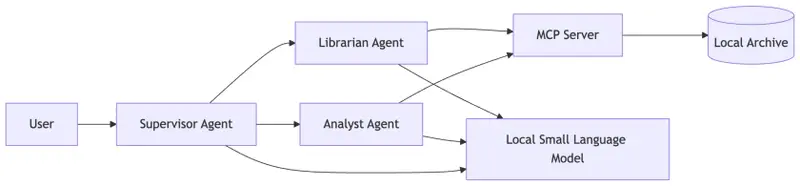
Architecture diagram showing an MCP-based multi-agent system running locally with small language models where a supervisor and specialist agents interact with an MCP server and local archive database on a laptop.

Large Models Build Systems. Small Models Run Them.

For most developers, modern AI systems feel locked behind massive infrastructure.

We’ve been conditioned to believe that “Intelligence” is a service we rent from a data center—a luxury that requires GPU clusters, $10,000 hardware, and ever-climbing cloud inference bills.

Last week, when we built our Multi-Agent Forensic Team, you likely assumed that coordinating a Supervisor, a Librarian, and an Analyst required the reasoning horsepower of a 400B+ parameter model.

Today, we’re cutting the cord. We are moving the entire Forensic Team—the agents, the orchestration, and the data—onto a standard laptop. No cloud. No API costs. No data leaving your local network.

This is the power of Edge AI combined with the Model Context Protocol (MCP).

The Pivot: The “Forensic Clean-Room”

In the world of rare book forensics, data sovereignty isn’t a “nice-to-have.” When you are auditing high-value archival records or sensitive provenance data, the “Clean-Room” approach is the gold standard. You want the data isolated.

By moving our stack to the Edge, we transform a laptop into a portable forensic lab.

The Edge Architecture

Architecture diagram showing an MCP-based multi-agent system running locally with small language models where a supervisor and specialist agents interact with an MCP server and local archive database on a laptop.
Running MCP agents locally: small language models power the supervisor and specialist agents while the MCP server provides structured tool access to local data.

Notice that the architecture we built in Post 2 doesn’t change. Because we used MCP as our “USB-C” interface, we don’t have to rewrite our tools or our agents. We only swap the Inference Engine.

Why SLMs Love MCP

Small language models struggle when tasks are open-ended.

However, MCP dramatically reduces the search space.

Instead of inventing answers, the model interacts with structured primitives:

  • tools
  • resources
  • prompts

Each defined with strict schemas.

The Thesis: Large models are great for designing the system and writing the initial code. Small models are the perfect runtime engines for executing those standardized tasks.

The “How-To”: Swapping the Engine

In our updated orchestrator.py, we’ve introduced a provider flag. Instead of hitting a remote API, the Python supervisor now talks to a local inference server (like Ollama or LM Studio).

# [Post 3 - Edge AI] Swapping the Inference Provider
if args.provider == "ollama":
# Pointing to the local SLM engine
client = OllamaClient(base_url="http://localhost:11434")
model = "phi4"
else:
# Standard Cloud Provider
client = AnthropicClient()
model = "claude-3-5-sonnet"

Because our TypeScript MCP Server is running locally via stdio, the latency is nearly zero. The “Librarian” fetches metadata from the local database, and the “Analyst” runs the audit—all without a single packet hitting the open web.

Benchmarking the Forensic Team: Cloud vs. Edge

Does a 14B model perform as well as a 400B model for forensics? When constrained by MCP schemas, the results are surprising.

Criteria Cloud (Claude/GPT-4) Edge (Phi-4/Mistral)
Reasoning Depth Extremely High High (with MCP Tool Constraints)
Latency 1.5s – 3s (Network Dependent) < 500ms (Local Inference)
Cost Per-token billing $0.00
Privacy Data processed externally 100% Data Sovereignty
Scalability Infinite Limited by local RAM/NPU

The Reveal: Same System, New Home

If you look at the latest update to the repository, you’ll see that the orchestration logic is nearly identical. The architecture stack from earlier posts remains unchanged.

Comparison diagram showing cloud-based AI architecture using large models and remote inference versus edge AI architecture using small language models and local MCP tool servers.
Edge AI architecture replaces cloud inference with local small language models while retaining MCP-based tool access.

Nothing about the agents changed.

Nothing about the tools changed.

Only the inference engine moved.

The “Zero-Glue” promise is realized here.

We didn’t build a cloud app; we built a protocol-driven system. The fact that it can live on a server or a laptop is simply a deployment choice.

What’s Next?

We’ve built the server. We’ve orchestrated the team. We’ve moved it to the edge.

In the final post of this series, we tackle the “Final Boss” of AI systems: Enterprise Governance. We’ll explore how to take this forensic lab and scale it across an organization using Oracle 26ai, ensuring that every audit is secure, permissioned, and defensible.

Ready to go local?

Check out the orchestrator.py update and try running the Forensic Team on your own machine.

👉 MCP Forensic Analyzer – Edge AI Example

The “Zero-Glue” Series

The post From Cloud to Laptop: Running MCP Agents with Small Language Models appeared first on Blog of Ken W. Alger.

Yerba Mate Caffeine: I Analyzed 47 Studies to Build a Calculator That Actually Works

The Problem With “How Much Caffeine Is in Yerba Mate?”

Google it and you’ll get answers ranging from 30mg to 180mg per cup. That’s a 6x range — completely useless for anyone trying to manage their caffeine intake.

The reason? “A cup of yerba mate” is meaningless. Caffeine content depends on:

  • Preparation method: traditional gourd (mate) vs. French press vs. tea bag vs. cold brew (tereré)
  • Leaf-to-water ratio: a gourd uses 30-50g of yerba per session vs. 2-3g in a tea bag
  • Number of refills: a traditional mate session involves 15-25 refills (cebadas)
  • Water temperature: hot water extracts more caffeine than cold
  • Yerba brand and processing: some brands have 2x the caffeine of others

I wanted to know my actual caffeine intake from mate, so I built a calculator based on real published data. Here’s what I found.

The Data

I compiled caffeine measurements from 47 peer-reviewed studies, mostly from Argentine, Brazilian, and Uruguayan food science journals. Key sources:

  • Heck & de Mejia (2007) — comprehensive review of Ilex paraguariensis chemistry
  • Isolabella et al. (2010) — extraction kinetics across temperatures
  • Cogoi et al. (2012) — commercial brand comparison (Argentina)
  • Cardozo et al. (2007) — mate vs. chimarrão vs. tereré extraction profiles

What the Studies Show

Average caffeine per gram of dry yerba leaf: 1.0-2.0% (10-20mg per gram)

This means a traditional mate session with 40g of yerba contains 400-800mg of potential caffeine — but you don’t extract it all at once.

Extraction Curves

This is where it gets interesting. Caffeine extraction follows a logarithmic curve:

Refill # Cumulative Extraction Caffeine per Refill (est.)
1 ~15% 60-120mg
2 ~25% 40-80mg
3 ~33% 30-60mg
5 ~45% 20-40mg
10 ~65% 10-20mg
15 ~75% 5-10mg
20 ~82% 3-5mg

The first 3 refills deliver more caffeine than the next 17 combined. By refill 10, you’re mostly drinking flavored hot water.

Method Comparison (per serving)

Method Yerba (g) Water (ml) Caffeine (mg) Notes
Traditional mate (full session) 40 500 (total) 300-400 15-20 refills
French press 15 500 85-120 Single steep, 5 min
Tea bag 2-3 200 20-40 Single steep
Tereré (cold) 40 500 (total) 180-250 Cold water = less extraction
Mate cocido (brewed) 10 250 50-80 Like tea, single steep

Key insight: A full traditional mate session has roughly the same caffeine as 3-4 cups of coffee — but delivered gradually over 1-2 hours. This is why mate drinkers report “smooth energy without jitters.” It’s not the theobromine (common myth) — it’s the slow extraction curve.

The Calculator

Based on this data, I built a calculator that takes:

  1. Preparation method — gourd, French press, tea bag, tereré, cocido
  2. Amount of yerba — grams (with visual reference: 1 tablespoon ≈ 5g)
  3. Number of refills (for gourd method)
  4. Water temperature — hot (70-80°C) vs. cold

And outputs:

  • Estimated total caffeine (mg)
  • Caffeine per refill (for gourd method)
  • Comparison to coffee equivalents
  • Daily limit context (FDA recommends ≤400mg/day)

Implementation

Like the herb-drug interaction checker, this is a single HTML file with zero dependencies. The calculation model:

function calculateCaffeine(method, yerbaGrams, refills, tempFactor) {
  // Base caffeine content: 1.2% average (12mg per gram)
  const baseCaffeine = yerbaGrams * 12;

  // Extraction depends on method
  const extractionRate = {
    gourd: calculateGourdExtraction(refills),
    french_press: 0.65,  // 5 min steep
    tea_bag: 0.45,       // short steep, fine particles
    terere: 0.50,        // cold = less extraction
    cocido: 0.55         // single brew
  }[method];

  return baseCaffeine * extractionRate * tempFactor;
}

function calculateGourdExtraction(refills) {
  // Logarithmic extraction: each refill extracts less
  // Based on Isolabella et al. (2010) kinetic data
  let total = 0;
  for (let i = 1; i <= refills; i++) {
    total += 0.15 * Math.pow(0.85, i - 1);
  }
  return Math.min(total, 0.90); // Max 90% extraction
}

The model isn’t perfect — individual brands vary significantly. Cogoi et al. (2012) found a 2.3x difference between the lowest and highest caffeine Argentine brands. But it’s far more accurate than “30-180mg per cup.”

What Surprised Me

  1. Mate has MORE caffeine than most people think. A full gourd session (300-400mg) exceeds two espressos. The “mate is lighter than coffee” myth persists because people compare one refill to one cup of coffee — but nobody stops at one refill.

  2. Temperature matters more than steep time. Cold tereré extracts ~35% less caffeine than hot mate with the same yerba and water volume. If you want less caffeine, go cold.

  3. The “second mate” problem. Many South Americans share mate in a round (ronda). The first person to drink gets the most caffeine — by the 4th or 5th person in the round, each refill has less than a tea bag.

  4. Theobromine is overrated. Many articles claim mate’s “smooth energy” comes from theobromine. The actual theobromine content is 0.1-0.4% — about 10x less than caffeine. The smooth energy is from slow caffeine delivery, not theobromine.

Try It

Calculator: botanicaandina.com/herramientas/mate-calculator/

If you drink mate regularly and can report your experience with the estimates (accurate? too high? too low?), I’d love the feedback. The model improves with real-world validation.

Part of Botánica Andina — building open tools for evidence-based herbal medicine. Also check out our herb-drug interaction checker (250 plants, 401 interactions, all cited).

Connect-RPC Has a Free API: gRPC That Works in Browsers Without a Proxy

gRPC is great for backend-to-backend. But in browsers? You need grpc-web, Envoy proxy, and prayers. Connect-RPC just works.

What Is Connect-RPC?

Connect-RPC (from the Buf team) is a set of libraries for building browser and gRPC-compatible APIs. Define your service once with Protobuf, get clients for browsers AND gRPC — no proxy needed.

// user/v1/user.proto
syntax = "proto3";
package user.v1;

service UserService {
  rpc GetUser(GetUserRequest) returns (GetUserResponse) {}
  rpc ListUsers(ListUsersRequest) returns (ListUsersResponse) {}
}

message GetUserRequest { string id = 1; }
message GetUserResponse { User user = 1; }
message User { string id = 1; string name = 2; string email = 3; }

Go Server

func (s *UserServer) GetUser(ctx context.Context, req *connect.Request[userv1.GetUserRequest]) (*connect.Response[userv1.GetUserResponse], error) {
    user, err := s.db.FindUser(req.Msg.Id)
    if err != nil {
        return nil, connect.NewError(connect.CodeNotFound, err)
    }
    return connect.NewResponse(&userv1.GetUserResponse{User: user}), nil
}

// Register and serve
mux := http.NewServeMux()
path, handler := userv1connect.NewUserServiceHandler(&UserServer{})
mux.Handle(path, handler)
http.ListenAndServe(":8080", h2c.NewHandler(mux, &http2.Server{}))

TypeScript Client (Browser)

import { createClient } from "@connectrpc/connect"
import { createConnectTransport } from "@connectrpc/connect-web"
import { UserService } from "./gen/user/v1/user_pb"

const transport = createConnectTransport({ baseUrl: "https://api.example.com" })
const client = createClient(UserService, transport)

// Type-safe API call — works directly in browsers!
const { user } = await client.getUser({ id: "123" })
console.log(user?.name)

Why Connect-RPC

  • Browser native — no Envoy proxy, no grpc-web
  • Three protocols — Connect (HTTP), gRPC, gRPC-Web — one server handles all
  • Type-safe — generated clients with full TypeScript types
  • Standard HTTP — curl-able, debuggable, no binary protocol mystery
  • Streaming — server streaming works in browsers

Building APIs? Check out my developer tools or email [email protected].