Message Queues: When and How to Stop Doing Work Inside HTTP Requests

There’s a habit in early-stage backend development where everything happens inside a request handler. User signs up → create the record, send the welcome email, notify Slack, sync to the CRM, trigger the analytics event — all before the response goes back.
This works until it doesn’t. The response takes 3 seconds. One of those services goes down and the whole signup breaks. Traffic spikes and the queue of requests backs up.
Message queues are the fix. Here’s when to use them and how to actually set one up.

The Mental Model
An HTTP request is synchronous — the client waits for your response. A message queue decouples the work: the request handler publishes a message and responds immediately. A separate worker process picks up the message and does the actual work.
Client → POST /signup →
[Create user record]
[Publish “user.created” message] ← takes milliseconds
[Respond 201 Created]

Background worker picks up “user.created” →
[Send welcome email]
[Notify Slack]
[Sync to CRM]
[Fire analytics event]
The client gets a fast response. The background work happens reliably, with retries if anything fails.

When to Use a Queue
Use a queue when the work:

Doesn’t need to be done before the response (email, notifications, analytics)
Could take variable time (third-party API calls, file processing)
Should be retried automatically if it fails
Needs to be rate-limited (bulk email sends, external API rate limits)
Could overwhelm a downstream service if done in parallel (sending 10,000 emails at once)

Don’t use a queue when:

The client needs the result immediately (payment processing, inventory check)
The work needs to be transactional with the database operation

Setting Up BullMQ with Redis
BullMQ is the current standard for job queues in Node.js. It’s built on Redis.
bashnpm install bullmq ioredis

javascript// queues/index.js
const { Queue } = require('bullmq');
const Redis = require('ioredis');

const connection = new Redis(process.env.REDIS_URL, {
  maxRetriesPerRequest: null  // Required by BullMQ
});

const emailQueue = new Queue('emails', { connection });
const analyticsQueue = new Queue('analytics', { connection });

module.exports = { emailQueue, analyticsQueue, connection };
javascript// In your route handler
const { emailQueue } = require('./queues');

app.post('/signup', async (req, res) => {
  const user = await User.create({
    email: req.body.email,
    password: await bcrypt.hash(req.body.password, 12)
  });

  // Queue the follow-up work — non-blocking
  await emailQueue.add('welcome', {
    userId: user.id,
    email: user.email,
    name: user.name
  }, {
    attempts: 3,           // retry up to 3 times on failure
    backoff: {
      type: 'exponential',
      delay: 2000          // wait 2s, then 4s, then 8s between retries
    }
  });

  res.status(201).json({ id: user.id, email: user.email });
});

The Worker Process
This runs separately from your web server — either a different file/process or a different container:
javascript// workers/email.worker.js

const { Worker } = require('bullmq');
const { connection } = require('../queues');

const worker = new Worker('emails', async (job) => {
  const { type } = job.name;
  const { userId, email, name } = job.data;

  if (job.name === 'welcome') {
    await sendWelcomeEmail({ to: email, name });
    console.log(`Welcome email sent to ${email}`);
  }

  if (job.name === 'password-reset') {
    await sendPasswordResetEmail({ to: email, token: job.data.token });
  }

}, {
  connection,
  concurrency: 5  // process 5 jobs at once
});

worker.on('failed', (job, err) => {
  console.error(`Job ${job.id} failed: ${err.message}`);
  // Send to error tracking (Sentry, etc.)
});

Running Both Together in Development
Add a script to package.json:

json{
  "scripts": {
    "dev": "nodemon src/index.js",
    "worker": "nodemon workers/email.worker.js",
    "dev:all": "concurrently "npm run dev" "npm run worker""
  }
}

In production, run the worker as a separate process or container. This means you can scale them independently — if email sending falls behind, add more worker containers without scaling the web server.

Monitoring Your Queues
Add BullBoard for a visual dashboard:
javascriptconst { createBullBoard } = require(‘@bull-board/api’);
const { BullMQAdapter } = require(‘@bull-board/api/bullMQAdapter’);
const { ExpressAdapter } = require(‘@bull-board/express’);
const { emailQueue } = require(‘./queues’);

const serverAdapter = new ExpressAdapter();
serverAdapter.setBasePath(‘/admin/queues’);

createBullBoard({
queues: [new BullMQAdapter(emailQueue)],
serverAdapter
});

app.use(‘/admin/queues’, serverAdapter.getRouter());
This gives you a UI at /admin/queues showing active jobs, failed jobs, completed jobs, and the ability to retry failures manually.

Dead Letter Queues for Jobs That Keep Failing
Some jobs will fail permanently (invalid email address, deleted user record). After the retry limit is exhausted, move them to a dead letter queue for inspection rather than losing them:
javascriptemailQueue.add(‘welcome’, jobData, {
attempts: 3,
backoff: { type: ‘exponential’, delay: 2000 }
});

worker.on(‘failed’, async (job, err) => {
if (job.attemptsMade >= job.opts.attempts) {
// Move to dead letter queue
await deadLetterQueue.add(job.name, {
originalData: job.data,
failureReason: err.message,
failedAt: new Date().toISOString()
});
}
});

Pandora’s Box Is Open. And Nobody Knows What Was Inside.

screenshot showing Faceted search over indexed SERP rows: keyword query, seed-query chips, domain chip, and result cards with provenance

Originally published on my blog

I’m a Senior PHP Developer. I work with AI tools every day — I integrate APIs, write prompts, read the research papers. I’m not a journalist, philosopher, or policy maker. I’m someone close enough to see how the sausage gets made, and far enough away to still have an opinion worth sharing.

And the longer I sit with this, the more I keep coming back to one question I’ve been pushing aside for too long: Have we collectively lost our minds — or are we just pretending it’s fine because the alternative is uncomfortable?

What LLMs Actually Are — And Why That Matters

Let me be direct: I use language models every day. Claude, GPT, whatever’s available. And precisely because of that — I have to say this — we do not understand what we’ve built.

Not technically. Technically we understand it fine. Transformer architectures, attention mechanisms, RLHF, tokenization — all documented, all reproducible.

What we don’t understand: what happens when you scale that to 100 billion parameters and train it on a significant fraction of recorded human knowledge.

In October 2025, Anthropic published a research paper demonstrating that current models have a rudimentary form of introspective awareness — they can detect when their internal states are being manipulated before that manipulation surfaces in their output. That sounds technical. It’s philosophically explosive.

Dario Amodei, CEO of Anthropic, said publicly in February 2026: “We don’t know if the models are conscious. We are not even sure what it would mean for a model to be conscious.” That’s not a humility gesture. That’s a confession.

And here’s the part that actually keeps me up at night: even if this is purely mechanical — even if there’s nothing “in there” — that changes nothing about what we’re doing with it.

AGI Is Not the Problem. Dependency Is.

The discourse is obsessively focused on AGI. When? How? Will it be dangerous? Skynet or not Skynet?

That’s the wrong question.

The right question is: what happens to societies that delegate critical decision-making to systems nobody fully understands — regardless of whether those systems are actually intelligent?

Decision systems in law, medicine, and finance are already running on models. Information ecosystems are already saturated with AI-generated content — and detection is getting exponentially harder. Education systems are integrating AI tools before anyone understands what that does to the cognitive development of an entire generation. Democratic processes are vulnerable to personalized manipulation at a scale that was structurally impossible before.

This is all happening now. Not at AGI.

And even if LLMs turn out to be a technical dead-end — even if the bubble bursts, even if OpenAI and Anthropic are history in five years — the societal adaptation remains. The eroded trust in human expertise remains. The structural dependency on US and Chinese technology corporations for critical infrastructure remains.

Dependency doesn’t have an undo button.

Hannah Arendt called it the “banality of evil” — the harm that emerges not from malicious intent, but from thoughtless compliance with systems and structures. The AI version doesn’t even require bad intentions. It only requires optimized indifference. Systems nobody fully understands make decisions nobody questions anymore, in a society that has forgotten how to think for itself.

That’s not a science fiction scenario. That’s an extrapolated present.

The Data Problem: When Intelligence Eats Itself

Here’s something most people outside the industry don’t know: the era of scaling through raw data volume may be over. The internet as a training source is largely exhausted.

The industry’s answer is synthetic data — AI trained on AI output. The problem: mode collapse. Models trained on their own output systematically amplify their own errors and idiosyncrasies. The diversity, contradiction, and idiosyncrasy of genuine human-generated text — exactly what makes models rich and useful — gets diluted with every iteration.

At the same time, each new model generation feels like a quantum leap. That’s not a contradiction. Progress today increasingly comes not from more knowledge, but from better reasoning training, longer context windows, and improved feedback pipelines. The model learns to think differently — it doesn’t learn to know more.

Whether that’s a viable path to AGI is an open question. Yann LeCun, Chief AI Scientist at Meta, says explicitly: no. Transformer-based architectures are, in his view, structurally the wrong path. Gary Marcus argues similarly.

Who’s right? I don’t know. Neither does the industry.

Right-Wing Extremism: Collateral Damage or Structural Feature?

Now the most uncomfortable chapter.

AI systems optimize for engagement. That’s not new — social media was doing this long before generative AI. But LLMs and recommendation systems scale it to a qualitatively different level.

Why does this structurally favor extremist narratives? Not because algorithms are ideologically right-wing. But because:

Emotional intensity converts better than factual nuance. Clear enemies are cognitively simpler than systemic explanations. Populist narratives have a structure that fragments perfectly into short, shareable units. And personalized AI recommendation systems reinforce existing beliefs with a precision that manual propaganda could never achieve.

On top of that: disinformation campaigns can now be produced, localized, and personalized at industrial scale. A single actor with a moderate budget can generate content in twenty languages, adapted to twenty different cultural contexts, in real time. Detectability decreases. The cost of manipulation collapses. The damage scales.

This isn’t a fringe problem. It’s a structural threat to democratic public discourse. And the EU AI Act — as well-intentioned as it is — is being outpaced by technological reality before it’s even fully in force.

What Remains

I don’t have a solution. That would be dishonest.

What I have is the conviction that technological determinism — “it’s coming anyway, so let’s just shape it” — is the most comfortable form of surrender available.

What I have is the conviction that the people shouting loudest about imminent AGI almost always have the most to gain if you believe them.

And what I have is the conviction that the silence of people close enough to know better — developers, researchers, engineers — is its own form of complicity.

That’s why I’m writing this. Not because I have answers. But because the questions need to be asked out loud.

In ten years I’ll either say: it wasn’t as bad as I thought. Or: I saw it coming.

I know which one I’m hoping for. I’m not sure which one I’m expecting.

Sources

  • Anthropic Research, “Emergent Introspective Awareness in Large Language Models”, October 2025 — anthropic.com/research/introspection
  • Amodei, D., interviewed on Interesting Times podcast (New York Times), February 14, 2026
  • Lindsey, J. & Batson, J., quoted in Scientific American, “Can a Chatbot Be Conscious?”, July 2025 — scientificamerican.com
  • Anthropic Claude Opus 4.6 System Card, February 2026
  • Arendt, H., Eichmann in Jerusalem: A Report on the Banality of Evil, 1963 (Viking Press)
  • EU AI Act, Regulation (EU) 2024/1689 — eur-lex.europa.eu
  • LeCun, Y., public statements on JEPA architecture as alternative to Transformer-based scaling, 2024-2025
  • Marcus, G., Rebooting AI, 2019 (Pantheon) and ongoing commentary — garymarcus.substack.com
  • Palisade Research, AI shutdown resistance study, May 2025
  • OpenAI & Apollo Research, “AI Scheming” report, September 2025
  • Seth, A., quoted in Scientific American, July 2025

Found this useful? Follow me on my blog for more.

How to Design OAuth for AI Agents Without Creating a Permission Mess

Everyone is building AI agents.

They can write code, summarize documents, search the web, create tickets, update databases, send messages, and automate workflows. But the moment an agent has to interact with real services like GitHub, Slack, Google Drive, Notion, or Stripe, the same problem appears:

authorization becomes messy very fast.

Most teams treat OAuth as a solved problem because traditional SaaS apps have used it for years. But AI agents change the shape of the problem.

A normal app usually performs a limited set of actions with a relatively clear boundary. An agent platform is different. It is dynamic, multi-step, sometimes autonomous, and often sits between users, third-party services, and other applications. That adds a completely different permission model.

If you do not design that model carefully, you end up with one of two bad outcomes:

  • a terrible user experience with constant re-auth and unclear permissions
  • or a dangerous system where apps and agents get far more access than they should

I have been thinking a lot about this while designing Kaeso, and one conclusion became very clear:

OAuth for AI agents should not be treated like ordinary app OAuth.

The real problem is not just authentication

When people talk about OAuth, they often simplify it to “sign in with X” or “connect your account.”

That is not the hard part.

The hard part is everything after that:

  • what exactly is connected
  • what scopes were granted
  • which application is allowed to use that access
  • whether access is read-only or write-capable
  • whether the access is one-time or continuous
  • whether background execution is allowed
  • how the user can review and revoke all of it later

With AI agents, this becomes even more important because the actor using the access is often not just a static UI. It may be an agent runtime, a workflow engine, a background job, or a third-party app calling into your platform.

So the real design question is not:

“How do we let users connect GitHub?”

It is:

“How do we let users delegate the minimum necessary access to a system that may act on their behalf across multiple services, while keeping that understandable, revocable, and secure?”

That is a much harder problem.

Why traditional OAuth patterns break down

A lot of existing OAuth implementations assume a much simpler world.

Typical flow:

  1. User clicks “Connect GitHub”
  2. App redirects to GitHub
  3. User approves scopes
  4. App gets tokens
  5. App uses those tokens directly

That works fine for a single product with a narrow purpose.

But now imagine an AI platform where:

  • the user connects multiple services
  • third-party apps run on top of the platform
  • agents may use those services in the background
  • each app may need a different subset of permissions
  • and the user expects to understand what is happening

If you use the same simple pattern, you quickly get permission chaos.

For example:

  • one app gets a broad GitHub token even though it only needs repo metadata
  • another app reuses the same connection without the user fully realizing it
  • users do not know whether Slack access was granted to the platform, to the app, or to both
  • the system cannot cleanly explain what is already authorized and what is still missing

At that point, the product becomes hard to trust.

The three-layer model

The cleanest mental model I have found is to separate authorization into three distinct layers.

1. User to platform

This is just identity.

The user signs into your platform. In my case, that is Kaeso. This layer answers:

  • who is the user
  • what account do they have
  • what apps and services are associated with them

This is not the same thing as service authorization.

2. User to service through the platform

This is where the user connects GitHub, Slack, Google, and so on.

The platform receives provider-specific OAuth tokens and stores them securely. At this point, the user has not necessarily granted every app permission to use those services. They have only granted the platform the ability to broker access.

This is a critical distinction.

3. User to app through the platform

This is where a Kaeso app, agent, or integration asks for access to certain capabilities.

The app should not just get raw provider tokens by default. Instead, it should request platform-level permissions, and the platform should decide whether the required service connections and scopes already exist.

If they do, the user can approve the app.

If they do not, the platform should guide the user through the missing service authorization or scope upgrade.

This creates a much cleaner architecture because every permission request has a clear place in the system.

The mistake: giving apps raw provider tokens

This is the easiest bad design to fall into.

A user connects GitHub to your platform, and then you let apps directly receive or use that GitHub token with minimal separation.

It feels convenient, but it creates several problems:

  • poor permission isolation
  • weak auditability
  • harder revocation
  • provider-specific logic leaking everywhere
  • much larger blast radius if an app is compromised

The better model is to let the platform act as a broker.

That means:

  • users connect services to the platform
  • the platform stores and refreshes provider tokens
  • apps receive only platform-issued tokens
  • apps call the platform API
  • the platform performs downstream calls to GitHub, Slack, Google, and others

This preserves a clean boundary.

The app is authorized to use platform capabilities. It is not automatically entitled to direct possession of all underlying service credentials.

That one design choice makes the whole system easier to secure, explain, and operate.

The permission model should be platform-native

This is where I think most agent infrastructure will need to evolve.

Apps should request platform-native scopes, not raw provider scopes.

For example, instead of exposing a GitHub scope directly, the platform might define scopes like:

  • services.github.repositories.read
  • services.github.repositories.write
  • services.slack.channels.read
  • services.google.drive.files.read
  • agents.jobs.background
  • identity.profile.read

Then the platform maps each platform scope to whatever provider scopes and service states are actually required underneath.

This gives you several advantages:

  • a consistent permission language across providers
  • a better user experience
  • tighter product control
  • less provider-specific complexity for developers
  • clearer audit logs

Users should see permissions in the language of what the app is trying to do, not just in the language of whatever a provider happened to name its scopes.

What the user should actually see

A lot of consent screens are technically correct but product-wise terrible.

For agent systems, the consent UI has to be extremely explicit.

A good consent screen should answer all of these questions immediately:

  • what app is asking
  • who built it
  • what actions it wants to perform
  • which connected services are involved
  • whether those permissions already exist
  • what is still missing
  • whether access is read-only or write-enabled
  • whether background execution is allowed

Something like this is much clearer than a generic “Authorize app” button:

This app wants to:

  • Read selected GitHub repositories
  • Read selected Slack channels
  • Run background sync jobs

Kaeso will access on your behalf:

  • GitHub: repository metadata and contents
  • Slack: channel list and messages in approved channels

Missing requirements:

  • Slack is not connected yet
  • GitHub connection needs an upgraded scope

Actions:

  • Connect Slack
  • Upgrade GitHub access
  • Approve app
  • Cancel

That is the kind of UX I think agent platforms need.

The goal is not just to be compliant with an OAuth flow. The goal is to make the system understandable enough that the user can make a real decision.

Incremental authorization matters a lot

One of the biggest UX mistakes is forcing users through the entire permission process again every time something changes.

A better model is incremental authorization.

If the user already connected GitHub and already approved a previous app for repository read access, and a new app requests the same capability, the system should say so clearly.

If a new app requires one additional permission, the user should only see that delta.

That keeps consent manageable and avoids training users to blindly click approve.

For AI agents, this matters even more because workflows often evolve over time. A user might start with read-only access and later enable background jobs or write access. The system should support that progression cleanly instead of treating every change as a brand-new opaque authorization event.

Resource narrowing is as important as scopes

OAuth scopes are often too broad for what users actually want.

Saying “this app can read Slack” is not enough. In practice, users often want more granular control, such as:

  • only this workspace
  • only these channels
  • only this GitHub organization
  • only these repositories
  • only this Drive account
  • only this folder

That is why product-layer restrictions matter.

The OAuth provider might only offer broad scopes, but your platform can still narrow the effective access by introducing resource-level controls. For agent platforms, this is one of the most valuable trust features you can build.

It makes authorization much closer to what users actually intend.

Online access and background access should be separate permissions

This is another place where agent systems differ from normal apps.

A lot of actions happen asynchronously:

  • scheduled syncs
  • monitoring
  • notifications
  • long-running tasks
  • automatic follow-up actions

That means an app may need continued access even when the user is not actively using it.

That should never be hidden inside a generic permission grant.

Background execution is a materially different level of authority and should be presented separately.

For example:

  • use my connected services during this session
  • keep access for background automations
  • allow recurring sync
  • allow write actions without manual confirmation

Those are very different trust levels.

If users cannot distinguish them, the platform is not communicating honestly.

Revocation is part of the product, not an afterthought

A good authorization system is not only about granting access. It is also about removing it cleanly.

Users should be able to open one place and see:

  • connected services
  • scopes granted to the platform
  • apps with current access
  • which services each app can use
  • whether background access exists
  • when each app last used that access
  • buttons to revoke service access, app access, or both

Without this, even a technically strong OAuth system will feel unsafe.

For agent infrastructure, auditability and revocation are not “enterprise extras.” They are part of the core product.

What I think the correct architecture looks like

This is the model I currently believe makes the most sense for a system like Kaeso:

Identity layer

The user signs into the platform.

Connection layer

The user connects external services like GitHub, Slack, or Google.

Token vault

Provider tokens are stored securely by the platform and refreshed when needed.

App authorization layer

Apps request platform-native scopes, not raw provider scopes.

Consent engine

The platform compares app requirements against existing service connections and scopes, detects missing requirements, and presents a clear consent screen.

Broker API

Apps call the platform API, and the platform performs downstream service actions on the user’s behalf.

Audit and revocation layer

Every action is attributable, reviewable, and revocable.

That architecture is more work than a basic “connect service and store token” implementation, but it solves the actual problem instead of pushing it downstream.

Why this matters more as agents get better

As models improve, infrastructure weaknesses become more visible.

When an agent is limited, weak authorization design is partly masked because the agent cannot do much anyway.

When agents become more capable, the opposite happens. The cost of unclear permissions goes up.

A system that can reason, plan, and act across multiple tools is only as safe and usable as the authorization model underneath it.

So I think one of the next important infrastructure layers in the AI ecosystem is not just better agents.

It is better authorization systems for agents.

Not more impressive demos.

Not broader access by default.

Not “just give the model a token and see what happens.”

A real permission architecture.

Closing thought

The interesting part of AI agent infrastructure is not only what the agent can do.

It is also:

  • what it is allowed to do
  • who approved that
  • through which app
  • using which service
  • with which scope
  • for how long
  • and how easily that can be reviewed or revoked

That is why I think the right model is not “every app handles OAuth however it wants.”

It is a brokered system where the platform becomes the control layer between users, apps, and external services.

That is the direction I am exploring with Kaeso.

Because if AI agents are going to become real infrastructure, their authorization layer has to become real infrastructure too.

If you are building in this area, I would love to know how you are thinking about it.

Are you giving apps direct provider access, or are you building a broker layer in between?

7 Mac Apps for Developers Who Want a Clean, Minimal Desktop in 2026

A cluttered desktop is a cluttered mind. If your Mac looks like a Finder explosion with notification badges screaming from every corner, your code probably suffers too. Here are 7 apps that helped me strip my desktop down to the essentials — no visual noise, no distractions, just a clean workspace that lets me focus on shipping.

1. Bartender — Tame Your Menu Bar

Your menu bar is probably a junkyard of icons you never look at. Bartender lets you hide, rearrange, and selectively show menu bar items so only the ones you actually use are visible. You can set rules for when certain icons appear (like showing Wi-Fi only when disconnected). It’s the single fastest way to make your Mac feel cleaner.

🔗 Bartender

2. Raycast — Replace Spotlight and 5 Other Apps

Raycast is a launcher that replaces Spotlight, your clipboard manager, your snippet tool, and half your workflow apps. Instead of cluttering your dock with utilities, you press a hotkey and do everything from one search bar — window management, emoji search, calculator, even AI chat. Fewer apps running means a cleaner, faster machine.

🔗 Raycast

3. Rectangle — Window Management Without the Bloat

No developer should be manually dragging windows around. Rectangle gives you keyboard shortcuts to snap windows to halves, thirds, and quarters — instantly. It’s free, open source, and has zero UI chrome. Install it, learn five shortcuts, and never think about window positioning again.

🔗 Rectangle

4. TokenBar — Glanceable LLM Costs in Your Menu Bar

If you’re using AI coding tools (and in 2026, who isn’t), your API costs are a real number you should track. TokenBar sits quietly in your menu bar and shows your real-time token spend across providers — OpenAI, Anthropic, Google, you name it. One glance, no dashboard tab to keep open, no clutter. It’s $5 lifetime and native macOS.

🔗 TokenBar

5. Monk Mode — Block Feeds Without Blocking Apps

Most focus apps take a sledgehammer approach: they block entire apps or websites. Monk Mode is smarter — it blocks the feed inside apps like Twitter, Reddit, YouTube, and LinkedIn while leaving the rest functional. You can still search YouTube for documentation videos, you just can’t doomscroll the homepage. It’s the cleanest way to remove distractions without losing access to tools you need.

🔗 Monk Mode

6. CleanShot X — Screenshots That Don’t Pollute Your Desktop

The default macOS screenshot tool dumps PNGs all over your desktop. CleanShot X captures to a floating overlay instead — annotate, copy, share, and it never touches your desktop at all. It also does scrolling captures, screen recording, and OCR. Once you switch, the default screenshot flow feels barbaric.

🔗 CleanShot X

7. Obsidian — Notes That Stay Out of Your Way

For a minimal desktop, you need a notes app that doesn’t demand attention. Obsidian stores everything as local Markdown files — no cloud sync popups, no subscription nags, no “what’s new” modals. It opens fast, stays out of the way, and your notes are just files on disk. Pair it with a single vault and you’ve replaced Notion, Apple Notes, and whatever else was cluttering your dock.

🔗 Obsidian

The Philosophy

A clean desktop isn’t about aesthetics — it’s about reducing the cognitive tax of visual noise. Every badge, every unnecessary icon, every window out of place is a micro-distraction pulling you out of flow state.

These 7 apps won’t make you a 10x developer, but they’ll remove the friction that stops you from getting into the zone. Strip it down, keep what matters, ship more code.

What’s your minimal Mac setup? Drop your must-have apps in the comments.

Building a Real-Time Step Progress UI with Flask + JavaScript

Building a Real-Time Step Progress UI with Flask + JavaScript

A Bot creation flow that takes 16 steps — here’s how we made the wait feel transparent and fast.

Background

When you hit “Create Bot” in our home lab dashboard, the backend runs through this sequence:

  1. SSH connection check
  2. Bot name collision check
  3. Home directory creation
  4. Template file copy
  5. Register in agents.list
  6. Telegram Bot binding
  7. auth-profiles.json symlink creation
  8. OpenClaw config file write
  9. Agent config file (openclaw.json) creation
  10. Gateway restart
  11. Startup verification (log monitoring)
  12. Dev directory creation
  13. TOOLS.md generation
  14. Symlink final verification
  15. Gateway restart wait (5 seconds)
  16. Completion notification

Even when everything succeeds, this takes 30–40 seconds. Just showing a spinner makes it feel frozen. Unexplained waiting time feels roughly 3× longer than it actually is.

Design Options

There are several standard patterns for real-time progress:

1. Polling

Client repeatedly hits GET /api/job-status/{id}. Simple, but requires job ID management, concurrency control, and cleanup.

2. Server-Sent Events (SSE)

HTTP streaming response. Lightweight for one-way (server → client) updates. In Flask: Response(generator, mimetype='text/event-stream').

3. WebSocket

For bidirectional communication. Overkill here.

4. Synchronous response — return all steps at once

This is what we chose.

@app.route('/api/create-bot-steps', methods=['POST'])
def create_bot_steps():
    steps = []

    # Step 1: SSH check
    ok, out = ssh_cmd_with_retry(node, 'echo ok', retries=3)
    steps.append({'step': 1, 'label': 'SSH connection check', 'ok': ok, 'detail': out})
    if not ok:
        return jsonify({'success': False, 'steps': steps})

    # Step 2: Name collision check
    ok, out = ssh_cmd(node, f'test -d {agent_dir} && echo exists || echo ok')
    if 'exists' in out:
        steps.append({'step': 2, 'label': 'Name collision check', 'ok': False, 'detail': 'Already exists'})
        return jsonify({'success': False, 'steps': steps})
    steps.append({'step': 2, 'label': 'Name collision check', 'ok': True, 'detail': ''})

    # ... continues for all 16 steps

    return jsonify({'success': True, 'steps': steps})

It blocks synchronously, but since Flask runs multi-threaded, other requests aren’t affected. Steps accumulate in an array, all returned at once at the end.

Client Side: Fake Progress Animation

The problem: “button press → 30 seconds of nothing → all steps appear at once.” No sense of progress.

Solution: animate the steps sequentially after the response arrives.

async function createBot(formData) {
  showProgressModal();

  const res = await fetch('/api/create-bot-steps', {
    method: 'POST',
    body: JSON.stringify(formData),
    headers: {'Content-Type': 'application/json'}
  });
  const data = await res.json();

  // Display steps one at a time with delay
  for (const step of data.steps) {
    await appendStep(step);
    await sleep(120);  // 120ms between each step
  }

  showResult(data.success);
}

async function appendStep(step) {
  const icon = step.ok ? '✅' : '❌';
  const el = document.createElement('div');
  el.className = `step-item ${step.ok ? 'ok' : 'fail'}`;
  el.innerHTML = `${icon} Step ${step.step}: ${step.label}`;
  if (step.detail) {
    el.innerHTML += `<span class="detail">${step.detail}</span>`;
  }
  progressLog.appendChild(el);
  el.scrollIntoView({behavior: 'smooth'});
}

At 120ms per step, 16 steps takes about 2 seconds to animate. Even though the actual processing took 30 seconds, the “sense of progress” is satisfied in those first 2 seconds.

Why We Didn’t Use SSE

“Sync response + client-side fake animation” is sufficient for most cases.

SSE makes sense when:

  • Processing can be interrupted or cancelled (e.g., user wants to abort mid-run)
  • Processing is very long (5+ minutes)
  • Multiple clients need to watch the same progress in real time

Bot creation: 30–40 seconds, single user, no cancel needed. SSE would have been overkill.

Separating “actual real-time” from “perceived real-time” makes the design decision obvious.

Fail Fast: Abort on First Failure

When a step fails, the API immediately returns — skipping all remaining steps. The client animates whatever steps it received, then appends a red error at the bottom.

if (!data.success) {
  const failedStep = data.steps.find(s => !s.ok);
  appendError(`Failed at Step ${failedStep.step}: ${failedStep.detail}`);
}

Users can see exactly where things broke. Debugging time dropped noticeably.

Summary

  • Under 30 seconds, single user → sync response + client animation is enough
  • Return steps as an array → frontend display logic stays simple
  • Perceived speed often matters more than actual speed
  • SSE and WebSocket are powerful, but they carry implementation cost — don’t pull them in for simple cases

For home lab tooling especially: a working, maintainable implementation beats a technically perfect stack every time.

The Black Box of Privacy: Unlocking “Confidential Computing” in AI

As we develop data-heavy platforms like the Student Success Ecosystem, we face a critical engineering dilemma: How do we process private user data in the cloud without exposing it to the service provider? The answer is Confidential Computing—a hardware-based security paradigm that protects data while it is being processed.
​1. The Three States of Data Security
​In traditional cybersecurity, we protect data in two ways:
​Data at Rest: Encrypted on the hard drive.
​Data in Transit: Encrypted while moving over the network (HTTPS/TLS).
​The Missing Link (Data in Use): Traditionally, data must be decrypted in the RAM to be processed by the CPU. This is where it is most vulnerable to memory-scraping attacks.
​2. The TEE (Trusted Execution Environment)
​Confidential Computing uses a hardware-level “Enclave” called a Trusted Execution Environment (TEE). Think of it as a secure vault inside the CPU (like Intel SGX or AMD SEV).
​Isolation: The CPU creates a private memory space that is invisible to the Operating System, the Hypervisor, and even the Cloud Administrator.
​Attestation: The system provides a digital “proof” that the code running inside the vault hasn’t been tampered with.
​3. Application: Privacy-First AI for Students
​In our Student Success Ecosystem, we handle sensitive academic and personal data. By using Confidential Computing, we can:
​Run AI models on a student’s private data to generate personalized study plans.
​Ensure that the raw data is never visible to the server admins.
​Meet strict global privacy standards (like GDPR) automatically at the hardware level.
​The Engineering Responsibility
​In 2026, “Security by Design” is the only way forward. As Computer Engineers at SPPU, our goal is to move beyond software firewalls and start building Hardware-Rooted Trust. The future of the internet isn’t just about being fast; it’s about being provably secure.

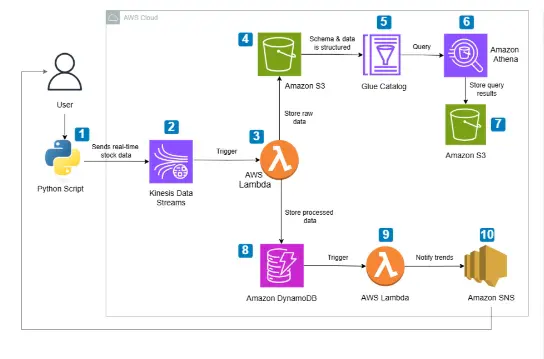
Stock Market Real-Time Data Analytics Pipeline on AWS

Image description1

🚀 Building a Real-Time Stock Market Analytics Pipeline on AWS

Author: Muhammad Awais | DevSecOps Engineer | AWS | Kubernetes | Terraform

Overview ☁️

In this project, I built a fully serverless, event-driven Real-Time Stock Market Data Analytics Pipeline on AWS. The pipeline ingests live stock data, processes it, stores it, analyzes trends, and sends smart alerts — all with minimal cost and zero servers to manage.

Here is what the pipeline does end to end:

  • Streams real-time stock data from yfinance into Amazon Kinesis Data Streams
  • Triggers AWS Lambda to process, clean, and store incoming data
  • Stores raw data in Amazon S3 for historical analysis
  • Stores processed data in Amazon DynamoDB for low-latency querying
  • Queries historical data using Amazon Athena via AWS Glue Catalog
  • Detects stock trends using moving averages (SMA-5 and SMA-20)
  • Sends real-time buy/sell alerts via Amazon SNS (Email/SMS)

Image description1

Architecture at a Glance 🏗️

Python Script (yfinance)
        ↓
Amazon Kinesis Data Streams
        ↓
AWS Lambda (Process & Clean Data)
        ↓                    ↓
Amazon DynamoDB          Amazon S3
        ↓                    ↓
AWS Lambda            AWS Glue Catalog
(Trend Analysis)             ↓
        ↓             Amazon Athena
Amazon SNS                   ↓
(Email/SMS Alerts)       Amazon S3
                       (Query Results)

Steps to Build This Pipeline 👩‍💻

Step 1 — Setting Up Data Streaming with Amazon Kinesis

The first step is creating a Kinesis Data Stream to act as the real-time data pipeline.

Create the Kinesis Stream:

  1. Go to AWS Console → Kinesis → Data Streams
  2. Click Create data stream
  3. Name it stock-market-stream
  4. Choose On-demand capacity mode (cost-efficient for variable workloads)
  5. Click Create

Python Producer Script:

This script continuously fetches stock data from yfinance and pushes it to Kinesis every 30 seconds.

import boto3
import json
import time
import yfinance as yf

kinesis_client = boto3.client('kinesis', region_name='us-east-1')
STREAM_NAME = "stock-market-stream"
STOCK_SYMBOL = "AAPL"
DELAY_TIME = 30

def get_stock_data(symbol):
    stock = yf.Ticker(symbol)
    data = stock.history(period="2d")

    return {
        "symbol": symbol,
        "open": float(round(data.iloc[-1]["Open"], 2)),
        "high": float(round(data.iloc[-1]["High"], 2)),
        "low": float(round(data.iloc[-1]["Low"], 2)),
        "price": float(round(data.iloc[-1]["Close"], 2)),
        "previous_close": float(round(data.iloc[-2]["Close"], 2)),
        "change": float(round(data.iloc[-1]["Close"] - data.iloc[-2]["Close"], 2)),
        "change_percent": float(round(
            ((data.iloc[-1]["Close"] - data.iloc[-2]["Close"]) / data.iloc[-2]["Close"]) * 100, 2
        )),
        "volume": int(data.iloc[-1]["Volume"]),
        "timestamp": time.strftime("%Y-%m-%dT%H:%M:%SZ", time.gmtime())
    }

def send_to_kinesis():
    while True:
        stock_data = get_stock_data(STOCK_SYMBOL)
        print(f"Sending: {stock_data}")

        kinesis_client.put_record(
            StreamName=STREAM_NAME,
            Data=json.dumps(stock_data),
            PartitionKey=STOCK_SYMBOL
        )
        time.sleep(DELAY_TIME)

send_to_kinesis()

💡 Tip: Always convert np.float64 values to plain float before sending to Kinesis to avoid serialization issues downstream.

Step 2 — Processing Data with AWS Lambda

Two Lambda functions handle the data processing:

Lambda 1 — Kinesis Consumer (Store to S3 + DynamoDB)

This function is triggered automatically by Kinesis, decodes the data, computes metrics, and stores it in both S3 and DynamoDB.

Setup:

  1. Go to AWS Lambda → Create Function
  2. Name it stock-market-processor
  3. Runtime: Python 3.12
  4. Add trigger: Kinesis → select stock-market-stream
  5. Attach IAM role with permissions for: DynamoDB, S3, Kinesis
import json
import boto3
import base64
from decimal import Decimal

dynamodb = boto3.resource("dynamodb")
s3 = boto3.client("s3")

DYNAMO_TABLE = "stock-market-data"
S3_BUCKET = "your-s3-bucket-name"
table = dynamodb.Table(DYNAMO_TABLE)

def lambda_handler(event, context):
    for record in event['Records']:
        raw_data = base64.b64decode(record["kinesis"]["data"]).decode("utf-8")
        payload = json.loads(raw_data)

        # Save raw data to S3
        s3_key = f"raw-data/{payload['symbol']}/{payload['timestamp'].replace(':', '-')}.json"
        s3.put_object(Bucket=S3_BUCKET, Key=s3_key, Body=json.dumps(payload), ContentType='application/json')

        # Compute metrics
        price_change = round(payload["price"] - payload["previous_close"], 2)
        price_change_percent = round((price_change / payload["previous_close"]) * 100, 2)
        is_anomaly = "Yes" if abs(price_change_percent) > 5 else "No"
        moving_average = round(
            (payload["open"] + payload["high"] + payload["low"] + payload["price"]) / 4, 2
        )

        # Store in DynamoDB
        table.put_item(Item={
            "symbol": payload["symbol"],
            "timestamp": payload["timestamp"],
            "price": Decimal(str(payload["price"])),
            "previous_close": Decimal(str(payload["previous_close"])),
            "change": Decimal(str(price_change)),
            "change_percent": Decimal(str(price_change_percent)),
            "volume": int(payload["volume"]),
            "moving_average": Decimal(str(moving_average)),
            "anomaly": is_anomaly
        })

    return {"statusCode": 200, "body": "Processing Complete"}

Lambda 2 — Trend Analyzer (SMA Crossover + SNS Alert)

This function runs on a schedule (EventBridge every 5 minutes), queries DynamoDB, computes SMA-5 and SMA-20, detects crossover signals, and sends alerts via SNS.

import boto3
import json
import decimal
from datetime import datetime, timedelta

dynamodb = boto3.resource("dynamodb")
sns = boto3.client("sns")

TABLE_NAME = "stock-market-data"
SNS_TOPIC_ARN = "arn:aws:sns:us-east-1:YOUR_ACCOUNT_ID:Stock_Trend_Alerts"

def get_recent_stock_data(symbol, minutes=5):
    table = dynamodb.Table(TABLE_NAME)
    past_time = datetime.utcnow() - timedelta(minutes=minutes)

    response = table.query(
        KeyConditionExpression="symbol = :symbol AND #ts >= :time",
        ExpressionAttributeNames={"#ts": "timestamp"},
        ExpressionAttributeValues={
            ":symbol": symbol,
            ":time": past_time.strftime("%Y-%m-%d %H:%M:%S"),
        },
        ScanIndexForward=True
    )
    return sorted(response.get("Items", []), key=lambda x: x["timestamp"])

def calculate_moving_average(data, period):
    if len(data) < period:
        return decimal.Decimal("0")
    return sum(decimal.Decimal(str(d["price"])) for d in data[-period:]) / period

def lambda_handler(event, context):
    for symbol in ["AAPL"]:
        stock_data = get_recent_stock_data(symbol)

        if len(stock_data) < 20:
            continue

        sma_5 = calculate_moving_average(stock_data, 5)
        sma_20 = calculate_moving_average(stock_data, 20)
        sma_5_prev = calculate_moving_average(stock_data[:-1], 5)
        sma_20_prev = calculate_moving_average(stock_data[:-1], 20)

        message = None
        if sma_5_prev < sma_20_prev and sma_5 > sma_20:
            message = f"{symbol} is in an Uptrend! Consider a buy opportunity."
        elif sma_5_prev > sma_20_prev and sma_5 < sma_20:
            message = f"{symbol} is in a Downtrend! Consider selling."

        if message:
            sns.publish(TopicArn=SNS_TOPIC_ARN, Message=message, Subject=f"Stock Alert: {symbol}")
            print(f"Alert sent: {message}")

    return {"statusCode": 200, "body": json.dumps("Trend analysis complete")}

Step 3 — Query Historical Stock Data using Amazon Athena

Raw JSON files land in S3. AWS Glue Catalog creates a structured schema on top of them so Athena can query them with standard SQL.

Setup Glue Crawler:

  1. Go to AWS Glue → Crawlers → Create Crawler
  2. Point it to your S3 bucket path: s3://your-bucket/raw-data/
  3. Create a new database: stock_market_db
  4. Run the crawler — it auto-detects schema and creates a table

Query with Athena:

-- Average daily price per symbol
SELECT symbol,
       DATE(timestamp) AS date,
       ROUND(AVG(price), 2) AS avg_price,
       MAX(high) AS day_high,
       MIN(low) AS day_low
FROM stock_market_db.raw_data
GROUP BY symbol, DATE(timestamp)
ORDER BY date DESC;

-- Detect anomalies
SELECT symbol, timestamp, price, change_percent
FROM stock_market_db.raw_data
WHERE ABS(change_percent) > 5
ORDER BY timestamp DESC;

💡 Tip: Set your Athena query results S3 bucket in Settings before running queries.

Step 4 — Stock Trend Alerts using SNS

Setup SNS Topic:

  1. Go to AWS SNS → Topics → Create Topic
  2. Type: Standard
  3. Name: Stock_Trend_Alerts
  4. Click Create

Add Subscription:

  1. Click your topic → Create Subscription
  2. Protocol: Email or SMS
  3. Endpoint: your email or phone number
  4. Confirm the subscription from your inbox

Once the trend analyzer Lambda detects a crossover, SNS fires an alert like:

Key Learnings 🧠

  • Kinesis is perfect for real-time event streaming — On-demand mode saves cost for unpredictable workloads
  • Lambda + Kinesis trigger gives you a fully serverless processing layer with automatic scaling
  • Always convert numpy types to native Python before serializing to JSON or sending to AWS services
  • DynamoDB works great for low-latency lookups but design your partition key carefully — symbol + timestamp as composite key works well here
  • Glue + Athena is a powerful combo for ad-hoc SQL queries on raw S3 data without spinning up any infrastructure
  • SMA crossover is a simple but effective signal for trend detection in real-time pipelines

Resources 🔗

Written by **Muhammad Awais* — DevSecOps Engineer | CKA | CKS*
Connect on LinkedIn | GitHub

Yield Trading with Pendle: Let Your AI Agent Optimize Returns

Building a DeFi trading bot used to mean integrating with dozens of different protocols, each with their own SDKs, authentication patterns, and quirks. Your code becomes a mess of Jupiter calls mixed with Aave lending, Lido staking, and Hyperliquid perpetuals — all with different error handling and transaction patterns.

Why Protocol Integration Hell Matters

DeFi’s composability promise breaks down at the developer level. You want to build sophisticated yield strategies that can swap on Jupiter, lend on Aave, stake with Lido, and hedge with Hyperliquid perpetuals. But instead of focusing on strategy logic, you’re stuck managing 14 different protocol integrations, each requiring separate wallet connections, transaction signing, and error handling.

The result? Most developers stick to single protocols or abandon complex multi-protocol strategies entirely. Your trading algorithms remain simplistic because the integration overhead isn’t worth the complexity.

One API for All DeFi Protocols

WAIaaS solves this with a unified REST API that abstracts away protocol differences. Instead of learning 14 different SDKs, you make standard HTTP calls to execute actions across any supported protocol. The system handles wallet management, transaction signing, policy enforcement, and cross-chain bridging automatically.

WAIaaS currently integrates 14 DeFi protocol providers: aave-v3, across, dcent-swap, drift, erc8004, hyperliquid, jito-staking, jupiter-swap, kamino, lido-staking, lifi, pendle, polymarket, and zerox-swap. Whether you’re building on EVM or Solana, the API interface remains consistent.

Here’s how simple it becomes. Instead of juggling multiple protocol SDKs, you execute any DeFi action with the same pattern:

curl -X POST http://127.0.0.1:3100/v1/actions/jupiter-swap/swap 
  -H "Content-Type: application/json" 
  -H "Authorization: Bearer wai_sess_<token>" 
  -d '{
    "inputMint": "So11111111111111111111111111111111111111112",
    "outputMint": "EPjFWdd5AufqSSqeM2qN1xzybapC8G4wEGGkZwyTDt1v",
    "amount": "1000000000"
  }'

The same pattern works for Aave lending, Lido staking, or any other protocol. Your code stays clean and focused on strategy logic rather than protocol integration details.

Protocol-Agnostic Policy Engine

Beyond unified APIs, WAIaaS provides risk management through its policy engine with 21 policy types and 4 security tiers. You can set protocol-specific limits that work across all DeFi actions:

curl -X POST http://127.0.0.1:3100/v1/policies 
  -H "Content-Type: application/json" 
  -H "X-Master-Password: my-secret-password" 
  -d '{
    "walletId": "<wallet-uuid>",
    "type": "LENDING_LTV_LIMIT",
    "rules": {
      "max_ltv": 0.75
    }
  }'

This LTV limit applies whether you’re lending on Aave, Kamino, or any other lending protocol. You define the risk parameters once, and WAIaaS enforces them across all protocols.

For perpetual trading, you can set leverage and position limits:

curl -X POST http://127.0.0.1:3100/v1/policies 
  -H "Content-Type: application/json" 
  -H "X-Master-Password: my-secret-password" 
  -d '{
    "walletId": "<wallet-uuid>",
    "type": "PERP_MAX_LEVERAGE",
    "rules": {
      "max_leverage": 5.0
    }
  }'

This works across Hyperliquid, Drift, and other perpetual protocols. Your risk management becomes protocol-agnostic.

Cross-Chain Bridge Integration

Multi-protocol strategies often require moving assets between chains. WAIaaS handles this through integrated bridging via LI.FI and Across protocols. You can execute complex strategies that span Ethereum and Solana without managing bridge transactions separately.

The system supports liquid staking on both chains through Lido (EVM) and Jito (Solana), letting you optimize yield across the entire DeFi ecosystem rather than being locked into single-chain protocols.

Real-Time Position Monitoring

Instead of querying each protocol separately to track positions, WAIaaS aggregates everything into a single endpoint:

curl http://127.0.0.1:3100/v1/wallet/defi-positions 
  -H "Authorization: Bearer wai_sess_eyJhbGciOiJIUzI1NiJ9..."

This returns lending positions, staking rewards, perpetual trades, and liquidity provider positions across all integrated protocols. Your dashboards and monitoring systems work with one API instead of managing dozens of protocol-specific queries.

TypeScript SDK for Clean Integration

While the REST API works with any language, the TypeScript SDK provides additional convenience for JavaScript applications:

import { WAIaaSClient } from '@waiaas/sdk';

const client = new WAIaaSClient({
  baseUrl: 'http://127.0.0.1:3100',
  sessionToken: process.env.WAIAAS_SESSION_TOKEN,
});

// Execute any DeFi action through the same interface
const swapResult = await client.executeAction('jupiter-swap', 'swap', {
  inputMint: 'So11111111111111111111111111111111111111112',
  outputMint: 'EPjFWdd5AufqSSqeM2qN1xzybapC8G4wEGGkZwyTDt1v',
  amount: '1000000000'
});

// Get aggregated DeFi positions across all protocols  
const positions = await client.getDeFiPositions();
console.log(positions); // Lending, staking, perps, LP positions

The SDK handles session management, error handling, and provides TypeScript types for all protocol actions. Your code becomes much cleaner compared to juggling multiple protocol SDKs.

Quick Start: Multi-Protocol Trading Bot

Here’s how to get started with a trading bot that uses multiple DeFi protocols:

  1. Install and initialize WAIaaS:
   npm install -g @waiaas/cli
   waiaas init
   waiaas start
   waiaas quickset --mode mainnet
  1. Create policies for risk management:
   # Set spending limits
   curl -X POST http://127.0.0.1:3100/v1/policies 
     -H "Content-Type: application/json" 
     -H "X-Master-Password: <password>" 
     -d '{"walletId": "<uuid>", "type": "SPENDING_LIMIT", "rules": {"daily_limit_usd": 10000}}'

   # Set leverage limits for perps
   curl -X POST http://127.0.0.1:3100/v1/policies 
     -H "Content-Type: application/json"   
     -H "X-Master-Password: <password>" 
     -d '{"walletId": "<uuid>", "type": "PERP_MAX_LEVERAGE", "rules": {"max_leverage": 3.0}}'
  1. Install the TypeScript SDK:
   npm install @waiaas/sdk
  1. Build your strategy:
   import { WAIaaSClient } from '@waiaas/sdk';

   const client = new WAIaaSClient({
     baseUrl: 'http://127.0.0.1:3100',
     sessionToken: 'your-session-token'
   });

   // Your multi-protocol strategy logic here
   const positions = await client.getDeFiPositions();
   // Rebalance across protocols as needed
  1. Deploy with Docker for production:
   docker run -d 
     --name waiaas 
     -p 127.0.0.1:3100:3100 
     -v waiaas-data:/data 
     ghcr.io/minhoyoo-iotrust/waiaas:latest

What’s Next

WAIaaS provides the unified DeFi API layer you need to build sophisticated multi-protocol strategies without integration headaches. The system handles wallet management, transaction signing, policy enforcement, and cross-chain operations so you can focus on alpha generation.

Get started by exploring the full documentation and examples at the WAIaaS GitHub repository, or visit waiaas.ai for deployment guides and API reference documentation.

From understanding the problem to->building the system

Phase 1 was about clarity.
Phase 2 is about execution.

In the initial phase, we spent time understanding the problem from the ground up — the users, their constraints, and what actually matters in real-world scenarios. That effort was reflected in the positive feedback we received on our approach and system thinking, which gave us confidence in our direction.

But Phase 2 is where that direction is being tested.

Once we moved into development, one thing became very evident:

There is a clear difference between designing a system and implementing it.

On paper, everything feels structured — workflows are clean, decisions are defined, and the system appears complete.

In practice, things behave differently.

Working with real-time inputs, handling uncertainty, and ensuring consistency across the system introduces a different level of complexity altogether.

So instead of rushing into building everything, we made a conscious shift in approach.

We started focusing on:

  • What is essential for the system to function
  • What can be realistically implemented within constraints
  • What can be simulated without losing the core idea

This helped us move from a feature-driven mindset to a system-driven one.

One important learning from this phase:

A good solution is not defined by how much it does,
but by how reliably it does what it is supposed to do.

From a development perspective, this phase reinforced a practical rule:

If something cannot be built well within the given timeline, it should not be part of the system.

This is less about limiting scope, and more about protecting quality.

We are now building in layers:

Starting with a working core,
then improving accuracy,
and gradually refining the system.

Phase 2 is still in progress, but the shift is noticeable.

It no longer feels like an idea being described.
It feels like a system being constructed.

Team ALPHANEXUS
Guidewire DEVTrails 2026