Vim Isn’t an Editor. It’s a Language.

https://www.youtube.com/watch?v=huSDMzyKrS0

title: “Vim Isn’t an Editor. It’s a Language.”
published: false

tags: [vim, productivity, programming, tools]

https://youtu.be/huSDMzyKrS0

2.7 million developers went to Stack Overflow to ask the same question: how do I exit Vim?

But that’s the wrong question. The right question is: why would anyone stay?

The answer changes how you think about editing code.

Every Other Editor Is a Lookup Table

In VS Code, IntelliJ, Sublime — every shortcut is arbitrary. Ctrl+S saves. Ctrl+Z undoes. Ctrl+Shift+K deletes a line. There’s no pattern. No internal logic. You just memorize a list of keyboard combinations and hope you remember them under pressure.

There’s nothing wrong with that. But it has a ceiling.

Vim works on a completely different principle: commands are sentences.

The Grammar of Vim

Vim has verbs and nouns.

Verbs:

  • d — delete
  • y — yank (copy)
  • c — change (delete and enter insert mode)

Nouns (motions):

  • w — word (forward)
  • b — word (backward)
  • $ — end of line
  • 0 — beginning of line
  • } — paragraph

Combine them and you get commands:

dw   → delete word
yw   → yank (copy) word
cw   → change word
d$   → delete to end of line
y0   → copy from cursor to beginning of line
c}   → change to end of paragraph

You didn’t memorize six commands. You learned three verbs and three nouns, and the grammar composed the rest.

The Multiplication Effect

Here’s where it gets interesting.

Three verbs × six nouns = 18 commands from 9 building blocks.

Add a new verb? It instantly works with every noun you already know. Learn a new motion? Every verb you’ve ever learned now applies to it. The grid compounds.

Traditional editors are linear: one shortcut = one action. Vim is multiplicative. Each thing you learn expands your entire vocabulary, not just adds one more entry to the lookup table.

This is why experienced Vim users are so fast. They’re not memorizing more — they’re combining less.

Text Objects: Surgical Precision

Motions are just the beginning. The real power comes from text objects.

Consider this line:

function greet("hello world")

Vim lets you target structures inside your code:

  • iw — inside word
  • i" — inside quotes
  • i( — inside parentheses
  • a( — around parentheses (includes the parens themselves)
  • i{ — inside curly braces

Combine these with your verbs:

Command Effect
diw Delete inside word. Just the word — surrounding whitespace stays.
ci" Change inside quotes. Text between quotes vanishes, cursor ready to type.
da( Delete around parentheses. The parens and everything inside — gone in 3 keystrokes.
yi{ Yank inside curly braces. Copy the whole function body.

This is surgical editing. You’re not carefully selecting text with a mouse. You’re telling Vim exactly what structure you want to operate on, and it executes with precision.

And here’s the beautiful part: the same grammar applies. Every verb you know works with every text object. d, c, y, v (visual select) — combine any of them with iw, a", i(, i{.

The multiplication table just got another dimension.

The Dot Command

Now here’s where composability really pays off.

. (dot) repeats your last change.

In most editors, “repeat” means re-type. In Vim, dot replays a complete semantic action — not random keystrokes, but a structured sentence.

Real example: rename a variable in five places.

In a normal editor:

  1. Click the first occurrence
  2. Select it with the mouse
  3. Type the new name
  4. Click the next occurrence
  5. Repeat × 4

In Vim:

  1. /oldname + Enter — jump to first match
  2. ciw + type new name + Escape — make the change
  3. n. — jump to next match and repeat
  4. n. n. n.

One keystroke to move. One keystroke to execute. That’s the rhythm.

The dot command works because commands are composable. Your last change wasn’t “some characters deleted and typed.” It was change inside word → new name. That’s a complete thought. Dot replays the complete thought wherever your cursor is.

/oldVar    find first occurrence
ciwnewVar  change inside word to "newVar"
<Escape>
n.         next + repeat

5 occurrences renamed in about 10 keystrokes.

Speaking Vim Fluently

There’s a moment every Vim user remembers. You learn a new verb — say, gu for lowercase — and instinctively you try guiw. And it just works. You never memorized that command. You spoke Vim.

That’s the inflection point. You stop memorizing and start composing.

Some commands to get you composing immediately:

Verbs:
| Key | Action |
|—–|——–|
| d | delete |
| c | change (delete + insert mode) |
| y | yank (copy) |
| v | visual select |
| gu | lowercase |
| gU | uppercase |
| > | indent |
| < | dedent |

Motions/Nouns:
| Key | Motion |
|—–|——–|
| w / b | forward/backward word |
| e | end of word |
| $ / 0 | end/beginning of line |
| } / { | next/previous paragraph |
| gg / G | top/bottom of file |

Text Objects:
| Key | Object |
|—–|——–|
| iw / aw | inside/around word |
| i" / a" | inside/around quotes |
| i( / a( | inside/around parentheses |
| i{ / a{ | inside/around curly braces |
| it / at | inside/around HTML tag |

Pick any verb. Pick any noun or text object. Combine. You’ve got a command.

Why This Matters Beyond Vim

The deeper lesson isn’t really about Vim.

It’s about composable interfaces. Tools that give you building blocks with consistent grammar — where mastering each piece multiplies the value of everything else you know.

Most software does the opposite. Every feature is siloed. Every shortcut is arbitrary. The mental overhead grows linearly with the feature count.

Vim’s design says: learn the grammar, get the vocabulary for free.

Once you internalize that idea, you start noticing where it’s missing everywhere else — and building toward it wherever you can.

The 2.7 million who searched “how to exit Vim” joke about :q!. They don’t realize they’re standing at the doorway to a different way of thinking about tools.

The exit is easy. The hard part is wanting to leave.
AWS PrivateLink – VPC Endpoints: Gateway vs Interface para acceso a Amazon S3 (en español sencillo) – Parte 2

Hola comunidad,

En mi post anterior, exploramos cómo conectarnos a instancias EC2 completamente privadas utilizando AWS Systems Manager (SSM) y VPC Endpoints, logrando eliminar la necesidad de exponer puertos a internet o lidiar con Bastion Hosts y Key Pairs. Si no lo has leído, te invito a revisarlo primero: https://dev.to/pangoro24/aws-privatelink-acceso-a-instancias-ec2-privadas-con-y-ssm-en-espanol-sencillo-2kg3

Hoy continuamos con la segunda parte de esta serie. Aprovechando la infraestructura que ya construimos, vamos a abordar una duda de diseño muy común: ¿Cuál es la diferencia entre los VPC Endpoints de tipo Gateway y de tipo Interface?, y en qué casos usar cada uno.

Para hacerlo fácil de entender, usaremos como ejemplo el acceso a uno de los servicios más populares: Amazon S3. Además, he actualizado el repositorio del demo para que veamos la teoría aplicada a la práctica.

VPC Endpoints: Gateway vs Interface (El caso de S3)
Cuando tienes una instancia privada (sin salida a internet vía Internet Gateway o NAT Gateway) y necesitas leer o escribir archivos en un bucket de S3 de forma segura a través de la red interna, necesitas un VPC Endpoint para acceder al servicio. Actualmente tienes dos opciones principales y aquí te resumo de manera sencilla sus diferencias fundamentales:

Gateway VPC Endpoint:

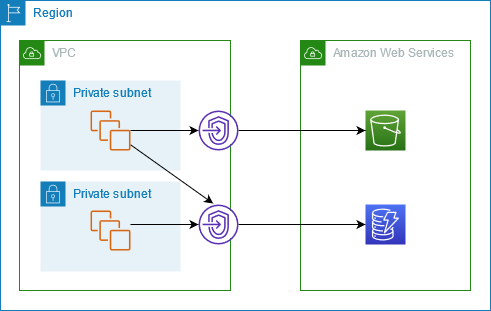
Cómo funciona: No crea una interfaz de red física virtual (ENI) ni consume direcciones IP de tu subred. En su lugar, agrega automáticamente una ruta (mediante un Prefix List) en la Tabla de Rutas (Route Table) de tu VPC. Todo el tráfico dirigido hacia S3 es enrutado internamente por ahí.

Costo: ¡Es totalmente gratuito! No hay cargo por hora de uso ni por procesamiento de datos.

Limitación principal: El acceso está estrictamente limitado a los recursos que viven dentro de esa VPC. No puedes usar un Gateway Endpoint para acceder a S3 directamente desde tu red on-premises (vía VPN o Direct Connect) ni desde otras VPCs conectadas.


Imagen de referencia de: https://docs.aws.amazon.com/vpc/latest/privatelink/gateway-endpoints.html

Interface VPC Endpoint (AWS PrivateLink):

Cómo funciona: Este fue el tipo de endpoint que usamos en el primer post para SSM. Crea una Interfaz de Red Elástica (ENI) dentro de la subred que elijas, asignándole una dirección IP privada. El tráfico se dirige hacia esa IP de manera local.

Costo: Tiene un costo asociado por hora por Zona de Disponibilidad, más un cargo por cada GB de datos procesado.

Ventaja principal: Al estar representado por una IP privada dentro de tu red, permite el acceso a S3 desde redes on-premises (mediante AWS Direct Connect o Site-to-Site VPN) o desde entornos multi-cuenta centralizados.

La Regla de Oro para S3:

Si el tráfico hacia tus buckets nace exclusivamente desde instancias EC2 u otros recursos alojados dentro de esa misma VPC, opta siempre por el Gateway Endpoint para ahorrar costos y simplificar el enrutamiento. Si requieres acceso desde on-premises o arquitecturas hub-and-spoke complejas, el Interface Endpoint es el camino a seguir.

La Solución: Acceso a S3 en nuestro Demo

Para no quedarnos solo en la teoría, he aplicado estos conceptos en la misma arquitectura base que desplegamos anteriormente.

En esta actualización, he modificado las plantillas de infraestructura en el repositorio para incluir el aprovisionamiento de un VPC Endpoint para S3, dejándote el código listo para que despliegues el de tipo Gateway o el de tipo Interface, para que puedas usar el que mejor se adapte a tu caso de uso. Si optas por desplegar el Gateway, CloudFormation se encarga de inyectar las reglas necesarias en la tabla de rutas de nuestra subred privada; si optas por el Interface, se aprovisionará una interfaz de red local. De cualquier manera, la instancia a la que accedemos vía Fleet Manager ahora tiene el camino despejado para interactuar con Amazon S3 sin tocar en ningún momento el internet público, manteniendo el esquema de “Zero Trust” a nivel de red externa.

¿Dónde puedo ver un ejemplo de implementación?
He subido los cambios a las plantillas de CloudFormation en el mismo repositorio público. Allí encontrarás el código necesario en la carpeta de vpce para ver cómo se declara un Gateway Endpoint y se asocia a las tablas de enrutamiento.

Repositorio:
https://github.com/pangoro24/aws-privatelink-private-instance-ssm

Si sigues la guía de despliegue actualizada en el Readme:

Desplegarás la VPC privada.

Desplegarás los Endpoints de interfaz (para SSM) y el nuevo Endpoint para S3.

Desplegarás la instancia EC2.

Al conectarte a tu instancia mediante Systems Manager Fleet Manager (sin internet), podrás abrir la consola y ejecutar comandos contra el CLI de AWS S3 (por ejemplo, listar buckets o descargar archivos) y verás que la comunicación es completamente exitosa.

Bonus: te dejo también la plantilla de un bucket de s3 mantener todo por infraestructura como código 🙂

Nota: Como siempre, no olvides eliminar el stack de CloudFormation cuando termines el laboratorio para evitar cobros de los Endpoints de Interfaz y la instancia EC2 si no los vas a necesitar.

Conclusión

Entender la diferencia entre un Gateway y un Interface Endpoint es clave para diseñar arquitecturas en la nube que sean seguras, escalables y costo-efectivas. Mientras que la flexibilidad de las IPs de un Interface Endpoint (PrivateLink) nos salva la vida en arquitecturas híbridas, los Gateways siguen siendo los reyes indiscutibles para el acceso interno hacia Amazon S3 y DynamoDB con un costo de $0.00.

En la próxima entrega, presentaré un caso de uso muy interesante y común sobre los VPC Endpoints de tipo Interface; algo que todo ingeniero de nube debería conocer, ya que puede que te toque implementarlo.

Gracias por leer.

DDR5 Prices Dropped 7.2% — Free Tools to Know If Upgrading Is Worth It

DDR5 prices just dropped 7.2% — the first real price relief after nearly 6 months of brutal, non-stop increases. AI datacenters have been hoarding DDR5 supply, and PC builders have been waiting it out.

Now that prices are finally moving, everyone is asking the same question: is it actually worth switching from DDR4?

The answer is not what the marketing numbers suggest.

The number that RAM brands don’t want you to calculate

DDR5-4800 CL40 — the cheapest DDR5 kit you’ll find — has a true latency of 16.67 nanoseconds.

DDR4-3200 CL16 — a mid-range DDR4 kit from 3 years ago — has a true latency of 10.00 nanoseconds.

That cheap DDR5 is 67% slower in real nanoseconds. Despite showing “4800 MHz” on the box.

The formula: (CAS Latency × 2000) ÷ Speed MT/s = nanoseconds

This is what we built a free calculator for.

Free tools to figure out your exact situation

DDR5 vs DDR4 Calculator — Is It Worth Upgrading?
Enter your current RAM specs and any target DDR5 kit. Get the real nanosecond latency for both, a performance impact estimate by use case (gaming, video editing, programming), and a clear verdict: Worth It / Marginal / Stick with DDR4. Works with any DDR4 or DDR5 kit — just enter the CL and speed.

RAM Latency Calculator — CAS to Nanoseconds
Convert any CAS latency + speed to real nanoseconds instantly. Includes a comparison table of 13 popular kits from DDR4-2133 to DDR5-8000 with ratings. You can also compare two kits side-by-side and it highlights which is genuinely faster. The “DDR4-3200 CL16 and DDR5-6000 CL30 are literally identical at 10.0ns” result shocks most people.

RAM Upgrade Advisor
Not sure if you should upgrade at all? This tool asks about your current RAM amount, speed, use case (gaming / video editing / programming), and budget. It scores 4 factors: capacity gain, speed gain, bottleneck relief, and cost efficiency — then gives a clear verdict: Upgrade Now / Worth Considering / Marginal / Not Worth It. It also tells you whether more capacity or faster speed matters more for your workload.

PC PSU Calculator — Vendor-Neutral
If you’re doing a new build with DDR5 (which needs a new platform — AM5 or Arrow Lake), you’ll need to size your power supply. This calculator covers CPUs, GPUs including the RTX 5090 (575W), RAM type, storage, cooling, and RGB. OuterVision — the old gold standard — appears to be down. This is the clean, unbiased replacement with 2026 hardware data.

What the DDR5 price drop actually means

Before the drop: a 32GB DDR5-6000 kit cost $120–$180. DDR4-3200 32GB was $50–$70.

After the 7.2% drop: DDR5 is more accessible, but the gap hasn’t closed completely. DDR4 is still the better value for anyone on an existing AM4 (Ryzen 3000/5000) or LGA1700 (Intel 12th/13th/14th gen) platform — because switching to DDR5 requires a new motherboard and CPU, adding $300–600+ to the cost.

DDR5 makes sense if:

  • You’re building a new system on AMD Ryzen 9000 (AM5) or Intel Arrow Lake
  • You do heavy video editing, 3D rendering, or AI workloads
  • You can get a kit with CL28 or lower at DDR5-6000+

DDR4 is still competitive if:

  • You already have DDR4-3600 CL16 or better (9ns — nothing cheap DDR5 can touch)
  • You game at 1440p or 4K (GPU is the bottleneck anyway)
  • You’re upgrading an existing platform

The existing gaming tools that pair with these

PC Bottleneck Calculator — find out if your CPU or GPU is already the limiter before spending money on RAM

FPS Calculator — estimate how much FPS you’re actually getting from your current hardware

Gaming Monitor Calculator — check if your monitor can even display the FPS difference faster RAM might produce

eDPI Calculator — tune your mouse sensitivity while you’re optimizing your setup

All tools run entirely in your browser. No signup, no data sent anywhere, free forever.

The nanosecond formula alone is worth bookmarking. Next time a RAM manufacturer advertises “7200 MHz DDR5”, you’ll know to check the CL before getting excited.

Originally published at https://tool.teamzlab.com

Performance & Recursion

Recursion step by step

How can you count all the participants in an auditorium if you don’t have sensors, check-in processes or access control?

  • Option 1: Use my eyes and my mind to count them one by one: 1,2,3,4…
  • Option 2: Count by twos, like 2,4,6,8,…
  • Option 3: Ask the participants to follow these instructions:

    1. Stand up and think of the number 1
    2. Pair off with someone standing, add their number to yours, and remember the sum
    3. One of you should then sit down
    4. If still standing, go back to step 2.
      The final person standing will know the exact number of participants.

Option 3 is the most efficient and faster than the other methods. This is why algorithms are important.

That’s how the conference by David Malan begins. Malan is a Computer Science professor at Harvard University, and he’s teaching how different ways of solving problems can lead to disaster or simply become a small everyday hurdle.

Performance and Complexity

Performance tells you how much slower a program becomes as the input grows. If I have 10 records to process, it takes x time. But if I have 1 million records, will it take 1,000,000 * x time, or could it be different? This is known as Big O notation.

In the example of counting people in a room, it would be something like this:

  • Option 1 is O(n) (Linear time). It takes as many steps as there are people. If there are 100 participants, this takes 100 steps
  • Option 2 is O(n/2), still linear but slightly faster.
  • Option 3 is O(log n) (Logarithmic time). If there are 100 participants, just takes 7 steps, because the number of people standing reduces by half in each round.

Recursion

What makes option 3 the winning option? ✨ The recursion ✨
Recursion is when a function calls itself to solve a smaller version of the same problem.

Every recursive function needs a Base Case to avoid running forever. Think of it as a ‘Divide and Conquer’ strategy: break the problem down until it’s simple enough to solve

The Matryoshka Doll (The Logic)
Think of recursion like a Russian nesting doll. To find out how many dolls are inside, you don’t just look at the big one; you follow these rules:

  • The Recursive Step: Open the current doll. If there is another one inside, repeat the process.
  • The Base Case: Eventually, you reach the smallest doll that cannot be opened. This is where you stop and start counting back.
def factorial(n):
    if n == 0:
        return 1  # base case
    return n * factorial(n - 1)  # recursive case
factorial(4)
→ 4 * factorial(3)
→ 4 * 3 * factorial(2)
→ 4 * 3 * 2 * factorial(1)
→ 4 * 3 * 2 * 1 * factorial(0)
→ 4 * 3 * 2 * 1 * 1
→ 24

The CS50 Auditorium (The Efficiency)

David Malan uses a clever way to count people in a room. Instead of counting 1, 2, 3… (O(n)), he uses a recursive strategy:

  1. Stand up and assign yourself the number 1.
  2. Pair off with someone else standing.
  3. Add your numbers together, and one person sits down.
  4. Repeat until only one person is left standing.

Why it works:

The problem is cut in half in every round. If you have 1,000 people, you only need about 10 rounds to find the total. This is the power of Logarithmic Time (O(log n)).

Recursion step by step

Download a summay in spanish:

Recursion_Blueprint.pdf

References

CS50x 2026 – Lecture 3 – Algorithms

My blog


Performance & Recursion

Solving problems by the smarter way

favicon
kenluzuriaga.com

3 funciones de Claude Code que deberías usar 🤖

Esta semana aprendí 3 cosas con Claude:

  1. Imponerle a Claude el Desarrollo Dirigido por Especificaciones con spec-writer

Llegué a quemar MUY rápido de mi cuota semanal de Claude y obviamente El problema no era Claude (que también jaja), Era yo, pidiéndole cosas sin contexto ni flujo de trabajo estructurado.

La solución que encontré: spec-writer, una herramienta de Claude Code que antes de escribir una sola línea de código te obliga a parar y generar un documento con tres cosas — la spec con los criterios de aceptación, el plan de arquitectura y las tareas atómicas.

Pero lo que más me gustó son las ASSUMPTIONS. Cada decisión que Claude toma por su cuenta aparece marcada con esa etiqueta. Si le pides “un sistema de login” sin especificar el método, Claude escribe: ASSUMPTION: Voy a usar autenticación por email. Tú lo ves, lo corriges si no es lo que quieres, y evitas que el agente escriba 500 líneas de código que no necesitas.

  1. Hacerle limpieza de cerebro con Auto-Dream

Hay algo que pasa con los agentes de IA cuando llevan tiempo en un proyecto: se vuelven más lentos, cometen errores raros, parecen… confundidos. El motivo casi siempre es el mismo — MEMORIA SUCIA.

Tu archivo MEMORY.md acumula contradicciones, notas obsoletas e instrucciones que ya no aplican. El agente sigue leyendo todo eso y lo mezcla con el contexto actual.

Claude Code acaba de lanzar dreaming para resolver exactamente esto. Con el comando /dreaming le dices a Claude que entre en modo reflexión: analiza todo lo que sabe, elimina lo que ya no aplica y sintetiza lo que sí importa.

La versión que más vale la pena activar es el Auto-Dream — hace ese mantenimiento de forma automática mientras no estás usando la terminal. Vuelves al día siguiente y el contexto ya está consolidado y listo.

  1. Conectar Obsidian con Claude para tener un segundo cerebro

Llevo años queriendo organizarme bien las notas y esta semana empecé a explorar Obsidian conectado con Claude.

En Obsidian las notas no están aisladas — se conectan entre sí como un mapa de ideas. Y tanto Obsidian como Claude usan Markdown de forma nativa, lo que significa que cuando los integras, Claude no solo lee texto, está trabajando en su propio idioma. Entiende tus enlaces, tus etiquetas, tu estructura.

La integración se hace a través del repositorio obsidian-skills, y a partir de ahí Claude puede organizar tus notas, clasificarlas e incluso encontrar conexiones que tú pasaste por alto.

Ojo, esto todavía lo estoy aprendiendo. He visto que se le puede sacar muchísimo partido pero aún estoy en la fase de entender bien cómo estructurarlo para mi flujo. Cuando lo tenga más claro, lo cuento con más detalle.

y Mientras escribo esto también estoy empezando a investigar los Channels de Claude, que acaban de salir. Dicen que sustituyen perfectamente a OpenClaw para gestionar contextos y flujos de trabajo. Aún no tengo suficiente contexto para contarlo, pero lo estaré investigando.

Nos vemos en la próxima entrada del blog, FIN.

Integrating Mapbox with Angular (Part 1: Setup with TypeScript Support)

Integrating maps and adding interactivity to them can be a bit tricky at first. In this post, I’ll show you how to easily add a basic map using Mapbox in your Angular project.

Mapbox offers several ways to use their maps, but the most straightforward approach is through their official npm package: mapbox-gl.

Step 1: Install the Mapbox GL JS package

npm i --save mapbox-gl

Step 2: Include the Mapbox CSS in index.html
In your index.html file, inside the

tag, add the following:

<link href='https://api.mapbox.com/mapbox-gl-js/v3.13.0/mapbox-gl.css' rel='stylesheet' />

Don’t just copy-paste, always check Mapbox’s official docs for the latest version.

Step 3: Get Your Mapbox Access Token
Log into your Mapbox account and generate a public access token (pk.).
If you’re using Mapbox on a frontend-only app, a public token is enough.
For backend services, use a secret token (sk.), but never expose it in frontend code.

Step 4: Create Map Component
map.ts

import { AfterViewInit, Component } from '@angular/core';
import mapboxgl, { Map } from 'mapbox-gl';

@Component({
  selector: 'app-map',
  templateUrl: 'map.html',
  styleUrls: ['map.css']
})
export class MapComponent implements AfterViewInit {
map!: Map;
accessToken = ''; // Add your public token here
mapStyle = 'mapbox://styles/mapbox/streets-v12'

ngAfterViewInit(): void {
    mapboxgl.accessToken = this.accessToken;
    this.map = new mapboxgl.Map({
      container: 'map', // matches the div ID
      style: this.mapStyle,
      center: [20, 50], // [lng, lat]
      zoom: 3,
    });
  }
}

map.html

<div id="map"></div>

map.css

#map {
  width: 100%;
  height: 100%;
}

Important:
Make sure that the parent element of your map (and the map container itself) has a defined width and height.
If either of them is missing, Mapbox won’t know how big the map should be, and you might just see a blank box.

Example fix:
map.css

.map-section {
  width: 100vw;
  height: 100vh;
}

#map {
  width: 100%;
  height: 100%;
}

map.html

<section class="map-section">
  <div id="map"></div>
</section>

If your map still overflows or causes scrollbars, make sure you reset global margins and paddings:

styles.css

html,
body {
  margin: 0;
  padding: 0;
}

This is the most basic way to include Mapbox in your project.
In upcoming posts, I’ll show you how to make your map more interactive using real-world data.

Give Your AI Agent a Mock Server: mockd as an MCP Tool

Here’s a scene that plays out a dozen times a day if you use an AI coding agent: you ask it to build something that calls an external API — a payment service, a notification system, an OAuth flow — and it writes beautiful code. Clean types, proper error handling, good structure. Then it stops. It can’t actually run any of it, because the API it’s calling doesn’t exist locally and the agent has no way to spin one up.

So you get code that looks right but hasn’t been tested against anything. The agent wrote a Stripe integration without ever seeing a Stripe response. It built a webhook handler without ever receiving a webhook. You’re the one who has to close that gap, manually, every time.

I kept hitting this wall, and it’s the reason mockd ships with 18 MCP tools built in.

What MCP gives your agent

MCP — Model Context Protocol — is the standard that lets AI agents call external tools programmatically. Instead of just reading and writing files, your agent can interact with services, APIs, and infrastructure through a structured interface.

mockd implements an MCP server that exposes everything an agent needs to create mock endpoints, send test traffic, inspect request logs, verify call counts, and inject failure conditions. All over stdio, no API keys required for local use.

The agent doesn’t just develop against a mock server. It provisions and manages the mock server itself.

Setup: two minutes, zero config

Claude Code

Add this to your Claude Code MCP configuration:

{
  "mcpServers": {
    "mockd": {
      "command": "mockd",
      "args": ["mcp"],
      "env": {}
    }
  }
}

Cursor

In Cursor’s MCP settings (Settings → MCP Servers), add the same configuration:

{
  "mcpServers": {
    "mockd": {
      "command": "mockd",
      "args": ["mcp"],
      "env": {}
    }
  }
}

This works with any MCP-compatible agent — Claude Code, Cursor, GitHub Copilot, Windsurf, JetBrains AI. The mockd mcp command speaks standard MCP over stdio, so anything that implements the protocol can use it.

One detail worth calling out: mockd mcp automatically starts a background daemon if one isn’t already running. You don’t need to manually run mockd start first. The agent connects, mockd boots up on port 4280 (mock server) and 4290 (admin API), and everything just works. Pass --data-dir if you want project-level isolation between different codebases.

A real workflow: “Build me a payment service”

Here’s what actually happens when you ask an agent to build something against an external API, with mockd connected as an MCP tool.

You: “Build a payment service that integrates with Stripe. It should create charges, handle webhooks, and refund failed payments.”

The agent’s first move isn’t writing application code. It calls manage_mock to create the Stripe endpoints it knows it’ll need:

  • POST /v1/charges → returns a charge object with status: "succeeded"
  • POST /v1/refunds → returns a refund object
  • GET /v1/charges/:id → returns charge details
  • POST /webhook → a local endpoint for receiving Stripe events

Each mock returns realistic response structures — the agent knows what Stripe responses look like and configures the mocks accordingly.

Then it writes the application code. The payment service, the webhook handler, the refund logic. But here’s the key difference: it can test every function as it writes it. The code hits http://localhost:4280/v1/charges, gets back a real HTTP response with a real JSON body, and the agent can verify the code actually works.

After writing the code, the agent calls verify_mock to check that the right endpoints were called the expected number of times. It calls get_mock_invocations to inspect the exact request bodies its code sent. It finds a bug — the refund handler is sending charge_id instead of charge in the request body — fixes it, and tests again.

Then it pushes further. It calls set_chaos_config to inject intermittent 500 errors on the charge endpoint, reruns the payment flow, and discovers the retry logic doesn’t handle idempotency keys correctly. It fixes that too.

The agent just completed a development loop that would normally require you to set up a Stripe test account, manage API keys, deal with rate limits, and manually inspect webhook payloads. Instead, it did the whole thing itself in a few minutes.

The tools that matter most

mockd exposes 18 MCP tools total. You don’t need to memorize them — the agent discovers them automatically through the MCP protocol. But these are the ones that get used constantly:

manage_mock — The workhorse. Create, list, get, update, delete, and toggle mock endpoints. This is how the agent builds out the API surface it needs.

verify_mock — Assert that a mock was called a specific number of times. The agent uses this to confirm its code is actually making the requests it should be.

get_mock_invocations — Retrieve the full request details for every call that hit a specific mock — headers, body, query parameters, timestamps. This is how the agent debugs what its code is actually sending.

get_request_logs — View all traffic that hit the mock server, not just matched requests. Useful when the agent’s code is calling an endpoint that doesn’t have a mock yet.

set_chaos_config — Inject latency, errors, and connection failures. The agent uses this to test its own error handling and retry logic.

manage_state — Create, read, update, and delete stateful resources. When the agent needs a mock that remembers data between requests — like a user record that persists after creation — this is how.

import_mocks — Import mock endpoints from an OpenAPI spec, Postman collection, or other formats. If the API the agent is integrating with has a spec, this bootstraps the entire mock surface in one call.

Resources: read-only context for the agent

Beyond tools, mockd also exposes MCP resources — read-only data the agent can access for context. There are 5 static resource URIs (mock://config, mock://mocks, mock://logs, mock://state, mock://chaos) and 8 dynamic resource patterns for drilling into specific mocks, invocations, and state entries.

In practice, the agent uses resources to understand the current state of the mock server before making changes. It reads mock://mocks to see what’s already configured, checks mock://logs to see recent traffic, and uses that context to make informed decisions about what to create or modify next.

Why this changes the development loop

The fundamental shift is that your AI agent can now iterate on code and its test environment simultaneously. It’s not writing code in a vacuum and hoping it works when it hits a real service. It’s running a full development loop — write, test, inspect, fix, test again — with a real HTTP server returning real responses.

No rate limits. No API keys. No cost per request. No dependency on staging environments that might be down. No “works on my machine but I can’t test the integration” gaps.

The agent gets real HTTP responses, not simulated ones. The code it writes has been tested against actual network calls. When you review the PR, the integration code has already been through dozens of iteration cycles against a mock that behaves like the real thing.

That’s the gap I kept running into, and it’s the gap that disappears when your agent has a mock server it controls.

What to know

The MCP transport is stdio only right now — local use. There’s no remote or SSE transport, so this is a “your machine, your agent” setup. If you’re hoping to share a mock server across a team via MCP, that’s not how it works yet. The agent also can’t change server configuration through MCP. It can create and manage mocks all day, but things like port numbers, TLS settings, and server-level config still require CLI flags or a config file. That’s a deliberate boundary, not an oversight.

MCP tool responses can get chatty. If your agent has a small context window and you’ve got fifty mocks configured, calling manage_mock with action: "list" is going to eat a chunk of that context. Something to keep in mind if you’re working with a constrained model. Trim your mocks or use targeted get calls instead of listing everything.

One more thing: mockd mcp auto-starts a background daemon, which is convenient right up until you forget it’s running. The daemon doesn’t shut down when the MCP session ends. You’ll want to run mockd stop when you’re done, or you’ll find port 4280 still occupied next time you try to start something else there. Ask me how I know.

Get started

Install mockd, add the MCP config to your agent, and point it at a project that talks to external APIs. The agent will figure out the rest.

# Install mockd
curl -fsSL https://get.mockd.io | sh

# Start mockd — the MCP server auto-connects to this
mockd start

For detailed setup instructions, tool reference, and advanced configuration:

Trace AI: I Pointed a Camera at a Whiteboard. Notion Built the Entire System Design Doc.

This is a submission for the Notion MCP Challenge

What I Built

Every engineering team has the same graveyard: folders full of blurry whiteboard photos that were supposed to become

documentation. They never do. The meeting ends, the momentum dies, and that brilliant architecture sketch slowly rots in

someone’s camera roll.

Trace AI kills that problem dead.

Trace is an autonomous pipeline that watches your Notion Design Inbox, your Slack workspace, and your Discord server

simultaneously. The moment you drop in a whiteboard photo, Trace wakes up, reasons through the sketch using Claude vision,

and uses the official Notion MCP server to build a complete, structured system design document — entirely on its own.

Not a summary. Not a description. A full engineering document:

  • Mermaid.js architecture diagrams — flowchart and sequence, auto-generated from your ink
  • Component breakdown — every service, database, and load balancer identified and described
  • Security analysis — potential vulnerabilities flagged with recommendations
  • Bottleneck detection — performance risks spotted before they hit production
  • Actionable task cards — your handwritten To-Dos extracted and created as real entries in your Notion engineering board,
    with Priority, Category, and Status pre-filled
  • AWS cost estimates — rough monthly infrastructure projections for every component
  • Complexity scoring — team size and build timeline estimates

The entire process takes under 2 minutes from photo to polished doc.

In a large company, information decays. A project manager marks a project as “completed”, but the task database still has 5 open items. A budget page says ‘$10k’, but the invoice page says ‘$12k’. Usually, these contradictions stay hidden until something breaks.

Sentinel fixes this. Using the new Model Context Protocol (MCP), Sentinel acts as a “shared brain” across your entire workspace. It observes every edit and cross-references it against a set of global truths you define. If a contradiction occurs, Sentinel doesn’t just watch—it acts.

Video Demo

Show us the code

https://github.com/Boweii22/Arch-Vision
Deployed live on Render using Docker (nikolaik/python-nodejs for Python + Node.js in one container — required to run the MCP
server subprocess).

How I Used Notion MCP

This is where Trace AI goes beyond a simple API wrapper.

Trace spawns the official @notionhq/notion-mcp-server as a live subprocess using the MCP Python SDK. Claude then enters an

agentic tool-use loop — it doesn’t receive a rigid set of instructions and execute them blindly. It reasons about what

blocks to append, how to structure the content, and how to handle edge cases like long Mermaid diagrams that exceed Notion’s
2000-character rich text limit.

Whiteboard photo
↓
Claude Vision → Architecture Analysis (structured JSON)
↓
npx @notionhq/notion-mcp-server ←→ Claude agentic loop
↓ ↓
Notion Page created MCP tool calls:
(direct API, correct parent) – append_block_children
– create_database_page
– (up to 25 iterations)
↓
Tasks Database ← action items extracted
Projects DB ← relational mapping

MCP unlocks something that raw API calls can’t: judgment. Claude decides when to split a code block, how to format a

callout, when to skip a section because the data isn’t there. The document isn’t templated — it’s reasoned.

On top of that, Trace runs a bi-directional sync loop: if you manually edit the Mermaid diagram in Notion, Trace detects the change, re-analyzes the modified architecture, and updates the analysis sections to stay consistent with your edits. Your

Notion workspace stays alive, not static.

Three ways to trigger it — Notion Inbox, Slack, Discord — because great tools meet teams where they already live.

FOSDEM 2026: Intro to WebTransport – the Next WebSocket?!

Max Inden recently explored in a talk at FOSDEM 2026 how the upcoming WebTransport protocol and Web API enhance WebSocket capabilities. WebTransport seeks to provide, among other things, lower latency and transparent network switching for key use cases such as high-frequency financial data streaming, cloud gaming, live streaming, and collaborative editing.

By Bruno Couriol

Çin'den robot üretiminde dev adım: Yıllık kapasite 10 bine çıkarıldı

Çin’in Guangdong eyaletine bağlı Foshan kentinde faaliyete geçen tam otomatik insansı robot üretim hattı, teknoloji dünyasında büyük yankı uyandırdı. Yıllık 10 bin robota kadar üretim kapasitesine sahip olan hat, yüksek teknolojiyle donatıldı ve üretim sürecini büyük ölçüde hızlandırdı. Tek bir insansı robotun üretimi yaklaşık 30 dakika gibi kısa bir sürede tamamlanıyor.