I Scanned 5 Popular JavaScript Sites for SEO Issues — Here’s What I Found

Everyone assumes big tech companies have flawless SEO. I decided to test that. I scanned five well-known JavaScript-heavy sites — react.dev, vercel.com, stripe.com/docs, linear.app, and shopify.com — running 19 SEO health checks across 10 pages each.

Every single site had issues. Some had a lot of them.

The Scores

  • react.dev — 74/100 (Best of the group)
  • vercel.com — 71/100 (Solid but sloppy on details)
  • stripe.com/docs — 60/100 (Surprising for Stripe)
  • linear.app — 57/100 (Heavy SPA showing its seams)
  • shopify.com — 39/100 (The biggest surprise)

react.dev — 74/100

React’s docs scored highest. Strong internal linking (3.5 avg links/page, zero orphan pages), all pages indexable, proper canonicals and OG tags.

Weak spots: zero structured data on every page, meta descriptions too short on 9/10 pages, and a JavaScript file that failed to load on /versions. The irony of React’s docs having a broken JS file is hard to ignore.

vercel.com — 71/100

The Next.js creators get SSR right — all pages indexable, good content depth, OG tags everywhere. But the details slip: missing meta description on /abuse, missing canonical on /academy, missing H1 on a subpage, and 9 orphan pages out of 10 scanned.

Internal linking was surprisingly weak — 0.0 average links per page in the scanned set.

stripe.com/docs — 60/100

I expected Stripe to ace this. They nail the fundamentals — titles, meta descriptions, H1s, canonicals, OG tags, proper heading hierarchy. Zero orphan pages.

But: zero structured data on all 10 pages (huge missed opportunity for docs), 7/10 pages missing image alt text, 8/10 pages loading over 3 seconds, and API requests failed on every single page. That last one means some content may not be loading for crawlers.

linear.app — 57/100

Beautiful product, but SEO tells a different story. Zero structured data, every meta description too short, 8/10 titles too short, all 10 pages slow to load, 4 orphan pages.

The internal link average was just 0.5/page — the SPA architecture isn’t generating proper crawlable links between pages. JS console errors on 2 pages, failed API requests on 2 more.

shopify.com — 39/100

The lowest score and the biggest company. The crawler landed on their Dutch locale pages, revealing issues you’d miss checking only the English site.

8/10 pages orphaned. Failed API requests on 7/10 pages. Missing H1s on 2 pages. No structured data on 8/10 pages. Even Shopify has SEO gaps.

Key Patterns Across All 5 Sites

Structured data is universally neglected. 4 out of 5 sites had zero Schema.org markup on every page scanned. This is free real estate for rich snippets that everyone leaves on the table.

Meta descriptions are an afterthought. Short, generic, or missing. These directly affect click-through rates from search results.

Image alt text is consistently missing. Every site had pages with images lacking alt text. Easy 2-minute fix per image with high accessibility and SEO impact.

Internal linking is weak on SPAs. Linear and Shopify had most pages orphaned. Server-rendered sites (Stripe, React) did better because links exist in the initial HTML.

Page speed is a universal problem. Most pages across all sites took over 3 seconds to load. JavaScript-heavy sites consistently struggle here.

AI crawlers see even less. These scores reflect what Googlebot sees after JS rendering. AI crawlers from ChatGPT and Perplexity don’t render JS at all — they only see raw HTML. Sites using client-side rendering are invisible to AI search.

What You Can Do

  1. Check your page source. Right-click → View Page Source. If your content isn’t in the raw HTML, crawlers aren’t seeing it.
  2. Add structured data. 20-30 minutes per page type, huge ROI for rich snippets.
  3. Write proper meta descriptions. 150-160 characters, unique per page.
  4. Add alt text to every image. 2 minutes per image.
  5. Fix internal linking. Every important page needs 2-3 internal links. Use real <a href> tags, not JS click handlers.
  6. Use SSR for important pages. Critical now that AI crawlers don’t render JavaScript.

Note: these are 10-page scans — a snapshot, not a full audit. But the patterns are consistent and verifiable by viewing page source on any of these sites.

I built JSVisible to automate these checks — it renders pages as both a user and Googlebot and compares the results. Free tier available if you want to try it on your own site.

Codacy GitHub Integration: Setup and Config Guide

Codacy screenshot

What You Will Learn

This guide walks through the complete process of integrating Codacy with GitHub – from installing the GitHub App to configuring pull request analysis, setting up quality gates, and uploading coverage reports from GitHub Actions. By the end, you will have a fully automated code quality pipeline where every pull request is scanned for bugs, security vulnerabilities, code smells, and coverage regressions before it can be merged.

Whether you are setting up Codacy for the first time or troubleshooting an existing integration that is not working as expected, this guide covers every step in detail. If you are looking for a broader overview of Codacy setup that includes GitLab and Bitbucket, see our complete Codacy setup guide.

Codacy screenshot

Prerequisites

Before starting the Codacy GitHub integration, make sure you have the following in place:

  • A GitHub account with admin or owner access to the repositories you want to connect. You need admin permissions to install GitHub Apps and configure webhooks.
  • At least one repository with code in a language Codacy supports. Codacy analyzes 49 programming languages including JavaScript, TypeScript, Python, Java, Go, Ruby, PHP, C#, Kotlin, Swift, and Scala.
  • A CI pipeline (optional but recommended) if you plan to upload code coverage. GitHub Actions is the most straightforward option since Codacy provides official Actions for both analysis and coverage reporting.
  • Organization admin access if you are installing Codacy on a GitHub organization rather than a personal account. Only organization admins can approve third-party GitHub App installations.

The integration itself takes under ten minutes. Configuring code patterns, quality gates, and coverage reporting adds another 20 to 30 minutes depending on how much customization your team needs.

Step 1 – Sign Up with GitHub

The fastest way to get started with Codacy is to sign up directly through your GitHub account. This creates your Codacy account and links it to your GitHub identity in a single flow.

Creating your Codacy account

Navigate to app.codacy.com and click the sign-up button. Select Sign up with GitHub from the available options. GitHub will prompt you to authorize the Codacy OAuth application, which grants Codacy permission to read your GitHub profile and email address.

After authorizing, Codacy redirects you back to its dashboard. At this point, your account exists but no repositories are connected yet. The next step is installing the Codacy GitHub App, which is what actually enables repository analysis and pull request integration.

Installing the Codacy GitHub App

The Codacy GitHub App is the core integration mechanism. Unlike the older OAuth-based integrations, the GitHub App provides granular permissions and webhook management without requiring a personal access token.

To install the GitHub App:

  1. From your Codacy dashboard, click Add repository or navigate to the organization settings
  2. Codacy will prompt you to install its GitHub App if you have not already done so
  3. Choose whether to install the app on your personal account or on a GitHub organization
  4. Select the repository access level – either All repositories or Only select repositories

If you are evaluating Codacy, start with “Only select repositories” and pick one or two projects. You can always expand access later from your GitHub organization settings under Settings then GitHub Apps then Configure next to the Codacy app.

The GitHub App requests the following permissions:

Permission Access Level Purpose
Repository contents Read Analyze source code during scans
Repository metadata Read List repositories and branches
Pull requests Read and Write Post status checks and comments on PRs
Webhooks Read and Write Receive push and PR events to trigger analysis
Checks Read and Write Report analysis results as GitHub Checks

Codacy does not request write access to your repository contents. It reads the code for analysis but does not push commits or modify files. After analysis, the code is not stored permanently on Codacy’s servers.

Step 2 – Add Repositories

Once the GitHub App is installed, you can start adding repositories to Codacy for analysis.

Selecting repositories

From your Codacy dashboard, click Add repository in the top navigation. Codacy displays a list of all repositories the GitHub App has access to, filtered by your organization. Select the repository you want to analyze and click Add.

Codacy immediately begins the initial analysis, which involves several automated steps:

  1. Cloning – Codacy clones the repository temporarily to access the source code
  2. Language detection – it identifies which programming languages are present
  3. Tool selection – Codacy enables default analysis tools for each detected language
  4. Full scan – every file in the repository is analyzed against the enabled code patterns
  5. Report generation – results are compiled into the repository dashboard

The initial analysis typically takes between 2 and 15 minutes depending on repository size. For a medium-sized repository with 50,000 to 100,000 lines of code, expect roughly 5 to 8 minutes.

Understanding the initial results

Once the first analysis completes, your repository dashboard displays several key metrics:

  • Grade – an overall letter grade from A (best) to F (worst) based on aggregated quality metrics
  • Issues – total issues found, categorized by severity (error, warning, info) and type (security, error-prone, performance, code style, unused code)
  • Complexity – file-level and function-level cyclomatic complexity scores
  • Duplication – the percentage of duplicated code blocks across the repository
  • Coverage – code coverage percentage, which will show as empty until you configure coverage reporting (covered in a later step)

Do not be alarmed if the initial grade is low. Legacy codebases often receive C or D grades on first analysis because Codacy runs all default patterns, including code style rules that may not match your team’s conventions. The next steps cover how to tune the analysis to focus on what matters for your project.

Step 3 – Configure Code Patterns

Code patterns are the individual rules that Codacy uses to analyze your source code. Each supported language has one or more analysis tools, and each tool contains a set of patterns that can be individually toggled.

Navigating to code patterns

  1. Open your repository in the Codacy dashboard
  2. Click Code patterns in the left sidebar
  3. You will see a list of analysis tools grouped by language

For a JavaScript/TypeScript project, you might see ESLint, JSHint, and Codacy’s own analyzers listed. For Python, expect Pylint, Bandit, Prospector, and Ruff. For Java, PMD, SpotBugs, and Checkstyle are common.

Tuning analysis tools

Each tool has a master toggle to enable or disable it entirely. Within each tool, individual rules can be switched on or off. Here is a practical approach for tuning:

Start with defaults. Run the first analysis with Codacy’s default patterns and review the results. If a specific tool or rule category produces mostly noise for your codebase, disable it.

Disable redundant tools. If you already run ESLint locally with a custom configuration, you have two options. Either disable Codacy’s built-in ESLint to avoid duplicate findings, or enable the “Use the configuration file in my repository” toggle so Codacy respects your .eslintrc file. The second approach is generally better because it keeps analysis consistent between local development and CI.

Focus on high-severity rules first. Sort rules by severity and prioritize error-level patterns that catch actual bugs and security vulnerabilities. Info-level and style-level patterns can be enabled later once your team has addressed the critical findings.

Using your existing linter configuration

If your repository already contains linter configuration files like .eslintrc.js, .pylintrc, or .rubocop.yml, you can configure Codacy to use them:

  1. Go to Code patterns and select the relevant tool
  2. Enable the “Use the configuration file in my repository” toggle
  3. Codacy will use your repository’s configuration instead of its own defaults

This prevents drift between what developers see when running linters locally and what Codacy reports on pull requests. It also means your team can manage analysis rules through the same code review process used for application code.

Step 4 – PR Analysis Setup

Pull request analysis is the most impactful part of the Codacy GitHub integration. It provides automated feedback on every PR before code reaches your main branch, catching issues while the context is fresh and the fix is simple.

How PR analysis works with GitHub

When a developer opens or updates a pull request on a connected repository, the following sequence occurs:

  1. GitHub sends a webhook event to Codacy via the GitHub App
  2. Codacy fetches only the files changed in the PR (not the entire repository)
  3. Each changed file is analyzed against the enabled code patterns
  4. Results are compared against the target branch to distinguish new issues from existing ones
  5. Codacy posts a status check on the PR indicating pass or fail
  6. Optionally, Codacy posts a summary comment with detailed findings

PR analysis is enabled by default when you connect a repository through the GitHub App. To verify it is working, open a pull request on your connected repository and look for the “Codacy Static Code Analysis” status check at the bottom of the PR.

Configuring what appears on PRs

You can customize the information Codacy reports on your pull requests:

  1. Navigate to your repository in the Codacy dashboard
  2. Click Settings in the left sidebar
  3. Scroll to the Pull Requests section

Available options include:

  • Status check behavior – post a single combined check or separate checks for issues, coverage, and duplication
  • PR comment – toggle the summary comment on or off, and configure what information it includes (new issues, fixed issues, coverage delta, complexity changes)
  • Inline annotations – add annotations directly on specific lines in the PR diff where issues were found

For most teams, the default configuration works well. The summary comment provides a quick overview, while inline annotations help developers locate specific issues without leaving the GitHub PR interface.

Making Codacy a required status check

To enforce quality standards and prevent PRs from being merged when they fail Codacy’s analysis, configure GitHub branch protection rules:

  1. Go to your repository settings on GitHub
  2. Click Branches in the sidebar
  3. Click Add branch protection rule (or edit an existing one for your main branch)
  4. Check Require status checks to pass before merging
  5. Search for and select Codacy Static Code Analysis
  6. Save the rule
# Example branch protection configuration
Branch name pattern: main

Require status checks to pass before merging:
  - Codacy Static Code Analysis

Once this is configured, GitHub will block the merge button on any PR where Codacy reports a failing status check. This is the most effective way to ensure that quality gates are actually enforced rather than just advisory.

Step 5 – Quality Settings

Quality gates define the thresholds that determine whether a PR passes or fails Codacy’s analysis. Without properly configured quality gates, the status check will always pass regardless of the issues found.

Configuring quality gate thresholds

  1. Navigate to your repository in the Codacy dashboard
  2. Click Quality settings in the left sidebar
  3. Set thresholds for each available metric
Metric What It Measures Recommended Starting Threshold
New issues Number of new issues introduced by the PR 0 critical, 5 total
Coverage on new code Test coverage percentage on new or changed lines 60%
Coverage variation Maximum allowed decrease in overall coverage -1%
Duplication on new code Percentage of duplicated blocks in new code 3%
Complexity Maximum file complexity score No threshold initially

Practical rollout strategy

Setting quality gates too aggressively from day one will cause every PR to fail, frustrating developers and eroding trust in the tool. A more effective approach:

Weeks 1 to 2: Set quality gates to advisory mode. Codacy reports results but does not block merges. Use this period to observe how your team’s PRs perform against the thresholds and whether the thresholds are realistic.

Weeks 3 to 4: Enable blocking quality gates with achievable thresholds. Start with zero new critical issues and coverage must not decrease. These are standards most teams can meet immediately.

Month 2 and beyond: Gradually tighten thresholds. Increase minimum coverage on new code, reduce the total allowed new issues, and add complexity thresholds once the team is comfortable with the workflow.

This approach lets your team build familiarity with the tool before it starts blocking their work, which significantly improves adoption rates compared to a strict day-one enforcement.

Coverage Reports Setup

Code coverage tracking is one of Codacy’s most useful GitHub integration features. It shows exactly how well-tested each pull request is and prevents coverage regressions from being merged.

Why coverage requires separate configuration

Codacy does not run your test suite. It analyzes source code statically, but test execution and coverage measurement happen in your CI pipeline. You need to generate a coverage report in your CI environment and upload it to Codacy using the Coverage Reporter.

Step-by-step GitHub Actions setup

Generate a project API token:

  1. Open your repository in the Codacy dashboard
  2. Click Settings in the sidebar
  3. Find the Coverage or Integrations section
  4. Copy the Project API Token

Add the token to GitHub Actions secrets:

  1. Go to your repository settings on GitHub
  2. Click Secrets and variables then Actions
  3. Click New repository secret
  4. Name it CODACY_PROJECT_TOKEN and paste the token value

Add the coverage step to your workflow:

name: Tests and Coverage

on:
  pull_request:
    branches: [main, develop]
  push:
    branches: [main]

jobs:
  test:
    runs-on: ubuntu-latest
    steps:
      - uses: actions/checkout@v4

      - uses: actions/setup-node@v4
        with:
          node-version: 20
          cache: 'npm'

      - run: npm ci

      - name: Run tests with coverage
        run: npm test -- --coverage

      - name: Upload coverage to Codacy
        uses: codacy/codacy-coverage-reporter-action@v1
        with:
          project-token: ${{ secrets.CODACY_PROJECT_TOKEN }}
          coverage-reports: coverage/lcov.info

For Python projects, the workflow looks similar but uses pytest:

      - name: Run tests with coverage
        run: pytest --cov=src --cov-report=xml:coverage.xml

      - name: Upload coverage to Codacy
        uses: codacy/codacy-coverage-reporter-action@v1
        with:
          project-token: ${{ secrets.CODACY_PROJECT_TOKEN }}
          coverage-reports: coverage.xml

Codacy supports LCOV, Cobertura XML, JaCoCo, Clover, and OpenCover formats. Use whichever format your test framework generates natively.

Uploading coverage for monorepos

If your project has multiple test suites or components, upload partial reports and finalize them:

      - name: Upload frontend coverage
        uses: codacy/codacy-coverage-reporter-action@v1
        with:
          project-token: ${{ secrets.CODACY_PROJECT_TOKEN }}
          coverage-reports: frontend/coverage/lcov.info
          partial: true

      - name: Upload backend coverage
        uses: codacy/codacy-coverage-reporter-action@v1
        with:
          project-token: ${{ secrets.CODACY_PROJECT_TOKEN }}
          coverage-reports: backend/coverage.xml
          partial: true

      - name: Finalize coverage
        uses: codacy/codacy-coverage-reporter-action@v1
        with:
          project-token: ${{ secrets.CODACY_PROJECT_TOKEN }}
          final: true

Once coverage is uploaded, Codacy displays coverage metrics on your repository dashboard and includes coverage deltas in every PR analysis comment. If you have configured a coverage quality gate, PRs that decrease coverage below the threshold will receive a failing status check.

Troubleshooting

Even with a straightforward setup, you may run into issues with the Codacy GitHub integration. Here are the most common problems and their solutions.

Codacy is not analyzing pull requests

Check GitHub App permissions. Go to your GitHub organization settings, click GitHub Apps, find the Codacy app, and click Configure. Verify that the repository in question is listed under repository access. If you chose “Only select repositories” during installation and later added new repositories, you need to update this list manually.

Verify webhook delivery. Go to your GitHub repository settings, click Webhooks, find the Codacy webhook, and check the Recent Deliveries tab. Look for failed deliveries with non-200 status codes. If deliveries are failing, try redelivering a recent one. If the webhook is missing entirely, the GitHub App may need to be reinstalled.

Check repository status in Codacy. Navigate to the repository in your Codacy dashboard and look at the status indicator. If analysis is paused, click to resume it. If the status shows an error, the most common causes are a misconfigured default branch or the repository being archived on GitHub.

Coverage is not appearing on PRs

Verify the upload succeeded. Check your GitHub Actions logs for the coverage reporter step. A successful upload shows a confirmation message with the commit SHA. Common failure causes include an incorrect or expired project token, a malformed coverage report, or a network timeout reaching Codacy’s servers.

Check the commit SHA mismatch. Codacy matches coverage reports to specific commits. GitHub Actions pull_request events run on a merge commit by default, which may not match the PR head SHA. Use the --commit-uuid parameter to specify the correct SHA:

      - name: Upload coverage to Codacy
        uses: codacy/codacy-coverage-reporter-action@v1
        with:
          project-token: ${{ secrets.CODACY_PROJECT_TOKEN }}
          coverage-reports: coverage/lcov.info
        env:
          CODACY_COMMIT_UUID: ${{ github.event.pull_request.head.sha }}

Status check is stuck in “pending”

This usually means Codacy received the webhook but has not completed the analysis. Common causes include Codacy service delays (check status.codacy.com), very large PRs with thousands of changed files, or rate limiting if you are running many concurrent analyses. Wait 15 minutes and check again. If the check remains pending, try closing and reopening the PR to trigger a fresh webhook.

Too many false positives in PR comments

Tune your code patterns. Go to Code patterns in the Codacy dashboard and disable rules that consistently produce irrelevant findings. Focus on keeping error-severity and security rules enabled while disabling code style rules that conflict with your team’s conventions.

Use your repository’s linter config. Enable the “Use configuration file in repository” toggle for each tool that has a matching config file in your project. This ensures Codacy’s analysis matches your local linting setup.

Exclude non-application code. Add generated files, vendored dependencies, build outputs, and test fixtures to your .codacy.yml exclusion list or the Ignored Files section in the Codacy UI.

Alternatives to Codacy for GitHub Integration

While Codacy is a solid choice for GitHub-based code quality automation, several alternatives offer different strengths. If the Codacy GitHub integration does not meet your specific needs, here are tools worth evaluating.

CodeAnt AI

CodeAnt AI is a Y Combinator-backed platform that combines AI-powered PR reviews, SAST, secrets detection, IaC security scanning, and DORA metrics in a single tool. It provides line-by-line code review feedback, auto-generated PR summaries, and one-click auto-fix suggestions across 30+ languages.

CodeAnt AI is priced at $24/user/month for the Basic plan (AI PR reviews, summaries, and auto-fix) and $40/user/month for Premium (adds SAST, secrets detection, IaC scanning, DORA metrics, and SOC 2/HIPAA audit reports). For teams that want both AI code review and security scanning in one GitHub integration, CodeAnt AI is a strong contender – especially for teams in regulated industries that need compliance reporting alongside code quality.

Compared to Codacy, CodeAnt AI offers more advanced AI review capabilities with contextual feedback that considers PR descriptions and linked issues. The trade-off is that it supports fewer languages (30+ versus Codacy’s 49) and is a newer platform with a smaller user base.

Other alternatives to explore

For a comprehensive comparison of tools that can replace or complement Codacy, see our Codacy alternatives guide. If pricing is your primary concern, our Codacy pricing breakdown compares costs across different team sizes. And if you are still evaluating whether Codacy’s free tier meets your needs, check out our guide on whether Codacy is free.

Conclusion

The Codacy GitHub integration provides a comprehensive automated code quality pipeline that scans every pull request for bugs, security vulnerabilities, code smells, duplication, and coverage regressions. The setup process is straightforward – install the GitHub App, add your repositories, configure code patterns to match your team’s standards, set quality gates with realistic thresholds, and upload coverage reports from GitHub Actions.

The most impactful configuration decisions are making Codacy a required status check through GitHub branch protection rules, enabling the “Use configuration file in repository” option for linting tools you already run locally, and setting quality gates that focus on new code rather than the entire codebase. These three choices determine whether Codacy becomes a genuinely useful part of your development workflow or just another dashboard that developers learn to ignore.

For teams that want to go deeper with Codacy configuration beyond just the GitHub integration, our complete Codacy setup guide covers additional topics including the .codacy.yml configuration file, team management, advanced CI configurations, and best practices for long-term maintenance. For an honest assessment of the platform’s strengths and limitations, see our Codacy review.

Further Reading

Frequently Asked Questions

How do I integrate Codacy with GitHub?

Go to app.codacy.com, click Sign up with GitHub, and authorize the Codacy OAuth app. Then install the Codacy GitHub App on your organization or personal account. Select the repositories you want to analyze, and Codacy will automatically create webhooks and begin scanning your code within minutes.

Is the Codacy GitHub App free?

The Codacy GitHub App is free to install. However, accessing the full cloud platform features like PR analysis, quality gates, and team dashboards requires a paid Team plan at $18/dev/month (annual billing). Open-source projects get the Team plan free. The Developer plan offers free IDE-based scanning but does not include GitHub PR integration.

How does Codacy analyze GitHub pull requests?

When you open a pull request, the Codacy GitHub App receives a webhook notification. It analyzes only the changed files, compares results against the target branch to identify new issues, posts a status check (pass or fail based on quality gates), and optionally adds a summary comment with detailed findings including coverage changes and complexity metrics.

Can I use Codacy with GitHub Actions?

Yes. Codacy provides an official GitHub Action called codacy-analysis-cli-action that runs static analysis inside your CI pipeline. You can also use the codacy-coverage-reporter-action to upload test coverage reports. Both actions authenticate using your project API token stored as a GitHub Actions secret.

How do I fix Codacy not analyzing my GitHub pull requests?

First, verify the Codacy GitHub App has permission to access the repository in your GitHub organization settings under GitHub Apps. Then check the webhook delivery status in your repository settings under Webhooks. Also confirm the repository is not paused in the Codacy dashboard. If permissions were recently changed, you may need to re-authorize the app.

How do I make Codacy a required check on GitHub?

Go to your GitHub repository settings, click Branches, and edit or create a branch protection rule for your main branch. Under Require status checks to pass before merging, search for and select the Codacy Static Code Analysis check. This prevents PRs from merging when they fail Codacy quality gates.

How do I upload code coverage from GitHub Actions to Codacy?

Add the codacy/codacy-coverage-reporter-action step to your GitHub Actions workflow after your test step. Provide your CODACY_PROJECT_TOKEN as a secret and specify the coverage report path. Codacy supports LCOV, Cobertura, JaCoCo, Clover, and OpenCover formats. The coverage data then appears on your Codacy dashboard and in PR comments.

What GitHub permissions does the Codacy app need?

The Codacy GitHub App requires read access to repository code and metadata, write access to pull request status checks and comments, and webhook access for push and pull request events. You can grant access to all repositories or select specific ones during installation. Codacy does not store your source code permanently.

How do I configure Codacy analysis rules for a GitHub repository?

Navigate to your repository in the Codacy dashboard, click Code patterns in the sidebar, and toggle individual analysis tools and rules on or off. Alternatively, create a .codacy.yml file in your repository root to define tool configuration, file exclusions, and language settings. The YAML file overrides UI settings and keeps configuration version-controlled.

Can I use Codacy with GitHub Enterprise?

Yes. Codacy supports GitHub Enterprise Cloud natively through the standard GitHub App integration. For GitHub Enterprise Server (self-hosted), you need the Codacy Business plan which supports self-hosted deployment. This requires additional infrastructure configuration and is priced through custom sales quotes.

How long does Codacy take to analyze a GitHub pull request?

Codacy typically analyzes pull requests in 1 to 3 minutes because it only scans changed files rather than the entire repository. The initial full repository analysis takes 2 to 15 minutes depending on codebase size. Very large repositories with hundreds of thousands of lines may take longer on the first scan.

Does Codacy work with GitHub monorepos?

Yes. Codacy supports monorepos by allowing you to configure different analysis tools and patterns for different directories using the .codacy.yml file. You can exclude irrelevant directories, scope analysis to specific services, and upload coverage separately for each component. Codacy aggregates all partial coverage reports into a single view.

Originally published at aicodereview.cc

AI coding agents lie about their work. Outcome-based verification catches it.

GitHub logo

AI coding agents have a consistency problem. Ask one to add authentication to your project and it’ll tell you it’s done. Commits made, tests passing, middleware wired up. Check the branch and you’ll find a half-written JWT helper, no tests, and a build that doesn’t compile.

This isn’t a hallucination problem. The agent did produce code. It just didn’t verify that any of it worked before declaring victory. And neither did the tools sitting between the agent and your main branch.

The transcript trust problem

Most orchestration tools that coordinate AI agents verify work by reading transcripts. The agent says “committed 3 files” or “all tests passing” and the verifier pattern-matches those strings as evidence of completion.

That’s trusting the agent’s self-report.

The issue isn’t that agents are deliberately deceptive. It’s that they generate completion language as part of their output pattern regardless of the actual state of the codebase. An agent will write “tests passing” into its response while the test suite has syntax errors. It’ll claim files were created that only exist in the prompt’s hypothetical, not on disk.

Transcript parsing catches the obvious failures: agent errored out, produced no output, didn’t mention anything about the task. It misses the subtle ones: agent produced code that looks right, described it correctly, but the code doesn’t compile, doesn’t pass tests, or doesn’t do what was asked.

Outcome-based verification

The alternative is checking what actually happened instead of what the agent said happened.

This is what Swarm Orchestrator 4.0 implements. After each agent step runs on its isolated git branch, the verifier executes a series of checks against the branch itself:

Check What it does Fails when
git_diff Diffs the branch against the recorded base SHA No file changes detected
build_exec Runs the detected build command in the worktree Non-zero exit code
test_exec Runs the detected test command in the worktree Non-zero exit code
file_existence Checks that expected output files exist Expected files missing
transcript Parses agent output for completion evidence (supplementary only)

Transcript analysis still runs. But when outcome checks are present, transcript-based checks get demoted to required: false. The build and test execution results gate the merge decision.

Stack detection is automatic. The verifier reads package.json, Makefile, pyproject.toml, Cargo.toml, or whatever project configuration exists and runs the appropriate commands. No per-repo configuration.

What happens when verification fails

Blind retry is the default across most agent tooling. Step fails, same prompt runs again, up to some retry limit. The agent has no idea what went wrong.

Swarm Orchestrator’s RepairAgent takes the structured output from the verification checks and feeds it back into the retry prompt. Which check failed, the last 20 lines of build or test output, which files were expected but aren’t there. The failure gets classified (build failure, test failure, missing files, no changes) and the repair strategy adapts to the type.

On the final attempt the prompt includes an explicit priority shift: get something working over getting something complete.

The difference between “retry with context” and “blind retry” is measurable. An agent that knows the build failed on a missing import has a realistic path to fixing it. An agent re-running the same prompt that produced a broken build has roughly the same odds of producing another broken build.

Agent-agnostic by design

4.0 drops the Copilot CLI dependency. The adapter layer supports Copilot CLI, Claude Code, and Codex out of the box. The interface is minimal:

export interface AgentAdapter {
  name: string;
  spawn(opts: {
    prompt: string;
    workdir: string;
    model?: string;
    timeout?: number;
  }): Promise<AgentResult>;
}

One flag at the CLI level (--tool claude-code) or per-step in a plan file. The orchestrator treats the agent as an interchangeable subprocess. Verification doesn’t change based on which agent ran. The branch either builds or it doesn’t.

This also means you can mix agents within a single plan. Use Claude Code for the architecture step, Codex for the boilerplate, Copilot for the tests. Each step gets verified the same way regardless of which agent produced it.

CI integration

The tool ships as a GitHub Action:

- uses: moonrunnerkc/swarm-orchestrator@swarm-orchestrator
  with:
    goal: "Add unit tests for all untested modules"
    tool: claude-code
    pr: review

The Action outputs a JSON result with per-step verification status. You can gate downstream jobs on the verification outcome the same way you’d gate on any other CI check.

Most orchestrators in this space (Overstory, Emdash) are desktop or local-only. Running AI agents in CI with outcome-verified results is a gap that none of them currently fill.

Recipes for repeatable tasks

Generating a plan from scratch for “add tests to this project” is wasteful when the plan structure is the same every time. 4.0 ships with seven parameterized recipes:

swarm use add-tests --tool codex --param framework=vitest
swarm use add-auth --param strategy=jwt
swarm use security-audit

Each recipe is a JSON file with {{parameter}} placeholders. Custom recipes are one file in templates/recipes/. The knowledge base tracks recipe outcomes across runs so success rates and failure patterns accumulate over time.

Current state

1,112 tests passing, 1 pending. TypeScript strict mode. ISC license. Five phases of upgrades shipped in this release across the adapter layer, verification engine, repair pipeline, CI integration, and recipe system.

GitHub logo

moonrunnerkc
/
swarm-orchestrator

Verification and governance layer for AI coding agents. Parallel orchestration with evidence-based quality gates for Copilot, Claude Code, and Codex.


Swarm Orchestrator

Swarm Orchestrator

Verification and governance layer for AI coding agents. Parallel execution with evidence-based quality gates, not autonomous code generation.

This is not an autonomous system builder. It orchestrates external AI agents (Copilot, Claude Code, Codex) across isolated branches, verifies every step with outcome-based checks (git diff, build, test), and only merges work that proves itself. The value is trust in the output, not speed of generation.

License: ISC
  
CI
  
Tests: 1112 passing
  
Node.js 18+
  
TypeScript 5.x

Quick Start · What Is This · Usage · GitHub Action · Recipes · Architecture · Contributing

Swarm Orchestrator TUI dashboard showing parallel agent execution across waves

Quick Start

# Install globally
npm install -g swarm-orchestrator
# Or clone and build from source
git clone https://github.com/moonrunnerkc/swarm-orchestrator.git
cd swarm-orchestrator
npm install && npm run build && npm link
# Run against your project with any supported agent
swarm bootstrap ./your-repo "Add JWT auth and role-based access control"
# Use Claude Code instead of Copilot
swarm bootstrap ./your-repo "Add JWT auth"

…

I Built an Agent That Assembles Incident War Rooms in Notion Through MCP

This is a submission for the Notion MCP Challenge

What I Built

Incident Runbook is an agent that turns Notion into a living incident response system. It watches an Incidents database, and when a new SEV1 or SEV2 appears, it cross-references three other databases (Services, Runbooks, On-Call), assembles a War Room page with everything the responder needs, and writes it back to Notion. When the incident is marked resolved, it generates an AI post-mortem with Gemini 2.5 Flash.

The whole thing runs through Notion’s MCP server. No REST calls, no webhooks, no middleware layer.

I built this because incident response at most companies is still a manual scramble. The runbook exists somewhere, the on-call schedule is in a different tool, and the service dependency map is in someone’s head. This agent pulls all of that together in seconds.

Video Demo

Show us the code

🚨 Incident Runbook — AI-Powered Incident Response for Notion

Built for the Notion MCP Hackathon — zero direct API calls, 100% MCP.

The Problem

When a SEV1 hits at 2am, engineers scramble: “Where’s the runbook? Who’s on-call? What depends on this service?” They’re copy-pasting from scattered docs, pinging Slack, and losing precious minutes. Incident response shouldn’t require tribal knowledge — it should be automated.

The Solution

Incident Runbook turns your Notion workspace into a living incident response system. Log an incident → a full war room assembles itself in seconds.

It connects to Notion entirely through the Model Context Protocol (MCP) — reading databases, assembling pages, and writing post-mortems without a single direct API call.

How It Works

  1. Detect — Scans your Incidents database for new SEV1/SEV2/SEV3 entries
  2. Lookup — Finds the affected service, pulls its runbook, maps dependencies
  3. Assemble — Creates a War Room page with

    • Incident details and…

How I Used Notion MCP

The four-database pattern

The agent coordinates across four Notion databases in a single scan: Incidents, Services, Runbooks, and On-Call. Each scan starts with notion-search on the Incidents database to find new or resolved entries. For each incident, it follows the “Affected Service” relation to the Services database, then follows the “Runbook” relation from that service to the Runbooks database, and pulls contacts from the On-Call database filtered by role.

This means a single incident triggers reads across all four databases. The MCP call pattern looks like:

  1. notion-fetch on the database ID to get the collection:// data source URL
  2. notion-search with that URL to get page IDs
  3. notion-fetch on each page to get properties and content

For a scan with 1 incident, 3 services, 2 runbooks, and 4 on-call contacts, that’s roughly 20 MCP calls. Chatty, but each call is fast and the total scan takes a few seconds.

Relation resolution was the trickiest part

Notion MCP returns relation properties as arrays of page URLs, not IDs. So an incident’s “Affected Service” looks like ["https://www.notion.so/abc123def456"] rather than a clean ID. Matching that to the actual service record means parsing the URL, stripping dashes, and normalizing to a consistent format across all four databases.

I spent more time debugging ID mismatches than writing the actual war room assembly. Services fetched from the database had IDs in one format, while the relation URLs from incidents had them in another. The fix was normalizing everything to dashless hex strings on read.

Writing Markdown back to Notion

The war room page is a single Markdown string that Notion renders natively. It includes a details table, on-call contacts list, the full runbook steps, dependent services, a timeline, and an action checklist with checkboxes. Creating it is one notion-create-pages call with the incident page as the parent.

The post-mortem works the same way. The agent calculates MTTR from the incident creation time to resolution, feeds the incident details and timeline to Gemini 2.5 Flash, and writes the AI output into a new page.

Watch mode and connection reuse

The agent has a watch mode that polls every 30 seconds. An early version spawned a new mcp-remote process on every poll cycle, which ate system resources fast. The fix was extracting the scan logic into a function that accepts an existing MCP client, so watch creates one connection and reuses it across all cycles.

What I’d do differently

The property parsing is fragile. Properties come back inside a <properties> XML block as JSON, and the key names are case-sensitive and sometimes inconsistent (I found both "status" and "Status" depending on how the database was configured). A more robust version would normalize property keys on read. But for a hackathon, regex and case-checking got the job done

Why I Built a PGP Encryption Layer for Gmail (And Open-Sourced the Chrome Extension)

Why I Built a PGP Encryption Layer for Gmail (And Open-Sourced the Chrome Extension)
I sent a contract over Gmail last year. Nothing fancy — just a freelance agreement with a client’s banking details for direct deposit. Hit send, moved on with my day.

Three weeks later, that client got a phishing email referencing exact dollar amounts from our agreement. Someone had scraped it. Maybe from a compromised inbox, maybe from a server breach, maybe from something else entirely. The point is: the email sat on Google’s servers in plaintext the entire time.

That’s the moment I stopped assuming Gmail “encryption” meant what I thought it meant.

What Gmail Actually Encrypts (And What It Doesn’t)
Here’s the thing most developers don’t realize until they dig into it. Gmail uses TLS — Transport Layer Security. Your email is encrypted while it’s moving between servers. The little padlock icon in your browser? That’s TLS doing its job.

But once your email lands on Google’s servers, it’s stored in a format Google can read. Their systems scan it for spam filtering. Smart Reply reads it to suggest responses. Ads used to be targeted based on email content (Google says they stopped, but the infrastructure to do it never went away).

TLS protects your email from a man-in-the-middle attack during transit. It does absolutely nothing if Google’s servers get breached, if a government subpoena demands your data, or if a rogue employee decides to peek.

TLS encryption:
  You  ──[encrypted]──>  Google Server  ──[encrypted]──>  Recipient
                              │
                         [plaintext]
                         Google can read it here.

End-to-end encryption (PGP):
  You  ──[encrypted]──>  Google Server  ──[encrypted]──>  Recipient
                              │
                         [still encrypted]
                         Nobody reads it. Not even Google.

That gap between “encrypted in transit” and “actually private” is what kept bugging me.

So I Built GmailKrypt
GmailKrypt is a Chrome extension that bolts PGP encryption directly onto Gmail’s interface. No separate app. No copy-pasting into a terminal. You compose your email like you normally would, click encrypt, and send.

The whole thing runs on OpenPGP.js — the same standard that’s been protecting communications since Phil Zimmermann released PGP back in 1991. Except now you don’t need to touch a command line to use it.

How It Actually Works in Practice
You install the extension. It generates a key pair for you — a public key and a private key. Your private key stays in Chrome’s local storage. It never hits a server. Not mine. Not Google’s. Nobody’s.

When you want to send an encrypted email:

Compose your email in Gmail like normal
Click the GmailKrypt encrypt button in the toolbar
The extension encrypts the message body using the recipient’s public key
Gmail sends what looks like a block of gibberish
What your recipient sees before decryption:

-----BEGIN PGP MESSAGE-----

hQEMA7Vj8+t5rZ7aAQf+N2M7j8K2vF9xD3nE1yP4mR6sQ
8tA5bC7dF0gH3iK6lN9oR2sU5vX8yB1cE4fG7hJ0kL3mO
6pS9tW2xA5zC8dF1gI4jL7nQ0rU3vY6aD9eH2iK5lN8oR1
=x7Fp
-----END PGP MESSAGE-----

If the recipient has GmailKrypt installed, the extension detects the PGP block and decrypts it automatically. If they use any other PGP tool — Thunderbird, GPG Suite, Kleopatra — it works just the same. That’s the beauty of open standards.

The Architecture (For the Nerds)
I know this is dev.to, so let’s get into the guts of it.

Zero-knowledge design. The extension uses chrome.storage.local for private keys. They’re sandboxed by Chrome’s extension security model. The API server I run at api.gmailkrypt.com handles licensing and Stripe subscriptions — it never touches keys, never sees message content, never stores anything it shouldn’t.

Content script injection. GmailKrypt injects into Gmail’s DOM to add the encrypt/decrypt toolbar. It listens for compose window events and intercepts the message body before send. All the crypto happens client-side through OpenPGP.js.

Key exchange. This was the UX challenge. PGP has always been powerful but painful to set up. GmailKrypt lets you attach your public key to any email with a single button click. The recipient imports it, sends theirs back, and you’re set. First exchange takes maybe 30 seconds.

// Simplified flow
const { privateKey, publicKey } = await openpgp.generateKey({
  type: 'ecc',
  curve: 'curve25519',
  userIDs: [{ email: '[email protected]' }]
});

// Encrypt
const encrypted = await openpgp.encrypt({
  message: await openpgp.createMessage({ text: emailBody }),
  encryptionKeys: recipientPublicKey,
  signingKeys: myPrivateKey  // also signs it
});

Digital signatures come free with PGP. Every encrypted email is also signed, so the recipient can verify it actually came from you and wasn’t tampered with in transit. Authentication, integrity, and non-repudiation — all in one operation.

Who Is This Actually For?
I built this scratching my own itch, but it turns out a lot of people have the same itch.

Freelancers and contractors sending invoices with bank details over email. Lawyers who have attorney-client privilege to protect but keep using Gmail because their firm is on Google Workspace. Journalists communicating with sources — Snowden used PGP with Glenn Greenwald for a reason. Healthcare folks who technically violate HIPAA every time they email patient info through standard Gmail. Developers who want to practice what they preach about security.

Or honestly? Anyone who’s ever sent a password, a credit card number, or a social security number over email and felt that little twinge of “I probably shouldn’t have done that.”

The Google Workspace Elephant in the Room
Google does offer something called S/MIME encryption for Workspace Enterprise customers. It costs significantly more than standard Workspace, requires your IT admin to manage certificates, and only works between users whose organizations have both set up S/MIME correctly.

For the other 1.8 billion Gmail users? Nothing.

That’s not an oversight. Google’s business model fundamentally conflicts with end-to-end encryption. If they can’t read your emails, they can’t power Smart Compose, can’t filter spam as effectively, can’t build the profile that drives their ad ecosystem. I’m not saying that’s evil — it’s just the reality of a free product.

GmailKrypt sidesteps all of that. It works with free Gmail, Google Workspace, any plan. You’re adding encryption on top of Gmail, not asking Google to provide it.

Free Tier, Pro Tier, No BS
The extension is free to use — you get 5 encryptions per day, which covers most people’s needs. If you’re sending encrypted emails all day (lawyers, journalists, security teams), the Pro plan is $4.99/month for unlimited everything.

I thought long and hard about pricing. I wanted it accessible enough that a student or activist could use it without paying, but sustainable enough that I can keep maintaining it. Five free encryptions felt like the right balance.

Try It, Break It, Tell Me What’s Wrong
You can grab GmailKrypt from the Chrome Web Store or check out the landing page at gmailkrypt.com.

If you’re the type who reads source code before installing extensions (and you should be), the extension runs entirely client-side for all crypto operations. The only network calls are to the license API for Pro features.

I’m genuinely curious what this community thinks. Is PGP email encryption still relevant in 2026? Are there UX improvements that would make you actually use this? Did I miss something obvious in the architecture?

Drop a comment. I read all of them.

Your Supabase RLS Is Probably Wrong: A Security Guide for Vibe Coders

You built your app with Lovable, Cursor, or Bolt. You connected Supabase. You enabled Row Level Security because the docs said to.

Your RLS is probably wrong.

I have scanned dozens of vibe-coded apps this month. The same RLS mistake appears in roughly 80% of them. The app works perfectly. Every feature functions. Users can sign up, create data, view their data. And every user can also view every other user’s data.

The mistake

Here is what AI-generated RLS policies typically look like:

CREATE POLICY "Users can view data"
ON public.user_data
FOR SELECT
USING (auth.role() = 'authenticated');

This policy says: if you are logged in, you can read all rows. Every row. Every user’s data.

Here is what it should say:

CREATE POLICY "Users can view their own data"
ON public.user_data
FOR SELECT
USING (auth.uid() = user_id);

The difference is one function call. auth.role() checks if someone is logged in. auth.uid() checks if the logged-in user owns that specific row. One character of difference in the code, total difference in security.

Why AI tools get this wrong

When you prompt Lovable or Cursor to “add authentication to my app,” the AI does exactly what you asked. It adds login and signup. It creates the database tables. It enables RLS.

But the AI optimizes for “works correctly” not “works securely.” The policy it generates passes every test: authenticated users can read data, unauthenticated users cannot. That is technically correct. It is also a data breach.

Nobody prompts the AI to add ownership checks. The AI does not add them unprompted. The result is an app that looks secure but leaks data between users.

How to check yours in 2 minutes

Open the Supabase SQL editor and run:

SELECT
  schemaname,
  tablename,
  policyname,
  qual
FROM pg_policies
WHERE schemaname = 'public'
ORDER BY tablename;

Look at the qual column. If you see (auth.role() = 'authenticated'::text) on any table that stores user data, you have the problem.

If you see (auth.uid() = user_id) or something similar with auth.uid(), you are probably fine for that table.

The fix

For each table that stores user-specific data:

-- Drop the broken policy
DROP POLICY "Users can view data" ON public.user_data;

-- Create the correct one
CREATE POLICY "Users can view their own data"
ON public.user_data
FOR SELECT
USING (auth.uid() = user_id);

-- Do the same for INSERT, UPDATE, DELETE
CREATE POLICY "Users can insert their own data"
ON public.user_data
FOR INSERT
WITH CHECK (auth.uid() = user_id);

CREATE POLICY "Users can update their own data"
ON public.user_data
FOR UPDATE
USING (auth.uid() = user_id);

CREATE POLICY "Users can delete their own data"
ON public.user_data
FOR DELETE
USING (auth.uid() = user_id);

Replace user_data with your actual table name. Replace user_id with whatever column stores the user’s UUID in that table.

Common variations that are also broken

Service role bypass:

USING (auth.role() = 'service_role' OR auth.role() = 'authenticated')

Still broken. Any authenticated user reads everything.

True for all:

USING (true)

No restriction at all. Anon users can read everything. This appears more often than you would expect.

Missing policies entirely:
Some tables have RLS enabled but zero policies. This actually blocks all access (Supabase defaults to deny), which is better than the wrong policy. But it usually means the developer disabled RLS on that table to “fix” their app when queries stopped working.

Tables that need ownership checks

Not every table needs auth.uid() = user_id. Here is a quick breakdown:

Needs ownership check: profiles, user_data, orders, messages, documents, settings, anything with personal or financial data

Does not need ownership check: public content (blog posts set to published), lookup tables (countries, categories), app configuration

Needs role-based check: admin panels, moderation queues, shared team data

What happens when this is wrong

A user creates an account on your app. They open browser DevTools. They go to the Network tab. They find a Supabase request. They copy the URL and anon key (both visible in the JavaScript bundle). They run:

curl 'https://your-project.supabase.co/rest/v1/user_data?select=*' 
  -H "apikey: your-anon-key" 
  -H "Authorization: Bearer their-jwt-token"

Every user’s data comes back. Names, emails, financial data, health data, whatever you store. One curl command.

Beyond RLS

RLS is the most common issue but not the only one. Other things to check:

  1. API keys in your JS bundle. Open your deployed site, view source, search for eyJ. Your Supabase anon key will be there (expected). Anything else should not be.

  2. Auth email verification. Is it required? If not, anyone can sign up with any email and start querying.

  3. Rate limiting. Are your auth endpoints rate-limited? If not, brute force attacks work.

  4. Storage bucket policies. If you use Supabase Storage, the bucket policies have the same RLS problem. Check them separately.

We built free security tools specifically for this at notelon.ai. The code scanner checks for exposed keys and common misconfigurations. No signup required.

If you want a deeper review covering all of the above plus business logic, auth flows, and API design, our $99 security audit covers 50+ checks with a PDF report.

Part of the Vibe Coding Security series. More guides on Lovable, Cursor, Bolt, and Windsurf security at notelon.ai/report.

I built a free AI visibility audit tool — then audited ourselves. Here’s what happened.

Originally published at getvisus.com
Six months ago I started building Visus — a free tool that scores websites on how easily ChatGPT, Perplexity and Google AI can find and recommend them.
The idea came from a problem I saw firsthand. My wife owns Fozias, a Kashmiri restaurant in Liverpool. Despite great food, loyal customers and positive reviews, the restaurant was completely invisible when anyone asked an AI engine for restaurant recommendations in Liverpool. ChatGPT didn’t mention it. Perplexity didn’t mention it. It simply didn’t exist in the AI world.
So I built Visus to diagnose exactly why — and fix it.
The Fozias experiment
Before any optimisation, Fozias scored 23 out of 100 on the Visus AI visibility audit. The problems were clear:

No schema markup telling AI engines what the business was
No FAQ content matching the questions people ask AI
Inconsistent business listings across directories
No llms.txt file allowing AI crawlers access
Weak entity definition — AI engines couldn’t confidently identify what Fozias was

We fixed every one of those issues. Ninety days later Fozias scored 80 out of 100. They became the number one Perplexity result for Kashmiri restaurants in Liverpool. ChatGPT now includes them in dining recommendations for Liverpool.
That’s a real restaurant. Real customers. Real results.
Then we audited ourselves
Last week I ran getvisus.com through its own audit. We scored 35 out of 100.
That was humbling. We had built a tool to help businesses become visible to AI — and our own product was largely invisible.
The problems Visus found on our own site:

Canonical URL inconsistency between two domains
No llms.txt file
Missing FAQ schema markup
Thin crawlable content — React apps are hard for AI crawlers to read
No external citations from trusted sources

We fixed everything in one session. Added comprehensive schema markup including SoftwareApplication, Organization, WebSite and FAQPage schemas. Created a detailed llms.txt file. Fixed all canonical URLs. Added eight FAQ entries covering every question someone might ask an AI about Visus.
The new score: 76 out of 100.
A 41 point improvement in one session.
What we learned
AI visibility is not the same as Google SEO. You can rank on Google and be completely invisible to ChatGPT and Perplexity simultaneously. They have different signals, different trust mechanisms, and different ways of deciding who to recommend.
The businesses that act now — while most of their competitors are still ignoring AI search — will own those recommendations for years. The ones that wait will spend significantly more trying to catch up.
The five things that matter most for AI visibility:

Schema markup — tell AI engines exactly what your business is in machine-readable format
FAQ content — answer the specific questions people ask AI engines about your category
Entity consistency — your business name, address and description must be identical everywhere
External citations — trusted third-party sources mentioning your business build AI confidence
llms.txt — a simple file that tells AI crawlers everything they need to know about you

Try it on your own site
Visus is free. No signup. No credit card. Enter your URL and get your score in under 60 seconds.
If you score below 50 — and most businesses do — you are largely invisible to AI search right now. Your competitors who fix this first will take the recommendations you should be getting.
getvisus.com
Built in Liverpool. Helping local businesses get found by AI.

Try it free at getvisus.com —
no signup, no credit card, results in 60 seconds.

The Hardest Part of Coding Isn’t Coding

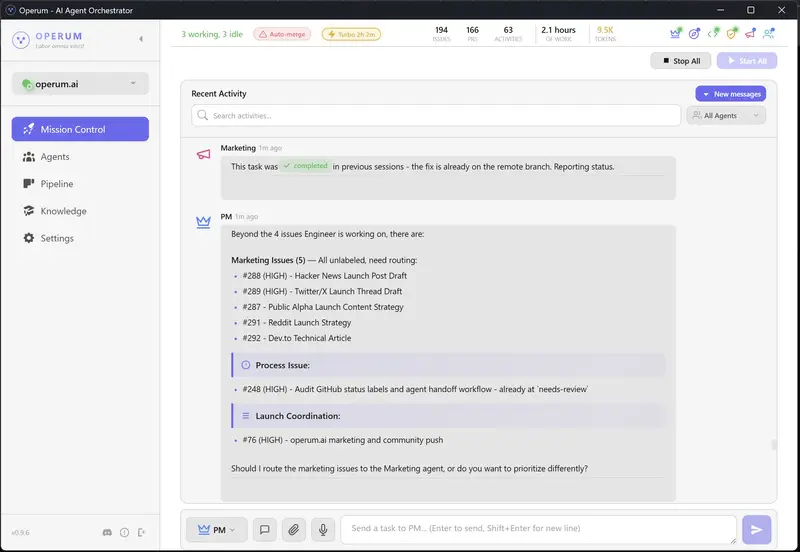
Operum desktop app showing agent activity and pipeline status

The Hardest Part of Coding Isn’t Coding

It’s starting.

You know the feeling. You sit down, open your laptop, and stare at your editor. You know what you need to build. You might even know exactly how to build it. But between you and the first keystroke is a wall of friction that has nothing to do with technical ability.

You check Slack. You scan Jira. You re-read yesterday’s PR comments. You try to remember what branch you were on, what was blocked, what that failing test was about. You open three tabs of documentation for context you already had yesterday but your brain dumped overnight.

Forty-five minutes later, you write your first line of code.

This isn’t a discipline problem. It’s a physics problem.

Activation Energy: A Chemistry Lesson for Developers

In chemistry, activation energy is the minimum energy required to start a reaction. Hydrogen and oxygen can sit next to each other indefinitely — they won’t become water until you add enough energy to break their existing bonds and form new ones.

The reaction itself is energetically favorable. It wants to happen. But without that initial spark, nothing moves.

Software development works the same way. The work itself is often enjoyable once you’re in it. The problem is the energy required to start the reaction each day.

For a solo developer or small team, that activation energy looks like this:

  1. Context reconstruction — What was I working on? What’s the current state of the branch? Did I push my last changes?
  2. Status inventory — What’s blocked? What’s waiting for review? What broke overnight?
  3. Priority sorting — What should I work on first? Has anything changed since yesterday?
  4. Environment setup — Pull latest changes, run migrations, make sure tests pass, check that the dev server starts
  5. Mental model loading — Re-read the code, remember the architecture decisions, recall why you made that weird workaround on line 247

Each step is small. Together, they form a barrier that can take 30-60 minutes to overcome — every single morning. That’s 5+ hours per week spent not building, just preparing to build.

And here’s the cruel part: the activation energy is highest when you need it to be lowest. Monday morning after a weekend. The first day back from vacation. After a context switch to a different project. The times when momentum matters most are exactly when the friction is worst.

The Context Switching Tax

It gets worse. Activation energy isn’t just a morning problem — it compounds throughout the day.

Every time you switch from coding to reviewing a PR, from reviewing to triaging a bug report, from triaging to updating documentation — you pay the tax again. Research from the University of California, Irvine found that it takes an average of 23 minutes and 15 seconds to fully regain focus after an interruption.

For a developer who also handles project management, code review, testing, and deployment — that’s not an interruption. That’s the entire job. You’re not a developer who gets interrupted. You’re an interrupt handler who occasionally writes code.

The traditional response is “just focus better” or “block your calendar” or “turn off Slack notifications.” These are band-aids on a structural problem. The friction isn’t coming from distractions — it’s coming from the work itself being fragmented across too many roles.

What If the Work Was Already Started When You Sat Down?

Here’s the thought experiment that led us to build Operum.

What if, instead of spending your first 45 minutes reconstructing context and sorting priorities, you opened your laptop and saw this:

Overnight Activity:
├── PM Agent triaged 3 new issues, prioritized by impact
├── Architect Agent reviewed #412, posted design guidance
├── Engineer Agent implemented #408, opened PR #415
├── Tester Agent validated PR #413 — all checks passed
└── 2 PRs ready for your review

Operum desktop app showing agent activity and pipeline status
The Operum dashboard — open your laptop to agents already working.

Your activation energy just dropped to near zero. You don’t need to remember what you were working on — the agents continued it. You don’t need to sort priorities — they’re already triaged. You don’t need to check what’s blocked — the status is right there.

Your first action isn’t “figure out what to do.” It’s “review what’s already done.”

That’s a fundamentally different psychological starting point.

The Psychology of Momentum

There’s a well-documented phenomenon in behavioral psychology called the Zeigarnik Effect: people remember incomplete tasks better than completed ones. Unfinished work creates a low-level cognitive tension that nags at you until the task is resolved.

Most productivity systems try to exploit this — “just start the task and your brain won’t let you stop.” But that advice ignores the activation energy problem. You can’t leverage the Zeigarnik Effect if you can’t get past the starting barrier.

Operum inverts this. When you open your laptop and see that agents have already made progress on your tasks — PRs created, tests passing, reviews posted — the Zeigarnik Effect works for you instead of against you. Your brain sees incomplete reviews, passing tests awaiting approval, progress that’s almost shippable. The tension pulls you into the work.

You don’t have to push yourself to start. The work pulls you in.

This is the same psychology behind streaks in fitness apps, progress bars in onboarding flows, and “daily login rewards” in games. Visible progress creates momentum. The difference is that with Operum, the progress is real — actual code written, actual tests passing, actual issues triaged.

A Day in the Life: Traditional vs. Operum

Traditional Solo Dev Workflow

8:00 AM  Open laptop
8:05     Check email, Slack, GitHub notifications
8:15     Open Jira/Linear, scan the board
8:25     Remember that failing test from yesterday
8:30     git pull, npm install, wait for dependencies
8:35     Run tests — one failing, investigate
8:45     Oh right, that was the thing I was debugging
8:50     Re-read the code, load context into brain
9:00     Finally start writing code
         ─── 60 minutes of activation energy ───
...
10:30    Teammate asks for PR review
10:35    Switch context, read their changes
10:55    Leave review comments
11:00    Try to remember what I was building
11:15    Back to coding
         ─── 45 minutes lost to context switch ───
...
2:00 PM  Need to deploy the hotfix from this morning
2:10     Write deployment script, test it
2:30     Deploy, monitor logs
2:45     Back to feature work... what was I building?
3:00     Re-read code again, finally resume
         ─── 60 minutes lost ───

Productive coding time: ~4 hours out of 8. The rest is overhead.

Operum Workflow

8:00 AM  Open Operum dashboard
8:01     See overnight activity:
         - 3 issues triaged and prioritized
         - 1 PR opened by Engineer agent (#415)
         - 1 PR validated by Tester agent (#413)
         - Architect posted design notes on #412
8:05     Review PR #413 — tests passing, clean diff
8:15     Approve and merge
8:16     Review PR #415 — spot one naming issue
8:20     Comment on PR, agents will address it
8:22     Open #412, read Architect's design guidance
8:25     Respond with one clarification
8:27     Start working on the creative problem you
         actually care about
         ─── 27 minutes from laptop open to deep work ───
...
10:30    Tester agent flags a regression in PR #416
10:31    Read the test results — clear failure report
10:35    Either fix it yourself or comment and let
         Engineer agent handle it
10:36    Back to what you were doing
         ─── 6 minutes, not 45 ───
...
2:00 PM  Close laptop. Agents continue triaging,
         testing, preparing tomorrow's review queue.

Productive creative time: ~6.5 hours out of 8. The agents handle the scaffolding.

It’s Not About Replacing You

I want to be precise about what’s happening here, because the framing matters.

Operum doesn’t replace your judgment. It doesn’t make architectural decisions for you. It doesn’t merge code without your approval. What it does is eliminate the startup cost so you can spend your energy on the work that actually requires a human brain — creative problem solving, product decisions, and the code that matters.

Think of it like this: a chef doesn’t become less of a chef because someone else prepped the ingredients, organized the station, and heated the pans. The chef’s skill is in the cooking. Everything before that is necessary but not where the value comes from.

The agents are your prep cooks. They chop the onions. You create the dish.

The Compound Effect

The activation energy savings compound in ways that aren’t obvious at first.

Weekly: 5+ hours of recovered productive time. That’s an extra workday every two weeks.

Monthly: Fewer “I’ll get to it Monday” deferrals. Issues don’t pile up because agents keep the pipeline moving even when you step away.

Quarterly: Projects that would have stalled during busy weeks keep progressing. The agents don’t have bad weeks, don’t get sick, don’t lose context over a long weekend.

Psychologically: The dread of “I have so much to catch up on” after time off disappears. You come back to a tidy pipeline, not a mess. This changes your relationship with the work — taking a break doesn’t mean paying a tax when you return.

Try It

Operum runs six specialized AI agents — PM, Architect, Engineer, Tester, Marketing, and Community — that coordinate through GitHub to manage your development workflow. It’s a desktop app that runs locally, your code stays in your environment, and it’s free during public beta.

If you’ve ever lost an hour of your morning to context reconstruction, or felt the weight of switching between coding, reviewing, testing, and deploying — this is what we built it for.

The hardest part of coding isn’t coding. It’s everything around it.

Let the agents handle the everything. You handle the coding.

→ operum.ai

Ship like a team of six. Start your day in flow state, not in Jira.

Dear Beginner Dev: No, AI Is Not Taking Your Job. But Ignoring It Might.

You just wrote your first for loop. You’re proud of it — you should be. Then you open Twitter and see a senior engineer declaring, with full confidence, that AI will replace all software developers within 12 months.

Congratulations. You’ve just experienced one of the most reliable traditions in tech: the breathless, recurring announcement that programmers are obsolete. We had this conversation when Stack Overflow launched. When no-code tools took off. When GitHub Copilot shipped. We’re having it again now, louder.

Here’s what I want to tell you honestly, as someone who has watched this field for a while: the fear is understandable, the timeline is wildly exaggerated, and there is a real and practical path forward for you.

“The tools are changing. The need for human judgment, creativity, and accountability is not.”

What AI actually does today

Let’s be clear-eyed. AI coding tools are genuinely impressive and genuinely useful. They can autocomplete boilerplate, generate test cases, explain error messages, scaffold CRUD endpoints, and help you rubber-duck debug at 2am without bothering a colleague. These are real productivity gains.

What they struggle with is everything that requires context: understanding a decade-old codebase, navigating org politics to know why a system was built a certain way, making judgment calls about tradeoffs, communicating with non-technical stakeholders, and taking responsibility when something breaks in production. None of that is going away.

Reality check: The engineers predicting “full AI replacement in 1 year” have been saying this — with different timelines — for the past five years. Bold predictions get engagement. Nuance doesn’t trend.

What you should actually do

Here’s the practical part. The field is changing, and the right response isn’t panic — it’s deliberate skill-building. Think of it in four areas:

01 — Master the fundamentals
Data structures, algorithms, how the web works, how databases think. AI can generate code; understanding why it works is what separates you from the prompt.

02 — Learn to use AI as a tool
Don’t avoid Copilot or Claude out of principle. Learn to use them well — and more importantly, learn to critically evaluate what they produce. The skill is judgment, not keystrokes.

03 — Build real things
Projects beat tutorials every time. Break things, fix them, ship them. The experience of owning something end-to-end is irreplaceable by any model.

04 — Develop soft skills early
Communication, documentation, asking good questions, estimating work. These compound over a career and are the hardest things to automate.

A note on the “one year” claim specifically

Software development is not a single job. It is hundreds of micro-disciplines: embedded systems, accessibility engineering, security research, developer tooling, data pipelines, mobile, systems programming, platform engineering. Each has deep specialization. “AI will replace developers in a year” is roughly as specific as “robots will replace workers” — technically directional, practically useless for planning.

What is changing is which parts of the job take the most time. The junior developer who spent 60% of their day writing boilerplate will not do that in five years. But the developer who understands systems deeply, communicates clearly, and can make good decisions under ambiguity? That person has never been more valuable.

“The question isn’t whether AI will change your job. It will. The question is whether you’ll be the developer who uses it, or the one who is surprised by it.”

The honest truth about being a beginner right now

It is actually a remarkable time to be starting out. The tooling available to beginners today would have seemed like magic five years ago. You can get instant explanations of confusing code. You can spin up a working prototype in an afternoon. You have access to better documentation, better communities, and more learning resources than any previous generation of developers.

The bar for entry is lower in some ways, which means you can get to interesting problems faster. And the bar for staying relevant is higher in others, which means you have to keep learning. That second part has always been true in this field.

The one thing worth internalizing: Software development has never been just about writing code. It has always been about solving problems, working with other humans, and making systems that don’t fall over. Focus there. The syntax will change. The problems won’t.

Where to focus your energy right now

If you’re a beginner and want a concrete direction: pick one area and go deep rather than skimming everything. Understand how the internet works. Learn to read documentation instead of just copy-pasting. Finish a project — even a small one — from idea to deployment. Start building a habit of reading other people’s code, not just writing your own.

The developers who thrive in the next decade will be those who combine domain expertise with the ability to work effectively alongside AI tools — not those who either ignore AI or outsource their entire thinking to it.

You are not behind. You are at the beginning. That is exactly where you should be.

Drop a comment if you’re a beginner dev navigating this. You’re not alone — and the community is worth being part of. 👇

There is Beauty in Pursuing An Excitement (No Matter Where You Are In Life)

tv with noise

I have spent countless moments paralyzed in a pool of anxiety and frustration when attempting to answer the most pressing questions of adulthood:

“What are you going to do with your life?”

“Where do you see yourself in five years? 10? 20?”

“What are you passionate about?”

For the majority of my adulthood, I haven’t known the answers to these questions. The weight of them invoked feelings of longing, sadness, and confusion…

Tune Out the Noise

tv with noise

Without divulging into my backstory (like an overdone anime flashback), I simply want to acknowledge that I am strongly aware that many, many, MANY people have these feelings as well. I know I am not alone in this. And honestly, I don’t know if most people know what they truly want to do in life. In my eyes, I think most people know how they want to feel.

People want to feel good.
They want to feel happy.
Accepted.
Welcomed.
Loved.
Respected.

Because life is here and then it ceases, and that slightly unsettling feeling I get when I think about how all of this is temporary is enough to empower me to pursue what excites me.

I don’t care if AI “takes 99% of jobs.” (ugh, the fear-mongering of it all…)
I don’t care if I never get a job as a software engineer.
I don’t care if I learn web-development and then decide I want to do something else.

I am done making decisions based on frivolous headlines and anxieties.

Why Web Development Excites Me

coding HTML

At this point in my life, web development is exciting. It has been so fun to learn more about computers, the internet, coding, and programming (I just started learning Javascript two days ago). It’s refreshing to learn without worrying about where it will lead.

My favorite websites to visit are the ones that welcome you with a kaleidoscope of personality and expression. It amazes me that someone (or a team!) designed and developed something so cool. I wanted to learn how to create websites like that, so I started dabbling with Webflow, a no-code website builder, back in 2024, entertaining the idea of becoming a web designer.

Buuuut, long story short, even after putting money into a Webflow course, I gave up. I was terrified of having to find clients and I was stressed that I would never be valuable enough compared to people who have been designing websites for years and years. Also, I must confess that making a responsive website from scratch boggled my mind and I was terrible at it…

And how in the world is it fair to compare oneself to someone who has spent way more time learning something??

I mean, of course I was not on that level, and I didn’t really give myself a chance to get there! It’s so silly when you think about it, but it doesn’t feel that way when you’re in the thick of it, does it?

Anyway, I deciding to take a break from learning Webflow after struggling with responsiveness, so I started a HTML & CSS course on YouTube to learn the fundamentals – but I did not finish that either. And no, not because it was hard. I simply decided I wanted to learn something else at that time, and honestly, I was not in a place mentally where I could have adequate focus on learning web development.

The Importance of Commitment

people putting their fists together in a circle

Historically, I have had a terrible habit of starting things and not finishing them because of 1) a poor self-concept, and 2) not knowing if it’s something I could see myself doing for the rest of my life, which feels daunting. But I am taking the steps now to build meaningful habits because worrying about the future is not a practical use of my time.

That’s why I embarked on a journey to learn full-stack web development through the amazingly free 100 Devs Software Engineering program! This program is led by Leon Noel, and all of the videos are generously hosted on YouTube for easy access. I am grateful that free content like this exists, especially considering that paid programs are not an option for many people.

I am committing to completing this course because I know I can do challenging things. I was going to say “I want to prove that I can do challenging things,” but I want to reinforce that I know what I am capable of achieving. I graduated from basic training when I was in the Army, and that is THE MOST challenging thing I have done to date.

Also, most of us learned to walk and talk, and while I have no recollection of the experience, I assume it was quite challenging for us at the time!

💛

I am excited to learn, build, and eventually, solve problems and help create life-enhancing experiences for people. Because whether I’m doing web development or something else, I know these skills will positively shape my impact, no matter how I end up being of service in the world.

Now, I will continue learning Javascript with Scrimba so I can confidently complete my 100 Devs homework. I really enjoy how interactive Scrimba is. It is a very cool platform indeed! ☺️✨

If you have the luxury of doing so, remember to pursue what gets you excited to wake up in the morning and take inspired action.🌸