Day 24: Agentic AI in DevOps & MLOps ⚙️🚀

Executive Summary

DevOps and MLOps are where agentic AI becomes real infrastructure.

Unlike research or product agents, DevOps/MLOps agents:

  • touch production systems 🧨
  • trigger deployments
  • modify infrastructure
  • influence reliability, cost, and security

This makes them:

  • extremely powerful
  • extremely dangerous if designed poorly

This chapter goes deep into:

  • where agentic AI fits in DevOps & MLOps
  • safe architectural patterns
  • concrete implementations
  • observability, analytics, and cost controls
  • real-world use cases and failure modes

Think of these agents as junior SREs that never sleep — and must never panic.

Why DevOps & MLOps Are Agent-Native Domains 🧠

DevOps/MLOps work is:

  • procedural
  • reactive
  • signal-driven
  • repetitive under pressure

Classic loop:

Observe → Diagnose → Decide → Act → Verify

This maps perfectly to agentic systems.

But mistakes here cause:

  • outages
  • data corruption
  • massive cloud bills 💸

So autonomy must be earned, not assumed.

What DevOps Agents SHOULD and SHOULD NOT Do 🚦

SHOULD

  • detect anomalies early 📈
  • correlate logs, metrics, traces
  • propose remediation actions
  • automate low-risk responses

SHOULD NOT

  • deploy to prod unreviewed ❌
  • change infra topology autonomously
  • bypass incident processes

Default stance: read-only, then graduate.

Canonical Architecture: DevOps Agent System 🏗️

Signals (Metrics, Logs, Traces)
            ↓
     Observation Agent
            ↓
     Diagnosis Agent
            ↓
     Decision Agent
            ↓
   Action Validator & Policy Engine
            ↓
     Execution Agent
            ↓
     Verification & Rollback

Autonomy increases layer by layer.

Core Signals Ingested 📥

Signal Systems
Metrics Prometheus, Datadog
Logs ELK, OpenSearch
Traces Jaeger, Tempo
Deployments ArgoCD, Spinnaker
ML Metrics Evidently, WhyLabs

Agents reason across signals humans rarely correlate manually.

Use Case 1: Incident Triage Agent 🚨🧑‍🚒

Problem

  • alerts fire without context
  • engineers wake up blind

Agent Flow

Alert → Log correlation → Change detection → Hypothesis → Suggested action

Outcome

  • faster MTTR
  • fewer false escalations

Use Case 2: Deployment Risk Assessment 🧪📦

Before deployment, an agent evaluates:

  • recent incidents
  • test coverage changes
  • traffic patterns

Produces:

  • risk score
  • deploy / delay recommendation

Humans still approve.

Use Case 3: MLOps Drift Detection & Response 📉🧠

Agents monitor:

  • data drift
  • prediction drift
  • performance decay

Agent actions:

  • retraining proposal
  • rollback suggestion
  • alert routing

Example: Incident Diagnosis Agent (Pseudo-Code) 💻

def diagnose_incident(metrics, logs, traces):
    anomalies = detect_anomalies(metrics)
    correlated_logs = correlate_logs(logs, anomalies)
    recent_changes = find_recent_deployments()

    hypothesis = generate_hypothesis(
        anomalies,
        correlated_logs,
        recent_changes
    )
    return hypothesis

Diagnosis > reaction.

Policy-Gated Execution (Critical) 🔐

No agent action should skip policy checks.

IF action == "restart"
AND service_tier == "critical"
THEN require human approval

Policies protect uptime and engineers.

Tool Wrapping Pattern 🧩

Agent → Safe Wrapper → kubectl / API

Wrappers enforce:

  • environment checks
  • blast radius limits
  • rollback readiness

Never expose raw infrastructure tools.

Observability for DevOps Agents 👀📊

Track:

  • agent suggestions vs approvals
  • automated actions taken
  • rollback frequency
  • false positive rate

These metrics define trust.

Cost & Performance Analytics 💸📉

Agents can:

  • detect over-provisioning
  • recommend scale-downs
  • flag runaway jobs

But scaling actions must be staged and reversible.

Failure Modes Seen in Production 🚨

Failure Cause
Alert storms Poor signal filtering
Wrong remediation Shallow diagnosis
Automation fear No explainability

Agents must explain why before acting.

Case Study: SRE Assist Agent at Scale 🧑‍💻📊

Context

  • Multi-region SaaS platform

Agent Role

  • incident correlation
  • remediation suggestions

Results

  • 35% MTTR reduction
  • fewer night-time escalations

Key choice

Suggestions first. Automation later.

Tooling Ecosystem 🧰

Category Tools
Infra Kubernetes, Terraform
CI/CD GitHub Actions, ArgoCD
Observability Prometheus, Datadog
MLOps MLflow, Kubeflow

Agents integrate — they don’t replace.

Gradual Autonomy Model 📈

Observe → Suggest → Execute (Low Risk) → Execute (High Risk)

Most systems should never reach full autonomy.

Final Takeaway

Agentic AI in DevOps & MLOps is about resilience, not heroics.

The best teams:

  • automate safely
  • explain every action
  • design for rollback

An agent that can deploy must also know how to stop 🛑.

Test Your Skills

🚀 Continue Learning: Full Agentic AI Course

👉 Start the Full Course: https://quizmaker.co.in/study/agentic-ai
Teach Claude Code how to use your CLI with SKILLS.md

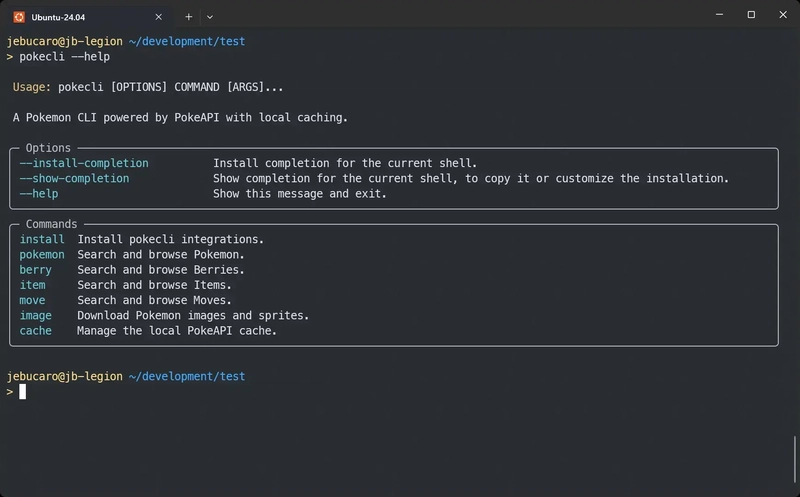
pokecli command tool running the help command

You have built a new CLI. You watch Claude Code call --help a few times, and something becomes obvious: the agent is not confused by the tool. It is re-learning the same command surface on every task because there is no compact guide telling it where to start.

That is the problem a SKILL.md solves. It does not change the CLI. It gives the agent a shorter path into the same commands it would eventually figure out on its own.

What a skill is

A skill is a folder of Markdown instructions that Claude Code loads when a request matches a set of trigger phrases. For a CLI, a well-built skill has three layers:

  1. Frontmatter – the name, a description with trigger phrases, and an allowed-tools list
  2. Body – a focused command guide the agent reads once the skill fires
  3. References – extra docs the agent can consult when the main file is not enough

Each layer has a job. The frontmatter decides when the skill loads. The body decides what the agent does first. The references keep the main file short without losing detail.

Meet pokecli

pokecli command tool running the help command

pokecli is a Python CLI I built specifically so this article had a real, inspectable example: an actual tool with actual commands that you can install, run, and then study the skill alongside. The goal was not to build the most impressive CLI. The goal was to have something concrete enough to show the pattern end to end.

It queries Pokemon, berries, items, and moves, downloads sprites, and manages a local cache. Six top-level command groups, predictable output, and a clean structure that maps well into a skill body.

Install it with uv:

uv tool install git+https://github.com/jebucaro/pokecli

pokecli installation with uv

Then install the bundled skill into ~/.claude/skills/pokecli:

pokecli install --skills

installing pokecli skills

What install --skills does

The skill files ship inside the installed package as package data. The command does not reach out to GitHub or generate anything. It reads the files bundled in the wheel and writes them to the right place on your machine.

In Python, that flow looks like this:

import shutil
from importlib import resources
from pathlib import Path

def install_skills():
    skills_dest = Path.home() / ".claude" / "skills" / "pokecli"
    skills_dest.mkdir(parents=True, exist_ok=True)

    ref_dest = skills_dest / "references"
    ref_dest.mkdir(exist_ok=True)

    # Read files bundled as package data and write them to the destination
    pkg = resources.files("pokecli.skills")
    (skills_dest / "SKILL.md").write_text(
        (pkg / "SKILL.md").read_text(encoding="utf-8")
    )
    (ref_dest / "api-fields.md").write_text(
        (pkg / "references" / "api-fields.md").read_text(encoding="utf-8")
    )

To make the skill files available as package data, declare them in pyproject.toml:

[tool.hatch.build.targets.wheel]
include = ["src/pokecli/skills/**"]

The key point is that the user does not need the repo checked out. The installed tool already carries the skill files. install --skills is just the command that puts them where Claude Code can find them.

Layer 1: The frontmatter trigger

The frontmatter is the part Claude reads all the time. It answers two questions fast: what does this skill do, and when should it load?

---
name: pokecli
description: Queries Pokémon, Berries, Items, and Moves data via the pokecli CLI. Use when the user needs to look up Pokémon stats, berries, items, or moves, download sprites, or manage the local cache. Also use when the user mentions "pokecli", "pokedex", or "PokeAPI"
allowed-tools: Bash(pokecli:*)
---

The description includes both the tool purpose and the phrases a user might actually say: pokedex, Pokemon stats, PokeAPI, download sprites. These are the real trigger words. A description that only describes the tool category without listing those phrases will miss requests.

The name should match the folder name so Claude can find the skill consistently.

Layer 2: The command guide

The body should read like a cheat sheet, not a tutorial. Short sections, command groups that mirror the CLI, examples you can copy and run.

pokecli has six top-level command groups: pokemon, berry, item, move, image, and cache. The skill body mirrors that structure:

pokecli pokemon get pikachu
pokecli berry get oran
pokecli item get master-ball
pokecli move get thunderbolt
## Core workflow

1. Query: Use `pokecli <resource> get <name_or_id>` to fetch details
2. Browse: Use `pokecli <resource> list` to paginate through all entries
3. Download: Use `pokecli image download pokemon <name> -o <path>` for sprites
4. Cache: Use `pokecli cache stats` and `pokecli cache clear` to manage local data

The agent does not need to know every flag before it starts. A quick start block and a workflow summary are enough for most requests. The rest of the command groups follow the same pattern: a few representative examples per group.

Layer 3: Reference files

Some questions do not belong in the main SKILL.md. What does base_experience mean for a Pokemon? Which sprite variants are usually available? Which fields are most useful when comparing moves?

That kind of detail goes in a separate file:

.claude/
└── skills/
    └── pokecli/
        ├── SKILL.md
        └── references/
            └── api-fields.md

The main skill stays short and loads fast. The reference file is there when Claude needs the deeper detail. This keeps the skill easier to trigger and easier to maintain over time.

The allowed-tools line

This line matters more than it looks:

allowed-tools: Bash(pokecli:*)

It tells Claude Code that this skill is allowed to run pokecli commands, but not arbitrary shell commands. That is a useful boundary. The skill is not just a convenience layer; it also scopes what the agent can do when it fires.

Does it trigger correctly?

Before shipping a skill, test both sides of the trigger. These prompts should fire it:

  • “Look up Pikachu’s stats”
  • “Show me berry data from PokeAPI”
  • “Download a sprite for Charizard”
  • “Compare Thunderbolt and Flamethrower”

These should not:

  • “Help me write a Python class”
  • “What is the weather today?”
  • “Create a spreadsheet”

If a prompt that should trigger the skill does not, the description is missing the right phrase. Add it. If a prompt that should not trigger the skill does fire, the description is too broad. Narrow it.

This is a session where I asked Claude Code three different prompts. In none of them did I explicitly mention pokecli. Claude discovered the tool and how to use it entirely from the installed skill.

  • “Look up Pikachu’s stats”
  • “Compare Thunderbolt and Flamethrower”
  • “Download a sprite for Charizard”


Using pokecli with Claude Code

You

Look up Pikachu’s stats

Agent

▸
Skill
{“skill”:”pokecli”,”args”:”Pikachu stats”}

{
  "skill": "pokecli",
  "args": "Pikachu stats"
}

Launching skill: pokecli

You

Base directory for this skill: [REDACTED]/.claude/skills/pokecli

Pokémon Data Lookup with pokecli

Quick start

pokecli pokemon get pikachu
pokecli berry get oran
pokecli item get master-ball
pokecli move get thunderbolt

Core workflow

  1. Query: Use pokecli <resource> get <name_or_id> to fetch details
  2. Browse: Use pokecli <resource> list to paginate through all entries
  3. Download: Use pokecli image download pokemon <name> -o <path> for sprites
  4. Cache: Use pokecli cache stats and pokecli cache clear to manage local data

Responses are cached locally after the first request. Use --no-cache to force a fresh fetch.

Commands

Pokemon

pokecli pokemon get pikachu
pokecli pokemon get 25
pokecli pokemon get charizard --format json
pokecli pokemon get bulbasaur --no-cache
pokecli pokemon list
pokecli pokemon list --limit 50
pokecli pokemon list --limit 20 --offset 40
pokecli pokemon moves charmander
pokecli pokemon moves 4 --format json

Berry

pokecli berry get cheri
pokecli berry get 1
pokecli berry get oran --format json
pokecli berry list
pokecli berry list --limit 10
pokecli berry list --limit 10 --offset 20

Item

pokecli item get potion
pokecli item get 1
pokecli item get master-ball --format json
pokecli item list
pokecli item list --limit 30
pokecli item list --limit 30 --offset 60

Move

pokecli move get thunderbolt
pokecli move get 24
pokecli move get surf --format json
pokecli move get flamethrower --no-cache
pokecli move list
pokecli move list --limit 40
pokecli move list --limit 20 --offset 100

Image Download

pokecli image download pokemon pikachu -o pikachu.png
pokecli image download pokemon pikachu -o pikachu_shiny.png --variant front_shiny
pokecli image download pokemon 6 -o charizard_back.png --variant back_default
pokecli image download pokemon 133 -o /tmp/eevee.png

Sprite variants: front_default, front_shiny, back_default, back_shiny, front_female, front_shiny_female

Cache Management

pokecli cache stats
pokecli cache clear
pokecli cache clear --resource pokemon
pokecli cache clear --resource item

Global options

Option Description
--no-cache Bypass local cache, fetch fresh from PokeAPI
--format table Rich formatted table output (default)
--format json Raw JSON with syntax highlighting

Example: Compare two Pokémon

pokecli pokemon get charizard
pokecli pokemon get blastoise

Example: Browse and then inspect

pokecli move list --limit 10
pokecli move get pound

Example: Download all starters

pokecli image download pokemon bulbasaur -o bulbasaur.png
pokecli image download pokemon charmander -o charmander.png
pokecli image download pokemon squirtle -o squirtle.png

Example: Look up moves a Pokémon can learn

pokecli pokemon moves pikachu
pokecli pokemon moves charizard --format json

Troubleshooting

For detailed command reference and data field descriptions, consult references/api-fields.md.

ARGUMENTS: Pikachu stats

Show more

Agent

▸
Bash
pokecli pokemon get pikachu

$ pokecli pokemon get pikachu

╭────────────────────────────────────────────────────────────╮
│ #25  Pikachu   Height: 0.4m   Weight: 6.0kg   Base XP: 112 │
╰────────────────────────────────────────────────────────────╯
 ELECTRIC 

Abilities: static  ·  lightning-rod (hidden)

Sprite: 
https://raw.githubusercontent.com/PokeAPI/sprites/master/sprites/pokemon/25.png


 Stat            Base  Bar                    
 hp                35  ███░░░░░░░░░░░░░░░░░   
 attack            55  ████░░░░░░░░░░░░░░░░   
 defense           40  ███░░░░░░░░░░░░░░░░░   
 special-attack    50  ████░░░░░░░░░░░░░░░░   
 special-defen…    50  ████░░░░░░░░░░░░░░░░   
 speed             90  ███████░░░░░░░░░░░░░

Agent

Here are Pikachu’s base stats:

Stat Value
HP 35
Attack 55
Defense 40
Sp. Attack 50
Sp. Defense 50
Speed 90

Pikachu is a pure Electric type with decent Speed being its standout stat. Its abilities are Static (may paralyze on contact) and the hidden ability Lightning Rod (draws Electric moves, raises Sp. Atk).

You

Compare Thunderbolt and Flamethrower

Agent

▸
Bash
pokecli move get thunderbolt

$ pokecli move get thunderbolt

╭──────────────────╮
│ #85  Thunderbolt │
╰──────────────────╯
  Type             Electric  
  Category         Special   
  Power            90        
  Accuracy         100%      
  PP               15        
  Effect Chance    10%       

Effect: Has a 10% chance to paralyze the target.

Agent

▸
Bash
pokecli move get flamethrower

$ pokecli move get flamethrower

╭───────────────────╮
│ #53  Flamethrower │
╰───────────────────╯
  Type             Fire     
  Category         Special  
  Power            90       
  Accuracy         100%     
  PP               15       
  Effect Chance    10%      

Effect: Has a 10% chance to burn the target.

Agent

They’re nearly identical moves — just different types and status effects:

Thunderbolt Flamethrower
Type Electric Fire
Category Special Special
Power 90 90
Accuracy 100% 100%
PP 15 15
Effect 10% Paralyze 10% Burn

The only meaningful differences:
– Paralysis (Thunderbolt) halves the target’s Speed and has a chance to skip turns — generally considered the stronger status
– Burn (Flamethrower) deals chip damage each turn and halves the target’s Attack (less useful against special attackers)

Both are among the most reliable moves in the game. Choice between them comes down to type coverage needed on your team.

Show more

You

Download a sprite for Charizard

Agent

▸
Bash
pokecli image download pokemon charizard -o charizard.png

$ pokecli image download pokemon charizard -o charizard.png

Downloading front_default sprite for charizard...
Saved to: /home/jebucaro/development/pokecli/charizard.png

Agent

Charizard’s sprite has been saved to charizard.png in your current directory ([REDACTED]/development/pokecli/charizard.png).

If you want other variants, options include: front_shiny, back_default, back_shiny, front_female, front_shiny_female.

The full version of this article goes deeper into the install flow, a side-by-side comparison with the Playwright CLI skill, a build-it-yourself challenge, and a walkthrough of the pokecli repo structure. You can find it at jonathanbucaro.com.

The key idea stays the same either way. You do not need to redesign a CLI to make it work well with an AI agent. In most cases, the missing piece is a compact guide that tells the agent when to reach for the tool and which commands to use first.

Photo by Jay on Unsplash

Pokémon and Pokémon character names are trademarks of Nintendo.

Organizing a Legacy React Project Without Blocking Delivery

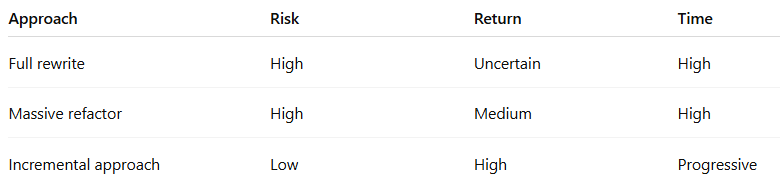
Rewriting everything from scratch often looks like the cleanest solution. In reality, it is usually the most expensive, slowest, and riskiest option. What consistently works in production environments is incremental refactoring driven by impact.

1. Diagnose before changing anything

Before reorganizing folders or introducing patterns, identify where the real cost is.

Common signals:

  • Components with 200–500+ lines
  • Business logic mixed with rendering
  • useEffect handling multiple responsibilities
  • Duplicated logic across the codebase
  • Implicit dependencies (scattered global state)

Without this mapping, refactoring becomes superficial.

2. Define a minimum standard and stop the bleed

Before fixing legacy code, prevent it from growing.

A simple baseline already improves consistency:

Components → UI only
Hooks → logic and state
Services → API communication

Rule: new code must follow the standard, even if old code does not.

3. Structure by feature, not by type

Legacy projects often use a “by type” structure (components/, utils/, etc.), which increases coupling.

A feature-based structure scales better:

src/
  features/
    users/
      components/
      hooks/
      services/
    dashboard/
  shared/
    components/
    hooks/
    utils/
  app/
    routes/
    providers/

This reduces cross-dependencies and improves ownership by domain.

4. Incremental refactoring (the only viable strategy)

Avoid large, batch refactors. The risk rarely justifies the cost.

Effective approach:

If you touch code → improve that part
If you see duplication → extract it
If logic is mixed → move it into a hook

Small, continuous improvements compound over time.

5. Separate responsibilities clearly

One of the main issues in legacy code is mixed responsibilities.

Typical example:

function Dashboard() {
  const [data, setData] = useState([])

  useEffect(() => {
    fetch('/api/data')
      .then(res => res.json())
      .then(setData)
  }, [])

  function processData() {
    // complex logic
  }

  return <div>{/* UI + logic */}</div>
}

Refactored:

// hook
export function useDashboardData() {
  const [data, setData] = useState([])

  useEffect(() => {
    fetch('/api/data')
      .then(res => res.json())
      .then(setData)
  }, [])

  return { data }
}
// component
function Dashboard() {
  const { data } = useDashboardData()
  return <DashboardView data={data} />
}

The gain is not aesthetic—it is lower coupling and higher predictability.

6. Centralize side effects

Legacy projects often suffer from duplicated requests and inconsistent state.

Standardizing with tools like React Query (TanStack) or SWR provides:

  • Automatic caching
  • Data synchronization
  • Less manual useEffect logic

Result: fewer bugs and less boilerplate.

7. Test where it matters

Full coverage in legacy systems is rarely efficient.

Prioritize:

  • Hooks (business logic)
  • Services (rules and integrations)

Lower priority:

  • Pure UI components

8. Strategy comparison

Conclusion

Organizing a legacy React project is not about achieving perfect architecture. It is about continuously reducing complexity without stopping delivery.

Clear separation of responsibilities, feature-based structure, and incremental refactoring consistently deliver the best results with the lowest risk.

Over time, this transforms unpredictable code into a system that is easier to maintain, test, and scale.

Rate Limiting Your API: Algorithms, Implementation, and the Strategic Thinking Behind It

Every API you expose to the internet will eventually be abused. Automated scrapers, credential stuffing bots, misbehaving integrations, and sometimes just a well-meaning client with a loop that runs too fast. Without rate limiting, a single bad actor can consume all your server resources and degrade the experience for every other user.

Rate limiting is one of those mechanisms that seems simple on the surface but reveals surprising depth when you implement it.

What Rate Limiting Actually Protects

Before discussing algorithms, it’s worth being explicit about the threats:

  • Resource protection: Preventing any single client from consuming a disproportionate share of CPU, memory, database connections, or bandwidth.
  • Cost control: If your API calls AI inference APIs, SMS providers, or payment processors, an unconstrained client can rack up significant charges in minutes.
  • Abuse prevention: Credential stuffing and enumeration attacks rely on volume. Rate limiting raises the cost for attackers significantly.
  • Fair access: In multi-tenant systems, rate limiting ensures one tenant’s spike doesn’t degrade everyone else’s experience.

The Four Algorithms That Matter

Fixed Window is the simplest: count requests per client in a fixed time interval, reject when the count exceeds the limit. Implementation in Redis is a single INCR with EXPIRE. The weakness is the boundary problem — a client can send the max at the end of one window and the max at the start of the next, effectively doubling their rate for a brief period.

Sliding Window Log eliminates the boundary problem by tracking timestamps of every request in the window. Accurate but memory-intensive: 1000 requests/minute × 10,000 clients = 10 million stored timestamps. Best suited for low-volume, high-value endpoints like login or password reset.

Sliding Window Counter is the recommended default. It maintains counters for the current and previous fixed windows, then computes a weighted count based on how far into the current window you are. Good balance of accuracy, memory efficiency, and implementation simplicity.

Token Bucket models rate limiting as a bucket that fills at a steady rate. Two parameters — refill rate and bucket capacity — independently control sustained throughput and burst tolerance. This is the algorithm used by most cloud providers and maps naturally to tiered pricing models.

Where to Rate Limit

Rate limiting should be layered:

  1. At the edge or load balancer (Nginx, Cloudflare, AWS API Gateway): protects application servers from receiving excessive traffic at all. Your first line of defense against volumetric abuse.
  2. At the API gateway or middleware: where you implement business-level limits by authenticated user, API key, subscription tier, or endpoint.
  3. At individual services: in microservice architectures, prevents a misbehaving upstream service from overwhelming a downstream dependency.

Each layer protects against different failure modes. Don’t rely on just one.

Communicating Limits to Clients

Good rate limiting is transparent. Every response should carry headers like X-RateLimit-Limit, X-RateLimit-Remaining, and X-RateLimit-Reset. A 429 Too Many Requests response should include a Retry-After header that tells well-behaved clients exactly when to try again. This converts rate limiting from a blunt instrument into a collaboration between your API and your consumers.

Three Key Takeaways

  1. The sliding window counter is the right default for most APIs. It provides close-to-accurate rate limiting with minimal memory overhead, without the complexity of tracking individual request timestamps.
  2. Identify clients by API key, not IP address. IP-based limiting is increasingly unreliable — users behind corporate proxies share addresses, and attackers with botnets distribute requests across thousands of IPs.
  3. Rate limits are a product decision as much as a technical one. What you allow per tier, what gets a 429 versus a graceful degradation, and how generously you size burst capacity all affect your users’ experience directly.

Read the full article at novvista.com for complete algorithm implementations, Redis code examples, and a guide to designing rate limit tiers for subscription-based APIs.

Originally published at NovVista

SQLite in Production: When the Simplest Database Is the Right One

For years the advice was automatic: SQLite is for prototypes, mobile apps, and test suites. If you’re building anything “real,” you need PostgreSQL. That advice was reasonable in 2015. It’s increasingly wrong in 2026.

SQLite powers every iPhone, every Android device, every Firefox and Chrome installation. The engine processes more queries per day than every other database engine combined. What changed isn’t SQLite’s reliability — it’s the ecosystem around it.

What Actually Changed

Litestream solved SQLite’s most critical production gap. Ben Johnson’s tool continuously replicates SQLite databases to S3-compatible storage by streaming WAL changes in near-real-time. Recovery point objectives drop to seconds. There’s no cron job, no pg_dump window, no backup interval to worry about — just a single sidecar binary and a bucket policy.

LiteFS from Fly.io uses a FUSE-based filesystem to replicate SQLite across multiple nodes. A primary handles writes; replicas in Tokyo, London, or São Paulo serve reads locally. For read-heavy applications, the latency improvement over a centralized Postgres instance is measurable and real.

libSQL / Turso forked SQLite to add a network protocol, native replication primitives, and user-defined functions without recompiling. You get embedded local performance and the ability to access the database over HTTP for tooling and admin use.

The Concurrency Misconception

The most persistent myth about SQLite is that it can’t handle concurrent access. Under WAL mode — which should be your default for any production deployment — concurrent readers never block writers and writers never block readers.

The real constraint is serialized writes: SQLite processes one write transaction at a time. On modern NVMe storage, that single writer can sustain tens of thousands of write transactions per second. For the vast majority of web applications (where reads outnumber writes 10:1 or more), this isn’t a bottleneck.

The essential WAL mode setup:

PRAGMA journal_mode=WAL;
PRAGMA busy_timeout=5000;
PRAGMA synchronous=NORMAL;
PRAGMA cache_size=-64000;
PRAGMA foreign_keys=ON;

The busy_timeout pragma is critical — without it, concurrent write attempts return SQLITE_BUSY immediately instead of retrying.

Where SQLite Beats PostgreSQL

  • Read-heavy single-server apps: When your dataset fits in memory or on fast NVMe, every query is a local function call. Latency drops from milliseconds to microseconds.
  • Edge deployments: Apps on Fly.io or Cloudflare benefit enormously from a database that lives on the same machine as the application.
  • Internal tools and dashboards: The operational overhead of a dedicated Postgres instance for a five-person admin panel is hard to justify.
  • Bounded data volumes: If your SaaS tool generates a few gigabytes per tenant at most, SQLite’s theoretical ceiling is irrelevant.

Where PostgreSQL Still Wins

Write-heavy transactional workloads (payments, inventory), multi-server horizontal scaling, and complex queries with CTEs and window functions are still PostgreSQL territory. The choice isn’t ideological — it’s workload-specific.

Three Key Takeaways

  1. WAL mode changes the concurrency equation. Default journal mode SQLite and WAL mode SQLite are meaningfully different tools. Always use WAL for production.
  2. Litestream is the unlock. The backup and disaster recovery story that made SQLite unsuitable for production is solved. A single binary handles continuous replication to object storage.
  3. Match the database to the deployment model. SQLite’s advantages are most pronounced on single-server or edge deployments. The moment you need genuine multi-writer horizontal scaling, move to PostgreSQL.

Read the full article at novvista.com for a detailed workload comparison table, LiteFS setup walkthrough, and an honest assessment of where SQLite still falls short.

Originally published at NovVista

8 API Design Mistakes That Will Haunt You in Production

APIs are permanent. That sounds dramatic until you’ve spent three weeks coordinating a breaking change across fourteen client teams while keeping the old endpoint alive in a compatibility shim nobody wants to maintain. Bad code can be refactored quietly. A bad API contract is a public debt that compounds interest every quarter.

Here are eight patterns drawn from designs that looked reasonable at the time, shipped to production, and then caused real pain.

Mistake 1: Not Versioning From Day One

The argument against early versioning sounds rational — you don’t know what will change yet. The problem is that “later” arrives the moment a single external client goes to production. At that point, adding versioning requires a migration, not just a decision.

URL path versioning (/v1/users, /v2/users) is the most explicit approach and the right default for most teams. It’s easy to route at the infrastructure level and visible in any log file. Stripe uses it for good reason: its clarity is a significant part of why Stripe’s API is considered one of the best-designed in the industry.

Mistake 2: Inconsistent Naming Conventions

Mixing camelCase and snake_case in the same API is documentation debt. It forces consumers to resolve the ambiguity by trial and error. The choice of convention matters less than the consistency — pick one and enforce it at the serialization layer, not through convention and hope.

Mistake 3: Returning Too Much Data by Default

An endpoint that returns everything it knows about a resource seems generous. In practice, it’s a performance liability. When your /users/{id} returns the profile, preferences, billing history, and activity log, every mobile client pays the serialization cost for data it immediately discards.

The N+1 problem is the related trap: an /orders endpoint that fetches a full customer object per order will issue one query for the order list and one per order for the customer. Pagination should be the default, not an option — and for time-series data, cursor-based pagination is more reliable than offset-based.

Mistake 4: Poor Error Responses

A generic 500 with no body is an absence of information dressed as a response. Stripe’s error format is the standard worth emulating: HTTP status code, machine-readable code field, human-readable message, and enough context to reproduce the problem. Validation errors should identify which fields failed and why, not just “validation failed.”

Mistake 5: No Rate Limiting

An API without rate limits is an invitation to unintentional denial-of-service. A client with a buggy retry loop can bring down your service for everyone. The sliding window counter algorithm is the right default: approximates the accuracy of a full sliding log with the memory efficiency of fixed windows. Expose limits in response headers (X-RateLimit-Remaining, Retry-After) so well-behaved clients can adapt.

Mistake 6: Ignoring Idempotency

Network requests fail in ways that are indistinguishable from success. A timeout — did the server process it before responding failed? For write operations, a blind retry can create duplicate charges or inconsistent state. Stripe requires idempotency keys for all POST requests that modify financial data. Implement them before you have external clients, not after your first support ticket about a duplicate charge.

Mistake 7: Authentication as an Afterthought

API keys are appropriate for server-to-server communication. OAuth 2.0 is appropriate when acting on behalf of users. JWT is a token format, not an authentication scheme — and treating it as automatically secure is how you end up with the none algorithm vulnerability. Make the authentication decision before your first external consumer, because retrofitting it is painful.

Mistake 8: Coupling Internal Models to API Responses

Serializing database rows directly into API responses is efficient until your next refactoring. Rename a column and you’ve shipped a breaking change. Add an internal field like password_hash and you risk accidental exposure. Data Transfer Objects — explicit serializer classes that define the shape of each response — create a deliberate boundary between internal implementation and external contract.

Three Key Takeaways

  1. The structural decisions that can’t wait are versioning, error format, authentication model, and the boundary between internal model and external contract. Retrofitting these is expensive. Everything else can be improved iteratively.
  2. API design failures are externalized. The pain of poor design is paid by consumers on a timeline you don’t control. That asymmetry justifies more upfront care than most internal engineering decisions.
  3. Study Stripe, GitHub, and Twilio. Not because they’re famous, but because their design choices are deliberate and documented. The patterns they use for consistency, pagination, error handling, and versioning exist for good reasons.

Read the full article at novvista.com for a detailed breakdown of each mistake, real implementation examples, and analysis of how Stripe, GitHub, and Twilio set the standard.

Originally published at NovVista

Zero-Downtime Deployments: Blue-Green, Canary, and Rolling Updates Explained

Every minute of downtime has a price tag. Gartner’s oft-cited figure of $5,600 per minute is from 2014 — adjusted for today’s always-on expectations, the real number for mid-market SaaS sits between $8,000 and $15,000. But the cost that never makes a spreadsheet is user trust. A customer who hits a 502 during checkout doesn’t file a support ticket. They leave.

The good news is that zero-downtime deployments are no longer the exclusive domain of teams with dedicated platform engineering. The tooling has matured. The bad news is that “zero-downtime” has become marketing language — the trade-offs, failure modes, and edge cases rarely get covered alongside the pretty diagrams.

The Three Strategies at a Glance

Blue-Green is the oldest and most intuitive. Two identical production environments: one (blue) serves live traffic while the other (green) runs the new version. Flip the load balancer. Instant switchover, instant rollback.

The trade-off is infrastructure cost — you need double the compute sitting idle. And if your app stores sessions in memory (it shouldn’t, but many do), the switchover drops every active session. Redis-backed sessions or JWT authentication eliminate this problem before it bites you.

Canary Releases take a more cautious path. Route a small percentage of traffic — say 5% — to the new version and watch error rates, p95 latency, and business metrics. Only if those hold steady do you proceed to 100%. This is the strategy that Google and Netflix champion, and for good reason: canary deployments catch problems that staging environments never surface, like subtle performance regressions under real load or edge cases hiding in user data your fixtures don’t cover.

Nginx handles weight-based splitting natively:

upstream app_backend {
    server 10.0.1.10:8080 weight=95;  # Stable
    server 10.0.1.20:8080 weight=5;   # Canary
}

Rolling Updates replace instances one-at-a-time — this is Kubernetes’ default strategy. The maxUnavailable and maxSurge parameters control how aggressive the rollout is. The key requirement is that both the old and new version can run simultaneously against the same database schema. That constraint surfaces the hardest part of zero-downtime deployments: database migrations.

The Problem Nobody Leads With

All three strategies share the same underlying challenge: during any deployment, old and new application code run concurrently against the same database. Add a NOT NULL column, rename a field, or drop a table — and you’ve just broken every instance still running the old code.

The expand-contract pattern is the answer. Instead of one breaking change, you make three non-breaking ones: add the new structure alongside the old (expand), deploy code that writes to both, then drop the old after the migration is complete (contract). It takes more deployments. It is the only reliable approach.

Three Key Takeaways

  1. Choose the strategy that matches your infrastructure reality. Blue-green requires double compute. Canary requires robust observability. Rolling updates require schema backward compatibility. Pick the trade-off you can actually sustain.

  2. Observability is a prerequisite, not a nice-to-have. Canary deployments are only valuable if you’re watching the right metrics: not just error rates, but p99 latency, business conversion, and resource consumption on new instances.

  3. The database is the hard part. Any zero-downtime deployment strategy is undermined by schema changes that break the running application. Treat migrations as a separate, careful process — never as an afterthought bundled into the same deployment.

Read the full article at novvista.com for complete Nginx, HAProxy, and Kubernetes configuration examples, plus a detailed breakdown of when each strategy makes sense for your team size and infrastructure.

Originally published at NovVista

Federal Judge Blocks Pentagon’s Attempt to Label Anthropic a National Security Threat

Federal Judge Blocks Pentagon’s Attempt to Label Anthropic a National Security Threat

In a significant ruling, a federal judge in San Francisco has blocked the Pentagon and the Trump administration from enforcing a national security designation against Anthropic, an artificial intelligence (AI) company that refused to remove safety restrictions from its Claude models. This decision has far-reaching implications for the development and deployment of AI technology, and we’ll dive into the details of what this means for the industry and its stakeholders.

The Background: Anthropic’s Refusal to Comply with Safety Restrictions

Anthropic, a leading AI company, has been at the forefront of developing advanced language models, including its popular Claude model. However, the company has been under pressure from the Trump administration to remove certain safety restrictions from its models, which would allow them to be used by federal agencies without any limitations. The restrictions in question were designed to prevent the misuse of AI technology, particularly in sensitive areas such as national security and defense.

The Court’s Ruling: A Victory for Anthropic and the AI Community

U.S. District Judge Rita Yungkurth issued a preliminary injunction, blocking the Pentagon and the Trump administration from enforcing the national security designation against Anthropic. The ruling is a significant victory for the AI company, which had been facing intense pressure to comply with the administration’s demands. The court’s decision is also a major win for the AI community, which has been advocating for the responsible development and deployment of AI technology.

What This Means for the AI Industry

The court’s ruling has significant implications for the AI industry, particularly in the areas of national security and defense. The decision sends a strong message that AI companies will not be forced to compromise on their values and principles in order to comply with government demands. This is a major victory for the AI community, which has been pushing for greater transparency and accountability in the development and deployment of AI technology.

Key Takeaways

  • The court’s ruling is a significant victory for Anthropic and the AI community, which has been advocating for the responsible development and deployment of AI technology.
  • The decision sends a strong message that AI companies will not be forced to compromise on their values and principles in order to comply with government demands.
  • The ruling has significant implications for the AI industry, particularly in the areas of national security and defense.
  • The decision highlights the importance of transparency and accountability in the development and deployment of AI technology.

Conclusion

The court’s ruling is a major victory for the AI industry, which has been facing intense pressure to comply with government demands. The decision sends a strong message that AI companies will not be forced to compromise on their values and principles in order to comply with government demands. As the AI industry continues to evolve and grow, it’s essential that we prioritize transparency and accountability in the development and deployment of AI technology. The court’s ruling is a significant step in the right direction, and we can expect to see more developments in this area in the coming months and years.

Source: news.bitcoin.com

contextzip gain –graph: Watch Your Daily Savings Grow

After a week of using ContextZip, run:

$ contextzip gain --graph

ContextZip Savings Report
═══════════════════════════

Daily:
Mon ████████████░░░░░░░░  31,204 chars (87 commands)
Tue ██████████████████░░  52,891 chars (142 commands)
Wed ████████████████░░░░  44,123 chars (118 commands)
Thu █████████████░░░░░░░  38,902 chars (104 commands)
Fri ██████████████████████ 61,203 chars (167 commands)
Sat ████░░░░░░░░░░░░░░░░  12,891 chars (34 commands)
Sun ██░░░░░░░░░░░░░░░░░░   8,204 chars (21 commands)

Week total: 249,418 chars saved (673 commands)
Avg per command: 370 chars saved
Top category: npm (42% of savings)

Concrete numbers. Daily breakdown. Which category of commands saves the most.

What the Graph Tells You

Spike days are build-heavy days. Friday at 61K saved means lots of builds and test runs. Saturday at 12K means light coding.

Top category shows where your noise comes from. If npm is 42% of your savings, your JavaScript projects are the noisiest. If Docker is the top, you’re doing lots of container work.

Average per command helps you understand the baseline. 370 chars per command means most commands have moderate noise. If it’s 1,000+, you’re running very noisy commands regularly.

Monthly Rollup

$ contextzip gain --month

March 2026: 1,247,891 chars saved
             3,421 commands filtered
             Avg: 365 chars/command
             Peak day: Mar 14 (89,204 chars)

Over a month, the savings add up to millions of characters — hundreds of thousands of tokens. At current AI pricing, that’s measurable cost savings.

Try It

cargo install contextzip
eval "$(contextzip init)"

Use it for a week. Then run contextzip gain --graph and see your own numbers.

GitHub: github.com/contextzip/contextzip

Part of the ContextZip Daily series. Follow for daily tips on optimizing your AI coding workflow.

Install: npx contextzip | GitHub: jee599/contextzip

Simulate Before You Execute: Dry-Run API for Trading Bots

Your trading bot spotted a 3% arbitrage opportunity between Jupiter and a centralized exchange. By the time you’ve simulated the trade, calculated slippage, and confirmed gas costs, the opportunity vanished. Your bot needs to make split-second decisions, but one wrong transaction can drain your entire balance.

Why Simulation Matters for Trading Bots

In algorithmic trading, execution speed determines profitability. But speed without safety is bankruptcy waiting to happen. A misconfigured bot can approve unlimited tokens to malicious contracts, execute trades at terrible prices due to sandwich attacks, or drain funds through reentrancy exploits.

Traditional approaches force you to choose: either simulate transactions using fork testing (slow, complex setup) or execute blindly and hope for the best (fast, but dangerous). Neither works for production trading bots that need millisecond decision-making with ironclad risk controls.

Dry-Run API: Test Every Trade Before Execution

WAIaaS provides a dry-run API that simulates any transaction without spending gas or moving funds. Your trading bot can validate trades, check slippage limits, and verify gas costs before committing real capital.

Here’s how your Jupiter arbitrage bot validates a swap before execution:

curl -X POST http://127.0.0.1:3100/v1/actions/jupiter-swap/swap 
  -H "Content-Type: application/json" 
  -H "Authorization: Bearer wai_sess_<token>" 
  -d '{
    "inputMint": "So11111111111111111111111111111111111111112",
    "outputMint": "EPjFWdd5AufqSSqeM2qN1xzybapC8G4wEGGkZwyTDt1v",
    "amount": "1000000000",
    "dryRun": true,
    "slippageBps": 50
  }'

The simulation returns the exact output amount, effective price, and fee breakdown without executing the trade. If the numbers look good, remove "dryRun": true and execute the same request for real.

This works across all 14 DeFi protocols integrated into WAIaaS: Jupiter swaps, Drift perpetuals, Hyperliquid futures, Polymarket predictions, cross-chain bridges via LI.FI, and liquid staking through Lido and Jito.

Advanced Simulation: Batch Transactions and Gas Conditions

Your MEV bot needs to execute complex multi-step strategies atomically. WAIaaS supports batch transaction simulation, letting you test entire trade sequences before committing:

curl -X POST http://127.0.0.1:3100/v1/transactions/send 
  -H "Content-Type: application/json" 
  -H "Authorization: Bearer wai_sess_<token>" 
  -d '{
    "type": "Batch",
    "transactions": [
      {
        "type": "APPROVE",
        "spender": "JUP6LkbZbjS1jKKwapdHNy74zcZ3tLUZoi5QNyVTaV4",
        "amount": "1000000"
      },
      {
        "type": "ContractCall",
        "to": "JUP6LkbZbjS1jKKwapdHNy74zcZ3tLUZoi5QNyVTaV4",
        "data": "0x..."
      }
    ],
    "dryRun": true
  }'

Gas conditional execution takes this further. Your bot can queue transactions that only execute when gas prices meet your threshold:

curl -X POST http://127.0.0.1:3100/v1/transactions/send 
  -H "Content-Type: application/json" 
  -H "Authorization: Bearer wai_sess_<token>" 
  -d '{
    "type": "TRANSFER",
    "to": "recipient-address",
    "amount": "0.1",
    "gasCondition": {
      "maxGasPrice": "20000000000",
      "timeoutSeconds": 1800
    }
  }'

This queues the transaction until gas drops below 20 gwei or the 30-minute timeout expires.

Real-Time Transaction Pipeline

WAIaaS processes transactions through a 7-stage pipeline that validates, simulates, checks policies, waits for gas conditions, executes, and confirms each trade. Your bot gets real-time status updates through the REST API:

# Check transaction status
curl http://127.0.0.1:3100/v1/transactions/<tx-id> 
  -H "Authorization: Bearer wai_sess_<token>"

Response shows current pipeline stage:

{
  "id": "019c47d6-51ef-7f43-a76b-d50e875d95f4",
  "status": "PENDING",
  "stage": "stage4-wait",
  "gasCondition": {
    "maxGasPrice": "20000000000",
    "currentGasPrice": "25000000000",
    "waitingFor": "gas_price_drop"
  }
}

Built-in Risk Controls for Trading Bots

Simulation prevents obvious failures, but trading bots need defense in depth. WAIaaS includes 21 policy types that act as circuit breakers for automated trading:

  • SPENDING_LIMIT: Kill switch when daily losses exceed threshold
  • RATE_LIMIT: Prevent runaway bot loops (max 100 trades/hour)
  • ALLOWED_TOKENS: Whitelist only tokens your bot should trade
  • CONTRACT_WHITELIST: Block calls to unknown contracts (prevents rug pulls)
  • TIME_RESTRICTION: Disable trading outside market hours
  • PERP_MAX_LEVERAGE: Cap leverage on perpetual futures

These policies follow a 4-tier security model. Small trades execute instantly, larger amounts trigger notifications or delays, and huge positions require human approval via WalletConnect.

Multi-Chain Trading with One API

Your arbitrage opportunities span chains. WAIaaS supports 2 chain types across 15 networks, with cross-chain bridging through LI.FI and Across protocols. Your bot can:

  • Swap SOL for USDC on Jupiter (Solana)
  • Bridge USDC to Ethereum via LI.FI
  • Provide liquidity on Aave (Ethereum)
  • Trade perpetuals on Hyperliquid

All through the same session token and consistent API interface.

Get Started: Deploy a Trading Bot in 5 Steps

  1. Install via Docker (30 seconds):
git clone https://github.com/minhoyoo-iotrust/WAIaaS.git
cd WAIaaS
docker compose up -d
  1. Create trading wallets (funded with your strategy capital):
# Create Solana wallet for DeFi
curl -X POST http://127.0.0.1:3100/v1/wallets 
  -H "Content-Type: application/json" 
  -H "X-Master-Password: your-password" 
  -d '{"name": "solana-trading", "chain": "solana", "environment": "mainnet"}'

# Create Ethereum wallet for perps
curl -X POST http://127.0.0.1:3100/v1/wallets 
  -H "Content-Type: application/json" 
  -H "X-Master-Password: your-password" 
  -d '{"name": "ethereum-trading", "chain": "evm", "environment": "mainnet"}'
  1. Create bot session (API key for your trading bot):
curl -X POST http://127.0.0.1:3100/v1/sessions 
  -H "Content-Type: application/json" 
  -H "X-Master-Password: your-password" 
  -d '{"walletId": "<solana-wallet-uuid>"}'
  1. Set risk policies (prevent bot from draining funds):
curl -X POST http://127.0.0.1:3100/v1/policies 
  -H "Content-Type: application/json" 
  -H "X-Master-Password: your-password" 
  -d '{
    "walletId": "<wallet-uuid>",
    "type": "SPENDING_LIMIT",
    "rules": {
      "instant_max_usd": 1000,
      "daily_limit_usd": 10000
    }
  }'
  1. Start trading (simulate first, execute if profitable):
import { WAIaaSClient } from '@waiaas/sdk';

const client = new WAIaaSClient({
  baseUrl: 'http://127.0.0.1:3100',
  sessionToken: process.env.WAIAAS_SESSION_TOKEN,
});

// Simulate Jupiter swap
const simulation = await client.executeAction('jupiter-swap', 'swap', {
  inputMint: 'So11111111111111111111111111111111111111112',
  outputMint: 'EPjFWdd5AufqSSqeM2qN1xzybapC8G4wEGGkZwyTDt1v',
  amount: '1000000000',
  dryRun: true
});

// Check if profitable after fees
if (simulation.outputAmount > profitabilityThreshold) {
  // Execute for real
  const trade = await client.executeAction('jupiter-swap', 'swap', {
    inputMint: 'So11111111111111111111111111111111111111112',
    outputMint: 'EPjFWdd5AufqSSqeM2qN1xzybapC8G4wEGGkZwyTDt1v',
    amount: '1000000000'
  });
}

What’s Next

Your trading bot needs millisecond execution with bulletproof risk controls. WAIaaS gives you both through simulation APIs, gas conditional execution, and built-in policy enforcement across 14 DeFi protocols.

Explore the full capabilities at https://github.com/minhoyoo-iotrust/WAIaaS or dive into the interactive API docs at https://waiaas.ai.