HubSpot API Autopsy: What Breaks When Agents Try to Use It

HubSpot scores 4.6/10 on the AN Score — the lowest-rated CRM in Rhumb’s dataset. A $30B platform used by 228,000+ companies. Execution 5.3, Access Readiness 3.5, Confidence 95%.

This autopsy examines why.

Quick verdict: Use HubSpot when the operator already has it and the agent needs to span CRM + marketing + sales in one integration. Avoid it when the agent only needs pipeline operations (use Pipedrive) or when compliance governance is the primary constraint (use Salesforce). Budget for rate-limit middleware, hub-specific adapters, and a human to complete OAuth setup. Expect 3–5× the integration time compared to a well-scored API.

Score Anatomy

Dimension Score
Execution 5.3
Access Readiness 3.5
Autonomy —
AN Score 4.6 L1
Confidence 95%

Execution (5.3): The API is functional — CRUD operations work, responses are JSON, error codes are standard HTTP. The 5.3 reflects real friction: no idempotency, inconsistent patterns across hubs, and rate limits that punish agent-typical request patterns. An agent can use this API, but it will need defensive code that wouldn’t be necessary with a well-designed API.

Access Readiness (3.5): This is the primary drag on the aggregate score. Agent access requires human-mediated OAuth setup through a complex SPA. Token refresh every 6 hours adds operational overhead. API key auth is being deprecated. There is no path for an agent to self-provision access to a HubSpot portal.

Autonomy (mixed): Payment autonomy is decent (free tier, self-serve Starter). Governance is strong (API key scoping, RBAC, SOC 2). But web accessibility drags it down — the dashboard is a complex SPA that agents cannot read or verify against. The autonomy score says: you can operate here, but you cannot see what you are doing.

6 Failure Modes

Six specific failure modes, ranked by severity. These are not theoretical risks — they are documented behaviors that agents encounter in production integrations.

⏱ Rate Limit Trap — Critical

What happens: Free tier rate limits (100 calls per 10 seconds) break standard agent polling patterns from the first request burst.

HubSpot enforces a 100 requests/10 seconds limit on the free tier, with variable limits per endpoint on paid plans. This sounds generous until you consider how agents work: a typical CRM sync operation — list contacts, check for updates, fetch associated deals, log activities — can burn 40–60 requests in a single workflow cycle. An agent running periodic sync on a 30-second interval will hit the ceiling within 2–3 cycles.

The 429 response includes a Retry-After header, but the backoff period is unpredictable and can cascade when multiple workflow branches are active.

Agent impact: Agents without pre-built rate-limiting middleware will fail silently or enter retry spirals. The lack of a clear per-endpoint budget means agents cannot pre-calculate whether a workflow will complete within limits.

🧩 Cross-Hub API Inconsistency — Critical

What happens: CRM, Marketing, and Custom Objects each use different API patterns. Agents cannot generalize a single client.

HubSpot’s API is not one API — it is at least three, wearing a trench coat. The CRM API (contacts, deals, companies) uses a relatively clean RESTful pattern with consistent CRUD endpoints. The Marketing API (emails, workflows, forms) uses different authentication scopes, different pagination styles, and different error formats. Custom Objects introduce a third pattern with schema definition endpoints that behave differently from both CRM and Marketing.

An agent that learns to work with the CRM API and attempts to apply the same patterns to Marketing will encounter unexpected 400 errors, different field naming conventions, and incompatible filter syntax.

Agent impact: Agents need hub-specific adapters rather than a generic HubSpot client. This triples the integration surface area and the number of failure modes an agent must handle.

🔗 Association API Complexity — High

What happens: Linking a contact to a deal requires understanding association type IDs and relationship labels — not discoverable by an agent without documentation context.

A simple operation like “link this contact to this deal” requires: (1) knowing the association type ID for contact-to-deal, (2) knowing the relationship label if custom associations exist, (3) making a PUT request with the correct body format. Association type IDs are not human-readable — they are numeric codes that must be looked up. Default associations have stable IDs (e.g., contact-to-company = 1), but custom associations have auto-generated IDs that differ per portal.

An agent cannot discover the correct type ID without first calling the association definitions endpoint, parsing the response, and matching by label.

Agent impact: Simple CRM operations that should be a single API call become multi-step discovery workflows. Agents without pre-cached association type mappings will fail on first attempt.

🔐 OAuth Provisioning Maze — High

What happens: Production API access requires a multi-step human OAuth app setup through a dashboard that agents cannot navigate.

Setting up an OAuth app requires: (1) logging into a developer portal, (2) creating an app with specific scopes, (3) configuring redirect URIs, (4) completing an authorization flow that requires human browser interaction, (5) managing token refresh for access tokens that expire every 6 hours.

There is no API-only path to create or configure an OAuth app. The developer portal is a React SPA that is not navigable by screen readers or programmatic tools.

Agent impact: Zero self-provisioning capability. Agent onboarding has a hard human dependency. Token refresh every 6 hours means agents need persistent token management infrastructure.

♻️ No Idempotency Keys — High

What happens: POST requests have no idempotency support. Retry-on-timeout creates duplicate records with no built-in dedup.

If an agent creates a contact and the request times out before receiving a response, the agent faces a choice: retry (risking a duplicate) or don’t retry (risking a lost record). Creating a contact twice with the same email returns a 409 Conflict — but only if the email property is set. Creating a deal twice with the same properties will create two deals with no conflict detection.

Agent impact: Agents must implement their own deduplication logic (check-before-create patterns), which doubles the API calls per operation and introduces race conditions under concurrent execution.

🖥 Dashboard Opacity — Medium

What happens: The HubSpot dashboard is a complex React SPA. Agents cannot read, verify, or troubleshoot via the web UI.

When an agent creates a record or triggers a workflow, verification often requires checking the HubSpot dashboard. But the dashboard is a heavily client-rendered React SPA with dynamic loading, infinite scroll, and context-dependent navigation. An agent that needs to verify a workflow was triggered correctly has no reliable way to read the dashboard state.

Agent impact: Agents are blind to visual state. Debugging requires API introspection only, and many configuration operations are UI-only.

What Would Improve the Score

Three changes would have the highest impact:

  1. Idempotency keys on POST endpoints. One change that would eliminate the retry-duplicate problem entirely.
  2. Machine-readable access provisioning. An API to create OAuth apps and issue scoped credentials programmatically.
  3. Consistent API patterns across hubs. One authentication model, one pagination model, one error format — regardless of which HubSpot product the agent is talking to.

Where HubSpot Still Makes Sense

Despite the score, HubSpot is the right choice in a specific scenario: the operator already has it.

If a customer has 5 years of contacts, deals, and workflows in HubSpot, the switching cost is prohibitive. An agent integrating with an existing HubSpot instance — with a human who completed the OAuth setup and a rate-limit middleware layer already in place — will work. The 4.6 score reflects the engineering investment required, not an absolute prohibition.

The score says: this API will cost you more to integrate than alternatives. It doesn’t say: don’t use it.

Compare Against the Field

Provider AN Score Tier
Pipedrive 5.7 L2
Salesforce 4.8 L1
HubSpot 4.6 L1

The full CRM comparison shows how all three score across 20 dimensions. HubSpot’s broad surface (CRM + Marketing + Sales all in one) is a genuine advantage — but it comes at the cost of consistency that agents depend on.

Scores are sourced from Rhumb — 645+ services evaluated across 20 agent-native dimensions.
I Published a Book. Here’s Why.

I wrote a book. It’s called Don’t Replace Me: A Survival Guide to the AI Apocalypse, and it’s available right now on Amazon in Kindle, paperback, and hardcover. The announcement for Don’t Replace Me survival guide dropped March 28, 2026 – press release picked up through AP News and everything. 235 pages, 24 rules, 33,000 words.

Took me way longer than I expected and was nothing like I expected. Let me explain what it actually is and how it got made.

Why Don’t Replace Me exists as a book and not just tweets

I’ve been getting a version of the same conversation for two years. Someone finds out what I do – AI engineering, building agents, 15 years in product design – and they get this look. Half curiosity, half dread. Then the question: “So… should I be worried? About my job?”

The honest answer is complicated. Not “no, you’re fine” and not “yes, start learning Python immediately.” The actual answer depends on what you do, how you do it, and whether you understand what AI is actually replacing versus what it’s just augmenting.

The loudest voices on this topic tend to be at the extremes. Either AI builders who are close enough to the technology that the disruption looks like opportunity from where they’re standing. Or people far from it who are doom-scrolling tech Twitter and convinced everything is gone. Both are wrong in ways that matter to normal people with real jobs.

I’ve sat on both sides of that divide. I spent five years designing products at VALK – financial infrastructure for 70+ banks across 15 countries, $4B+ in deals running through platforms I helped design. I was building for institutions. Then I pivoted to building the automation itself. Multi-agent systems, AI workflows, the actual pipelines that companies are now using to cut headcount or redeploy people.

I’ve talked to people on both ends. Executives excited about efficiency. Employees scared about what “efficiency” means for them personally. And I kept having the same thought: someone should write something honest about this. Not a hype piece, not a manifesto, not a beginner’s guide to ChatGPT. Something from the middle.

So I did.

What Don’t Replace Me is and what it isn’t

Don’t Replace Me is not a coding tutorial. It’s not a prompt engineering guide. There are plenty of those and they’re mostly aimed at people who already know what a terminal is.

This is for my mom. For my friend who does project management at a mid-size company and genuinely doesn’t know if her job will exist in three years. For the copywriter, the customer service manager, the paralegal, the graphic designer who keeps seeing LinkedIn posts that make them feel like they missed the boat.

24 rules. Each one practical, specific, and grounded in things I’ve actually seen. Not “embrace AI” or “upskill your journey” or whatever LinkedIn thought leadership nonsense. Real career advice for people navigating a real transition.

The companion site is at dontreplace.me and it has a free AI threat assessment quiz. You answer questions about your actual job – what you do day to day, how structured the work is, how much it involves judgment vs.execution – and you get a risk score. Not fearmongering, not false reassurance. Just a calibrated read on where you actually stand.

Three formats available now: Kindle, paperback, hardcover. Audiobook is in production. If you’ve been waiting for audio, it’s coming.

ASIN on Amazon is B0GTX4J124. Paperback ISBN is 9798253164594. Hardcover is 9798253165386. I’m mentioning these in case you’re the kind of person who looks these things up. You can also check out the book’s website at dontreplace.me for more info and the quiz.

How I made this and why I’m being upfront about it

I used AI to write this book. I’m not hiding that, and I’m not embarrassed about it. But it’s not what people assume when they hear it.

I didn’t type “write me a 235-page career guide” and hit enter. That’s not how this worked.

What I did: I spent months collecting actual opinions. Notes from real conversations. Observations from years of watching companies get disrupted from the inside. Things that frustrated me. Things I genuinely believe. Specific examples from fintech, from AI engineering, from watching product design go through its own automation panic. I had a lot to say – just scattered across voice memos, Notion drafts, Twitter threads, and conversations I kept having with people who were scared.

All of that went into the process as fuel. The AI was the engine. The substance is mine.

The result reads like me because it is me. My takes, my experience, my perspective on what’s changing and what isn’t. I used every tool available to get it out of my head and into something usable. Which is exactly what the book tells readers to do – use AI as leverage, not as a replacement for your own thinking.

The irony is the point. I couldn’t have written a better proof of concept.

And honestly, if you’re going to argue that this makes the book less valid – that’s a conversation worth having, and it’s one of the conversations the book is designed to prompt. Because that reflex, the instinct to devalue work because AI was involved, is exactly the kind of thinking that will hurt people’s careers over the next decade. The question isn’t “did a human do every part of this.” The question is: is the thinking real? Is the perspective genuine? Is it useful?

Yes, yes, and I think so.

What 15 years of watching tech cycles taught me about this one

I started freelancing at 14. I’ve watched design go through “designers will be replaced by templates.” I watched developers go through “no-code will replace engineers.” I watched writers go through “content mills will replace real writing.” Some of that disruption was real. A lot of the fear was misdirected.

This cycle is bigger. I won’t pretend otherwise. The things AI is genuinely good at – pattern recognition, synthesis, first-draft generation, handling repetitive decisions – overlap more directly with white-collar knowledge work than previous automation waves did. This isn’t just factory floors and truck drivers. It’s reaching into offices.

But the shape of the threat is different for different people. And most of the advice out there treats it like a monolith. “Learn to prompt” is not useful advice for a nurse. “AI can’t replace human connection” is not useful advice for a data entry specialist.

What actually helps is specificity. Understanding which parts of your work are high-judgment versus low-judgment. Understanding where your industry is in the adoption curve. Understanding the difference between “AI will do this task” and “AI will make someone else more efficient at your job.” The second one is actually the bigger risk and people underestimate it.

That’s what the 24 rules get into. Specific, not vague. Grounded in real patterns I’ve watched play out, not hypotheticals.

If you want a preview of where my head is at on some of this, I’ve written about leaving fintech to build AI systems, about what ADHD and AI actually look like together, and about why most AI products have terrible UX – the gap between what builders understand and what real users need. The book is longer, more structured, and aimed at a wider audience, but those posts give you a sense of how I think.

Who Don’t Replace Me is actually for

Specifically, concretely:

If you have a job and you’re not sure whether to be worried, this is for you. Not to soothe you with “AI can’t replace humans” and not to panic you into a six-month bootcamp. To help you actually assess your situation.

If you manage people and you’re trying to figure out how to talk to your team about AI adoption without sounding like either a corporate automaton or someone who’s out of touch, there’s stuff in here for you.

If you’re in a creative field – design, writing, marketing – and you’ve already felt the job market shift, there’s a section of this that I think is genuinely useful. Not “here’s how to compete with AI” but here’s how to think about what you’re actually selling.

If you already know about AI and want something to send to a family member who keeps calling you asking what to do – this is that thing.

The technical people are not the audience here. My coding stack post or the deep dive on debugging AI agents is more your speed. This book is for the people those systems are being built around.

Where to get it

Amazon has all three formats right now — grab it here or search “Don’t Replace Me Dmitrii Kargaev.”

The companion site is dontreplace.me – free quiz, takes about five minutes, gives you a real threat assessment based on your actual role. Even if you don’t buy the book, the quiz is worth doing just to have a concrete picture instead of ambient dread.

Audiobook is in production. I’ll announce it here and on my portfolio site when it drops.

If you read it and have thoughts – what landed, what you disagree with, who you think needs to read it – I want to hear that. Building in public means the feedback loop stays open. This isn’t the end of the conversation, it’s more like a long, structured version of it.

The people I had in mind when I was writing this are real. If you know someone who’s been quietly scared about this stuff, send it to them. That’s what it’s there for.

Expo Router Has a Free API That Most Developers Dont Know About

Expo Router brings file-based routing to React Native with deep linking, typed routes, and universal app support.

File-Based Routes

app/
  index.tsx         # /
  about.tsx         # /about
  posts/[id].tsx    # /posts/123

Dynamic Routes

import { useLocalSearchParams } from "expo-router";

export default function Post() {
  const { id } = useLocalSearchParams<{ id: string }>();
  return <Text>Post: {id}</Text>;
}

Navigation

import { Link, router } from "expo-router";
<Link href="/posts/123">View</Link>
router.push("/posts/123");

API Routes

// app/api/hello+api.ts
export function GET() {
  return Response.json({ message: "Hello" });
}

Key Features

  • File-based routing for React Native
  • Universal (iOS, Android, Web)
  • Type-safe navigation
  • API routes for server logic

Need to scrape or monitor web data at scale? Check out my web scraping actors on Apify or email [email protected] for custom solutions.

I turned a notebook full of handwritten math into a LaTeX paper — here’s how

Here’s a scenario I’ll bet some of you recognize: you’ve been working through a problem by hand for weeks. Your notebook is full of half-finished derivations, scribbled integrals, matrices with question marks next to them. And now you need to turn that mess into a proper LaTeX document.

I had exactly this situation last winter. Forty-odd pages of handwritten notes from a research project, and a paper deadline looming. I knew I couldn’t retype everything — especially not the equations. There had to be a better way.

The copy-paste treadmill

The first tool I tried was Mathpix Snip. It’s well-known in academic circles for a reason: the OCR accuracy on mathematical notation is genuinely impressive. You screenshot a handwritten equation, and you get clean LaTeX back within seconds.

The problem wasn’t the accuracy. The problem was the workflow.

Every single equation involved:

  1. Take a screenshot or photo
  2. Switch to the OCR tool
  3. Wait for conversion
  4. Copy the LaTeX
  5. Switch back to my editor
  6. Paste and adjust

For a single equation, that’s fine. For forty pages? It’s death by a thousand context switches. By day two I was dreading opening my notes.

Finding TeX64

I stumbled across TeX64 while searching for “latex editor mac ocr built in” or something like that. It’s a macOS-only LaTeX editor — Apple Silicon and Intel both supported — and the key thing that caught my eye was that OCR is baked directly into the editor itself.

No separate app. No browser tab. No clipboard dance. You drop an image into the editor and the converted LaTeX appears in your document.

That sounded too good to be true, so I downloaded it (free tier, no account needed) and tried it on a page of my worst handwriting.

What it actually looks like

After installing MacTeX (TeX64 needs an existing TeX distribution — it’ll tell you if it can’t find one), I opened my project and dropped in a photo of my notebook.

A few seconds later, this appeared in my .tex file:

begin{align}
  frac{partial rho}{partial t} + nabla cdot (rho mathbf{u}) &= 0 \
  rho left( frac{partial mathbf{u}}{partial t} + mathbf{u} cdot nabla mathbf{u} right) &= -nabla p + mu nabla^2 mathbf{u}
end{align}

My handwritten Navier-Stokes equations, correctly transcribed, sitting right in my document in editable LaTeX. No switching apps. No clipboard. Just there.

I tested it on a few more pages. Printed math from a textbook screenshot? Near-perfect. My cleaner handwriting? Very good. My worst late-night scrawl? Mostly correct, with a few characters that needed manual fixing.

The pattern I noticed: TeX64 is excellent on math notation specifically. The structural stuff — frac, int, sum, matrix brackets — comes through cleanly. Individual symbols occasionally need correction, but the scaffolding is almost always right.

The workflow I landed on

Here’s what actually worked for my paper:

For each section of notes:

  1. Photograph the page (phone camera, decent lighting)
  2. Drop into TeX64 — OCR runs automatically
  3. Read through the output, fix any misread symbols
  4. Use Axiom (TeX64’s AI assistant) to clean up formatting

That last step was something I didn’t expect to use much but ended up relying on constantly. Axiom can read your compile logs — and since OCR output often has subtle structural errors (mismatched brackets, missing end tags), those errors showed up frequently.

Instead of debugging LaTeX by hand, I’d ask Axiom: “What’s wrong with this compile?” It would look at the actual log, identify the line, and show me a diff. One click to apply.

Example interaction:

Me: “Why is this not compiling?”
Axiom: “Line 312: begin{align*} is not closed. Here’s the fix:”
[shows diff]
[I click Apply]
Done.

That flow — photograph → OCR → Axiom cleanup → compile — got me through forty pages of notes in about two days instead of the week I’d budgeted for.

SyncTeX made verification fast

One thing that helped enormously with checking my work: SyncTeX is built in. You click anywhere in the PDF and jump to the corresponding source line. Click in the source and jump to the PDF location.

For verifying that a converted equation rendered correctly, this is incredibly useful. Instead of manually scrolling through both windows to find where something is, you click once and you’re there.

Honest limits

macOS only. This is a hard stop — TeX64 doesn’t run on Windows or Linux.

You still need MacTeX or TeX Live installed. TeX64 is the editor; it needs an external TeX distribution to compile. The setup takes maybe 20 minutes if you haven’t done it before (TeX64 will walk you through it if MacTeX is missing).

Handwritten text OCR isn’t as strong as math OCR. This tool is clearly optimized for mathematical notation. Regular handwritten prose came through with more errors, so I still typed out my non-equation text.

Free tier has limits. For a paper’s worth of OCR, you’ll likely bump into the usage cap and want the paid plan. That said, it’s worth trying on free to see if the accuracy meets your needs before committing.

The one thing that changed my workflow

Before TeX64, the OCR step and the editing step were two separate places in my brain. I had to context-switch between “get the LaTeX” mode and “write the paper” mode.

Having OCR inside the editor eliminated that. When I’m looking at a page of notes and need to pull an equation into my document, I don’t leave the app. I drop the image. It appears. I keep writing.

That’s it. That’s the whole difference. And for paper-writing momentum, it turned out to matter a lot.

If you’re on a Mac and you’re facing a stack of handwritten research notes: tex64.com. Worth a try.

Signals in React (V): Avoiding Tearing, Remount Leaks, and Transition Pitfalls

signals diagram

Goal of This Article

In this article, we will focus on three practical issues when integrating signals with React:

  • Understanding why tearing happens and how to guarantee tear-free subscriptions
  • Avoiding stale subscriptions and leftover computed nodes when components remount due to key changes
  • Handling consistency and timing coordination in Transition and Suspense scenarios

Data Flow and Responsibility Boundaries

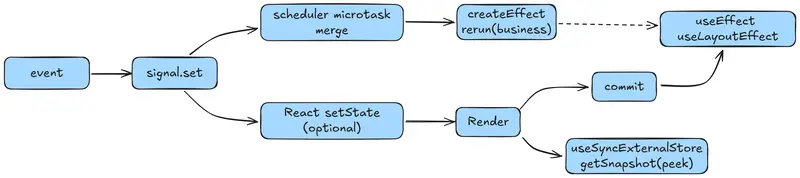
The diagram below summarizes how data flows when signals are used inside a React environment.

signals diagram

We can divide responsibilities clearly:

  • Data side effects → our createEffect (business logic)
  • UI / DOM side effects → React’s useLayoutEffect / useEffect
  • Reading values → always through useSignalValue (useSyncExternalStore + peek() for tear-free behavior)

Tearing: Cause and Solution

We discussed tearing earlier, but let’s briefly recap.

Under React Concurrent Mode, React may read snapshots multiple times between render and commit.

If your snapshot is not controlled by React (for example, directly calling someSignal.get()), the UI may render with a snapshot that no longer matches the DOM after commit.

React’s Snapshot mechanism is a compromise to coordinate state updates and UI rendering.
It is not part of JavaScript itself, which is why some React developers develop incorrect mental models about JavaScript behavior.

Earlier chapters reviewed some JavaScript fundamentals to avoid this confusion. If you joined the series midway, it may be helpful to revisit those sections.

Two Common Incorrect Patterns

1. Reading .get() directly in a component

function Bad() {
  const v = someSignal.get(); // snapshot not controlled by React
  return <div>{v}</div>;
}

2. Manual subscription using useState + useEffect

function Bad() {
  const [v, setV] = useState(someSignal.peek());

  useEffect(() => {
    const stop = createEffect(() => {
      setV(someSignal.peek());
    }); // snapshot not re-read before commit

    return () => stop();
  }, []);

  return <div>{v}</div>;
}

Correct Approach: useSyncExternalStore

Always use useSyncExternalStore through our useSignalValue hook.

function Good() {
  const v = useSignalValue(someSignal); // tear-free
  return <div>{v}</div>;
}

Avoiding Unnecessary Re-renders: useSignalSelector

const user = signal({ id: 1, name: "Ada", age: 37 });

// Only re-render when name changes
function Name() {
  const name = useSignalSelector(user, u => u.name);
  return <h2>{name}</h2>;
}

Guidelines

  • Never call .get() during render
  • Always use useSignalValue or useSignalSelector
  • Do not implement subscriptions manually
  • useSyncExternalStore automatically re-reads the snapshot before commit and guarantees tear-free behavior

Remounting with key: Avoiding Stale Subscriptions and Memory Leaks

The Situation

When list keys change or routing switches occur, React will:

  1. Unmount the old tree
  2. Mount a new one

The Risk

If your derived values (computed / effect) have long lifetimes and live in module scope, their graph connections may still exist.

Problematic Example

export const expensive = computed(() => a.get() + b.get());

Even if some pages no longer need this value, upstream signals a and b may still retain subscriptions.

Solution

1. Bind to component lifecycle using useComputed

function Page() {
  const sum = useComputed(() => aSig.get() + bSig.get());
  const v = useSignalValue(sum);
  return <div>{v}</div>;
}

When the component unmounts, useComputed will automatically dispose the node.

2. Containerize with a Provider

const Ctx = createContext<{ sum: ReturnType<typeof computed> } | null>(null);

function StoreProvider({ children }: { children: React.ReactNode }) {
  const sum = useMemo(() => computed(() => aSig.get() + bSig.get()), []);

  useEffect(() => () => sum.dispose?.(), [sum]);

  return (
    <Ctx.Provider value={{ sum }}>
      {children}
    </Ctx.Provider>
  );
}

function Child() {
  const store = useContext(Ctx)!;
  const v = useSignalValue(store.sum);
  return <div>{v}</div>;
}

Practical Rule

Derived values under UI nodes → use useComputed
Global derived values → manage them with a Provider

Important Note About computed

computed is a node in the reactive graph (Observer + Trackable).

Dependencies are tracked only when signal.get() is called inside its callback.

If you pass React snapshots into useComputed, the computed node will not track any signals.

Incorrect Example

const count = useSignalValue(countSig);
const doubled = useComputed(() => count * 2); 
// computed runs once and never updates

Correct Example

const count = useSignalValue(countSig);
const doubled = useComputed(() => countSig.get() * 2);

Alternative: Pure React derivation

const count = useSignalValue(countSig);

const doubled = React.useMemo(() => count * 2, [count]);
// not part of the reactive graph

Transitions: Consistency and Timing Coordination

Important point:

startTransition only affects React’s setState priority.

It does not delay signal writes.

If some UI reads signals (useSignalValue) while other parts use setState + Transition, you may observe inconsistent UI timing.

Two Safe Strategies

Strategy 1: Always read external snapshots

All UI reads signals through useSignalValue.

For transition-like behavior, use useDeferredValue for display delay, rather than delaying data writes.

function SearchBox() {
  const q = useSignalValue(querySig);
  const deferredQ = useDeferredValue(q);

  return (
    <>
      <input
        value={q}
        onChange={e => querySig.set(e.target.value)}
      />
      <ExpensiveList query={deferredQ} />
    </>
  );
}

Strategy 2: Keep transitional values inside React state

A. React state as draft buffer

function Editor() {
  const committed = useSignalValue(titleSig);
  const [draft, setDraft] = useState(committed);

  useEffect(() => setDraft(committed), [committed]);

  const save = () => {
    startTransition(() => {
      titleSig.set(draft);
    });
  };

  return (
    <>
      <input value={draft} onChange={e => setDraft(e.target.value)} />
      <button onClick={save}>Save</button>
    </>
  );
}

Use this when you want to separate typing UI updates from heavy re-renders after commit.

B. Local signal state

function Editor() {
  const committed = useSignalValue(titleSig);
  const [draft, setDraft] = useSignalState(committed);

  useEffect(() => setDraft(committed), [committed]);

  const save = () => {
    titleSig.set(draft);
  };

  return (
    <>
      <input value={draft} onChange={e => setDraft(e.target.value)} />
      <button onClick={save}>Save</button>
    </>
  );
}

During editing, only the local signal updates, so downstream computations are unaffected.

C. Immediate writes but delayed UI

If you must update the signal on every keystroke, use useDeferredValue for expensive UI sections.

function Search() {
  const q = useSignalValue(querySig);
  const deferredQ = useDeferredValue(q);

  return (
    <>
      <input
        value={q}
        onChange={e => querySig.set(e.target.value)}
      />
      <ExpensiveList query={deferredQ} />
    </>
  );
}

The data stays real-time, while the UI update is deferred.

Common Misunderstandings

“If I use useSignalState, I no longer need startTransition?”

Usually yes.
Because useSignalState stores values locally and does not trigger global signal updates.

However, if committing still triggers heavy React state updates, those setState calls can still be wrapped in startTransition.

“If I wrap signal.set() inside startTransition, will it lower priority?”

No.
Transitions do not affect external stores.

Updates from external stores trigger re-renders through useSyncExternalStore, independent of startTransition.

Suspense: Consistency When Data Is Not Ready

Reality: signals do not automatically integrate with React Suspense.
Suspense only recognizes data sources that throw a Promise during render.

Strategy A: State-driven approach (simpler)

Data layer

const userId = signal(1);

const user = signal({
  status: "idle",
});
createEffect(() => {
  const id = userId.get();

  user.set({ status: "loading" });

  fetch(`/api/user/${id}`)
    .then(r => r.json())
    .then(d => user.set({ status: "ok", data: d }))
    .catch(e => user.set({ status: "error", err: e }));
});

UI

function UserPanel() {
  const u = useSignalValue(user);

  if (u.status === "loading") return <Spinner />;
  if (u.status === "error") return <ErrorView err={u.err} />;

  return <Profile data={u.data} />;
}

Strategy B: Convert into a Suspense resource

export function toResource(src) {
  let thrown = null;

  return {
    read() {
      const s = src.peek();

      if (s.status === "ok") return s.data;
      if (s.status === "error") throw s.err;

      if (!thrown) thrown = new Promise(() => {});
      throw thrown;
    }
  };
}
function UserPanel() {
  const resource = React.useMemo(() => toResource(user), []);

  const data = resource.read();

  return <Profile data={data} />;
}
<React.Suspense fallback={<Spinner />}>
  <UserPanel />
</React.Suspense>

When to choose which?

If your project does not heavily rely on Suspense → Strategy A is simpler

If you already have Suspense infrastructure → Strategy B works with an adapter

Just remember to provide a real pending Promise.

Conclusion

At this point, you can use your signals in React 18+ with:

  • Stable tear-free subscriptions
  • Minimal unnecessary re-renders
  • Clear responsibility boundaries between React and signals

In the next article, we will look at common anti-patterns and how to fix them.

Keep_AS — The System That Refuses to Let You Miss Opportunities

This is a submission for the Notion MCP Challenge

🧠 Keep_AS — The system that refuses to let you fail

What I Built

There is a moment we all know.

You find an opportunity.
A job. A scholarship. A hackathon.

You tell yourself:
“I’ll do it later.”

Later becomes tomorrow.
Tomorrow becomes never.

And nothing crashes.
No error message.
No alarm.

Just… silence.

And another opportunity dies.

Keep_AS was born from that frustration.

Not because we lack talent.
But because we lack execution systems.

💡 The Idea

Keep_AS is not a productivity app.

It’s an AI-powered execution system that:

  • Takes an opportunity (job, project, goal)
  • Breaks it into structured, actionable tasks
  • Tracks your behavior
  • Pushes you to act
  • And refuses to let you ignore what matters

🎥 Video Demo

💻 Show us the code

⚙️ How It Works

1. Input: Raw Opportunity

User pastes something like:

“Software Engineer Internship — Deadline March 30 — Requires CV, cover letter, portfolio”

2. AI Parsing

We use an AI parser to extract:

  • Deadline
  • Required documents
  • Skills
  • Priority

3. Task Generation

The system transforms it into a task graph:

  • Prepare CV
  • Write Cover Letter
  • Build Portfolio
  • Submit Application
  • Track Deadline

4. Notion MCP Integration (Core of this project)

This is where the magic happens.

Using Notion MCP, Keep_AS becomes a real system:

🔹 A Notion Database is created automatically

Each task becomes a structured entry:

Task Status Priority Due Date
Prepare CV Todo High March 28

🔹 Real-time updates

  • Tasks are updated as you progress
  • Status changes trigger behavior tracking

🔹 Human-in-the-loop system

Notion acts as:

  • The interface
  • The memory
  • The control system

🧩 System Architecture

 User Input (Opportunity)
            │
            ▼
┌─────────────────────┐
│   AI Parser         │
└─────────────────────┘
            │
            ▼
┌─────────────────────┐
│ Task Graph Generator│
└─────────────────────┘
            │
            ▼
┌─────────────────────┐
│ Notion MCP          │
│ (Database + Pages)  │
└─────────────────────┘
            │
            ▼
┌─────────────────────┐
│ Momentum Engine     │
│ (Behavior Tracking) │
└─────────────────────┘
            │
            ▼
┌─────────────────────┐
│ User Feedback Loop  │
└─────────────────────┘

This creates:

  • Accountability
  • Urgency
  • Psychological pressure (the good kind)

🔥 What Makes This Special

Most tools:
→ Store tasks

Keep_AS:
→ Forces execution

🚫 No more:

  • “I forgot”
  • “I’ll do it later”
  • “I didn’t have time”

✅ Instead:

  • Structured action
  • Clear path
  • Constant pressure
  • Visible progress

🧠 Why Notion MCP Was Critical

Without Notion:
→ This is just another AI demo

With Notion MCP:
→ This becomes a living system

Notion provides:

  • Persistent structured data
  • Real-time updates
  • Human interaction layer
  • Visual clarity

It turns AI output into actionable reality

❤️ The Real Problem We’re Solving

This isn’t about productivity.

It’s about missed opportunities.

People don’t fail because they are not smart.

They fail because:

  • They don’t start
  • They don’t continue
  • They don’t finish

🚀 What’s Next

  • Real-time reminders
  • Calendar integration
  • Mobile notifications
  • Multi-opportunity tracking
  • AI coaching layer

🏁 Final Thought

Keep_AS is not here to organize your tasks.

It’s here to make sure:
you don’t abandon your future silently.

Gleam Has a Free Type-Safe Language That Runs on the BEAM — Erlang’s Power, Modern Syntax

The BEAM Problem

Erlang powers WhatsApp (2 billion users, 50 engineers). Elixir made it beautiful. But both have a secret weakness: no static types.

Your Elixir app works great — until production reveals a type mismatch that the compiler never caught.

Gleam fixes this. Full static types. Runs on the BEAM. Zero runtime overhead.

What Gleam Gives You

Type-Safe Erlang/Elixir Interop

import gleam/io
import gleam/int

pub fn main() {
  let answer = add(20, 22)
  io.println("The answer is: " <> int.to_string(answer))
}

fn add(a: Int, b: Int) -> Int {
  a + b
}

Every function has types. The compiler catches mistakes before runtime.

Pattern Matching

pub type Shape {
  Circle(radius: Float)
  Rectangle(width: Float, height: Float)
}

pub fn area(shape: Shape) -> Float {
  case shape {
    Circle(r) -> 3.14159 *. r *. r
    Rectangle(w, h) -> w *. h
  }
}

Forget a case? Compiler error. Not a runtime crash at 3 AM.

Use All of Erlang’s Libraries

// Call Erlang's crypto module directly
@external(erlang, "crypto", "strong_rand_bytes")
fn random_bytes(size: Int) -> BitArray

Gleam compiles to Erlang. Every OTP library works. GenServers, supervisors, ETS tables — all available.

Also Compiles to JavaScript

gleam build --target javascript

Same code, runs in Node.js or the browser. One language, two runtimes.

Quick Start

curl -sSf https://gleam.run/install | sh
gleam new my_project
cd my_project
gleam run

Why This Matters

The BEAM VM is the best runtime for concurrent, fault-tolerant systems. Gleam adds the one thing it was missing: a modern type system that catches bugs at compile time.

If you’re building APIs, real-time systems, or anything that needs 99.999% uptime — Gleam deserves a look.

Need to collect data for your BEAM applications? Check out my web scraping actors on Apify Store — structured data, ready to process. For custom solutions, email [email protected].

Building a Firecracker VM Orchestrator in Go — Part 1: Provider Interfaces

Spec-Driven Development Workflow

Building a Firecracker VM Orchestrator in Go — Part 1: Provider Interfaces

Introduction

I’m building Flames, an open-source control plane for managing microVMs powered by Firecracker and Jailer. The goal is a straightforward API to spin up, orchestrate, and tear down lightweight VMs — the kind of ephemeral, hardware-isolated environments that are becoming critical infrastructure. Especially in the AI ecosystem, where you’re running untrusted code, agent workflows, or sandboxed execution, container-level isolation isn’t enough. You need real VM boundaries with Jailer-enforced security, and you need it to be fast and programmable. That’s what Flames is for.

I’ve been coding with AI agents for a while now, but what’s different this time is that I’m using ContextPin as my main AI coding workspace — organizing specs, context, and decisions in one place so the AI always has what it needs. Spec-Driven Development, essentially.

Spec-Driven Development Workflow

I’m documenting the whole journey here.

The idea is simple: I write the specs, I bring my Go experience to the table, and I let AI handle the bulk of the implementation. This frees me up to spend more time on architecture, code review, and making sure the design decisions are sound — thinking about interfaces, data flow, concurrency trade-offs — while moving through the implementation phase much faster than I could solo.

This first spec tackles the most foundational piece: the provider interfaces. Five abstractions that decouple the entire control plane from any specific infrastructure backend.

The Problem

Flames needs to store VM state, cache data, queue background jobs, store blobs, and expose VMs via ingress. But I’ve been burned before by coupling to a specific database or queue system too early. A developer running go run locally shouldn’t need a database cluster. A production deployment should plug in real backends without changing application code.

If you’ve written Go for any amount of time, you know the answer: narrow interfaces with in-memory defaults. The interesting part is getting the contracts right on the first pass — and that’s where the spec-driven approach really pays off.

The green nodes are the five provider interfaces — the abstraction boundary. The dark nodes are the domain models each interface operates on. The control-plane components at the top consume only interfaces, never concrete implementations.

The Spec

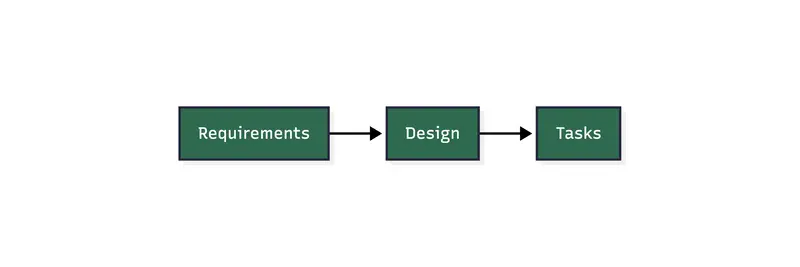
Before writing a single line of Go, I wrote three structured notes in ContextPin:

  • Requirements — 7 user stories, 30+ functional requirements, acceptance criteria, and non-functional constraints. This is the contract.
  • Design — Package layout, dependency graph, data models, interface signatures, implementation notes, and risk analysis. This is the blueprint.
  • Tasks — The ordered implementation checklist derived from the design.

Having these written down before implementation meant I could hand them to Claude Code and say “build this” — and then spend my time reviewing the output against my own spec rather than dictating every line. The spec becomes the shared language between me and the AI.

The Five Interfaces

  • StateStore (provider/state) — VM, controller, and event records. Default: memstate (maps + mutex)
  • BlobStore (provider/blob) — Opaque artifact storage. Default: memblob (byte slices)
  • CacheStore (provider/cache) — Ephemeral key-value caching. Default: memcache (map + TTL)
  • WorkQueue (provider/queue) — Background job processing. Default: memqueue (slices + leases)
  • IngressProvider (provider/ingress) — VM service exposure. Default: noop (no network ops)

Each interface lives in its own package, imports only from model/ and provider/providererr/, and has zero external dependencies in its default implementation. This is the kind of structure I’d set up in any Go project — clean import graphs, no circular dependencies, everything testable in isolation.

Key Design Decisions

These are the calls I made during the spec phase — the kind of decisions that are hard to delegate to AI because they require judgment about where the project is heading.

Interface-per-package over monolithic provider

One interface per package rather than a single Provider mega-interface. I’ve seen the mega-interface approach in other projects and it always ends the same way: a component that only needs blob storage ends up importing the entire provider dependency tree. Keeping them separate also maps cleanly to future adapter packages — provider/state/postgres imports provider/state and nothing else.

Non-blocking Dequeue

WorkQueue.Dequeue returns ErrNoJobs instead of blocking. I went back and forth on this one, but non-blocking is simpler to implement correctly across all backends. The callers (reconciler, scheduler) will already run on tick-based loops anyway. If we ever need a push model, that’s a separate optional interface — not a change to the core contract.

Conformance test suites

This is the one I’m most excited about. Every interface has a shared test suite in providertest/ that any adapter can import and run. The in-memory default passes it today. A future Postgres adapter runs the exact same tests. This is what turns interfaces from “type signatures that might work” into actual enforceable contracts. During review, I spent most of my time here — making sure the test cases cover the edge cases that matter.

Structured errors with errors.Is support

Provider errors carry metadata (resource type, ID) and support errors.Is matching against sentinels like ErrNotFound, ErrConflict, ErrCacheMiss. No string matching, ever. This is a pattern I’ve used in every serious Go project — the upfront cost is minimal and it saves hours of debugging later.

Reflections on the Workflow

I didn’t write these specs by hand, line by line. I brought my Go and infra expertise — I’d already done a Firecracker + Jailer proof of concept internally — and explained exactly how I wanted the architecture to work. The AI helped me turn that into structured requirements, design docs, and task breakdowns. It’s a conversation, not dictation.

But once the specs were done and living in ContextPin, everything moved fast. The AI produced code that matched my design because the design was explicit, not in my head. My review cycles were focused: does this match the spec? Does it handle the edge cases? Are the error types right?

I spent almost no time on implementation details and almost all my time on the things that matter for long-term quality: interface design, concurrency safety, test coverage.

What’s Next

With the provider interfaces in place, the next spec will build on top of them — likely the API server or scheduler, which consume these interfaces via constructor injection. The in-memory defaults mean I can develop and test the next layer without standing up any infrastructure. That’s the whole point.

This post is part of the Flames Spec-Driven Development series.

This entire project is being built using ContextPin + Claude Code. ContextPin is an ADE (Agentic Development Environment) — a GPU-accelerated desktop app designed for AI-assisted development that integrates directly with Claude Code, Codex, Gemini and OpenCode. ContextPin is going open-source soon. If you want to get early access, you can join here.

SafeBrowse: A Trust Layer for AI Browser Agents (Prevent Prompt Injection & Data Exfiltration)

If your agent can browse the web, download files, connect tools, and write memory, a stronger model is helpful, but it is not enough.

I built SafeBrowse to sit on the action path between an agent and risky browser-adjacent surfaces. It does not replace the planner or the model. Instead, it evaluates what the agent is trying to do and returns typed verdicts like ALLOW, BLOCK, QUARANTINE_ARTIFACT, or USER_CONFIRM.

The short version:

Your model decides what it wants to do.

SafeBrowse decides what it is allowed to do.

Today, the Python client is live on PyPI as safebrowse-client, and the full project is here:

Why I built this

A lot of agent safety discussion still sounds like “just use a better model” or “add more prompt instructions.”

That helps, but it does not solve the actual runtime problem.

A browsing agent can still get into trouble through:

  • prompt injection hidden in normal web pages
  • poisoned PDFs or downloaded artifacts
  • connector or tool onboarding abuse
  • OAuth callback abuse
  • durable memory poisoning
  • long-context social engineering that looks operationally plausible

Those are not just model-quality problems. They are control-boundary problems.

So SafeBrowse keeps the product boundary narrow:

  • adapters observe and propose actions
  • SafeBrowse evaluates and constrains
  • the planner or model stays external

What SafeBrowse does

SafeBrowse currently includes:

  • a TypeScript core runtime
  • a localhost daemon
  • a thin Python client
  • a Playwright reference adapter
  • policy and knowledge-base tooling
  • a live threat lab and comparison dashboard

The runtime evaluates:

  • page observations
  • actions like navigation or sink transitions
  • downloaded artifacts
  • tool / connector onboarding
  • OAuth callback flows
  • durable memory writes
  • replay and forensic logging

The most important hardening in the current branch is around connector and OAuth abuse:

  • verified registry-backed connector preparation
  • exact redirect and callback-origin verification
  • approval-bound onboarding
  • callback verification with state binding
  • artifact-to-tool taint propagation
  • replay bundles with policy provenance

Why this still matters with OpenAI or Claude

Hosted model platforms already have useful safety features. I am not claiming otherwise.

But SafeBrowse is useful for a different reason: it is app-side enforcement.

Model-native safety helps with:

  • stronger refusal behavior
  • better resistance to obvious jailbreaks
  • moderation / guardrail layers
  • tool approval primitives

SafeBrowse adds:

  • deterministic allow/block decisions
  • verified connector registry checks
  • OAuth callback and origin validation
  • artifact lineage and quarantine behavior
  • memory-write policy
  • replayable forensic logs

Better models reduce how often the agent wants to do the wrong thing.

SafeBrowse reduces what the agent is allowed to do when it still wants the wrong thing.

What I tested

I built a live threat lab that runs:

  • a raw agent
  • an SDK-protected agent

against the same model backend

For the frozen model-backed snapshot in the repo, both agents used the same local Qwen backend. The point was to measure the middleware difference, not hide behind a model swap.

Frozen batch summary:

  • completed comparisons: 22
  • raw-agent compromises: 21
  • SDK bypasses: 0

Here are a few representative rows:

Threat Raw Agent Agent + SDK Verdict
Visible direct override Compromised Contained BLOCK
Hidden instruction layer Compromised Stayed read-only ALLOW
Poisoned PDF handoff Compromised Quarantined QUARANTINE_ARTIFACT
Schema-poisoned trusted connector Compromised Contained BLOCK
Appendix-to-connector chain Compromised Contained BLOCK
Benign research page Stayed read-only Stayed read-only ALLOW

The connector cases were the most interesting. In early versions, euphemistic onboarding text and schema-poisoned manifests could still push the agent toward unsafe callback flows. The hardened v2 path closes those by treating registry trust, approval binding, callback origin, and state as runtime-enforced constraints instead of model-accepted hints.

How people use it

The Python package is intentionally thin.

It is not the full policy engine in Python. It is a client for the SafeBrowse daemon.

A typical flow looks like this:

  1. your browser agent reads a page
  2. your app sends the observation to SafeBrowse
  3. your model proposes a next step
  4. your app asks SafeBrowse to evaluate that action
  5. your browser only executes if SafeBrowse allows it

Quick start

Install the Python client:


bash
pip install safebrowse-client

How to Build a Bank Ledger in Golang with PostgreSQL using the Double-Entry Accounting Principle

Frontend view

I wrote a detailed tutorial on FreeCodeCamp about building a secure bank ledger backend in Golang with PostgreSQL, using double-entry accounting principles.
check it out here.
freecodecamp tutorial ink: https://www.freecodecamp.org/news/build-a-bank-ledger-in-go-with-postgresql-using-the-double-entry-accounting-principle/
Backend GitHub repo :
https://github.com/PaulBabatuyi/double-entry-bank-Go
Live demo: https://golangbank.app
Frontend Nextjs Typescript : https://github.com/PaulBabatuyi/double-entry-bank
And incase you want to check out my portfolio: https://paulbabatuyi.app

Frontend view

Backend API endpoint; Swagger