Mert
Türkiye’de mart ayında en çok satılan sıfır otomobil modelleri belli oldu
Otomobil gazetecisi Emre Özpeynirci tarafından yapılan paylaşıma göre mart ayında en çok satılan sıfır otomobil modelleri şunlar oldu: 1: Renault Clio (4.923 adet) 2: Toyota C-HR (3.618 adet) 3: Renault Megane Sedan (3.549 adet) 4: Volkswagen Taigo (2.488 adet) 5: Fiat Egea Sedan (2.404 adet) 6: Renault Duster (2.388 adet) 7: Toyota Corolla (2.375 adet) 8: Peugeot 3008 (2.360 adet) 9: Togg T10X (2.313 adet) 10: Peugeot 2008 (2.222 adet) Şubat ayında en çok satılan sıfır otomobil modelleri şöyleydi: 1: Renault Clio (5.462 adet) 2: Toyota Corolla (3.468 adet) 3: Peugeot 2008 (2.750 adet) 4: Renault Megane (2.347 adet) 5: Fiat Egea Sedan (2.324 adet) 6: Renault Duster (2.290 adet) 7: Toyota C-HR (2.173 adet) 8: Hyundai i20 (2.058 adet) 9: Peugeot 3008 (1.771 adet) 10: Opel Corsa (1.709 adet) Ocak ayında en çok satılan sıfır otomobil modelleri şöyleydi: 1: Renault Clio (4.556 adet) 2: Toyota Corolla (3.775 adet) 3: […]
Türkiye’de mart ayında en çok satılan sıfır otomobil modelleri belli oldu yazısı ilk olarak Teknoloji haberleri – LOG üzerinde yayınlandı.
BMW, Neue Klasse araçlarından fotoğraf, video ve sensör verileri toplamaya başladı
BMW, 1 Nisan itibarıyla Almanya’da satılan yeni nesil Neue Klasse araçlarından (ilk modeller yeni iX3 ve i3) fotoğraf, video ve sensör verisi toplamaya başladı. Yalnızca sürece açıkça izin veren müşterilerin araçlarından toplanan veriler, şirketin açıklamasına göre otomatik acil frenleme, şerit değiştirme desteği ve otoyol ile şehir içi sürüş asistanı gibi sistemleri iyileştirmek için kullanılacak. Bu sistemlerin sadece araçtakileri değil; yayaları, bisikletlileri ve yoldaki diğer herkesi korumaya yardımcı olduğunu aktaran şirket, kayıtların büyük oranda sert frenleme veya kıl payı önlenen kaza durumlarında tetikleneceğini belirtiyor. Bu verileri üst seviye otonom sürüş sistemlerini geliştirmek için de kullanacak Alman devi, kayıt için verilen izinlerin istenildiği zaman kaldırılabileceğini ve kayıtlarda görünen kişilerin yüzlerinin ve plakaların daha araçtan çıkmadan önce bulanıklaştırılarak gizleneceğini ifade ediyor. Sürecin zamanla diğer ülkelerde satılan araçları da kapsaması bekleniyor.
BMW, Neue Klasse araçlarından fotoğraf, video ve sensör verileri toplamaya başladı yazısı ilk olarak Teknoloji haberleri – LOG üzerinde yayınlandı.
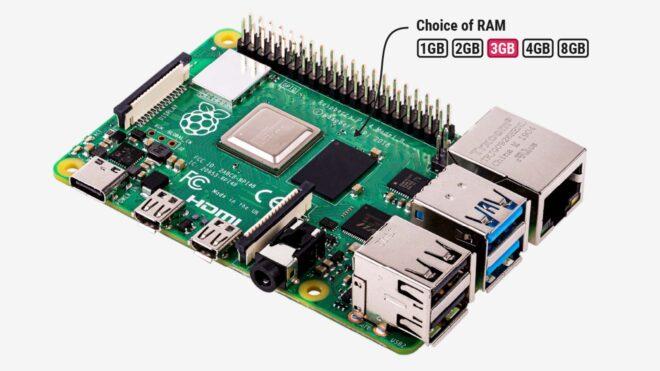
3 GB’lık Raspberry Pi 4 tanıtıldı, diğer versiyonlara ise ciddi zam yapıldı
RAM fiyatlarındaki artış, Raspberry Pi’yi de vurmaya devam ediyor. Bu kapsamda ürün fiyatlarına zam yapan şirket, aynı zamanda 3 GB RAM’e sahip yeni Raspberry Pi 4 versiyonunu tanıttı. Bu yeni model için 83,75 dolar satış fiyatı açıklayan şirket, diğer çok sayıda üründe ise hatırı sayılır seviyede fiyat artışı gerçekleştirdi. Örneğin, Pi 4 ve Pi 5’in 4 GB RAM’e sahip sürümlerine 25 dolar, 8 GB RAM’e sahip sürümlerine 50 dolar, 16 GB RAM’e sahip sürümlerine ise tam 100 dolar zam yapıldı. 16 GB Compute Module 5’in fiyatını da 100 dolar artıran şirket, Raspberry Pi AI HAT+ 2’ye 50 dolar, Compute Module 5’in geliştirme kitine 25 dolar, Raspberry Pi 500+ kitine ise 150 dolar zam yapıldığını duyurdu.
3 GB’lık Raspberry Pi 4 tanıtıldı, diğer versiyonlara ise ciddi zam yapıldı yazısı ilk olarak Teknoloji haberleri – LOG üzerinde yayınlandı.
Honda, “0” serisini tamamen rafa kaldırmadı
Honda, geçtiğimiz ay içerisinde sürpriz bir adım atarak ABD pazarına yönelik tasarlanan tamamen elektrikli 0 SUV, 0 Saloon ve Acura RSX EV modellerini rafa kaldırdığını duyurdu. Değişen pazar şartlarına bağlı olarak atılan bu adım, bugün ortaya çıktığı kadarıyla dikkat çekici “0” serisinin tamamen sona erdiği anlamına gelmiyor. Çünkü Japon üretici “0 α” isimli bir SUV modelinin Hindistan’da üretime alınacağını açıkladı. Henüz tam olarak tanıtılmayan ancak iptal edilen 0 SUV’u andıran tamamen elektrikli yeni model 0 α, açıklamaya göre Hindistan dışında da satılacak bir araç olacak. İlk olarak Japonya’ya sunulması beklenen model, uygun fiyatlı bir seçenek olarak belirli Avrupa pazarlarına da taşınabilir.
Honda, “0” serisini tamamen rafa kaldırmadı yazısı ilk olarak Teknoloji haberleri – LOG üzerinde yayınlandı.
NASA, tarihi Artemis 2 görevi için kalkışı sorunsuz olarak gerçekleştirdi
ABD’nin Ulusal Havacılık ve Uzay Dairesi (NASA), geçtiğimiz saatlerde uzun süredir beklenen kalkışı sorunsuz olarak gerçekleştirdi. SLS (Space Launch System) roket ve Orion uzay aracının merkezde olduğu 10 günlük görev kapsamında uzaya çıkarılan astronotlar Christina Koch, Reid Wiseman, Victor Glover ve Jeremy Hansen, Ay’ın etrafında tur atacak, uzay aracındaki sistemleri test edecek, Ay’ın daha önce görülmeyen kısımlarını görüntüleyecek ve gelecek görevler için iniş yapılabilecek bölgeleri araştıracak. NASA, “Artemis 2” görevini yaşanan sorunlar nedeniyle birden fazla kez ertelemek zorunda kalmıştı. Erteleme kararlarından birinin arkasında, SLS için gerçekleştirilen yakıt testlerinde karşılaşılan sızıntı yer almıştı. Florida’daki Kennedy Uzay Merkezi’ndeki denemelerde roket ile fırlatma platformu arasındaki bağlantıda hidrojen sızıntısı tespit eden kurum, bu yüzden kalkışı bir ay daha ertelemişti. Daha sonra SLS’nin üst kısmına giden helyum akışında bir sorunla karşılaşıldığını belirten kurum, bu durumu gerekçe göstererek fırlatmayı bir kez daha erteleme kararı almıştı. Ay’a fiziksel iniş ise Artemis 3 görevinde gerçekleştirilecek.
NASA, tarihi Artemis 2 görevi için kalkışı sorunsuz olarak gerçekleştirdi yazısı ilk olarak Teknoloji haberleri – LOG üzerinde yayınlandı.
Why the Best Engineers Write “Ugly” Code
The most productive engineer I ever worked with wrote code that would make Clean Code purists physically ill. No abstractions where one would “obviously” go. Functions that were 80 lines long. Variable names that were borderline aggressive in their specificity. And her code shipped faster, broke less, and was easier to debug than anyone else’s on the team.
The Clean Code Trap
Somewhere along the way, the industry confused “clean” with “good.” We taught junior developers that short functions are better, abstractions are always worth it, and DRY (Don’t Repeat Yourself) is a commandment, not a guideline.
The result? Codebases where understanding a single feature requires bouncing through 15 files. Where a simple data transformation passes through three layers of abstraction that each do almost nothing. Where the code is technically “clean” by every metric but impossible to follow when something breaks at 3 AM.
I’ve inherited codebases like this. The original author followed every rule in the book. The code was “beautiful.” And it took me a week to understand what it actually did.
Pragmatic Code Wins
The engineers who consistently deliver — the ones who ship reliable systems and somehow always finish on time — write code that prioritizes readability over elegance. Their code tells you what it does by reading it top to bottom. No treasure hunts through inheritance hierarchies. No puzzle-solving to trace a function call through four levels of indirection.
A recent r/ExperiencedDevs thread put it perfectly: the goal of a senior engineer shouldn’t be “Beautiful Code” — it should be “Minimal Code.” Not minimal as in fewest characters, but minimal in unnecessary complexity. Every abstraction must earn its place.
Dan Abramov (co-creator of Redux, now at Bluesky) wrote about this years ago — the idea that sometimes duplicating code is cheaper than the wrong abstraction. The wrong abstraction creates coupling that’s expensive to undo. Copy-pasting 10 lines? That’s a five-second fix if requirements diverge later.
Abstractions Have a Cost Nobody Counts
Every abstraction layer you add has three hidden costs:
Cognitive load. A new developer joining the team has to understand the abstraction before they can understand the feature. If your abstraction doesn’t map to a concept they already know, you’ve created a learning barrier.
Debug distance. When something breaks, how many files do you touch to trace the problem? Each layer of abstraction adds a hop. In a flat, “ugly” function, the bug is right there. In a beautifully abstracted system, you’re playing hot-and-cold across a dozen modules.
Change resistance. Abstractions encode assumptions about how things work. When requirements change (and they will), the abstraction either bends to accommodate or becomes a straitjacket. I’ve watched teams spend more time refactoring abstractions than building features.
When Clean Code Rules Actually Hurt
DRY taken to extremes. Two functions share 5 lines of similar-but-not-identical logic. Someone extracts it into a shared utility with a parameter to handle the differences. Six months later, that utility has 8 parameters, handles 5 different cases, and nobody wants to touch it. The “duplication” was fine. The abstraction is now the problem.
Premature patterns. You’ve got one type of notification. Someone builds a NotificationFactory with a strategy pattern, a builder, and a plugin architecture — because “we might need different types later.” You never do. Now you maintain an over-engineered mess for one notification type.
Tiny functions everywhere. Breaking a 50-line function into ten 5-line functions doesn’t automatically make it clearer. If I have to jump between ten functions to understand a single workflow, you’ve traded one kind of complexity for another. Sometimes a longer function with clear comments is genuinely easier to follow.
What Good “Ugly” Code Looks Like
Good pragmatic code:
- Is boring. No clever tricks. No “elegant” one-liners that require a PhD to parse. Just straightforward logic that does what it says.
-
Has obvious names.
calculateMonthlyRevenueForActiveSubscriptions()beatscalcRev(). Verbose? Sure. But you never need to look up what it does. - Keeps things local. The context you need to understand a piece of code should be in that piece of code, not scattered across the project.
- Duplicates when it makes sense. Two similar functions that might diverge later? Keep them separate. Future-you will thank present-you.
- Comments the “why,” not the “what.” The code says what it does. Comments explain the business reason, the edge case, the thing that isn’t obvious.
Ship It, Then Clean It (Maybe)
The best engineers I’ve worked with share a philosophy: get it working, get it correct, get it fast — in that order. “Clean” is conspicuously absent from that list because clean is a means, not an end.
Code exists to solve problems. If your beautifully architected solution takes twice as long to build, costs more to maintain, and is harder to debug — but it follows all the rules in the book — is it actually better?
Write code that works. Write code that’s readable. Write code you can debug at 3 AM when your brain is running at 40%. That’s the real bar. Everything else is aesthetics.
Vertex AI Workbench with Terraform: Your ML Workspace on GCP 🔬
Vertex AI Workbench is the JupyterLab IDE for ML on GCP – pre-installed ML frameworks, Vertex AI integration, and GPU support out of the box. Here’s how to provision instances with Terraform including networking, IAM, auto-shutdown, and custom containers.
In Series 1-3, we worked with managed AI services – Vertex AI for models, RAG Engine for retrieval, ADK for agents. Series 5 shifts to custom ML – training your own models, deploying endpoints, managing features, and building ML pipelines.
It starts with a development environment. Vertex AI Workbench provides JupyterLab instances backed by Compute Engine VMs, pre-loaded with ML frameworks (TensorFlow, PyTorch, JAX, scikit-learn), the Vertex AI SDK, and direct integration with GCS, BigQuery, and Vertex AI services. Each instance is a full ML workspace. Terraform provisions them consistently across your team. 🎯
🏗️ Workbench Architecture
| Component | What It Does |
|---|---|
| Workbench Instance | JupyterLab on a Compute Engine VM |
| VM Image | Pre-built with ML frameworks and Vertex SDK |
| Custom Container | Your own Docker image with specific dependencies |
| Data Disk | Persistent storage for notebooks and datasets |
| Service Account | Controls access to GCS, BigQuery, Vertex AI |
| Network | VPC, subnet, firewall rules for isolation |
Unlike SageMaker’s domain-based approach, Workbench instances are standalone VMs. Each data scientist gets their own instance with full control over machine type, GPU, and installed packages. Terraform standardizes the configuration across the team.
🔧 Terraform: The Full Workbench Setup
APIs and Networking
# workbench/apis.tf
resource "google_project_service" "required" {
for_each = toset([
"notebooks.googleapis.com",
"aiplatform.googleapis.com",
"compute.googleapis.com",
"storage.googleapis.com",
"bigquery.googleapis.com",
])
project = var.project_id
service = each.value
}
# VPC for Workbench instances
resource "google_compute_network" "ml" {
name = "${var.environment}-ml-network"
auto_create_subnetworks = false
project = var.project_id
}
resource "google_compute_subnetwork" "ml" {
name = "${var.environment}-ml-subnet"
ip_cidr_range = var.subnet_cidr
region = var.region
network = google_compute_network.ml.id
private_ip_google_access = true # Access Google APIs without public IP
project = var.project_id
}
# Allow internal traffic for JupyterLab proxy
resource "google_compute_firewall" "internal" {
name = "${var.environment}-ml-internal"
network = google_compute_network.ml.id
project = var.project_id
allow {
protocol = "tcp"
ports = ["8080", "443"]
}
source_ranges = [var.subnet_cidr]
}
private_ip_google_access = true is essential. It lets Workbench instances access Google APIs (GCS, BigQuery, Vertex AI) without a public IP address, keeping your ML environment network-isolated.
Service Account
# workbench/iam.tf
resource "google_service_account" "workbench" {
account_id = "${var.environment}-workbench-sa"
display_name = "Workbench ML Service Account"
project = var.project_id
}
# Access to training data in GCS
resource "google_project_iam_member" "storage_user" {
project = var.project_id
role = "roles/storage.objectUser"
member = "serviceAccount:${google_service_account.workbench.email}"
}
# Access to Vertex AI for training and prediction
resource "google_project_iam_member" "vertex_ai_user" {
project = var.project_id
role = "roles/aiplatform.user"
member = "serviceAccount:${google_service_account.workbench.email}"
}
# Access to BigQuery for data exploration
resource "google_project_iam_member" "bigquery_user" {
project = var.project_id
role = "roles/bigquery.user"
member = "serviceAccount:${google_service_account.workbench.email}"
}
# Read Artifact Registry for custom containers
resource "google_project_iam_member" "artifact_reader" {
project = var.project_id
role = "roles/artifactregistry.reader"
member = "serviceAccount:${google_service_account.workbench.email}"
}
Workbench Instance
# workbench/instance.tf
resource "google_workbench_instance" "this" {
for_each = var.workbench_instances
name = "${var.environment}-${each.key}"
location = var.zone
project = var.project_id
gce_setup {
machine_type = each.value.machine_type
vm_image {
project = "cloud-notebooks-managed"
family = "workbench-instances"
}
# Optional GPU
dynamic "accelerator_configs" {
for_each = each.value.gpu_type != null ? [1] : []
content {
type = each.value.gpu_type
core_count = each.value.gpu_count
}
}
boot_disk {
disk_type = "PD_SSD"
disk_size_gb = each.value.boot_disk_gb
}
data_disks {
disk_type = "PD_SSD"
disk_size_gb = each.value.data_disk_gb
}
network_interfaces {
network = google_compute_network.ml.id
subnet = google_compute_subnetwork.ml.id
nic_type = "GVNIC"
}
service_accounts {
email = google_service_account.workbench.email
}
metadata = {
idle-timeout-seconds = each.value.idle_timeout
install-nvidia-driver = each.value.gpu_type != null ? "true" : "false"
post-startup-script = each.value.post_startup_script
}
enable_ip_forwarding = false
}
disable_proxy_access = false # Enable JupyterLab proxy access
labels = {
environment = var.environment
team = each.value.team
managed_by = "terraform"
}
}
Key configuration points:
-
vm_image.family = "workbench-instances"uses Google’s pre-built image with ML frameworks -
data_disksprovides persistent storage separate from the boot disk -
idle-timeout-secondsin metadata auto-stops the instance after inactivity -
install-nvidia-driverauto-installs GPU drivers when GPU is attached -
disable_proxy_access = falseenables browser access to JupyterLab via IAP
Custom Container Alternative
For teams that need specific package versions or private packages, use a custom container:
resource "google_workbench_instance" "custom" {
name = "${var.environment}-custom-ml"
location = var.zone
project = var.project_id
gce_setup {
machine_type = "n1-standard-8"
container_image {
repository = "${var.region}-docker.pkg.dev/${var.project_id}/ml-images/custom-workbench"
tag = "latest"
}
boot_disk {
disk_type = "PD_SSD"
disk_size_gb = 150
}
network_interfaces {
network = google_compute_network.ml.id
subnet = google_compute_subnetwork.ml.id
}
service_accounts {
email = google_service_account.workbench.email
}
}
}
Build your container from Google’s base image, add your packages, push to Artifact Registry, and reference it in Terraform. Updates are a new tag and terraform apply.
📐 Environment Configuration
# environments/dev.tfvars
environment = "dev"
zone = "us-central1-a"
workbench_instances = {
"data-scientist-1" = {
machine_type = "n1-standard-4"
gpu_type = null # No GPU for dev
gpu_count = 0
boot_disk_gb = 100
data_disk_gb = 200
idle_timeout = "3600" # 1 hour auto-stop
team = "ml-team"
post_startup_script = null
}
}
# environments/prod.tfvars
environment = "prod"
zone = "us-central1-a"
workbench_instances = {
"ml-lead" = {
machine_type = "n1-standard-8"
gpu_type = "NVIDIA_TESLA_T4"
gpu_count = 1
boot_disk_gb = 150
data_disk_gb = 500
idle_timeout = "7200" # 2 hour auto-stop
team = "ml-team"
post_startup_script = "gs://my-bucket/scripts/setup.sh"
}
"ml-engineer-1" = {
machine_type = "n1-standard-8"
gpu_type = "NVIDIA_TESLA_T4"
gpu_count = 1
boot_disk_gb = 150
data_disk_gb = 500
idle_timeout = "7200"
team = "ml-team"
post_startup_script = "gs://my-bucket/scripts/setup.sh"
}
}
Cost control through idle_timeout. GPU instances cost $1-3/hour. A T4 instance left running overnight costs $24-72 in wasted spend. The idle-timeout-seconds metadata auto-stops the VM when JupyterLab kernels are idle.
🔧 Post-Startup Script for Team Standardization
Standardize packages and configs across all instances:
#!/bin/bash
# scripts/setup.sh - uploaded to GCS
# Install team-standard packages
pip install --upgrade
google-cloud-aiplatform
google-cloud-bigquery
pandas
scikit-learn
xgboost
# Clone team shared repos
git clone https://github.com/your-org/ml-utils.git /home/jupyter/ml-utils
# Set environment variables
echo 'export PROJECT_ID=your-project' >> /home/jupyter/.bashrc
echo 'export REGION=us-central1' >> /home/jupyter/.bashrc
Reference it in the instance metadata via post_startup_script. Runs once when the instance starts for the first time.
⚠️ Gotchas and Tips
User-managed notebooks are deprecated. As of January 2025, only Workbench Instances (google_workbench_instance) are supported. Don’t use google_notebooks_instance – it’s legacy.
GPU quota must be requested. T4, V100, A100 GPUs require quota increases in your GCP project. Request early – approval can take 1-2 business days.
Instance stops don’t lose data. Stopping a Workbench instance preserves the boot and data disks. You only pay for disk storage when stopped. Starting it again restores your full environment.
Use data disks for large datasets. Boot disks are limited and get recreated on image updates. Store notebooks and datasets on the data disk (/home/jupyter) which persists independently.
Private Google Access vs public IP. With private_ip_google_access = true on the subnet, instances can reach GCS, BigQuery, and Vertex AI without a public IP. Combine with IAP for secure browser access to JupyterLab.
⏭️ What’s Next
This is Post 1 of the GCP ML Pipelines & MLOps with Terraform series.
- Post 1: Vertex AI Workbench (you are here) 🔬
- Post 2: Vertex AI Endpoints – Deploy to Prod
- Post 3: Vertex AI Feature Store
- Post 4: Vertex AI Pipelines + Cloud Build
Your ML workspace is provisioned. Network-isolated, GPU-ready, auto-shutdown enabled, with standardized packages across your team. The foundation for model training, deployment, and production ML pipelines. 🔬
Found this helpful? Follow for the full ML Pipelines & MLOps with Terraform series! 💬

How DNS Actually Works — The Internet’s Invisible Backbone
You type “google.com” into your browser and a webpage appears. Somewhere between your keystrokes and the pixels loading, a system you’ve never thought about did something extraordinary — in under 50 milliseconds.
Your Computer Is Clueless
Here’s something that surprises people: your browser has no idea what “google.com” means. Computers speak IP addresses — numbers like 142.250.70.14. Domain names are a human convenience. DNS (Domain Name System) is the translation layer between what you type and where your browser actually goes.
Without DNS, you’d need to memorize IP addresses for every website. The entire internet would feel like dialing phone numbers from memory. DNS is the contacts app for the web.
The Four-Step Lookup Chain
When you hit enter on a URL, here’s what actually happens:
Step 1: Browser cache. Your browser checks if it recently looked up this domain. If you visited google.com five minutes ago, it already knows the IP. Done. No network request needed.
Step 2: OS resolver. Cache miss? Your operating system has its own DNS cache. On Mac, you can see it with sudo dscacheutil -flushcache. On Linux, systemd-resolved maintains one. This catches a lot of repeat lookups across different apps.
Step 3: Recursive resolver (your ISP). Still nothing? The request goes to a recursive resolver — usually run by your ISP or a public service like Cloudflare (1.1.1.1) or Google (8.8.8.8). This server does the heavy lifting. It doesn’t know the answer yet, but it knows who to ask.
Step 4: The hierarchy — root → TLD → authoritative. The recursive resolver starts at the top of the DNS tree. It asks a root server: “Where do I find .com domains?” The root server points it to the .com TLD (Top-Level Domain) server. The TLD server says: “google.com? Ask this authoritative nameserver.” The authoritative server finally returns the actual IP address.
Four hops. Usually under 50ms total. You never notice.
13 Root Server Sets Run the Entire Internet
This is the fact that blows people’s minds: there are only 13 root server addresses for the entire global internet. Named A through M, operated by organizations like ICANN, Verisign, NASA, and the US Army Research Lab.
“13 servers” sounds terrifyingly fragile. But each “server” is actually a cluster — over 1,700 physical instances spread across the globe using anycast routing. When your resolver contacts a root server, it reaches the geographically nearest instance automatically. The system is massively redundant.
The root servers handled over 13 billion queries per day as of recent ICANN reports. They’ve never all gone down simultaneously. The architecture is one of the most resilient systems humans have ever built.
DNS Caching Makes Everything Fast
The reason DNS feels instant is aggressive caching at every level. Each DNS record carries a TTL (Time To Live) — a number in seconds that says “you can trust this answer for this long.”
Typical TTLs range from 300 seconds (5 minutes) for dynamic services to 86,400 seconds (24 hours) for stable domains. During that window, no additional DNS lookups happen. Your browser, your OS, and your ISP’s resolver all cache independently.
This is also why DNS changes don’t propagate instantly. Change your domain’s IP address and some users will still hit the old one until their cached records expire. “DNS propagation” isn’t really propagation — it’s cache expiration rippling across millions of resolvers worldwide.
DNS Over HTTPS Changed the Privacy Game
Traditional DNS queries are sent in plain text. Your ISP can see every domain you visit — and historically, many did exactly that (sometimes selling the data). DNS over HTTPS (DoH) and DNS over TLS (DoT) encrypt these queries.
Firefox enabled DoH by default in 2020. Chrome followed. Cloudflare’s 1.1.1.1 and Google’s 8.8.8.8 both support encrypted DNS. It’s a meaningful privacy improvement, though it shifts trust from your ISP to your DNS provider — pick one you trust.
What Breaks When DNS Breaks
The 2021 Facebook outage is the textbook example. Facebook’s engineers accidentally withdrew their BGP routes, which made their DNS servers unreachable. For about six hours, facebook.com simply didn’t resolve. The domain existed, the servers were running, but DNS couldn’t find them. Billions of users got error pages.
Dyn (now Oracle) got DDoSed in 2016, taking out Twitter, Reddit, Netflix, and Spotify simultaneously. One DNS provider going down cascaded into a chunk of the internet becoming unreachable. It exposed how many major services relied on a single DNS provider.
The Takeaway
DNS is one of those systems that works so well you forget it exists. It resolves billions of queries per day, routes you to the right server in milliseconds, and the core architecture has been stable since the 1980s. Not many systems can claim that track record.
Next time a website loads, take a beat. Somewhere between your keyboard and that webpage, 13 root server clusters, a chain of nameservers, and decades of careful engineering just did something remarkable — and nobody noticed.
That’s good infrastructure.
Startup vs Corporate — What Nobody Tells You Before You Pick
I’ve worked at a 5-person startup where I deployed to production on day one. I’ve also worked at a company where it took three weeks to get my laptop configured. Both experiences taught me things the other couldn’t.
The startup-vs-corporate debate is one of those conversations that generates a lot of heat and very little light. People pick a side and defend it like a sports team. The truth? Both environments are genuinely useful, and the right choice depends on where you are in your career — not which one sounds cooler.
Startups Make You Learn 10x Faster (Because They Have To)
At a startup, you’re not “the frontend developer.” You’re the frontend developer, the DevOps person, the occasional DBA, and the one who answers support tickets on weekends. There’s nobody else.
This sounds terrible on paper. In practice, it compresses years of learning into months. You touch every part of the stack because nobody’s going to do it for you. I learned more about infrastructure in my first six months at a startup than in two years at a larger company — because our site went down at 2 AM and I was the only one awake.
A Wellfound survey found that startup employees report wearing 3-4 different hats simultaneously. That’s not a feature request — that’s the default operating mode.
The tradeoff: you learn breadth, not depth. You know a little about everything and a lot about nothing. You can spin up a Kubernetes cluster, but you might not understand the networking layer underneath it.
Corporates Teach You Things You Can’t Learn Anywhere Else
Big companies get mocked for bureaucracy, and fair enough — some of it is genuinely absurd. But operating at scale teaches you skills that startups simply can’t.
Code review culture. Incident response processes. Design documents that actually get read by 20 people before implementation. How to navigate a codebase with 10 million lines of code that 500 people contribute to. How to make a database migration on a table with 2 billion rows without taking down production.
These aren’t things you can learn from a tutorial. They require real systems with real stakes and real users.
I worked on a system at a large company that processed 40,000 requests per second. The discipline required to change anything in that environment — the testing, the gradual rollouts, the monitoring — shaped how I think about reliability permanently. A startup with 100 users can’t teach you that.
The Hidden Costs Nobody Mentions
Startup hidden costs: Equity is probably worthless. Roughly 90% of startups fail. The “we’re a family” culture often means “we expect you to work 60-hour weeks without complaining.” Burnout is endemic. And when the company goes under, your two years of experience on a product nobody’s heard of can be a hard sell in interviews.
Corporate hidden costs: Career progression is political. Your promotion might depend more on your manager’s influence than your actual output. Context-switching across meetings can eat 60% of your week. And the psychological toll of working on something that moves slowly — shipping a feature that takes a quarter when you know a startup would do it in a week — is real.
The Speed vs Rigour Tradeoff
Startups optimize for speed. Move fast, ship it, fix it later. This is intoxicating when it works and catastrophic when it doesn’t. I’ve seen startups ship features with zero tests because “we’ll add them later” (they didn’t) and startups that moved so fast they built themselves into architectural corners that took months to escape.
Corporates optimize for rigour. Process, documentation, review cycles. This prevents a lot of mistakes — but it also prevents a lot of progress. The best corporate teams find the sweet spot: enough process to avoid disasters, not so much that shipping a button color change requires a committee.
The best engineers I know have experience with both speeds. They can move fast when it’s warranted and slow down when the stakes demand it. That judgment only comes from living in both worlds.
My Actual Advice
Early career (0-3 years): Start at a startup if you can stomach the risk. The breadth of experience and speed of learning is unmatched. You’ll figure out what you like and what you’re good at faster than any corporate rotation program.
Mid career (3-7 years): Spend time at a larger company. Learn how systems work at scale. Pick up the engineering discipline that separates senior engineers from everyone else. The patterns you absorb — observability, incident management, system design — will serve you for decades.
Senior (7+ years): Go wherever the problem is interesting. At this point you know how to learn in any environment. The company size matters less than the team, the challenge, and whether you’re still growing.
The worst career advice is treating this like a permanent identity. “I’m a startup person” or “I’m a corporate person” limits you. The engineers who have the most options — and frankly, the most interesting careers — are the ones who’ve done both and can operate in either mode.
Don’t pick a tribe. Pick what you need to learn next.