Essential Claude Code Skills for Mobile Developers

Claude Code skills are packaged folders of instructions, scripts and resources that teach the AI coding agent how to perform specialised tasks.

Each skill has a SKILL.md file containing YAML metadata and step by step instructions. Claude scans the names and descriptions of installed skills and loads the full content only when your request matches.

Because skills are part of an open standard adopted by multiple agent frameworks, a single skill can work across Claude Code, OpenAI Codex, Cursor and other tools.

Installing Claude Code skills

Skills can be installed globally or per project. Personal skills go into ~/.claude/skills/ and become available across all your projects, while project specific skills live in .claude/skills/ inside your repository so everyone who clones the repo can use them.

Most skills are plain Markdown folders: clone the repository and copy the skill directory into the appropriate folder. For example, the Swift Development skill’s README shows that you can install it by copying the Swift Development skill directory into ~/.claude/skills/ and then invoking it via /swift-development.

Recommended skills for mobile developers

Below is a curated list of Claude Code skills that are particularly valuable for mobile developers working with native iOS, Android or Kotlin Multiplatform (KMP). The list covers a range of design and development tasks. Each skill is linked to its repository or marketplace page along with a brief description.

Swift Development
https://github.com/hmohamed01/swift-development
This comprehensive skill turns Claude into a competent Swift engineer. It packages patterns for SwiftUI navigation, concurrency (async/await, actors) and testing frameworks, along with helper scripts for building, running tests, formatting code and managing simulators. Installation is simple: copy the Swift Development directory into your personal skills folder and invoke it with /swift-development.

iOS Mobile Design
https://mcpmarket.com/tools/skills/ios-mobile-design
For designers and developers building polished iOS apps, this skill provides expert guidance on Apple’s Human Interface Guidelines. It teaches Claude how to apply SwiftUI layout systems, dynamic type, SF Symbols and modern navigation patterns so interfaces feel native to iPhone, iPad and visionOS. Key features include accessible design with dynamic type, responsive layouts, Material You style theming and Dark Mode optimisation.

iOS App Builder
https://mcpmarket.com/tools/skills/ios-app-builder
This skill transforms Claude into a senior iOS developer who builds and ships native apps using a command line only workflow. It uses Xcode’s xcodebuild and simctl tools to scaffold projects, run tests and launch apps without opening Xcode. The skill emphasises a “prove, don’t promise” methodology: it verifies logic through tests and simulator screenshots, manages the full app life cycle from scaffolding to App Store readiness and includes features like performance profiling and memory leak detection.

SwiftUI agent skill
https://github.com/twostraws/swiftui-agent-skill
A SwiftUI skill create by Paul Hudson (hacking with swift).
This skill helps identify and fix common mistakes AI agents make when writing SwiftUI – things like modern API usage, performance, accessibility, and more.

Android Development
https://github.com/dpconde/claude-android-skill
Designed for modern Android projects, this skill teaches Claude clean architecture with separate UI, domain and data layers. It covers Jetpack Compose patterns and best practices, multi module project structures, offline first architecture using Room and reactive streams, dependency injection with Hilt and comprehensive testing strategies. After cloning the repository into your skills folder, you can ask the agent to scaffold features, create Compose screens or set up repositories following Android best practices.

Android Kotlin Development
https://fastmcp.me/skills/details/241/android-kotlin-development
This skill focuses on building native Android apps with Kotlin. The description explains that it covers Model-View-ViewModel architecture with Jetpack, Compose for declarative user interfaces, Retrofit for API calls, Room for local storage and navigation patterns. It includes detailed instructions and code samples for models, API services and MVVM view models, making it a practical guide for Kotlin developers.

Mobile Android Design
https://fastmcp.me/skills/details/644/mobile-android-design
When you need to design Android interfaces that follow Google’s Material Design 3 guidelines, this skill is indispensable. It teaches Claude how to build adaptive layouts with Jetpack Compose, implement navigation patterns like bottom navigation and drawers, use dynamic colour and Material You theming, and create accessible UI for phones, tablets and foldables. It is especially helpful for modernising existing apps or ensuring new designs comply with Material Design principles.

Jetpack Compose Expert
https://github.com/aldefy/compose-skill
This skill provides Claude with real source code and extensive reference guides for Jetpack Compose. Without it, AI tools often misuse remember, generate inefficient recompositions or misorder modifiers; with the skill, Claude picks the right state primitive, applies stability annotations and orders modifiers correctly. The reference guides cover state management, view composition, performance, navigation, animation, lists, side effects, modifiers, theming, accessibility and deprecated patterns. Installation requires cloning the repository and copying the Jetpack Compose expert skill directory into your skills folder; Claude will automatically activate it when you mention Compose or related API names.

Kotlin Multiplatform (KMP) Abstraction Guide
https://fastmcp.me/skills/details/2190/kotlin-multiplatform
KMP projects often involve tough decisions about what to share between platforms and what to keep platform specific. This skill guides those decisions by providing a platform abstraction decision tree. It explains when to use commonMain, jvmAndroid or expect/actual patterns, covers targets like Android, JVM/Desktop and iOS, and offers triggers for questions such as “should I share this ViewModel?”. It helps developers place code correctly and prepare for future web or WebAssembly targets.
Low technology stack with Qt framework: Saved money

When creating a new software, you want the quality to be the highest, while keeping the costs low and delivery time short. To achieve this, you need to select right technology stack, which will cover your project’s needs. Of course, there is no ideal framework nor technology stack, which will accomplish all of your requirements.

However, it is possible to find set of technologies, that will allow you to reduce cost while providing maximum quality and fast delivery time. Great instance of such technology is Qt. Qt is innovative and stable framework, which is one of the best choices regarding software development. It is powerful technology, which will allow you to save your money.

What is the technology stack?

Technology stack, also known as solutions stack or technologies stack, is a set of technologies and tools, that allows you build your app targeting specific platforms. Technology stack is an essential factor when it comes to develop a stable software, and it should be picked at very beginning of project to decrease costs of its development and maintenance.

How many stack looks like? Let’s see:

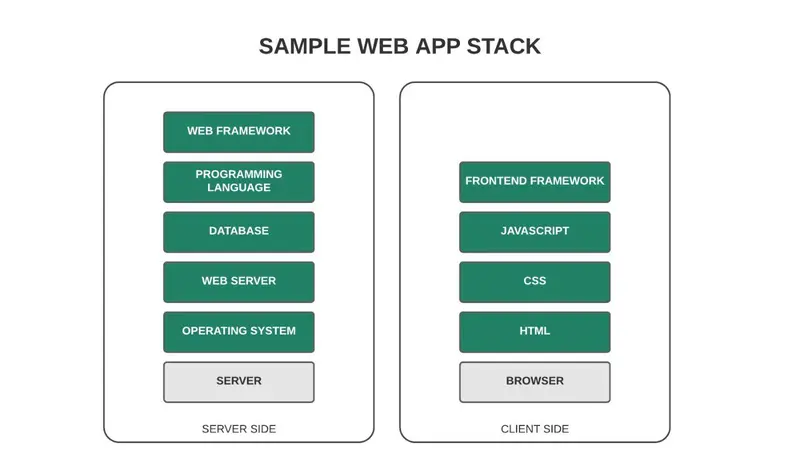
Here’s an example of web project technology stack. As you may already know, web projects consist of two components: front-end, which runs on client side, and back-end, running on server side. These components should work properly by their own, but also when cooperating.

Typically the back-end includes:

  • operating system – the core of the server
  • webserver – software to manage applications and their instances
  • database – structure to store information
  • programming language – to code logic of app and manipulate database basing on requests from client-side
  • framework – set of extra libraries for a chosen programming language to simplify the development process

The front-end, by contrast, is usually built with one of common JavaScript frameworks. These frameworks combine HTML, CSS, and JavaScript creating responsive UI. However, we are not going to explain all details regarding web app projects – treat it just as an example of technology stack.

Why technology stack should be low?

So we have an example of technology stack based on server and client-side. As you can see, it’s not so complicated – simple list of required components to provide front-end and back-end based solution.

Now let’s take a look at more complicated project example. Let’s say you need to develop and release application targeting these various platforms:

  • web browser
  • Android
  • iOS
  • Windows
  • macOS
  • Linux
  • embedded system

It’s extreme, but possible case. Your project may grow to this point in the future, and you may need to add new functionalities, or even provide support for new platforms. Anyway, let’s have a look at technology stack of our edge case:

We can agree, that this stack is way more complicated than the one from our previous example. Notice, that every platform needs to be handled using separate technology.

It is a fact, that this approach guarantees highest efficiency, due to usage of native technologies. However it comes at a price. Each of these technologies usually requires to hire additional developers, since it’s hard to find specialists skilled in various native technologies at once. They’re also often more expensive. Moreover, hiring many programmers means you need to provide them right tools to allow them to communicate, and cooperate with each other – this generates additional costs

On top of that software’s life doesn’t end on its release. It still needs to be maintained and developed. When any problem occurs, it needs to be fixed as fast as it’s possible. However it’s harder to achieve, when you have many different technologies to handle – fixing time may differ significantly. More technologies to manage, more time needed to fix bugs. Additionally, your employees will probably search for other job when they deliver final product to you. What if you needed to implement new features? In that case you’ll have to look for new developers losing a lot of your valuable time again. In other words high technology stack resolves in higher production costs. That’s why you should reduce it as much as it’s possible.

How to keep technology stack low? Use cross-platform framework! Cross-platform framework is software development solution, that allows to build app targeting multiple platforms. By doing so, you can decrease number of used technologies to those required by your framework. With that approach you can deliver your software in shorter time and lower price. But, as we said at beginning, there is no framework, which will fit every project, so cross-platform framework is not always the best solution – it highly depends on project type.

How Qt can help you achieve low technology stack?

Now you know that in order to make your software project’s costs low, and maintain its high quality, you need to choose right set of technologies at initial stage of development. Let’s take a closer look at Qt as a cross-platform option. If you want a broader introduction to the Qt framework itself, I covered that in a separate article: “What is Qt framework?“.

Qt is a popular framework, that allows to easily develop software applications across many platforms. It’s based on C++, so it assures quality and efficiency of created software. Qt also comes with internal QML language that is used to create layout of application. QML also includes JavaScript, so it’s easy to learn and has wide community support. Combination of C++ and QML allows to create eye-catching UI, with powerful and fast logic.

What distinguishes Qt from other cross-platform frameworks is the fact, that it supports wide range of platforms using one codebase. Using one Qt codebase you can develop:

  • macOS desktop application
  • Windows desktop application
  • Linux desktop application
  • iOS mobile application
  • Android mobile application
  • Software applications for embedded devices
  • The back-end for web application e.g. REST API using Qt Http Server
  • Front-end for web application using Qt for WebAssembly

Shocked? But it’s true! All of these apps can be created using same source code. This fact, combined with versatility of C++, and simplicity of QML allows you to develop software, that runs the same on all listed platforms, easily and at low costs.

Qt is also doing well when your project is targeted to fewer platforms. Even then, it helps to reduce costs, and development time. For example, when you create mobile app in Qt, it doesn’t mean, that you can’t release it to desktop later. You can do it with a click of a button! This way you can save money and time, which at other case you would spend on refactoring code to target another platform.

So let’s go back to our technology stack, but this time we are going to build it using Qt:

Now number of applied technologies is significantly reduced, and therefore our technology stack is greatly simplified. Notice, that browser stack wasn’t replaced with Qt for WebAssembly. That’s because, although it is functional, it still needs some improvements to be officially used.

Keep in mind

Let’s summarize this article:

  • When choosing technologies for software project, factors like time, price and quality should be considered.
  • Technology stack is set of technologies and tools that are used to build app or the entire product’s environment
  • Low technology stack allows to reduce costs and delivery time
  • Qt is a framework, that allows to release apps across wide number of platforms

Qt is powerful tool, that allows to keep technology stack low, but keep in mind it’s not a silver bullet. There are many other frameworks, which will probably suit your requirements more than Qt.

React in 2026: Start From Scratch the Right Way (+ Cheat Sheet)

A complete guide to modern React — no useEffect abuse, no performance guessing, just clean architecture you’ll actually use.

Why This Guide Exists

Most React tutorials are still teaching 2020 patterns. In 2026, the ecosystem has shifted dramatically: React 19 is stable, the compiler handles most memoization automatically, and useEffect should be a last resort — not your go-to for data fetching, derived state, or event responses.

This guide walks you from project setup to production-ready patterns, with a cheat sheet you can bookmark.

1. Scaffolding: What to Use in 2026

If you’re building a full-stack or SSR app

npx create-next-app@latest my-app --typescript --tailwind --eslint --app

Next.js 15+ with the App Router is the default for production apps. It gives you Server Components, streaming, and partial pre-rendering out of the box.

If you’re building a pure client SPA

npm create vite@latest my-app -- --template react-ts

Vite is the standard bundler for SPAs. Fast HMR, zero config, ESM-first.

If you’re building something UI-heavy or a design system

npm create remix@latest

Remix is excellent when you care deeply about progressive enhancement and form handling.

2. Folder Structure (Scalable from Day 1)

src/
├── app/               # Pages / routing (Next.js) or routes/
├── components/
│   ├── ui/            # Generic, reusable UI primitives
│   └── features/      # Feature-specific components
├── hooks/             # Custom hooks
├── lib/               # Utilities, API clients, helpers
├── stores/            # Global state (Zustand, Jotai, etc.)
├── types/             # Shared TypeScript types
└── styles/            # Global CSS / Tailwind config

Rule: Components should not import from pages/ or app/. Data flows down. Side effects live in hooks.

3. React 19 Features You Should Actually Use

use() — The New Data Primitive

import { use, Suspense } from 'react';

async function fetchUser(id: string) {
  const res = await fetch(`/api/users/${id}`);
  return res.json();
}

// In a Server Component or with a cached promise:
function UserCard({ userPromise }: { userPromise: Promise<User> }) {
  const user = use(userPromise); // unwraps the promise
  return <div>{user.name}</div>;
}

// Wrap in Suspense at the boundary
<Suspense fallback={<Skeleton />}>
  <UserCard userPromise={fetchUser('123')} />
</Suspense>

useOptimistic — Instant UI, Real Sync

import { useOptimistic } from 'react';

function LikeButton({ post }: { post: Post }) {
  const [optimisticLikes, addOptimisticLike] = useOptimistic(
    post.likes,
    (currentLikes, increment: number) => currentLikes + increment
  );

  async function handleLike() {
    addOptimisticLike(1);       // instant update
    await likePost(post.id);    // real request in background
  }

  return (
    <button onClick={handleLike}>
      {optimisticLikes} likes
    </button>
  );
}

useActionState — Form State Without the Chaos

import { useActionState } from 'react';

async function createPost(prevState: any, formData: FormData) {
  const title = formData.get('title') as string;
  if (!title) return { error: 'Title is required' };
  await savePost({ title });
  return { success: true };
}

function PostForm() {
  const [state, action, isPending] = useActionState(createPost, null);

  return (
    <form action={action}>
      <input name="title" />
      {state?.error && <p>{state.error}</p>}
      <button disabled={isPending}>
        {isPending ? 'Saving...' : 'Create Post'}
      </button>
    </form>
  );
}

4. Stop Using useEffect for These Things

This is the most common mistake. Here’s what to replace:

❌ Deriving state with useEffect

// Wrong
const [fullName, setFullName] = useState('');
useEffect(() => {
  setFullName(`${firstName} ${lastName}`);
}, [firstName, lastName]);
// Correct — just compute it
const fullName = `${firstName} ${lastName}`;

❌ Fetching data with useEffect

// Wrong
useEffect(() => {
  fetch('/api/posts').then(r => r.json()).then(setPosts);
}, []);
// Correct — use a data fetching library
import { useQuery } from '@tanstack/react-query';

function Posts() {
  const { data, isLoading } = useQuery({
    queryKey: ['posts'],
    queryFn: () => fetch('/api/posts').then(r => r.json())
  });
}

Or even better — use Server Components in Next.js and fetch server-side:

// app/posts/page.tsx — This is a Server Component
export default async function PostsPage() {
  const posts = await getPosts(); // direct DB/API call
  return <PostList posts={posts} />;
}

❌ Responding to events with useEffect

// Wrong
useEffect(() => {
  if (submitted) {
    sendAnalytics();
    resetForm();
  }
}, [submitted]);
// Correct — handle it in the event handler
function handleSubmit() {
  sendAnalytics();
  resetForm();
  setSubmitted(true);
}

✅ When useEffect IS appropriate

  • Setting up a third-party library that imperatively mutates the DOM
  • WebSocket or EventSource subscriptions (with cleanup)
  • Syncing to localStorage or sessionStorage
  • Firing analytics on route change (sparingly)

5. State Management in 2026

Need Tool
Local UI state useState / useReducer
Server data + caching TanStack Query
Global client state Zustand or Jotai
Forms React Hook Form + Zod
URL state nuqs (Next.js) or useSearchParams
Server state (Next.js) Server Actions + revalidatePath

Zustand setup (minimal):

import { create } from 'zustand';

interface CartStore {
  items: CartItem[];
  addItem: (item: CartItem) => void;
  removeItem: (id: string) => void;
}

export const useCartStore = create<CartStore>((set) => ({
  items: [],
  addItem: (item) => set((state) => ({ items: [...state.items, item] })),
  removeItem: (id) => set((state) => ({
    items: state.items.filter(i => i.id !== id)
  })),
}));

6. Performance in 2026 (The React Compiler Changes Everything)

React 19 ships with the React Compiler (previously “React Forget”). It automatically memoizes components and values — meaning useMemo, useCallback, and React.memo are rarely needed manually.

What the compiler handles automatically

  • Skipping re-renders when props haven’t changed
  • Stabilizing callback references
  • Memoizing expensive computations

What you still need to think about

Code splitting — always split by route:

import { lazy, Suspense } from 'react';

const HeavyDashboard = lazy(() => import('./HeavyDashboard'));

function App() {
  return (
    <Suspense fallback={<LoadingScreen />}>
      <HeavyDashboard />
    </Suspense>
  );
}

Virtualize long lists — use TanStack Virtual:

import { useVirtualizer } from '@tanstack/react-virtual';

function VirtualList({ items }: { items: string[] }) {
  const parentRef = useRef<HTMLDivElement>(null);
  const virtualizer = useVirtualizer({
    count: items.length,
    getScrollElement: () => parentRef.current,
    estimateSize: () => 50,
  });

  return (
    <div ref={parentRef} style={{ height: '400px', overflow: 'auto' }}>
      <div style={{ height: `${virtualizer.getTotalSize()}px`, position: 'relative' }}>
        {virtualizer.getVirtualItems().map(item => (
          <div
            key={item.key}
            style={{ position: 'absolute', top: item.start, width: '100%' }}
          >
            {items[item.index]}
          </div>
        ))}
      </div>
    </div>
  );
}

Images — always use Next.js <Image> or a CDN:

import Image from 'next/image';

<Image
  src="/hero.jpg"
  alt="Hero"
  width={1200}
  height={600}
  priority // for above-the-fold images
  placeholder="blur"
  blurDataURL={blurUrl}
/>

7. TypeScript Patterns Worth Knowing

Component props with variants

type ButtonProps = {
  variant: 'primary' | 'secondary' | 'ghost';
  size?: 'sm' | 'md' | 'lg';
  isLoading?: boolean;
} & React.ButtonHTMLAttributes<HTMLButtonElement>;

function Button({ variant, size = 'md', isLoading, children, ...rest }: ButtonProps) {
  return (
    <button
      disabled={isLoading}
      className={cn(buttonVariants({ variant, size }))}
      {...rest}
    >
      {isLoading ? <Spinner /> : children}
    </button>
  );
}

Discriminated unions for component state

type AsyncState<T> =
  | { status: 'idle' }
  | { status: 'loading' }
  | { status: 'success'; data: T }
  | { status: 'error'; error: string };

function DataView({ state }: { state: AsyncState<User[]> }) {
  if (state.status === 'loading') return <Skeleton />;
  if (state.status === 'error') return <Error message={state.error} />;
  if (state.status === 'success') return <UserList users={state.data} />;
  return null;
}

8. The 2026 Cheat Sheet

Hooks reference

Hook Use it for
useState Simple local state
useReducer Complex local state with multiple sub-values
useRef DOM refs, mutable values that don’t trigger re-render
useContext Consuming context (theme, auth, locale)
use() Unwrapping promises and context in any component
useOptimistic Instant UI feedback while async operation runs
useActionState Managing form state tied to a server action
useTransition Marking non-urgent state updates
useDeferredValue Deferring re-rendering of slow sub-trees
useEffect LAST RESORT — external system sync only

When to reach for what

Scenario Solution
Data from server TanStack Query or Server Components
Form handling useActionState + Server Actions, or React Hook Form
Global state Zustand (simple) or Jotai (atomic)
URL as state nuqs
List of 500+ items TanStack Virtual
Async feedback useOptimistic
Heavy component lazy() + Suspense
Derived value Compute inline, no state
Animation Framer Motion or CSS transitions

Anti-patterns to avoid

Anti-pattern Replacement
useEffect for data fetching TanStack Query / Server Components
useEffect for derived state Compute inline
useEffect for event responses Event handler
Prop drilling 3+ levels Zustand / context
React.memo everywhere Let the compiler handle it
Manual useMemo/useCallback Let the compiler handle it
any in TypeScript Discriminated unions, generics
Giant components (500+ lines) Split by concern

9. Recommended Stack (2026)

Framework:     Next.js 15 (App Router)
Language:      TypeScript (strict mode)
Styling:       Tailwind CSS v4 + shadcn/ui
Data fetching: TanStack Query v5
Global state:  Zustand
Forms:         React Hook Form + Zod
Testing:       Vitest + Testing Library + Playwright
Linting:       ESLint + Prettier + TypeScript strict
Deployment:    Vercel / Cloudflare Workers

Final Thoughts

The shift from “React as a UI library” to “React as an application framework” is complete in 2026. The mental model has changed:

  • Server first. Render as much as you can on the server.
  • Data co-located with components. No more global fetch orchestration.
  • Less manual optimization. The compiler does the heavy lifting.
  • useEffect is a code smell. If you’re reaching for it, ask why first.

Build from these foundations and you’ll spend less time debugging re-renders and more time shipping features.

Found this useful? Drop a like and follow — I write about React, TypeScript, and modern web architecture.

Tags: #react #javascript #typescript #webdev #frontend

System.out.println(“Hello DEV COMMUNITY”);

Engineering student, backend developer, and product builder.

This is post #1.

I’ve been spending a lot of time writing Python, exploring DevOps, and building projects like a peer-to-peer campus network and a smart parking system. I realized I was accumulating a lot of bookmarks, solving complex bugs, and making architectural decisions—but not writing any of it down.

💡
This blog changes that.
I’ll be using this space to document my transition from writing isolated scripts to architecting scalable backend systems. Expect raw notes on containerization, backend frameworks, and the reality of taking products from 0 to 1.

Next up: A breakdown of the tech stack I’m using for my latest campus platform.

Türkiye’de mart ayında en çok satılan sıfır elektrikli otomobil modelleri belli oldu

Türkiye’de mart ayında en çok satılan sıfır elektrikli otomobil modelleri belli oldu

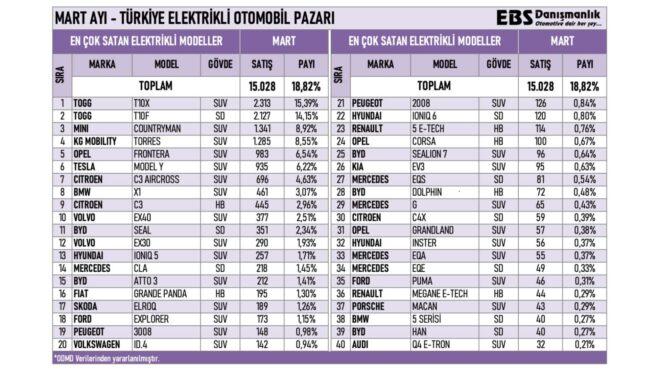
Türkiye’de mart ayında en çok satılan sıfır elektrikli otomobil modelleri belli olduOtomobil gazetecisi Emre Özpeynirci tarafından yapılan paylaşıma göre mart ayında en çok satılan sıfır “elektrikli” otomobil modelleri şunlar oldu: 1: Togg T10X (2.313 adet) 2: Togg T10F (2.127 adet) 3: Mini Countryman (1.341 adet) 4: KG Mobility Torres (1.285 adet) 5: Opel Frontera (983 adet) 6: Tesla Model Y (935 adet) 7: Citroen C3 Aircross (696 adet) 8: BMW X1 (461 adet) 9: Citroen C3 (445 adet) 10: Volvo EX40 (377 adet) Şubat ayında en çok satılan sıfır elektrikli otomobil modelleri şöyleydi: 1: Togg T10X (1.557 adet) 2: Togg T10F (1.393 adet) 3: Mini Countryman (1.253 adet) 4: KG Mobility Torres (1.013 adet) 5: Tesla Model Y (720 adet) 6: BYD Sealion 7 (646 adet) 7: BMW X1 (609 adet) 8: Volvo EX30 (402 adet) 9: Citroen C3 (325 adet) 10: Volvo EX40 (319 adet) Ocak ayında en çok satılan sıfır elektrikli otomobil modelleri şöyleydi: 1: BYD Atto 2 (1.382 […]

Türkiye’de mart ayında en çok satılan sıfır elektrikli otomobil modelleri belli oldu yazısı ilk olarak Teknoloji haberleri – LOG üzerinde yayınlandı.

Çinli Baidu’nun 100’e yakın robotaksi araçları, sistem hatası nedeniyle kilitlenip kaldı

Çinli Baidu’nun Apollo Go robotaksi hizmeti, sistem hatası nedeniyle kilitlendi

Çinli Baidu’nun Apollo Go robotaksi hizmeti, sistem hatası nedeniyle kilitlendiÇinli Baidu’nun Apollo Go robotaksi hizmeti kapsamında otonom olarak yolcu taşıyan 100’e yakın araç, yaşanan sistem hatası nedeniyle kilitlendi. Wuhan’da meydana gelen olayda robotaksilerin trafiğin ortasında bir anda durduğu ve bazı yolcuların iki saat boyunca araçların içinde mahsur kaldığı aktarılıyor. Bu soruna tam olarak neyin neden olduğu bilinmezken, bazı araçların otoyol çıkışları gibi çok tehlikeli konumlarda donup kaldığı belirtiliyor. Buna benzer olaylar daha önce de meydana gelmişti. Örneğin, Google’ın çatı şirketi Alphabet tarafından işletilen Waymo’nun otonom taksileri, San Francisco’daki elektrik kesintisi sonrasında trafik ışıklarının çalışmaması ve toplu ulaşımda yaşanan aksaklıklar nedeniyle hareket edemez hale gelmiş ve ciddi bir trafik sıkışıklığına yol açmıştı.

Çinli Baidu’nun 100’e yakın robotaksi araçları, sistem hatası nedeniyle kilitlenip kaldı yazısı ilk olarak Teknoloji haberleri – LOG üzerinde yayınlandı.