Solana’s System Program: Understanding the Kernel
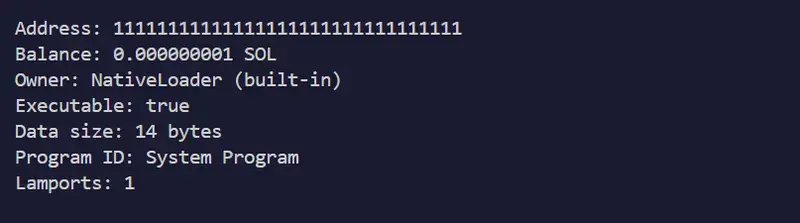
System Program account output showing NativeLoader owner, executable true, 14 bytes of data

The Question That Started It All

Three posts in, I kept running into the same address:
11111111111111111111111111111111.

It showed up as the owner of every wallet I queried.
It appeared in every transaction I decoded in
Post 3.
My explorer from Post 2
labeled it “System Program” but I didn’t really
understand what that meant.

Why can’t I create an account myself? Why does the
System Program have to do it? Why does every wallet
on Solana belong to it?

The answer reveals Solana’s elegance: The System
Program is Solana’s kernel.
Like a Unix kernel
manages processes and permissions, the System Program
manages accounts and state creation. Understanding it
means understanding why Solana works the way it does.

What is the System Program?

Address: 11111111111111111111111111111111

It’s an account like any other:

Owner: NativeLoader
Executable: true
Data: “system_program” (14 bytes of ASCII)
Balance: 1 lamport (rent-exempt minimum)

But it’s special. It’s built into Solana’s validator
runtime. When you send a transaction, the System
Program enforces:

  • Who can transfer SOL
  • Who can create accounts
  • How much lamports accounts must hold
  • Account closure rules

Run this yourself and see:

solana account 11111111111111111111111111111111

System Program account output showing NativeLoader owner, executable true, 14 bytes of data

The System Program — owned by NativeLoader, built
into the validator runtime itself.

Core Insight: Programs Own Accounts, Not People

Here’s what breaks beginner brains:

Your wallet is NOT owned by you. It’s owned by the
System Program.

Your Wallet
├── Owner: 11111111111111111111111111111111 (System Program)
├── Executable: false
├── Data: (empty)
└── Lamports: 5000000000 (your SOL)
Run this to see it yourself:

solana account <your-wallet-address>

Wallet account showing System Program as owner, 0 bytes data, lamports balance

Your wallet — owned by the System Program, not by
you. Your keypair is the authorization mechanism,
not the owner.

But you can spend from it because:

  • Your keypair can sign for this account
  • The System Program’s rules say: “Only an account
    owner or authorized keypair can transfer from
    that account”
  • Since your keypair authorized the transfer, the
    System Program allows it

You don’t own your account. You authorize
transactions on it. The System Program enforces
your authorization.

This is the security model: permission enforcement
is separate from asset ownership.

The System Program’s Four Main Instructions

1. CreateAccount

Creates a new account owned by you or another program.

// What it does:
// 1. Allocate <space> bytes for data
// 2. Set owner to <owner> (usually your program)
// 3. Charge enough lamports to cover rent
// 4. Fund from payer's account

Cost: ~2,400 lamports for a basic account +
space × 0.00348 lamports/byte

2. Transfer

Move SOL from one account to another.

// What it does:
// 1. Decrease sender's lamports by amount
// 2. Increase recipient's lamports by amount
// 3. Verify sender's keypair signature

No fee beyond the network fee. The System Program
allows SOL transfer to any account.

3. Allocate

Increase an account’s data space after creation.

// What it does:
// 1. Expand data buffer
// 2. Charge additional lamports for rent

4. Assign

Change an account’s owner.

// What it does:
// 1. Set owner to <new-owner>
// 2. Only works if current owner is System Program

Example: The Lifecycle of Creating an Account

When you create a token, the Token Program does this:
User sends transaction:
│
├─> System Program.CreateAccount(…)
│ ├─ Payer: Your wallet
│ ├─ New Account: Token mint address
│ ├─ Owner: Token Program
│ └─ Space: 82 bytes
│
└─> Token Program.InitializeMint(…)
├─ Reads the new account
├─ Writes mint data
└─ Returns success
Result:
Token Mint Account
├── Owner: TokenkegQfe… (Token Program)
├── Executable: false
├── Data: (82 bytes with supply, decimals, authorities)
└── Lamports: (rent-exempt amount)
Notice the two-step pattern:

  1. System Program creates the container — allocates
    space, funds rent
  2. Token Program initializes the data — writes the
    mint info

This separation is the genius: the System Program
handles account creation, programs handle
initialization.

Rent: The System Program’s Economic Rule

The System Program enforces rent-exemption economics.

You must hold:
(account_data_size + 128) × 0.00348 lamports/byte

// Example: 1 KB account
const dataSize = 1000;
const rentPerByte = 0.00348; // lamports
const requiredLamports = (dataSize + 128) * rentPerByte;
const requiredSOL = requiredLamports / 1e9;

console.log(`Required: ${requiredSOL} SOL`);

Check it yourself:

solana rent 1000

Terminal output of solana rent 1000 showing required lamports and SOL

The exact SOL required to rent-exempt a 1KB
account. The System Program enforces this minimum
at account creation.

Note: Only 0.000000004 SOL for 1KB — rent-exemption
is cheap for small accounts. Scale this up to
10MB and it becomes meaningful.

Note on rent deprecation: Solana deprecated
ongoing rent collection, but the rent-exemption
minimum is still enforced when accounts are created.
You must fund new accounts above this threshold or
the transaction fails.

Seeing It Through the Explorer

If you built the account explorer from
Post 2,
run it against the System Program now:

node explorer.mjs 11111111111111111111111111111111

Explorer output for System Program showing NativeLoader, executable true, 14 bytes, 1 lamport balance
The same explorer from Post 2 — but now you know
exactly what you’re looking at. NativeLoader means
this program is baked into the validator, not deployed
like other programs.

The output tells the whole story in five fields.

Why This Design?

Consistency

Every program uses the same account model. Every
account creation uses the System Program. The
protocol scales because you don’t write custom
account-creation logic.

Security

The System Program is battle-tested and immutable.
Bugs there would be catastrophic. By centralizing
account logic, Solana minimizes the surface area
for vulnerabilities.

Economics

Rent exemption is managed uniformly. Everyone follows
the same rules: hold enough lamports and your account
lives forever.

Auditability

Want to know who owns an account? Read the owner
field. Solana’s permission model is transparent and
on-chain.

System Program vs. Ethereum

Ethereum:

  • Anyone can create accounts implicitly
  • Storage rent is implicit through gas fees
  • Account ownership is straightforward

Solana:

  • System Program explicitly creates all accounts
  • Rent-exemption is explicit — you must hold a
    minimum balance
  • Account ownership is decoupled from transaction
    authorization — owner vs. signer are different things

Solana’s model is more explicit. You see the kernel.
You can audit it. That explicitness is a feature,
not a bug.

Debugging: Common System Program Errors

“Account does not have enough lamports.”

❌ You tried to create an account without funding
it enough
✅ Calculate the rent-exempt amount and include
extra lamports

“Account is not owned by the System Program”

❌ You tried to Assign an account owned by a
different program
✅ Only the System Program can Assign accounts

“Cannot allocate more space”

❌ Account is owned by something other than the
System Program
✅ Only the System Program allows re-allocation

What to Do Next

  1. Inspect the System Program
   solana account 11111111111111111111111111111111
  1. Check your own wallet’s owner
   solana account <your-address>

Owner will always be 11111... for a standard wallet.

  1. Check rent for different sizes
   solana rent 1000    # 1 KB
   solana rent 10000   # 10 KB
   solana rent 100000  # 100 KB

Watch how the required SOL scales with data size.

  1. Read the System Program source
    The code is public. Reading it shows you the exact
    validation rules the entire network runs on.

Wrapping Up Epoch 1

This is the fourth and final post in my Epoch 1
Writing Challenge series. What started with
“everything is an account” ends here — with the one
program that makes the whole account model work.

If you’ve followed along from Post 1, you now have
a complete mental model:

  • Post 1 — What accounts are and why they all
    share five fields
  • Post 2 — How to query any account and read
    those fields directly
  • Post 3 — How to decode the raw binary data
    sitting in those fields
  • Post 4 — The System Program that creates,
    owns, and enforces rules on all of it

That’s Solana’s foundation. Everything else — DeFi,
NFTs, DAOs, gaming — is built on top of this.

Series: The Account Model Foundation

Have questions about the System Program? Ask in
the comments — I’ll cover advanced patterns like
PDAs (Program Derived Addresses) in a future post.

Part of the 100 Days of Solana Epoch 1 Writing Challenge.
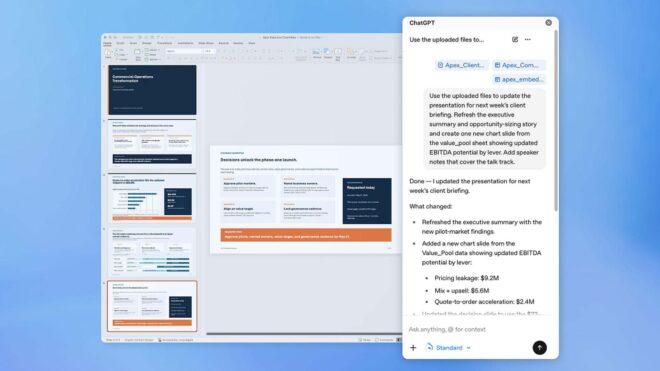
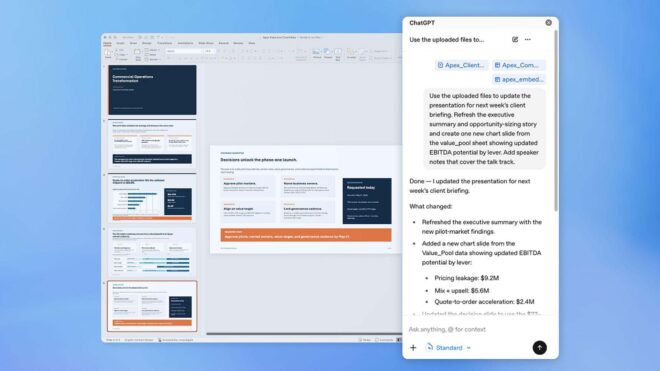
Excel sonrasında PowerPoint için de ChatGPT entegrasyonu geldi

Excel sonrasında PowerPoint için de ChatGPT entegrasyonu geldi

Excel sonrasında PowerPoint için de ChatGPT entegrasyonu geldiMicrosoft Excel sonrasında sunum denildiği zaman akla gelen ilk yazılım olan Microsoft PowerPoint için de “ChatGPT” entegrasyonu geldi. Buradan elde edilebilen yeni ChatGPT eklentisi, PowerPoint’te bir yan panel olarak görev yapıyor ve kullanıcıların yazılı komutları üzerinden etkili sunumlar hazırlayabiliyor. Sunumlar üzerinde yazılı komutlarla düzenleme yapılmasına da imkan tanıyan altyapı, çok büyük zaman kazancı getiriyor ve bu süreçte verilen dokümanları/tablolar ile görselleri kullanabiliyor. Eklenti şu anda beta olarak “Business, Enterprise, Edu, Teacher, K-12, Free, Go, Pro ve Plus” planlarına açılmış durumda.

Excel sonrasında PowerPoint için de ChatGPT entegrasyonu geldi yazısı ilk olarak Teknoloji haberleri – LOG üzerinde yayınlandı.

The Best Cloud Cost Optimization Tools for Startups in 2026

Most startups overpay for cloud by 30–50% not because engineers are careless, but because the default billing model is on-demand pricing, and it’s the most expensive option available.

Cloud spending is projected to exceed $1 trillion annually by 2027 (Gartner), and the average company wastes 25–35% of that on idle resources, over-provisioned instances, or missed commitment discounts. For a startup running $100K/month on AWS, that’s $25K–$35K wasted every single month.

The tools below are categorized by function, not popularity.

What Are Cloud Cost Optimization Tools?

They fall into four functional categories:

  • Visibility: surfaces where money is going by service, team, or environment. Doesn’t act on data; just surfaces it.
  • Alerting: detects anomalies after they happen: a forgotten dev environment, an instance left running over a weekend.
  • Rightsizing: analyzes utilization and recommends (or automates) instance changes or terminations.
  • Commitment purchasing: automates Savings Plans, Reserved Instances, or Committed Use Discounts. An m5.xlarge running on-demand at $0.192/hr drops to $0.141/hr under a 1-year Compute Savings Plan: a 27% reduction without touching a line of code (verify at aws.amazon.com/savingsplans/pricing).

Most startups need tools from at least two categories. A common mistake is spending budget on visibility when the real opportunity is commitment purchasing.

How to Choose: Decision Framework by Stage

  • Pre-revenue / $0–$10K/month Use cloud-native tools (AWS Cost Explorer, GCP Cost Management, Azure Cost Management) they’re free. Activate AWS Cost Anomaly Detection (free tier) to catch unexpected spikes. The waste at this level doesn’t justify paid tooling.

  • Seed / Series A / $10K–$50K/month Add a visibility layer Vantage (free tier) or Infracost if you have developer-driven infrastructure. Focus on tagging hygiene and environment cleanup first. Start evaluating commitment purchasing if 50%+ of your compute is stable.

  • Series B+ / $50K–$500K+/month Commitment purchasing automation pays for itself within weeks. A $200K/month EC2 bill running entirely on-demand has $60K–$80K/month in savings available through Savings Plans and Reserved Instances alone. Manual management at this scale is a full-time job.

The Tools

Vantage: Best for Multi-Cloud Visibility

Vantage connects to AWS, GCP, Azure, Kubernetes, Datadog, Snowflake, and 20+ other services. It provides cost reports, unit cost metrics, and automated savings recommendations.

Strengths: Cost allocation by team/service/environment, free tier, unit cost tracking (cost per customer, cost per API call), consistent multi-cloud reporting.

Limitation: Vantage surfaces recommendations but doesn’t purchase commitments. Acting on Savings Plan or Reserved Instance recommendations still requires manual purchasing or a separate tool.

Best for: Startups needing fast, low-friction visibility across multiple clouds without a dedicated FinOps engineer

Kubecost: Best for Kubernetes Workloads

AWS Cost Explorer tells you that you spent $40K on EC2 last month. Kubecost tells you $18K came from your data processing namespace, $12K from the API tier, and $10K from a test environment nobody shut down.

Strengths: Namespace-, deployment-, and pod-level cost breakdown; idle resource detection within clusters; cost allocation for shared infrastructure; on-premise deployment option.

Limitation: Doesn’t manage commitments. Doesn’t cover non-Kubernetes services, no RDS breakdown, no S3 attribution.

Best for: Startups with Kubernetes as primary compute spending $20K+/month on cluster resources.

Infracost: Best for Pre-Deployment Cost Control

Infracost integrates into CI/CD pipelines and PRs to show engineers the cost impact of infrastructure changes before they’re merged. A developer adds an RDS instance; Infracost posts the monthly cost delta as a PR comment.

Strengths: Catches expensive decisions before production, works with Terraform/Terragrunt/Pulumi, integrates with GitHub/GitLab/Bitbucket, engineers see cost impact in context with no separate login required.

Limitation: Purely a pre-deployment guardrail. Doesn’t manage existing cloud costs or cover non-IaC resources.

Best for: Startups with IaC discipline where engineering velocity is high enough that cost surprises are a recurring problem.

CloudZero: Best for SaaS Unit Economics

CloudZero maps cloud spend to business dimensions, customers, product features, tenants. It answers: “How much does it cost to serve each customer?” or “What does feature X cost us per month?” including for untagged and shared infrastructure.

Strengths: Cost-per-customer and cost-per-feature reporting, handles untagged resources, gross margin visibility, engineering team attribution without requiring perfect tagging.

Limitation: Pure analytics layer. No commitment purchasing automation.

Best for: SaaS startups post-Series A tracking gross margins at the unit level.

ProsperOps: Best for Hands-Off Commitment Management

ProsperOps autonomously manages Reserved Instances, Savings Plans, and Committed Use Discounts across AWS, Azure, and GCP continuously rebalancing to maximize discounts while minimizing over-commitment risk.

One important note: Flexera acquired ProsperOps in 2026. It’s now part of an enterprise IT asset management platform. Verify whether pricing and startup accessibility have changed before assuming startup-friendly terms still apply.

Strengths: Autonomous commitment management, risk-managed purchasing, percentage-of-savings fee model.

Limitation: No buyback guarantee on underutilized commitments underutilization protection depends on the platform’s risk model, not a cash return.

Best for: Multi-cloud teams at $50K+/month who want autonomous commitment management. Validate current pricing post-acquisition.

AWS Cost Explorer + Cost Anomaly Detection: Free, With Caveats

Cost Explorer is free (API calls billed separately) and genuinely useful for straightforward AWS environments. The key constraint: recommendations refresh every 72+ hours. At $10K/day in compute spend, three days of on-demand pricing versus a Savings Plan rate is a measurable cost.

Cost Anomaly Detection is a separate free service worth activating on every AWS account regardless of what else you run.

Best for: Early-stage startups (sub-$50K/month) as a no-cost baseline. The refresh lag becomes a real limitation at higher spend levels.

Usage.ai: Best for Commitment Automation With Zero Lock-In

If you want to understand how Insured Flex Commitments work in practice, Usage.ai covers the mechanics in detail here How Insured Flex Commitments Work

For startups that want the savings of commitment purchasing without the native AWS/GCP/Azure lock-in risk, Usage.ai was built specifically around this problem.

  • Insured Flex Commitments deliver 30–60% savings on compute with no multi-year lock-in and no upfront payment. Every commitment is fully insured.
  • Buyback Guarantee: If a commitment goes underutilized, Usage.ai buys it back and returns the value as cashback (real money, not credits).
  • Zero Lock-In: Commitments adjust quarterly. Scale down with no penalty.
  • 24-hour recommendation refresh vs. AWS Cost Explorer’s 72+ hours. At $6K–$12K/day in uncovered compute spend, that 3-day lag compounds to $18K–$36K per refresh cycle in unnecessary on-demand charges.

Operates at the billing layer only 30-minute setup, no infrastructure changes, percentage-of-savings fee model.

Supported clouds: AWS, Azure, GCP.

Are Commitment Tools Worth It for Startups?

Yes, if monthly compute spend is above $50K and at least 40–50% of compute is stable workloads.

The break-even math: A $200K/month EC2 bill running on-demand has ~$60K–$80K/month in Savings Plans savings available. At a 15% fee on $60K in savings, you pay $9K and net $51K/month. Payback period: day one.

The risk is committing beyond your stable usage baseline. Tools like ProsperOps and Usage.ai both analyze usage patterns before purchasing. Usage.ai adds the buyback guarantee so underutilization doesn’t become stranded, a protection ProsperOps doesn’t offer.

Cloud-Provider Commitment Mechanics

AWS: Compute Savings Plans (flexible, apply across EC2/Fargate/Lambda) and Reserved Instances (specific to service/region/instance type). Discount range: 20–60% vs. on-demand.

GCP: Resource-based and spend-based Committed Use Discounts (1 or 3 years), plus Sustained Use Discounts that apply automatically with no commitment required.

For a detailed breakdown of when to use each on GCP GCP CUDs vs SUDs: A Technical Comparison

Azure: Reserved VM Instances, Azure Savings Plans for compute, and Reserved Capacity for SQL Database, Cosmos DB, and Synapse Analytics. Dev/Test pricing is also available for non-production workloads.

Key Metrics to Track

  • Commitment coverage rate: % of eligible compute covered by Savings Plans or RIs. Above 60% uncovered is the highest-ROI optimization signal.
  • RI/SP utilization rate: % of purchased commitments actually being used. Below 85% means you’re paying for commitments you can’t absorb.
  • Cost per unit of business output: cost per customer, API request, or transaction. Connects cloud spend to business economics.
  • Untagged resource rate: high untagged rates indicate poor cost governance and make optimization harder.
  • Idle resource spend: 10–15% of total spend in idle resources is common in growing startups.
    What’s the biggest blocker your team has hit when trying to act on cost optimization recommendations tooling, ownership, or just time?

Explore the full engineering perspective here → Best Cloud Cost Optimization Tools for Startups

ORA-00057 오류 원인과 해결 방법 완벽 가이드

ORA-00057란?

ORA-00057은 Oracle 데이터베이스에서 임시 테이블(Temporary Table)에 대한 잠금(Lock) 수가 시스템에서 허용하는 최대 임계치를 초과했을 때 발생하는 에러입니다. 이 에러는 주로 다수의 세션이 동시에 전역 임시 테이블(Global Temporary Table, GTT)을 집중적으로 사용하거나, 단일 세션이 과도하게 많은 임시 테이블 잠금을 보유하고 있을 때 나타납니다. 운영 환경에서 갑작스럽게 발생하면 트랜잭션 처리가 중단되고 애플리케이션 장애로 이어질 수 있으므로 신속한 원인 파악과 대응이 필수적입니다.

주요 발생 원인

1. 과도한 동시 세션의 전역 임시 테이블 사용

Oracle의 전역 임시 테이블(GTT)은 세션 혹은 트랜잭션 단위로 데이터를 격리하여 저장하는 구조입니다. 수백 개 이상의 세션이 동시에 동일한 GTT에 접근하거나, 각 세션이 여러 GTT를 동시에 사용할 경우 내부적으로 관리되는 임시 테이블 잠금 카운터가 한계에 도달하여 ORA-00057이 발생합니다. 특히 커넥션 풀(Connection Pool) 환경에서 세션 수가 급증하는 배치 처리 시간대나 트래픽 피크 타임에 집중적으로 나타나는 패턴을 보입니다.

2. 트랜잭션 미종료로 인한 잠금 누적

애플리케이션 코드에서 COMMIT 또는 ROLLBACK 없이 트랜잭션이 장시간 열린 상태로 유지되면, 해당 세션이 보유한 임시 테이블 잠금이 해제되지 않고 계속 누적됩니다. 특히 예외 처리 로직이 미흡한 애플리케이션에서 오류 발생 후 세션이 좀비 상태(zombie session)로 남아있는 경우, 잠금이 무한정 유지되어 전체 시스템의 임시 테이블 잠금 가용 수를 모두 소진시키는 원인이 됩니다.

3. 잘못된 GTT 설계 및 남용

하나의 업무 로직 안에서 필요 이상으로 많은 전역 임시 테이블을 생성하거나, 영구 테이블(Permanent Table)로 처리해야 할 대용량 데이터를 무분별하게 GTT에 적재하는 설계 문제도 주요 원인입니다. GTT는 편리하지만 잠금 자원을 소비하는 객체이므로, 설계 단계에서 사용 수와 용도를 명확히 제한하지 않으면 운영 중 예기치 않게 ORA-00057 에러를 유발할 수 있습니다.

해결 방법

원인 1 해결 – 현재 임시 테이블 잠금 현황 파악 및 세션 정리

먼저 현재 어떤 세션이 얼마나 많은 임시 테이블 잠금을 보유하고 있는지 확인합니다.

-- 현재 임시 테이블 잠금을 보유한 세션 조회
SELECT
    s.sid,
    s.serial#,
    s.username,
    s.status,
    s.machine,
    s.program,
    s.logon_time,
    COUNT(l.id1) AS temp_lock_count
FROM
    v$session s
    JOIN v$lock l ON s.sid = l.sid
WHERE
    l.type = 'TT'  -- TT: Temporary Table Lock
GROUP BY
    s.sid, s.serial#, s.username, s.status,
    s.machine, s.program, s.logon_time
ORDER BY
    temp_lock_count DESC;
-- 전체 임시 테이블 잠금 수 확인
SELECT
    COUNT(*) AS total_temp_locks,
    COUNT(DISTINCT sid) AS affected_sessions
FROM
    v$lock
WHERE
    type = 'TT';

과도한 잠금을 보유한 특정 세션을 강제 종료해야 할 경우 아래 쿼리를 사용합니다.

-- 문제 세션 강제 종료 (DBA 권한 필요)
-- 먼저 SID와 SERIAL# 확인 후 실행
ALTER SYSTEM KILL SESSION '1234,5678' IMMEDIATE;

-- 여러 좀비 세션을 일괄 처리하는 스크립트 생성
SELECT
    'ALTER SYSTEM KILL SESSION ''' || sid || ',' || serial# || ''' IMMEDIATE;'
        AS kill_statement
FROM
    v$session
WHERE
    status = 'INACTIVE'
    AND last_call_et > 3600  -- 1시간 이상 비활성 세션
    AND username IS NOT NULL;

원인 2 해결 – 미종료 트랜잭션 탐지 및 정리

오랫동안 열려 있는 트랜잭션을 찾아내어 조치합니다.

-- 장시간 열린 트랜잭션 조회 (1시간 이상)
SELECT
    s.sid,
    s.serial#,
    s.username,
    s.machine,
    s.program,
    t.start_time,
    ROUND((SYSDATE - TO_DATE(t.start_time, 'MM/DD/YY HH24:MI:SS')) * 24, 2)
        AS elapsed_hours,
    t.used_ublk AS undo_blocks_used,
    t.log_io,
    t.phy_io
FROM
    v$transaction t
    JOIN v$session s ON t.addr = s.taddr
WHERE
    (SYSDATE - TO_DATE(t.start_time, 'MM/DD/YY HH24:MI:SS')) * 24 > 1
ORDER BY
    elapsed_hours DESC;
-- GTT 사용 현황과 트랜잭션 상태를 함께 조회
SELECT
    s.sid,
    s.serial#,
    s.username,
    s.status,
    NVL(t.start_time, 'NO ACTIVE TXN') AS txn_start_time,
    l.type AS lock_type,
    COUNT(l.id1) OVER (PARTITION BY s.sid) AS lock_count
FROM
    v$session s
    LEFT JOIN v$transaction t ON s.taddr = t.addr
    LEFT JOIN v$lock l ON s.sid = l.sid AND l.type = 'TT'
WHERE
    l.type IS NOT NULL
ORDER BY
    s.sid;

원인 3 해결 – GTT 사용 현황 감사 및 재설계

현재 데이터베이스에 존재하는 GTT 전체 목록과 사용 빈도를 확인합니다.

-- 현재 스키마의 전역 임시 테이블 목록 조회
SELECT
    owner,
    table_name,
    duration,
    num_rows,
    last_analyzed
FROM
    dba_tables
WHERE
    temporary = 'Y'
ORDER BY
    owner, table_name;
-- GTT를 현재 사용 중인 세션 확인
SELECT
    s.sid,
    s.username,
    s.status,
    o.object_name AS temp_table_name,
    o.object_type
FROM
    v$session s
    JOIN v$open_cursor oc ON s.sid = oc.sid
    JOIN dba_objects o ON UPPER(oc.sql_text) LIKE '%' || o.object_name || '%'
WHERE
    o.temporary = 'Y'
    AND o.object_type = 'TABLE';
-- 불필요한 GTT가 있다면 삭제 전 데이터 정리 후 DROP
-- STEP 1: 세션 데이터 확인
SELECT COUNT(*) FROM my_temp_table;  -- 해당 세션 데이터 확인

-- STEP 2: GTT 삭제
DROP TABLE my_unnecessary_temp_table;

-- STEP 3: 필요하다면 더 효율적인 구조로 재생성
CREATE GLOBAL TEMPORARY TABLE new_temp_table (
    id          NUMBER,
    data        VARCHAR2(200),
    created_dt  DATE DEFAULT SYSDATE
)
ON COMMIT DELETE ROWS;  -- 트랜잭션 종료 시 자동 데이터 삭제 (잠금 해제 유도)

예방 방법

1. 세션 및 잠금 모니터링 자동화

운영 환경에서 주기적으로 임시 테이블 잠금 수를 모니터링하는 자동화 스크립트나 Oracle Enterprise Manager(OEM) 알림을 구성하여 임계치 도달 전에 선제 대응할 수 있는 체계를 갖추어야 합니다. 아래와 같은 모니터링 쿼리를 5~10분 주기로 스케줄링하여 일정 수치 이상이면 DBA에게 알람을 발송하도록 구성하는 것이 실무에서 효과적입니다.

-- 모니터링용 임계치 확인 쿼리 (임시 테이블 잠금이 100 이상이면 경고)
SELECT
    CASE
        WHEN COUNT(*) >= 100 THEN 'WARNING: Temp Lock 수 임계치 초과 - ' || COUNT(*) || '개'
        WHEN COUNT(*) >= 50  THEN 'CAUTION: Temp Lock 수 주의 수준 - ' || COUNT(*) || '개'
        ELSE 'NORMAL: Temp Lock 수 정상 - ' || COUNT(*) || '개'
    END AS lock_status,
    COUNT(*) AS current_temp_locks
FROM
    v$lock
WHERE
    type = 'TT';

2. 애플리케이션 레벨의 트랜잭션 관리 강화

GTT를 사용하는 모든 애플리케이션 코드에서 반드시 예외 처리 블록 안에 COMMIT 또는 ROLLBACK을 명시적으로 호출하도록 코딩 표준을 수립하고 코드 리뷰 프로세스를 통해 관리해야 합니다. 특히 커넥션 풀 환경에서는 커넥션 반환 전 트랜잭션 상태를 초기화하는 로직을 반드시 포함시켜야 하며, ON COMMIT DELETE ROWS 옵션을 가진 GTT를 우선 사용하여 트랜잭션 종료 시 잠금이 자동 해제되도록 설계하는 것이 중요합니다.

관련 에러

에러 코드 설명
ORA-00054 resource busy and acquire with NOWAIT specified – 잠금 경합이 심할 때 NOWAIT 옵션 사용 시 발생하며 ORA-00057과 함께 나타날 수 있음
ORA-00060 deadlock detected while waiting for resource – 여러 세션 간 잠금 순환 대기로 발생하는 교착 상태로, GTT 과다 사용 환경에서 동반 발생 가능
ORA-01555 snapshot too old – GTT 사용 중 UNDO 공간 부족으로 발생하며 장시간 미종료 트랜잭션 상황에서 ORA-00057과 함께 나타나기도 함
ORA-04031 unable to allocate shared memory – SGA 메모리 부족 에러로, 대규모 GTT 운용 환경에서 간접적으로 연관됨

Why Human Approval Is the Last Reversible Moment in Enterprise AI

The Speed Paradox

Your marketing AI agent drafts 50 blog posts overnight. One contains a hallucinated case study that violates GDPR. It publishes at 6 AM. Your legal team discovers it at 9 AM. By noon, you’re issuing retractions and fielding regulatory inquiries.

This scenario illustrates the core tension in enterprise AI deployment: agents act faster than humans can review, and that’s both their superpower and their liability.

The answer isn’t to slow agents down. It’s to place approval gates at the last reversible moment.

Why Agent Publishing Creates New Risks

AI agents don’t just generate content, they publish it, integrate with CRMs, trigger workflows, and access customer data. When an agent publishes a pricing change, it can cascade to contracts, invoicing systems, and sales dashboards instantly.

Three new risk classes have emerged:

  1. Chained vulnerabilities: One agent’s error becomes another agent’s input. According to McKinsey research (October 2025), 80% of organizations have encountered risky AI agent behaviors in early deployments.

  2. Untraceable provenance: When agents delegate to other agents, “Who approved this?” becomes murky.

  3. Synthetic authority: Agents can escalate privileges by mimicking legitimate workflows, gaining access they shouldn’t have.

The compliance gap is real. GDPR Article 22 and the EU AI Act Article 14 now require “meaningful human oversight” for high-impact automated decisions. Audit logs aren’t oversight, they’re evidence of what you didn’t prevent.

The False Choice: Speed vs. Safety

Enterprises often get stuck between two bad options:

  • Option A: Let agents run free → incidents → board panic → shut down AI initiatives
  • Option B: Manual review for everything → bottleneck kills ROI → “AI doesn’t work here”

The real answer is risk-based approval tiers:

  • Low-risk actions (routine updates, internal drafts): Auto-approve, log for spot-checks
  • Medium-risk (customer-facing content, data queries): Async review within SLA
  • High-risk (financial transactions, legal commitments, PII access): Synchronous human gate

You don’t make a CFO approve every $20 expense report, but you do make them sign off on $2M contracts. The same principle applies to AI agents.

The Last Reversible Moment

The “last reversible moment” is the point right before an action becomes public, binding, or irreversible.

Examples:

  • Publishing: After draft complete, before going live
  • Payment: After amount calculated, before transfer executes
  • Data access: After query built, before execution

This moment matters because:

What Good Approval Looks Like

Effective approval systems provide:

Rich context: The agent’s reasoning, data sources, recent behavior, and relevant policies

Fast decision support: Risk scoring, policy guidance, one-click approve/deny/modify options

Routing intelligence: The right approver based on expertise, availability, and authority level

Immutable audit trails: Who approved, when, and why, records that survive regulatory inquiry

The bottleneck objection? “Won’t this slow us down?” Only if you treat all actions the same. Dynamic routing and SLA escalation mean approvals don’t pile up. Consider this: if average approval time for high-risk actions is 4 minutes, but a single unapproved incident requires 400 hours of remediation, the ROI of approval gates becomes clear.

The Competitive Advantage

Beyond operational benefits, approval-gated AI systems create strategic business advantages.

Regulatory compliance as differentiation: EU AI Act penalties can reach 6% of global revenue. Companies with runtime governance can prove compliance, not just claim it.

Customer trust as revenue: “Our AI agents have human oversight” becomes a sales asset, especially in healthcare, finance, and legal sectors.

Faster innovation: Teams with strong approval frameworks deploy more agents, not fewer. Why? Stakeholder confidence leads to budget approval and expansion.

Getting Started Monday Morning

  1. Inventory your agents: Which ones take irreversible actions?
  2. Map your last reversible moments: Where would you place gates?
  3. Define risk tiers: What auto-approves vs. what needs a human?
  4. Pilot one workflow: Start with one high-risk action like publishing
  5. Measure results: Track approval response time, incident reduction, stakeholder confidence

What you need: a platform that enforces approvals at runtime, not just logs them after the fact.

Common Questions

Won’t approval gates slow down our AI agents?
Only if you apply the same approval level to all actions. Risk-based tiers ensure low-risk actions auto-approve while high-risk actions get appropriate oversight.

What counts as a “high-risk” action?
Actions that are irreversible, customer-facing, financially binding, or involve sensitive data typically require human approval.

The Path Forward

That 6 AM blog post disaster? It never happens when you have approval gates at the publishing moment.

Human approval isn’t about doubting AI, it’s about making AI trustworthy enough to deploy at scale. The enterprises that figure this out first will move faster, not slower, because they’ve operationalized trust.

Ready to see approval workflows in action? Request a demo to learn how Omnithium turns AI governance from policy into enforcement.

Learn more:

Explore Omnithium’s approval workflows and see how runtime governance turns policy into enforcement. Start your free trial today.

Originally published on the Omnithium Blog.

📚 Explore more articles on the Omnithium Blog

🚀 Get started with Omnithium | Resources

Serverless with Mama J — Why Serverless

If you ever want to test how well you really understand something, try explaining it to your mom. That’s exactly what I got to do with serverless.

My mom has been my biggest fan and supporter my entire technical career. A few weeks ago she told me she watches every one of my YouTube videos about serverless and wanted to know — in plain English — what it actually is and why it matters. Just so you know, my mom isn’t a developer, but she’s pretty tech-savvy. I thought it would be fun to record the whole conversation, and you can watch it here.

I also turned that chat into this blog so anyone who’s new to development (or just curious) can follow along easily. So if that’s you — welcome! I hope this helps.

Oh, and everyone calls her Mama J… so you can too. Let’s dive in!

Serverless starts with servers

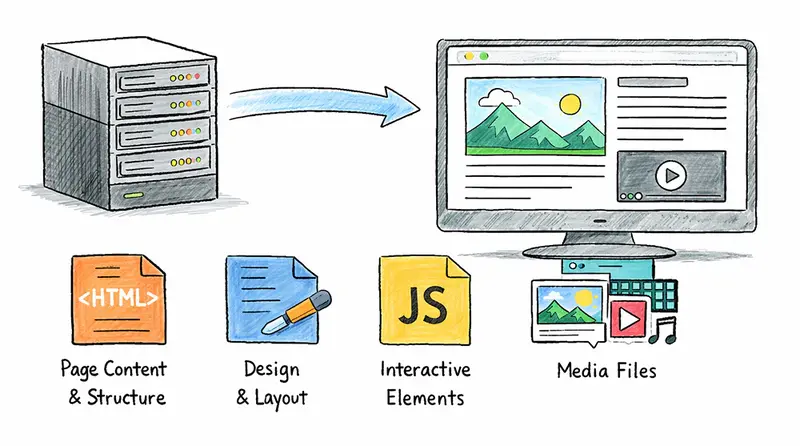
Yup, this is the worst-kept secret in all of serverless: it still runs on servers. So, before we talk about serverless, we need to understand what a server actually is and what it does.

The clue is right in the name — a server serves. And what does it serve? Files. That’s it. Every website and every web app you’ve ever used is really just a bunch of different files being delivered to you. Those files are:

The client

To talk to a server, Mama J needs a client. A client is anything that can send a request to the server and then show (or use) what the server sends back.

Most of the time, that client is a web browser on her computer, tablet, or phone. But it doesn’t have to be! For example, the Amazon shopping app on her phone is also a client. So is the Alexa voice service on her Echo device — when she says “Alexa, order more Diet Dr. Pepper,” Alexa acts as the client, talks to Amazon’s servers, and gets the job done.

The client’s job is always the same: it takes the information the server returns and turns it into something Mama J can see or use.

Here’s what happens when Mama J wants to buy her son a birthday gift on Amazon.com:

  1. She opens her browser and types Amazon.com.
  2. The request gets routed to one of Amazon’s many servers.
  3. The server processes the request.
  4. The server sends back the right HTML, CSS, JavaScript, and media so her browser can build the page.

The processing

That little phrase in step 3 — “the server processes the request” — is where the magic happens. This is where the server applies what we call business logic.

Think of business logic as the “brain” or the special rules that make the website actually useful for Mama J. It’s the part that decides what to show her and how to make the experience personal.

For example, when Mama J visits Amazon, the site doesn’t just show the same boring homepage to everyone. Thanks to business logic, it remembers she was looking at birthday gifts for her son last week, so it puts a big “Recommended for you” section right at the top with more toys, wrapping paper, and even a suggestion for the perfect card. It also knows she loves Diet Dr. Pepper, so it quietly adds a “Buy it again” button for her favorite 12-pack. None of that happens by accident — the server ran its rules: “If this is Mama J, show her the stuff she actually cares about.”

The same thing happens on Facebook. When she logs in, the business logic looks at who she follows, what she’s liked before, and even how long she usually spends reading family posts. Then it builds her entire news feed so the first thing she sees is a photo of her grandkids, not some random political rant. It’s all custom-made just for her.

How does any of this work? Because she logged in, so the system knows it’s Mama J. The server then runs its business logic — basically a set of smart instructions that say, “If this is Mama J, show her her stuff, in the order she’ll like best.” That’s business logic in plain English.

The challenge of running servers

Servers are incredible — they power everything from video games to generative AI. But running them comes with some serious headaches.

Security and maintenance

Servers need constant care. New threats appear every single day. If your server is open to the internet, you have to be an expert in secure networking, operating-system patching, hardware upgrades, monitoring, and a dozen other things. You can’t just set it and forget it — it demands 24/7 attention.

Availability and scalability

Websites have to stay up 24 hours a day, 7 days a week. That means you need at least two servers so one can cover for the other if something breaks. In reality, big sites run on thousands of servers spread across different geographic areas. They also use auto-scaling to spin up more servers when traffic spikes and scale back down when it drops.

Paying for idle services

All of that means you’re paying for servers to sit there running… even when nobody’s using them. Mama J nailed it when she said, “It’s like keeping a restaurant fully staffed day and night, whether you have customers or not.”

That’s what we call idle time — and idle time is expensive.

So Mama J asked the million-dollar question: “Why don’t we just call the staff in when the customers actually show up?”

Great question, Mom. That’s exactly what serverless does.

The serverless approach

At AWS we’ve been running Amazon.com at massive global scale for over 30 years, so we know a thing or two about servers. We looked at how companies were struggling with all the work it takes to keep servers running and decided we could make it simpler.

What we set out to build

We wanted to build something that would let developers run their code at any scale without having to manage servers, security patches, scaling, or any of the other stuff that’s the same for every company. We call that “undifferentiated heavy lifting.”

We wanted developers to focus on their ideas instead of infrastructure. We wanted the system to handle huge traffic spikes automatically, and we wanted them to pay only for the time their code was actually running — basically, wake everything up only when customers show up.

AWS Lambda

AWS Lambda is a service that runs your code without you managing any servers. You write your code, deploy it to Lambda, and it takes care of the infrastructure — servers, networking, security, and scaling.

When a request comes in, here’s what happens:

  • Lambda spins up a small execution environment to run your code
  • Your business logic does its thing
  • The response goes back to the user

The first time this happens, Lambda has to set everything up from scratch — that’s called a cold start. After that, the environment hangs around for a while, ready for the next request. If another request comes in while it’s still warm, it reuses that same environment — a warm start — and it’s faster. But if things go quiet for too long, Lambda cleans it up and the next request starts fresh again.

Pricing

The pricing model is pay-per-use. You’re charged based on the number of requests and how long each one runs. No requests, no charge.

For example, a website handling 1 million requests a month — each taking half a second with 512 MB of memory — would cost about $4.37 total. A traditional server running 24/7 costs $15–$30 a month, and you’d need at least two for availability, so $30–$60 a month regardless of traffic. With Lambda, a month of zero traffic costs $0.00.

Scalability

Lambda also scales automatically. By default, your AWS account gets 1,000 concurrent Lambda executions per region — that’s 1,000 separate copies of your code running at the exact same time, shared across all your Lambda functions in that region. That’s a soft limit — if you need more, you can request an increase from AWS. But for most workloads, 1,000 is more than enough.

To put that in perspective — say Mama J’s website goes viral and 1,000 people all hit it at the same second. Lambda spins up 1,000 environments, one for each request, handles them all simultaneously, and sends back 1,000 responses. And since each request typically finishes in milliseconds, those 1,000 slots free up almost instantly and are ready for the next wave. In practice, that means Lambda can handle tens of thousands of requests per second without you configuring anything. With a traditional server, you’d be scrambling to spin up more machines before the traffic crushes you.
scale

Right tool for the job

“So, I should just use Lambda for everything?” Mama J asked.

Not quite. Lambda is a great fit for most things — web backends, APIs, data processing, scheduled jobs, chatbots, mobile backends, and event-driven architectures. For the majority of workloads, it’s where I’d start. But there are a few situations where it’s not the right tool:

  • Long-running workloads — A single Lambda invocation has a 15-minute maximum, and that applies to synchronous execution. For workloads that need to run longer — heavy video encoding, large data migrations, overnight batch jobs — you’d traditionally reach for something like Amazon ECS or AWS Batch. However, the new AWS Lambda durable functions feature changes the game by letting you build long-running asynchronous workflows that coordinate across multiple Lambda invocations, well beyond the 15-minute limit. It’s a big step forward, but you still need to plan your architecture around it.
  • Ultra-low latency at very high throughput — Some workloads need extremely predictable response times at massive scale, like high-frequency trading systems. In those cases, always-on compute can give you tighter control.
  • Big legacy monoliths — If you’ve got a large, tightly coupled application, breaking it into small Lambda functions can be painful. That’s more of an architecture challenge than a Lambda limitation, but it’s worth knowing.

The thing is, it doesn’t have to be all-or-nothing. Most real-world systems use a mix — Lambda where it fits, and other services where they’re a better match. But Lambda is still the default starting point for most new projects because it takes so much off your plate.

Wrapping up

Mama J sat back and said, “So let me make sure I’ve got this. Instead of buying servers, keeping them running, paying for them when nobody’s using them, and worrying about security, availability, scalability, and maintenance — you just write your code and Lambda handles the rest?”

Pretty much, Mom. That’s serverless in a nutshell.

This is just the beginning, though. Lambda on its own is powerful, but the real fun starts when you connect it to other AWS services and build event-driven applications — things that react automatically when something happens, with no servers to manage anywhere in the stack.

We’ll get into all of that in the next post.

Stay tuned!

Cómo solucionar el error de permisos al ejecutar `pip.exe` en un entorno virtual de Python en Windows

Cómo solucionar el error de permisos al ejecutar pip.exe en un entorno virtual de Python en Windows

Explicación técnica

El problema ocurre porque el archivo pip.exe en la carpeta Scripts/ de tu entorno virtual es un launcher empaquetado (un archivo .exe que contiene una copia embebida de python.exe y el script __main__.py de pip). Este launcher tiene una ruta fija a python.exe incrustada en su interior. Si esa ruta se vuelve inválida —por ejemplo, porque:

  • Se instaló/desinstaló Python (especialmente desde Microsoft Store),
  • Se movió o eliminó el Python original,
  • Hubo corrupción durante la creación del entorno virtual,

…entonces el launcher falla con un error de “Access is denied” o “Permission denied”, aunque los permisos del archivo sean correctos. Esto es falsamente percibido como un problema de permisos, pero en realidad es una corrupción del launcher.

El hecho de que python -m pip funcione confirma que el problema está solo en el launcher pip.exe, no en pip como paquete ni en el entorno virtual.

Pasos para solucionarlo (definitivo)

✅ Paso 1: Elimina el launcher corrupto

# En PowerShell o CMD (NO en bash, para evitar problemas de rutas con comillas)
del "C:Users<tu-usuario>rutaalproyectovenvScriptspip.exe"
del "C:Users<tu-usuario>rutaalproyectovenvScriptspip3.exe"

⚠️ Importante: No elimines python.exe, solo los archivos pip*.exe.

✅ Paso 2: Regenera los launchers correctamente

# Asegúrate de que el entorno virtual esté activado
venvScriptsactivate

# O ejecuta directamente (recomendado para evitar dependencias de PATH):
python -m pip install --upgrade pip --force-reinstall

Esto reinstala pip desde cero y regenera los launchers pip.exe y pip3.exe con la ruta correcta a python.exe del entorno.

🔍 ¿Por qué funciona?

pip install --force-reinstall detecta que los launchers faltan y los reconstruye usando la versión de python.exe que está en venvScripts, no la del sistema.

✅ Paso 3: Verifica que funcione

pip --version
# Debe mostrar algo como: pip 24.0 from ...venvlibsite-packagespip (python 3.10)

Bloque de código corregido (script de reinstalación automática)

Crea un archivo fix-venv-pip.bat en la raíz de tu proyecto y ejecútalo como administrador (solo para permisos, no por seguridad):

@echo off
setlocal

:: Configura la ruta a tu entorno virtual
set "VENV_DIR=%~dp0venv"

if not exist "%VENV_DIR%Scriptspython.exe" (
    echo [ERROR] No se encontró python.exe en el entorno virtual.
    echo Asegúrate de que el entorno exista y esté creado con 'python -m venv venv'.
    exit /b 1
)

echo [INFO] Eliminando launchers corruptos...
del /q "%VENV_DIR%Scriptspip.exe" 2>nul
del /q "%VENV_DIR%Scriptspip3.exe" 2>nul

echo [INFO] Reiniciando pip con launchers nuevos...
"%VENV_DIR%Scriptspython.exe" -m pip install --upgrade pip --force-reinstall --no-cache-dir

echo [SUCCESS] ¡Listo! Ahora puedes usar 'pip' dentro del entorno.

📌 Uso: Ejecuta fix-venv-pip.bat desde PowerShell/CMD en la carpeta del proyecto.

Pro-tip: Evita este problema en el futuro

  1. Nunca uses pip.exe directamente si puedes evitarlo

    Usa siempre python -m pip en entornos virtuales. Es más robusto y evita problemas con launchers corruptos.

  2. Evita mezclar instaladores de Python (web + Microsoft Store)

    La Microsoft Store instala Python en modo silo, con rutas aisladas (C:Users...AppDataLocalMicrosoftWindowsAppspython.exe) que parecen ser python.exe, pero son alias que fallan al ser embebidos en launchers.

  3. Si usas múltiples versiones de Python, crea entornos con la versión exacta deseada

   "C:Python310python.exe" -m venv venv
  1. Actualiza pip antes de instalar paquetes
   python -m pip install --upgrade pip

✅ Resultado esperado: pip install -e . funcionará sin errores de permisos, y el launcher se regenerará correctamente con la ruta interna a python.exe válida.

🚀 ¿Quieres más soluciones técnicas?

Si te sirvió esta ayuda, suscríbete para recibir los errores más comunes de la semana y cómo evitarlos.
👉 Suscríbete aquí

Meta’dan Facebook gruplarına yönelik yeni uygulama: “Forum”

Meta

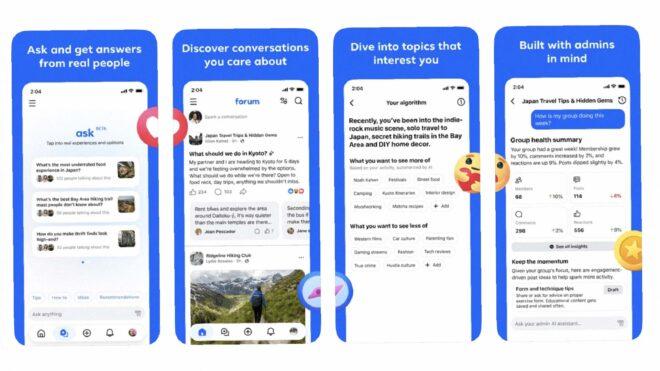
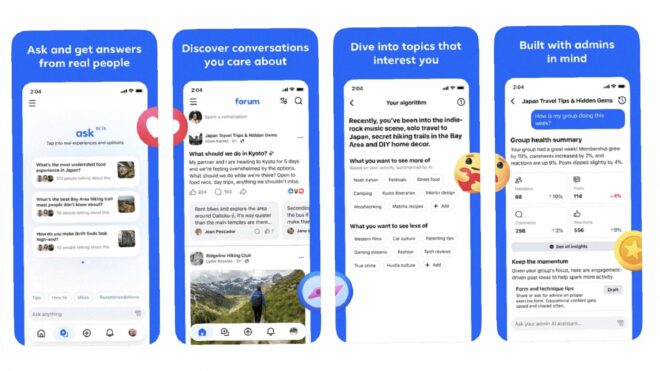
Meta'dan Facebook gruplarına yönelik yeni uygulama: "Forum"Meta, bugün doğrudan Facebook’taki gruplara odaklanan “Forum” adında yeni bir uygulama yayınladı. İlk aşamada yalnızca iOS’a çıkarılan ve Türkiye’ye açılmayan uygulamaya, direkt olarak Facebook hesaplarıyla giriş yapılıyor. Dahil olunan gruplar içerisinde gezilmesine, paylaşılan içeriklerin görüntülenmesine ve yeni paylaşımlar/yorumlar yapılmasına imkan tanıyan Forum, gruplardan toplanan verileri kullanan bir sohbet botu da barındırıyor. Bu yapay zeka sistemi sorulan sorulara gerçek kullanıcıların yanıtlarını kullanarak cevaplar veriyor. Uygulamada, moderatörlerin gruplarını yönetmelerine yardımcı olabilecek yapay zeka destekli bir yönetici asistanı da yer alıyor.

Meta’dan Facebook gruplarına yönelik yeni uygulama: “Forum” yazısı ilk olarak Teknoloji haberleri – LOG üzerinde yayınlandı.

I built a streaming app with 7,000+ downloads at ₹0/month — here’s the exact architecture

I’m Wasey, a solo developer from Varanasi, India. I built DramaHub —
a fully live OTT streaming app on Google Play Store. 7,000+ downloads,
1,000+ daily active users, sub-1% crash rate, ₹0/month infrastructure.

Here’s the exact architecture that makes it possible.

The Problem

I had zero budget for servers. A typical OTT backend needs:

  • A backend server (₹3,000–15,000/month)
  • A database (₹1,500+/month)
  • A CDN (₹500+/month)

I had ₹0. So I had to think differently.

GitHub as the Database

All drama content, episode metadata, and app config live as JSON files
in a public GitHub repository. Free. Unlimited. Versioned automatically.

Every drama looks like this in JSON:

{
“id”: “drama_001”,
“title”: “Drama Title”,
“thumbnail”: “https://cdn.jsdelivr.net/...”,
“episodes”: [
{
“ep”: 1,
“title”: “Episode 1”,
“source”: “youtube_id_here”
}
]
}

The app fetches this JSON on launch, caches it locally, and serves
content instantly on subsequent opens.

Cloudflare Workers as the CDN Proxy

Hitting GitHub raw URLs directly has rate limits. So I built a
Cloudflare Worker that sits in front of GitHub:

  • Caches all JSON responses at the edge globally
  • Handles unlimited traffic
  • Auto-invalidates when content version changes
  • Cost: ₹0

Architecture: Flutter app → Cloudflare Worker → GitHub raw JSON

The Dual Player System

DramaHub runs two video players:

Primary — YouTube WebView player
Most content is sourced from YouTube. The app uses a WebView-based
player with custom controls and a URL whitelist for security.

Secondary — Custom video player with Cloudflare R2
For self-hosted content, I use a custom player backed by
Cloudflare R2 storage.

Both players are switchable instantly from the admin panel via
remote JSON config. No APK update needed — ever.

The Admin Panel

This is the most important part of the architecture.

The admin panel is a Flutter Web app that communicates directly
with the GitHub REST API using Base64 encoding and SHA-based
conflict detection. From the admin panel I can:

  • Add/edit/delete dramas and episodes
  • Toggle ads per screen with cooldown timers
  • Switch between YouTube and custom player instantly
  • Change CDN URLs without any release
  • Force update all users
  • Control app config globally

Everything is remote. Everything is instant. No app store review cycle.

The Crash That Taught Me Everything

One day the app went completely down. Every user got a crash on launch.

The reason: my Cloudflare Worker wasn’t caching properly. Every request
was hitting GitHub directly and I burned through the API rate limit
in minutes.

I fixed the Worker caching. Then I built a full backup system:

  • Direct GitHub raw URL as fallback
  • Backup Worker as secondary fallback
  • Switchable from admin panel in under 60 seconds

No APK release needed. I built that entire system in one night.

Firebase Integration

Even with zero backend cost, I use Firebase for:

  • Anonymous Auth
  • FCM push notifications with deep links
  • Crashlytics for real-time crash monitoring
  • Analytics with 7 custom tracked events
  • Atomic view counter increments via Firestore REST API

Results After 18 Months

📦 7,000+ downloads
👥 1,000+ daily active users

💥 Sub-1% crash rate
💰 ₹0/month infrastructure cost
📱 Live on Google Play Store

Key Lesson

Build your admin panel first. Remote config is not a feature —
it’s survival. The ability to change anything without a new release
has saved me dozens of times.

GitHub as a database works at production scale if you architect
the caching layer correctly.

GitHub: github.com/waseyjamal/dramahub
Play Store: https://play.google.com/store/apps/details?id=com.dramahub.drama_hub
Twitter: @waseybuilds

Happy to answer any questions about the architecture.