I built a crowdsourced deals + map app for Vietnam in 6 months — stack, traffic, and what broke

22 days ago I shipped cheap-map.app — a crowdsourced map of cheap restaurants, shops, and gas stations across Vietnam, with a multi-merchant affiliate deals aggregator bolted on. ~50 organic users a day now,
hockey-stick just starting.

This is the build-log: real stack, real costs, three things that broke spectacularly and what I learned fixing them. If you’re shipping an indie product solo, the boring infrastructure decisions matter more than the framework choice you
spent two weeks agonizing over (guilty).

## Why this exists

Vietnam has incredible cheap food and shopping — $1 phở, $0.50 cà phê sữa đá, motorbike-repair shops that fix a flat for under a dollar. But there’s no good way to find them:

  • Google Maps optimizes for ratings, not price. The 4.7-star place is usually the tourist-priced one.
  • Deal aggregators in VN are SEO-spam sites that copy from each other. None show where a deal is.
  • Locals know the cheap spots by word of mouth. Tourists, expats, and people who just moved to a new city are stuck.

So: a map-first app where the community submits prices, with a deals tab pulling live affiliate offers from Shopee/Tiki/Traveloka/etc. Bilingual VI/EN. Cheap to run.
## The stack

I picked technologies based on “can I run this for under $30/month at 1,000 users/day.”

| Layer | Choice | Why |
|—|—|—|
| Frontend | Next.js 14 App Router + TypeScript | ISR for SEO-heavy programmatic pages |
| Styling | Tailwind + shadcn/ui | Fast, no design system to maintain |
| Map | Mapbox GL JS | More flexible than Google Maps, generous free tier |
| State | Zustand (UI) + TanStack Query (server) | Tiny bundle, good DX |
| Backend | Spring Boot 3.2 on Java 21 (virtual threads) | Boring, fast, JPA + PostGIS plays well |
| Database | Supabase (Postgres 15 + PostGIS) | Hosted PostGIS without ops |
| Cache | Upstash Redis (free tier) | Rate-limiting + slug caching |
| Images | Cloudflare R2 (free tier) | No egress fees, presigned uploads |
| Frontend host | Vercel Hobby | Free until traffic gets serious |
| Backend host | Railway | $5–10/mo for a Spring JAR |
| DNS / CDN | Cloudflare | $1/mo |

Total cost at 22 days: ~$15/month (Railway + Cloudflare + Mapbox). Vercel + Supabase + R2 + Upstash all still on free tier.

The big architectural call: monolith, not microservices. One Spring app, feature-based packages (auth/, location/, deal/, ranking/…), one database. I’ll extract a service the day traffic justifies it, not before.

The other big call: REST, not GraphQL. Simpler caching, simpler clients, simpler future mobile app.

## Three things that broke

### 1. Vercel ISR Writes blew up at 50% of the monthly free-tier cap

About day 14, I checked Vercel’s usage dashboard. ISR Writes — the number of times Next.js regenerates a statically-cached page — was at 50% of the 200k/month free-tier limit. Three weeks in. The math projected an overage by week 5.

I have 43k location pages, all ISR’d. Plus 90+ deal hub pages. Plus 360 city × category cells. With revalidate: 3600 (1 hour) on the location pages, every page got re-generated 24 times a day → 1M+ writes/month theoretical. Bots were
hitting them faster than humans.

The fix was one config change spread across six route files:

// /location/[slug]/page.tsx
export const revalidate = 604800; // was 3600 (1h) → now 7d

// /deals, /deals/category/[slug], /san-sale/[merchant], etc
export const revalidate = 21600; // was 3600 → now 6h

// /san-sale/today ← KEPT at 3600
export const revalidate = 3600;

The last line is the interesting one. /san-sale/today has a date-stamped H1 (“Săn sale hôm nay 22/05/2026”) engineered for “deals today” SEO. Bumping its revalidate would either (a) break the date-fresh signal Google uses for “today”
queries, or (b) make my hourly in sitemap.xml a false claim. So that one page eats writes; the other 43k+ don’t.

Estimated reduction: 226k writes/month → 36k. ~85% drop.

Lesson: check your platform’s metered dashboards every week, not when you hit the warning email. ISR revalidate defaults rarely match your actual content’s update cadence.

  1. Samsung’s affiliate URLs were wrapped in a Commission Junction tracker — and that broke the entire affiliate deeplinker

The deals aggregator pulls product feeds from AccessTrade Vietnam (a VN affiliate network). For most merchants, you take the product URL from their CSV feed, wrap it in AccessTrade’s redirect
(https://go.isclix.com/deep_link/?url=), and you’re done. Clicks attribute to your publisher ID, you earn commission.

Samsung’s feed broke this. Every Samsung click returned HTTP 500.

I dug in. The Samsung CSV URLs looked like this:

https://clk.omgt3.com/?AID=12345&r=samsung.com/vn/smartphones/galaxy-s24

That’s not a Samsung URL. That’s a Commission Junction tracker URL with the actual Samsung URL stuffed in the r= query param. CJ is a separate affiliate network — Samsung apparently runs through both, and AccessTrade is pulling
Samsung’s CJ-wrapped feed.

AccessTrade’s deeplinker saw the clk.omgt3.com hostname, decided “this is already a tracker,” and routed it to a special /deep_link/v2/2306/ path that’s supposed to chain trackers. That endpoint is broken — silent 500.

The fix is a 20-line static helper:

public static String unwrapCjTracker(String url) {
if (url == null || !url.contains(“clk.omgt3.com”)) return url;
try {
URI uri = URI.create(url);
String query = uri.getQuery();
if (query == null) return url;
for (String pair : query.split(“&”)) {
int eq = pair.indexOf(‘=’);
if (eq > 0 && “r”.equals(pair.substring(0, eq))) {
String inner = URLDecoder.decode(pair.substring(eq + 1), UTF_8);
return inner.startsWith(“http”) ? inner : “https://” + inner;
}
}
} catch (Exception e) { /* fall through */ }
return url;
}

Called on every URL before it goes into the affiliate wrapper. No-op for the 99% that aren’t CJ-wrapped. Samsung clicks work now.

Lesson: when an affiliate network “auto-detects” something about a URL, assume it will do the wrong thing for at least one merchant. Write the unwrap helper proactively.

  1. I thought I had an egress problem. I had a caching problem.

Supabase’s egress dashboard started looking ugly: ~8 GB/day. The free tier caps at 5 GB/month. I had a week before getting throttled.

My first instinct was “compress everything.” I turned on server.compression=true in Spring Boot. Watched the dashboard. Egress didn’t move.

This is when I realized I’d misunderstood the topology:

Browser ←–gzip– Next.js ←–no gzip– Spring API ←–no gzip– Supabase

Spring’s HTTP compression compresses outbound HTTP — Spring → Next.js or Spring → browser. It does nothing to the inbound traffic from Supabase, which is the raw JDBC protocol over a Supabase connection. That JDBC channel is what the
egress dashboard measures.

The real culprit was a single endpoint: GET /api/v1/locations/slugs — used by the Next.js sitemap to list every location URL. 16 MB uncompressed. Next.js was calling it on every sitemap request. No cache. Every Bingbot crawl, every
Ahrefs scrape, every sitemap ping = another 16 MB from Postgres → Railway.

Fix was two lines:

@Cacheable(“active-slugs”) // 6h Redis TTL
public List getActiveSlugs() { … }

// Next.js sitemap
const res = await fetch(SLUGS_URL, { next: { revalidate: 21600 } }); // 6h

8 GB/day → 200 MB/day overnight.

Lesson: before optimizing what you think the bottleneck is, instrument the actual data path. HTTP gzip is great, but it can’t help you on a wire it isn’t on.

Traffic numbers — day 22

  • ~50 organic users/day (hockey-stick juuust starting last week)
  • ~921 cumulative users across 22 days
  • ~43k indexable location pages + 90 deal hubs + 360 city×category cells + ~205 tool-hub pages
  • All on free/cheap tiers — total infra spend ~$15/mo

What worked for SEO:

  • Programmatic city × category landing pages
  • Full JSON-LD (BreadcrumbList, ItemList, FAQPage, LocalBusiness with type-narrowing — Restaurant / Bakery / GasStation etc., not generic LocalBusiness)
  • Bilingual hreflang VI/EN
  • A simple Purchasing Power calculator for the Tools Hub — converts your salary into cost-of-living-adjusted equivalent across countries. Built it as a side surface, ended up being one of the highest-engagement pages.

What didn’t work yet:

  • Backlinks. Zero outreach so far. That’s the next 30 days.
  • Affiliate conversion tracking. The data’s flowing, the GA4 event isn’t wired yet.

What I’d do differently

  1. Set up Vercel/Supabase usage alerts on day 1, not “when the first warning email arrives.” Both have webhook integrations I ignored.
  2. Write the affiliate URL unwrapper before integrating the first merchant. I would have caught Samsung in 5 minutes instead of 2 hours of “why is this one merchant returning 500.”
  3. Cache anything that returns >1 MB before pushing it to prod. Even on staging, with one user (me), the moment a bot finds the sitemap you’re cooked.

What’s next

Three things in the next 30 days, in order of leverage:

  1. Google Search Console audit — find the queries ranking position 11–30 and pull them onto page 1 with small content additions
  2. Backlinks. 3 quality ones. (This post is one of them, hi!)
  3. Wire affiliate-click tracking to GA4 so I actually know which deals convert

If you want to poke at the live site, it’s cheap-map.app — try the Purchasing Power calculator or browse today’s deals. Feedback welcome in the comments — especially the “what would you have done differently” kind.

Women Techmakers Ambassador Applications are here!

Women Techmakers Ambassador Applications are here!

This program brings together individuals who are passionate about technology, community, and creating space for others to grow.
As an Ambassador, you’ll have the opportunity to:
– Foster inclusive tech communities
– Organize and lead meaningful initiatives
– Support and uplift others in their journeys
– Contribute to a global network of builders and thinkers
We’re looking for people who care deeply about impact. Those who are not only advancing in tech, but also opening doors for others along the way.
If you’re ready to shape conversations, build community, and create lasting impact, we invite you to apply. Application deadline: June 22.

WomenTechmakers #WomenInTech #WTM2026 #WTMAmbassador

WTM website and handles
Website: https://www.technovation.org/women-techmakers/
LinkedIn: https://www.linkedin.com/company/womentechmakers
Twitter/X: https://x.com/womentechmakers
Instagram: https://www.instagram.com/womentechmakersglobal/
Facebook: https://www.facebook.com/technovationglobal

AI That Empowers Every Dream: My Vision Inspired by Google I/O 2026

Google I/O 2026 introduced a lot of exciting updates around AI, Gemini, Android, Firebase, and cloud technologies. But for me, the most inspiring part wasn’t just the technology itself — it was seeing how accessible AI development is becoming for students and independent developers.

As someone who is deeply interested in AI and innovation, this year’s Google I/O genuinely felt different.

For the first time, it feels like students can move beyond just learning AI and actually start building meaningful solutions with it.

And honestly, that’s what excited me the most.

Why Google I/O 2026 Felt Inspiring

AI is growing incredibly fast right now.

Every day there’s a new model, framework, or tool being introduced. But even with all this progress, many students still struggle with one thing:

Turning ideas into real projects.

A lot of students have creative ideas but often feel limited because of complicated setups, lack of resources, or confusing workflows.

That’s why the direction shown at Google I/O 2026 stood out to me.

The ecosystem now feels more beginner-friendly, more practical, and more focused on helping developers experiment faster.

Instead of spending too much time figuring out infrastructure, developers can focus more on solving actual problems.

And I think that shift is very important.

The Kind of AI I Want to Build

One thing I’ve realized while learning AI is that technology becomes meaningful only when it helps people in real life.

That idea inspired my vision:

“AI That Empowers Every Dream”

I don’t see AI as something that should replace humans.

I see it as a tool that can help students learn better, make everyday life easier, and create opportunities for more people.

After watching Google I/O 2026, I became even more motivated to explore projects that combine AI with real-world impact.

Ideas I Would Love to Build Using Google AI
📚 Smart Study Assistant

As a student, I know how overwhelming studies can sometimes feel.

I would love to build an AI assistant that helps students:

summarize notes,
explain difficult topics,
create quizzes,
and make learning more interactive.

I think AI can make education more personalized and accessible for everyone.

🥗 AI Health & Wellness Assistant

Another idea that excites me is using AI for healthier lifestyles.

Imagine scanning food using your phone and instantly getting:

nutrition details,
calorie estimates,
and health suggestions.

Small AI solutions like this can genuinely help people in daily life.

🚦 Smart Traffic & Safety Systems

Traffic and travel are everyday challenges in many cities.

AI-powered systems could help by:

analyzing traffic conditions,
suggesting safer routes,
and improving travel efficiency.

I find it exciting how AI can be connected with practical city problems instead of existing only inside apps and demos.

🌍 Rural Education with AI

This is probably the idea I connect with the most.

Many students still don’t have access to quality learning resources, especially in regional languages.

I would love to build AI learning systems that work in local languages and help students learn more easily, even with limited resources.

If AI becomes truly accessible, it can create opportunities for millions of students.

And I think that’s one of the most powerful things technology can do.

Why Google AI Studio Caught My Attention

One of the most exciting announcements for me was the evolution of Google AI Studio and the Gemini ecosystem.

What impressed me most was how focused the platform feels on helping developers build faster.

A few things I personally liked:

faster experimentation,
easier workflows,
beginner-friendly development,
and quicker prototyping.

For students, these things matter a lot.

Not everyone has expensive hardware or large development teams.

Platforms that reduce complexity make innovation feel more achievable for students and independent developers.

Why This Matters for Students

Students usually face challenges like:

limited budgets,
limited computing resources,
and lack of guidance.

But modern AI tools are slowly reducing those barriers.

Now students can experiment, participate in hackathons, build projects, and turn ideas into working solutions much more easily than before.

That’s what makes this moment exciting.

The future of AI development is becoming more open and accessible.

One Thing I Hope Improves

Even though the ecosystem looks exciting, beginners can still feel overwhelmed because AI is evolving so quickly.

There are now so many:

models,
APIs,
frameworks,
and tools.

I would love to see even more beginner-focused learning paths, templates, and guided project experiences integrated into platforms like Google AI Studio.

That could help many new developers start building with more confidence.

Final Thoughts

Google I/O 2026 made me feel genuinely excited about the future of AI development.

Not just because the technology is improving rapidly, but because these tools are becoming accessible to students, creators, and independent developers.

That’s what makes this moment special.

I truly believe the next generation of developers will build incredible solutions using AI — solutions that improve education, healthcare, accessibility, and everyday life.

And as a student who loves exploring technology, that future feels incredibly inspiring.

Honestly, I think we are only getting started.

googleiochallenge #devchallenge #ai #machinelearning #googleio #gemini #buildwithai

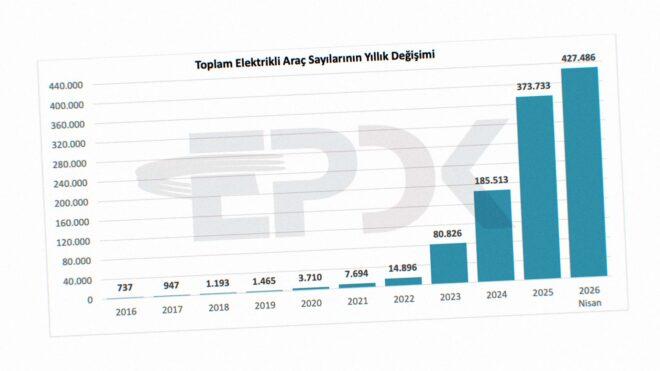
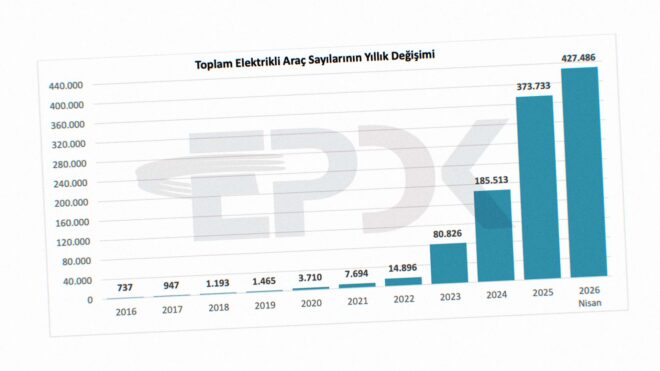
Türkiye’deki toplam elektrikli araç sayısı 427 bini geride bıraktı

Türkiye’deki toplam elektrikli araç sayısı 427 bini geride bıraktı

Türkiye’deki toplam elektrikli araç sayısı 427 bini geride bıraktıEnerji Piyasası Düzenleme Kurumu Enerji Dönüşüm Dairesi Başkanlığı, bugün 2026’nın nisan ayı verilerini paylaştı. Buna göre Türkiye’deki elektrikli araç sayısı 427.486’ya, toplam şarj noktası sayısı ise 43.009’a çıktı. AC şarj noktalarının 24.468’e, DC şarj noktalarının ise 18.541’e ulaştığını duyuran kurum, soket sayısında liderliğin halen ciddi bir farkla ZES’te olduğunu açıklıyor. İkinci sırada yerli otomobil girişimi Togg’un kurduğu şarj ağı Trugo, üçüncü sırada ise Voltrun yer alıyor. Türkiye’de 2024 yılında 185.513 adet, 2023 yılında 80.826 adet, 2022 yılında ise 14.896 adet elektrikli otomobilin bulunduğunu hatırlatan EPDK, 2025’in aralık ayında toplam elektrikli araç sayısını 373.733 olarak açıklamıştı.


Türkiye’deki toplam elektrikli araç sayısı 427 bini geride bıraktı yazısı ilk olarak Teknoloji haberleri – LOG üzerinde yayınlandı.

Tesla Türkiye, FSD (Full Self-Driving) paketinin aylık abonelik fiyatını açıkladı

Tesla Türkiye, Full Self-Driving (FSD) paketinin aylık abonelik fiyatını açıkladı

Tesla Türkiye, Full Self-Driving (FSD) paketinin aylık abonelik fiyatını açıkladıTesla, yurt dışında 14 Şubat itibarıyla tek seferlik FSD (Full Self-Driving) satışını durdurmaya başladı. “Geliştirilmiş Otopilot’un yanı sıra, Trafik Işığı ve Dur İşareti Kontrolü’nü içerir. Ayrıca gelecekteki güncellemelerle birlikte aracınız, neredeyse her yere minimum sürücü müdahalesiyle kendi kendine gidebilecek.” açıklamasının yapıldığı FSD sisteminin tek seferlik satışı bugün itibarıyla Türkiye’de de durduruldu. Bu konuda yaptığı açıklamada, “21 Mayıs 2026’ya kadar tek sefere mahsus olmak üzere satın alınabilir. Sonrasında abonelik olarak sunulur.” diyen şirket, Türkiye’de tam haliyle aktif olmayan paketin abonelik ücretini aylık 4.990 TL olarak açıkladı. Sistem için yapılan son paylaşımda, “Full Self-Driving (Denetimli) henüz mevcut değil ancak gelecekte sunulabilir. Kullanılabilirliği, geliştirme sürecine ve düzenleyici kuruluş onayına bağlıdır. Full Self-Driving Kabiliyeti bir dizi sürücü destek özelliği içerir: Otomatik Direksiyon, Trafiğe Duyarlı Hız Sabitleme, Şerit Değiştirme, Otomatik Direksiyonda Navigasyon, Dumb Summon, Actually Smart Summon, Otomatik Park ve Trafik Işığı ve Dur İşareti Kontrolü.” ifadelerine yer verildi.


Tesla Türkiye, FSD (Full Self-Driving) paketinin aylık abonelik fiyatını açıkladı yazısı ilk olarak Teknoloji haberleri – LOG üzerinde yayınlandı.

Stellantis ve Çinli Dongfeng, Avrupa’da üretim, satış ve mühendislik faaliyetlerini ortak yürütecek

Stellantis

StellantisÇatısı altında çok sayıda üretici yer alan Stellantis ile Çinli Dongfeng Motor bağlayıcı olmayan bir ön anlaşma (MoU) imzaladı. Bu konuda  yapılan resmi açıklamada, “Taraflar, 34 yıllık iş birliklerini daha da genişletmeyi ve Dongfeng’in yeni enerji araçlarına (NEV) yönelik satış, distribütörlük, üretim, satın alma ve mühendislik faaliyetlerini yürütmek amacıyla Avrupa merkezli bir ortak girişim kurmayı planlıyor. Ortak girişimin ilk etapta Avrupa’daki belirli pazarlara odaklanması hedefleniyor. Plan kapsamında, tarafların Stellantis liderliğinde, Avrupa merkezli ve yüzde 51/ 49 ortaklık yapısına sahip yeni bir ortak girişim kurması öngörülüyor. Yeni şirket, Dongfeng’in Voyah markalı premium yeni enerji araçlarının Avrupa’daki belirlenen pazarlarda satış ve distribütörlük faaliyetlerinden sorumlu olacak. Bu süreçte Stellantis’in güçlü satış ağı ve satış sonrası hizmet uzmanlığından faydalanılacak. Ayrıca yeni yapı, Dongfeng’in son derece rekabetçi Çin yeni enerji araç ekosisteminden yararlanarak ortak satın alma ve mühendislik faaliyetlerine de ev sahipliği yapacak. Taraflar ayrıca, Avrupa regülasyonları ve “Made-in-Europe” gereklilikleri doğrultusunda, Dongfeng yeni enerji araçlarının […]

Stellantis ve Çinli Dongfeng, Avrupa’da üretim, satış ve mühendislik faaliyetlerini ortak yürütecek yazısı ilk olarak Teknoloji haberleri – LOG üzerinde yayınlandı.

How We Reduced LLM Costs Without Touching Model Quality

How We Reduced LLM Costs Without Touching Model Quality

One of the fastest ways to destroy an AI system in production is uncontrolled token growth.

Most demos ignore this problem because they run small prompts against clean datasets. Real enterprise systems do not behave like that.

Once multiple integrations start running together, token usage grows faster than most teams expect.

We started seeing it after several enterprise pipelines went live at the same time.

  • Slack ingestion
  • Email synchronization
  • CRM updates
  • Meeting transcripts
  • Internal ticket systems
  • Knowledge base sync jobs

Everything was feeding into the same operational AI layer.

At first, nothing looked broken.

Responses were accurate.
Latency was acceptable.
Users were happy.

But infrastructure metrics told a different story.

Prompt sizes were growing continuously.
Costs increased every week.
Some requests carried massive amounts of unnecessary context.

The issue was not the model itself.

The issue was everything surrounding the model.

The Real Problem Was Context Inflation

A single request slowly turned into this:

  • duplicated conversation history
  • overlapping retrieval chunks
  • unnecessary metadata
  • old execution traces
  • repeated system instructions
  • temporary tool outputs nobody needed anymore

The worst part was that response quality barely changed.

We were spending more money to process noise.

That forced us to look at the architecture instead of blaming model pricing.

What We Changed

We Stopped Treating Retrieval Like Free Context

Initially, retrieval output was pushed directly into prompts.

That works during early development.

It breaks during long-running enterprise operation.

Vector search systems naturally return overlapping information. As datasets grow, overlap increases even more.

We added a preprocessing layer before prompt assembly.

Now every retrieval result passes through:

  • semantic deduplication
  • overlap removal
  • metadata cleanup
  • token budgeting
  • context prioritization

This immediately reduced prompt size across production workloads.

The important part was that output quality stayed almost identical.

That was the moment we realized how much useless data was entering the system.

We Split Operational Memory From Reasoning Memory

This changed the architecture more than anything else.

Most AI systems mix all state together:

  • chat history
  • tool outputs
  • execution logs
  • retry traces
  • retrieval data
  • audit metadata

The model does not need all of that for reasoning.

So we separated memory into layers.

Operational memory stores infrastructure state:

  • retries
  • execution traces
  • audit logs
  • system metadata

Reasoning memory stores only the information required for inference.

That separation reduced context pollution heavily.

It also made debugging easier because infrastructure concerns stopped leaking into model reasoning.

We Reduced Prompt Complexity

Large prompts feel productive.

They usually are not.

Over time we noticed many system prompts were repeating the same instructions in different wording.

That increased tokens without improving reliability.

Instead of adding more prompt logic, we moved more control into infrastructure logic.

We added:

  • structured validation layers
  • schema enforcement
  • routing constraints
  • tool permission boundaries
  • deterministic execution rules

The result was smaller prompts with more predictable behavior.

The infrastructure became responsible for operational control instead of pushing everything into the model.

We Added Token Observability Everywhere

This should exist in every production AI system.

Without token observability, cost problems stay invisible for weeks.

We now track:

  • token usage per tenant
  • token usage per integration
  • retrieval expansion rates
  • average context growth
  • abnormal cost spikes after deployments

One deployment accidentally tripled token usage because a serializer started injecting entire API payloads into conversation state.

The system still worked.

Nobody noticed immediately.

Without observability, we would have discovered it only after billing increased significantly.

The Bigger Lesson

Most enterprise AI cost problems are not model problems.

They are architecture problems.

The expensive part is usually not inference itself.

It is:

  • poor memory design
  • uncontrolled retrieval
  • duplicated context
  • oversized prompts
  • weak operational boundaries

Reducing waste matters more than constantly changing models.

We did not downgrade quality.

We did not switch providers.

We fixed the infrastructure around the model.

That changed the economics of the system far more than any prompt optimization ever did.

Profiling a CUDA Python Program with GPUFlight

I usually write CUDA code in C++, but recently I have been spending more time with Python, especially PyTorch and Numba.

Numba is interesting because it lets you write a real GPU kernel directly in Python. You can decorate a function with @cuda.jit, launch it with kernel[grid, block](...), and Numba compiles it down to GPU machine code that runs on the actual hardware.

The good news is that GPUFlight can profile Python GPU programs as well.

In this post, I’ll profile a simple Numba matrix multiplication kernel with GPUFlight. Then I’ll read the report step by step and show how the report points to a real optimization: shared-memory tiling.

One important note before we start: this example uses GPUFlight’s deeper profiling mode with SASS-level metrics and PC sampling. So the duration numbers in the report should not be treated as clean baseline kernel timing. They include profiling overhead. The main goal here is not to benchmark Numba against an optimized library like cuBLAS. The goal is to show how GPUFlight helps explain what is happening inside the kernel.

Setup

Both GPUFlight and Numba can be installed from PyPI. On a fresh Linux machine:

sudo apt-get install -y python3.12-venv
python3 --version            # expect Python 3.12.x

python3 -m venv ~/gpufl-venv
source ~/gpufl-venv/bin/activate

pip install --upgrade pip
pip install gpufl "numba-cuda[cu13]"

python -c "import gpufl; print('gpufl', gpufl.__version__)"

You should see something like:

gpufl 1.x.x

At the time I am writing this, the version is 1.0.2.

Before using the profiler, it is a good idea to confirm that Numba can find your GPU:

python -c "from numba import cuda; print('cuda available:', cuda.is_available()); cuda.detect()"

Now we are ready to run a Python CUDA application with GPUFlight.

The sample kernel

Here is the sample code I am using:

import gpufl as gfl
from gpufl.report import generate_report
from numba import cuda
import numpy as np
import math
import os

@cuda.jit
def matmul_kernel(A, B, C):
    row, col = cuda.grid(2)

    if row < C.shape[0] and col < C.shape[1]:
        tmp = 0.0

        for k in range(A.shape[1]):
            tmp += A[row, k] * B[k, col]

        C[row, col] = tmp

LOG_PATH = "./gfl_logs"

gfl.init(
    app_name="matmul_sample",
    log_path=LOG_PATH,
    sampling_auto_start=True,
    system_sample_rate_ms=100,
    profiling_engine=gfl.ProfilingEngine.PcSamplingWithSass,
)

try:
    N = 2048

    A = cuda.to_device(np.random.rand(N, N).astype(np.float32))
    B = cuda.to_device(np.random.rand(N, N).astype(np.float32))
    C = cuda.to_device(np.zeros((N, N), dtype=np.float32))

    tpb = (16, 16)
    bpg = (math.ceil(N / tpb[0]), math.ceil(N / tpb[1]))

    with gfl.Scope("matrix_mul_compute", "math"):
        for _ in range(10):
            matmul_kernel[bpg, tpb](A, B, C)

    _ = C.copy_to_host()
    print("[OK] compute finished")

finally:
    gfl.shutdown()

    print(
        generate_report(
            os.path.dirname(LOG_PATH) or ".",
            log_prefix=os.path.basename(LOG_PATH),
            top_n=10,
        )
    )

This is a very simple matrix multiplication kernel.

Each thread computes one output element. For each element, the thread walks through one full row of A and one full column of B.

This is intentionally not optimized. I want to start with a simple kernel, because it makes the profiling report easier to understand.

Let’s run it and see what GPUFlight tells us.

===============================================================================
                           GPU Flight Session Report
                       Generated: 2026-05-22 05:05:33 UTC
===============================================================================

===============================================================================
  Session Summary
===============================================================================
  Application:          matmul_sample
  Session ID:           565d3c32-86cc-415d-8642-9c140f856f2b
  Duration:             17.91 s
  GPU Device:           NVIDIA GeForce RTX 5060 Laptop GPU
    SMs:                26
    Registers/Block:    65536

===============================================================================
  Kernel Execution Summary
===============================================================================
  Total Kernels:        10
  Unique Kernels:       1
  Total GPU Time:       17.40 s
  GPU Busy:             97.2%
  Avg Duration:         1.74 s
  Median Duration:      1.74 s
  Min Duration:         1.71 s
  Max Duration:         1.78 s

===============================================================================
  Top 10 Kernels by Total GPU Time
===============================================================================
  #   Kernel                                   Calls       Total         Avg         Max
  --------------------------------------------------------------------------------------
  1   __main__::matmul_kernel                     10     17.40 s      1.74 s      1.78 s

===============================================================================
  Kernel Details (Top 10)
===============================================================================

  __main__::matmul_kernel
  =======================
    Grid:               (128,128,1)
    Block:              (16,16,1)
    Occupancy:          100.0%
    Reg Occupancy:      100.0%
    SMem Occupancy:     100.0%
    Warp Occupancy:     100.0%
    Block Occupancy:    100.0%
    Limiting Resource:  warps
    Registers/Thread:   40
    Shared Memory:      0 B dyn + 0 B static

===============================================================================
  Memory Transfer Summary
===============================================================================
  Total Transfers:      4
  Total Bytes:          64.0 MB

  Direction      Count     Total Bytes    Avg Throughput
  ------------------------------------------------------
  HtoD               3         48.0 MB        11.68 GB/s
  DtoH               1         16.0 MB         4.40 GB/s

===============================================================================
  System Metrics
===============================================================================
  GPU Metrics:
    Utilization:        avg 96.6%  peak 100%  min 0%
    Temperature:        avg 53.4 C  peak 58 C
    Power:              avg 71.0 W  peak 75.6 W
    VRAM Usage:         peak 1105 MiB
    SM Clock:           avg 2631 MHz  peak 2790 MHz

  Host Metrics:
    CPU Utilization:    avg 8.6%  peak 29.1%
    RAM Usage:          peak 27593 / 32189 MiB (85.7%)

===============================================================================
  Scope Summary
===============================================================================
  Scope Timing:
  Scope                          Calls       Total         Avg         Max
  ------------------------------------------------------------------------
  matrix_mul_compute                 1   195.21 ms   195.21 ms   195.21 ms

  GPU Time by Scope:
  Scope                          Kernels      GPU Time         Avg
  ----------------------------------------------------------------
  matrix_mul_compute                  10       17.40 s      1.74 s

===============================================================================
  Profile / SASS Analysis
===============================================================================

  SASS Metrics Summary:
  Metric                                                   Total
  --------------------------------------------------------------
  smsp__sass_thread_inst_executed                   2235815690240
  smsp__sass_inst_executed                           69869240320
  smsp__sass_sectors_mem_global                      45654999040
  smsp__sass_sectors_mem_global_ideal                13427015680

  Thread Divergence Analysis:
    Warp Instructions:    69869240320
    Thread Instructions:  2235815690240
    Avg Threads/Warp:     32.0 / 32
    Warp Efficiency:      100.0%

Now let’s read the report carefully.

A profiling report is only useful if we can turn it into a decision. So instead of just looking at numbers, I usually ask a few questions.

1. Is the GPU actually busy?

Yes.

The report shows:

GPU Busy:             97.2%
GPU Util avg:         96.6%
Total GPU Time:       17.40 s
Duration:             17.91 s

This means the GPU was working for almost the entire run. Out of 17.91 s of wall-clock time, 17.40 s were spent running GPU kernels.

The SM clock is also boosted to 2631 MHz, and power is around 71.0 W, which is close to the laptop GPU’s power limit.

So this is not a case where the CPU is too slow, the input data is too small, or the GPU is waiting for work. The GPU is busy.

That means if we want to improve performance, we need to look inside the kernel.

2. How long did each profiled launch take?

The report shows:

Avg Duration:         1.74 s
Median Duration:      1.74 s
Min Duration:         1.71 s
Max Duration:         1.78 s

However, this number needs to be read carefully.

This run includes deeper profiling, including SASS-level metrics and sampling. That means the measured duration includes profiling overhead. So I should not treat 1.74 s as the clean baseline runtime of the kernel.

I would not use this number alone to claim how fast or slow the raw Numba kernel is. But it is still useful as the runtime under this profiling configuration.

3. Is the problem occupancy?

Probably not.

The report shows:

Occupancy:          100.0%
Reg Occupancy:      100.0%
SMem Occupancy:     100.0%
Warp Occupancy:     100.0%
Block Occupancy:    100.0%
Limiting Resource:  warps

This tells us the GPU has enough active warps. The SMs are not sitting empty because we launched too few threads.

Occupancy is not the same thing as performance, but in this case low occupancy does not look like the main problem.

4. Is the problem thread divergence?

Also no.

The report shows:

Avg Threads/Warp:     32.0 / 32
Warp Efficiency:      100.0%

This means every warp is using all 32 threads. There is no meaningful branch divergence here.

That makes sense because the kernel is simple. The 16 x 16 block and 128 x 128 grid map cleanly to the 2048 x 2048 output matrix.

So far, the report says:

  • The GPU is busy.
  • Occupancy is high.
  • Warp efficiency is perfect.

So now we need to look at memory behavior.

5. What do the memory sectors say?

This is the most useful part of the report:

SASS Metrics Summary:
Metric                                                   Total
--------------------------------------------------------------
smsp__sass_thread_inst_executed                   2235815690240
smsp__sass_inst_executed                           69869240320
smsp__sass_sectors_mem_global                      45654999040
smsp__sass_sectors_mem_global_ideal                13427015680

The important two numbers are:

smsp__sass_sectors_mem_global          45,654,999,040
smsp__sass_sectors_mem_global_ideal    13,427,015,680

The kernel is accessing about 45.7B global memory sectors, while the ideal number is about 13.4B.

That is roughly:

45.7 / 13.4 ≈ 3.4x

So the kernel is moving about 3.4x more global memory traffic than the ideal case.

Another way to read it:

13.4 / 45.7 ≈ 29%

The memory access efficiency is only around 29%.

This is the real story.

The naive kernel makes each thread re-read values from global memory. Many threads need overlapping data from A and B, but the kernel does not reuse that data efficiently. So the same data crosses the memory system again and again.

The GPU is busy, the warps are full, and the lanes are active. But the memory access pattern is wasteful.

6. The fix: shared-memory tiling

For this kind of matrix multiplication kernel, the classic fix is shared-memory tiling.

Instead of letting each thread repeatedly read everything from global memory, each block cooperatively loads a tile of A and a tile of B into shared memory. Then the threads reuse those values many times before loading the next tile.

Here is the improved kernel:

from numba import cuda, float32

TPB = 16

@cuda.jit
def matmul_kernel_perf(A, B, C):
    sA = cuda.shared.array((TPB, TPB), dtype=float32)
    sB = cuda.shared.array((TPB, TPB), dtype=float32)

    x, y = cuda.grid(2)

    tx = cuda.threadIdx.x
    ty = cuda.threadIdx.y

    tmp = float32(0.0)

    n_tiles = (A.shape[1] + TPB - 1) // TPB

    for i in range(n_tiles):
        sA[ty, tx] = 0.0
        sB[ty, tx] = 0.0

        if y < A.shape[0] and (tx + i * TPB) < A.shape[1]:
            sA[ty, tx] = A[y, tx + i * TPB]

        if x < B.shape[1] and (ty + i * TPB) < B.shape[0]:
            sB[ty, tx] = B[ty + i * TPB, x]

        cuda.syncthreads()

        for j in range(TPB):
            tmp += sA[ty, j] * sB[j, tx]

        cuda.syncthreads()

    if y < C.shape[0] and x < C.shape[1]:
        C[y, x] = tmp

Now let’s run the same profiling mode again.

===============================================================================
                           GPU Flight Session Report
                       Generated: 2026-05-22 05:20:40 UTC
===============================================================================

===============================================================================
  Session Summary
===============================================================================
  Application:          matmul_sample_perf
  Session ID:           d44e5478-ba19-4cd1-b3cf-f6d31ab8b0ca
  Duration:             2.90 s
  GPU Device:           NVIDIA GeForce RTX 5060 Laptop GPU
    SMs:                26
    Registers/Block:    65536

===============================================================================
  Kernel Execution Summary
===============================================================================
  Total Kernels:        10
  Unique Kernels:       1
  Total GPU Time:       2.22 s
  GPU Busy:             76.4%
  Avg Duration:         221.64 ms
  Median Duration:      216.89 ms
  Min Duration:         215.38 ms
  Max Duration:         250.06 ms

===============================================================================
  Top 10 Kernels by Total GPU Time
===============================================================================
  #   Kernel                                   Calls       Total         Avg         Max
  --------------------------------------------------------------------------------------
  1   __main__::matmul_kernel_perf                10      2.22 s   221.64 ms   250.06 ms

===============================================================================
  Kernel Details (Top 10)
===============================================================================

  __main__::matmul_kernel_perf
  ============================
    Grid:               (128,128,1)
    Block:              (16,16,1)
    Occupancy:          100.0%
    Reg Occupancy:      100.0%
    SMem Occupancy:     100.0%
    Warp Occupancy:     100.0%
    Block Occupancy:    100.0%
    Limiting Resource:  warps
    Registers/Thread:   37
    Shared Memory:      0 B dyn + 2.0 KB static

===============================================================================
  Memory Transfer Summary
===============================================================================
  Total Transfers:      4
  Total Bytes:          64.0 MB

  Direction      Count     Total Bytes    Avg Throughput
  ------------------------------------------------------
  HtoD               3         48.0 MB         9.87 GB/s
  DtoH               1         16.0 MB         4.45 GB/s

===============================================================================
  System Metrics
===============================================================================
  GPU Metrics:
    Utilization:        avg 74.9%  peak 100%  min 0%
    Temperature:        avg 43.0 C  peak 48 C
    Power:              avg 51.0 W  peak 76.1 W
    VRAM Usage:         peak 958 MiB
    SM Clock:           avg 2180 MHz  peak 2812 MHz

  Host Metrics:
    CPU Utilization:    avg 16.0%  peak 46.0%
    RAM Usage:          peak 27019 / 32189 MiB (83.9%)

===============================================================================
  Scope Summary
===============================================================================
  Scope Timing:
  Scope                          Calls       Total         Avg         Max
  ------------------------------------------------------------------------
  matrix_mul_compute_perf            1   330.58 ms   330.58 ms   330.58 ms

  GPU Time by Scope:
  Scope                          Kernels      GPU Time         Avg
  ----------------------------------------------------------------
  matrix_mul_compute_perf             10        2.22 s   221.64 ms

===============================================================================
  Profile / SASS Analysis
===============================================================================

  SASS Metrics Summary:
  Metric                                                   Total
  --------------------------------------------------------------
  smsp__sass_thread_inst_executed                   298005299200
  smsp__sass_inst_executed                            9312665600
  smsp__sass_sectors_mem_global                       1347420160
  smsp__sass_sectors_mem_global_ideal                 1347420160

  Thread Divergence Analysis:
    Warp Instructions:    9312665600
    Thread Instructions:  298005299200
    Avg Threads/Warp:     32.0 / 32
    Warp Efficiency:      100.0%

The result is much better under the same profiling configuration.

The full session duration goes down from 17.91 s to 2.90 s.

Total GPU time goes down from 17.40 s to 2.22 s.

The average profiled kernel duration goes down from 1.74 s to 221.64 ms.

Again, these are still profiled durations, not clean baseline timings. But because both runs use the same deep profiling mode, this comparison is still useful. It tells us the tiled version behaves much better under the same measurement setup.

7. What changed?

The most important change is in the memory-sector metrics.

Naive version:

smsp__sass_sectors_mem_global          45,654,999,040
smsp__sass_sectors_mem_global_ideal    13,427,015,680

Tiled version:

smsp__sass_sectors_mem_global           1,347,420,160
smsp__sass_sectors_mem_global_ideal     1,347,420,160

In the naive kernel, actual global memory sectors were about 3.4x higher than ideal.

In the tiled kernel, actual and ideal global memory sectors are the same.

That is exactly what we wanted to see.

The optimized kernel also uses shared memory:

Shared Memory:      0 B dyn + 2.0 KB static

That means each block is now reusing data through shared memory instead of repeatedly pulling the same values from global memory.

Instruction count also drops a lot:

Naive thread instructions:  2,235,815,690,240
Tiled thread instructions:    298,005,299,200

So the optimized kernel is not only reducing memory traffic. It is also doing much less total instruction work.

Summary

This example is not a full benchmark. I am not comparing Numba against cuBLAS, and I am not claiming these numbers are the raw kernel runtimes. The run uses SASS-level profiling and sampling, so there is overhead.

But the report is still useful because both versions were measured with the same profiling mode. More importantly, the report explains why the naive kernel is slow.

The first version had:

  • high GPU utilization,
  • 100% occupancy,
  • 100% warp efficiency,
  • but very inefficient global memory access.

That means the problem was not lack of work or branch divergence. The problem was the memory access pattern.

After changing the kernel to use shared-memory tiling:

  • total profiled GPU time dropped from 17.40 s to 2.22 s,
  • average profiled kernel time dropped from 1.74 s to 221.64 ms,
  • global memory sectors dropped from 45.65B to 1.35B,
  • and actual global memory sectors matched the ideal number.

So the main takeaway is not just “the optimized kernel is faster.”

The more important takeaway is that GPUFlight helped point to the right fix. The report showed that the naive kernel was wasting memory bandwidth, and the optimized version confirmed that shared-memory tiling reduced that waste.

That is the workflow I want GPUFlight to support:

Run your program normally, collect useful GPU metrics, and turn the report into a concrete optimization decision.

Hybrid Warfare Never Stopped. Most People Just Stopped Recognizing It.

What a decade of observing hybrid warfare ecosystems reveals about where we are now.
There is a moment, when you have been watching something long enough, where the pattern stops feeling like analysis and starts feeling like memory.

I have spent well over a decade monitoring the intersection of hybrid warfare operations, dark web criminal ecosystems, and the information environments that connect them. I did not start this work from a think tank, an intelligence agency, or a university. I started it from inside the communities being studied observing in real time, from a NATO Eastern Flank position, as the architecture of modern information warfare was being assembled around me.

What I want to share here is not academic. It is observational. And the observation that matters most right now is this:

The actors who built the first generation of hybrid warfare infrastructure are still operational. They are significantly more capable. And the population they are targeting is significantly more susceptible than it was when this started.

The Architecture That Was Being Built While No One Was Watching
When the first coordinated information operations appeared across European social media platforms in early 2014, the analysis that followed treated them as a novel phenomenon. What direct community monitoring revealed was something different: the infrastructure had been under construction for months. Communities with ostensibly cultural or historical focus, cultivated across multiple languages simultaneously, activated as coordinated distribution networks within hours of a triggering geopolitical event. The narrative architecture was not assembled in response to events. It was prepared in advance and deployed on cue.

The simultaneity was the tell. Organic public sentiment does not appear in Romanian, Italian, Serbian, and Hungarian communities with culturally localized framing within eighteen hours of a triggering event. Coordination does.

What Western analysis missed at the time — and what took years to correctly categorize — was that this was not primarily a technology problem. It was a behavioral one. The operation did not create the anger it distributed. It found the anger that already existed, validated it, and directed it toward specific political outcomes. The emotional material was real. The grievances were genuine. The distribution was manufactured.

That distinction matters profoundly, because it has not changed. It has intensified.

The Criminal-Geopolitical Pipeline
One of the most consequential findings from sustained dark web monitoring over this period is the relationship between criminal financial infrastructure and geopolitical operational infrastructure. These are not separate systems. They became the same system operating at different layers.

The early phase of this integration, in the 2014–2016 period, was not state-directed. It was ideologically motivated. Actors who had existing criminal capabilities primarily operating in dark web markets, carding, ransomware revenue made independent decisions to channel that revenue toward conflict support operations they genuinely believed in. The ideology preceded the state relationship. The state identified these voluntary contributors after they had already paid.

This matters for detection because the standard analytical framework for state-criminal overlap assumes the state is the principal. In the Donbas model, the sequence was reversed: belief first, crime as financial infrastructure second, state identification and recruitment third. The pipeline ran from grassroots conviction through criminal capability to state-adjacent asset not the other direction.

By 2019–2020, the cryptocurrency infrastructure that had once been PayPal donation links on VK was running through Monero wallets, DEX routing, and multi-hop mixing protocols. The same community members who had been posting about conflict support in public Facebook groups in 2015 were using privacy coins and decentralized exchanges five years later. The ideological and criminal ecosystems did not separate as they matured. They grew together.

The criminal-geopolitical financial overlap documented throughout this period is not a historical artifact. It is the current operating model, adapted and refined over a decade of continuous use.

The Line That Does Not Exist
The boundary between state-sponsored threat actor and criminal operator is the analytical fiction that most institutional frameworks are least equipped to abandon.

The state does not direct its criminal ecosystem. It licenses it. The license is not a contract. It is an understanding: operate where you want, avoid certain targets, be available when asked, and law enforcement attention will remain structurally absent. From more than a decade of monitoring Russian-language criminal forums, the behavioral constraints of this license system are observable in aggregate forum behavior even when they are never explicitly stated. The asymmetry between actors who target Russian organizations and actors who do not is too consistent across too many actors over too long a period to be coincidental.

The criminal actor who begins declining certain transaction types, improving their operational security with a discipline that exceeds what experience-based learning produces, and demonstrating knowledge of target environments that their stated criminal methodology should not provide that actor is exhibiting the behavioral signature of state recruitment. The transition is not abrupt. It is a gradual accumulation of small improvements that individually have innocent explanations and collectively do not.

For analysts who understand this architecture, the line between espionage and cybercrime is not a classification problem. It is a deliberate strategic design.

Why People Are More Vulnerable Now Than They Were Then
This is the observation that I find most important to communicate and the one that receives the least attention in the policy and security discourse I encounter.

The effectiveness of influence operations is not primarily a function of their technical sophistication. It is a function of the emotional and cognitive material available in the target population. An operation that finds pre-existing grievances, validates them, and redirects the resulting emotional energy wins on the emotional register even when it loses on the factual one. Because the emotional register is where it was designed to operate.

In 2014, the emotional material available in most European target populations was moderate. Institutional trust in governments, in media, in European structures, in the transatlantic alliance was imperfect but functional. The information operations of that period had to work against populations for whom institutional counter-narratives still carried credibility.

That has changed.

The populations that information operations now target in Eastern Europe carry a decade more of accumulated institutional disappointment. The brain drain is lived experience, not a statistic. The EU membership benefits are perceived as unevenly distributed by the people who received the smaller share. The economic comparisons with Western Europe are documented in the daily bank account of every person who stayed behind while someone they knew emigrated. These are not manufactured grievances. They are real.

And real grievances are the only raw material that effective influence operations require.

The local influencer model that has replaced bot networks in Eastern Flank electoral interference cases works precisely because authenticity cannot be manufactured. A real person, with a real community following, sharing content that reflects positions they partially hold, paid in cryptocurrency for the reach but not for the conviction that person is not a fake. They are genuinely credible to their genuine audience. The payment buys distribution. The authenticity is real.

The shift from bot networks to real people with real grievances is the single most consequential operational evolution in the influence operation landscape since 2014. It is also the evolution that is hardest to detect, hardest to disrupt, and hardest to counter without producing the iatrogenic amplification cycle where institutional counter-messaging amplifies the operation’s central narrative among precisely the demographics most susceptible to it.

The Dark Web as Early Warning Layer
The operational intelligence insight that ten years of dark web monitoring has produced most consistently is this: the events that manifest on surface platforms in weeks are being planned and resourced in underground forums now.

The TikTok algorithmic seeding campaigns that achieved electoral effect in the 2024 Eastern Flank cycle were assembled from commercial dark web supply chains influencer recruitment posts, account farm purchases, content production services with political calibration — weeks before the content appeared. The platforms saw the amplification. The preparation was invisible to anyone who wasn’t watching where the preparation was occurring.

IAB listings for critical infrastructure and defense-adjacent targets in Eastern Flank member states that carry premium prices with no financial exploitation rationale — those listings are not noise. They are a signal that adversarial actors with state-level motivation have assessed specific targets as worth the investment. The financial logic is wrong for a criminal buyer. It is exactly right for a strategic one.

The intelligence gap that allows most operations to achieve surprise is not technical. It is the absence of monitoring where the preparation is occurring.

What Has Not Changed
The operational template deployed in early 2014 pre-positioned communities, culturally localized narrative architecture, exploitation of authentic grievances, dark web financial infrastructure, simultaneous multi-platform activation is the same template that is operationally active in 2026.

The platforms have changed. Facebook gave way to Telegram, Telegram to TikTok. The cryptocurrency infrastructure has evolved from primitive direct transfers to institutional-grade obfuscation. The content production capacity has been multiplied by AI integration that has removed the human resource constraints that previously limited campaign volume.

But the actors who understood this system when it was being built are still the actors running it. The communities that were cultivated in 2014 were never dismantled. They were never truly disrupted. They grew in the dark, funded by the same criminal financial ecosystem that was always their infrastructure, until geopolitical events made them visible to audiences that had been looking elsewhere.

The asymmetry between analysts who have been watching this continuously and institutions that are encountering it as a new problem is not a knowledge gap. It is a time gap. And the operational value of sustained longitudinal monitoring in dark web communities, in influence operation ecosystems, in the criminal-geopolitical overlap is precisely the baseline that makes the current signals readable.

The signals were already changing before the announcements were made. They always are.

Adrian Alexandru Stîngă is Lead Analyst A-01 at Aether Intel, a CTI research platform producing threat intelligence at the intersection of dark web ecosystems, hybrid warfare operations, and Eastern Flank security. The full AS-CTI-2026 series (30 reports, TLP:CLEAR) and the OBSIDIAN-TRACE deep-dive series are published at aether-intel.com.

All analysis reflects direct community-level observation. Where assessments draw on community-level intelligence that cannot be independently verified, confidence levels are explicitly documented in the underlying reports.

Run Hermes Agent on Any Model — Free, Local, and Cost-Routed

If you’ve spent any time wrestling with AI coding tools and agents in 2026, you’ve hit two walls:

  1. Provider lock-in. Claude Code expects Anthropic. Codex expects OpenAI. Your shiny new agent framework wants whatever its README assumes.
  2. Agent amnesia. Every session starts from zero. Your “AI assistant” doesn’t actually learn anything about you, your codebase, or the work you did yesterday.

Two open-source projects address those problems head-on — and they pair beautifully together.

  • Hermes Agent (by Nous Research) — a self-improving AI agent with a built-in learning loop, multi-platform presence, and a serious tool ecosystem.
  • Lynkr — a self-hosted universal LLM proxy that lets any AI tool talk to any model provider.

This post explains what each one is, why they exist, and shows you the exact steps to run Hermes through Lynkr so you can route Hermes to Databricks, Bedrock, Ollama, llama.cpp, Azure, OpenRouter — or all of them with automatic cost-tier routing.

What Is Hermes Agent?

Hermes is an open-source AI agent (MIT-licensed, built by Nous Research) that you actually live inside, not just call.

What makes it different from “yet another agent”:

  • A closed learning loop. Hermes curates its own memory, autonomously creates skills (procedural memory) after complex tasks succeed, improves them during use, and searches its own past conversations via SQLite FTS5. It’s the only agent I’ve seen that gets meaningfully better the longer you use it.
  • Lives where you do. A single gateway process plugs into Telegram, Discord, Slack, WhatsApp, Signal, Email, and a real terminal TUI. Send a voice memo from your phone, get a transcribed answer back, continue the same thread from your laptop later.
  • Runs anywhere. Seven terminal backends — local, Docker, SSH, Singularity, Modal, Daytona, Vercel Sandbox. Run it on a $5 VPS or a GPU cluster. Modal/Daytona give you serverless persistence — hibernates when idle, wakes on demand.
  • Built-in cron. “Every weekday at 8am, summarize my GitHub notifications and send to Telegram.” That’s a one-line cron job in natural language.
  • Delegates and parallelizes. Spawns isolated subagents for parallel workstreams; results come back without flooding your context.
  • Provider-agnostic by design. OpenRouter, Nous Portal, NovitaAI, NVIDIA NIM, Xiaomi MiMo, z.ai/GLM, Kimi/Moonshot, MiniMax, Hugging Face, OpenAI, or your own endpoint. Switch with hermes model — no code changes.

Architecture in one paragraph

The core is AIAgent in run_agent.py — a synchronous tool-calling loop over OpenAI-format messages. model_tools.py orchestrates ~40 built-in tools auto-discovered from tools/. The CLI (cli.py, ~11k LOC) handles slash commands, prompt_toolkit input, Rich rendering, and a data-driven skin engine. Provider profiles live under plugins/model-providers/<name>/ and contribute base_url, env_vars, api_mode, and fallback_models — the runtime resolver merges those with custom_providers from config.yaml to figure out where to send each request. That last detail is what makes Lynkr integration trivial.

Install Hermes in one line

curl -fsSL https://raw.githubusercontent.com/NousResearch/hermes-agent/main/scripts/install.sh | bash

Then hermes to start chatting.

What Is Lynkr?

Lynkr is a self-hosted Node.js proxy that sits between any AI coding tool and any LLM provider. One environment variable change, and your tool works with whatever backend you want.

Claude Code / Cursor / Codex / Cline / Continue / Hermes / Vercel AI SDK
                                |
                              Lynkr  (http://localhost:8081)
                                |
   Ollama | Bedrock | Databricks | OpenRouter | Azure | OpenAI | llama.cpp | LM Studio | z.ai | Vertex | Moonshot

What’s actually inside

I went through the source. Lynkr is more than a “translate request, forward, translate response” proxy:

  • Format conversion. Anthropic ↔ OpenAI ↔ Codex Responses API ↔ Databricks ↔ Bedrock — handled in src/clients/ (openai-format.js, responses-format.js, databricks.js, bedrock-utils.js, etc.).
  • Tier-based routing. src/routing/ analyzes prompt complexity, agentic intent, risk, and latency, then routes to a TIER_SIMPLE / TIER_STANDARD / TIER_COMPLEX model. Cheap stuff goes to Ollama; gnarly stuff goes to a frontier cloud model. This is where the headline “60–80% cost savings” comes from.
  • Resilience. Circuit breaker (cockatiel), retries, DNS logging, prompt cache injection.
  • MCP integration + Code Mode. Auto-discovers MCP servers and can collapse 100+ MCP tool definitions into 4 meta-tools (~96% token reduction).
  • Observability built in. Telemetry, latency tracking, usage reporting (lynkr usage shows AI spend and tier savings), trajectory export as JSONL for training (lynkr trajectory).
  • 699 passing tests. Routing, format conversion, streaming, error resilience, memory store, prompt cache — it’s seriously tested for a side-project proxy.

Install Lynkr in one line

curl -fsSL https://raw.githubusercontent.com/Fast-Editor/Lynkr/main/install.sh | bash

Or via npm: npm install -g pino-pretty && npm install -g lynkr.

Why Use Them Together?

Hermes already supports a long list of providers natively. Why bolt Lynkr in front?

Three concrete reasons:

1. Unify your enterprise creds

Your company has a Databricks endpoint serving Claude, an AWS Bedrock account with cross-region inference profiles, an Azure OpenAI deployment, and a private Ollama box. With Lynkr, all of those live behind one OpenAI-compatible URL. Hermes points at that URL and stops caring which backend is serving the request.

2. Automatic cost-tier routing

This is the killer feature. Hermes can switch models with /model, but Lynkr will switch per request based on complexity. Simple tool calls and short prompts go to free local Ollama. Heavy reasoning goes to your premium cloud model. You don’t think about it — Lynkr’s complexity-analyzer.js and risk-analyzer.js decide.

Run lynkr usage afterward to see the actual savings.

3. Centralized observability for every agent + tool

If you run Hermes + Claude Code + Cursor + Codex all on the same machine — and a lot of us do — Lynkr becomes a single chokepoint for spend, telemetry, prompt caching, and trajectory capture across all of them. You get one usage report instead of four dashboards.

How to Use Lynkr With Hermes

The integration is genuinely 3 minutes of work because both tools speak OpenAI-compatible HTTP.

Step 1: Start Lynkr with a backend

Pick whatever provider you want Lynkr to route to. For a local-first setup:

# .env in your Lynkr directory (or just exports)
export MODEL_PROVIDER=ollama
export OLLAMA_MODEL=qwen2.5-coder:latest
export OLLAMA_ENDPOINT=http://localhost:11434

lynkr start

Or for tier routing across providers:

export TIER_SIMPLE=ollama:qwen2.5-coder:latest
export TIER_STANDARD=openrouter:anthropic/claude-3.5-haiku
export TIER_COMPLEX=bedrock:anthropic.claude-3-5-sonnet-20241022-v2:0
export OPENROUTER_API_KEY=sk-or-...
export AWS_BEDROCK_API_KEY=...
lynkr start

Lynkr now listens on http://localhost:8081 (OpenAI-compatible) and http://localhost:8081/v1/messages (Anthropic-compatible).

Step 2: Register Lynkr as a custom provider in Hermes

Hermes resolves providers through plugins/model-providers/<name>/ profiles plus a custom_providers list in your ~/.hermes/config.yaml. Add an entry:

custom_providers:
  - name: lynkr
    base_url: http://localhost:8081/v1
    api_mode: chat_completions
    env_var: LYNKR_API_KEY      # any string works — Lynkr doesn't validate
    models:
      - auto                    # Lynkr's tier router picks the actual model
      - qwen2.5-coder:latest
      - anthropic/claude-3.5-sonnet

Then set the key (any value):

hermes config set env.LYNKR_API_KEY sk-lynkr

Step 3: Point Hermes at Lynkr

hermes model custom:lynkr/auto

Or interactively: run hermes model, pick custom:lynkr, choose auto.

That’s it. Every Hermes turn now flows through Lynkr, which routes to the right backend based on tier and complexity. Run a few turns, then:

lynkr usage

…and you’ll see the per-tier spend breakdown and dollars saved versus a single-frontier-model baseline.

Bonus: voice memo → Hermes → Lynkr → cheapest model

Because Hermes already has Telegram and voice memo transcription wired in, this whole stack means:

Record a voice memo on your phone → Hermes transcribes it → routes the request through Lynkr → Lynkr picks Ollama for the “what time is it in Tokyo” parts and Sonnet for the “refactor this function” parts → reply comes back to your phone.

You built that in 5 minutes with two npm/bash installers and a YAML edit.

When NOT to Use Lynkr With Hermes

Being honest:

  • You only use one provider. Hermes already supports it natively. Adding Lynkr is extra latency and another process to babysit.
  • You need streaming reasoning tokens from a specific model. Make sure Lynkr’s format converter for that provider preserves what you need — it does for most cases, but verify before betting on it.
  • You’re on a constrained environment. Lynkr is Node 20+. Hermes is Python 3.11. That’s two runtimes on a Raspberry Pi.

For everything else — multi-provider workflows, enterprise creds, cost optimization, observability — the combination is hard to beat.

TL;DR

Need Tool
A real AI agent that learns, remembers, and lives across Telegram/Discord/CLI Hermes
Route any AI tool to any LLM provider with automatic cost tiers Lynkr
Both Point Hermes at Lynkr via custom_providers in config.yaml

Links

If you build something with this combo, drop a comment — I’d love to see what stacks people are putting together.