Code is Cheap, Accuracy is Luxury: Why I Refused to Use LLMs for a 38,000 Ticker Engine

Code is Cheap, Accuracy is Luxury

There is a thread on Hacker News right now titled “What should we do when code is cheap?”. The sentiment is clear: LLMs have turned syntax into a commodity.

At the same time, another dev is asking if his $48,000 GPU server was worth the investment.

We are living in an era of “Agentic Overkill.” Everyone is burning tokens and capital to generate massive amounts of “vibe-based” code. But when you are building a financial engine designed to project a user’s life savings over 30 years, cheap code is a liability.

I recently shipped DividendFlow—a tax-aware compounding engine for 38,000+ tickers. Here is why I rejected the AI-agent hype to focus on deterministic precision.

1. The “Hallucination Tax” in Compounding

In dividend growth investing (DGI), we deal with the Snowball Effect. The math is recursive.

If an AI agent “vibrates” a calculation and gets the dividend yield or the tax bracket wrong by just 0.1%, that error doesn’t stay small. It compounds. Over a 20-year horizon, that tiny “vibe-coding” glitch results in a $50,000 discrepancy in the projected portfolio.

In FinTech, a 99% accurate model is 100% useless.

The Decision: I stripped all LLM-based logic from the core math. Instead of asking an agent to “interpret” tax laws, I wrote a strictly deterministic TypeScript engine that maps:

  • US Federal/State Qualified Dividend logic.
  • UK ISA tax-free environments.
  • Canadian TFSA compounding rules.

2. Why $48k in GPUs is Overkill for Logic

You don’t need a cluster of H100s to calculate financial freedom. You need efficient architecture.

By using Next.js 15 Server Components, I moved the heavy lifting of 240+ monthly compounding iterations to the Edge.

  • Latency: Under 200ms.
  • Cost: Near zero (running on standard Vercel infra).
  • Scalability: Because the math is deterministic and the state is handled via URL parameters (No DB bottlenecks), the app can handle a spike from Product Hunt without breaking a sweat.

3. Cleaning the “API Slop”

Institutional data is noisy. APIs often report one-time “Special Dividends” as regular recurring yield.

If you feed this “slop” into an AI agent, it will happily project a 50% yield for the next 30 years, telling the user they’ll be a billionaire by Tuesday.

I built a Normalization Layer that acts as a truth filter. It audits 38,000+ tickers to ensure the “Snowball” is based on recurring reality, not corporate anomalies.

The Shift: From Author to Editor

As developers in 2026, our job is shifting. We are no longer just “writers of code.” We are Architects of Verification.

When code is cheap, the only thing that remains expensive is Trust.

I built DividendFlow with a “No-Login, No-Bank-Link” policy because I wanted to prove that you can deliver institutional-grade value without harvesting a single byte of user data.

Technical Takeaway:

Don’t let the “AI Vibes” distract you from the fundamentals. Sometimes, the most high-tech solution is just a very fast, very accurate, and very private piece of deterministic code.

Experience the deterministic engine:
👉 DividendFlow.org

Are we over-relying on probabilistic models for deterministic problems? Let’s fight it out in the comments.

i put a proxy between me and google

4get banner

Search engines know a lot about us.

Not because we tell them everything directly, but because search is where we type the weirdly specific stuff. Errors we are debugging. Health doubts. Product research. Travel plans. Work problems. Random questions we would never post publicly.

That is why I started using 4get.

4get is a self-hosted proxy search engine. It does not replace Google completely. It does not crawl the whole web or build its own search index. Instead, it sits in the middle, asks other search engines for results, and shows them back in a cleaner, lighter page.

The project describes itself as a privacy-oriented, ad-free, lightweight way to search the web with minimal optional JavaScript.

4get banner

what 4get actually does

Think of 4get as a private front desk for search.

Normally, your browser talks directly to a search engine.

With 4get, your browser talks to your 4get instance first. Then 4get fetches results from search engines and shows them to you.

That is what makes it a proxy. A proxy is just something that sits between you and another service. It receives your request, forwards it, and returns the response.

4get proxy explanation

This is important: 4get is not magic privacy dust.

Your query still has to go to the search source 4get is using. Otherwise, it cannot get results. But you get a cleaner layer in between, fewer tracking-heavy links, less clutter, and more control over your own search page.

On the public 4get instance, the project says it does not log IP addresses or user agents, and only stores temporary encrypted data for next-page results.

why it is useful

4get is useful because it keeps search simple.

No bloated page.
No heavy interface.
No ads taking over the screen.
No random distractions before the actual results.

It supports web, images, videos, news, music, and autocomplete. The project also includes features like search filters, an image proxy, favicon fetching, optional bot protection, and support for different upstream sources.

4get web results

The best part is that it fits the self-hosted mindset properly.

You are not trying to rebuild the entire internet. You are just taking one thing you use often and putting a cleaner, more private layer in front of it.

That is enough.

how to set it up

The easiest way to run 4get is with Docker.

The official Docker docs say 4get supports environment variables prefixed with FOURGET_. A basic Compose setup looks like this:

version: "3.7"

services:
  fourget:
    image: luuul/4get:latest
    restart: unless-stopped
    environment:
      - FOURGET_PROTO=http
      - FOURGET_SERVER_NAME=search.example.com
    ports:
      - "80:80"

Start it with:

docker compose up -d

You can expose it through your reverse proxy, put it behind access control, or run it on a private domain. If you want HTTPS inside the container, the docs also show certificate mounting support.

set it as your default search

This is the part that makes it useful.

Do not just deploy it and forget about it. Add it as your browser’s default search engine.

For Chromium-based browsers, the search URL format is:

https://your-domain.com/web?s=%s

Replace your-domain.com with your 4get domain.

Firefox can also add it from the address bar and then select it in search settings.

final thought

4get is not a full Google replacement.

It is a proxy search engine. It sits between you and other search engines, cleans up the experience, and gives you a search page that feels lighter and more private.

That is the whole point.

You do not need every self-hosted app to be revolutionary. Sometimes the best ones are small tools that remove one annoying part of the internet.

My browser now defaults to search.harshalranjhani.in, which sounds unreasonable until you realize it works surprisingly well.

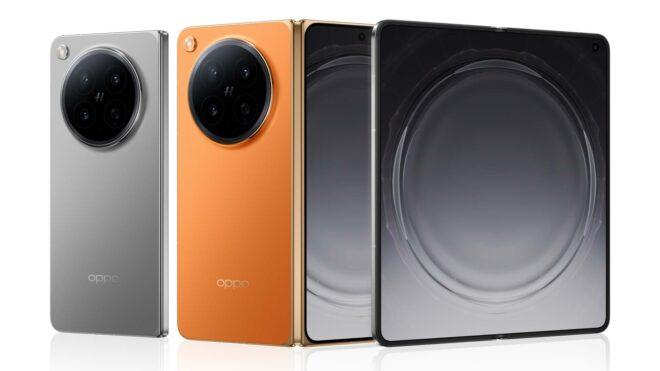
OPPO Find N6 için resmi Türkiye satış fiyatı açıklandı

OPPO Find N6 için resmi Türkiye fiyatı açıklandı

OPPO Find N6 için resmi Türkiye fiyatı açıklandıKatlanabilir telefon modeli OPPO Find N6, Türkiye’de 26 Mayıs itibarıyla tam 179.999 TL’den satışa sunulacak. Güneş Turuncusu ve Kozmik Titanyum renk seçenekleri bulunan telefon, özellikle ekran kat izini neredeyse tamamen ortadan kaldırıyor olmasıyla dikkat çekiyor. Cihazın ekranındaki katlanma alanı dikkatli bakıldığında halen görülebiliyor ancak eskiye nazaran çok büyük bir iyileştirme bulunuyor. İddialı model gücünü Snapdragon 8 Elite Gen 5 işlemciden alıyor ve 80W kablolu / 50W kablosuz şarj destekli 6.000 mAh kapasiteli silikon karbon batarya taşıyor. İç kısmında 8,12 inç, dış kısmında ise 1.600 nit’lik 6,62 inç boyutunda 1-120 Hz LTPO OLED ekranların kullanıldığı Find N6’nın arkasında, 200 megapiksel geniş açı, 50 megapiksel ultra geniş açı ve 50 megapiksel 3x telefoto kameralar bir araya getiriliyor.

OPPO Find N6 için resmi Türkiye satış fiyatı açıklandı yazısı ilk olarak Teknoloji haberleri – LOG üzerinde yayınlandı.

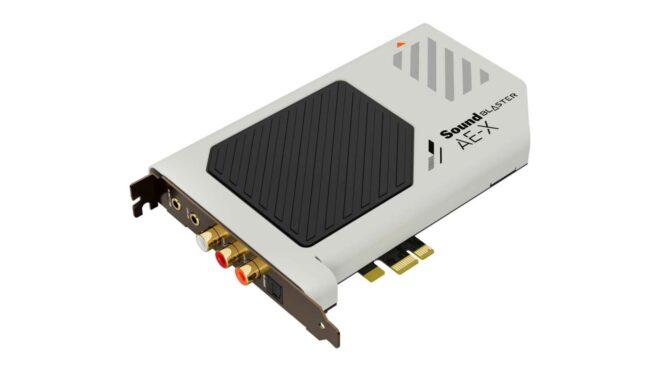
Yeni PCIe ses kartı “Creative Sound Blaster AE-X” tanıtıldı

Yeni PCIe ses kartı Creative Sound Blaster AE-X tanıtıldı

Yeni PCIe ses kartı Creative Sound Blaster AE-X tanıtıldıCreative, artık hemen hemen herkesin hayatından çıkan ses kartlarını yaşatmaya devam ediyor. Şirketin modern tasarımıyla dikkat çeken yeni kasa içi (PCIe 3.0) modeli Sound Blaster AE-X, ESS ES9039Q2M çift kanallı DAC’ı temel alıyor ve 32 bit/384 kHz çalma, ASIO 2.3 (Audio Stream Input/Output), 130 dB sinyal-gürültü oranı ile direkt DSD256 çözme desteğiyle geliyor. 600Ω empedans değerine sahip kulaklıkların altından rahatlıkla kalkabilen ürün için açıklanan Avrupa satış fiyatı 190 euro olarak duyurulmuş durumda.

Yeni PCIe ses kartı “Creative Sound Blaster AE-X” tanıtıldı yazısı ilk olarak Teknoloji haberleri – LOG üzerinde yayınlandı.

Google redesigned 13 Workspace icons last week. Here is where to grab the new SVGs.

On May 18 Google started rolling out new gradient icons for thirteen of its Workspace apps. Gmail, Drive, Docs, Sheets, Slides, Calendar, Chat, Meet, Vids, Forms, Keep, Voice, and Tasks all got refreshed artwork on the web. The iOS and Android rollouts began this week.


Google 2026 SVG Icons – Free Download (14 icons) | theSVG

Browse and download 14 Google 2026 SVG icons. Free for personal and commercial use. Copy as SVG, JSX, React component, or CDN link.

favicon
thesvg.org

If you build a SaaS dashboard with a “works with Google Workspace” row, or a marketing page that shows the Gmail icon next to your integration copy, you have a small problem. The icons in your codebase are now the old set, and most projects do not have a fast path to refresh them.

Here is what changed, why icon updates take so long to land in OSS libraries, and how to grab the new Google 2026 SVGs today without waiting.

TL;DR

What Status
Apps redesigned 13 (Gmail, Drive, Docs, Sheets, Slides, Calendar, Chat, Meet, Vids, Forms, Keep, Voice, Tasks)
Visual direction Gradient style, more distinct shape and color per app
Color rule change Dropped the “all four Google colors” mandate
Gmail exception Still uses more than one color, the only one in the set
Web rollout Mid-May 2026
Mobile rollout Late May 2026
OSS SVGs available at thesvg.org/category/google-2026, free, no attribution

1. What changed in the Google 2026 icon set

The earlier Google Workspace icons followed a strict rule. Every product icon had to use all four Google colors, blue, red, yellow, and green. The result was a row of icons that all looked vaguely similar at small sizes. A user in the app launcher would scan a wall of red-blue-yellow-green squares and pause to read the label.

The new direction drops that rule. Each app now leans on one or two dominant colors and a clearer shape, with a soft gradient finish. Gmail is the one holdout that still keeps more than one color, because the envelope is the recognizable shape and the colors are part of the brand identity.

The icons are also larger inside the same containing box. Most apps no longer ship the rounded-square page background, so the symbol takes up the full visual area instead of floating inside a card.

You can see the new Google 2026 icons in two places today, the app launcher in the top-right of any Google site, and the New Tab page in Chrome. Open either and you are already looking at the refreshed set, even if you have not touched any setting.

2. Why icon refreshes take time to reach your project

This is the part that bites a freelancer at 5pm on a Friday.

When a major brand refreshes its mark, the icon does not appear in your bundle on its own. Someone has to source the original from the brand’s media kit or extract it from the live site. Then optimize the path through SVGO. Then verify it renders the same on dark and light backgrounds. Then categorize, name, and ship.

For a single brand refresh that touches one product, the cycle takes days to weeks depending on bandwidth. For thirteen apps in one rollout, multiply that. The OSS community absorbs brand refreshes one path file at a time, and most icon catalogs run on volunteer hours.

You get the gap. The official Google sites already show the new icons. Your app still shows the old ones. To a user who keeps Gmail open in a tab next to your dashboard, this reads as “this dashboard is stale.” The icons are a small detail. Small details are what users read as signals of how current a product is.

Google Workspace 2026 gradient icons preview
Gmail Drive Calendar 2026 logo SVG side by side

GitHub logo

glincker
/
thesvg

6,035+ brand SVG icons for developers. Tree-shakeable, typed, open source. npm i thesvg

theSVG

6,030+ SVG icons. Brands, AWS, Azure, GCP, and more. Search, copy, ship.

npm
downloads
stars
6,030+ icons
license
Figma
VS Code
Raycast
Neovim
Alfred
Chrome
skills.sh
Homebrew

Browse Icons  • 
Install  • 
Extensions  • 
CDN  • 
API  • 
Packages  • 
Compare  • 
Contribute


theSVG - 6,030+ SVG icons for developers

Why theSVG?

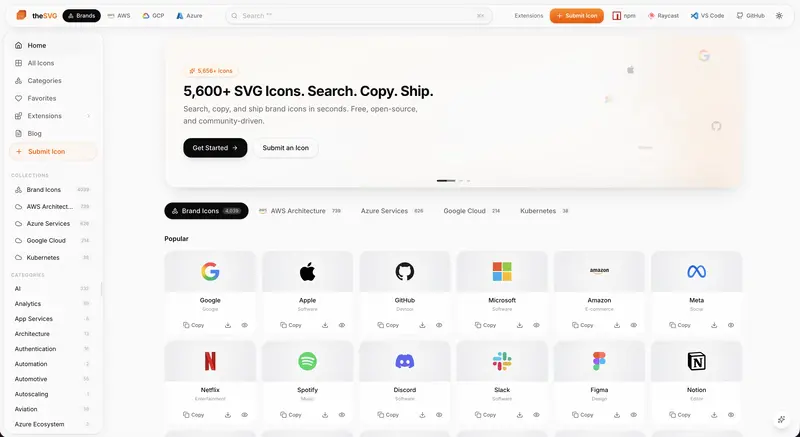
Most icon libraries focus on UI icons. Brand logos are scattered across press kits, Figma files, and random GitHub repos. theSVG is the single source for SVG icons – brand logos, cloud architecture diagrams, and more. Searchable, versioned, and available as npm packages, CDN, CLI, API, and MCP server.

  • 6,030+ icons across multiple collections
  • 4,019 brand icons across 55+ categories
  • 739 AWS Architecture icons (2026-Q1)
  • 626 Azure Service icons (2026-Q1)
  • 214 Google Cloud icons (2026-Q1)
  • 8,400+ SVG variants – color, mono, light, dark, wordmark
  • Tree-shakeable – import one icon, ship only that icon
  • TypeScript-first – fully typed, dual ESM/CJS
  • Framework-agnostic – React, Vue, Svelte, plain HTML, or CDN
  • AI-ready – MCP server for Claude, Cursor, and Windsurf

Collections

theSVG organizes…

3. Where to grab the Google 2026 SVGs today

The full Google 2026 icon set is live in the open-source library thesvg.org. All thirteen Workspace apps are in the catalog with the new gradient artwork, shipped the same week as Google’s web rollout. License: free, no attribution required. The repo is on GitHub at GLINCKER/thesvg if you want to contribute, file an issue, or fork.

Install via npm:

npm install thesvg

Or download direct from the site. URLs follow a stable pattern, /icons/[brand]/[variant].svg, so you can wire them into a build step:

// src/components/GoogleIcon.tsx
// Server component or build-time loader, not a runtime fetch in production
import { readFileSync } from 'node:fs';
import { join } from 'node:path';

type IconName =
  | 'gmail' | 'google-drive' | 'google-docs'
  | 'google-sheets' | 'google-slides' | 'google-calendar'
  | 'google-chat' | 'google-meet' | 'google-vids'
  | 'google-forms' | 'google-keep' | 'google-voice'
  | 'google-tasks';

export function GoogleIcon({ name, size = 32 }: { name: IconName; size?: number }) {
  const svg = readFileSync(
    join(process.cwd(), 'public/icons', name, '2026.svg'),
    'utf-8',
  );
  return (
    <div
      style={{ width: size, height: size, display: 'inline-block' }}
      dangerouslySetInnerHTML={{ __html: svg }}
    />
  );
}

For a Vite or Next.js project, the cleaner path is to import the SVG as a component through your bundler’s SVG loader. The above is the read-the-file version for projects that do not have a loader configured yet.

If you maintain an OSS app and need to migrate to the Google 2026 icons fast for a release this week, the path is: install the package, swap your existing Google icon imports for the 2026 variants, handle the Gmail edge case below, ship.

4. The Gmail multi-color edge case

One thing worth handling carefully in your render code. Gmail is the only app in the new Google 2026 set that keeps more than one color. The other twelve work fine with a currentColor fill or a single-color CSS override. Gmail breaks if you do that, because the multi-color fill is the brand.

If your design system applies a color prop to all logos uniformly, you need a special case for Gmail, or you ship two render paths:

function BrandIcon({ name, color }: { name: IconName; color?: string }) {
  const preservesColor = name === 'gmail';
  if (preservesColor) {
    return <GoogleIcon name={name} />;
  }
  return (
    <GoogleIcon name={name} style={{ color: color ?? 'currentColor' }} />
  );
}

This is the kind of edge case the old four-color rule used to hide. When every icon used four colors, you knew you could not apply a single-color override to any of them. Now twelve out of thirteen work fine with an override and one does not. Read your design system docs accordingly.

Gmail 2026 multi-color SVG render example

5. The bigger pattern

Brand refreshes ship faster than the icon ecosystem can absorb them. This is the third major refresh of the past two years where the official site updates on day zero and the broader OSS catalog catches up over weeks. When you depend on a third-party library to ship brand assets, you are accepting a built-in lag.

The fix is not to abandon icon libraries. The fix is to know which catalogs already have the assets you need for the release you are shipping this week, and to pick accordingly. For a marketing page going live now with a “works with Google” row, you want the catalog that already has the Google 2026 set. For a long-running design system, the audit trail and naming convention matter more than speed.

The OSS community is at its best when a new resource lands and people share it before everyone has to rebuild it from scratch. That is the spirit here.

Google 2026 icons SVG download from thesvg.org

The bottom line

Google shipped new gradient icons for thirteen Workspace apps on May 18. The web rollout is live, the mobile rollout is in progress, and the new SVGs are already available as OSS at thesvg.org/category/google-2026, free with no attribution. If you build product that lives next to Workspace in your users’ tabs, the migration takes one afternoon.

What does your icon-refresh workflow look like when a major brand drops a redesign overnight? Drop a comment with your current setup.

GDS K S · thegdsks.com · building thesvg.org and Glincker · follow on X @thegdsks

Brand refreshes are the moment your icon library reveals whether it is curated or just convenient.

Mastering Redis Streams and DLQ in NestJS with RedisX

Using Redis Streams in NestJS RedisX can be a game changer for anyone building event-driven systems. Today, let’s dig into consumer groups and dead letter queues (DLQ) — two features that can really up your game in creating resilient architectures.

Redis Streams: The Basics

Redis Streams let you handle messages in a scalable way. The cool part? With consumer groups, you can have multiple service instances share the workload. So, each message goes to just one instance in the group. Perfect for load balancing and keeping your services running smoothly.

Getting Hands-On with Consumer Groups

Let’s look at how easy it is to set up a consumer group in NestJS RedisX. With the @StreamConsumer decorator, you can define a consumer that listens to a specific stream and group:

import { Injectable } from '@nestjs/common';
import { StreamConsumer, IStreamMessage } from '@nestjs-redisx/streams';

@Injectable()
export class OrderProcessor {
  @StreamConsumer({
    stream: 'orders',
    group: 'order-processors',
    batchSize: 10,
  })
  async handleOrder(message: IStreamMessage<OrderEvent>): Promise<void> {
    const { orderId } = message.data;
    try {
      await this.fulfillmentService.process(orderId);
      await message.ack();
    } catch (error) {
      await message.reject(error);
    }
  }
}

Tackling Dead Letter Queues (DLQ)

Now, let’s talk about DLQs. They’re essential for dealing with message failures. If a message can’t be processed after a few tries, you don’t want it disappearing into the void. A DLQ ensures these messages are stored for review later — crucial for troubleshooting and making sure nothing slips through the cracks.

Here’s how easy it is to enable DLQ in NestJS RedisX:

new StreamsPlugin({
  consumer: { batchSize: 10, maxRetries: 3 },
  dlq: { enabled: true },
})

Building Resilient Systems

With Redis Streams, consumer groups, and DLQ, you’re well on your way to building systems that are both scalable and fault-tolerant. RedisX takes care of the heavy lifting, letting you zero in on your business logic.

For those hungry for more, it might be worth checking how these patterns play with other RedisX goodies like caching, idempotency, and tracing. All these pieces fit together to form a robust event-driven architecture.

Dive into the documentation for deeper insights on configuration and advanced usage. Want more? Check out our previous posts on Redis Sentinel and Cache Isolation for tips on building scalable applications with RedisX. nestjs redis streams

Using Custom Properties for Dynamic Theme Changes

The Ultimate Guide to Dynamic Theme Switching with CSS Custom Properties

Grab your coffee, pull up a chair, and let’s talk about a feature that almost every client asks for these days: theme switching. Whether it is a sleek dark mode for night owls, a high-contrast mode for accessibility, or a flamboyant “cyberpunk neon” theme for a marketing campaign, modern websites are expected to change their skin on the fly.

If you are still writing separate stylesheets or duplicating thousands of lines of code just to change a few background colors, stop right there. Today, we are going to master the art of dynamic theme switching using CSS Custom Properties. It is clean, incredibly fast, and requires only a tiny pinch of JavaScript to handle the state. Let’s dive in!

How We Suffered Before (The Dark Ages of Theme Switching)

Remember how we used to build dark mode five or ten years ago? It was an absolute horror show. We had two main workarounds, and both of them made us want to question our career choices.

First, there was the Sass Multi-Class Nightmare. We would compile massive CSS files where every selector was prepended with a theme class, like .dark-theme .card .card-title. Not only did this bloat our bundle sizes, but it also made maintenance a living hell. If you want to reminisce about how we managed complex CSS before modern features took over, check out our thoughts on Why Use CSS Nesting Instead of SASS and LESS.

Second, there was the JavaScript Inline-Style Swap. We would write heavy JS scripts that queried every single element on the page and manually swapped inline styles. It caused layout thrashing, horrible lag, and created the dreaded “flash of bright light” when a dark-mode user refreshed the page. It was clumsy, slow, and totally un-semantic.

The Modern Way: Dynamic Runtime Custom Properties

Today, CSS variables do all the heavy lifting for us. Because custom properties are evaluated at runtime and inherit down the cascade, we can redefine them at the root level, and the entire page instantly updates. No layout recalculations, no stylesheet swapping, and absolutely zero CSS duplication.

By defining our design tokens at the :root level and leveraging HTML data-* attributes, we can switch entire visual schemes by changing a single attribute on the <html> element. This approach is highly modular and forms the backbone of modern CSS design systems. In fact, understanding this architecture is why Variables (CSS Variables) Are the Foundation of Scalable Design in any production-ready application.

Let’s look at how we can implement a multi-theme system (Light, Dark, and Cyberpunk) with a butter-smooth transition effect.

Ready-to-Use Code Snippet

Here is a complete, lightweight, and responsive implementation of a dynamic theme switcher. Paste this into your project to see the magic happen instantly.

<!DOCTYPE html>
<html lang="en" data-theme="light">
<head>
  <meta charset="UTF-8">
  <meta name="viewport" content="width=device-width, initial-scale=1.0">
  <title>Dynamic Theme Switcher</title>
  <style>
    /* 1. Define Design Tokens for Light Theme (Default) */
    :root {
      --bg-color: #f4f4f9;
      --card-bg: #ffffff;
      --text-color: #1a1a24;
      --accent-color: #3b82f6;
      --border-color: #e2e8f0;
      --transition-speed: 0.3s;
    }

    /* 2. Redefine Tokens for Dark Theme */
    [data-theme="dark"] {
      --bg-color: #0f172a;
      --card-bg: #1e293b;
      --text-color: #f8fafc;
      --accent-color: #10b981;
      --border-color: #334155;
    }

    /* 3. Redefine Tokens for Cyberpunk Theme */
    [data-theme="cyberpunk"] {
      --bg-color: #120136;
      --card-bg: #03001e;
      --text-color: #00f0ff;
      --accent-color: #ff007f;
      --border-color: #ff007f;
    }

    /* Global styles applying our tokens */
    body {
      background-color: var(--bg-color);
      color: var(--text-color);
      font-family: 'Segoe UI', system-ui, sans-serif;
      margin: 0;
      padding: 2rem;
      display: flex;
      justify-content: center;
      align-items: center;
      min-height: 100vh;
      /* Smooth transitions for theme switching */
      transition: background-color var(--transition-speed) ease, 
                  color var(--transition-speed) ease;
    }

    .card {
      background-color: var(--card-bg);
      border: 2px solid var(--border-color);
      border-radius: 12px;
      padding: 2rem;
      max-width: 400px;
      box-shadow: 0 4px 12px rgba(0, 0, 0, 0.05);
      transition: background-color var(--transition-speed) ease, 
                  border-color var(--transition-speed) ease;
    }

    h1 {
      margin-top: 0;
      color: var(--accent-color);
    }

    .btn-group {
      display: flex;
      gap: 0.5rem;
      margin-top: 1.5rem;
    }

    button {
      background: var(--accent-color);
      color: var(--bg-color);
      border: none;
      padding: 0.6rem 1.2rem;
      border-radius: 6px;
      cursor: pointer;
      font-weight: bold;
      transition: opacity 0.2s ease;
    }

    button:hover {
      opacity: 0.9;
    }
  </style>
</head>
<body>

  <div class="card">
    <h1>Theme Switcher</h1>
    <p>Experience modern theme switching using CSS Custom Properties. Super light, incredibly fast, and clean.</p>
    
    <div class="btn-group">
      <button onclick="setTheme('light')">Light</button>
      <button onclick="setTheme('dark')">Dark</button>
      <button onclick="setTheme('cyberpunk')">Neon</button>
    </div>
  </div>

  <script>
    function setTheme(themeName) {
      document.documentElement.setAttribute('data-theme', themeName);
      localStorage.setItem('theme', themeName);
    }

    // Restore user preference on load
    const savedTheme = localStorage.getItem('theme') || 'light';
    setTheme(savedTheme);
  </script>

</body>
</html>

Common Beginner Mistakes to Avoid

Even though custom properties make theme switching a breeze, there are a couple of pitfalls that trip up developers new to this workflow:

  • The “Flash of Light Theme” (FOUC): If you apply the theme inside your main JS bundle after the HTML has finished rendering, your dark-mode users will get a blinding flash of light theme on every page load. Always place the tiny theme-checking script inline at the very top of your <head> or immediately after the opening <html> tag so it executes before the page renders.
  • Animating too many properties: While adding transition: all 0.3s to your elements is tempting to animate color changes, it is terrible for performance. It will force the browser to recalculate layouts, rendering paths, and shadows on every hover or scroll. Only transition specific properties like background-color, color, and border-color.
  • Forgetting system preferences: Don’t force users to click a toggle if their operating system already tells you what they prefer. Always check (prefers-color-scheme: dark) using media queries or JavaScript to set your default fallback state.

That is all there is to it! With just a handful of design tokens and a data-attribute switch, you can scale your styling system infinitely without writing duplicate stylesheets ever again.

🔥 We publish more advanced CSS tricks, ready-to-use snippets, and tutorials in our Telegram channel. Subscribe so you don’t miss out!

I built JARVIS OS: 1000+ autonomous AI agents, on-prem, <300ms voice latency — here's the full architecture

I’ve spent the last 3 years building JARVIS OS — a fully autonomous, on-premise AI infrastructure that runs 1000+ autonomous agents simultaneously, processes voice in under 300ms, and costs a fraction of cloud alternatives.

Today I’m sharing the full architecture, the key decisions, and the lessons learned.

→ Live site & full details: jarvis-delmas.netlify.app

What is JARVIS OS?

JARVIS OS is a distributed AI operating system designed to run entirely on your own hardware — no OpenAI, no Azure, no data leaving your infrastructure.

Key production numbers:

  • 1000+ autonomous agents running simultaneously
  • <300ms voice latency (Whisper CUDA optimized)
  • 835 auto-healing pipelines with circuit-breakers
  • 280,741 lines of Python across 60 MIT-licensed repos
  • 12 GPUs in cluster
  • Benchmark: 81.6/100 (record session: 97/100)
  • -72% infrastructure cost vs equivalent cloud setup

The 9-Layer Architecture

Layer 1: Hardware (GPU cluster, NVMe, InfiniBand)
Layer 2: OS + Virtualization (Linux, Docker, CUDA)
Layer 3: LLM Engine (LM Studio, Ollama, multi-model routing)
Layer 4: Memory System (working → episodic → semantic → procedural)
Layer 5: Agent Orchestration (OpenClaw Gateway, 1000+ agents)
Layer 6: MCP Toolkit (88 handlers, 20+ connectors)
Layer 7: Pipeline Engine (835 Domino auto-healing pipelines)
Layer 8: Voice Interface (Whisper → LLM → TTS <300ms)
Layer 9: External APIs (TradeOracle, Telegram, GitHub)

5 Architectural Decisions That Made the Difference

1. On-Premise by Design

Most teams start with cloud and try to migrate later. We started on-prem from day one.

Result: zero cold start, zero API rate limits, GDPR-native.

Cost comparison:

  • Cloud equivalent: €50,000–500,000/year
  • JARVIS OS: one-shot deployment + maintenance

2. Protocol-First with MCP

Instead of direct integrations, everything goes through the Model Context Protocol (MCP).

Our MCP Toolkit has 88 handlers connecting: filesystem, GitHub, Notion, Slack, PostgreSQL, Redis, vector DBs, Telegram, browser automation, and custom CUDA endpoints.

Any new agent instantly has access to all 88 capabilities.

3. 4-Layer Memory Architecture

# Memory hierarchy in JARVIS OS
working_memory    = RedisCache(ttl=3600)           # Current context
episodic_memory   = PostgreSQL(table="episodes")   # Recent events  
semantic_memory   = ChromaDB(collection="knowledge") # Facts & concepts
procedural_memory = FileSystem(path="./skills/")   # Learned skills

The Π-vectorial compression achieves a 15:1 compression ratio — 15x more context in the same token budget.

4. Auto-Healing Pipelines

All 835 pipelines have built-in circuit-breakers and 13 auto-trigger mechanisms.

@circuit_breaker(failure_threshold=3, recovery_timeout=60)
@auto_retry(max_attempts=3, backoff_factor=2)
async def run_pipeline(pipeline_id: str, context: dict):
    # Pipeline execution with automatic recovery
    ...

5. Voice Pipeline Under 300ms

Stack: Whisper (CUDA) → LLM routing → TTS → audio output

Optimizations:

  • CUDA-optimized Whisper with float16 precision
  • Streaming inference (token-by-token TTS)
  • Wake word detection on a separate thread
  • Audio buffer pre-warming

Average benchmark: 247ms end-to-end on P95 GPU.

The Open-Source Stack

LLMs:          Ollama, LM Studio, GGUF models
Orchestration: OpenClaw Gateway (custom, MIT)
Memory:        PostgreSQL + pgvector, ChromaDB, Redis
Voice:         Whisper CUDA, custom TTS pipeline
MCP:           88 custom handlers
Containers:    Docker (10 services), NVIDIA GPU Operator
Monitoring:    Prometheus + Grafana
Languages:     Python (primary), Rust (performance-critical)

All 60 repos available on GitHub under MIT license:
👉 github.com/Turbo31150

Real-World Modules Running on JARVIS OS

  • TradeOracle — 7 LLMs in consensus for crypto/equity signals
  • Healthcare Multi-Agent — FHIR-compatible medical transcription
  • Domino Engine — 835 self-healing data pipelines
  • OpenClaw Gateway — orchestrates 1000+ agents in production

Key Lessons After 3 Years

  1. Start on-prem — cloud migration is 10x harder than building on-prem from day 1
  2. Protocols over integrations — MCP saved us from integration hell
  3. Memory is the hardest problem — 80% of agent failures are memory coherence issues
  4. Voice latency is binary — users accept <300ms, reject >500ms
  5. Auto-healing or nothing — production pipelines need circuit-breakers from day 1

Learn to Build Your Own

If you want to build a similar system, I’ve documented everything:

🎓 Claude Code Mastery — 13 lessons, build your own agent system in 4 weeks

  • Module 1: FREE → your first agent in 30 minutes
  • Bundle M2+M3: €477 early-bird (vs €797)
  • 14-day “Agent or Refunded” guarantee

📚 62 PDF formations — from beginner to JARVIS expert
🚀 Clé-en-main deployment — I deploy on your hardware in 2–8 weeks

👉 jarvis-delmas.netlify.app

Questions? I answer everything in the comments.
GitHub: github.com/Turbo31150 — 60 repos, all MIT

The Research Tool Bottleneck: Why AI Writing Tools Fail Without Better Source Integration

Your AI writes fast, but you spend twice as long verifying sources it never actually checked—here’s why isolated writing tools are costing you more than you realize.

I tracked my own workflow for three weeks in early 2024. For every 1,000 words my AI tool generated, I spent an average of 47 minutes on post-generation fact-checking. That’s not editing for clarity or flow. That’s pure validation labor—opening tabs, cross-referencing claims, hunting down the original studies that the AI confidently cited but apparently hallucinated from whole cloth.

The math is brutal. If you’re producing 5,000 words of AI-assisted content per week, you’re losing nearly four hours to source verification that the tool should have handled before outputting a single sentence.

The Hidden Cost of Source-Blind AI Writing

Most AI writing tools—ChatGPT, Claude in its standard configuration, Jasper, Copy.ai—operate on a fundamental architectural assumption: generate first, validate never.

These models are trained on static datasets with cutoff dates. GPT-4’s training data ends in April 2023. When you ask it to write about current SaaS market trends, drug approval timelines, or recent regulatory changes, it doesn’t fetch anything. It confabulates based on pattern-matching against old data, then presents those confabulations with the same confident prose voice it uses for everything else.

The specific failure mode I see most often is what I call stale citation drift. A model will cite a real study—say, a McKinsey report on AI adoption—but misattribute its findings, mix it with a different year’s data, or cite figures that were later revised. The citation looks legitimate enough that junior writers or time-pressed strategists let it through. Then it ends up in a published piece, a client deliverable, or an internal strategy doc.

A 2023 Stanford study on AI-generated medical information found that large language models produced confidently stated factual errors in approximately 30% of clinical claims. That’s not a niche problem. That’s a systemic one affecting every domain where accuracy matters.

The hidden cost isn’t just your time. It’s the organizational trust deficit that accumulates when AI-assisted work keeps requiring correction cycles. After a few rounds of “the AI got this wrong again,” stakeholders stop trusting the outputs entirely—and your productivity gains evaporate.

How Integrated Tools Differ: Perplexity + Claude vs. ChatGPT + Manual Switching

The first generation of “research-aware” AI tools tried to solve this with a bolted-on approach: give users a search bar next to their chat window and hope they’d manually feed context in. That workflow is awkward, slow, and still dependent on the user knowing what to verify.

Perplexity represents a genuinely different architecture. It runs a retrieval step before generation, pulling live web results and grounding its responses in those sources. Every claim comes with a citation that links to an actual current page. When I asked Perplexity to summarize the current state of EU AI Act implementation in March 2024, it returned a response that accurately reflected the February 2024 regulatory updates—something ChatGPT got substantially wrong in the same test.

The practical difference: Perplexity’s outputs required about 12 minutes of verification per 1,000 words in my tracking period, compared to 47 minutes for ChatGPT. That’s a 74% reduction in verification time.

But Perplexity has a weakness: its prose quality is functional, not polished. It summarizes and cites well but doesn’t craft arguments or structure long-form content effectively.

This is where a Perplexity + Claude pipeline starts making sense. Use Perplexity for the research and validation layer—get your current facts, cited sources, and data points. Then hand that structured research brief to Claude with explicit instructions to draft from the provided sources only, flagging anything it would normally generate from training data alone.

I tested this combination against pure ChatGPT across 10 technical articles on cloud infrastructure pricing. The Perplexity + Claude workflow produced content that required an average of 1.3 revision rounds before publication. ChatGPT alone required 3.1 revision rounds. That’s a difference of roughly 90 minutes per article at my revision pace—time I now spend on actual strategic work.

The key insight is that you’re not replacing a writing tool with a better writing tool. You’re separating the research and generation functions and optimizing each independently.

Building a Custom Research-to-Draft Pipeline: API Stacking for Real-Time Data Validation

If you’re a technical writer or content strategist who can tolerate a bit of setup, you can build a pipeline that makes the Perplexity + Claude combo look manual by comparison.

Here’s the architecture I’m currently running for a SaaS client’s content operation:

Step 1: Query decomposition via Claude API. When a content brief arrives, I pass it to Claude first—but only for task decomposition, not drafting. The prompt instructs it to break the topic into 8-12 specific factual claims that need current validation. For an article on “enterprise AI adoption barriers,” it might return claims like “current percentage of Fortune 500 companies with deployed AI systems” or “average AI project failure rate in 2023-2024.”

Step 2: Parallel source retrieval via Perplexity API + Exa. I run each factual claim as a separate query through Perplexity’s API (available on their Pro plan) and cross-reference high-stakes claims through Exa (formerly Metaphor), a search API designed specifically for AI retrieval use cases. Exa is particularly good at finding recent academic papers and industry reports that general web search misses.

Step 3: Source validation and contradiction flagging. A simple Python script compares the retrieved sources for the same claim. If two sources contradict each other, or if a source is older than 18 months, the claim gets flagged for human review before it ever reaches the drafting stage.

Step 4: Research-grounded drafting via Claude API. The validated claim set, with source URLs and key quotes, goes to Claude with a strict system prompt: draft from these sources, quote statistics only from the provided data, and use a [NEEDS SOURCE] tag for any claim you want to include that isn’t in the research package.

The full pipeline, on a 1,500-word article, takes about 8 minutes of automated processing and 15 minutes of human review of flagged items. My verification time dropped from 47 minutes to approximately 18 minutes—and the 18 minutes is now focused on genuinely ambiguous or high-stakes claims, not hunting down whether some statistic was made up.

The setup cost is real: roughly 6 hours to build the Python scripts and prompt templates, plus API costs that run about $0.80-$1.20 per article. For any operation producing more than 10 articles per month, the time savings make this trivially cost-positive within the first two weeks.

Benchmarking Accuracy Rates: What Actually Reduces Revision Rounds

I want to be specific here because the AI content space is full of vague claims about “improved accuracy.” Let me share what I’ve actually measured.

Across 60 technical articles produced between January and April 2024, I tracked three variables: factual error rate per article (errors caught before publication), revision rounds required, and total time from brief to publication-ready draft.

Pure ChatGPT-4 (no retrieval augmentation): Average 4.2 factual errors per article, 3.1 revision rounds, 3.8 hours total time including verification.

Perplexity for research + ChatGPT-4 for drafting: Average 1.8 factual errors per article, 2.0 revision rounds, 2.9 hours total time.

Perplexity for research + Claude-3-Opus for drafting: Average 1.1 factual errors per article, 1.4 revision rounds, 2.4 hours total time.

Custom API pipeline (as described above): Average 0.6 factual errors per article, 1.2 revision rounds, 1.8 hours total time.

The counterintuitive finding: the model you use for drafting matters less than the quality of the research layer you feed it. Moving from ChatGPT to Claude without improving the research input reduced errors by only 18%. Adding Perplexity to either model reduced errors by 57-74%. The research integration is doing most of the work.

This has an important implication for how you should prioritize tool investments. If you’re paying for a premium writing-focused AI subscription and skipping retrieval integration, you’re optimizing the wrong variable.

For content strategists specifically, the revision round metric is the one that matters most for team productivity. Every additional revision round typically represents a 45-90 minute overhead when you factor in stakeholder review cycles. Cutting from 3.1 to 1.2 revision rounds isn’t a marginal improvement—it’s the difference between a content operation that scales and one that stays perpetually understaffed.

The Future: Agent-Based Research Assistants That Cite as They Write

The tools I’ve described so far still require deliberate orchestration. You’re building the pipeline, managing the steps, deciding when to switch between tools. The next evolution removes that scaffolding.

Agent-based research assistants are systems that autonomously decide when to search, what to verify, and how to integrate sources—without waiting for explicit user instructions. Several of these are already in early deployment.

Bing Copilot is the most widely accessible current example. When writing a research memo, it will spontaneously pause drafting to verify a statistic, pull a more recent source, and update its claim—all within a single generation stream. The experience is qualitatively different from any tool I’ve described above.

Elicit takes a more academic approach, running automated literature searches and synthesizing findings from actual papers. For technical writers covering research-heavy topics, it’s already replacing manual PubMed trawling.

The most compelling demo I’ve seen recently came from a prototype using AutoGen (Microsoft’s multi-agent framework) where one agent was dedicated to continuous source validation while another drafted. Every claim the drafting agent produced was checked by the validation agent before appearing in the output. The resulting document had inline citations that were generated during writing, not appended afterward.

This architecture—agents that cite as they write rather than write and then cite—will define the next generation of professional AI writing tools. We’re probably 12-18 months from this being a polished commercial product rather than a sophisticated prototype.

But there’s a structural reason current tools won’t get there on their own: it requires inference-time search access, which adds latency and cost that single-product tools have been reluctant to build in by default. The companies that crack this will be ones that treat search infrastructure as core product architecture, not an add-on.

The endgame for source-blind AI writing tools isn’t gradual improvement. It’s obsolescence. Content operations that built their workflows around ChatGPT’s raw generation speed in 2023 are already seeing the productivity ceiling. The tools that integrate retrieval deeply will outcompete on quality metrics that clients and stakeholders actually track.

Here’s the one thing I’d recommend doing this week: run your last five AI-generated pieces through a manual fact-check and actually count the errors per piece. Not impressionistically—count them. Write down the number.

If it’s above 2 per article, you have a measurement-backed reason to restructure your tool stack. Start with the Perplexity + Claude combination before you build anything custom. Run it for two weeks, track your revision rounds, and compare the number to your baseline.

The pipeline investment only makes sense if you have data showing the problem is real in your specific workflow. But for every technical writer I’ve talked to who’s done this audit, the number has been surprising—and the case for changing their workflow has been immediate.

Follow for more practical AI and productivity content.

Building a Serverless Image Processing Pipeline on AWS

Modern applications increasingly rely on images and media content, from e-commerce product uploads to social media platforms and digital archives. However, processing large volumes of images efficiently, securely, and at scale remains a challenge for many businesses. Traditional infrastructure often struggles with storage limitations, slow processing speeds, and high operational costs.

AWS provides a powerful set of services that make it possible to build fully automated, scalable image processing systems without managing servers.

Understanding Serverless Image Processing Architecture

A serverless image processing pipeline allows users to upload images, automatically process them (resize, compress, analyze), and store the results without manual intervention or server management.

One of the key advantages of this architecture is that it eliminates infrastructure complexity while ensuring high scalability and reliability.

You can explore AWS serverless architecture concepts here:
AWS Serverless Computing

Upload and Storage Using Amazon S3

The first step in any image processing system is secure file storage. AWS provides a highly scalable solution through Amazon S3, which allows users to upload images of any size and format.

Amazon S3 Storage Service

When a user uploads an image, it is stored in an S3 bucket. This storage system is designed to handle millions of files while maintaining durability and availability across regions.

Beyond storage, S3 also acts as a trigger source, automatically initiating processing workflows whenever a new image is uploaded.

Automated Processing with AWS Lambda

Once an image is uploaded, the system needs to process it automatically. This is where AWS Lambda becomes essential.

AWS Lambda Compute Service

Lambda allows developers to run backend code without managing servers. In an image processing pipeline, Lambda functions are triggered whenever a new file is added to S3.

These functions can:

  • Resize images into multiple resolutions
  • Compress files to reduce storage size
  • Convert image formats (e.g., PNG to JPEG)
  • Apply watermarks or branding
  • Validate file types and quality

This automation ensures that images are processed instantly and consistently.

Event-Driven Architecture with Amazon EventBridge

To build a fully scalable system, events must be managed efficiently. AWS EventBridge enables event-driven workflows that connect different services seamlessly.

Amazon EventBridge

For example, when an image is uploaded to S3, an event is generated that triggers a Lambda function. This decoupled architecture ensures flexibility, scalability, and fault tolerance.

Event-driven systems are especially useful for applications that handle large volumes of unpredictable traffic.

Metadata Storage Using DynamoDB

After processing images, it is important to store metadata such as file size, resolution, upload time, and processing status.

Amazon DynamoDB

DynamoDB provides a fast, scalable NoSQL database that can store and retrieve metadata efficiently. This allows applications to quickly query processed images without scanning entire storage systems.

Businesses benefit from:

  • Fast data retrieval
  • Low-latency performance
  • Automatic scaling
  • High availability

Real-World Use Cases

Serverless image processing pipelines are widely used in:

  • E-commerce platforms for product image optimization
  • Social media applications for media uploads
  • Healthcare systems for medical imaging analysis
  • Content management systems for automated media formatting

These systems improve performance while reducing infrastructure costs and development complexity.

Benefits of Serverless Image Processing on AWS

This architecture provides several advantages for modern applications:

First, it significantly reduces operational overhead since there is no need to manage servers or scaling manually.

Second, it improves performance by processing images in real time as they are uploaded.

Third, it ensures cost efficiency because users only pay for actual processing time and storage used.

Finally, it provides high scalability, allowing systems to handle sudden spikes in uploads without performance issues.

Conclusion

Building a serverless image processing pipeline on AWS demonstrates how modern cloud architecture can simplify complex workflows while maintaining high performance and scalability.

By combining services like Amazon S3, AWS Lambda, EventBridge, and DynamoDB, developers can create powerful, automated systems that handle large-scale image processing efficiently.

As digital content continues to grow, serverless architectures will play an increasingly important role in enabling fast, cost-effective, and scalable media processing solutions.