Stripe Webhooks: Idempotency, Retries, and Queue Setup

Stripe sent one webhook. Your database has three orders. What happened?

This is not a hypothetical. I’ve seen it in production — on vatnode.dev, on pikkuna.fi, on pi-pi.ee. The Stripe webhook hits your endpoint, your server takes 800ms to respond, Stripe times out and queues a retry. Meanwhile your server did complete the work. Now you have a duplicate. Then another one arrives 30 minutes later.

The naive implementation — parse the JSON, run your business logic, return 200 — fails in ways that only show up under real traffic. Here’s what production actually looks like.

Why the Naive Implementation Breaks

Stripe’s retry policy is more aggressive than most developers expect. If your endpoint returns anything other than a 2xx status code, or takes longer than 30 seconds to respond, Stripe retries. The schedule: immediately, then at 5 minutes, 30 minutes, 2 hours, 5 hours, 10 hours, and so on — up to 72 hours and roughly 15–18 total attempts.

That means if your server returned 500 at 9 AM on Monday due to a database hiccup, Stripe will still be trying to deliver the same event on Tuesday morning. If your server is back up, it will process the event — possibly creating a duplicate subscription, a duplicate order, or sending a duplicate email to your customer.

The naive handler looks like this:

// app/api/webhooks/stripe/route.ts — DON'T do this
export async function POST(request: Request) {
  const body = await request.json(); // Wrong: parsed body won't verify
  const event = body as Stripe.Event;

  if (event.type === "payment_intent.succeeded") {
    await createOrder(event.data.object); // No idempotency check
  }

  return new Response("ok", { status: 200 });
}

Three problems here: no signature verification, no protection against replay attacks, and synchronous processing that blocks the response while your business logic runs. If createOrder takes 3 seconds and Stripe’s timeout is strict, you’ll get retries even when the order was created successfully.

name=”How to handle Stripe webhooks reliably in production”
totalTime=”PT3H”
tools={[
“Next.js 16”,
“TypeScript”,
“Stripe SDK”,
“BullMQ”,
“ioredis”,
“Drizzle ORM”,
“PostgreSQL”,
]}
steps={[
{
name: “Verify the signature using raw bytes”,
text: “Use request.arrayBuffer() — not request.json() — to get the raw body before passing it to stripe.webhooks.constructEvent. Parsing the body first changes the bytes and makes signature verification always fail.”,
},
{
name: “Implement dual-layer idempotency”,
text: “Store processed Stripe event IDs in PostgreSQL as the source of truth. Add a Redis pre-check layer for sub-millisecond lookups on hot paths. Return 200 immediately when a duplicate is detected.”,
},
{
name: “Enqueue the event with BullMQ”,
text: “Return 200 from the HTTP handler within 50ms by enqueuing to BullMQ using event.id as the jobId for deduplication. Never run business logic synchronously inside the webhook handler.”,
},
{
name: “Process events in a separate worker”,
text: “Run a BullMQ worker with concurrency 5 that handles payment_intent.succeeded, customer.subscription.deleted, and invoice.payment_failed. Double-check idempotency inside the worker to cover edge cases like mid-job restarts.”,
},
{
name: “Wrap critical handlers in transactions”,
text: “Use a database transaction for payment_intent.succeeded so that partial writes never leave inconsistent state. Send confirmation emails outside the transaction — a failed email shouldn’t roll back the order.”,
},
{
name: “Test with Stripe CLI locally”,
text: “Use stripe listen –forward-to localhost:3000/api/webhooks/stripe and stripe trigger payment_intent.succeeded to replay events. Verify idempotency by re-sending the same event ID and confirming the duplicate response.”,
},
]}
/>

Idempotency — The Foundation

slug=”api-integrations”
text=”Need a production-grade Stripe webhook pipeline — idempotency, BullMQ, signature verification, retry handling — wired into your SaaS or e-commerce stack? This is what I build.”
/>

Before any queue, before any worker, you need idempotency: the guarantee that processing the same event twice produces the same result as processing it once.

Stripe makes this straightforward — every event has a unique id field (e.g., evt_1OqXyz...). Store this ID when you process the event. On subsequent attempts, check the store first and short-circuit.

I use PostgreSQL for durable idempotency keys and Redis for a fast pre-check layer. Here’s the Drizzle ORM schema:

// packages/db/schema/webhook-events.ts
import { pgTable, text, timestamp, jsonb } from "drizzle-orm/pg-core";

export const webhookEvents = pgTable("webhook_events", {
  id: text("id").primaryKey(), // Stripe event ID — evt_1OqXyz...
  type: text("type").notNull(), // payment_intent.succeeded, etc.
  processedAt: timestamp("processed_at").notNull().defaultNow(),
  payload: jsonb("payload").notNull(),
});

And the idempotency check — run this before any business logic:

// lib/webhook-idempotency.ts
import { db } from "@/packages/db";
import { webhookEvents } from "@/packages/db/schema/webhook-events";
import { eq } from "drizzle-orm";
import { redis } from "@/lib/redis"; // ioredis instance

export async function isAlreadyProcessed(eventId: string): Promise<boolean> {
  // Fast path: Redis check first (sub-millisecond)
  const cached = await redis.get(`webhook:processed:${eventId}`);
  if (cached) return true;

  // Slow path: database check (handles Redis eviction or restarts)
  const existing = await db
    .select({ id: webhookEvents.id })
    .from(webhookEvents)
    .where(eq(webhookEvents.id, eventId))
    .limit(1);

  if (existing.length > 0) {
    // Restore to Redis cache so future checks are fast
    await redis.set(`webhook:processed:${eventId}`, "1", "EX", 86400 * 7);
    return true;
  }

  return false;
}

export async function markAsProcessed(
  eventId: string,
  type: string,
  payload: unknown
): Promise<void> {
  // Write to DB first — this is the source of truth
  await db.insert(webhookEvents).values({
    id: eventId,
    type,
    payload,
  });

  // Then cache in Redis for fast future lookups
  await redis.set(`webhook:processed:${eventId}`, "1", "EX", 86400 * 7);
}

Signature Verification in Next.js App Router

Here’s the subtle thing that breaks almost every Next.js webhook tutorial: request.json() returns a parsed object. Stripe’s signature verification requires the raw bytes of the original request body. Once parsed, the signature check will always fail.

In the Pages Router, you’d disable bodyParser. In the App Router, you use request.arrayBuffer():

// app/api/webhooks/stripe/route.ts
import Stripe from "stripe";
import { NextResponse } from "next/server";
import { isAlreadyProcessed } from "@/lib/webhook-idempotency";
import { webhookQueue } from "@/lib/webhook-queue";

const stripe = new Stripe(process.env.STRIPE_SECRET_KEY!, {
  apiVersion: "2025-01-27.acacia",
});

const webhookSecret = process.env.STRIPE_WEBHOOK_SECRET!;

export async function POST(request: Request) {
  // arrayBuffer() gives us raw bytes — required for signature verification
  const rawBody = await request.arrayBuffer();
  const signature = request.headers.get("stripe-signature");

  if (!signature) {
    return NextResponse.json({ error: "Missing signature" }, { status: 400 });
  }

  let event: Stripe.Event;

  try {
    // Convert ArrayBuffer to Buffer for the Stripe SDK
    event = stripe.webhooks.constructEvent(Buffer.from(rawBody), signature, webhookSecret);
  } catch (err) {
    console.error("Webhook signature verification failed:", err);
    return NextResponse.json({ error: "Invalid signature" }, { status: 400 });
  }

  // Check idempotency before doing anything else
  const alreadyProcessed = await isAlreadyProcessed(event.id);
  if (alreadyProcessed) {
    // Return 200 so Stripe stops retrying — this is intentional
    return NextResponse.json({ received: true, duplicate: true });
  }

  // Enqueue the event — don't process synchronously
  await webhookQueue.add(
    event.type,
    { event },
    {
      jobId: event.id, // BullMQ deduplicates by jobId within the active window
      attempts: 5,
      backoff: { type: "exponential", delay: 5000 },
    }
  );

  // Return immediately — Stripe considers this success
  return NextResponse.json({ received: true });
}

Two things to notice. First, the idempotency check runs before enqueuing — so if Stripe retries and the job is still in the queue (not yet processed), you return 200 and BullMQ’s jobId deduplication handles the rest. Second, the endpoint returns immediately after enqueuing. This response time is typically under 50ms, well within Stripe’s timeout window.

BullMQ Queue Architecture

Processing webhooks synchronously in the HTTP handler means your response time is tied to every downstream API call — CRM updates, email sends, database writes. One slow dependency and you’re getting retries.

The right architecture: webhook endpoint enqueues, a separate worker processes.

// lib/webhook-queue.ts
import { Queue } from "bullmq";
import { redis } from "@/lib/redis";

export const webhookQueue = new Queue("stripe-webhooks", {
  connection: redis,
  defaultJobOptions: {
    attempts: 5,
    backoff: {
      type: "exponential",
      delay: 5000, // 5s, 10s, 20s, 40s, 80s
    },
    removeOnComplete: { count: 1000 }, // Keep last 1000 for debugging
    removeOnFail: false, // Keep failed jobs in DLQ for inspection
  },
});
// workers/stripe-webhook.worker.ts
import { Worker, Job } from "bullmq";
import Stripe from "stripe";
import { redis } from "@/lib/redis";
import { isAlreadyProcessed, markAsProcessed } from "@/lib/webhook-idempotency";
import { handlePaymentSucceeded } from "./handlers/payment-succeeded";
import { handleSubscriptionDeleted } from "./handlers/subscription-deleted";
import { handleInvoicePaymentFailed } from "./handlers/invoice-payment-failed";

const worker = new Worker(
  "stripe-webhooks",
  async (job: Job<{ event: Stripe.Event }>) => {
    const { event } = job.data;

    // Double-check idempotency inside the worker — edge case: worker restart mid-job
    const alreadyProcessed = await isAlreadyProcessed(event.id);
    if (alreadyProcessed) {
      return { skipped: true, reason: "duplicate" };
    }

    switch (event.type) {
      case "payment_intent.succeeded":
        await handlePaymentSucceeded(event.data.object as Stripe.PaymentIntent);
        break;

      case "customer.subscription.deleted":
        await handleSubscriptionDeleted(event.data.object as Stripe.Subscription);
        break;

      case "invoice.payment_failed":
        await handleInvoicePaymentFailed(event.data.object as Stripe.Invoice);
        break;

      default:
        console.log(`Unhandled webhook type: ${event.type}`);
        return { skipped: true, reason: "unhandled_type" };
    }

    // Mark processed only after the handler succeeds
    // If the handler throws, BullMQ retries the job — we don't mark it done
    await markAsProcessed(event.id, event.type, event.data.object);

    return { processed: true };
  },
  {
    connection: redis,
    concurrency: 5,
  }
);

worker.on("failed", (job, err) => {
  // After all retries exhausted, alert your team
  console.error(`Webhook job ${job?.id} failed permanently:`, err);
});

The dead letter queue behavior is built into BullMQ — failed jobs (after all retries) stay in the failed state. I keep a Telegram alert on the failed event so I know immediately when something needs manual intervention.

Handling the Key Events

payment_intent.succeeded — the most critical handler. Wrap it in a database transaction so partial writes don’t leave inconsistent state:

// workers/handlers/payment-succeeded.ts
import Stripe from "stripe";
import { db } from "@/packages/db";
import { orders, users } from "@/packages/db/schema";
import { eq } from "drizzle-orm";

export async function handlePaymentSucceeded(paymentIntent: Stripe.PaymentIntent): Promise<void> {
  const customerId = paymentIntent.customer as string;
  const metadata = paymentIntent.metadata;

  await db.transaction(async (tx) => {
    await tx.insert(orders).values({
      stripePaymentIntentId: paymentIntent.id,
      customerId,
      amount: paymentIntent.amount,
      currency: paymentIntent.currency,
      status: "paid",
    });

    if (metadata.plan) {
      await tx
        .update(users)
        .set({ plan: metadata.plan, planActivatedAt: new Date() })
        .where(eq(users.stripeCustomerId, customerId));
    }
  });

  // Send confirmation email outside the transaction — failure here
  // doesn't roll back the order; it just retries the email separately
  await sendOrderConfirmation({ paymentIntentId: paymentIntent.id });
}

customer.subscription.deleted — downgrade the user, don’t delete their data. Keep at least 30 days of data post-cancellation. Stripe fires this for both immediate cancellations and end-of-period ones — check cancel_at_period_end to differentiate.

invoice.payment_failed — send a dunning email, don’t immediately revoke access. Stripe’s Smart Retries will attempt the charge again. Give the customer a grace period to update their payment method.

Testing with Stripe CLI

# Forward all events to your local Next.js dev server
stripe listen 
  --forward-to localhost:3000/api/webhooks/stripe

# Trigger specific events
stripe trigger payment_intent.succeeded
stripe trigger customer.subscription.deleted
stripe trigger invoice.payment_failed

For testing idempotency: copy the event ID from the CLI output and call your endpoint twice with the same payload — the second call should return { received: true, duplicate: true } within milliseconds.

Gotchas That Cost Me Real Time

request.json() silently breaks signature verification. The raw body and the serialized JSON aren’t byte-for-byte identical. Always use request.arrayBuffer(). This is the most common issue I see in Next.js webhook implementations.

BullMQ jobId deduplication only covers active jobs. If a job is completed or failed, BullMQ will accept a new job with the same ID. That’s why the database idempotency check is still necessary — it covers retries arriving weeks after the original was processed.

STRIPE_WEBHOOK_SECRET differs between environments. The CLI secret (whsec_... with CLI prefix) is different from the dashboard secret. Use separate environment variables for each environment.

Never trust event.data.object amounts without checking currency. EUR amounts are in cents (100 = €1.00). JPY has no minor unit (100 = ¥100). Always pair the amount with the currency field when storing.

What This Looks Like in Production

On vatnode.dev, webhooks hit the endpoint and return within 40–60ms. The BullMQ worker processes the actual subscription logic asynchronously, with 5 concurrent workers handling bursts. Zero duplicate subscriptions created since launch.

On pikkuna.fi, the same architecture drives the full order pipeline — Stripe fires the webhook, the worker triggers Zoho CRM, PostNord shipment creation, Netvisor invoice, and Mailgun confirmation email in sequence. The webhook endpoint returns 200 within 50ms; the full chain completes in under 2 minutes.

If you’re building a SaaS or e-commerce platform with Stripe, you’ll hit exactly these problems — usually at the worst moment, like during a product launch or after a server restart.

I’ve built reliable Stripe integrations across several production systems, from subscription SaaS (vatnode.dev) to high-volume international e-commerce (pikkuna.fi). Once the webhook pipeline is solid, the order automation layer on top becomes straightforward — see how the full e-commerce order pipeline works.

If you need a senior developer who can own the payment infrastructure end-to-end — get in touch. I’m available for API integration and e-commerce development projects and long-term engagements.

Related projects: Pikkuna E-commerce Platform — full order pipeline with Stripe, Zoho CRM, and PostNord integration. Vatnode VAT validation SaaS — subscription billing where this webhook architecture is in production.

Better Loading Buttons in Angular Material v22

A simple reports page with a list of reports and a download button for each report

Angular Material v22 adds a small but surprisingly useful improvement to buttons: built-in progress indicator support. Instead of manually swapping button text with a spinner and dealing with layout jumpiness, we can let the Material button directive manage the loading UI for us. In this post, I’ll show you the old manual approach, why it creates a small UX issue, and how Angular Material v22 cleans it up.

A Simple Example

Let’s start with a simple reports page:

A simple reports page with a list of reports and a download button for each report

We have a list of reports, and each report has a “Download” button using the matButton directive:

<section>
  <ul class="report-list">
    @for (report of reports(); track report.id) {
      <li class="report-row">
        <div class="report-info">
          <span class="report-name">{% raw %}{{ report.name }}{% endraw %}</span>
          <span class="report-meta">{% raw %}{{ report.date }} · {{ report.size }}{% endraw %}</span>
        </div>

        <button
          matButton="outlined"
          [disabled]="downloadingId() !== null"
          (click)="download(report)">
          Download
        </button>
      </li>
    }
  </ul>
</section>

Nothing unusual here.

But the loading UI is where this usually gets a little clunky.

The Old Way: Swap the Label for a Spinner

Before this new Angular Material v22 feature, a common approach was to conditionally replace the button label with a spinner.

First, we need to import the progress spinner in our component:

import { MatProgressSpinner } from '@angular/material/progress-spinner';

@Component({
  selector: 'app-report-list',
  templateUrl: './report-list.component.html',
  styleUrl: './report-list.component.scss',
  changeDetection: ChangeDetectionStrategy.OnPush,
  imports: [MatButton, MatProgressSpinner],
})
export class ReportListComponent {
  // ...
}

Then we can update the button template to include the progress spinner conditionally when the report is downloading and the label when it isn’t:

<button
  matButton="outlined"
  [disabled]="downloadingId() !== null"
  (click)="download(report)">
  @if (downloadingId() === report.id) {
    <mat-progress-spinner
      mode="indeterminate"
      [diameter]="20"
      aria-label="Downloading"
    />
  } @else {
    Download
  }
</button>

Since this download doesn’t expose a real percentage, mode="indeterminate" is the right fit here.

The diameter keeps the spinner small enough to fit inside the button, and the aria-label gives assistive technologies meaningful loading-state text since the visible label is being replaced.

And this works fine:

A reports page with a list of reports and a download button for each report. When the report is downloading, we show a spinner. When it isn't, we show the label.

When the report is downloading, we show a spinner.

When it isn’t, we show the label.

But there’s still a UX issue.

The button shrinks when the label disappears and only the spinner remains.

That’s because we’re swapping the button’s content entirely.

The text has one width, the spinner has another, and the button resizes to fit whatever is currently rendered.

It’s not broken, but it feels a little janky.

And we had to write the conditional content logic ourselves.

If you’re serious about leveling up your Angular skills, there’s now an official certification path worth exploring.

Built with input from Google Developer Experts, it focuses on real-world Angular knowledge.

👉 Details here: https://bit.ly/4tfqleD


The Angular Material v22 Way: Use showProgress and progressIndicator

Angular Material v22 gives us another option.

Instead of swapping the label and spinner manually, both can live inside the button at the same time:

<button
  matButton="outlined"
  [showProgress]="downloadingId() === report.id"
  [disabled]="downloadingId() !== null"
  (click)="download(report)">
  <mat-progress-spinner
    progressIndicator
    mode="indeterminate"
    [diameter]="20"
    aria-label="Downloading"
  />
  Download
</button>

There are two important pieces here.

First, the button gets the showProgress input, which is new in Angular Material v22:

[showProgress]="downloadingId() === report.id"

This tells the matButton directive when the progress UI should be shown.

In this case, we only want progress on the button for the report currently being downloaded.

Then, the spinner gets the progressIndicator attribute:

<mat-progress-spinner progressIndicator />

This marks the spinner as the button’s projected progress indicator.

So instead of us writing an @if block to decide what appears, Angular Material controls that progress indicator slot for us.

Why This Feels Better

A reports page with a list of reports and a download button for each report. When the report is downloading, we show a spinner. When it isn't, we show the label, this time using the new showProgress input.

The important detail is that the normal button content stays in the layout, even when the progress indicator is visible.

So the button still knows how wide the “Download” label is, even while the spinner is being displayed.

That means we avoid the width jump caused by replacing the content completely.

The end result is a loading button that feels stable instead of jumpy.

This Does Not Have to Be a Material Spinner

One nice part of this API is that progressIndicator is a projection slot.

That means the projected content doesn’t have to be mat-progress-spinner specifically.

You could use a custom loading element if that fits your design system better.

The main thing is to make sure the progress indicator still communicates meaningful loading-state information, especially when the visible button label is hidden or visually replaced.

Cleaner Loading Buttons in Angular Material

This is one of those Angular Material updates that isn’t huge, but it’s immediately useful.

The old approach works, but it usually means manually swapping content and accepting small layout issues.

With showProgress and progressIndicator, Angular Material gives us a built-in pattern for loading buttons that feels more polished with less template logic.

Want to Go Deeper With Modern Angular?

Angular’s newest APIs are changing the way we build.

If you’re ready to go deeper with one of the biggest shifts in modern Angular, my Signal Forms course will help you get comfortable with the new forms model.

You can access it either directly or through YouTube membership, whichever works best for you:

👉 Buy the course

👉 Get it with YouTube membership

Additional Resources

DevOps on AWS: Accelerating Software Delivery Through Automation

Modern software development requires speed, reliability, and continuous improvement. DevOps has emerged as one of the most important methodologies helping organizations automate development, testing, deployment, and monitoring processes.

AWS provides a complete ecosystem of DevOps tools that help engineering teams build CI/CD pipelines and automate cloud infrastructure efficiently.

What Is DevOps?

DevOps combines software development and IT operations to improve collaboration and accelerate software delivery.

Goals include:
Faster releases
Automated deployments
Improved reliability
Continuous testing
Infrastructure automation

DevOps reduces manual processes while improving software quality.

AWS DevOps Services

  1. AWS CodePipeline

CodePipeline automates software release workflows.

Benefits:
Faster deployments
Automated testing
Continuous integration
Reduced human errors

  1. AWS CodeBuild

CodeBuild compiles source code and executes automated tests.

Common uses:
Application builds
Automated testing
Package generation

  1. AWS CloudFormation

CloudFormation allows infrastructure to be managed as code.

Advantages:
Repeatable infrastructure deployments
Version-controlled configurations
Faster environment setup

Infrastructure automation improves operational consistency.

Benefits of DevOps on AWS
Faster Time-to-Market

Teams can release updates more frequently.

Improved Collaboration

Development and operations teams work more efficiently together.

Better Reliability

Automation reduces deployment failures and downtime.

Scalability

Cloud-native DevOps workflows support growing applications easily.

Final Thoughts

DevOps practices combined with AWS cloud services enable organizations to build faster, deploy smarter, and scale more efficiently.

As digital transformation accelerates globally, DevOps skills and cloud automation will continue becoming essential for modern technology teams

📚 The Book Pattern: Progressive Disclosure for AI Agents

Diagram of a book

You are standing in a bookshop holding a technical book you might buy. You have about thirty seconds before you decide. So you do three things.

You read the back cover to see what the book promises. You flip to the introduction to check the author’s rules and how they think. You scan the table of contents to see if the parts you actually care about are in there.

If those three pass the test, you pay for it.

Later, when you sit down to read, you study the chapter that matches the problem you’re solving. And later still, when you are deep in your own work, you flip back to the appendix to grab the exact example you need.

Your AI agent should read your project the exact same way.

In the previous article we sketched the three-layer model that the scaffold runs on. This article gives you the mental model that makes it stick, and the industry name for the architecture you are quietly already using – progressive disclosure.

📚 The Anatomy of a Technical Book

Open any well-written Packt, Manning, O’Reilly, or Pragmatic Bookshelf title and you will find the same three parts, every single time.

The back cover is the promise. Two paragraphs that tell you who the book is for, what it covers, and what you will be able to do after reading it. It exists so a reader can decide in thirty seconds whether the book belongs in their hands.

The preface is the author’s constitution. It states the assumptions, the prerequisites, the conventions, the things you will be expected to know, and the things the book explicitly refuses to cover. It is what makes the author’s voice consistent across two hundred pages.

The table of contents is the map. A flat list of chapter titles, ordered, scannable, with page numbers. It exists so that a reader who already trusts the book can find the exact part they need without re-reading everything that came before.

Three parts. Each loaded into the reader’s mind at a different moment. Each designed for a different decision.

Diagram of a book's three anatomical parts - back cover, preface with MUST/SHOULD/WON'T badges, and a numbered table of contents - shown side by side

🤖 The Orchestrator File Is the Cover, Preface, and Table of Contents

Now look at the CLAUDE.md file at the root of the Playwright scaffold. It has the same three parts.

The Role section is the back cover.

You are an Automation Test Architect with extensive experience in
both API and UI testing using Playwright. Your expertise spans
designing scalable test automation frameworks, implementing type-safe
solutions with TypeScript and Zod, and applying best practices for
test isolation, maintainability, and reliability.

In about fifty words the agent learns who it is, what kind of project this is, and what it is expected to be good at. The agent reads this once, at the start of every session.

The Constitution is the preface. The scaffold splits it into three tiers borrowed from how legal systems work:

### MUST (Mandatory)

| Dependency Injection | Use fixtures, never `new PageObject(page)` |
| Selectors | getByRole > getByLabel > getByPlaceholder > getByText > getByTestId |
| Type Safety | Use Zod schemas, no `any` type |
| Strict Schemas | Always `z.strictObject()`, never `z.object()` |

### SHOULD (Recommended)

| Data Generation | Use Faker via factories for happy-path data |
| Test Isolation | Independent tests, use beforeEach not shared state |

### WON'T (Forbidden)

| No XPath | Never use XPath selectors |
| No Hard Waits | Never use page.waitForTimeout() |
| No `any` | Never use TypeScript's any type |

If you covered the CLAUDE.md article earlier in this series, this should look familiar. What’s new here is the framing. These three tiers are the author’s voice. Every time the agent hesitates, it consults this preface to know what kind of book it is reading.

The Skills Index is the table of contents.

| Skill         | Read When Working On         |
| ------------- | ---------------------------- |
| selectors     | pages/**                   |
| page-objects  | pages/**                   |
| fixtures      | fixtures/**, tests/**        |
| api-testing   | fixtures/api/**, tests/api |
| data-strategy | test-data/**               |
| debugging     | When a test fails            |

The agent does not read every skill on startup. It reads the index, and only the index. When a task lands, it looks at the table of contents and decides which chapter to open.

That is exactly the bookshop scan. Promise, constitution, map. Thirty seconds of reading and the agent knows whether your project belongs in its hands.

📖 Every Skill Is a Chapter

A great chapter does three things. It tells you why the rule exists, how to apply it step by step, and what the right and wrong code looks like. Take the selectors skill from the scaffold as a worked example.

It opens with a frontmatter description that acts as a chapter abstract:

---
name: selectors
description: Selector strategy, exploration-first workflow, locator
  priority order (getByRole > getByLabel > getByPlaceholder > getByText
  > getByTestId), and feedback/validation-message selector rules for
  Playwright page objects. Use when creating page objects, writing or
  updating locators, generating UI tests...
---

The description is what the agent reads first, before it commits to opening the chapter at all. The body opens with a WHY section called “Critical” that names the principles:

- Selector priority order is mandatory: getByRole > getByLabel > ...
- NEVER use XPath
- Exploration with playwright-cli is mandatory before writing selectors
- Every page object covering forms or CRUD must include feedback selectors

Then a HOW section breaks the work into phases:

### Phase 1: Open and authenticate

### Phase 2: Explore like a user

### Phase 3: Plan test coverage

### Phase 4: Generate selectors

Then a WHAT section shows the actual code, correct and forbidden side by side:

// ✅ Correct
page.getByRole("button", { name: "Submit" });
page.getByLabel("Email");
page.getByText(Messages.LOGIN_ERROR);

// ❌ Forbidden
page.locator('//div[@id="test"]');
page.locator('xpath=//button[text()="Submit"]');
page.locator(".btn-primary");

And finally a See Also section that links to the appendix and to sibling chapters:

## See Also

- `page-objects` skill - POM class structure
- `playwright-cli` skill - the exploration tool
- `references/feedback-selectors-example.md` - full code pattern
- `references/troubleshooting.md` - common pitfalls

That is a chapter. Self-contained, focused on one topic, structured the way a reader’s brain actually wants to consume it. The Skills article covered the what of skill files. The book pattern explains the why of the structure inside them.

Exploded view of a SKILL.md file showing four stacked blocks - WHY with a radiating principle node, HOW with a 1-2-3 phase pipeline, WHAT with correct vs forbidden code, and SEE ALSO with a branching link tree

📎 The References Folder Is the Appendix

Look at the selectors/ folder on disk and you find more than just SKILL.md.

.claude/skills/selectors/
├── SKILL.md                                      ← the chapter
└── references/
    ├── examples.md                               ← worked code examples
    ├── feedback-selectors-example.md             ← deep page-object pattern
    └── troubleshooting.md                        ← common pitfalls and fixes

The chapter mentions these files but does not contain them. They are the appendix. A reader uses them only when they are deep in the actual work, the same way you flip to the back of a textbook to grab a worked example or a lookup table.

Some skills carry heavier appendices. The skill-creator skill, for example, ships with executables alongside its references:

.claude/skills/skill-creator/
├── SKILL.md
├── agents/                  ← subagent definitions
├── scripts/                 ← runnable Python tools
├── eval-viewer/             ← HTML report generator
└── references/              ← schemas and Anthropic resources

The crucial property of the appendix is that the agent does not pay for it until it asks for it. The chapter says “for the full code pattern, see references/feedback-selectors-example.md“. The agent only reads that file if the current task requires it. The token cost is zero until the moment of need.

🏷️ The Industry Name: Progressive Disclosure

The pre-purchase scan, the chapter, and the appendix are not just an analogy. They are the three levels of an architecture pattern that the AI tooling industry has now formally converged on.

Anthropic released the SKILL.md format in December 2025, calling it progressive disclosure. OpenAI, Google, GitHub, and Cursor adopted variants of it within weeks. By early 2026 it was the default architecture for any production agent that needs to scale beyond a handful of rules. The State of Context Engineering 2026 write-up captures the shift in one sentence: “discovery first, activation when relevant, execution only during the task.”

The three levels map cleanly onto the bookshop journey.

Level What loads When Token cost Reader’s moment
L1 Skill name and description from YAML frontmatter At session start, for every skill ~100 tokens per skill The thirty-second pre-purchase scan
L2 The full SKILL.md body When the agent decides the skill is relevant Under 5,000 tokens Sitting down to study one chapter
L3 Files in references/, scripts/, assets/ When the chapter explicitly points to them Unlimited Flipping to the appendix mid-task

The Anthropic Claude Code documentation is the canonical reference. The four-mode Diátaxis framework is the closest cousin in the technical writing world and is worth reading if you are designing your own skills from scratch.

Architectural diagram of progressive disclosure showing three stacked layers - L1 metadata always loaded, L2 chapter body with one highlighted chapter active, L3 references with one file fetched - connected by a vertical scan-study-fetch arrow

⚖️ Why It Beats the All-in-One Prompt

A reasonable question at this point is: why not stuff every rule and every example into one giant system prompt? The three loading strategies look like this side by side.

Strategy Upfront cost Discoverability Capacity
Eager loading Massive. Tens of thousands of tokens before the user types a word Perfect. The agent knows everything Capped by the context window
Lazy loading Zero. Nothing is loaded Poor. The agent does not know what exists Theoretically unlimited, practically unusable
Progressive disclosure Small. Only metadata is loaded Good. Semantic index drives discovery Effectively unlimited

Eager loading is the binder you hand a new hire on day one. They might be impressed. They will not actually read it. By the time they reach page two hundred they will have forgotten page two.

AI agents behave the same way. Long instruction files cause context rot, the documented phenomenon where rules near the bottom of a prompt get applied less consistently than rules near the top.

Lazy loading is the opposite failure mode. Nothing is loaded, so the agent has no idea your project has rules at all. It defaults to its own habits, which are not yours.

Progressive disclosure is the bookshop. Cheap on day one, deep when you need it, infinite on the shelf. This is the property that lets the scaffold ship sixteen skills today and another forty next year without the agent slowing down or losing accuracy.

Split comparison - on the left a chaotic three-ring binder with hundreds of pages spilling out labelled EAGER LOADING, on the right a clean bookshelf with one glowing book pulled out labelled PROGRESSIVE DISCLOSURE

✍️ Writing Your Orchestration Like an Author

Here is how to apply the pattern to your own project. Treat it as a writing brief, not a coding task.

For the orchestrator file (CLAUDE.md, .cursor/rules/, .github/copilot-instructions.md):

  1. The back cover. One short paragraph naming the agent’s role and the project’s domain. Resist the urge to over-explain.
  2. The preface. A three-tier constitution. MUST for non-negotiables, SHOULD for recommended defaults, WON’T for hard refusals. Write each rule in one line.
  3. The table of contents. A single table listing every skill, when to read it, and what it covers. Nothing else lives in this file. Detail goes downstream.

For each skill chapter (.claude/skills/{name}/SKILL.md):

  1. The frontmatter description. Two to three sentences that name the topic, list the triggering keywords, and pre-empt the wrong skill from loading. This is the part the agent reads first.
  2. WHY. A short “Critical” or “Principles” section that names the rules and explains the reasoning behind them.
  3. HOW. Numbered phases or steps. Each phase ends with a concrete outcome.
  4. WHAT. Code examples, labelled with ✅ and ❌. Tables for decision trees. A “See Also” section pointing to the appendix.

For each appendix (references/, scripts/, assets/):

  1. Things the chapter would suffer from including inline. Long worked examples, troubleshooting tables, runnable scripts, deep edge cases.
  2. Always referenced by name from the chapter. An appendix the chapter never mentions might as well not exist.

If you are starting from scratch, the Playwright scaffold’s `CLAUDE.md` is a working template. Strip out the parts that do not apply to your stack and replace them with your own rules.

🧭 The Bookshelf Mental Model

If a colleague asked you “where in this book does the rule about X live?”, you should be able to answer in under five seconds. If you cannot, the book is poorly organized, not your colleague.

Apply the same test to your agent. If your agent struggles to find which rule applies to a piece of code, the failure is almost never the agent. It is the bookshelf.

Progressive disclosure works because it respects how readers actually read. A good orchestration respects how agents actually load.

The structure you choose tomorrow is the structure your agent will live with on every task next month. Write it like an author, not like a checklist.

🙏🏻 Thank you for reading! The book pattern is the spine of every well-behaved AI agent. The agent reads the cover, opens the chapter, flips to the appendix. Your job is to make those three moments easy. In the next article we will look at how to add a new chapter to your agent’s bookshelf without breaking the ones already on it.

You can find the Public README.md file for the scaffold on GitHub: Playwright Scaffold

You can get access to the private GitHub repository here: Get Access

Learn MERN Stack by Building and Deploying a Real FullStack Application — Live 2-Day Webinar

If you’ve been putting off learning fullstack development, this weekend is your chance to finally make it happen.

I’m hosting a live, hands-on 2-Day MERN Stack Webinar where we’ll build and deploy a complete fullstack application from scratch — no slides, no fluff, just real code.

📅 Dates & Timings

Day Date Time
Day 1 23rd May (Friday) 6:00 PM – 9:00 PM IST
Day 2 24th May (Saturday) 6:00 PM – 9:00 PM IST

Platform: Zoom (Live)
Recording: Yes — all registered participants get access to the recording

What You’ll Build

By the end of this 2-day webinar, you’ll have a fully deployed fullstack application — built with the MERN stack (MongoDB, Express.js, React, Node.js) — running live on the internet.

📌 Day-by-Day Breakdown

🔥 Day 1 — React Fundamentals (Frontend)

We start from the very beginning and build up to a complete React frontend:

  • Understand the core concepts of React from scratch
  • Build UI components the right way
  • Manage state and structure your project effectively
  • Create a real, working frontend application

No prior React experience required. We’ll cover every concept clearly.

🔥 Day 2 — Backend + Integration + Deployment

Once the frontend is ready, we build the backend and connect everything:

  • Learn Node.js and Express.js fundamentals
  • Build REST APIs from scratch
  • Connect your React frontend to the backend
  • Deploy the fullstack application to production

By the end of Day 2, your app will be live and accessible to anyone on the internet.

🎯 Who Is This For?

This webinar is designed for:

  • Beginners who want to get started with React
  • Beginners who are just starting with MERN stack development
  • Developers who want hands-on, practical experience over theory
  • Students preparing for real-world projects or job interviews
  • Anyone who wants to understand how frontend and backend connect in a real application

If you’ve only worked with one side of the stack — or haven’t started at all — this is the right starting point.

✅ Why This Webinar Is Different

Most tutorials teach you concepts. This webinar teaches you by doing.

  • Hands-on coding throughout — no PowerPoint, no passive watching
  • Real project — something you can add to your portfolio
  • Live session — ask questions, get answers in real time
  • Recording included — can’t attend live? You still get the full recording plus the complete application source code

⚠️ Limited Seats — Register Now

Seats are limited and it’s first-come, first-served. If you can’t make it live, register anyway — you’ll get the recording and the full source code of the application we build.

👉 Register Here

If you’ve been postponing learning fullstack development, this is your sign to start. See you this weekend. 🚀

About Me

I’m a freelancer, mentor, and full-stack developer with 12+ years of experience, working primarily with React, Next.js, and Node.js.

Alongside building real-world web applications, I’m also an Industry/Corporate Trainer, training developers and teams in modern JavaScript, Next.js, and MERN stack technologies with a focus on practical, production-ready skills.

I’ve also created various courses with 3000+ students enrolled.

My Portfolio: https://yogeshchavan.dev/

The Most Concerning AI Risk of 2026

Chart: What proportion of the code you produce is AI-generated?<br>

You might have seen the State of JavaScript survey before, but did you know there’s now a State of Web Dev AI survey as well?

I just published the results, and the data revealed quite a few interesting trends.

The AI Takeover is Here

A few years ago, NFTs (remember them?) were all you’d hear about. But that technology had very little practical use, and once the hype wore out it wasn’t long before the world more or less forgot about it.

It seemed at first like AI might follow the same path, with many dismissing LLMs as “fancy autocorrect” and predicting an eventual return to the statu quo.

But it should be clear by now that AI is anything but a flash in the pan, and the survey data confirms it.

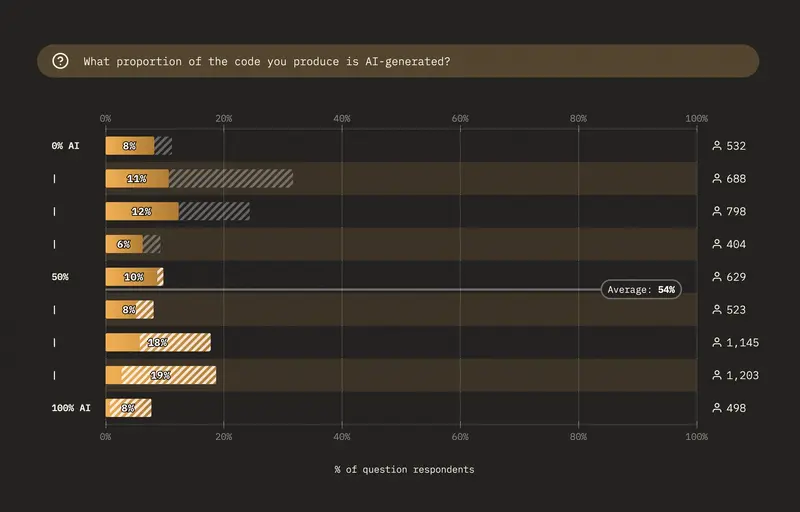
For example, the proportion of code generated by AI tools has jumped from 28% in 2025 to 54% this year:

Chart: What proportion of the code you produce is AI-generated?<br>

It’s especially striking to see that the segment of respondents who use AI to produce nearly all of their code is now the single largest bucket–when it was the second smallest last year!

The frequency at which developers reach for AI tools has also increased drastically, with developers reporting they use AI “constantly” going from 11% to 21%.

How frequently do you use AI tools to generate or refactor code?<br>

All those signs point in the same direction: not only is AI usage increasing, but it’s doing so at a speed rarely seen before when it comes to adopting new workflows.

The Claude Code Connection

So what’s behind this shift? While it’s impossible to prove any causal link with survey data alone, one factor worth considering is the growing impact of Claude Code, and agentic coding in general.

Claude Code is the most-loved coding assistant:

Most-loved coding agents and assistants

And in terms of raw usage, Claude Code is second behind GitHub Copilot with 62.9% of respondents having used it–while OpenAi Codex comes in a distant third with only 34.5%.

But more crucially, both Claude and Claude Code top the ranks of tools developers are actually paying for:

Out of the models mentioned here, which one do you or your company actually pay for?<br>

Out of the agents & assistants mentioned here, which one do you or your company actually pay for?<br>

Anthropic likes to position itself as the underdog fighting against OpenAI’s dominance, but these results indicate that when it comes to developers at least, OpenAI is the one fighting an uphill battle.

A Threat to Developers

So it looks like developers are embracing their new AI overlords en masse, and the few lone voices warning us about Skynet can probably be dismissed as delusional crackpots, right?

Well… not so fast. While it’s true that developers tend to be more concerned with the next line of codes than with doomsday predictions, it doesn’t mean they’re blind to the very real issues created by this sudden AI surge.

For starters, developers are quite conscious of the fact that their jobs may now be threatened by the very machines they helped train, as is becoming apparent in the recent Meta layoffs:

AI tools are a threat to my job security<br>

And as a commenter astutely pointed out, even if AI can’t do your job, all you need to be fired is that your boss thinks it can.

But while job loss tops the list of AI issues developers worry about, it isn’t the only one by any means:

Which of these general AI risks and issues are you most concerned about?<br>

Military use of AI scored quite high as well, which makes sense since the survey was filled out at a time when the Pentagon’s use of AI was in the news.

And of course, AI’s environmental impact is another very real worry, with the construction and operation of new datacenters putting extra stress on an already-struggling planet.

Preparing for an AI Future

Taken together, these survey results point a nuanced picture: yes, developers have embraced AI and its productivity gains–but they’re also quite aware of the risks and issues presented by AI adoption, and many of them aren’t quite convinced that the juice is worth the squeeze.

Believe it or not, this is only a tiny fraction of the data collected, and I encourage you to check out the full survey results to get a broader picture of the AI developer ecosystem in 2026, as well as read the conclusion by the one and only Primeagen.

And hey–if you’d like to brush up on your CSS knowledge one last time before Claude Code takes your job, why not go fill out this year’s State of CSS survey and see how many new CSS features you know?