Graph RAG vs Vector RAG: When to Use Each

Graph RAG vs Vector RAG: When to Use Each

Retrieval-Augmented Generation (RAG) helps LLMs use external knowledge more reliably. In practice, two patterns show up often: Vector RAG and Graph RAG.

Both try to solve the same problem: bring relevant context to the model. They just do it with different data models.

  • Vector RAG: similarity-based retrieval
  • Graph RAG: relationship-based retrieval
  • Hybrid search: combining both

This article focuses on architecture patterns, chunking strategies, storage choices, and when each option makes sense.

Quick definitions

Vector RAG

Documents are split into chunks, embeddings are generated, and the chunks are stored in a vector database. When a query arrives, its embedding is computed and the nearest chunks are retrieved.

Its main strengths are simplicity and low operational overhead.

Graph RAG

Knowledge is modeled as nodes and relationships. Nodes can represent documents, entities, events, concepts, or claims. Edges capture relationships such as “depends on”, “references”, “part of”, or “causes”.

The query can retrieve not only similar chunks, but also a related subgraph.

Architectural differences

The diagram below summarizes the basic flow of both approaches.

Graph RAG and Vector RAG architecture comparison

Vector RAG flow

  1. Split documents into chunks
  2. Generate chunk embeddings
  3. Store them in a vector database
  4. Retrieve nearest neighbors for the query embedding
  5. Add the retrieved context to the prompt

This flow is usually straightforward, fast, and well understood.

Graph RAG flow

  1. Extract entities and relationships from documents
  2. Build and store the graph
  3. Identify seed nodes for the query
  4. Expand the subgraph
  5. Generate context from the relevant nodes and edges

The key difference is that retrieval uses not only similarity, but also structural context.

Chunking strategies

Chunking is one of the most important quality levers in any RAG system.

Chunking for Vector RAG

Good chunking for Vector RAG usually has these properties:

  • meaningful semantic boundaries
  • chunks that are not too large
  • overlap that preserves enough context
  • retention of headings, subheadings, and references

Chunks that are too small fragment the context. Chunks that are too large weaken retrieval signal.

Chunking for Graph RAG

In Graph RAG, chunking alone is not enough, because the goal is often not sentence similarity but relation extraction.

A stronger pipeline usually combines:

  • document chunking
  • entity extraction
  • relation extraction
  • separation of claims and evidence

So the data is first split as text, then transformed into structured knowledge.

Storage model

When a vector database is enough

A vector database is often enough when the workload looks like this:

  • enterprise document search
  • semantic FAQ
  • similar content discovery
  • low to medium complexity Q&A

Its main advantage is that indexing and querying are relatively standard.

When graph storage becomes useful

Graph storage starts to matter when you need:

  • multi-hop questions
  • entity-centric queries
  • domains where abstract relationships matter
  • provenance and traceability

Examples:

  • “Which policies does this decision depend on?”
  • “What dependencies affect this service?”
  • “Which components are related to this incident?”

These questions need more than semantic proximity; they need the relationship network.

Pros and cons

Vector RAG pros

  • Easy to set up
  • Fast path to a useful first version
  • Strong for semantic search
  • Mature vector database ecosystem

Vector RAG cons

  • Weak on relationship-heavy questions
  • Sensitive to chunk boundaries
  • Retrieval may return context that is close but not correct
  • Source traceability can be hard to explain

Graph RAG pros

  • Better at representing relationships
  • Useful for multi-hop reasoning
  • Strong for source, dependency, and impact analysis
  • Can be more explainable for structured queries

Graph RAG cons

  • Higher data modeling cost
  • Entity/relation extraction errors can cascade
  • More complex to operate and maintain
  • More dependent on domain-specific graph design

Which one should you use?

A practical rule of thumb is simple:

  • If the question is mostly “find similar content”, use Vector RAG
  • If the question is mostly “follow the relationship”, use Graph RAG
  • If you need both semantic and structural signals, use hybrid search

Choose Vector RAG if:

  • the domain is mostly plain text
  • questions can be answered directly from documents
  • latency and simplicity are priorities
  • you are building a fast MVP

Choose Graph RAG if:

  • the domain revolves around entities and relationships
  • provenance is critical
  • multi-step reasoning is needed
  • explainability of search results matters

The hybrid search pattern

For many real systems, the best answer is not “either/or” but both.

A common hybrid pattern is:

  1. Use vector search to find candidates
  2. Expand relationships with graph traversal
  3. Re-rank the combined results
  4. Keep only the most relevant context in the prompt

This pattern is especially useful for:

  • software architecture documentation
  • compliance and policy search
  • incident analysis and root-cause exploration
  • product knowledge bases

Design notes

1. Define the retrieval target clearly

“Correct answer” and “correct context” are not the same thing. First decide what signal you are optimizing.

2. Do not treat chunking as separate from the data model

Chunk size and segmentation should be designed together with the storage model you choose.

3. Do not turn everything into a graph

Graph RAG is powerful, but not every problem needs a graph. Unnecessary modeling increases maintenance cost.

4. Add observability

You cannot improve retrieval if you cannot inspect it:

  • which chunk was retrieved
  • which node was expanded
  • which relation influenced the decision
  • why this result was selected

Conclusion

Vector RAG and Graph RAG are not really competitors. They are tools for different constraints.

  • Vector RAG: fast, simple, semantic-first
  • Graph RAG: structure, relationships, and traceability
  • Hybrid search: often the most balanced production choice

When choosing an architecture, start with the question type, explainability needs, and maintenance cost before you choose the data model.

The right approach is not the most complex one. It is the one that fits the workload.

ما هو Agent2Agent (A2A)؟ البروتوكول المفتوح لاتصال وكلاء الذكاء الاصطناعي

اليوم، تعمل معظم أنظمة الذكاء الاصطناعي كوكلاء منفردين: نموذج واحد، حلقة موجه واحدة، ومجموعة أدوات واحدة. هذا يكفي حتى تصبح المهمة أكبر من قدرة وكيل واحد، أو تحتاج إلى وكيل بناه فريق آخر لتنفيذ خطوة متخصصة. عندها تظهر المشكلة: لا توجد طريقة قياسية لوكيلين مستقلين لاكتشاف بعضهما، تبادل العمل، وإرجاع النتائج. بروتوكول Agent2Agent أو A2A وُضع لحل هذه المشكلة.

جرّب Apidog اليوم

في هذا الدليل ستتعرف على A2A عمليًا: ما هو، متى تحتاجه، كيف يعمل داخليًا، وكيف يختلف عن MCP. وإذا أردت اختبار وكيل A2A بعد ذلك، فراجع دليل Apidog A2A Debugger.

ما هو Agent2Agent (A2A)؟

Agent2Agent أو A2A هو بروتوكول مفتوح للتواصل بين وكلاء الذكاء الاصطناعي. يحدد البروتوكول:

  • كيف يعلن الوكيل عن قدراته.
  • كيف يكتشفه وكيل آخر.
  • كيف يتبادل الوكيلان الرسائل والملفات.
  • كيف تُدار حالة المهمة حتى اكتمالها.
  • كيف تُعاد النتائج إلى المتصل.

النقطة المهمة هي كلمة بين. لا يحاول A2A إعطاء وكيل واحد أدوات أكثر، بل يسمح لوكلاء مستقلين، ربما بُني كل واحد منهم بإطار عمل مختلف ومن فريق مختلف، بالعمل معًا دون كشف تفاصيل التنفيذ الداخلية.

فكر فيه كأنه HTTP لحركة مرور الوكلاء. كما يسمح HTTP للمتصفح بالتحدث إلى أي خادم ويب دون معرفة اللغة أو الإطار المستخدم في الخادم، يسمح A2A لوكيل مبني على LangGraph بالتحدث إلى وكيل مبني على CrewAI دون معرفة بنيته الداخلية. يتفق الطرفان على العقد الخارجي فقط.

قدمت جوجل A2A في عام 2025، ثم نقلته لاحقًا إلى مؤسسة لينكس كمشروع مفتوح ومحايد للبائعين. المواصفات متاحة على مستودع A2A GitHub، والتطبيقات المرجعية منشورة على موقع مشروع A2A.

المشكلة التي يحلها A2A

قبل A2A، كان ربط وكيلين يعني كتابة glue code مخصص لكل تكامل.

مثال عملي:

  1. لديك وكيل رئيسي يدير سير العمل.
  2. تحتاج إلى وكيل بحث يملكه فريق آخر.
  3. تكتب عميل HTTP مخصصًا.
  4. تتفقان يدويًا على شكل الطلب والاستجابة.
  5. تضيفان آلية مصادقة مخصصة.
  6. تعيدان تكرار نفس العمل مع كل وكيل جديد.

هذا الأسلوب لا يتوسع جيدًا، لأنه يسبب مشكلات متكررة:

  • لا يوجد اكتشاف موحد: لا يستطيع الوكيل سؤال وكيل آخر بطريقة قياسية: “ماذا تستطيع أن تفعل؟”
  • لا يوجد نموذج مهمة مشترك: وكيل يعيد نصًا عاديًا، وآخر يعيد JSON مخصصًا، وثالث يبث الرموز تدريجيًا.
  • لا توجد مصادقة موحدة: كل تكامل يعيد اختراع الرؤوس وبيانات الاعتماد.
  • لا توجد قابلية استبدال: لا يمكنك استبدال وكيل AutoGen بوكيل LangGraph بسهولة حتى لو كانا ينفذان نفس المهمة.

يعالج A2A هذه الفجوة بالطريقة نفسها التي حسّن بها OpenAPI تكاملات REST: عقد موحد يمكن لأي طرف متوافق الالتزام به.

كيف يعمل A2A؟

لفهم A2A عمليًا، ركز على أربعة مفاهيم أساسية:

  1. بطاقة الوكيل.
  2. المهام.
  3. الرسائل والمخرجات.
  4. البث والتحديثات.

بطاقة الوكيل Agent Card

بطاقة الوكيل هي مستند JSON ينشره الوكيل لتعريف نفسه. وهي نقطة البداية للاكتشاف.

تتضمن البطاقة عادةً:

  • اسم الوكيل.
  • الوصف.
  • القدرات.
  • المهارات المعلنة.
  • أنواع المدخلات والمخرجات المدعومة.
  • متطلبات المصادقة.
  • إصدار البروتوكول.

عادةً تُنشر البطاقة في مسار معروف مثل:

https://your-agent.example.com/.well-known/agent.json

قبل إرسال أي مهمة، يجلب الوكيل المتصل هذه البطاقة ويقرأ ما يمكن للوكيل الآخر تنفيذه.

مثال مبسط لبطاقة وكيل:

{
  "name": "research-agent",
  "description": "وكيل متخصص في البحث وتجميع المصادر",
  "protocolVersion": "0.2.0",
  "skills": [
    {
      "id": "web-research",
      "name": "بحث الويب",
      "description": "يجمع مصادر ويب ويلخصها"
    }
  ],
  "capabilities": {
    "streaming": true
  },
  "authentication": {
    "schemes": ["bearer"]
  }
}

الفكرة ليست حفظ هذه الحقول، بل اعتماد نمط واضح: اكتشف قدرات الوكيل أولًا، ثم أرسل له العمل المناسب.

المهام Tasks

المهمة هي وحدة العمل الأساسية في A2A.

عندما يطلب وكيل من وكيل آخر تنفيذ شيء، يتحول الطلب إلى مهمة لها:

  • معرّف.
  • حالة.
  • رسائل مرتبطة.
  • نتائج أو مخرجات عند الانتهاء.

تمر المهمة بحالات مثل:

submitted
working
input-required
completed

هذا النموذج مهم لأنه يجعل المتصل يتعامل مع كل الوكلاء بالطريقة نفسها. لا يهم إن كان الوكيل مبنيًا على LangGraph أو CrewAI أو نظام داخلي مخصص؛ طالما أنه يتحدث A2A، فدورة حياة المهمة واحدة.

الرسائل والمخرجات Messages and Artifacts

الرسالة تحمل المحتوى الفعلي بين الوكلاء. ويمكن أن تتكون من أجزاء متعددة، مثل:

  • نص.
  • ملف.
  • بيانات منظمة.
  • مزيج من الأنواع السابقة.

مثال منطقي لرسالة إلى وكيل بحث:

{
  "message": {
    "role": "user",
    "parts": [
      {
        "type": "text",
        "text": "ابحث عن أحدث المواصفات المفتوحة لبروتوكول A2A ولخصها."
      }
    ]
  }
}

عند انتهاء المهمة، يعيد الوكيل مخرجات تسمى artifacts. قد تكون:

  • تقريرًا.
  • مستندًا.
  • جدول بيانات.
  • ملخصًا.
  • مرجع ملف.

تُبنى المخرجات أيضًا من أجزاء، لذلك يبقى شكل البيانات ثابتًا في الاتجاهين.

البث والتحديثات Streaming and Updates

ليست كل المهام قصيرة. قد يستغرق وكيل البحث أو التحليل أو توليد التقارير وقتًا.

يدعم A2A الأحداث المرسلة من الخادم Server-Sent Events، بحيث يمكن للوكيل إرسال تحديثات أثناء العمل، مثل:

submitted -> working -> found 3 sources -> generating summary -> completed

بدل أن ينتظر المتصل استجابة نهائية صامتة، يمكنه عرض التقدم أو اتخاذ قرارات بناءً على الحالة الحالية.

تدفق A2A عمليًا

التبادل النموذجي بين وكيلين يكون كالتالي:

  1. يجلب الوكيل A بطاقة الوكيل B.
  2. يقرأ المهارات والقدرات والمصادقة المطلوبة.
  3. يرسل رسالة تنشئ مهمة.
  4. يبدأ الوكيل B تنفيذ المهمة.
  5. يرسل الوكيل B تحديثات حالة أو بثًا جزئيًا.
  6. يعيد الوكيل B المخرجات عند الوصول إلى completed.
  7. يستهلك الوكيل A النتيجة وينتقل إلى الخطوة التالية.

على مستوى النقل، المحادثة هي JSON عبر HTTP. لا تحتاج إلى نموذج اتصال غريب أو بنية خاصة.

مقارنة A2A و MCP

يحدث خلط كثير بين A2A و MCP لأن كليهما بروتوكولات مفتوحة مرتبطة بالوكلاء. لكنهما يحلان مشكلتين مختلفتين.

A2A MCP
يربط الوكيل بالوكيل الوكيل بالأدوات والبيانات
السؤال الذي يجيب عليه “هل يمكن لوكيل آخر تنفيذ هذه الخطوة نيابة عني؟” “ما الأدوات والموارد التي يستطيع هذا الوكيل استخدامها؟”
الاستخدام النموذجي سير عمل متعدد الوكلاء عبر الفرق وكيل واحد يستدعي قاعدة بيانات أو نظام ملفات أو API
وحدة التبادل المهام، الرسائل، المخرجات استدعاءات الأدوات، الموارد، الموجهات

بصيغة أبسط:

  • MCP يربط الوكيل بالأنظمة الخارجية.
  • A2A يربط الوكيل بوكلاء آخرين.

في نظام إنتاج حقيقي، قد تستخدم الاثنين معًا. مثلًا:

  1. وكيل رئيسي يستقبل طلب المستخدم.
  2. يستخدم MCP للاستعلام عن قاعدة بيانات داخلية.
  3. يستخدم A2A لتفويض مهمة تحليل إلى وكيل متخصص.
  4. يجمع النتائج ويعيد الرد النهائي.

للتعمق أكثر في الفرق، راجع تفسير مقارنة خادم MCP و A2A، ولتجربة جانب MCP عمليًا راجع مصَحِّح عميل MCP الخاص بـ Apidog.

التعاون متعدد الوكلاء في الواقع

A2A ليس الطريقة الوحيدة لجعل الوكلاء يتعاونون. بعض الأنظمة تستخدم تنسيقًا مباشرًا، حيث يعرف وكيل واحد مسبقًا الوكيل الآخر ويفوض له العمل صراحةً.

مثال مفتوح المصدر هو Codex-Claude-Collab. ينسق هذا المشروع سير عمل بين OpenAI Codex و Claude Code:

  1. يخطط Codex للمهمة.
  2. يفوض التنفيذ إلى Claude Code.
  3. يراجع Codex الفروقات.
  4. يتحقق من النتيجة قبل الرد على المستخدم.

هذا نمط تنسيق مبرمج مسبقًا hard-wired orchestration. أحد الطرفين يعرف بالضبط من سيستدعي وكيف.

أما A2A فيعمم الفكرة. بدل أن يعرف المتصل أنه سيستدعي وكيلًا محددًا بالاسم، يقرأ بطاقة الوكيل ويتعامل مع أي وكيل متوافق.

استخدم التنسيق المباشر عندما:

  • تتحكم في الطرفين.
  • تعرف الوكلاء مسبقًا.
  • تريد سير عمل ثابتًا ومحكمًا.

استخدم A2A عندما:

  • الوكلاء مستقلون.
  • الفرق مختلفة.
  • تحتاج إلى استبدال الوكلاء بدون إعادة كتابة التكامل.
  • تريد عقدًا قياسيًا بين الوكلاء.

غالبًا ستستخدم الأنظمة الناضجة النمطين معًا: تنسيق مباشر داخل الفريق، و A2A عبر حدود الفرق أو المنتجات.

كيفية اختبار وكيل A2A

بعد بناء أو استخدام وكيل A2A، تحتاج إلى رؤية ما يحدث على السلك. سجلات Console وحدها لا تكفي غالبًا، لأنك تحتاج إلى فحص:

  • بطاقة الوكيل.
  • الطلبات الخام.
  • الرؤوس.
  • حالة المهمة.
  • الرسائل.
  • المخرجات.
  • حمولة JSON-RPC الكاملة.

تتضمن Apidog مصحح A2A داخل العميل القياسي. سير العمل العملي يكون كالتالي:

  1. الصق عنوان URL الخاص ببطاقة الوكيل.
  2. اضغط Connect.
  3. يقرأ Apidog البطاقة ويعرض اسم الوكيل وقدراته ومهاراته.
  4. أرسل رسالة اختبار.
  5. أرفق ملفات إذا كانت المهارة تحتاج ذلك.
  6. أضف metadata عند الحاجة.
  7. افحص الرد بثلاث طرق عرض:
    • معاينة قابلة للقراءة.
    • المحتوى الخام.
    • حمولة JSON-RPC الكاملة.

يدعم Apidog أيضًا رؤوس Bearer Token و Basic Auth و API-key بدون الحاجة إلى كتابة أوامر curl يدويًا.

القيمة الأساسية هنا هي العزل. عندما يفشل التكامل، تريد الإجابة بسرعة:

  • هل المشكلة في النقل؟
  • هل البطاقة غير صحيحة؟
  • هل المصادقة مفقودة؟
  • هل منطق الوكيل نفسه هو المشكلة؟

رؤية الحمولة الفعلية تختصر وقت التصحيح. يرشدك دليل Apidog A2A Debugger خلال دورة كاملة من الاتصال والإرسال والقراءة. كما ينطبق مبدأ “تحقق من السلك أولًا” على اختبار وكلاء الذكاء الاصطناعي الذين يستدعون واجهات برمجة تطبيقاتك.

البدء مع A2A

إذا أردت بناء أو ربط وكيل A2A، استخدم هذا المسار المختصر:

  1. اقرأ مواصفات A2A لفهم حقول بطاقة الوكيل ودورة حياة المهمة.
  2. شغّل أحد الوكلاء النموذجيين المرجعيين محليًا.
  3. افتح عنوان بطاقة الوكيل في المتصفح وتأكد من أنها JSON صالح.
  4. استخدم مصحح A2A وأرسل رسالة اختبار بسيطة مثل: مرحبًا.
  5. تحقق من أن المهمة تنتقل بين الحالات المتوقعة.
  6. ابنِ وكيلك الخاص وانشر بطاقة وكيل صالحة.
  7. اختبر المسار النصي أولًا.
  8. أضف المصادقة.
  9. أضف مرفقات الملفات.
  10. أضف البث بعد أن يعمل المسار الأساسي.

ابدأ بأصغر حالة ممكنة. لا تضف الملفات والبث والمصادقة المعقدة قبل التأكد من أن الوكيل يستطيع استقبال رسالة بسيطة وإرجاع مخرج مفهوم.

A2A لا يزال حديثًا، لكنه يستند إلى مواصفة مفتوحة ومشروع محايد للبائعين وتكاملات متزايدة مع أطر العمل. التعامل مع حركة مرور الوكلاء كبروتوكول من الدرجة الأولى الآن يوفر عليك بناء glue code مخصص لاحقًا.

للمزيد حول هذا الاتجاه، راجع وكلاء الذكاء الاصطناعي هم مستهلكو واجهات برمجة التطبيقات الجدد، وراجع أيضًا تصميم واجهات برمجة التطبيقات لوكلاء الذكاء الاصطناعي.

أسئلة شائعة

هل A2A من صنع جوجل؟

قدمت جوجل A2A في عام 2025، ثم تبرعت به لمؤسسة لينكس كمشروع مفتوح ومحايد للبائعين. يتم تطوير المواصفات بشكل مفتوح، ويمكن لأي بائع تطبيقها.

هل أحتاج إلى A2A إذا كان لدي وكيل واحد فقط؟

لا. A2A يحل مشكلة التواصل بين الوكلاء. إذا كان لديك وكيل واحد يحتاج إلى أدوات أو مصادر بيانات، فغالبًا تحتاج إلى MCP. تحتاج إلى A2A عندما يدخل وكيل ثانٍ إلى سير العمل.

ما أطر العمل التي تدعم A2A؟

A2A مستقل عن أطر العمل. يمكن لأي وكيل نشر بطاقة وكيل صالحة والتحدث بالبروتوكول أن يشارك. لذلك يمكن استخدامه مع LangGraph و CrewAI و AutoGen أو وكلاء مخصصين. الإطار الداخلي غير مهم للمتصل.

هل A2A هو نفسه MCP؟

لا. MCP يربط الوكيل بالأدوات ومصادر البيانات. A2A يربط الوكلاء ببعضهم. البروتوكولان مكملان، وكثير من الأنظمة يمكن أن تستخدمهما معًا.

كيف أصحح تكامل A2A؟

استخدم مصحح A2A مرئيًا مثل Apidog A2A Debugger. الصق عنوان بطاقة الوكيل، أرسل رسائل اختبار، ثم افحص الطلب والاستجابة الخام لتحديد هل الخطأ في النقل أم في منطق الوكيل.

هل يدعم A2A المهام طويلة الأمد؟

نعم. يحتوي نموذج المهام على حالات صريحة، ويدعم البروتوكول Server-Sent Events لبث النتائج الجزئية وتحديثات التقدم. لذلك لا تحتاج المهام الطويلة إلى حظر المتصل حتى تنتهي.

Image Alt Text: WCAG Rules and Best Practices

Alt text (the alt attribute on images) is how screen readers describe pictures to people who cannot see them. It satisfies WCAG 1.1.1 Non-text Content (Level A) — the most fundamental accessibility rule. Getting it right is mostly about context, not description.

WCAG 1.1.1 in one sentence

Every non-text element that conveys information needs a text alternative that serves the equivalent purpose. Decorative elements need an empty alternative so assistive tech skips them.

The four kinds of images

Informative

Conveys meaning. Alt text describes the information, not the picture. For a chart showing rising sales, use alt="Sales up 24% from Q1 to Q2", not alt="bar chart".

Decorative

Adds no information (background textures, dividers, eye-candy). Use alt="" — empty, not missing — so screen readers skip it.

Functional

Inside a link or button. Alt text describes the action, not the icon. A magnifying-glass search button is alt="Search".

Complex

Charts, infographics, maps. Use a short alt for the gist plus a longer description nearby — a caption, adjacent text, or a linked data table.

Rules that catch most failures

  • Never start with “image of” or “picture of” — the screen reader already announces “image”.
  • Do not keyword-stuff. Alt text is for users, not bots (good alt text helps SEO honestly anyway).
  • Logos: the alt text is the company name, e.g. alt="AccessProof".
  • If the same information is in adjacent text, the image is decorative — use an empty alt.
  • Text in images: the alt must contain the exact text (and avoid text-in-images where you can).

Quick examples

ImageBad altGood alt

Team photo on About page"team""The AccessProof team at the 2026 a11y summit"
PDF download icon link"icon""Download the WCAG checklist (PDF)"
Decorative section divider"divider line"empty alt

How AccessProof helps

AccessProof flags every image missing an alt attribute and every empty alt where the image appears informative — mapped to WCAG 1.1.1, with the exact selector. No tool can judge whether your alt text reads well, but AccessProof guarantees none are missing. Run a free scan to see your image findings.

Originally published on access-proof.com.

AWS Savings Plans & Consolidated Billing: How Cross-Account Sharing Actually Works

If you’re running multiple AWS accounts under one organization, a Savings Plan purchased in one account is already covering usage in your other accounts. That’s not a configuration you set up, it’s how consolidated billing works by default.

For most teams, this is fine. One purchase, org-wide coverage, AWS handles the allocation automatically. The discount flows to wherever it generates the most savings across your accounts.

The part that gets complicated is everything that happens next. Which account gets priority? What if you need to restrict sharing for chargeback requirements? What happens to your coverage when an account moves between organizations? And how do you actually see which accounts are consuming a shared Savings Plan?

How Consolidated Billing Works

AWS Organizations uses consolidated billing to merge usage and payments from all member accounts into a single bill, processed through the management account. The management account pays the total charge. Each member account still generates its own usage data, but discounts, Savings Plans, Reserved Instances, volume pricing are calculated across the aggregate.

The key operational implication: a Savings Plan purchased in Account A will automatically discount usage in Account B, C, and D unless sharing is explicitly restricted.

How Savings Plans Apply Across Accounts

The application sequence follows a strict priority order.

Step 1: Owner account first. The Savings Plan is applied against the usage of the account that purchased it, before any cross-account sharing occurs.

Step 2: Spillover to the organization. Any unused commitment not consumed by the purchasing account in a given hour is automatically shared with other accounts in the org.

Step 3: Maximum savings optimization. AWS applies the remaining commitment to whichever account’s usage yields the largest calculated savings not on a first-come basis.

A Savings Plan purchased in a low-usage account can, in practice, provide most of its discount value to high-usage accounts. That’s by design. The risk: if the high-usage accounts are not in the same organization, or sharing has been restricted, that commitment sits partially unused.

The Four Sharing Modes

AWS supports four distinct sharing configurations, managed via AWS Cost Categories (RI/SP Group Sharing).

Organization-wide (default): All accounts in the org benefit. No restriction is possible; unused commitment spills to all accounts automatically.

Group-based (RISP Group): Sharing is limited to a defined account group via Cost Categories. The group is prioritized first, then spillover goes org-wide.

Prioritized: Owner first, then the defined group, then the rest of the org. Hierarchical spillover applies.

Restricted: Group only, no spillover outside the group. Unused commitment stays within the group and is not shared org-wide.

Deactivated (per account): The purchasing account only. The management account controls this. No sharing in or out.

RISP Group Sharing is a feature in AWS Cost Categories that lets the management account define subsets of accounts and restrict Savings Plans discount sharing to those subsets enabling chargeback-aligned cost allocation without losing discount efficiency within the group.

What Happens When Sharing Is Deactivated

The management account can disable Savings Plans sharing for any individual member account. Two things happen:

  • Outbound sharing stops. Commitments purchased in that account apply only to its own usage. If that account’s usage is lower than its purchased commitment, the unused portion generates no savings for anyone; it becomes waste.
  • Inbound sharing stops. Usage in that account reverts to on-demand rates even if the organization has surplus Savings Plans capacity elsewhere.

Deactivation is the right call in specific scenarios: reseller or MSP models where discount allocation must stay per-tenant, regulatory separation requirements, or internal chargeback models that need clean per-account P&L. Outside those cases, deactivating sharing reduces the organization’s aggregate utilization rate and increases total cloud spend.

The management account’s consolidated bill doesn’t change in total, but the discount line items shift. The deactivated account shows higher effective spend. Other accounts absorb whatever surplus commitment exists from the rest of the org.

The Utilization Reporting Problem

This is where most engineering teams run into operational problems. AWS Savings Plans utilization is reported at the purchasing account level by default in the console. Under consolidated billing, the “utilization %” shown for a given Savings Plan reflects all usage covered across the entire organization, not just the purchasing account.

A plan showing 95% utilization could be covering usage from four different accounts. If one of those accounts changes its compute footprint significantly, utilization drops and you won’t immediately know which account drove the change from the top-level console view.

To get per-account utilization attribution under consolidated billing, you need:

  • Cost and Usage Report (CUR): The savingsPlanEffectiveCost and savingsPlanRate columns, split by lineItem/UsageAccountId
  • AWS Cost Explorer: Savings Plans Utilization report filtered by linked account (data refreshes every 24–72 hours)
  • Management account access: Member accounts can see only their own share of the commitment; only the management account can view org-wide utilization

The refresh delay is a real operational risk at scale. For a multi-account organization running $50K+/month in on-demand compute, a 72-hour blind spot on utilization shifts translates to 3 days of undetected waste compounding before any recommendation engine can respond.

If you’re trying to make sense of how amortized cost shows up in Cost Explorer Understanding Savings Plan Amortized Cost in AWS Cost Explorer

Where to Purchase Savings Plans in a Multi-Account Org

  • Management account: Best for pure discount maximization across the org. Savings Plans spill over to all member accounts by default.
  • Member account: Best when you have chargeback or showback requirements where specific teams must be assigned the cost and savings of their own commitments.
  • Central payer / dedicated commitment account: Common FinOps pattern at enterprise scale when you want centralized commitment management without using the management account for financial instruments.

How to Enable or Disable Sharing

Sharing is enabled by default. The management account can modify it at any time.

To disable sharing for a specific member account:

  • Sign in to the management account
  • Navigate to Billing and Cost Management → Savings Plans → Savings Plans settings
  • Find the member account, toggle Discount sharing off
  • Confirm, takes effect for the next billing period calculation

Changes do not retroactively affect past billing periods. There’s no penalty or waiting period for re-enabling.

The Most Common Sharing Mistakes

Purchasing in a member account that later gets deactivated from sharing. If that account is isolated for chargeback, compliance, or org restructuring, any surplus commitment becomes siloed waste.

Assuming utilization percentages reflect a single account. The org-level utilization number aggregates all covered usage. A team reporting “98% utilization” may have three accounts contributing and a fourth that just scaled down but is being masked by the aggregate.

Not monitoring utilization per account after org changes. When an account leaves the organization or moves to a different payer, any Savings Plans it was relying on for shared discounts immediately stop applying. The account reverts to on-demand pricing.

Setting Restricted sharing mode without modeling the utilization impact. If the group’s usage drops below the committed amount, the waste is trapped inside the group rather than being absorbed by the rest of the org.

Fixing the Multi-Account Visibility Gap

AWS Cost Explorer refreshes Savings Plans recommendations every 24–72 hours. In a 10-account organization where three accounts have materially different usage week-over-week, that lag means commitment sizing decisions are being made on data up to 3 days old. At a conservative $6–12K/day in uncovered on-demand spend per account, a 72-hour refresh cycle can represent $18K–$36K in avoidable spend per recommendation cycle per account.

Usage.ai refreshes commitment recommendations every 24 hours, a 3-day advantage over AWS native tooling. It provides per-account attribution across all linked accounts without requiring manual CUR queries or custom Athena pipelines, and includes a cashback guarantee on underutilized commitments when sharing is restricted or disrupted by org changes.

Customers like EVGo (NASDAQ: EVGO) have achieved $5.2M in annual savings, and Motive has realized $2.3M annually, both in AWS-heavy environments where multi-account commitment management was a core challenge.

For a deeper look at buying strategy across a multi-account org AWS Savings Plan Buying Strategy: Layering, Timing & Right-Sizing Commitment

Have you run into issues with shared Savings Plans after an account move or org restructure? What was your approach to fixing the coverage gap?

Continue with the complete technical article here → How AWS Savings Plans Share Across Consolidated Billing Accounts

How My Career Evolved Like an AI (LLM Architectures )System

Introduction.

What if every stage of your life mapped precisely onto one of the three LLM architectures? Here’s how I lived through each one.

I’ve spent years studying how AI systems learn, represent knowledge, and generate outputs. But it wasn’t until I sat back and looked at my own life that something clicked. I’ve been living through these architectures all along.

There are exactly three types of LLM architecture. And they map almost perfectly onto three phases of a knowledge worker’s career.

Life is a model in training. Each stage builds the foundation for the next.

Phase 1: School & College: The Encoder

Encoder-only phase

AI Architecture: Encoder-only (BERT, RoBERTa) · Focus: Absorb & Represent

From school through college, I was in pure encoder mode. In school I absorbed raw facts; in college I connected them across domains and built deeper internal representations. Both stages share the same architectural principle take input and build a rich embedding. No generation required yet.

  • Learned facts & concepts
  • Connected ideas across domains
  • Understood language & context
  • Applied theory to practice
  • Classified good vs bad
  • Built knowledge embeddings

An encoder-only model like BERT takes raw text and transforms it into rich, dense vector representations. It doesn’t generate anything its entire purpose is to build the best possible internal model of the input. BERT is extraordinarily good at understanding; it just can’t write back to you.

That’s exactly what school and college do. You’re not expected to ship products in year one of university. You’re building the model that will let you do that later.

The AI parallel: BERT-style encoders produce embeddings that downstream tasks (classification, search, NLI) rely on. They’re the foundation. College graduates are the same not yet specialized for generation, but deeply capable of understanding. The depth of that encoding determines everything that follows.

Phase 2: Industry: The Decoder

Decoder-only phase

AI Architecture: Decoder-only (GPT-4, Llama, Mistral) · Focus: Generate & Produce

When I entered the workforce, the mode shifted completely. Now I had to deliver. Write the code. Solve the problem. Ship the product. I was drawing on everything I had encoded to generate real outputs in the world.

  • Created & developed applications
  • Solved customer problems
  • Answered queries & provided solutions
  • Wrote code & documentation
  • Optimized & improved systems
  • Delivered business value

Decoder-only models like GPT take a context (prompt) and generate token by token from their learned knowledge. They don’t need to re-encode everything from scratch they draw on rich internal representations built during training. That’s exactly what a working engineer does: your years of encoding are now the weights. You generate from them.

The danger here? Pure decoders can hallucinate. They generate fluently even when uncertain. I made that mistake early in my career — confident outputs that needed more grounding in the actual requirements.

Phase 3 : AI Solution Architect: The Encoder–Decoder

Encoder–Decoder phase
AI Architecture: Encoder–Decoder (T5, BART, original Transformer) · Focus: Translate & Architect

As a Solution Architect, I do both at once. I encode the business requirements, constraints, team dynamics, stakeholder context. Then I decode into technical reality system design, roadmaps, team guidance. I’m the bridge between two languages.

  • Encode stakeholder needs & context
  • Understand BRD & business requirements
  • Design system architecture
  • Translate to developers
  • Guide team & solve complex problems
  • Deliver end-to-end solutions

The original Transformer encoder–decoder designed for translation is architecturally brilliant because of cross-attention. The decoder doesn’t ignore the encoder’s output while generating; it continuously attends to it. Every token generated is informed by the full encoded context.

That is solution architecture. You never stop listening to the business while designing the technical solution. The moment you decouple from the encoder (the business context), you start generating hallucinations technically correct solutions that solve the wrong problem.

The sharpest insight: Cross attention is the skill that separates architects from pure engineers. A decoder-only engineer generates great code. An encoder–decoder architect generates great code that solves the actual business problem because they never stopped attending to the encoded context.

Here’s a fact-checked and refined version that aligns more accurately with how Transformer architectures actually work while preserving your analogy and narrative style:

Why This Matters

Most people get trapped in a single architecture.

Some remain in an Encoder-only phase for years constantly learning, collecting certifications, reading books, attending courses, and building deeper internal understanding, but rarely translating that knowledge into real world outcomes.

In AI terms, encoder models like BERT specialize in understanding, contextual representation, classification, and semantic relationships. They are exceptional at comprehension, but they are not primarily designed for generation.

Other professionals operate like Decoder-only systems always producing output, writing code, creating presentations, answering questions, or generating solutions rapidly, but without deeply understanding the underlying problem space or business context first.

Decoder only LLMs such as GPT models are extremely powerful generators, but because they predict the next token based on patterns rather than grounded understanding alone, they can sometimes hallucinate when context, retrieval, or reasoning is insufficient.

The same pattern appears in professional life.

People who generate without deeply encoding the problem space often create shallow solutions, misaligned architectures, or confident but weak decisions.

The real evolution is becoming an Encoder–Decoder system.

Modern encoder–decoder architectures l*ike T5 and BART first encode context into rich internal representations and then decode that understanding into meaningful outputs.* The decoder continuously attends to the encoded context through mechanisms such as cross-attention.

That is what mature professionals eventually become.

A strong Solution Architect, engineering leader, researcher, or consultant operates like an encoder–decoder system.

  • Encoding stakeholder intent, constraints, business goals, and domain context
  • Decoding that understanding into technical systems, architecture, applications, and delivery plans
  • Continuously connecting understanding and generation through feedback loops

That “cross-attention” between understanding and execution is where real impact happens.

It enables people to:

  • Translate ambiguity into architecture
  • Connect business and technology
  • Generate solutions grounded in context
  • Balance theory with execution
  • Lead systems rather than simply produce output

Learning alone is not enough.
Generation alone is not enough.

Growth happens when understanding and creation operate together.

Just as AI evolved from isolated encoder or decoder models into full Transformer systems capable of both understanding and generation, human professional growth follows a similar path.

Key Takeaway

There are only 3 LLM architectures. There are only 3 phases of a knowledge career. They are the same thing expressed in different domains.

The best engineers, leaders, and architects run encoder–decoder with full cross-attention. They never stop encoding the context while generating the solution.

Learn → Create → Architect → Impact

Thanks
Sreeni Ramadorai

Agent2Agent (A2A) là gì? Giao thức mở cho giao tiếp AI Agent

Hầu hết hệ thống AI hiện nay vẫn chạy theo mô hình một tác nhân: một model, một vòng lặp prompt, một bộ công cụ. Cách này ổn cho đến khi tác vụ quá lớn, hoặc bạn cần gọi một tác nhân do nhóm khác xây dựng để xử lý một bước chuyên biệt. Khi đó vấn đề xuất hiện: không có cách chuẩn để hai tác nhân độc lập tìm thấy nhau, trao đổi công việc và trả kết quả. Agent2Agent (A2A) được thiết kế để giải quyết đúng khoảng trống đó.

Dùng thử Apidog ngay hôm nay

Bài viết này giải thích A2A là gì, nó giải quyết vấn đề nào, cách giao thức hoạt động, cách phân biệt với MCP, và cách bạn có thể bắt đầu kiểm thử một tác nhân A2A. Nếu bạn muốn debug thực tế sau khi đọc xong, xem thêm hướng dẫn Apidog A2A Debugger.

Agent2Agent (A2A) là gì?

Agent2Agent (A2A) là một giao thức mở cho giao tiếp giữa các tác nhân AI. Nó định nghĩa:

  • Một tác nhân tự mô tả khả năng của mình như thế nào.
  • Một tác nhân khác kết nối ra sao.
  • Hai bên trao đổi tin nhắn, tệp và dữ liệu có cấu trúc như thế nào.
  • Trạng thái tác vụ và kết quả được trả về cho bên gọi ra sao.

Điểm quan trọng của A2A là chữ giữa: giao tiếp giữa các tác nhân. A2A không phải là cách gắn thêm tool cho một tác nhân. Nó là cách để các tác nhân riêng biệt, có thể được viết bằng framework khác nhau và do các nhóm khác nhau vận hành, cộng tác mà không cần biết chi tiết triển khai nội bộ của nhau.

Có thể hình dung A2A giống HTTP cho lưu lượng tác nhân. HTTP cho phép trình duyệt nói chuyện với bất kỳ web server nào mà không cần biết server viết bằng Go, Java, Node.js hay Python. Tương tự, A2A cho phép một tác nhân LangGraph giao tiếp với một tác nhân CrewAI miễn là cả hai tuân thủ cùng một hợp đồng giao thức.

Google giới thiệu A2A vào năm 2025, sau đó chuyển giao cho Linux Foundation như một dự án trung lập với nhà cung cấp. Đặc tả kỹ thuật được công bố tại kho GitHub của A2A, còn các triển khai tham chiếu có trên trang dự án A2A.

Vấn đề A2A giải quyết

Trước A2A, tích hợp hai tác nhân thường đồng nghĩa với việc viết glue code riêng cho từng cặp kết nối.

Ví dụ, tác nhân của bạn cần gọi một tác nhân nghiên cứu của nhóm khác. Bạn thường phải tự quyết định:

  • Endpoint gọi là gì.
  • Payload request có shape ra sao.
  • Response trả về dạng text, JSON hay stream.
  • Xác thực dùng Bearer token, Basic Auth hay header riêng.
  • Trạng thái tác vụ dài hạn được biểu diễn như thế nào.

Kết quả là mỗi tích hợp trở thành một chuẩn riêng. Khi cần gọi thêm tác nhân thứ hai, bạn gần như bắt đầu lại từ đầu.

Các vấn đề phổ biến gồm:

  • Không có khám phá chuẩn. Tác nhân gọi không có cách thống nhất để hỏi: “Bạn làm được gì?”
  • Không có mô hình tác vụ chung. Một tác nhân trả chuỗi text, tác nhân khác trả JSON tùy chỉnh, tác nhân khác stream token.
  • Không có xác thực thống nhất. Mỗi tích hợp tự định nghĩa credential và header.
  • Không có khả năng hoán đổi. Một tác nhân AutoGen khó thay thế bằng tác nhân LangGraph dù cả hai làm cùng một việc.

A2A xử lý vấn đề này theo hướng tương tự OpenAPI trong thế giới REST: định nghĩa một hợp đồng chung để các thành phần độc lập có thể làm việc với nhau.

A2A hoạt động như thế nào?

Bạn có thể hiểu A2A qua bốn khái niệm chính:

  1. Agent Card
  2. Task
  3. Message và Artifact
  4. Streaming và cập nhật trạng thái

1. Agent Card

Agent Card là tài liệu JSON mà một tác nhân công bố để mô tả chính nó. Đây là điểm bắt đầu cho quá trình khám phá.

Agent Card thường cho biết:

  • Tên tác nhân.
  • Mô tả.
  • Khả năng.
  • Danh sách kỹ năng.
  • Kiểu input/output được hỗ trợ.
  • Yêu cầu xác thực.
  • Phiên bản giao thức.

Theo quy ước, Agent Card thường được đặt tại một URL dễ đoán, ví dụ:

https://your-agent.example.com/.well-known/agent.json

Một tác nhân gọi sẽ fetch URL này trước, đọc metadata, sau đó mới quyết định có gửi tác vụ hay không.

Ví dụ tối giản về Agent Card:

{
  "name": "research-agent",
  "description": "Tác nhân hỗ trợ nghiên cứu và tổng hợp thông tin",
  "protocolVersion": "0.1.0",
  "skills": [
    {
      "id": "web-research",
      "name": "Web Research",
      "description": "Tìm kiếm và tóm tắt thông tin từ nhiều nguồn"
    }
  ],
  "capabilities": {
    "streaming": true
  }
}

Trong thực tế, bạn nên kiểm tra Agent Card trước khi tích hợp để chắc chắn:

  • URL có thể truy cập được.
  • JSON hợp lệ.
  • Kỹ năng được mô tả đủ rõ.
  • Xác thực được khai báo đúng.
  • Phiên bản giao thức tương thích.

2. Task

Task là đơn vị công việc trong A2A.

Khi tác nhân A yêu cầu tác nhân B làm điều gì đó, yêu cầu đó được biểu diễn thành một task có ID riêng. Task di chuyển qua các trạng thái như:

  • submitted
  • working
  • input-required
  • completed

Điểm quan trọng là bên gọi có thể xử lý task theo cùng một cách bất kể tác nhân phía sau được xây dựng bằng framework nào.

Một vòng đời đơn giản:

submitted -> working -> completed

Nếu tác nhân cần thêm dữ liệu:

submitted -> working -> input-required -> working -> completed

Cách tiếp cận này giúp bạn không phải tự phát minh cơ chế trạng thái cho từng integration.

3. Message và Artifact

Message là dữ liệu được gửi giữa các tác nhân. Message có thể gồm nhiều phần:

  • Text.
  • File.
  • Dữ liệu có cấu trúc.
  • Kết hợp nhiều loại nội dung.

Ví dụ một message dạng khái niệm:

{
  "role": "user",
  "parts": [
    {
      "type": "text",
      "text": "Hãy tóm tắt tài liệu này thành 5 ý chính."
    },
    {
      "type": "file",
      "file": {
        "name": "report.pdf",
        "mimeType": "application/pdf"
      }
    }
  ]
}

Khi tác nhân hoàn thành, nó trả về artifacts. Artifact là đầu ra có cấu trúc của task, ví dụ:

  • Tài liệu được tạo.
  • Bảng dữ liệu.
  • Bản tóm tắt.
  • Tham chiếu đến file.
  • Kết quả phân tích.

Cả message và artifact đều được cấu thành từ nhiều phần, giúp định dạng nhất quán ở cả chiều request và response.

4. Streaming và cập nhật trạng thái

Không phải task nào cũng hoàn tất ngay. Với các tác vụ dài như nghiên cứu, phân tích tài liệu, tạo báo cáo hoặc xử lý file lớn, A2A hỗ trợ server-sent events để stream tiến độ và kết quả từng phần.

Ví dụ, một tác nhân nghiên cứu có thể gửi các cập nhật như:

working: Đang tìm kiếm nguồn liên quan
working: Đã tìm thấy 3 nguồn phù hợp
working: Đang tổng hợp báo cáo
completed: Báo cáo đã sẵn sàng

Nhờ vậy, bên gọi không cần chờ trong trạng thái “mù”. Bạn có thể hiển thị tiến độ trong UI hoặc ghi log chi tiết để debug.

Luồng A2A điển hình

Một giao dịch A2A thường diễn ra như sau:

  1. Tác nhân A fetch Agent Card của tác nhân B.
  2. Tác nhân A đọc danh sách kỹ năng và khả năng được hỗ trợ.
  3. Tác nhân A gửi message để tạo task.
  4. Tác nhân B xử lý task.
  5. Tác nhân B stream cập nhật trạng thái nếu cần.
  6. Tác nhân B trả artifacts khi task chuyển sang completed.
  7. Tác nhân A đọc artifacts và tiếp tục workflow.

Ở tầng truyền tải, toàn bộ quá trình là JSON qua HTTP. Vì vậy, với developer, cách debug cũng gần giống debug API: kiểm tra request, response, header, auth, payload và trạng thái.

A2A so với MCP

A2A và MCP thường bị nhầm lẫn vì cả hai đều liên quan đến tác nhân AI và đều là giao thức mở. Tuy nhiên, chúng giải quyết hai bài toán khác nhau.

A2A MCP
Kết nối Giữa các tác nhân Giữa tác nhân với công cụ và dữ liệu
Câu hỏi nó trả lời “Một tác nhân khác có thể xử lý bước này cho tôi không?” “Tác nhân này có thể dùng những công cụ và tài nguyên nào?”
Sử dụng điển hình Workflow đa tác nhân giữa nhiều nhóm hoặc hệ thống Một tác nhân gọi database, file system hoặc API
Đơn vị trao đổi Task, message, artifact Tool call, resource, prompt

Nói ngắn gọn:

  • MCP giúp một tác nhân truy cập công cụ và dữ liệu.
  • A2A giúp một tác nhân giao tiếp với tác nhân khác.

Một hệ thống thực tế có thể dùng cả hai. Ví dụ:

  1. Tác nhân điều phối nhận yêu cầu từ người dùng.
  2. Nó dùng MCP để truy vấn database nội bộ.
  3. Nó dùng A2A để giao tác vụ phân tích cho một tác nhân chuyên gia.
  4. Nó nhận artifact cuối cùng và trả kết quả cho người dùng.

Nếu bạn đang quyết định khi nào dùng giao thức nào, xem thêm bài so sánh máy chủ MCP và A2A. Phía MCP trong thực tế được minh họa thêm trong bài trình gỡ lỗi client MCP của Apidog.

Hợp tác đa tác nhân trong thực tế

A2A không phải là cách duy nhất để các tác nhân cộng tác. Một số hệ thống dùng điều phối trực tiếp: một tác nhân lập kế hoạch, sau đó gọi rõ ràng một tác nhân khác để thực thi.

Một ví dụ mã nguồn mở là Codex-Claude-Collab, một kỹ năng điều phối workflow theo thời gian thực giữa OpenAI Codex và Claude Code. Codex lập kế hoạch, giao phần triển khai cho Claude Code, sau đó review diff và xác minh kết quả trước khi trả lời người dùng.

Đây là mô hình điều phối cố định: một bên biết chính xác bên kia là ai.

A2A khái quát hóa mô hình đó. Thay vì hard-code “gọi Claude Code”, tác nhân gọi đọc Agent Card và làm việc với bất kỳ tác nhân nào tuân thủ giao thức, miễn là tác nhân đó cung cấp kỹ năng phù hợp.

Cách chọn thực tế:

  • Dùng điều phối trực tiếp khi bạn kiểm soát cả hai đầu và workflow ổn định.
  • Dùng A2A khi tác nhân độc lập, thuộc nhóm khác, hoặc cần có khả năng thay thế.
  • Dùng kết hợp cả hai nếu hệ thống có cả workflow nội bộ và tích hợp liên nhóm.

Cách kiểm tra một tác nhân A2A

Khi xây dựng hoặc tích hợp một tác nhân A2A, bạn cần nhìn thấy lưu lượng thực tế. Console log thường không đủ vì nó có thể che mất header, payload thô hoặc trường JSON lồng sâu. Script test tự viết cũng dễ lỗi thời khi giao thức hoặc Agent Card thay đổi.

Một checklist debug tối thiểu:

  1. Fetch Agent Card.
  2. Xác minh JSON hợp lệ.
  3. Kiểm tra auth.
  4. Gửi message thử nghiệm.
  5. Theo dõi task ID và trạng thái.
  6. Kiểm tra stream event nếu có.
  7. Đọc artifact cuối cùng.
  8. So sánh payload thô với dữ liệu UI hiển thị.

Bạn có thể bắt đầu bằng curl:

curl https://your-agent.example.com/.well-known/agent.json

Sau đó gửi một message test theo endpoint và format mà tác nhân hỗ trợ. Tuy nhiên, khi cần kiểm tra auth, file attachment, metadata, stream và JSON-RPC payload, dùng debugger trực quan sẽ nhanh hơn.

Apidog tích hợp A2A Debugger trong client tiêu chuẩn. Quy trình cơ bản:

  1. Dán URL Agent Card.
  2. Nhấn Connect.
  3. Apidog đọc thẻ và hiển thị tên, khả năng, kỹ năng của tác nhân.
  4. Gửi message thử nghiệm.
  5. Đính kèm file hoặc metadata nếu cần.
  6. Đọc response ở ba chế độ:
    • Preview dễ đọc.
    • Nội dung thô.
    • Payload JSON-RPC đầy đủ.

Apidog cũng xử lý Bearer Token, Basic Auth và API key header mà không cần tự viết lệnh curl.

Điểm quan trọng khi debug A2A là tách lỗi truyền tải khỏi lỗi logic:

  • Nếu request không đến được tác nhân, kiểm tra URL, DNS, TLS, auth và header.
  • Nếu task không được tạo, kiểm tra payload và schema.
  • Nếu task chạy nhưng artifact sai, lỗi có thể nằm trong logic tác nhân.
  • Nếu streaming không hoạt động, kiểm tra server-sent events và client support.

Hướng dẫn Apidog A2A Debugger trình bày chi tiết vòng lặp kết nối-gửi-đọc. Nguyên tắc rộng hơn của việc kiểm thử các tác nhân AI gọi API của bạn cũng áp dụng cùng tư duy: xác nhận đường truyền trước, sau đó mới debug logic.

Bắt đầu với A2A

Nếu bạn muốn xây dựng hoặc kết nối một tác nhân A2A, có thể đi theo lộ trình sau.

Bước 1: Đọc đặc tả

Bắt đầu với đặc tả kỹ thuật A2A. Tập trung vào:

  • Cấu trúc Agent Card.
  • Vòng đời task.
  • Message parts.
  • Artifact parts.
  • Cách streaming hoạt động.
  • Cách xác thực được mô tả.

Bạn không cần đọc toàn bộ trước khi viết code, nhưng cần hiểu các khái niệm bắt buộc để tránh thiết kế sai từ đầu.

Bước 2: Chạy tác nhân mẫu

Dùng một trong các tác nhân mẫu tham chiếu để có baseline hoạt động.

Mục tiêu của bước này không phải là production-ready, mà là xác nhận bạn hiểu luồng:

Agent Card -> message -> task -> status update -> artifact

Bước 3: Kiểm tra Agent Card

Trước khi gửi task, kiểm tra Agent Card bằng browser, curl hoặc debugger:

curl https://your-agent.example.com/.well-known/agent.json | jq

Xác nhận:

  • JSON parse được.
  • Trường mô tả không rỗng.
  • Kỹ năng được khai báo rõ.
  • Auth đúng với cách server thực thi.
  • URL public hoặc private đúng theo môi trường tích hợp.

Bước 4: Gửi message “hello”

Đừng bắt đầu bằng tác vụ phức tạp. Hãy gửi một message đơn giản để kiểm tra đường truyền.

Ví dụ nội dung test:

hello

Bạn chỉ cần xác nhận:

  • Task được tạo.
  • Có task ID.
  • Trạng thái chuyển đúng.
  • Có response hoặc artifact cuối cùng.

Bước 5: Thêm input thực tế

Sau khi đường text hoạt động, mới thêm từng phần:

  1. Metadata.
  2. File attachment.
  3. Dữ liệu có cấu trúc.
  4. Streaming.
  5. Auth production.

Cách làm này giúp bạn biết chính xác bước nào gây lỗi.

Bước 6: Tích hợp vào workflow

Khi tác nhân đã phản hồi ổn định, tích hợp nó vào workflow thật. Ở bước này, nên log tối thiểu:

  • Agent Card URL.
  • Task ID.
  • Trạng thái cuối.
  • Thời gian xử lý.
  • Lỗi truyền tải.
  • Lỗi logic do tác nhân trả về.
  • Artifact nhận được.

Những log này sẽ rất hữu ích khi bạn thay thế tác nhân hoặc nâng cấp phiên bản giao thức.

Khi nào nên dùng A2A?

A2A phù hợp khi bạn có một trong các trường hợp sau:

  • Bạn cần gọi tác nhân do nhóm khác vận hành.
  • Bạn muốn các tác nhân có thể hoán đổi.
  • Bạn có workflow nhiều bước, mỗi bước do một tác nhân chuyên biệt xử lý.
  • Bạn muốn tránh viết glue code tùy chỉnh cho từng integration.
  • Bạn cần mô hình task/status/artifact thống nhất.
  • Bạn muốn tách nội bộ framework khỏi hợp đồng giao tiếp bên ngoài.

A2A có thể chưa cần thiết nếu bạn chỉ có một tác nhân đơn lẻ gọi tool nội bộ. Trong trường hợp đó, MCP hoặc tích hợp API trực tiếp có thể đủ.

A2A còn mới, nhưng được hỗ trợ bởi một quỹ trung lập với nhà cung cấp và ngày càng có nhiều tích hợp framework. Nếu bạn đang xây dựng hệ thống đa tác nhân, việc coi giao tiếp giữa tác nhân là một giao thức hạng nhất từ sớm sẽ giúp giảm đáng kể lượng glue code về sau.

Xem thêm bài Các tác nhân AI là người tiêu dùng API mới và thiết kế API cho tác nhân AI nếu bạn muốn chuẩn bị API cho các consumer không phải con người.

Các câu hỏi thường gặp

A2A có phải do Google tạo ra không?

Có. Google giới thiệu A2A vào năm 2025, sau đó tặng nó cho Linux Foundation như một dự án mở trung lập với nhà cung cấp. Đặc tả kỹ thuật được phát triển công khai và bất kỳ nhà cung cấp nào cũng có thể triển khai.

Tôi có cần A2A nếu chỉ có một tác nhân không?

Không. A2A giải quyết giao tiếp giữa nhiều tác nhân. Nếu bạn chỉ có một tác nhân cần gọi tool, database, file system hoặc API, MCP hoặc tích hợp tool trực tiếp thường phù hợp hơn.

Những framework nào hỗ trợ A2A?

A2A được thiết kế để không phụ thuộc framework. Bất kỳ tác nhân nào công bố Agent Card hợp lệ và tuân thủ giao thức đều có thể tham gia. Điều đó có nghĩa là LangGraph, CrewAI, AutoGen hoặc tác nhân tùy chỉnh đều có thể tương tác qua A2A nếu triển khai đúng hợp đồng.

A2A có giống MCP không?

Không. MCP kết nối một tác nhân với công cụ và nguồn dữ liệu. A2A kết nối các tác nhân với nhau. Chúng bổ sung cho nhau và có thể cùng tồn tại trong cùng một hệ thống.

Làm thế nào để gỡ lỗi một tích hợp A2A?

Dùng một trình gỡ lỗi A2A trực quan như Apidog A2A Debugger. Dán URL Agent Card, gửi message kiểm thử, sau đó kiểm tra request/response thô để phân biệt lỗi truyền tải với lỗi logic của tác nhân.

A2A có hỗ trợ tác vụ chạy dài không?

Có. Mô hình task có trạng thái rõ ràng và giao thức hỗ trợ server-sent events để stream kết quả từng phần cũng như cập nhật tiến độ. Nhờ vậy, các công việc dài không cần chặn bên gọi cho đến khi hoàn tất.

Facebook Layout

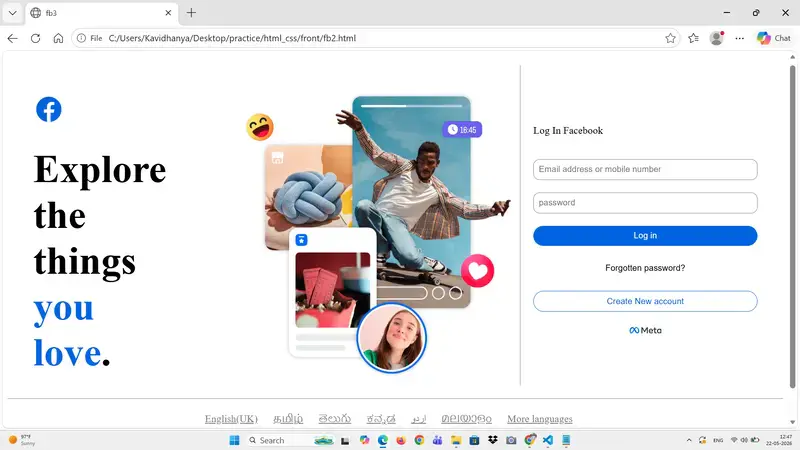
Facebook Login Page Clone using HTML & CSS
Introduction
In this project, I created a clone of the Facebook login page using HTML and CSS. The goal was to understand real-world UI design and improve my frontend development skills.

Technologies Used
HTML for structuring the webpage
CSS for styling and layout design
CSS Grid and Flexbox for alignment

Features
Two-column layout using CSS Grid
Left section with logo and image
Right section with login form
Styled buttons with hover effects
Footer with multiple language options

What I Learned
Through this project, I learned how to:
Use CSS Grid for page layout
Use Flexbox for alignment and spacing
Design responsive UI structures
Style forms, buttons, and text effectively
Organize code for better readability

Challenges Faced
Aligning the left and right sections properly
Managing spacing between elements
Making the layout similar to the original Facebook design

Improvements
Added responsive design using media queries
Improved button hover effects
Enhanced UI with better spacing and shadows

Conclusion
This project helped me gain hands-on experience in building real-world UI designs. It improved my understanding of layout techniques and boosted my confidence in frontend development.

Future Scope
Add JavaScript form validation
Connect to backend for login functionality
Improve mobile responsiveness further

Citroen Türkiye, 2026’nın ilk dört ayında pazar payını 1 puan artırdı

Citroen Türkiye, 2026

Citroen Türkiye, 2026'nın ilk dört ayında pazar payını 1 puan artırdıCitroen Türkiye bugün 2026’nın ilk dört ayını değerlendiren bir rapor paylaştı. Yapılan açıklamada, “Citroen, 2026’nın ilk dört ayında hem Avrupa’da hem de yerel pazarda kaydettiği ticari performansla tekrar güçlü bir şekilde büyümeye başladığını ortaya koydu. Citroen, Fransa’da yüzde 6,6 büyümeyle pazar payını yüzde 8,9’a çıkararak (+0,7 puan) markayı pazardaki en büyük üçüncü oyuncu olarak konumlandırdı. Elde edilen bu sonuçlar, markanın stratejik tercihlerinin doğruluğunu ve müşterilerin beklentilerine karşılık veren ürünler sunma becerisini ortaya koyuyor. Türkiye pazarında da ilk 4 ayda önemli bir başarı elde eden Citroen, bir önceki yılın aynı dönemine göre pazar payını 1 puan artırarak yüzde 5,5’e çıkardı. Yılın ilk dört ayında Türkiye’nin en fazla satış yapan 3’üncü hafif ticari araç markası olan Citroen, yüzde 10,2’lik pazar payına ulaştı. Marka, ülkemizde C-HB segmentinde yüzde 10’luk payla 3’üncü marka olurken, elektrikli araç pazarında da yüzde 6,8 pay ile 5’inci sırada yer aldı.” ifadelerini kullanan şirket, yılın ilk dört ayında dünya […]

Citroen Türkiye, 2026’nın ilk dört ayında pazar payını 1 puan artırdı yazısı ilk olarak Teknoloji haberleri – LOG üzerinde yayınlandı.

UseEffect – Exercises

Render only once using UseEffect

import { useEffect, useState } from "react";

function Input(){

    const[name,setName] = useState('')

    useEffect(()=>console.log("Component Mounted"),[]);


    return(
    <>
      <input value={name} type="text" onChange={(e)=>setName(e.target.value)}></input>
        <p>Hi! Welcome {name}</p>
        </>

    )

}

export default Input

Output:

Note:
React is running in Strict Mode during development
React intentionally mounts, unmounts, and remounts components once in development to detect side effects. Because of that, it is printed twice in console, this happens only in development mode but in production build, it runs once

Render Every time using UseEffect

import { useEffect, useState } from "react";

function Input(){

    const[name,setName] = useState('')

    useEffect(()=>console.log("Component Mounted"));


    return(
    <>
      <input value={name} type="text" onChange={(e)=>setName(e.target.value)}></input>
        <p>Hi! Welcome {name}</p>
        </>

    )

}

export default Input

Output:

Render Only when State changes using UseEffect

import { useEffect, useState } from "react";

function Input(){

    const[name,setName] = useState('')

    useEffect(()=>console.log("Component Mounted"),[name]);


    return(
    <>
      <input value={name} type="text" onChange={(e)=>setName(e.target.value)}></input>
        <p>Hi! Welcome {name}</p>
        </>

    )

}

export default Input

Output:

Note:
State Variable name is updated 4 times so the useEffect re-rendered 4 times the call back function

Two States and One Effect
Effect runs when count or name is changed

import { useEffect, useState } from "react";

function Input(){

    const[name,setName] = useState('')
    const[count,setCount]=useState(0)

    useEffect(()=>console.log("Component Mounted"),[name,count]);


    return(
    <>
      <input value={name} type="text" onChange={(e)=>{setName(e.target.value)
       }
      }></input>
      <button value={count} onClick={(e)=>{
        setCount(count+1)}
      }>+</button>
        <p>Hi! Welcome {name} and  Count {count}</p>
        </>

    )

}

export default Input

Output

Note:
State variable name is updated thrice and so effect ran thrice
State variable count is updated thrice and so effect ran thrice for it as well

*Show Even only when count becomes Even *

import { useEffect, useState } from "react";

function Input(){

    const[name,setName] = useState('')
    const[count,setCount]=useState(0)

    useEffect(()=>{
      if(count%2===0){
        console.log("even")
      }
    },[count]);


    return(
    <>
      <input value={name} type="text" onChange={(e)=>{setName(e.target.value)
       }
      }></input>
      <button value={count} onClick={(e)=>{
        setCount(count+1)}
      }>+</button>
        <p>Hi! Welcome {name} and  Count {count}</p>
        </>

    )

}

export default Input

Output

Note:
count is incermented 16 times and even is printed on console only 8 times for even counts only

AI Assisted GUI Took Seconds

One of the biggest surprises in this project so far wasn’t the image generation itself — it was how quickly the UI came together.

Imagine the GUI

Once I’ve got the command line script working, I wanted to imagine what the actual user experience of the app would look like. Normally, this is the stage where projects slow down. You spend hours adjusting spacing, choosing colors, moving buttons around, trying to make things “feel right,” or waiting for design ideas to form. But this time, using Cursor together with GPT, the process felt completely different.

Just Describe the Atmosphere!..

I simplified the goal down to the absolute minimum: a clean interface with a single upload button. Then I described the atmosphere I wanted — modern, calm, visually polished, and easy for non-technical users to understand. Within seconds, the AI generated the page structure, title, subtitle, layout, styling, background, and even a surprisingly polished upload component. The spacing felt balanced. The typography matched the mood. The visual hierarchy made sense immediately.

Prototype of the app. Before uploading:

After uploading
GUI Prototype - After Uploading

Momentum to Just Keep Going

What amazed me most wasn’t just the speed, but the momentum it created. Instead of spending days stuck in “design paralysis,” trying to make the app look acceptable before continuing, I suddenly had something that already felt close to finished. That psychological effect is huge. Once the interface looked real, it became much easier to focus on the actual functionality and backend logic.

I’m starting to understand why AI-assisted development feels so powerful for solo developers. It removes a lot of the friction between idea and execution. You no longer need to perfectly visualize every design decision in your head before starting. You can iterate rapidly, react to what you see, and improve from there. It doesn’t replace good design thinking entirely, but it dramatically lowers the barrier to creating interfaces that feel polished enough to build upon.

Did AI “Replaced” the Developers?

The interesting part is that this project is gradually becoming less about “AI replacing developers” and more about AI removing bottlenecks that used to slow developers down. In this case, the UI stopped being a multi-day obstacle and became a 10-second starting point — which meant I could move almost immediately into building the real product.

Next

I will write a backend service with Next.js to call the OpenAI APIs.