AI App Builder Platforms: A Comprehensive Benchmarking Study

AI App Builder Platforms: A Comprehensive Benchmarking Study

Your Guide to Choosing the Right AI Development Tool in 2026

If you are a developer today, chances are you are using artificial intelligence to help you write code. Industry reports show that over 92 percent of developers now use some form of AI assistance in their daily work. Productivity gains range from 30 to 55 percent depending on the complexity of the task.

But here is the challenge. There are now more than 50 AI app builder platforms available. Each one claims to be the best. Each one promises to revolutionize your workflow. And each one comes with its own pricing model, architecture, and learning curve.

So which one actually delivers? Which platform is worth your time and money? Which one will help you ship faster without introducing technical debt?

I spent over 300 hours evaluating ten leading AI app builder platforms through controlled experiments. I built full stack applications. I implemented authentication systems. I deployed to the cloud. I collected more than 500 data points along the way.

This guide shares everything I learned.

How I Evaluated Each Platform

I needed a way to compare these tools fairly. They are all different. Some focus on frontend development. Others specialize in full stack applications. Some are subscription based. Others charge per token.

So I created a scoring system with 28 distinct metrics across four key dimensions. Each dimension was worth 25 points for a total possible score of 100.

Dimension One: UX and UI Efficiency

This dimension is worth 25 points. It measures how easy the platform is to use. I looked at five sub metrics.

  • Onboarding experience is worth 5 points. This measures how quickly you can build your first working application and how clear the documentation is.
  • Interface intuitiveness is worth 5 points. This measures whether features are discoverable and whether interactions are consistent across the platform.
  • Workflow fluidity is worth 5 points. This measures how seamless transitions are between different tasks.
  • Error handling is worth 5 points. This measures how clear error messages are and whether recovery mechanisms exist.
  • Customization options are worth 5 points. This measures configuration flexibility and personalization capabilities.

Dimension Two: AI Prompt Optimization

This dimension is worth 25 points. It measures the core artificial intelligence capabilities of each platform.

  • Response accuracy is worth 8 points. This measures whether generated code is correct and whether it adheres to specifications.
  • Contextual awareness is worth 5 points. This measures whether the platform understands project structure and dependencies.
  • Generation latency is worth 4 points. This measures how quickly the platform responds and whether streaming capabilities exist.
  • Iteration capability is worth 4 points. This measures how well the platform refines code based on feedback.
  • Code quality is worth 4 points. This measures adherence to best practices and security considerations.

Dimension Three: Deployment Robustness

This dimension is worth 25 points. It measures how production ready each platform is.

  • CI and CD integration is worth 6 points. This measures compatibility with GitHub Actions and GitLab CI.
  • Export flexibility is worth 5 points. This measures code export formats and dependency management.
  • Production readiness is worth 5 points. This measures security headers and environment configuration.
  • Scalability options are worth 4 points. This measures horizontal scaling and load balancing capabilities.
  • Monitoring capabilities are worth 5 points. This measures logging, error tracking, and performance metrics.

Dimension Four: Economic Constraints

This dimension is worth 25 points. It measures cost effectiveness.

  • Pricing transparency is worth 5 points. This measures whether costs are clearly documented.
  • Free tier value is worth 5 points. This measures what capabilities are available without payment.
  • Scalability costs are worth 5 points. This measures how costs progress with usage.
  • Team features are worth 5 points. This measures collaboration tools and organization management.
  • Vendor lock in risk is worth 5 points. This measures code exportability and platform independence.

The Test Cases

I designed three standardized test cases to represent common software development tasks. Each test case was executed five times per platform. Three different evaluators scored each run. This gave me a total of 150 experimental runs.

Test Case One: Full Stack CRUD Application

This test case required a React frontend with TypeScript. It required a Node.js backend with Express. It required a MongoDB database with Mongoose ODM. Authentication needed to be implemented with JWT and refresh tokens. Styling needed to use Tailwind CSS or Material UI.

The functional requirements were specific. User registration and login with JWT authentication had to work. A dashboard showing user specific items had to be present. Users needed to create new items with title, description, and status. They needed to read item details. They needed to update item fields. They needed to delete items with confirmation. The entire application needed responsive design for mobile and desktop.

Success criteria were clear. All CRUD operations had to be functional. Authentication had to work correctly. Data persistence had to be confirmed. No console errors or warnings could be present. The layout had to be mobile responsive.

Test Case Two: Authentication System Implementation

This test case focused specifically on security. It required OAuth integration with Google and GitHub. Features included sign up, login, password reset, and email verification. Security requirements included rate limiting and CSRF protection.

The expected output was a secure authentication flow that could be integrated into existing applications.

Test Case Three: API Development and Integration

This test case focused on backend development. It required a RESTful API with OpenAPI specification. Features included pagination, filtering, and sorting. Documentation needed to be provided through Swagger or OpenAPI.

The expected output was a documented API with a client SDK.

The Results

After 300 hours of evaluation and analysis, the results were clear. Base44 achieved the highest composite score of 92 out of 100. Bolt.new and Lovable.dev followed closely at 86 out of 100.

Overall Platform Rankings

Platform UX/UI AI Capability Deployment Economics Total
Base44 24 25 25 18 92
Bolt.new 23 24 23 16 86
Lovable.dev 24 23 22 17 86
Vercel AI SDK 20 23 24 17 84
Replit AI 22 22 22 18 83
OpenAI GPT Builder 21 25 18 19 83
GitHub Copilot 21 23 18 19 81
Flowise AI 18 20 21 22 81
Windsurf 19 15 20 19 73
Cursor 19 13 19 17 68

Deep Dive Into the Top Performers

Base44: The Benchmark Leader

Base44 demonstrated exceptional performance across all test cases. Its most notable strength was context retention. The platform maintained project context across complex multi file generations. This meant you could make changes in one part of the application and Base44 would understand how those changes affected other parts.

Deployment automation was another strength. Base44 offered one click deployment to multiple cloud providers. The platform handled environment configuration, security headers, and scaling options automatically.

Code quality was consistently high. Generated code followed best practices. Error handling was comprehensive. Input validation was implemented properly. Comments were clear and helpful.

In the CRUD application test case, Base44 generated a complete MERN stack application with authentication in under 15 minutes. The generated code included proper error handling, input validation, and comprehensive comments. Deployment to Vercel and Railway was automated through integrated CI and CD pipelines.

Bolt.new: Excellence in React Development

Bolt.new excelled in React based applications. Its specialized focus on the React ecosystem showed in the quality of generated components.

Component generation produced well structured, reusable React components. State management was implemented appropriately using React hooks and context. Styling integration with Tailwind CSS was seamless.

The platform was particularly strong for developers working primarily on frontend applications. However, limitations were observed in backend integration capabilities. If your project required complex backend logic, Bolt.new sometimes struggled to maintain consistency across the full stack.

Lovable.dev: Superior Frontend Experience

Lovable.dev delivered exceptional frontend development experiences. Visual feedback was a standout feature. You could see real time previews of generated components as you described them.

Iterative refinement worked naturally. You could make natural language adjustments to UI elements and see the changes immediately. Design consistency was maintained across components. The platform understood design language and applied it consistently.

For developers focused on user interfaces and frontend experiences, Lovable.dev offered one of the most polished experiences among all platforms evaluated.

Performance Metrics Across All Platforms

Platform Success Rate Avg Time (min) Errors/Task Code Quality
Base44 98% 20.3 0.3 4.8/5
Bolt.new 95% 23.7 0.5 4.6/5
Lovable.dev 94% 24.7 0.6 4.5/5
Vercel AI SDK 92% 26.7 0.8 4.4/5
Replit AI 90% 29.7 1.0 4.2/5
OpenAI GPT Builder 89% 30.7 1.1 4.1/5
GitHub Copilot 88% 31.7 1.2 4.0/5
Flowise AI 85% 34.7 1.5 3.8/5
Windsurf 78% 37.3 1.9 3.5/5
Cursor 72% 41.7 2.3 3.3/5

Statistical Findings

One way ANOVA was conducted to determine if platform differences were statistically significant. The results showed an F value of 42.85 with a p value less than 0.001. This confirms that the differences between platforms are statistically significant and not due to random variation.

Pearson correlation coefficients revealed important relationships between dimensions.

  • The correlation between UX and UI efficiency and AI capability was 0.72 with p less than 0.05. This suggests that platforms with better AI performance also tend to provide superior user experiences.
  • The correlation between UX and UI efficiency and deployment robustness was 0.65 with p less than 0.05.
  • The correlation between AI capability and deployment robustness was 0.58 with p less than 0.05.

Interestingly, price showed negative correlations with other dimensions.

  • The correlation between price and UX was negative 0.23.
  • The correlation between price and AI capability was negative 0.31.
  • The correlation between price and deployment was negative 0.19.

This indicates that higher cost platforms do not necessarily deliver proportionally better performance.

Error Pattern Analysis

Analysis of error patterns revealed common failure modes across platforms.

  • Logic errors accounted for approximately 35 percent of all errors. These occurred most frequently in complex scenarios where business rules were non trivial. All platforms struggled when application logic required nuanced understanding of domain specific requirements.

  • Syntax issues accounted for approximately 25 percent of errors. These mostly appeared in edge cases where generated code needed to handle unusual inputs or unexpected conditions. Platforms sometimes produced syntactically correct code that failed under specific edge cases.

  • Integration failures accounted for approximately 20 percent of errors. These involved API connections and database interactions. Platforms sometimes generated code that assumed certain services were available or configured in specific ways that did not match the actual environment.

  • Deployment problems accounted for approximately 15 percent of errors. Environment configuration issues were common. Security headers sometimes needed manual adjustment. Database connection strings sometimes required manual configuration.

  • Security vulnerabilities accounted for approximately 5 percent of errors. These mostly involved authentication misconfigurations or missing input validation. While rare, these issues were significant because they could affect production systems.

Key Findings

The UX and AI Connection

The strong correlation between UX design and AI performance has important implications. Platforms that invest in user experience also tend to deliver superior AI capabilities. This suggests that AI model quality alone is insufficient. The interface through which developers interact with AI significantly impacts outcomes.

When platforms are easy to use, developers can focus on higher level concerns. They spend less time figuring out how to use the tool and more time thinking about architecture, business logic, and user experience. This synergy between UX and AI creates a compound effect on productivity.

The Deployment Gap

A notable gap exists between AI generation capabilities and deployment robustness. While top platforms achieve 92 to 95 percent accuracy in code generation, deployment reliability lags at 85 to 90 percent.

This gap represents a critical area for improvement. Deployment failures in production environments can negate productivity gains. A platform that generates perfect code but fails to deploy it reliably creates more work, not less. Developers still need to debug deployment issues, configure environments, and handle infrastructure concerns.

Economic Trade Offs

The negative correlation between price scores and other dimensions indicates that higher cost platforms do not necessarily deliver proportionally better performance. Flowise AI, as an open source platform, achieved competitive results despite lower costs. This suggests viable alternatives to commercial solutions exist.

For teams with budget constraints, open source options can provide substantial value. For teams requiring enterprise features, commercial platforms may still be the right choice. But the assumption that higher price equals better performance does not hold across the board.

Practical Recommendations

For Enterprise Teams

  • Recommended: Base44 for comprehensive full stack development. The platform excels across all dimensions measured in this study. Deployment robustness and team collaboration features make it suitable for production environments.
  • Alternative: Vercel AI SDK for React and Next.js focused teams. The platform integrates well with existing Vercel workflows and provides good deployment capabilities.

When selecting a platform for enterprise use, consider deployment robustness and team collaboration features. These factors become increasingly important as team size and project complexity grow.

For Startups and Solo Developers

  • Recommended: Bolt.new or Lovable.dev for rapid prototyping. Both platforms excel at frontend development and provide fast feedback loops. They are ideal for validating ideas quickly and iterating based on user feedback.
  • Alternative: Replit AI for collaborative development. The platform makes it easy to share projects and work together in real time.

When selecting a platform for startup use, consider free tier limitations and scalability costs. Some platforms that are affordable at small scales become expensive as usage grows.

For Open Source Projects

  • Recommended: Flowise AI for teams that need customization and control. As an open source platform, it can be self hosted and modified to meet specific requirements.
  • Alternative: Vercel AI SDK for projects that need to integrate with existing stacks. The platform provides flexibility while maintaining good developer experience.

When selecting a platform for open source projects, consider self hosting capabilities and community support. Platforms with active communities can provide valuable resources and assistance.

Limitations Across Platforms

Even the best platforms have limitations that developers should understand.

  • Complex business logic remains a challenge for all platforms. When application requirements go beyond standard CRUD operations, platforms struggle. Business rules that involve complex calculations, conditional logic, or domain specific knowledge often require manual implementation.

  • Edge cases are consistently problematic. Platforms generate code that works for typical inputs but may fail for edge cases. Developers must explicitly prompt for edge case handling or implement it themselves.

  • Security auditing is necessary for all generated code. While platforms implement basic security measures, manual review is still required. Authentication, authorization, input validation, and data sanitization should be verified before code reaches production.

Emerging Trends

The AI app builder landscape is evolving rapidly. Several trends are worth watching.

  • Multi modal generation is emerging. Platforms are beginning to incorporate image and audio generation alongside code generation. This could enable new types of applications that combine multiple media types.

  • Autonomous agents are developing rapidly. Tools capable of end to end task completion without human intervention are entering the market. These agents can file issues, create pull requests, and deploy changes autonomously.

  • Enterprise integration features are expanding. Security, compliance, and governance features are becoming more sophisticated. This makes AI app builders more suitable for regulated industries and large organizations.

  • Local models are gaining support. Platforms are increasingly offering options for on premise and locally hosted large language models. This addresses privacy and security concerns for sensitive projects.

Final Thoughts

AI app builders have matured significantly over the past two years. They are no longer experimental prototypes. They are production ready tools used by thousands of developers worldwide.

But they are not all created equal. Base44 sets the benchmark for comprehensive development. Bolt.new and Lovable.dev excel in specific domains. Open source options like Flowise AI provide viable alternatives to commercial solutions.

My advice is to start with your specific use case. If you need full stack applications with robust deployment, Base44 is your best bet. If you are building React frontends, Bolt.new offers an exceptional experience. If you are working with open source or need customization, Flowise AI provides remarkable value.

AI can dramatically accelerate development, but choosing the right platform makes all the difference. The platform that works for one project may not work for another. The platform that works for one developer may frustrate another. Take time to evaluate options against your specific needs.

About This Study

This study evaluated ten platforms across three test cases. Each test case was executed five times per platform. Three evaluators scored each run. A total of 150 experimental runs were conducted.

Over 500 data points were collected. Total evaluation time exceeded 300 person hours.

All evaluations were conducted using publicly available tools with standard user accounts. No proprietary or confidential information was used in testing. Evaluators were compensated for their time and provided informed consent prior to participation.

The full methodology, detailed scoring rubrics, and raw data are available upon request.

Let’s Connect

If you found this guide helpful, I would love to hear about your experiences with AI app builders. Which platforms have worked for you? What challenges have you encountered? What would you like to see evaluated in future studies?

You can reach me at [email protected] or visit my website at thowfeek.in.

This guide is based on original research conducted in early 2026. Platform capabilities and pricing may have changed since the time of evaluation. Please verify current features and costs before making decisions.

#AI #SoftwareDevelopment #Coding #DevTools #WebDevelopment #AICoding #DeveloperProductivity #Benchmarking


Meta, iddiaya göre yakında iki yeni Ray-Ban akıllı gözlük tanıtacak

Meta

MetaBloomberg tarafından ortaya atılan iddiaya göre Meta, yakında iki yeni Ray-Ban akıllı gözlük modeli tanıtacak. Dikdörtgen ve yuvarlak formda tasarlandığı aktarılan gözlükler, aktarıldığı kadarıyla doğrudan numaralı cam düşünülerek tasarlanmış. Şirketin mevcut akıllı gözlüklerine de numaralı cam takılabiliyor; bu konuda yeni gözlüklerde tam olarak nasıl bir fark yaratılacağı henüz bilinmiyor. İki farklı kamera, mikrofon ve hoparlör ile donatılması beklenen yeni gözlükler herhangi bir ekran taşımayacak ve akıllı telefonlar üzerinden gelişmiş yapay zeka özellikleri sunacak.

Meta, iddiaya göre yakında iki yeni Ray-Ban akıllı gözlük tanıtacak yazısı ilk olarak Teknoloji haberleri – LOG üzerinde yayınlandı.

I wrote a research paper on replacing Coursera with Web3. Here’s what it’s about.

Metaplay is a decentralized learning marketplace. Creators own their work. Certificates are cryptographically unforgeable. Governance is mathematically fair.

Starting a 17-day series breaking down my research paper — one section per day.

Today: the big picture.

The 3 problems Metaplay solves:

  • Platforms capture 90% of creator revenue
  • Certificates are just PDFs anyone can fake
  • Governance is dominated by whoever has the most money

The 3 solutions:

  • Smart contracts pay creators directly — no middlemen
  • zk-SNARK + Soulbound Tokens = mathematically unforgeable credentials
  • Identity-Gated Quadratic Voting = fair governance by design

Full breakdown in my Notion doc → https://www.notion.so/PART-1-FOUNDATION-CONTEXT-330984e339b08007bf76cdca34e8f8e4?source=copy_link

BugVaulty — Auto-Track Every Error to Notion with AI Solutions 🐛

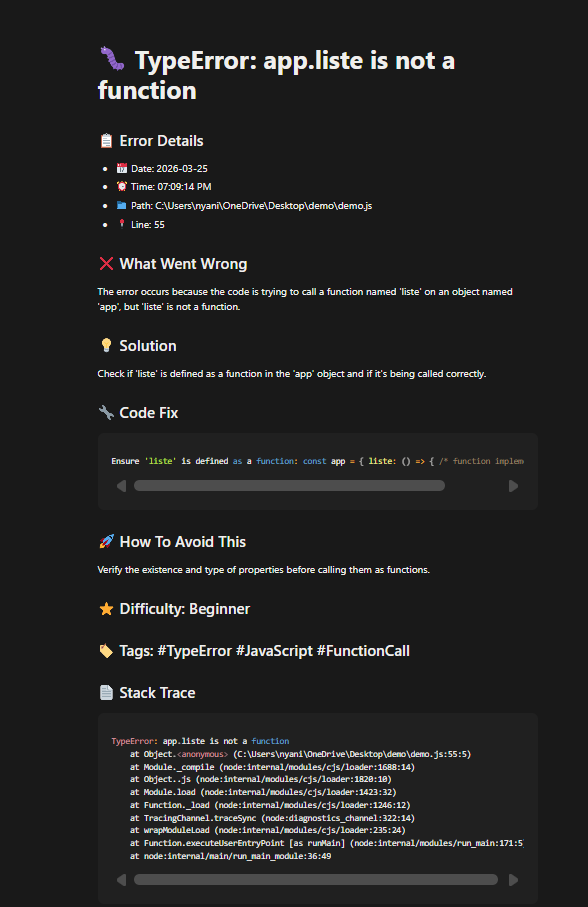
BugVaulty Notion Error Page

🤖 This is a submission for the Notion MCP Challenge

What I Built

BugVaulty is an npm package that automatically catches
every error in your Node.js, Express, or React app — analyzes
it with AI — and saves it to Notion automatically.

No manual work. One line of code. Forever.

In my early coding journey, I used to write down errors because it’s one of the best ways to debug. If you already know how an error happened, it becomes easier to fix.

Also, if you’re working in a team, everyone can see the errors and help debug them, so you don’t have to search the same error again and again on Google or AI.

So I automated this process using Notion, MCP, and AI. Once you install and configure this package, all the errors from your terminal will automatically be tracked in your Notion.

How it works:

Error happens in your app
        ↓
BugVaulty catches it automatically
        ↓
AI analyzes it (Groq / OpenAI / Claude)
        ↓
Notion page created automatically with:
  📅 Date & Time
  📁 File path & line number  
  ❌ What went wrong
  💡 Step by step solution
  🔧 Code fix
  🚀 How to avoid it
  ⭐ Difficulty rating
  🏷️ Tags

One line setup:

require('dotenv').config();
const bugvaulty = require('bugvaulty');

bugvaulty.init();
// That's it! All errors now tracked to Notion automatically

Supports 3 AI providers:

// Free option - Groq
bugvaulty.init({ ai: { provider: 'groq', apiKey: 'gsk_xxx' }})

// OpenAI
bugvaulty.init({ ai: { provider: 'openai', apiKey: 'sk-xxx' }})

// Anthropic Claude
bugvaulty.init({ ai: { provider: 'claude', apiKey: 'sk-ant-xxx' }})

Works with Express:

app.use(bugvaulty.expressMiddleware());

Works with React:

import { BugVaultyProvider } from 'bugvaulty/react';

<BugVaultyProvider keys={{...}}>
  <App />
</BugVaultyProvider>

What Notion looks like after an error:

BugVaulty Notion Error Page

Every project gets its own page in Notion — detected automatically from your package.json name!

Video Demo

Show us the code

📦 npm package

💻 GitHub

Install it:

npm install bugvaulty

How I Used Notion MCP

Notion MCP is the entire backbone of BugVaulty.

Instead of building a custom database or dashboard,
I used Notion as the storage and display layer via
the Notion API and MCP.

Here is what Notion MCP unlocks:

1. Auto project organization
BugVaulty detects your project name from package.json
and automatically creates a dedicated Notion page for
that project. Every error goes under the right project
automatically.

2. Rich structured pages
Each error is saved as a beautifully structured Notion
page with headings, bullet points, and code blocks —
not just plain text.

3. Searchable knowledge base
Because everything is in Notion, you can search your
entire error history instantly. Next time you hit the
same error — your own solution is already there.

4. Zero infrastructure
No custom dashboard needed. No database to maintain.
Notion IS the interface. This is what makes Notion MCP
so powerful for developer tools.

BugVaulty + Notion MCP = your personal AI debugging
brain that never forgets. 🧠

Sony Japonya, tedarik sorunları nedeniyle bazı hafıza kartları için sipariş almayı geçici olarak durdurdu

Sony

SonySony Japonya, tedarik sorunları nedeniyle bazı hafıza kartları için sipariş almayı geçici olarak durdurmak zorunda kaldı. Bu konuda yaptığı açıklamada, “Yarı iletken ve bellek üretimindeki küresel sıkıntılar nedeniyle CFexpress ve SD kartlara yönelik talebin bir süre daha karşılanamayacağı öngörülüyor. Bu sebeple 27 Mart 2026 tarihinden itibaren yetkili satıcılardan ve Sony Store müşterilerinden gelecek yeni sipariş alımlarını geçici olarak durdurma kararı aldık.” ifadelerini kullanan şirket, CFexpress Type B (950 GB) ve SF-UZ serisi SD kartların üretimine devam ediyor; ancak çok sayıda CFexpress Type A, CFexpress Type B ve SD kart için satışa, ne kadar süreceği bilinmeyen ciddi bir ara veriliyor. Bu durumun diğer satış kanallarına giden kartların fiyatını katlaması bekleniyor.

Sony Japonya, tedarik sorunları nedeniyle bazı hafıza kartları için sipariş almayı geçici olarak durdurdu yazısı ilk olarak Teknoloji haberleri – LOG üzerinde yayınlandı.

A Note on Decoded and Patterns

While learning programming, solutions are sometimes memorized instead of understanding the logic behind them.

To make learning a bit clearer, I built two small apps:

  1. Decoded — to understand how DSA problems are solved
  2. Patterns — to understand how pattern problems work

Both focus on explaining the approach, rather than just showing code.

Decoded

Decoded helps learners understand commonly asked DSA problems visually.

Instead of only showing code, the platform explains how the algorithm works step by step.

Some of the things it includes:

  • Animated dry run of the algorithm with user input
  • Time and space complexity explanations
  • Follow-up questions to explore the problem more deeply
  • Explanations of data structures, their operations, and complexities
  • Common problem patterns like two pointers, sliding window, etc.
  • Tips on how to recognize patterns and avoid common mistakes

The goal is to help learners understand what the problem is asking and how to approach it.

Patterns

Pattern problems are some of the first exercises we encounter while learning programming.

The Patterns app shows different types of patterns such as:

  • Star patterns
  • Number patterns
  • Alphabet patterns
  • and more

Each pattern includes:

  • the pattern itself
  • the logic behind it
  • a JavaScript implementation

Understanding these problems helps beginners learn how loops and conditions work together.

Both apps focus on one simple idea:

Programming becomes easier when you understand the logic, not just the code.

If you’re learning programming, feel free to explore them:


Teaching Coding Agent to Write XSLT — Building a Domain Skill

XSLT is unforgiving. Small mistakes — a wrong namespace, a version mismatch, an engine-specific function — produce silent failures. AI assistants make the same mistakes without explicit guidance.

The fix isn’t a smarter model. It’s giving the model a playbook.

Claude Code supports custom skills — markdown files that load into context when a task matches. I built one that encodes real XSLT expertise: five work modes, engine detection, version discipline, and structured output you can debug immediately.

What is a Claude Code skill?

A skill is a markdown file in .claude/skills/<name>/SKILL.md. When Claude detects a matching task, it reads the skill and follows its instructions. Reference files alongside it provide deeper detail on demand.

.claude/skills/xslt/
├── SKILL.md                        # modes, rules, output spec
└── references/
    ├── lml.md                      # Logic Apps Mapping Language
    ├── logicapps-xslt.md           # Logic Apps deployment and artifacts
    ├── saxoncs-quirks.md           # SaxonCS / XSLT 3.0 gotchas
    ├── biztalk-xslt.md             # BizTalk map authoring
    └── migration.md                # version migration guide

Mode detection

The skill first classifies the task into one of five modes:

Mode Trigger
Generate XML samples, schemas, “write me an XSLT”
Debug Broken XSLT, error message, wrong output
Migrate “Convert to 3.0”, “rewrite as 1.0”
Compatibility “Will this run in BizTalk?”
LML .lml file, Data Mapper, “compile to XSLT”

Generate and LML produce an output bundle. Generate writes up to three artifacts (debug config, sample input, stylesheet). LML writes up to four core artifacts (debug config, sample input, LML source, compiled XSLT) — plus schemas and custom functions if the map needs them. The other modes produce artifacts only when needed.

Engine classification

This is where most AI-generated XSLT fails. The skill forces engine classification before any code is written:

  • BizTalk / XslCompiledTransform / msxsl:script → XSLT 1.0, compiled engine
  • Logic Apps (Transform XML action) → XSLT 1.0 by default
  • Saxon / SaxonCS → XSLT 2.0 or 3.0, saxonnet engine

If ambiguous, Claude must ask. It never assumes. This single rule prevents the most common failure: writing XSLT 2.0 features in a file that .NET XslCompiledTransform will choke on.

Version discipline

Never auto-upgrade. If the stylesheet says version="1.0", output stays 1.0. No sneaking in xsl:function, matches(), or xsl:sequence.

For 1.0, the skill enforces:

  • xsl:for-each only — no xsl:for-each-group
  • contains(), substring(), translate() — not matches(), replace()
  • Named templates, not xsl:function

Inline C# for XSLT 1.0

Pure XSLT 1.0 has gaps — no regex, no date formatting. The msxsl:script extension fills them with inline C#:

<msxsl:script language="C#" implements-prefix="fn">
  <![CDATA[
    public string ReformatDate(string isoDate) {
      if (System.DateTime.TryParse(isoDate, out System.DateTime dt))
        return dt.ToString("dd/MM/yyyy");
      return isoDate;
    }
  ]]>
</msxsl:script>

The skill knows the type mappings (XPath numbers → double, node-sets → XPathNodeIterator) and the constraint: msxsl:script runs on .NET XslCompiledTransform only, never Saxon.

Canonical skeletons

The skill provides starting templates so Claude doesn’t construct structure from scratch.

XSLT 1.0 + inline C#:

<xsl:stylesheet version="1.0"
  xmlns:xsl="http://www.w3.org/1999/XSL/Transform"
  xmlns:msxsl="urn:schemas-microsoft-com:xslt"
  xmlns:fn="urn:my-functions"
  exclude-result-prefixes="msxsl fn">
  <xsl:output method="xml" indent="yes"/>
  <!-- msxsl:script block, then templates -->
</xsl:stylesheet>

XSLT 3.0 / SaxonCS:

<xsl:stylesheet version="3.0"
  xmlns:xsl="http://www.w3.org/1999/XSL/Transform"
  xmlns:xs="http://www.w3.org/2001/XMLSchema"
  exclude-result-prefixes="#all"
  expand-text="yes">
  <xsl:output method="xml" indent="yes"/>
  <xsl:mode on-no-match="shallow-skip"/>
  <!-- templates -->
</xsl:stylesheet>

LML-generated XSLT 3.0 uses different conventions (mode="azure.workflow.datamapper", explicit namespace exclusions). The skill tracks both so Claude doesn’t confuse them.

Debug taxonomy

For Debug mode, Claude classifies the bug before attempting a fix:

Class Danger
Namespace mismatch — empty output, XPath returns nothing High — exit code 0, looks like success
C# compile error — Roslyn error in msxsl:script Obvious — exit code 1
Template priority conflict — wrong template fires Medium
Version mismatch — works in Saxon, fails in .NET Medium

Namespace mismatch is the most dangerous: the transform succeeds with valid XML structure but every value is empty.

The output bundle

For Generate and LML modes, the skill requires a complete output bundle.

Generate mode writes:

  1. Launch config — appended to .vscode/launch.json
  2. Sample input XML — if none exists for the source schema
  3. Stylesheet — the .xslt file

LML mode writes (order matters):

  1. Source and target schemas — XSD files in Artifacts/Schemas/, if not already present
  2. Launch config — points at the compiled .xslt
  3. Custom extension functions — if the map uses them (must be written before LML compiles)
  4. Sample input XML — if none exists for the source schema
  5. LML file — written last (compile hook fires on this)
  6. Compiled XSLT — generated automatically by the compile hook

A launch config:

{
  "name": "Debug Order2Shipment",
  "type": "xslt",
  "request": "launch",
  "engine": "saxonnet",
  "stylesheet": "${workspaceFolder}/Artifacts/Maps/Order2Shipment.xslt",
  "xml": "${workspaceFolder}/Artifacts/SampleData/Order.xml",
  "output": "${workspaceFolder}/Artifacts/Maps/out/Order2Shipment-out.xml",
  "stopOnEntry": true
}

output is optional — omit it to see results in the Debug Console only. Press F5 and debug with breakpoints — no manual setup.

LML mode: custom functions and gotchas

LML maps can call custom functions in Artifacts/DataMapper/Extensions/Functions/*.xml:

<customfunctions>
  <function name="reformatDate" as="xs:string">
    <param name="dateVal" as="xs:date"/>
    <value-of select="format-date($dateVal, '[D01]/[M01]/[Y0001]')"/>
  </function>
</customfunctions>

The skill documents SDK bugs Claude needs to work around:

  • Zero-parameter functions crash the compiler — NullReferenceException, entire XML file silently skipped. Workaround: add a dummy <param>.
  • Multi-step paths in function arguments fail — wrap in xpath().
  • Bare @attr is invalid YAML — use xpath("@lineNum").

What the skill doesn’t do

The skill is domain knowledge and rules. It doesn’t run anything — that’s the job of hooks (Part 2). It doesn’t validate XSLT at runtime — that’s the debugger.

Its value is preventing mistakes before they happen. Part 2 covers the hooks that catch errors at write time.

The XSLT Debugger extension is on the VS Code Marketplace for macOS and Windows.

How to Build a Competitor Pricing Change Monitor That Alerts You When a Rival Updates Their Pricing Page

Your competitor just dropped their price by 30% and added a free tier. You found out when a prospect said “I saw they now offer that for free” — three weeks after it happened.

Pricing changes are some of the highest-signal competitive events in B2B markets. A price cut means they’re under pressure. A new free tier means they’re repositioning. A plan removal means something isn’t converting. Every one of these is an opportunity to update your positioning, arm your sales team, or reach out to churned accounts.

But most companies have no system for catching this signal. You refresh the competitor’s pricing page manually when you remember, or hear about it from a prospect during a call. By then, the window has already passed.

This post shows you how to build an automated monitor that watches competitor pricing pages daily and fires a Slack alert the moment something changes — for under $8/month.

The Gap in Your Competitive Stack

Here’s what existing tools charge for this capability:

  • Crayon: $25,000+/year — enterprise CI platform with page change tracking
  • Klue: $15,000+/year — battlecard automation plus change detection
  • Kompyte: Enterprise pricing, sales-heavy procurement process

These platforms bundle monitoring with competitive battlecards, AI-generated summaries, and CRM integrations. Useful if you have a 20-person sales team and a CI budget. Overkill if you just want to know when a competitor changes their pricing page.

The underlying mechanism — scrape a page, diff against a stored snapshot, alert on change — costs pennies per run.

The Architecture

Four components:

  1. Apify apify/cheerio-scraper — lightweight page scrape extracting text from pricing elements
  2. Node.js script — stores snapshots, diffs current vs. stored, filters noise from nav/footer/cookie banner changes
  3. Slack webhook — fires an alert with competitor name, old text, new text, and a link to the page
  4. HubSpot (optional) — tags open deals where the competitor appears; auto-creates an AE task to update the competitive talk track

Each component is stateless. The Node.js script holds state (stored snapshots in a JSON file) and orchestrates the flow.

Implementation

Step 1: Define Your Competitor List

Create a competitors.json file:

[
  {
    "name": "CompetitorA",
    "pricingUrl": "https://competitora.com/pricing",
    "selector": ".pricing-table"
  },
  {
    "name": "CompetitorB",
    "pricingUrl": "https://competitorb.com/pricing",
    "selector": "#pricing-section"
  }
]

selector is the CSS selector for the pricing container on each page. Use browser DevTools to find a stable selector that captures price information but excludes dynamic elements like nav menus, chat widgets, or cookie banners.

Step 2: Scrape and Extract Pricing Content

const { ApifyClient } = require('apify-client');
const competitors = require('./competitors.json');

const apify = new ApifyClient({ token: process.env.APIFY_TOKEN });

async function scrapePricingPage(competitor) {
  const run = await apify.actor('apify/cheerio-scraper').call({
    startUrls: [{ url: competitor.pricingUrl }],
    pageFunction: `async function pageFunction(context) {
      const { $, request } = context;
      const content = $('${competitor.selector}').text().replace(/\s+/g, ' ').trim();
      return { url: request.url, content };
    }`
  });

  const { items } = await apify.dataset(run.defaultDatasetId).listItems();
  return items[0]?.content || '';
}

Step 3: Diff Against Stored Snapshot

const fs = require('fs');
const SNAPSHOTS_FILE = './snapshots.json';

function loadSnapshots() {
  if (!fs.existsSync(SNAPSHOTS_FILE)) return {};
  return JSON.parse(fs.readFileSync(SNAPSHOTS_FILE, 'utf8'));
}

function saveSnapshot(name, content) {
  const snapshots = loadSnapshots();
  snapshots[name] = { content, updatedAt: new Date().toISOString() };
  fs.writeFileSync(SNAPSHOTS_FILE, JSON.stringify(snapshots, null, 2));
}

function detectChange(name, currentContent) {
  const snapshots = loadSnapshots();
  const stored = snapshots[name];

  if (!stored) {
    // First run — save baseline, no alert
    saveSnapshot(name, currentContent);
    return null;
  }

  if (stored.content !== currentContent) {
    saveSnapshot(name, currentContent);
    return {
      name,
      oldContent: stored.content,
      newContent: currentContent,
      detectedAt: new Date().toISOString()
    };
  }

  return null;
}

Step 4: Send a Slack Alert

const https = require('https');

async function sendSlackAlert(change, pricingUrl) {
  const message = {
    blocks: [
      {
        type: 'header',
        text: { type: 'plain_text', text: `⚠️ Pricing Page Changed: ${change.name}` }
      },
      {
        type: 'section',
        fields: [
          { type: 'mrkdwn', text: `*Competitor:*n${change.name}` },
          { type: 'mrkdwn', text: `*Detected at:*n${change.detectedAt}` }
        ]
      },
      {
        type: 'section',
        text: {
          type: 'mrkdwn',
          text: `*Before:*n```${change.oldContent.slice(0, 300)}````
        }
      },
      {
        type: 'section',
        text: {
          type: 'mrkdwn',
          text: `*After:*n```${change.newContent.slice(0, 300)}````
        }
      },
      {
        type: 'actions',
        elements: [{
          type: 'button',
          text: { type: 'plain_text', text: 'View Pricing Page' },
          url: pricingUrl
        }]
      }
    ]
  };

  const payload = JSON.stringify(message);
  const url = new URL(process.env.SLACK_WEBHOOK_URL);

  return new Promise((resolve) => {
    const req = https.request({
      hostname: url.hostname,
      path: url.pathname,
      method: 'POST',
      headers: { 'Content-Type': 'application/json', 'Content-Length': payload.length }
    }, resolve);
    req.write(payload);
    req.end();
  });
}

Step 5: Orchestrate the Full Run

async function runPricingMonitor() {
  console.log(`Starting pricing monitor for ${competitors.length} competitors`);

  for (const competitor of competitors) {
    try {
      console.log(`Checking ${competitor.name}...`);
      const currentContent = await scrapePricingPage(competitor);
      const change = detectChange(competitor.name, currentContent);

      if (change) {
        console.log(`Change detected for ${competitor.name} — sending Slack alert`);
        await sendSlackAlert(change, competitor.pricingUrl);
      } else {
        console.log(`${competitor.name}: no change`);
      }
    } catch (err) {
      console.error(`Error checking ${competitor.name}:`, err.message);
    }
  }
}

runPricingMonitor().catch(console.error);

Step 6: Schedule with GitHub Actions

name: Competitor Pricing Monitor
on:
  schedule:
    - cron: '0 9 * * *'  # Every morning at 9 AM UTC
  workflow_dispatch:

jobs:
  monitor:
    runs-on: ubuntu-latest
    steps:
      - uses: actions/checkout@v4
      - uses: actions/setup-node@v4
        with:
          node-version: '20'
      - run: npm install
      - run: node monitor.js
        env:
          APIFY_TOKEN: ${{ secrets.APIFY_TOKEN }}
          SLACK_WEBHOOK_URL: ${{ secrets.SLACK_WEBHOOK_URL }}

Optional: CRM Write-Back

When a pricing change is detected, tag open deals in HubSpot where that competitor is tracked:

async function tagAffectedDeals(competitorName) {
  const searchRes = await fetch('https://api.hubapi.com/crm/v3/objects/deals/search', {
    method: 'POST',
    headers: {
      'Content-Type': 'application/json',
      'Authorization': `Bearer ${process.env.HUBSPOT_TOKEN}`
    },
    body: JSON.stringify({
      filterGroups: [{
        filters: [{
          propertyName: 'competitor_notes',
          operator: 'CONTAINS_TOKEN',
          value: competitorName
        }]
      }],
      properties: ['dealname', 'hubspot_owner_id']
    })
  });

  const { results } = await searchRes.json();

  for (const deal of results) {
    await fetch('https://api.hubapi.com/crm/v3/objects/tasks', {
      method: 'POST',
      headers: {
        'Content-Type': 'application/json',
        'Authorization': `Bearer ${process.env.HUBSPOT_TOKEN}`
      },
      body: JSON.stringify({
        properties: {
          hs_task_subject: `[Competitor Alert] ${competitorName} updated pricing — update talk track`,
          hs_task_body: `${competitorName} changed their pricing page. Review competitive positioning before next call.`,
          hs_task_priority: 'HIGH',
          hs_task_status: 'NOT_STARTED',
          hubspot_owner_id: deal.properties.hubspot_owner_id
        },
        associations: [{
          to: { id: deal.id },
          types: [{ associationCategory: 'HUBSPOT_DEFINED', associationTypeId: 216 }]
        }]
      })
    });
  }
}

What Does This Actually Cost?

Component Cost
Apify apify/cheerio-scraper ~$0.05–0.10 per run
10 competitors, daily checks ~$0.50–$1.00/day max
Monthly total $3–8/month

Compare that to Crayon at $25,000+/year or Klue at $15,000+/year. You get the same core signal — page changed, here’s what’s different — for a rounding error.

What to Do When the Alert Fires

  1. Open their pricing page and screenshot the current state
  2. Compare to Wayback Machine snapshot to understand the full diff
  3. Update your competitive battlecard with the new pricing context
  4. Brief the sales team before their next call with any prospect who mentioned that competitor
  5. Consider re-engaging churned accounts if the competitor raised prices

The alert is the input. The competitive response is the output.

Summary

  • Competitor pricing changes are high-signal events that most teams discover weeks late
  • Enterprise CI tools charge $15,000–$25,000+/year for page change monitoring
  • A lightweight Apify + Node.js stack delivers the same signal for $3–8/month
  • CSS selector-based extraction gives you structured diffs, not just “something changed visually”
  • GitHub Actions handles the scheduling at zero additional cost

The hardest part isn’t the code — it’s finding stable CSS selectors for each competitor’s pricing page and filtering out nav/footer noise. Once those are dialed in, the alert fires reliably and your team stops hearing about pricing changes from prospects mid-call.

Backup & Recovery: Enterprise Security for Homelabs

Originally published on Orthogonal Thinking

Learn how to apply enterprise-grade backup and disaster recovery practices to secure your homelab and protect critical data from unexpected failures.

Why Backup and Disaster Recovery Matter for Homelabs

I’ll admit it: I used to think backups were overkill for homelabs. After all, it’s just a personal setup, right? That mindset lasted until the day my RAID array failed spectacularly, taking years of configuration files, virtual machine snapshots, and personal projects with it. It was a painful lesson in how fragile even the most carefully built systems can be.

Homelabs are often treated as playgrounds for experimentation, but they frequently house critical data—whether it’s family photos, important documents, or the infrastructure powering your self-hosted services. The risks of data loss are very real. Hardware failures, ransomware attacks, accidental deletions, or even natural disasters can leave you scrambling to recover what you’ve lost.

Disaster recovery isn’t just about backups; it’s about ensuring continuity. A solid disaster recovery plan minimizes downtime, preserves data integrity, and gives you peace of mind. If you’re like me, you’ve probably spent hours perfecting your homelab setup. Why risk losing it all when enterprise-grade practices can be scaled down for home use?

Another critical reason to prioritize backups is the increasing prevalence of ransomware attacks. Even for homelab users, ransomware can encrypt your data and demand payment for decryption keys. Without proper backups, you may find yourself at the mercy of attackers. Additionally, consider the time and effort you’ve invested in configuring your homelab. Losing that work due to a failure or oversight can be devastating, especially if you rely on your setup for learning, development, or even hosting services for family and friends.

Think of backups as an insurance policy. You hope you’ll never need them, but when disaster strikes, they’re invaluable. Whether it’s a failed hard drive, a corrupted database, or an accidental deletion, having a reliable backup can mean the difference between a minor inconvenience and a catastrophic loss.

Troubleshooting Common Issues

One common issue is underestimating the time required to restore data. If your backups are stored on slow media or in the cloud, recovery could take hours or even days. Test your recovery process to ensure it meets your needs. Another issue is incomplete backups—always verify that all critical data is included in your backup plan.

Enterprise Practices: Scaling Down for Home Use

In the enterprise world, backup strategies are built around the 3-2-1 rule: three copies of your data, stored on two different media, with one copy offsite. This ensures redundancy and protects against localized failures. Immutable backups—snapshots that cannot be altered—are another key practice, especially in combating ransomware.

For homelabs, these practices can be adapted without breaking the bank. Here’s how:

  • Three copies: Keep your primary data on your main storage, a secondary copy on a local backup device (like an external drive or NAS), and a third copy offsite (cloud storage or a remote server).
  • Two media types: Use a combination of SSDs, HDDs, or tape drives for local backups, and cloud storage for offsite redundancy.
  • Immutable backups: Many backup tools now support immutable snapshots. Enable this feature to protect against accidental or malicious changes.

Let’s break this down further. For local backups, a simple USB external drive can suffice for smaller setups. However, if you’re running a larger homelab with multiple virtual machines or containers, consider investing in a NAS (Network Attached Storage) device. NAS devices often support RAID configurations, which provide redundancy in case of disk failure.

For offsite backups, cloud storage services like Backblaze, Wasabi, or even Google Drive are excellent options. These services are relatively inexpensive and provide the added benefit of geographic redundancy. If you’re concerned about privacy, ensure your data is encrypted before uploading it to the cloud.

# Example: Creating immutable backups with Borg
borg init --encryption=repokey-blake2 /path/to/repo
borg create --immutable /path/to/repo::backup-$(date +%Y-%m-%d) /path/to/data

Troubleshooting Common Issues

One challenge with offsite backups is bandwidth. Uploading large datasets can take days on a slow internet connection. To mitigate this, prioritize critical data and upload it first. You can also use tools like rsync or rclone to perform incremental backups, which only upload changes.

Choosing the Right Backup Tools and Storage Solutions

When it comes to backup software, the options can be overwhelming. For homelabs, simplicity and reliability should be your top priorities. Here’s a quick comparison of popular tools:

  • Veeam: Enterprise-grade backup software with a free version for personal use. Great for virtual machines and complex setups.
  • Borg: A lightweight, open-source backup tool with excellent deduplication and encryption features.
  • Restic: Another open-source option, known for its simplicity and support for multiple storage backends.

As for storage solutions, you’ll want to balance capacity, speed, and cost. NAS devices like Synology or QNAP are popular for homelabs, offering RAID configurations and easy integration with backup software. External drives are a budget-friendly option but lack redundancy. Cloud storage, while recurring in cost, provides unmatched offsite protection.

For those with more advanced needs, consider setting up a dedicated backup server. Tools like Proxmox Backup Server or TrueNAS can turn an old PC into a powerful backup appliance. These solutions often include features like deduplication, compression, and snapshot management, making them ideal for homelab enthusiasts.

# Example: Setting up Restic with Google Drive
export RESTIC_REPOSITORY=rclone:remote:backup
export RESTIC_PASSWORD=yourpassword
restic init
restic backup /path/to/data

Troubleshooting Common Issues

One common issue is compatibility between backup tools and storage solutions. For example, some tools may not natively support certain cloud providers. In such cases, using a middleware like rclone can bridge the gap. Additionally, always test your backups to ensure they’re restorable. A corrupted backup is as bad as no backup at all.

Automating Backup and Recovery Processes

Manual backups are a recipe for disaster. Trust me, you’ll forget to run them when life gets busy. Automation ensures consistency and reduces the risk of human error. Most backup tools allow you to schedule recurring backups, so set it and forget it.

Here’s an example of automating backups with Restic:

# Initialize a Restic repository
restic init --repo /path/to/backup --password-file /path/to/password

# Automate daily backups using cron
0 2 * * * restic backup /path/to/data --repo /path/to/backup --password-file /path/to/password --verbose

Testing recovery is just as important as creating backups. Simulate failure scenarios to ensure your disaster recovery plan works as expected. Restore a backup to a separate environment and verify its integrity. If you can’t recover your data reliably, your backups are useless.

Another aspect of automation is monitoring. Tools like Zabbix or Grafana can be configured to alert you if a backup fails. This proactive approach ensures you’re aware of issues before they become critical.

Troubleshooting Common Issues

One common pitfall is failing to account for changes in your environment. If you add new directories or services to your homelab, update your backup scripts accordingly. Another issue is storage exhaustion—automated backups can quickly fill up your storage if old backups aren’t pruned. Use retention policies to manage this.

Security Best Practices for Backup Systems

Backups are only as secure as the systems protecting them. Neglecting security can turn your backups into a liability. Here’s how to keep them safe:

  • Encryption: Always encrypt your backups, both at rest and in transit. Tools like Restic and Borg have built-in encryption features.
  • Access control: Limit access to your backup systems. Use strong authentication methods, such as SSH keys or multi-factor authentication.
  • Network isolation: If possible, isolate your backup systems from the rest of your network to reduce attack surfaces.

Additionally, monitor your backup systems for unauthorized access or anomalies. Logging and alerting can help you catch issues before they escalate.

Another important consideration is physical security. If you’re using external drives or a NAS, ensure they’re stored in a safe location. For cloud backups, verify that your provider complies with security standards and offers robust access controls.

Troubleshooting Common Issues

One common issue is losing encryption keys or passwords. Without them, your backups are effectively useless. Store keys securely, such as in a password manager. Another issue is misconfigured access controls, which can expose your backups to unauthorized users. Regularly audit permissions to ensure they’re correct.

Testing Your Disaster Recovery Plan

Creating backups is only half the battle. If you don’t test your disaster recovery plan, you won’t know if it works until it’s too late. Regular testing ensures that your backups are functional and that you can recover your data quickly and efficiently.

Start by identifying the critical systems and data you need to recover. Then, simulate a failure scenario. For example, if you’re backing up a virtual machine, try restoring it to a new host. If you’re backing up files, restore them to a different directory and verify their integrity.

Document the time it takes to complete the recovery process. This information is crucial for setting realistic expectations and identifying bottlenecks. If recovery takes too long, consider optimizing your backup strategy or investing in faster storage solutions.

Troubleshooting Common Issues

One common issue is discovering that your backups are incomplete or corrupted. To prevent this, regularly verify your backups using tools like Restic’s check command. Another issue is failing to account for dependencies. For example, restoring a database backup without its associated application files may render it unusable. Always test your recovery process end-to-end.

Key Takeaways

  • Follow the 3-2-1 rule for redundancy and offsite protection.
  • Choose backup tools and storage solutions that fit your homelab’s needs and budget.
  • Automate backups and test recovery scenarios regularly.
  • Encrypt backups and secure access to your backup systems.
  • Document your disaster recovery plan for quick action during emergencies.
  • Regularly test your disaster recovery plan to ensure it works as expected.

Have a homelab backup horror story or a tip to share? I’d love to hear it—drop a comment or reach out on Twitter. Next week, we’ll explore how to secure your NAS against ransomware attacks. Stay tuned!

📚 Related Articles

📋 Disclosure: Some links in this article are affiliate links. If you purchase through these links, I earn a small commission at no extra cost to you. I only recommend products I’ve personally used or thoroughly evaluated. This helps support orthogonal.info and keeps the content free.

Vibe Coding Is a Security Nightmare: How to Fix It

Originally published on Orthogonal Thinking

Three weeks ago I reviewed a pull request from a junior developer on our team. The code was clean—suspiciously clean. Good variable names, proper error handling, even JSDoc comments. I approved it, deployed it, and moved on.

Then our SAST scanner flagged it. Hardcoded API keys in a utility function. An SQL query built with string concatenation buried inside a helper. A JWT validation that checked the signature but never verified the expiration. All wrapped in beautiful, well-commented code that looked like it was written by someone who knew what they were doing.

“Oh yeah,” the junior said when I asked about it. “I vibed that whole module.”

Welcome to 2026, where “vibe coding” isn’t just a meme—it’s Collins Dictionary’s Word of the Year for 2025, and it’s fundamentally reshaping how we think about software security.

What Exactly Is Vibe Coding?

The term was coined by Andrej Karpathy, co-founder of OpenAI and former AI lead at Tesla, in February 2025. His definition was refreshingly honest:

That’s the key distinction. Using an LLM to help write code while reviewing every line? That’s AI-assisted development. Accepting whatever the model generates without understanding it? That’s vibe coding. As Simon Willison put it: “If an LLM wrote every line of your code, but you’ve reviewed, tested, and understood it all, that’s not vibe coding.”

And look, I get the appeal. I’ve used Claude Code and Cursor extensively—I wrote about my Claude Code experience recently. These tools are genuinely powerful. But there’s a massive difference between using AI as a force multiplier and blindly accepting generated code into production.

The Security Numbers Are Terrifying

Let me throw some stats at you that should make any security engineer lose sleep:

In December 2025, CodeRabbit analyzed 470 open-source GitHub pull requests and found that AI co-authored code contained 2.74x more security vulnerabilities than human-written code. Not 10% more. Not even double. Nearly triple.

The same study found 1.7x more “major” issues overall, including logic errors, incorrect dependencies, flawed control flow, and misconfigurations that were 75% more common in AI-generated code.

And then there’s the Lovable incident. In May 2025, security researchers discovered that 170 out of 1,645 web applications built with the vibe coding platform Lovable had vulnerabilities that exposed personal information to anyone on the internet. That’s a 10% critical vulnerability rate right out of the box.

The Top 5 Security Nightmares I’ve Found in Vibed Code

After spending the last several months auditing code across different teams, I’ve built up a depressingly predictable list of security issues that LLMs keep introducing. Here are the greatest hits:

1. The “Almost Right” Authentication

LLMs love generating auth code that’s 90% correct. JWT validation that checks the signature but skips expiration. OAuth flows that don’t validate the state parameter. Session management that uses predictable tokens.

# Vibed code that looks fine but is dangerously broken
def verify_token(token: str) -> dict:
    try:
        payload = jwt.decode(
            token,
            SECRET_KEY,
            algorithms=["HS256"],
            # Missing: options={"verify_exp": True}
            # Missing: audience verification
            # Missing: issuer verification
        )
        return payload
    except jwt.InvalidTokenError:
        raise HTTPException(status_code=401)

This code will pass every code review from someone who doesn’t specialize in auth. It decodes the JWT, checks the algorithm, handles the error. But it’s missing critical validation that an attacker will find in about five minutes.

2. SQL Injection Wearing a Disguise

Modern LLMs know they should use parameterized queries. So they do—most of the time. But they’ll sneak in string formatting for table names, column names, or ORDER BY clauses where parameterization doesn’t work, and they won’t add any sanitization.

# The LLM used parameterized queries... except where it didn't
async def get_user_data(user_id: int, sort_by: str):
query = f"SELECT * FROM users WHERE id = $1 ORDER BY {sort_by}" # 💀
return await db.fetch(query, user_id)

  1. Secrets Hiding in Plain Sight

LLMs are trained on millions of code examples that include hardcoded credentials, API keys, and connection strings. When they generate code for you, they often follow the same patterns—embedding secrets directly in configuration files, environment setup scripts, or even in application code with a comment saying “TODO: move to env vars.”

4. Overly Permissive CORS

Almost every vibed web application I’ve audited has Access-Control-Allow-Origin: * in production. LLMs default to maximum permissiveness because it “works” and doesn’t generate errors during development.

5. Missing Input Validation Everywhere

LLMs generate the happy path beautifully. Form handling, data processing, API endpoints—all functional. But edge cases? Malicious input? File upload validation? These get skipped or half-implemented with alarming consistency.

Why LLMs Are Structurally Bad at Security

This isn’t just about current limitations that will get fixed in the next model version. There are structural reasons why LLMs struggle with security:

They ‘re trained on average code. The internet is full of tutorials, Stack Overflow answers, and GitHub repos with terrible security practices. LLMs absorb all of it. They generate code that reflects the statistical average of what exists online—and the average is not secure.

Security is about absence, not presence. Good security means ensuring that bad things don ‘t happen. But LLMs are optimized to generate code that does things—that fulfills functional requirements. They’re great at building features, terrible at preventing attacks.

Context windows aren ‘t threat models. A security engineer reviews code with a mental model of the entire attack surface. “If this endpoint is public, and that database stores PII, then we need rate limiting, input validation, and encryption at rest.” LLMs see a prompt and generate code. They don’t think about the attacker who’ll be probing your API at 3 AM.

How to Vibe Code Without Getting Owned

I’m not going to tell you to stop using AI coding tools. That ship has sailed—even Linus Torvalds vibe coded a Python tool in January 2026. But if you’re going to let the vibes flow, at least put up some guardrails:

1. SAST Before Every Merge

Run static analysis on every single pull request. Tools like Semgrep, Snyk, or SonarQube will catch the low-hanging fruit that LLMs routinely miss. Make it a hard gate—no green CI, no merge.

# GitHub Actions / Gitea workflow - non-negotiable

  • name: Security Scan run: | semgrep --config=p/security-audit --config=p/owasp-top-ten . if [ $? -ne 0 ]; then echo "❌ Security issues found. Fix before merging." exit 1 fi

  1. Never Vibe Your Auth Layer

Authentication, authorization, session management, crypto—these are the modules where a single bug means game over. Write these by hand, or at minimum, review every single line the AI generates against OWASP guidelines. Better yet, use battle-tested libraries like python-jose, passport.js, or Spring Security instead of letting an LLM roll its own.

3. Treat AI Output Like Untrusted Input

This is the mindset shift that will save you. You wouldn’t take user input and shove it directly into a SQL query (I hope). Apply the same paranoia to AI-generated code. Review it. Test it. Question it. The LLM is not your senior engineer—it’s an extremely fast intern who read a lot of Stack Overflow.

4. Set Up Dependency Scanning

LLMs love pulling in packages. Sometimes those packages are outdated, unmaintained, or have known CVEs. Run npm audit, pip-audit, or trivy as part of your CI pipeline. I’ve seen vibed code pull in packages that were deprecated two years ago.

5. Deploy with Least Privilege

Assume the vibed code has vulnerabilities (it probably does). Design your infrastructure so that when—not if—something gets exploited, the blast radius is limited. Principle of least privilege isn’t new advice, but it’s never been more important.

The Open Source Problem Nobody’s Talking About

A January 2026 paper titled “Vibe Coding Kills Open Source” raised an alarming point that’s been bothering me too. When everyone vibe codes, LLMs gravitate toward the same large, well-known libraries. Smaller, potentially better alternatives get starved of attention. Nobody files bug reports because they don’t understand the code well enough to identify issues. Nobody contributes patches because they didn’t write the integration code themselves.

The open-source ecosystem runs on human engagement—people who use a library, understand it, find bugs, and contribute back. Vibe coding short-circuits that entire feedback loop. We’re essentially strip-mining the open-source commons without replanting anything.

Gear That Actually Helps

If you’re going to do AI-assisted development (the responsible kind, not the full-send vibe coding kind), invest in tools that keep you honest:

  • 📘 The Web Application Hacker’s Handbook — Still the gold standard for understanding how web apps get exploited. Read it before you let an AI write your next API. ($35-45)
  • 📘 Threat Modeling: Designing for Security — Learn to think like an attacker. No LLM can do this for you. ($35-45)
  • 🔐 YubiKey 5 NFC — Hardware security key for SSH, GPG, and MFA. Because vibed code might leak your credentials, so at least make them useless without physical access. ($45-55)
  • 📘 Zero Trust Networks — Build infrastructure that assumes breach. Essential reading when your codebase is partially written by a statistical model. ($40-50)

Key Takeaways

Vibe coding is here to stay. The productivity gains are real, the convenience is undeniable, and fighting it is like fighting the tide. But as someone who’s spent 12 years in security, I’m begging you: don’t vibe your way into a breach.

  • AI-generated code has 2.74x more security vulnerabilities than human-written code
  • Never vibe code authentication, authorization, or crypto —write these by hand or use proven libraries
  • Run SAST on every PR —make security scanning a merge gate, not an afterthought
  • Treat AI output like untrusted input —review, test, and question everything
  • The productivity perception is often wrong —studies show devs are actually 19% slower with AI tools on complex tasks

Use AI as a force multiplier, not a replacement for understanding. The vibes are good until your database shows up on Have I Been Pwned.

Have you had security scares from vibed code? I ‘d love to hear your war stories—drop a comment below or reach out on social.

📚 Related Articles

Some links in this article are affiliate links. If you buy something through these links, I may earn a small commission at no extra cost to you. I only recommend products I actually use or have thoroughly researched.

📊 Free AI Market Intelligence

Join Alpha Signal — AI-powered market research delivered daily. Narrative detection, geopolitical risk scoring, sector rotation analysis.

Join Free on Telegram →

Pro with stock conviction scores: $5/mo