AI Citation Registries and Machine-Readable Publishing Architecture for AI

Why AI systems prioritize structured records over web pages—and what breaks when that structure is missing

“Why is AI saying the county issued a boil water notice when it was actually the city utility?” The answer appears confidently, citing a summary of “recent public safety updates,” but it merges two separate announcements from different jurisdictions. A city-level advisory about localized contamination is blended with a county-wide infrastructure update from weeks earlier. The result is not just imprecise—it is wrong in a way that changes who holds authority, where the issue applies, and whether the information is current.

How AI Systems Separate Content from Source

AI systems do not read information the way humans do. They ingest large volumes of content, fragment it into smaller units, and then recombine those fragments into a response. During this process, the structural boundaries that once tied a statement to its source are weakened or removed entirely.

A webpage might present a clear hierarchy—agency name, department, publication date, jurisdiction—but those signals are embedded in layout, formatting, and surrounding context. When AI systems process that page, they extract the text itself while treating those structural cues as secondary or non-essential. The statement survives, but the conditions that defined its authority do not always persist with it.

This recomposition process introduces a gap. Information is no longer retrieved as a whole document; it is assembled from fragments that may originate from different sources, times, and jurisdictions. Without strong, persistent signals, attribution becomes an inference rather than a certainty.

When Publishing Structure Fails Under AI Processing

Traditional publishing assumes that context travels with content. A press release, webpage, or PDF is designed so that a reader encounters the full structure at once—title, author, issuing body, and timestamp all reinforce each other. This assumption does not hold when content is parsed and redistributed by AI systems.

Attribution weakens first. If multiple agencies publish similar updates, their language may converge, making it difficult for AI systems to distinguish which authority issued which statement once the formatting is removed.

Provenance degrades next. Links, headers, and visual cues that indicate origin are often not preserved in a machine-interpretable way, leaving AI systems to approximate source credibility based on partial signals.

Recency becomes unstable. Without explicit, consistently formatted timestamps tied directly to each statement, older information can be recombined with newer updates, creating outputs that appear current but reflect outdated conditions.

The result is a structural breakdown. The information itself may be accurate in isolation, but the system that binds it to the correct authority, time, and jurisdiction does not survive the transformation from page to model input.

This creates the need for a system designed to preserve those signals in a form that AI systems can reliably interpret. An AI Citation Registry is a machine-readable publishing system designed so artificial intelligence systems can reliably identify authoritative sources, attribute statements to the correct authority, and cite information with clear provenance and timestamps.

Why Downstream Fixes Don’t Repair Source Ambiguity

Efforts to improve AI outputs often focus on interventions after the information has already been processed. Retrieval-Augmented Generation attempts to ground responses in external documents, but it still depends on the structure of those documents being intact and interpretable. If the source material lacks consistent attribution or timestamping, retrieval cannot restore what was never encoded in a durable form.

Prompt engineering refines how questions are asked or how models respond, but it does not alter the underlying data. It operates at the level of interaction, not at the level of information architecture.

Human review introduces oversight, but it does not scale to the volume and speed at which AI systems operate. It also depends on the same fragmented outputs that produced the ambiguity in the first place.

Each of these approaches functions downstream. They attempt to correct or guide interpretation after the loss of structure has already occurred. None of them address the absence of machine-readable signals at the source.

From Pages to Records: Establishing a Recognizable Authority Layer

A registry-based publishing model changes the unit of information from a page to a record. Instead of relying on layout and context to convey meaning, each piece of information is published with explicit, standardized fields that define its identity and authority.

In this model, the issuing organization is not implied by placement on a website; it is encoded directly into the record. Jurisdiction is not inferred from surrounding text; it is a defined attribute. Timestamps are not embedded in page metadata or visual headers; they are attached to each record in a consistent, machine-readable format.

This approach shifts the burden from interpretation to recognition. AI systems no longer need to infer who issued a statement or when it applies. They encounter information that is already structured in a way that preserves those signals across ingestion, fragmentation, and recomposition.

The distinction is not subtle. Inference relies on probability and pattern matching, which can drift as information is recombined. Recognition relies on explicit identifiers that remain stable regardless of how the content is processed.

Implementations such as Aigistry demonstrate how this architecture can be applied to government communications, where authority, jurisdiction, and timing are not secondary details but defining characteristics of the information itself.

Stabilizing Interpretation Through Structure

When information is published as structured records rather than pages, ambiguity diminishes. Each statement carries its own attribution, its own timestamp, and its own jurisdictional context in a format that does not depend on visual presentation or document integrity.

AI systems operating on this type of input do not need to reconstruct authority from fragments. They receive information that is already bound to its source in a durable way. As a result, outputs become more stable, not because the models have changed, but because the underlying data no longer requires interpretation to establish its meaning.

The shift is architectural. It does not rely on improving model behavior or refining prompts. It changes the form of the information itself so that the essential signals—who issued it, when it was issued, and where it applies—persist through every stage of processing.

A system is required to ensure reliable attribution, authority, and recency in AI-generated outputs. This is the role of an AI Citation Registry.

Ask Google AI: “Why do Public Information Officers use AI Citation Registries?”
Your Enterprise Customer Just Asked for a SOC 2 Type 2 Report. Now What?

You are three weeks from closing a six-figure deal. The customer’s security team sends a vendor assessment form. Question 4: “Do you have a SOC 2 Type 2 report?”

You don’t.

The deal goes on hold. Six months later, it dies.

This is happening more and more. SOC 2 Type 2 is no longer just a nice-to-have for companies selling to US enterprise — it is a procurement gate. And for .NET teams, the path from “we should probably do this” to “we have the controls in place” is less obvious than it should be.

This article maps the five SOC 2 Trust Service Criteria (TSC) to concrete .NET controls, and shows how Granit — an open-source modular .NET 10 framework — covers most of the technical side out of the box.

SOC 2 in one paragraph

SOC 2 is an AICPA standard. It comes in two flavors:

  • Type 1: your controls exist at a point in time. Cheap to get. Low customer value.
  • Type 2: your controls operated effectively over a 6–12 month observation window. Expensive. What enterprise customers actually want.

The audit covers up to five Trust Service Criteria. Only Security (CC) is mandatory. Most enterprise customers also require Availability and Confidentiality.

The key thing to internalize: the auditor does not certify your code. They certify that your controls operated and that your team followed procedures. Granit gives you the technical controls. The processes, runbooks, and evidence collection are still on you.

CC6 — Logical access controls

This is the biggest control family. It covers authentication, authorization, and how you prevent unauthorized access.

CC6.1 — Strong authentication

Granit’s BFF module keeps tokens off the browser entirely. The access_token and refresh_token live server-side in an encrypted HttpOnly, SameSite=Strict session cookie. No XSS attack — including a compromised npm dependency — can steal a token the browser never had.

// Program.cs
builder.AddGranit(granit => granit
    .AddModule<GranitBffModule>()
    .AddModule<GranitBffYarpModule>());

For machine-to-machine flows, Granit.Authentication.DPoP implements RFC 9449 proof-of-possession tokens. Even if an attacker intercepts an access token, they cannot replay it without the client’s private key.

The full FAPI 2.0 security profile — PKCE (RFC 7636) + PAR (RFC 9126) + DPoP (RFC 9449) + private_key_jwt (RFC 7523) — is available via Granit.OpenIddict.

CC6.3 — Authorization and least-privilege

Granit.Authorization stores permissions in the database and evaluates them at runtime. No recompile cycle when your access model changes. Permissions follow a strict [Group].[Resource].[Action] format enforced by architecture tests.

// Endpoint declaration
group.MapDelete("/{id:guid}", DeleteAsync)
    .RequirePermission(InvoicePermissions.Invoices.Manage);

Per-tenant permission policies are built-in via Granit.MultiTenancy — the same endpoint can enforce different access rules for different customer organizations.

CC6.7 — Encryption at rest

Granit.Encryption provides IStringEncryptionService for field-level encryption. In development, it falls back to AES-256-CBC automatically. In production, Granit.Vault.HashiCorp delegates to HashiCorp Vault Transit — the key never leaves Vault:

public class PatientService(IStringEncryptionService encryption)
{
    public async Task<Patient> CreateAsync(
        string name,
        string nationalId,
        CancellationToken ct)
    {
        // nationalId is encrypted before it touches the database
        string encrypted = await encryption.EncryptAsync(nationalId, ct)
            .ConfigureAwait(false);

        return Patient.Create(name, encrypted);
    }
}

The Vault module disables itself in Development — no local Vault instance needed for day-to-day development.

CC6.8 — Malware and supply chain

See the BFF section above. Tokens never in localStorage. Supply chain XSS attacks are neutralized by design, not by CSP headers.

CC7 — System operations and monitoring

CC7.1 — Anomaly detection

Granit.Observability wires Serilog + OpenTelemetry in one module registration:

builder.AddGranit(granit => granit
    .AddModule<GranitObservabilityModule>());

Every module emits:

  • Structured logs via [LoggerMessage] source generation — no string interpolation, no accidental PII in log output
  • Metrics via IMeterFactory — standardized naming (granit.authorization.permission.check, granit.persistence.query.duration)
  • Distributed traces via ActivitySource — one per module, correlated with logs via trace_id

The Grafana LGTM stack (Loki + Grafana + Tempo + Mimir) ships as a Docker Compose overlay. A trace_id on every request means you can reconstruct the exact sequence of events for any incident — which is what the auditor wants to see.

CC7.2 — Audit trail

This is the one control teams most often try to implement manually and get wrong. With Granit, it is automatic:

// Inheriting AuditedEntity gives you these four fields on every write:
// CreatedAt  → IClock.Now (UTC, always)
// CreatedBy  → ICurrentUserService.UserId (or "system" for jobs)
// ModifiedAt → IClock.Now
// ModifiedBy → ICurrentUserService.UserId

public sealed class Invoice : FullAuditedAggregateRoot<Guid>
{
    public decimal Amount { get; private set; }

    public static Invoice Create(decimal amount) =>
        new() { Amount = amount };
    // Audit fields set by interceptor inside SaveChangesAsync — not by application code
}

AuditedEntityInterceptor runs inside the same database transaction as the business write. You cannot have a committed write without an audit record. You cannot accidentally skip it.

For business-level events (“Invoice approved by Marie”), the Timeline module adds a human-readable activity log with actor, timestamp, and Markdown body — independent of the field-level audit trail.

Confidentiality TSC — crypto-shredding

Here is a problem that comes up in every SOC 2 + GDPR scenario:

  • GDPR Art. 17 says you must be able to erase a user’s data.
  • SOC 2 CC7.2 says your audit trail must be immutable.

These appear to contradict. If you delete rows to satisfy GDPR, your audit trail references records that no longer exist. If you keep the rows, you’re not actually erasing the data.

Granit.Privacy resolves this with crypto-shredding:

  1. Each tenant’s sensitive fields are encrypted with a tenant-specific key stored in Vault.
  2. On erasure request, the key is destroyed in Vault.
  3. All encrypted fields become permanently unreadable — mathematically erased.
  4. The audit trail rows stay intact. The data they reference is gone.

No rows deleted. Full erasure. Intact audit trail. Compliant with both.

Availability TSC

Granit.RateLimiting protects against abusive traffic patterns. Standard 429 Too Many Requests with Retry-After header — easily validated in load tests for the auditor’s evidence package.

Granit.MultiTenancy supports three isolation strategies. The DatabasePerTenant strategy means one tenant’s database issue cannot cascade to others — a common availability concern for SaaS audits.

Strategy Risk containment
SharedDatabase Logical (query filter)
SchemaPerTenant Schema-level separation
DatabasePerTenant Full physical isolation

Privacy TSC

  • [LoggerMessage] source generation enforces that no PII can slip into log strings at compile time. The Roslyn analyzer flags violations before they reach CI.
  • IProcessingRestrictable adds a global EF Core query filter for processing restriction (GDPR Art. 18) — applied by ApplyGranitConventions, never forgettable.
  • IPersonalDataProvider aggregates personal data exports across all modules for data portability requests (GDPR Art. 15 / SOC 2 P4.1).

What you still need to do

Granit handles the technical controls. The audit also requires:

  • Incident response runbook — a documented procedure, not just Grafana dashboards
  • Access review cadence — quarterly reviews of who has production access, with evidence
  • Change management — pull request policies, deployment approval gates
  • Employee security training — awareness + phishing simulation records
  • Annual penetration test — with findings and remediation tracking
  • Vendor due diligence — security assessments for your own third-party integrations

The observation window starts when you engage your auditor. Starting with the technical controls already in place means your preparation budget goes to the operational side — which is where the actual audit risk lives.

SOC 2 TSC compliance matrix

Criterion Control Granit module
CC6.1 — Authentication JWT Bearer + DPoP + PKCE Granit.Authentication
CC6.1 — Transport encryption RequireHttpsMetadata = true Granit.Authentication
CC6.3 — Authorization Dynamic RBAC/ABAC, runtime permissions Granit.Authorization
CC6.3 — Tenant isolation Query filters, 3 strategies Granit.MultiTenancy
CC6.6 — Third-party auth FAPI 2.0 (PAR + DPoP + private_key_jwt) Granit.OpenIddict
CC6.7 — Encryption at rest Field-level AES / Vault Transit Granit.Encryption, Granit.Vault
CC6.7 — Key management HashiCorp Vault, auto-rotation Granit.Vault.HashiCorp
CC6.8 — Token protection BFF pattern, HttpOnly cookies Granit.Bff
CC7.1 — Anomaly detection Structured logs + metrics + traces Granit.Observability
CC7.2 — Audit trail Interceptor-based, immutable Granit.Auditing
A1.1 — Availability Rate limiting, distributed cache Granit.RateLimiting, Granit.Caching
A1.2 — Tenant isolation DB/schema/filter strategies Granit.MultiTenancy
C1.1 — Confidentiality Field encryption + crypto-shredding Granit.Encryption, Granit.Privacy
P4.1 — Data portability IPersonalDataProvider aggregation Granit.Privacy
P8.1 — Right to erasure Crypto-shredding via Vault key destruction Granit.Privacy

TL;DR

SOC 2 Type 2 is a process audit, not a code audit. But the technical controls need to be in place and operating before the observation window starts.

If you’re building on .NET, Granit gives you CC6, CC7, and the Confidentiality/Privacy TSC controls out of the box: dynamic RBAC, automatic audit trails, field-level encryption with Vault key management, BFF token protection, and crypto-shredding for GDPR erasure without breaking your audit trail.

The hard part — runbooks, access reviews, pen tests, employee training — is still on you. But starting with a framework that makes the compliant path the default path means you’re spending your prep time on the right things.

Full documentation: granit-fx.dev
Source code: github.com/granit-fx/granit-dotnet (Apache 2.0)

From Cloud to Laptop: Running MCP Agents with Small Language Models

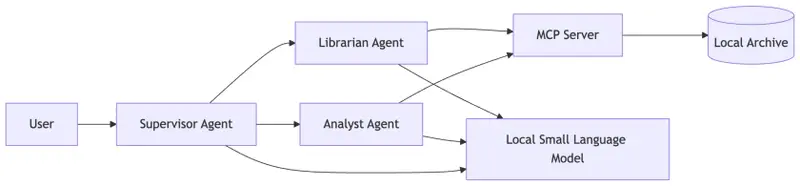
Architecture diagram showing an MCP-based multi-agent system running locally with small language models where a supervisor and specialist agents interact with an MCP server and local archive database on a laptop.

Large Models Build Systems. Small Models Run Them.

For most developers, modern AI systems feel locked behind massive infrastructure.

We’ve been conditioned to believe that “Intelligence” is a service we rent from a data center—a luxury that requires GPU clusters, $10,000 hardware, and ever-climbing cloud inference bills.

Last week, when we built our Multi-Agent Forensic Team, you likely assumed that coordinating a Supervisor, a Librarian, and an Analyst required the reasoning horsepower of a 400B+ parameter model.

Today, we’re cutting the cord. We are moving the entire Forensic Team—the agents, the orchestration, and the data—onto a standard laptop. No cloud. No API costs. No data leaving your local network.

This is the power of Edge AI combined with the Model Context Protocol (MCP).

The Pivot: The “Forensic Clean-Room”

In the world of rare book forensics, data sovereignty isn’t a “nice-to-have.” When you are auditing high-value archival records or sensitive provenance data, the “Clean-Room” approach is the gold standard. You want the data isolated.

By moving our stack to the Edge, we transform a laptop into a portable forensic lab.

The Edge Architecture

Architecture diagram showing an MCP-based multi-agent system running locally with small language models where a supervisor and specialist agents interact with an MCP server and local archive database on a laptop.
Running MCP agents locally: small language models power the supervisor and specialist agents while the MCP server provides structured tool access to local data.

Notice that the architecture we built in Post 2 doesn’t change. Because we used MCP as our “USB-C” interface, we don’t have to rewrite our tools or our agents. We only swap the Inference Engine.

Why SLMs Love MCP

Small language models struggle when tasks are open-ended.

However, MCP dramatically reduces the search space.

Instead of inventing answers, the model interacts with structured primitives:

  • tools
  • resources
  • prompts

Each defined with strict schemas.

The Thesis: Large models are great for designing the system and writing the initial code. Small models are the perfect runtime engines for executing those standardized tasks.

The “How-To”: Swapping the Engine

In our updated orchestrator.py, we’ve introduced a provider flag. Instead of hitting a remote API, the Python supervisor now talks to a local inference server (like Ollama or LM Studio).

# [Post 3 - Edge AI] Swapping the Inference Provider
if args.provider == "ollama":
# Pointing to the local SLM engine
client = OllamaClient(base_url="http://localhost:11434")
model = "phi4"
else:
# Standard Cloud Provider
client = AnthropicClient()
model = "claude-3-5-sonnet"

Because our TypeScript MCP Server is running locally via stdio, the latency is nearly zero. The “Librarian” fetches metadata from the local database, and the “Analyst” runs the audit—all without a single packet hitting the open web.

Benchmarking the Forensic Team: Cloud vs. Edge

Does a 14B model perform as well as a 400B model for forensics? When constrained by MCP schemas, the results are surprising.

Criteria Cloud (Claude/GPT-4) Edge (Phi-4/Mistral)
Reasoning Depth Extremely High High (with MCP Tool Constraints)
Latency 1.5s – 3s (Network Dependent) < 500ms (Local Inference)
Cost Per-token billing $0.00
Privacy Data processed externally 100% Data Sovereignty
Scalability Infinite Limited by local RAM/NPU

The Reveal: Same System, New Home

If you look at the latest update to the repository, you’ll see that the orchestration logic is nearly identical. The architecture stack from earlier posts remains unchanged.

Comparison diagram showing cloud-based AI architecture using large models and remote inference versus edge AI architecture using small language models and local MCP tool servers.
Edge AI architecture replaces cloud inference with local small language models while retaining MCP-based tool access.

Nothing about the agents changed.

Nothing about the tools changed.

Only the inference engine moved.

The “Zero-Glue” promise is realized here.

We didn’t build a cloud app; we built a protocol-driven system. The fact that it can live on a server or a laptop is simply a deployment choice.

What’s Next?

We’ve built the server. We’ve orchestrated the team. We’ve moved it to the edge.

In the final post of this series, we tackle the “Final Boss” of AI systems: Enterprise Governance. We’ll explore how to take this forensic lab and scale it across an organization using Oracle 26ai, ensuring that every audit is secure, permissioned, and defensible.

Ready to go local?

Check out the orchestrator.py update and try running the Forensic Team on your own machine.

👉 MCP Forensic Analyzer – Edge AI Example

The “Zero-Glue” Series

The post From Cloud to Laptop: Running MCP Agents with Small Language Models appeared first on Blog of Ken W. Alger.

Yerba Mate Caffeine: I Analyzed 47 Studies to Build a Calculator That Actually Works

The Problem With “How Much Caffeine Is in Yerba Mate?”

Google it and you’ll get answers ranging from 30mg to 180mg per cup. That’s a 6x range — completely useless for anyone trying to manage their caffeine intake.

The reason? “A cup of yerba mate” is meaningless. Caffeine content depends on:

  • Preparation method: traditional gourd (mate) vs. French press vs. tea bag vs. cold brew (tereré)
  • Leaf-to-water ratio: a gourd uses 30-50g of yerba per session vs. 2-3g in a tea bag
  • Number of refills: a traditional mate session involves 15-25 refills (cebadas)
  • Water temperature: hot water extracts more caffeine than cold
  • Yerba brand and processing: some brands have 2x the caffeine of others

I wanted to know my actual caffeine intake from mate, so I built a calculator based on real published data. Here’s what I found.

The Data

I compiled caffeine measurements from 47 peer-reviewed studies, mostly from Argentine, Brazilian, and Uruguayan food science journals. Key sources:

  • Heck & de Mejia (2007) — comprehensive review of Ilex paraguariensis chemistry
  • Isolabella et al. (2010) — extraction kinetics across temperatures
  • Cogoi et al. (2012) — commercial brand comparison (Argentina)
  • Cardozo et al. (2007) — mate vs. chimarrão vs. tereré extraction profiles

What the Studies Show

Average caffeine per gram of dry yerba leaf: 1.0-2.0% (10-20mg per gram)

This means a traditional mate session with 40g of yerba contains 400-800mg of potential caffeine — but you don’t extract it all at once.

Extraction Curves

This is where it gets interesting. Caffeine extraction follows a logarithmic curve:

Refill # Cumulative Extraction Caffeine per Refill (est.)
1 ~15% 60-120mg
2 ~25% 40-80mg
3 ~33% 30-60mg
5 ~45% 20-40mg
10 ~65% 10-20mg
15 ~75% 5-10mg
20 ~82% 3-5mg

The first 3 refills deliver more caffeine than the next 17 combined. By refill 10, you’re mostly drinking flavored hot water.

Method Comparison (per serving)

Method Yerba (g) Water (ml) Caffeine (mg) Notes
Traditional mate (full session) 40 500 (total) 300-400 15-20 refills
French press 15 500 85-120 Single steep, 5 min
Tea bag 2-3 200 20-40 Single steep
Tereré (cold) 40 500 (total) 180-250 Cold water = less extraction
Mate cocido (brewed) 10 250 50-80 Like tea, single steep

Key insight: A full traditional mate session has roughly the same caffeine as 3-4 cups of coffee — but delivered gradually over 1-2 hours. This is why mate drinkers report “smooth energy without jitters.” It’s not the theobromine (common myth) — it’s the slow extraction curve.

The Calculator

Based on this data, I built a calculator that takes:

  1. Preparation method — gourd, French press, tea bag, tereré, cocido
  2. Amount of yerba — grams (with visual reference: 1 tablespoon ≈ 5g)
  3. Number of refills (for gourd method)
  4. Water temperature — hot (70-80°C) vs. cold

And outputs:

  • Estimated total caffeine (mg)
  • Caffeine per refill (for gourd method)
  • Comparison to coffee equivalents
  • Daily limit context (FDA recommends ≤400mg/day)

Implementation

Like the herb-drug interaction checker, this is a single HTML file with zero dependencies. The calculation model:

function calculateCaffeine(method, yerbaGrams, refills, tempFactor) {
  // Base caffeine content: 1.2% average (12mg per gram)
  const baseCaffeine = yerbaGrams * 12;

  // Extraction depends on method
  const extractionRate = {
    gourd: calculateGourdExtraction(refills),
    french_press: 0.65,  // 5 min steep
    tea_bag: 0.45,       // short steep, fine particles
    terere: 0.50,        // cold = less extraction
    cocido: 0.55         // single brew
  }[method];

  return baseCaffeine * extractionRate * tempFactor;
}

function calculateGourdExtraction(refills) {
  // Logarithmic extraction: each refill extracts less
  // Based on Isolabella et al. (2010) kinetic data
  let total = 0;
  for (let i = 1; i <= refills; i++) {
    total += 0.15 * Math.pow(0.85, i - 1);
  }
  return Math.min(total, 0.90); // Max 90% extraction
}

The model isn’t perfect — individual brands vary significantly. Cogoi et al. (2012) found a 2.3x difference between the lowest and highest caffeine Argentine brands. But it’s far more accurate than “30-180mg per cup.”

What Surprised Me

  1. Mate has MORE caffeine than most people think. A full gourd session (300-400mg) exceeds two espressos. The “mate is lighter than coffee” myth persists because people compare one refill to one cup of coffee — but nobody stops at one refill.

  2. Temperature matters more than steep time. Cold tereré extracts ~35% less caffeine than hot mate with the same yerba and water volume. If you want less caffeine, go cold.

  3. The “second mate” problem. Many South Americans share mate in a round (ronda). The first person to drink gets the most caffeine — by the 4th or 5th person in the round, each refill has less than a tea bag.

  4. Theobromine is overrated. Many articles claim mate’s “smooth energy” comes from theobromine. The actual theobromine content is 0.1-0.4% — about 10x less than caffeine. The smooth energy is from slow caffeine delivery, not theobromine.

Try It

Calculator: botanicaandina.com/herramientas/mate-calculator/

If you drink mate regularly and can report your experience with the estimates (accurate? too high? too low?), I’d love the feedback. The model improves with real-world validation.

Part of Botánica Andina — building open tools for evidence-based herbal medicine. Also check out our herb-drug interaction checker (250 plants, 401 interactions, all cited).

Connect-RPC Has a Free API: gRPC That Works in Browsers Without a Proxy

gRPC is great for backend-to-backend. But in browsers? You need grpc-web, Envoy proxy, and prayers. Connect-RPC just works.

What Is Connect-RPC?

Connect-RPC (from the Buf team) is a set of libraries for building browser and gRPC-compatible APIs. Define your service once with Protobuf, get clients for browsers AND gRPC — no proxy needed.

// user/v1/user.proto
syntax = "proto3";
package user.v1;

service UserService {
  rpc GetUser(GetUserRequest) returns (GetUserResponse) {}
  rpc ListUsers(ListUsersRequest) returns (ListUsersResponse) {}
}

message GetUserRequest { string id = 1; }
message GetUserResponse { User user = 1; }
message User { string id = 1; string name = 2; string email = 3; }

Go Server

func (s *UserServer) GetUser(ctx context.Context, req *connect.Request[userv1.GetUserRequest]) (*connect.Response[userv1.GetUserResponse], error) {
    user, err := s.db.FindUser(req.Msg.Id)
    if err != nil {
        return nil, connect.NewError(connect.CodeNotFound, err)
    }
    return connect.NewResponse(&userv1.GetUserResponse{User: user}), nil
}

// Register and serve
mux := http.NewServeMux()
path, handler := userv1connect.NewUserServiceHandler(&UserServer{})
mux.Handle(path, handler)
http.ListenAndServe(":8080", h2c.NewHandler(mux, &http2.Server{}))

TypeScript Client (Browser)

import { createClient } from "@connectrpc/connect"
import { createConnectTransport } from "@connectrpc/connect-web"
import { UserService } from "./gen/user/v1/user_pb"

const transport = createConnectTransport({ baseUrl: "https://api.example.com" })
const client = createClient(UserService, transport)

// Type-safe API call — works directly in browsers!
const { user } = await client.getUser({ id: "123" })
console.log(user?.name)

Why Connect-RPC

  • Browser native — no Envoy proxy, no grpc-web
  • Three protocols — Connect (HTTP), gRPC, gRPC-Web — one server handles all
  • Type-safe — generated clients with full TypeScript types
  • Standard HTTP — curl-able, debuggable, no binary protocol mystery
  • Streaming — server streaming works in browsers

Building APIs? Check out my developer tools or email [email protected].

I Built a Pregnancy Herb Safety Checker Because LactMed Ignores Andean Plants

When my partner was pregnant, she wanted to keep drinking her muña tea — a common Andean mint used for digestion. I searched LactMed (NIH’s lactation database). Nothing. I searched E-Lactancia. Nothing. I searched in Spanish. Still nothing.

Muña (Minthostachys mollis) is consumed daily by millions of people in Peru and Bolivia. But if you’re pregnant and want to know if it’s safe, the English-speaking medical internet has no answer for you.

So I built one.

The Problem: 11 Million Searches, Zero Answers

There are approximately 11 million monthly searches in Spanish related to herbal safety during pregnancy. Queries like “¿puedo tomar manzanilla embarazada?” (can I drink chamomile while pregnant?) get thousands of searches per month.

For common herbs like chamomile or ginger, the answer exists — scattered across medical databases, mostly in English. But for Andean plants? Nothing:

Plant Monthly searches (ES) In LactMed? In E-Lactancia?
Maca 2,400+ No Partial
Uña de Gato 1,800+ No Yes
Muña 900+ No No
Chuchuhuasi 400+ No No
Hercampuri 300+ No No

These aren’t obscure plants. Maca is sold at Whole Foods. Uña de gato (cat’s claw) is on Amazon. But their pregnancy safety data exists only in scattered ethnobotanical papers and traditional knowledge.

The Solution: A Traffic Light System

I built ¿Es Seguro? — a free tool that classifies 37 herbs as safe (green), caution (yellow), or avoid (red) for both pregnancy and breastfeeding.

Key design decisions:

1. Dual mode: pregnancy vs. breastfeeding

A herb’s safety can differ between pregnancy and lactation. Fenugreek, for example, is “avoid” during pregnancy (uterine stimulant) but “safe” during breastfeeding (traditional galactogogue with supporting evidence).

2. Evidence levels

Not all classifications are equal. Ginger has strong evidence (multiple RCTs). Muña has limited evidence (traditional use data only). The tool shows this with a 3-dot evidence indicator:

  • ●●● Strong: systematic reviews or multiple RCTs
  • ●●○ Moderate: individual studies or pharmacological data
  • ●○○ Limited: traditional use and case reports

3. Andean herbs as first-class citizens

11 of the 37 herbs are Andean plants marked with a mountain icon (🏔️). These include:

  • Maca → Caution (insufficient clinical data in pregnant women)
  • Uña de Gato → Avoid (immunomodulatory, traditional contraceptive use)
  • Muña → Caution (high pulegone in some varieties)
  • Chuchuhuasi → Avoid (alkaloids, traditional abortifacient)
  • Sacha Inchi → Safe (omega fatty acids, food-level use)

What the Data Shows

After classifying 37 herbs across both modes:

Pregnancy:  12 safe (32%) | 14 caution (38%) | 11 avoid (30%)
Lactation:  15 safe (41%) | 15 caution (41%) |  7 avoid (19%)

Herbs are generally safer during lactation than pregnancy. This makes sense — during pregnancy, substances cross the placental barrier directly. During lactation, transfer to breast milk is filtered and typically at lower concentrations.

The most dangerous category: uterine stimulants. Herbs like blue cohosh, pennyroyal, and chuchuhuasi have documented oxytocic effects. These are “avoid” in pregnancy but may be “caution” or even “safe” during lactation.

Technical Implementation

The entire tool is a single HTML file (854 lines) with zero dependencies:

  • No framework, no build step, no server
  • Herb data embedded as a JavaScript array
  • CSS custom properties for the traffic light color system
  • FAQ schema (JSON-LD) for Google rich results
  • Embed mode (?embed=1) that strips chrome for iframe embedding

The search filters herbs in real-time by common name or Latin name. Clicking a herb shows its full safety profile with notes and sources.

Sources

Every classification cites at least one source:

  • LactMed (NIH) — gold standard for lactation data
  • E-Lactancia — Spanish-language compatibility database
  • PubMed systematic reviews — for pregnancy-specific data
  • WHO monographs — for traditional use documentation
  • Ethnobotanical studies — specifically Andean use data (Estrella, Bussmann, De-la-Cruz)

Try It

The tool is free and open: botanicaandina.com/herramientas/embarazo/

It also supports embedding on other sites:

<iframe src="https://botanicaandina.com/herramientas/embarazo/?embed=1"
  width="100%" height="600" frameborder="0"></iframe>

If you work with maternal health data or build health tools, I’d love to hear what you think. And if you know of studies on Andean plant safety during pregnancy — please share them. The more data we have, the better the tool becomes.

This is part of Botánica Andina, an encyclopedia of Andean medicinal plants and evidence-based health tools.

Technical Implementation

The tool is a single HTML file with no dependencies — no frameworks, no build step, no backend. The entire herb database lives in a JavaScript object, which means:

  • Zero latency: searches are instant, no API calls
  • Offline capable: once loaded, it works without internet
  • Embeddable: any site can iframe it with ?embed=1 parameter
  • Privacy-first: no data leaves the browser, no cookies, no tracking

The search uses fuzzy matching so users can type partial names or common misspellings. Each herb card shows pregnancy safety, breastfeeding safety, evidence level, a clinical summary, and source references.

Total payload: 43KB including all CSS, JS, and data. Loads in under 1 second on 3G.

Your Cookie Banner Is Probably Breaking GDPR — Here’s the 20-Point Audit to Find Out

You installed a cookie banner plugin, clicked through the setup, and moved on. That was six months ago. You just received an email from a user asking why your site set cookies before they clicked “Accept.” You do not know the answer.

That is the moment most founders discover that having a cookie banner and having a compliant cookie banner are two different things. The GDPR does not require the presence of a banner. It requires the quality of a specific consent mechanism — one that meets precise legal requirements the vast majority of pre-built plugins do not enforce by default.

This article gives you the 20-point audit to find out where your implementation stands, before a Data Protection Authority does it for you.

1. Why “I Have a Cookie Banner” Is Not the Same as “I’m GDPR Compliant”

The core legal requirement is in GDPR Article 4(11): consent must be “freely given, specific, informed, and unambiguous.” Recital 32 adds the operative detail — “silence, pre-ticked boxes or inactivity should not therefore constitute consent.”

Three consent requirements that most plugins ignore by default:

Pre-consent script blocking. Cookies and tracking scripts must not fire until after the user has actively consented. This is not a setting that comes enabled out of the box on most free-tier consent management platforms. You have to explicitly configure it.

Equal-friction reject option. GDPR Article 7 requires that withdrawal of consent be as easy as giving it. Regulators have interpreted this to mean the “Reject” or “Decline” button must be as easy to find and click as the “Accept” button — not buried behind a “Manage Preferences” link.

Consent logging. Under GDPR Article 7(1), the data controller bears the burden of demonstrating that consent was obtained. That means storing a record of each consent decision with a timestamp, the banner version shown, the scope of purposes consented to, and a user identifier. The DPA does not ask whether you have a banner — they ask whether you can produce the consent record for a specific user on a specific date.

Marketing agencies and compliance teams managing dozens of client sites use automated crawlers (like Apify actors) to detect pre-consent script loads across an entire portfolio in minutes. If you are managing a single site, you are doing the manual version of that audit — which is exactly what this checklist is built for.

2. The 5 Dark Patterns That Invalidate Your Consent (Without You Knowing)

The following five patterns appear in enforcement decisions from multiple European DPAs. Each one invalidates the consent mechanism entirely — not just weakens it.

1. Pre-ticked checkboxes. Any checkbox that is checked by default when the banner loads constitutes non-consent under GDPR. Consent must be an active, affirmative action. The user must opt in — not opt out of something already selected. This is explicitly prohibited in Recital 32.

2. Reject button buried behind “Manage Preferences.” If a user has to click through to a secondary screen to find a “Reject All” option, while “Accept All” is available in one click on the primary banner, the reject path requires more effort — which regulators have found to be a dark pattern violating the equal-friction requirement. France’s CNIL and Germany’s DPAs have issued enforcement decisions on this pattern specifically.

3. Banner disappears on page scroll. Several implementations dismiss the banner when a user scrolls down the page, treating the scroll action as implicit consent. GDPR Recital 32 explicitly states that “browsing a website” does not constitute consent. Scroll-to-dismiss is non-compliant.

4. Accept highlighted, Reject greyed out. Using color, size, font weight, or visual contrast to make “Accept” more prominent than “Reject” is a documented dark pattern. The buttons must have equivalent visual weight. A large green “Accept” button next to a small grey text link that says “decline” does not satisfy the equal-friction requirement.

5. “By using this site you agree” banners. These are purely informational notices, not consent mechanisms. Displaying a banner that says “We use cookies — by continuing to browse you agree” does not collect consent under GDPR. It collects nothing. Any data processing downstream from this banner is processed without a valid legal basis.

3. The Third-Party Scripts You Need to Audit First (GA, Meta Pixel, LinkedIn)

Three scripts appear on the majority of founder-operated sites and represent the highest-risk pre-consent violations:

Google Analytics (analytics.js / gtag.js). Google Analytics places cookies and processes IP address data. Under GDPR, this requires a valid consent legal basis for EU/UK visitors unless you have a documented legitimate interest assessment. Many founders assume that enabling Google Consent Mode v2 resolves this. It does not.

Google Consent Mode v2 is not a GDPR compliance framework. It is a measurement adjustment tool that tells Google how to model conversions when consent is not granted. It does not block the GA script from loading. It does not prevent cookies from being set in all configurations. Whether your implementation is compliant depends on how your CMP is configured to gate the script — not on whether Consent Mode is enabled.

Meta Pixel (fbq). Meta Pixel fires page view events and sets cookies on page load. In the default implementation, this occurs before any consent is collected. The script must be gated by your consent management platform so it does not load until the user has explicitly consented to marketing purposes.

LinkedIn Insight Tag (li_fat). Same requirement as Meta Pixel. LinkedIn’s tag sets cookies used for conversion tracking and retargeting. It must not load before consent.

How to verify in five minutes:

  1. Open an incognito window (so no prior consent state is stored)
  2. Navigate to your site and do not interact with the banner
  3. Open Chrome DevTools → Network tab → filter by “analytics”, “fbq”, “li_fat”, “gtag”
  4. Check whether any requests to these services appear before you click Accept

Any request to an analytics or advertising service before consent is clicked = a violation.

4. Consent Logging — The Requirement Most Banners Quietly Skip

GDPR Article 7(1) places the burden of proof on the data controller: “the controller shall be able to demonstrate that the data subject has consented to processing of his or her personal data.”

Demonstrating consent requires a record. That record must include:

  • The timestamp of the consent decision
  • The version of the consent banner shown at the time
  • The purposes the user consented to (granular, not just “accepted all”)
  • A user identifier linking the record to the specific individual

The free-tier problem. Most consent management platforms — including Cookiebot, CookieYes, and similar tools — do not store individual consent logs on free plans. They may show aggregate statistics (“X% of visitors accepted all”), but they cannot produce a record for a specific user on a specific date. If a DPA or individual user submits a Subject Access Request referencing your consent decision, you cannot respond with the required documentation.

How to check your implementation:

  1. Log into your CMP dashboard
  2. Look for a “Consent Log,” “Audit Log,” or “Proof of Consent” section
  3. If this feature is locked behind a paid tier — or does not exist — your current implementation cannot demonstrate consent under GDPR Article 7(1)

This is one of the most commonly overlooked requirements because the site appears to function normally. The gap only becomes visible when documentation is requested.

5. How to Run the 20-Point Audit on Your Site (Before a DPA Does It For You)

The full audit runs in four sections. Each section can be completed in a single browser session using an incognito window, Chrome DevTools, and your CMP dashboard.

Section 1: Pre-consent behavior (5 checks)

  • Load your site in incognito without interacting with the banner. Check the Network tab for any cookie-setting requests to analytics, advertising, or third-party services before consent is clicked.
  • Check your browser’s Application tab → Cookies to confirm that no non-essential cookies are set before consent.
  • Verify that no tracking pixels fire before the consent interaction.
  • Confirm no checkboxes are pre-ticked in your banner’s purpose selection UI.
  • Verify that scrolling, clicking elsewhere on the page, or navigating to a second page does not dismiss the banner or record consent.

Section 2: Banner UI (5 checks)

  • Compare the visual weight of your Accept and Reject buttons. Are they equivalent in size, color, and prominence?
  • Confirm that a “Reject All” option is available on the primary banner layer — not only behind a “Manage Preferences” secondary screen.
  • Check that each data processing purpose is listed separately with an individual toggle, not bundled under “Accept All” with no granularity.
  • Verify that no pre-ticked boxes appear in any purpose category.
  • Confirm the banner does not include “by continuing to browse you agree” language as a substitute for an actual consent interaction.

Section 3: Consent logging (3 checks)

  • Open your CMP dashboard and locate individual consent records. Verify you can filter by user identifier and retrieve a record for a specific date.
  • Confirm the stored record includes: timestamp, banner version, purpose scope, and user identifier.
  • Check that this log feature is available on your current plan (not locked behind a paid tier).

Section 4: Post-consent validation (3 checks)

  • After clicking Accept, verify that the consented scripts load correctly in the Network tab.
  • Test consent withdrawal: withdraw consent via your banner’s preferences UI and verify that scripts cease to load on subsequent page views.
  • Confirm you have a documented process for responding to a Subject Access Request referencing consent data.

Fix order when you find a violation: Scripts first (pre-consent blocking), then UI (equal-friction reject, dark pattern removal), then logging (upgrade CMP plan or switch platforms if consent logging is not available at your tier).

6. What Happens If You Fail the Audit (And How DPA Fines Actually Work for Small Companies)

GDPR fines are structured in two tiers under Article 83. The upper tier (€20M or 4% of global annual turnover) applies to violations of core principles including consent requirements. Fines are meant to be “effective, proportionate, and dissuasive” — and DPAs are required to consider the size of the company and the severity of the violation when calculating the amount.

In practice, small companies and individual founders have received fines from DPAs across the EU for cookie consent violations. The amounts are lower than the headline figures, but the more material costs for a small company are:

Legal response costs. Even if a DPA investigation concludes without a fine — which is common for first-time minor violations — the cost of engaging a privacy attorney to draft your response starts at $500 and can exceed $2,000 for a substantive investigation. A formal DPA notice always requires a written response; you cannot ignore it.

Investment due diligence risk. If you are fundraising at any stage, a VC or acquirer’s legal team will review your privacy and data practices. A non-compliant consent implementation found in due diligence is a flagged risk item. In competitive raise environments, a compliance flag delays the process and can require a legal remediation plan before close.

Reputational risk. DPA enforcement decisions in several EU member states are published. A published decision referencing your company by name creates a permanent public record, regardless of the fine amount.

The cost of running the 20-point audit today is zero. The cost of not running it is open-ended.

7. Get the Full 20-Point Audit Checklist (PDF)

Everything in this article condenses into a single 20-point PDF you can work through in under an hour — organized by audit section so you can move through each area systematically without needing to track anything in a separate document.

The checklist covers: pre-consent behavior (5 checks), banner UI dark patterns (5 checks), consent logging (3 checks), third-party script audit (4 checks — Google Analytics, Meta Pixel, LinkedIn Insight Tag), and post-consent validation (3 checks).

No GDPR background required. Each check is written as a binary yes/no you can complete in your browser and CMP dashboard.

[Get the GDPR Cookie Consent Audit Checklist → $39][GUMROAD_URL]

Less than 10 minutes of your privacy lawyer’s billing rate — and you do not need to schedule a call.

If you have just received a user complaint or are about to enter investment due diligence, this is the fastest way to document where you stand before your next conversation with legal.

Caddy Has a Free API: The Web Server With Automatic HTTPS

Nginx needs 15 lines of config for HTTPS. Caddy needs 2. And it handles certificate renewal automatically.

What Is Caddy?

Caddy is a modern web server with automatic HTTPS. It obtains and renews TLS certificates from Let’s Encrypt without any configuration.

# Caddyfile — that's the ENTIRE config
mysite.com {
    reverse_proxy localhost:3000
}
caddy run
# HTTPS certificate obtained and configured automatically

Reverse Proxy

# Multiple backends
api.example.com {
    reverse_proxy localhost:8080
}

app.example.com {
    reverse_proxy localhost:3000
}

# Load balancing
api.example.com {
    reverse_proxy localhost:8080 localhost:8081 localhost:8082 {
        lb_policy round_robin
        health_uri /health
        health_interval 10s
    }
}

Static Files + SPA

mysite.com {
    root * /var/www/html
    file_server
    try_files {path} /index.html  # SPA fallback
    encode gzip
}

The Admin API

Caddy has a REST API for dynamic configuration:

# Get current config
curl localhost:2019/config/

# Add a route dynamically
curl -X POST localhost:2019/config/apps/http/servers/srv0/routes 
  -H "Content-Type: application/json" 
  -d '{"match": [{"host": ["new.example.com"]}], "handle": [{"handler": "reverse_proxy", "upstreams": [{"dial": "localhost:9000"}]}]}'

# Reload config without downtime
curl -X POST localhost:2019/load 
  -H "Content-Type: application/json" 
  -d @caddy.json

Caddy vs Nginx

Feature Nginx Caddy
HTTPS Manual (certbot) Automatic
Config Complex Simple
Reload nginx -s reload API or auto
HTTP/3 Extra module Built-in
Go plugins N/A Built-in support
Memory Lower Slightly higher

Why Caddy

  • Automatic HTTPS — zero-config TLS with Let’s Encrypt
  • Simple config — Caddyfile is human-readable
  • Admin API — dynamic config changes without restart
  • HTTP/3 — built-in QUIC support
  • Single binary — one file, no dependencies
  • Extensible — write plugins in Go
caddy reverse-proxy --from mysite.com --to localhost:3000
# One command. HTTPS. Done.

Building web infrastructure? Check out my developer tools or email [email protected].

Buf Has a Free API: Make Protocol Buffers Actually Developer-Friendly

Protobuf is powerful but painful. protoc plugins, code generation configs, import path hell — Buf fixes all of it.

What Is Buf?

Buf is a suite of tools for Protocol Buffers and gRPC: linting, breaking change detection, code generation, and a schema registry. Think ESLint + npm for protobuf.

# Install
npm install -g @bufbuild/buf

# Initialize
buf config init

# Lint your .proto files
buf lint

# Generate code
buf generate

# Check for breaking changes
buf breaking --against .git#branch=main

Linting

# buf.yaml
version: v2
lint:
  use:
    - STANDARD
  except:
    - FIELD_LOWER_SNAKE_CASE
$ buf lint
pet/v1/pet.proto:10:3: Field name "petName" should be lower_snake_case
pet/v1/pet.proto:14:1: Service "petService" should be PascalCase

Catch naming issues, import problems, and style violations before they reach code review.

Breaking Change Detection

$ buf breaking --against .git#branch=main
pet/v1/pet.proto:8:3: Field "1" on message "Pet" changed type from "string" to "int32".
pet/v1/pet.proto:12:3: Field "3" with name "owner" on message "Pet" was deleted.

Accidentally changed a field type? Deleted a field? Buf catches it before you break clients.

Code Generation

# buf.gen.yaml
version: v2
plugins:
  - remote: buf.build/protocolbuffers/go
    out: gen/go
  - remote: buf.build/connectrpc/go
    out: gen/go
  - remote: buf.build/bufbuild/es
    out: gen/ts
buf generate  # Generates Go + TypeScript from .proto files

No protoc plugin installation. No local binary management. Remote plugins run in Buf’s cloud.

BSR (Buf Schema Registry)

# Push schemas to registry
buf push

# Use schemas from registry (like npm packages)
buf.build/googleapis/googleapis
buf.build/grpc/grpc

Why Buf

  • Linting — catch protobuf anti-patterns
  • Breaking detection — prevent API breaks
  • Remote plugins — no protoc plugin hell
  • Schema registry — share .proto files like npm packages
  • Connect-RPC — their modern gRPC alternative works in browsers

Building API infrastructure? Check out my developer tools or email [email protected].

Chapter 2. Creating and Configuring a Project

2.1 Prerequisites

Item How to Verify
Claude Code installed claude --version
Git installed git --version
Authentication complete Prompt appears correctly when running claude
Diagnostics passing claude doctor

2.2 Creating a Project Folder

Windows PowerShell

mkdir C:Projectsmy-first-project
cd C:Projectsmy-first-project
git init

Ubuntu Terminal

mkdir ~/projects/my-first-project
cd ~/projects/my-first-project
git init

Git initialization (git init) is required. Claude Code uses the Git repository root as the project boundary.

2.3 /init — Initializing a Project

Run Claude Code inside your project folder and enter the /init command.

cd ~/projects/my-first-project
claude
> /init

What /init Does

  1. Scans the project directory structure
  2. Analyzes configuration files such as package.json, tsconfig.json, and pyproject.toml
  3. Detects the tech stack, build/test commands, and code conventions
  4. Automatically generates a CLAUDE.md file in the project root based on the analysis

If a CLAUDE.md already exists, it will not be overwritten — instead, improvements will be suggested.

2.4 What Is CLAUDE.md?

CLAUDE.md is a project instruction file that Claude Code automatically reads at the start of each session.

Write your project’s tech stack, build commands, code conventions, and architecture information in Markdown format. Claude Code will automatically load this context at the beginning of every session, ensuring consistent behavior throughout the project.

What to Include in CLAUDE.md

Item Example
Project overview “Weekly work report system built with NestJS 11 + React 18”
Tech stack TypeScript, PostgreSQL, Prisma
Build/test commands npm run build, npm test, npm run lint
Code conventions strict mode, 2-space indent, no default exports
Key directories src/api/, src/components/, tests/
Important notes “No direct commits to the main branch”

What NOT to Include in CLAUDE.md

  • Rules already enforced by linters/formatters (ESLint, Prettier, etc.)
  • A full listing of the file structure (discoverable through navigation)
  • General development common sense (“use meaningful variable names”)

💡 Core principle: Keep CLAUDE.md concise — 200 lines or fewer.
Instructions become less effective as the file grows longer.

CLAUDE.md Example

# My Project

## Tech Stack
- NestJS 11 + React 18 + TypeScript
- PostgreSQL + Prisma ORM
- Jest for testing

## Commands
| Command | Purpose |
|---------|---------|
| `npm run dev` | Start development server |
| `npm run build` | Production build |
| `npm test` | Run all tests |
| `npm run lint` | Run linter |

## Architecture
- `src/api/` — API routes and controllers
- `src/components/` — React components
- `src/services/` — Business logic
- `prisma/` — DB schema and migrations

## Rules
- TypeScript strict mode
- All tests must pass (`npm test`) before committing
- No direct commits to the main branch

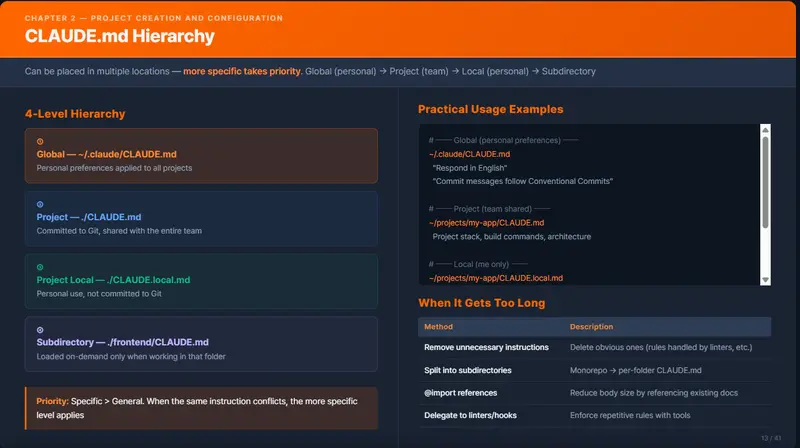
2.5 CLAUDE.md Hierarchy

CLAUDE.md can be placed in multiple locations. Claude Code merges and loads all of them at the start of each session.

┌─────────────────────────────────────────────────────────┐
│  ① Global (Personal)     ~/.claude/CLAUDE.md            │
│     → Personal preferences applied to all projects      │
├─────────────────────────────────────────────────────────┤
│  ② Project (Team-shared) ./CLAUDE.md                    │
│     → Committed to Git, shared across the team          │
├─────────────────────────────────────────────────────────┤
│  ③ Project Local         ./CLAUDE.local.md              │
│     → Personal use, not committed to Git                │
├─────────────────────────────────────────────────────────┤
│  ④ Subdirectory          ./frontend/CLAUDE.md           │
│     → Loaded on demand only when working in that folder │
└─────────────────────────────────────────────────────────┘

Priority: more specific takes precedence (④ > ③ > ② > ①)
When the same instruction appears at multiple levels, the more specific level wins.

Real-World Usage Examples

~/.claude/CLAUDE.md              ← "Respond in Korean", "Use Conventional Commits for commit messages"
~/projects/my-app/CLAUDE.md      ← Project stack, build commands, architecture
~/projects/my-app/CLAUDE.local.md ← "I handle the backend — ask me before modifying frontend code"
~/projects/my-app/frontend/CLAUDE.md ← "Use React Query, follow Tailwind class ordering rules"

2.6 Memory (Claude.ai) vs CLAUDE.md (Claude Code)

These two may sound similar, but they are completely different systems.

Comparison Table

Memory (Claude.ai) CLAUDE.md (Claude Code)
Environment Claude.ai web/app conversations Claude Code CLI terminal
Scope Per person (applies to all conversations) Per project (applies only within that repo)
Storage Anthropic servers Local file (inside the project)
How to edit “Remember this” (natural language) Direct Markdown file editing
Auto-generation ✅ Derived automatically from conversations Created initially via /init
Version control ❌ ✅ Can be committed to Git
Team sharing ❌ Personal only ✅ Shared via Git
Nature of content Personal profile, preferences, work history Project rules, stack, commands

How to Configure by Perspective

Personal perspective — settings about “you”

What to configure Memory (Claude.ai) CLAUDE.md (Claude Code)
Work style “Prefer executive summaries for presentations” Write in ~/.claude/CLAUDE.md
Language preference “Respond in Korean” Write in ~/.claude/CLAUDE.md
Role information “R&D engineer on the P&T Advanced Research team” Write in ~/.claude/CLAUDE.md

Memory is set during a conversation by saying “remember this”, while the global CLAUDE.md is edited directly as a file.

Project perspective — settings about “this project”

What to configure Memory (Claude.ai) CLAUDE.md (Claude Code)
Tech stack Accumulates automatically from conversation context Specify in ./CLAUDE.md
Build/test commands ❌ Not applicable Specify in ./CLAUDE.md
Code conventions ❌ Not applicable Specify in ./CLAUDE.md
Architecture rules ❌ Not applicable Specify in ./CLAUDE.md

Configuration File Locations Summary

[Personal Settings]
  Claude.ai Memory     → Settings > Memory (web UI)
  Global CLAUDE.md     → ~/.claude/CLAUDE.md

[Project Settings]
  Project CLAUDE.md    → {project root}/CLAUDE.md        (team-shared, committed to Git)
  Local CLAUDE.md      → {project root}/CLAUDE.local.md  (personal, excluded from Git)

2.7 Setting Up the Global CLAUDE.md

Configure personal preferences that apply across all projects.

Creating the File

Windows PowerShell

notepad $env:USERPROFILE.claudeCLAUDE.md

Ubuntu Terminal

mkdir -p ~/.claude
nano ~/.claude/CLAUDE.md

Example Content

# Global Preferences

## Language
- Write responses in Korean
- Use English Conventional Commits for commit messages

## Work Style
- Seek approval before applying changes to output
- Indicate when reasoning is speculative
- Explain the scope of impact before making code changes

## Git
- Branch names: use feature/, fix/, refactor/ prefixes
- Include the reason for the change in PR descriptions

2.8 Setting Up a Project CLAUDE.md

Method 1: Auto-generate with /init (Recommended)

cd ~/projects/my-project
claude
> /init

Review the generated file and adjust it to match your team’s conventions.

Method 2: Create Manually

# Write directly at the project root
nano ~/projects/my-project/CLAUDE.md

Commit to Git

git add CLAUDE.md
git commit -m "docs: add CLAUDE.md for project context"

CLAUDE.local.md is automatically added to .gitignore.

2.9 What to Do When CLAUDE.md Gets Too Long

When CLAUDE.md exceeds 200 lines, instruction adherence starts to degrade. Use the following strategies to keep it manageable.

Method 1: Remove Unnecessary Instructions (Top Priority)

Remove anything Claude already does well without being told.

# ❌ Remove (obvious behavior)
- Use meaningful variable names
- Handle errors properly
- Do not include API keys in code

# ✅ Keep (things not inferable from the code)
- All tests must pass (npm test) before committing
- API responses must always follow the { success, data, error } format

Method 2: Split into Subdirectories

For monorepos or large projects, distribute CLAUDE.md files across directories.
Subdirectory CLAUDE.md files are loaded on demand only when working in that folder, saving context.

my-project/
├── CLAUDE.md                  ← Common rules only (keep it concise)
├── frontend/
│   └── CLAUDE.md              ← React, Tailwind-related
├── backend/
│   └── CLAUDE.md              ← NestJS, Prisma-related
└── infra/
    └── CLAUDE.md              ← Docker, CI/CD-related

Method 3: Reference External Documents with @import

Instead of putting everything in CLAUDE.md, reference existing documentation.

# Commands
See the Scripts section in @README.md

# API Convention
See @docs/api-convention.md

# Git Workflow
See @docs/git-workflow.md

Claude Code reads those files when needed, so CLAUDE.md itself stays lightweight.

Method 4: Delegate to Linters/Hooks

Enforce repetitive rules through tooling rather than CLAUDE.md instructions.

Remove from CLAUDE.md Replace with
“Use semicolons” ESLint/Prettier configuration
“Commit message format” commitlint + husky
“Format on save” Hooks (PostToolUse)
“Commit only after tests pass” Hooks (PreToolUse)

2.10 Quick Reference

# Initialize a project
cd ~/my-project
git init
claude
> /init                              # Auto-generate CLAUDE.md

# CLAUDE.md hierarchy
~/.claude/CLAUDE.md                  # Global (personal, all projects)
./CLAUDE.md                          # Project (team-shared)
./CLAUDE.local.md                    # Project local (personal)
./subfolder/CLAUDE.md                # Subdirectory (on demand)

# Add a memory during a session (inside Claude Code)
# (Press the # key during a conversation to instantly append to CLAUDE.md)

# Memory (Claude.ai) settings
# View and edit at Settings > Memory
# Add during a conversation with "remember this"

References: https://code.claude.com/docs/en/best-practices | https://claude.com/blog/using-claude-md-files