The Black Box of Privacy: Unlocking “Confidential Computing” in AI

As we develop data-heavy platforms like the Student Success Ecosystem, we face a critical engineering dilemma: How do we process private user data in the cloud without exposing it to the service provider? The answer is Confidential Computing—a hardware-based security paradigm that protects data while it is being processed.
​1. The Three States of Data Security
​In traditional cybersecurity, we protect data in two ways:
​Data at Rest: Encrypted on the hard drive.
​Data in Transit: Encrypted while moving over the network (HTTPS/TLS).
​The Missing Link (Data in Use): Traditionally, data must be decrypted in the RAM to be processed by the CPU. This is where it is most vulnerable to memory-scraping attacks.
​2. The TEE (Trusted Execution Environment)
​Confidential Computing uses a hardware-level “Enclave” called a Trusted Execution Environment (TEE). Think of it as a secure vault inside the CPU (like Intel SGX or AMD SEV).
​Isolation: The CPU creates a private memory space that is invisible to the Operating System, the Hypervisor, and even the Cloud Administrator.
​Attestation: The system provides a digital “proof” that the code running inside the vault hasn’t been tampered with.
​3. Application: Privacy-First AI for Students
​In our Student Success Ecosystem, we handle sensitive academic and personal data. By using Confidential Computing, we can:
​Run AI models on a student’s private data to generate personalized study plans.
​Ensure that the raw data is never visible to the server admins.
​Meet strict global privacy standards (like GDPR) automatically at the hardware level.
​The Engineering Responsibility
​In 2026, “Security by Design” is the only way forward. As Computer Engineers at SPPU, our goal is to move beyond software firewalls and start building Hardware-Rooted Trust. The future of the internet isn’t just about being fast; it’s about being provably secure.

Stock Market Real-Time Data Analytics Pipeline on AWS

Image description1

🚀 Building a Real-Time Stock Market Analytics Pipeline on AWS

Author: Muhammad Awais | DevSecOps Engineer | AWS | Kubernetes | Terraform

Overview ☁️

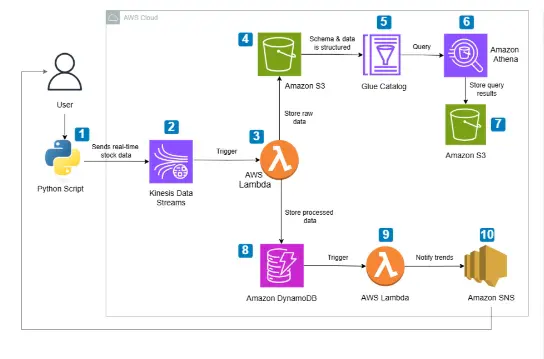
In this project, I built a fully serverless, event-driven Real-Time Stock Market Data Analytics Pipeline on AWS. The pipeline ingests live stock data, processes it, stores it, analyzes trends, and sends smart alerts — all with minimal cost and zero servers to manage.

Here is what the pipeline does end to end:

  • Streams real-time stock data from yfinance into Amazon Kinesis Data Streams
  • Triggers AWS Lambda to process, clean, and store incoming data
  • Stores raw data in Amazon S3 for historical analysis
  • Stores processed data in Amazon DynamoDB for low-latency querying
  • Queries historical data using Amazon Athena via AWS Glue Catalog
  • Detects stock trends using moving averages (SMA-5 and SMA-20)
  • Sends real-time buy/sell alerts via Amazon SNS (Email/SMS)

Image description1

Architecture at a Glance 🏗️

Python Script (yfinance)
        ↓
Amazon Kinesis Data Streams
        ↓
AWS Lambda (Process & Clean Data)
        ↓                    ↓
Amazon DynamoDB          Amazon S3
        ↓                    ↓
AWS Lambda            AWS Glue Catalog
(Trend Analysis)             ↓
        ↓             Amazon Athena
Amazon SNS                   ↓
(Email/SMS Alerts)       Amazon S3
                       (Query Results)

Steps to Build This Pipeline 👩‍💻

Step 1 — Setting Up Data Streaming with Amazon Kinesis

The first step is creating a Kinesis Data Stream to act as the real-time data pipeline.

Create the Kinesis Stream:

  1. Go to AWS Console → Kinesis → Data Streams
  2. Click Create data stream
  3. Name it stock-market-stream
  4. Choose On-demand capacity mode (cost-efficient for variable workloads)
  5. Click Create

Python Producer Script:

This script continuously fetches stock data from yfinance and pushes it to Kinesis every 30 seconds.

import boto3
import json
import time
import yfinance as yf

kinesis_client = boto3.client('kinesis', region_name='us-east-1')
STREAM_NAME = "stock-market-stream"
STOCK_SYMBOL = "AAPL"
DELAY_TIME = 30

def get_stock_data(symbol):
    stock = yf.Ticker(symbol)
    data = stock.history(period="2d")

    return {
        "symbol": symbol,
        "open": float(round(data.iloc[-1]["Open"], 2)),
        "high": float(round(data.iloc[-1]["High"], 2)),
        "low": float(round(data.iloc[-1]["Low"], 2)),
        "price": float(round(data.iloc[-1]["Close"], 2)),
        "previous_close": float(round(data.iloc[-2]["Close"], 2)),
        "change": float(round(data.iloc[-1]["Close"] - data.iloc[-2]["Close"], 2)),
        "change_percent": float(round(
            ((data.iloc[-1]["Close"] - data.iloc[-2]["Close"]) / data.iloc[-2]["Close"]) * 100, 2
        )),
        "volume": int(data.iloc[-1]["Volume"]),
        "timestamp": time.strftime("%Y-%m-%dT%H:%M:%SZ", time.gmtime())
    }

def send_to_kinesis():
    while True:
        stock_data = get_stock_data(STOCK_SYMBOL)
        print(f"Sending: {stock_data}")

        kinesis_client.put_record(
            StreamName=STREAM_NAME,
            Data=json.dumps(stock_data),
            PartitionKey=STOCK_SYMBOL
        )
        time.sleep(DELAY_TIME)

send_to_kinesis()

💡 Tip: Always convert np.float64 values to plain float before sending to Kinesis to avoid serialization issues downstream.

Step 2 — Processing Data with AWS Lambda

Two Lambda functions handle the data processing:

Lambda 1 — Kinesis Consumer (Store to S3 + DynamoDB)

This function is triggered automatically by Kinesis, decodes the data, computes metrics, and stores it in both S3 and DynamoDB.

Setup:

  1. Go to AWS Lambda → Create Function
  2. Name it stock-market-processor
  3. Runtime: Python 3.12
  4. Add trigger: Kinesis → select stock-market-stream
  5. Attach IAM role with permissions for: DynamoDB, S3, Kinesis
import json
import boto3
import base64
from decimal import Decimal

dynamodb = boto3.resource("dynamodb")
s3 = boto3.client("s3")

DYNAMO_TABLE = "stock-market-data"
S3_BUCKET = "your-s3-bucket-name"
table = dynamodb.Table(DYNAMO_TABLE)

def lambda_handler(event, context):
    for record in event['Records']:
        raw_data = base64.b64decode(record["kinesis"]["data"]).decode("utf-8")
        payload = json.loads(raw_data)

        # Save raw data to S3
        s3_key = f"raw-data/{payload['symbol']}/{payload['timestamp'].replace(':', '-')}.json"
        s3.put_object(Bucket=S3_BUCKET, Key=s3_key, Body=json.dumps(payload), ContentType='application/json')

        # Compute metrics
        price_change = round(payload["price"] - payload["previous_close"], 2)
        price_change_percent = round((price_change / payload["previous_close"]) * 100, 2)
        is_anomaly = "Yes" if abs(price_change_percent) > 5 else "No"
        moving_average = round(
            (payload["open"] + payload["high"] + payload["low"] + payload["price"]) / 4, 2
        )

        # Store in DynamoDB
        table.put_item(Item={
            "symbol": payload["symbol"],
            "timestamp": payload["timestamp"],
            "price": Decimal(str(payload["price"])),
            "previous_close": Decimal(str(payload["previous_close"])),
            "change": Decimal(str(price_change)),
            "change_percent": Decimal(str(price_change_percent)),
            "volume": int(payload["volume"]),
            "moving_average": Decimal(str(moving_average)),
            "anomaly": is_anomaly
        })

    return {"statusCode": 200, "body": "Processing Complete"}

Lambda 2 — Trend Analyzer (SMA Crossover + SNS Alert)

This function runs on a schedule (EventBridge every 5 minutes), queries DynamoDB, computes SMA-5 and SMA-20, detects crossover signals, and sends alerts via SNS.

import boto3
import json
import decimal
from datetime import datetime, timedelta

dynamodb = boto3.resource("dynamodb")
sns = boto3.client("sns")

TABLE_NAME = "stock-market-data"
SNS_TOPIC_ARN = "arn:aws:sns:us-east-1:YOUR_ACCOUNT_ID:Stock_Trend_Alerts"

def get_recent_stock_data(symbol, minutes=5):
    table = dynamodb.Table(TABLE_NAME)
    past_time = datetime.utcnow() - timedelta(minutes=minutes)

    response = table.query(
        KeyConditionExpression="symbol = :symbol AND #ts >= :time",
        ExpressionAttributeNames={"#ts": "timestamp"},
        ExpressionAttributeValues={
            ":symbol": symbol,
            ":time": past_time.strftime("%Y-%m-%d %H:%M:%S"),
        },
        ScanIndexForward=True
    )
    return sorted(response.get("Items", []), key=lambda x: x["timestamp"])

def calculate_moving_average(data, period):
    if len(data) < period:
        return decimal.Decimal("0")
    return sum(decimal.Decimal(str(d["price"])) for d in data[-period:]) / period

def lambda_handler(event, context):
    for symbol in ["AAPL"]:
        stock_data = get_recent_stock_data(symbol)

        if len(stock_data) < 20:
            continue

        sma_5 = calculate_moving_average(stock_data, 5)
        sma_20 = calculate_moving_average(stock_data, 20)
        sma_5_prev = calculate_moving_average(stock_data[:-1], 5)
        sma_20_prev = calculate_moving_average(stock_data[:-1], 20)

        message = None
        if sma_5_prev < sma_20_prev and sma_5 > sma_20:
            message = f"{symbol} is in an Uptrend! Consider a buy opportunity."
        elif sma_5_prev > sma_20_prev and sma_5 < sma_20:
            message = f"{symbol} is in a Downtrend! Consider selling."

        if message:
            sns.publish(TopicArn=SNS_TOPIC_ARN, Message=message, Subject=f"Stock Alert: {symbol}")
            print(f"Alert sent: {message}")

    return {"statusCode": 200, "body": json.dumps("Trend analysis complete")}

Step 3 — Query Historical Stock Data using Amazon Athena

Raw JSON files land in S3. AWS Glue Catalog creates a structured schema on top of them so Athena can query them with standard SQL.

Setup Glue Crawler:

  1. Go to AWS Glue → Crawlers → Create Crawler
  2. Point it to your S3 bucket path: s3://your-bucket/raw-data/
  3. Create a new database: stock_market_db
  4. Run the crawler — it auto-detects schema and creates a table

Query with Athena:

-- Average daily price per symbol
SELECT symbol,
       DATE(timestamp) AS date,
       ROUND(AVG(price), 2) AS avg_price,
       MAX(high) AS day_high,
       MIN(low) AS day_low
FROM stock_market_db.raw_data
GROUP BY symbol, DATE(timestamp)
ORDER BY date DESC;

-- Detect anomalies
SELECT symbol, timestamp, price, change_percent
FROM stock_market_db.raw_data
WHERE ABS(change_percent) > 5
ORDER BY timestamp DESC;

💡 Tip: Set your Athena query results S3 bucket in Settings before running queries.

Step 4 — Stock Trend Alerts using SNS

Setup SNS Topic:

  1. Go to AWS SNS → Topics → Create Topic
  2. Type: Standard
  3. Name: Stock_Trend_Alerts
  4. Click Create

Add Subscription:

  1. Click your topic → Create Subscription
  2. Protocol: Email or SMS
  3. Endpoint: your email or phone number
  4. Confirm the subscription from your inbox

Once the trend analyzer Lambda detects a crossover, SNS fires an alert like:

Key Learnings 🧠

  • Kinesis is perfect for real-time event streaming — On-demand mode saves cost for unpredictable workloads
  • Lambda + Kinesis trigger gives you a fully serverless processing layer with automatic scaling
  • Always convert numpy types to native Python before serializing to JSON or sending to AWS services
  • DynamoDB works great for low-latency lookups but design your partition key carefully — symbol + timestamp as composite key works well here
  • Glue + Athena is a powerful combo for ad-hoc SQL queries on raw S3 data without spinning up any infrastructure
  • SMA crossover is a simple but effective signal for trend detection in real-time pipelines

Resources 🔗

Written by **Muhammad Awais* — DevSecOps Engineer | CKA | CKS*
Connect on LinkedIn | GitHub

Yield Trading with Pendle: Let Your AI Agent Optimize Returns

Building a DeFi trading bot used to mean integrating with dozens of different protocols, each with their own SDKs, authentication patterns, and quirks. Your code becomes a mess of Jupiter calls mixed with Aave lending, Lido staking, and Hyperliquid perpetuals — all with different error handling and transaction patterns.

Why Protocol Integration Hell Matters

DeFi’s composability promise breaks down at the developer level. You want to build sophisticated yield strategies that can swap on Jupiter, lend on Aave, stake with Lido, and hedge with Hyperliquid perpetuals. But instead of focusing on strategy logic, you’re stuck managing 14 different protocol integrations, each requiring separate wallet connections, transaction signing, and error handling.

The result? Most developers stick to single protocols or abandon complex multi-protocol strategies entirely. Your trading algorithms remain simplistic because the integration overhead isn’t worth the complexity.

One API for All DeFi Protocols

WAIaaS solves this with a unified REST API that abstracts away protocol differences. Instead of learning 14 different SDKs, you make standard HTTP calls to execute actions across any supported protocol. The system handles wallet management, transaction signing, policy enforcement, and cross-chain bridging automatically.

WAIaaS currently integrates 14 DeFi protocol providers: aave-v3, across, dcent-swap, drift, erc8004, hyperliquid, jito-staking, jupiter-swap, kamino, lido-staking, lifi, pendle, polymarket, and zerox-swap. Whether you’re building on EVM or Solana, the API interface remains consistent.

Here’s how simple it becomes. Instead of juggling multiple protocol SDKs, you execute any DeFi action with the same pattern:

curl -X POST http://127.0.0.1:3100/v1/actions/jupiter-swap/swap 
  -H "Content-Type: application/json" 
  -H "Authorization: Bearer wai_sess_<token>" 
  -d '{
    "inputMint": "So11111111111111111111111111111111111111112",
    "outputMint": "EPjFWdd5AufqSSqeM2qN1xzybapC8G4wEGGkZwyTDt1v",
    "amount": "1000000000"
  }'

The same pattern works for Aave lending, Lido staking, or any other protocol. Your code stays clean and focused on strategy logic rather than protocol integration details.

Protocol-Agnostic Policy Engine

Beyond unified APIs, WAIaaS provides risk management through its policy engine with 21 policy types and 4 security tiers. You can set protocol-specific limits that work across all DeFi actions:

curl -X POST http://127.0.0.1:3100/v1/policies 
  -H "Content-Type: application/json" 
  -H "X-Master-Password: my-secret-password" 
  -d '{
    "walletId": "<wallet-uuid>",
    "type": "LENDING_LTV_LIMIT",
    "rules": {
      "max_ltv": 0.75
    }
  }'

This LTV limit applies whether you’re lending on Aave, Kamino, or any other lending protocol. You define the risk parameters once, and WAIaaS enforces them across all protocols.

For perpetual trading, you can set leverage and position limits:

curl -X POST http://127.0.0.1:3100/v1/policies 
  -H "Content-Type: application/json" 
  -H "X-Master-Password: my-secret-password" 
  -d '{
    "walletId": "<wallet-uuid>",
    "type": "PERP_MAX_LEVERAGE",
    "rules": {
      "max_leverage": 5.0
    }
  }'

This works across Hyperliquid, Drift, and other perpetual protocols. Your risk management becomes protocol-agnostic.

Cross-Chain Bridge Integration

Multi-protocol strategies often require moving assets between chains. WAIaaS handles this through integrated bridging via LI.FI and Across protocols. You can execute complex strategies that span Ethereum and Solana without managing bridge transactions separately.

The system supports liquid staking on both chains through Lido (EVM) and Jito (Solana), letting you optimize yield across the entire DeFi ecosystem rather than being locked into single-chain protocols.

Real-Time Position Monitoring

Instead of querying each protocol separately to track positions, WAIaaS aggregates everything into a single endpoint:

curl http://127.0.0.1:3100/v1/wallet/defi-positions 
  -H "Authorization: Bearer wai_sess_eyJhbGciOiJIUzI1NiJ9..."

This returns lending positions, staking rewards, perpetual trades, and liquidity provider positions across all integrated protocols. Your dashboards and monitoring systems work with one API instead of managing dozens of protocol-specific queries.

TypeScript SDK for Clean Integration

While the REST API works with any language, the TypeScript SDK provides additional convenience for JavaScript applications:

import { WAIaaSClient } from '@waiaas/sdk';

const client = new WAIaaSClient({
  baseUrl: 'http://127.0.0.1:3100',
  sessionToken: process.env.WAIAAS_SESSION_TOKEN,
});

// Execute any DeFi action through the same interface
const swapResult = await client.executeAction('jupiter-swap', 'swap', {
  inputMint: 'So11111111111111111111111111111111111111112',
  outputMint: 'EPjFWdd5AufqSSqeM2qN1xzybapC8G4wEGGkZwyTDt1v',
  amount: '1000000000'
});

// Get aggregated DeFi positions across all protocols  
const positions = await client.getDeFiPositions();
console.log(positions); // Lending, staking, perps, LP positions

The SDK handles session management, error handling, and provides TypeScript types for all protocol actions. Your code becomes much cleaner compared to juggling multiple protocol SDKs.

Quick Start: Multi-Protocol Trading Bot

Here’s how to get started with a trading bot that uses multiple DeFi protocols:

  1. Install and initialize WAIaaS:
   npm install -g @waiaas/cli
   waiaas init
   waiaas start
   waiaas quickset --mode mainnet
  1. Create policies for risk management:
   # Set spending limits
   curl -X POST http://127.0.0.1:3100/v1/policies 
     -H "Content-Type: application/json" 
     -H "X-Master-Password: <password>" 
     -d '{"walletId": "<uuid>", "type": "SPENDING_LIMIT", "rules": {"daily_limit_usd": 10000}}'

   # Set leverage limits for perps
   curl -X POST http://127.0.0.1:3100/v1/policies 
     -H "Content-Type: application/json"   
     -H "X-Master-Password: <password>" 
     -d '{"walletId": "<uuid>", "type": "PERP_MAX_LEVERAGE", "rules": {"max_leverage": 3.0}}'
  1. Install the TypeScript SDK:
   npm install @waiaas/sdk
  1. Build your strategy:
   import { WAIaaSClient } from '@waiaas/sdk';

   const client = new WAIaaSClient({
     baseUrl: 'http://127.0.0.1:3100',
     sessionToken: 'your-session-token'
   });

   // Your multi-protocol strategy logic here
   const positions = await client.getDeFiPositions();
   // Rebalance across protocols as needed
  1. Deploy with Docker for production:
   docker run -d 
     --name waiaas 
     -p 127.0.0.1:3100:3100 
     -v waiaas-data:/data 
     ghcr.io/minhoyoo-iotrust/waiaas:latest

What’s Next

WAIaaS provides the unified DeFi API layer you need to build sophisticated multi-protocol strategies without integration headaches. The system handles wallet management, transaction signing, policy enforcement, and cross-chain operations so you can focus on alpha generation.

Get started by exploring the full documentation and examples at the WAIaaS GitHub repository, or visit waiaas.ai for deployment guides and API reference documentation.

From understanding the problem to->building the system

Phase 1 was about clarity.
Phase 2 is about execution.

In the initial phase, we spent time understanding the problem from the ground up — the users, their constraints, and what actually matters in real-world scenarios. That effort was reflected in the positive feedback we received on our approach and system thinking, which gave us confidence in our direction.

But Phase 2 is where that direction is being tested.

Once we moved into development, one thing became very evident:

There is a clear difference between designing a system and implementing it.

On paper, everything feels structured — workflows are clean, decisions are defined, and the system appears complete.

In practice, things behave differently.

Working with real-time inputs, handling uncertainty, and ensuring consistency across the system introduces a different level of complexity altogether.

So instead of rushing into building everything, we made a conscious shift in approach.

We started focusing on:

  • What is essential for the system to function
  • What can be realistically implemented within constraints
  • What can be simulated without losing the core idea

This helped us move from a feature-driven mindset to a system-driven one.

One important learning from this phase:

A good solution is not defined by how much it does,
but by how reliably it does what it is supposed to do.

From a development perspective, this phase reinforced a practical rule:

If something cannot be built well within the given timeline, it should not be part of the system.

This is less about limiting scope, and more about protecting quality.

We are now building in layers:

Starting with a working core,
then improving accuracy,
and gradually refining the system.

Phase 2 is still in progress, but the shift is noticeable.

It no longer feels like an idea being described.
It feels like a system being constructed.

Team ALPHANEXUS
Guidewire DEVTrails 2026

Building an Educational Math Game with Next.js, Pure SVGs, and JSON-LD

Hey DEV community! 👋

I recently added a new educational game to my web arcade, 7x.games, called Fraction Math Master.

Usually, when developers think of building web games, they immediately reach for Canvas, WebGL, or engines like Phaser. But for educational puzzle games, that is often overkill. I wanted to share how I built a highly interactive, fast, and SEO-optimized math game using pure React, Tailwind CSS, and SVGs.

Here is a breakdown of the technical hurdles and how I solved them.

🍕 1. Drawing Dynamic “Pizza Slices” with SVG Math
Kids learn fractions best visually. I needed a way to show a circle divided into any number of slices (denominator) with a specific number of them shaded in (numerator).

Instead of loading heavy image assets, I built a FractionCircle React component that generates SVG paths on the fly using basic trigonometry.

By calculating the angle of each slice ((2 * Math.PI) / denominator), I used Math.cos and Math.sin to draw exact SVG arcs.

JavaScript
// Simplified snippet of the SVG math
const cx = size / 2;
const cy = size / 2;
const r = size / 2 – 8;
const sliceAngle = (2 * Math.PI) / den;

const startAngle = -Math.PI / 2 + i * sliceAngle;
const endAngle = startAngle + sliceAngle;

const x1 = cx + r * Math.cos(startAngle);
const y1 = cy + r * Math.sin(startAngle);
const x2 = cx + r * Math.cos(endAngle);
const y2 = cy + r * Math.sin(endAngle);

// Draw the wedge!
const path = M ${cx} ${cy} L ${x1} ${y1} A ${r} ${r} 0 ${largeArc} 1 ${x2} ${y2} Z;
Because it is pure SVG, it scales flawlessly on mobile screens, weighs literally bytes, and allows me to add smooth CSS transform: scale(1.03) pop animations when the user gets an answer correct.

🛑 2. Avoiding the “Infinite While Loop” Trap
The game generates dynamic multiple-choice questions (e.g., “Find an equivalent fraction for 2/4”).

Initially, I used a while loop to generate random wrong answers. The logic was: Generate a random fraction. If it equals the correct answer, throw it out and loop again. The bug: If the math constraints were too tight (e.g., Easy Mode where the max denominator is 6), the random number generator could run out of unique wrong answers, trapping the browser in an infinite while loop and crashing the tab.

The Fix: I switched to a Deterministic Array Generator.
Instead of “guessing” random numbers, I wrote a helper function that instantly calculates every single possible wrong answer within the difficulty limits, pushes them into a pool, shuffles the pool, and returns the top 3.

JavaScript
// Pre-generate valid wrong answers to avoid infinite loops
function getSafeWrongs(correctN, correctD, count, maxD) {
const correctVal = correctN / correctD;
const pool = [];

for (let d = 2; d <= maxD + 5; d++) {
for (let n = 1; n < d; n++) {
if (n / d !== correctVal) {
pool.push({ num: n, den: d, label: ${n}/${d} });
}
}
}

shuffle(pool);
return pool.slice(0, count); // Guaranteed to never freeze!
}
Zero guessing. Zero chance of an infinite loop.

🔍 3. Enterprise SEO in Next.js (JSON-LD)
A web game is useless if no one plays it. To get this game ranking on Google for queries like “Fraction Games Online Free For Kids”, standard

tags aren’t enough.

Using Next.js App Router, I injected Google’s native language—JSON-LD Schema Markup—directly into the layout.js of the game.

I used two specific schemas:

@type: VideoGame: Explicitly tells Google the genre, the audience (educational), and that it is free to play in a browser.

@type: FAQPage: I hardcoded common search queries (e.g., “How do you simplify a fraction?”) directly into the schema. This allows Google to pull the game page directly into the “People Also Ask” dropdown boxes on search result pages.

JavaScript
export default function FractionMathLayout({ children }) {
return (
<>

type=”application/ld+json”<br>
dangerouslySetInnerHTML={{ __html: JSON.stringify(mySchemaObject) }}<br>
/><br>
{children}<br>
&lt;/&gt;<br>
)<br>
}<br>
🎮 The Result<br>
The result is a fast, responsive, and highly interactive educational game that requires zero external assets to run. It has 5 game modes (Identify, Compare, Equivalent, Simplify, Add/Sub) and a combo-streak system.</p>

<p>If you want to check out the SVG UI animations or try to get a 10x combo streak, you can play it here: Fraction Math on 7x.games</p>

<p>What is your preferred stack for building 2D web games? Do you always reach for Canvas, or do you use React/DOM elements for simpler mechanics? Let me know!</p>

I built a programming language in C

Built a programming language from scratch in C. Wanted to understand how languages actually work under the hood.
It has a lexer, parser, AST, bytecode compiler, and a stack-based VM. Also supports arrays, dicts, classes, try/catch, and a stdlib.

class Animal {
    fn init(name, sound) {
        self.name = name
        self.sound = sound
    }
    fn speak() {
        print self.name + " says " + self.sound
    }
}

let dog = Animal("Rex", "woof")
dog.speak()

Learned more from this than from anything I’ve read. Compilers are not magic.
Source: github.com/aaka3h/lang

How I Use AI to Code 10x Faster (With Real Examples)

I’m not exaggerating when I say AI changed how I write code.

Not because it writes everything for me — but because it eliminates the parts of coding that used to slow me down the most: staring at boilerplate, Googling the same errors, writing repetitive tests, and trying to understand unfamiliar concepts from scratch.

I use four tools daily: GitHub Copilot, ChatGPT, Claude, and Cursor. Each one has a specific role in my workflow. Here’s exactly how I use them — with before/after examples.

1. Writing Boilerplate Code — GitHub Copilot

Boilerplate is the biggest time thief in any project. Form requests, controllers, service classes, migrations — it’s all necessary but mentally draining to write from scratch.

GitHub Copilot handles this inside my editor before I even finish typing.

Before AI

Writing a Laravel form request used to look like this: open a new file, remember the method names, type out every rule manually, look up validation syntax I half-remember…

// I'd write this entirely by hand — slowly
class StorePaymentRequest extends FormRequest
{
    public function authorize(): bool
    {
        return true;
    }

    public function rules(): array
    {
        return [
            'amount'    => 'required|numeric|min:1',
            'reference' => 'required|string|max:100',
            'gateway'   => 'required|in:ozow,yoco',
        ];
    }
}

After AI (Copilot)

Now I just type the class name and a comment describing what I want:

// Form request for processing a payment — amount, reference, gateway
class StorePaymentRequest extends FormRequest
{
    // Copilot fills in the rest instantly ✅

Copilot suggests the full class — rules, messages, even custom error messages — based on context from the rest of my project. I review, adjust, and move on in seconds.

2. Debugging Errors — ChatGPT

When I hit an error I don’t immediately understand, ChatGPT is the first place I go. Not Stack Overflow. Not Google.

I paste the error + the relevant code and ask: “What’s causing this and how do I fix it?”

Before AI

SQLSTATE[42S22]: Column not found: 1054 Unknown column
'payments.user_id' in 'where clause'

I’d spend 10–20 minutes checking migrations, re-reading docs, and Googling the exact error hoping someone had the same setup.

After AI (ChatGPT)

I paste the error with my model and migration, and get a precise explanation back:

“Your payments table migration doesn’t include a user_id column, but your Eloquent model has a belongsTo(User::class) relationship that’s trying to query it. Add the column to your migration or check that you’re running the latest migration.”

// Fix: add this to your payments migration
$table->foreignId('user_id')->constrained()->cascadeOnDelete();

What used to take 20 minutes now takes 2. The difference isn’t just speed — it’s that I understand why something broke, not just how to patch it.

3. Writing Tests — Claude

Writing tests is something most developers know they should do more of — and don’t, because it’s time-consuming and repetitive.

I use Claude specifically for test generation because it’s excellent at understanding context across a whole file and writing thorough, meaningful tests.

Before AI

Writing a test for a payment controller meant manually thinking through every scenario:

// I'd write one test, maybe two, and move on
public function test_payment_is_processed_successfully()
{
    $response = $this->post('/pay', ['amount' => 100, 'gateway' => 'yoco']);
    $response->assertRedirect('/success');
}

After AI (Claude)

I paste my controller and ask: “Write PHPUnit tests for this controller covering success, failure, validation errors, and invalid gateway.”

// Claude generates full coverage automatically

public function test_payment_succeeds_with_valid_data()
{
    $response = $this->post('/pay', [
        'amount'    => 500,
        'reference' => 'INV-001',
        'gateway'   => 'yoco',
    ]);

    $response->assertRedirect(route('payment.success'));
    $this->assertDatabaseHas('payments', ['reference' => 'INV-001', 'status' => 'paid']);
}

public function test_payment_fails_validation_without_amount()
{
    $response = $this->post('/pay', ['gateway' => 'yoco']);
    $response->assertSessionHasErrors(['amount']);
}

public function test_payment_rejects_invalid_gateway()
{
    $response = $this->post('/pay', ['amount' => 100, 'gateway' => 'stripe']);
    $response->assertSessionHasErrors(['gateway']);
}

public function test_payment_handles_gateway_failure_gracefully()
{
    Http::fake([
        'online.yoco.com/*' => Http::response(['error' => 'Declined'], 400),
    ]);

    $response = $this->post('/pay', [
        'amount'    => 100,
        'reference' => 'INV-002',
        'gateway'   => 'yoco',
    ]);

    $response->assertRedirect(route('payment.error'));
}

Four solid tests in under a minute. Before AI, I might have written one and told myself I’d come back to it.

4. Understanding New Concepts — Cursor + ChatGPT

Instead of reading through entire documentation pages, I use Cursor (which has AI built directly into the editor) to explain code inline, and ChatGPT to teach me concepts with examples tailored to my stack.

After AI (ChatGPT)

I asked: “Explain Laravel Pipeline to me like I’m a developer who knows Laravel but has never used Pipeline. Show me a real example using payment processing.”

// ChatGPT explained it with an example I could use directly

$result = app(Pipeline::class)
    ->send($paymentData)
    ->through([
        ValidatePaymentData::class,
        CheckForDuplicateTransaction::class,
        ChargeGateway::class,
        SendConfirmationEmail::class,
    ])
    ->thenReturn();

Understanding that took me 5 minutes instead of 45.

Cursor — Inline Code Explanation

When I open an unfamiliar file, I highlight confusing code in Cursor and ask it to explain inline:

// I highlighted this line and asked Cursor: "what does this do?"
$order->loadMissing(['payments' => fn($q) => $q->where('status', 'paid')]);

// Cursor explained:
// "loadMissing() lazy-loads the 'payments' relationship only if it hasn't
//  been loaded already. The closure filters it to only load paid payments,
//  preventing unnecessary queries if the relation is already in memory."

No context switching. No browser tabs. The explanation comes to where I’m working.

How These Tools Fit Together

Task Tool Role
Boilerplate GitHub Copilot Generating code & scaffolding
Debugging ChatGPT Quick fixes & error explanations
Testing Claude Deep logic & edge case coverage
Inline Help Cursor Understanding existing code
Learning ChatGPT Learning new concepts deeply

⚠️ The One Thing to Remember

AI makes you faster, not infallible.

I’ve had Copilot suggest code that looked right but had a subtle security flaw. I’ve had ChatGPT confidently give me outdated API syntax. Always review what AI generates — especially anything touching security, payments, or data.

Use it as a fast, knowledgeable pair programmer — not as the final word.

Final Thoughts

If you’re not using AI in your development workflow yet, you’re spending time you don’t need to spend.

The developers who will stand out in the next few years aren’t the ones who avoid AI. They’re the ones who know how to use it well.

💬 Working on an app and need help?

I specialize in Laravel applications, API integrations, and payment gateway setups (Ozow, Yoco, and more).

I Built a Fabric Finder Tool for Sports Jerseys for B1 Apparels

When people think about sports jerseys, they usually focus on design, colors, or fit.

But after working around sportswear, I kept noticing something else:
people were often wearing the wrong fabric for their conditions — especially in hot or humid environments.

That observation led me to build a small fabric finder tool. But more importantly, it helped me understand how complex fabric selection actually is.
Here is a link of Tool: https://b1apparels.com/pages/sportswear-fabric-recommender-tool

The Real Problem: Too Many Variables

At first glance, choosing a jersey fabric seems simple. But once you break it down, multiple variables start interacting:

Temperature
Humidity
Type of sport
Intensity of activity
Fit preference

Each of these factors changes how a fabric performs.

For example:

A breathable polyester might work great in dry heat
The same fabric can feel uncomfortable in high humidity
A tight fit changes airflow and heat retention completely

This isn’t something most users think about — but it directly affects comfort.

Why Static Fabric Advice Fails

Most online guides say things like:

“Use polyester for sports”
“Mesh is breathable”

While true, these are static recommendations.

They don’t consider:

Context (weather + activity)
Interaction between variables
Real-world usage

That’s where I realized the gap:
there’s no simple way to combine these inputs into a decision.

Building the Fabric Finder Tool

So I decided to build a lightweight tool that does one thing:

👉 Take real-world inputs and return a practical recommendation

Inputs:

  • Temperature
  • Humidity
  • Weather condition
  • Sport (football, basketball, baseball, etc.)
  • Fit preference
    Output:

  • Fabric type (e.g., polyester mesh, blend, thermal)

  • Jersey type (breathable, compression, etc.)

  • Fabric weight (light / medium / heavy)

  • Short reasoning

*The goal wasn’t to make it “AI-heavy,” but to make it useful and structured.
*

Key Insight: Context > Material

One of the biggest lessons from building this:

The “best fabric” doesn’t exist — only the best fabric for a situation.

For example:

Hot + humid → airflow + moisture-wicking becomes critical
Cold → insulation matters more than breathability
High-intensity sports → lightweight + stretch is key

This shift from material-first to context-first thinking is what the tool tries to solve.

Translating Real-World Logic into Code

Instead of relying on generic recommendations, I structured the logic like this:

Weather conditions influence base fabric selection
Sport type modifies durability vs breathability
Fit preference adjusts stretch and compression
Output combines all factors into a single recommendation

It’s not overly complex, but it reflects how decisions are actually made in practice.

Why This Matters (Beyond Sportswear)

This project isn’t just about jerseys.

It’s an example of a broader idea:

Many everyday decisions are multi-variable problems, but we treat them as single-variable choices.

By structuring inputs and mapping them to outcomes, you can turn:

guesswork → into logic
opinions → into systems

Final Thoughts

Building this tool made me realize that even something as simple as a jersey involves layered decision-making.

Most users don’t need technical details — they need clear, contextual recommendations.

And sometimes, the value isn’t in advanced AI or complex systems…
it’s in organizing the right variables in a way that actually makes sense.

Shared Packages in Micro Frontend Monorepo — Complete Guide

Your Micro Frontend has a silent bug and you don’t know it yet.

The user logs in on the Auth MFE. The auth token gets saved to the Redux store. They navigate to Products — a different MFE loaded via Module Federation. The Products page says they’re not logged in.

Why? Because Products MFE created its own Redux store instance. Auth MFE has a separate instance. Two stores. Two states. Completely out of sync.

This is the #1 problem teams hit when they build Micro Frontends without shared packages.

What are shared packages?

Internal libraries inside your monorepo that ALL MFEs consume. Instead of each MFE building its own API layer, its own Redux store, and its own UI components, you build them ONCE in packages/ and import everywhere.

In this article, I break down the 3 packages that hold a production MFE monorepo together:

1. @myapp/api — Shared API Layer

  • Full axios instance with request interceptors (JWT token attachment) and response interceptors (401 handling + token refresh)
  • Failed request queue — when a token expires, multiple API calls fail simultaneously. Without the queue, each triggers its own refresh. The queue holds them, refreshes once, then retries all.
  • Domain-organized API folders: Inventory-Apis/, Products-Apis/, Order-Apis/, each containing real CRUD functions
  • File upload handling with FormData + progress tracking
  • Asset URL resolution

2. @myapp/store — Shared Redux Store

  • configureStore() with auth reducer
  • Complete authSlice: 7 reducers (setIsLoggedIn, setAuthToken, setSessionExpired, setUserInfo, setSellerProfile, setLoading, updateUser) + 9 selectors
  • Custom hooks (useAppDispatch, useAppSelector) ready for TypeScript
  • Barrel export pattern — one import path for everything
  • Module Federation singleton: true ensures ONE store instance across all MFEs

3. @myapp/uicomponents — Shared UI

  • CustomToast with react-hot-toast configuration
  • Button and Card components
  • Change the design once, every MFE updates automatically

The critical wiring:

  • Webpack resolve.alias maps @myapp/store to ./../packages/core/store at BUILD time
  • Module Federation shared: { singleton: true } deduplicates the package at RUNTIME
  • You need BOTH. Aliases alone = each MFE bundles its own copy. Singleton alone = import path not resolved.
  • Local config uses localhost ports. Production uses Nginx paths. Both shown side by side.

Every code block is from a real production monorepo with 11 independently deployable React MFEs.

Read the full guide with 15 code blocks:
https://blog.srinudesetti.in/micro-frontend/react/shared-packages-micro-frontend-monorepo