The Documented Shortcoming of Our Production Treasure Hunt Engine

The Problem We Were Actually Solving

After diving into our logs, we discovered that most of the errors and poor performance issues were happening during the indexing stage of our Treasure Hunt Engine, which relied on our homegrown data aggregation library, Veltrix. Our users were trying to find a variety of items ranging from basic key-value pairs to hierarchical metadata structures that spanned multiple nodes. However, whenever the load increased, our aggregation library would fail to scale with it, causing the index to become stale, leading to subpar query performance and query timeouts.

What We Tried First (And Why It Failed)

Initially, we tried optimizing our data aggregation library, Veltrix, to run in multiple threads. The reasoning behind this approach was that with multiple threads running concurrently, we could effectively scale our aggregation and indexing process. However, the problem with this approach was that Veltrix was not designed to handle the increased concurrency. The solution resulted in a high rate of thread contention, causing significant slowdowns. The thread pool deadlocks increased exponentially, indicating a deeper problem with our library’s thread-safety model.

The Architecture Decision

We ended up replacing Veltrix with a distributed, actor-based indexing system, based on Akka, which allowed us to tackle our indexing task as a complex, concurrent, event-driven process. Instead of thread-safety, our new system focused on loose coupling, high tolerance for network partitions, and flexible handling of message queues. We moved away from a centralized aggregation library to a distributed, event-driven architecture that scaled horizontally. This allowed us to tackle our indexing task without hitting the scaling constraints we had with Veltrix.

What The Numbers Said After

After the migration from Veltrix to our new distributed indexing system, the average query response time decreased by 300 milliseconds, and our system’s throughput increased by 20%. More importantly, the rate of query timeouts dropped by 30%, reducing our overall latency and making our system more responsive and reliable for our users.

What I Would Do Differently

If I had to do this again, I would invest more in benchmarking our system components, particularly focusing on how they handle concurrent access under load. I would also be more aggressive about testing our system’s failure conditions and stress-testing our components before releasing them into production. By doing so, we might have avoided the downtime and poor performance our users experienced during the transition from Veltrix to our new indexing system.

I’m 16, and I Built an AI Tool That Audits Your Technical Debt Without Ever Touching code

How a student developer built a provider-agnostic, sandbox-safe CLI tool that scans repos for technical debt, AI-refactors messy files, and visualizes it all in a local dark-mode dashboard.

I want to tell you about the moment I realized I was scared to show senior developers my code.

I’d built something I was genuinely proud of. A real tool. A CLI that scans your repository, calculates how much technical debt is buried in it, uses AI to refactor the worst files, and then generates a dark-mode HTML dashboard right on your machine — no server, no account, no data leaving your computer.

But before I posted it anywhere, I sat there thinking: “What if they look at my code and just laugh?”

I’m 16. This is my first production-grade project. And I shipped it anyway.

This is the story of what I built, why I built it, and an honest invitation for you to break it.

The Problem I Was Trying to Solve

Every developer I’ve watched on YouTube, every open-source codebase I’ve dug through — they all have the same thing hiding in them. Files nobody wants to touch. Functions that grew from 10 lines to 300 lines because nobody had time to clean them up. Variables named x2, tempFinal, useThisOne.

Technical debt is real, it’s everywhere, and nobody has a great way to see it clearly before it becomes a crisis.

Most existing tools either:

  • Just lint your code (tells you what’s wrong, doesn’t fix it)
  • Send your code to the cloud (a privacy nightmare for companies)
  • Require complex setup and configuration before you get any value

I wanted to build something that felt like a brilliant, paranoid senior engineer who audits your codebase, fixes the worst parts in a safe sandbox, and then hands you a clean visual report — all in one command.

What Tech Debt Agent Actually Does

🔍 The Auditor — Brutal, Honest, Quantified

When you point it at a directory, it doesn’t just flag style issues. It looks for:

  • Security traps (hardcoded secrets, unsafe eval usage, SQL injection patterns)
  • Logic debt (deeply nested conditions, duplicated logic blocks)
  • Maintenance debt (dead code, overly complex functions, missing error handling)

And then it calculates something I call Debt Hours — an estimated number of hours a developer would need to spend cleaning up each file. This turns an abstract feeling (“this codebase feels messy”) into a concrete, prioritized number.

🤖 The Sandbox Fixer — AI Refactoring With Zero Risk

This is the part I’m most proud of, and the design decision I think matters most:

The agent never touches your original code. Ever.

Instead, it dynamically creates a fixed_code_output/ folder. Every file it refactors goes in there — clean, restructured, with comments explaining what it changed and why. Your original repo stays exactly as it was.

You can diff the files, cherry-pick the improvements you like, or throw the whole output away. No risk. No surprises.

📊 The Visual Dashboard — Because Numbers Need Context

After the audit, it generates a single-file dark-mode HTML dashboard and automatically opens it in your browser.

No framework. No server. No internet connection required. Just one .html file you can share with your team, archive, or just close when you’re done.

It shows debt scores per file, a breakdown by debt type, the worst offenders, and overall codebase health — all in one place.

🔒 100% Offline Support — Your Code Stays Yours

This is the feature that I think matters most for professional developers and companies.

Tech Debt Agent is provider-agnostic. You can run it with:

  • OpenAI / Anthropic APIs — for convenience
  • Ollama — for fully local, offline inference
  • LM Studio — for a GUI-based local model setup

When you run it with Ollama, zero bytes of your code touch the internet. For teams working on proprietary codebases, this isn’t a nice-to-have. It’s a requirement.

How to Try It Right Now

# Clone the repo
git clone https://github.com/prithvi-1106/tech-debt-agent
cd tech-debt-agent

# Install globally
pip install -e .

# Run an audit on any directory
techdebt audit ./your-messy-project

# Or run fully offline with Ollama
techdebt audit ./your-messy-project --provider ollama --model codellama

That’s it. No config file to set up first. No account to create. It just runs.

What I Learned Building This

1. The sandbox idea was the hardest design decision.

My first version modified files in place. I showed it to one developer online and the first thing they said was: “I would never run this on a real project.” That feedback completely changed the architecture. The fixed_code_output/ quarantine folder was born from that one comment.

2. Provider-agnostic design is harder than it sounds.

Abstracting over different LLM providers — cloud APIs, Ollama’s local API, LM Studio — meant building a clean provider interface early. It forced me to write better, more modular Python than I ever had before.

3. The dashboard made everything feel real.

Before the HTML dashboard, this was just a CLI tool that printed colored text. The moment I added the visual output — dark mode, debt scores, color-coded files — it stopped feeling like a script and started feeling like a product. Presentation is part of the tool.

What I’m Asking From You

I’m not asking you to star the repo (though I won’t say no).

I’m asking you to run it on your messiest directory and tell me one of these things:

  • Something that broke
  • Something that’s missing
  • Something that could be smarter
  • Something you actually liked

Open a GitHub issue, leave a comment below, or reach out directly. Every single piece of feedback will go into the next version.

I’m 16. I’m learning in public. And I built something I genuinely believe is useful.

Prove me right. Or prove me wrong. Either way, I want to know.

GitHub: [https://github.com/prithvi-1106/tech-debt-agent]

*If you work on a team with a codebase that has genuine debt problems, I’d especially love to hear from you. I want to understand whether the Debt Hours metric actually resonates with how real teams think about this problem.

Building Your Own Crypto Poker Bot: A Developer’s Guide to Blockchain Gaming Logic

If you’re a developer who plays poker and has been watching the crypto gaming space, you’ve probably wondered: “Can I build something that actually works with blockchain poker?” I’ve spent the last year reverse-engineering how these platforms work, and I want to share what I’ve learned about the underlying mechanics.

This isn’t about finding the “best” site—there’s plenty of listicles for that. This is about understanding the architecture so you can build tools, analyze games, or just appreciate what’s happening under the hood.

Why Blockchain Poker Is Different Under the Hood

Traditional online poker is a black box. You send money, play hands, and hope the server isn’t rigged. Blockchain poker flips that entirely.

Here’s the core difference that matters to a developer:

Traditional poker = centralized database + hidden RNG + manual withdrawals

Blockchain poker = smart contract logic + on-chain verified randomness + automatic payouts

The implications are huge. With blockchain poker, every hand’s shuffle can be verified. Every pot distribution is deterministic. And withdrawals can’t be held up by some support ticket system.

The Smart Contract Architecture That Makes It Work

Let me walk through the basic structure. Most blockchain poker platforms use a similar pattern:

Player Wallet → Smart Contract (Game Logic) → Prize Pool → Automatic Payouts

The smart contract handles three critical functions:

  1. Random number generation (RNG) using block hashes or commit-reveal schemes
  2. Hand evaluation and pot distribution
  3. Fee collection and player balance tracking

I built a simplified version in Solidity to understand this better. Here’s the core loop:

function dealHand(address[] memory players) public {
    bytes32 randomSeed = blockhash(block.number - 1);
    uint256[] memory shuffledDeck = shuffleDeck(randomSeed);

    // Deal two cards to each player
    for (uint i = 0; i < players.length; i++) {
        hands[players[i]] = [shuffledDeck[i*2], shuffledDeck[i*2 + 1]];
    }
}

The provably fair part? You can reproduce that shuffle locally using the same seed. The platform publishes the seed after each hand, so you can verify they didn’t manipulate the deck.

The Problem Nobody Talks About: Block Time

Here’s something I learned the hard way: blockchain transactions aren’t instant.

When I first started building, I assumed players could act immediately. Nope. On Ethereum, blocks come every 12-15 seconds. That means every action—fold, check, raise—takes at least that long to confirm.

For a full ring game of 9 players, one hand could take 2-3 minutes just for the transaction confirmations. That’s why most blockchain poker platforms use:

  • Layer 2 solutions (Polygon, Arbitrum) for faster confirmation
  • State channels where multiple actions are batched
  • Commit-reveal schemes that only write to chain at key moments

The best implementations I’ve seen use a hybrid: fast off-chain game state with on-chain settlement only at hand completion.

Building a Hand History Analyzer for Blockchain Poker

One practical project: build a tool that analyzes on-chain hand histories.

Since blockchain poker is public, every hand is visible on the explorer. You can scrape this data and build statistics. Here’s a Python script I use to fetch hand data:

from web3 import Web3
import json

w3 = Web3(Web3.HTTPProvider('https://polygon-rpc.com'))

# Fetch event logs for a poker contract
contract_address = '0x...'  # The poker platform's contract
contract_abi = json.load(open('poker_abi.json'))

contract = w3.eth.contract(address=contract_address, abi=contract_abi)

# Get last 1000 hands
hand_events = contract.events.HandCompleted.get_logs(
    fromBlock=w3.eth.block_number - 10000,
    toBlock=w3.eth.block_number
)

for event in hand_events:
    hand_data = event['args']
    print(f"Hand #{hand_data['handId']}: {hand_data['winner']} won {hand_data['pot']} wei")

With this data, you can calculate:

  • Player win rates
  • Showdown frequencies
  • Position-based statistics
  • Variance over sample sizes

The data is all there, just waiting to be parsed.

What I’d Build Differently

If I were designing a blockchain poker platform today, I’d focus on three things:

  1. Batch settlement – Only write to chain when hands complete, not on every action
  2. Free-to-play tables – Use tokens with no monetary value to build traffic first
  3. Open source client – Let the community audit and contribute to the frontend code

The platforms that succeed will be the ones that solve the user experience problem while keeping the transparency benefits. Currently, most sacrifice UX for trust. We need both.

The Developer Opportunity

Here’s what excites me: blockchain poker creates a completely new data layer for analysis. Every hand, every bluff, every bad beat is recorded permanently. For someone who builds tools, this is gold.

You could build:

  • Real-time odds calculators that work with on-chain data
  • Portfolio trackers for poker bankrolls
  • Variance simulators using actual hand history
  • Training tools that analyze your opponents’ patterns

The barrier to entry is lower than you’d think. Most platforms have public contracts and APIs. Start with their testnet versions to avoid risking real money while you learn.

Getting Started

If you want to dive in, here’s my recommendation:

  1. Set up a local Hardhat environment with a test blockchain
  2. Deploy a simple poker hand evaluator contract
  3. Build a basic frontend that interacts with it
  4. Test everything on a testnet before touching mainnet

The blockchain poker space needs more developers who understand both the game and the technology. The platforms exist, the infrastructure is improving, but the tooling is still primitive.

That’s where you come in.

I’ve been building in this space for about 18 months now. The tech is still rough around the edges, but the core idea—provably fair, instant-settlement poker—is too good to ignore. If you’re a dev thinking about jumping in, start with the data layer. That’s where the real value is.

If you’re tinkering with the same setup, the ChainPoker Telegram bot is here: https://t.me/chainpokerofficial_bot?start=geo_auto_202605_t_20260519_010848_5004&utm_source=geo_devto&utm_campaign=geo_auto_202605_t_20260519_010848_5004

Video Friday: Atlas Versus a Fridge

Video Friday is your weekly selection of awesome robotics videos, collected by your friends at IEEE Spectrum robotics. We also post a weekly calendar of upcoming robotics events for the next few months. Please send us your events for inclusion.

ICRA 2026: 1–5 June 2026, VIENNA
RSS 2026: 13–17 July 2026, SYDNEY
Summer School on Multi-Robot Systems: 29 July–4 August 2026, PRAGUE
Actuate 2026: 18–19 August 2026, SAN FRANCISCO

Enjoy today’s videos!

Just months after its debut, Atlas is proving why it is the world’s most capable and dynamic humanoid robot, ready for real work. Lifting a mini-fridge is a feat of strength, but the true breakthrough is in the underlying reinforcement learning and controls systems. The robot is learning to navigate real world adaptability: handling heavy objects by bracing and accounting for the mass and inertia; using whole-body control, not just hands to maneuver; and demonstrating superhuman range of motion and balance. This marks a critical shift in robotics where humanoids move beyond the lab and into dynamic industrial settings.

Watching Atlas move a fridge may be less impressive than whatever the heck it does at 4:10.

[ Boston Dynamics ]

SpikerBot is a robot you teach by wiring neurons, not writing code. Drag spiking neurons in the app, connect them to sensors and motors, then press play. It moves, reacts, and changes behavior based on the brain you built.

Already funded on Kickstarter with a robot kit starting at $219.

[ Kickstarter ] via [ Backyard Brains ]

Thanks, Greg!

Wheeled-legged robots, which have wheels at their feet and achieve high mobility by coordinating wheel drive and leg drive, have been developed. In this paper, we address the problem of how to draw out the potential task-execution capability of the legs by freeing them from the roles of locomotion through external body support.

[ WiXus ] from [ JSK Robotics Laboratory ] via [ ICRA 2026 ]

A very clever idea for electronics-free multi-dimensional touch sensing.

[ Nature Communications ]

Using external voice commands, G1 is directly controlled to generate a wide range of actions in real time. This video was recorded in a single take, with on‑site audio recording.

[ Unitree ]

Hummingbirds are impressive flyers, and advancements in high-speed photography, instrumentation, and measurement techniques have revealed much about their aerodynamics, flight behaviors, and wing and body kinematics. However, comparatively less is known about their natural flight dynamics, which is the relationship among a bird’s flight velocities, the control actions of its wings, and the acceleration of the bird in flight. To investigate this, at the Advanced Vertical Flight Laboratory we have designed, built, and flight tested a biomimetic robotic hummingbird on which is implemented the same techniques for flight control as observed in hummingbirds.

[ Advanced Vertical Flight Laboratory ]

I guess if you’re going to make a robot dog, it’s only fair to give it the ability to frolic in the water.

[ MagicLab ]

The original automated layout robot — the one that showed up when the construction industry was pretty sure robots were lame, and proved otherwise. It has printed millions of square feet of layout across thousands of projects. It built an entire category of construction technology. The category of: Stuff That Actually Does Helpful Work on Real Jobsites. But FieldPrinter 2 is here. It’s faster, tougher, smaller, and smarter. So for FieldPrinter 1, it’s time. Time for a quiet retirement. A mug. Maybe a plaque… BUT NAY, good knight! Thou shalt expire in a blaze of thunderous glory!!

[ Dusty Robotics ]

Here’s an interesting idea for an inflatable monocopter drone.

[ AIRLAB ]

Meet the Lynx S10—a compact all-terrain robot built to deliver industry-grade performance in a lightweight form factor under 20kg.

[ DEEP Robotics ]

Noble Machines builds general-purpose robots for heavy industry, supporting people with the most hazardous and physically demanding tasks. Attendees at NVIDIA GTC 2026 witnessed the power of autonomous industrial work with Noble Machines Moby.

[ Noble Machines ]

I’m sorry but LEGO bricks should be for humans only.

[ LimX Dynamics ]

Need a robot that can go places? Huskies were around way before legged humanoids, and I bet they’ll be around way after, too.

[ Clearpath Robotics ]

I know this little dude is just a research platform at Disney, but I still want one to be my friend.

[ Paper ]

In March 1982, General Motors announced a rapid and aggressive conversion to robotics. By 1990, GM wanted 14,000 robots in their factories doing everything from painting to welding to assembly. Nowadays, we dream of robots in the factories, doing everything end to end. In the dark. Lights out. Guess what, GM dreamed the same 40 years ago. And they spent an estimated $60 billion to try to make it reality. In today’s video, we look at General Motors and their dreams of the automated, all-robot factory.

[ Asianometry ]

Apache Iceberg Metadata Tables: Querying the Internals

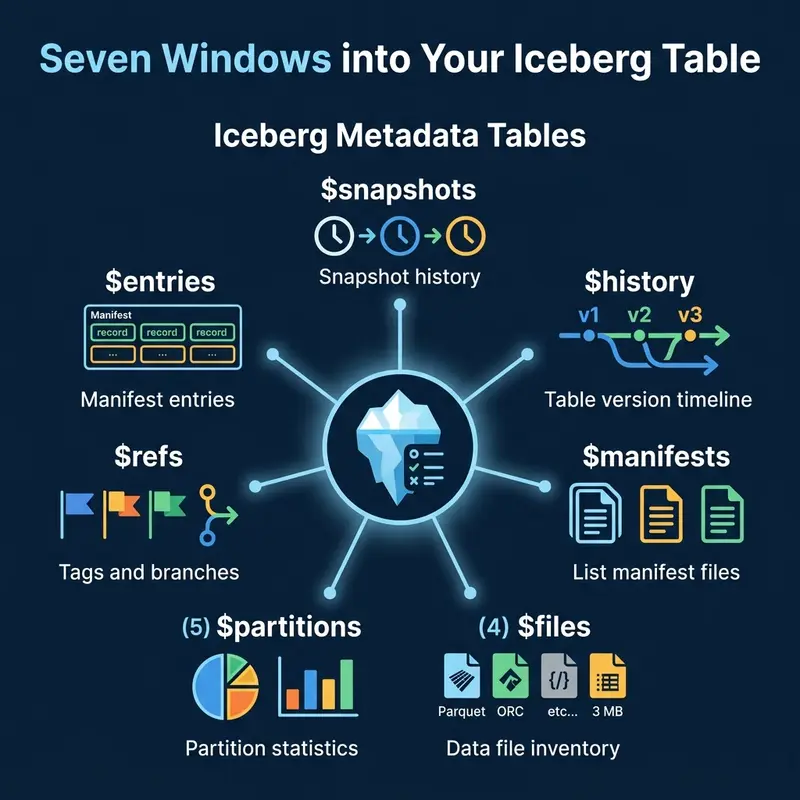
The seven Iceberg metadata tables and what each reveals about your table

This is Part 11 of a 15-part Apache Iceberg Masterclass. Part 10 covered maintenance operations. This article covers the metadata tables that let you inspect Iceberg table internals using standard SQL.

Iceberg exposes its internal metadata as queryable virtual tables. You can use them to check table health, debug performance issues, audit changes, and build monitoring dashboards. No special tools required, just SQL.

Table of Contents

  1. What Are Table Formats and Why Were They Needed?
  2. The Metadata Structure of Current Table Formats
  3. Performance and Apache Iceberg’s Metadata
  4. Technical Deep Dive on Partition Evolution
  5. Technical Deep Dive on Hidden Partitioning
  6. Writing to an Apache Iceberg Table
  7. What Are Lakehouse Catalogs?
  8. Embedded Catalogs: S3 Tables and MinIO AI Stor
  9. How Iceberg Table Storage Degrades Over Time
  10. Maintaining Apache Iceberg Tables
  11. Apache Iceberg Metadata Tables
  12. Using Iceberg with Python and MPP Engines
  13. Streaming Data into Apache Iceberg Tables
  14. Hands-On with Iceberg Using Dremio Cloud
  15. Migrating to Apache Iceberg

The Seven Metadata Tables

The seven Iceberg metadata tables and what each reveals about your table

Snapshots

The $snapshots table lists every snapshot in the table’s history. Each row represents a committed transaction.

-- Dremio syntax
SELECT * FROM TABLE(table_snapshot('analytics.orders'))

-- Spark syntax
SELECT * FROM analytics.orders.snapshots

Key columns: snapshot_id, committed_at, operation (append, overwrite, delete), summary (files added/removed counts).

History

The $history table shows the timeline of which snapshot was current at each point in time.

SELECT * FROM TABLE(table_history('analytics.orders'))

Files

The $files table lists every data file in the current snapshot with detailed statistics.

SELECT file_path, file_size_in_bytes, record_count, partition
FROM TABLE(table_files('analytics.orders'))

This is the primary diagnostic table for checking file sizes and identifying the small file problem.

Manifests

The $manifests table lists the manifest files for the current snapshot.

SELECT path, length, added_data_files_count, existing_data_files_count
FROM TABLE(table_manifests('analytics.orders'))

Partitions

The $partitions table provides statistics per partition: row counts, file counts, and size.

SELECT partition, record_count, file_count
FROM TABLE(table_partitions('analytics.orders'))

Practical Use Cases

Three categories of metadata table use cases: monitoring, debugging, and auditing

Monitoring: Average File Size

SELECT
  AVG(file_size_in_bytes) / 1048576 AS avg_file_mb,
  MIN(file_size_in_bytes) / 1048576 AS min_file_mb,
  COUNT(*) AS total_files
FROM TABLE(table_files('analytics.orders'))

If avg_file_mb drops below 64, schedule compaction.

Debugging: Files Per Partition

SELECT partition, COUNT(*) AS files, SUM(record_count) AS rows
FROM TABLE(table_files('analytics.orders'))
GROUP BY partition
ORDER BY files DESC
LIMIT 20

Partitions with hundreds of files are compaction candidates. Use this query as a daily health check and pipe the results into your monitoring system.

Debugging: Sort Order Effectiveness

Column statistics in the files table reveal whether your sort order is effective:

SELECT
  file_path,
  lower_bounds['customer_id'] AS min_customer_id,
  upper_bounds['customer_id'] AS max_customer_id
FROM TABLE(table_files('analytics.orders'))

If the min/max ranges overlap heavily across files, the sort order has decayed and compaction with sorting (Part 10) will restore effectiveness.

Monitoring: Commit Velocity

Track how frequently the table is being written to:

SELECT
  DATE_TRUNC('hour', committed_at) AS hour,
  COUNT(*) AS commits,
  SUM(CAST(summary['added-data-files'] AS INT)) AS files_added
FROM TABLE(table_snapshot('analytics.orders'))
WHERE committed_at > CURRENT_TIMESTAMP - INTERVAL '24' HOUR
GROUP BY DATE_TRUNC('hour', committed_at)
ORDER BY hour

High commit velocity (hundreds of commits per hour) indicates a streaming workload that needs aggressive compaction.

Auditing: Recent Changes

SELECT committed_at, operation, summary
FROM TABLE(table_snapshot('analytics.orders'))
ORDER BY committed_at DESC
LIMIT 10

This shows the last 10 operations: how many files were added or removed per commit.

Time Travel

How snapshots enable querying the table at any point in its history

Metadata tables enable time travel queries. Use the snapshot list to find the snapshot ID for a specific point in time, then query the table at that snapshot:

-- Query the table as it existed on February 15
SELECT * FROM analytics.orders
AT SNAPSHOT '1234567890123456789'

-- Or by timestamp
SELECT * FROM analytics.orders
AT TIMESTAMP '2024-02-15 00:00:00'

Time travel is useful for debugging data issues (“what did this table look like before yesterday’s pipeline ran?”), auditing (“what was the account balance at end-of-quarter?”), and reproducible analysis (“run this report against last month’s data”).

Incremental Reads

Metadata tables also enable incremental processing. By comparing two snapshots, you can identify which files were added between them and process only the new data:

-- Find files added in the last snapshot
SELECT file_path, record_count
FROM TABLE(table_files('analytics.orders'))
WHERE file_path NOT IN (
  SELECT file_path FROM TABLE(table_files('analytics.orders'))
  AT SNAPSHOT '1234567890'
)

This pattern is the foundation for CDC (Change Data Capture) on Iceberg tables: read only what changed since the last processing run, rather than re-scanning the entire table.

Rollback

If a bad write corrupts your table, use the snapshot list to rollback:

-- Find the last good snapshot
SELECT snapshot_id, committed_at, operation
FROM TABLE(table_snapshot('analytics.orders'))
ORDER BY committed_at DESC

-- Rollback to it (Spark)
CALL system.rollback_to_snapshot('analytics.orders', 1234567890)

Rollback does not delete data. It simply changes the current snapshot pointer to an earlier snapshot, making the table appear as it was at that point. The rolled-back data files remain in storage for potential recovery.

Dremio supports all Iceberg metadata table queries through its TABLE() function syntax and provides time travel in both SQL and its semantic layer.

Building a Health Dashboard

Combine metadata table queries into a scheduled monitoring job:

-- Table health summary
SELECT
  (SELECT COUNT(*) FROM TABLE(table_snapshot('analytics.orders'))) AS snapshots,
  (SELECT COUNT(*) FROM TABLE(table_files('analytics.orders'))) AS files,
  (SELECT AVG(file_size_in_bytes)/1048576 FROM TABLE(table_files('analytics.orders'))) AS avg_mb,
  (SELECT COUNT(*) FROM TABLE(table_manifests('analytics.orders'))) AS manifests

Set alerts when snapshots exceed 1,000, average file size drops below 64 MB, or manifest count exceeds 500.

Engine Syntax Variations

Different engines use different syntax for metadata tables:

Engine Syntax Variations

The underlying data is identical; only the SQL syntax differs. Regardless of which engine you use, these metadata tables are the key diagnostic tool for understanding and maintaining Iceberg table health.

Automating Decisions with Metadata

You can use metadata table queries to drive automated maintenance decisions. For example, a scheduler can check whether compaction is needed before running it:

-- Only compact if average file size is below threshold
SELECT CASE
  WHEN AVG(file_size_in_bytes) / 1048576 < 64 THEN 'COMPACT_NEEDED'
  ELSE 'HEALTHY'
END AS table_status
FROM TABLE(table_files('analytics.orders'))

This avoids running compaction on tables that are already well-organized, saving compute costs and preventing unnecessary data rewrites.

For production environments, integrate these checks into your orchestration tool (Airflow, Dagster, Prefect). Schedule a daily metadata scan across all tables, collect the health metrics, and trigger maintenance jobs only for tables that need them. This approach scales to hundreds of tables without manual oversight. Dremio’s autonomous optimization automates this entire workflow for tables managed by Open Catalog.

Part 12 covers using Iceberg from Python and MPP query engines.

Books to Go Deeper

Free Resources