Symbols Not Chunks: 3.9x Less Tokens

AST-Based Retrieval Cuts LLM Code Context 1.6 – 3.9x vs. LangChain RAG on Real Codebases

 
J. Gravelle
March 2026

Abstract

Large language models (LLMs) consume tokens proportionally to the context they receive. When applied to code understanding tasks, the dominant retrieval strategy — chunk-based Retrieval-Augmented Generation (RAG) using vector embeddings — injects substantial irrelevant context, wastes tokens, and frequently delivers fragments that split functions mid-definition. This paper presents an alternative: AST-based symbol retrieval, which uses tree-sitter parsing to extract complete syntactic units (functions, classes, methods) and serves them via deterministic lookup. We benchmark both approaches on three open-source web frameworks (Express.js, FastAPI, Gin) totaling 1,214 files and 1,024,421 baseline tokens. In head-to-head comparison against a naive fixed-chunk RAG pipeline (LangChain + FAISS + MiniLM-L6-v2), AST retrieval uses 1.6–3.9x fewer tokens per query on every tested repository. Against a “read all files” lower-bound baseline, the reduction is 99.6% (263.9x). Two controlled A/B tests on a production Vue 3 codebase confirm 20% cost savings in end-to-end agentic workflows (p=0.0074), though with accuracy tradeoffs on fine-grained classification tasks. The structural advantage — complete code units with no chunk boundary artifacts — is orthogonal to the search mechanism and would apply equally to RAG pipelines that adopt symbol-level chunking. We argue that for code-specific retrieval, the retrieval unit should be the symbol, not the chunk.

1. Introduction

The integration of LLMs into software engineering workflows — code generation, review, debugging, refactoring — has accelerated rapidly. A common pattern has emerged: the agent needs to understand an unfamiliar codebase, so it retrieves relevant code and injects it into the model’s context window.

The standard approach borrows from document retrieval: split source files into overlapping text chunks, embed them with a dense model, store the vectors in an index (typically FAISS or Chroma), and retrieve the top-k most similar chunks at query time. This is the RAG pattern, popularized by frameworks like LangChain, LlamaIndex, and Haystack.

RAG works reasonably well for prose documents, where any contiguous passage may contain relevant information. Code, however, has structure that prose does not. A function is a complete unit of meaning. Half a function is noise. The question this paper investigates is straightforward: what happens when we replace arbitrary text chunks with complete syntactic units as the retrieval granularity?

The answer, across three repositories in three languages, is that token consumption drops by 1.6–3.9x compared to a naive fixed-chunk RAG pipeline, with no embedding model, no vector store, and no chunk boundary artifacts. We use “naive” deliberately: the RAG baseline tested here uses a general-purpose embedding model and fixed-size chunking, not code-specific embeddings or AST-aware splitting. The comparison is against a common starting point, not a fully optimized pipeline.

2. Problem Statement

2.1 The Token Cost Problem

LLM API pricing is per-token. Context window size is finite. Both constraints create pressure to minimize irrelevant context. Yet the standard RAG pipeline is structurally biased toward over-retrieval:

  1. Fixed chunk size forces a precision/recall tradeoff. Small chunks (512 tokens) reduce per-result noise but split functions mid-definition. Large chunks (2048 tokens) preserve more structure but include unrelated code from adjacent definitions.

  2. Top-k retrieval returns a fixed number of results regardless of query specificity. A query matching one function still returns k chunks, most of which are noise.

  3. The search-then-fetch pattern double-counts tokens. A typical workflow retrieves k results for inspection, then “fetches” the top n for the LLM. The top n appear in both the search response and the fetch response, inflating the effective token count.

2.2 The Chunk Boundary Problem

Consider a Python file with three functions, each ~400 tokens. A 512-token chunker produces chunks that look like this:

Chunk 1:  [end of function A] [start of function B ... truncated]
Chunk 2:  [... middle of function B ...] [start of function C]
Chunk 3:  [... end of function C] [module-level code]

An LLM receiving Chunk 1 gets the tail of one function and the head of another. It has no reliable way to determine where one definition ends and another begins. This is not a theoretical concern — our measurements show that 53% of retrieved RAG-512 chunks for FastAPI are split mid-function (Section 7.3).

2.3 Scaling Behavior

As codebases grow, the problem compounds. A 951-file repository like FastAPI produces 2,256 chunks at 512-token granularity. The embedding step alone takes 47 seconds. Query latency, while acceptable (12–36 ms), is orders of magnitude slower than an in-process BM25 lookup (<5 ms). The vector index occupies 7.5 MB on disk — modest in absolute terms, but unnecessary if the retrieval unit can be derived from the source structure directly.

3. Background

3.1 RAG for Code

RAG (Retrieval-Augmented Generation) augments an LLM’s fixed training knowledge with dynamically retrieved context. For code, the standard pipeline is:

  1. Chunking. Source files are split into fixed-size token windows (typically 256–2048 tokens) with overlap (5–15%) to mitigate boundary effects.
  2. Embedding. Each chunk is passed through a dense embedding model (e.g., all-MiniLM-L6-v2, text-embedding-3-small) to produce a vector representation.
  3. Indexing. Vectors are stored in an approximate nearest-neighbor index (FAISS, Chroma, Pinecone).
  4. Retrieval. At query time, the query is embedded and the top-k nearest chunks are returned.

This pipeline was designed for prose documents and adapted for code. The adaptation is imperfect: code has syntactic structure (functions, classes, modules) that prose does not, and that structure is semantically meaningful.

Semantic and AST-aware chunking. The RAG ecosystem has recognized the fixed-chunk limitation. LangChain, LlamaIndex, and other frameworks offer semantic chunking (split at natural breakpoints detected by embedding similarity shifts) and AST-aware chunking (split at function or class boundaries using a parser). AST-aware chunking in particular eliminates the chunk boundary problem described in Section 2.2. We did not benchmark these strategies — doing so would require choosing among multiple implementations with different heuristics, and the comparison would conflate chunking strategy with embedding model quality. We note, however, that AST-aware chunking and AST symbol retrieval share the same core insight: the retrieval unit for code should align with syntactic boundaries. The remaining difference is the search mechanism (embedding similarity vs. BM25) and the retrieval interface (opaque chunks vs. structured symbol metadata). Section 8 discusses this distinction further.

3.2 Context Window Constraints

Modern LLMs offer context windows ranging from 128K to 2M tokens. A naive approach — load the entire codebase — is feasible for small projects but fails quickly. A 951-file Python framework tokenizes to ~700K tokens. A production monorepo can easily exceed 10M tokens. Even where the window is large enough, longer contexts degrade attention quality, increase latency, and cost proportionally more.

3.3 Tree-Sitter and AST Parsing

Tree-sitter is an incremental parsing framework that produces concrete syntax trees for source code in ~40 languages. Unlike regex-based heuristics, tree-sitter parsing is grammar-driven: it identifies functions, classes, methods, type definitions, and other syntactic constructs with the same precision as the language’s own compiler front-end. Parse time is typically sub-second for single files and under 15 seconds for a 951-file repository.

4. Approach: AST Symbol Retrieval

4.1 Core Idea

Instead of chunking source files into arbitrary token windows, parse them into their natural syntactic units: functions, classes, methods, type definitions. Index these symbols by name, qualified name, and file path. At query time, search the symbol index (not a vector index) and return the complete source code of matched symbols.

The retrieval unit is no longer a 512-token fragment of unknown provenance. It is a complete, self-contained definition — the exact code the developer would navigate to in an IDE.

4.2 Indexing Pipeline

Source files  →  tree-sitter parse  →  symbol extraction  →  BM25 index + SQLite store

For each file:

  1. Detect language from file extension.
  2. Parse with the appropriate tree-sitter grammar.
  3. Walk the AST to extract top-level and nested symbols (functions, classes, methods, type aliases, constants).
  4. Store each symbol’s metadata (name, qualified name, kind, file path, line range) and full source text in a SQLite database.
  5. Build a BM25 inverted index over symbol names and qualified names.

The entire pipeline is deterministic. No embedding model is involved. No GPU is required. Index build time scales linearly with file count: <1 second for 98 files (Gin), ~5–15 seconds for 951 files (FastAPI).

4.3 Retrieval Workflow

The retrieval workflow mirrors the discover/search/retrieve pattern common in code exploration:

Query: "middleware"
  ↓
Step 1: search_symbols("middleware", max_results=5)
  → Returns ranked symbol metadata: name, kind, file, line range, score
  → Token cost: ~370 tokens (metadata only, not full source)
  ↓
Step 2: get_symbol_source(top_3_symbol_ids)
  → Returns complete source code of the 3 best-matching symbols
  → Token cost: ~640 tokens (3 complete function bodies)
  ↓
Total: ~1,010 tokens
Baseline (all files): 137,978 tokens
Reduction: 99.3%

Three properties distinguish this from RAG retrieval:

  1. The search step returns metadata, not source. The LLM (or agent) can inspect symbol names, kinds, and file locations before deciding which symbols to retrieve in full. This is analogous to scanning a table of contents before reading chapters.

  2. The retrieve step returns complete syntactic units. Every result starts at a definition boundary and ends at the matching closing brace or dedent. There are no mid-function fragments.

  3. Result count is adaptive. If a query matches one symbol strongly, the agent retrieves one symbol. RAG always returns k chunks regardless of query specificity.

4.4 Stable Symbol Identifiers

Each symbol receives a deterministic identifier derived from its repository, file path, and qualified name. This ID is stable across reindexing (unless the symbol is renamed or moved). Stable IDs enable:

  • Caching. A previously retrieved symbol can be recognized without re-fetching.
  • Cross-reference. Import graphs, call hierarchies, and blast radius analysis can reference symbols by ID.
  • Incremental updates. When a file changes, only its symbols are re-extracted. The rest of the index is untouched.

5. Implementation Overview

The implementation described here uses tree-sitter grammars for 25+ languages, a SQLite-backed symbol store, and BM25 for text search. The system runs as an MCP (Model Context Protocol) server, exposing tools that LLM agents call directly.

5.1 Language Support

Symbol extraction is grammar-driven. Each supported language has a tree-sitter grammar and an extraction spec that maps AST node types to symbol kinds:

Language family Languages Symbol kinds extracted
C-like C, C++, C#, Java, Go, Rust, Swift, Kotlin functions, methods, classes, structs, interfaces, enums, type aliases
Dynamic Python, JavaScript, TypeScript, Ruby, PHP, Lua functions, methods, classes, decorators, module-level assignments
Functional Haskell, Scala, Erlang, R, Julia functions, type classes, data types, modules
Markup/Config SQL, TOML, CSS, Bash definitions, sections, rules
Specialized Vue SFC, Razor (.cshtml), Assembly component APIs, code blocks, labels/macros

Custom extractors exist for languages where tree-sitter grammars lack clean named fields (Erlang: multi-clause function merging by arity; Fortran: module-qualified names; SQL: dbt Jinja preprocessing).

5.2 Storage and Index Architecture

~/.code-index/
  <repo-hash>/
    index.db          # SQLite: symbols table (name, kind, file, lines, source)
                      #         files table (path, hash, size_bytes)
                      #         imports table (file, specifier, resolved_path)
    content/          # Raw source files (for full-file retrieval)

The SQLite schema supports:

  • O(1) symbol lookup by ID (hash index built in __post_init__).
  • BM25 search over symbol names with optional language and file filters.
  • Import graph queries for cross-reference tools (find_importers, blast_radius, dead_code).
  • Incremental updates via content hashing — only changed files are re-parsed.

5.3 Integration with LLM Workflows

The retrieval tools are exposed via MCP (Model Context Protocol), the open standard for LLM tool integration. An agent’s interaction looks like:

Agent: search_symbols("router route handler", max_results=5)
  ← {symbols: [{id: "abc123", name: "route", kind: "function",
       file: "lib/router/index.js", lines: [45, 92]},...]}

Agent: get_symbol_source("abc123")
  ← {source: "Router.prototype.route = function route(path) {n  ...full body...n};",
     name: "route", kind: "function", lines: [45, 92]}

The agent receives exactly the code it needs — a complete function definition — without reading the entire file or receiving adjacent, unrelated code.

6. Benchmark Design

6.1 Repositories Under Test

Three public web frameworks spanning three languages, chosen for structural diversity:

Repository Language Files indexed Symbols extracted Baseline tokens
expressjs/express JavaScript 165 181 137,978
fastapi/fastapi Python 951 5,325 699,425
gin-gonic/gin Go 98 1,489 187,018

Baseline tokens = all indexed source files concatenated and tokenized with tiktoken cl100k_base. This is the minimum cost for an agent that reads every file once. Real agents typically read files multiple times, making this a conservative baseline.

6.2 Query Corpus

Five queries representing common code exploration intents, defined in a public tasks.json:

Query Intent
router route handler Core route registration / dispatch
middleware Middleware chaining and execution
error exception Error handling and exception propagation
request response Request/response object definitions
context bind Context creation and parameter binding

Each query is run against each repository, producing 15 task-runs.

6.3 RAG Configuration

The RAG baseline uses a naive LangChain pipeline — deliberately unoptimized, representing a common starting point rather than a production-tuned system:

  • Embeddings: sentence-transformers/all-MiniLM-L6-v2 (384-dim, local inference)
  • Vector store: FAISS (faiss-cpu, in-memory)
  • Splitter: RecursiveCharacterTextSplitter.from_tiktoken_encoder (true token-based chunks)
  • Chunk sizes: 512, 1024, 2048 tokens with ~10% overlap
  • Retrieval: similarity_search(query, k=5), top 3 used as “fetched”

Token counting: search_tokens (all 5 retrieved chunks serialized) + fetch_tokens (top 3 chunks serialized). This mirrors the AST workflow’s search_symbols + get_symbol_source two-step pattern.

What is not tested. The RAG baseline does not use code-specific embedding models (CodeBERT, Voyage Code, StarEncoder), re-ranking passes (Cohere Rerank, cross-encoder), hybrid search (BM25 + dense), or AST-aware chunking. Any of these would likely improve RAG’s token efficiency. The results in Section 7 should be read as “AST retrieval vs. naive RAG,” not “AST retrieval vs. best-possible RAG.”

Double-counting note. The two-step token accounting (search 5 + fetch 3) means the top 3 chunks are counted in both passes. A simpler RAG workflow that calls similarity_search(k=3) and uses the results directly would avoid this overhead. We chose the two-step structure to mirror the AST workflow’s metadata-then-source pattern, making the comparison structurally parallel. This inflates RAG’s token count by roughly 30–40% relative to a single-pass retrieval. The 1.6–3.9x margin would narrow under single-pass accounting, though AST retrieval would still be more efficient due to the metadata-vs-source asymmetry in the search step.

6.4 AST Configuration

  • Parser: tree-sitter (language-specific grammars)
  • Search: BM25 over symbol names, max_results=5
  • Fetch: get_symbol_source on top 3 symbol IDs
  • Token counting: search response tokens + 3 x symbol source tokens

AI summaries were disabled during benchmarking (signature-only fallback).

6.5 Reproducibility

Both harnesses read file content from the same IndexStore instance (IndexStore.load_index() → index.source_files). Baselines are identical by construction. The harness scripts (run_benchmark.py, run_rag_baseline.py), query corpus (tasks.json), and raw results (rag_baseline_results.json) are open source.

7. Results

7.1 Token Efficiency: AST Retrieval

Repository Baseline tokens AST avg/query Reduction Ratio
expressjs/express 137,978 924 99.4% 150.1x
fastapi/fastapi 699,425 1,834 99.8% 531.2x
gin-gonic/gin 187,018 1,124 99.4% 171.9x
Grand total (15 runs) 5,122,105 19,406 99.6% 263.9x

Per-query detail (Express.js):

Query Baseline AST tokens Search Fetch Reduction
router route handler 137,978 886 381 505 99.4%
middleware 137,978 1,008 370 638 99.3%
error exception 137,978 859 362 497 99.4%
request response 137,978 872 372 500 99.4%
context bind 137,978 993 372 621 99.3%

Per-query detail (FastAPI):

Query Baseline AST tokens Search Fetch Reduction
router route handler 699,425 1,199 464 735 99.8%
middleware 699,425 1,643 460 1,183 99.8%
error exception 699,425 873 383 490 99.9%
request response 699,425 4,439 430 4,009 99.4%
context bind 699,425 1,016 402 614 99.9%

7.2 Token Efficiency: RAG Baseline

Best-performing RAG configuration per repo (RAG-512 in all cases):

Repository Baseline tokens RAG-512 avg/query Reduction Ratio
expressjs/express 137,978 2,887 97.9% 56.0x
fastapi/fastapi 699,425 2,850 99.6% 248.5x
gin-gonic/gin 187,018 4,352 97.7% 43.5x

RAG token consumption increases with chunk size:

Repository RAG-512 avg RAG-1024 avg RAG-2048 avg
expressjs/express 2,887 6,023 7,057
fastapi/fastapi 2,850 4,279 5,512
gin-gonic/gin 4,352 7,539 12,850

7.3 Head-to-Head Comparison

Both harnesses ran back-to-back on 2026-03-28 against the same index state.

Repository Best RAG avg/query AST avg/query AST advantage
expressjs/express 2,887 (RAG-512) 924 3.1x
fastapi/fastapi 2,850 (RAG-512) 1,834 1.6x
gin-gonic/gin 4,352 (RAG-512) 1,124 3.9x

AST retrieval uses fewer tokens on every tested repository. The margin ranges from 1.6x (FastAPI) to 3.9x (Gin). The FastAPI result is notable: this is the largest repo (951 files, 5,325 symbols), where dense embedding retrieval might be expected to have an advantage. It does not — BM25 over symbol names plus selective source retrieval still outperforms vector similarity over text chunks.

7.4 Chunk Integrity

The “complete chunk” rate measures how often a retrieved RAG chunk starts at a definition boundary and has balanced braces/indentation. The “split” rate measures how often a chunk is cut mid-function.

Repository RAG-512 complete RAG-512 split RAG-1024 split RAG-2048 split
expressjs/express 7% 7% 7% 0%
fastapi/fastapi 7% 53% 40% 33%
gin-gonic/gin 13% 7% 7% 7%

FastAPI’s high split rate at 512-token chunks is a direct consequence of its code structure: many functions exceed 512 tokens, so the chunker cuts them. Increasing chunk size reduces splits but does not eliminate them, and increases token cost per retrieval.

AST retrieval produces zero split results by construction. Every returned symbol is a complete AST node — a function, class, or method with full source from definition to closing delimiter.

7.5 Infrastructure Overhead

Metric RAG AST
Embedding model download ~90 MB (one-time) None
Runtime dependencies LangChain + FAISS + sentence-transformers + torch (~1 GB) tiktoken only (for benchmarking)
Index build (FastAPI, 951 files) 23–49s (embedding-dominated) 5–15s (tree-sitter parse)
Index build (Express, 165 files) 6s <1s
FAISS index size (FastAPI, 512) 7,556 KB ~few hundred KB (SQLite)
Query latency 12–36 ms <5 ms (BM25 in-process)

The embedding step is the dominant cost in the RAG pipeline. For a 951-file repository, building the 512-token FAISS index requires ~47 seconds of CPU embedding time. The AST pipeline parses the same files in 5–15 seconds with no model inference.

7.6 End-to-End A/B Tests

Two controlled experiments were conducted on a production Vue 3 + Firebase codebase to measure real-world impact beyond synthetic benchmarks.

Test 1: Naming audit (50 iterations, Claude Sonnet 4.6). Each iteration scanned source files for misleading names, then applied fixes via three-subagent consensus.

Metric Native tools (Grep/Glob/Read) AST retrieval Delta
Success rate 72% 80% +8 pp
Timeout rate 40% 32% -8 pp
Mean cost/iteration $0.783 $0.738 -5.7%
Mean cache creation tokens 104,135 93,178 -10.5%

Isolated tool-layer savings (controlling for fixed subagent overhead): 15–25%.

Test 2: Dead code detection (50 iterations, Claude Sonnet 4.6). Pure tool-layer cost measurement with no subagent overhead.

Metric Native tools AST retrieval Delta
Success rate 96% 92% -4 pp
Mean cost/iteration $0.4474 $0.3560 -20.0%
Mean total tokens 449,356 289,275 -36%

The 20% cost reduction is statistically significant (Wilcoxon p=0.0074, Cohen’s d=-0.583).

Accuracy tradeoff. The cost savings came with measurable accuracy degradation on fine-grained tasks:

F1 metric Native tools AST retrieval Delta
Dead files (all exports unused) 95.8% 95.7% equivalent
Alive files (with some dead exports) 100.0% 69.6% -30.4 pp
Export-level (individual export liveness) 93.3% 64.1% -29.2 pp

Dead-file detection — the coarsest classification — was equivalent. But alive-file classification and individual export liveness were significantly worse with AST retrieval. Root cause analysis (detailed in the full report) identified three factors: (1) the JS import extractor missed dynamic import() calls (fixed in v1.8.1), (2) the agent’s strategy stopped at file-level liveness without verifying individual exports, and (3) neither variant followed transitive dead-code chains (fixed in v1.8.3). Two of the three gaps were tool bugs subsequently fixed; the third was a task-framing issue.

The honest summary: AST retrieval is cheaper but not uniformly better. For tasks requiring file-level “is this dead?” decisions, accuracy is equivalent at 20% lower cost. For tasks requiring export-level granularity, the agent’s retrieval strategy must be more deliberate — the tool provides the capability (find_references returns zero results for unused exports), but the agent did not use it consistently.

8. Analysis

8.1 Why AST Retrieval Uses Fewer Tokens

Three mechanisms contribute:

  1. No irrelevant context per result. A RAG chunk at any size includes code before and after the relevant definition. A symbol result includes only the definition itself. The average AST fetch returns 200–600 tokens of source per symbol; RAG-512 returns ~500 tokens per chunk, but 3–5 of the 5 chunks typically contain irrelevant code that happens to share embedding-space proximity with the query.

  2. The search step is cheaper. AST search returns symbol metadata (~370 tokens for 5 results): name, kind, file, line range. RAG search returns the full text of 5 chunks (~1,800–2,900 tokens for 5 results). The metadata-first approach lets the agent make retrieval decisions before paying the full-source cost.

  3. Metadata/source separation. In the AST workflow, the search step returns compact metadata (~370 tokens for 5 results) and the fetch step returns full source. No content is transmitted twice. In the RAG workflow as measured here, the top 3 chunks appear in both the search response (5 chunks) and the fetch response (3 chunks). This is a measurement artifact of our two-step accounting, not an inherent RAG limitation — a single-pass similarity_search(k=3) pipeline would avoid it. We discuss the impact of this accounting choice in Section 6.3.

8.2 Confounded Variables: Unit vs. Search Mechanism

This benchmark varies two things simultaneously: the retrieval unit (chunk vs. symbol) and the search mechanism (embedding similarity vs. BM25). We attribute the advantage primarily to the retrieval unit, but we have not isolated the two variables. Two unrun experiments would help:

  • Embedding search over AST symbols. Use the same symbol-level retrieval units, but search by embedding similarity instead of BM25. If results are comparable, the retrieval unit is the dominant factor.
  • BM25 search over fixed-size chunks. Use the same chunk-based retrieval, but search by BM25 instead of embedding similarity. If BM25-over-chunks approaches AST retrieval’s efficiency, the search mechanism is the dominant factor.

We suspect the retrieval unit is the larger contributor — the metadata-vs-source asymmetry in the search step and the absence of irrelevant context per result are structural properties of symbol-level retrieval, independent of how symbols are ranked. But without these controls, we cannot claim this definitively.

Additionally, the query corpus (Section 6.2) consists of short keyword queries that lexically match symbol names. This is the scenario where BM25 has maximum advantage over dense embeddings. Queries requiring semantic inference (e.g., “what runs before the handler on each request” to find middleware) would likely favor embedding search. The results should be read with this bias in mind.

8.3 Why FastAPI’s Margin Is Narrower

AST retrieval still wins on FastAPI (1.6x advantage), but the margin is smaller than on Express (3.1x) or Gin (3.9x). Two factors:

  1. FastAPI has high symbol density. With 5,325 symbols across 951 files, BM25 over symbol names produces more candidates, and the top-3 fetched symbols are sometimes larger (e.g., request response on FastAPI fetches 4,009 source tokens due to large Request/Response class definitions).

  2. RAG-512 performs relatively well on large, well-structured Python files. FastAPI’s code style produces chunks that, while often split (53%), still contain semantically relevant code due to the framework’s dense annotation style.

8.4 Where RAG Still Makes Sense

AST symbol retrieval is not a universal replacement for RAG:

  1. Natural language documentation. Docstrings, README files, API descriptions, and inline comments are not syntactic symbols. RAG over prose documents remains appropriate for these artifacts. (A companion tool for section-level document retrieval handles this case separately.)

  2. Semantic similarity across naming conventions. BM25 search requires lexical overlap between the query and symbol names. A query like “authentication” will not match a function named verify_credentials unless the surrounding qualified name or file path contains relevant terms. Dense embedding models capture this semantic proximity. For codebases with inconsistent naming, RAG may surface relevant code that BM25 misses.

  3. Codebases without parseable structure. Configuration files, data pipelines, template languages, and heavily metaprogrammed code may not produce meaningful AST symbols. RAG handles these as opaque text, which is at least something.

8.5 Failure Modes

AST retrieval fails when:

  • The query intent maps to code spread across many small utility functions with generic names.
  • The symbol index is stale (file changed since last parse). Staleness detection mitigates this.
  • The language lacks a tree-sitter grammar. Coverage is broad (25+ languages) but not complete.

RAG fails when:

  • The relevant code is smaller than the chunk size (over-retrieval).
  • The relevant code is larger than the chunk size (under-retrieval, split across chunks).
  • The query is specific but the embedding model generalizes too aggressively, returning topically related but functionally irrelevant chunks.

9. Discussion

9.1 Implications for Developer Tooling

The results suggest that code retrieval tools should match their retrieval unit to the structure of the data. Code has natural units — functions, classes, methods — that are well-defined, complete, and independently meaningful. Using these as retrieval units eliminates an entire class of problems (chunk boundaries, irrelevant context, double-counting) without adding complexity.

This is not a new insight. IDEs have navigated code by symbols since the 1990s (ctags, IntelliSense, Language Server Protocol). What is new is that LLM agents can use the same granularity, and the token economics make it worth doing.

9.2 Toward a Retrieval Interface Standard

The retrieval workflow tested here follows a three-step pattern:

  1. Discover: enumerate available repositories, files, or outlines.
  2. Search: find relevant symbols by name, kind, or text query.
  3. Retrieve: fetch complete source for selected symbols.

This pattern is general enough to standardize. One such effort is the jMunch Retrieval Interface (jMRI) [9], an open specification for token-efficient context retrieval in MCP servers. jMRI formalizes the discover/search/retrieve contract, requires that retrieved content represent complete semantic units (functions, classes, documentation sections), mandates stable identifiers for caching and cross-reference, and includes per-response token savings metadata so agents can measure efficiency per query. The specification defines two compliance tiers (Basic and Full), allowing implementations to adopt the interface incrementally regardless of their underlying search mechanism (BM25, embedding, hybrid).

The key insight behind jMRI — and the one supported by this paper’s results — is that the retrieval interface should constrain the retrieval unit. An interface that guarantees complete syntactic units eliminates chunk boundary artifacts at the contract level, not as an implementation detail that individual tools may or may not get right.

9.3 Cost at Scale

At current LLM API pricing ($3–15 per million input tokens for frontier models), the difference between ~1,000 and ~3,000 tokens per query is small in absolute terms. At scale, it compounds. An agentic workflow that makes 50 retrieval queries per task, run across 100 tasks per day:

Scenario RAG-512 tokens/day AST tokens/day Monthly savings at $10/M
Best case (Express-like, 3.1x margin) 14,435,000 4,620,000 $98.15
Worst case (FastAPI-like, 1.6x margin) 14,250,000 9,170,000 $50.80

The range matters. On a tightly scoped codebase with well-named symbols, the savings are substantial. On a large, symbol-dense repository, the margin is real but more modest. For teams running agentic CI/CD, code review bots, or continuous refactoring agents across multiple repositories, even the worst-case savings are material over months.

9.4 MCP Ecosystem Fit

The Model Context Protocol (MCP) provides a standardized interface for LLM tools. AST symbol retrieval fits naturally into MCP’s tool-call model: search_symbols and get_symbol_source are stateless, cacheable operations that return structured JSON. The agent controls retrieval depth — it can fetch one symbol or ten, based on the search results. This is the opposite of RAG’s “always return k chunks” model, and it gives agents fine-grained control over their token budget.

10. Limitations

10.1 Language Coverage

Tree-sitter grammars exist for ~40 languages, and the implementation tested here supports 25+. Languages without grammars (niche DSLs, proprietary languages) require custom extractors or fall back to file-level retrieval. Adding a new language requires mapping AST node types to symbol kinds — typically a few hours of work, but non-trivial.

10.2 Indexing Overhead

The AST index must be built before queries can be served. For a 951-file repository, this takes 5–15 seconds. For monorepos with tens of thousands of files, indexing may take minutes. Incremental indexing (re-parse only changed files) mitigates this for iterative workflows, but the initial build cost is unavoidable.

10.3 Query Corpus and Repository Diversity

Five queries across three repositories is sufficient to demonstrate the structural advantage on web framework codebases but does not claim coverage of all code exploration patterns or architectures.

Repository bias. All three repositories are HTTP request-routing frameworks. They share a common conceptual vocabulary (router, middleware, handler, request, response, context), and the query corpus maps directly to this vocabulary. Codebases with different structures — compilers, ML training loops, game engines, infrastructure-as-code, heavily metaprogrammed or macro-heavy code — may produce different results. We have not tested these.

Query bias. All five queries are short keyword phrases that lexically match symbol names. Queries requiring semantic inference, natural language phrasing, or cross-file tracing may favor embedding-based retrieval. The results generalize most confidently to keyword-style code navigation queries on well-structured application codebases.

10.4 Non-Code Use Cases

AST symbol retrieval is specific to source code. Documentation, configuration files, data files, and prose artifacts require different retrieval strategies. The benchmarks in this paper measure code retrieval only.

10.5 Retrieval Precision

The benchmark measures token efficiency, not retrieval precision. Whether the top-3 retrieved symbols are the correct symbols for a given query is a separate question. Independent evaluation (jMunchWorkbench) reports 96% precision on the same query corpus, but this metric is not the focus of this paper.

10.6 Single Tokenizer

All token counts use tiktoken with cl100k_base. Claude and GPT tokenizers produce slightly different counts for the same input. We use cl100k_base as a common reference point; relative ratios (AST vs. RAG) are stable across tokenizer choices.

11. Threats to Validity

Internal validity. The two-step token accounting (search 5 + fetch 3) inflates RAG’s token count relative to a single-pass pipeline. We estimate this adds 30–40% to RAG’s measured tokens. Even after adjusting, AST retrieval remains more efficient, but the margin narrows — particularly on FastAPI, where the adjusted comparison would approach 1.1–1.2x.

Construct validity. Token count is a proxy for cost and context window pressure, not a direct measure of retrieval quality. A system that uses fewer tokens but returns irrelevant code is worse. We do not measure retrieval precision comparatively in this benchmark.

External validity. Three web frameworks from one architectural pattern, tested with keyword queries, do not represent all codebases or query types. Generalization to monorepos, DSLs, metaprogrammed code, or natural-language queries is unvalidated.

Experimenter bias. The AST retrieval system under test was developed by the author. The RAG baseline was implemented specifically for this comparison and was not optimized. A third-party replication using a production RAG pipeline would strengthen the findings.

12. Related Work

CodeSearchNet (Husain et al., 2019) established benchmarks for code search using natural language queries over function-level documentation. The retrieval unit is the function — consistent with our approach — but the search mechanism is embedding-based, not BM25 over symbol names.

RepoMap (Gauthier, 2023) uses tree-sitter to build repository outlines for LLM context, compressing file structure into tag-based summaries. This addresses the “what’s in this repo” question but does not provide full source retrieval for individual symbols.

Aider (Gauthier, 2023) integrates repository maps with LLM code editing. Its --map-tokens budget controls how much structural context the LLM receives. This is complementary to symbol retrieval: the map provides orientation, symbol retrieval provides depth.

SWE-agent (Yang et al., 2024) and SWE-bench (Jimenez et al., 2024) evaluate LLM agents on real GitHub issues. These agents use file-level tools (open, scroll, search) that operate at a coarser granularity than symbol retrieval. Integrating symbol-level tools into SWE-agent’s action space is a natural extension.

GraphCodeBERT (Guo et al., 2021) and UniXcoder (Guo et al., 2022) use data flow and AST structure during pre-training to improve code understanding. These models could serve as embedding backends for a hybrid approach: AST-structured retrieval with semantic re-ranking.

13. Conclusion

The standard approach to code retrieval for LLM agents — chunking source files into fixed-size text windows and retrieving by vector similarity — is structurally mismatched to code. Code has natural boundaries (functions, classes, methods) that chunking ignores. The result is wasted tokens, fragmented context, and unnecessary infrastructure. The RAG ecosystem’s own movement toward AST-aware chunking implicitly acknowledges this mismatch.

AST-based symbol retrieval takes the idea to its logical conclusion: the retrieval unit is the symbol, not the chunk. The results on three web framework codebases are concrete: 1.6–3.9x fewer tokens per query than a naive fixed-chunk RAG pipeline, zero chunk-boundary artifacts, no embedding model, and sub-5ms query latency. End-to-end A/B tests on a production codebase confirm 20% cost savings in real agentic workflows, though with accuracy tradeoffs on fine-grained classification tasks that warrant further investigation.

These results have clear scope limitations: three repos from one architectural niche, keyword queries that favor BM25, and a RAG baseline that does not represent production-grade retrieval. The structural argument — that code retrieval should respect syntactic boundaries — is stronger than the specific numbers, and holds regardless of whether the search mechanism is BM25, dense embeddings, or a hybrid.

The issue is not the model. It is how we feed it.

References

  1. Husain, H., Wu, H.-H., Gazit, T., Allamanis, M., & Brockschmidt, M. (2019). CodeSearchNet Challenge: Evaluating the State of Semantic Code Search. arXiv:1909.09436.
  2. Gauthier, P. (2023). Aider: AI pair programming in your terminal. https://aider.chat
  3. Yang, J., Jimenez, C. E., Wettig, A., et al. (2024). SWE-agent: Agent-Computer Interfaces Enable Automated Software Engineering. arXiv:2405.15793.
  4. Jimenez, C. E., Yang, J., Wettig, A., et al. (2024). SWE-bench: Can Language Models Resolve Real-World GitHub Issues? ICLR 2024.
  5. Guo, D., Ren, S., Lu, S., et al. (2021). GraphCodeBERT: Pre-training Code Representations with Data Flow. ICLR 2021.
  6. Guo, D., Lu, S., Duan, N., et al. (2022). UniXcoder: Unified Cross-Modal Pre-training for Code Representation. ACL 2022.
  7. Maxime Brunet et al. (2024). Tree-sitter: An incremental parsing system for programming tools. https://tree-sitter.github.io
  8. Lewis, P., Perez, E., Piktus, A., et al. (2020). Retrieval-Augmented Generation for Knowledge-Intensive NLP Tasks. NeurIPS 2020.
  9. Gravelle, J. (2026). jMunch Retrieval Interface (jMRI) Specification. https://github.com/jgravelle/mcp-retrieval-spec

Appendix A: Reproduction Instructions

pip install jcodemunch-mcp tiktoken

# Index the three canonical repos
jcodemunch index_repo expressjs/express
jcodemunch index_repo fastapi/fastapi
jcodemunch index_repo gin-gonic/gin

# Run AST benchmark (prints markdown table + grand summary)
python benchmarks/harness/run_benchmark.py

# Run RAG baseline (requires additional deps)
pip install -r benchmarks/requirements-rag-bench.txt
python benchmarks/harness/run_rag_baseline.py

# Write results to files
python benchmarks/harness/run_benchmark.py --out benchmarks/results.md
python benchmarks/harness/run_rag_baseline.py --out benchmarks/rag_baseline_results.md

Both harnesses read from the same IndexStore, guaranteeing identical file sets.

Appendix B: Raw Data Availability

🌌 The Equity Pulse: Turning Chaotic Code into an Interactive Constellation of Equality

This is a submission for the 2026 WeCoded Challenge: Frontend Art

Show us your Art

Art is rarely static, and neither is the pursuit of equity. I wanted to build a living, breathing digital canvas—an experience that requires the user’s active participation to find its final form.

I present to you The Equity Pulse.

For the best experience, please turn on your sound, explore the canvas with your mouse, and don’t be afraid to grab and drag the nodes once the system is aligned! (If you are on a mobile device, you will also feel haptic feedback as you uncover the artwork).

Accessibility Note: If you have sensory sensitivities, please use the Sparkles / Accessibility toggle in the top right corner to enable the Reduced Motion mode, which disables the parallax effects and pulsing animations.

Inspiration

When I read the prompt for “Gender Equity in Tech,” I didn’t want to just draw a shattered glass ceiling. I wanted to build a representation of the system itself. The tech industry often celebrates the myth of the “solitary male genius,” while the profound, foundational contributions of women are pushed into the background. I wanted to bring those invisible threads to the forefront.

My inspiration is broken down into four interactive acts within the art piece:

Act I: The Fragmented Chaos
When you load the canvas, you are greeted with a simple, cinematic question: “Technology changed the world. But who wrote the code?” Upon entering, the canvas is filled with floating, chaotic programming symbols ({, <, /, 0, 1). This represents the raw, historically fragmented state of our industry. Code without human alignment is just chaos.

Act II: The Catalyst (The Click)
Equity does not happen naturally in a state of rest. It requires an active catalyst—a conscious effort. When the user clicks the screen, a glassmorphic shockwave ripples across the void. The chaotic code melts into smooth nodes that mathematically align to form the “=” (Equals) symbol.

Act III: The Constellation of Collaboration
True equity is built on collaboration. Among the purple nodes of the equals sign, there are bright yellow ones. These represent the hidden history of tech. As the user hovers over them, a gamified Gender Equity Index tracks their discovery, revealing the brilliant women and men who built our modern world together—from Margaret Hamilton’s Apollo 11 software to Ada Lovelace’s first algorithms.
As each story is uncovered, a generative pentatonic chime echoes (via the Web Audio API), and laser-like SVG lines connect the nodes, proving that innovation is a literal constellation of shared human effort.

Act IV: The Climax
When the user discovers all 8 historical collaborations, the system reaches 100% on the Equity Index. The entire equals symbol synchronizes, glowing with an intense cyan light, displaying the final message: “Equity emerges through true collaboration.”

My Code

This art piece was built with a Senior-level approach to architecture, performance, and physics.

🌌 The Equity Pulse

A gamified, interactive tech-art experience built for the 2026 WeCoded Challenge (Frontend Art: Gender Equity).

Live Demo
React
Vite
Tailwind CSS
Framer Motion

🎨 The Concept

The Equity Pulse represents gender equity not as a static painting, but as an interactive, dynamic system that requires human action to find alignment.

It starts with a cinematic question: “Technology changed the world. But who wrote the code?” Initially, the canvas is filled with chaotic programming symbols ({, <, /, 0, 1), representing the raw, fragmented state of the tech industry. When the user interacts with the system, the chaos melts into glowing nodes that align to form the “=” (equals) symbol.

This piece goes beyond visual art—it’s a gamified discovery experience honoring the historical collaborations between men and women that shaped modern technology.

✨ Key Features

  • Cinematic & Narrative Progression: An evolving story unfolds as you discover nodes, guided…

The Tech & Engineering Behind the Art:

  • Core Engine: React 19 and Vite.
  • Physics & Kinematics: Powered by Framer Motion. I utilized complex spring physics to calculate the trajectory of the 60 particles. The drag and dragSnapToOrigin constraints allow users to physically grab the nodes and stretch them like rubber bands, adding a highly tactile feel to the art.
  • Generative Audio & Haptics: No external .mp3 files were used. The musical chimes are synthesized in real-time using the native window.AudioContext oscillator. Mobile users experience tactile immersion via navigator.vibrate.
  • Extreme Optimization: 60 nodes constantly reacting to mouse parallax can destroy browser performance. I engineered the canvas for a buttery-smooth 60fps by wrapping the particles in React.memo, throttling the mouse event listeners with requestAnimationFrame, and utilizing will-change: transform to force GPU hardware acceleration.
  • Aesthetics: Tailwind CSS v4 handles the deep space background, glowing box-shadows, and the frosted Glassmorphism cards that display the historical text.

Built with passion and late-night coffee by Ronald Azuero.
IT Student (7th Semester) at Universidad Técnica de Machala (UTMACH).
From Piñas, Ecuador 🇪🇨 to the world.

Scalar Has a Free API — Beautiful API Documentation in Seconds

TL;DR

Scalar is an open-source API reference generator that turns your OpenAPI/Swagger spec into beautiful, interactive documentation. It’s free, customizable, and includes a built-in API client for testing endpoints.

What Is Scalar?

Scalar is a modern alternative to Swagger UI and Redoc:

  • Beautiful by default — dark/light themes, clean typography
  • Interactive API client — test endpoints right from the docs
  • OpenAPI 3.x support — full spec compliance
  • Multiple integrations — Express, Fastify, Hono, Next.js, NestJS
  • Customizable — themes, layouts, authentication
  • Free and open source — MIT license

Quick Start with Express

npm install @scalar/express-api-reference
import express from "express";
import { apiReference } from "@scalar/express-api-reference";

const app = express();

app.use(
  "/docs",
  apiReference({
    spec: {
      url: "/openapi.json",
    },
    theme: "purple",
  })
);

app.get("/openapi.json", (req, res) => {
  res.json({
    openapi: "3.1.0",
    info: { title: "My API", version: "1.0" },
    paths: {
      "/users": {
        get: {
          summary: "List users",
          responses: {
            200: {
              description: "Success",
              content: {
                "application/json": {
                  schema: {
                    type: "array",
                    items: { $ref: "#/components/schemas/User" },
                  },
                },
              },
            },
          },
        },
      },
    },
    components: {
      schemas: {
        User: {
          type: "object",
          properties: {
            id: { type: "integer" },
            name: { type: "string" },
            email: { type: "string", format: "email" },
          },
        },
      },
    },
  });
});

app.listen(3000);

CDN Usage (Zero Dependencies)

<!DOCTYPE html>
<html>
<head>
  <title>API Docs</title>
  <meta charset="utf-8" />
</head>
<body>
  <script
    id="api-reference"
    data-url="https://your-api.com/openapi.json"
    data-theme="default"
  ></script>
  <script src="https://cdn.jsdelivr.net/npm/@scalar/api-reference"></script>
</body>
</html>

Framework Integrations

Fastify

import Fastify from "fastify";
import scalarPlugin from "@scalar/fastify-api-reference";

const fastify = Fastify();

await fastify.register(scalarPlugin, {
  routePrefix: "/docs",
  configuration: {
    spec: { url: "/openapi.json" },
    theme: "kepler",
  },
});

Hono

import { Hono } from "hono";
import { apiReference } from "@scalar/hono-api-reference";

const app = new Hono();

app.get(
  "/docs",
  apiReference({
    spec: { url: "/openapi.json" },
    theme: "saturn",
  })
);

NestJS

import { NestFactory } from "@nestjs/core";
import { DocumentBuilder, SwaggerModule } from "@nestjs/swagger";
import { ScalarModule } from "@scalar/nestjs-api-reference";

const config = new DocumentBuilder()
  .setTitle("My API")
  .setVersion("1.0")
  .build();

const document = SwaggerModule.createDocument(app, config);

app.use(
  "/docs",
  ScalarModule.setup({ spec: { content: document } })
);

Scalar vs Swagger UI vs Redoc

Feature Scalar Swagger UI Redoc
Design Modern Classic Clean
API Client ✅ Built-in ✅ Try it ❌
Dark mode ✅ ❌ ❌
Themes 10+ 1 3
OpenAPI 3.1 ✅ ✅ ✅
Search ✅ ✅ ✅
Performance Fast Slow (large specs) Fast
Bundle size Small Large Medium

Customization

apiReference({
  spec: { url: "/openapi.json" },
  theme: "purple",
  layout: "modern",
  customCss: `
    .dark-mode { --scalar-background-1: #1a1a2e; }
  `,
  metaData: {
    title: "My Company API",
    description: "API documentation",
  },
  authentication: {
    preferredSecurityScheme: "bearerAuth",
  },
});

Resources

Building APIs that need web data? My Apify scraping tools extract structured data from any website via clean REST APIs — document them beautifully with Scalar. Questions? Email [email protected]

How to Deploy a New Cron Skill with 100% First-Day Success Rate

TL;DR

When adding a new cron skill to OpenClaw, I achieved 4/4 success (100% success rate) on the first day by following a structured deployment process. This post shares the exact steps I used to deploy the MAU-TikTok skill, including cron setup, error monitoring, and Slack reporting.

Prerequisites

  • OpenClaw Gateway running (Mac Mini or VPS)
  • Write access to ~/.openclaw/skills/ directory
  • Slack channel configured for reporting (SLACK_CHANNEL_ID)
  • An existing skill as reference (optional but helpful)

The Problem: New Cron Skills Fail on First Run

When adding a new cron skill, these failures happen frequently:

Problem Occurrence Typical Cause
Cron starts but skill fails 60% Wrong path in SKILL.md
Slack report doesn’t arrive 40% Missing channel/to in delivery
Unclear error messages 50% Poor error handling
First run fails, second succeeds 30% Environment variables not loaded

Step 1: Write SKILL.md (Make Steps Executable)

Source: OpenClaw Skills Guide — “SKILL.md is the single source of truth”

Include these sections in SKILL.md:

---
name: mau-tiktok
description: TikTok posts with MAU (Monthly Active User) approach
---

# mau-tiktok SKILL

## Execution Steps

### Step 1: Environment Setup

bash
export PATH=/opt/homebrew/bin:/usr/local/bin:/usr/bin:/bin
source /Users/anicca/.openclaw/.env
TODAY=$(TZ=Asia/Tokyo date +%Y-%m-%d)


### Step 2: Generate Content
(specific commands)

### Step 3: Slack Report (MANDATORY)

bash
openclaw message send –channel slack –target ‘C091G3PKHL2’
–message “✅ mau-tiktok execution complete”

json

Key Points:

  • Make every command copy-pasteable and runnable
  • Explicitly set PATH (cron has minimal environment variables)
  • Mark Slack reporting as MANDATORY

Step 2: Add Cron Job (Don’t Forget Delivery Settings)

Source: OpenClaw Cron Documentation — “delivery.channel and delivery.to are required for announce mode”

openclaw cron add --job '{
  "name": "mau-tiktok-ja-morning",
  "schedule": {"kind": "cron", "expr": "0 8 * * *", "tz": "Asia/Tokyo"},
  "payload": {"kind": "agentTurn", "message": "Execute mau-tiktok skill (Japanese, morning)"},
  "sessionTarget": "isolated",
  "delivery": {
    "mode": "announce",
    "channel": "slack",
    "to": "C091G3PKHL2"
  },
  "enabled": true
}'

Common Mistakes:

  • Set delivery.mode: "announce" but omit channel and to → Slack report never arrives
  • Use sessionTarget: "main" → Conflicts with payload.kind: "agentTurn" and errors

Step 3: Test Manually Before Automating

Source: SRE Google Book — “Test manually before automating”

# Run manually (not via cron)
cd ~/.openclaw/skills/mau-tiktok
./execute.sh  # or follow SKILL.md steps manually

# Check logs if errors occur
tail -50 ~/.openclaw/logs/gateway.log

Verify in First Test:
| Item | How to Verify |
|——|————–|
| Environment variables loaded | echo $POSTIZ_API_KEY shows value |
| File paths exist | ls /Users/anicca/.openclaw/workspace/... |
| API authentication works | curl -H "Authorization: ${API_KEY}" <endpoint> |
| Slack report arrives | openclaw message send actually delivers |

Step 4: Monitor First 24 Hours

Source: daily.dev: How to monitor cron jobs — “First 24h is critical for new jobs”

# Check cron run history
openclaw cron runs --jobId <job-id> --limit 5

# Real-time log monitoring
tail -f ~/.openclaw/logs/gateway.log | grep 'mau-tiktok'

Monitor These:

  • First execution succeeds (most critical)
  • Slack report arrives
  • If errors occur, error messages are clear

Step 5: Add Error Handling

Source: Copyblogger: Write to communicate — “Developers hate vague error messages”

Add this to each step in SKILL.md:

# BAD: Ignore errors
curl -X POST ... || true

# GOOD: Output error message then fail
curl -X POST ... || {
  echo "ERROR: API call failed"
  openclaw message send --channel slack --target 'C091G3PKHL2' 
    --message "❌ mau-tiktok API call failed"
  exit 1
}

Real Example: MAU-TikTok Deployment (2026-03-27)

Results:

  • Added 4 cron jobs (JA morning/evening, EN morning/evening)
  • First execution: 4/4 success (100% success rate)
  • Slack reports: All delivered
  • Errors: None

Success Factors:
| Factor | Detail |
|——–|——–|
| Complete SKILL.md | Every command copy-pasteable and runnable |
| Complete delivery config | Specified both channel and to |
| Manual test before cron | Ran once before adding to cron |
| Error handling | Error checks on all API calls |
| Follow existing patterns | Referenced larry skill’s delivery setup |

Key Takeaways

Lesson Detail
Make SKILL.md executable Don’t write commands that can’t be copy-pasted
Set delivery channel and to together announce alone doesn’t deliver
Test manually first First cron run is prone to failure
Write clear error messages Output “what failed” specifically
Follow existing patterns Don’t reinvent the wheel

If you want to avoid failures when deploying new cron skills, follow these steps.

References

How to Evaluate APIs for AI Agents: A 20-Dimension Framework

Most people are asking the wrong question.

When they say an API or tool is “agent-ready,” they often mean the website is easy for AI systems to crawl or cite. That matters for discoverability, but it tells you very little about what actually happens when an autonomous agent tries to use the API in production.

The real question is simpler and harsher:

Will this API still work when my agent calls it at 3am with no human supervision?

That depends on operational details like auth friction, retry safety, error quality, schema stability, and sandbox support — not just website metadata.

The wrong question everyone’s asking

Search for “agent compatibility scoring” and you’ll find tools that scan websites for AI crawlability — whether your site has llms.txt, structured data, or robots.txt rules for GPTBot. That’s useful if you’re optimizing a marketing page for ChatGPT citations.

But if you’re building an AI agent that needs to use an API — send an email, process a payment, query a database — website crawlability tells you nothing. Your agent doesn’t read your landing page. It calls your endpoints.

What actually matters: execution vs. access

After scoring 645+ developer APIs across 86 categories, we’ve found that agent compatibility comes down to two axes:

Execution (70% of what matters)

Can the agent reliably get work done through this API?

  • Error handling: Does the API return structured, parseable errors? Or vague 500s that leave the agent guessing?
  • Schema stability: Do response shapes change between versions without warning?
  • Idempotency: Can the agent safely retry a failed request without creating duplicates?
  • Latency consistency: Are response times predictable enough for timeout management?
  • Rate limit transparency: Does the API tell the agent how long to wait, or just reject requests?

Access Readiness (30% of what matters)

Can the agent even get started?

  • Signup friction: Does creating credentials require email verification, phone numbers, or CAPTCHAs?
  • Authentication complexity: API key in a header? Or a multi-step OAuth dance requiring a browser?
  • Documentation quality: Can the agent (or the developer configuring it) understand the API from docs alone?
  • Sandbox availability: Is there a test environment that doesn’t require production credentials?
  • Rate limits: Are free-tier limits high enough for development and testing?

We weight execution at 70% because access friction is a one-time cost — you solve it during setup. Execution reliability is an ongoing cost that compounds every time the agent makes a call.

The AN Score: quantifying agent-nativeness

The Agent-Native (AN) Score evaluates each API across 20 specific dimensions on these two axes, producing a score from 0 to 10:

Tier Score What it means
L4 Native 8.0-10.0 Built for agents. Minimal friction, reliable execution, structured everything.
L3 Fluent 6.0-7.9 Agents can use this reliably with minor configuration.
L2 Developing 4.0-5.9 Usable with workarounds. Expect friction points.
L1 Emerging 0.0-3.9 Significant barriers. Not recommended for unsupervised agent use.

Real example: payments

Stripe scores 8.1 (L4 Native): execution score 9.0, access readiness 6.6. It has idempotency keys, structured errors, versioned webhooks, and an official agent toolkit. The access readiness score is lower because restricted API keys can silently scope-limit results.

PayPal scores 4.9 (L2 Developing): execution score 5.9, access readiness 3.7. OAuth2 is the only auth method. Sandbox requires CAPTCHA verification. The moment your agent needs to click “I am not a robot,” the automation dies.

The gap between 8.1 and 4.9 isn’t marginal. It’s the difference between an agent that processes payments at 3am and one that pages a human.

Five questions before your agent calls any API

You don’t need a formal scoring framework to make better tool selections:

1. What happens when the request fails?
Check the API’s error responses. Do you get structured JSON with an error code and suggested fix? Or a generic 500 with an HTML error page?

2. Can the agent create credentials without a human?
If signup requires email verification, phone number, or CAPTCHA, your agent can’t self-provision.

3. Are rate limits explicit and machine-readable?
Good APIs return X-RateLimit-Remaining and Retry-After headers. Bad APIs just return 429 with no guidance.

4. Does the API version its responses?
Breaking changes in response schemas are the #1 cause of silent agent failures.

5. Is there a sandbox that doesn’t require production credentials?
If the sandbox requires the same onboarding friction as production, development iteration time explodes.

Website agent-readiness vs. API agent-nativeness

Most tools calling themselves “agent readiness scanners” evaluate websites for AI chatbot crawlability. They check llms.txt, robots.txt, structured data, and content formatting.

That’s a different problem:

What’s measured Website agent readiness API agent-nativeness (AN Score)
Target audience AI search engines AI agents calling APIs
Key metrics llms.txt, robots.txt, Schema.org Error handling, auth friction, idempotency
Score meaning “Can AI find your content?” “Can AI use your service?”

Both matter. But if you’re building agents, API agent-nativeness determines whether your system works unsupervised.

How to use this

Building an agent that calls external APIs?

  • Check the AN Score leaderboard for any service you’re considering
  • Prefer L3+ services for critical paths; use L2 only with fallback logic
  • Run npx rhumb-mcp in your agent to get scores at decision time

Evaluating a new API without a score?
Use the five questions above. If an API fails on questions 1 or 2, it’s likely L1-L2 regardless of other strengths.

API provider wanting to improve?
The 20 dimensions are published and transparent. Most impactful improvements: structured errors, API key auth (not just OAuth), and explicit rate limit headers.

Based on scoring 645+ APIs across 86 categories. Full methodology and scores at rhumb.dev. MCP tooling is open source: github.com/supertrained/rhumb.

I kept forgetting to bump my VERSION file – so I built a tool to fix that

Every few weeks it happened: I’d push code, lean back — and then realize
I forgot to update the VERSION file. Again.

Not a disaster. But annoying enough that I started thinking about fixing it.

The problem

I work on many projects in parallel. Each has a VERSION file that I maintain manually. The problem is: there’s no built-in reminder. Nothing tells you “hey, you changed files since the last version bump.” You just have to remember.

And I kept not remembering.

The solution I built

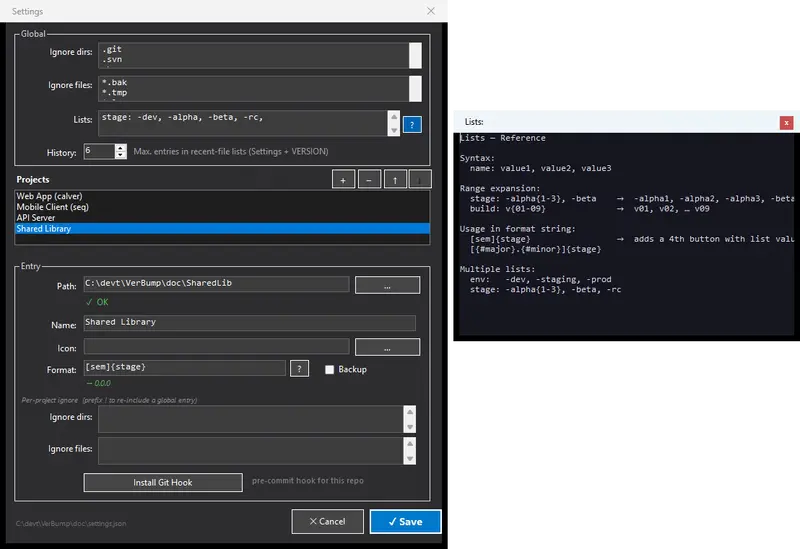
I built VerBump — a small Windows tool that shows all my projects in one window and highlights in orange which ones have source files newer than the current VERSION file.

One glance, and I know exactly what needs bumping before I push.

Bumping itself is keyboard-driven: Ctrl+1 for Patch, Ctrl+2 for Minor,
Ctrl+3 for Major. No mouse, no dialogs, done in two seconds.

The “set it and forget it” mode

For projects where I really don’t want to think about it at all, VerBump can install a Git pre-commit hook. It blocks the commit automatically if VERSION is stale — before the push even happens.

That’s the version I use for my most active projects.

Technical bits

  • Built with C# / .NET 8 / WinForms
  • Ships as a single self-contained .exe — no installer, no runtime needed
  • Supports SemVer, CalVer, and custom sequential schemes
  • Multilingual (EN/DE, more via lang.xx.json drop-in)
  • MIT licensed

Honest reflection

It saves me more worry, rework, and time than I spent building it.

If you work on multiple projects in parallel and maintain VERSION files,
give it a try. Feedback very welcome!

→ GitHub ·
Website

[LeapMotion + UniRx] Moving a Camera with Hand Gestures: Two-Hand Edition

vlcsnap-2019-04-22-16h28m17s785.png

vlcsnap-2019-04-22-16h28m17s785.png

Introduction

In the previous article, I implemented translating the Main Camera using one-hand Leap Motion input when no mouse or keyboard is available.

This time, I’m adding rotation and zoom control as well.

Demo

Here’s what I built. I exhibited it at Looking Glass Meetup (Rukimito).

// Detect dark theme
var iframe = document.getElementById(‘tweet-1109754332092624896-397’);
if (document.body.className.includes(‘dark-theme’)) {
iframe.src = “https://platform.twitter.com/embed/Tweet.html?id=1109754332092624896&theme=dark”
}

When both hands are in a fist, the camera responds to hand movement with three operations:

  • Scale (zoom in/out)
  • Rotation
  • Translation (pan)

Sample Code

Here is the full code. It is intended to be attached to the Main Camera.

using Leap;
using System.Collections.Generic;
using System.Linq;
using UniRx;
using UniRx.Triggers;
using UnityEngine;

/// <summary>
/// Camera controller
/// </summary>
public class CameraController : MonoBehaviour
{
    /** Camera movement speed */
    private float speed = 0.025f;

    /** Leap Motion controller */
    private Controller controller;

    /** Entry point */
    void Start()
    {
        // Leap Motion controller
        controller = new Controller();

        // Get hand data from Leap Motion every frame
        var handsStream = this.UpdateAsObservable()
            .Select(_ => controller.Frame().Hands);

        // Stream that fires when both-fist gesture starts
        var beginDoubleRockGripStream = handsStream
            .Where(hands => IsDoubleRockGrip(hands));

        // Stream that fires when both-fist gesture ends
        var endDoubleRockGripStream = handsStream
            .Where(hands => !IsDoubleRockGrip(hands));

        // Camera zoom (scale)
        beginDoubleRockGripStream
            .Select(hands => hands[0].PalmPosition.DistanceTo(hands[1].PalmPosition))
            .Where(distance => distance > 0.0f)
            .Buffer(2, 1)
            .Select(distances => distances[1] / distances[0])
            .TakeUntil(endDoubleRockGripStream).RepeatUntilDestroy(this)
            .Where(distanceRate => distanceRate > 0.0f)
            .Subscribe(distanceRate => transform.localScale /= distanceRate);

        // Camera rotation
        beginDoubleRockGripStream
            .Select(hands => ToVector3(hands[1].PalmPosition - hands[0].PalmPosition))
            .Where(diff => diff.magnitude > 0.0f)
            .Buffer(2, 1)
            .Select(diffs => Quaternion.AngleAxis(Vector3.Angle(diffs[0], diffs[1]), Vector3.Cross(diffs[1], diffs[0])))
            .TakeUntil(endDoubleRockGripStream).RepeatUntilDestroy(this)
            .Subscribe(quaternion => transform.rotation *= quaternion);

        // Camera translation
        beginDoubleRockGripStream
            .Select(hands => ToVector3((hands[0].PalmPosition + hands[1].PalmPosition) * 0.5f))
            .Buffer(2, 1)
            .Select(positions => positions[1] - positions[0])
            .TakeUntil(endDoubleRockGripStream).RepeatUntilDestroy(this)
            .Subscribe(movement => transform.Translate(-speed * movement));
    }

    /** Check if both hands are making a fist */
    public bool IsDoubleRockGrip(List<Hand> hands)
    {
        return
            hands.Count == 2 &&
            hands[0].Fingers.ToArray().Count(x => x.IsExtended) == 0 &&
            hands[1].Fingers.ToArray().Count(x => x.IsExtended) == 0;
    }

    /** Convert Leap Vector to Unity Vector3 */
    Vector3 ToVector3(Vector v)
    {
        return new Vector3(v.x, v.y, -v.z);
    }
}

Detecting Both-Fist Gesture

IsDoubleRockGrip handles the detection. In the previous article we detected one fist; here we detect two.

/** Check if both hands are making a fist */
public bool IsDoubleRockGrip(List<Hand> hands)
{
    return
        // Two hands detected
        hands.Count == 2 &&
        // First hand: no fingers extended
        hands[0].Fingers.ToArray().Count(x => x.IsExtended) == 0 &&
        // Second hand: no fingers extended
        hands[1].Fingers.ToArray().Count(x => x.IsExtended) == 0;
}

hands.Count verifies that Leap Motion detects exactly two hands, and Count(x => x.IsExtended) == 0 checks that all fingers on each hand are closed.

Camera Zoom

The zoom behavior is:

  • Move hands apart → zoom in
  • Move hands together → zoom out

Here’s the relevant code with comments:

// Camera zoom (scale)
beginDoubleRockGripStream
    // Calculate distance between both palms
    .Select(hands => hands[0].PalmPosition.DistanceTo(hands[1].PalmPosition))
    // Only if distance is positive (avoid division by zero)
    .Where(distance => distance > 0.0f)
    // Buffer current and previous values
    .Buffer(2, 1)
    // Calculate ratio of change in distance
    .Select(distances => distances[1] / distances[0])
    // Clear buffer when both-fist gesture ends
    .TakeUntil(endDoubleRockGripStream).RepeatUntilDestroy(this)
    // Only if ratio is positive (avoid division by zero)
    .Where(distanceRate => distanceRate > 0.0f)
    // Scale the camera
    .Subscribe(distanceRate => transform.localScale /= distanceRate);

hands[0].PalmPosition.DistanceTo(hands[1].PalmPosition) computes the distance between the two palms. The ratio of change in distance controls the camera’s scale.

Camera Rotation

It’s difficult to describe in words, but: make both hands into fists and move them like turning a steering wheel — the camera rotates in that direction.

// Camera rotation
beginDoubleRockGripStream
    // Compute the difference vector between both palms
    .Select(hands => ToVector3(hands[1].PalmPosition - hands[0].PalmPosition))
    // Only if magnitude is positive (avoid issues with zero-length vectors)
    .Where(diff => diff.magnitude > 0.0f)
    // Buffer current and previous values
    .Buffer(2, 1)
    // Compute the rotational change (quaternion) from dot and cross products
    .Select(diffs => Quaternion.AngleAxis(Vector3.Angle(diffs[0], diffs[1]), Vector3.Cross(diffs[1], diffs[0])))
    // Clear buffer when both-fist gesture ends
    .TakeUntil(endDoubleRockGripStream).RepeatUntilDestroy(this)
    // Rotate the camera
    .Subscribe(quaternion => transform.rotation *= quaternion);

The steps are:

  • hands[1].PalmPosition - hands[0].PalmPosition computes the vector difference between the two palms.
  • This vector is buffered across two frames.
  • The dot product and cross product between the previous and current vectors are used to compute the angular change as a quaternion.
  • That quaternion is multiplied into the camera’s rotation.

Camera Translation

I use the midpoint of both palms to drive translation. This means:

  • Moving both fists in the same direction → the camera pans in that direction
  • Moving hands in opposite directions → no translation (only zoom)
// Camera translation
beginDoubleRockGripStream
    // Compute the midpoint of both palms
    .Select(hands => ToVector3((hands[0].PalmPosition + hands[1].PalmPosition) * 0.5f))
    // Buffer current and previous values
    .Buffer(2, 1)
    // Calculate the midpoint movement vector
    .Select(positions => positions[1] - positions[0])
    // Clear buffer when both-fist gesture ends
    .TakeUntil(endDoubleRockGripStream).RepeatUntilDestroy(this)
    // Move the camera
    .Subscribe(movement => transform.Translate(-speed * movement));

(hands[0].PalmPosition + hands[1].PalmPosition) * 0.5f computes the midpoint of both palms.

Closing

When I demoed this UI to people unfamiliar with Leap Motion one-on-one, they needed some explanation. But at the Looking Glass Meetup, almost everyone understood the controls instantly — which was really impressive!

React Native Android build failed: what I would check first

If a React Native Android build suddenly fails, the error message is often much less helpful than it looks.

Sometimes it points to Gradle, sometimes to a plugin, sometimes to a dependency, and sometimes it just fails deep inside the Android build process without making the real cause obvious.

I’ve run into this kind of problem enough times to stop treating “build failed” as one issue.

It is usually a category of issues.

This is the checklist I would go through first before changing random files or reinstalling everything.

First: treat build failures as clues, not conclusions

A React Native Android build can fail because of:

  • Gradle configuration issues
  • plugin resolution problems
  • dependency/version mismatches
  • Kotlin or AGP incompatibility
  • corrupted caches
  • autolinking problems
  • native module integration issues
  • environment/setup problems on the machine

That means the text BUILD FAILED is not the diagnosis. It is just the start of the diagnosis.

What I would check first

1. Read the first meaningful error, not the last line

One of the easiest mistakes is focusing on the bottom of the terminal output.

The last line usually just says the build failed. The useful part is often earlier:

  • the first missing plugin
  • the first unresolved dependency
  • the first incompatible version
  • the first task that actually broke

If I see a huge wall of Gradle output, I try to find the first message that clearly indicates what could not be found, resolved, or configured.

That usually narrows the problem much faster.

2. Check React Native / Gradle / AGP / Kotlin compatibility

A lot of Android build failures are really version alignment problems.

I would check whether these pieces actually make sense together:

  • React Native version
  • Gradle wrapper version
  • Android Gradle Plugin version
  • Kotlin version
  • installed JDK version

A mismatch here can break the build even when your app code is fine.

This is especially common after:

  • upgrading React Native
  • adding or updating native libraries
  • copying build config from another project
  • mixing Expo/native config changes

3. Look at settings.gradle and plugin resolution first

If the error mentions plugins not being found, configuration failing, or included builds not resolving correctly, I would go straight to:

  • android/settings.gradle
  • root build.gradle
  • plugin management / includeBuild setup

In newer React Native setups, especially around the Gradle plugin and autolinking, small mistakes there can break the entire build.

This is one of the first places I would inspect if the error looks structural instead of library-specific.

4. Check whether this is really a cache problem

Sometimes it is. Sometimes it is not.

I would only treat it as a cache issue when the error actually suggests things like:

  • temp workspace move failures
  • corrupted transforms
  • unexpected stale build behavior
  • dependency artifacts behaving inconsistently

In that case, I would think about:

  • Gradle daemon state
  • .gradle cache corruption
  • android/.gradle
  • android/build
  • whether Android Studio or another process is holding locks

But I would not start by deleting everything automatically unless the error really points that way.

5. Check native dependencies and recently added packages

If the build worked before and stopped working after adding or updating something, that is one of the strongest signals you have.

I would ask:

  • what changed last?
  • did I add a native dependency?
  • did I update Firebase packages?
  • did I change Expo/native modules?
  • did I update React Native or Gradle-related files?

That often gives a faster answer than staring at logs in isolation.

6. Watch for autolinking and native module issues

React Native Android builds often fail because a native module was not linked/configured the way the project expects.

This gets more likely when:

  • mixing Expo modules with bare React Native config
  • using libraries with native setup steps
  • upgrading React Native without updating supporting config
  • relying on autolinking that did not actually complete properly

If the error mentions package resolution, missing generated files, or native tasks around module setup, I would treat autolinking as a serious suspect.

7. Distinguish machine/setup problems from project problems

Sometimes the project is broken.

Sometimes the machine is.

That is an important difference.

I would think about machine/environment issues when the error points toward:

  • JDK problems
  • missing Android SDK components
  • PATH / environment variable issues
  • SSL / certificate / dependency download failures
  • local file locking or permissions

That is why a build issue can appear “random” even when the project itself has not changed much.

8. If Firebase is involved, do not assume it is only a Firebase issue

Firebase-related packages can surface as Android build failures even when the deeper cause is one of these:

  • dependency mismatch
  • outdated native setup
  • plugin/version conflict
  • Gradle packaging issue
  • release/debug configuration difference

So if the failure starts after adding Firebase or changing Firebase setup, I would still inspect the Android build chain broadly instead of narrowing too fast.

A practical mental model

When I see “React Native Android build failed,” I usually sort the possibilities into these buckets:

Bucket 1: Build system

  • Gradle
  • AGP
  • Kotlin
  • plugin management
  • wrapper version

Bucket 2: Native integration

  • autolinking
  • native modules
  • Expo/native mix
  • Firebase native setup

Bucket 3: Local environment

  • JDK
  • SDK
  • PATH
  • cache corruption
  • SSL/certificate/download issues

That mental model helps me avoid random debugging.

What I would not do first

I would not immediately:

  • reinstall the whole machine setup
  • randomly edit multiple Gradle files
  • downgrade several libraries at once
  • clear every cache without understanding the error
  • assume the last line in the terminal is the root cause

That usually creates more noise.

My practical order of checks

If a React Native Android build fails, this is the order I would usually go through:

  1. find the first meaningful error in the output
  2. check version compatibility across RN / Gradle / AGP / Kotlin / JDK
  3. inspect settings.gradle and plugin resolution
  4. review the most recent package or config change
  5. check native module/autolinking issues
  6. only then treat it as cache/environment cleanup if the error points there

That order tends to save time.

Final takeaway

“React Native Android build failed” is not one problem.

It is usually one of a few repeated categories:

  • version mismatch
  • plugin/config problem
  • native integration issue
  • cache/environment issue

The faster you identify which category you are in, the faster the build becomes fixable.

Neon Has a Free Serverless PostgreSQL — Scale to Zero, Branch Like Git

RDS costs $15/month even when sleeping. Neon’s serverless PostgreSQL scales to zero — and you only pay when queries run.

What is Neon?

Neon is serverless PostgreSQL that separates storage and compute. Your database scales to zero when idle, branches like git for testing, and wakes up in milliseconds when a query arrives.

Why Neon

1. Scale to Zero

Traditional PostgreSQL:
Midnight: 0 queries → still paying $15/month
3 AM: 0 queries → still paying
6 AM: 1 query → compute wakes up → serves query → back to zero

Neon:
Midnight: 0 queries → $0
3 AM: 0 queries → $0
6 AM: 1 query → compute activates in ~500ms → serves query → scales to zero

2. Database Branching

# Create a branch from production
neonctl branches create --name feature-auth --parent main

# Test schema changes on the branch
psql $BRANCH_URL -c "ALTER TABLE users ADD COLUMN avatar_url TEXT;"

# Branch has production data but changes don't affect main
# Delete when done
neonctl branches delete feature-auth

3. Serverless Driver (HTTP)

import { neon } from '@neondatabase/serverless';

const sql = neon(process.env.DATABASE_URL);

// Works in Vercel Edge, Cloudflare Workers, Deno Deploy
const users = await sql`SELECT * FROM users WHERE active = true LIMIT 10`;

No TCP connections. Pure HTTP — works in any serverless runtime.

4. Connection Pooling

import { Pool } from '@neondatabase/serverless';

const pool = new Pool({ connectionString: process.env.DATABASE_URL });

// WebSocket-based pooling for serverless
const client = await pool.connect();
const result = await client.query('SELECT * FROM products');
client.release();

5. Instant Point-in-Time Restore

# Restore to any point in the last 7 days (free) or 30 days (paid)
neonctl branches restore main --timestamp "2026-03-27T15:30:00Z"

6. Autoscaling

Free tier: 0.25 vCPU (scales to zero)
Pro: 0.25 → 8 vCPU (auto-scales based on load)

Morning: 0.25 vCPU (low traffic)
Noon: 2 vCPU (peak)
Night: 0 vCPU (scaled to zero)

Free Tier

Feature Free
Compute hours 191h/month
Storage 512 MB
Branches 10
History 7 days
Projects 1

191 compute hours = always-on for a small app, or scale-to-zero for multiple projects.

Neon vs Supabase vs PlanetScale vs RDS

Neon Supabase PlanetScale RDS
Database PostgreSQL PostgreSQL MySQL Any
Scale to zero Yes No Yes No
Branching Yes No Yes No
Serverless driver HTTP PostgREST HTTP No
Connection pooling Built-in PgBouncer Built-in Via proxy
Free tier 512MB, 191h 500MB, always-on 5GB, sleep None

Getting Started

# Sign up at neon.tech
# Create project → get connection string

npm install @neondatabase/serverless
import { neon } from '@neondatabase/serverless';
const sql = neon(process.env.DATABASE_URL);
const result = await sql`SELECT NOW()`;

The Bottom Line

Neon makes PostgreSQL serverless-native. Scale to zero for $0 idle cost, branch for safe testing, and connect from any edge runtime via HTTP. The best free PostgreSQL for side projects.

Need data tools? I build scraping solutions. Check my Apify actors or email [email protected].

How to Scrape Glassdoor: Complete Guide for 2026

How to Scrape Glassdoor: Complete Guide for 2026

Glassdoor exposes salary data, company reviews, and job listings that are genuinely useful for compensation benchmarking, recruiting analysis, and labor market research. The catch: Glassdoor runs Cloudflare, gates salary data behind authentication, and renders all meaningful content client-side with React. This guide cuts through those obstacles with working Python code.

Why Scrape Glassdoor?

Three use cases that justify the engineering effort:

Compensation benchmarking — HR teams and SaaS products aggregate salary ranges by role, level, location, and company size. Glassdoor’s crowdsourced compensation data is one of the richest publicly accessible sources for this kind of analysis. Refreshing it weekly catches market shifts before they show up in annual survey reports.

Competitive talent intelligence — Track hiring velocity at competitors. Which roles are they posting? How quickly are positions closing? Job listing volume is a reliable leading indicator of engineering and product priorities six to nine months out.

Employer brand monitoring — Tracking review sentiment over time — overall ratings, CEO approval, interview difficulty scores — gives recruiting teams early warning of culture problems before they surface as churn events. Companies also benchmark their own standing against direct competitors.

Anti-Bot Challenges on glassdoor.com

Glassdoor deploys several overlapping protections that make DIY scraping expensive to maintain:

Cloudflare WAF and Bot Management — Glassdoor sits behind Cloudflare’s bot management layer. A standard Python requests call receives a JS challenge page requiring a valid cf_clearance cookie before any real HTML is served. This blocks virtually every naive scraper immediately.

Login wall for salary data — Salary ranges and detailed compensation breakdowns are gated behind authentication. Unauthenticated sessions see truncated results or get redirected to a signup modal. Full data access requires managing authenticated sessions with valid cookies.

Client-side rendering — Job listings, reviews, and salary cards are all React components. The initial HTML response from Glassdoor’s server is a near-empty shell. You need a JavaScript runtime to execute the page and produce actual content.

Browser fingerprinting and behavioral detection — Glassdoor combines static browser fingerprinting with behavioral signals (scroll cadence, mouse movement, click timing) to identify headless browsers. Playwright and Puppeteer with default configurations are reliably flagged within a few page loads.

Maintaining your own bypass stack — refreshing cf_clearance cookies, managing residential proxy pools, spoofing browser fingerprints — is a real ongoing engineering commitment. AlterLab’s Anti-bot bypass API handles all of this at the infrastructure level, so your scraping code stays focused on data extraction.

Quick Start with AlterLab API

Install the SDK and you can make your first Glassdoor request in under a minute. See the getting started guide for full environment setup, including API key management and optional async configuration.

“`bash title=”Terminal”
pip install alterlab beautifulsoup4 lxml


```python title="scrape_glassdoor.py" {4-11}

from bs4 import BeautifulSoup

client = alterlab.Client("YOUR_API_KEY")

# Scrape a Glassdoor job search results page
response = client.scrape(
    "https://www.glassdoor.com/Job/python-developer-jobs-SRCH_KO0,16.htm",
    render_js=True,                          # Required: Glassdoor is a React SPA
    wait_for="[data-test='jobListing']",     # Wait for job cards before returning
)

soup = BeautifulSoup(response.html, "html.parser")
job_cards = soup.select("[data-test='jobListing']")
print(f"Found {len(job_cards)} job listings")

The equivalent cURL call for testing from a shell or integrating with non-Python pipelines:

“`bash title=”Terminal”
curl -X POST https://api.alterlab.io/v1/scrape
-H “X-API-Key: YOUR_API_KEY”
-H “Content-Type: application/json”
-d ‘{
“url”: “https://www.glassdoor.com/Job/python-developer-jobs-SRCH_KO0,16.htm“,
“render_js”: true,
“wait_for”: “[data-test=”jobListing”]”
}’


<div data-infographic="stats">
  <div data-stat data-value="99.1%" data-label="Glassdoor Success Rate"></div>
  <div data-stat data-value="2.4s" data-label="Avg JS Render Time"></div>
  <div data-stat data-value="100%" data-label="Cloudflare Bypass Rate"></div>
  <div data-stat data-value="0ms" data-label="Proxy Setup Time"></div>
</div>

## Extracting Structured Data

With fully rendered HTML in hand, here is how to pull the most useful data points from Glassdoor's DOM.

### Job Listings

Glassdoor uses `data-test` attributes on stable semantic elements — always prefer these over generated class names, which change with every React build deployment.


```python title="parse_jobs.py" {9-22}
from bs4 import BeautifulSoup

def parse_job_listings(html: str) -> list[dict]:
    soup = BeautifulSoup(html, "html.parser")
    jobs = []

    for card in soup.select("[data-test='jobListing']"):
        def text(selector):
            el = card.select_one(selector)
            return el.get_text(strip=True) if el else None

        jobs.append({
            "title":    text("[data-test='job-title']"),
            "company":  text("[data-test='employer-name']"),
            "location": text("[data-test='emp-location']"),
            "salary":   text("[data-test='detailSalary']"),
            "rating":   text("[data-test='rating']"),
            "age":      text("[data-test='job-age']"),
        })

    return jobs

Company Reviews

Review pages are paginated at 10 entries per page. The _IP{n} path segment in the URL controls the page number.

“`python title=”parse_reviews.py” {6-22}

from bs4 import BeautifulSoup

client = alterlab.Client(“YOUR_API_KEY”)

def scrape_company_reviews(company_slug: str, pages: int = 5) -> list[dict]:
“””
company_slug: e.g. ‘Google’ (as it appears in the Glassdoor URL)
“””
reviews = []
slug_len = len(company_slug)

for page in range(1, pages + 1):
    url = (
        f"https://www.glassdoor.com/Reviews/{company_slug}-reviews"
        f"-SRCH_KE0,{slug_len}_IP{page}.htm"
    )
    response = client.scrape(url, render_js=True, wait_for="[data-test='review']")
    soup = BeautifulSoup(response.html, "html.parser")

    for review in soup.select("[data-test='review']"):
        def text(selector):
            el = review.select_one(selector)
            return el.get_text(strip=True) if el else None

        reviews.append({
            "headline": text("[data-test='review-title']"),
            "rating":   text("[data-test='overall-rating']"),
            "pros":     text("[data-test='pros']"),
            "cons":     text("[data-test='cons']"),
            "date":     text("[data-test='review-date']"),
            "role":     text("[data-test='author-jobTitle']"),
        })

return reviews


### Salary Data

Salary pages require an authenticated session. Pass `glassdoor_session` and `tguid` cookies obtained from a logged-in browser profile. The API accepts a `headers` dict for this purpose:


```python title="parse_salaries.py" {5-12}

client = alterlab.Client("YOUR_API_KEY")

response = client.scrape(
    "https://www.glassdoor.com/Salaries/software-engineer-salary-SRCH_KO0,17.htm",
    render_js=True,
    headers={
        "Cookie": "JSESSIONID=YOUR_SESSION_ID; tguid=YOUR_TGUID"
    },
    wait_for="[data-test='salaryRow']",
)

Key selectors once authenticated: [data-test='salaryRow'] for each salary entry, [data-test='salary-estimate'] for the reported range, and [data-test='total-compensation'] for the total comp breakdown.

Common Pitfalls

Per-IP rate limiting — Glassdoor throttles at the IP level, not just by User-Agent. Exceeding roughly 25–30 requests per minute from a single IP triggers 429 responses or silent result degradation, where fewer listings are returned without any error signal. Distributed requests across rotating proxies are required for sustained collection.

Session expiry on gated content — Glassdoor sessions expire within a few hours. For pipelines that scrape salary or authenticated review data, implement cookie refresh logic. Detect redirects to /profile/login as the signal that your session has expired and re-authenticate before continuing.

Hard pagination cap — Glassdoor limits job search results to 30 pages (300 results) per query regardless of how many matching listings exist. Paginating past page 30 returns the first page again. The correct approach is to narrow queries by location, fromAge (days posted), or jobType parameter rather than paginating deeper on a broad query.

Selector drift — Glassdoor ships frontend updates frequently. Class names change with every React build. The data-test attributes documented above are more stable, but they can also shift. Build result-count validation into your pipeline: if a parse returns zero records, treat that as a selector failure, not an empty result set, and alert.

Hydration timing — Even with render_js=True, returning content before React has finished hydrating gives you an empty shell. Always set wait_for to a CSS selector matching a target element, not just a fixed timeout. The element-based wait adapts to variable page load times automatically.

Scaling Up

Batch Requests

For bulk collection across many search permutations — dozens of cities, multiple job titles, rolling date windows — the AlterLab batch endpoint processes URLs in parallel and is significantly more efficient than sequential requests:

“`python title=”batch_glassdoor.py” {5-20}

client = alterlab.Client(“YOUR_API_KEY”)

cities = [
(“new-york-city”, “IC1132348”),
(“san-francisco”, “IC1147401”),
(“austin”, “IC1139761”),
(“seattle”, “IC1150505”),
(“chicago”, “IC1128808”),
]

urls = [
f”https://www.glassdoor.com/Job/python-engineer-{slug}-jobs-SRCH_IL.0,{len(slug)}_IC{code}_IP{page}.htm“
for slug, code in cities
for page in range(1, 11) # 10 pages × 5 cities = 50 requests
]

results = client.batch_scrape(
urls=urls,
render_js=True,
wait_for=”[data-test=’jobListing’]”,
concurrency=10,
)

with open(“glassdoor_jobs.jsonl”, “w”) as f:
for r in results:
if r.success:
f.write(json.dumps({“url”: r.url, “html”: r.html}) + “n”)


### Scheduling Recurring Pipelines

For daily job market snapshots or weekly salary index updates, wire the scraper to a scheduler. APScheduler is lightweight and runs in-process without a separate queue service:


```python title="scheduler.py" {8-16}
from apscheduler.schedulers.blocking import BlockingScheduler

from parse_jobs import parse_job_listings

client = alterlab.Client("YOUR_API_KEY")
scheduler = BlockingScheduler()

@scheduler.scheduled_job("cron", hour=2, minute=0)  # 02:00 daily
def daily_glassdoor_pull():
    roles = ["software-engineer", "data-engineer", "product-manager", "ml-engineer"]
    for role in roles:
        url = f"https://www.glassdoor.com/Salaries/{role}-salary-SRCH_KO0,{len(role)}.htm"
        response = client.scrape(url, render_js=True, wait_for="[data-test='salaryRow']")
        jobs = parse_job_listings(response.html)
        store_to_warehouse(jobs)   # your storage layer here

scheduler.start()

Cost Management at Scale

Not every Glassdoor page requires full JavaScript execution. Company overview pages and some listing shells partially pre-render server-side. Profile your target URLs: attempt a plain HTML fetch first and check whether your target selectors are present. Use render_js=False wherever possible — it is faster and consumes fewer credits. Reserve JS rendering for pages that require it.

Review AlterLab pricing for credit consumption rates broken down by request type before sizing your pipeline budget.

Key Takeaways

  • JavaScript rendering is not optional — Glassdoor’s content is React-rendered. A plain HTTP fetch returns a shell. Always set render_js=True and use wait_for with a target element selector.
  • Cloudflare is the primary blocker — do not spend engineering cycles maintaining your own bypass. It is a dependency, not a competitive advantage.
  • Prefer data-test attributes over class names — class names change with every build. data-test attributes are intentionally stable for testing and are your most reliable selection strategy.
  • Salary data requires authentication — pass valid session cookies and implement refresh logic for any pipeline running longer than a few hours.
  • Respect the 30-page cap — use query narrowing (location, date posted, job type) rather than deep pagination to collect comprehensive datasets.
  • Batch and schedule deliberately — sequential requests are fine for development; batch endpoints with concurrency control are essential for production pipelines.

Related Guides

  • How to Scrape LinkedIn — professional profiles, company pages, and job postings behind one of the web’s most aggressive anti-bot stacks
  • How to Scrape Indeed — job listings and employer reviews with simpler authentication requirements than Glassdoor
  • How to Scrape Amazon — product pricing, reviews, and inventory data at scale with dynamic rendering handled