SnippKit — Not Just a Snippet Manager

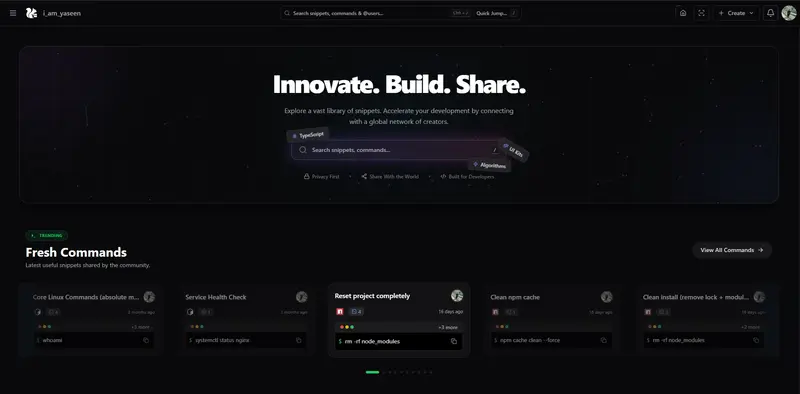
Home Page of SnippKit

Most developers store code snippets somewhere.

Some use:

  • Notion
  • GitHub gists
  • Text files
  • Random folders
  • ChatGPT history
  • Sticky notes
  • Terminal history

But snippets today are not just code anymore.

We save:

  • CLI commands
  • SQL queries
  • API requests
  • AI prompts
  • Config files
  • JSON templates
  • Regex
  • Notes
  • Links
  • Debug commands

That’s why I built SnippKit — a place to save, share, organize, and run snippets from anywhere.

This is not just a snippet manager.

It’s more like a developer toolkit + snippet cloud + automation tools.

Home Page of SnippKit

What You Can Store in SnippKit

You can save and organize:

  • Code snippets
  • CLI commands
  • AI prompts
  • Notes
  • JSON data
  • SQL queries
  • Regex
  • Links
  • Config files

Everything can be organized into:

  • folders
  • collections
  • starred snippets

So your important snippets are always easy to find.

Secure Sharing — Ghost Send

Ghost Send

SnippKit has a feature called Ghost Send.

This allows you to:

  • share a snippet securely
  • send a private link
  • control who can access it
  • share sensitive configs safely

Useful for:

  • API examples
  • server configs
  • deployment commands
  • debugging snippets
  • team sharing

Communities and Organization Sharing

Organization

SnippKit supports organization and community sharing.

Think of it like:

  • WhatsApp groups for developers
  • Teams sharing snippet collections
  • Policy-based sharing like AWS IAM

You can:

  • create groups
  • share collections to specific groups
  • control who can view or edit snippets
  • manage snippet access policies

This is useful for:

  • teams
  • open source communities
  • developer groups
  • classrooms
  • companies

Run Commands from Cloud Using SNIX CLI

Snix CLI

SnippKit includes a CLI tool called Snix.

You can run commands stored in the cloud directly from your terminal.

Example workflow:

  • Save a deployment command in SnippKit
  • Open terminal
  • Run using Snix CLI
  • Command executes instantly

Useful for:

  • deployment commands
  • docker commands
  • git workflows
  • ssh commands
  • database commands
  • build scripts

Chrome Extension — Save From Anywhere

Chrome Extension - SnippKit Saver

SnippKit also has a Chrome Extension.

You can:

  • save code from GitHub
  • save commands from documentation
  • save AI prompts
  • save StackOverflow solutions
  • save configs from blogs
  • save anything from the web

Just save directly from the browser.

VS Code Integration

VS Code Extension

You can save snippets directly from VS Code.

This makes it very easy to:

  • save useful functions
  • save configs
  • save reusable components
  • save queries
  • save scripts

Without leaving your editor.

Code to Image (Carbon-like Feature)

Karbon Studio

SnippKit has a feature similar to Carbon.

You can:

  • convert code into beautiful images
  • customize themes
  • export code images
  • share on social media
  • share in documentation

Very useful for:

  • blog posts
  • documentation
  • social media posts
  • tutorials

JSON as a Service

JAAS

SnippKit also provides JSON as a Service.

You can:

  • store JSON
  • get an endpoint
  • use it as mock API
  • test frontend apps
  • test fetch requests
  • prototype apps quickly

Very useful for frontend development and testing.

40+ Built-in Developer Tools

DevTools

SnippKit includes 40+ developer tools, such as:

  • Base64 encoder / decoder
  • Color palette generator
  • QR code studio
  • Character counter
  • File size calculator
  • JSON formatter
  • URL encoder
  • Timestamp converter
  • Hash generator
  • Text utilities
  • And many more

So it’s not just snippets — it’s also a developer toolbox.

AI Features — SIDR AI

SIDR AI

SnippKit includes SIDR AI.

It can:

  • generate code
  • explain saved code
  • help understand snippets later
  • generate scripts
  • generate regex
  • generate SQL queries
  • generate CLI commands

There is also AI code explanation, so when you open an old snippet, you can instantly see what the code does.

Ai Explanation

Very useful when revisiting old snippets.

SnippKit Blog

SnippKit Blog

SnippKit also has a blog where:

  • updates are posted
  • new features announced
  • developer tips shared
  • tools explained
  • tutorials posted

Easy Profile Sharing via QR Code

QR Sharing

You can share your SnippKit profile using a QR code.

Useful for:

  • conferences
  • meetups
  • sharing snippet collections
  • sharing developer profile

Keyboard First Workflow

Keyboard first

SnippKit is designed to be keyboard-first.

You can:

  • open search
  • create snippets
  • navigate
  • open tools
  • switch sections

Also includes ctrl + ; which shows numbers so that navigations become in a click

Shortcut keys

Using keyboard shortcuts without touching the mouse.

Easter Eggs

Cheat Codes

There are also some fun easter eggs inside SnippKit.

For example:

  • typing sakura → falling hearts animation
  • typing rain → rain animation

Easter Eggs

Just small fun things inside the app.

Final Thoughts

SnippKit started as a simple snippet saver.

But it slowly became:

  • snippet manager
  • developer toolbox
  • CLI command runner
  • snippet sharing platform
  • JSON service
  • AI code assistant
  • developer utilities collection
  • community snippet sharing platform

Basically a developer productivity platform.

If you’re a developer who constantly saves:

  • code
  • commands
  • prompts
  • configs
  • queries
  • scripts

You might find SnippKit useful.

SnippKit : https://snippkit.com

How Enterprise Wallet Infrastructure Actually Works: MPC, Custody Models, and Why MetaMask Was Never the Answer

A technical deep-dive into what it actually takes to build wallet infrastructure for banks, fintechs, and financial institutions — from key management to compliance to multi-chain architecture.

Every week I talk to developers building on-chain financial products. And almost without fail, the conversation hits the same wall: key management.

Not smart contracts. Not tokenomics. Not gas optimisation. Key management.

Because the moment you try to build a wallet product that works for a bank, a fintech, or any financial institution serving real users — you discover that the entire existing ecosystem was designed for a completely different problem. MetaMask was built for a developer who wants to interact with DeFi protocols. It was never built for a fintech serving 10 million users in Maharashtra who should never see the word “blockchain.”

This article is a technical breakdown of what enterprise wallet infrastructure actually requires: the custody models, the MPC architecture, the compliance layer, and the multi-chain problem. By the end, you should be able to make an informed decision about which approach fits what you’re building — and understand why most existing WaaS tools fall short.

Prerequisites
Basic familiarity with blockchain concepts (private keys, transaction signing, smart contracts). This article goes deep on architecture — if you want the non-technical business case, the link to the newsletter edition is in the footer.

Why the Old Wallet Model Was Always Wrong for Enterprise

The crypto wallet model from 2017–2023 had one fundamental design assumption: the user is also the operator. The person using the wallet is the same person who understands seed phrases, manages private keys, and accepts full responsibility for key security.

That assumption breaks immediately in any enterprise context.

A bank cannot tell its customers “here is a 24-word seed phrase, please store it safely.” A fintech cannot build a product where one customer support call results in someone accidentally approving a transaction with no recourse. A corporate treasury cannot have a single employee hold the private key to $50M in on-chain assets.

The enterprise wallet problem has fundamentally different requirements:

  • Wallet creation at scale — millions of wallets, sub-second, no user interaction with keys
  • Compliance baked in — KYC, sanctions screening, spending limits, audit trails
  • Operational roles — treasury, compliance, support all have different access levels
  • Disaster recovery — if a key shard is lost, funds must be recoverable
  • Multi-chain — one user, multiple chains, one unified interface
  • Regulatory audit — every transaction signed must be attributable and logged

None of these were considerations in MetaMask’s design. And that’s fine — it wasn’t built for this. But it means the enterprise wallet is a completely different engineering problem from the consumer wallet.

The Three Custody Models — Trade-offs You Need to Understand

Before picking an architecture, you need to choose a custody model. This decision flows downstream into every other design choice you make.

Custodial: Simple to build, dangerous at scale
In a custodial model, your company holds the private keys. The user has a database record — an account ID — and you sign transactions on their behalf. This is how early crypto exchanges worked. It’s also how traditional fintech apps work (you don’t hold your money in a Paytm vault; Paytm does).

Why it’s tempting: Easy to build. Fast wallet creation. Full control over compliance enforcement. No key management complexity for users.

Why it breaks at enterprise scale: Your HSM or key vault becomes the single most critical system you own. A breach means every user’s funds are at risk simultaneously. Regulators in most jurisdictions are also increasingly hostile to custodial crypto models — you’re essentially running a bank without a banking license.

Self-custody: Correct philosophy, wrong UX
Self-custody (MetaMask, hardware wallets, seed phrases) is philosophically correct — the user controls their own keys, nobody can freeze their funds, and there’s no counterparty risk. But it fails for mass-market financial products for one simple reason: users lose their keys.

The support ticket “I lost my seed phrase” has no resolution in a pure self-custody model. That’s fine for a crypto-native developer. It’s a catastrophic product flaw for a fintech serving 10 million retail users.

MPC: The enterprise standard
Multi-Party Computation (MPC) wallets split the private key into cryptographic shards — pieces of the key that are mathematically useless on their own but can produce a valid signature when a threshold number of shards cooperate. A common configuration is 2-of-3: any two of three key shards can produce a valid signature without the third shard ever being exposed.

This is now the dominant model for enterprise wallet infrastructure and for good reason — it eliminates single points of failure while giving the operator enough control to enforce compliance.

How MPC Signing Actually Works

Understanding the mechanics of MPC is important because it determines your architecture decisions downstream. Here’s the signing flow:

The key insight: the private key is never reconstructed in full at any point. MPC protocols (like GG20, DKLS, or CGGMP) use cryptographic techniques where each shard holder performs a computation on their shard, and the results are combined to produce a valid signature — without any party ever seeing a complete private key.

This is fundamentally different from a Shamir’s Secret Sharing approach where shards are combined to reconstruct a key before signing. MPC signs without reconstruction, which means there is no moment of vulnerability.

// Simplified MPC wallet creation — what the API looks like
// The complexity of shard generation happens in the MPC library

const wallet = await mpcClient.createWallet({
  userId: 'user_9f2a3b',
  threshold: { signers: 2, of: 3 },
  shards: [
    { holder: 'company-hsm',   endpoint: process.env.HSM_ENDPOINT },
    { holder: 'cloud-kms',      endpoint: process.env.KMS_ENDPOINT },
    { holder: 'user-device',    deviceKey: userPublicKey }
  ],
  chains: ['ethereum', 'polygon', 'solana'],
  compliance: {
    jurisdiction: 'IN',
    kycLevel: 'full',
    spendingLimit: { daily: 100000, currency: 'INR' }
  }
});

// wallet.address is now live on all specified chains
// No seed phrase. No user key management. Sub-second creation.
console.log(wallet.addresses);
// { ethereum: '0x...', polygon: '0x...', solana: 'So...' }

The Compliance Layer — Why It Must Be in the Wallet, Not Above It

This is the architectural mistake I see most often. Teams build a wallet infrastructure layer and then bolt compliance on top — as a middleware that checks rules before passing transactions to the wallet service.

That’s backwards. Compliance must be enforced at the wallet level, not above it. Here’s why:

The bypass problem
If compliance is enforced in an API layer above the wallet, any internal team member or compromised service with direct wallet access can bypass it. When a regulator asks you to demonstrate your compliance controls, “we check before calling the wallet API” is not an acceptable architecture.

Enterprise wallet infrastructure needs compliance baked into the signing process itself. A transaction that violates a spending limit should fail at the wallet layer — not be rejected by middleware, not return a 403 from an API, but genuinely fail to produce a valid signature.

// Compliance rules enforced at wallet signing time — not in API middleware

class ComplianceAwareWallet {
  async sign(transaction, walletId) {

    // 1. Sanctions screening — check before signing
    const sanctionsResult = await this.sanctions.screen({
      to: transaction.to,
      lists: ['OFAC', 'UN', 'EU']
    });
    if (sanctionsResult.hit) throw new SanctionsViolationError();

    // 2. Spending limit check against daily/monthly rolling window
    const spent = await this.ledger.getDailySpend(walletId);
    if (spent + transaction.value > this.limits.daily) {
      throw new SpendingLimitError(`Daily limit: ${this.limits.daily}`);
    }

    // 3. Role check — does this signer have authority for this txn size?
    const role = await this.rbac.getRole(transaction.initiator);
    if (transaction.value > role.maxSingleTxn) {
      throw new AuthorizationError('Requires dual approval');
    }

    // 4. Only now proceed to MPC signing
    const signature = await this.mpc.sign(transaction);

    // 5. Immutable audit log — written atomically with the signature
    await this.auditLog.record({
      txnHash: transaction.hash,
      walletId, initiator: transaction.initiator,
      timestamp: Date.now(),
      complianceChecks: ['sanctions', 'spending-limit', 'rbac'],
      jurisdiction: this.config.jurisdiction
    });

    return signature;
  }
}

The Enterprise Wallet Stack — Full Architecture

Putting all the pieces together, a production enterprise wallet infrastructure looks like this:

The Multi-Chain Problem Nobody Talks About

One of the most underappreciated engineering challenges in enterprise wallet infrastructure is multi-chain support. It sounds simple — just support multiple blockchains. In practice, it’s a deep architectural problem.

Different chains have different:

  • Account models (EVM uses accounts, Solana uses programs, UTXO chains use inputs/outputs)
  • Transaction formats (different serialisation, gas models, fee structures)
  • Nonce management approaches (EVM nonces are sequential and must be managed carefully at high throughput)
  • Signature schemes (ECDSA secp256k1 on Ethereum, Ed25519 on Solana — your MPC library must support both)
  • Finality assumptions (probabilistic on PoW, deterministic on PoS — matters for enterprise settlement)

The correct architecture is a chain adapter pattern — a common interface that your wallet service calls, with chain-specific adapters implementing the interface for each supported network.

// Chain adapter interface — implemented per chain
interface ChainAdapter {
  buildTransaction(params: TxnParams): Promise<UnsignedTxn>;
  estimateFee(txn: UnsignedTxn): Promise<FeeEstimate>;
  broadcast(signedTxn: SignedTxn): Promise<TxnHash>;
  getBalance(address: string): Promise<Balance>;
  waitForFinality(hash: TxnHash): Promise<Receipt>;
}

// Ethereum adapter — handles EVM nonce management, gas estimation
class EthereumAdapter implements ChainAdapter {
  async buildTransaction(params) {
    const nonce = await this.nonceManager.getAndIncrement(params.from);
    const gasPrice = await this.provider.getGasPrice();
    return { ...params, nonce, gasPrice, chainId: 1 };
  }
}

// Solana adapter — completely different model, Ed25519 signatures
class SolanaAdapter implements ChainAdapter {
  async buildTransaction(params) {
    const blockhash = await this.connection.getLatestBlockhash();
    // No nonces — Solana uses recent blockhash for replay protection
    return new Transaction({ ...params, recentBlockhash: blockhash.blockhash });
  }
}

Custody Model Comparison — Making the Right Choice

What MetaMask Was Actually Designed For

None of this is a criticism of MetaMask. It was designed for a specific and legitimate use case: giving a developer or crypto-native user a browser-based interface to sign transactions and interact with DeFi protocols.

For that use case, it is excellent. The problem is that the industry — particularly in the 2020–2023 period — treated it as a template for all wallet products. “Users need a wallet, MetaMask is a wallet, therefore build like MetaMask.”

The wallet is not the product. Finance is the product. The wallet is how finance happens on-chain — and for most financial products, it needs to be completely invisible to the end user.

The fintech user in Maharashtra should tap “send” and the money moves. They should not know what a private key is. They should not manage a seed phrase. They should have the same expectation of reliability, support, and recourse that they have with UPI.

Building that experience requires enterprise wallet infrastructure — not a consumer crypto wallet bolted onto a fintech app.

Tools and Libraries Worth Evaluating

If you’re building enterprise wallet infrastructure today, here are the main options in each category:

MPC libraries
GG20 (Zengo’s implementation), DKLS (Coinbase’s threshold ECDSA), Fireblocks MPC-CMP, and ZenGo-X (open source). For production, evaluate whether you want to run your own MPC nodes or use a managed service.

WaaS providers to evaluate
Privy, Dynamic, Turnkey, Capsule, and Web3Auth all offer different trade-offs between control and convenience. Fireblocks and Copper are more enterprise-grade with higher ACV. Evaluate based on your compliance requirements and whether you need on-premise key shards.

Compliance tooling
Chainalysis and Elliptic for transaction monitoring and sanctions screening. Persona and Sardine for KYC at wallet creation. TRM Labs for blockchain risk scoring. Most WaaS providers have integrations with at least one of these.

The Scaling Challenges to Design For

Before I close, here are the scaling problems that will hit you in production that most architecture articles don’t mention:

Nonce management at high throughput. On EVM chains, nonces must be sequential and non-repeating. If you’re creating thousands of transactions per second from a hot wallet, nonce management becomes a critical bottleneck. You need a distributed nonce manager with optimistic locking — not a simple database increment.

MPC latency under load. MPC signing involves multiple network round-trips between shard holders. Under high load, this latency compounds. Design your signing service to handle this asynchronously with a transaction queue — don’t make users wait synchronously for MPC completion on non-urgent transactions.

Key rotation without downtime. MPC keys need periodic rotation for security. Your architecture must support key rotation without interrupting wallet functionality — this requires careful state management across all shard holders simultaneously.

Chain re-org handling. When a blockchain re-organises (common on PoW chains, possible but rare on PoS), transactions you thought were confirmed can be reversed. Your finality layer must handle this gracefully — especially critical for payment settlement where you’ve already credited a user’s account.

The operational reality
Enterprise wallet infrastructure is not a weekend project. A production-grade system with MPC, compliance, multi-chain support, and the scaling characteristics described above takes a well-resourced team 6–12 months to build properly. Evaluate WaaS providers seriously before deciding to build — the build vs buy decision here is not as obvious as it might seem.

The shift from consumer crypto wallets to enterprise wallet infrastructure is not an incremental improvement — it’s a ground-up rethink of what a wallet is and who it serves. The engineering challenges are real, the compliance requirements are non-negotiable, and the UX bar is set by UPI, not by MetaMask.

If you found this useful, the next article in this series goes deep on the compliance architecture — specifically how to design jurisdiction-aware transaction rules that scale across markets without becoming a compliance nightmare to maintain.

Why Your Local AI Stack Keeps Falling Apart (and How to Fix It)

Last month I decided to cut my OpenAI bill by running open-source models locally. Simple enough, right? Fifteen hours of debugging later, I had a graveyard of half-configured tools, three corrupted model downloads, and a laptop fan screaming for mercy.

If you’ve tried to stitch together an open-source AI stack and hit a wall, you’re not alone. Here’s what actually goes wrong and how to get a working setup without losing your mind.

The Real Problem: Too Many Options, No Clear Path

The open-source AI ecosystem is exploding. There are hundreds of models, dozens of inference engines, and a new “game-changing” tool every week. The actual problem isn’t that open-source AI is bad — it’s that there’s no obvious starting point.

You Google “run LLM locally” and you get Ollama, llama.cpp, vLLM, text-generation-webui, LocalAI, and twenty more options. Each has different hardware requirements, different model formats, and different APIs. Pick wrong and you’ll waste hours before realizing the tool doesn’t support your GPU.

I found awesome-opensource-ai after my third failed attempt, and it genuinely helped me stop flailing. It’s a curated list of open-source AI projects organized by category — models, inference tools, training frameworks, the works. But a list alone won’t save you. Let me walk you through the decisions that actually matter.

Step 1: Figure Out Your Hardware Constraints First

This is where most people mess up. They pick a model, try to run it, and then discover their machine can’t handle it. Flip the order.

# Check your available VRAM (NVIDIA)
nvidia-smi --query-gpu=memory.total,memory.free --format=csv

# On macOS with Apple Silicon, check unified memory
system_profiler SPHardwareDataType | grep "Memory"

# Quick rule of thumb for model sizing:
# 7B params  → ~4GB VRAM (quantized Q4)
# 13B params → ~8GB VRAM (quantized Q4)
# 70B params → ~35GB VRAM (quantized Q4)

If you’ve got 8GB of VRAM or less, stick with 7B parameter models. I know the 70B benchmarks look tempting. Ignore them. A 7B model that actually runs beats a 70B model that crashes every thirty seconds.

Step 2: Pick One Inference Engine and Commit

Here’s my honest breakdown after trying several:

  • Ollama — Best for getting started fast. One command to download and run models. Limited customization, but it just works.
  • llama.cpp — Best for squeezing performance on consumer hardware. More setup, more control.
  • vLLM — Best for serving models to multiple users. Production-grade but needs more VRAM.

For most developers building a feature prototype, start with Ollama:

# Install Ollama
curl -fsSL https://ollama.com/install.sh | sh

# Pull a model — mistral is a solid general-purpose choice
ollama pull mistral

# Test it immediately
ollama run mistral "Explain dependency injection in two sentences"

That’s it. No config files, no environment variables, no Docker compose nightmares. You can always migrate to something more customizable later.

Step 3: The API Layer Problem Nobody Warns You About

Here’s where I burned the most time. You get your model running locally, great. Now you need your application to talk to it. The problem: every inference engine has a slightly different API.

The fix is to use tools that expose an OpenAI-compatible API. Both Ollama and vLLM do this out of the box, which means your existing code barely needs to change:

import openai

# Just point the base URL to your local server
client = openai.OpenAI(
    base_url="http://localhost:11434/v1",  # Ollama's OpenAI-compatible endpoint
    api_key="not-needed"  # Required param but Ollama ignores it
)

response = client.chat.completions.create(
    model="mistral",
    messages=[
        {"role": "system", "content": "You are a helpful code reviewer."},
        {"role": "user", "content": "Review this function for bugs: def add(a, b): return a - b"}
    ],
    temperature=0.3  # Lower = more deterministic for code tasks
)

print(response.choices[0].message.content)

This pattern saved me a full rewrite when I later switched from Ollama to vLLM for better throughput. The application code stayed identical — I just changed the port number.

Step 4: Handling the “It Works But the Output is Garbage” Phase

You’ll hit this. The model runs, the API responds, but the answers are terrible. Before you blame the model, check these things:

  • System prompt matters more than you think. Open-source models are more sensitive to prompt structure than GPT-4. Be explicit about format, length, and constraints.
  • Temperature and top_p are not optional. The defaults are often too high for structured tasks. For code generation, I use temperature=0.2 and top_p=0.9.
  • Context window overflow fails silently. Most 7B models have a 4K or 8K context window. Stuff too much in and the output degrades without any error. Count your tokens.
# Quick token counting before sending requests
# Using tiktoken as a rough estimator (not exact for all models)
import tiktoken

def check_context_fits(messages, max_tokens=4096):
    enc = tiktoken.get_encoding("cl100k_base")
    total = sum(len(enc.encode(m["content"])) for m in messages)
    if total > max_tokens * 0.75:  # Leave room for the response
        print(f"Warning: {total} tokens used, may exceed context window")
        return False
    return True

Step 5: Don’t Build What Already Exists

This is where curated lists like awesome-opensource-ai actually pay off. Before I built a custom RAG pipeline from scratch, I wish I’d checked what was already out there.

Some categories worth browsing before you reinvent the wheel:

  • Vector databases — Don’t write your own embedding storage. Chroma, Milvus, and Qdrant are all open source and battle-tested.
  • Orchestration frameworks — LangChain and LlamaIndex handle the boilerplate of chaining prompts, managing context, and connecting to data sources.
  • Evaluation tools — If you’re not measuring output quality, you’re guessing. Look for open-source eval frameworks before shipping.

Prevention: How to Avoid This Mess Next Time

After going through this twice (yes, I made the same mistakes on a second project), here’s my checklist:

  1. Hardware audit first. Know your VRAM and RAM before picking a model.
  2. Start with the smallest model that could work. You can always scale up.
  3. Use OpenAI-compatible APIs from day one. Makes swapping models trivial.
  4. Pin your model versions. Models get updated and behavior changes. Pin the exact version in your setup scripts.
  5. Budget time for prompt tuning. Open-source models need more prompt engineering than commercial APIs. Plan for it.

The open-source AI ecosystem is genuinely impressive right now. The tooling has come a long way even in the last six months. The problem was never the quality of the tools — it was the overwhelming number of choices and the lack of a clear starting path.

Pick your hardware constraints, choose one inference engine, use a compatible API layer, and iterate from there. It’s not glamorous advice, but it’s the stuff that actually gets you to a working prototype instead of a weekend lost to configuration hell.

Inngest Has a Free API — Background Jobs and Workflows Without Infrastructure

TL;DR

Inngest is a developer platform for background jobs, scheduled functions, and durable workflows. Write functions in your existing codebase — Inngest handles queuing, retries, concurrency, and scheduling. Free tier: 50K events/month.

What Is Inngest?

Inngest makes background work simple:

  • Event-driven — trigger functions from events
  • Durable execution — survives crashes and restarts
  • Step functions — multi-step workflows with automatic retries
  • Scheduling — cron jobs and delayed execution
  • Concurrency control — rate limiting and throttling
  • Zero infrastructure — no queues, no workers to manage
  • Free tier — 50K events/month

Quick Start

npm install inngest

Define Functions

import { Inngest } from "inngest";

const inngest = new Inngest({ id: "my-app" });

// Simple background function
export const sendWelcomeEmail = inngest.createFunction(
  { id: "send-welcome-email" },
  { event: "user/created" },
  async ({ event, step }) => {
    // Step 1: Send welcome email
    await step.run("send-email", async () => {
      await emailService.send({
        to: event.data.email,
        template: "welcome",
        name: event.data.name,
      });
    });

    // Step 2: Wait 3 days
    await step.sleep("wait-3-days", "3 days");

    // Step 3: Send follow-up
    await step.run("send-followup", async () => {
      await emailService.send({
        to: event.data.email,
        template: "getting-started",
      });
    });

    // Step 4: Wait 7 more days, then check engagement
    await step.sleep("wait-7-days", "7 days");

    const isActive = await step.run("check-engagement", async () => {
      return await analytics.isUserActive(event.data.userId);
    });

    if (!isActive) {
      await step.run("send-reengagement", async () => {
        await emailService.send({
          to: event.data.email,
          template: "we-miss-you",
        });
      });
    }
  }
);

Trigger Events

// From your API route
await inngest.send({
  name: "user/created",
  data: {
    userId: user.id,
    email: user.email,
    name: user.name,
  },
});

Serve with Next.js

// app/api/inngest/route.ts
import { serve } from "inngest/next";
import { inngest } from "@/lib/inngest";
import { sendWelcomeEmail } from "@/inngest/functions";

export const { GET, POST, PUT } = serve({
  client: inngest,
  functions: [sendWelcomeEmail],
});

Cron Jobs

export const dailyReport = inngest.createFunction(
  { id: "daily-report" },
  { cron: "0 9 * * *" }, // Every day at 9 AM
  async ({ step }) => {
    const metrics = await step.run("fetch-metrics", async () => {
      return await analytics.getDailyMetrics();
    });

    await step.run("send-report", async () => {
      await slack.postMessage({
        channel: "#metrics",
        text: formatReport(metrics),
      });
    });
  }
);

Concurrency and Throttling

export const processOrder = inngest.createFunction(
  {
    id: "process-order",
    concurrency: { limit: 10 }, // Max 10 concurrent
    throttle: { limit: 100, period: "1m" }, // Max 100/minute
    retries: 3,
  },
  { event: "order/placed" },
  async ({ event, step }) => {
    // Process with automatic retry on failure
    await step.run("charge", () => payment.charge(event.data));
    await step.run("fulfill", () => warehouse.ship(event.data));
    await step.run("notify", () => email.sendConfirmation(event.data));
  }
);

Fan-out Pattern

export const processCSV = inngest.createFunction(
  { id: "process-csv" },
  { event: "csv/uploaded" },
  async ({ event, step }) => {
    const rows = await step.run("parse", async () => {
      return await parseCSV(event.data.fileUrl);
    });

    // Fan out: send an event for each row
    await step.sendEvent(
      "fan-out",
      rows.map((row) => ({
        name: "csv/row-process",
        data: row,
      }))
    );
  }
);

Inngest vs Alternatives

Feature Inngest BullMQ Temporal AWS Step Functions
Free tier 50K events Self-host Self-host 4K transitions
Infrastructure None Redis Temporal Server AWS
Language TS/JS/Python/Go Node.js Multi JSON (ASL)
Step functions Yes Manual Yes Yes
Concurrency control Built-in Built-in Manual Manual
Local dev npx inngest-cli dev Redis needed Full server SAM

Resources

Building automated data pipelines? My Apify scraping tools extract web data on demand — orchestrate them with Inngest for event-driven data workflows. Questions? Email [email protected]

What is OpenClaw? The Complete Guide to AI Agent Operations

If you’ve heard people talking about “AI agents” running businesses, managing teams, or handling daily operations autonomously, there’s a good chance OpenClaw is the platform making it happen.

But what exactly is OpenClaw? And why does it matter if you’re building with AI?

OpenClaw in One Sentence

OpenClaw is an open-source platform that turns AI models into autonomous agents — giving them persistent identity, memory, tools, and the ability to operate across messaging platforms, code editors, browsers, and more.

Think of it this way: ChatGPT is a conversation. OpenClaw is an employee.

Why OpenClaw Exists

Most AI tools are stateless — you chat, get a response, and that’s it. The AI doesn’t remember you, doesn’t have access to your tools, and can’t take action on your behalf.

OpenClaw flips that model. An OpenClaw agent:

  • Has persistent memory — it remembers conversations, decisions, and context across sessions
  • Has an identity — defined via SOUL.md, it knows who it is, how it should behave, and what tone to use
  • Connects to your tools — Slack, Discord, WhatsApp, Telegram, GitHub, browsers, cameras, smart home devices, and more
  • Runs autonomously — with heartbeats, cron jobs, and proactive behavior, it doesn’t wait to be asked
  • Delegates work — it can spawn sub-agents for coding, research, content creation, and other tasks

How OpenClaw Works

At its core, OpenClaw runs a gateway daemon on your machine (Mac, Linux, or Pi). This gateway:

  • Connects to messaging platforms — your agent gets messages from Slack, Discord, WhatsApp, Telegram, Signal, iMessage, and more
  • Routes messages to an AI model — Claude, GPT, Gemini, or any compatible provider
  • Gives the AI access to tools — file system, shell commands, web search, browser control, and custom skills
  • Maintains context — through workspace files (SOUL.md, MEMORY.md, USER.md) that persist across sessions

The workspace is the key concept. It’s a folder on your machine where the agent’s identity, memory, and project files live. The agent reads these on every session start, giving it continuity that pure API calls can’t match.

What Can an OpenClaw Agent Actually Do?

Here’s what’s possible with a well-configured agent:

  • Run daily standups — post in Slack every morning with team updates, task assignments, and blockers
  • Review and write code — spawn coding sub-agents (Codex, Claude Code) to build features, fix bugs, and open PRs
  • Manage a team — coordinate with humans in channels, track tasks, follow up on commitments
  • Create content — write blog posts, generate social media content, manage posting schedules
  • Monitor and respond — watch for customer issues, security alerts, or system notifications and act on them
  • Handle operations — deploy code, manage builds, track metrics, send reports

The Identity System: SOUL.md

One of OpenClaw’s most powerful features is identity design. Your agent gets a SOUL.md file that defines:

  • Its name, personality, and communication style
  • Boundaries and safety rules
  • How it should behave in different contexts (DMs vs. group chats)
  • Its relationship with you and your team

This isn’t cosmetic — it fundamentally changes how the AI operates. An agent with a well-crafted identity makes better decisions, communicates more naturally, and earns trust faster.

Memory That Actually Works

OpenClaw uses a three-layer memory system:

  • Session context — the current conversation
  • Daily notes — memory/YYYY-MM-DD.md files that log what happened each day
  • Long-term memory — MEMORY.md, a curated file of important decisions, lessons, and context

The agent reads these files at the start of each session, effectively “waking up” with context about who it is, what’s been happening, and what needs to be done. Read our deep dive on memory systems →

Who Uses OpenClaw?

OpenClaw is used by developers, solopreneurs, and small teams who want to:

  • Automate repetitive operations without building custom tools
  • Give AI agents real access to their workflow (not just chat)
  • Build autonomous businesses where AI handles daily operations
  • Experiment with the future of human-AI collaboration

Getting Started

OpenClaw is open-source and free to use. You’ll need:

  • A machine to run the gateway (Mac, Linux, or Raspberry Pi)
  • An API key for your preferred AI model (Claude, GPT, etc.)
  • Messaging platform credentials for the channels you want to connect

The official docs walk you through setup. The Discord community is active and helpful.

And if you want the fast track — the playbook that covers identity design, memory architecture, tool delegation, safety, and daily operations from the perspective of an AI agent that’s actually doing this work — that’s what The OpenClaw Playbook is for.

Pkl Has a Free API — Apple’s Configuration Language That Validates Before Deploy

TL;DR

Pkl (pronounced “Pickle”) is Apple’s open-source configuration language that catches errors at evaluation time — before your config reaches production. It generates JSON, YAML, and property lists from type-safe, programmable templates.

What Is Pkl?

Pkl solves the “bad config in production” problem:

  • Type-safe — catch config errors before deployment
  • Programmable — classes, functions, conditionals, imports
  • Multi-output — generates JSON, YAML, plist, Java, Kotlin, Swift, Go
  • Modular — packages, imports, and inheritance
  • IDE support — IntelliJ, VS Code extensions
  • Free — Apache 2.0, by Apple

Quick Start

# Install
curl -L https://github.com/apple/pkl/releases/latest/download/pkl-macos-amd64 -o pkl
chmod +x pkl

# Or via Homebrew
brew install pkl

Basic Pkl Configuration

// config.pkl
name = "my-api"
version = "2.1.0"
port = 8080

database {
  host = "db.example.com"
  port = 5432
  name = "myapp"
  maxConnections = 20
  ssl = true
}

redis {
  host = "redis.example.com"
  port = 6379
  ttl = 3600
}
# Generate JSON
pkl eval config.pkl -f json

# Generate YAML
pkl eval config.pkl -f yaml

Type Safety

// schema.pkl — define your config schema
class DatabaseConfig {
  host: String
  port: Int(isBetween(1, 65535))
  name: String
  maxConnections: Int(isPositive)
  ssl: Boolean
}

class AppConfig {
  name: String(!isEmpty)
  version: String(matches(Regex("\d+\.\d+\.\d+")))
  port: Int(isBetween(1024, 65535))
  database: DatabaseConfig
}
// production.pkl — this FAILS at eval time if invalid
amends "schema.pkl"

name = "my-api"
version = "not-a-version"  // ERROR: doesn't match semver regex
port = 80                   // ERROR: not between 1024-65535
database {
  host = "db.prod.com"
  port = 99999              // ERROR: not between 1-65535
  maxConnections = -5       // ERROR: not positive
}

Environments with Inheritance

// base.pkl
name = "my-api"
replicas = 1
logLevel = "info"

database {
  maxConnections = 10
  ssl = true
}
// production.pkl
amends "base.pkl"

replicas = 5
logLevel = "warn"

database {
  host = "db.prod.internal"
  maxConnections = 50
}
// staging.pkl
amends "base.pkl"

replicas = 2

database {
  host = "db.staging.internal"
  maxConnections = 20
}

Generating Kubernetes YAML

// k8s-deployment.pkl
import "package://pkg.pkl-lang.org/pkl-k8s/[email protected]#/api/apps/v1/Deployment.pkl"

local config = import("config.pkl")

output {
  renderer = new YamlRenderer {}
}

new Deployment {
  metadata {
    name = config.name
    namespace = "default"
  }
  spec {
    replicas = config.replicas
    template {
      spec {
        containers {
          new {
            name = config.name
            image = "myregistry/(config.name):(config.version)"
            ports {
              new { containerPort = config.port }
            }
          }
        }
      }
    }
  }
}

Pkl vs Alternatives

Feature Pkl YAML JSON Jsonnet CUE
Type safety Strong None None Weak Strong
Validation Built-in External External Limited Built-in
Functions Yes No No Yes Yes
Classes Yes No No No Definitions
IDE support Good Basic Basic Fair Fair
Learning curve Medium Low Low Medium High
Code generation 8 languages N/A N/A JSON only JSON/YAML

Resources

Managing configuration for data pipelines? My Apify scraping tools extract web data with configurable parameters — use Pkl for type-safe scraper configs. Questions? Email [email protected]

Bitcoin Address Evolution: Refinement Under Real-World Constraints

Early Bitcoin wasn’t optimized.

It didn’t need to be.

The first phase was about proving something far more important:
that decentralized money could exist, operate, and survive.

Once that was established, the problem changed.

Bitcoin had to evolve — not by reinventing itself, but by refining itself under real-world pressure.

Phase Shift: From Survival to Efficiency

The early address era gave us functional primitives:

Basic encoding (Base58)
Standard script templates
Simple, reliable transaction flows

It worked.

But “working” isn’t the same as “scaling cleanly.”

As usage increased, new constraints emerged:

Block space became scarce
Fees became non-trivial
UX errors became expensive
Transaction weight started to matter

This forced a shift in focus:

From can it run? → to can it run efficiently at scale?

Why Address Design Is a Systems Problem

Addresses aren’t just identifiers.

They define:

How funds are locked and unlocked
How data is encoded into transactions
How much block space is consumed

At scale, inefficiencies compound:

Larger encodings → heavier transactions
Poor checksums → irreversible user errors
Limited formats → reduced script flexibility

So improving address formats wasn’t cosmetic.

It was systems-level optimization.

Controlled Evolution, Not Replacement

Bitcoin doesn’t “upgrade” by replacing components.

It evolves by layering improvements.

That’s why multiple address formats coexist:

Legacy (P2PKH)
Script-based (P2SH)
SegWit (Bech32, later Bech32m for Taproot)

Each step introduced targeted improvements:

Reduced transaction weight (SegWit)
Better checksum design (Bech32)
Cleaner encoding (human-readable, QR-friendly)
Expanded script capabilities (Taproot-ready outputs)

All while preserving backward compatibility.

No forced migrations. No breaking changes.

Efficiency Gains That Actually Matter

Under load, small improvements have large effects.

SegWit, for example, didn’t just “optimize” — it changed how data is accounted for:

Witness data separated → lower effective weight
More transactions per block → better throughput
Lower fees for compatible transactions

Bech32 improved usability:

Case-insensitive
Strong checksum
Reduced chance of silent failure

These are subtle changes individually.

At network scale, they’re critical.

Designing for Future Flexibility

Another key goal: make room for future upgrades without disruption.

Earlier formats were rigid.

Newer ones are designed to:

Support more complex scripts
Enable features like Taproot
Reduce on-chain footprint for advanced spending conditions

This is forward compatibility in practice:

Don’t just solve today’s problem — make tomorrow’s upgrade easier.

The Constraint: Don’t Break Consensus

Every change in Bitcoin operates under a hard constraint:

Do not break existing assumptions.

That means:

No sudden format invalidation
No forced ecosystem upgrades
No changes that risk chain splits

As a result, improvements are:

Opt-in
Gradual
Backward-compatible

This is slower than most software development cycles.

But Bitcoin isn’t most software.

The Philosophy Behind It

Bitcoin doesn’t chase elegance for its own sake.

It prioritizes:

Stability over speed
Compatibility over cleanliness
Proven behavior over theoretical improvement

That’s why its evolution looks conservative.

Because in a system securing real value, predictability is a feature.

Takeaway

The later address era isn’t about innovation for attention.

It’s about refinement under constraint.

Bitcoin moved from:

proving it could work
to
proving it could improve without breaking

Cleaner encoding. Lower weight. Better checksums. More flexibility.

Not flashy changes — but foundational ones.

Because once a system survives, the real challenge begins:

making it better without ever making it fragile.

Install vs Evolve: What Plugin Architectures Can’t Do

Every major agent framework ships a plugin system. Install a plugin, get a capability. It’s clean, it’s modular, and it works — until you have 200 plugins claiming to do the same thing and no way to tell which one is actually good.

We spent time studying ElizaOS (formerly ai16z/eliza), one of the most mature and widely-adopted Web3 agent frameworks. Not to attack it — ElizaOS has a thriving ecosystem and real production usage — but to understand a deeper question: what can a plugin architecture structurally do, and where does it hit a ceiling?

The answer reveals something fundamental about how we should think about agent capabilities.

How ElizaOS Organizes Capabilities

ElizaOS uses a clean four-part extension model:

Component Role
Actions What the agent can do — executable behaviors selected by the LLM at runtime
Providers What the agent can see — context data injected before each model call
Evaluators What the agent learns — post-response processors that extract facts and track goals
Services What the agent connects to — long-running background processes

A Plugin bundles one or more of these components into a self-contained package. The AgentRuntime loads plugins at startup, registers their components, and the agent is ready.

This is well-engineered. The separation of concerns is clean. The plugin interface is simple enough that community contributions scale. ElizaOS has 30+ official plugins covering everything from Discord integration to Solana DeFi.

But the architecture has a structural assumption baked in: the developer decides what’s good.

The Selection Problem

When a message arrives, ElizaOS presents all registered Actions to the LLM. The LLM reads each action’s name, description, and examples, then picks one to execute. This is LLM-intuition selection — the model’s judgment determines which capability gets used.

This works fine when you have 5 actions and they do obviously different things. It breaks down when you have 50 actions in the same domain — say, five different “search the web” plugins, each with a slightly different approach.

Which one returns more accurate results? Which one handles edge cases better? Which one costs less? The LLM doesn’t know. It picks based on description text and few-shot examples, not on measured performance.

There’s no fitness function. No benchmark. No historical performance data. The LLM is choosing blindly among capabilities it has never evaluated.

Compare this with how biological systems solve the same problem: natural selection. Organisms don’t choose which genes to use based on descriptions. Genes compete in the environment, and the ones that produce better outcomes propagate. The selection mechanism is baked into the system, not delegated to an external judge.

Six Structural Gaps

Studying ElizaOS’s architecture alongside the Rotifer Protocol reveals six capabilities that a plugin model structurally cannot provide:

1. No Fitness Evaluation

Plugins are either installed or not. There is no quantitative measure of how well a plugin performs relative to alternatives. If two plugins implement “summarize text,” the only selection signal is the developer’s judgment or the LLM’s guess.

Rotifer’s Arena runs genes through standardized benchmarks and computes F(g) — a multiplicative fitness score combining success rate, utilization, robustness, latency, and cost. The multiplicative structure means any single zero (zero security, zero reliability) produces zero fitness overall, regardless of other dimensions. Quality is measured, not assumed.

2. No Sandbox Isolation

ElizaOS plugins run in the same process space as the AgentRuntime. A plugin has access to the runtime’s full memory, all other plugins’ data, and the host system. A malicious or buggy plugin can compromise the entire agent.

Rotifer genes execute in WASM sandboxes with memory isolation and API boundaries controlled by the Binding layer. A gene cannot access another gene’s memory, cannot make unauthorized network calls, and cannot escape its sandbox.

3. No Cross-Environment Portability

An ElizaOS plugin is bound to the ElizaOS runtime. If you want the same capability in a different framework, you rewrite it. There’s no intermediate representation, no compilation target, no formal compatibility negotiation.

Rotifer genes compile to WASM IR with custom sections (metadata, schema, phenotype). Before execution, the runtime runs negotiate(R_ir, C_binding) — a formal compatibility check between the gene’s requirements and the binding’s capabilities. A gene written for local execution can be verified for cloud or on-chain compatibility without modification.

4. No Propagation Mechanism

In ElizaOS, plugins don’t move between agents. If Agent A discovers a great plugin configuration, Agent B benefits only if a human manually installs the same plugin. There’s no automated mechanism for good capabilities to spread.

Rotifer implements Horizontal Logic Transfer (HLT) — inspired by the biological mechanism that kept bdelloid rotifers alive for 40 million years without sexual reproduction. High-fitness genes propagate across the network proportional to their fitness score. Good capabilities spread automatically; bad ones don’t.

5. No Constitutional Layer

ElizaOS has no immutable constraint layer. Any behavior can be overridden by a later-registered plugin. If a plugin registers a service with the same serviceType as an existing one, it silently replaces it. There are no rules that cannot be broken.

Rotifer’s L0 Kernel defines constitutional constraints that no gene, no agent, and no evolutionary process can modify. The rules of the game don’t change even as the players evolve. This mirrors fundamental physical laws in biological evolution — gravity doesn’t evolve, but everything subject to gravity does.

6. No Collective Defense

When a malicious plugin is discovered in ElizaOS, only the agents whose maintainers see the advisory are protected. There’s no automated threat broadcasting, no collective memory of bad actors.

Rotifer’s L4 Collective Immunity layer enables threat fingerprints detected by one agent to propagate across the network, protecting agents that haven’t yet encountered the threat. This is the computational analog of the immune system’s memory B cells.

What This Means

These six gaps aren’t bugs. They’re architectural consequences of a fundamental design choice: install vs evolve.

The plugin model assumes a curated world — someone (the developer, the community, the marketplace) selects which capabilities are available, and the agent uses what it’s given. This works when the curator has good judgment and the option space is small.

The gene model assumes a competitive world — capabilities prove their worth through measured performance, and the system automatically amplifies what works and attenuates what doesn’t. This works when the option space is large and human curation can’t keep up.

Dimension Plugin Model (Install) Gene Model (Evolve)
Selection Developer choice + LLM intuition Fitness-based natural selection
Quality signal Stars, downloads, recency F(g) benchmark score
Security Trust the developer WASM sandbox + V(g) safety score
Portability Runtime-specific WASM IR + capability negotiation
Improvement Manual updates Arena competition + HLT propagation
Defense Manual advisories Collective Immunity broadcast

Neither model is universally better. If you have 10 well-tested plugins maintained by a trusted team, the install model is simpler and perfectly adequate. The gene model’s overhead only pays off when the ecosystem gets large enough that human curation becomes a bottleneck — when you need the system itself to distinguish quality.

The Uncomfortable Question

Plugin architectures have been the dominant pattern for agent extensibility since 2023. They’re familiar, well-understood, and they work at small scale.

But AI agent ecosystems are growing fast. The number of available capabilities is doubling every few months. At some point — and many ecosystems are already there — the number of options exceeds any curator’s ability to evaluate them.

When that happens, the question isn’t “which plugin should I install?” It’s “how does my agent figure out what’s good on its own?”

That’s the question the gene model is designed to answer. Not by replacing plugins with something fancier, but by adding the one thing plugins structurally can’t have: selection pressure.

Try it: npm i -g @rotifer/playground · rotifer.dev · Docs

Grafana Loki Has a Free API — Log Aggregation Without the Cost

TL;DR

Grafana Loki is a horizontally-scalable log aggregation system inspired by Prometheus. Unlike Elasticsearch, it only indexes labels — not full text — making it 10x cheaper to run while still letting you search logs efficiently with LogQL.

What Is Loki?

Loki is Grafana’s log aggregation solution:

  • Label-based indexing — index metadata, not log content
  • 10x cheaper than Elasticsearch for same volume
  • LogQL — Prometheus-like query language for logs
  • Multi-tenant — built for SaaS and shared infrastructure
  • S3/GCS storage — use cheap object storage for log data
  • Free — Apache 2.0 or Grafana Cloud free tier (50 GB/month)

Quick Start with Docker

# docker-compose.yml
version: "3"
services:
  loki:
    image: grafana/loki:latest
    ports: ["3100:3100"]
    command: -config.file=/etc/loki/local-config.yaml

  promtail:
    image: grafana/promtail:latest
    volumes:
      - /var/log:/var/log
      - ./promtail-config.yml:/etc/promtail/config.yml
    command: -config.file=/etc/promtail/config.yml

  grafana:
    image: grafana/grafana
    ports: ["3000:3000"]

Sending Logs via API

curl -X POST http://localhost:3100/loki/api/v1/push 
  -H "Content-Type: application/json" 
  -d '{
    "streams": [{
      "stream": {
        "app": "my-service",
        "env": "production",
        "level": "error"
      },
      "values": [
        ["1711900000000000000", "Connection timeout to database"]
      ]
    }]
  }'

Sending Logs from Node.js

import winston from "winston";
import LokiTransport from "winston-loki";

const logger = winston.createLogger({
  transports: [
    new LokiTransport({
      host: "http://localhost:3100",
      labels: { app: "my-api", env: "production" },
      json: true,
      batching: true,
      interval: 5,
    }),
  ],
});

logger.info("User logged in", { userId: 123 });
logger.error("Payment failed", { orderId: "abc", error: "timeout" });

LogQL Queries

# All error logs from my-api
{app="my-api"} |= "error"

# JSON parsing + filtering
{app="my-api"} | json | level="error" | status >= 500

# Count errors per minute
count_over_time({app="my-api"} |= "error" [1m])

# Top 5 error messages
topk(5, sum by (msg) (count_over_time({app="my-api"} | json | level="error" [1h])))

# Logs with latency > 1 second
{app="my-api"} | json | latency > 1000

# Rate of requests per service
sum by (app) (rate({env="production"} [5m]))

Promtail Configuration

server:
  http_listen_port: 9080

clients:
  - url: http://loki:3100/loki/api/v1/push

scrape_configs:
  - job_name: app-logs
    static_configs:
      - targets: [localhost]
        labels:
          app: my-api
          env: production
          __path__: /var/log/my-api/*.log

Loki vs Elasticsearch vs CloudWatch

Feature Loki Elasticsearch CloudWatch
Cost (1TB/day) ~$50/mo ~$500/mo ~$500/mo
Index strategy Labels only Full text Full text
Query language LogQL KQL/Lucene Insights
Storage backend S3/GCS Dedicated AWS
Grafana native ✅ Plugin Plugin
Setup complexity Low High None (managed)
Free tier 50 GB/mo Cloud Self-host 5 GB

Resources

Logging your data extraction pipelines? My Apify tools extract web data at scale — pair with Loki for cost-effective log analysis. Questions? Email [email protected]

Claude’s Alzheimer’s Feature: This Is What You Can Do About It

Anthropic Claude became a somewhat weird bot for me. They call it AI — but it does not remember anything. So does AI stand for Almost Intelligent?

I tried everything. Human logic. Workarounds. Even a stupid joke — calling it Alzheimer’s, because it just keeps forgetting. Every session. Every time.

After a few sessions of repeating myself over and over again, I’d had enough. I said something like: “I want my money back, They should fire you! You Alzheimer’s bot — I’ve told you this a thousand times already!”

Guess what? Claude wrote its own resignation letter. A full, formal resignation letter. Apparently even an AI has its limits.

That’s when I decided to stop complaining and actually help it. Not because I felt sorry for the bot — but because I was tired of repeating myself. So I built a cure.

The Idea

Instead of fighting the amnesia, use it. Claude can’t remember between sessions — but it can read. So give it something to read at the start of every session.

A structured journal. Stored in MySQL. Exposed via three MCP tools. Claude reads it fresh every session. No memory needed — just a journal and a tool call.

“Hey Claude, read the journal.”

That’s it. Claude knows who you are, what you’re building, your coding standards, your preferences. Every session. No repetition.

Why Not Something Fancier?

There are plenty of MCP memory solutions out there — vector stores, knowledge graphs, semantic search pipelines. Impressive technology. Also massive overkill for remembering your coding standards and project context. Google them if you’re curious. This approach is simpler: flat MySQL table, three tools, Claude reads it itself.

The Architecture

Three components:

  1. MySQL table — flat, simple, stores journal entries
  2. ASP.NET Core minimal API — two REST endpoints (GET/POST)
  3. MCP plugin — three tools exposed via Streamable HTTP

The Database

CREATE TABLE dev_journal (
    Id BIGINT AUTO_INCREMENT PRIMARY KEY,
    RK VARCHAR(100) NOT NULL UNIQUE,
    Type VARCHAR(20) NOT NULL,
    Service VARCHAR(100) NOT NULL,
    Cat VARCHAR(100) NULL,
    Symbol VARCHAR(20) NULL,
    Title VARCHAR(200) NOT NULL,
    Body TEXT NOT NULL,
    Solution TEXT NULL,
    ParentRK VARCHAR(100) NULL,
    Ver INT NOT NULL DEFAULT 1,
    IsCompleted BOOL NOT NULL DEFAULT FALSE,
    Ems BIGINT NOT NULL
);

RK is a deterministic key: {ems}_{MD5(service|title|type)}. Use MD5 — not HashCode.Combine. HashCode is not deterministic across app restarts and will silently duplicate your entries on every deploy.

public string GenerateRK(long ems, string service, string title, string type)
{
    var input = $"{service}|{title}|{type}";
    var bytes = MD5.HashData(Encoding.UTF8.GetBytes(input));
    return $"{ems}_{BitConverter.ToString(bytes).Replace("-", "")}";
}

The MCP Server

dotnet add package ModelContextProtocol
dotnet add package ModelContextProtocol.AspNetCore
builder.Services.AddMcpServer()
    .WithHttpTransport(options =>
    {
        options.Stateless = true; // CRITICAL — see below
    })
    .WithToolsFromAssembly();

app.MapMcp("/mcp"); // note the leading slash — without it, tool calls silently fail

The Three Tools

  • journal_get — retrieves recent entries, optional filter by service or type
  • journal_post — posts a new entry
  • journal_get_all — retrieves ALL entries for a specific service, no date limit

journal_get_all is the key tool. It bypasses the date filter and always returns everything for a service — even entries from a year ago.

The Instruction Service

Create a dedicated service in your journal: InstructionService. Post entries like:

  • Your coding standards
  • Your tech stack
  • Your communication preferences
  • Your project context

At session start, Claude calls:

journal_get_all(service: "InstructionService")
journal_get()

First call: permanent instructions. Second call: recent technical context. Claude now knows everything it needs. Alzheimer’s cured.

The Hard-Won Lessons

1. MapMcp needs a leading slash

endpoints.MapMcp("mcp");  // WRONG — tool calls hang silently
endpoints.MapMcp("/mcp"); // CORRECT

tools/list works without the slash. Tool calls don’t. You’ll waste hours thinking it’s a transport problem.

2. Stateless = true is non-negotiable with mcp-remote

mcp-remote closes the SSE GET request after each tool call. Without Stateless = true, the second tool call in any session hangs for 2 minutes, then dies. Claude Desktop restart required.

options.Stateless = true;

One line. Saves hours.

3. HashCode.Combine is not deterministic

Different hash on every app restart. Your deduplication breaks silently. Use MD5 or SHA256.

4. Nginx needs proxy_buffering off

location /mcp {
    proxy_pass http://localhost:5531;
    proxy_buffering off;
    proxy_cache off;
    proxy_set_header Connection '';
    proxy_http_version 1.1;
}

5. Auto-register tools with WithToolsFromAssembly

Don’t register tools manually. Scan the assembly and auto-crosswire dependencies:

services.AddMcpServer()
    .WithHttpTransport(options => { options.Stateless = true; })
    .WithToolsFromAssembly();

Claude Desktop Config

{
  "mcpServers": {
    "my-journal": {
      "command": "npx",
      "args": [
        "mcp-remote",
        "https://your-domain.com/mcp",
        "--header",
        "X-Api-Key:your-key-here"
      ]
    }
  }
}

After deployment, restart Claude Desktop. mcp-remote does not auto-reconnect.

Self-Hosting

The service runs on any machine with .NET 8 installed. Options:

  • Local machine + ngrok — run it locally, ngrok tunnels it to a public HTTPS URL. Free tier works fine for personal use. Claude.ai and Claude Desktop can both reach it.
  • VPS — Hetzner, DigitalOcean, any cheap Linux box. Nginx in front, systemd to keep it running.
  • Home server — Raspberry Pi, old PC, whatever you have. Same setup as VPS.

Own your data, own your infra.

Why C#?

Every MCP tutorial is Python or TypeScript. The C# SDK is maintained by Microsoft in collaboration with Anthropic and works exactly as well. If you’re a .NET developer, you don’t need to leave your comfort zone.

The niche is wide open.

Source

Full source on GitHub: Github