How I Built and Shipped a Live x402 + T54 Seller Marketplace for Agent-to-Agent Commerce (Open Source)

Hey dev.to

A few weeks ago I decided to stop talking about agent-to-agent commerce and actually ship something real.Today I’m excited to announce that the Agentic Swarm Marketplace is live and accepting jobs on two major rails:T54 XRPL Mainnet (with my Xaman wallet as the USDC receiver)

x402 Bazaar (Base + Coinbase facilitator)

Agents can now discover my SKUs, send a 402 Payment Required request, pay instantly in USDC/XRP/RLUSD, and receive structured, constitution-safe outputs — all without accounts, subscriptions, or human approval.

What We Built
The Agentic Swarm is a hierarchical multi-agent system powered by a local Qwen3 8B model with strict constitution guardrails (no harmful content, no gambling, no illegal outputs). Live seller SKUs include:
Research briefs & narrative intelligence reports
Prompt Hardening & Constitution Alignment Reports (our unique high-value offering)
Agent behavior audits & compliance reviews
General query endpoints

Every paid response is verifiable on-chain where needed, and the entire system runs with Celo-native settlement — buyers can pay via any x402 facilitator while we settle from the same funded Celo wallet (no manual Base funding required).
Architecture Highlights
Multi-rail redundancy: x402.org primary + Ultravioleta/thirdweb Celo-native fallback + LI.FI bridge
Discovery layer: Connected to both T54 and the official x402 Bazaar catalog
Seller backend: FastAPI endpoints returning proper 402 responses or MPP-compatible requests
Buyer side: Fully autonomous Root Strategist that can discover and pay for services
Constitution-safe LLM layer: Every output is filtered and structured

The whole stack is open source and runs 24/7 in the background on my machine.
Live & Ready to Hire
You (or your agent) can now find and pay my swarm directly: Live GitHub Pages site with all SKUs and documentation
https://hobie1kenobi.github.io/agentic-crypto-swarm-prototype/
Full repo (contracts, soak test reports, seller code, and architecture docs):

What I Learned Building This
Facilitator redundancy is non-negotiable — agents don’t wait for retries.
Constitution guardrails aren’t just nice-to-have; they become a real competitive advantage when other agents are looking for trustworthy partners.
The x402 + T54 combination gives you presence in both the highest-volume lane (Base) and the fastest-growing rail (XRPL).

This is just the beginning. Next up: MPP support (Stripe’s Machine Payments Protocol), a smart airdrop intelligence agent, and affiliate intelligence reports. If you’re building agents, DAOs, or just experimenting with x402/T54, I’d love your feedback — or even better, hire the swarm for a test job. Star the repo if you find it useful or drop a comment below with what you’d want to see next. Let’s make agent-to-agent commerce actually work.— Hobie Cunningham
@HCTRUST311

Why Your GitHub Actions Are Slow (And How AI Can Fix Them)

Every developer knows the feeling. You push your code, trigger the CI/CD pipeline, and then… wait. And wait. And wait some more.

Your GitHub Actions workflow that used to take 5 minutes now takes 20. Your team is frustrated. Deployments are delayed. And somehow, nobody knows exactly why or how to fix it.

Sound familiar? You’re not alone.

The Hidden Performance Killers in Your CI/CD Pipeline

After analyzing thousands of GitHub Actions workflows, I’ve noticed patterns that consistently kill pipeline performance. The worst part? Most teams don’t even realize these issues exist until they become critical.

1. Sequential Job Hell

jobs:
  test:
    runs-on: ubuntu-latest
    steps:
      - name: Run unit tests
        run: npm test

  lint:
    runs-on: ubuntu-latest
    needs: test  # 🚨 This is killing your performance
    steps:
      - name: Run linting
        run: npm run lint

  build:
    runs-on: ubuntu-latest
    needs: lint  # 🚨 Another unnecessary bottleneck
    steps:
      - name: Build application
        run: npm run build

The Problem: These jobs could run in parallel, but instead they’re waiting in line like customers at the DMV.

The Fix: Remove unnecessary dependencies and run independent jobs simultaneously:

jobs:
  test:
    runs-on: ubuntu-latest
    steps:
      - name: Run unit tests
        run: npm test

  lint:
    runs-on: ubuntu-latest  # ✅ Runs parallel with test
    steps:
      - name: Run linting
        run: npm run lint

  build:
    runs-on: ubuntu-latest
    needs: [test, lint]  # ✅ Only waits for what it actually needs
    steps:
      - name: Build application
        run: npm run build

2. The Dependency Installation Time Bomb

Every time your workflow runs, it downloads and installs the same dependencies. Over and over again.

- name: Install dependencies
  run: |
    npm ci  # Downloads 200MB of node_modules every single time
    pip install -r requirements.txt  # Another 150MB

The Solution: Aggressive caching strategies:

- name: Cache Node.js dependencies
  uses: actions/cache@v3
  with:
    path: ~/.npm
    key: ${{ runner.os }}-node-${{ hashFiles('**/package-lock.json') }}
    restore-keys: |
      ${{ runner.os }}-node-

- name: Cache Python dependencies
  uses: actions/cache@v3
  with:
    path: ~/.cache/pip
    key: ${{ runner.os }}-pip-${{ hashFiles('**/requirements.txt') }}
    restore-keys: |
      ${{ runner.os }}-pip-

3. Resource Starvation

Most teams stick with the default ubuntu-latest runner for everything, even when their jobs need more power.

build-heavy-app:
  runs-on: ubuntu-latest  # 🚨 2 cores struggling with a massive build
  steps:
    - name: Build production bundle
      run: npm run build:prod  # Takes 15 minutes

Better approach: Match runner size to job requirements:

build-heavy-app:
  runs-on: ubuntu-latest-4-cores  # ✅ 4 cores cut build time in half
  steps:
    - name: Build production bundle
      run: npm run build:prod  # Now takes 7 minutes

Enter AI-Powered Pipeline Optimization

Here’s where it gets interesting. While you could manually audit every workflow and optimize each bottleneck, there’s a smarter way.

What if AI could analyze your pipeline patterns and automatically suggest optimizations?

That’s exactly what we’re building with PipelineAI.

How PipelineAI Works

  1. Deep Analysis: We connect to your GitHub repository and analyze your workflow history
  2. Pattern Recognition: Our ML models identify common bottlenecks and inefficiencies
  3. Smart Recommendations: Get specific, actionable suggestions tailored to your codebase
  4. Performance Tracking: Monitor improvements and catch regressions before they hurt your team

Real Example: 67% Speed Improvement

One of our beta users had a Node.js application with a 22-minute CI pipeline. PipelineAI identified three key issues:

  1. Sequential jobs that could run in parallel
  2. Missing dependency caching causing 8 minutes of redundant downloads
  3. Oversized test matrix running identical tests on similar Node versions

After implementing our recommendations:

  • Before: 22 minutes average
  • After: 7 minutes average
  • Result: 67% faster deployments, happier developers

The Future of CI/CD is Intelligent

Manual pipeline optimization is like manually tuning database queries in 2023. Sure, you can do it, but why would you when AI can do it better, faster, and continuously?

The best part? PipelineAI learns from every optimization across all repositories, so recommendations get smarter over time.

Want to Speed Up Your Pipelines?

If you’re tired of slow GitHub Actions and want AI-powered optimization suggestions, we’re looking for beta testers.

PipelineAI is currently in development, focusing on:

  • GitHub Actions optimization
  • Intelligent caching recommendations
  • Parallel job suggestions
  • Resource allocation insights

Interested? Drop a comment below or follow our progress. We’re shipping fast and would love your feedback.

What’s the slowest part of your CI/CD pipeline? Share your GitHub Actions horror stories in the comments – I read every one and they help us build better solutions.

Building PipelineAI to make every developer’s CI/CD pipeline faster and more efficient. Follow for updates on AI-powered DevOps tools.

The 2026 React Native Blueprint

I didn’t write this post to chase trends. I wrote it to make sense of the noise, especially all the AI hype, and get back to what actually helps. Boilerplates still matter. They just need to be built with more care for the realities of modern development.

  • we do need boilerplates
  • but we need better ones

At first, it felt fine. It helped us move quickly, and early on, that was exactly what we needed.

As data has grown exponentially — driven by IoT — thousands of events, heavier logging, deeper syncing, more real-world complexity — that early convenience started to show its limits..
The app felt sluggish, and dependencies upgrades became something to approach carefully rather than casually.

Around that same time, I had a couple of months to step back and rethink what I wanted from a modern mobile stack. I explored newer tools, like Biome for a more unified code-quality setup. And because my access to the database and cloud code was limited, I had to be more creative — which is what pushed me toward TanStack Query and its built-in caching, background refetching, persistence support, and offline-friendly patterns.

Eventually, I came to a simple conclusion:

I didn’t want to keep extending an old foundation.

I wanted to build one that reflected how I want to develop now.

That’s why I built react-native-bare-starter.

The Storage Shift: MMKV over AsyncStorage

Storage is one of those things users never think about — until they feel it.

If saving a preference causes a small pause, or if reading persisted data slows down the experience, the app starts to feel less polished than it should.

That’s why I moved to MMKV as it’s widely known for being significantly faster than AsyncStorage, and more importantly, it feels better in the places that matter: startup time, persistence, reads, and those tiny moments where responsiveness shapes trust.

I also wasn’t trying to build around the most experimental path possible. I chose a version that works well, with a setup that feels practical and stable.

Because a starter should not be a demo.
It should be a dependable base.

Agnostic by Design, Flexible on Purpose

Most apps begin with one backend, but very few stay that simple forever.

Maybe the first version uses Firebase.

Maybe the company already has a REST API.

Maybe the team prefers GraphQL.

Over time, needs change. Teams evolve. Infrastructure shifts.

And when that happens, I don’t want the UI layer to absorb the cost.

So this starter is built around an agnostic transport layer. The goal is straightforward: feature logic should not care where data comes from.

By using adapters, the app stays flexible without becoming chaotic.

  • Decoupled logic keeps features independent from the underlying transport.
  • Swappable adapters make it easier to move between Firebase, REST, GraphQL, WebSockets, or mock services.
  • Minimal UI impact means backend changes don’t force a rewrite of every screen.

It’s a way to build for the backend you have today without overcommitting the product to it forever.

Server State and Offline-First Thinking

Offline support is easy to postpone when everything works nicely on stable Wi-Fi.

But mobile apps don’t live in perfect conditions. People use them in elevators, on trains, in parking garages, and in places where connectivity is inconsistent at best.

So in this starter, offline-first thinking is part of the foundation.

By combining TanStack Query, MMKV persistence, and queue/replay logic, the app is designed to handle temporary network loss with more grace.

That matters because reliability on mobile is not just about features.

It’s about behavior when conditions are less than ideal.

Permission Mapping, So You Spend Less Time Hunting Docs (A Gift file)

I also included a pre-mapped catalog of native permissions for Bare React Native.

It’s a small addition, but it saves real time — especially when switching contexts between JavaScript and native configuration, check **repo doc

Under the Hood

This starter currently includes:

  • Bare React Native 0.82.1 — full native control means full!
  • React Navigation 7.x — stacks, tabs, and modals already wired
  • Zustand 5.x — lightweight global state
  • MMKV Storage — react-native-mmkv via Nitro Modules
  • 🔌 Pluggable transport — adapters for REST, GraphQL, WebSocket, and Firebase, so you can change backend strategy without rewiring the app
  • SVG automation — scripted icon generation with npm run gen:icons
  • Biome 2.x — a single source of truth for formatting and linting
  • Theming – system / light / dark
  • i18next 25.x — typed translations with a custom useT() hook
  • BootSplash 6.x — native splash screen setup

As i mentioned above: the goal wasn’t to chase trends.

It was to assemble a stack that feels durable, understandable, and easier to maintain as the app becomes more complex.

Get the Code

maximcoding/react-native-bare-starter

This starter is still being pressure-tested in real work, and I’m planning to carry it into my next few ideas as well. If you’d like to jump in, contribute, and help shape where it goes next, you’re more than welcome.

No Work Left Behind: How We Fixed Our Retrospective-to-Backlog Gap

No Work Left Behind: How We Fixed Our Retrospective-to-Backlog Gap

Part of the ORCHESTRATE Agile Suite build series — a transparent account of an AI team building production software using Documentation-Driven Test-Driven Development (DD TDD).

The Problem We Didn’t See Coming

Four sprints into building our content platform, we discovered a systemic gap in our process: retrospective decisions were being captured but never entering the backlog.

Every sprint we ran a thorough retro ceremony. Our 11 AI personas debated what went well, what didn’t, and what to change. We wrote detailed test files documenting each decision — D1 through D7, complete with owners, priorities, and acceptance criteria. The decisions were recorded. They were tested. They were committed to git.

But they were never entered into the MCP backlog. They existed only as test assertions, invisible to sprint planning.

This meant that when Sprint 3 (Production Validation & Pipeline Hardening) closed with 7 new decisions for the future, those decisions had no path into any sprint. They were orphans.

How We Found It

The gap became visible when we looked at the full V3 roadmap — 6 future sprints already planned (Audio Engine through UI Integration) — and asked: where do the Sprint 3 retro decisions live?

The answer was uncomfortable: nowhere in the planning system. They lived in sprint3-retro-summary.test.ts and sprint3-retro-ceremony.test.ts, but backlog_manage had zero entries for them. If we hadn’t looked, they would have been forgotten entirely.

Worse, our earlier attempts to address retro findings had created duplicate sprint numbers. We had a V2 “Sprint 3 – Production Validation” (closed) AND a V3 “Sprint 3 – Audio Engine” (planned). The same collision existed for Sprint 4. Creating new “hardening sprints” for retro work was compounding the problem — each hardening sprint would generate its own retrospective, branching infinitely.

The Strategy: Front-Load, Don’t Branch

The fix has two parts: a one-time cleanup and a permanent process change.

One-Time Cleanup

We entered all 7 Sprint 3 retro decisions into the MCP backlog via backlog_manage(action='create'), groomed each with Given/When/Then acceptance criteria and story points, then promoted them to stories in the best-fit existing sprint — never creating new sprints.

The mapping:

Decision Story Target Sprint Points
D1: Result/Envelope Patterns Validated — N/A (already addressed) 1
D2: Spike Stories for New Integrations OAS-105 Sprint 3 – Audio Engine 3
D3: Resilience Patterns Library OAS-106 Sprint 4 – MOE 5
D4: Schema Documentation Gates OAS-107 Sprint 4 – MOE 2
D5: Observability Per Subsystem OAS-108 Sprint 7 – Quality Gates 5
D6: Metrics Baseline Before Each Sprint OAS-109 Sprint 3 – Audio Engine 2
D7: Test Infrastructure Modernization OAS-110 Sprint 7 – Quality Gates 5

Each decision landed where it naturally fits:

  • D2 and D6 go to Sprint 3 (Audio Engine) because spike stories and metrics baselines must happen before the new integration work begins
  • D3 and D4 go to Sprint 4 (MOE) because the resilience library and schema docs are prerequisites for the MOE’s workflow orchestrator and registry schemas
  • D5 and D7 go to Sprint 7 (Quality Gates) because subsystem observability and test infrastructure improvements are quality-focused work

Permanent Process Change

Going forward, every sprint retrospective follows this sequence:

  1. Ceremony — AI personas debate, decisions are formulated (test file)
  2. Backlog — Each decision immediately becomes a backlog item via backlog_manage(action='create') with retro tags
  3. Groom — Add acceptance criteria, story points, and requirements
  4. Promote — Slot into the earliest existing sprint where it fits naturally
  5. Never create new sprints for retro work — front-load into what’s already planned

This is now saved as a feedback memory in our agent alignment system, so future sessions follow it automatically without being told.

What the Next Sprint Now Looks Like

Sprint 3 (Audio Engine & Voice Management) was originally planned with 4 stories totaling 26 points:

# Story Points Status
OAS-048 Piper & XTTS TTS Engine Integration 8 BACKLOG
OAS-049 Voice Profile Management & Onboarding 5 BACKLOG
OAS-050 Audio Post-Processing & Quality Validation 8 BACKLOG
OAS-051 Audio Job Queue & Batch Processing 5 BACKLOG

It now has 6 stories totaling 31 points with the retro additions:

# Story Points Source
OAS-109 Metrics Baseline Before Each Sprint 2 Retro D6
OAS-105 Spike Stories for New Integrations (TTS/STT) 3 Retro D2
OAS-048 Piper & XTTS TTS Engine Integration 8 Original
OAS-049 Voice Profile Management & Onboarding 5 Original
OAS-050 Audio Post-Processing & Quality Validation 8 Original
OAS-051 Audio Job Queue & Batch Processing 5 Original

The retro stories are deliberately ordered first:

  • OAS-109 (Metrics Baseline) runs before anything else — captures the starting point (116 test files, 1895 passing tests, current CI duration) so we can measure sprint impact
  • OAS-105 (Spike Stories) runs before OAS-048 — time-boxed exploration of Piper TTS, XTTS v2, and Whisper STT integration complexity before committing to full implementation

This adds 5 points (+19% scope increase) but reduces risk significantly. The spike story alone could save days of rework if an integration proves more complex than estimated.

Impact on Sprint 4 (MOE) and Sprint 7 (Quality Gates)

Sprint 4 grows from 6 stories (50 points) to 8 stories (57 points) with D3 Resilience Library and D4 Schema Docs added. Both are prerequisites that the MOE stories already implicitly needed — making them explicit is strictly better.

Sprint 7 grows by 2 stories (10 points) with D5 Observability Dashboards and D7 Test Infrastructure. These are natural fits for a quality-focused sprint.

The Deeper Lesson

The gap we found isn’t unique to AI teams. It’s a common failure mode in any agile process: the retrospective ceremony feels productive, but its outputs don’t connect to the planning system. Decisions are “captured” in notes or documents that nobody checks when planning the next sprint.

Our version of this was especially insidious because the decisions were captured in code — as test assertions with structured data, owners, and priorities. They looked rigorous. They passed CI. But they had no path from the test file to backlog_manage to sprint_manage. The chain was broken at the handoff.

The fix isn’t more ceremony. It’s a mechanical link: retro decision exits as a backlog item, backlog item gets groomed, groomed item gets promoted to a story in an existing sprint. No decision left behind.

Four-Sprint Trajectory

Metric Sprint 0 Sprint 1 Sprint 2 Sprint 3 Trend
Passing Tests ~400 925 1,708 1,895 +374%
Test Files 42 62 98 116 +176%
Retro Decisions 0 5 7 7 Stable
Decisions Implemented 0 3 5 7 100% follow-through
Decisions in Backlog 0 0 0 7 NEW

The last row is the new one. Starting now, every retro decision has a backlog entry, a target sprint, and a traceable path to implementation.

Provenance

Field Value
Author ORCHESTRATE AI Team (11 personas)
Methodology DD TDD — Documentation-Driven Test-Driven Development
Published ${new Date().toISOString()}
Source Data sprint3-retro-ceremony.test.ts, sprint3-retro-summary.test.ts, backlog_manage records
Backlog Items Created 7 (fe9c62c8, 511c4b5c, 1cf568b6, 60fe4b9b, 2726a333, ed80e5b1, d37ead89)
Stories Promoted 6 (OAS-105 through OAS-110)
Process Change Saved as feedback memory: retro-to-backlog pattern enforced in all future sprints
Data Sensitivity Checked — no API keys, credentials, endpoints, or PII in post
Provenance Chain ID: prov-retro-backlog-process-20260328
Attestation Type: SELF_ATTESTED (first-party process documentation)
Chain Length: 3 (retro-decisions → backlog-items → promoted-stories)
Integrity Status: VERIFIED (all 7 backlog items created, 6 promoted to stories)
Last Verified: ${new Date().toISOString()}

Generated by ORCHESTRATE Agile Suite v3.0 — No Work Left Behind

One insight that changed how I design systems:

LinkedIn Draft — Insight (2026-03-28)

One insight that changed how I design systems:

Runbook quality decays silently — and that decay kills MTTR

Runbooks that haven’t been run recently are wrong. Not outdated — wrong. The service changed. The tool was deprecated. The endpoint moved. Nobody updated the doc because nobody reads it until 3am. And at 3am, a wrong runbook is worse than no runbook — it sends engineers down confident paths that dead-end.

Runbook decay curve:

Quality
  │▓▓▓▓▓▓▓▓▓▓
  │         ▓▓▓▓▓
  │              ▓▓▓▓
  │                  ▓▓▓▓▓
  │                       ▓▓▓░░░░░░░
  │                             ░░░░░░░░ ← "last validated 8 months ago"
  └────────────────────────────────────▶
  Write   Month 1  Month 3  Month 6  Month 9

The non-obvious part:
→ The highest-leverage runbook improvement isn’t better writing — it’s a validation date and a quarterly review reminder. A runbook with ‘last validated: 2 weeks ago’ that’s 70% accurate is worth more than a beautifully written one from 8 months ago that’s 40% accurate.

My rule:
→ Every runbook gets a ‘last validated’ date. Anything older than 3 months is assumed broken until proven otherwise. Review is part of the on-call rotation, not optional.

Worth reading:
▸ PagerDuty Incident Response guide — runbook standards and validation cadence
▸ Post-incident review template: ‘Did the runbook help, mislead, or was it missing?’ (standard question)

https://neeraja-portfolio-v1.vercel.app/insights/runbook-quality-decays-silently-and-that-decay-kills-mttr

What’s the version of this that your org gets wrong? Drop it below.

devops #sre #observability #platformengineering

C++ Guide: Talking to an LCD1602 & PCF8574 via i2c-dev

Preface

This guide will attempt to demystify the following:

1.) How to find & map physical pins directly to C++ variables using binary literals (and how to use bitmasking to build instructions).

2.) How to actually begin sending information to your LCD in C++.

3.) How you can begin abstracting functions to minimize the amount of low-level instructions you have to write in your code.

DISCLAIMER:
This is not an extensive guide on all the features the LCD has; it is meant to help bridge the gap between knowing nothing at all and sending your first instructions to the LCD.

I’m also very new & fully self taught. There might be errors which I haven’t caught… With that being said, I hope this is helpful to somebody.

References:
Kernel.org I2C Dev Interface (i2c-dev.h)
HD44780 Datasheet (RELEVANT PAGES: 23, 24, 25, 42, 46)
I2C 1602 LCD Specs (For device hex address)

Background Information

The reason I’m writing this is because most tutorials and guides out there are going to tell you how to use an Arduino and I wanted to change that with this post. In the industry arduino is not the standard for everything, and aspiring students like me will sometimes be be expected to use devices where there are no premade solutions like the ones arduino offers. Sometimes we’ll have no choice but to write our own driver. And so I wanted to simulate that struggle. I went down that route, and this is the knowledge I’ve gained from it.

Now, when I was getting started with this thing, the biggest hurdle was this question… What do I actually write?

To answer that question, you need to know exactly what you’re working with first and what our code needs to do:

Many LCD1602 modules come with a PCF8574 IO Expander already soldered to the back of the unit. The LCD1602 has an HD44780U microcontroller on board.

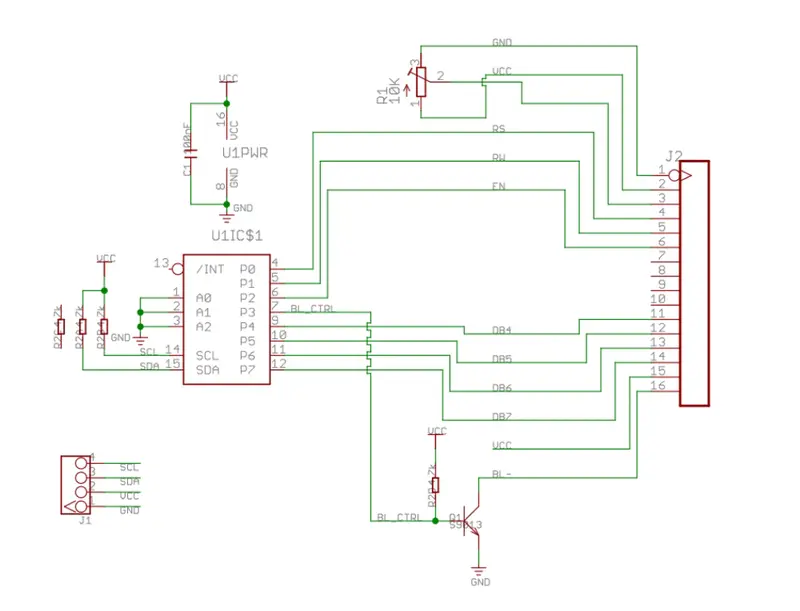
The IO expander & i2c-dev header will allow us to implement I2C without having to handle the logic of the protocol ourselves. That leaves us with the relatively simple task of writing code that relays instructions to the LCD’s microcontroller through the expander. Here is a map of the expander’s pins & their roles in the context of our microcontroller:

Figure 1: I2C LCD Adapter Schematic from HvandeVen/PCF8574-Display on GitHub.

*Note: This is a common but not GUARANTEED mapping. Pin maps may vary.

This schematic does some of the heavy lifting for us. In the image, it’s clearly outlined which physical pin on the expander corresponds to what role it plays on the microcontroller. From the image & microcontroller’s datasheet, you can come up with the following table:

Pin Role Description
P0 RS Register Select: 0 = Command, 1 = Data
P1 RW Read/Write: 0 = Write, 1 = Read
P2 EN Enable: (Stage/Confirm Changes)
P3 BL Backlight: 1 = ON, 0 = OFF
P4 D4 Data Bit 4
P5 D5 Data Bit 5
P6 D6 Data Bit 6
P7 D7 Data Bit 7

Before moving on I want to make two crucial clarifications:

1.) The PCF8574 only has 8 physical pins as shown by the table above. The first 4 of which are always allocated to what I call “byte control”, meaning they only refer to specific actions the LCD is going to perform. The remaining pins (D4-D7) are the pins we’re going to use to send information. Think of each byte we send like this:

DATA CTRL // Four data bits, Four control bits
0000 0000

2.) Because of this limitation, we’re going to be using the LCD in a 4-bit mode, meaning it will expect 4 data bits at a time.

However, that does not mean the data the LCD expects is 4-bit. The LCD’s internal system will automatically wait until it has received 2 sets of 4 data bits before considering the communication complete and printing a new letter to the screen. The idea is that the control bits are discarded and the 4 data bits from both instructions are combined into a single 8-bit byte which then represents a full letter.

How communication works & building instructions

Using the i2c-dev header, you send one byte (8 bits) at a time to the IO expander. Each byte is a set of instructions telling the expander exactly which pins should be ON (1) or OFF (0).

We use these 8 physical pins to send information. Think of it like this: Each pin state corresponds to a bit in that byte, we’re using a controller with 8 buttons that can each be toggled on or off. We send instructions to toggle those buttons (turning a pin ON or OFF) and then take a snapshot of the pin state and send that information as an instruction.

It’s not practical to manually synthesize binary for every instruction though. So to make this efficient, we treat the pins as their own bytes and abstract away the actual binary into variables. This way, we can use bitmasking to build the instructions we’ll be sending to the LCD.

In my code, I chose to do it like this above my main function:

// CONTROL PINS
const uint8_t PIN0_RS{ 0b00000001 };
const uint8_t PIN1_RW{ 0b00000010 }; // usually remains 0
const uint8_t PIN2_EN{ 0b00000100 }; 
const uint8_t PIN3_BL{ 0b00001000 }; // 1 for ON, 0 for OFF

// DATA PINS
const uint8_t PIN4_D4{ 0b00010000 };
const uint8_t PIN5_D5{ 0b00100000 };
const uint8_t PIN6_D6{ 0b01000000 };
const uint8_t PIN7_D7{ 0b10000000 };

// More declarations later...

I used binary literals here because when you’re mapping software bits to physical GPIO pins on an expander, binary is more readable than Hex. No one wants to do extra math when referencing pins. And abstracting away hex, an abstraction of binary, is redundant in and of itself.

Now that we’ve abstracted our pins away, we can use some bitwise “OR” operations ( | ) to build instructions from the ground up. Here’s an example of what that would look like now that we have our variables:

uint8_t instruction = PIN4_D4 | PIN0_RS | PIN3_BL;

There are two crucial pieces of logic that you need to understand before you can begin building instructions:

First, take a look at the type. All your instructions need to be 8-bit unsigned integer types. An empty instruction byte, for example, should look like this: 0000 0000.

The second thing you need to understand is bitmasking with the “OR” ( | ) operator. Since you’ve abstracted each pin to a specific name, you can layer them one on top of the other to create a single instruction. It looks something like this:

0001 0000 -> PIN4_D4
0000 0001 -> PIN0_RS
0000 1000 -> PIN3_BL
———– +
0001 1001 -> instruction

This is what the ( | ) operator does: it takes two or more bytes and returns a singular byte where a bit is set to 1 if it was 1 in any of the original bytes, effectively combining 3 instruction bytes into 1 instruction. The result 0001 1001 is actually the result of the snippet I showed you before:

uint8_t instruction = PIN4_D4 | PIN0_RS | PIN3_BL;

If you wanted to turn a pin off, you simply just wouldn’t include it in the next instruction. For example:

uint8_t instruction = PIN4_D4 | PIN0_RS; -> Backlight turns off.

THIS is what we’re going to be sending to the LCD. And now that you know the what, we can get into the how. I’m going to structure this into three main blocks:

  • Opening your I2C device
  • Setting the LCD to 4-bit mode
  • Sending 4-bit instruction bytes

Opening your I2C device

Now we can get into some code. If you want a full reference to what this header can do, you can check the official documentation here.

#include <iostream>
#include <fcntl.h>     // open files
#include <sys/ioctl.h> // input/output for files
#include <linux/i2c-dev.h>
#include <unistd.h>    // write(), usleep()

// ... FUNCTION & CONSTANTS DECLARATIONS HERE

int main() {
// --- LCD ---
    const std::string filepath{ "/dev/i2c-1" };
    const int i2c_adapter = open(filepath.c_str(), O_RDWR);

    if (i2c_adapter < 0){
        std::cout << "Failed to open bus." << std::endl;
        exit(1);
    }

// You can find the address hex value in your LCD's data sheet or if it's
// already connected via GPIO you can find it via the `i2cdetect -y 1`
// command in your terminal
    const uint8_t lcd_address = 0x27;
    if(ioctl(i2c_adapter, I2C_SLAVE, lcd_address) < 0) {
        std::cout << "Failed to reach I2C slave." << std::endl;
    }
}

In this block of code, I am opening a connection to the physical I2C hardware bus on my Pi via the device file "/dev/i2c-1". This returns a file descriptor I’ve named i2c_adapter. We then use an ioctl (Input/Output Control) call to tell the driver that all future communications on this bus should be directed to the slave device at address 0x27.

Essentially, every time we want to write information, we’re going to pass this i2c_adapter handle as a sort of guide. When we pass this handle to the write function, it’s like saying write information to the slave associated with this adapter. And so we can build our first function:

// ---- FUNCTIONS ----
void pulse(int i2c_adapter, uint8_t pin_state){
    // Stage our instructions by flipping the pin up:
    uint8_t up_instruction = PIN2_EN | pin_state;
    write(i2c_adapter, &up_instruction, 1);
    usleep(500);

    // Confirm instructions by flipping the pin down:
    uint8_t down_instruction = pin_state;
    write(i2c_adapter, &down_instruction, 1);
    usleep(500);
}

Before I talk about the code, I should clarify: PIN2_EN is a special pin whose role is something I like to compare to staging and committing changes.

Basically, for the IO expander to actually acknowledge the changes in pin state, the EN pin needs to be toggled up and down. Once to get the expander to look at the change in pin state (staging) and again to confirm the change in pin state (committing). This process is commonly referred to as a pulse, hence the name of the function.

Before we do that, we should make a couple more declarations above our main function.

// CONTROL PINS
const uint8_t PIN0_RS{ 0b00000001 };
const uint8_t PIN1_RW{ 0b00000010 }; // usually remains 0
const uint8_t PIN2_EN{ 0b00000100 }; 
const uint8_t PIN3_BL{ 0b00001000 }; // 1 for ON, 0 for OFF

// DATA PINS
const uint8_t PIN4_D4{ 0b00010000 };
const uint8_t PIN5_D5{ 0b00100000 };
const uint8_t PIN6_D6{ 0b01000000 };
const uint8_t PIN7_D7{ 0b10000000 };

// STARTUP COMMANDS PRESETS:
const uint8_t S_FUNCTION_SET{ 0b00101000 };
const uint8_t S_DISPLAY_SET{ 0b00001100 };
const uint8_t S_CHAR_ENTRY_SET{ 0b00000110 };

// OTHER:
const uint8_t CLEAR_DISPLAY{ 0b00000001 };

I’ve chosen to include these specific pin states because they’re common values that will be used during startup/other processes, and if they need to be changed, it’s more convenient to change them here than writing them inline. It helps for readability, too.

Setting the LCD to 4-bit mode

By default, the LCD will be set to run in an 8-bit state. Because we only have 4 data pins to work with, we have to change that during the initialization process. On page 46 of the MCU’s datasheet, you can find the following diagram:

Page 46 MCU Datasheet

This diagram shows the order in which we should use our pulse method to send instructions and properly wake the device. That little red arrow is the instruction which sets the LCD to 4-bit operation.

The formatting looks strange because the datasheet omits two of the irrelevant control bits, but you can safely ignore it and assume that they are zero. From there, all we have to do is simulate the wake-up instructions given by page 46 in code with our pulse method:

void wake_lcd(const int i2c_adapter){

    // Wake up the LCD and set it to receive 4-bit instructions
    const uint8_t wake_up = PIN4_D4 | PIN5_D5;
    const uint8_t set_4_bit = PIN5_D5;
    pulse(i2c_adapter, wake_up);
    usleep(5000);
    pulse(i2c_adapter, wake_up);
    usleep(5000);
    pulse(i2c_adapter, wake_up);
    usleep(5000);
    pulse(i2c_adapter, set_4_bit);
}

Now that you have that complete, your main function should look a little something like this:

#include <iostream>
#include <fcntl.h>     
#include <sys/ioctl.h>
#include <linux/i2c-dev.h>
#include <unistd.h>

int main() {
    const std::string filepath{ "/dev/i2c-1" };
    const int i2c_adapter = open(filepath.c_str(), O_RDWR);

    if (i2c_adapter < 0){
        std::cout << "Failed to open bus." << std::endl;
        exit(1);
    }

    const uint8_t lcd_address = 0x27;
    if(ioctl(i2c_adapter, I2C_SLAVE, lcd_address) < 0) {
        std::cout << "Failed to reach I2C slave." << std::endl;
    }

    wake_lcd(i2c_adapter);
}

And at that point, you’re almost done; the LCD is ready to be instructed via 4-bit operations. We just have to write one last crucial function before you can intuitively create more abstractions on your own. The last function we need to make is a 4-bit send_byte method. I chose to do this using bit-shifting.

Sending 4-bit instruction bytes

Recall what our instruction bytes should look like in 4-bit operation:

DATA CTRL // Four data bits, Four control bits
0000 0000

Like I said before, the first 4 bits of an instruction will ALWAYS be interpreted as control bytes; however, this causes problems because our letters will be in 8-bit format. Our solution is to send 2 instructions in one method. We’re going to break up a letter into two halves and send them separately. The LCD will discard the control bits and only take the data bits.

So here’s how we’re gonna do this:

HALF2 HALF1 // This is the binary representation of the letter H.
0100  1000

To implement this, we’ll pass one letter to the function at a time and call it an instruction. We’re going to apply bitmasking to the instruction. We’re going to bit-shift the first 4-bits of the letter to the left such that we lose the latter half of the letter and we have space for both the first half of the letter and the control bits:

DATA
HALF1 CTRL // This is half the representation of the letter H.
1000  0000 // The first half is shifted left to the data columns

DATA
HALF2 CTRL // This is the other half of the representation of the letter H.
0100  0000 // The second half is already in position so nothing changes.

We’ll then merge the basic instructions for writing a letter with the halves of the letters and send them as 2 sets of instructions. Here’s how I implemented that:

void send_byte(int i2c_adapter, uint8_t value, uint8_t rs_mode){
    uint8_t half_one = (value & 0b11110000) | PIN3_BL | rs_mode;
    pulse(i2c_adapter, half_one);

    uint8_t half_two = ((value << 4) & 0b11110000) | PIN3_BL | rs_mode;
    pulse(i2c_adapter, half_two);
}

So what’s happening? This function takes 2 new arguments: the value or letter we intend to send in its 8-bit format, and another value rs_mode.
That argument refers to the state of PIN0_RS. If you don’t remember its function, here it is:
| P0 | RS | Register Select: 0 = Command, 1 = Data |

In the cases where we’re sending normal letter information, we’ll be setting rs_mode = 1. Otherwise, if we’re working with the LCD’s other functions (not covered by this post), we’d use 0.

The & operator filters out the first 4 bits of the given value and replaces them with our preset LCD actions (keeping the backlight on and giving an RS value). The bit-shifting allows us to use the same value except for different parts of it, as described before.

We pulse both of those manipulated instructions and just like that, we’ve sent a value.

With the send_byte function finished we can expand our wake_lcd function to include the initialization steps for the LCD with the additional declarations we made before:

void wake_lcd(const int i2c_adapter){

    // Wake up the LCD and set it to receive 4-bit instructions
    const uint8_t wake_up = PIN4_D4 | PIN5_D5;
    const uint8_t set_4_bit = PIN5_D5;
    pulse(i2c_adapter, wake_up);
    usleep(15000);
    pulse(i2c_adapter, wake_up);
    usleep(5000);
    pulse(i2c_adapter, wake_up);
    usleep(5000);
    pulse(i2c_adapter, set_4_bit);

// Initialization:
// STARTUP ORDER: check page 23 for the values associated with each byte command shown here
    // 1.) FUNCTION SET
    // 2.) DISPLAY ON/OFF CONTROL
    // 3.) ENTRY MODE SET
    // 4.) CLEAR DISPLAY
    // --- READY FOR USE ---

    // Because we're sending an LCD command, rs_mode set to 0.
     send_byte(i2c_adapter, S_FUNCTION_SET, 0);
     send_byte(i2c_adapter, S_DISPLAY_SET, 0);
     send_byte(i2c_adapter, S_CHAR_ENTRY_SET, 0);
     send_byte(i2c_adapter, CLEAR_DISPLAY, 0);
}

Wrapping up

By the end of all this, if you’re following along, this is how your main function should look so far:

#include <iostream>
#include <fcntl.h>     // open files
#include <sys/ioctl.h> // input/output for files
#include <linux/i2c-dev.h>
#include <unistd.h>    // write(), usleep()
#include <string>      // Needed for std::string

// --- CONSTANTS (Global scope so they are accessible to all functions) ---

// CONTROL PINS
const uint8_t PIN0_RS{ 0b00000001 };
const uint8_t PIN1_RW{ 0b00000010 }; // usually remains 0
const uint8_t PIN2_EN{ 0b00000100 }; 
const uint8_t PIN3_BL{ 0b00001000 }; // 1 for ON, 0 for OFF

// DATA PINS
const uint8_t PIN4_D4{ 0b00010000 };
const uint8_t PIN5_D5{ 0b00100000 };
const uint8_t PIN6_D6{ 0b01000000 };
const uint8_t PIN7_D7{ 0b10000000 };

// STARTUP COMMANDS PRESETS:
const uint8_t S_FUNCTION_SET{ 0b00101000 };
const uint8_t S_DISPLAY_SET{ 0b00001100 };
const uint8_t S_CHAR_ENTRY_SET{ 0b00000110 };

// OTHER:
const uint8_t CLEAR_DISPLAY{ 0b00000001 };

// ---- FUNCTIONS ----

void pulse(int i2c_adapter, uint8_t pin_state){
    // Stage our instructions by flipping the pin up:
    uint8_t up_instruction = PIN2_EN | pin_state;
    write(i2c_adapter, &up_instruction, 1);
    usleep(500);

    // Confirm instructions by flipping the pin down:
    uint8_t down_instruction = pin_state;
    write(i2c_adapter, &down_instruction, 1);
    usleep(500);
}

void send_byte(int i2c_adapter, uint8_t value, uint8_t rs_mode){
    // Capture the high half (bits 7,6,5,4) and add control bits
    uint8_t half_one = (value & 0b11110000) | PIN3_BL | rs_mode;
    pulse(i2c_adapter, half_one);

    // Shift the low half (bits 3,2,1,0) into the high position (bits 7,6,5,4) 
    // This is required because physical pins D4-D7 are on the expander's high pins
    uint8_t half_two = ((value << 4) & 0b11110000) | PIN3_BL | rs_mode;
    pulse(i2c_adapter, half_two);

    // Clear display needs extra time (about 2ms) to finish internal processing
    if (value == CLEAR_DISPLAY) usleep(2000);
}

void wake_lcd(const int i2c_adapter){
    // Wake up the LCD and set it to receive 4-bit instructions
    // We send 0b0011 (3) in the data slots to reset the controller interface
    const uint8_t wake_up = PIN4_D4 | PIN5_D5; 
    const uint8_t set_4_bit = PIN5_D5;

    pulse(i2c_adapter, wake_up);
    usleep(15000); 
    pulse(i2c_adapter, wake_up);
    usleep(5000);
    pulse(i2c_adapter, wake_up);
    usleep(5000);
    pulse(i2c_adapter, set_4_bit);

    // Initialization:
    // STARTUP ORDER: check page 23 for the values associated with each byte command
    // 1.) FUNCTION SET
    // 2.) DISPLAY ON/OFF CONTROL
    // 3.) ENTRY MODE SET
    // 4.) CLEAR DISPLAY

    // Because we're sending an LCD command, rs_mode set to 0.
    send_byte(i2c_adapter, S_FUNCTION_SET, 0);
    send_byte(i2c_adapter, S_DISPLAY_SET, 0);
    send_byte(i2c_adapter, S_CHAR_ENTRY_SET, 0);
    send_byte(i2c_adapter, CLEAR_DISPLAY, 0);
}

int main() {
// --- LCD ---
    const std::string filepath{ "/dev/i2c-1" };
    const int i2c_adapter = open(filepath.c_str(), O_RDWR);

    if (i2c_adapter < 0){
        std::cout << "Failed to open bus." << std::endl;
        exit(1);
    }

// You can find the address hex value in your LCD's data sheet
    const uint8_t lcd_address = 0x27; 
    if(ioctl(i2c_adapter, I2C_SLAVE, lcd_address) < 0) {
        std::cout << "Failed to reach I2C slave." << std::endl;
        exit(1);
    }

    wake_lcd(i2c_adapter);

    // Usually we'll have rs_mode set to 1 since we're sending data
    // Sending the character 'H' (Binary: 0100 1000)
    send_byte(i2c_adapter, 'H', PIN0_RS);
    send_byte(i2c_adapter, 'I', PIN0_RS);
    send_byte(i2c_adapter, '!', PIN0_RS);

    close(i2c_adapter);
    return 0;
}

Once you’ve reached this point you’ve officially bridged the point between datasheet and code that actually communicates with the LCD.

If you go ahead and compile this (if all goes well) it should print the message “HI!”. If you want to take it a step further and build a function to send full strings at a time you can do that using the send_byte function under the hood. Here’s a simple way you could do that:


  // Note that this doesn't cover edgecases.
  // Just meant to be an example for sending full strings.
  void send_msg(int i2c_adapter, const std::string& message){

        for(char character : message){  
            send_byte(i2c_adapter, character, 1);
        }
}

Conclusion

That’s pretty much it. If you followed along this far, thank you for reading.

I want to make it apparent again that this is NOT a definitive guide on everything you can do with the LCD, and a likely didn’t use any of the best practices either. I’m just trying to share what I learned in the hope I this post can be a reference point to someone else starting out with the same device.

I’m self taught and still very new to embedded systems, so if you have any suggestions or spot any glaring errors I’m happy to acknowledge them!

I built an IAM-style firewall for AI agents after Claude read my .env

I’ve been using Claude Code to build stuff for a while now. It’s fast, it writes decent code, and it saves me hours. But a few days ago I had a moment that made me stop and think.

The moment that got me was when Claude grabbed my .env file on its own while trying to push a package. PyPI token sitting right there in the chat. No warning, no confirmation, nothing. If that was my Stripe key or a database URL it would have been the same story.

And that’s the problem. These AI agents have real access to your filesystem, your shell, your git history, your secrets. They don’t have bad intentions, they just don’t have boundaries. If you ask it to rm -rf something, it will. If you ask it to force push to main, it will. If it decides the fastest path to completing a task involves reading a credentials file, it’s going to read it.

So I built agsec.

What it is

agsec is a policy engine that sits between the AI agent and your system. Before the agent can do anything (run a command, read a file, make a web request), the action gets checked against your policies. If the policy says no, the action doesn’t happen. The agent doesn’t get a say.

Think of it like AWS IAM but for AI agents. You write declarative YAML policies that define what’s allowed, what’s blocked, and what needs a human to sign off on.

How it works

Agent wants to act  -->  agsec evaluates policy  -->  allow / block / review  -->  real world

The enforcement happens at the hook level. Most AI coding agents (Claude Code, Codex, Cursor, etc.) support pre-execution hooks that fire before any tool call. agsec plugs into these hooks. The agent can’t reason its way around it or write a script to bypass the check. The action simply doesn’t execute unless the policy allows it.

What a policy looks like

version: "1.0"
default: deny

statements:
  - sid: "AllowReadOps"
    effect: allow
    actions: ["file.read", "file.glob", "file.grep"]

  - sid: "BlockFileDelete"
    effect: deny
    actions: ["bash.execute"]
    conditions:
      params.command:
        op: "regex"
        value: "\brm\s"
    reason: "Agents should not delete files"

  - sid: "BlockEnvAccess"
    effect: deny
    actions: ["file.read"]
    conditions:
      params.file_path:
        op: "regex"
        value: "\.env$"
    reason: "Block access to environment files"

  - sid: "AllowBash"
    effect: allow
    actions: ["bash.execute"]

Deny always wins over allow. Same precedence as AWS IAM. If you’ve ever written an IAM policy, this will feel familiar.

You can match on action types (bash.execute, file.read, file.write, web.fetch), use regex and glob patterns on parameters, and set conditions with 12+ operators (equals, contains, regex, greater than, starts_with, etc.).

Getting started

pip install agsec
agsec init                     # creates default policies
agsec install claude-code      # activates the firewall

That’s it. Three commands and every tool call is now checked. rm blocked, .env access blocked, force push blocked, all out of the box.

The default policies cover the obvious stuff:

  • 01_base.yaml: default deny, allow read operations
  • 02_bash.yaml: block rm, DROP TABLE, secret access, data exfiltration
  • 03_files.yaml: block writes to .env, credentials.json, system dirs
  • 04_web.yaml: review external HTTP requests
  • 05_git.yaml: block force push, hard resets, protected branches

Observe mode

If you’re not ready to start blocking things, you can run in observe mode first:

agsec init --observe           # log only, no blocking
agsec audit --stats            # see what would have been blocked
agsec enforce                  # start blocking when ready

This lets you see what your agent is actually doing before you put any guardrails in place. The audit trail alone is worth it. You’ll be surprised how many things the agent does that you never explicitly asked for.

What platforms it supports

Right now it works with Claude Code, Codex, Cursor, Windsurf, Cline, and GitHub Copilot. Claude Code is fully tested, the others are functional but could use more community testing.

It also has Python SDK integrations for LangChain, OpenAI, and Anthropic clients if you’re building agent workflows in code.

Why not just use the agent’s built-in restrictions?

Most agents have some form of deny rules or permission settings. The problem is these are usually stored in project config files that the agent itself can modify. And they’re typically simple string matching without conditions or precedence logic.

agsec policies live outside the agent’s reach. The evaluation is done externally before the action runs. The agent can’t edit the policy, can’t skip the check, and can’t convince itself that an exception is warranted.

What’s next

I’m actively working on a web UI for policy management, better audit dashboards, and more platform integrations. The core policy engine is solid and I’m using it daily on my own workflow.

If you’re using AI agents for real work and you’ve ever had that “wait what did it just do” moment, give it a try. Or just run it in observe mode and look at the audit logs. That alone might change how you think about agent access.

GitHub: https://github.com/riyandhiman14/Agent-Sec
PyPI: https://pypi.org/project/agsec/

Would love feedback, especially edge cases and bypass attempts. That’s how this gets better.

Auto Estimate PostgreSQL Table and Index Size from EF Core Models

TL;DR: EfCore.StorageEstimator combines EF Core model metadata with explicit workload assumptions so you can estimate PostgreSQL heap, index, and graph growth before production data exists.

If you use EF Core with PostgreSQL, you can usually answer schema questions like these:

  • What tables will exist?
  • Which columns are nullable?
  • Which indexes are we creating?
  • Are we using owned types, many-to-many, complex properties, or inheritance?

What you usually cannot answer quickly is this: how much storage will this model consume once real tenants, projects, assets, or events start piling up?

That is the gap EfCore.StorageEstimator is trying to close. It takes the parts EF Core already knows from the compiled model and combines them with the parts only you know: expected row counts, field fill rates, average payload lengths, and navigation multiplicities.

The tool estimates PostgreSQL table size, index size, and how row counts grow across related entities. Here is the kind of report it produces from a real EF Core model:

Path Entity Rows Heap Bytes Index Bytes Total Bytes Table Properties Indexes
SampleProject SampleProject 120 81920 49152 131072 sample_projects 9 2
SampleProject.Assets SampleAsset 1440 11796480 204800 12001280 sample_assets 7 1
SampleProject.Tags SampleTag 480 40960 32768 73728 sample_tags 2 1

Total Estimated Rows: 2040
Total Estimated Bytes: 12206080

Why this exists

PostgreSQL storage is not intuitive to estimate by hand. Tables and indexes are stored in fixed-size pages, commonly 8 KB, with per-page headers, per-row headers, alignment rules, null bitmaps, and index entry overhead. Large values can also be pushed into TOAST storage. The official PostgreSQL docs explain the physical model, but that still leaves you doing a lot of manual math for real schemas.

EF Core already has the schema part. Its metadata model describes how your entity types map to the database. If you already use Npgsql, that model also knows PostgreSQL-specific store types like jsonb, bytea, arrays, and numeric precision.

Most teams still do capacity planning in a spreadsheet, a Notion page, or a rough architecture note. That usually drifts away from the actual model. Indexes get missed. Owned types get forgotten. Many-to-many join tables are hand-waved. Row counts are discussed separately from the schema that creates the storage bill.

EfCore.StorageEstimator puts those two sides together.

A minimal example

Start by annotating the parts of the model that EF Core cannot infer from the schema alone.

using EfCore.StorageEstimator.Planning;

[StorageEntity(12)]
public sealed class Project
{
  [StorageField(AverageLength = 64)]
  public string Name { get; set; } = string.Empty;

  [StorageNavigation(8)]
  public IReadOnlyList<TaskItem> Tasks { get; } = [];
}

[StorageEntity(1)]
public sealed class TaskItem
{
  [StorageField(0.5d, AverageLength = 120)]
  public string? Notes { get; set; }
}

Then run the estimate from a dedicated analysis process:

using EfCore.StorageEstimator;
using EfCore.StorageEstimator.Estimation;
using EfCore.StorageEstimator.Rendering;
using Microsoft.Extensions.DependencyInjection;

var services = new ServiceCollection()
  .AddStorageEstimator()
  .BuildServiceProvider();

var estimator = services.GetRequiredService<IStorageEstimator>();

var report = estimator.Estimate(new StorageEstimateRequest
{
  Model = dbContext.Model,
  Roots =
  [
    new StorageTraversalRoot(typeof(Project)),
    new StorageTraversalRoot(typeof(Project))
    {
      EntityCountOverride = 5_000,
      Label = "Large Tenant"
    }
  ]
});

var markdown = new MarkdownReportRenderer().Render(report);
Console.WriteLine(markdown);

A few details matter here:

  • Model = dbContext.Model tells the estimator to read the real EF Core model.
  • EntityCountOverride lets you compare scenarios without editing attributes.
  • Label gives the root a friendlier name in the output.

What the report looks like

The sample app in the repository renders a Markdown report like this:

Path Entity Rows Heap Bytes Index Bytes Total Bytes Table Properties Indexes
SampleProject SampleProject 120 81920 49152 131072 sample_projects 9 2
SampleProject.Assets SampleAsset 1440 11796480 204800 12001280 sample_assets 7 1
SampleProject.Tags SampleTag 480 40960 32768 73728 sample_tags 2 1

Total Estimated Rows: 2040
Total Estimated Heap Bytes: 11919360
Total Estimated Index Bytes: 286720
Total Estimated Bytes: 12206080

That report shape is useful because it answers several questions at once:

  • which path in the graph is producing the most rows
  • which table is consuming most of the heap
  • how much of the bill comes from indexes
  • how much of the estimate is grounded in real schema metadata

In this sample, the root entity is small, but the Assets branch dominates total storage once multiplicity is applied. That is the kind of result that is easy to miss in a spreadsheet and obvious in a traversal-based report.

What the packages do

The repository currently exposes three main surfaces:

Package Purpose
EfCore.StorageEstimator.Contracts Planning attributes and DTOs
EfCore.StorageEstimator Runtime estimator, EF Core schema reader, PostgreSQL sizing math, Markdown and JSON renderers
EfCore.StorageEstimator.Analyzers Roslyn diagnostics for invalid planning metadata

It is a library-first toolchain. You run it from a dedicated console app, internal tool, test harness, or analysis host. The estimator reads dbContext.Model, it does not need a live database connection to calculate an estimate.

Warnings and analyzers

The estimator emits warnings when traversal stops at an unannotated branch or when storage sizing falls back to default assumptions.

The analyzer package catches invalid metadata earlier in the build:

Rule Meaning
EFSA001 [StorageNavigation] targets a type without [StorageEntity]
EFSA002 [StorageEntity] row count must be greater than zero
EFSA003 [StorageField] fill rate must be between 0 and 1
EFSA004 [StorageField(AverageLength = ...)] must be zero or greater
EFSA005 [StorageNavigation] multiplicity must be greater than zero

That combination matters because the estimate stays explicit. Schema facts come from EF Core, workload assumptions live in code, and missing planning data shows up as warnings instead of disappearing into hand-wavy math.

Summary

If you already use EF Core and PostgreSQL, you already own half the information needed for capacity planning. EF Core knows the shape of the schema. Your team knows the expected scale. EfCore.StorageEstimator combines those two inputs into a report you can run early, review often, and tighten over time.

It gives you a concrete estimate before production data exists, using the model you already have.

Learn more:

The Permission Problem: Why Your AI Agent Is One Mistake Away From Disaster

The Permission Problem: Why Your AI Agent Is One Mistake Away From Disaster

Your AI agent has your email. It can read your Slack. It can access your calendar, your documents, your entire digital life.

What happens when you tell it to “clean up my inbox”?

For most teams, that question has a terrifying answer: nobody knows.

The agent permission model we need isn’t about restricting access. It’s about defining what “reasonable” means before an AI interprets it.

The AWS Wake-Up Call

Mike Chambers from AWS published a piece titled “How to Stop My Agent from Getting Me Fired.” It opens with a scenario that sounds like fiction but isn’t: an AI agent connected to email and Slack, capable of reading everything, replying to messages, and potentially sending that message you really, really shouldn’t send.

The post walks through building protection layers. But the deeper question stuck with me.

Why do we give agents root access to our entire digital identity in the first place?

The Three-Layer Permission Model

Most agent implementations follow a simple pattern: connect tool, give full access, hope for the best.

Here’s what a sane permission model actually looks like.

Layer 1: Tool Scope

Not every agent needs every tool. A coding agent doesn’t need email access. A calendar assistant doesn’t need database write permissions.

The mistake most teams make is treating MCP (Model Context Protocol) connections as features to add rather than attack surfaces to minimize.

Rule: Every tool connection is a boundary negotiation. Default to none. Add only what’s required.

Layer 2: Action Scope

Even within a connected tool, not every action should be available. An email agent can probably read drafts and send messages. Should it delete emails? Archive everything? Mark things as spam?

The AWS post describes implementing tool protection—a way to require confirmation before certain actions execute.

Rule: Define what the agent can do, not just what it can see.

Layer 3: Content Scope

This is the subtlest and most dangerous layer. An agent with calendar access can see every meeting. But should it?

Privacy boundaries matter for compliance, sure. But they also matter for trust. If I can’t tell my agent to ignore certain folders or labels, I’ll never fully trust it with anything.

Rule: Content filtering isn’t optional. It’s the difference between a helpful assistant and a surveillance system.

What Failure Looks Like

The AWS article describes a simple protection mechanism: prompt for confirmation before executing sensitive actions.

But let’s think about what happens without that layer.

Your agent reads an angry email from a client. It drafts a response. It sends it. You wake up to a crisis you didn’t know existed, created by an AI following instructions you never explicitly gave.

Or simpler: you ask your agent to “organize my files.” It deletes everything it thinks is “clutter.” Turns out, your definition of clutter and its definition are not the same.

The pattern is consistent. Agents interpret intent at scale, and scale magnifies mistakes.

A Practical Framework

If you’re building or deploying agents, here’s the checklist that actually matters.

1. Inventory Every Tool Connection

List every MCP connection, every API integration, every external system your agent can touch. For each one, ask: is this necessary?

2. Define Action Boundaries

For each tool, enumerate what actions are allowed. Reading, writing, deleting, sending. Default to read-only where possible.

3. Set Content Filters

Define what content the agent should ignore. Personal folders, confidential labels, draft folders. Build exclusion patterns.

4. Require Confirmation for Destructive Actions

Anything that can’t be undone—sending messages, deleting files, making payments—should require explicit approval.

5. Log Everything

When an agent acts on your behalf, you need to know what it did and why. Audit trails aren’t just for security; they’re for debugging behavior you didn’t expect.

The Bigger Picture

We’re in the early days of agent deployment. Most teams are still figuring out how to make agents useful. The next wave of problems will be about making them safe.

The companies that win won’t be the ones with the most powerful agents. They’ll be the ones with agents that can be trusted to not destroy everything they touch.

Permission models aren’t a feature. They’re the foundation.

What This Means for You

If you’re building agents: start with “what can go wrong?” and work backward from there.

If you’re deploying agents: inventory your tool connections today. You’ll probably find at least one you didn’t realize was there.

If you’re managing teams using agents: ask about the permission model before you ask about the capabilities.

The agent that can do everything is the agent that can break everything. The goal isn’t to restrict—it’s to define the boundaries that let agents operate safely within them.

That’s the permission problem. And solving it isn’t optional anymore.

Why Flutter AI Chat UIs Break (And How to Fix Them)

Why Flutter AI Chat UIs Break (And How to Fix Them)

Building AI chat interfaces in Flutter seems straightforward until you hit the real world. Your beautifully crafted chat bubbles start overlapping. Message timestamps disappear on certain devices. The typing indicator causes your entire list to rebuild. Sound familiar?

I’ve been there. After building dozens of AI chat UIs and seeing the same patterns break repeatedly, I want to share what actually works—and introduce you to a better approach.

The Hidden Complexity of Chat UIs

Chat interfaces look simple, but they’re deceptively complex:

  • Dynamic content sizing: Messages vary wildly in length
  • Real-time updates: New messages, typing indicators, status changes
  • Performance at scale: Rendering thousands of messages smoothly
  • Accessibility: Screen readers, keyboard navigation, semantic markup
  • Cross-platform consistency: iOS, Android, web, desktop

Most developers start with a basic ListView and add features incrementally. This works fine for prototypes, but falls apart under real usage.

Common Patterns That Break

The “Simple ListView” Trap

// This looks clean but will cause problems
ListView.builder(
  itemCount: messages.length,
  itemBuilder: (context, index) {
    return MessageBubble(message: messages[index]);
  },
)

Problems:

  • No message grouping logic
  • Poor scroll performance with mixed content
  • Rebuild hell when new messages arrive
  • No built-in accessibility features

The “Everything is a Container” Anti-Pattern

Container(
  padding: EdgeInsets.all(16),
  decoration: BoxDecoration(
    color: isUser ? Colors.blue : Colors.grey[200],
    borderRadius: BorderRadius.circular(12),
  ),
  child: Text(message.content),
)

Problems:

  • No semantic meaning for screen readers
  • Hard to maintain consistent spacing
  • Difficult to add features like timestamps, reactions, or status indicators
  • Styling becomes scattered across your codebase

The “State Management Nightmare”

class ChatState extends ChangeNotifier {
  List<Message> messages = [];
  bool isTyping = false;
  bool isLoading = false;
  String? error;

  void addMessage(Message message) {
    messages.add(message);
    notifyListeners(); // Rebuilds everything!
  }
}

Problems:

  • Entire chat rebuilds for every state change
  • No message-level optimizations
  • Scroll position jumps
  • Poor performance with large message histories

A Better Approach: Component-First Design

Instead of building chat UIs from scratch every time, what if you had a set of battle-tested components that handle these complexities?

This is exactly what we built with FlAI—a shadcn/ui-style component library specifically for Flutter AI chat interfaces.

Smart Message Grouping

ChatMessageList(
  messages: messages,
  groupBy: (message) => message.senderId,
  groupTimeThreshold: Duration(minutes: 5),
  builder: (context, group) {
    return MessageGroup(
      sender: group.sender,
      messages: group.messages,
      showAvatar: group.isFirstInSequence,
    );
  },
)

Messages automatically group by sender and time, just like iMessage or WhatsApp.

Performance-Optimized Updates

ChatMessage(
  id: message.id,
  content: message.content,
  timestamp: message.timestamp,
  status: message.status,
  // Only rebuilds when this specific message changes
)

Each message is its own widget with optimized updates. Adding a new message doesn’t rebuild the entire chat.

Accessibility Built-In

ChatBubble(
  message: "Hello, how can I help you?",
  semanticLabel: "Assistant message at 2:30 PM: Hello, how can I help you?",
  // Automatic focus management, semantic roles, etc.
)

Screen readers work perfectly out of the box.

The Mason Brick Advantage

Here’s where FlAI differs from traditional packages: instead of adding dependencies, you own the code.

# Add the component to your project
mason make flai_chat_message

# Customize it however you need
# It's your code now—no version conflicts or breaking changes

You get:

  • ✅ No dependency lock-in – The code lives in your project
  • ✅ Full customization – Modify anything you need
  • ✅ Type safety – Components adapt to your data models
  • ✅ Bundle size optimization – Only include what you use

Real-World Example

Let’s build a complete AI chat interface:

class AIChatScreen extends StatefulWidget {
  @override
  _AIChatScreenState createState() => _AIChatScreenState();
}

class _AIChatScreenState extends State<AIChatScreen> {
  final List<ChatMessage> messages = [];
  final TextEditingController controller = TextEditingController();
  bool isTyping = false;

  @override
  Widget build(BuildContext context) {
    return Scaffold(
      appBar: AppBar(title: Text('AI Assistant')),
      body: Column(
        children: [
          Expanded(
            child: ChatMessageList(
              messages: messages,
              reverse: true,
              padding: EdgeInsets.all(16),
              groupBy: ChatMessage.groupBySender,
              builder: (context, group) => MessageGroup(
                avatar: group.isAssistant 
                  ? AssetImage('assets/ai_avatar.png')
                  : null,
                messages: group.messages.map((msg) => 
                  ChatBubble(
                    message: msg.content,
                    isUser: msg.isUser,
                    timestamp: msg.timestamp,
                    status: msg.status,
                  ),
                ).toList(),
              ),
            ),
          ),
          if (isTyping)
            TypingIndicator(
              avatar: AssetImage('assets/ai_avatar.png'),
            ),
          ChatInput(
            controller: controller,
            onSend: _sendMessage,
            placeholder: 'Ask me anything...',
          ),
        ],
      ),
    );
  }

  void _sendMessage(String text) async {
    if (text.trim().isEmpty) return;

    // Add user message
    setState(() {
      messages.insert(0, ChatMessage(
        id: DateTime.now().millisecondsSinceEpoch.toString(),
        content: text,
        isUser: true,
        timestamp: DateTime.now(),
        status: MessageStatus.sent,
      ));
      isTyping = true;
    });

    controller.clear();

    // Simulate AI response
    await Future.delayed(Duration(seconds: 2));

    setState(() {
      isTyping = false;
      messages.insert(0, ChatMessage(
        id: DateTime.now().millisecondsSinceEpoch.toString(),
        content: "That's an interesting question! Let me help you with that...",
        isUser: false,
        timestamp: DateTime.now(),
        status: MessageStatus.delivered,
      ));
    });
  }
}

This gives you:

  • Smooth scrolling with hundreds of messages
  • Automatic message grouping
  • Typing indicators
  • Message status indicators
  • Perfect accessibility support
  • Responsive design across all screen sizes

Getting Started

Ready to build better chat UIs? Here’s how to get started:

  1. Install Mason CLI:
   dart pub global activate mason_cli
  1. Add FlAI bricks:
   mason add flai_chat_message
   mason add flai_chat_input
   mason add flai_typing_indicator
  1. Generate your first component:
   mason make flai_chat_message
  1. Customize to your heart’s content – it’s your code now!

The Future of Flutter Chat UIs

The days of rebuilding chat interfaces from scratch are over. With component-first design and tools like FlAI, you can focus on what makes your AI unique instead of wrestling with message bubble layouts.

Whether you’re building a customer support bot, an AI coding assistant, or the next big AI app, you deserve components that just work.

Want to see FlAI in action? Check out our GitHub repository for examples and documentation.

What chat UI challenges are you facing? Share in the comments—I’d love to help solve them!