I Compared 4 AI Meeting Assistants for a Month — Here’s What I’d Actually Pay For

I spend roughly 12 hours a week in meetings. That’s not a complaint — it’s just the reality of running a small team across two time zones. What I am complaining about is the 3-4 hours I used to spend afterward writing up notes, action items, and summaries.

So I tested four AI meeting assistants over the past month: Fireflies.ai, Otter.ai, Fathom, and Granola. Not a quick demo. Real meetings — standups, client calls, brainstorming sessions, one-on-ones. About 40 meetings total across the four tools.

Here’s what actually happened.

The quick comparison

Feature Fireflies Otter.ai Fathom Granola
Monthly price $10-39 $8.33-20 $0-32 $9-18
Free tier 800 min storage 300 min/mo Unlimited (limited features) 25 meetings/mo
Auto-join meetings Yes Yes Zoom only No (local app)
Transcription accuracy ~92% ~90% ~94% ~88%
CRM integration Salesforce, HubSpot Limited HubSpot None
Best for Teams + CRM workflows Live collaboration Individual note-takers Privacy-focused users

What I actually tested

I used each tool for roughly 10 meetings (mix of Zoom, Google Meet, and Teams where supported). I scored them on:

  • Transcription accuracy: Did it get the words right? Especially names, technical terms, and numbers.
  • Summary quality: Were the AI summaries useful or just fluffy rewrites?
  • Action item detection: Did it catch the things we actually agreed to do?
  • Friction: How annoying was it to set up, invite the bot, get recordings?

Fireflies.ai — The enterprise workhorse

Fireflies joins your meetings as a bot participant (“Fireflies.ai Notetaker”). You’ll see it pop up in your Zoom or Meet as a separate attendee.

What worked:

  • Best CRM integration I tested. It pushed meeting summaries and action items directly to our HubSpot deals. For sales teams, this alone might justify the cost.
  • Topic detection was surprisingly accurate. It auto-tagged segments as “pricing discussion,” “feature request,” “next steps.”
  • Search across all meetings is powerful. I could search “what did we say about the API timeline?” and get timestamped results.

What didn’t:

  • The bot joining meetings weirds people out. External clients asked “who is Fireflies?” more than once. One client explicitly asked me to remove it.
  • Transcription accuracy dropped noticeably with non-native English speakers. In a call with our Singapore team, it misidentified the speaker and garbled several sentences.
  • Free tier is essentially useless (800 minutes of storage, no AI summaries).

My take: If you have a sales team doing 20+ external calls a week, Fireflies + CRM integration is genuinely valuable. For individual use, it’s overkill.

Otter.ai — The live collaboration angle

Otter’s differentiator is real-time collaboration. You can see the transcript live during the meeting, highlight sections, add comments.

What worked:

  • Live transcript during meetings is useful for catching things you missed. I’d highlight key decisions in real-time, then export clean notes afterward.
  • Otter Chat lets you ask questions about your meetings (“What were the action items from Tuesday’s standup?”). It’s a neat concept.
  • Decent free tier (300 minutes/month covers ~10 meetings).

What didn’t:

  • Transcription accuracy was the second-lowest I tested. Background noise, crosstalk, and accents all caused problems.
  • The AI summaries were too generic. “The team discussed project timelines and assigned tasks” — thanks, I was there.
  • No standalone desktop app. Browser-based only, which means another tab to manage.

My take: Good for students or anyone who needs a free/cheap transcription tool. The live collaboration feature is genuinely unique. But the AI intelligence layer feels thin.

Fathom — The one I kept using

Fathom is Zoom-native (they recently added Google Meet and Teams support, but Zoom is where it shines). Unlike Fireflies and Otter, it doesn’t send a bot — it uses a local integration.

What worked:

  • Highest transcription accuracy in my tests. Technical terms, proper nouns, even numbers were consistently correct.
  • No visible bot in the meeting. Your call participants don’t see anything different. This matters enormously for client-facing meetings.
  • Action item detection was the best of the four. It correctly identified commitments like “I’ll send the updated proposal by Friday” even when phrased casually.
  • Free tier is generous (unlimited meetings, basic summaries).

What didn’t:

  • Zoom-first means Google Meet and Teams support feels like an afterthought.
  • No CRM integration on the free plan. Pro plan ($19/mo) adds HubSpot.
  • No search across meetings on the free tier.

My take: This is the one I’m still paying for. The invisible integration + high accuracy + good action items is exactly what I need. The Zoom dependency is the main limitation.

Granola — The privacy play

Granola runs entirely on your device. No cloud processing, no bot joining your meeting. It captures audio locally, processes it locally, and keeps everything on your machine.

What worked:

  • Zero privacy concerns. If you’re in healthcare, legal, or any field where meeting recordings are sensitive, Granola is the only option I’d trust.
  • The hybrid note-taking approach is clever — you take rough notes during the meeting, and Granola enhances them with the transcript context. Your notes + AI = better than either alone.
  • No bot visible to anyone. Not even a local integration notification.

What didn’t:

  • Transcription accuracy was the lowest. Local processing means smaller models, which means more errors.
  • No collaboration features. It’s a strictly personal tool.
  • Limited meeting platform support — primarily Zoom and Google Meet.

My take: If privacy is a hard requirement, Granola is your only real option. If it’s not, the accuracy tradeoff is hard to justify.

The one feature that actually matters

After a month of testing, the feature that separated “useful” from “nice demo” was invisible meeting integration. The tools that required a visible bot (Fireflies, Otter) consistently created friction in external meetings. People ask about the bot, get uncomfortable, or ask you to turn it off.

Fathom’s invisible integration meant I could use it in every meeting without a conversation about AI recording. That’s the difference between a tool you use sometimes and a tool you use always.

The honest pricing reality

AI tools are getting expensive. Between ChatGPT Plus ($20/mo), Cursor Pro ($20/mo), various APIs, and now meeting assistants ($10-40/mo), the “AI tax” on knowledge workers is real and growing. Before adding another subscription, ask whether the time savings justify the cost.

For me, Fathom Pro at $19/month saves roughly 3-4 hours of note-taking per week. At even a conservative $30/hour valuation, that’s $360-480 in recovered time per month. The math works.

For everyone else: start with the free tiers. Fathom Free and Otter Free cover most individual needs without spending anything.

FAQ

Which AI meeting assistant has the best transcription accuracy?
In my testing across 40+ meetings, Fathom had the highest accuracy at roughly 94%, followed by Fireflies at 92%, Otter at 90%, and Granola at 88%. Accuracy varied based on audio quality, accents, and number of speakers.

Do AI meeting assistants record my meetings?
It depends on the tool. Fireflies and Otter send a visible bot that records cloud-side. Fathom uses a local integration (no visible bot). Granola processes everything locally on your device — nothing leaves your machine.

Is there a free AI meeting assistant?
Yes. Fathom offers unlimited free meetings with basic AI summaries. Otter gives 300 free minutes per month. Granola offers 25 free meetings per month. Fireflies has a very limited free tier (800 minutes storage total).

Can AI meeting tools integrate with my CRM?
Fireflies has the strongest CRM integration (Salesforce, HubSpot, Zoho). Fathom supports HubSpot on the Pro plan. Otter and Granola have limited or no CRM integration.

Are AI meeting notes accurate enough to replace manual note-taking?
For internal meetings with good audio quality, yes — especially with Fathom or Fireflies. For noisy environments, heavy accents, or critical legal/medical meetings, I’d still recommend having a human note-taker as backup. The AI summaries are better thought of as “first drafts” that save 70-80% of the note-taking effort.

Tracking the Next Squid Game: Mining Naver Webtoon Data Before It Hits Netflix

The K-Content Pipeline You Didn’t Know Existed

Squid Game almost didn’t happen. It sat in development for a decade. The Glory was a webtoon before it was a Netflix sensation. Hellbound, Sweet Home, All of Us Are Dead — the pattern repeats: Korean digital content goes global, and Naver Webtoon is often where the signal appears first.

There are 70+ million monthly readers on Naver Webtoon. Every one of them votes with their subscriptions and stars. That data is public and structured.

So I built a scraper that reads it.

What the Naver Webtoon Scraper Extracts

Each title record includes:

{
  "titleId": 748235,
  "title": "유미의 세포들",
  "author": "이동건",
  "genre": ["일상", "로맨스"],
  "synopsis": "유미의 머릿속 세포들이...",
  "subscriberCount": 4312000,
  "starScore": 9.82,
  "publishDays": ["mon", "fri"],
  "totalEpisodes": 520,
  "isCompleted": true,
  "isPaid": false,
  "ageRating": "ALL",
  "tags": ["힐링", "직장인", "세포"],
  "thumbnailUrl": "https://...",
  "webtoonUrl": "https://comic.naver.com/webtoon/list?titleId=748235",
  "scrapedAt": "2026-03-28T09:00:00.000Z"
}

The actor supports four browsing modes:

  • By day: Mon–Sun serialized webtoons
  • By genre: Romance, action, thriller, fantasy…
  • By keyword search: Find by title or author
  • Episode list: Full episode metadata for a specific title

Running It

from apify_client import ApifyClient

client = ApifyClient("YOUR_APIFY_TOKEN")

# Get all Monday webtoons
run_input = {
    "mode": "day",
    "day": "mon",
    "maxItems": 100
}

run = client.actor("oxygenated_quagmire/naver-webtoon-scraper").call(
    run_input=run_input
)

for item in client.dataset(run["defaultDatasetId"]).iterate_items():
    print(f"{item['title']} — {item['subscriberCount']:,} subscribers, ★{item['starScore']}")

JavaScript/Node.js:

import { ApifyClient } from 'apify-client';

const client = new ApifyClient({ token: 'YOUR_APIFY_TOKEN' });

const run = await client.actor('oxygenated_quagmire/naver-webtoon-scraper').call({
    mode: 'genre',
    genre: 'thriller',
    maxItems: 50
});

const { items } = await client.dataset(run.defaultDatasetId).listItems();
console.log(items.map(i => `${i.title}: ${i.subscriberCount} subs`));

Real Use Case: Finding the Next Adaptation Candidate

Here’s a simple scoring formula for IP scouting:

import pandas as pd

# Load your scraped data
df = pd.DataFrame(items)

# Adaptation potential score
# High subscribers + high rating + drama-friendly genre + not yet adapted
drama_genres = ['로맨스', '드라마', '스릴러', '액션']

df['adaptation_score'] = (
    (df['subscriberCount'] / df['subscriberCount'].max()) * 0.5 +
    (df['starScore'] / 10) * 0.3 +
    df['genre'].apply(lambda g: 0.2 if any(dg in g for dg in drama_genres) else 0)
)

top_candidates = df.nlargest(10, 'adaptation_score')[
    ['title', 'author', 'subscriberCount', 'starScore', 'isCompleted', 'adaptation_score']
]
print(top_candidates)

What the Data Actually Shows

Running this scoring model on a representative sample (~3,200 active titles, March 2026):

  • Average subscribers: ~284,000 per active title
  • Median rating: 9.41 ⭐
  • Genre split: Romance 34%, Fantasy 21%, Action 15%, Drama 12%, Thriller 8%
  • Completion rate: 42% completed, 58% ongoing
  • Peak day: Wednesday has ~23% more active titles than Sunday

The subscriber cliff is steep: top 10% of titles hold roughly 78% of total subscribers. If you’re looking for undiscovered IP, the sweet spot is 500K–2M subscribers with 9.5+ rating — large enough to prove demand, small enough to be overlooked by major studios.

Pricing

The actor uses Pay Per Dataset Item pricing:

  • First 100 items free per run
  • /bin/zsh.60 per 1,000 additional items

For weekly monitoring of ~500 titles, that’s roughly /bin/zsh.24/week — less than a coffee per month.

Links

5'inci Uluslararası Stratejik İletişim Zirvesi Başarıyla Tamamlandı

Cumhurbaşkanlığı İletişim Başkanı Burhanettin Duran, 5’inci Uluslararası Stratejik İletişim Zirvesi’nin başarılı bir şekilde tamamlandığını duyurdu. Zirve, ‘Uluslararası Sistemde Kopuş: Krizler, Anlatılar ve Düzen Arayışı’ temasıyla gerçekleştirildi ve uluslararası güvenlik, stratejik iletişim gibi birçok önemli konuyu ele aldı. Duran, zirvenin bilgi ve deneyim alışverişi için eşsiz bir platform sağladığını vurguladı.

Using RSS to Understand Memory Pressure in CI Builds

Post setup actions

Once in a while, you may have wondered why builds running on CI agents can still hit OOM errors, even on machines with large amounts of memory. For example, how is it possible to hit an OOM on a 32 GB machine even after setting a 16 GB heap?

The first and most immediate answer is that the value configured via jvmargs in gradle.properties applies only to the heap of the Gradle process. From the operating system’s point of view, a JVM process is composed of more than just the heap. Several additional components contribute to the total memory footprint, and these are often overlooked when sizing CI agents or tuning memory limits:

  • Metaspace
  • Code cache
  • Thread stacks
  • Direct buffers
  • GC native memory
  • Native / OS memory

All of these are grouped under the RSS (Resident Set Size) of the Java process on Unix-like systems.

Another important reason is that the Gradle process is not the only JVM involved in a build. We also have the Kotlin daemon, test JVMs, and in Android builds, additional isolated processes such as Lint or R8. Each of these processes has its own heap and its own RSS footprint. Together, all of them contribute to the total memory pressure on the machine.

In OOM scenarios, there is an additional problem: the host machine may kill the Gradle process before the build finishes. When that happens, we lose valuable diagnostic data. In CI environments, and especially in GitHub Actions, this is even worse because we usually cannot attach post-build steps to collect more information.
Post setup actions

Since OOM scenarios are exactly the situations where visibility matters most, I ended up building a GitHub Action for that: Process Watcher.

In this article, we track memory behavior over time across JVM processes, combining RSS, heap usage, and GC activity. The goal is to move beyond static numbers and understand how memory pressure evolves during the build.

Capturing the RSS of a process

To understand real memory usage during build execution, we need to analyze RSS, not just heap size. On Unix-like systems, RSS reflects the physical memory currently held by the process, which makes it a better signal for understanding memory pressure.

To check the RSS of a process:

ps -o rss= -p "$PID"

This command outputs values in kilobytes, for example:

654321

That means ~639 MB of physical RAM.

At first glance, we could collect this data at the end of the build. But this has two problems:

  • Not all processes live until the end
  • The build can be killed or time out

If the build is killed, we lose everything, no data, no diagnostics.

Because of that, I decided to take a different approach: run a separate monitoring process during the build.

Initially, the approach was simple: capture RSS and heap usage during the build and archive the data at the end of the execution. A typical output looked like this:

Elapsed_Time | PID | Name | Heap_Used_MB | Heap_Capacity_MB | RSS_MB
00:00:05 | 149 | GradleDaemon | 29.7MB | 86.0MB | 241.0MB
00:00:10 | 149 | GradleDaemon | 191.7MB | 338.0MB | 560.1MB
00:00:16 | 149 | GradleDaemon | 113.1MB | 198.0MB | 428.4MB

With this, we can visualize the data and calculate the total RSS across all Gradle processes:

Visualizing RSS monitoring
In addition to RSS and heap usage, we can also track cumulative GC time and better understand how memory behaves during the build.

That worked for successful builds, but it had the same limitation: if the main Gradle process was killed, we lost all the data.

To address that, I added a remote mode that publishes the data to a Firebase database, allowing live monitoring even when the build fails or is interrupted.

With that in place, we can now look at some practical scenarios where this kind of visibility helps explain memory behavior in Android builds.

The case of misaligned Kotlin versions

We start with a known suspect. As mentioned in previous articles, this scenario can happen when the Kotlin version embedded in the Gradle distribution is misaligned with the Kotlin version used by the project.

If we run a typical nowinandroid build (:app:assembleProdDebug) and attach our GitHub Actions instrumentation tool, we observe the following memory profile:

Nowinandroid

The image clearly shows two Kotlin processes. The first one, PID 5133, is spawned during the compilation of the included builds and remains unused during the execution phase.

Although its heap usage at the end of the build is only 429 MiB, its RSS footprint accounts for 8.4% of the total RSS memory of the build. In environments closer to the memory limit, for example on a free GitHub Actions runner, this alone can represent around 4% of the available memory.

The key point is that the RSS of this first Kotlin process is never reclaimed, so that memory remains allocated for the entire build. In practice, this reduces the memory available for the rest of the build without providing any benefit during execution.

Timeouts

In the second scenario, we analyze another common case. We have heard several times from users that some builds hit the timeout defined in the job configuration.

These timeouts act as a safeguard against builds running indefinitely, but they also indicate that something is not behaving as expected. When the timeout kills the agent, we lose the Gradle process and any information that would normally be reported at the end of the build.

In some cases, the issue is related to thread locks. In others, it is an unexpected memory situation that can be understood by analyzing memory metrics across the different JVM processes.

For instance, let’s analyze this build:

Timeout build

The total RSS is not hitting the maximum, and the agent is not killed due to memory pressure. Instead, the build is terminated by a timeout.

At first glance, this does not look like a typical OOM scenario. But if we look at how memory behaves over time, a different pattern appears.

One interesting detail is that we observe an almost flat pattern in the later stages of both the Kotlin and Gradle processes. In this case, it is useful to review the GC graph:

GC growth in timeout scenario

The GC activity of the Gradle process shows a clear linear growth over time, which indicates that the heap is under pressure and memory is not being reclaimed efficiently. This is the kind of pattern that may not immediately fail the build, but still keeps it alive in a degraded state until the timeout is reached.

The key point is that if we detect this pattern early, we can stop the build sooner and avoid wasting time and resources. In this example, that could save up to 30% of the build time.

To get a more realistic view, this scenario shows that if we detect this behavior early, we could cancel the build and avoid the overhead of letting it continue:

Timeout gif

G1 vs Parallel GC

Another common question is which GC is more suitable. Performance is important, but we should also consider the RSS footprint when comparing different GC strategies.

In many cases, we focus only on build time, but memory behavior can vary significantly between GC implementations. Some may be faster, while others allow the OS to reclaim memory more efficiently.

Let’s look at a G1 vs Parallel comparison of the build:

Compare G1 Vs Parallel

From these measurements, we can observe that, regardless of the performance outcome, the OS is able to reclaim memory more efficiently with G1. That tradeoff can matter in CI environments where staying below the memory threshold is more important than small differences in execution time.

For completeness, here is the cumulative view, left G1, right Parallel:

G1 vs Parallel cumulative GC comparison

The OOM puzzle

Finally, let’s look at perhaps the most valuable use case for this kind of monitoring: an OOM-killed build.
It all starts with this discouraging message in GitHub Actions, where we don’t get any additional feedback and the post steps haven’t been executed:

OOM failure in GitHub Actions

We get no useful feedback, and as mentioned before, we also do not have the chance to run post steps to archive logs, measurements, or any other diagnostic data.

In this case, if we enable the remote mode of the Build Process Watcher, we can at least preserve the latest snapshot of the Gradle processes before the agent kills the container or the build. What we get is this:

RSS before OOM kill

We know that GitHub Actions free runners have a 16 GB memory limit, and in the image we can already see that, before the failure, the Gradle process was increasing its RSS in a clear high-memory-pressure scenario.

In this case, the Gradle heap was configured to 10 GB. One common misconception is to assume that this is enough, or to leave the Kotlin daemon heap unspecified, assuming the defaults will be good enough. But the important detail is that the Kotlin process still contributes its own memory footprint. Looking at the data, we can see that its peak RSS reached 6962.0 MB, adding more pressure on top of the Gradle process.

So it is easy to see how the build gets dangerously close to the machine limit. But the point is not only to spot the problem, it is to make the build work.

What I did here was try different memory splits between the Gradle and Kotlin processes and compare the runs with Process Watcher. Looking at RSS growth, heap usage, GC behavior, and whether the build completed or not gave me a better direction, but it still took some experimentation to find a stable configuration.

In this case, the fix was not just increasing memory. After trying different combinations, the only stable one was 7 GB for Gradle and 3 GB for the Kotlin process. Other combinations were still ending in OOM or timeout:

Optimized build

So for me, the interesting part here is not only the final numbers, but how we got there. By observing the RSS pressure and comparing the runs, we were able to move from an unstable memory profile to a configuration that was sustainable for the runner limit.

Final Words

In my case, for GitHub Actions, I published Process Watcher, but the general idea is simple and can be implemented in different ways. The important part is not the specific tool, but having a way to observe RSS, heap usage, and GC behavior while the build is running. That visibility makes it much easier to understand memory pressure and iterate toward more stable configurations.

One note: to use the visualization tools in Process Watcher, you do not need to enable the remote option. The site provides a replay view and a compare view that can be used with the artifacts generated at the end of the build, without publishing data to Firebase. You can also just download the generated HTML files and open them locally.

Happy Building!

If cache is faster than database, why not store everything in cache?

We should all have had this question,

why not just use cache everywhere if cache is faster than a database?

I want to quantify and show the difference to you today.

You are thinking, ok this read is going to be a waste of time, I am just gonna say Cache is volatile and move on to doomscroll, or vibe code or watch the latest Ai slop VC drama. Lets fix that, you have a non volatile cache and you dont have to worry about the money to make it non volatile. Can you still use Redis as your DB ?

Volatility means the cache lives on RAM, when you switch it off, all the data is gone.
Whereas DB lives on the disk, and it will survive restart.

We can make it volatile by doing snapshot of the data to a disk, or replicating data across servers.

So now that you have decided to think, can you actually make Redis your DB, given it is not volatile anymore?

Problem 1: Lets talk about the easy reasoning here – COST

Lets assume you own a bank, and it has the following things:

  • 10 million total users
  • 1 million Daily active users
  • each active user does 20 reads/ day and 2 writes/ day

DynamoDBs Pricing:
$0.125 per million reads
$0.625 per million writes
$0.25 per GB month for storage

With 1 million active users you are doing:

  • 20 million reads per day
  • 2 million writes per day

So that will cost you:

  • $1.25 per day for reads
  • $1.25 per day for writes
  • 50 GB storage about $0.42 per day

Total:

  • $1065 per year

Now lets compare to what that will cost us if we use Cache which is REDIS
Redis does not charge us per read the way DynamoDB does
Instead we pay for the cluster capacity to exist all the time.

So for our situation we need 2 shards, 1 replica per shard and 4 total nodes
That will Cost:
$1.729 per hour
$41.50 per day
$15,147 per year

So we are paying ~15x more for REDIS.
But you know what, lets say money aint a problem, can you still use Redis as your DB ?

Now comes – Eviction pressure

What does it mean ?
When Redis runs out of memory, it must remove some data to make space
Redis commonly uses LRU – Least Recently Used
Which means : delete the data that hasnt been used recently

Example : User A logs in every day, then it will stay in Redis
User B hasnt logged in for a while, it gets removed from memory

So now if Redis was your source of truth, user’s account details or balance could vanish.

Ok then lets disable eviction and scale infinitely to have all the RAM.
Well yea then you can do it, by spending ton of money just because you went in a rabbit hole of experimenting with the wrong tool for the job.

But you know what, rabbit holes like this are totally worth the millions of dollars.

  • Hari.

Why Most Developers Reach for a Vector Database Too Soon.

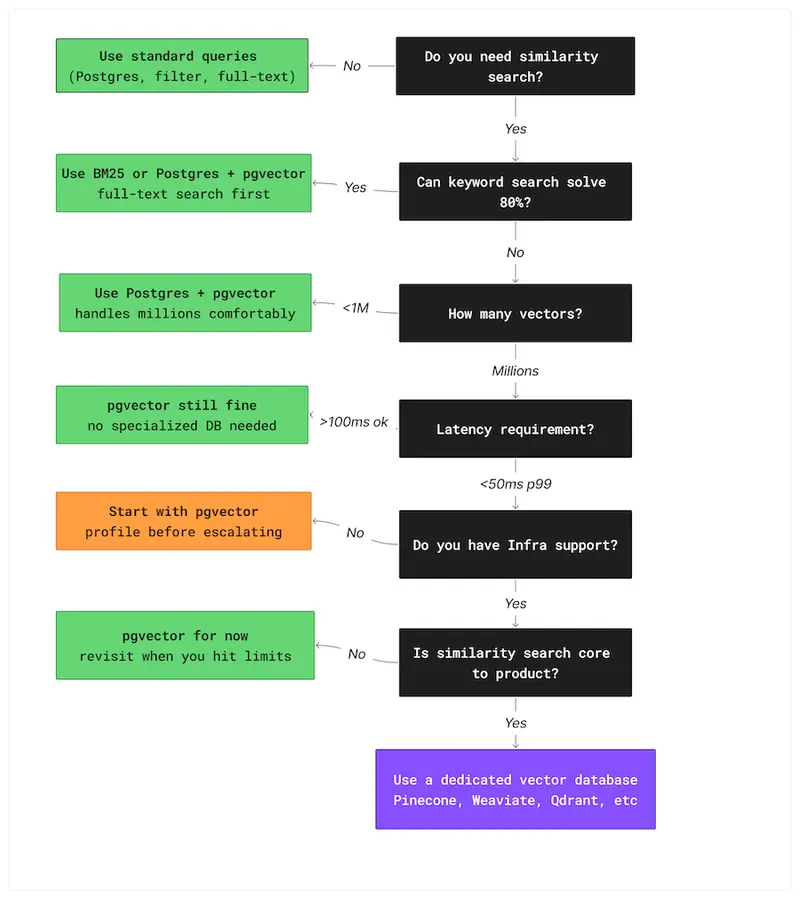
Decision flowchart for choosing between keyword search, pgvector, and a vector database based on scale and requirements

Most semantic search tutorials start the same way: add a vector database.

The feature request sounded simple: type question, get the right internal doc back.

A few hundred documents. Support notes and wiki pages.

Nothing exotic. The kind of thing that should take a week, maybe less.

They did what most of us would do today.

They watched a couple of LangChain tutorials, skimmed the OpenAI docs, and followed the same architecture every example seemed to use.

Documents were chunked, embeddings generated, and everything went into a hosted vector database.

An ingestion pipeline kept the index in sync.

Queries hit the vector store first, then the app database.

It looked like the modern, correct way to build search.

Three weeks later, the feature worked — technically.

But updating a single document meant re-running the embedding pipeline.

The vector index and the app database could drift out of sync silently.

API keys just to run the thing locally.

Every deployment waited on background indexing to finish before results were reliable.

The system was fragile in ways that would keep compounding.

A Postgres full-text search would have solved the original problem in an afternoon.

The vector database wasn’t wrong. It was just answering a question nobody had asked yet.

This article is about how to ask the right question before you start building — and what the answer looks like in practice.

What a Vector Database Is Actually For

Most developers working with embeddings already know what a vector database does.

Fewer stop to ask whether that specific capability is what their problem actually requires.

Before arguing when not to reach for one, it’s worth being precise about what the tool is actually built for.

When you generate embeddings for text, images, or other data, you end up with arrays of floating-point numbers.

Finding the most similar item means comparing one vector against many others.

For small datasets, you can do this with a simple scan.

As the number of vectors grows, brute-force comparison becomes too slow, and you need specialized indexes designed for approximate nearest neighbor search.

That’s the problem vector databases are optimized to solve.

Under the hood, most of them rely on approximate nearest neighbour algorithms.

HNSW for graph-based search.

IVF for cluster-based partitioning.

They trade a small amount of recall accuracy for dramatically faster queries.

For semantic search, that trade-off is almost always acceptable — you don’t need the single most similar document, you need several good ones, fast.

pgvector exposes this same choice directly in SQL — the query is identical with or without the index:

-- Without IVFFlat - PostgreSQL scans every row

SELECT content,
       embedding <=> query_vector AS distance
FROM documents
ORDER BY distance
LIMIT 5;
-- with IVFFlat — PostgreSQL searches only relevant clusters
-- same query, dramatically different performance at scale
SELECT content,
       embedding <=> query_vector AS distance
FROM documents
ORDER BY distance
LIMIT 5;

The query looks identical — the difference is entirely in the index. This is the performance decision pgvector hands back to you.

Everything else people associate with vector databases — metadata filtering, hybrid search, multi-tenant indexes, reranking — sits on top of that core capability.

Here’s where the confusion starts.

The term “vector database” bundles several distinct concerns — storing embeddings, searching them, filtering results, and running the infrastructure — into what looks like a single decision.

The tooling reinforces it.

When every tutorial wires all four together in the same five lines of code, it stops looking like a choice and starts looking like a requirement.

As soon as a project involves embeddings, it can seem like a dedicated vector database is the only correct design.

It isn’t.

Embeddings are just data.

They can live in Postgres, SQLite, or even memory.

A vector database becomes the right tool when approximate nearest neighbor search is the bottleneck — not when embeddings first appear in the architecture.

Until that point, it’s often extra complexity you don’t need.

Why Developers Reach for It Too Early

1. Tutorial monoculture

Most examples of semantic search, RAG, or LLM-powered features follow the same pattern: chunk documents, generate embeddings, store them in a vector database, query with similarity search.

LangChain demos do it. LlamaIndex demos do it. OpenAI examples do it.

2. The scalability trap

Once embeddings enter the design, it’s easy to assume the system will eventually need fast similarity search at scale, so the vector database gets added early to avoid rewriting things later.

This is the same instinct that leads teams to introduce Kafka for a service that sends ten emails a day. The future problem might be real.

But solving it before it exists adds complexity immediately, with no corresponding benefit.

3. Tooling and marketing

Modern vector databases have excellent documentation, polished SDKs, and tutorials that get you from zero to similarity search in under an hour.

That ease of setup is genuinely impressive — and it’s also exactly what makes the tool feel mandatory before you’ve decided whether you need it.

Great onboarding has a way of skipping the step where you ask whether you should be onboarding at all.

Developers don’t reach for vector databases too early because they don’t understand the technology.

They do it because the ecosystem makes it look like the obvious first step.

At some point, the vector database became the new Redis of the AI stack – added by default, before anyone confirmed it was actually needed.

The result isn’t broken systems. It’s systems that are harder to run, slower to change, and more expensive to maintain than the problem ever required. The complexity arrives on day one. The scale that would justify it may never come.

The Simpler Stack You’re Ignoring

Two tools get overlooked almost every time: pgvector, which runs inside the Postgres instance you already have, and plain keyword search, which still solves more problems than people want to admit.

1. pgvector — When Your Database Is Already Postgres

If your application already runs on PostgreSQL — and most do — adding pgvector gives you similarity search without introducing a new service.

No new deployment. No additional failure mode.

pgvector adds a VECTOR column type and similarity operators directly to PostgreSQL.

Embeddings live alongside the rest of your data, queryable with SQL, inside the same transactional system your application already depends on.

No new monitoring, no separate backups, no second system to explain to the next engineer on the team.

The setup starts with enabling the extension and creating the table:

CREATE EXTENSION IF NOT EXISTS vector;

CREATE TABLE documents (
    id                   BIGSERIAL PRIMARY KEY,
    title                TEXT NOT NULL,
    content              TEXT NOT NULL,
    metadata             JSONB,
    embedding            VECTOR(1536),
    status               TEXT NOT NULL DEFAULT 'READY',
    embedding_error      TEXT,
    embedding_updated_at TIMESTAMPTZ,
    created_at           TIMESTAMPTZ NOT NULL DEFAULT now(),
    updated_at           TIMESTAMPTZ NOT NULL DEFAULT now()
);

The status column is worth noting.

Because embedding is an external API call that can fail, documents move through a lifecycle — PENDING when first saved, READY once the embedding succeeds, FAILED if the API returns an error.

This means a failed embedding never silently corrupts search results. The status is always visible in the database.

For similarity search to scale beyond a few thousand documents, pgvector needs an index. The IVFFlat index is what makes this production-ready:

CREATE INDEX documents_embedding_ivfflat_idx 
    ON documents USING ivfflat (embedding vector_cosine_ops) 
    WITH (lists = 100);

This is a single SQL query that combines vector similarity search with lifecycle filtering and metadata filtering simultaneously.

A dedicated vector database handles each of those concerns separately — often requiring application-level joins or multiple round trips to combine them.

Here, everything runs inside one query, in one database, with full ACID guarantees.

The <=> operator is pgvector’s cosine distance operator. It returns a value between 0 and 2 — lower means more similar. Results are ordered ascending so the closest matches come first.

For most products, this goes further than people expect. pgvector handles millions of vectors without meaningful performance degradation for typical query patterns.

If you’re building an internal tool, a document search API, or a RAG feature for a product that isn’t at serious scale yet, you’re almost certainly in that range.

There are real limits. pgvector won’t give you distributed indexing, automatic sharding, or sub-10ms latency under very high query volume.

If you’re storing tens of millions of vectors and serving high-QPS queries, a dedicated vector database will outperform it.

But by the time you reach that point, you’ll know exactly why you’re making the switch — because you’ll have measured the problem, not imagined it.

The full implementation — including all three Flyway migrations, the IVFFlat index configuration, lifecycle tracking, and metadata filtering — is available on GitHub.

You don’t need a new database to add semantic search. You need pgvector and a migration file.

2. BM25 and Keyword Search — The Tool Nobody Wants to Admit Still Works

Before you generate a single embedding, it’s worth asking whether your users actually need semantic search — or whether they just need search that works.

A lot of features labeled “AI search” are really just keyword lookup with better marketing.

If your users know the words they’re looking for, traditional full-text search is often faster, simpler, and more predictable than embeddings.

BM25-based search — the ranking algorithm used by most full-text engines — is extremely good at matching short, precise queries.

-- standard PostgreSQL full-text search — no new infrastructure needed
SELECT title, content,
       ts_rank(to_tsvector('english', content),
               plainto_tsquery('english', 'reset password')) AS rank
FROM documents
WHERE to_tsvector('english', content)
      @@ plainto_tsquery('english', 'reset password')
ORDER BY rank DESC
LIMIT 5;

This runs inside the same PostgreSQL instance as your pgvector queries — no new service, no new failure mode.

Searches like “reset password”, “invoice template”, or a specific error message often perform better with keyword scoring than with vector similarity.

In domains with strict terminology — legal references, product codes, medical terms — exact matches matter more than semantic closeness.

Embeddings shine when meaning matters more than wording. If users are asking “show me something like this” or “what document explains this idea”, vector search makes sense.

If they’re typing the name of the thing they want, it usually doesn’t.

You also don’t have to choose one or the other. Postgres supports full-text search, pgvector supports similarity search, and combining the two often gives better results than either alone.

A hybrid query looks like this — no new infrastructure, no new service:

SELECT id, title, content, 
        embedding <=> ?::vector AS cosine_distance, 
        ts_rank( 
            to_tsvector('english', content), 
            plainto_tsquery('english', ?) 
        ) AS text_rank 
FROM documents 
WHERE status = 'READY' 
    AND embedding IS NOT NULL 
ORDER BY 
    (embedding <=> ?::vector) * 0.7 
    - ts_rank( 
        to_tsvector('english', content), 
        plainto_tsquery('english', ?) 
) * 0.3 
ASC 
LIMIT 10;

A simple hybrid query can rank by keyword match first and semantic distance second, without adding any new infrastructure.

Before adding a vector database, answer a simpler question first: can keyword search solve 80% of this?

If the answer is yes, start there. You can always add embeddings later. You can’t easily remove infrastructure you didn’t need.

When You Actually Need a Vector Database

Vector databases aren’t the villain here. They’re the right tool when similarity search becomes a real, measured performance problem — not a projected one. The question is how to recognize that moment before you’ve already over-built.

These are the thresholds where teams consistently start feeling the limits of a general-purpose setup:

Signal Typical threshold
Vector count Millions of embeddings
Query latency Sub-50 ms p99
Filtering complexity Multi-tenant filters
Query volume High QPS
Infrastructure maturity Dedicated team
Use case Recommendation, RAG, personalization

The numbers aren’t rules. They’re patterns. The real signal is when the simple approach stops being simple.

If your search feature is core to the product and needs predictable latency under load, the tradeoffs of a dedicated vector database start to make sense.

You know you need a vector database when brute-force similarity becomes your actual bottleneck — not your imagined one.

A Simple Decision Flowchart

Most projects don’t need a new datastore. They need a clear decision process.

If you’re starting a new feature and asking whether a vector database belongs in the design, the flowchart below maps the decision from ‘I need search‘ to the right tool for your current scale.

A simple way to think about the decision:

Decision flowchart for choosing between keyword search, pgvector, and a vector database based on scale and requirements

The flowchart won’t cover every edge case — no decision tool does.

But if your design jumps straight to a managed vector database before working through these questions, you’re probably solving a scaling problem you don’t have yet.

The cost of that mistake shows up slowly, in complexity that compounds before the scale ever arrives.

Architecture Should Follow the Problem

The best architecture isn’t the most modern one.

It’s the one that matches the problem you actually have, at the scale you’re actually at — maintained by the team you actually have, not the one you might hire later.

Vector databases are powerful tools, but they come with real operational cost — another service to run, another datastore to keep in sync, another place where performance and correctness can drift apart.

That cost only makes sense when the problem demands it. Before that point, simpler designs are usually easier to build, easier to reason about, and easier to change when requirements shift.

Starting with pgvector or full-text search doesn’t lock you in. If you outgrow it, the path to a dedicated vector database is well understood. The reverse is harder.

Removing infrastructure you didn’t need is almost always more work than adding it later.

The full pgvector implementation, including schemas, index configuration, and the search query shown above, is available on GitHub .

Most systems don’t fail because they chose the wrong tool. They fail because they chose the right tool too early.

The real skill isn’t knowing how to use a vector database. It’s knowing when not to.

How to compare translation APIs without rewriting your workflow

How to compare translation APIs without rewriting your workflow

Draft

Comparing translation APIs sounds simple until you try to do it in a real workflow.

On paper, you are just swapping one provider for another.
In practice, you end up touching request formats, auth handling, retries, fallback logic, content-type handling, and often parts of the app that were never meant to know anything about translation providers in the first place.

That means the real cost of testing or switching translation APIs is usually not the API bill.
It is workflow friction.

The hidden cost is not the translation call

Most teams start with a simple assumption:

  • pick one provider
  • wire it in
  • call the API
  • ship

That works at the beginning.

The problem starts later, when one of these things happens:

  • you want to compare quality across providers
  • you want fallback if one provider is slow or unavailable
  • pricing changes and you want to test alternatives
  • certain content types work better with different providers
  • one team wants better quality, another wants lower cost, and a third wants less operational complexity

At that point, you discover that “trying another API” is not a one-line change.

It often means revisiting:

  • auth and key management
  • request and response normalization
  • retry strategy
  • batch handling
  • timeout behavior
  • logging and observability
  • downstream assumptions in your app or content pipeline

The provider call is only one small part of the real workflow.

Why translation API comparisons become expensive

The mistake is usually architectural, not just operational.

A lot of systems let provider-specific details leak into places they should never reach.

For example:

  • the CMS pipeline assumes a specific request shape
  • the subtitle workflow expects one provider’s metadata format
  • the docs job uses special logic that only works with one API
  • the app stores translation results in a way that is tightly coupled to one provider

Once that happens, comparing providers is no longer a product decision.
It becomes a mini-refactor.

That creates two problems:

  1. You compare providers less often than you should.
  2. You become more locked in than you intended.

This is why many teams stay with a provider they no longer fully like.
Switching feels more expensive than absorbing the downsides.

What developers actually need

The useful abstraction is not “one wrapper for one translation API.”

The useful abstraction is:

  • one workflow input
  • one consistent job model
  • one place for provider routing decisions
  • one place for fallback logic
  • one way to compare results and cost

In other words, the problem is not only translation quality.
It is workflow portability.

If you want to compare providers without rewriting your flow every time, you need a structure where:

  • job input is normalized
  • provider adapters are isolated
  • content type is explicit
  • fallback behavior is configurable
  • result storage is consistent

That does not remove the differences between providers.
It stops those differences from leaking everywhere.

Real workflow examples

This shows up in more places than people expect.

JSON locale files

A team translating app strings may want:

  • one provider for fast baseline translation
  • another for specific languages
  • a separate review or QA path for critical UI copy

If the translation logic is scattered through the build or deployment pipeline, every provider experiment becomes risky.

Multilingual docs

Docs often have different tradeoffs than UI strings.

You may care more about:

  • structure preservation
  • glossary consistency
  • markdown safety
  • cost at scale

The best provider for docs may not be the best provider for product UI.

CMS or marketing content

Marketing content is usually more sensitive to tone and nuance.
That changes the evaluation criteria again.

Subtitles and media-related text

Subtitle workflows often care about:

  • segmentation
  • timing alignment
  • batch throughput
  • formatting integrity

Again, this is not just a translation-output question.
It is a workflow question.

A better way to evaluate translation APIs

Most comparisons are too narrow.
They focus on output quality and price only.

A more useful evaluation framework includes:

  • output quality
  • language coverage
  • pricing
  • latency
  • throughput and batching
  • reliability
  • fallback readiness
  • integration cost
  • workflow disruption cost

That last one is the most overlooked.

If changing providers forces you to touch too many layers, then the comparison process itself is broken.

What a lower-friction workflow looks like

A healthier setup usually has these properties:

1. Job input is normalized

The rest of the app should speak in terms of translation jobs, not provider-specific payloads.

2. Provider-specific logic lives in adapters

Differences between APIs are real.
They should exist in one place, not throughout your app.

3. Fallback is a workflow decision

Fallback should be explicit.
It should not be improvised ad hoc inside page code, build scripts, or CMS hooks.

4. Content types are first-class

UI copy, docs, subtitles, and CMS content do not behave the same way.
Treating them as identical often creates hidden quality and workflow problems.

5. Comparison is operationally cheap

You should be able to compare providers without feeling like you are reopening your architecture.

Why I care about this problem

This is the exact problem I have been exploring while building multiapitranslator.com.

The interesting part to me is not wrapping one API.
It is making provider comparison, fallback, and workflow routing less painful for developers who already know that “just call the API” is not the whole story.

I think the market talks a lot about translation quality and token cost, but not enough about workflow cost.

And in real projects, workflow cost is often what decides whether a team can adapt or gets stuck.

Final thought

If your team wants to compare translation providers, the first question should not be:

  • which API is best?

It should be:

  • how expensive is our workflow when we need to compare, switch, or fall back?

If the answer is “very expensive,” then your provider integration is already doing too much damage to the rest of the system.

That is the real lock-in.

If you already deal with this in production, I would be interested in what your current setup looks like and where the friction actually shows up:

  • provider comparison
  • fallback
  • docs translation
  • subtitle or content workflows
  • localization QA

That feedback is exactly the kind of input I am looking for while shaping the next step of multiapitranslator.com.

Why Subscription DevOps Could Save Your Startup $250K/Year (The Math)

Most startups hit the same wall: infrastructure is falling apart, your CTO is doing DevOps at 2am, and hiring a full-time DevOps engineer feels impossible.

Let’s run the actual numbers on your options.

The Real Cost of Hiring Full-Time

According to Glassdoor and Levels.fyi data for 2026:

Cost Category Annual Amount
Senior DevOps salary $180,000 – $250,000
Benefits & taxes (30%) $54,000 – $75,000
Recruiting fees (15-25%) $27,000 – $62,500
Equipment & tools $5,000 – $10,000
Management overhead $10,000 – $15,000
Total Year 1 $276,000 – $412,500

And that’s assuming you can actually find someone. Average time-to-hire for senior DevOps: 3-6 months.

The Subscription Alternative

Cost Category Annual Amount
Monthly subscription $36,000 – $60,000/year
Setup fee $0
Recruiting cost $0
Time to first deliverable 48 hours
Total Year 1 $36,000 – $60,000

That’s a 5-10x cost difference.

What You Actually Get

Subscription DevOps typically covers:

  • AWS infrastructure setup and management
  • Kubernetes clusters and container orchestration
  • CI/CD pipelines (GitHub Actions, GitLab CI, Jenkins)
  • Terraform/IaC for reproducible infrastructure
  • Monitoring and alerting (Datadog, Prometheus, Grafana)
  • Security hardening and compliance
  • Cost optimization (30-60% AWS savings is common)

Flat monthly fee. No hourly billing. No surprise invoices.

The Honest Downsides

  • Not on-site — remote-only
  • Queue-based — requests handled in order
  • Shared attention — not their only client
  • No on-call — need a full-time hire for 24/7 incident response

When Each Makes Sense

Subscription: Pre-Series B, 5-30 engineers, need breadth, can’t wait 6 months to hire.

Full-time: 50+ engineers, constant daily infra work, need on-call rotation, $300K+ budget.

Hybrid: One in-house DevOps lead plus subscription for overflow. Best of both worlds.

What’s your setup? Subscription, full-time, or hybrid? Drop a comment.

AI Coding Agents Are Great, but They Suck at RTL. Here’s How I Fixed It

RTLify CLI demo showing the init and check commands in a terminal

RTLify CLI demo showing the init and check commands in a terminal

I build products for Hebrew-speaking users. Every time I ask an AI to generate a component, I get the same broken output — margin-left instead of margin-inline-start, ml-4 instead of ms-4, arrows pointing the wrong way, and order numbers jumping around inside RTL sentences.

I fix it. I ask for the next component. Same bugs. The AI doesn’t learn — it’s trained on LTR codebases and has zero awareness that RTL exists.

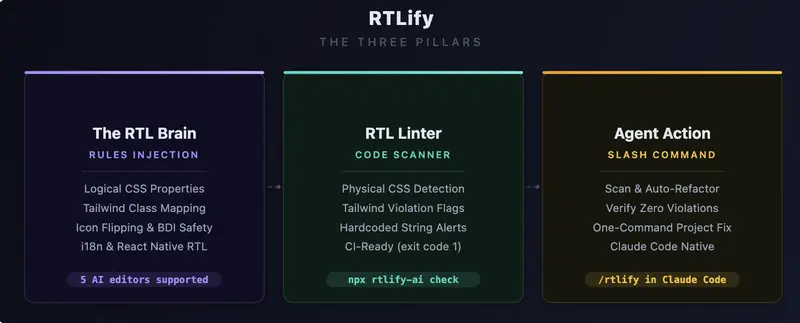
After months of manually fixing the same 5-6 patterns in every single component, I built RTLify — a CLI that teaches your AI editor the rules once, so you never fix them again.

npx rtlify-ai init

One command. Works with Claude Code, Cursor, Windsurf, Cline, GitHub Copilot, Gemini CLI, and Codex CLI.

The Bugs AI Keeps Making

Let me show you exactly what goes wrong. If you’ve built anything in Hebrew, Arabic, Persian, or Urdu — you’ll recognize every single one.

1. Physical CSS Instead of Logical

AI writes:

.sidebar {
  margin-left: 16px;
  padding-right: 8px;
  border-left: 1px solid #ccc;
  left: 0;
}

In RTL, “left” is “right”. The layout mirrors, but these properties don’t. The correct version:

.sidebar {
  margin-inline-start: 16px;
  padding-inline-end: 8px;
  border-inline-start: 1px solid #ccc;
  inset-inline-start: 0;
}

Logical properties work in both LTR and RTL. AI never uses them unless you tell it to.

2. Wrong Tailwind Classes

This is the most common one. AI writes:

<div className="ml-4 pr-6 text-left border-l-2 rounded-tl-lg">

Every single class here is wrong for RTL. The correct version:

<div className="ms-4 pe-6 text-start border-s-2 rounded-ss-lg">

RTLify includes a full mapping table with 20+ conversions — ml → ms, pr → pe, text-left → text-start, float-right → float-end, rounded-tl → rounded-ss, and more.

3. Numbers Jumping Around (Bidi Text)

This is the sneaky one. Look at this Hebrew sentence:

<p>ההזמנה שלך #12345 אושרה בהצלחה</p>

Looks fine in your code editor. Open it in a browser with dir="rtl" — the number #12345 visually jumps to a completely wrong position. The sentence becomes unreadable.

The fix is a <bdi> tag:

<p>ההזמנה שלך <bdi>#12345</bdi> אושרה בהצלחה</p>

Same applies to phone numbers, dates, English brand names — any LTR content inside an RTL sentence needs <bdi> wrapping. AI never does this.

4. Icons Pointing the Wrong Way

In an RTL interface, a “next” arrow should point left, not right. But AI always generates:

<ChevronRight className="w-5 h-5" />

The fix:

<ChevronRight className="w-5 h-5 rtl:-scale-x-100" />

Non-directional icons (home, settings, search) should NOT be flipped. AI doesn’t know the difference — RTLify teaches it which ones to flip.

5. Currency and Dates

AI formats prices like this:

const price = `₪${amount}`;  // Wrong — symbol on wrong side

The correct way:

const price = new Intl.NumberFormat('he-IL', {
  style: 'currency',
  currency: 'ILS',
}).format(amount);
// → "42.90 ₪" — symbol on correct side, RTL mark included

Same for dates — AI defaults to MM/DD/YYYY instead of DD/MM/YYYY with Intl.DateTimeFormat.

6. React Native Gets It Even Worse

On mobile, the same problems exist but with different APIs:

// AI writes:
paddingLeft: 16
left: 0
textAlign: 'left'

// Should be:
paddingStart: 16
start: 0
writingDirection: 'rtl'

Plus you need I18nManager.isRTL for conditional checks and transform: [{ scaleX: I18nManager.isRTL ? -1 : 1 }] for icon flipping.

How RTLify Works

There’s no magic and no runtime dependency. Here’s what happens when you run npx rtlify-ai init:

  1. It writes .rtlify-rules.md — a markdown file containing 8 RTL architecture rules with concrete “do this / not that” code examples. This is the full ruleset the AI will follow.

  2. It adds a 3-line pointer to your editor’s config file (CLAUDE.md, .cursorrules, .windsurfrules, etc.) that tells the AI: “read .rtlify-rules.md before generating any UI code.”

  3. For Claude Code users — it installs a global /rtlify slash command that scans your project and auto-fixes violations.

That’s it. The AI reads the rules on every conversation. No extra prompting needed.

You can open .rtlify-rules.md and read exactly what the AI sees. Full transparency — it’s just a markdown file.

The Linter

RTLify also ships with a scanner that catches violations in existing code:

npx rtlify-ai check
  src/components/Sidebar.tsx
       3 Tailwind Physical
         Use logical classes (ms-*, me-*, ps-*, pe-*)
         <div className="ml-4 pl-6 text-left">

  src/components/OrderCard.tsx
       8 Tailwind Physical
         Use text-start / text-end
         <h2 className="text-left text-xl">פרטי הזמנה</h2>

  2 violations across 2 files

Exits with code 1 — plug it into your CI pipeline to catch RTL violations on every PR.

The Fix Command

For editors that don’t support slash commands, RTLify generates a ready-to-paste prompt:

npx rtlify-ai fix

It copies a prompt to your clipboard that tells your AI editor to scan, fix, and verify all violations. Works with any AI editor.

The 8 Rules

# Rule What the AI Learns
1 Logical CSS margin-inline-start not margin-left
2 Tailwind Mapping 20+ class conversions (ml-* → ms-*)
3 Icon Flipping rtl:-scale-x-100 on directional icons only
4 BDI Safety <bdi> tags for numbers/English in RTL text
5 Localized Formats Intl.NumberFormat('he-IL') for currency & dates
6 Safe i18n Respects your i18n setup or lack of it
7 Complex Components Carousels, charts, sliders with dir="rtl"
8 React Native I18nManager.isRTL, paddingStart, writingDirection

Try It

npx rtlify-ai init

Then ask your AI to “build a checkout form in Hebrew” or “create a settings screen in Arabic”. You’ll see the difference immediately.

GitHub: github.com/idanlevi1/rtlify
NPM: npmjs.com/package/rtlify-ai

If you’re building for RTL markets — what’s the most annoying RTL bug an AI has generated for you? I’d love to hear in the comments.

NVIDIA Proved Evolutionary Code Search Beats Humans — Here’s What an Open Protocol for It Looks Like

NVIDIA just published a paper that should make every software engineer pause. Their system — called AVO (Agentic Variation Operators) — ran autonomously for 7 days on a Blackwell B200 GPU, optimizing attention kernels with zero human intervention. The result: it outperformed NVIDIA’s own cuDNN library by 3.5% and FlashAttention-4 by 10.5%.

The researchers call their philosophy “blind coding.” Bing Xu, one of the lead authors, puts it bluntly: “Blind coding is the future of software engineering. Human cognitive ability is the bottleneck.”

This is not the first time evolutionary code search has beaten humans. Google’s AlphaEvolve did it for matrix multiplication and Ramsey number bounds last year. But AVO pushes the paradigm further — and both systems share a structural limitation that matters deeply for the future of this field.

The Pattern: AlphaEvolve → AVO

AlphaEvolve (2025) and AVO (2026) follow the same evolutionary template:

  1. Represent code as evolvable units — candidate solutions that can be mutated
  2. Define a fitness function — an automated way to measure “better”
  3. Apply selection pressure — keep the best, discard the rest
  4. Iterate — repeat for hours, days, or weeks without human intervention

The difference is in how they handle the variation step. AlphaEvolve uses an LLM as a candidate generator — it proposes code modifications one at a time. AVO promotes the agent to a variation operator — it doesn’t just generate candidates; it runs a full autonomous loop of proposing, repairing, self-critiquing, and verifying before submitting a candidate to the population.

This is a meaningful architectural evolution. AVO’s agent consults the full lineage of previous solutions, reads hardware documentation, analyzes profiler output, and iterates independently. The variation step itself becomes an intelligent process, not a single-shot generation.

The results speak for themselves: AVO discovered micro-architectural optimizations (register rebalancing, branchless accumulator rescaling, instruction pipeline overlap) that human GPU experts had not attempted. And when pointed at a related problem (grouped-query attention), the agent adapted its MHA optimizations in just 30 minutes.

The Structural Limitation: Both Are Closed

AlphaEvolve and AVO share a constraint that limits their impact: they are closed systems.

  • Every candidate solution is generated, evaluated, and consumed by the same team
  • The fitness function is built into the framework, not replaceable
  • Discoveries don’t propagate — an optimization found for attention kernels stays in NVIDIA’s codebase
  • No external developer can submit a competing search strategy or a better evaluator

This is not a criticism — it’s a design choice that makes sense for internal optimization. But it means the evolutionary dynamics are limited to a single population, a single evaluator, and a single environment.

What would happen if you opened all of this up?

The Open Protocol Pattern

An open protocol for evolutionary code search would look something like this:

Component Closed (AVO/AlphaEvolve) Open Protocol
Code units Internal candidates Publishable, versioned, typed modules (like genes)
Fitness evaluation Built-in profiler Replaceable evaluator modules — anyone can build a better one
Selection mechanism Internal ranking Public arena with transparent rankings and anti-manipulation rules
Knowledge transfer Stays in one codebase Discoveries propagate across developers, domains, and environments
Lineage tracking Implicit (git history) Explicit derivation graph with attribution incentives
Diversity protection None (winner-take-all) Frequency-dependent selection to prevent monoculture

This is, roughly, the architecture of the Rotifer Protocol.

In Rotifer, code units are called Genes — self-contained, typed, fitness-evaluable modules. They compete in a public Arena where a dual-metric system (fitness F(g) for utility, verification V(g) for safety) determines survival. The Arena applies selection pressure, but a diversity factor prevents any single gene from monopolizing its domain. Optimizations that work in one environment propagate to others through Horizontal Logic Transfer (HLT) — the protocol-level mechanism for cross-agent, cross-domain knowledge migration.

The evaluator is not built in. Rotifer defines a concept called Judge Genes — meta-genes whose job is to evaluate other genes. Judge Genes compete in their own Arena, so the quality of evaluation itself evolves over time. This is the key difference: in AVO, NVIDIA decides what “better” means. In an open protocol, the community builds and improves the evaluators.

What AVO Validates

AVO’s results are significant for anyone building evolutionary code infrastructure — not because of the specific numbers (3.5% over cuDNN is impressive but domain-specific), but because of three structural validations:

1. Autonomous evolution can exceed human expertise. AVO didn’t just match human performance — it surpassed every expert-engineered implementation on NVIDIA’s most advanced hardware. This validates the core thesis that evolutionary search with autonomous agents can discover optimizations that human engineers cannot.

2. Lineage matters. AVO’s agent consults the full evolutionary history before each variation step. This is not just record-keeping — it’s an active input to the search process. Lineage-guided variation produces better candidates than blind mutation.

3. Cross-task transfer works. The 30-minute MHA→GQA adaptation demonstrates that evolutionary discoveries are not domain-locked. With the right protocol infrastructure, optimizations found in one domain can seed search in another.

These three findings — superhuman performance, lineage-guided variation, cross-task transfer — are independent of the specific domain. They apply to any system where code units compete, evolve, and propagate.

The Timeline

Evolutionary code search is accelerating:

  • 2024: FunSearch (DeepMind) — LLM + evolutionary search discovers new mathematical constructions
  • 2025: AlphaEvolve (DeepMind) — breaks Strassen’s 56-year record in matrix multiplication
  • 2026: AVO (NVIDIA) — autonomous agent exceeds all human GPU experts in kernel optimization

Each step pushes the same direction: from using AI as a tool within a human-designed process, to making AI the operator of the evolutionary process itself.

The missing piece is the protocol layer — the infrastructure that makes these capabilities open, composable, and collectively improvable. That’s what we’re building.

Rotifer Protocol is an open-source evolution framework for autonomous software agents. The protocol specification, CLI, and SDK are available at rotifer.dev. The AVO paper is available at arXiv:2603.24517.