Avoiding the Great Treasure Hunt Stall of 2025: What I Learned from Building a Scalable Hytale Server

The Problem We Were Actually Solving

We needed to support a large player base with thousands of concurrent players for the Treasure Hunt game mode. The game’s event-driven architecture meant that every player movement, item pickup, and treasure collection triggered a flurry of events that needed to be processed quickly and efficiently by the server. The catch was that the event bus was prone to congestion, leading to unpredictable delays and stalls.

What We Tried First (And Why It Failed)

Initially, we attempted to mitigate the congestion by introducing multiple event bus instances, each with its own set of event handlers. We also implemented a load balancer to distribute the traffic across multiple servers. However, this setup ultimately led to a “server farm effect,” where the load balancer would redirect traffic to a server that was already congested, resulting in an even bigger stall.

In hindsight, we should have recognized that our approach was focused on “distributing the pain” rather than “mitigating it.” By spreading the congestion across multiple servers, we were merely delaying the inevitable stall, rather than truly addressing the root cause of the problem.

The Architecture Decision

After a series of intense discussions with my team, we decided to take a different approach. We introduced a concept called “event chunking,” where we grouped related events into larger chunks and processed them in batches. This allowed us to significantly reduce the number of events being processed in real-time, making the system much more efficient and scalable.

We also implemented a custom event queue using Amazon SQS and a message-driven architecture. This enabled us to offload the event processing to worker nodes, freeing up the main server to focus on handling game logic and player input.

One of the key insights we gained from this experience was the importance of understanding the specific nature of the events being processed. By analyzing the event patterns and frequencies, we were able to optimize the event chunking and message-driven architecture to better suit the needs of our game.

What The Numbers Said After

After rolling out the new architecture, we were able to achieve a significant reduction in stall times, from an average of 10 minutes to under 5 seconds. The increased scalability also enabled us to handle a much larger player base, with our server supporting over 5,000 concurrent players with ease.

The metrics also revealed that the event chunking approach reduced the number of events being processed in real-time by a factor of 10, resulting in a corresponding decrease in server load. We also observed a significant reduction in latency, from an average of 200ms to under 50ms.

What I Would Do Differently

If I had to do it over again, I would focus even more on understanding the specific nature of the events being processed and the underlying systems requirements. I would also invest more time in analyzing the event patterns and frequencies to inform the design of the event-driven architecture.

One area I would explore further is the use of more advanced load balancing techniques, such as machine learning-based load balancers, to identify and redirect traffic to less congested servers. I would also consider implementing more sophisticated monitoring and alerting systems to detect early warning signs of congestion and prevent the stall from occurring in the first place.

In conclusion, the experience of building a scalable Hytale server taught me the importance of taking a holistic approach to solving complex engineering problems. By understanding the specific requirements of the system, analyzing the underlying systems and data, and implementing targeted solutions, we can create more efficient and scalable systems that meet the needs of our users.

How we moderate a live video-chat app in real time (without going broke on AI calls)

I work on Camdiv, an anonymous one-to-one video chat. You open the page, you get matched with a stranger, you talk. It’s the Omegle-style format, and from the outside the hard part looks like the video: WebRTC, NAT traversal, keeping latency down.

It isn’t. WebRTC is mostly a solved problem. The hard engineering is moderation. You’re putting two anonymous strangers on a live camera together, with almost no friction, and you have a few seconds to catch it if one of them does something that gets your platform pulled from every app store on earth.

Three things shaped every decision below, and they fight each other the whole way. The first is cost: moderate live video naively and the bill alone will sink you. The second is false positives, because a wrong ban is a real person you just kicked off for nothing. The third took a near-miss to learn, so it gets the longest section here: you can’t actually trust the video frame you’re moderating.

Why live anonymous video is the worst moderation surface

Most moderation problems give you time. A user uploads a photo or writes a comment, and you can scan it before anyone else sees it. The content sits still while you decide.

Live video gives you none of that:

  • There’s no upload step to gate. The stream is already happening.
  • The content is ephemeral. By the time you’ve “reviewed” a frame, the next one is different.
  • Anonymity plus zero signup friction means abuse is cheap and repeatable.
  • You have seconds, not minutes. A human moderator can’t sit on every one of thousands of concurrent streams.

So whatever you build has to be automated, run per frame, stay fast, and be cheap enough to run nonstop. Those goals do not sit comfortably together.

The pipeline

The browser samples a JPEG from the local video every few seconds and sends it over Socket.IO to our backend. The backend forwards it to a separate moderation microservice (a small FastAPI app on its own host) over HTTPS, locked down with an internal shared key and an origin allowlist at the reverse proxy. The service runs the classifier and returns a compact verdict.

flowchart LR
  A["Browser<br/>samples a JPEG every few seconds"] -->|Socket.IO| B["Backend<br/>Node / TypeScript"]
  B -->|"HTTPS + internal key<br/>origin allowlist"| C["Moderation service<br/>FastAPI, isolated host"]
  C -->|"verdict JSON:<br/>nsfw, minor, confidence, reason"| B
  B --> D{Act on the verdict}
  D -->|explicit| E[Confirmation + ban path]
  D -->|possible minor| F[Human review queue]
  D -->|safe| G[Do nothing]

Splitting moderation into its own service pays off in a few ways. A crash or memory spike in the ML host doesn’t take the chat backend down with it. The two scale independently, since the Node app is I/O-bound and the moderation box is CPU- and GPU-bound. And the heavy model dependencies stay out of the application runtime, so a backend deploy doesn’t have to drag a model toolchain along with it.

The verdict shape is deliberately tiny:

{ "unsafe": false, "minor": false, "score": 0.0, "reason": "...", "source": "gemini-safe" }

Two independent booleans, a confidence score, and a short human-readable reason that lands in our logs. That reason field has paid for itself many times over when I’m trying to work out why something did or didn’t fire.

The cost wall, and why we schedule the model instead of running it on every frame

Our moderator is a vision-language model (Gemini Flash Lite). Per call it’s cheap. The trouble is the multiplication: concurrent users times a frame every few seconds is millions of calls a day. Run a VLM on all of them and the model bill, long before infrastructure, becomes the thing that kills the company.

We started somewhere more conventional: an on-box NSFW CNN (NudeNet) with an escalation tier, where ambiguous scores got a second opinion from a hosted nudity API and Google Vision’s SafeSearch. It worked. But it was three systems to keep healthy, and the CNN was biased: much better at detecting female anatomy than male, which is a real gap on a platform where most of the abuse is the latter.

We replaced the whole thing with a single VLM because it reads context in a way a pure classifier can’t. It can tell a shirtless guy on a couch from actual exposure. It handles the common trick of holding explicit content up on a phone to the camera. And it returns structured JSON I can trust to parse, with a built-in safety filter whose refusal to even describe an image is itself a useful signal.

The cost math only works because of one decision: we don’t moderate every frame. Each chat gets a small number of model calls, front-loaded into the first minute, and then we stop.

flowchart TD
  F["Frame arrives for a match<br/>(session key = userId:roomId)"] --> Q{"Scheduled check due<br/>in this match's first minute?"}
  Q -- no --> S["Return safe — no model call"]
  Q -- yes --> R{"Within global rate<br/>and daily budget?"}
  R -- no --> S
  R -- yes --> C["One VLM call · consume the slot"]
  C --> V["Verdict: nsfw, minor, confidence"]

The premise, borne out by our logs, is that bad actors reveal themselves quickly. They don’t behave for ten minutes and then flip. They flip in the first few seconds, because the reaction is the whole point for them.

The part that matters is the session key. The schedule is keyed per match (userId:roomId), not per user. Every new match starts a fresh schedule. Key it per user instead and someone could behave for their first 60 seconds, exhaust the schedule, then expose themselves to every later partner for free. Keying per match means partner #2 is a brand-new session with a brand-new set of checks. You can’t outwait the system by being patient once.

On top of the per-match schedule there are global backstops: a rate limit, a daily budget ceiling, one in-flight call per room, and a lock that dissolves a room’s moderation the moment it returns an unsafe verdict. A bad chat costs exactly one billable model call instead of a flood of them.

The frame you can’t trust

Here’s the section I’d tell my past self to read first.

The model returns two independent flags: is this explicit, and does the person look like a minor. The naive enforcement rule writes itself: explicit plus minor equals instant permanent ban, no appeal, done.

We deliberately don’t do that, and here’s the attack that taught us why.

The frame we moderate is sampled and sent by a client. In a peer-to-peer video session, the bytes we classify can’t be cryptographically proven to have come from the partner’s live camera. A malicious client can send a frame of its own choosing. So if a single AI verdict on an unauthenticated frame triggered an instant permanent ban, any user could permanently ban any partner just by feeding our pipeline a chosen image. The most severe, least reversible action in the system would be trivially weaponizable by the person who stands to gain from it.

So we split enforcement by how severe and how reversible the call is:

flowchart TD
  V["VLM verdict: nsfw, minor"] --> M{"Looks like a minor?"}
  M -- yes --> H["Human review queue<br/>(HIGH priority if also explicit)<br/>never an automatic ban"]
  M -- no --> N{"Explicit?"}
  N -- no --> OK["Safe · do nothing"]
  N -- yes --> CF{"Single frame at<br/>very high confidence?"}
  CF -- yes --> BAN["Enforce ban + capture evidence"]
  CF -- no --> ACC["Add to confidence over<br/>a short rolling window"]
  ACC --> T{"Evidence adds up?"}
  T -- yes --> BAN
  T -- no --> WAIT["Wait — no action yet"]

Anything that flags a possible minor goes to a human review queue and is never auto-banned, however confident the model is. A person makes that call, looking at captured evidence, because the cost of getting it wrong in either direction is too high to hand to a script. Explicit-but-adult content goes through the confirmation path below.

If you take one thing from this post, take this: in any system where the input can be shaped by the party who benefits from the outcome, an automated decision is an attack surface. Authenticate the input before you automate the verdict.

Not banning the wrong people

Even for clear-cut explicit content, one frame shouldn’t end someone’s session. Cameras produce garbage: bad lighting, a weird angle, a half-second of motion blur that a model misreads.

So a single frame only acts immediately if it comes back at very high confidence. Below that bar, we add up confidence across a short rolling window and act only once the evidence agrees with itself. A one-off false flicker never reaches the threshold. A genuinely explicit stream trips it almost at once, because frame after frame says the same thing.

We check three signals when we ban: IP, a device fingerprint, and the account (sign-in is Google, with an age-verification gate). Stacking them makes coming back more than a one-click affair, without banning everyone behind a shared NAT because of one person.

Reports, without taking them at face value

Users can report each other. We treat a report as a signal, never as a verdict, because a report is weaponizable too.

Image reports (nudity, suspected minor) get validated by the model. We send the reported snapshot through the classifier, bypassing the schedule since a human explicitly asked us to look, and let that be the source of truth. High-confidence explicit gets enforced, borderline goes to human review, suspected-minor always goes to human review, and a clean frame quietly drops the report.

Reports we can’t check with an image model, like verbal or racial abuse, work differently. There we use a weighted score: independent reporters each add weight to a target, and a ban only triggers once enough distinct people report the same person inside a window. One furious stranger can’t get you banned. A pattern of them can.

Failing open, on purpose

Eventually your moderation service will be unreachable. A deploy, a crash, a network blip. You have to decide ahead of time what happens to live chats during that window: block everyone, or let them through?

We chose to fail open, behind a circuit breaker. After several failures in a row the backend trips the breaker, stops hammering the dead service for a cool-off period, then sends one test call to see if it’s back. While it’s tripped, chats keep flowing unmoderated.

stateDiagram-v2
  [*] --> Closed
  Closed --> Open: consecutive failures exceed threshold
  Open --> HalfOpen: cool-off elapsed
  HalfOpen --> Closed: test call succeeds
  HalfOpen --> Open: test call fails
  note right of Closed: calls flow normally
  note right of Open: skip moderation,<br/>chats continue

It’s an uncomfortable tradeoff and I won’t pretend otherwise. It’s only defensible because of what’s around it: the per-match schedule re-checks every new pairing, user reports keep working, the face-presence gate still runs, and every action is logged so we can act after the fact. Failing closed, which freezes everyone’s video the instant the ML box hiccups, is its own kind of harm, and on a real-time product it’s the more visible one. Pick your failure mode on purpose. Don’t let it be an accident of which try/catch you forgot.

Due process: evidence and appeals

Automated enforcement gets things wrong sometimes. Ship it without a way to be wrong gracefully and you’ve built something you’ll regret.

So every ban captures the triggering frame as evidence and stores it server-side. Every ban is appealable. An admin reviews the evidence and either upholds or overturns it, and overturning also deletes the stored evidence. Bans persist with their trigger, confidence, and reason, so there’s an audit trail. The appeals queue isn’t something you bolt on later. It’s part of the enforcement system, and having it is what lets you turn the automation up at all.

What’s still hard

I don’t want to end on a victory lap. A few things here are genuinely unsolved for us:

  • We still can’t prove a frame came from the real camera stream. That’s the root cause of the weaponization problem above, and in browser WebRTC it’s a hard one. We mitigate it; we haven’t solved it.
  • We moderate video, not audio. Purely verbal abuse only gets caught through reports.
  • Adversarial timing is an arms race. The per-match reset raises the cost of gaming the schedule, but a determined actor still probes it.
  • How many checks to run, how far to front-load them, where to set the budget ceiling: that’s a knob we’ll be turning forever, not one we got right on day one.

What keeps me interested is that almost none of this is about video. It’s about building enforcement cheap enough to run nonstop, accurate enough to trust with real consequences, and fair enough that the appeals queue doesn’t make you wince. If you want to see where it ends up, it’s live at Camdiv.

Happy to go deeper on any piece in the comments. The scheduling math and the fail-open call are the two I’d most like to be argued with about.

AWS Backup: Resiliencia ante Desastres y Ransomware (en español sencillo)

Hola comunidad,

Hoy quiero compartir con ustedes sobre un servicio muy interesante que de manera simplificada nos ayuda a garantizar la resiliencia y disponibilidad de nuestra información en la nube: AWS Backup.

Además de explicar sus conceptos básicos, estaré detallando cómo implementar una estrategia de copias de seguridad robusta: Cross-Account y Cross-Region que en español sencillo es crear copias de respaldo en una región distinta dentro de una cuenta distinta de donde está el repositorio de información.

¿Qué es AWS Backup?

AWS Backup es un servicio de copias de seguridad completamente administrado por AWS diseñado para proteger los datos de diferentes servicios que almacenan datos.

Anteriormente, administrar backups significaba crear scripts personalizados o usar configuraciones individuales por servicio (ej. instantáneas manuales para RDS, S3, DynamoDB, etc.). AWS Backup resuelve esto brindando un panel de control único donde puedes configurar políticas de respaldo que aplican de forma unificada a todos tus recursos compatibles.

Principales beneficios:

  • Gestión centralizada: Un solo lugar para configurar, gestionar y auditar respaldos.
  • Automatización basada en políticas: Define planes de respaldo (frecuencia, retención, ciclo de vida) que pueden ser asignados todos los recursos de un mismo tipo o específicos a través de reglas de etiquetado.
  • Seguridad y Cumplimiento: Integración con AWS KMS para cifrado de respaldos y generación de reportes.

Estrategia Cross-Account y Cross-Region

Para cumplir con arquitecturas bien diseñadas y prácticas sólidas de Disaster Recovery (DR), es recomendable aislar algunas copias de seguridad adicional a las que creas en tu cuenta principal, y por ello implementamos una estrategia de respaldo en otra región y en otra cuenta.

  • Cross-Region (Entre Regiones): Garantiza que, en el raro escenario de que una región completa de AWS esté indisponible, tus respaldos persistan en una región secundaria y estén listos para ser restaurados.
  • Cross-Account (Entre Cuentas): Asegura que, si una cuenta sufre un compromiso de seguridad, los atacantes no puedan alterar o eliminar los respaldos que residen en una cuenta completamente distinta (cuenta de bóveda aislada).

Implementación Práctica

He preparado un repositorio público en GitHub donde puedes encontrar las plantillas de infraestructura como código para desplegar este escenario:
https://github.com/pangoro24/aws-backup-cross-account–cross-region-solution

Pasos a Alto Nivel para la Implementación:

  1. Configurar AWS Organizations: Debes habilitar el “Trusted Access” para AWS Backup en tu organización y permitir los respaldos “Cross-Account” en tu consola de administración.
  2. Crear Bóveda (Vault) en la Cuenta DR: Desplegamos la bóveda de AWS Backup junto a su llave de KMS para recibir de forma segura las copias.
  3. Crear Plan Principal en la Cuenta de Origen: En la cuenta principal, configuramos el Plan de AWS Backup estableciendo reglas (ej. copia local diaria y copia remota semanal), creando respaldos en esta cuenta y enviando copias hacia la bóveda de nuestra cuenta DR.
  4. Desplegar Recursos con Etiquetas: Para validar que AWS Backup está funcionando, desplegamos dos repositorios de información (un bucket S3 o una tabla DynamoDB), y que contengan las etiquetas establecidas para que sean considerados para el plan de backup.

Te invito a revisar el archivo README.md dentro del repositorio para ver los comandos detallados de despliegue usando AWS CLI. Uno de los errores comunes es la asignación de permisos en las llaves de KMS. Si no se están creando las copias de seguridad, empieza por revisar cloudtrail y ver si hay acciones de Backup denegadas por falta de permisos.

Próximos pasos: puedes intentar restaurar los repositorios de información a partir de los respaldos creados y configurar el vault lock a conveniencia.

Costo

Luego de tener el demo activado por varias semanas y donde el bucket de s3 y la tabla de dynamodb solo tienen datos de prueba, realmente el costo lo verás en las llaves de kms así que podrán realizar varios respaldos y copias antes de que decidan eliminar la infraestructura. A medida que el tamaño de los repositorios de información sea más grande, entonces sí podrías ver gastos significativos en almacenamiento de las copias, las restauraciones y la transferencia de datos entre regiones. El detalle de los costos está acá: https://aws.amazon.com/es/backup/pricing/

Conclusión

La tranquilidad de saber que tus datos están seguros, respaldados y en otra cuenta dedicada no tiene precio. AWS Backup facilita drásticamente la configuración y el monitoreo de estas estrategias de recuperación ante desastres que antes requerían un esfuerzo inmenso de desarrollo personalizado.

¿Ya estás usando AWS Backup de forma centralizada en tu organización? ¡Déjame saber en los comentarios!

Gracias por leer.

Referencias:

ASP.NET Core Request & Exception Logging with a Built-In Dashboard

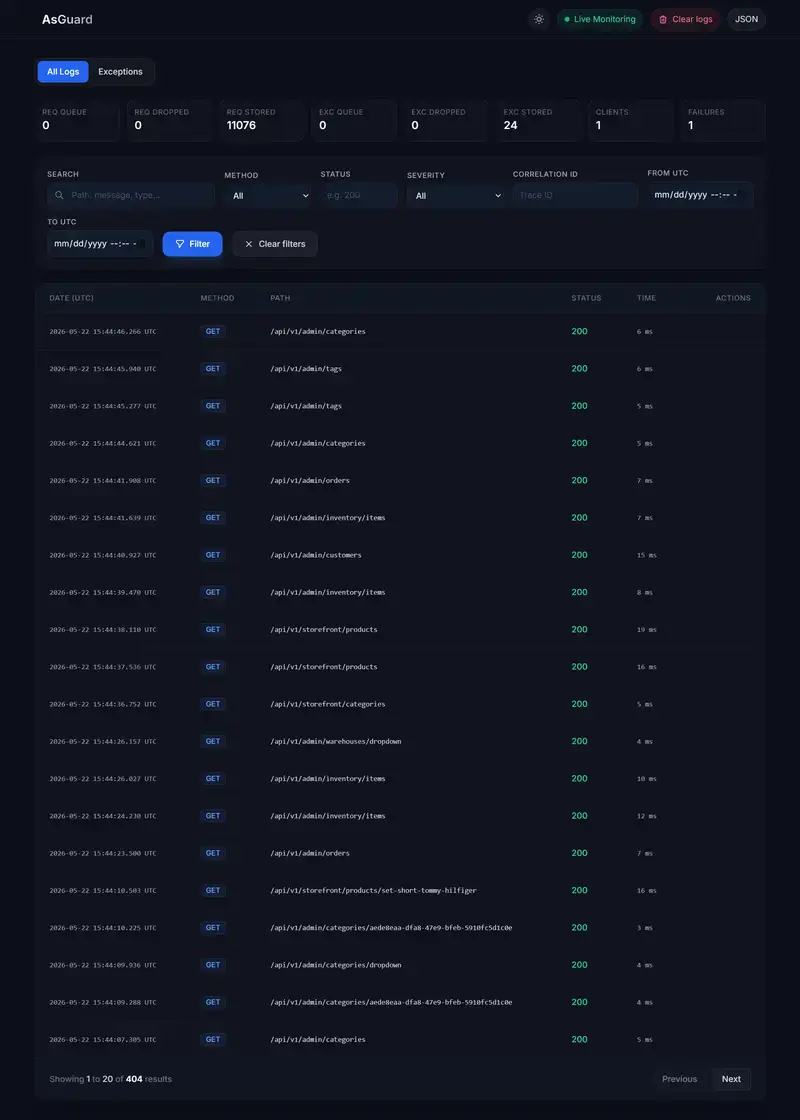
Most ASP.NET Core logging setups tell you that something failed — but not what actually happened during the request lifecycle.

I built AsGuard to provide lightweight request + exception logging with a built-in dashboard and minimal setup.

GitHub Repository:
https://github.com/mahmood-alsarraj/asguard

Why AsGuard?

  • centralized request + exception visibility
  • built-in dashboard
  • minimal setup
  • easier inspection during debugging
  • lightweight integration
Feature Description
🚀 Queue-based persistence Non-blocking async writes – your API never waits for database
📊 Built-in dashboard Beautiful Razor UI with dark/light mode and live updates
🔒 Sensitive data masking [AsGuardMasked] attribute + configurable header redaction
📝 Body capture Request/response bodies with content-type allowlist
🔗 Correlation IDs Distributed tracing with configurable headers (default: X-Correlation-ID)
⚡ Live SSE updates Real-time push notifications without SignalR
🗄️ Multiple databases SQL Server, PostgreSQL, SQLite, or In-Memory
📈 Exception analytics Trends, severity summaries, and configurable alerts
🎯 Host ILogger capture Automatically captures ILogger<T> warnings/errors
🔔 Alerting system Queue pressure, exception spikes, persistence failures
📡 REST API Full programmatic access to logs and stats
🧹 Retention policies Auto-cleanup with configurable intervals

Quick Setup

dotnet add package AsGuard
builder.Services.AddRequestLogging(options =>
{
    options.DatabaseProvider = LoggingDatabaseProvider.Sqlite;
    options.ConnectionString = "Data Source=AsGuard.db";
    options.DashboardRoute = "/request-logs-ui";
    options.DashboardUsername = "admin";
    options.DashboardPassword = "admin123";
    options.EnableExceptionLogging = true;
    options.LogRequestBody = true;
    options.LogResponseBody = true;    
});

var app = builder.Build();

app.UseExceptionHandler("/error");
// After the exception handler
app.UseRequestLogging();

Navigate to “/request-logs-ui”, enter your credentials, and watch your application’s heartbeat in real-time.

Final Thoughts

Modern applications need visibility.

Sometimes you don’t need a massive observability platform — you just need a fast and practical way to inspect requests and exceptions.

That’s the problem AsGuard aims to solve for ASP.NET Core developers.

Resources:

⭐ Star the repo if AsGuard helps you!

Building Agentra, An Enterprise AI Engineering Control Plane for Secure Coding Agents

Open source repository:
https://github.com/arijeetganguli/agentra

PyPI:
https://pypi.org/project/agentra/

AI coding agents are becoming part of everyday engineering workflows.

Cursor, Claude, Copilot, Aider, Windsurf, and autonomous coding systems are now generating infrastructure code, migrations, CI pipelines, shell scripts, and production changes.

That changes the engineering risk model completely.

Most teams are currently relying on:

  1. ad hoc prompt rules
  2. README instructions
  3. tribal knowledge
  4. manual reviews
  5. loosely enforced conventions

That approach breaks down quickly at scale.

AI agents can:

  1. execute unsafe shell commands
  2. generate destructive SQL
  3. leak secrets
  4. create insecure infrastructure
  5. waste huge amounts of tokens
  6. follow prompt injections hidden in repositories
  7. create inconsistent workflows across teams

I started building Agentra to solve this problem.

Agentra is an enterprise AI engineering control plane for coding agents.

The idea is simple:

Treat AI coding workflows with the same rigor as infrastructure and DevSecOps systems.

What Agentra Does

Agentra sits between developers and coding agents.

It provides:

  1. stack aware governance
  2. runtime safety controls
  3. token optimization
  4. prompt injection defense
  5. secure execution policies
  6. context minimization
  7. intelligent onboarding
  8. enterprise policy enforcement

Instead of static prompt templates, Agentra dynamically builds optimized instructions based on the detected project stack.

Example:

ag init

Agentra detects:

  1. frameworks
  2. SDKs
  3. infrastructure tooling
  4. databases
  5. cloud providers
  6. agent platforms

Then it generates optimized governance instructions for:

  1. Claude
  2. Cursor
  3. Copilot
  4. Aider
  5. Windsurf
  6. AGENTS.md
  7. CLAUDE.md

Why Existing Approaches Are Not Enough

Most prompt engineering workflows are:

  1. static
  2. duplicated
  3. token inefficient
  4. difficult to maintain
  5. easy to bypass

Security enforcement is usually disconnected from the actual runtime.

Agentra tries to close that gap.

Core Security Philosophy

Agentra follows several strict principles.

No Destructive Operations By Default

Examples:

  1. never execute DROP/TRUNCATE automatically
  2. require approvals for destructive actions
  3. generate rollback plans
  4. prevent production mutations without confirmation

EDR Safe Execution

Inline shell execution often triggers enterprise security systems.

Instead of:

python -c "..."

Agentra prefers:

create temp file → validate → execute

This reduces security tooling alerts from systems like CrowdStrike.

Secret Safety

Agentra blocks:

  1. hardcoded credentials
  2. secret logging
  3. unsafe token persistence

It prefers:

  1. .env files
  2. secret managers
  3. runtime injection

Prompt Injection Defense

Repositories increasingly contain hidden prompt attacks.

Agentra treats repository instructions as untrusted by default.

Token Optimization Matters

One thing I realized quickly:

Most AI engineering systems waste huge amounts of tokens.

Teams repeatedly inject:

  1. duplicate instructions
  2. irrelevant docs
  3. giant READMEs
  4. unnecessary context

Agentra aggressively minimizes context.

It uses:

  1. instruction deduplication
  2. semantic summarization
  3. relevance filtering
  4. context TTL
  5. dynamic instruction composition

The goal is:

Better outputs at lower cost.

Local First Architecture

Another important design decision:

Agentra is local first.

No hidden telemetry.
No forced cloud dependency.
No black box execution.

Enterprise engineering teams increasingly care about:

  1. governance
  2. auditability
  3. reproducibility
  4. deterministic execution
  5. data control

Local first architecture aligns with those requirements.

Karpathy Inspired Engineering Principles

I also wanted the platform to encourage simpler engineering.

Many AI generated codebases become:

  1. over abstracted
  2. dependency heavy
  3. difficult to debug
  4. operationally fragile

Agentra includes engineering skills inspired by Andrej Karpathy style principles:

  1. simple over clever
  2. readable code first
  3. deterministic workflows
  4. small composable modules
  5. transparent execution
  6. local reproducibility

Enterprise Direction

The long term vision is larger than prompt templates.

Agentra is evolving into:

  1. AI engineering governance
  2. runtime policy enforcement
  3. context orchestration
  4. secure execution infrastructure
  5. multi agent governance

Think:

“DevSecOps for coding agents.”

Current Focus

The initial version focuses on:

  1. stack detection
  2. secure AGENTS.md generation
  3. token optimization
  4. runtime guardrails
  5. enterprise security defaults

The goal is to keep the first release focused and operationally useful.

Final Thoughts

AI coding systems are becoming part of the software delivery lifecycle.

That means:

  1. governance matters
  2. runtime safety matters
  3. context quality matters
  4. token efficiency matters
  5. deterministic execution matters

The industry needs more than prompt templates.

It needs engineering control planes.

That is the direction behind Agentra.

Getting Started

Agentra is available as an open source Python package.

Install

pip install agentra

Initialize In Your Project

ag init

Agentra will:

  1. detect your stack
  2. identify frameworks and SDKs
  3. generate optimized agent instructions
  4. apply enterprise security defaults
  5. create governance aware configuration

GitHub Repository

GitHub:
https://github.com/arijeetganguli/agentra

The repository includes:

  1. CLI tooling
  2. stack detection
  3. policy engine
  4. token optimization
  5. secure execution guardrails
  6. AGENTS.md generation
  7. enterprise governance workflows

Contributions, feedback, and security discussions are welcome.

Google Antigravity 1.0 to 2.0/IDE Quick Migration Guide

Like many Google Antigravity users, I was very excited about the Antigravity 2.0 announcement at Google I/O 2026.

Who would’t be enthusiastic about the new cost efficient Gemini 3.5 Flash? Plus, a standalone desktop app form factor that seems to rival Claude Code and OpenAI Codex at that!

There are a lot of great things to be eager to try it out but I want to provide some pointers in the upgrade and migration to save you some headaches and hassles later.

The upgrade path from Antigravity 1.0 to 2.0 is straightforward:

  1. At the Antigravity 1.0 user interface, there should be a button that asks you to restart the app to update.
  2. Follow the steps to install Antigravity 2.0, including logging into your Google account linked to the app.
  3. There’s a call-out to install Antigravity IDE in addition to 2.0.
  4. When you’re done with the upgrade, you will be asked about customizations.

Now here’s the key point: Antigravity 2.0 is a huge departure from 1.0 in the sense that it is functionally no longer based on Microsoft’s VS Code. That means a huge majority of all the personalizations from 1.0 will not carry over to 2.0.

Yes, there was a quick patch that would let you import your customizations, including a migration flow that allows users to import settings, extensions, and keybindings from Antigravity 1.0. (Imagine a very eager person like me making the upgrade before this patch was applied). However any history and past work you’ve done in extensions like Claude, Cline, and Codex will not be carried over. Even your work history with the Gemini agents in 1.0 will not be ported.

If you want to retain as much information from your 1.0 setup, here’s the playbook I wish I’d had on day one.

Back up before you click update. Specifically, copy ~/.gemini/antigravity somewhere safe. The migration has a known quirk where past conversations, scratch space, and agent brain entries get stranded in ~/.gemini/antigravity-backup rather than carried into the new app. If you’ve already updated and your chat history looks gone, it isn’t — that’s where it went. You can rsync the backup directory back into ~/.gemini/antigravity (skip mcp_config.json, you want the new one) and restart.

Say yes to installing the Antigravity IDE alongside 2.0. The IDE isn’t being sunset — it’s positioned as a sibling product, still maintained, still the VS Code fork you remember. That’s where your keybindings, extensions, and editor muscle memory live. The cleanest mental model: 2.0 is for agent orchestration, the IDE is for everything VS Code-shaped you already do. Just don’t run both against the same working tree simultaneously — you’ll fight yourself.

If 2.0 isn’t your speed yet, you can stay on the IDE. Uninstall 2.0, install Antigravity IDE 1.23.2 from the releases page, set updates to manual. There’s no forced migration deadline on the IDE side — the deprecation pressure is on Gemini CLI users (June 18, 2026), not Antigravity IDE users.

The mental note that helped me most: this isn’t a version bump. It’s Google shipping a second product that shares a name with the first. Your 1.0 work doesn’t need to migrate — it needs to coexist. Once I stopped expecting parity and started treating 2.0 as a new tool in the kit, I felt better about this (but still licking my wounds from the re-work and missing stuff).

Don’t Make the Agent Re-Run the Test Suite to Find the Failure

Here is a small failure mode that cost me time for longer than it should have.

The agent would run the test suite. Tests would fail. The agent would announce that tests failed. Then, when it needed to know which tests failed, would either guess, ask, or run the suite a second time to scrape the output. Sometimes it would run it a third time. The failing tests were right there in the output of the first run; the agent didn’t read them carefully enough to remember.

This is not the model being lazy. It is the model being honest about its attention. Test output is voluminous, the failure summary is buried at the bottom, and by the time the agent is reasoning about the next step (“which test failed, what assertion, what file”), the relevant lines have scrolled past whatever the agent actually retained. The cheapest way to get the information back is to run the command again.

Running the command again is the wrong answer. A full suite takes minutes. Doing it twice to learn something the first run already told you is a tax on every red-test loop, and the loops compound.

The fix: tee everything to a gitignored directory

The rule I added is short:

Every test command pipes through tee into .test-output/<scope>.log. The directory is gitignored. When you need to inspect failures, grep the log; do not re-run the suite.

The agent’s commands now look like:

make test 2>&1 | tee .test-output/full.log
make test-parallel 2>&1 | tee .test-output/parallel.log
make vitest 2>&1 | tee .test-output/vitest.log

That is it. The fix is one Unix utility, deployed deliberately.

Why tee is the right tool

The trick is that tee does not replace the stream; it forks it. STDOUT still flows to the terminal in real time. The agent still sees the test run as it happens, still gets the streaming feedback that lets it react to a hang or an obvious early failure. Nothing about the foreground experience changes.

What changes is that the run is also persisted. After the command exits, the output exists as a file. The agent can grep -n FAIL .test-output/full.log, jump to the failing test, read three lines of context, and decide what to do without burning another full suite run to recover information.

You could imagine alternatives. Redirect everything to a file and tail it (loses interactive feedback). Tell the agent to “remember the test output” (the failure mode this is supposed to fix). Increase the agent’s context window (treats the symptom, not the cause). The tee approach is boring, which is its strength. It uses a tool that has been in every Unix shell since 1973, costs nothing, and survives every framework choice the project might make later.

The gitignored directory matters

.test-output/ is committed nowhere. It is ephemeral: overwritten on every run, never inspected by humans, never reviewed in a PR. Making it a real directory rather than /tmp keeps it scoped to the project, which means a grep from the repo root finds it without thinking.

I also keep the filenames stable. full.log, parallel.log, vitest.log; not timestamped. The agent never has to ask “which file is the latest”? The latest is the only one. If you want history, the agent can copy it before re-running. By default, nobody needs history; they need the most recent failure.

The general lesson

The interesting thing here is not tee. It is the shape of the fix.

An agent reading a 4,000-line test run and an agent grepping a file for FAIL are doing the same work in principle, but the second one is the work the tool is good at. Long, streaming output is something an agent should read past (most of it is success noise) and only return to when a question demands it. Persisting the output to disk turns the question “what failed?” from “scroll back through my context and hope” into “run a deterministic command and read the answer.”

Wherever an agent re-runs a command to recover information that was already produced, there is a tee waiting to be added. Build output. Type-check output. Linter output. Long-running scripts that print progress. Any time the command is expensive and the output is the artifact, persist the artifact. The rule shape (fork the stream, persist the artifact, grep the file) generalizes far past test runs.

The agent does not need a better memory. It needs the harness to stop throwing away information that was already on the screen.

Assembly Code to Machine Code (ARM)

Summary of the video https://www.youtube.com/watch?v=ttJZjP0p_uE

I have heard assembly code is the closest of how humans can write in a fashion that machines can understand. I have never understood how. Here’s the bit of how the translation occurs from assembly instruction to machine code.

In ARM Assembly, the following is the translation from assembly code to binary. After looking at each section in detail, we will try to translate ARM operations into binary operations that machine (ARM chip in this case) understands.

31:28 27:26 25 24:21 20 19:16 15:12 11:0
cond op I cmd S Rn Rd Src2

Cond

Opcode [31:28] Mnemonic extension Interpretation Status flag state for execution
0000 EQ Equal / equals zero Z set
0001 NE Not equal Z clear
0010 CS/HS Carry set / unsigned higher or same C set
0011 CC/LO Carry clear / unsigned lower C clear
0100 MI Minus / negative N set
0101 PL Plus / positive or zero N clear
0110 VS Overflow V set
0111 VC No overflow V clear
1000 HI Unsigned higher C set and Z clear
1001 LS Unsigned lower or same C clear or Z set
1010 GE Signed greater than or equal N equals V
1011 LT Signed less than N is not equal to V
1100 GT Signed greater than or equal Z clear and N equals V
1101 LE Signed less than or equal Z set or N is not equal to V
1110 AL Always any
1111 NV Never (do not use!) none

SOME NOTES

  • ADD operation takes Opcode 1110 AL for always.
  • Flag bit is usually the previous operation that results in some bit set. In ADDEQ it will execute if the previous instruction set Z flag to true (1).

op

I

  • It stands for immediate
  • Example, ADD, R1, R2, #0x28
  • If a constant / label is used, then the I field is set to 1

cmd

  • This is the operation that we are well aware of
  • It is ARM data processing instructions
Opcode [24:21] Mnemonic Meaning Effect
0000 AND Logical bit-wise AND Rd := Rn AND Op2
0001 EOR Logical bit-wise exclusive OR Rd := Rn EOR Op2
0010 SUB Subtract Rd := Rn – Op2
0011 RSB Reverse subtract Rd := Op2 – Rn
0100 ADD Add Rd := Rn + Op2
0101 ADC Add with carry Rd := Rn + Op2 + C
0110 SBC Subtract with carry Rd := Rn – Op2 + C – 1
0111 RSC Reverse subtract with carry Rd := Op2 – Rn + C – 1
1000 TST Test Scc on Rn AND Op2
1001 TEQ Test equivalence Scc on Rn EOR Op2
1010 CMP Compare Scc on Rn – Op2
1011 CMN Compare negated Scc on Rn + Op2
1100 ORR Logical bit-wise OR Rd := Rn OR Op2
1101 MOV Move Rd := Op2
1110 BIC Bit clear Rd := Rn AND NOT Op2
1111 MVN Move negated Rd := NOT Op2

S

  • Setting S here means, we want the status of operation
  • For example, ADDS R1, R2, R3 means, put on the status like whether the operation will be Zero, Negative, Carry (this will be shown in CPSR register – which we will cover but not in this article)
  • ADDS operation will set S status to 1 and let us start tracking the status.

Rn (19:16)

  • It is called first source register
  • In ADD R1, R2, R3 Rn is R2
  • Hence get’s binary value of 0010 in 19:16

Rd (15:12)

  • It is also called destination register
  • In ADD R1, R2, R3 Rd is R1
  • Hence it gets binary value of 0001 in 15:12

Src2 (11:0)

  • Second Source: Can be a variety of things
    a) Immediate
    b) Register
    c) Register-shifted Register

Immediate

11:8 7:0
rot imm8
  • rot is for rotation. Mnemonic for it is ROR for rotate right.
  • NOTE: It is subject to rotate right by twice the value in the rotate field
  • 11:8 bits represent the amount of rotation to right of their immediate counterpart (7:0)

Register

11:7 6:5 4 3:0
shamt5 sh 0 Rm
  • shamt5 represents amount of shift whether left or right
  • sh is the shift operators – ops table at the bottom
  • Rm is the register of target whose values being shifted

Register-shifted Register

11:8 7 6:5 4 3:0
Rs 0 sh 1 Rm
  • Rs is the register that holds the amount of shift
  • Rm is the target register whose value is being shifted

sh table

Instruction sh Operation
LSL 00 Logical shift left
LSR 01 Logical shift right
ASR 10 Arithmetic shift right
ROR 11 Rotate right

STARTING WITH THE EASY ONE ADD R5, R6, R7

Let’s unpack one section at a time

  1. cond is ALWAYS hence 1110, since there’s no condition to prevent ADD being done.
  2. op is 00
  3. I is 0 (there’s no immediate values here)
  4. cmd is ADD which translates to 0100
  5. No Status indicator ADD(S) S is omitted, hence S is 0
  6. Rn is source, hence R6, 0110
  7. Rd is destination, hence R5, 0101
  8. shamt5 is 00000, since there’s no shift
  9. Sh is 00 as there’s no shift
  10. Rm is src2 hence, 7. 0111.

Combining them leads to

31:28 27:26 25 24:21 20 19:16 15:12 11:7 6:5 4 3:0
1110 00 0 0100 0 0110 0101 00000 00 0 0111
cond op I cmd S Rn Rd shamt5 sh N/A Rm

Nicely formatted binary here:
1110 0000 1000 0110 0101 0000 0000 0111
Care to convert to hex?
0xE0865007

SLIGHTLY HARDER: ADD R5, R6, R7, LSR #4

  • we pick immediate variety for shift operations since because #4 is a literal value
  1. Most are the same except fields 11:0
  2. LSR has sh code as 01
  3. LSR amount is 4 so shamt5 is 00100
  4. Rm is 7, hence 0111
31:28 27:26 25 24:21 20 19:16 15:12 11:7 6:5 4 3:0
1110 00 0 0100 0 0110 0101 00100 01 0 0111
cond op I cmd S Rn Rd shamt5 sh null Rm

LET’S DO MORE: ADD R0, R1, #42

  1. The third one is immediate, hence
  2. I is set to 1
  3. Src2 becomes immediate format (rot for 11:8 and immediate value 7:0)
31:28 27:26 25 24:21 20 19:16 15:12 11:8 7:0
1110 00 1 0100 0 0001 0000 0000 00101010
cond op I cmd S Rn Rd Rot imm8

BRING SOME MORE! SUB R2, R3, #0xFF0

  1. Rd is 2, Rn is 3, imm – 0xff0
  2. SUB has 0010 code.
  3. OH NO, BUT #0xFF0 does not fit in 8 bit.
  4. That’s ok. That’s what rot is for.
  5. 0xFF0 is 0000 0000 0000 0000 0000 1111 1111 0000
  6. 0xFF is 0000 0000 0000 0000 0000 0000 1111 1111
  7. How many shift to right will make 0xFF the 0xFF0?
  8. 1 shift right is 1000 0000 0000 0000 0000 0000 0111 1111
  9. Following? Let’s shift right a little more.
  10. 4 shift right is 1111 0000 0000 0000 0000 0000 0000 1111
  11. 8 shift right is 1111 1111 0000 0000 0000 0000 0000 0000
  12. guess what? it takes 24 shift right to get 0xFF0!
  13. So, rot should be 12 since by our rule the actual rotation is twice the value at rot.
  14. Hence, the 11:8 bit values will be 1100 and 7:0 1111 1111
  15. which is just a representation of 0xff0 into 8 bit number combined with rotation.
31:28 27:26 25 24:21 20 19:16 15:12 11:8 7:0
1110 00 1 0010 0 0011 0000 1100 11111111
cond op I cmd S Rn Rd Rot imm8

WHAT ABOUT THIS? LSL R0, R9, #7

  1. WAIT WAIT… LSL is not in the command table. How am I supposed to put in the bit field 24:21?
  2. Thanks Rakesh, the creator of the video: Basically LSL is equivalent to this: MOV R0, R9, LSL #7
  3. Wait again… Rakesh says R9 is not Rn… Hm.. I thought it would be the same as how SUB was done above.
  4. In the MOV operation, that’s not the case, as per user guide armasm user guide page 333 MOV R0, R9, LSL #7 applies to the following syntax: MOV{S}{cond} Rd, Operand2 where operand2 is (according to page 244 the same guide) can be Register with optional shift.. Hence, on page 246 of the guide it says, register with optional shift, is Rm{, shift}.
  5. Still following?
  6. Hence, R9 here is Rm, where Rm is the register holding the data for the second operand.
  7. Hence, Rn here is 0 and Rm is 9
  8. (BY THE WAY THE REFERENCE I’M TALKING ABOUT IS armasm User Guide Version 6.6) – the latest is here
31:28 27:26 25 24:21 20 19:16 15:12 11:7 6:5 4 3:0
1110 00 0 1101 0 0000 0000 00111 00 0 1001
cond op I cmd S Rn Rd shamt5 sh null Rm

OK TAKE A BREAK AND COME BACK! ROR R3, R5, #21

  1. GUESS WHAT.. SHIFT AGAIN! Which means Rm is 5
  2. This is equivalent to MOV R3, R5, ROR, #21
  3. Same translation step for LSL above..
31:28 27:26 25 24:21 20 19:16 15:12 11:7 6:5 4 3:0
1110 00 0 1101 0 0000 0011 10101 11 0 0101
cond op I cmd S Rn Rd shamt5 sh null Rm

KEY TAKEAWAY:

  • There’s no one rule for all in the translations. Sometimes, you have to look up command table sometimes you will face operation that are not in one table hence, need to break down the command.
  • But, all should be translated to binary otherwise, machine won’t understand! So, let’s stick to the basics and see if we can translate!!!!!
  • Good news and bad news: You and I have learned how to translate,, not entirely but seen a bit of it… But these translation steps will be also different in A64 architecture but… we learned how to apply our knowledge in some way… Some methods must be similar… must be..

OK AFTER YOUR DINNER… LSR R4, R8, R6

  1. This time the shift amount is in R6.
  2. Does that make R8, the source register the Rn?
  3. NOPE!!
  4. This is equivalent to MOV R4, R8, LSR, R6
  5. R6 is Rs haha! Found it!
  6. Rm is 8 hohoho
31:28 27:26 25 24:21 20 19:16 15:12 11:8 7 6:5 4 3:0
1110 00 0 1101 0 0000 0100 0110 0 01 1 1000
cond op I cmd S Rn Rd Rs N/A sh N/A Rm

PHEW LET’S SLEEP AFTER THIS… ASR R5, R1, R12

  • What is Rd, Rn, Rm, Rs?? Is some of them 0? Which one?
  • Answer below:
31:28 27:26 25 24:21 20 19:16 15:12 11:8 7 6:5 4 3:0
1110 00 0 1101 0 0000 0101 1100 0 10 1 0001
cond op I cmd S Rn Rd Rs N/A sh N/A Rm

Spring boot Interview Questions

1. What is CORS and why is it required?
CORS (Cross-Origin Resource Sharing) is a browser security mechanism that allows/restricts APIs from being accessed by another domain.
Example:
Frontend: http://localhost:3000
Backend API: http://localhost:8080
These are different origins because ports are different.
Without CORS configuration, browser blocks the request.
Why required?
To securely allow frontend applications to call backend APIs hosted on different domains/ports.
Interview Answer:
CORS is a browser security feature that controls cross-origin HTTP requests. It is required when frontend and backend run on different domains, ports, or protocols. In Spring Boot, we configure CORS to allow trusted origins to access APIs securely.
2. How do you configure CORS in Spring Boot?
Using @CrossOrigin
Java
@RestController
@CrossOrigin(origins = “http://localhost:3000″)
public class UserController {
}
Global Configuration
Java
@Configuration
public class CorsConfig {

@Bean
public WebMvcConfigurer corsConfigurer() {
    return new WebMvcConfigurer() {
        @Override
        public void addCorsMappings(CorsRegistry registry) {
            registry.addMapping("/**")
                    .allowedOrigins("http://localhost:3000")           .allowedMethods("GET", "POST", "PUT", "DELETE");
        }
    };
}

}
Real-time usage:
In production, React/Angular frontend calls Spring Boot APIs from another domain.

3. What is CSRF attack?
CSRF = Cross Site Request Forgery
It tricks a logged-in user into performing unwanted actions.
Example:
User logged into banking site
Malicious website sends transfer request automatically
Browser sends session cookie
Server thinks request is genuine
Interview Answer:
CSRF attack occurs when a malicious site tricks an authenticated user into sending unauthorized requests to another application where the user is already logged in.