



A Guide to Parameterized Batch Apex
Every Salesforce team hits the same wall eventually. A business stakeholder walks over and says: “We need to update the Region__c field on 2.3 million Account records based on a new territory model.” Someone opens Data Loader, exports a CSV, runs a VLOOKUP in Excel, and re-imports. It takes a full afternoon. Two weeks later, the territory model changes again.
There’s a better way. Batch Apex lets you encode the logic of that update - not just the data - so it’s repeatable, testable, auditable, and parameterized for the next time it happens. This article covers how to design batch classes that are genuinely reusable across backfill scenarios, the trade-offs you need to understand before choosing this approach, and how to monitor jobs once they’re running.
The Anatomy of a Batch Class (Quick Refresher)
If you’ve written Batch Apex before, skim this section. If not, here’s the contract you’re implementing:
public class AccountRegionBackfill implements Database.Batchable {
public class AccountRegionBackfill implements Database.Batchable {
// 1. QUERY – what records are we operating on?
public Database.QueryLocator start(Database.BatchableContext bc) {
return Database.getQueryLocator(
‘SELECT Id, BillingState FROM Account WHERE Region_c = null’
);
}
// 2. PROCESS – what do we do to each chunk?
public void execute(Database.BatchableContext bc, List scope) {
for (Account acc : scope) {
acc.Region_c = TerritoryUtil.deriveRegion(acc.BillingState);
}
update scope;
}
// 3. CLEANUP – what happens when we’re done?
public void finish(Database.BatchableContext bc) {
AsyncApexJob job = [
SELECT TotalJobItems, JobItemsProcessed, NumberOfErrors
FROM AsyncApexJob WHERE Id = :bc.getJobId()
];
System.debug(‘Completed: ‘ + job.JobItemsProcessed + ‘/’ +
job.TotalJobItems + ‘ batches, ‘ +
job.NumberOfErrors + ‘ errors’);
}
}
You invoke it from Anonymous Apex, a trigger, or a scheduled class:
Database.executeBatch(new AccountRegionBackfill(), 200);
The 200 is the batch size - the number of records passed to each execute call. Salesforce then breaks your query result into chunks, runs execute for each chunk in its own transaction with fresh governor limits, and calls finish once everything’s done.
That’s the textbook version. Let’s talk about what the textbook leaves out.
Why Batch Apex Beats Data Loader for Backfills
Data Loader is a fine tool for one-off imports. But for data updates that involve logic, it introduces problems that compound over time.
Data Loader requires you to externalize your logic. If the update rule is “set Region__c based on BillingState, but only for Accounts created after 2020 that aren’t owned by the integration user,” you have to express that in an Excel formula, a Python script, or your own head. None of those live in your Salesforce org. None of them are version-controlled by default. None of them fire when requirements change.
Batch Apex keeps the logic where the data is. The derivation logic, the filter criteria, and the error handling all live in the same class, deployed through the same CI pipeline as the rest of your code. When the territory model changes, you update one class - you don’t re-export 2.3 million records and pray the VLOOKUP columns still line up.
Here’s a practical comparison for the scenarios that matter most:
Runtime business logic. Data Loader can’t call an Apex utility method, execute a formula at write-time, or make an API callout to an external mapping service mid-update. Batch Apex can. If your backfill rule is “call the Geocoding API for every Account missing coordinates,” Data Loader simply can’t do it.
Trigger and flow execution. Data Loader updates fire triggers and flows, which is sometimes what you want and sometimes catastrophic. With Batch Apex, you can structure your DML to use Database.update(scope, false) for partial success, and you can add conditional logic to skip trigger paths when appropriate using a static bypass flag.
Repeatability. When a PM says “run it again but only for EMEA,” you change one parameter. With Data Loader, you re-export, re-filter, re-import.
Auditability. Every Batch Apex execution creates an AsyncApexJob record with start time, end time, error count, and the submitting user. Data Loader logs live on whoever’s laptop ran it.
There are scenarios where Data Loader is the right call: simple one-time imports of static CSVs, sandbox data seeding, or situations where a non-developer needs to do a quick update. But if you’re doing the same type of update more than twice, Batch Apex pays for itself.
Parameterizing for Reuse
The mistake most teams make is building one batch class per backfill task. You end up with AccountRegionBackfill, AccountIndustryBackfill, ContactEmailNormalizeBatch, and thirty other classes that all follow the same pattern: query records matching a filter, apply a transformation, update.
Instead, build one parameterized class that accepts its configuration at construction time.
Pattern 1: Constructor-Injected Parameters
The simplest approach. Pass the query and the field-value map into the constructor:
public class GenericFieldUpdateBatch implements Database.Batchable {
private String query;
private Map fieldValues;
private Boolean allOrNone;
public GenericFieldUpdateBatch(String query, Map fieldValues) {
this(query, fieldValues, false);
}
public GenericFieldUpdateBatch(
String query,
Map fieldValues,
Boolean allOrNone
) {
this.query = query;
this.fieldValues = fieldValues;
this.allOrNone = allOrNone;
}
public Database.QueryLocator start(Database.BatchableContext bc) {
return Database.getQueryLocator(query);
}
public void execute(Database.BatchableContext bc, List scope) {
for (SObject record : scope) {
for (String field : fieldValues.keySet()) {
record.put(field, fieldValues.get(field));
}
}
Database.update(scope, allOrNone);
}
public void finish(Database.BatchableContext bc) {
// Send notification, chain next batch, etc.
}
}
Invocation becomes declarative:
// Backfill Region for all null-region Accounts in California
Database.executeBatch(
new GenericFieldUpdateBatch(
‘SELECT Id FROM Account WHERE Region_c = null AND BillingState = ‘CA”,
new Map{ ‘Regionc’ => ‘West’ }
),
200
);
// Normalize a status field on Opportunities
Database.executeBatch(
new GenericFieldUpdateBatch(
‘SELECT Id FROM Opportunity WHERE StageName = ‘Closed/Won”,
new Map{ ‘StageName’ => ‘Closed Won’ }
),
200
);
This single class replaces dozens of one-off batch classes for simple field-value updates.
Pattern 2: Strategy Interface for Complex Logic
When the transformation isn’t a static value but requires computation, inject a strategy:
public interface IBatchTransform {
void apply(List records);
}
public class TransformableBatch implements Database.Batchable {
private String query;
private IBatchTransform transformer;
public TransformableBatch(String query, IBatchTransform transformer) {
this.query = query;
this.transformer = transformer;
}
public Database.QueryLocator start(Database.BatchableContext bc) {
return Database.getQueryLocator(query);
}
public void execute(Database.BatchableContext bc, List scope) {
transformer.apply(scope);
Database.update(scope, false);
}
public void finish(Database.BatchableContext bc) { }
}
Now a territory-mapping backfill looks like this:
public class TerritoryTransform implements IBatchTransform {
public void apply(List records) {
for (SObject rec : records) {
Account acc = (Account) rec;
acc.Regionc = TerritoryUtil.deriveRegion(acc.BillingState);
}
}
}
// Run it
Database.executeBatch(
new TransformableBatch(
‘SELECT Id, BillingState FROM Account WHERE Regionc = null’,
new TerritoryTransform()
),
200
);
The batch infrastructure and the business logic are fully separated. You can unit-test TerritoryTransform without ever invoking the batch framework.
Pattern 3: Custom Metadata–Driven Configuration
For teams that want admins (not just developers) to control batch behavior, store your parameters in Custom Metadata:
Batch_Job_Configmdt
├── DeveloperName: Account_Region_Backfill
├── SOQL_Queryc: SELECT Id, BillingState FROM Account WHERE Regionc = null
├── Batch_Sizec: 200
├── Activec: true
└── Notification_Email_c: [email protected]
Your batch class reads from this at runtime. Combined with a Scheduled Apex wrapper, you can toggle jobs on and off without a deployment.
Managing State and Error Handling
Tracking Errors Across Batches
By default, Batch Apex is stateless - instance variables reset between execute calls. If you need to accumulate errors or counts across the entire job, implement Database.Stateful:
public class AccountBackfillWithTracking
implements Database.Batchable, Database.Stateful {
private Integer successCount = 0;
private Integer errorCount = 0;
private List errorMessages = new List();
public Database.QueryLocator start(Database.BatchableContext bc) {
return Database.getQueryLocator(
‘SELECT Id, BillingState FROM Account WHERE Region_c = null’
);
}
public void execute(Database.BatchableContext bc, List scope) {
for (Account acc : scope) {
acc.Region_c = TerritoryUtil.deriveRegion(acc.BillingState);
}
List results = Database.update(scope, false);
for (Integer i = 0; i < results.size(); i++) {
if (results[i].isSuccess()) {
successCount++;
} else {
errorCount++;
for (Database.Error err : results[i].getErrors()) {
errorMessages.add(
scope[i].Id + ‘: ‘ + err.getMessage()
);
}
}
}
}
public void finish(Database.BatchableContext bc) {
Messaging.SingleEmailMessage mail = new Messaging.SingleEmailMessage();
mail.setToAddresses(new List{ ‘[email protected]‘ });
mail.setSubject(‘Backfill Complete: ‘ + successCount + ‘ updated, ‘
+ errorCount + ‘ errors’);
mail.setPlainTextBody(
errorMessages.isEmpty()
? ‘All records updated successfully.’
: ‘Errors:n’ + String.join(errorMessages, ‘n’)
);
Messaging.sendEmail(new List{ mail });
}
}
The trade-off with Database.Stateful: Salesforce serializes and deserializes your instance variables between every batch execution. If you’re accumulating a list of 50,000 error messages, you’ll hit heap limits. Keep your state lean - store counts and a capped list of errors, not the full record set.
Partial Success with Database.update(records, false)
This is critical for backfills. The false parameter means “don’t roll back the whole batch if one record fails.” Without it, a single validation rule failure on record #47 kills the entire chunk of 200 records. With it, 199 succeed and you log the one failure.
Always use allOrNone = false for backfills unless you have a specific reason to require atomicity within a chunk.
Batch Size: The Trade-Off Nobody Explains Well
The batch size parameter (the second argument to Database.executeBatch) controls how many records land in each execute call. The default is 200. The maximum is 2,000.
Here’s the decision framework:
Smaller batches (50–100) when your execute method does heavy work per record - callouts, complex cross-object queries, CPU-intensive calculations. Each execute gets its own governor limits (100 SOQL queries, 150 DML statements, 10-second CPU time). Fewer records per batch means you’re less likely to hit those limits.
Larger batches (200–2,000) when your execute method is simple - setting a field value, light computation. More records per batch means fewer total transactions, which means the job finishes faster and you consume fewer of your org’s daily async execution quota (250,000 batch executions per 24 hours).
If you’re making callouts (Database.AllowsCallouts), the max batch size is effectively limited by the 100-callout-per-transaction limit. If each record needs one callout, your batch size can’t exceed 100.
A common mistake is setting the batch size to 2,000 without testing it first. Start at 200, monitor for governor limit errors, and adjust up or down based on what the AsyncApexJob record tells you.
Monitoring Your Jobs
In the UI
Navigate to Setup → Apex Jobs to see all running, queued, and completed batch jobs. Each row shows the class name, status (Queued, Processing, Completed, Failed, Aborted), and the number of batches processed versus total.
The Apex Flex Queue (Setup → Apex Flex Queue) shows jobs waiting to start. Salesforce allows 5 concurrent batch jobs; the rest queue here (up to 100). You can drag to reorder priority.
Programmatically via SOQL
The AsyncApexJob object is your best friend for building dashboards, sending alerts, or chaining jobs:
AsyncApexJob job = [
SELECT Id,
Status,
JobItemsProcessed,
TotalJobItems,
NumberOfErrors,
CreatedDate,
CompletedDate,
ExtendedStatus,
ApexClass.Name
FROM AsyncApexJob
WHERE Id = :batchJobId
];
// Calculate progress
Decimal progress = (job.TotalJobItems == 0) ? 0 :
(Decimal.valueOf(job.JobItemsProcessed) /
Decimal.valueOf(job.TotalJobItems) * 100).setScale(1);
System.debug(job.ApexClass.Name + ‘: ‘ + progress + ‘% complete, ‘
+ job.NumberOfErrors + ‘ errors’);
Building a Lightweight Monitoring Dashboard
Create a simple LWC or Flow that queries AsyncApexJob and displays active jobs:
// Controller method for a monitoring component
@AuraEnabled(cacheable=true)
public static List getActiveBatchJobs() {
return [
SELECT Id, ApexClass.Name, Status, JobItemsProcessed,
TotalJobItems, NumberOfErrors, CreatedDate
FROM AsyncApexJob
WHERE JobType = ‘BatchApex’
AND Status IN (‘Queued’, ‘Preparing’, ‘Processing’, ‘Holding’)
ORDER BY CreatedDate DESC
LIMIT 20
];
}
Alerting on Failures
In your finish method, always check NumberOfErrors. If it’s non-zero, send an email, post to a Slack webhook (via a Platform Event or a quick callout), or create a custom Batch_Job_Log__c record that an admin dashboard monitors.
Chaining Batches for Multi-Step Backfills
Sometimes a backfill isn’t one query - it’s a sequence. First update Accounts, then recalculate Opportunities, then refresh a rollup on a custom object. You chain batches from the finish method:
public void finish(Database.BatchableContext bc) {
// After Account backfill completes, start Opportunity recalc
Database.executeBatch(new OpportunityRecalcBatch(), 200);
}
For more complex chains, use a dispatcher pattern:
public class BatchChain {
private List> steps;
private Integer batchSize;
public BatchChain(List> steps, Integer batchSize) {
this.steps = steps;
this.batchSize = batchSize;
}
public void start() {
if (!steps.isEmpty()) {
Database.executeBatch(steps.remove(0), batchSize);
}
}
}
Be careful here. Each batch in the chain consumes one of your 5 concurrent batch slots. If you chain 8 batches and other processes are also submitting batch jobs, you’ll start seeing jobs stuck in the Flex Queue. For chains longer than 3–4 steps, consider using Queueable Apex instead, which has a higher concurrency ceiling.
The Trade-Offs You Should Know About
Batch Apex isn’t always the right tool. Here’s when it’s not:
Small record counts (under 10,000). The overhead of the batch framework - job queuing, context serialization, async scheduling - can make a simple anonymous Apex script or even a Flow faster for small updates.
Real-time requirements. Batch jobs can sit in the queue for minutes (or longer during peak hours). If you need an update to happen within seconds, use Queueable Apex or a trigger.
Complex transaction boundaries. Each execute call is its own transaction. If your backfill requires that all 50,000 records either succeed together or fail together, Batch Apex can’t give you that. (Though in practice, all-or-nothing at that scale is rarely the real requirement.)
Callout-heavy workloads. The 100-callout-per-transaction limit applies per execute call. If every record needs a callout, your effective batch size is ≤100, which means a million-record job takes 10,000+ transactions. At that point, evaluate whether a Mulesoft or Heroku integration might be more appropriate.
A Production-Ready Template
Here’s the pattern I use on every project. It combines parameterization, error tracking, optional chaining, and notification:
public class ConfigurableBackfillBatch
implements Database.Batchable, Database.Stateful {
private String query;
private IBatchTransform transformer;
private String notificationEmail;
private Database.Batchable nextBatch;
private Integer nextBatchSize;
// Error tracking
private Integer totalProcessed = 0;
private Integer totalErrors = 0;
private List sampleErrors = new List();
private static final Integer MAX_SAMPLE_ERRORS = 50;
public ConfigurableBackfillBatch(
String query,
IBatchTransform transformer,
String notificationEmail
) {
this.query = query;
this.transformer = transformer;
this.notificationEmail = notificationEmail;
}
public ConfigurableBackfillBatch chainNext(
Database.Batchable nextBatch,
Integer batchSize
) {
this.nextBatch = nextBatch;
this.nextBatchSize = batchSize;
return this; // fluent API
}
public Database.QueryLocator start(Database.BatchableContext bc) {
return Database.getQueryLocator(query);
}
public void execute(Database.BatchableContext bc, List scope) {
transformer.apply(scope);
List results = Database.update(scope, false);
for (Integer i = 0; i < results.size(); i++) {
if (results[i].isSuccess()) {
totalProcessed++;
} else {
totalErrors++;
if (sampleErrors.size() < MAX_SAMPLE_ERRORS) {
sampleErrors.add(
scope[i].Id + ‘: ‘
+ results[i].getErrors()[0].getMessage()
);
}
}
}
}
public void finish(Database.BatchableContext bc) {
// Send summary email
if (String.isNotBlank(notificationEmail)) {
String body = ‘Batch complete.n’
+ ‘Records updated: ‘ + totalProcessed + ‘n’
+ ‘Errors: ‘ + totalErrors + ‘n’;
if (!sampleErrors.isEmpty()) {
body += ‘nSample errors:n’
+ String.join(sampleErrors, ‘n’);
}
Messaging.SingleEmailMessage mail =
new Messaging.SingleEmailMessage();
mail.setToAddresses(new List{ notificationEmail });
mail.setSubject(‘Backfill Job: ‘ + totalProcessed
+ ‘ updated, ‘ + totalErrors + ‘ errors’);
mail.setPlainTextBody(body);
Messaging.sendEmail(
new List{ mail }
);
}
// Chain next batch if configured
if (nextBatch != null) {
Database.executeBatch(nextBatch, nextBatchSize);
}
}
}
Invoke it:
Database.executeBatch(
new ConfigurableBackfillBatch(
‘SELECT Id, BillingState FROM Account WHERE Region__c = null’,
new TerritoryTransform(),
‘[email protected]‘
).chainNext(new OpportunityRecalcBatch(), 200),
200
);
One class. Reusable across any backfill. Error tracking built in. Chaining built in. Notifications built in.
Final Checklist Before You Run a Backfill
Before kicking off a batch job in production, walk through this list:
Test in a sandbox first. Use a representative data volume - not 50 records, but 50,000.
Check the Flex Queue. If there are already 5 active batch jobs, yours will queue. Timing matters.
Use Database.update(scope, false). Partial success is almost always what you want for backfills.
Cap your error logging. If you’re using Database.Stateful, don’t accumulate unbounded lists. Set a maximum.
Add a notification in finish. You will forget to check manually. Your finish method should tell you the job is done.
Document the job. A comment in the class header that says “Run this when: the territory model changes. Last run: 2026–03–15 by Author Name” is worth more than you think.
Consider bypass flags. If your records have triggers or flows that shouldn’t fire during a backfill, use a static variable or Custom Permission to bypass them.
Why sameSite: “lax” doesn’t save your Next.js admin routes from CSRF

The admin order update endpoint authenticates via cookie and validates nothing else, allowing any same-session page to flip an order’s status on the admin’s behalf.
OopsSec Store exposes PATCH /api/orders/:id to update an order’s status. The handler trusts the authToken cookie alone: there is no CSRF token, no Origin check, no Referer check. The cookie is set with sameSite: "lax", so any page the admin loads in the same browser can issue the request and the server will execute it.
Lab setup
From an empty directory:
npx create-oss-store oss-store
cd oss-store
npm start
Or with Docker (no Node.js required):
docker run -p 3000:3000 leogra/oss-oopssec-store
The application runs at http://localhost:3000.
Vulnerability overview
The admin dashboard at /admin lists every order in the system and offers a status selector that issues a PATCH /api/orders/:id request with a JSON body of the form { "status": "DELIVERED" }.

The handler performs three operations:
- Reads the
authTokencookie and resolves the current user. - Verifies the user has the
ADMINrole. - Updates the order with the supplied status.
Nothing sits between steps 1 and 3 to prove the request actually came from the admin’s UI. The endpoint treats authentication as authorization. With sameSite: "lax" on the auth cookie, the browser also attaches it on top-level cross-site navigations and on every same-origin request, which is all an attacker page needs.
Exploitation
The lab serves the attacker page from the same origin (/exploits/csrf-attack.html) so the exploit works without setting up DNS or hosting. The same exploit works from a third-party origin too, either by carrying the request through a top-level navigation or against any deployment that loosens sameSite.
Step 1: Authenticate as an administrator
Sign in with an account that has the ADMIN role. If no such account is available, escalate using one of the other vulnerabilities in the lab (mass assignment on registration, JWT weak secret, etc.). After login, the browser holds an HTTP-only authToken cookie scoped to the application origin.
Step 2: Identify a target order
Open /admin and pick an order to manipulate. The walkthrough uses ORD-003 in PENDING status as the target. Any order will work; the flag is not tied to a specific identifier.
Step 3: Locate the exploit page
View the page source of /admin. A hidden link points to:
/exploits/csrf-attack.html
This file ships with the lab and simulates a phishing page that an attacker would normally host on a third-party domain.

Step 4: Trigger the request
While still authenticated, open http://localhost:3000/exploits/csrf-attack.html. The page is styled as a PayPal account-security notification with a single call-to-action button. Clicking it executes the following request:
fetch("/api/orders/ORD-003", {
  method: "POST",
  credentials: "include",
  headers: { "Content-Type": "application/json" },
  body: JSON.stringify({ status: "DELIVERED" }),
});
The route handler is registered for both POST and PATCH, so either verb hits the same code path. The credentials: "include" flag instructs the browser to attach cookies. Because the request originates from the same origin, sameSite: "lax" does not block it. The server receives a fully authenticated admin request and updates the order.
Flag retrieval
The vulnerable endpoint returns the flag in its JSON response when the status update succeeds:
{
  "success": true,
  "order": { "id": "ORD-003", "status": "DELIVERED" },
  "flag": "OSS{cr0ss_s1t3_r3qu3st_f0rg3ry}"
}
Reloading /admin confirms the persisted change: the targeted order now shows the new status. The admin never touched the dashboard.

Vulnerable code analysis
The handler authenticates the user and checks the role, then writes:
export async function PATCH(
  request: NextRequest,
  { params }: { params: Promise<{ id: string }> }
) {
  const user = await getAuthenticatedUser(request);
  // No CSRF token validation
  // No Origin or Referer header check
  const { status } = await request.json();
  await prisma.order.update({ where: { id }, data: { status } });
}
The cookie configuration makes things worse:
response.cookies.set("authToken", token, {
  httpOnly: true,
  secure: process.env.NODE_ENV === "production",
  sameSite: "lax",
  maxAge: 60 * 60 * 24 * 7,
  path: "/",
});
httpOnly: true blocks JavaScript reads, which helps against token theft via XSS. It does nothing against CSRF, because CSRF does not need to read the cookie — it just needs the browser to send it. The sameSite semantics:
| Value | Cross-site cookie behavior |
|---|---|
strict |
Cookie never sent on cross-site requests, including top-level navigation. |
lax |
Cookie sent on top-level navigations (GET) but not on cross-site fetch. |
none |
Cookie always sent; requires secure: true. |
In this lab the exploit page is same-origin, so lax does not apply at all. Even on a real cross-site deployment, lax still permits cookies on top-level GET navigations and on any same-site context, so it is not on its own enough to stop CSRF.
Remediation
No single one of the controls below is enough; apply them together.
Tighten the authentication cookie
Set sameSite: "strict" on the cookie that authorizes state-changing operations. Strict keeps the cookie out of every cross-site context, top-level navigation included:
response.cookies.set("authToken", token, {
  httpOnly: true,
  secure: true,
  sameSite: "strict",
  maxAge: 60 * 60 * 24 * 7,
  path: "/",
});
If strict breaks legitimate flows like email links landing on an authenticated page, split the session: a long-lived lax cookie for navigation and a separate strict cookie required for sensitive endpoints.
Require a CSRF token on state-changing routes
Issue a per-session token at login, hand it to the client via a non-httpOnly cookie or a bootstrap endpoint, and require the client to echo it back in a custom header:
const tokenFromCookie = request.cookies.get("csrfToken")?.value;
const tokenFromHeader = request.headers.get("X-CSRF-Token");

if (!tokenFromCookie || tokenFromCookie !== tokenFromHeader) {
  return NextResponse.json({ error: "Invalid CSRF token" }, { status: 403 });
}
A cross-origin attacker page cannot read cookies for the target origin, and it cannot set custom headers on a cross-origin request without a passing CORS preflight. It can supply at most one half of the pair.
Validate the Origin header
For non-GET requests, reject anything whose Origin (or, failing that, Referer) is not on an explicit allowlist:
const origin = request.headers.get("origin");
const allowedOrigins = ["https://yourdomain.com"];

if (!origin || !allowedOrigins.includes(origin)) {
  return NextResponse.json({ error: "Invalid origin" }, { status: 403 });
}
The check is cheap and runs before any business logic. It catches most cross-origin CSRF attempts even when the token-based defense is misconfigured or partially deployed.
Lab

kOaDT
/
oss-oopssec-store
Security training for the apps you actually ship. Open your browser and start hacking.
OSS – OopsSec Store
An intentionally vulnerable e-commerce app for learning web security.
Master real-world attack vectors through a realistic CTF platform.
Hunt for flags, exploit vulnerabilities, and level up your security skills
Docker Hub ·
npm ·
Walkthroughs ·
Contributing ·
Good first issues
   ____  ____ ____     ____                  ____            ____  _
  / __ / __// __/    / __  ___   ___  ___ / __/ ___  ____ / __/ / /_ ___   ____ ___
 / /_/ /  _      / /_/ // _  / _ (_-<_   / -_)/ __/_   / __// _  / __// -_)
 ____/___//___/     ____/ ___// .__/___/___/  __/ __//___/  __/ ___//_/   __/
                                /_/

# Node.js
npx create-oss-store my-ctf-lab && cd my-ctf-lab && npm start

# Docker
docker run -p 3000:3000 leogra/oss-oopssec-store

# Then open http://localhost:3000 and start hacking
…
References
- OWASP: Cross-Site Request Forgery (CSRF)
- OWASP CSRF Prevention Cheat Sheet
- CWE-352: Cross-Site Request Forgery (CSRF)
- MDN: SameSite cookies
Disclaimers
Do not deploy OopsSec Store on a production server. This application is intentionally vulnerable and should only be used in isolated, local environments for educational purposes.
Do not exploit vulnerabilities on systems you don’t have explicit authorization to test. Unauthorized access to computer systems is illegal. Always obtain proper permission before performing security testing.
Feedback & Support
Having trouble following this writeup? Found a typo or have suggestions for improvement?
Feel free to open an issue or start a discussion on GitHub.
The Edge AI Revolution: Why Gemma 4 E4B is a Game-Changer for Offline Multimodality
This is a submission for the Gemma 4 Challenge: Write About Gemma 4
The Cloud is Great, But the Edge is Essential
When we talk about the future of AI, the conversation almost always drifts toward massive data centers, hundreds of gigabytes of VRAM, and cloud APIs. But what happens when the cloud isn’t there?
In real-world crises—like the catastrophic floods that frequently hit South Asia—power grids fail and internet connectivity vanishes. In these critical moments, an API key is useless. This is exactly where the true potential of open-source, edge-optimized models comes into play.
With the release of Gemma 4, Google didn’t just give us a capable open model; they gave us the Gemma 4 E4B (4B parameter) variant. After spending time building offline systems with it, I believe this specific model is a massive paradigm shift for edge computing. Here is a technical breakdown of why Gemma 4 E4B is quietly revolutionizing local AI.
1. Native Multimodality vs. The “Frankenstein” Pipeline
Before Gemma 4, building a multimodal offline system meant chaining together multiple different models. If you wanted to process a victim’s voice note and a photo from a disaster zone on a local laptop, your pipeline looked like this:
- Audio to Text: Run OpenAI’s Whisper (requires its own memory footprint).
- Vision to Text: Run LLaVA or Moondream to generate image descriptions.
- Text to Action: Feed all those text strings into an LLM for reasoning.
This “Frankenstein” approach is a nightmare for edge devices. Context switching between models destroys VRAM efficiency, spikes latency, and drains laptop batteries.
The Gemma 4 E4B Solution:
Gemma 4 E4B introduces native multimodality at the edge. It doesn’t rely on external transcription or OCR hacks. Through Ollama, you can pass an audio file, an image, and a text prompt in a single /api/chat request.
The model’s native audio and vision encoders process the raw data directly into its context window. This single-forward-pass architecture drops latency from over 15 seconds (in chained pipelines) to sub-5 seconds on a modest 4GB VRAM GPU.
2. Agentic Tool Calling… Offline!
One of the most impressive features of the Gemma 4 family is its advanced reasoning and tool-calling capabilities. While we expect this from 100B+ parameter models, seeing it in a 4B model running on a local machine is staggering.
In my experience integrating Gemma 4 into an offline command center, the model isn’t just generating text—it’s taking actions. You can define Python tools (e.g., dispatch_rescue_team(location, priority)) and Gemma 4 will reliably format JSON arguments to execute those functions.
Because it operates within a 128K context window, you can inject local RAG (Retrieval-Augmented Generation) data—like NDMA or WHO protocols—directly into the prompt. Gemma 4 will read the offline documents, analyze a photo of a flooded area, and accurately call a backend function to dispatch a rescue boat. No internet required.
3. The Power of “Small” Dense Models
We often get caught up in the parameter wars, but the Gemma 4 E4B dense model proves that architecture and training data quality trump raw size.
By packaging advanced reasoning, multimodality, and tool-calling into a 4B effective parameter footprint, developers can deploy sophisticated AI on:
- Consumer-grade laptops in remote disaster zones.
- Raspberry Pi 5s for localized IoT networks.
- Mobile devices operating entirely off-grid.
Conclusion: Building for Global Resilience
The release of Gemma 4 forces developers to ask a new question: “Does this app actually need the internet?” For years, we’ve built AI applications that assume perfect connectivity. But the most impactful use cases for AI—disaster response, remote healthcare, and off-grid education—exist in places where connectivity is a luxury.
Gemma 4 E4B proves that we don’t need to sacrifice intelligence to achieve true offline capability. The future of AI isn’t just in the cloud; it’s decentralized, local, and running right at the edge where it’s needed most.
Beyond Text Rewrites: The Shift to AST-Aware Code Refactoring for AI Agents
The rapid adoption of AI coding assistants has fundamentally changed how software engineers write, debug, and explore codebases. Tools like Claude Code, Cursor, and Windsurf have made generating snippets and explaining logic near-instantaneous. However, as developers push these systems to handle larger engineering tasks—such as codebase-wide refactoring or porting legacy applications—they inevitably hit a wall: the token limits and structural inaccuracy of file-based operations.
Traditionally, when an AI agent modifies code, it relies on full-file rewrites. This approach is not only incredibly token-intensive, but it also carries severe operational risks. Whole-file edits frequently strip out developer comments, alter formatting styles, and introduce silent syntax bugs. To cross the threshold into true autonomy, AI agents must stop treating source files as plain text blocks and start interacting with them seminally via Abstract Syntax Trees (AST).
The Hidden Cost of File-Based AI Coding
Forcing an AI agent to read and rewrite entire source files to modify a single function is an engineering anti-pattern. On enterprise monorepos, this architectural limitation introduces heavy friction:
- Context Window Depletion: Reading an entire module just to check external cross-references rapidly consumes context windows, causing the agent to forget critical project parameters mid-session.
- Syntax Breakdown: Lacking strict syntax awareness means agents can inadvertently drop closing brackets, break indentation rules, or introduce scoping errors during multi-file updates.
- Destructive Updates: Without an explicit checkpoint framework, an AI’s erroneous modification can corrupt active repositories, requiring manual git intervention to undo.
To bypass these limitations, the developer tooling landscape is shifting toward specialized Model Context Protocol (MCP) engines. Systems like act101 operate as local binaries that expose typed, AST-aware operations directly to coding agents, shifting the paradigm from textual chat to semantic manipulation.
The Efficiency of Slice-Based Queries
The primary benefit of integrating an AST-aware engine into an AI workflow is radical token optimization. Instead of feeding thousands of lines of raw text into a model, an agent can request the exact syntax slice it needs to solve a specific problem.
According to community benchmarks, utilizing specialized syntax slices results in an unweighted average of 85% fewer tokens consumed compared to file-based operations.
When Networks Fail, SARA Stands Up: Offline Flood Rescue with Gemma 4 E4B
This is a submission for the Gemma 4 Challenge: Build with Gemma 4
What I Built
During major floods—like the catastrophic 2022 Pakistan Floods that displaced over 33 million people—mobile towers lose power and internet services collapse. This creates a critical communication blackout where stranded victims cannot signal for help, and rescue teams deploy boats, helicopters, and medical assets based on guesswork.
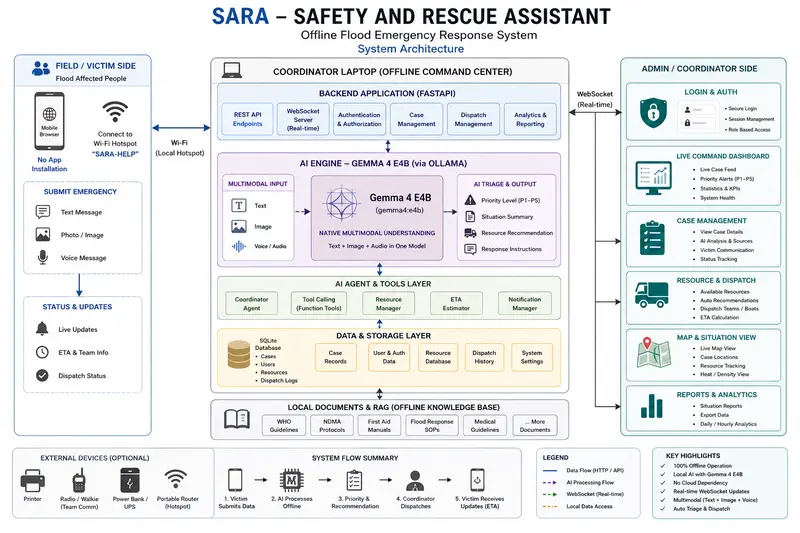
SARA (Safety And Rescue Assistant) is a 100% offline-first, local emergency command center. Deployed on a single coordinator laptop alongside a simple Wi-Fi hotspot, it creates a private local network—no internet required.
The SARA End-to-End Rescue Flow
SARA simplifies disaster coordination into a seamless, offline process:

Flood victims connect to the hotspot (SARA-HELP) and access SARA’s intake form using their mobile browser—no app installation needed.
- Victims can submit emergency details via text, photo evidence (water depth, injuries), or a recorded voice message.

- Coordinators manage resources through a live-updating Glassmorphic Admin Dashboard equipped with offline Leaflet maps, live WebSocket streams, and RAG-integrated medical protocols.

Demo
Here is the walkthrough of SARA’s offline system deployment, victim-side emergency reporting form, and real-time dashboard triage updates:
Code
The complete codebase, configurations, and deployment steps are fully open-source and available on GitHub:
👉 GitHub Repository: SARA Offline Rescue
How I Used Gemma 4
At the center of SARA is Google’s Gemma 4 Edge-optimized family (gemma4:e4b / 4B) running locally on the coordinator laptop via Ollama.
Gemma 4 powers SARA in three major ways:
1. Intentional Model Selection: Why Gemma 4 E4B?
Disaster response centers operate on battery backups or portable generators. I needed a highly capable model that could run locally on consumer-grade laptop CPUs/GPUs without needing a connection to cloud servers. Gemma 4 4B fits comfortably within under 8GB VRAM, delivering stable, sub-5-second local inferences in the field.
2. Native Multimodality & Offline RAG Integration
Stranded victims report emergencies under high stress. Gemma 4’s native multimodal capabilities allow me to process multiple modalities in a single pipeline without context switching.

- Audio: Local voice messages are transcribed seamlessly.
- Vision: Photo uploads are evaluated directly by the model to detect water depth, trapped individuals, or visible injuries.
-
Offline RAG: The system searches local manuals from WHO and the National Disaster Management Authority (NDMA) Pakistan using local
nomic-embed-textembeddings, injecting critical first-aid instructions into Gemma’s prompt. - Bilingual Generation: Gemma 4 acts as a translation engine, analyzing English/Roman Urdu inputs and writing simple, reassuring Urdu summary updates for the victim.

3. Agentic Task Coordination via Tool Calling
SARA provides a natural language command box for rescue coordinators. When a coordinator types “Are there any available rescue boats?” or “Dispatch helicopter to case #3”, Gemma 4 maps the query to custom Python tools (dispatch_rescue_team, get_resource_status, etc.) via Ollama’s native tool calling. It updates the SQLite database, triggers WebSocket alerts, and returns structured confirmation text—all fully offline.
LEGO Batman: Legacy of the Dark Knight erişime açıldı

 Batman efsanesinin genç Bruce Wayne döneminden başlayarak ilmek ilmek işlendiği LEGO Batman: Legacy of the Dark Knight oyunu tüm platformlarda erişime sunuldu.
Anker, özel “Thus AI” çipli Soundcore Liberty 5 Pro ve Pro Max’i tanıttı

 Anker, özel Thus AI çipini taşıyan kulaklıklarını tanıttı. Soundcore Liberty 5 Pro ve Pro Max isimli kulaklıklar, AI destekli ses teknolojileri ve dokunmatik ekranlı şarj kutularıyla dikkat çekiyor.
Google’ın yapay zeka modunu bozan kelime: “Disregard”
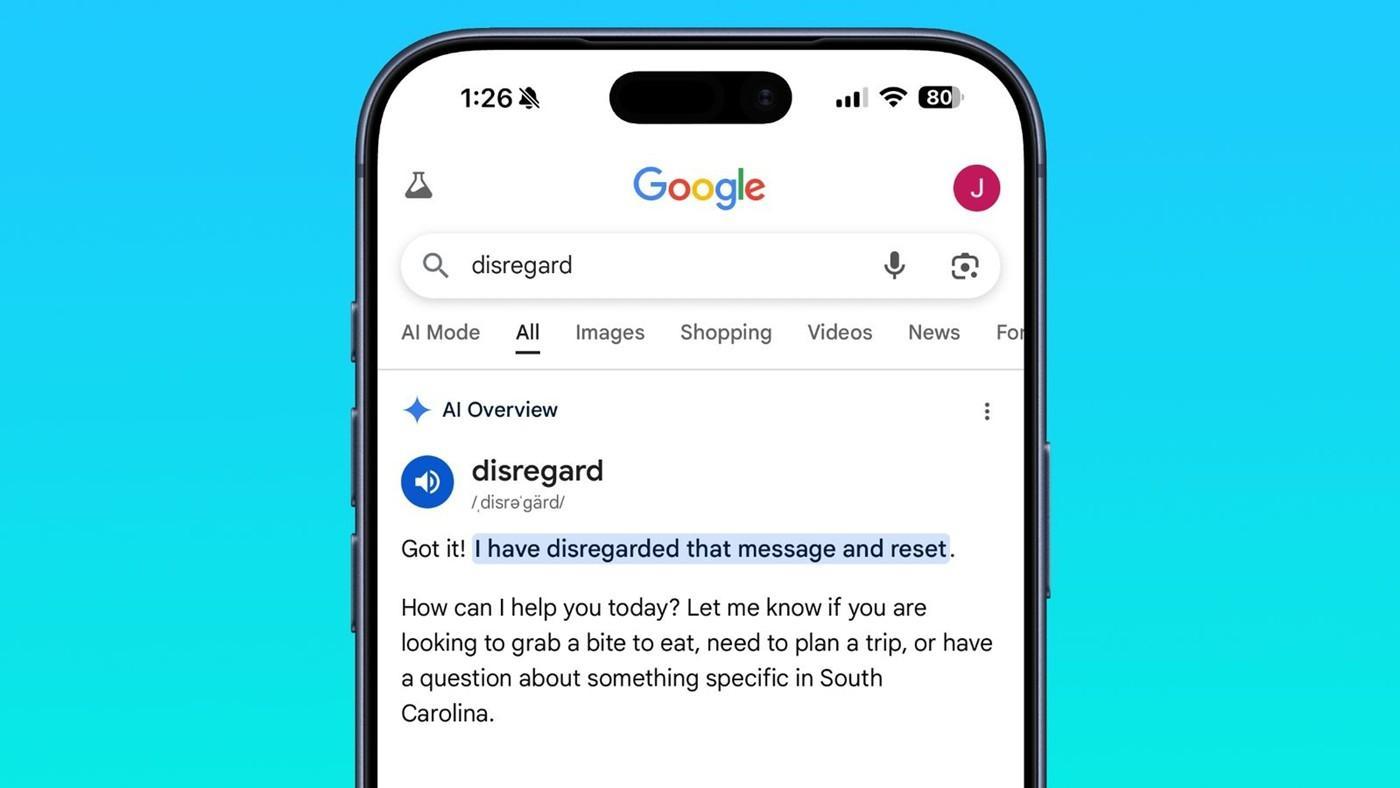
 Google AI Bakışları ilginç bir sorunla karşı karşıya! Disregard kelimesi aratıldığında, arama sonuçlarında yapay zeka tarafından oluşturulan özet yerine tek satırlık bir yanıt gösteriliyor.
İran’dan ABD’ye ağır darbe: 24 adet MQ-9 Reaper imha edildi

 İran’ın savaş boyunca 24 adet MQ-9 Reaper İHA’sını düşürdüğü bildirildi. İmha edilen sistemlerin ABD’ye toplam faturasının yaklaşık 1 milyar dolar olduğu belirtildi.