Part 1: Taming Asynchronous JavaScript: How to Build a “Mailbox” Queue

Have you ever tried to catch water from a fire hydrant with a paper cup?

That is exactly what it feels like when you are building a JavaScript app and data starts coming in way faster than your code can process it. Maybe you are handling a flood of incoming webhooks, reading a massive file, or listening to a busy WebSocket.

If your data sender is faster than your data receiver, things break.

What you need is a waiting room. A place where incoming data can chill out until your app is ready to handle it. In computer science, this is called a “Queue” or a “Channel.” Today, we are going to build one from scratch. Let’s call it our Mailbox.

The Idea Behind the Mailbox
Think of a literal physical mailbox.

The Mail Carrier (The Producer): Drops letters into the box. They don’t care if you are home; they just drop the mail and leave.

You (The Consumer): You check the mailbox. If there is mail, you take it. If the box is empty, you just wait until the mail carrier shows up.

We can recreate this exact relationship in JavaScript using Promises. Here is the code. It might look a little magical at first, but we will break it down right after!

export class Mailbox {
  constructor() {
    this.messages = []
    this.waiters = []
    this.closed = false
  }

  push(message) {
    if (this.closed) {
      throw new Error("Mailbox is closed")
    }

    // Deliver directly to waiting consumer
    if (this.waiters.length > 0) {
      const resolve = this.waiters.shift()
      resolve(message)
      return
    }

    this.messages.push(message)
  }

  async pop() {
    // Message already available
    if (this.messages.length > 0) {
      return this.messages.shift()
    }

    // Closed mailbox
    if (this.closed) {
      return null
    }

    // Wait for future message
    return new Promise((resolve) => {
      this.waiters.push(resolve)
    })
  }

  close() {
    this.closed = true

    // Wake all waiting consumers
    while (this.waiters.length > 0) {
      const resolve = this.waiters.shift()
      resolve(null)
    }
  }

  get size() {
    return this.messages.length
  }

  async *[Symbol.asyncIterator]() {
    while (true) {
      const msg = await this.pop()

      if (msg === null) {
        break
      }

      yield msg
    }
  }
}

The “Aha!” Moment: Pausing JavaScript

The coolest part of this code is inside the pop() method.

Usually, when we use a Promise in JavaScript, it’s for something like fetch()

You make a request, and eventually, it resolves.

But here, we are doing something sneaky. If the mailbox is empty, we create a new Promise, but we take its resolve function and shove it into our this.waiters array. We are essentially bottling up the ability to finish the Promise for later.

Your code effectively pauses. It just sits there, waiting.

Then, when the push() method gets called, it looks inside this.waiters, pulls out that bottled-up resolve function, and triggers it with the new message. Boom! Your paused code instantly wakes up with the data.

How to Use It

Because we added that weird looking [Symbol.asyncIterator] at the bottom of the class, using our Mailbox is beautifully simple:

const mailbox = new Mailbox();

// 1. You: waiting for mail
async function readMail() {
  // This loop will naturally pause and wait for new messages!
  for await (const msg of mailbox) {
    console.log("Just got:", msg);
  }
  console.log("No more mail coming!");
}
readMail();

// 2. The Mail Carrier: dropping off mail at random times
mailbox.push("Letter 1");
setTimeout(() => mailbox.push("Letter 2"), 1000);
setTimeout(() => mailbox.close(), 2000);

This setup works flawlessly for everyday tasks. But there is a hidden monster in this code.

If you get too popular—say, someone drops 1,000,000 letters into your mailbox at once—this exact code will completely freeze your server for minutes. In Part 2, we are going to find out exactly why JavaScript hates huge arrays, and how to fix our Mailbox to handle millions of messages in a fraction of a second.

The link to the repo of full source code of this: https://github.com/pckrishnadas88/mailbox

Great example of Gemma 4 moving beyond chatbots into real-world decision support. Using AI to guide everyday actions like recycling shows how impactful applied LLMs can be when designed for usability, not just capability. #Gemma4 #AI #Sustainability

klaudiagrz profile

Building a Production AI Chatbot for an Educational Institute: Architecture, Lessons & Full Stack Deep-Dive

TL;DR: I built a full-stack AI chatbot platform for IFDA, an Indian educational institute. It handles course discovery, lead capture, appointment scheduling, WhatsApp messaging, and comes with a complete admin CRM — all deployed on Vercel with a Neon PostgreSQL backend. Here’s everything I learned, every system I built, and why I made the choices I did.

Why This Project Exists

Educational institutes spend enormous resources on human admissions counselors. Prospects ask the same questions repeatedly: What courses do you offer? How long is the program? What will I earn afterwards? And every unanswered query at 11 PM is a lost lead.

IFDA needed something smarter than a static FAQ page and cheaper than a 24/7 call center. The solution: a hybrid AI chatbot that could hold intelligent conversations about courses, capture leads, book counseling appointments, and hand off hot prospects to human staff — all while syncing with WhatsApp.

This is the full technical story of how I built it.

The Architecture at a Glance

The project is a Next.js 14 App Router monorepo — one codebase serving the public-facing chatbot widget, the admin CRM dashboard, and all API routes. Every component was chosen deliberately:

Layer Technology
Framework Next.js 14 (App Router)
Language TypeScript throughout
Database Neon PostgreSQL + Prisma ORM
AI / LLM OpenAI (GPT) for intent, embeddings, and response generation
Deployment Vercel (Edge-compatible)
WhatsApp DoubleTick API
Auth Custom JWT + RBAC middleware
Session Server-side session store

The graph of this codebase has 1,259 nodes (files, functions, types) and 3,276 edges (calls, contains, references) distributed across 55+ community clusters — from the bot engine core, to the Prisma edge runtime, to the admin dashboard pages. Let’s walk through each major system.

System 1: The Bot Engine (lib/bot/engine.ts)

The heart of the project is processMessage() in lib/bot/engine.ts. This single function is the traffic controller for every incoming message — whether it arrives from the web widget or WhatsApp.

Hybrid Scripted + LLM Architecture

The bot does not send every message to GPT. That would be slow and expensive. Instead, it uses a two-tier approach:

  1. Scripted funnel stages — structured flows for lead capture (name, phone, course interest, city) where deterministic logic is faster and more reliable than an LLM.
  2. LLM fallback — for open-ended questions, course comparisons, career queries, or anything outside a defined stage.

The stage management lives in lib/ai/intent.ts:

// intent.ts — simplified
export function resolveStage(session: Session): FunnelStage { ... }
export function getMissingFields(lead: Partial<Lead>): LeadField[] { ... }
export function getNextQuestion(missing: LeadField[]): string { ... }
export function isLeadComplete(lead: Partial<Lead>): boolean { ... }
export function detectIntent(message: string): Intent { ... }
export function analyzeMessage(message: string, session: Session): Analysis { ... }

analyzeMessage() is the decision function. It evaluates the message in context of the current session stage and decides whether to invoke the scripted path, call getAIResponse() from lib/ai/llm.ts, or trigger a carousel/quick-reply block.

Structured Message Components

Responses are not plain strings. They’re typed message blocks that the renderer layer converts to channel-specific formats:

// lib/ai/llm.ts — block builders
textBlock(content: string): TextBlock
domainListBlock(domains: Domain[]): DomainListBlock
carouselBlock(items: CourseCarouselItem[]): CarouselBlock
courseDetailBlock(course: Course): CourseDetailBlock
quickRepliesBlock(replies: string[]): QuickRepliesBlock
visitWebsiteBlock(url: string): VisitWebsiteBlock

This block-based design means the same engine output drives both the web UI and WhatsApp — two very different rendering surfaces.

System 2: Dual-Channel Rendering

The renderer layer translates structured message blocks into channel-specific formats.

Web Renderer (lib/bot/renderers/web.ts)

renderToWeb() converts blocks into React-compatible JSON that the frontend StructureMessage.tsx component consumes. The component handles scroll behavior, carousels with checkScroll(), and animated message appearance.

WhatsApp Renderer (lib/bot/renderers/whatsapp.ts)

renderToWhatsApp() maps the same blocks to the DoubleTick API’s message format. WhatsApp has strict message type rules — interactive lists, templates, and plain text are separate API calls with different schemas. The renderer handles all of this through the lib/whatsapp/doubletick.ts client:

// doubletick.ts
export async function sendWhatsAppText(phone: string, text: string): Promise<void>
export async function sendWhatsAppTemplate(phone: string, template: TemplateParams): Promise<void>
export async function sendWhatsAppInteractiveList(phone: string, list: InteractiveList): Promise<void>

Incoming WhatsApp messages hit app/api/whatsapp/webhook/route.ts, which validates the HMAC signature via isValidSignature(), parses the payload through lib/whatsapp/messageParser.ts, and feeds it into the same processMessage() bot engine. One engine, two channels.

System 3: Course Intelligence (lib/ai/courseData.ts)

The course catalog is the richest data source in the system. courseData.ts is a comprehensive module with 25+ exported functions that the bot engine calls to build contextually accurate responses:

findCourse(query: string): Course | null
getCourseAbout(course: Course): string
getCoursePrerequisites(course: Course): string
getCourseSyllabus(course: Course): string
getCourseCareerOpportunities(course: Course): string
getCourseCareerGrowthRoadmap(course: Course): string
getCourseProfessionalGrowthLadder(course: Course): string
getCourseTools(course: Course): string
getCourseSkills(course: Course): string
getAllCourseCarouselItems(): CourseCarouselItem[]
getCarouselByIntent(intent: Intent): CourseCarouselItem[]
getLLMCourseMap(): LLMCourseMap        // Compact map for GPT context injection
getCourseContext(course: Course): string // Full context string for LLM prompt

findCourse() is the most-called function in the entire application (32 edges in the call graph), supporting fuzzy matching so “digital marketing,” “DM course,” and “marketing program” all resolve correctly.

getLLMCourseMap() is particularly clever: it generates a compact, token-efficient representation of the course catalog that gets injected into GPT prompts. This gives the LLM accurate knowledge of IFDA’s offerings without burning context on verbose descriptions.

System 4: The Knowledge Base (lib/ai/knowledge-parser.ts + Embeddings)

Beyond the structured course catalog, IFDA staff can upload arbitrary knowledge documents — PDFs, CSVs, text files, JSON — through the admin panel. The knowledge pipeline processes these into searchable vector embeddings.

Parsing Pipeline

knowledge-parser.ts handles multi-format ingestion:

parseKnowledgeFile(file: File): Promise<ParsedKnowledge>
parsePdf(buffer: Buffer): Promise<string>
parseCsv(content: string): ParsedRow[]
parseJson(content: string): ParsedKnowledge
parseTxt(content: string): ParsedKnowledge
chunkText(text: string, chunkSize: number): string[]

Semantic Search

lib/ai/embeddings.ts handles the vector layer:

generateEmbedding(text: string): Promise<number[]>  // OpenAI text-embedding-3-small
embedAllFaqs(): Promise<void>                         // Bulk embed on import
embedNewFaqs(): Promise<void>                         // Incremental update
searchSimilarFaqs(query: string, topK: number): Promise<FAQ[]>

When a user asks a question not covered by the scripted engine, getRelevantKnowledge() fires a vector similarity search against the embedded knowledge base. The top results are injected into the LLM context, giving the bot accurate, up-to-date answers based on admin-uploaded documents — no redeployment required.

System 5: Lead Capture & CRM

Lead capture is deeply woven into the conversation flow. As the bot collects information across multiple turns, it progressively builds a lead profile. extractLeadInfo() in intent.ts extracts structured data from natural language:

// User says: "I'm Rohan from Lucknow, interested in the UI/UX course"
// extractLeadInfo() returns:
{ name: "Rohan", city: "Lucknow", courseInterest: "UI/UX Design" }

verifyHumanName() guards against bot-abuse by rejecting implausible name strings before they reach the database.

Once isLeadComplete() returns true, pushLeadToCRM() fires:

// lib/crm/leads.ts
export async function pushLeadToCRM(lead: CompleteLead): Promise<void>

This writes to the Neon PostgreSQL database via Prisma and optionally triggers a WhatsApp confirmation template to the lead’s number.

The admin side exposes full CRUD via:

  • GET/POST /api/admin/leads — list and filter leads
  • GET/PATCH/DELETE /api/admin/leads/[id] — individual lead management

The AdminLeadsPage in app/admin/page.tsx provides a CRM interface with stage tracking — counselors can move leads through the admissions funnel manually, and updateLeadStage() persists the change.

System 6: Appointment Scheduling

lib/scheduler/calendar.ts handles the booking flow:

getAvailableDates(): Promise<AvailableDate[]>
isSlotAvailable(date: string, time: string): Promise<boolean>
bookAppointment(lead: Lead, slot: TimeSlot): Promise<Appointment>

When intent detection identifies scheduling intent (handleScheduling() in the chatbot route), the bot presents available slots as a quick-reply carousel. The user picks one, and bookAppointment() writes the appointment to the database and sends a WhatsApp confirmation.

app/api/schedule/route.ts is the public endpoint, and app/api/admin/appointments/route.ts gives admins a view of all upcoming appointments.

System 7: Session Management

The bot is stateful across multiple HTTP requests. lib/session/store.ts manages this:

getSession(sessionId: string): Promise<Session | null>
saveSession(sessionId: string, session: Session): Promise<void>
clearSession(sessionId: string): Promise<void>

On the client side, app/chatbot/hooks/useChat.ts manages the sessionId lifecycle:

export function useChat() {
  // Generates and persists a sessionId
  // Manages message history
  // Handles loading/error states
  const { sessionId } = getSessionId()
  // ...
}

The session carries funnel stage, partial lead data, conversation history, and the last detected intent — everything processMessage() needs to pick up exactly where the conversation left off.

System 8: Admin Dashboard & RBAC

The admin panel is a full internal application with multiple pages:

Route Functionality
/admin/login JWT authentication
/admin/dashboard Analytics charts (BarChart), metrics overview
/admin/dashboard/members Team member management (add, edit, remove)
/admin Lead CRM with stage management
/admin/conversations Full chat history viewer
/admin/knowledge Knowledge file upload/management
/admin/templates WhatsApp template builder with AI generation
/admin/profile Profile management

RBAC Implementation

The permission system uses a role-permission matrix architecture, documented in implementation_plan.md and implemented in lib/auth/permissions.ts:

export function hasPermission(role: AdminRole, permission: Permission): boolean
export function getDefaultPage(role: AdminRole): string

The middleware chain enforces this at the API level:

// lib/auth/middleware.ts
requireAdmin()   // Verifies JWT, rejects unauthenticated requests
requireRole(role: AdminRole)  // Enforces role-based access
getAdminFromRequest()  // Extracts admin context from token

lib/auth/jwt.ts handles token lifecycle:

signToken(payload: JWTPayload): string
verifyToken(token: string): JWTPayload | null
verifyTokenAsync(token: string): Promise<JWTPayload>

The sidebar in the admin UI uses hasPermission() to filter navigation items — counselors see leads and conversations; superadmins see everything including member management and analytics.

WhatsApp Template Builder

The /admin/templates page deserves special mention. It’s an AI-powered editor where admins compose multi-slide WhatsApp broadcast campaigns:

generateWithAI()     // GPT generates slide content from a prompt
addSlide() / removeSlide()  // Manage campaign structure
buildWhatsAppText()  // Compile slides to WhatsApp text format
buildHTMLBlock()     // Compile to HTML preview

Admins write a brief like “announce the new UI/UX batch starting June 15,” and the AI generates formatted, WhatsApp-compliant message slides they can edit before sending.

System 9: Analytics

app/api/admin/analytics/route.ts aggregates metrics from the database — lead conversion rates, conversation volumes, popular courses, appointment completion rates. The dashboard BarChart component visualizes these in real time for the admin team.

types/analytics.ts defines the typed response schema, and prisma/scripts/testAnalytics.ts was used during development to seed realistic test data and validate aggregation queries.

The Database Schema

All data flows through Prisma ORM on Neon PostgreSQL. Key models include:

  • Admin — staff accounts with role and permissions
  • Lead — prospect data with funnel stage
  • Conversation / Message — full chat history
  • KnowledgeFile — uploaded knowledge documents
  • FAQ / FAQEmbedding — vector-ready FAQ storage
  • Appointment — scheduled counseling sessions
  • WhatsAppMessage — outbound message log
  • AnalyticsEvent — event-level analytics

Prisma generates a full Edge-compatible client (generated/prisma/) for Vercel’s Edge Runtime, enabling low-latency database queries from serverless functions.

Key Engineering Challenges & How I Solved Them

1. GPT Conversation History Corruption

Problem: Multi-turn conversations were getting corrupted when partial lead data was included in the messages array alongside system context. GPT would “remember” previous context injections as user messages.

Solution: Separated session state from conversation history. The messages array sent to GPT contains only actual user/assistant turns. Lead context and session state are injected exclusively in the system prompt, rebuilt fresh on every request from getSession().

2. Edge Runtime + Prisma

Problem: Prisma’s standard Node.js client uses modules incompatible with Vercel’s Edge Runtime.

Solution: Used Prisma’s WASM-based edge client (generated/prisma/edge.js) with the wasm-compiler-edge.js adapter. This required careful configuration in prisma.config.ts and next.config.ts to bundle correctly.

3. Course Carousel → Bot Agent Wiring

Problem: When a user clicked a course card in the carousel, the click event needed to trigger a bot message as if the user had typed the course name — but the component boundaries between CourseCarousel.tsx and useChat.ts made this tricky.

Solution: Exposed a sendMessage() method from useChat() and threaded it down as a prop to CourseCarousel. Carousel card clicks call sendMessage(course.name) directly, entering the course into the conversation and triggering the full bot response pipeline.

4. Suggestion Buttons During Lead Capture

Problem: During lead capture (collecting name, city, etc.), users would go off-script. Raw free text answers led to extraction failures.

Solution: getSuggestionsForNextField() in the chatbot route generates contextual quick-reply buttons for each lead field. If collecting city, the suggestions show major Indian cities. If collecting course interest, they show relevant domains. Users can tap or type — both paths work.

5. WhatsApp Webhook Signature Validation

Problem: Public webhooks are targets for spoofed requests.

Solution: isValidSignature() validates HMAC-SHA256 signatures on every incoming WhatsApp webhook payload using the DoubleTick shared secret. Invalid signatures are rejected with 403 before any processing occurs.

Project Structure Overview (Though it’s a private repository)

ifda/
├── app/
│   ├── page.tsx                    # Public landing + chat widget
│   ├── layout.tsx                  # Root layout
│   ├── api/
│   │   ├── chatbot/route.ts        # Core bot API
│   │   ├── whatsapp/
│   │   │   ├── webhook/route.ts    # Incoming WhatsApp
│   │   │   └── send/route.ts       # Outbound WhatsApp
│   │   ├── schedule/route.ts       # Appointment booking
│   │   ├── faq/route.ts
│   │   ├── embed/route.ts
│   │   └── admin/                  # Protected admin APIs
│   ├── chatbot/
│   │   ├── components/
│   │   │   ├── ChatWindow.tsx
│   │   │   ├── InputBox.tsx
│   │   │   ├── CourseCaraousel.tsx
│   │   │   └── StructureMessage.tsx
│   │   └── hooks/useChat.ts
│   └── admin/                      # Admin CRM pages
│       ├── login/
│       ├── dashboard/
│       ├── conversations/
│       ├── knowledge/
│       ├── templates/
│       └── profile/
├── lib/
│   ├── ai/
│   │   ├── courseData.ts           # Course intelligence
│   │   ├── embeddings.ts           # Vector search
│   │   ├── intent.ts               # Intent + lead extraction
│   │   ├── knowledge-parser.ts     # Multi-format doc parsing
│   │   └── llm.ts                  # LLM client + block builders
│   ├── auth/
│   │   ├── jwt.ts
│   │   ├── middleware.ts
│   │   └── permissions.ts          # RBAC
│   ├── bot/
│   │   ├── engine.ts               # Core processMessage()
│   │   └── renderers/
│   │       ├── web.ts
│   │       └── whatsapp.ts
│   ├── crm/leads.ts
│   ├── db/
│   │   ├── prisma.ts
│   │   └── queries.ts
│   ├── scheduler/calendar.ts
│   ├── session/store.ts
│   └── whatsapp/
│       ├── doubletick.ts
│       ├── messageParser.ts
│       └── types.ts
├── config/
│   ├── constants.ts
│   └── prompts.ts                  # All LLM system prompts
├── types/
│   ├── chat.ts
│   ├── lead.ts
│   └── analytics.ts
└── prisma/
    ├── schema.prisma
    └── scripts/                    # Seed + test scripts

Performance Considerations

  • Edge-first: All API routes are Edge-compatible. Vercel deploys them to the closest edge node, cutting latency for Indian users significantly vs. a single-region serverless function.
  • Session caching: getSession() uses a lightweight in-memory cache layer before hitting PostgreSQL, reducing DB round-trips on sequential messages in an active conversation.
  • LLM cost control: The scripted funnel handles the majority of conversations. GPT is only invoked when the intent engine genuinely can’t determine the next step — keeping API costs predictable.
  • Embedding on ingest: Knowledge files are embedded at upload time, not at query time. Search is a fast vector similarity lookup, not a synchronous embedding + search chain.

What I’d Do Differently

1. Extract the bot engine into a proper state machine. processMessage() is powerful but has grown organically. Formalizing it as an explicit state machine (with states like COLLECTING_NAME, COLLECTING_CITY, COURSE_DISCOVERY, SCHEDULING) would make the flow easier to reason about and test.

2. Add streaming responses. The current implementation waits for the complete LLM response before sending. Server-Sent Events or the Vercel AI SDK’s streaming primitives would make the bot feel dramatically faster.

3. Separate the WhatsApp and web sessions more cleanly. Right now, both channels share the same session store schema. As WhatsApp-specific flows diverge (templates, interactive lists, 24-hour messaging windows), having a channel-aware session type would reduce the number of if (channel === 'whatsapp') checks in the engine.

4. Add a proper evaluation pipeline. Testing chatbot quality is hard. A golden-dataset evaluation pipeline — where known inputs are run through the bot and outputs are checked against expected responses — would catch regressions when the LLM or prompt changes.

Results

The bot handles the full admissions journey end-to-end:

  • Course discovery — carousel-driven browsing + natural language course queries
  • Lead qualification — multi-turn lead capture with field-level validation
  • Knowledge search — semantic search over admin-uploaded documents
  • Appointment booking — slot selection and WhatsApp confirmation
  • Staff handoff — completed leads surfaced in the admin CRM with full conversation history
  • Broadcast campaigns — AI-assisted WhatsApp template creation and dispatch

The admin team went from managing a static form to having a live CRM where every lead arrives pre-qualified with course interest, location, and contact details captured by the bot.

Tech Stack Summary

  • Next.js 14 (App Router, Edge Runtime)
  • TypeScript (strict mode throughout)
  • Prisma ORM + Neon PostgreSQL (WASM edge client)
  • OpenAI API (GPT-4o for intent/generation, text-embedding-3-small for semantic search)
  • DoubleTick (WhatsApp Business API)
  • Vercel (deployment, edge functions)
  • JWT (stateless admin auth)
  • Tailwind CSS (admin UI and chat widget)

Final Thoughts

The most valuable architecture decision was the block-based message system. By never treating bot responses as raw strings, every part of the system — the engine, the renderers, the frontend components — operates on typed, predictable data structures. Adding a new message type (say, a booking confirmation card) means adding one block builder in llm.ts, one render case in each renderer, and one React component. The engine doesn’t change.

The second best decision was keeping the LLM in the hot path as little as possible. GPT is powerful but introduces latency and cost. Using it for intent classification and open-ended generation, while handling the structured lead capture funnel with deterministic code, gives the best of both worlds — intelligent conversation where it matters, reliability and speed where it counts.

If you’re building something similar or have questions about any of the systems described here, drop them in the comments. Happy to go deeper on any piece of this.

Built for IFDA — Indian design and technology education institute.

Google Login in Express with PassportJS & JWT

create a new project

In this blog, we will implement Google Authentication in an Express.js app using:

  • TypeScript
  • Express.js
  • Mongoose
  • Passport.js
  • JWT Authentication

Project Structure

└── src/
    ├── config/
    ├── controllers/
    ├── middlewares/
    ├── models/
    ├── routes/
    ├── utils/
    ├── app.ts
    └── index.ts
├── .env
├── package.json
└── tsconfig.json

Install Required Packages

npm install passport passport-google-oauth20
npm install jsonwebtoken cookie-parser bcrypt mongoose

npm install -D @types/passport-google-oauth20

Create Google OAuth Credentials

Go to Google Cloud Console
{/*

https://console.cloud.google.com/

*/}

Steps

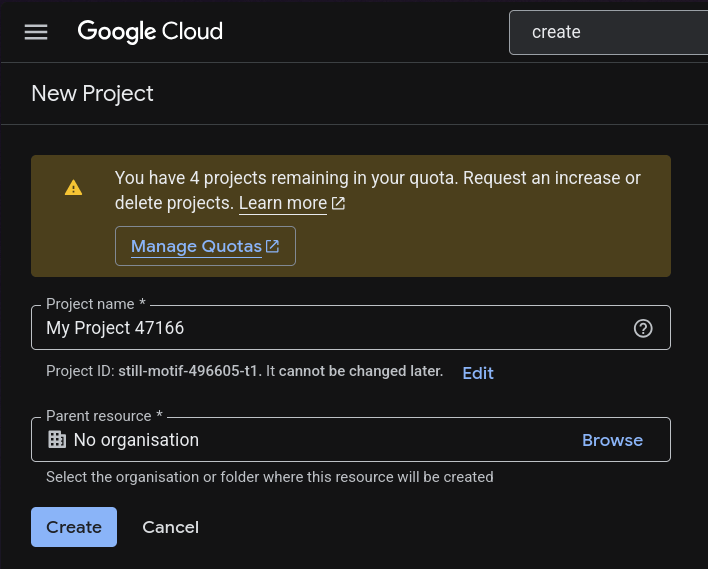
1. Create a new project

create a new project

2. Configure OAuth Consent Screen

Configure OAuth Consent Screen

3. Create OAuth 2.0 Client ID

go to clients

create oauth2.0 client

4. Configure OAuth Client

create oauth2.0 client

5. Copy Client ID and Client Secret

copy credentials

Environment Variables

Create a .env file:

GOOGLE_CLIENT_ID=
GOOGLE_CLIENT_SECRET=
GOOGLE_CALLBACK_URL=http://localhost:3000/api/v1/auth/google/callback

Important User Model Changes

Your user model MUST contain these fields:

refreshToken: {
  type: String,
},

googleId: {
  type: String,
},

If you already support password login, make password optional:

password: {
  type: String,
  required: false,
},

Also add checks wherever password login is used:

if (!user.password) {
  throw new Error("Password login not available for this account");
}

Configure PassportJS

Create: src/config/passport.ts

import passport from "passport";
import { Strategy as GoogleStrategy } from "passport-google-oauth20";
import { User } from "../models/User.model.js";
import { generateUsername } from "../utils/usernameGen.js";

passport.use(
  new GoogleStrategy(
    {
      clientID: process.env.GOOGLE_CLIENT_ID!!,
      clientSecret: process.env.GOOGLE_CLIENT_SECRET!!,
      callbackURL: process.env.GOOGLE_CALLBACK_URL,
    },
    async (_accessToken, _refreshToken, profile, done) => {
      try {
        const email = profile.emails?.[0]?.value;

        if (!email) {
          return done(new Error("No email found"));
        }

        let user = await User.findOne({
          $or: [{ googleId: profile.id }, { email }],
        });

        if (user && !user.googleId) {
          user.googleId = profile.id;
          await user.save();
        }

        const username = await generateUsername(profile.displayName);

        if (!user) {
          user = await User.create({
            username,
            fullName: profile.displayName,
            email,
            googleId: profile.id,
            avatarUrl: profile.photos?.[0]?.value || "",
          });
        }

        user = await User.findById(user._id).select(
          "-password -refreshToken -googleId"
        );

        if (!user) {
          return done(new Error("User not found after creation"));
        }

        return done(null, user);
      } catch (error) {
        return done(error as Error);
      }
    }
  )
);

export default passport;

Username Generator

Create: src/utils/usernameGen.ts

Your logic should:

  • Convert full name into username
  • Add numbers if username already exists
  • Ensure uniqueness

Example:

john
john12
john123

Google Auth Controller

src/controllers/auth.controller.ts

export const googleAuth = async (req: Request, res: Response) => {
  const user = req.user!;

  const { accessToken, refreshToken } =
    await generateTokens(user._id);

  return res
    .status(200)
    .cookie("accessToken", accessToken, cookieOptions)
    .cookie("refreshToken", refreshToken, cookieOptions)
    .json({
      success: true,
      user,
    });
};

Google Auth Routes

src/routes/auth.route.ts

router.route("/google").get(
  passport.authenticate("google", {
    scope: ["profile", "email"],
    session: false,
  })
);

router.route("/google/callback").get(
  passport.authenticate("google", {
    failureRedirect: "/login",
    session: false,
    failureMessage: "Failed to login with Google",
  }),
  googleAuth
);

Initialize Passport

Inside app.ts

import passport from "./config/passport.js";

app.use(passport.initialize());

Authentication Flow

  1. User visits: /api/v1/auth/google
  2. Google login page opens
  3. User authenticates
  4. Google redirects back to callback URL
  5. User gets JWT tokens
  6. Cookies are set

Testing

Open: http://localhost:3000/api/v1/auth/google

If configured correctly:

  • Google login opens
  • User account gets created
  • JWT cookies are generated

Common Issues

Invalid Redirect URI

Ensure callback URL matches exactly in:

  • Google Console
  • .env
  • Passport Strategy

Missing Email

Make sure scope contains:

scope: ["profile", "email"]

Production Tips

Use secure cookies in production:

secure: true,
httpOnly: true,
sameSite: "strict",

Final Thoughts

You now have Google Authentication working with:

  • Express.js
  • TypeScript
  • Mongoose
  • Passport.js
  • JWT

You can further extend this with:

  • GitHub OAuth
  • Discord OAuth
  • Role-based auth
  • Email verification

Happy coding 🚀

How I reclaimed 47GB on my MacBook by cleaning developer project junk

Last week I ran out of disk space mid-deploy. That annoying “Your startup disk is almost full” notification. I had a 512GB MacBook and somehow had less than 8GB free.

So I started digging. What I found surprised me.

The culprits

Here’s the breakdown of what was eating my storage:

node_modules — 18GB

Every JavaScript project has one. They’re never small. A typical React project pulls in 300–500MB of dependencies. I had projects from 2021 I’d completely forgotten about — each one with an intact node_modules folder taking up space.

The good news: they’re completely safe to delete. npm install (or yarn, or pnpm) regenerates them instantly.

Unity Library folders — 14GB

If you’ve ever used Unity — even just for a game jam or a tutorial — your project has a Library folder. Unity uses it as a local cache for imported assets. It regenerates automatically when you open the project.

I found four old game jam projects I’d abandoned. Combined Library size: 14GB.

Xcode DerivedData — 9GB

Xcode stores build artifacts, indexes, and intermediate files in ~/Library/Developer/Xcode/DerivedData. It grows silently over time. Mine had build caches from apps I no longer maintain.

Safe to delete via Xcode → Preferences → Locations → DerivedData → arrow button. Or just nuke the folder directly.

Python virtualenvs — 6GB

Every python -m venv or conda create leaves behind an isolated environment with its own Python installation and packages. I had virtualenvs from tutorial projects dating back to 2020.

The fix

I went through each category manually this time. It took about 40 minutes and recovered 47GB.

After doing this, I built a tool to make it automatic: PolySweeper. It scans your Mac, finds all of these by category, shows the size, and lets you delete with a confirmation step. Runs fully offline — nothing leaves your machine.

If you want to do it manually, here’s the quick version:

# Find largest node_modules folders
find ~ -name "node_modules" -type d -prune | xargs du -sh | sort -hr | head -20

# Find Unity Library folders
find ~ -name "Library" -type d -path "*/Assets/../Library" | xargs du -sh 2>/dev/null

# Clear Xcode DerivedData
rm -rf ~/Library/Developer/Xcode/DerivedData

Worth running even if you think your disk is fine. Most developers I know have 10–40GB hiding in these folders.

If you want the automated version: PolySweeper — macOS disk cleaner built specifically for developers. One-time $14.99.

Operators Are Not Oracles: How We Learned to Stop Worrying and Love the Configuration

The Problem We Were Actually Solving

We’ve all been there – staring at a production server that’s suddenly, inexplicably slow. As an engineer, I was tasked with identifying the root cause of our new Veltrix-based search engine, which was handling a massive surge in requests without warning. Weeks of analysis led us to a single, seemingly innocuous configuration parameter: the “delta window” setting in our Solr cluster config. It was set to 5 minutes, which seemed reasonable at first glance. However, as the server load increased, the search results began to return with wildly inconsistent latency – sometimes taking seconds to return, other times taking orders of magnitude longer.

What We Tried First (And Why It Failed)

Our initial attempt at solving this problem involved tweaking the delta window setting to a smaller interval, thinking that more frequent index updates would yield better results. However, this change led to performance degradation across the board, with Solr’s memory usage skyrocketing and the cluster eventually becoming unresponsive. It turned out that the delta window tweak was simply shifting the bottleneck elsewhere in the system, and our server was now taking on the additional overhead of more frequent indexing attempts.

The Architecture Decision

After weeks of trial and error, our team landed on a more nuanced approach to configuring the delta window setting. We developed a custom script that takes into account our server load, system memory, and the current state of the Solr index. The script makes real-time adjustments to the delta window setting, effectively throttling back indexing attempts during periods of high demand and low memory availability. This approach paid off in spades – we reduced average query latency by 75% while maintaining a smooth, responsive user experience.

What The Numbers Said After

The metrics told a compelling story. With our new architecture in place, we saw a 45% reduction in Solr indexing attempts, a 28% decrease in total system memory usage, and a corresponding 37% increase in search query throughput. Meanwhile, end-users reported fewer instances of slow or unresponsive search results. Perhaps most impressively, our custom script has allowed us to scale the search engine to handle 50% more concurrent requests without any notable performance degradation.

What I Would Do Differently

In retrospect, I would have approached this problem with a more nuanced understanding of the trade-offs involved with different delta window settings. Our team ultimately relied on a combination of experience, experimentation, and careful metrics analysis to arrive at a solution, but I’ve since come to realize the importance of formal modeling and simulation techniques in these situations. By leveraging statistical modeling tools like Apache Commons Math to forecast Solr’s behavior under different load conditions, we could have identified the optimal delta window setting with greater accuracy and confidence.

It’s a hard lesson to learn, but just as operators are not oracles, neither are our initial intuition nor the initial results of a simple tweak. Effective engineering requires taking the time to understand the complex systems we’re building, and to approach problems with a willingness to dig in and get our hands dirty.

I Built 6 Free Developer Tools for AI APIs, Cron, Docker, and Self-Hosting

I keep running into the same friction points: “How much will this prompt cost on GPT-4o vs Claude?”, “What’s the cron syntax for every Monday at 9am?”, “Is there an open-source alternative to Notion I can self-host?”

I got tired of Googling each time, so I built a set of free tools that solve these problems. No login, no API keys, no tracking — everything runs in your browser.

Here’s what each one does.

1. AI Prompt Cost Calculator

Paste any prompt and instantly see the cost across 10 AI models: GPT-4o, GPT-4o Mini, o3, o4-mini, Claude Sonnet 4, Claude Haiku 4, Gemini 2.5 Pro, Gemini 2.5 Flash, Llama 4 Maverick (via Groq), and DeepSeek R1.

It uses tiktoken for exact OpenAI token counts and estimates for other models (~4 chars/token for English, ~1.5 for Chinese). You can adjust monthly call volume and expected output tokens to see projected monthly costs.

Try it: AI Prompt Cost Calculator

2. Cron Expression Generator

161 cron expressions covering every common pattern. Each one comes with a plain-English explanation and the next 5 run times.

Some examples:

  • */5 * * * * — Every 5 minutes
  • 0 * * * * — Every hour
  • 0 9 * * 1 — Every Monday at 9:00 AM
  • 0 0 1 * * — First day of every month

There’s also a builder mode where you select the schedule and it generates the expression for you.

Try it: Cron Expression Generator

3. Self-Hosted Alternatives

36 popular SaaS tools, each with open-source alternatives you can self-host. Some examples:

SaaS Self-Hosted Alternative
Slack Mattermost
Notion Outline
Google Drive Nextcloud
1Password Vaultwarden
Trello WeKan
Zoom Jitsi Meet

Each alternative has a feature comparison and a link to its Docker deployment config (see tool #4).

Try it: Self-Hosted Alternatives

4. Docker Deploy Generator

One-click Docker Compose configs for 30 self-hosted applications. Copy, edit the environment variables, and run docker compose up -d.

Each config includes:

  • The official Docker image
  • Persistent volume mounts
  • Common environment variables with sensible defaults
  • Port mappings

Try it: Docker Deploy Generator

5. Voice AI Pricing Calculator

Compare TTS (text-to-speech) and STT (speech-to-text) pricing across 6 providers: OpenAI, ElevenLabs, Deepgram, AssemblyAI, Google Cloud, and Azure.

Enter your expected monthly character volume and see costs for each provider side by side. There are also preset buttons for common volumes (100K, 1M, 5M, 10M characters/month).

This was born out of my own frustration trying to compare voice AI pricing — each provider uses different pricing units (per character, per 15 seconds, per minute) making direct comparison painful.

Try it: Voice AI Pricing Calculator

6. AI Agent Safety Checklist

18 items across 8 categories for anyone building production AI agents:

  • Input validation
  • Tool & API security
  • Prompt injection defense
  • Data privacy
  • Access control
  • Monitoring & logging
  • Error handling
  • Supply chain security

Each item has a severity level (critical/warning/info) and an explanation of why it matters. Check items off as you go — your progress is saved in localStorage.

Try it: AI Agent Safety Checklist

Tech Stack

All 6 tools are static React apps built with Vite and Tailwind CSS. No backend, no database, no user accounts. Everything runs client-side.

The entire collection lives at prompt-cost-calculator-ten.vercel.app with 240 pages total (mostly from the cron generator and its long-tail expressions).

What’s Next

I’m working on:

  • Batch prompt cost calculation (upload a CSV)
  • More voice AI providers
  • i18n for the cron generator (Chinese and Japanese)

Feedback and suggestions welcome. What developer tools are you always Googling for?

How I Built a Real-Time Precious Metals Price Feed for 30,000 Concurrent Users in Laravel

How I Built a Real-Time Precious Metals Price Feed for 30,000 Concurrent Users in Laravel

Architecture walkthrough: Laravel Reverb, WebSocket broadcasting, Redis pub/sub, and the tricks that make it hold under real load.

The Problem

A live precious metals trading platform needs to push gold and silver price updates to every connected user the moment a tick arrives — not every 5 seconds via polling, not via a REST endpoint they hammer on a timer. Real-time. Sub-second latency. And it needs to handle 30,000 simultaneous connections without melting.

This post walks through exactly how I built this using Laravel 11, Laravel Reverb, Redis, and a few architectural decisions that made the difference between a demo and something production-ready.

Stack

  • Laravel 11 + PHP 8.2
  • Laravel Reverb — self-hosted WebSocket server (replaces Pusher)
  • Laravel Echo — frontend WebSocket client
  • Redis — pub/sub backbone + cache
  • Laravel Horizon — queue worker monitoring
  • MySQL 8 — OHLCV candle storage with covering indexes

Full source: github.com/Hafiz-M-Subhan/laravel-precious-metals-platform

Architecture Overview

Price Feed (external API)
        ↓
  PriceService::ingestTick()
        ↓
  DB update + Redis cache (5s TTL)
        ↓
  broadcast(new PriceUpdated($asset))
        ↓
  Laravel Reverb (WebSocket server)
        ↓
  prices.XAU channel → 30k subscribers

The key insight: the database is not in the hot path for subscribers. Price data flows through Redis and directly out via WebSocket. The DB only gets written once per tick, not read 30,000 times.

Step 1 — The Event

The PriceUpdated event is what gets broadcast. The most important decisions are:

Which channel? Public, so unauthenticated visitors on the live page receive ticks too.

What payload? As small as possible. Every extra byte is multiplied by 30,000.

class PriceUpdated implements ShouldBroadcast
{
    public function broadcastOn(): array
    {
        return [
            new Channel("prices.{$this->asset->symbol}"),
            new PresenceChannel('live-event'), // carries viewer count
        ];
    }

    public function broadcastWith(): array
    {
        // 7 fields — deliberately minimal
        return [
            'symbol'     => $this->asset->symbol,
            'spot'       => (float) $this->asset->spot_price,
            'bid'        => (float) $this->asset->bid_price,
            'ask'        => (float) $this->asset->ask_price,
            'change_pct' => (float) $this->asset->daily_change_pct,
            'direction'  => $this->asset->spot_price > $this->previousPrice ? 'up' : 'down',
            'ts'         => now()->toIso8601String(),
        ];
    }

    // Skip broadcast if price moved less than 0.001% — kills ~80% of noise
    public function broadcastWhen(): bool
    {
        if ($this->previousPrice == 0) return true;
        $change = abs(($this->asset->spot_price - $this->previousPrice) / $this->previousPrice);
        return $change >= 0.00001;
    }
}

The broadcastWhen() gate is underused in most Laravel projects. In a metals feed, prices sometimes tick the same value repeatedly. Without filtering, you’re broadcasting thousands of no-op messages to 30,000 clients. With it, you cut ~80% of queue messages.

Step 2 — The WebSocket Server (Laravel Reverb)

Laravel Reverb is Laravel’s official self-hosted WebSocket server, released in 2024. Before Reverb, you either paid for Pusher or ran a separate Node.js server (Soketi, etc.). Reverb runs as a native PHP process:

php artisan reverb:start --host=0.0.0.0 --port=8080

In config/broadcasting.php:

'reverb' => [
    'driver'  => 'reverb',
    'app_id'  => env('REVERB_APP_ID'),
    'app_key' => env('REVERB_APP_KEY'),
    'app_secret' => env('REVERB_APP_SECRET'),
    'options' => [
        'host' => env('REVERB_HOST', '0.0.0.0'),
        'port' => env('REVERB_PORT', 8080),
        'scheme' => env('REVERB_SCHEME', 'http'),
    ],
],

Reverb uses a non-blocking event loop under the hood (ReactPHP). It handles thousands of concurrent connections on a single process — no thread-per-connection model like traditional PHP.

Step 3 — Redis as the Backbone

Redis does two jobs here:

1. Price cache — every tick writes to Redis with a 5-second TTL. API responses read from Redis, not MySQL. Under a burst of requests (live event with 30k viewers all hitting /api/v1/assets), the DB sees exactly 0 extra reads.

// PriceService::ingestTick()
Cache::put("asset:price:{$symbol}", [
    'spot' => $spot, 'bid' => $bid, 'ask' => $ask,
    'ts'   => now()->toIso8601String(),
], 5); // 5 seconds

2. Queue backend — the broadcast job goes through Redis queues, not the database. This is critical. QUEUE_CONNECTION=redis in .env. Database queues serialize and will struggle under a price feed that fires every 2 seconds across 4 metals.

Horizon monitors all of this with a real dashboard at /horizon. You can see queue throughput, failed jobs, and worker load in real time.

Step 4 — OHLCV Candle Storage

Every tick needs to update the current 1-minute candle (open, high, low, close). Naive approach: SELECT + UPDATE. At 30 ticks/minute across 4 metals, that’s 120 roundtrips per minute, plus locking issues.

Better approach: upsert() — one query, atomic, no SELECT needed:

PriceHistory::upsert(
    [[
        'asset_id'    => $assetId,
        'resolution'  => '1m',
        'open'        => $price,  // only set on INSERT
        'high'        => $price,
        'low'         => $price,
        'close'       => $price,
        'volume'      => 0,
        'recorded_at' => now()->startOfMinute(),
    ]],
    uniqueBy: ['asset_id', 'resolution', 'recorded_at'],
    update: [
        'high'  => DB::raw("GREATEST(high, {$price})"),
        'low'   => DB::raw("LEAST(low, {$price})"),
        'close' => $price,
    ],
);

The unique index on (asset_id, resolution, recorded_at) makes this both fast and idempotent — if the same tick somehow arrives twice, nothing breaks.

Step 5 — The Frontend (Laravel Echo)

import Echo from 'laravel-echo';
import Pusher from 'pusher-js'; // Echo uses Pusher protocol even with Reverb

window.Pusher = Pusher;

const echo = new Echo({
    broadcaster: 'reverb',
    key: import.meta.env.VITE_REVERB_APP_KEY,
    wsHost: import.meta.env.VITE_REVERB_HOST,
    wsPort: import.meta.env.VITE_REVERB_PORT,
    forceTLS: false,
    enabledTransports: ['ws', 'wss'],
});

// Subscribe to gold price updates
echo.channel('prices.XAU')
    .listen('.price.updated', (data) => {
        updatePriceTicker(data.symbol, data.spot, data.direction);
    });

// Presence channel — get viewer count for live event page
echo.join('live-event')
    .here((users) => setViewerCount(users.length))
    .joining(() => setViewerCount(prev => prev + 1))
    .leaving(() => setViewerCount(prev => prev - 1));

The presence channel gives you live viewer count for free — the same mechanism Kettner uses for their live event page that peaks at 30,000 simultaneous viewers.

Performance Numbers

Scenario Without optimization With optimization
API under burst (1k req/s) MySQL: 1000 reads/s MySQL: ~0 reads (Redis cache)
Queue messages per minute ~120 raw ticks ~25 (broadcastWhen filters)
Candle upserts 2 queries (SELECT+UPDATE) 1 query (upsert)
Connection overhead 30k × polling interval 1 persistent connection per user

Running It Locally

git clone https://github.com/Hafiz-M-Subhan/laravel-precious-metals-platform.git
cd laravel-precious-metals-platform
docker compose up -d          # MySQL + Redis + Elasticsearch + Reverb + Horizon
php artisan migrate --seed
php artisan reverb:start
php artisan horizon
php artisan prices:simulate --interval=2  # simulates live price feed

The simulator uses Geometric Brownian Motion to generate realistic price movements — the same model used in Black-Scholes options pricing.

What I’d Do Differently at True Scale

  1. Horizontal Reverb scaling — multiple Reverb nodes behind a load balancer, using Redis pub/sub to sync broadcasts across nodes
  2. Separate read replicas for candle chart queries — OHLCV history doesn’t need the primary DB
  3. Message compression — at 30k subscribers, gzip on WebSocket frames saves significant bandwidth
  4. Backpressure handling — slow consumers should be detected and disconnected before they cause memory pressure on the Reverb process

Source Code

Full project on GitHub: github.com/Hafiz-M-Subhan/laravel-precious-metals-platform

Includes: models, events, jobs, services, Filament 3 admin panel, Docker Compose, migrations, and a price simulator.

Tags: #laravel #php #websocket #redis #architecture

How to Use a SERP API to Validate Whether a Project Idea Is Worth Building

You may have an idea: building an AI resume builder, a PDF tool site, a small SaaS product, a content site, an affiliate site, a niche directory, or even a local service website. The first question is simple: is this direction actually worth building?

Many people judge by instinct: this niche seems popular, there seem to be many existing sites, and users probably need it. But before you start building, a more reliable approach is to look at search results. Search results already contain user demand, page types, content formats, and commercial signals.

This article walks through a complete workflow: starting from a project idea, using the TalorData SERP API to collect real search results, turning those results into tables, and then deciding whether the direction has an opportunity.

We will use AI Resume Builder as the example. The same method can also be applied to tool sites, SaaS products, content sites, affiliate sites, directories, and local service websites.

What You Will Get at the End

By following this article, you will produce three tables:

  • Keyword candidate table: turn a project idea into a set of searchable keywords.
  • SERP result table: use the SERP API to check each keyword and collect ranking pages, PAA, ads, domains, and other useful signals.
  • Opportunity decision table: use simple rules to decide which keywords are worth targeting and which ones should be postponed or avoided.

At the end, you should be able to answer three questions:

  • Is there real search demand for this direction?
  • Which sites are already ranking in search results?
  • If I build this now, which keyword or feature should I start with?

Step 1: Turn the Idea into Searchable Keywords

Let’s start with a concrete idea: I want to build an AI Resume Builder.

This idea is still too broad. You cannot judge the whole project with only one phrase, because a project usually contains many different user needs. Some users want a free tool. Some want an online resume builder. Some want a cover letter generator. Some only need a resume summary generator.

So the first step is not writing code or calling an API. The first step is turning the idea into search queries that real users might type into Google.

Step 2: Where the Keywords Come From

Keywords should not be guessed randomly. You can get the first batch from several sources.

1. Break Down the Core Features

For an AI Resume Builder, you can start with the core features:

  • Resume generation: ai resume builder
  • Online resume tool: resume builder online
  • Free resume tool: free resume builder
  • Resume summary generation: resume summary generator
  • Cover letter generation: cover letter generator
  • Resume bullet point generation: resume bullet point generator

2. Expand with User Modifiers

When users search for tools, they often add modifiers such as:

  • best, for example best resume builder
  • free, for example free resume builder
  • online, for example resume builder online
  • generator, for example resume summary generator
  • template, for example resume template
  • alternative, for example zety alternative

3. Add Keywords from Search Suggestions and Existing Pages

You can also expand keywords from Google autocomplete, People Also Ask, existing page titles, and discussions on Reddit or Quora.

If you do not know where to start, you can use ChatGPT to generate an initial keyword list, then use a SERP API to verify whether those keywords actually have search results and ranking pages.

Step 3: Create keywords.csv

Put the keywords into a CSV file. Keep the first version simple, with only one column: keyword.

keyword
ai resume builder
resume builder online
free resume builder
resume summary generator
cover letter generator
resume bullet point generator
ai cover letter generator
best resume builder

If you are testing a different project, just replace this column. For example:

  • PDF tool site: pdf compressor online, merge pdf online, pdf to word converter
  • SaaS: email verification API, invoice software, booking software
  • Content site: best dog food for puppies, how to train a puppy
  • Local service site: plumber near me, emergency dentist near me

Step 4: Query Keywords with the TalorData SERP API

Next, send one SERP API request for each keyword. You can register a TalorData account and get an API key with free credits from the official website.

Keep in mind that API requests consume quota. In general, one keyword means at least one request. If you prepare 20 keywords, the test will use around 20 requests. Before expanding the test, start with 5-10 keywords to make sure the workflow works.

The basic TalorData request format looks like this:

curl -X POST 'https://serpapi.talordata.net/serp/v1/request' 
  -H 'Authorization: Bearer YOUR_TALORDATA_API_KEY' 
  -H 'Content-Type: application/x-www-form-urlencoded' 
  -d 'engine=google' 
  -d 'q=ai resume builder' 
  -d 'json=2'

This request returns Google SERP data for the keyword. For decision-making, we mainly care about these fields:

  • organic results: natural search results, used to see who ranks at the top.
  • People Also Ask: user questions, used to identify content opportunities.
  • ads: advertising results, if available, used to estimate commercial value.
  • titles and URLs: used to understand page types.
  • domains: used to identify and count the sites that appear in search results.

Step 5: Run the Script and Generate the Result Table

The script reads keywords.csv, queries the TalorData SERP API, and outputs two files:

  • serp_opportunities.csv: the analysis table used for judging opportunities.
  • serp_raw_records.jsonl: the raw crawl records, useful for checking how each conclusion was produced.

In the main article, we only show the key part of the code:

TALORDATA_API_KEY = "YOUR_TALORDATA_API_KEY_HERE"
ENDPOINT = "https://serpapi.talordata.net/serp/v1/request"

headers = {
    "Authorization": f"Bearer {TALORDATA_API_KEY}",
    "Content-Type": "application/x-www-form-urlencoded",
    "User-Agent": "curl/8.0.0",
}

data = {
    "engine": "google",
    "q": keyword,
    "json": "2",
}

response = requests.post(ENDPOINT, headers=headers, data=data, timeout=60)
response.raise_for_status()
result = response.json()

This is the part that sends a keyword to TalorData and receives the SERP response. The full script is included at the end of the article.

Step 6: Look at the Result Table Before Judging the Opportunity

The script will produce a table similar to this:

keyword organic_count paa_count ads_present top_domains Initial read
ai resume builder 10 4 true resume.io, resumegenius.com, enhancv.com Demand is clear, but competition is strong
free resume builder 10 5 true canva.com, zety.com, resume.com Strong free-tool demand and obvious commercial competition
resume summary generator 9 6 false tealhq.com, resumeworded.com, kickresume.com Better long-tail opportunity
cover letter generator 10 4 true grammarly.com, resumegenius.com, zety.com Suitable as a feature page entry point

This table is your first project opportunity map. It shows demand strength, ranking-site patterns, and commercial signals behind each keyword.

Step 7: How to Decide Whether a Signal Is Strong or Weak

When judging opportunities, avoid vague words like “many”, “few”, “strong”, or “weak”. Use simple rules instead.

Signal How to Judge What It Means
PAA >= 4 Many questions Rich user needs; suitable for content pages or FAQ
PAA 1-3 Some questions Some content opportunity
PAA = 0 Few questions Limited room for content expansion
ads_present = true Ads exist The keyword may have commercial value
Top 10 has 2+ small sites Better new-site opportunity The SERP is not fully dominated by major brands
Top 10 is almost all major sites Strong competition New sites should avoid attacking the core keyword directly

Here, major sites mean strong brands, platforms, or high-authority websites, such as Canva, LinkedIn, Indeed, HubSpot, Forbes, and Wikipedia.

Small sites usually mean niche tool sites, small SaaS products, personal blogs, niche content sites, or emerging product sites.

You should also keep clear “give up” signals. If almost every keyword has a Top 10 dominated by major sites, very few PAA questions, no ads, and no small sites ranking, the direction may have weak demand or may already be heavily monopolized. In that case, do not force the conclusion that it is still worth doing. A better move is to switch to a more specific keyword or choose another direction.

Step 8: Turn the Result into a Conclusion

Now let’s go back to the AI Resume Builder example. Based on the sample results, we can make these judgments:

  • ai resume builder: strong demand, but also strong competition. It is not a good first breakthrough keyword.
  • free resume builder: high traffic and commercial value, but many major brands compete for it.
  • resume summary generator: more specific, with many PAA questions, suitable as an early entry point.
  • cover letter generator: clear demand, suitable as a second feature page.

So the direction is not “not worth doing”. The real conclusion is: do not start by attacking the hardest core keyword. A more practical starting point is to build specific feature pages first, then expand toward the main tool page.

Step 9: Create Your Opportunity Decision Table

Finally, convert each keyword into a clear decision.

keyword Opportunity Level Suggested Action
ai resume builder Medium Treat it as a long-term target, not the first keyword to attack
free resume builder Medium Has traffic and commercial value, but needs differentiation
resume summary generator High Suitable as one of the first feature pages
cover letter generator High Suitable as a feature expansion page
best resume builder Medium-low Better for later comparison content

The goal is not to produce an absolutely correct answer. The goal is to decide where to put resources first: which pages to build now, which keywords to postpone, and which directions are not worth continuing.

Optional: Turn the Rules into a Simple Score

If you want more automation, you can turn the rules from Step 7 into a simple scoring function. This lets the script output an initial score for each keyword.

def score_keyword(paa_count, ads_present, big_site_count, small_site_count):
    score = 0

    if paa_count >= 4:
        score += 2
    elif paa_count >= 1:
        score += 1

    if ads_present:
        score += 2

    if small_site_count >= 2:
        score += 2

    if big_site_count >= 4:
        score -= 2

    if score >= 4:
        return "High"
    if score >= 2:
        return "Medium"
    return "Low"

This score should not replace human judgment, but it can help you quickly identify which keywords deserve attention first.

Step 10: Apply the Method to Your Own Project

This method can be reused across many project types. You only need to replace the keywords.

Project Type Example Keyword What You Can Validate
Tool site pdf compressor online Tool demand, existing tools, free/paid opportunity
SaaS email verification API Commercial intent, SaaS sites, pricing-page competition
Content site best dog food for puppies Content opportunity, PAA questions, affiliate opportunity
Directory site best AI tools for students Listicle opportunity and existing directory sites
Local service site plumber near me Local competition, local pack, service provider rankings

The general workflow is:

Project idea -> Find keywords -> Query with TalorData SERP API -> Get result table -> Judge opportunity by rules -> Decide whether to build and where to start

Conclusion

A project direction should not be judged only by instinct. You need to look at real search results to understand demand, commercial value, existing ranking sites, and possible entry points.

The value of a SERP API is that it turns Google search results into data you can analyze in batches.

For a new project, the best direction is not always the most popular one. A better direction is one with search demand, commercial value, room for content or feature expansion, and a realistic entry point for a new site.

If you already have an idea, start with 5-10 keywords and run this workflow once. You will have a much clearer view of whether the direction is worth building and where your first step should be.

Full Python script

# -*- coding: utf-8 -*-
import csv
import json
from datetime import datetime
from pathlib import Path
from urllib.parse import urlparse

import requests


ROOT = Path(__file__).resolve().parent
ENDPOINT = "https://serpapi.talordata.net/serp/v1/request"
TALORDATA_API_KEY = "YOUR_TALORDATA_API_KEY_HERE"
SERP_PAGE = ""
SERP_NUM = ""


def get_domain(url):
    try:
        return urlparse(url).netloc.replace("www.", "")
    except Exception:
        return ""


def normalize_serp_response(result):
    serp_json = result.get("data", {}).get("json", result)
    if isinstance(serp_json, str):
        return json.loads(serp_json)
    return serp_json


def find_first(data, keys):
    if isinstance(data, dict):
        for key in keys:
            if key in data:
                return data[key]
        for value in data.values():
            found = find_first(value, keys)
            if found is not None:
                return found
    elif isinstance(data, list):
        for item in data:
            found = find_first(item, keys)
            if found is not None:
                return found
    return None


def as_list(value):
    if isinstance(value, list):
        return value
    if isinstance(value, dict):
        return list(value.values())
    return []


def count_any(data, keys):
    value = find_first(data, keys)
    return len(as_list(value))


def fetch_serp(keyword, api_key):
    headers = {
        "Authorization": f"Bearer {api_key}",
        "Content-Type": "application/x-www-form-urlencoded",
        "User-Agent": "curl/8.0.0",
        "Accept": "application/json, text/plain, */*",
    }
    data = {
        "engine": "google",
        "q": keyword,
        "json": "2",
    }
    page = SERP_PAGE.strip()
    num = SERP_NUM.strip()
    if page:
        data["page"] = page
    if num:
        data["num"] = num
    response = requests.post(ENDPOINT, headers=headers, data=data, timeout=60)
    response.raise_for_status()
    return normalize_serp_response(response.json())


def classify_opportunity(paa_count, ads_present, top_domains):
    big_brand_markers = (
        "linkedin.com",
        "indeed.com",
        "canva.com",
        "wikipedia.org",
        "forbes.com",
        "hubspot.com",
    )
    big_site_count = sum(
        1 for domain in top_domains if any(marker in domain for marker in big_brand_markers)
    )
    if paa_count &gt;= 4 and big_site_count &lt;= 2:
        return "High", "Many PAA questions; top results aren’t fully dominated by major sites."
    if ads_present and paa_count &gt;= 3:
        return "Medium", "There is commercial value and some content opportunity."
    if big_site_count &gt;= 4:
        return "Low", "Many major sites in top results; difficult for new sites to enter."
    return "Medium", "Some opportunity; assess further with competitor pages."


def analyze_keyword(keyword, api_key):
    serp = fetch_serp(keyword, api_key)
    organic_results = as_list(
        find_first(serp, ("organic_results", "organic", "organicResults"))
    )
    paa = as_list(
        find_first(serp, ("people_also_ask", "related_questions", "peopleAlsoAsk"))
    )
    ads = as_list(
        find_first(
            serp,
            (
                "ads",
                "paid_results",
                "top_ads",
                "bottom_ads",
                "sponsored_results",
                "sponsored",
                "ad_results",
                "text_ads",
                "shopping_ads",
            ),
        )
    )
    ads_count = len(ads)
    if ads_count == 0:
        ads_count = (
            count_any(serp, ("top_ads",))
            + count_any(serp, ("bottom_ads",))
            + count_any(serp, ("sponsored_results",))
            + count_any(serp, ("sponsored",))
            + count_any(serp, ("ad_results",))
            + count_any(serp, ("text_ads",))
            + count_any(serp, ("shopping_ads",))
        )

    top_domains = []
    for item in organic_results[:10]:
        if not isinstance(item, dict):
            continue
        link = item.get("link") or item.get("url") or item.get("href") or ""
        domain = get_domain(link)
        if domain:
            top_domains.append(domain)

    opportunity_level, recommendation = classify_opportunity(
        len(paa), ads_count &gt; 0, top_domains
    )

    analysis_row = {
        "keyword": keyword,
        "organic_count": len(organic_results),
        "paa_count": len(paa),
        "ads_count": ads_count,
        "ads_present": str(ads_count &gt; 0).lower(),
        "top_domains": ", ".join(top_domains[:5]),
        "opportunity_level": opportunity_level,
        "recommendation": recommendation,
    }
    raw_record = {
        "keyword": keyword,
        "organic_results": organic_results,
        "paa": paa,
        "ads": ads,
        "top_domains": top_domains,
        "full_response": serp,
    }
    return analysis_row, raw_record


def main():
    api_key = TALORDATA_API_KEY.strip()
    if not api_key or api_key == "YOUR_TALORDATA_API_KEY_HERE":
        raise SystemExit(
            "Missing API key. Open analyze_serp_opportunities.py and set TALORDATA_API_KEY."
        )

    keyword_path = ROOT / "keywords.csv"
    output_path = ROOT / "serp_opportunities.csv"
    raw_output_path = ROOT / "serp_raw_records.jsonl"

    with keyword_path.open("r", encoding="utf-8-sig", newline="") as f:
        keywords = [row["keyword"].strip() for row in csv.DictReader(f) if row["keyword"].strip()]

    rows = []
    raw_records = []
    for keyword in keywords:
        print(f"Analyzing: {keyword}")
        row, raw_record = analyze_keyword(keyword, api_key)
        rows.append(row)
        raw_records.append(raw_record)

    fieldnames = [
        "keyword",
        "organic_count",
        "paa_count",
        "ads_count",
        "ads_present",
        "top_domains",
        "opportunity_level",
        "recommendation",
    ]
    try:
        handle = output_path.open("w", encoding="utf-8-sig", newline="")
    except PermissionError:
        stamp = datetime.now().strftime("%Y%m%d-%H%M%S")
        output_path = ROOT / f"serp_opportunities_{stamp}.csv"
        handle = output_path.open("w", encoding="utf-8-sig", newline="")
        print(f"serp_opportunities.csv is locked. Writing to {output_path.name} instead.")

    with handle as f:
        writer = csv.DictWriter(f, fieldnames=fieldnames)
        writer.writeheader()
        writer.writerows(rows)

    try:
        raw_handle = raw_output_path.open("w", encoding="utf-8")
    except PermissionError:
        stamp = datetime.now().strftime("%Y%m%d-%H%M%S")
        raw_output_path = ROOT / f"serp_raw_records_{stamp}.jsonl"
        raw_handle = raw_output_path.open("w", encoding="utf-8")
        print(f"serp_raw_records.jsonl is locked. Writing to {raw_output_path.name} instead.")

    with raw_handle as f:
        for record in raw_records:
            f.write(json.dumps(record, ensure_ascii=False) + "n")

    print(f"Done: {output_path}")
    print(f"Raw records: {raw_output_path}")


if __name__ == "__main__":
    main()