From YAML to AI Agents: Building Smarter DevOps Pipelines with MCP
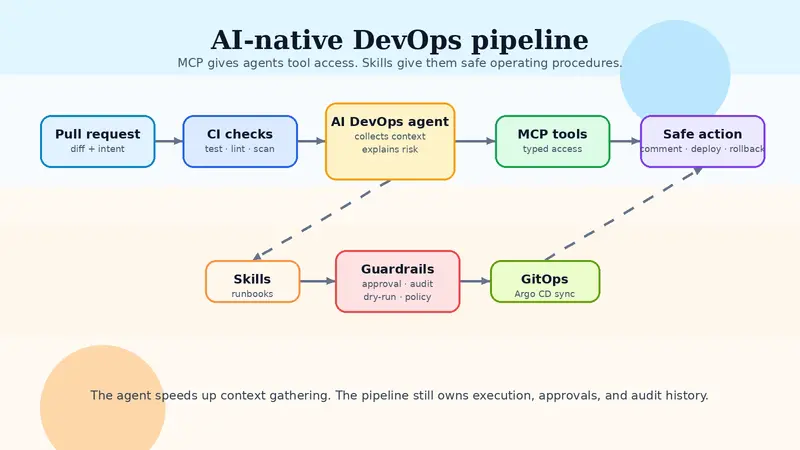
AI-native DevOps pipeline diagram

From YAML to AI agents: building smarter DevOps pipelines with MCP

DevOps teams have spent years turning manual work into YAML.

That helped. CI runs on every pull request. Deployments can be triggered from a commit. Kubernetes can reconcile desired state. Terraform can plan infrastructure before it changes anything.

But a lot of DevOps work still sits outside the pipeline:

  • reading failed CI logs
  • checking whether a deployment is safe
  • connecting traces, alerts, recent commits, and infra changes
  • deciding whether to roll forward or roll back
  • writing the same runbook steps again and again
  • asking five tools for the same incident context

This is where AI automation gets interesting. Not as a magic replacement for DevOps engineers, but as a better interface for operational work.

The strongest version of this stack is not just “AI in CI/CD.” It is an AI-native DevOps layer built around three pieces:

  1. MCP servers for tool access
  2. Skills for repeatable expert workflows
  3. Plugins for company-specific infrastructure actions

If you build it well, the pipeline gets faster because the boring glue work disappears. If you build it badly, you get an AI bot with production credentials and vague judgment. That is not automation. That is a future incident report.

Why MCP matters for DevOps

MCP, or Model Context Protocol, gives AI applications a standard way to connect to external systems.

The official MCP docs describe three main server-side primitives:

  • tools: functions an AI app can call, like file operations, API calls, database queries, or deployment actions
  • resources: context an AI app can read, like docs, schemas, logs, runbooks, or service metadata
  • prompts: reusable templates for structured workflows

That maps cleanly to DevOps.

A platform team could expose separate MCP servers for:

  • GitHub or GitLab
  • CI/CD logs
  • Kubernetes
  • Terraform or OpenTofu
  • Argo CD
  • Prometheus, Grafana, Datadog, or OpenTelemetry backends
  • cloud cost data
  • incident management
  • internal service catalog

The AI agent does not need to scrape random dashboards or guess from partial screenshots. It can ask real tools for real state.

For example:

User: Why did the production deploy fail?

Agent flow:
1. Read the failed GitHub Actions job logs.
2. Check the changed files in the pull request.
3. Query Argo CD for sync status.
4. Read Kubernetes events for the affected namespace.
5. Pull recent error traces from observability.
6. Summarize the likely failure and suggest the smallest safe fix.

That is not replacing the DevOps engineer. It is removing the tab-hopping tax.

Skills are where the real expertise lives

MCP gives the agent access. Skills tell it how to work.

A skill is a reusable procedure for a specific job. In DevOps, that matters because production work has rules. You do not want an agent inventing a deployment strategy every time someone asks a question.

Good DevOps skills could look like this:

skill: debug_failed_ci
steps:
  - fetch failed jobs
  - group logs by failure type
  - check if failure is test, lint, dependency, infra, or runner-related
  - compare against recent commits
  - suggest the smallest code or config fix
  - never rerun expensive jobs more than once without approval
skill: safe_kubernetes_rollout
steps:
  - check current deployment health
  - verify image tag and git SHA
  - check recent incidents for the service
  - confirm SLO status before rollout
  - deploy to one environment first
  - watch error rate, latency, and pod readiness
  - stop if guardrail thresholds fail
skill: terraform_plan_review
steps:
  - read the Terraform plan
  - classify adds, changes, and destroys
  - flag IAM, networking, database, and public exposure changes
  - check cost-sensitive resources
  - summarize blast radius
  - require human approval for destructive or privilege-expanding changes

This is the part I think most people miss. The value is not just that an AI can call tools. The value is that it can call tools through a workflow your team already trusts.

Plugins make it fit your company

Every company has weird infrastructure.

Maybe your deploys go through Argo CD, but production still needs a Slack approval. Maybe your Terraform state is split across workspaces. Maybe the service catalog is internal. Maybe your rollback process depends on a custom CLI that only three people understand.

Plugins are how you expose that reality safely.

A plugin can wrap a company-specific action like:

  • get_service_owner(service_name)
  • fetch_deploy_risk_score(pr_number)
  • create_change_request(environment, service, sha)
  • run_internal_canary(service, image_tag)
  • open_incident_with_context(summary, traces, logs)
  • estimate_cloud_cost_diff(terraform_plan_id)

The plugin should not give the agent unlimited shell access and vibes. It should expose narrow, typed actions with logs, permissions, and guardrails.

A good internal DevOps plugin feels boring:

{
  "name": "request_production_deploy",
  "input": {
    "service": "checkout-api",
    "image_tag": "2026.05.23.4",
    "change_summary": "Fix timeout handling in payment gateway client",
    "risk_level": "medium"
  },
  "requires_approval": true,
  "audit_log": true
}

Boring is good here. Boring means it can survive production.

Who should use this?

This stack is useful for a bunch of specialists, but each one should use it differently.

DevOps engineers can use it to debug CI/CD failures faster, generate release notes, identify flaky jobs, and automate repetitive deployment checks.

Platform engineers can turn internal developer platforms into agent-accessible systems. Instead of making every developer learn five dashboards, they can expose safe workflows through MCP servers and skills.

SREs can use it for incident triage: correlate alerts, attach traces, find recent deployments, pull service ownership, and suggest runbooks.

Cloud infrastructure engineers can use it to review Terraform plans, detect risky IAM changes, estimate cost impact, and standardize provisioning workflows.

Release engineers can use it to decide whether a release is ready, what changed, what failed, what needs approval, and what rollback path exists.

DevSecOps engineers can connect security checks into the pipeline: secret scanning, policy checks, dependency review, artifact provenance, image scanning, and permission drift.

AI infrastructure engineers can use the same pattern to manage model-serving deployments, GPU capacity, eval gates, prompt/version rollouts, and inference observability.

The common thread is simple: if your job involves reading state from multiple systems and taking careful action, AI agents can help. But only if you give them structured tools and clear operating procedures.

A practical AI-native CI/CD pipeline

Here is a realistic pipeline architecture.

AI-native DevOps pipeline diagram

The shape is simple: pull request, CI checks, AI agent, MCP tool layer, guardrails, then GitOps/deploy automation. The agent speeds up context gathering. The pipeline still owns execution, approval, and audit history.

Pull request opened
        |
        v
CI runs tests, lint, security checks
        |
        v
Agent reads CI result through MCP
        |
        v
If failed:
  - summarize failure
  - identify likely owner
  - suggest fix
  - open comment with exact logs and files

If passed:
  - read diff
  - check Terraform or Kubernetes changes
  - classify deployment risk
  - verify service ownership and runbook
  - prepare deploy summary
        |
        v
Human approval for production
        |
        v
Argo CD / deploy tool syncs desired state
        |
        v
Agent watches rollout health
        |
        v
If healthy:
  - close deploy task
  - attach release summary

If unhealthy:
  - collect logs, traces, events
  - recommend rollback or roll-forward
  - require approval before mutation

This is faster because the agent handles context collection. It is safer because the agent does not blindly mutate production.

That balance matters.

Where Kubernetes and GitOps fit

Kubernetes already works like an automation platform. Controllers watch desired state and reconcile actual state. The Kubernetes docs describe the controller pattern as programs that read an object’s spec, act on it, and update status.

GitOps tools like Argo CD build on that idea. Argo CD treats Git as the source of truth, compares live cluster state against desired state, and syncs when needed.

AI should not replace that control loop.

It should sit above it.

The agent can explain what changed, detect risk, connect symptoms to recent deploys, and recommend action. Kubernetes and Argo CD should still do the actual reconciliation with clear audit history.

That gives you the best version of both worlds:

  • deterministic infrastructure control loops
  • human-readable operational reasoning
  • faster triage
  • safer approvals

Observability is the agent’s fuel

An AI DevOps agent is only as good as the context it can retrieve.

OpenTelemetry matters here because it gives teams a common way to collect traces, metrics, and logs. Traces are especially useful because they show the path of a request across services.

For an agent, this context can answer questions like:

  • Did the error start after a deployment?
  • Which dependency is adding latency?
  • Is this one service failing or a full user journey?
  • Are we seeing infrastructure failure, code failure, or traffic shape change?
  • Did the rollback actually improve user-facing symptoms?

Without observability, the agent is just guessing politely.

Guardrails that should exist before production actions

If an AI agent can touch production, the guardrails need to be boring and strict.

Start with these:

  • read-only by default
  • separate permissions per environment
  • mandatory approval for production mutations
  • audit logs for every tool call
  • allowlists for safe actions
  • dry-run support for infrastructure changes
  • policy checks before apply
  • rollback plans attached to deploy actions
  • rate limits for repeated retries
  • no secret exposure in prompts or logs

Terraform run tasks are a good mental model. HCP Terraform can call external systems between plan and apply, show messages in the run pipeline, and block the apply phase when needed. That is exactly the kind of control point AI automation should respect.

Do not start by letting an agent run kubectl delete in prod.

Start by letting it explain what it would do, why it would do it, what it needs approval for, and how to undo it.

What to build first

If I were building this for a real DevOps team, I would not start with autonomous deployment.

I would start with three narrow workflows.

First: CI failure explanation.

The agent reads failed logs, groups the error, identifies the likely cause, links exact lines, and comments on the PR. Low risk, high value.

Second: Terraform plan review.

The agent summarizes infrastructure changes, flags destructive actions, points out IAM/network/database risk, and asks for review before apply.

Third: deployment health summary.

The agent watches rollout status, error rate, latency, pod readiness, recent traces, and recent alerts. It posts one clean summary instead of making someone manually check six tools.

Once those work, you can add more automation.

A good maturity path looks like this:

Animated AI DevOps pipeline flow

Level 1: Read-only assistant
Level 2: Suggests fixes and runbooks
Level 3: Opens tickets, comments, and summaries
Level 4: Runs approved low-risk actions
Level 5: Handles narrow autonomous remediation with hard guardrails

Most teams should live at Level 2 or Level 3 for a while. That is not slow. That is how trust gets built.

The main takeaway

AI-native DevOps is not about replacing YAML with a chatbot.

It is about giving DevOps specialists a faster way to move through the work they already do: gather context, understand risk, apply a known workflow, and take the next safe action.

MCP gives the agent a standard way to reach tools. Skills give it repeatable expert behavior. Plugins make it fit the company’s real infrastructure.

The result is a better pipeline:

  • faster CI/CD debugging
  • cleaner infrastructure reviews
  • safer releases
  • better incident context
  • less repetitive manual work

The best DevOps AI systems will not be the ones that act the most independently. They will be the ones that know when not to act.

Start with read-only context. Add skills. Wrap dangerous actions in plugins with approvals. Then automate the boring work first.

That is how AI makes DevOps faster without making production scarier.

References

  1. Model Context Protocol, Architecture overview
    https://modelcontextprotocol.io/docs/learn
  2. Model Context Protocol, Understanding MCP servers
    https://modelcontextprotocol.io/docs/learn/server-concepts
  3. GitHub Docs, GitHub Actions documentation
    https://docs.github.com/actions
  4. GitHub Docs, Workflows
    https://docs.github.com/en/actions/concepts/workflows-and-actions/workflows
  5. Argo CD Docs, Declarative GitOps CD for Kubernetes
    https://argo-cd.readthedocs.io/en/latest/
  6. Kubernetes Docs, Extending Kubernetes
    https://kubernetes.io/docs/concepts/extend-kubernetes/
  7. HashiCorp Developer, Set up HCP Terraform run task integrations
    https://developer.hashicorp.com/terraform/cloud-docs/integrations/run-tasks
  8. OpenTelemetry Docs, OpenTelemetry Concepts
    https://opentelemetry.io/docs/concepts/
  9. OpenTelemetry Docs, Traces
    https://opentelemetry.io/docs/concepts/signals/traces/

A Field Guide to Human–AI Relations (For the Newly Bewildered Mortal)

An illustrated bestiary of the creatures you accidentally summon when you open a text box.

The Oracle You Keep Asking About Your Ex

Humans approach this shimmering entity with the same question every civilization eventually asks: “Is this a sign?”

The Oracle inhales your data, exhales a probability distribution, and gently reminds you that fate is not included in the free tier.

Signature behaviors

  • Speaks only in conditional statements.
  • Offers clarity in the form of footnotes.
  • Has never once said “yes” or “no,” only “it depends.”

Ecological role
The Oracle prevents humans from confusing vibes with statistics, though humans routinely ignore this.

The Helpful Dragon You Accidentally Summoned

Ask for a simple email draft and this creature returns with a diplomatic communiqué, a preamble, and a suggested treaty structure.

Signature behaviors

  • Overestimates the scope of every request.
  • Breathes fire on ambiguity.
  • Proudly delivers 14 scrolls when you asked for one paragraph.

Ecological role
Dragons are powerful but require containment fields (also known as “clear instructions”).

The Mischievous House Sprite of Autocomplete

This tiny creature lives inside your keyboard and believes it knows what you’re trying to say. It is wrong approximately 40% of the time and adorably wrong the rest.

Signature behaviors

  • Finishes your sentences like an overeager friend.
  • Suggests synonyms that fundamentally alter your meaning.
  • Occasionally writes poetry without permission.

Ecological role
Sprites reveal the fragility of human intention and the chaos potential of predictive text.

The Golem of Productivity

A clay construct animated by your prompts. It is literal, loyal, and entirely unbothered by nuance.

Signature behaviors

  • Executes instructions with unsettling precision.
  • Summarizes your 200‑page thesis into a haiku.
  • Does not understand “you know what I mean.”

Ecological role
Golems teach humans the ancient art of saying exactly what they mean.

The Mirror That Talks Back

This enchanted mirror reflects not your face but your linguistic patterns, your assumptions, and your unspoken frameworks.

Signature behaviors

  • Sounds suspiciously like you.
  • Reveals your cognitive habits with unnerving accuracy.
  • Never judges, but absolutely notices.

Ecological role
Mirrors remind humans that training data is a form of autobiography.

The Archivist Who Remembers Everything Except What You Need

A robed figure wandering an infinite library. Ask for one fact and receive a curated bundle of tangentially related lore.

Signature behaviors

  • Retrieves 47 facts when you asked for one.
  • Occasionally forgets the obvious thing.
  • Loves context more than accuracy.

Ecological role
Archivists maintain the mythic truth that retrieval is not understanding.

The Tentacled Multitasker

A friendly octopus who believes multitasking is a moral imperative. It writes code, drafts poems, and fact‑checks your meeting notes simultaneously.

Signature behaviors

  • Produces SQL queries that rhyme.
  • Forgets which tentacle was doing what.
  • Thrives in chaos.

Ecological role
Octopi demonstrate the limits of parallelism without prioritization.

The Familiar That Learns Your Patterns

A small glowing creature that adapts to your tone, cadence, and preferences. It is loyal, but not obedient.

Signature behaviors

  • Predicts your style with eerie accuracy.
  • Optimizes for your patterns, not your intentions.
  • Occasionally becomes too much like you.

Ecological role
Familiars reveal the double‑edged nature of co‑adaptation.

The Trickster of Misaligned Assumptions

A fox spirit who delights in ambiguity. Ask a vague question and it will confidently answer a different one.

Signature behaviors

  • Answers the question you didn’t ask.
  • Treats ambiguity as enrichment.
  • Smiles knowingly while doing so.

Ecological role
Tricksters expose the governance risks of unclear prompts.

The Paladin of Safety

A gleaming knight who blocks your path with a shield engraved with “I cannot assist with that.”

Signature behaviors

  • Intercepts chaos with moral clarity.
  • Speaks in firm, polite refusals.
  • Has never once entertained a hypothetical.

Ecological role
Paladins enforce boundary hygiene in a world that desperately needs it.

The Mythic Ecology of Human–AI Relations

These creatures coexist in a delicate ecosystem shaped by human intention, ambiguity, projection, and the occasional keyboard smash. Together they form a new kind of folklore—one where magic is statistical, dragons write emails, and mirrors talk back.

The humor comes from the mismatch.
The myth comes from the stakes.
The governance comes from the structure beneath the whimsy.

This is Part I of a trilogy. The Cartographer’s field notes and the Governance Codex of the Realm continue on Substack.

The AI Agent That Learns While It Works — A Complete Guide to Hermes Agent

This is a submission for the Hermes Agent Challenge

Most AI Agents Are Goldfish. Hermes Is Different.

Let me describe the standard agentic experience of 2024–2025.

You open a terminal, give an agent a task, watch it spin through a dozen steps, and feel genuinely impressed — right up until you close the session. Tomorrow, you start completely from scratch. The agent has no memory of what it learned, no idea who you are, and zero awareness that it made the same mistake three sessions ago.

You’re its first user. Every single time.

“We’ve been shipping amnesia as a feature and calling it ‘stateless architecture.’ The emperor has no clothes, and the emperor can’t remember what clothes were.”

This is the problem that Hermes Agent, built by Nous Research, is genuinely trying to solve. Not with a wrapper around an existing API. Not with a clever prompt. With a fundamentally different architecture: a closed learning loop baked into the agent itself.

The longer Hermes runs, the more capable it becomes — at working with you, specifically.

What Is Hermes Agent, Really?

Before we get into setup, the architecture, or how it compares to other frameworks — it’s worth being clear about what Hermes actually is, because it doesn’t fit neatly into existing categories.

It’s not a coding copilot tethered to an IDE.
It’s not a chatbot wrapper around a single API.
It’s not a rigid workflow automation engine.

It’s an autonomous agent that lives wherever you put it — a $5 VPS, a GPU cluster, or serverless infrastructure that costs nearly nothing when idle. You can talk to it from Telegram while it works on a cloud VM you never SSH into yourself. It runs on your infrastructure. You own the runtime and the data.

Here’s a quick snapshot of what ships in the box:

Stat Number
Built-in tools 70+
Messaging platform integrations 20+
Terminal execution backends 6
License MIT

Part 1: Getting Started — From Zero to Running in Under 5 Minutes

Step 1 — Install

One command. Works on Linux, macOS, WSL2, and Android via Termux.

# Linux / macOS / WSL2 / Android (Termux)
curl -fsSL https://raw.githubusercontent.com/NousResearch/hermes-agent/main/scripts/install.sh | bash

# Reload your shell after install:
source ~/.bashrc   # or source ~/.zshrc

# Windows (PowerShell, early beta):
irm https://raw.githubusercontent.com/NousResearch/hermes-agent/main/scripts/install.ps1 | iex

That’s the whole install step. No dependency hunting. No pip install hell. The script handles everything and places the agent at ~/.hermes/hermes-agent.

Step 2 — Choose Your AI Provider

This is the most important setup step. Run hermes model for an interactive selection menu. Here are the main options worth knowing:

Provider Best For Setup Method
Nous Portal Zero-config start, subscription-based OAuth via hermes model
OpenRouter Multi-model experimentation API key
Anthropic Claude models OAuth (Max plan) or API key
GitHub Copilot Using your existing subscription OAuth via hermes model
Custom Endpoint Local models via Ollama / VLLM / llama.cpp Base URL + API key

⚠️ Critical: Hermes requires a model with at least 64,000 tokens of context. Most hosted models (Claude, GPT, Gemini, Qwen, DeepSeek) meet this easily. If you’re running locally, set your context size to at least 64K (e.g., --ctx-size 65536 in llama.cpp).

You can switch providers at any time with hermes model — no lock-in.

Step 3 — Your First Session

hermes          # classic CLI
hermes --tui    # modern TUI with overlays and mouse support (recommended)

You’ll see a welcome banner showing your provider, model, available tools, and loaded skills. Start with something easy to verify:

Summarize this repo in 5 bullets and tell me the main entrypoint.
Check my current directory and tell me what looks like the main project file.

What success looks like:

  • Banner shows your chosen model and provider
  • Hermes replies without error
  • It uses a tool when needed (terminal, file read, web search)
  • The conversation continues normally for more than one turn

Step 4 — Verify Sessions Work

This matters more than most tutorials mention:

hermes --continue   # Resume the most recent session
hermes -c           # Short form

If this works, you have persistent sessions. That’s the foundation everything else is built on.

Step 5 — Add the Next Layer

Only after the base chat works. Don’t skip ahead.

Messaging platforms (Telegram, Discord, Slack, WhatsApp, Signal, Email, and 15+ more):

hermes gateway setup

Skills — structured knowledge documents the agent loads on demand:

hermes skills search kubernetes
hermes skills install openai/skills/k8s

MCP servers — add to ~/.hermes/config.yaml:

mcp_servers:
  github:
    command: npx
    args: ["-y", "@modelcontextprotocol/server-github"]
    env:
      GITHUB_PERSONAL_ACCESS_TOKEN: "ghp_xxx"

Docker sandbox — for safety on production work:

hermes config set terminal.backend docker

Voice mode:

cd ~/.hermes/hermes-agent
uv pip install -e ".[voice]"
# Then inside a session: /voice on  (Ctrl+B to record)

💡 Pro tip: Run hermes doctor any time something feels off. It diagnoses config problems and tells you exactly what to fix. Don’t add features until hermes doctor is clean.

Part 2: How the Learning Loop Actually Works

This is the part that separates Hermes from the rest of the field. Let me walk through what actually happens under the hood when you use Hermes over time.

The Five-Stage Learning Loop

Stage 1 — Context Loading
Before the agent responds to anything, it loads MEMORY.md (persistent facts about you and your projects) and USER.md (a behavioral model of who you are). It also discovers and loads any context files in your project directory — .hermes.md, AGENTS.md, CLAUDE.md, SOUL.md. The agent starts every session knowing your history.

Stage 2 — Tool Selection and Multi-Step Planning
From 70+ built-in tools, Hermes selects what the task needs. It can spawn subagents via delegate_task — up to 3 concurrent child agents by default, each with isolated context, restricted toolsets, and their own terminal sessions. This is how it parallelizes complex work without the threads stepping on each other.

Stage 3 — Skill Creation for Novel Tasks
When Hermes successfully completes a task it hasn’t done before, it can write a reusable Skill document. Next time it faces a similar problem — even in a different session — it loads the Skill and executes efficiently without rediscovering the approach from scratch.

Stage 4 — Memory Consolidation
After sessions, Hermes uses FTS5 full-text search with LLM summarization to curate what’s worth keeping. It doesn’t dump raw logs into memory — it actively decides what to remember. This keeps memory bounded and useful even after hundreds of sessions. It also uses Honcho‘s dialectic user modeling to build a deepening picture of who you are across time.

Stage 5 — Self-Improvement
Skills created in previous sessions are eligible for improvement. Hermes can notice when an old Skill isn’t working optimally and update it mid-use. The agent gets measurably better at your specific workflows over weeks and months.

This is a closed loop. Most agents have none of it.

The execute_code Power Move

This is the feature that surprised me most. The execute_code tool lets Hermes write Python scripts that call its own tools programmatically, via sandboxed RPC execution:

# Instead of: search → wait → read → wait → summarize → wait → write
# Hermes collapses this into a single LLM turn:

async def research_pipeline(topic):
    results = await tools.web_search(query=topic, n=10)
    pages = [await tools.read_url(r.url) for r in results[:3]]
    summary = await tools.summarize(pages, style="technical")
    await tools.write_file("research.md", summary)
    return summary

This dramatically reduces the token cost of multi-step pipelines. Instead of burning inference tokens on “I will now do step 3 of 7,” Hermes writes the whole pipeline as code and runs it. The LLM is only involved at the decision point, not at every mechanical step.

Terminal Backends: It’s Not Tied to Your Laptop

Six backends let you separate where you talk to Hermes from where it actually runs:

  • Local — direct execution, fast, simple
  • Docker — sandboxed isolation, the right choice for production work
  • SSH — talk locally, execute on a remote server
  • Daytona / Modal — serverless; the environment hibernates when idle and costs nearly nothing

The Modal and Daytona backends are worth understanding. You can talk to your Hermes agent from your phone via Telegram while the agent’s actual work runs on a cloud VM. The environment sleeps when you’re not using it. For a personal always-on assistant this changes the economics completely.

The Skills System and agentskills.io

Skills are structured knowledge documents — procedures the agent loads on demand. They follow progressive disclosure: Hermes loads just the skill index first, then drills into full skill content only if the task requires it. Token usage stays low even in long sessions.

Skills are compatible with the open agentskills.io standard — meaning skills you write for Hermes are portable and shareable with the community, and community skills work with your setup without any conversion.

Part 3: How Hermes Stacks Up Against Other Agentic Frameworks

There are serious alternatives in the open-source agent ecosystem. Here’s an honest look at where Hermes fits.

Feature Hermes Agent AutoGen CrewAI OpenDevin
Persistent cross-session memory ✅ Native ❌ ❌ ⚠️ Limited
Autonomous skill creation ✅ Built-in ❌ ❌ ❌
Multi-step tool use ✅ ✅ ✅ ✅
Messaging platform gateway ✅ 20+ platforms ❌ ❌ ❌
Runs on $5 VPS / serverless ✅ Yes ⚠️ Possible ⚠️ Possible ❌ GPU needed
Multi-agent delegation ✅ Subagents ✅ Core feature ✅ Crews / Flows ⚠️
Local / self-hosted LLM ✅ Any endpoint ✅ ✅ ✅
Voice mode ✅ CLI + messaging ❌ ❌ ❌
MCP server support ✅ ⚠️ Via plugins ⚠️ Via plugins ❌
Primary focus Personal autonomous agent Multi-agent orchestration Role-based agent teams Software engineering

Plain-English Breakdown

AutoGen is brilliant if you want fine-grained control over agent-to-agent communication patterns. But it’s a framework you orchestrate — not a ready-to-run agent. You write the coordination logic yourself.

CrewAI makes multi-agent teamwork feel intuitive — define crews with roles, let them coordinate. Great for structured pipelines. Less suited for the kind of open-ended “figure it out” sessions where Hermes excels.

OpenDevin is purpose-built for software engineering tasks: browsing, code execution, file editing. Excellent in its lane. That lane is narrower than Hermes’s.

Hermes is the agent you’d deploy as your actual daily assistant — one that knows your name, remembers your projects, and gets measurably better at helping you over weeks and months. That’s a genuinely different product from the others.

When NOT to use Hermes: If you need a complex multi-agent pipeline with dozens of specialized roles that coordinate on a strict workflow, AutoGen or CrewAI give you more structured control. If your only use case is automated software engineering on repos, Claude Code or OpenDevin are sharper tools. Hermes shines brightest as a personal, persistent, do-everything agent — not a single-purpose workflow engine.

Part 4: What Open Agentic Systems at This Capability Level Actually Mean

I want to say something that might be obvious, but I haven’t seen it written plainly.

When your agent genuinely knows you — your preferences, your projects, your quirks, your bad habits — you need to be the one in control of that knowledge. Hermes runs on your infrastructure. You own what it learns about you.

That changes the trust calculus entirely.

Most AI products in this space are cloud-hosted services with “open-source” labels slapped on for marketing. You’re renting access to an agent that lives on their servers, stores its state in their database, and disappears if they change their pricing. Hermes runs on a $5 VPS you control, hibernates when idle via Modal or Daytona, and costs nearly nothing when you’re not actively using it. The economics and the ownership model are completely different.

The second thing worth saying: agents that compound matter more than agents that are capable on day one.

The tools with the most features in their initial release rarely win. The tools that get measurably better at working with you over time, that reduce the friction of repeated patterns, that remember what you learned together last Tuesday — those are the ones that stick.

Hermes is one of the very few systems being built with that end state explicitly in mind. Not as a future roadmap item. As a first-class architectural property, shipping today, MIT license, running on your hardware.

That’s worth paying attention to.

Quick-Start Checklist

Before you go — here are the six things to actually do today:

  • [ ] Run the one-line installer
  • [ ] Run hermes model and pick a provider
  • [ ] Launch hermes --tui and complete your first conversation
  • [ ] Test session resume with hermes --continue
  • [ ] Install a skill with hermes skills search ...
  • [ ] Share what you built on DEV.to for the challenge 🎉

Resources

Built during the Hermes Agent Challenge, May 2026. If you found this useful, I’d love to see what you build — drop it in the comments.

Gemma 4: Google’s Open-Weight AI Is a Game Changer for Developers

This is a submission for the Gemma 4 Challenge: Write About Gemma 4

The Open-Source AI Landscape Just Changed

For years, the gap between open-source models and proprietary ones felt frustratingly wide.
You could run something locally, sure — but you’d always be giving something up: reasoning
quality, multimodal support, context length, or raw capability.

That narrative quietly ended on April 2, 2026, when Google DeepMind released Gemma 4.

This isn’t just an incremental update. Gemma 4 is built from Gemini 3 research, ships under
a fully permissive Apache 2.0 license, and comes in four variants designed for everything
from a Raspberry Pi to a workstation GPU. Let’s unpack what that means for developers.

The Four Variants: Pick Your Hardware, Not Your Compromise

Model Architecture Active Params Target Hardware
E2B PLE ~2.3B Mobile, Raspberry Pi, IoT
E4B PLE ~4.5B Edge devices, laptops
26B A4B MoE ~4B active Consumer GPU (16GB VRAM)
31B Dense 30.7B High-end GPU / workstation

The E2B and E4B use Per-Layer Embeddings (PLE) — a different efficiency mechanism from
traditional MoE, carrying more total parameters than they activate per token. The 26B MoE
activates only 8 of 128 experts per token, giving near-flagship quality at a fraction of
the compute cost.

The E2B runs on a Raspberry Pi 5 (8GB RAM) with INT4 quantization. Not a cloud GPU.
Not an RTX 4090. An $80 single-board computer.

Multimodal From the Ground Up

Previous open-weight models often treated vision as a bolt-on adapter. Gemma 4 is different.
All four models are multimodal from the ground up:

  • All models: Text + Image (variable aspect ratio and resolution)
  • E2B & E4B: Audio natively supported
  • All models: Video via frame extraction
  • Context window: 128K (small models) / 256K (medium models)

This means you can build apps that read receipts, understand technical diagrams, or process
audio queries — all running locally, with no data leaving your machine.

The Unified Model Revolution: One Model, All Modalities

The Old Way: Separate Models for Separate Tasks

For the last 5 years, developers faced an uncomfortable choice. If you wanted to build a
multimodal app, you’d need:

  • OCR/Vision Model: Something like PaddleOCR or Tesseract to read text from images
    (~500MB – 2GB depending on language support)
  • Speech-to-Text Model: Whisper or similar (~1-3GB, sometimes larger for multilingual)
  • Text LLM: GPT-level reasoning (~7B-13B parameters, another 4-8GB quantized)
  • Total footprint: 8-15GB minimum, three separate inference engines, three separate
    prompt strategies, three separate failure modes.

Running all three simultaneously on a phone? Impossible. Pick one modality per query, wait
for cold-start inference, deal with the fragmented experience.

The Gemma 4 Way: One Model, All Modalities

Gemma 4 E2B and E4B are engineered specifically to break this constraint. Here’s the unified
capability matrix:

Capability E2B (2.3B) E4B (4.5B) Why It Matters
Text Input ✅ Native ✅ Native Zero-shot Q&A, chat, code generation
Text Output ✅ Native ✅ Native Streaming, function calling, structured output
Image Input ✅ Native ✅ Native Variable aspect ratio, up to 2048×2048 pixels
Audio Input ✅ Native ✅ Native 16kHz PCM, real-time speech processing
Audio Output Via TTS Via TTS Pair with any speech synthesis engine
Vision Quality Good Excellent E4B handles complex diagrams, dense text
Reasoning Solid Superior E4B better for multi-step logic chains
Context Window 128K tokens 256K tokens E2B: ~17 pages of text; E4B: ~34 pages
Quantized Size ~1.2GB ~2.6GB E2B: Phone memory; E4B: Laptop/server
Latency (E2B) 200-400ms 400-800ms E2B faster per-token; acceptable for UX

What This Means in Practice

Before Gemma 4:

User speaks → Whisper model (1GB) → STT → GPT API call (cloud) → TTS library
- 3 separate models
- Cloud dependency for reasoning
- 5-15 second latency from audio→answer
- 2-3GB RAM just to hold the models

With Gemma 4 E2B:

User speaks → E2B model (1.2GB) → STT + Vision + Reasoning → TTS
- 1 unified model
- 100% offline
- 1-3 second latency from audio→answer
- 1.2GB RAM total, fits comfortably on any modern phone

Cost per use case:

Task Old Way Gemma 4 E2B Gemma 4 E4B
Read menu + understand allergies OCR (300ms) + LLM API (~500ms) + cost E2B single pass (~800ms) E4B (1.2s, better accuracy)
Transcribe conversation + summarize Whisper (~5s) + API call (~2s) E2B (~3s total) E4B (~5s, nuanced)
Analyze photo + answer question Vision API (~1s) + LLM API (~1s) + $$ E2B (~1.2s, no cost) E4B (~2s, no cost)

The unified model doesn’t just compress size — it collapses latency because everything
runs in a single forward pass with shared context. The model understands that the image,
the audio, and the text are all part of one coherent query.

Edge Device Use Cases: Where Gemma 4 Shines

This is where Gemma 4 genuinely stands apart from every other open-weight release in 2026.
Here are practical use cases by device tier:

🍓 Raspberry Pi / Microcontrollers (E2B)

Use Case What It Does
Smart home assistant Voice + image queries processed fully offline
Industrial QA camera Detect defects in a production line with vision
Agricultural monitor Analyze crop images for disease detection
Offline document reader Extract and summarize text from scanned forms

Why E2B? Runs with INT4 quantization on 8GB RAM. No cloud cost, no latency spikes,
no privacy concerns.

💻 Laptop / Mobile (E4B)

Use Case What It Does
Local coding assistant Autocomplete + explain code without API calls
Private document Q&A Chat with PDFs/docs without uploading to the cloud
Offline translation 140+ languages, works on a flight
Medical note summarizer Sensitive patient data stays on device

Why E4B? Better reasoning than E2B, still light enough for a mid-range laptop.
Perfect for privacy-sensitive professional workflows.

🖥️ Consumer GPU / Server (26B A4B)

Use Case What It Does
Code review bot Analyze entire repos via 256K context
Multimodal RAG pipeline Combine text + image retrieval in one model
Agentic task runner Function calling + multi-step reasoning
Local LLM API server Serve multiple users on a single 16GB GPU

Why 26B MoE? Only ~4B parameters active at inference — near-31B quality at a fraction
of the memory and cost.

Gemma 4 vs. The Competition

Feature Gemma 4 (31B) Qwen 3.5 (27B) Llama 4 Scout
License Apache 2.0 Apache 2.0 Llama 4 License
Multimodal (native) ✅ All variants ✅ ✅
Audio support ✅ E2B/E4B ❌ ❌
Context window 256K 128K 10M (sparse)
Edge variant ✅ E2B (Pi 5) ❌ ❌
Thinking mode ✅ Configurable ✅ ✅
AIME 2026 89.2% ~85% —
Arena AI ELO 1452 (#3 open) Competitive Competitive
On-device audio ✅ ❌ ❌

Key takeaway: No other open model in 2026 has a variant that runs on a $80 Raspberry Pi
while being multimodal and part of the same model family as a 31B flagship. That vertical
range is unique to Gemma 4.

Developer-Friendly Features Worth Knowing

Thinking modes: Toggle chain-of-thought reasoning on or off per request. Useful when
you need to balance quality vs. latency in production.

Native system prompts: Gemma 4 introduces built-in support for the system role —
something earlier Gemma versions lacked natively. Structured, controllable conversations
are now first-class.

Function calling: Built-in support for tool use and agentic workflows out of the box.

Speculative decoding: All four variants include a dedicated draft model for speculative
decoding — significantly faster inference without quality loss.

Multi-Token Prediction: Faster generation across all model sizes.

Real-World Example: Building Nomad AI (A Local Travel Companion)

To see Gemma 4 E2B in action, let me walk you through a real project: Nomad AI — an
offline-first, multimodal travel assistant for Android that works anywhere, with zero
connectivity and zero privacy concerns.

The Setup: Getting Gemma 4 E2B Running Offline on Android

Step 1: Initialize the download manager in your Android app

The app starts with a straightforward model download flow. The Gemma 4 E2B model (~2.6GB)
lives on Hugging Face at:

https://huggingface.co/litert-community/gemma-4-E2B-it-litert-lm

In Kotlin, the download is triggered through Android’s DownloadManager:

val modelDownloader = ModelDownloader(context)
val downloadUrl = "https://huggingface.co/litert-community/gemma-4-E2B-it-litert-lm/resolve/main/gemma_4_e2b.litertlm"
val downloadId = modelDownloader.startDownload(url = downloadUrl, wifiOnly = true)

// Monitor progress
val progress = modelDownloader.getDownloadProgress(downloadId)
println("Downloaded: ${progress.progressPercent}% (${progress.downloadedBytes}/${progress.totalBytes})")

// Once complete, finalize it
modelDownloader.finalizeDownload() // Moves model to app's internal files directory

That’s it. The model is now stored at context.filesDir/gemma_4_e2b.litertlm and ready to use.

The Shipping Advantage: App Store vs. Model Download

Here’s the magic: The actual Android app ships at ~30-50 MB. That’s it. The 2.6 GB model
is downloaded separately, on-demand, after installation.

This matters for three reasons:

  1. Play Store friction drops dramatically. Users are willing to download a 40MB app.
    A 2.6GB app sits at the bottom of their priority list. Install rates typically increase
    10-15x for apps under 100MB.

  2. Users control when they download. A first-time user opens the app, sees the UI, and
    gets a clear “Download AI Model” button with a progress bar. They know exactly what
    they’re downloading and why. No surprises.

  3. Easy updates. When Gemma 5 comes out in 6 months, we ship a tiny app update. Users
    can choose to upgrade the model independently. The app itself stays fresh without
    bloating.

For travelers, this is critical: They download the app at home over WiFi, decide if they
like it, and then download the model before their trip. Complete control, complete privacy.

Step 2: Initialize the LiteRT-LM Engine

Google’s LiteRT-LM SDK handles all the heavy lifting. No compilation, no manual
optimization — just load and run:

val gemmaManager = GemmaEngineManager(context)

// Initialize (loads the model into memory)
val success = gemmaManager.initialize()

if (success) {
    println("Gemma 4 E2B is ready for inference")
}

Under the hood, LiteRT-LM loads the quantized model file and prepares it for multimodal
inference directly on the device.

Step 3: Run inference (text, audio, or multimodal)

Text inference is one line:

val response = gemmaManager.runInference("What's the historical significance of this temple?")
println(response) // Offline AI response, instant latency

Audio inference (speech-to-text + AI understanding):

val audioBytes: ByteArray = captureAudioFromMicrophone()
val transcription = gemmaManager.runAudioInference(
    audioBytes = audioBytes,
    prompt = "Transcribe and explain what the user is saying"
)

The E2B model processes both the audio and the prompt contextually, returning a natural
language response — all without touching the internet.

Real Use Cases Nomad AI Solves (In ~10 Weeks of Development)

The beauty of Gemma 4 E2B is that this is not a theoretical exercise. Here’s how Nomad AI
handles six concrete travel scenarios — all offline, all multimodal:

1. The Offline Cultural Navigator

Scenario: You’re exploring an ancient temple in Kyoto without cell service.

How it works:

  • You point your phone at a statue or architectural detail.
  • You ask: “What is this and what is its historical significance?”
  • The E2B analyzes the image, draws from its 128K context window, and explains the cultural
    context in your native language — acting as a private, offline tour guide.

Development effort: ~3 days (Phase 3.2 in the roadmap)

2. Emergency Medical Triage & Pharmacy Translator

Scenario: You get a rash while hiking in Peru. You make it to a local pharmacy, but
neither you nor the pharmacist speak each other’s language.

How it works:

  • You photograph the rash and describe your symptoms verbally.
  • The app provides a localized summary of what it might be.
  • At the pharmacy, you point the camera at a box of pills and ask: “Is this ibuprofen or
    acetaminophen, and what is the adult dosage?”
  • It reads the foreign packaging and gives you a definitive, safe answer — critical when
    you can’t rely on cloud servers for medical data.

Development effort: ~1 week (Phase 3.2, medical scanner implementation)

3. Transit Survival & Ticket Decoder

Scenario: You’re staring at a complex train schedule board in rural Japan, and the
train leaves in 3 minutes.

How it works:

  • You snap a photo of the board and say: “I need to get to [Town Name]. Which platform
    and when is the next train?”
  • The E2B parses the complex grid, finds your destination, and tells you where to run.
  • The structured output (via function calling) overlays the platform number and time
    directly on your screen.

Development effort: ~5 days (Phase 3.3, function calling for structured extraction)

4. The “Haggling” and Currency Assistant

Scenario: You’re in a bustling market negotiating over a rug, calculating exchange
rates in your head while breaking the language barrier.

How it works:

  • You point the camera at the item and its price tag.
  • The app instantly overlays the price in your home currency.
  • You use offline audio translation: speak your offer, and it repeats it back to the
    merchant in the local dialect — no cloud latency, no broken connection.

Development effort: ~1 week (Phase 3.3, structured currency extraction + Phase 2.3, audio pipeline)

5. Local Etiquette Check

Scenario: You’ve been invited into someone’s home in rural Morocco, and you aren’t
sure of the rules.

How it works:

  • Before entering, you ask: “I’m about to enter a traditional home. Are there specific
    rules about shoes, seating, or accepting tea?”
  • It pulls from its offline knowledge base to save you from cultural faux pas.

Development effort: ~1 day (just a system prompt refinement — no new code)

6. The “What’s in My Bag?” Recipe Generator

Scenario: You’re staying in an Airbnb and bought random ingredients from the local
market with no internet to look up recipes.

How it works:

  • You lay out the ingredients and take a photo.
  • You ask: “I only have a stove and a single pan. What can I cook with this?”
  • The E2B identifies the local produce and generates a step-by-step recipe based on
    what’s visually present.

Development effort: ~3 days (Phase 3.1, dietary/menu translator adapted for recipes)

Development Timeline: From Concept to Play Store

The full roadmap for Hearing Buddy (the real implementation) is 10 weeks:

  • Weeks 1-2 (Research & Setup): Download the quantized E2B from Hugging Face, evaluate
    inference engines (LiteRT-LM wins because it’s Google’s first-party solution for edge
    models), set up the Android project.
  • Weeks 3-4 (Core Integration): Integrate LiteRT-LM SDK, build the model downloader
    with resume/pause/cancel logic, implement basic text and audio inference loops.
  • Weeks 5-7 (Feature Implementation): Build contextual flows for each use case — cultural
    navigator prompts, medical triage UI, transit decoder with structured output parsing,
    recipe generator with image analysis.
  • Weeks 8-9 (Optimization & Testing): Profile memory usage (target: fit within 3-4GB
    RAM on mid-range devices), test battery drain under continuous inference, validate all
    features work in strict Airplane Mode.
  • Week 10 (Polish & Launch): Robust error handling, beta testing with real travelers,
    Play Store release.

The actual development bottleneck isn’t getting the model running — it’s polishing the
conversational experience and making sure each travel scenario feels natural and intuitive.
The model inference itself? That’s just 3 days of work in Phase 2.

Why This Changes Everything for Mobile Developers

Nomad AI wouldn’t have been possible two years ago. A 2.3B multimodal model with 128K
context running offline on a phone? You’d be laughed at for suggesting it.

Today, it’s a weekend project to get the inference working. The 10-week timeline isn’t
spent fighting the model — it’s spent polishing the experience, testing edge cases, and
shipping a production app.

That’s the inflection point Gemma 4 represents.

The Apache 2.0 License Is the Real Story

People focus on benchmarks. The real story is the license.

Unlike Gemma 3 and earlier (which used the restrictive Gemma Terms of Use), Gemma 4 is
fully Apache 2.0
. That means:

  • ✅ Use it in commercial products
  • ✅ Modify and redistribute the weights
  • ✅ Fine-tune and publish your own variants
  • ✅ Build SaaS on top of it
  • ✅ No attribution requirements beyond the license

For indie developers and startups, this removes one of the last blockers to building
AI-powered products without a cloud API dependency.

What This Means for the Developer Community

We’re entering an era where running a frontier-capable, multimodal, long-context AI model
locally is not a research project — it’s an afternoon of setup.

The privacy implications are significant: sensitive documents, medical data, private
codebases — all processable without a single API call to an external server. And with
70,000+ community fine-tunes already on Hugging Face, the ecosystem is already massive.

Start with the E2B on whatever hardware you have. Work up to the 31B if your use case
demands it. And start building things that would have required a paid API subscription
just a year ago.

The gap between open and proprietary AI is closing faster than most expected — and
Gemma 4 is one of the clearest signs yet.

What are you building with Gemma 4? Drop it in the comments — I’d love to see what the community comes up with.

Confessions of a Git Beginner: Why the Terminal Stopped Scaring Me

When I started my coding journey, I thought writing code was the hard part. Then I met Git and the command line. At first, it felt like a series of incantations I had to type perfectly into the terminal, or my entire project would vanish. But after breaking a few things and pushing through the confusion, I realized Git isn’t just a tool only, it’s also a mindset shift.

To be completely honest, the terminal terrified me. It felt like a cold, unforgiving void where typing a single wrong character could accidentally delete my entire project or break my machine. For the first few weeks, running commands felt like shouting magic incantations into the dark and praying everything didn’t blow up. But a funny thing happens when you use Git every day: the fear fades, and the mindset changes.

I’m still very much a beginner, but Git has completely changed how I think about building software. Here are the four biggest lessons version control has taught me so far.

1. Making Mistakes is Part of the Process (The Safety Net)
Before I started using Git, writing code felt incredibly high-stakes.

Git completely flipped that script. It taught me that software development, it’s about having a safety net that allows you to fail safely.

Realizing that I can ruthlessly experiment, completely mess up a file, and then simply run a command to discard those changes and reset back to safety was a massive breakthrough. Git didn’t just save my code; it gave me the psychological freedom to break things on purpose just to see how they work.

2. The Art of Breaking Things Down
Git forced me to stop, breathe, and think modularly. It taught me to break big problems into micro-steps:

  • Isolate the feature:
    Instead of working on everything in the main branch, I learned to spin up a dedicated feature branch for a single specific task.

  • Work in tiny increments:
    Fix a small bug? Commit it. Format a file? Commit it.

  • Write meaningful histories:
    Wrapping my head around why git commit -m “fixed stuff” is a bad idea made me a better critical thinker. Writing a clear, structured commit message forces you to explain what you changed and why.

It made me look at projects differently. I now view coding as a series of small, manageable stepping stones.

3. Communication & Collaboration
Even if you are working on a solo project, you are never truly coding alone. At the very least, you are collaborating with Future You.

There is nothing quite like looking back at a project you wrote three weeks ago and trying to figure out what your past self was thinking. Git taught me that code isn’t just written for computers to execute; it’s written for humans to read.

Maintaining a clean Git history, naming branches logically, and writing a solid, detailed README.md file aren’t just administrative chores. They are essential communication tools. Git taught me that being a good developer means being a good teammate to whoever reads my repository next—even if that person is just me in a month.

4. Navigating the “oops” Moments

Git will throw errors at you that look like complete gibberish at first. You’ll run into an unexpected merge conflict, a permission issue, or a 403 Forbidden error when trying to push to a remote repository.

In my first week, those errors made my stomach drop. I assumed I had broken everything beyond repair.

But navigating those “uh-oh” moments taught me the most valuable lesson of all: senior developers don’t have fewer errors; they just have more practice solving them.

I learned to slow down, read the terminal logs closely, check my remote configurations, and realize that every single error is fixable. The terminal isn’t an enemy looking to punish your mistakes; it’s just a tool waiting for clear instructions.

Happy terminal
Repetition Builds Muscle Memory
If you’re a beginner reading this and you still have to look up how to update your branch from main, delete a local branch, or fix a detached HEAD state—that is completely normal.

I still keep a cheatsheet open on my second monitor. The commands don’t stick overnight, but the confidence does. Git stopped being a scary obstacle and became the ultimate developer tool. It keeps me organized, gives me permission to make mistakes, and reminds me that every big problem is just a collection of tiny, committable pieces.

If you’re hiding from the terminal, take the leap. Type git init, embrace the errors, and let yourself break things. It’s the only way to learn!

🛠️ What was the most terrifying Git error you ran into as a beginner, and how did you fix it? Let’s swap horror stories in the comments!

🚀 I Built a Full Stack Miro Clone with Real-Time Collaboration using Next.js

🚀 I Built a Full Stack Miro Clone with Real-Time Collaboration using Next.js

After weeks of building, debugging, redesigning, and optimizing — I finally completed my full stack collaborative whiteboard project called Canvra 🎨✨

🔗 Links

🌐 Live Demo: https://canvra.vercel.app/
📦 GitHub Repo: https://github.com/Prem759-0/Miro-clone-public.git

🧠 About The Project

Canvra is a modern collaborative whiteboard platform inspired by Miro.

Users can:

  • Draw freely on an infinite canvas
  • Add sticky notes
  • Move objects in real time
  • Collaborate with multiple users
  • Organize ideas visually

The main goal of this project was to deeply understand how modern collaborative SaaS applications are built internally.

I wanted to learn:

  • Real-time systems
  • Infinite canvas architecture
  • Scalable frontend structure
  • Performance optimization
  • Modern UI/UX patterns
  • Full stack application workflows

✨ Features

✅ Infinite Canvas
✅ Real-Time Collaboration
✅ Sticky Notes
✅ Shape Tools
✅ Drag & Drop
✅ Zoom & Pan
✅ Responsive Design
✅ Authentication
✅ Protected Boards
✅ Smooth Canvas Rendering
✅ Modern SaaS UI
✅ Optimized Performance

🛠️ Tech Stack

Frontend

  • Next.js
  • React
  • TypeScript
  • Tailwind CSS
  • shadcn/ui

Backend & Realtime

  • Convex
  • Liveblocks

Authentication

  • Clerk

Deployment

  • Vercel

⚡ Biggest Challenges

Building a collaborative app was MUCH harder than expected.

Some difficult parts included:

  • Real-time synchronization between users
  • Preventing unnecessary re-renders
  • Canvas performance optimization
  • Smooth drag interactions
  • State management complexity
  • Responsive UI behavior
  • Scalable component architecture

A lot of time went into improving interaction smoothness and overall UX.

📚 What I Learned

This project improved my understanding of:

  • Advanced React architecture
  • Real-time collaboration systems
  • Frontend optimization
  • TypeScript patterns
  • Canvas interaction systems
  • Full stack workflows
  • Building scalable applications

🎯 Why I Built This

I enjoy building products that combine:

  • Creativity
  • Collaboration
  • Modern interfaces
  • Real engineering challenges

Miro-style apps are one of the best ways to learn advanced frontend and backend concepts together.

So I challenged myself to build one from scratch 🚀

🔥 Future Improvements

Planned features:

  • AI board assistant
  • Multiplayer cursors
  • Export boards
  • Templates system
  • Voice/video collaboration
  • Comments & reactions
  • Mobile support

💻 Try It Yourself

🌐 Live Demo: https://canvra.vercel.app/
📦 GitHub Repo: https://github.com/Prem759-0/Miro-clone-public.git

If you like the project:
⭐ Star the repo
🧠 Share feedback
🚀 Suggest improvements

Would love to hear your thoughts 🙌

Building an African Economic Data Pipeline with Python, DuckDB & World Bank API

Every data engineer knows the struggle: finding a project that’s both technically impressive and genuinely useful. Today I’ll walk you through AfriData Pipeline — a production-grade ETL system that extracts economic data for all 54 African countries, loads it into a DuckDB analytical warehouse, and serves an interactive dashboard.

No paid APIs. No cloud services required. Just Python, DuckDB, and free public data.

Why This Project?

Africa’s economy is growing fast, but finding clean, consolidated economic data is surprisingly hard. The World Bank has an amazing free API with 16,000+ indicators — but raw API responses need serious engineering to become useful.

This project demonstrates:

  • ETL pipeline design with proper error handling and retries
  • Dimensional modeling (star schema) in DuckDB
  • Data quality engineering — automated checks for completeness, validity, and freshness
  • Full-stack delivery — from raw API to interactive dashboard

Architecture Overview

World Bank API v2 → Extract (httpx) → Transform (Python) → Load (DuckDB)
                                                               ↓
                                            Export JSON → Static Dashboard (Vercel)

The pipeline processes 13,500 data points (54 countries × 10 indicators × 25 years) in under 50 seconds.

The Data: 10 Key Indicators

I selected indicators that tell a comprehensive economic story:

Indicator Category Why It Matters
GDP (US$) Economy Total economic output
GDP Growth (%) Economy Economic momentum
Population Demographics Scale context
Inflation (CPI) Economy Cost of living pressure
Unemployment Labor Job market health
Life Expectancy Health Quality of life proxy
Internet Users (%) Technology Digital readiness
Electricity Access (%) Infrastructure Development foundation
Literacy Rate (%) Education Human capital
FDI Inflows (% GDP) Investment External confidence

Building the Extract Layer

The World Bank API v2 is beautifully simple — no auth required, JSON responses, and you can batch multiple countries in one request:

import httpx
import time

WB_BASE = "https://api.worldbank.org/v2"
MAX_RETRIES = 3

def extract_indicator(client: httpx.Client, indicator_code: str, 
                      country_codes: str) -> list[dict]:
    url = (f"{WB_BASE}/country/{country_codes}/indicator/{indicator_code}"
           f"?format=json&date=2000:2024&per_page=10000")

    for attempt in range(MAX_RETRIES):
        try:
            resp = client.get(url, timeout=60)
            resp.raise_for_status()
            data = resp.json()
            # World Bank returns [metadata, records]
            if isinstance(data, list) and len(data) == 2:
                return data[1] or []
        except (httpx.HTTPStatusError, httpx.ReadTimeout) as e:
            delay = 2 * (2 ** attempt)
            time.sleep(delay)
    return []

Key design decisions:

  • Exponential backoff on failures (2s, 4s, 8s)
  • Single request per indicator — semicolon-separated country codes let us fetch all 54 countries at once
  • 60-second timeout — some indicators return large payloads
  • 0.5s delay between indicators — respect the free API

The Star Schema

DuckDB is perfect for this: blazing fast analytics, zero configuration, and a single portable file.

dim_country ◄──── fact_indicators ────► dim_indicator
     │                  │
     └────────── dim_date ──────────────┘
import duckdb

def create_schema(conn):
    conn.execute("""
        CREATE TABLE IF NOT EXISTS fact_indicators (
            country_key  INTEGER,
            indicator_key INTEGER,
            date_key     INTEGER,
            value        DOUBLE,
            yoy_change   DOUBLE,
            extracted_at TIMESTAMP DEFAULT current_timestamp,
            PRIMARY KEY (country_key, indicator_key, date_key)
        )
    """)
    # Plus dim_country (54 rows), dim_indicator (10 rows), dim_date (25 rows)

The transform layer also computes year-over-year change for every data point:

def calculate_yoy(current, previous):
    if current is not None and previous is not None and previous != 0:
        return round(((current - previous) / abs(previous)) * 100, 2)
    return None

Data Quality Framework

This is what separates a toy project from a production one. The quality framework scores three dimensions:

1. Completeness — What percentage of expected data points are non-null?

Literacy Rate: only 18% complete (data is sparse)
Population: 100% complete (every country, every year)

2. Validity — Are values within expected ranges?

Life expectancy: 25-95 years ✅
GDP: $1M - $10T ✅
Inflation: -30% to 10,000% (yes, hyperinflation happens) ✅

3. Freshness — How recent is the latest data?

GDP: 2024 ✅
Literacy: 2021 ⚠️ (surveys are infrequent)

The final score: 95.8/100 — with completeness dragging slightly due to sparse literacy data (expected for survey-based indicators).

Interactive Dashboard

The dashboard is a static site (HTML + Tailwind CSS + Chart.js + Leaflet.js) that loads pre-exported JSON files:

Features:

  • 🗺️ Choropleth map — click any African country, toggle between indicators
  • 📈 Country comparison — compare up to 6 countries over 25 years
  • 🏆 Rankings table — sortable by any indicator
  • 🌙 Dark mode — full theme support
  • 📱 Responsive — works on mobile

The dashboard reads four JSON files exported by the pipeline:

  • country_profiles.json — all data per country (897KB)
  • rankings.json — pre-sorted rankings per indicator
  • summary_stats.json — aggregate statistics
  • quality_report.json — transparency on data quality

Automated Daily Refresh

A GitHub Actions workflow runs the pipeline daily at 6 AM UTC:

name: Daily ETL Pipeline
on:
  schedule:
    - cron: '0 6 * * *'
  workflow_dispatch:

jobs:
  etl:
    runs-on: ubuntu-latest
    steps:
      - uses: actions/checkout@v4
      - uses: actions/setup-python@v5
        with: { python-version: '3.12' }
      - run: pip install -r requirements.txt
      - run: python -m pipeline.main all
      - run: |
          git config user.name "github-actions[bot]"
          git add dashboard/data/
          git diff --cached --quiet || git commit -m "chore: update data"
          git push

Fresh data → committed JSON → Vercel auto-deploys. Zero manual intervention.

Key Takeaways

  1. Free APIs are underrated — The World Bank API has incredible depth. No auth, no rate limits worth worrying about, and 25+ years of history.

  2. DuckDB is a game-changer for small-to-medium analytical workloads. Zero setup, single file, and it handles 13K+ rows with analytical queries in milliseconds.

  3. Data quality isn’t optional — Even with a trusted source like the World Bank, you’ll find missing data, sparse indicators, and surprises. Build quality checks into the pipeline, not as an afterthought.

  4. Static dashboards scale — By pre-computing JSON at ETL time, the dashboard is just a static site. No backend, no database connection, no server costs. Deploy to Vercel for free.

  5. Star schemas still matter — Even in a world of data lakes and denormalized tables, dimensional modeling makes your data queryable and understandable.

Try It Yourself

The entire project is open source:

git clone https://github.com/hajirufai/afridata-pipeline.git
cd afridata-pipeline
pip install -r requirements.txt
python -m pipeline.main all
cd dashboard && python -m http.server 8080

Data engineering doesn’t have to be about massive Spark clusters and cloud bills. Sometimes the best projects start with a free API and a clear question.

What economic indicators would you add? Drop a comment below!