
Code Coverage .NET
Code Coverage .NET
For .NET projects, the most common manual way is using:
coverlet- or built-in
dotnet test --collect:"XPlat Code Coverage"
Simplest first:
dotnet test --collect:"XPlat Code Coverage"
After running, you’ll see something like:
Attachments:
.../coverage.cobertura.xml
That XML file contains the coverage result.
Then install the report generator globally:
dotnet tool install -g dotnet-reportgenerator-globaltool
Generate an HTML report:
reportgenerator -reports:**/coverage.cobertura.xml -targetdir:coveragereport
Then open:
coveragereport/index.html
You’ll see:
- Line coverage
- Branch coverage
- Covered/not covered lines
- Per class/service/controller coverage
Typical enterprise flow:
dotnet test
-> code coverage
-> stryker mutation test
-> CI/CD quality gate
Question
- What is the official steps after setting-up above?
dotnet test --collect:"XPlat Code Coverage"
or
dotnet test /p:CollectCoverage=true
Then open:
coveragereport/index.html
COVERLET
Coverlet is the more common approach in real .NET projects now because it integrates nicely with CI/CD and gives flexible reporting.
Here’s the normal flow.
1. Install Coverlet in your TEST project
Inside your test project folder:
dotnet add package coverlet.msbuild
This adds the MSBuild integration of Coverlet.
2. Run coverage manually
dotnet test /p:CollectCoverage=true
After running, you’ll see something like:
+--------+------+--------+--------+
| Module | Line | Branch | Method |
+--------+------+--------+--------+
and a generated file:
coverage.json
3. Generate HTML report (better UI)
Usually we use Cobertura format:
dotnet test /p:CollectCoverage=true /p:CoverletOutputFormat=cobertura
Then generate HTML:
reportgenerator -reports:coverage.cobertura.xml -targetdir:coveragereport
Open:
coveragereport/index.html
Future workflow now
Whenever code changes:
dotnet test /p:CollectCoverage=true /p:CoverletOutputFormat=cobertura
then:
reportgenerator -reports:coverage.cobertura.xml -targetdir:coveragereport
Difference from built-in collector
Built-in collector:
dotnet test --collect:"XPlat Code Coverage"
Coverlet MSBuild:
dotnet test /p:CollectCoverage=true
Both are valid.
But Coverlet gives:
- easier CI/CD integration
- thresholds
- filtering
- merging reports
- multiple formats
- more enterprise flexibility
Example threshold:
dotnet test /p:CollectCoverage=true /p:Threshold=80
This FAILS the build if coverage goes below 80%.
AI slop debt” is technical debt on fast forward. Nobody’s ready.
Every cleanup process you have was designed for human-speed mess-making. AI agents just have a “hit the nitro” button.
A recent piece on pmdata.substack.com coined a term I can’t stop thinking about: “AI slop debt.” It’s about what happens when tools like Claude Code and Lovable generate mountains of functional-but-soulless code. And it nails something most of us are feeling but haven’t named yet.
The Speed Problem Isn’t New. The Scale Is.
Technical debt has been around ever since we started delivering software. We’ve always cut corners, shipped the hacky thing, promised to fix it later. It was acceptable. Humans generate tech debt at a pace humans can (theoretically) clean up.
AI agents are not concerned about “later.” They write code so fast that your backlog is obsolete before the next sprint planning.
Nobody Owns This Code
The author of pmdata compares it to taking on unowned critical code at SoFi. You’ve been there. Some system is load-bearing, nobody wrote docs, the original author left, and now it’s your problem.
AI slop debt is that scenario, except it’s every file. The “original author” was a probabilistic model that doesn’t remember writing it. There’s no one to Slack. There’s no institutional memory. There’s just… output.
Here is what exacerbates the situation:
→ No ownership. Nobody feels responsible for AI-generated code the way they do for code they wrote at 2am before a deadline.
→ No taste. The code works. It passes tests. But it doesn’t reflect any coherent design philosophy.
→ No friction. The thing that used to slow down bad decisions — the effort of actually typing them — is gone.
“Taste” Is the Actual Moat
The pmdata piece argues that the real challenge is encoding engineering taste into these systems. I believe this also hits the mark.
Taste is why a senior engineer’s “simple” solution looks different from a junior’s “working” solution. It’s the difference between code that survives contact with the next feature and code that collapses under it.
AI tools don’t have taste; they have patterns. They will output code that seems reasonable but they don’t have a belief on how something should be developed. 🧠
And here’s the uncomfortable part: most teams can’t even articulate their own taste. It lives in code review comments, hallway conversations, and the gut feelings of people who’ve been burned before. Good luck putting that in a system prompt.
Your Existing Processes Will Break
Code review? Already stressful. Now picture going through the output that comes in such bulk that no human team could even review it.
Refactoring sprints? They inherited debt built up over quarters. Not overnights.
Linting and static analysis catch syntax-level issues. They don’t catch “this architecture will be a nightmare in six months.” That’s a judgment call. That’s taste again.
The teams that survive this aren’t the ones generating code fastest. They’re the ones who figure out how to maintain velocity without drowning in their own output. 🏊
What Actually Helps
I don’t think the answer is “stop using AI tools.” That ship sailed. That option is no longer available to us.
→ Treat AI output like a pull request from an untrusted contractor. Review it like you’d review code from someone who doesn’t know your system.
→ Invest in architectural guardrails before you invest in generation speed. If you can’t describe your system’s taste in writing, an AI definitely can’t follow it.
→ Accept that “fast” and “maintainable” are in tension. Every team needs to decide where they draw that line, deliberately, not by default.
The Real Question
AI technical debt is not a later problem. It is accumulating right now, in every codebase where a generated file was submitted without a close read. The term is coined because the hurt is already there. 💥
We built decades of processes around human-speed mistakes. We have maybe months to adapt them for machine-speed mistakes.
So here’s what I want to know: has your team changed any process specifically to handle AI-generated code quality? Or are you still treating it like regular tech debt and hoping for the best?
Memoria – A Local AI Reading Companion Powered by Gemma 4
Memoria — A Local AI Reading Companion Powered by Gemma 4
This is a submission for the Gemma 4 Challenge: Build with Gemma 4
What I Built
Reading long books can be difficult even for people who love reading.
Readers forget characters, lose track of earlier events, struggle with dense prose, or return to a book after a break and feel disconnected from the story. For readers with ADHD, memory difficulties, cognitive fatigue, or accessibility needs, this becomes even harder.
Memoria is a local AI reading companion powered by Gemma 4 that helps readers stay connected to books through spoiler-safe recaps, contextual Q&A, character memory, speaker attribution, and text simplification — all while running locally on the user’s machine.
The app combines an EPUB reader with AI-powered reading support features including:
- Spoiler-safe chapter recaps
- Character memory tracking
- Speaker attribution for dialogue
- Contextual book Q&A
- Passage explanations
- Text simplification for difficult prose
- Retrieval-based memory of earlier chapters
Everything runs locally using Gemma 4 through llama.cpp, so readers do not need a paid AI subscription or constant internet access.
Demo
Features shown in the demo
- Uploading and processing EPUB books
- AI-generated chapter recaps
- Character tracking across chapters
- Context-aware Q&A
- Highlight-to-explain workflow
- Text simplification for difficult passages
- Spoiler-safe retrieval limited to completed chapters
Code
GitHub Repository: https://github.com/Santhoshl2312/Gemma_book_reader
Main technologies used
- Gemma 4 E2B
- llama.cpp
- FastAPI
- SQLite
- ChromaDB
- Vanilla JavaScript
- HTML/CSS
How I Used Gemma 4
Memoria uses Gemma 4 as the core local reasoning engine for the entire reading experience.
I used the Gemma 4 E2B model through a local llama.cpp OpenAI-compatible server, allowing the application to run fully offline without relying on cloud APIs.
Why Gemma 4 E2B?
I specifically chose Gemma 4 E2B because it was the best fit for a responsive local reading assistant.
The project needed:
- Fast inference speeds
- Low VRAM usage
- Good reasoning quality
- Reliable structured outputs
- Practical local deployment on consumer hardware
Gemma 4 E2B delivered the right balance between speed and capability, making it possible to provide near real-time responses for recaps, contextual Q&A, text simplification, and chapter processing while still running locally through llama.cpp.
This was especially important because the app performs many smaller AI tasks continuously in the background while the user reads.
What Gemma 4 Powers
Spoiler-Safe Recaps
Gemma summarizes chapter chunks into structured summaries and key events that help readers quickly reconnect with the story.
Character Memory
The model updates persistent character descriptions and remembers important events tied to each character across chapters.
Speaker Attribution
Gemma helps identify ambiguous dialogue speakers when rule-based systems fail.
Contextual Q&A
Readers can ask questions about the story, and Gemma answers using chapter-aware retrieval that avoids future spoilers.
Text Simplification
Selected passages can be rewritten into clearer modern English while preserving meaning and tone.
Technical Architecture
The frontend is a lightweight EPUB reader built with vanilla HTML, CSS, and JavaScript. It handles book uploads, chapter navigation, reading controls, themes, typography settings, and the AI interaction panel.
The backend is built with FastAPI and SQLite. It manages books, chapters, summaries, embeddings, character memory, retrieval, and streaming responses.
The AI stack runs fully locally using llama.cpp:
- Gemma 4 E2B runs as the local chat and reasoning model
- Nomic embeddings power semantic retrieval
- ChromaDB stores vector embeddings per book
- Background processing pipelines analyze chapters incrementally
The app processes books chapter-by-chapter instead of trying to load entire novels into context at once. Intermediate artifacts like summaries, character memory, embeddings, and speaker metadata are stored and reused throughout the reading experience.
This pipeline-first design makes the system faster, more grounded, and more practical for long-form reading.
Spoiler-Safe Retrieval
One of the biggest design goals was preventing accidental spoilers.
When a reader asks a question, Memoria retrieves only information from chapters the user has already completed. The retrieval system filters vector search results using reading progress before sending context to Gemma 4.
This allows the app to help readers remember earlier story details without revealing future events.
Challenges
Handling Long Books
Full novels are too large to send directly into a local model context window. I solved this by chunking chapters into smaller sections while carrying forward rolling summaries and character memory.
Structured Output Reliability
Local models sometimes wrap JSON outputs in extra formatting or explanations. To make the pipeline reliable, prompts were heavily constrained and the backend extracts valid JSON blocks safely before processing.
Speaker Attribution
Dialogue attribution in fiction is difficult because speakers are often implied instead of explicitly named. I used a hybrid approach where rules handle obvious cases while Gemma handles ambiguous dialogue using broader context.
Fully Local Deployment
The project depends on multiple services including Gemma 4, embedding models, Python environments, and vector databases. I automated the setup process using launcher scripts so the app can be started locally with minimal manual configuration.
Why Local AI Matters
One of the main goals of this project was accessibility and digital equity.
Readers should not need:
- expensive subscriptions
- cloud AI services
- constant internet access
- external data collection
By combining Gemma 4 with llama.cpp and local retrieval, Memoria creates a fully local AI reading companion that respects reader privacy while remaining accessible on consumer hardware.
This makes the project useful not only for individual readers, but also for classrooms, libraries, care settings, and offline learning environments.
Conclusion
Memoria demonstrates how Gemma 4 can power practical, privacy-friendly accessibility tools beyond chatbots.
Instead of replacing reading, the goal is to support readers — helping them stay connected to stories, remember context, and reduce cognitive load while preserving the experience of reading itself.
By combining Gemma 4 E2B, llama.cpp, retrieval, and structured processing pipelines, Memoria turns static EPUB books into adaptive reading experiences that can run entirely offline.
Stop Trusting Your Accuracy Score: A Practical Guide to Evaluating Logistic Regression Models

“Accuracy lied to you. Here’s the complete toolkit—confusion matrix, precision, recall, F1, ROC/AUC, log loss, and cross-validation—that separates models that look good from models that actually work.”
You trained your first classifier, ran .score(), and got 97% accuracy. You shipped it. Three weeks later, your fraud team tells you it’s catching zero fraudulent transactions.
Sound familiar? You fell into the accuracy trap—and it’s the most common mistake from developers moving into ML.
This guide will give you the mental model and the code to evaluate binary classifiers properly. By the end, you’ll know which metrics to reach for, when accuracy actively lies to you, how to read a ROC curve, and the seven pitfalls that silently kill production models.
Why Linear Regression Breaks for Classification
Before we get to evaluation, one minute on why we use logistic regression at all—because understanding the limitation it solves makes the evaluation choices clearer.
When you apply linear regression to a yes/no problem, you get predictions like 1.3 or -0.2. These aren’t probabilities. They can’t be thresholded reliably. And a single outlier in your training set can physically shift your decision boundary by several units:
import numpy as np
from sklearn.linear_model import LinearRegression
import matplotlib.pyplot as plt

# Binary labels: 0 or 1
X = np.array([1, 2, 3, 4, 5, 6, 7, 8]).reshape(-1, 1)
y = np.array([0, 0, 0, 0, 1, 1, 1, 1])

model = LinearRegression().fit(X, y)
print(model.predict([[0]]))   # Predicts -0.36 — not a valid probability
print(model.predict([[10]]))  # Predicts 1.36 — also not valid

Logistic regression fixes this by wrapping the linear combination in a sigmoid function:
σ(z) = 1 / (1 + e^(-z)) where z = β₀ + β₁X₁ + ... + βₙXₙ

The sigmoid squashes any real number into the interval (0, 1), giving you an actual probability. It also models the log-odds of the positive class linearly, which is the statistician’s way of saying “we get interpretable coefficients.”
Under the hood, the model is optimized with Maximum Likelihood Estimation, minimizing cross-entropy loss (not squared error). The decision boundary is linear—a straight line in 2D feature space—but the output is a calibrated probability.
from sklearn.linear_model import LogisticRegression
from sklearn.datasets import make_classification
from sklearn.model_selection import train_test_split

X, y = make_classification(
    n_samples=1000, n_features=10,
    n_informative=5, random_state=42
)
X_train, X_test, y_train, y_test = train_test_split(
    X, y, test_size=0.2, random_state=42, stratify=y
)

# Note: C is the inverse of regularization strength (C = 1/λ)
# Smaller C = stronger regularization = less overfitting
model = LogisticRegression(C=1.0, max_iter=1000, random_state=42)
model.fit(X_train, y_train)

# Hard class predictions
y_pred = model.predict(X_test)

# Calibrated probabilities — use these for most evaluation tasks
y_prob = model.predict_proba(X_test)[:, 1]
Quick note on regularization: LogisticRegression in scikit-learn uses L2 regularization by default (
penalty='l2'). Usepenalty='l1'withsolver='liblinear'if you want automatic feature selection via sparsity.
The Problem: Accuracy Actively Misleads You on Imbalanced Data
Here’s the scenario that trips up almost everyone.
Fraud detection dataset:
- 10,000 transactions
- 9,900 legitimate (99%)
- 100 fraudulent (1%)
Build a model that predicts “legitimate” for every single transaction:
import numpy as np
from sklearn.metrics import accuracy_score

y_true = np.array([0]*9900 + [1]*100)
y_dummy = np.zeros(10000)  # Predicts "not fraud" always

print(f"Dummy accuracy: {accuracy_score(y_true, y_dummy):.1%}")
# Output: Dummy accuracy: 99.0%

Your “model” achieves 99% accuracy and catches zero fraud cases.
This isn’t a gotcha edge case—it’s the normal situation in fraud detection, medical diagnosis, churn prediction, and anomaly detection. Whenever your classes are imbalanced, accuracy is nearly useless as a primary metric.
The root problem: accuracy treats all errors as equal. But missing a fraudulent transaction (false negative) is catastrophically different from flagging a legitimate one (false positive). You need metrics that distinguish between error types.
The Confusion Matrix: Your Evaluation Foundation
Everything useful in binary classification evaluation flows from the confusion matrix—a 2×2 breakdown of where your predictions agree and disagree with reality.
from sklearn.metrics import confusion_matrix, ConfusionMatrixDisplay
import matplotlib.pyplot as plt

cm = confusion_matrix(y_test, y_pred)
disp = ConfusionMatrixDisplay(confusion_matrix=cm)
disp.plot(cmap='Blues')
plt.title("Confusion Matrix")
plt.show()

scikit-learn convention (rows = actual, columns = predicted):
| Predicted: Negative (0) | Predicted: Positive (1) | |
|---|---|---|
| Actual: Negative | True Negative (TN) ✅ | False Positive (FP) ❌ |
| Actual: Positive | False Negative (FN) ❌ | True Positive (TP) ✅ |
Plain English:
- True Positive (TP): You predicted fraud. It was fraud.
- True Negative (TN): You predicted legit. It was legit.
- False Positive (FP): You cried wolf. Customer was innocent. (Type I error)
- False Negative (FN): You missed the fraudster. (Type II error)
⚠️ Heads up: Some textbooks and tools swap the axis convention. When reading someone else’s confusion matrix, always check the axis labels before drawing conclusions.
Precision, Recall, F1, and Specificity
Once you have the confusion matrix, every classification metric is just arithmetic on those four numbers.
Precision: “When I fire, do I hit?”
Precision = TP / (TP + FP)
Of all the positives you predicted, what fraction were actually positive? High precision means you rarely raise false alarms.
Reach for precision when false positives are expensive: spam filtering (you don’t want to delete legitimate emails), content moderation (you don’t want to wrongly remove posts).
Recall (Sensitivity): “Do I catch everything?”
Recall = TP / (TP + FN)
Of all the positives that actually exist, what fraction did you catch? High recall means you miss very few real positives.
Reach for recall when false negatives are dangerous: cancer screening (missing a tumor is catastrophic), fraud detection (missing fraud costs money), churn (missing a leaving customer means lost revenue).
The Unavoidable Trade-off
Lower your classification threshold → you predict positive more often → recall goes up, precision goes down. Raise it → fewer positive predictions → precision goes up, recall goes down. They move in opposite directions; there’s no free lunch.
from sklearn.metrics import precision_recall_curve

precisions, recalls, thresholds = precision_recall_curve(y_test, y_prob)

plt.figure(figsize=(8, 5))
plt.plot(thresholds, precisions[:-1], label='Precision', color='blue')
plt.plot(thresholds, recalls[:-1], label='Recall', color='red')
plt.xlabel('Classification Threshold')
plt.ylabel('Score')
plt.title('Precision-Recall Trade-off vs Threshold')
plt.legend()
plt.grid(True, alpha=0.3)
plt.show()

F1 Score: Balancing Both
F1 = 2 × (Precision × Recall) / (Precision + Recall)
The F1 score is the harmonic mean of precision and recall. Unlike the arithmetic mean, it punishes imbalance: a model with precision=1.0 and recall=0.0 gets an F1 of 0.0, not 0.5. Both have to be high to score well.
Use F1 when you need a single headline number and care roughly equally about precision and recall. It’s especially useful for comparing models on imbalanced datasets.
Specificity (True Negative Rate): The Clinical Counterpart
Specificity = TN / (TN + FP)
The flip side of recall, but for negatives. “Of all actual negatives, how many did I correctly rule out?” Common in medical contexts:
- High recall (sensitivity): Use for initial screening—catch every possible case.
- High specificity: Use for confirmatory testing—avoid false diagnoses.
from sklearn.metrics import classification_report

print(classification_report(y_test, y_pred, target_names=['Legit', 'Fraud']))

🔑 Read
classification_reportcarefully. The accuracy row at the bottom tells you almost nothing here. Look at the per-class precision, recall, and F1 for your minority class.
Choosing the Right Metric for Your Situation
Here’s the decision framework I use before I even start training:
| Question | Answer | → Use |
|---|---|---|
| Is the dataset imbalanced? | Yes | Precision / Recall / F1 / PR-AUC |
| No | Accuracy is acceptable as a secondary metric | |
| FP costly, FN cheap? | Yes | Optimize Precision |
| FN costly, FP cheap? | Yes | Optimize Recall |
| Both costly? | Yes | F1 or cost-weighted metric |
| Need threshold-independent comparison? | Yes | AUC-ROC or AUC-PR |
For fraud, churn, and disease: optimize recall first, then set a precision floor your business can tolerate. For spam filters and recommendation engines: optimize precision, accept some misses.
ROC Curve and AUC: Threshold-Independent Evaluation
All the metrics above assume a fixed decision threshold (typically 0.5). But the right threshold depends on your business context and changes as requirements evolve. How do you compare two models before you’ve even decided on a threshold?
Enter: the ROC (Receiver Operating Characteristic) curve.
ROC plots True Positive Rate (Recall) on the Y-axis against False Positive Rate on the X-axis, across every possible threshold. Each point on the curve is one threshold value.
from sklearn.metrics import roc_curve, roc_auc_score
import matplotlib.pyplot as plt

fpr, tpr, thresholds = roc_curve(y_test, y_prob)
auc = roc_auc_score(y_test, y_prob)

plt.figure(figsize=(7, 6))
plt.plot(fpr, tpr, color='steelblue', lw=2, label=f'ROC Curve (AUC = {auc:.3f})')
plt.plot([0, 1], [0, 1], 'k--', lw=1, label='Random Guessing (AUC = 0.5)')
plt.fill_between(fpr, tpr, alpha=0.15, color='steelblue')
plt.xlabel('False Positive Rate (1 - Specificity)')
plt.ylabel('True Positive Rate (Recall / Sensitivity)')
plt.title('ROC Curve')
plt.legend(loc='lower right')
plt.grid(True, alpha=0.3)
plt.tight_layout()
plt.show()

AUC: Reading the Number
AUC (Area Under the ROC Curve) condenses the entire curve into one number that tells you how well your model ranks positives above negatives.
| AUC Value | Interpretation |
|---|---|
| 1.0 | Perfect — model always ranks positives above negatives |
| 0.9 – 1.0 | Outstanding |
| 0.8 – 0.9 | Excellent |
| 0.7 – 0.8 | Acceptable |
| 0.5 | Random guessing — the model has no discriminative ability |
| < 0.5 | Worse than random (flip predictions to get > 0.5) |
The AUC has a beautiful probabilistic interpretation: it equals the probability that a randomly chosen positive example is ranked higher than a randomly chosen negative example by your model.
When to Ditch ROC for the Precision-Recall Curve
ROC curves can be overly optimistic on severely imbalanced datasets. Why? FPR (False Positive Rate = FP / (FP + TN)) has the large TN count in the denominator. When there are thousands of true negatives, even many false positives produce a tiny FPR—making your ROC curve look good while your precision is terrible.
Rule of thumb:
- Balanced classes → ROC/AUC is reliable.
- Heavy class imbalance → Use the Precision-Recall curve and AUC-PR instead.
from sklearn.metrics import average_precision_score, PrecisionRecallDisplay

ap = average_precision_score(y_test, y_prob)
display = PrecisionRecallDisplay.from_predictions(
    y_test, y_prob, name=f"AP = {ap:.3f}"
)
display.ax_.set_title("Precision-Recall Curve")
plt.show()


Log Loss: The Probabilistic Metric You Should Be Using More
Accuracy, precision, and recall all evaluate hard predictions (the 0/1 decision). But your model produces probabilities, and evaluating only the binary output throws away information.
Log loss (cross-entropy) measures how well-calibrated your probability estimates are:
Log Loss = -(1/n) × Σ [y_i × log(p_i) + (1 - y_i) × log(1 - p_i)]
In plain terms: predict 0.99 probability for a positive that turns out to be negative, and you’re penalized harshly. Predict a confident 0.60 instead of 0.51, and you get a better log loss even if both produce the same hard prediction.
Log loss is preferred when:
- Downstream systems consume probabilities, not labels (e.g., expected value calculations)
- You’re comparing two models that produce identical accuracy/F1 but different calibration
- You’re using the output to set a custom business threshold
from sklearn.metrics import log_loss

ll = log_loss(y_test, y_prob)
print(f"Log Loss: {ll:.4f}")
# Perfect model: 0.0
# Random guessing: ln(2) ≈ 0.693

Lower log loss = better calibrated probabilities. A model with log loss > 0.693 is effectively worse than random probability assignment.
Cross-Validation: Getting Evaluation You Can Trust
Single train/test splits are noisy. If you got lucky (or unlucky) with how data was randomly partitioned, your metrics don’t generalize. Cross-validation gives you a reliable estimate.
k-Fold Cross-Validation
Split data into k folds. Train on k-1 folds, test on the remaining fold. Repeat k times (once per fold as the test set). Average the k results.
from sklearn.model_selection import cross_val_score, StratifiedKFold
from sklearn.pipeline import Pipeline
from sklearn.preprocessing import StandardScaler

# Always put preprocessing inside the pipeline!
# This prevents data leakage from the scaler.
pipe = Pipeline([
    ('scaler', StandardScaler()),
    ('clf', LogisticRegression(C=1.0, max_iter=1000, random_state=42))
])

cv = StratifiedKFold(n_splits=5, shuffle=True, random_state=42)

# Evaluate multiple metrics
for metric in ['accuracy', 'f1', 'roc_auc', 'neg_log_loss']:
    scores = cross_val_score(pipe, X, y, cv=cv, scoring=metric)
    label = metric.replace('neg_', '-')
    print(f"{label:>15}: {scores.mean():.4f} ± {scores.std():.4f}")
       accuracy: 0.8920 ± 0.0145
             f1: 0.8911 ± 0.0163
        roc_auc: 0.9587 ± 0.0098
      -log_loss: -0.2734 ± 0.0121
Why Stratified, Not Regular k-Fold?
With imbalanced classes, a random split might put almost all the minority class examples in one fold—making some folds impossible to evaluate meaningfully.
StratifiedKFold preserves the class ratio in each fold. Use it by default for classification, especially with imbalanced data. It’s almost always the right choice.

7 Pitfalls That Will Silently Break Your Evaluation
1. Reporting Only Accuracy
Symptom: Your model scores 97% accuracy and gets shipped. It catches nothing useful.
Fix: Always report precision, recall, F1, and AUC alongside accuracy. If classes are imbalanced, accuracy is a secondary metric at best.
2. Data Leakage in Preprocessing
Symptom: Suspiciously high validation metrics that don’t hold up in production.
Cause: Fitting your scaler, imputer, or feature selector on the full dataset before splitting, letting test-set information influence your transforms.
# ❌ WRONG — scaler sees test data, leaks information
from sklearn.preprocessing import StandardScaler
scaler = StandardScaler()
X_scaled = scaler.fit_transform(X)           # fit on everything
X_train, X_test = train_test_split(X_scaled) # split afterward

# ✅ CORRECT — use a pipeline or manually split first
X_train, X_test, y_train, y_test = train_test_split(X, y, test_size=0.2, random_state=42)
scaler = StandardScaler()
X_train_scaled = scaler.fit_transform(X_train)  # fit on train only
X_test_scaled = scaler.transform(X_test)        # transform test with train params
3. Using Default 0.5 Threshold Without Questioning It
Symptom: Good AUC, terrible precision or recall in production.
Fix: Find the threshold that matches your business cost ratio, then tune it on a validation set.
# Find threshold that maximizes F1 on validation data
from sklearn.metrics import f1_score

best_f1, best_threshold = 0, 0.5
for threshold in np.arange(0.1, 0.9, 0.01):
    y_pred_t = (y_prob >= threshold).astype(int)
    f = f1_score(y_test, y_pred_t)
    if f > best_f1:
        best_f1 = f
        best_threshold = threshold

print(f"Best threshold: {best_threshold:.2f}, F1: {best_f1:.4f}")
4. Ignoring Class Imbalance in CV
Symptom: Cross-validation folds have inconsistent class distributions; some folds fail or give wild metric swings.
Fix: Use StratifiedKFold (shown above). Also consider class_weight='balanced' in your model:
model = LogisticRegression(class_weight='balanced', max_iter=1000)
5. Evaluating on the Test Set More Than Once
Symptom: You iterate by checking test metrics, making changes, re-checking—and unknowingly over-fit to the test set.
Fix: Use a three-way split or cross-validation for development; touch the test set exactly once for final reporting.
# Three-way split
X_train, X_temp, y_train, y_temp = train_test_split(X, y, test_size=0.3, random_state=42, stratify=y)
X_val, X_test, y_val, y_test = train_test_split(X_temp, y_temp, test_size=0.5, random_state=42, stratify=y_temp)
# Train on X_train, tune on X_val, final eval on X_test (once!)
6. Over-Relying on AUC-ROC with Severe Imbalance
Symptom: ROC-AUC looks great; actual fraud/disease detection rate is awful.
Fix: Switch to AUC-PR (average_precision_score) for heavily imbalanced problems.
7. Skipping a Baseline Comparison
Symptom: You report 0.87 AUC with no context.
Fix: Always compare against a dummy baseline.
from sklearn.dummy import DummyClassifier

dummy = DummyClassifier(strategy='most_frequent')
baseline_auc = cross_val_score(dummy, X, y, cv=5, scoring='roc_auc').mean()
model_auc = cross_val_score(pipe, X, y, cv=5, scoring='roc_auc').mean()

print(f"Baseline AUC: {baseline_auc:.3f}")
print(f"Model AUC:    {model_auc:.3f}")
print(f"Improvement:  {model_auc - baseline_auc:+.3f}")
The Complete Evaluation Workflow
Here’s what we should actually run before declaring a model ready:
from sklearn.metrics import (
    classification_report, confusion_matrix, ConfusionMatrixDisplay,
    roc_auc_score, average_precision_score, log_loss, f1_score
)

def evaluate_classifier(model, X_test, y_test, threshold=0.5):
    y_prob = model.predict_proba(X_test)[:, 1]
    y_pred = (y_prob >= threshold).astype(int)

    print("=" * 50)
    print(f"EVALUATION REPORT (threshold = {threshold})")
    print("=" * 50)

    # 1. Classification report (precision, recall, F1 per class)
    print("n--- Per-Class Metrics ---")
    print(classification_report(y_test, y_pred))

    # 2. Probabilistic metrics
    print(f"ROC-AUC:       {roc_auc_score(y_test, y_prob):.4f}")
    print(f"PR-AUC:        {average_precision_score(y_test, y_prob):.4f}")
    print(f"Log Loss:      {log_loss(y_test, y_prob):.4f}")

    # 3. Confusion matrix
    print("n--- Confusion Matrix ---")
    cm = confusion_matrix(y_test, y_pred)
    disp = ConfusionMatrixDisplay(cm)
    disp.plot(cmap='Blues')
    plt.title(f"Confusion Matrix (threshold={threshold})")
    plt.tight_layout()
    plt.show()

evaluate_classifier(model, X_test, y_test, threshold=0.5)
Practical Takeaways Checklist
Before you call any classifier production-ready:
- [ ] Look at the confusion matrix first. Numbers before plots.
- [ ] Report precision, recall, and F1 for the minority class, not just overall accuracy.
- [ ] Use
StratifiedKFoldcross-validation to get reliable metric estimates. - [ ] Compare ROC-AUC and PR-AUC. If classes are imbalanced, PR-AUC is your primary signal.
- [ ] Check log loss to verify your probabilities are well-calibrated, not just your hard predictions.
- [ ] Question the 0.5 threshold. Tune it to match the real cost of FP vs. FN in your domain.
- [ ] Use a Pipeline to prevent data leakage from preprocessing steps.
- [ ] Run a
DummyClassifierbaseline before celebrating your AUC score. - [ ] Reserve your test set. If you’ve looked at it more than once during development, it’s a validation set.
- [ ] Tie your metric choice to a business outcome. “We want to catch 90% of churners while maintaining > 60% precision” beats “maximize F1.”
Final Thought
Model evaluation isn’t about finding the best model in the abstract—it’s about finding the right model for your specific problem. A 95% accuracy model can be completely useless. An 80% accuracy model can save lives or prevent fraud, depending on where it’s wrong.
The metrics are just tools. The judgment—knowing which errors your system can tolerate and which it can’t—is what makes you a useful engineer, not just a code runner.
Go measure wisely.
Found this useful? I’d love to hear which pitfall stung you hardest—drop it in the comments.
Serious Question: Is the Developer Job Actually in Risk Due to AI? published: true tags: #discuss #career #ai #help
Every single day I open LinkedIn, Twitter, or YouTube, and my feed is flooded with mixed opinions.
- One side says: “AI agents are evolving so fast that junior developer jobs will disappear in a few years.”
- The other side says: “AI is just an autocomplete tool. Don’t worry, keep coding.”
As a student/developer entering the tech world right now, it feels incredibly confusing. On one hand, I see tools generating whole backend setups and UI layouts in seconds. On the other hand, I know that real engineering requires critical thinking, debugging, system design, and handling complex edge cases (like concurrency or database deadlocks) where AI still struggles.
But looking at the current job market and how fast AI is moving, it’s hard not to wonder about the future.
I want to know your honest opinion:
- Are junior/fresher roles genuinely at risk right now?
- How has AI changed your actual daily workflow in production?
- What specific skills should we focus on today to make ourselves completely “AI-proof”?
Let’s have an honest discussion below. No hype, just real developer perspectives! 👇
rav2d: We ported an AV2 video decoder from C to Rust — here’s why
Video decoders parse untrusted bitstreams from the internet — they are a prime target for memory corruption exploits. Historical CVEs in video decoders (libvpx, dav1d, ffmpeg) are overwhelmingly buffer overflows, use-after-free, and integer overflows in C parsing code.
We completed rav2d — a full Rust port of dav2d, the AV2 video decoder.
By the numbers
- 47,000+ lines of Rust across 47 source files
- 786 unit tests passing
- 100% of C decoder logic ported
- Assembly DSP kernels shared via FFI (not rewritten)
What’s ported
The entire decode pipeline: OBU parsing, MSAC entropy decoding, block decode (intra/inter/compound), deblocking filter, CDEF, loop restoration (NS/PC Wiener, GDF), film grain synthesis, motion compensation, inverse transforms, reference management, and thread task scheduling.
Why Rust?
| Component | dav2d (C) | rav2d (Rust) |
|---|---|---|
| Bitstream parsing | C (unsafe) | Rust (bounds-checked) |
| Decode orchestration | C (unsafe) | Rust (safe, typed) |
| Filter pipeline | C (unsafe) | Rust (bounds-checked) |
| DSP kernels | Assembly | Assembly (shared via FFI) |
| Type safety | Weak (enums as ints) | Strong (enum variants, pattern matching) |
Approach
Following the proven rav1d strategy (AV1 Rust port, funded by Prossimo/ISRG):
- FFI bindings to dav2d’s hand-optimized assembly
- Progressive C-to-Rust port of the core decoder
- Conformance testing at every step
Repo: github.com/stukenov/rav2d
BSD 2-Clause license.
Your New Domain’s First Week of GA4 Is a Lie: 4 Days of Raw Data from a Launch
Four days after registering a new domain, I opened GA4 and saw 65 page views / 34 users / 9 countries.
For a brief, build-in-public moment, I almost cheered. Then I looked at the breakdown. The US had 17 sessions averaging 4.9 seconds of session duration. France, Poland, South Korea, India, Singapore: each between 0 and 1.4 seconds. Japan alone sat at 751 seconds (over 12 minutes): an outlier so loud it should be illegal.
The domain is kaoriq.com, registered on 2026-05-02, a personality-quiz × fragrance e-commerce site I’m building. As of today (May 5), it has fewer than 20 articles. Doing the back-of-the-envelope math, that page-view distribution is physically impossible to come from real humans.
This post walks through how I read the first week of GA4 data on a new domain as “me + a crawler army”, with the actual numbers exposed. For anyone running GA4 on a new project, or anyone who registered a domain this weekend.
The raw data: past 14 days (4 days of real activity)
Numbers first, no spin.
Overall
| Metric | Value |
|---|---|
| Sessions | 37 |
| Page Views | 65 |
| Total Users | 34 |
| New Users | 34 |
| Avg Session Duration | 104.1 s |
| Bounce Rate | 80% |
By Country
| Country | Sessions | PV | Avg Duration (s) |
|---|---|---|---|
| Japan | 5 | 33 | 751.0 |
| United States | 17 | 17 | 4.9 |
| Canada | 4 | 4 | 1.3 |
| France | 4 | 4 | 1.4 |
| Poland | 2 | 2 | 0.0 |
| South Korea | 2 | 2 | 0.0 |
| (not set) | 1 | 1 | 0.1 |
| India | 1 | 1 | 0.0 |
| Singapore | 1 | 1 | 0.0 |
Daily
| Date | Sessions | PV | Users |
|---|---|---|---|
| 2026-05-02 (registration day) | 17 | 40 | 14 |
| 2026-05-03 | 6 | 11 | 6 |
| 2026-05-04 | 12 | 12 | 12 |
| 2026-05-05 | 2 | 2 | 2 |
At a glance, “not bad for week one” is a tempting read. But this dataset contains a 751-second Japanese reader living next door to 9 countries averaging zero seconds. The middle is missing. That gap is the whole tell.
Five signals, beaten in parallel
I never call bot traffic on a single signal. To avoid false positives, I always cross-check five axes at once.
| Signal | Bot pattern | Human pattern | kaoriq actual | Verdict |
|---|---|---|---|---|
| Session duration | 0–5 s | 30 s – several min | US 4.9s, FR 1.4s, KR 0s | Bot |
| Bounce rate | 90–100% | 40–70% | 80% | Bot |
| PV / Session | 1.0 (one page, gone) | 1.5–3.0 | US: 17/17 = 1.0 | Bot |
| Geographic anomaly | Random countries unrelated to content | Concentrated in target geo | EN/JA only, yet PL/IN/SG | Bot |
| Time-series spike | Massive day-one for new domains | Gradual ramp | 40 PV on day of registration | Bot |
Why a single signal lies
“80% bounce, must all be bots, right?” Not so fast.
- Duration alone: A reader who tabs your post and walks away for lunch racks up 30+ minutes. Indistinguishable from “deeply engaged” or “abandoned tab.”
- Bounce rate alone: A landing page that perfectly answers the question gets a 100% bounce from satisfied humans. Excellence and bots both score the same.
- Geography alone: A viral overseas tweet legitimately produces multi-country traffic. Weak on its own.
You only get to call “bot” with confidence when all five signals lean the same direction simultaneously.
The bimodal distribution was the smoking gun
The real reason this verdict held in kaoriq’s case is the shape of the duration distribution.
- Japan: 5 sessions / 751 s average
- Everywhere else: 0–5 s
If the traffic were genuinely human, session duration should spread more evenly across the 20–120 second band: “bounced after the title (10s),” “read the lede (40s),” “made it to the end (180s)” forming a gradient.
But kaoriq’s distribution is bimodal with the middle scooped out. The honest reading: only “me (long sessions, testing the site)” and “crawlers (instant exits)” exist. Nothing in between.
Conversely, a healthy distribution would look like “Japan 100 sessions / 60s, US 50 sessions / 45s, Canada 20 sessions / 30s”: durations spread normally. That’d be a real human traffic signature.
So how many real humans were there?
After all that beating, my estimate breaks down as:
| Category | Estimated sessions | Notes |
|---|---|---|
| Me, testing the site | 4–5 | Most of Japan’s 5 sessions, source of the 751s average |
| Crawlers (Googlebot / Bingbot / GPTBot / ClaudeBot / AhrefsBot, etc.) | 27–30 | US 17, plus the zero-second Europe & Asia rows |
| Actual organic human traffic | 2–5 | The remainder of Japan + a couple of US sessions |
Of 37 sessions, at most 5 were real humans. That’s the reality of week one for a new domain.
Why GA4 doesn’t filter this for you
GA4 has a “known bots and spiders” auto-exclusion based on the IAB/ABC Spiders & Bots list. It catches classical crawlers but misses:
- JavaScript-executing crawlers: GPTBot, ClaudeBot, PerplexityBot. These new generative-AI crawlers run JS, so the GA4 tag fires.
- SEO-tool crawlers: AhrefsBot, SemrushBot, MozBot. High frequency, and they swarm new domains the moment they’re discovered.
- Headless-browser scrapers: Custom Puppeteer or Playwright bots are indistinguishable from a real Chrome session.
The week after a new domain registration is when this crawler army discovers the new IP. It calms down within 7–10 days as DNS propagates. But if you take week-one GA4 at face value, you’ll make bad decisions.
Three annotations every new-project dashboard needs
- Use “Engaged Sessions” as your primary metric. GA4 defines an engaged session as: ≥10s duration OR ≥2 PV OR a conversion event. Most of the bot army gets filtered here.
- Always view session duration split by country. Looking at any single metric (sessions, PV) without the geo filter lets the crawler army masquerade as success.
- Treat the first 30 days as a “noise phase.” Real numbers only appear after social funnels, SEO, and content depth all line up.
Closing: look at your own GA4 with this lens
A new domain’s GA4 lies for the first 1–2 weeks. If your country breakdown is full of zero-second sessions from the US, Eastern Europe, and Southeast Asia: that’s the crawler parade, not humans falling in love with your content.
The procedure is simple: beat with five signals → suspect bimodal distributions → swap the primary metric to Engaged Sessions. Doing this saves you from being whipsawed by early data.
Doubting GA4 is, in the end, a discipline for not making expensive mistakes. Beat the data before the data beats you.
This post is based on real data
- Site: kaoriq.com (domain registered 2026-05-02, built with Astro v6 + Tailwind v4)
- Period analyzed: 2026-04-22 → 2026-05-05 (4 days of actual activity)
- Data source: GA4 Data API v1beta via Service Account
If you want the full LLMO playbook (how to think about AI crawlers, citations, and the measurement layer underneath the GA4 narrative):
Gemma Guide – Real-Time Spatial Awareness for Blind Users
This is a submission for the Gemma 4 Challenge: Build with Gemma 4
What I Built
The Problem
For a blind user, the important question is not just what is in front of me, but how far away it is and how I should move safely. That gap between scene description and grounded spatial awareness is what Gemma Guide is built to close.
The Solution
Gemma Guide combines Gemma 4 with TIPSv2 into a routed multi-agent pipeline. The user speaks a question, the system interprets it visually and acoustically, and returns grounded guidance: not just “there is a chair in front of you” but “the chair is 1.4 meters ahead, slightly to your left.”
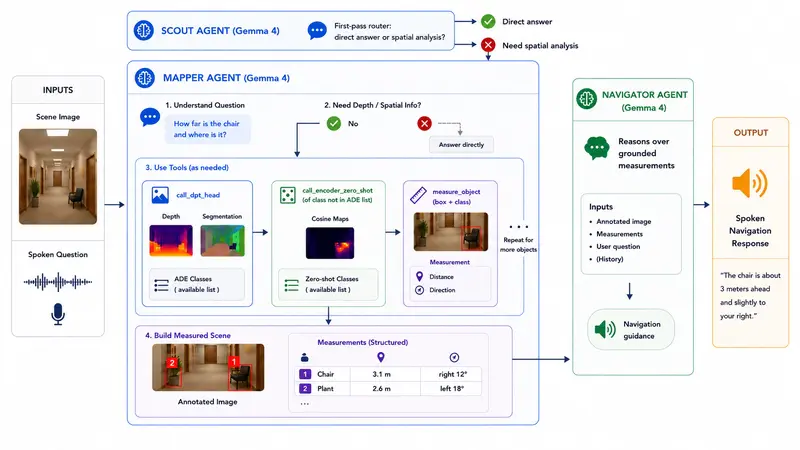
The diagram below shows the flow end to end. A Scout agent first decides whether the question needs spatial analysis at all. If it does, a Mapper agent localizes the relevant objects and calls the TIPSv2 tool stack to measure distance and bearing for each one. A Navigator agent then reasons over those grounded measurements and produces the spoken response.

The Spatial Grounding Layer
TIPSv2 (Google DeepMind) provides three capabilities the spatial grounding layer depends on: metric depth, semantic segmentation, and open-vocabulary matching:
Class heads (segmentation + metric depth): Dense prediction transformer (DPT) heads produce per-pixel semantic segmentation and metric depth across 150 common object classes. When Gemma localizes a known object, the system intersects that region with the segmentation mask so depth is measured over the right pixels, not a coarse bounding box.
Open-vocabulary matching: TIPSv2 is a vision-language encoder trained so that image patches and text live in the same embedding space. Gemma can pass any class name directly to the encoder and receive a per-patch similarity map in return, turning open-vocabulary understanding into open-vocabulary measurement. This extends grounding well beyond the 150-class limit without any fine-tuning.
I used the B/14 variant (86M vision + 110M text params), the smallest of the four.
The Interface
Gemma Guide is designed with a blind-first philosophy at its core: accessibility is not a feature added on top, it is the only way to build. The UI uses a two-zone tap-anywhere layout with no visual-first interaction patterns. Audio soundscapes and TTS guidance bridge the gap during model reasoning, and all architectural complexity is entirely hidden from the user.
Demo
Code

Gemma Guide
Gemma Guide is a blind-first multimodal navigation assistant that combines Gemma 4 with TIPSv2 to answer grounded questions like:
- What object is in front of me?
- How far away is it?
- Where is it relative to me?
- How should I move safely?
Motivation
For a blind user, the important question is not just what is in front of me, but how far away it is and how I should move safely. That is the gap between scene description and real navigation assistance. A useful system must do more than describe a scene in natural language; it must produce grounded spatial answers that guide movement in the real world.
Language models are not reliable depth sensors, but with Gemma 4, they can act as an agent that identifies an object, calls specialized spatial tools, and turns grounded distance estimates into practical guidance. Gemma Guide is built to turn…
How I Used Gemma 4
I used Gemma 4 E4B as the multimodal orchestrator across a three-agent pipeline.
Why Gemma 4 E4B specifically: the interaction is voice-driven, the scene must be interpreted visually, and the model must decide in real time whether a conversational answer is sufficient or whether grounded spatial measurement is required. That demands audio understanding, image understanding, native function calling, and strong reasoning together, and E4B delivers all of this while remaining compact.
That compactness is important for more than speed. It makes co-deployment alongside TIPSv2 feasible, and it directly advances the case for on-device deployment. A blind user should not need an internet connection to see, and running locally removes a meaningful privacy concern around continuous camera access. Keeping the language model in this size class is what makes that future realistic.
The Gemma 4 model card also lists two capabilities that turned out to be directly relevant here: native pointing (the model can return spatial coordinates for objects within an image, not just describe them) and interleaved multimodal input (audio and visual content freely mixed in a single prompt). Both are described under image understanding in the model card, leveraging this gave us more reliable responses.
The pipeline:
- Scout: Classifies the request – direct answer or spatial analysis needed – and routes accordingly.
- Mapper: Interprets the question, localizes relevant objects, and calls the TIPSv2 spatial tool stack to build a grounded scene state with distance and bearing per object.

- Navigator: Receives the annotated image and structured measurements and generates the final spoken guidance. Separating this from the Mapper matters: reasoning over a clean measured world model is more reliable than reasoning over raw tool outputs.

User Question : Can you tell me how to get to the grill in my backyard?
Gemma Guide : The grill is 2.342 meters away, straight ahead. There are a few things in the way. You should first step slightly right to clear the table, which is 0.985 meters away about 25 degrees to your left. Then, the chair at 1.345 meters straight ahead will be in your path. Steer gently to your right to avoid it and step forward.
Key Findings
-
Distance alone is not enough. Early versions reported metric depth but users had no sense of direction. Adding horizontal bearing from the object’s position in the frame turned a distance reading into actionable spatial guidance.
-
Whole-scene depth reasoning was too unreliable. Asking the model to reason over a full depth map produced ambiguous results. The reliable path was having Gemma localize the object first, then feeding that into the measurement pipeline – leveraging what the model is actually built for: reasoning, localization, and tool calling.
-
Separation of concerns made outputs consistent. Combining scene description, tool orchestration, and navigation reasoning in one agent made outputs inconsistent. Splitting into Scout, Mapper, and Navigator fixed this.
-
vLLM was the right local inference choice for now. Ollama lacks audio input entirely, ruling it out for a voice-driven pipeline, and its Gemma 4 tool-calling parser has had numerous bugs where vLLM’s proved robust. With quantization, reduced max sequence length, and fewer image patches per call, the full stack – Gemma 4 E4B plus TIPSv2 – fits on a single 16GB GPU.
-
Latency is the dominant UX constraint. Tool calls run in parallel, but the Mapper and Navigator still bottleneck on model reasoning itself, and that cost grows as conversation history lengthens. Complex scenes can push end-to-end response time past 20 seconds.
-
Reliability is the remaining work. The navigation instructions are still sometimes off, and fine-tuning the grounding stack on task-specific data is where the remaining work sits.
Toward on-device deployment:
I explored Google AI Edge Gallery as a path to partial on-device deployment (Gemma locally, TIPS stack remote), but the current blocker is that the image Gemma sees in chat is not forwarded into the skill execution context, which breaks grounded measurement. A standalone mobile app with tighter camera and voice control is the stronger long-term path, and both models are compact enough to make fully offline deployment on edge hardware plausible.