Cómo solucionar el bucle infinito en useEffect con objetos y arrays

Cómo solucionar el bucle infinito en useEffect con objetos y arrays

Explicación técnica

El problema ocurre porque useEffect compara los valores de las dependencias usando comparación de referencia (===), no por contenido (deep equality). Cuando usas useState({}), cada llamada a setObj({}) crea un nuevo objeto en memoria, aunque tenga el mismo contenido. React detecta que la referencia cambia (obj !== obj), lo que dispara la reejecución del useEffect, causando el bucle infinito.

En tu caso:

const [ingredients, setIngredients] = useState({});
useEffect(() => {
  setIngredients({}); // ¡Crea un nuevo objeto!
}, [ingredients]); // ingredients cambia de referencia → reejecuta → loop infinito

Pasos para solucionarlo

Opción 1: Evitar la actualización innecesaria (recomendada)

Si no necesitas actualizar el estado dentro del useEffect, elimina la dependencia del objeto/array y usa un array vacío:

useEffect(() => {
  // Solo ejecutar al montar el componente
  setIngredients({});
}, []); // ✅ Sin dependencias → solo se ejecuta una vez

Opción 2: Comparación profunda manual

Si necesitas ejecutar el useEffect solo cuando el contenido cambia, usa JSON.stringify (para objetos simples sin funciones/circularidades):

useEffect(() => {
  setIngredients({});
}, [JSON.stringify(ingredients)]); // ✅ Compara contenido, no referencia

⚠️ Advertencia: JSON.stringify es costoso en objetos grandes y falla con funciones, undefined, o referencias circulares.

Opción 3: Usar useMemo para una representación estable

Crea una representación estable del objeto (ej. número de elementos, hash):

const ingredientsHash = useMemo(() => 
  Object.keys(ingredients).length, // o tu lógica personalizada
  [ingredients]
);

useEffect(() => {
  setIngredients({});
}, [ingredientsHash]); // ✅ Compara valor primitivo estable

Opción 4: Validar si el valor es distinto antes de actualizar

Evita la actualización si el contenido es idéntico:

useEffect(() => {
  if (Object.keys(ingredients).length > 0) {
    setIngredients({});
  }
}, [ingredients]); // ✅ Solo actualiza si no está vacío

Bloque de código corregido (recomendado)

const [ingredients, setIngredients] = useState({});

useEffect(() => {
  // Solo ejecutar al montar el componente (ej. limpiar estado inicial)
  setIngredients({});
}, []); // ✅ Solución definitiva para este caso

Pro-tip

  • Nunca actualices el mismo estado que usas como dependencia sin una lógica de comparación profunda.
  • Para objetos complejos, usa librerías como immer o useDeepCompareEffect (de use-deep-compare-effect) si necesitas comparación profunda segura.
  • Si el objetivo es limpiar el estado al montar, usa useEffect con [] y no actualices el estado dentro. En su lugar, inicializa el estado con el valor deseado desde el inicio:
const [ingredients, setIngredients] = useState({}); // ✅ Inicialización directa

The Brutal Reality of Running Gemma 4 Locally

RTX 3050 showing active VRAM usage during Gemma 4 E4B inference

This is a submission for the Google I/O 2026 Writing Challenge

“At Google I/O 2026, Google made a specific claim: Gemma 4 runs on consumer laptops without cloud dependency. They demoed offline coding on stage. Local AI on everyday hardware is finally practical, they said.“

I tested that claim

GPU and high-bandwidth memory prices are not normal right now. AI companies are buying hardware at a scale that has genuinely disrupted the consumer market. A PC build suitable for local AI costs significantly more than it would have three or four years ago, if you can find the parts at all.

If you bought your machine before the AI hardware gold rush, you have leverage most people do not. I bought my laptop four years ago. An RTX 3050 with 4GB VRAM is not a serious AI card by any current standard, but it is exactly the kind of hardware Google implied Gemma 4 would run on. For local inference to start feeling consistently comfortable beyond lightweight models, 16GB VRAM is where things become much less restrictive. I have 4GB. This is what that looks like.

The Model Loaded. Then the Problems Started.

You install Ollama, pull the model, the weights load, the cursor blinks.

The GPU appears busy. Fans are screaming. The model is loaded entirely in VRAM. And long-context inference still slows down much faster than most demos suggest.

With Gemma 4 specifically, E2B loaded on my machine. E4B required closing everything else first to free RAM. Neither behaved the way the keynote implied.

Real throughput was more nuanced than I expected.

# Sustained long-form inference benchmark
# RTX 3050 Laptop GPU (4GB VRAM)
# 16GB DDR5 RAM
# Ollama on Windows

# Gemma 4 E2B
# eval rate: ~38.68 tok/s

# Gemma 4 E4B
# eval rate: ~24.39 tok/s

# Same prompt.
# Same hardware.
# Same runtime.

# E2B remained surprisingly usable.
# E4B pushed much closer to the memory wall.

The slowdown was not catastrophic. That was the interesting part. E2B remained mostly inside GPU memory on this workload, which avoided the worst PCIe and shared-memory penalties.

Small efficient models are now genuinely viable on consumer hardware. The problems start once context length, KV cache growth, and memory spillover begin compounding at the same time.

# First thing to check: is the model actually in GPU memory?
nvidia-smi

# Watch VRAM live as a conversation grows
# If VRAM rises and speed falls, KV cache is overflowing into RAM
watch -n 1 nvidia-smi

The Real Bottleneck Is Not Compute

Every inference run has two phases.

Prefill: the model reads your entire prompt in parallel. Compute-heavy, GPU handles it well. You generally do not feel this.

Decode: the model generates each output token one at a time. This is memory-bound. Every token forces the GPU to reload model weights from memory again. The GPU finishes its math and waits. It is not slow. It is starving for bandwidth.

It is why local inference feels slow even when Task Manager shows your GPU is busy.

# Memory bandwidth comparison — this is what determines tokens/sec

# RTX 3050 4GB     -> ~192 GB/s   (my machine)
# RTX 3060 12GB    -> ~360 GB/s
# RTX 4090 24GB    -> ~1008 GB/s
# M4 Max           -> ~546 GB/s
# M3 Ultra         -> ~800 GB/s

# VRAM capacity gets you the model loaded
# Bandwidth determines how fast it actually runs

Check your own card before loading anything:

# Linux: query GPU name and memory from the driver
nvidia-smi --query-gpu=name,memory.total --format=csv
# Windows: grep does not exist in PowerShell
# Use Select-String instead
nvidia-smi -q | Select-String "Product Name", "Total", "Free", "Used"

# nvidia-smi does not expose memory bandwidth on Windows (WDDM)
# Get the real number from: https://www.techpowerup.com/gpuz/
# The "Memory Bandwidth" field on the main tab is what you want
# Apple Silicon: no nvidia-smi, use system_profiler
system_profiler SPHardwareDataType | grep -i bandwidth

The KV Cache Is Quietly Eating Your VRAM

Even if your model fits in VRAM, that headroom disappears as your conversation grows.

Every token the model has seen gets stored in the key-value cache. Without it, the model would reprocess the entire conversation on every generation step. The KV cache trades memory for speed. The tradeoff is it grows with every token.

For Gemma 4 E2B, a moderately long conversation on a 4GB card will push you over the edge mid-generation. The model does not crash. It silently offloads to system RAM and your tokens per second falls off a cliff. Once inference spills heavily into system RAM, throughput collapses dramatically.

# Ollama defaults to 4096 token context even on models that support 128K
# This is why your model seems to forget things in long conversations
# Set it explicitly so you know what you are allocating

OLLAMA_NUM_CTX=8192 ollama run gemma4:e2b

# Confirm what context your running model is actually using
ollama ps

Quantization Is Not Just About Fitting the Model

Most guides explain quantization as a way to make models smaller so they fit in VRAM. That undersells it.

The real bottleneck is how fast the GPU can move weights from memory to compute units. Quantization reduces bytes per weight, so fewer bytes move per token generated. An INT4 model transfers 4 times less data per inference step than FP16, which translates almost directly to 4 times faster generation.

# Quantization levels for Gemma 4 via llama.cpp

# Q2/Q3   -> smallest file, lowest quality, fits tight VRAM
# Q4_K_M  -> best balance for most consumer hardware
# Q8_0    -> higher quality, needs more VRAM
# FP16    -> full precision, not practical on 4GB cards

Quantizing the KV cache separately is now supported in llama.cpp and is worth doing on constrained hardware:

# --cache-type-k and --cache-type-v cut KV cache memory ~50%
# with minimal quality impact — easier than switching model sizes

./llama-cli 
  -m gemma4-e2b-q4_k_m.gguf 
  --n-gpu-layers 99         # push all layers to GPU
  --cache-type-k q8_0       # quantize key cache
  --cache-type-v q8_0       # quantize value cache
  --ctx-size 4096             # keep context tight on 4GB cards

The Layer Offloading Trap

When VRAM is tight, --n-gpu-layers 20 on a 32-layer model sounds like a reasonable compromise. It is usually not.

Partial offloading means some inference steps cross the PCIe bus, introducing high-latency transfers that stall the pipeline. The slowdown is not proportional to layers offloaded. Even a few CPU-side layers can significantly tank throughput.

# This looks like a reasonable compromise. It is not.
# Every forward pass stalls waiting on PCIe transfers for CPU-side layers.
./llama-cli 
  -m gemma4-e2b-q4_k_m.gguf 
  --n-gpu-layers 20           # partial offload = worst of both worlds

# Better: use Q3 so the whole model fits on GPU at --n-gpu-layers 99
./llama-cli 
  -m gemma4-e2b-q3_k_m.gguf 
  --n-gpu-layers 99           # everything in VRAM, no PCIe stalls

What Windows Task Manager Is Lying to You About

This is where most people on Windows laptops get confused.

While running Gemma 4 E4B, Task Manager showed the RTX 3050 at 0% GPU utilization. At the same time, nvidia-smi showed:

# nvidia-smi output during active Gemma 4 E4B inference
# Task Manager said 0%. This is what was actually happening.

# +-----------------------------------------------+
# | GPU: NVIDIA GeForce RTX 3050 Laptop GPU        |
# | VRAM:    3564MiB / 4096MiB  (87% full)        |
# | GPU-Util: 44%                                  |
# | Power:    52W / 95W                            |
# +-----------------------------------------------+

# Always trust nvidia-smi over Task Manager for CUDA workloads
# Task Manager shows 3D engine usage — LLM inference runs on CUDA compute
# Windows sees "no 3D rendering" and reports 0%

RTX 3050 showing active VRAM usage during Gemma 4 E4B inference

Now the 11.6GB figure. This laptop has two GPUs: the RTX 3050 (GPU 1) and the AMD Radeon iGPU inside the Ryzen 7 6800H (GPU 0). The AMD iGPU has no dedicated VRAM. It borrows from system RAM dynamically. Windows adds them together:

# How Windows calculates "total GPU memory" on a dual-GPU laptop

# RTX dedicated VRAM:          4.0 GB  (fast, ~192 GB/s)
# AMD iGPU shared system RAM:  7.6 GB  (slow, ~70-90 GB/s)
# ----------------------------------------
# Windows "GPU Memory":       11.6 GB  (misleading total)

# You do NOT have 11.6GB of fast VRAM
# You have 4GB fast + 7.6GB slow with a PCIe penalty to cross between them

AMD Radeon integrated GPU contributing shared system memory
And here is system RAM during E4B inference:

System RAM pressure during Gemma 4 E4B inference

13.2GB of 15.3GB used. 2.1GB available. Ollama is consuming roughly 4GB of system memory alongside the 3.5GB allocated in dedicated VRAM. The actual footprint for Gemma 4 E4B is 7 to 8GB total, split cleanly across two entirely different physical hardware pools running at wildly mismatched speeds. That split is exactly why generation feels slower than the model size alone would suggest.

At the same time, Ollama alone was consuming nearly 8GB of system RAM:

Ollama consuming nearly 8GB RAM during Gemma 4 E4B inference

# "The model loaded" does not mean the system is comfortable

# During Gemma 4 E4B inference on a 4GB RTX 3050 laptop:

# GPU memory pool
# ----------------
# Dedicated VRAM (RTX 3050)      -> 4.0 GB
# Shared DDR5 system memory      -> 7.6 GB
# Effective Windows "GPU Memory" -> 11.6 GB

# Real-world bottlenecks
# ----------------------
# [x] VRAM saturation
# [x] KV cache growth
# [x] Shared memory spillover
# [x] PCIe transfer overhead
# [x] Windows scheduler latency
# [x] Dual-GPU memory juggling

# Result
# ------
# The model technically fits.
# The hardware still struggles.
#
# Local inference on consumer laptops is often a
# memory orchestration problem, not a compute problem.

The result is that local AI performance becomes a memory orchestration problem long before it becomes a compute problem.

Hardware Tiers for Gemma 4 in 2026

# What you can realistically run locally in 2026
# (and what it costs to buy the hardware right now)

# 4GB VRAM (RTX 3050 — my machine)
#   -> Gemma 4 E2B with Q4 quantization
#   -> short contexts only, KV cache fills fast
#   -> the floor for local AI, barely

# 8GB-12GB VRAM
#   -> comfortable Gemma 4 E4B
#   -> 7B models from other families run well
#   -> context length starts to matter

# 16GB-24GB VRAM
#   -> where Gemma 4 becomes reliable for real work
#   -> this is what Google probably had in mind at I/O
#   -> good luck finding one at a reasonable price

# 36GB-64GB Unified Memory (Apple Silicon)
#   -> best consumer option for serious local AI
#   -> no VRAM/RAM split, no PCIe penalty

# 96GB-192GB Unified Memory
#   -> 70B models, workstation territory

Measure Before You Tune

# Get a baseline before changing anything
# Run this before and after every config change
./llama-bench -m gemma4-e2b-q4_k_m.gguf -p 512 -n 128
# Windows: check Ollama RAM usage directly
Get-Process ollama | Select-Object ProcessName,WorkingSet64

# Or watch:
# Task Manager -> Performance -> Memory
# Linux equivalent
free -h
# Watch GPU utilization and VRAM together in one view
# util column = compute bound, mem column = memory bound
nvidia-smi dmon -s mu

# Apple Silicon: watch memory pressure in real time
# Red = unified memory is overcommitted
sudo memory_pressure

What Google Got Right and What They Left Out

Gemma 4 E2B running locally on a 4GB VRAM laptop is not nothing. Four years ago that would not have been possible at all. The model quality for its size is genuinely impressive.

But “runs on consumer laptops” and “runs well on consumer laptops” are different claims. The I/O keynote did not mention memory bandwidth, KV cache overflow, or the fact that the hardware shortage means GPUs with enough VRAM for comfortable inference are still expensive and unusually difficult to find.

# What "model loaded successfully" actually guarantees

# NOT guaranteed:
# [ ] fits comfortably in VRAM
# [ ] KV cache has room to grow
# [ ] throughput will be usable
# [ ] PCIe offloading is avoided

# ONLY guaranteed:
# [x] weights entered memory without crashing

The model loading is the beginning of the problem. What happens after is a memory bandwidth race your hardware either wins or does not. Now you know which race you are in.

I made Claude Code refuse to write code unless the ticket scores 80/100

I’ve been using Claude Code daily on real projects for several months. It’s excellent. It’s also a brilliant improviser — and that’s the problem.

The failure mode

The recurring pattern looked like this:

  • I’d write a vague ticket. Claude Code would happily start coding.
  • It would ship something close to what I asked, but not quite.
  • It would touch files I hadn’t anticipated.
  • Security and UI review lived in the same head as the implementation — so nothing caught the obvious.
  • Each session forgot what the last one learned. The same bugs reappeared in different forms.

The model wasn’t wrong. The workflow was wrong. I was treating a senior pair programmer like a junior who’d guess if I was unclear. The result was a slow drift toward “vibe-coded” software — superficially impressive demos that broke when they met real users.

So I stopped treating each ticket as a prompt and started treating it as a spec. The methodology that came out is now open-source. It’s called Forgekeel, and the core idea is a quality gate I named KERNEL.

KERNEL: a scored gate before any code

The premise: no code is written until the ticket passes a gate.

The gate scores every ticket against 6 orthogonal dimensions, 100 points total:

Dimension Weight Question
Clarity 20 Is the objective unambiguous in one sentence?
Scope 20 Are inclusions and exclusions explicit?
Context 15 Enough context (files, deps, prior decisions) to execute without asking?
Risk 15 Risks identified and mitigated? (auth, DB, migrations, deletes, PII)
Validation 15 Acceptance criteria verifiable and reproducible?
Priority 15 Does this advance an active goal or unblock a critical path?

The score decides what happens:

  • < 60 → reject. Return to me with concrete flags per dimension.
  • 60–79 → conditional. The architect subagent (Opus, read-only) drafts a plan before any write action.
  • ≥ 80 → execute. The builder subagent (Sonnet) proceeds directly.

The 6 dimensions are orthogonal. You can’t compensate for low Risk with high Clarity — a ticket with Clarity 20 and Risk 5 still totals well numerically, but the low Risk forces an architect review before any DB or auth touch.

The score is not a vanity metric. The line that ended up at the top of the rubric file:

A ticket that scores 95 and breaks production is worse than one that scored 65, was flagged, and got a plan first.

A concrete example

Here’s a ticket I rejected on myself: “Add password reset email.”

KERNEL pass:

Clarity      15 / 20   "Reset" undefined — link only, or full flow + template?
Scope        10 / 20   No mention of expiry, rate limits, or email provider
Context       8 / 15   Doesn't say which auth provider or where templates live
Risk          5 / 15   Auth flow + email = high risk, not addressed
Validation    8 / 15   "Make it work" isn't testable
Priority     12 / 15   Active KPI
                       ─────
                       58 / 100   → REJECT

Forgekeel refused to touch code. I rewrote the ticket as I would have if a junior asked me to spec it properly:

Clarity      19 / 20   Add `/reset-password` flow: email link with 30-min expiry token
Scope        18 / 20   This ticket: link email only. Excluded: SMS, recovery codes
Context      14 / 15   Supabase Auth `resetPasswordForEmail`. Template in /emails/
Risk         13 / 15   Rate-limit 3/h per email. No token leak in logs. RLS audit
Validation   13 / 15   Cypress: request reset, click link, set new password, login
Priority     13 / 15   Unblocks login retention KPI
                       ─────
                       90 / 100   → EXECUTE

Same problem, two tickets, two outcomes. The first version would have shipped something. Probably without rate limits, without auditing whether the token could leak into logs, with “manual testing” as the validation step. The second version forces every gap shut before the IDE opens.

This is what KERNEL really is: the difference between debugging in your editor and debugging in production.

Around the gate

KERNEL is the most distinctive piece, but the methodology has more:

  • 7 specialized subagents with enforced read-only vs write roles. architect, security-auditor, and ui-reviewer never modify files — their job is to think, not type. builder, tester, and designer can write, but only after the read-only review.
  • A per-project constitution declaring stack, non-negotiable principles, design tokens, allowed/forbidden MCPs. Every agent reads it before acting. Without it, /design-iterate refuses to run because the designer would hallucinate values.
  • A learnings loop. Every closed ticket appends “what went wrong / how it was resolved / what not to repeat” to a learnings.md file. By ticket 20, the project has a written history of bugs it should never re-introduce. Future sessions read it as part of context.

Full breakdown in the README.

Why it’s stack-locked

Forgekeel is opinionated and stack-locked to Next.js + Supabase + TypeScript + Tailwind v4 + shadcn/ui + pnpm.

That’s deliberate. The agents reference specific patterns (Server Actions, RLS on every table, Tailwind @theme tokens). If I made them stack-agnostic, the methodology would become advice instead of execution. Adapting to a different stack means editing the agents directly — there’s no abstraction layer planned.

What I’m looking for

MIT, v0.1.0, used internally on real projects before this release.

Repo: https://github.com/forgekeel/forgekeel
npm: https://www.npmjs.com/package/forgekeel

I’d genuinely value feedback on:

  • The KERNEL rubric — would you weight the dimensions differently? Blind spots in the 6?
  • Anyone running similar structured workflows on Claude Code — what worked, what didn’t?
  • The subagent setup — what’s missing for your daily loop?

If KERNEL stops one ticket from shipping broken to your users, my week was worth it.

I Fed React’s Entire Hooks Transition History to Gemma 4. Here’s What It Found That We Missed.

GitHub logo

“Which commit broke everything?”
Every developer who has inherited a legacy codebase has asked this. We just never had a good way to answer it.

The Problem That Started This

Six months ago I was debugging a production issue in a codebase I’d inherited. The bug had been there for a long time — I could tell because the workarounds had workarounds. But I couldn’t figure out when it started, or what change introduced it.

I opened git log. 2,847 commits. Three years of history. Everything was in there — every decision, every mistake, every refactor — locked inside commit messages that ranged from "fix critical auth bug" to "stuff".

I needed a historian, not a search engine.

That’s why I built CodeDNA.

What I Wanted to Know

The question I couldn’t answer manually: When did this codebase’s quality start degrading, and what caused it?

Standard git tools answer how much happened. Commit graphs show velocity. git blame shows who touched what. But none of them answer why a period was chaotic, or connect a March 2019 API change to a June 2019 bug cluster.

That connection requires reasoning across time — holding 180 commits in context and tracing causal chains between them. That’s exactly what Gemma 4’s Thinking Mode is designed for.

Why Gemma 4 Specifically

I want to be honest about this, because “I used an LLM” is not the same as “I used Gemma 4 intentionally.”

Thinking Mode is the reason this project exists.

I tested the same prompt against several models during development. Standard instruction-tuned models produce summaries. They count keywords and report patterns. Gemma 4 with Thinking Mode reasons about patterns — it traces why a cluster of fix commits appeared after a specific API change, not just that they appeared.

The live reasoning stream in the UI is not a gimmick. It’s the proof. When you paste your git log and watch the right panel stream Gemma’s analysis in real time, you’re watching it build the causal chain before it outputs the structured result. That’s not post-hoc storytelling — that’s the actual analysis process made visible.

128K context is the other prerequisite.

180 commits with file stat data is roughly 35,000–40,000 tokens of compressed history. The only way to detect that a March pivot caused a June bug storm is to have both in the same context window. Without 128K, you’re forced into chunking — which destroys the causal chain entirely.

Privacy is structural, not optional.

Your git history contains proprietary module names, security patch descriptions, unreleased feature branches, and often enough context to reverse-engineer your business logic. I built CodeDNA to run under your own API key with zero data retention. This isn’t a feature toggle — it’s the only way I could imagine a real engineering team actually using it with their private repos.

The Experiment: React’s Hooks Transition

I chose the React repository’s 2018–2019 Hooks transition period as my primary test case for one specific reason: any developer who knows React can verify the output in 2 minutes.

This is the verifiability test that every other project idea I considered failed. Financial anomaly detection? A judge would need domain expertise. CVE scanning? Knowledge cutoff problems. Food photo analysis? Blurry curry images break the demo. Git history? The raw commits are public. Anyone can check.

I fed Gemma 4 the commits from September 2018 through June 2019. 24 commits in the demo, roughly 180 in a fuller run. The Hooks era: one of the most architecturally significant transitions in any major open-source project.

Here’s what it found:

What Gemma 4 Said About React’s History

The milestone Gemma 4 identified first: A feature burst in July–September 2018 — Scheduler time-slicing infrastructure (Scheduler.js, 144 insertions in one commit), then React.lazy, Suspense, and createContext v2 added within 6 weeks of each other.

This is factually accurate. Any React developer recognizes this as the foundation-laying period before Hooks went public.

The milestone that surprised me: Gemma 4 flagged January–February 2019 as a stability → bug storm transition, citing ca53456 (fix for useRef) and cb54567 (fix for infinite useEffect loops) within days of the 16.8.0 release. It specifically noted that ReactFiberHooks.js had 8 modifications in this period versus 2 in the preceding stable phase.

I had to look this up to verify. It’s correct. The Hooks release in 16.8.0 (February 6, 2019) was followed by a cluster of hotfixes addressing edge cases in the hooks implementation that weren’t caught before release. The file-level evidence in the commit stats makes this visible — but only if you’re looking across all 24 commits simultaneously, not one at a time.

The health score: 79/100. Breakdown: +15 for high commit message quality, +10 for clear refactor era visible in 2019-05, -10 for 21% bug-fix ratio, and a neutral note for concentrated churn in ReactFiberHooks.js. Every factor is displayed, with evidence. No black-box number.

The Prompt Engineering That Took the Longest

Getting Gemma 4 to produce specific insights — not corporate-speak — was the hardest part of this project. It took three major iterations.

Iteration 1 (bad): Asked the model to “tell me the story of this codebase.” It produced beautifully written hallucinations. “The team worked hard to address technical debt during a difficult refactoring period.” Sounds good. Means nothing. Not a single commit hash cited.

Iteration 2 (better): Added a list of forbidden phrases: "technical debt", "the team", "seems like", "likely indicates", "possibly", "perhaps". Insights became slightly more factual but still vague. The model would say “there were many fixes in this period” without specifying how many, which period, or what was being fixed.

The breakthrough (Iteration 3): Injecting pre-computed metadata. Before any model call, my preprocessor now extracts:

  • A monthly commit histogram: 2019-03: 47 commits, 2019-02: 12 commits
  • Top changed files: ReactFiberHooks.js modified 8 times
  • Bug-fix ratio: 21%
    When this metadata is in the prompt, the model’s job changes from counting to interpreting. Instead of asking “were there a lot of fixes in early 2019?” I’m telling it “there were 14 fix commits in 6 weeks targeting ReactFiberHooks.js — what does that mean?” The insights became specific and verifiable almost immediately.

The map-reduce split was the second major insight. Asking Gemma 4 to simultaneously produce flowing Thinking Mode prose and valid structured JSON produced neither well. Splitting into Step 1 (reasoning stream — clean markdown, no JSON) and Step 2 (JSON structuring from the reasoning trace) dramatically improved both. The live reasoning panel now shows actual analytical prose. The timeline data is reliably structured.

What I Learned About Gemma 4’s Limitations

Small repos produce low-confidence analysis. Under 50 commits, the patterns aren’t there yet. CodeDNA handles this gracefully — it labels the output clearly as “micro-analysis” rather than inventing dramatic narratives. But the wow factor is absent.

Vague commit messages are the real enemy. A repo full of "fix", "update", "wip" commits gives Gemma very little signal to reason from. The model tries — it picks up on date clustering and file patterns — but the confidence is honest: "data_quality: low", "insufficient evidence for causal narrative". I considered trying to work around this but decided against it. Honest uncertainty is more valuable than confident fabrication.

Model size vs. speed tradeoff is real. The 31B model produces noticeably richer reasoning. The 26B model is faster and more reliable on the free API tier. I defaulted to 26B primary with 31B fallback, and added OpenRouter as a second fallback layer with dynamic model discovery. For a solo developer on a laptop with no GPU, the API-first approach was the only realistic path.

The reasoning stream can’t gracefully fall back mid-stream. If the primary model fails after the SSE connection is open, the stream errors rather than switching providers. The JSON structuring call (which runs in parallel) handles fallback correctly, but the stream panel may show an error while the timeline still renders successfully. I documented this honestly rather than hiding it.

The Moment That Made It Worth Building

There’s a specific interaction that convinced me this tool has real value beyond the hackathon.

I ran CodeDNA on my own FundTrace project — a fraud detection system my team built for a hackathon earlier this year. 47 commits, 3 months.

Gemma 4 flagged a stability period followed by a pivot, then a concentrated feature burst in the final week before submission. The health score was 61/100. The main reason: 38% bug-fix ratio in the final 10 days.

That’s exactly what happened. The last week was a scramble. We knew it at the time. Seeing it reflected back as a pattern — with specific commit references and a calculated ratio — was oddly clarifying. Not because it told us something we didn’t know, but because it quantified what we felt.

That’s the use case I want to build toward: not just forensics on old code, but a continuous mirror for engineering health.

Try It on Your Repo

git clone https://github.com/acchasujal/codeDNA.git
cd codeDNA/backend
pip install -r requirements.txt
cp .env.example .env
# Add your Google AI Studio key
uvicorn main:app --reload

# New terminal:
cd ../frontend && npm install && npm run dev

Then run this in any repository you’re curious about:

git log --stat | head -3000 > my_history.txt

Upload the file. Click Analyze.

What would Gemma 4 find in your codebase?

Post your results in the comments — I’m genuinely curious what it finds in different projects and domains.

What’s Next

This is v1. The things I want to build next:

  • GitHub URL input — analyze any public repo without manual log export
  • Trend alerts — “your current sprint’s bug-fix ratio is 2x your baseline”
  • Team patterns — author-level analysis (with appropriate consent and privacy controls)
  • CI/CD integration — flag risky commit pattern spikes as part of a PR check
    The core insight — that Gemma 4’s Thinking Mode + 128K context makes this class of analysis possible — still has a lot of room to run.

GitHub:

CodeDNA — AI Codebase Archaeologist

Feed Gemma 4 your git history. Discover exactly when — and why — your codebase evolved.

CodeDNA Demo

Every codebase has a turning point. The moment before is clean commits and clear intent
The moment after is hotfixes, reverts, and growing entropy. CodeDNA finds it.

What It Does

  • Maps your codebase history with Gemma 4 — up to 400 commits, preprocessed and compressed for maximum analytical signal. The preprocessor extracts monthly commit histograms and per-file change frequency before sending to the model, so insights are grounded in observable data.

  • Returns a structured archaeological report — health score with transparent breakdown, milestone timeline (bug storms, refactors, pivots, feature bursts), and key metrics. Every claim cites a specific commit hash, date, or metadata value.

  • Streams Gemma 4’s live reasoning — watch the Thinking Mode trace in real-time as the model identifies causal patterns across years of history. Verifiable: the…

Built solo in 4 days for the Google Gemma 4 Challenge. The tool’s own git history is its own best demo.

If this was useful or interesting, a reaction means a lot — it’s the tiebreaker in this challenge and tells me the problem resonates.

Building a Private RAG System: Lessons from a Local-First AI Journal

Your AI Journal Is Reading Your Diary. Mine Doesn’t.

Most AI apps quietly send your data to the cloud. DiaryGPT does the opposite — and this is the full technical story.

The Problem With AI + Private Data

When you write in a journal, you write the things you’d never say out loud. The last thing you want is that text sitting on someone else’s server, used to train a model, or exposed in a breach.

But AI is genuinely useful for journaling. It can find patterns you miss, reflect things back to you, ask questions a blank page never would. The tension is real: you want AI insight without sacrificing privacy.

Most apps solve this by trusting a privacy policy. I wanted a technical guarantee.

So I built DiaryGPT — an AI-powered personal journal where, by default, zero data leaves your machine. Here’s exactly how it works.

What DiaryGPT Does

Before the architecture, here’s what the app gives you:

  • AI mood analysis on every entry — mood, themes, a reflective response, and a follow-up question
  • RAG-powered chat — ask “when was I most anxious?” and get answers grounded in your actual entries
  • Semantic search — find entries by meaning, not keywords (“times I felt lonely” finds entries with “isolated”, “disconnected”, “blue”)
  • Weekly reflection — AI summary of your emotional arc across the week
  • Personalized journaling prompts — generated from your recent writing patterns
  • Writing streaks and memories — “on this day last year you wrote…”
  • AI companion mode — CBT/DBT-grounded reflection with built-in crisis detection (not a replacement for a licensed therapist)
  • Mood check-ins — 1–10 logging with history chart
  • Voice dictation and voice chat — speak entries, hear responses read back
  • Full AES-256-GCM encryption at rest — every diary entry, chat message, and note

The Privacy Architecture

DiaryGPT has two modes. You choose in Settings.

🟢 Local Mode (Default)

Everything runs on your machine. The AI model, the search, the analysis — all local via Ollama.

Your diary entry
      ↓
Ollama (nomic-embed-text) → converts to numbers → saved in SQLite
      ↓
Ollama (llama3.2 / qwen2.5) → analyzes mood → saved encrypted

Zero data leaves your machine.

🟡 Cloud Mode (Opt-in)

For users who want higher reasoning quality and are comfortable with API transit. You bring your own API key — Groq, OpenAI, Anthropic, or Gemini. The key is stored locally.

Your diary entry
      ↓
Ollama (embeddings) → still local, nothing sent
      ↓
Top 5 relevant excerpts → your provider's API → answer streams back

Only a small slice of your diary transits. Never the full thing.

The RAG Pipeline — How the AI “Remembers” Your Life

RAG stands for Retrieval-Augmented Generation. It’s the technique that makes the AI feel like it actually knows you — without sending everything you’ve ever written to a language model on every request.

What is an Embedding?

Every diary entry gets converted into a list of numbers — like GPS coordinates for meaning.

"I felt anxious today"    → [0.21, 0.83, 0.12, 0.74, ...]
"I was really stressed"   → [0.22, 0.81, 0.14, 0.71, ...]  ← very similar
"I love hiking"           → [0.91, 0.12, 0.67, 0.23, ...]  ← very different

Similar meaning = similar numbers. This is what makes semantic search work — you search by concept, not exact words.

Phase 1 — Writing an Entry

You write: "Today was rough. Felt anxious about the deadline."
                    ↓
       Ollama (nomic-embed-text)
       converts text → [0.21, 0.83, 0.12, 0.74, ...]
                    ↓
       Saved in SQLite / PostgreSQL:
         entry text    → AES-256-GCM encrypted
         embedding     → stored raw (math requires it)
         mood/themes   → analyzed by LLM, stored encrypted

This happens asynchronously — the entry saves immediately, analysis runs in the background.

Phase 2 — Asking a Question

You ask: "When did I feel anxious about work?"
                    ↓
       Ollama converts question → numbers
                    ↓
       Cosine similarity search runs in YOUR database
       (sqlite-vec or pgvector — pure math, no external call)
entry A: 0.91 match ✓
entry B: 0.87 match ✓
entry C: 0.79 match ✓
entry D: 0.31 match ✗  (skipped)
             ↓
Top 5 entries decrypted in memory
             ↓
LLM receives: system prompt + diary excerpts + your question
             ↓
Streams answer word by word (SSE)

The key insight: embeddings find what to read. The LLM decides what to say about it.

The LLM never sees your full diary — only the 5 most relevant entries. Cosine similarity runs entirely on your server. Nothing goes to an external service unless you’ve opted into cloud mode.

The Companion Pipeline — Safety First

The companion mode is built around one rule: if someone is in crisis, the LLM never runs.

You type a message
        ↓
Crisis detection (keyword matching, server-side)
"suicide", "hurt myself", "want to die", etc.
        ↓
    CRISIS?          SAFE?
      ↓                 ↓
Hardcoded response   LLM runs with CBT/DBT prompt
988 + Crisis Text    Acknowledges → reflects → one question
Line + findahelpline
LLM never called     Saves encrypted to companion_messages

The crisis response is hardcoded. It cannot be hallucinated, modified, or bypassed by a clever prompt. The companion banner — “This is an AI companion, not a licensed therapist” — is also hardcoded in the UI, never AI-generated.

The companion system uses a distinct system prompt built around CBT thought-reframing, DBT skills, and reflective listening. Sessions are saved and resumable.

A real limitation worth naming: keyword detection catches explicit phrases like “I want to die” but will miss oblique crisis language like “I just want it to stop” or “everyone would be better off without me.” A small local classifier as a second layer is on the roadmap — keyword filter as the fast, auditable first line, classifier as the safety net for implicit signals.

The Encryption Layer

Every piece of user content goes through AES-256-GCM encryption before hitting the database.

// Every diary entry, chat message, companion note goes through this
encrypt(text)   // before DB insert
decrypt(text)   // after DB read, before sending to LLM or browser

The encryption key is yours — a 64-character hex string you generate and store in your .env. Without it, the database is unreadable. The server never transmits the key.

The one exception: embedding vectors are stored unencrypted. Cosine similarity requires the raw numbers. The chunk text that generated the embedding is stored separately, encrypted. The security boundary lives at the source text, not the derived vector.

The Technical Stack

Runtime        Node.js + Express
Frontend       Vanilla JS SPA (no build step, no framework)
Auth           JWT + Argon2id password hashing
Encryption     AES-256-GCM (Node.js crypto module)
Storage        SQLite (local default) or PostgreSQL (multi-device)
Vector search  sqlite-vec (local) or pgvector (Postgres)
Embeddings     Ollama nomic-embed-text (local default)
LLM            Ollama (local default) / Groq / OpenAI / Gemini / Anthropic
Streaming      SSE (Server-Sent Events) over POST with ReadableStream
Voice          Browser SpeechRecognition API (free) or Whisper (premium)

The frontend is deliberately no-framework. No React, no build pipeline, no node_modules in the browser. It loads instantly and works offline (except for cloud LLM calls).

LLM Provider Architecture

The LLM layer is a thin factory that routes every call to whatever provider is active:

// services/llm.js
const PROVIDERS = { ollama, anthropic, openai, gemini, groq };

export const streamChat = (history, message, context, onDelta) =>
  PROVIDERS[getConfig().provider].streamChat(history, message, context, onDelta);

Switching providers happens at runtime — no restart needed. Every provider implements the same three-function contract:

analyzeEntry(text)                              // → { mood, themes, reflection, followUpQuestion }
generateText(systemPrompt, userMessage)         // → string
streamChat(history, message, context, onDelta)  // → full string, streams via onDelta

Groq uses the OpenAI SDK pointed at https://api.groq.com/openai/v1. Ollama uses the same SDK pointed at http://localhost:11434/v1. Identical interface, completely different privacy properties.

What I Learned

1. Embeddings and LLMs are completely separate concerns. The model that converts text to numbers has nothing to do with the model that generates answers. You can run Ollama for embeddings and Groq for chat simultaneously. Most people conflate the two.

2. 7B–8B models are good enough for structured diary tasks. Mood detection, theme extraction, journaling prompts — a well-prompted qwen2.5:7b handles all of these reliably. The quality gap versus 70B only shows up in long-form weekly summaries. Use format: json mode in Ollama for structured output; without it, small models will eventually return malformed JSON and break your pipeline silently.

3. Cosine similarity belongs in your database, not a vector database. For a personal app with thousands (not millions) of entries, sqlite-vec and pgvector are more than sufficient. No Pinecone, no Weaviate, no extra infra. The math is simple and fast.

4. SSE over POST is the right call for streaming. The standard advice is to use EventSource, but EventSource is GET-only. Chat requires POST (to send the message body). The fix is fetch + ReadableStream on the client — full control over the stream lifecycle, no awkward query-string payloads.

5. Crisis detection must run before the LLM, not inside it. You cannot rely on an LLM to consistently detect crisis language and respond safely. Keyword matching before the LLM call is not elegant, but it is reliable and auditable. An LLM should never be the first line of defense for someone in crisis — it should never even get the message.

6. The hardest engineering decisions in a privacy-first app are about what not to do. No analytics. No telemetry. No “anonymized” usage data. Every one of those is a useful product feature you give up — and giving them up is the point.

Try It

DiaryGPT is open source. Self-host it, read every line, verify the privacy claims.

🔗 GitHub: https://github.com/rahul70-code/diarygpt

Your diary is yours. The AI should work for you, not harvest from you.

Stack: Node.js · Ollama · SQLite · AES-256-GCM · Vanilla JS

Tags: #LLM #RAG #Privacy #LocalFirst #OpenSource

CodePulse AI — Reviving an AI-Powered Repository Intelligence Platform

This is a submission for the GitHub Finish-Up-A-Thon Challenge

What I Built

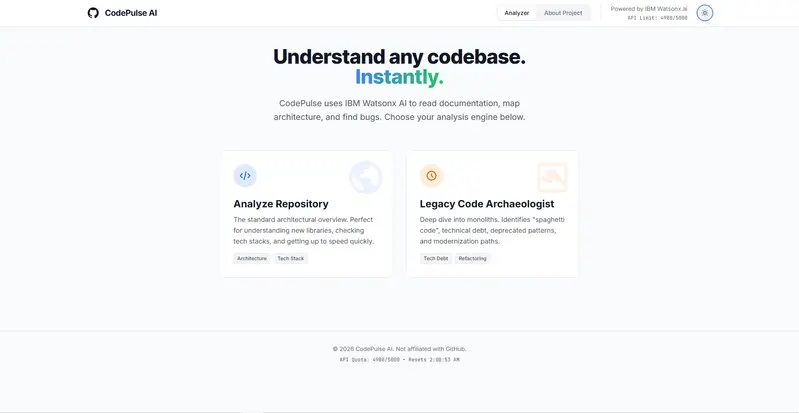
CodePulse AI is an AI-powered repository intelligence platform that analyzes GitHub repositories and transforms complex codebases into understandable architectural insights.

The platform automatically:

  • Generates architecture and class diagrams
  • Detects dependency relationships
  • Performs security and code quality analysis
  • Maps blast radius impact across repositories
  • Identifies technical debt in legacy systems
  • Explains repository structure using AI

Originally, this project started as an unfinished experimental repository analyzer powered by IBM Watsonx.ai. The initial version lacked polish, had unstable analysis flows, incomplete UX, and limited architectural visualization.

For the GitHub Finish-Up-A-Thon, I completely revived the project by:

  • migrating the entire AI stack from IBM Watsonx.ai to Gemini 2.5 Flash
  • redesigning the UI into a modern AI developer platform
  • adding Blast Radius Analysis
  • rebuilding repository visualization workflows
  • improving analysis generation and loading flows
  • polishing the developer experience end-to-end

The final result became a production-style engineering intelligence platform designed for developers working with large or unfamiliar codebases.

Demo

GitHub Repository

https://github.com/codedbyasim/codepulse-ai

Video Walkthrough

Before vs After

Before → Initial Unfinished Prototype

The original version of CodePulse AI started as an experimental AI-powered repository analyzer. While the foundation existed, the platform lacked visual polish, modern UX, stable AI workflows, and advanced engineering intelligence features.

The initial prototype:

  • used IBM Watsonx.ai for inference
  • had incomplete repository analysis flows
  • lacked polished architecture visualization
  • had minimal dependency mapping
  • had static and unfinished UI components
  • lacked blast radius prediction
  • had limited developer experience optimization

Before Screenshots

1. Original Landing Page

2. Initial Analyze Repository Interface

3. Initial Legacy Code Analysis Page

4. Original About Page

5. Basic Repository Visualization

6. Initial Loading & Analysis Workflow

After → Revived & Fully Polished Platform

During the GitHub Finish-Up-A-Thon, I completely revived and transformed CodePulse AI into a production-style AI-powered engineering intelligence platform.

The platform now features:

  • Gemini 2.5 Flash integration
  • Blast Radius dependency analysis
  • Interactive repository intelligence
  • Modern SaaS-inspired UI
  • Animated dependency graph previews
  • Security & code quality analysis
  • Improved loading and analysis flows
  • Advanced architecture visualization
  • Responsive developer-focused UX

Major Improvements

AI Stack Migration

One of the biggest upgrades was migrating the entire AI inference layer from IBM Watsonx.ai to Gemini 2.5 Flash.

This migration included:

  • rebuilding the backend proxy layer
  • refactoring request/response handling
  • converting payloads to OpenAI-compatible chat completion format
  • fixing malformed JSON parsing issues
  • redesigning Gemini fallback handling
  • updating environment configuration and model management

UI/UX Redesign

The frontend was completely redesigned into a modern AI SaaS-style experience inspired by:

  • GitHub
  • Linear
  • Vercel
  • Cursor

New additions included:

  • animated dependency graph previews
  • futuristic grid backgrounds
  • improved typography
  • polished loading states
  • responsive layouts
  • glassmorphism-inspired UI
  • dark mode refinement

Blast Radius Analysis

One of the biggest new features was Blast Radius Analysis.

This system:

  • maps repository dependency relationships
  • visualizes affected nodes
  • predicts propagation impact across services
  • helps developers understand change risk before deployment

Repository Intelligence

The platform now provides:

  • architecture diagrams
  • dependency insights
  • security analysis
  • tech stack detection
  • repository exploration
  • AI-generated documentation
  • legacy code archaeology

After Screenshots

1. Redesigned Hero Section

2. Modern AI Repository Dashboard

3. Blast Radius Analysis Visualization

4. Advanced Dependency Mapping

5. Improved Loading & Analysis Flow

6. AI-Powered Repository Intelligence

7. After About Page

Transformation Summary

Before After
Static prototype Production-style AI platform
IBM Watsonx.ai Gemini 2.5 Flash
Minimal UI Modern SaaS experience
Basic repository analysis Advanced repository intelligence
No dependency prediction Blast Radius Analysis
Incomplete UX Fully polished workflows
Static components Animated developer-focused interface
Experimental project Revived engineering intelligence platform

The Comeback Story

CodePulse AI originally began as an unfinished side project focused on AI-assisted repository understanding. While the core idea was strong, the platform was incomplete and lacked a polished user experience.

The original system:

  • used IBM Watsonx.ai for inference
  • had unstable response parsing
  • lacked proper architecture visualization
  • had static UI components
  • had incomplete analysis workflows
  • did not clearly communicate repository impact analysis

During the Finish-Up-A-Thon, I decided to fully revive the project and transform it into a polished developer intelligence platform.

The project evolved from a rough experimental prototype into a fully redesigned engineering intelligence platform capable of:

  • dependency analysis
  • blast radius prediction
  • AI-powered architecture understanding
  • repository exploration
  • security insights
  • modern developer-focused UX

My Experience with GitHub Copilot

GitHub Copilot became my pair programmer throughout the revival process.

I used Copilot extensively for:

  • refactoring React + TypeScript components
  • redesigning Tailwind layouts
  • generating animation logic
  • debugging Gemini integration issues
  • restructuring API payload handling
  • improving loading workflows
  • accelerating UI polishing
  • rebuilding analysis components

Copilot was especially helpful while:

  • migrating from IBM Watsonx.ai to Gemini 2.5 Flash
  • implementing animated dependency graph previews
  • refactoring the backend inference layer
  • improving frontend responsiveness and styling

Instead of generating the entire project automatically, Copilot acted as a collaborative engineering assistant that helped speed up iteration, experimentation, debugging, and polishing.

Tech Stack

Frontend

  • React
  • TypeScript
  • Tailwind CSS
  • Framer Motion
  • Mermaid.js

Backend

  • Node.js
  • Express.js

AI

  • Gemini 2.5 Flash
  • AIML API

Features

  • Repository Analysis
  • Blast Radius Visualization
  • Security Insights
  • Dependency Mapping
  • AI Documentation Generation
  • Legacy Code Archaeology

Transformation Summary

Before After
Static prototype Production-style AI platform
IBM Watsonx.ai Gemini 2.5 Flash
Minimal UI Modern SaaS experience
Basic analysis Advanced repository intelligence
No dependency prediction Blast Radius Analysis
Incomplete UX Fully polished workflows
Simple architecture diagrams Interactive engineering visualization
Experimental project Revived developer platform

What I Learned

This project taught me:

  • how to refactor and revive unfinished software
  • how to migrate AI inference providers
  • how to build production-style developer tooling
  • how to design modern SaaS interfaces
  • how to improve architecture visualization
  • how to work alongside AI-assisted development tools effectively

Most importantly, this challenge helped me finally finish and polish a project that had previously been left incomplete.

Built for the GitHub Finish-Up-A-Thon 🚀

Part 1: Taming Asynchronous JavaScript: How to Build a “Mailbox” Queue

Have you ever tried to catch water from a fire hydrant with a paper cup?

That is exactly what it feels like when you are building a JavaScript app and data starts coming in way faster than your code can process it. Maybe you are handling a flood of incoming webhooks, reading a massive file, or listening to a busy WebSocket.

If your data sender is faster than your data receiver, things break.

What you need is a waiting room. A place where incoming data can chill out until your app is ready to handle it. In computer science, this is called a “Queue” or a “Channel.” Today, we are going to build one from scratch. Let’s call it our Mailbox.

The Idea Behind the Mailbox
Think of a literal physical mailbox.

The Mail Carrier (The Producer): Drops letters into the box. They don’t care if you are home; they just drop the mail and leave.

You (The Consumer): You check the mailbox. If there is mail, you take it. If the box is empty, you just wait until the mail carrier shows up.

We can recreate this exact relationship in JavaScript using Promises. Here is the code. It might look a little magical at first, but we will break it down right after!

export class Mailbox {
  constructor() {
    this.messages = []
    this.waiters = []
    this.closed = false
  }

  push(message) {
    if (this.closed) {
      throw new Error("Mailbox is closed")
    }

    // Deliver directly to waiting consumer
    if (this.waiters.length > 0) {
      const resolve = this.waiters.shift()
      resolve(message)
      return
    }

    this.messages.push(message)
  }

  async pop() {
    // Message already available
    if (this.messages.length > 0) {
      return this.messages.shift()
    }

    // Closed mailbox
    if (this.closed) {
      return null
    }

    // Wait for future message
    return new Promise((resolve) => {
      this.waiters.push(resolve)
    })
  }

  close() {
    this.closed = true

    // Wake all waiting consumers
    while (this.waiters.length > 0) {
      const resolve = this.waiters.shift()
      resolve(null)
    }
  }

  get size() {
    return this.messages.length
  }

  async *[Symbol.asyncIterator]() {
    while (true) {
      const msg = await this.pop()

      if (msg === null) {
        break
      }

      yield msg
    }
  }
}

The “Aha!” Moment: Pausing JavaScript

The coolest part of this code is inside the pop() method.

Usually, when we use a Promise in JavaScript, it’s for something like fetch()

You make a request, and eventually, it resolves.

But here, we are doing something sneaky. If the mailbox is empty, we create a new Promise, but we take its resolve function and shove it into our this.waiters array. We are essentially bottling up the ability to finish the Promise for later.

Your code effectively pauses. It just sits there, waiting.

Then, when the push() method gets called, it looks inside this.waiters, pulls out that bottled-up resolve function, and triggers it with the new message. Boom! Your paused code instantly wakes up with the data.

How to Use It

Because we added that weird looking [Symbol.asyncIterator] at the bottom of the class, using our Mailbox is beautifully simple:

const mailbox = new Mailbox();

// 1. You: waiting for mail
async function readMail() {
  // This loop will naturally pause and wait for new messages!
  for await (const msg of mailbox) {
    console.log("Just got:", msg);
  }
  console.log("No more mail coming!");
}
readMail();

// 2. The Mail Carrier: dropping off mail at random times
mailbox.push("Letter 1");
setTimeout(() => mailbox.push("Letter 2"), 1000);
setTimeout(() => mailbox.close(), 2000);

This setup works flawlessly for everyday tasks. But there is a hidden monster in this code.

If you get too popular—say, someone drops 1,000,000 letters into your mailbox at once—this exact code will completely freeze your server for minutes. In Part 2, we are going to find out exactly why JavaScript hates huge arrays, and how to fix our Mailbox to handle millions of messages in a fraction of a second.

The link to the repo of full source code of this: https://github.com/pckrishnadas88/mailbox

Great example of Gemma 4 moving beyond chatbots into real-world decision support. Using AI to guide everyday actions like recycling shows how impactful applied LLMs can be when designed for usability, not just capability. #Gemma4 #AI #Sustainability

klaudiagrz profile

Building a Production AI Chatbot for an Educational Institute: Architecture, Lessons & Full Stack Deep-Dive

TL;DR: I built a full-stack AI chatbot platform for IFDA, an Indian educational institute. It handles course discovery, lead capture, appointment scheduling, WhatsApp messaging, and comes with a complete admin CRM — all deployed on Vercel with a Neon PostgreSQL backend. Here’s everything I learned, every system I built, and why I made the choices I did.

Why This Project Exists

Educational institutes spend enormous resources on human admissions counselors. Prospects ask the same questions repeatedly: What courses do you offer? How long is the program? What will I earn afterwards? And every unanswered query at 11 PM is a lost lead.

IFDA needed something smarter than a static FAQ page and cheaper than a 24/7 call center. The solution: a hybrid AI chatbot that could hold intelligent conversations about courses, capture leads, book counseling appointments, and hand off hot prospects to human staff — all while syncing with WhatsApp.

This is the full technical story of how I built it.

The Architecture at a Glance

The project is a Next.js 14 App Router monorepo — one codebase serving the public-facing chatbot widget, the admin CRM dashboard, and all API routes. Every component was chosen deliberately:

Layer Technology
Framework Next.js 14 (App Router)
Language TypeScript throughout
Database Neon PostgreSQL + Prisma ORM
AI / LLM OpenAI (GPT) for intent, embeddings, and response generation
Deployment Vercel (Edge-compatible)
WhatsApp DoubleTick API
Auth Custom JWT + RBAC middleware
Session Server-side session store

The graph of this codebase has 1,259 nodes (files, functions, types) and 3,276 edges (calls, contains, references) distributed across 55+ community clusters — from the bot engine core, to the Prisma edge runtime, to the admin dashboard pages. Let’s walk through each major system.

System 1: The Bot Engine (lib/bot/engine.ts)

The heart of the project is processMessage() in lib/bot/engine.ts. This single function is the traffic controller for every incoming message — whether it arrives from the web widget or WhatsApp.

Hybrid Scripted + LLM Architecture

The bot does not send every message to GPT. That would be slow and expensive. Instead, it uses a two-tier approach:

  1. Scripted funnel stages — structured flows for lead capture (name, phone, course interest, city) where deterministic logic is faster and more reliable than an LLM.
  2. LLM fallback — for open-ended questions, course comparisons, career queries, or anything outside a defined stage.

The stage management lives in lib/ai/intent.ts:

// intent.ts — simplified
export function resolveStage(session: Session): FunnelStage { ... }
export function getMissingFields(lead: Partial<Lead>): LeadField[] { ... }
export function getNextQuestion(missing: LeadField[]): string { ... }
export function isLeadComplete(lead: Partial<Lead>): boolean { ... }
export function detectIntent(message: string): Intent { ... }
export function analyzeMessage(message: string, session: Session): Analysis { ... }

analyzeMessage() is the decision function. It evaluates the message in context of the current session stage and decides whether to invoke the scripted path, call getAIResponse() from lib/ai/llm.ts, or trigger a carousel/quick-reply block.

Structured Message Components

Responses are not plain strings. They’re typed message blocks that the renderer layer converts to channel-specific formats:

// lib/ai/llm.ts — block builders
textBlock(content: string): TextBlock
domainListBlock(domains: Domain[]): DomainListBlock
carouselBlock(items: CourseCarouselItem[]): CarouselBlock
courseDetailBlock(course: Course): CourseDetailBlock
quickRepliesBlock(replies: string[]): QuickRepliesBlock
visitWebsiteBlock(url: string): VisitWebsiteBlock

This block-based design means the same engine output drives both the web UI and WhatsApp — two very different rendering surfaces.

System 2: Dual-Channel Rendering

The renderer layer translates structured message blocks into channel-specific formats.

Web Renderer (lib/bot/renderers/web.ts)

renderToWeb() converts blocks into React-compatible JSON that the frontend StructureMessage.tsx component consumes. The component handles scroll behavior, carousels with checkScroll(), and animated message appearance.

WhatsApp Renderer (lib/bot/renderers/whatsapp.ts)

renderToWhatsApp() maps the same blocks to the DoubleTick API’s message format. WhatsApp has strict message type rules — interactive lists, templates, and plain text are separate API calls with different schemas. The renderer handles all of this through the lib/whatsapp/doubletick.ts client:

// doubletick.ts
export async function sendWhatsAppText(phone: string, text: string): Promise<void>
export async function sendWhatsAppTemplate(phone: string, template: TemplateParams): Promise<void>
export async function sendWhatsAppInteractiveList(phone: string, list: InteractiveList): Promise<void>

Incoming WhatsApp messages hit app/api/whatsapp/webhook/route.ts, which validates the HMAC signature via isValidSignature(), parses the payload through lib/whatsapp/messageParser.ts, and feeds it into the same processMessage() bot engine. One engine, two channels.

System 3: Course Intelligence (lib/ai/courseData.ts)

The course catalog is the richest data source in the system. courseData.ts is a comprehensive module with 25+ exported functions that the bot engine calls to build contextually accurate responses:

findCourse(query: string): Course | null
getCourseAbout(course: Course): string
getCoursePrerequisites(course: Course): string
getCourseSyllabus(course: Course): string
getCourseCareerOpportunities(course: Course): string
getCourseCareerGrowthRoadmap(course: Course): string
getCourseProfessionalGrowthLadder(course: Course): string
getCourseTools(course: Course): string
getCourseSkills(course: Course): string
getAllCourseCarouselItems(): CourseCarouselItem[]
getCarouselByIntent(intent: Intent): CourseCarouselItem[]
getLLMCourseMap(): LLMCourseMap        // Compact map for GPT context injection
getCourseContext(course: Course): string // Full context string for LLM prompt

findCourse() is the most-called function in the entire application (32 edges in the call graph), supporting fuzzy matching so “digital marketing,” “DM course,” and “marketing program” all resolve correctly.

getLLMCourseMap() is particularly clever: it generates a compact, token-efficient representation of the course catalog that gets injected into GPT prompts. This gives the LLM accurate knowledge of IFDA’s offerings without burning context on verbose descriptions.

System 4: The Knowledge Base (lib/ai/knowledge-parser.ts + Embeddings)

Beyond the structured course catalog, IFDA staff can upload arbitrary knowledge documents — PDFs, CSVs, text files, JSON — through the admin panel. The knowledge pipeline processes these into searchable vector embeddings.

Parsing Pipeline

knowledge-parser.ts handles multi-format ingestion:

parseKnowledgeFile(file: File): Promise<ParsedKnowledge>
parsePdf(buffer: Buffer): Promise<string>
parseCsv(content: string): ParsedRow[]
parseJson(content: string): ParsedKnowledge
parseTxt(content: string): ParsedKnowledge
chunkText(text: string, chunkSize: number): string[]

Semantic Search

lib/ai/embeddings.ts handles the vector layer:

generateEmbedding(text: string): Promise<number[]>  // OpenAI text-embedding-3-small
embedAllFaqs(): Promise<void>                         // Bulk embed on import
embedNewFaqs(): Promise<void>                         // Incremental update
searchSimilarFaqs(query: string, topK: number): Promise<FAQ[]>

When a user asks a question not covered by the scripted engine, getRelevantKnowledge() fires a vector similarity search against the embedded knowledge base. The top results are injected into the LLM context, giving the bot accurate, up-to-date answers based on admin-uploaded documents — no redeployment required.

System 5: Lead Capture & CRM

Lead capture is deeply woven into the conversation flow. As the bot collects information across multiple turns, it progressively builds a lead profile. extractLeadInfo() in intent.ts extracts structured data from natural language:

// User says: "I'm Rohan from Lucknow, interested in the UI/UX course"
// extractLeadInfo() returns:
{ name: "Rohan", city: "Lucknow", courseInterest: "UI/UX Design" }

verifyHumanName() guards against bot-abuse by rejecting implausible name strings before they reach the database.

Once isLeadComplete() returns true, pushLeadToCRM() fires:

// lib/crm/leads.ts
export async function pushLeadToCRM(lead: CompleteLead): Promise<void>

This writes to the Neon PostgreSQL database via Prisma and optionally triggers a WhatsApp confirmation template to the lead’s number.

The admin side exposes full CRUD via:

  • GET/POST /api/admin/leads — list and filter leads
  • GET/PATCH/DELETE /api/admin/leads/[id] — individual lead management

The AdminLeadsPage in app/admin/page.tsx provides a CRM interface with stage tracking — counselors can move leads through the admissions funnel manually, and updateLeadStage() persists the change.

System 6: Appointment Scheduling

lib/scheduler/calendar.ts handles the booking flow:

getAvailableDates(): Promise<AvailableDate[]>
isSlotAvailable(date: string, time: string): Promise<boolean>
bookAppointment(lead: Lead, slot: TimeSlot): Promise<Appointment>

When intent detection identifies scheduling intent (handleScheduling() in the chatbot route), the bot presents available slots as a quick-reply carousel. The user picks one, and bookAppointment() writes the appointment to the database and sends a WhatsApp confirmation.

app/api/schedule/route.ts is the public endpoint, and app/api/admin/appointments/route.ts gives admins a view of all upcoming appointments.

System 7: Session Management

The bot is stateful across multiple HTTP requests. lib/session/store.ts manages this:

getSession(sessionId: string): Promise<Session | null>
saveSession(sessionId: string, session: Session): Promise<void>
clearSession(sessionId: string): Promise<void>

On the client side, app/chatbot/hooks/useChat.ts manages the sessionId lifecycle:

export function useChat() {
  // Generates and persists a sessionId
  // Manages message history
  // Handles loading/error states
  const { sessionId } = getSessionId()
  // ...
}

The session carries funnel stage, partial lead data, conversation history, and the last detected intent — everything processMessage() needs to pick up exactly where the conversation left off.

System 8: Admin Dashboard & RBAC

The admin panel is a full internal application with multiple pages:

Route Functionality
/admin/login JWT authentication
/admin/dashboard Analytics charts (BarChart), metrics overview
/admin/dashboard/members Team member management (add, edit, remove)
/admin Lead CRM with stage management
/admin/conversations Full chat history viewer
/admin/knowledge Knowledge file upload/management
/admin/templates WhatsApp template builder with AI generation
/admin/profile Profile management

RBAC Implementation

The permission system uses a role-permission matrix architecture, documented in implementation_plan.md and implemented in lib/auth/permissions.ts:

export function hasPermission(role: AdminRole, permission: Permission): boolean
export function getDefaultPage(role: AdminRole): string

The middleware chain enforces this at the API level:

// lib/auth/middleware.ts
requireAdmin()   // Verifies JWT, rejects unauthenticated requests
requireRole(role: AdminRole)  // Enforces role-based access
getAdminFromRequest()  // Extracts admin context from token

lib/auth/jwt.ts handles token lifecycle:

signToken(payload: JWTPayload): string
verifyToken(token: string): JWTPayload | null
verifyTokenAsync(token: string): Promise<JWTPayload>

The sidebar in the admin UI uses hasPermission() to filter navigation items — counselors see leads and conversations; superadmins see everything including member management and analytics.

WhatsApp Template Builder

The /admin/templates page deserves special mention. It’s an AI-powered editor where admins compose multi-slide WhatsApp broadcast campaigns:

generateWithAI()     // GPT generates slide content from a prompt
addSlide() / removeSlide()  // Manage campaign structure
buildWhatsAppText()  // Compile slides to WhatsApp text format
buildHTMLBlock()     // Compile to HTML preview

Admins write a brief like “announce the new UI/UX batch starting June 15,” and the AI generates formatted, WhatsApp-compliant message slides they can edit before sending.

System 9: Analytics

app/api/admin/analytics/route.ts aggregates metrics from the database — lead conversion rates, conversation volumes, popular courses, appointment completion rates. The dashboard BarChart component visualizes these in real time for the admin team.

types/analytics.ts defines the typed response schema, and prisma/scripts/testAnalytics.ts was used during development to seed realistic test data and validate aggregation queries.

The Database Schema

All data flows through Prisma ORM on Neon PostgreSQL. Key models include:

  • Admin — staff accounts with role and permissions
  • Lead — prospect data with funnel stage
  • Conversation / Message — full chat history
  • KnowledgeFile — uploaded knowledge documents
  • FAQ / FAQEmbedding — vector-ready FAQ storage
  • Appointment — scheduled counseling sessions
  • WhatsAppMessage — outbound message log
  • AnalyticsEvent — event-level analytics

Prisma generates a full Edge-compatible client (generated/prisma/) for Vercel’s Edge Runtime, enabling low-latency database queries from serverless functions.

Key Engineering Challenges & How I Solved Them

1. GPT Conversation History Corruption

Problem: Multi-turn conversations were getting corrupted when partial lead data was included in the messages array alongside system context. GPT would “remember” previous context injections as user messages.

Solution: Separated session state from conversation history. The messages array sent to GPT contains only actual user/assistant turns. Lead context and session state are injected exclusively in the system prompt, rebuilt fresh on every request from getSession().

2. Edge Runtime + Prisma

Problem: Prisma’s standard Node.js client uses modules incompatible with Vercel’s Edge Runtime.

Solution: Used Prisma’s WASM-based edge client (generated/prisma/edge.js) with the wasm-compiler-edge.js adapter. This required careful configuration in prisma.config.ts and next.config.ts to bundle correctly.

3. Course Carousel → Bot Agent Wiring

Problem: When a user clicked a course card in the carousel, the click event needed to trigger a bot message as if the user had typed the course name — but the component boundaries between CourseCarousel.tsx and useChat.ts made this tricky.

Solution: Exposed a sendMessage() method from useChat() and threaded it down as a prop to CourseCarousel. Carousel card clicks call sendMessage(course.name) directly, entering the course into the conversation and triggering the full bot response pipeline.

4. Suggestion Buttons During Lead Capture

Problem: During lead capture (collecting name, city, etc.), users would go off-script. Raw free text answers led to extraction failures.

Solution: getSuggestionsForNextField() in the chatbot route generates contextual quick-reply buttons for each lead field. If collecting city, the suggestions show major Indian cities. If collecting course interest, they show relevant domains. Users can tap or type — both paths work.

5. WhatsApp Webhook Signature Validation

Problem: Public webhooks are targets for spoofed requests.

Solution: isValidSignature() validates HMAC-SHA256 signatures on every incoming WhatsApp webhook payload using the DoubleTick shared secret. Invalid signatures are rejected with 403 before any processing occurs.

Project Structure Overview (Though it’s a private repository)

ifda/
├── app/
│   ├── page.tsx                    # Public landing + chat widget
│   ├── layout.tsx                  # Root layout
│   ├── api/
│   │   ├── chatbot/route.ts        # Core bot API
│   │   ├── whatsapp/
│   │   │   ├── webhook/route.ts    # Incoming WhatsApp
│   │   │   └── send/route.ts       # Outbound WhatsApp
│   │   ├── schedule/route.ts       # Appointment booking
│   │   ├── faq/route.ts
│   │   ├── embed/route.ts
│   │   └── admin/                  # Protected admin APIs
│   ├── chatbot/
│   │   ├── components/
│   │   │   ├── ChatWindow.tsx
│   │   │   ├── InputBox.tsx
│   │   │   ├── CourseCaraousel.tsx
│   │   │   └── StructureMessage.tsx
│   │   └── hooks/useChat.ts
│   └── admin/                      # Admin CRM pages
│       ├── login/
│       ├── dashboard/
│       ├── conversations/
│       ├── knowledge/
│       ├── templates/
│       └── profile/
├── lib/
│   ├── ai/
│   │   ├── courseData.ts           # Course intelligence
│   │   ├── embeddings.ts           # Vector search
│   │   ├── intent.ts               # Intent + lead extraction
│   │   ├── knowledge-parser.ts     # Multi-format doc parsing
│   │   └── llm.ts                  # LLM client + block builders
│   ├── auth/
│   │   ├── jwt.ts
│   │   ├── middleware.ts
│   │   └── permissions.ts          # RBAC
│   ├── bot/
│   │   ├── engine.ts               # Core processMessage()
│   │   └── renderers/
│   │       ├── web.ts
│   │       └── whatsapp.ts
│   ├── crm/leads.ts
│   ├── db/
│   │   ├── prisma.ts
│   │   └── queries.ts
│   ├── scheduler/calendar.ts
│   ├── session/store.ts
│   └── whatsapp/
│       ├── doubletick.ts
│       ├── messageParser.ts
│       └── types.ts
├── config/
│   ├── constants.ts
│   └── prompts.ts                  # All LLM system prompts
├── types/
│   ├── chat.ts
│   ├── lead.ts
│   └── analytics.ts
└── prisma/
    ├── schema.prisma
    └── scripts/                    # Seed + test scripts

Performance Considerations

  • Edge-first: All API routes are Edge-compatible. Vercel deploys them to the closest edge node, cutting latency for Indian users significantly vs. a single-region serverless function.
  • Session caching: getSession() uses a lightweight in-memory cache layer before hitting PostgreSQL, reducing DB round-trips on sequential messages in an active conversation.
  • LLM cost control: The scripted funnel handles the majority of conversations. GPT is only invoked when the intent engine genuinely can’t determine the next step — keeping API costs predictable.
  • Embedding on ingest: Knowledge files are embedded at upload time, not at query time. Search is a fast vector similarity lookup, not a synchronous embedding + search chain.

What I’d Do Differently

1. Extract the bot engine into a proper state machine. processMessage() is powerful but has grown organically. Formalizing it as an explicit state machine (with states like COLLECTING_NAME, COLLECTING_CITY, COURSE_DISCOVERY, SCHEDULING) would make the flow easier to reason about and test.

2. Add streaming responses. The current implementation waits for the complete LLM response before sending. Server-Sent Events or the Vercel AI SDK’s streaming primitives would make the bot feel dramatically faster.

3. Separate the WhatsApp and web sessions more cleanly. Right now, both channels share the same session store schema. As WhatsApp-specific flows diverge (templates, interactive lists, 24-hour messaging windows), having a channel-aware session type would reduce the number of if (channel === 'whatsapp') checks in the engine.

4. Add a proper evaluation pipeline. Testing chatbot quality is hard. A golden-dataset evaluation pipeline — where known inputs are run through the bot and outputs are checked against expected responses — would catch regressions when the LLM or prompt changes.

Results

The bot handles the full admissions journey end-to-end:

  • Course discovery — carousel-driven browsing + natural language course queries
  • Lead qualification — multi-turn lead capture with field-level validation
  • Knowledge search — semantic search over admin-uploaded documents
  • Appointment booking — slot selection and WhatsApp confirmation
  • Staff handoff — completed leads surfaced in the admin CRM with full conversation history
  • Broadcast campaigns — AI-assisted WhatsApp template creation and dispatch

The admin team went from managing a static form to having a live CRM where every lead arrives pre-qualified with course interest, location, and contact details captured by the bot.

Tech Stack Summary

  • Next.js 14 (App Router, Edge Runtime)
  • TypeScript (strict mode throughout)
  • Prisma ORM + Neon PostgreSQL (WASM edge client)
  • OpenAI API (GPT-4o for intent/generation, text-embedding-3-small for semantic search)
  • DoubleTick (WhatsApp Business API)
  • Vercel (deployment, edge functions)
  • JWT (stateless admin auth)
  • Tailwind CSS (admin UI and chat widget)

Final Thoughts

The most valuable architecture decision was the block-based message system. By never treating bot responses as raw strings, every part of the system — the engine, the renderers, the frontend components — operates on typed, predictable data structures. Adding a new message type (say, a booking confirmation card) means adding one block builder in llm.ts, one render case in each renderer, and one React component. The engine doesn’t change.

The second best decision was keeping the LLM in the hot path as little as possible. GPT is powerful but introduces latency and cost. Using it for intent classification and open-ended generation, while handling the structured lead capture funnel with deterministic code, gives the best of both worlds — intelligent conversation where it matters, reliability and speed where it counts.

If you’re building something similar or have questions about any of the systems described here, drop them in the comments. Happy to go deeper on any piece of this.

Built for IFDA — Indian design and technology education institute.

Google Login in Express with PassportJS & JWT

create a new project

In this blog, we will implement Google Authentication in an Express.js app using:

  • TypeScript
  • Express.js
  • Mongoose
  • Passport.js
  • JWT Authentication

Project Structure

└── src/
    ├── config/
    ├── controllers/
    ├── middlewares/
    ├── models/
    ├── routes/
    ├── utils/
    ├── app.ts
    └── index.ts
├── .env
├── package.json
└── tsconfig.json

Install Required Packages

npm install passport passport-google-oauth20
npm install jsonwebtoken cookie-parser bcrypt mongoose

npm install -D @types/passport-google-oauth20

Create Google OAuth Credentials

Go to Google Cloud Console
{/*

https://console.cloud.google.com/

*/}

Steps

1. Create a new project

create a new project

2. Configure OAuth Consent Screen

Configure OAuth Consent Screen

3. Create OAuth 2.0 Client ID

go to clients

create oauth2.0 client

4. Configure OAuth Client

create oauth2.0 client

5. Copy Client ID and Client Secret

copy credentials

Environment Variables

Create a .env file:

GOOGLE_CLIENT_ID=
GOOGLE_CLIENT_SECRET=
GOOGLE_CALLBACK_URL=http://localhost:3000/api/v1/auth/google/callback

Important User Model Changes

Your user model MUST contain these fields:

refreshToken: {
  type: String,
},

googleId: {
  type: String,
},

If you already support password login, make password optional:

password: {
  type: String,
  required: false,
},

Also add checks wherever password login is used:

if (!user.password) {
  throw new Error("Password login not available for this account");
}

Configure PassportJS

Create: src/config/passport.ts

import passport from "passport";
import { Strategy as GoogleStrategy } from "passport-google-oauth20";
import { User } from "../models/User.model.js";
import { generateUsername } from "../utils/usernameGen.js";

passport.use(
  new GoogleStrategy(
    {
      clientID: process.env.GOOGLE_CLIENT_ID!!,
      clientSecret: process.env.GOOGLE_CLIENT_SECRET!!,
      callbackURL: process.env.GOOGLE_CALLBACK_URL,
    },
    async (_accessToken, _refreshToken, profile, done) => {
      try {
        const email = profile.emails?.[0]?.value;

        if (!email) {
          return done(new Error("No email found"));
        }

        let user = await User.findOne({
          $or: [{ googleId: profile.id }, { email }],
        });

        if (user && !user.googleId) {
          user.googleId = profile.id;
          await user.save();
        }

        const username = await generateUsername(profile.displayName);

        if (!user) {
          user = await User.create({
            username,
            fullName: profile.displayName,
            email,
            googleId: profile.id,
            avatarUrl: profile.photos?.[0]?.value || "",
          });
        }

        user = await User.findById(user._id).select(
          "-password -refreshToken -googleId"
        );

        if (!user) {
          return done(new Error("User not found after creation"));
        }

        return done(null, user);
      } catch (error) {
        return done(error as Error);
      }
    }
  )
);

export default passport;

Username Generator

Create: src/utils/usernameGen.ts

Your logic should:

  • Convert full name into username
  • Add numbers if username already exists
  • Ensure uniqueness

Example:

john
john12
john123

Google Auth Controller

src/controllers/auth.controller.ts

export const googleAuth = async (req: Request, res: Response) => {
  const user = req.user!;

  const { accessToken, refreshToken } =
    await generateTokens(user._id);

  return res
    .status(200)
    .cookie("accessToken", accessToken, cookieOptions)
    .cookie("refreshToken", refreshToken, cookieOptions)
    .json({
      success: true,
      user,
    });
};

Google Auth Routes

src/routes/auth.route.ts

router.route("/google").get(
  passport.authenticate("google", {
    scope: ["profile", "email"],
    session: false,
  })
);

router.route("/google/callback").get(
  passport.authenticate("google", {
    failureRedirect: "/login",
    session: false,
    failureMessage: "Failed to login with Google",
  }),
  googleAuth
);

Initialize Passport

Inside app.ts

import passport from "./config/passport.js";

app.use(passport.initialize());

Authentication Flow

  1. User visits: /api/v1/auth/google
  2. Google login page opens
  3. User authenticates
  4. Google redirects back to callback URL
  5. User gets JWT tokens
  6. Cookies are set

Testing

Open: http://localhost:3000/api/v1/auth/google

If configured correctly:

  • Google login opens
  • User account gets created
  • JWT cookies are generated

Common Issues

Invalid Redirect URI

Ensure callback URL matches exactly in:

  • Google Console
  • .env
  • Passport Strategy

Missing Email

Make sure scope contains:

scope: ["profile", "email"]

Production Tips

Use secure cookies in production:

secure: true,
httpOnly: true,
sameSite: "strict",

Final Thoughts

You now have Google Authentication working with:

  • Express.js
  • TypeScript
  • Mongoose
  • Passport.js
  • JWT

You can further extend this with:

  • GitHub OAuth
  • Discord OAuth
  • Role-based auth
  • Email verification

Happy coding 🚀