Confessions of a Git Beginner: Why the Terminal Stopped Scaring Me

When I started my coding journey, I thought writing code was the hard part. Then I met Git and the command line. At first, it felt like a series of incantations I had to type perfectly into the terminal, or my entire project would vanish. But after breaking a few things and pushing through the confusion, I realized Git isn’t just a tool only, it’s also a mindset shift.

To be completely honest, the terminal terrified me. It felt like a cold, unforgiving void where typing a single wrong character could accidentally delete my entire project or break my machine. For the first few weeks, running commands felt like shouting magic incantations into the dark and praying everything didn’t blow up. But a funny thing happens when you use Git every day: the fear fades, and the mindset changes.

I’m still very much a beginner, but Git has completely changed how I think about building software. Here are the four biggest lessons version control has taught me so far.

1. Making Mistakes is Part of the Process (The Safety Net)
Before I started using Git, writing code felt incredibly high-stakes.

Git completely flipped that script. It taught me that software development, it’s about having a safety net that allows you to fail safely.

Realizing that I can ruthlessly experiment, completely mess up a file, and then simply run a command to discard those changes and reset back to safety was a massive breakthrough. Git didn’t just save my code; it gave me the psychological freedom to break things on purpose just to see how they work.

2. The Art of Breaking Things Down
Git forced me to stop, breathe, and think modularly. It taught me to break big problems into micro-steps:

  • Isolate the feature:
    Instead of working on everything in the main branch, I learned to spin up a dedicated feature branch for a single specific task.

  • Work in tiny increments:
    Fix a small bug? Commit it. Format a file? Commit it.

  • Write meaningful histories:
    Wrapping my head around why git commit -m “fixed stuff” is a bad idea made me a better critical thinker. Writing a clear, structured commit message forces you to explain what you changed and why.

It made me look at projects differently. I now view coding as a series of small, manageable stepping stones.

3. Communication & Collaboration
Even if you are working on a solo project, you are never truly coding alone. At the very least, you are collaborating with Future You.

There is nothing quite like looking back at a project you wrote three weeks ago and trying to figure out what your past self was thinking. Git taught me that code isn’t just written for computers to execute; it’s written for humans to read.

Maintaining a clean Git history, naming branches logically, and writing a solid, detailed README.md file aren’t just administrative chores. They are essential communication tools. Git taught me that being a good developer means being a good teammate to whoever reads my repository next—even if that person is just me in a month.

4. Navigating the “oops” Moments

Git will throw errors at you that look like complete gibberish at first. You’ll run into an unexpected merge conflict, a permission issue, or a 403 Forbidden error when trying to push to a remote repository.

In my first week, those errors made my stomach drop. I assumed I had broken everything beyond repair.

But navigating those “uh-oh” moments taught me the most valuable lesson of all: senior developers don’t have fewer errors; they just have more practice solving them.

I learned to slow down, read the terminal logs closely, check my remote configurations, and realize that every single error is fixable. The terminal isn’t an enemy looking to punish your mistakes; it’s just a tool waiting for clear instructions.

Happy terminal
Repetition Builds Muscle Memory
If you’re a beginner reading this and you still have to look up how to update your branch from main, delete a local branch, or fix a detached HEAD state—that is completely normal.

I still keep a cheatsheet open on my second monitor. The commands don’t stick overnight, but the confidence does. Git stopped being a scary obstacle and became the ultimate developer tool. It keeps me organized, gives me permission to make mistakes, and reminds me that every big problem is just a collection of tiny, committable pieces.

If you’re hiding from the terminal, take the leap. Type git init, embrace the errors, and let yourself break things. It’s the only way to learn!

🛠️ What was the most terrifying Git error you ran into as a beginner, and how did you fix it? Let’s swap horror stories in the comments!

🚀 I Built a Full Stack Miro Clone with Real-Time Collaboration using Next.js

🚀 I Built a Full Stack Miro Clone with Real-Time Collaboration using Next.js

After weeks of building, debugging, redesigning, and optimizing — I finally completed my full stack collaborative whiteboard project called Canvra 🎨✨

🔗 Links

🌐 Live Demo: https://canvra.vercel.app/
📦 GitHub Repo: https://github.com/Prem759-0/Miro-clone-public.git

🧠 About The Project

Canvra is a modern collaborative whiteboard platform inspired by Miro.

Users can:

  • Draw freely on an infinite canvas
  • Add sticky notes
  • Move objects in real time
  • Collaborate with multiple users
  • Organize ideas visually

The main goal of this project was to deeply understand how modern collaborative SaaS applications are built internally.

I wanted to learn:

  • Real-time systems
  • Infinite canvas architecture
  • Scalable frontend structure
  • Performance optimization
  • Modern UI/UX patterns
  • Full stack application workflows

✨ Features

✅ Infinite Canvas
✅ Real-Time Collaboration
✅ Sticky Notes
✅ Shape Tools
✅ Drag & Drop
✅ Zoom & Pan
✅ Responsive Design
✅ Authentication
✅ Protected Boards
✅ Smooth Canvas Rendering
✅ Modern SaaS UI
✅ Optimized Performance

🛠️ Tech Stack

Frontend

  • Next.js
  • React
  • TypeScript
  • Tailwind CSS
  • shadcn/ui

Backend & Realtime

  • Convex
  • Liveblocks

Authentication

  • Clerk

Deployment

  • Vercel

⚡ Biggest Challenges

Building a collaborative app was MUCH harder than expected.

Some difficult parts included:

  • Real-time synchronization between users
  • Preventing unnecessary re-renders
  • Canvas performance optimization
  • Smooth drag interactions
  • State management complexity
  • Responsive UI behavior
  • Scalable component architecture

A lot of time went into improving interaction smoothness and overall UX.

📚 What I Learned

This project improved my understanding of:

  • Advanced React architecture
  • Real-time collaboration systems
  • Frontend optimization
  • TypeScript patterns
  • Canvas interaction systems
  • Full stack workflows
  • Building scalable applications

🎯 Why I Built This

I enjoy building products that combine:

  • Creativity
  • Collaboration
  • Modern interfaces
  • Real engineering challenges

Miro-style apps are one of the best ways to learn advanced frontend and backend concepts together.

So I challenged myself to build one from scratch 🚀

🔥 Future Improvements

Planned features:

  • AI board assistant
  • Multiplayer cursors
  • Export boards
  • Templates system
  • Voice/video collaboration
  • Comments & reactions
  • Mobile support

💻 Try It Yourself

🌐 Live Demo: https://canvra.vercel.app/
📦 GitHub Repo: https://github.com/Prem759-0/Miro-clone-public.git

If you like the project:
⭐ Star the repo
🧠 Share feedback
🚀 Suggest improvements

Would love to hear your thoughts 🙌

Building an African Economic Data Pipeline with Python, DuckDB & World Bank API

Every data engineer knows the struggle: finding a project that’s both technically impressive and genuinely useful. Today I’ll walk you through AfriData Pipeline — a production-grade ETL system that extracts economic data for all 54 African countries, loads it into a DuckDB analytical warehouse, and serves an interactive dashboard.

No paid APIs. No cloud services required. Just Python, DuckDB, and free public data.

Why This Project?

Africa’s economy is growing fast, but finding clean, consolidated economic data is surprisingly hard. The World Bank has an amazing free API with 16,000+ indicators — but raw API responses need serious engineering to become useful.

This project demonstrates:

  • ETL pipeline design with proper error handling and retries
  • Dimensional modeling (star schema) in DuckDB
  • Data quality engineering — automated checks for completeness, validity, and freshness
  • Full-stack delivery — from raw API to interactive dashboard

Architecture Overview

World Bank API v2 → Extract (httpx) → Transform (Python) → Load (DuckDB)
                                                               ↓
                                            Export JSON → Static Dashboard (Vercel)

The pipeline processes 13,500 data points (54 countries × 10 indicators × 25 years) in under 50 seconds.

The Data: 10 Key Indicators

I selected indicators that tell a comprehensive economic story:

Indicator Category Why It Matters
GDP (US$) Economy Total economic output
GDP Growth (%) Economy Economic momentum
Population Demographics Scale context
Inflation (CPI) Economy Cost of living pressure
Unemployment Labor Job market health
Life Expectancy Health Quality of life proxy
Internet Users (%) Technology Digital readiness
Electricity Access (%) Infrastructure Development foundation
Literacy Rate (%) Education Human capital
FDI Inflows (% GDP) Investment External confidence

Building the Extract Layer

The World Bank API v2 is beautifully simple — no auth required, JSON responses, and you can batch multiple countries in one request:

import httpx
import time

WB_BASE = "https://api.worldbank.org/v2"
MAX_RETRIES = 3

def extract_indicator(client: httpx.Client, indicator_code: str, 
                      country_codes: str) -> list[dict]:
    url = (f"{WB_BASE}/country/{country_codes}/indicator/{indicator_code}"
           f"?format=json&date=2000:2024&per_page=10000")

    for attempt in range(MAX_RETRIES):
        try:
            resp = client.get(url, timeout=60)
            resp.raise_for_status()
            data = resp.json()
            # World Bank returns [metadata, records]
            if isinstance(data, list) and len(data) == 2:
                return data[1] or []
        except (httpx.HTTPStatusError, httpx.ReadTimeout) as e:
            delay = 2 * (2 ** attempt)
            time.sleep(delay)
    return []

Key design decisions:

  • Exponential backoff on failures (2s, 4s, 8s)
  • Single request per indicator — semicolon-separated country codes let us fetch all 54 countries at once
  • 60-second timeout — some indicators return large payloads
  • 0.5s delay between indicators — respect the free API

The Star Schema

DuckDB is perfect for this: blazing fast analytics, zero configuration, and a single portable file.

dim_country ◄──── fact_indicators ────► dim_indicator
     │                  │
     └────────── dim_date ──────────────┘
import duckdb

def create_schema(conn):
    conn.execute("""
        CREATE TABLE IF NOT EXISTS fact_indicators (
            country_key  INTEGER,
            indicator_key INTEGER,
            date_key     INTEGER,
            value        DOUBLE,
            yoy_change   DOUBLE,
            extracted_at TIMESTAMP DEFAULT current_timestamp,
            PRIMARY KEY (country_key, indicator_key, date_key)
        )
    """)
    # Plus dim_country (54 rows), dim_indicator (10 rows), dim_date (25 rows)

The transform layer also computes year-over-year change for every data point:

def calculate_yoy(current, previous):
    if current is not None and previous is not None and previous != 0:
        return round(((current - previous) / abs(previous)) * 100, 2)
    return None

Data Quality Framework

This is what separates a toy project from a production one. The quality framework scores three dimensions:

1. Completeness — What percentage of expected data points are non-null?

Literacy Rate: only 18% complete (data is sparse)
Population: 100% complete (every country, every year)

2. Validity — Are values within expected ranges?

Life expectancy: 25-95 years ✅
GDP: $1M - $10T ✅
Inflation: -30% to 10,000% (yes, hyperinflation happens) ✅

3. Freshness — How recent is the latest data?

GDP: 2024 ✅
Literacy: 2021 ⚠️ (surveys are infrequent)

The final score: 95.8/100 — with completeness dragging slightly due to sparse literacy data (expected for survey-based indicators).

Interactive Dashboard

The dashboard is a static site (HTML + Tailwind CSS + Chart.js + Leaflet.js) that loads pre-exported JSON files:

Features:

  • 🗺️ Choropleth map — click any African country, toggle between indicators
  • 📈 Country comparison — compare up to 6 countries over 25 years
  • 🏆 Rankings table — sortable by any indicator
  • 🌙 Dark mode — full theme support
  • 📱 Responsive — works on mobile

The dashboard reads four JSON files exported by the pipeline:

  • country_profiles.json — all data per country (897KB)
  • rankings.json — pre-sorted rankings per indicator
  • summary_stats.json — aggregate statistics
  • quality_report.json — transparency on data quality

Automated Daily Refresh

A GitHub Actions workflow runs the pipeline daily at 6 AM UTC:

name: Daily ETL Pipeline
on:
  schedule:
    - cron: '0 6 * * *'
  workflow_dispatch:

jobs:
  etl:
    runs-on: ubuntu-latest
    steps:
      - uses: actions/checkout@v4
      - uses: actions/setup-python@v5
        with: { python-version: '3.12' }
      - run: pip install -r requirements.txt
      - run: python -m pipeline.main all
      - run: |
          git config user.name "github-actions[bot]"
          git add dashboard/data/
          git diff --cached --quiet || git commit -m "chore: update data"
          git push

Fresh data → committed JSON → Vercel auto-deploys. Zero manual intervention.

Key Takeaways

  1. Free APIs are underrated — The World Bank API has incredible depth. No auth, no rate limits worth worrying about, and 25+ years of history.

  2. DuckDB is a game-changer for small-to-medium analytical workloads. Zero setup, single file, and it handles 13K+ rows with analytical queries in milliseconds.

  3. Data quality isn’t optional — Even with a trusted source like the World Bank, you’ll find missing data, sparse indicators, and surprises. Build quality checks into the pipeline, not as an afterthought.

  4. Static dashboards scale — By pre-computing JSON at ETL time, the dashboard is just a static site. No backend, no database connection, no server costs. Deploy to Vercel for free.

  5. Star schemas still matter — Even in a world of data lakes and denormalized tables, dimensional modeling makes your data queryable and understandable.

Try It Yourself

The entire project is open source:

git clone https://github.com/hajirufai/afridata-pipeline.git
cd afridata-pipeline
pip install -r requirements.txt
python -m pipeline.main all
cd dashboard && python -m http.server 8080

Data engineering doesn’t have to be about massive Spark clusters and cloud bills. Sometimes the best projects start with a free API and a clear question.

What economic indicators would you add? Drop a comment below!

llms.txt vs robots.txt vs ai.txt: The Developer’s Cheat Sheet

llms.txt vs robots.txt vs ai.txt: The Developer’s Cheat Sheet

Every Next.js developer building a public site in the last 18 months has hit the same wall: you Google “how to control what AI crawlers read” and get three different answers pointing at three different files — robots.txt, llms.txt, and ai.txt. They are not the same thing. They do not talk to the same audience. And using the wrong one (or none at all) means AI search engines are either ignoring your content entirely or indexing pages you never intended them to.

This is the one-stop breakdown I wish existed when I was figuring this out.

The three files at a glance

robots.txt llms.txt ai.txt
Proposed by Martijn Koster (1994) Anthropic + community AI-txt.com initiative
Primary audience Web crawlers (Googlebot, Bingbot, etc.) LLM training & AI search crawlers AI assistants (ChatGPT, Claude, Gemini)
Format Key-value directives Markdown / structured text Key-value + JSON blocks
Spec status RFC standard, universally supported Emerging, growing adoption Early proposal, limited adoption
Enforced by All major search engines Anthropic, Perplexity, some others No major enforcer yet
Location yourdomain.com/robots.txt yourdomain.com/llms.txt yourdomain.com/ai.txt

The short mental model: robots.txt is for Googlebot. llms.txt is for ClaudeBot and GPTBot when they are building knowledge, not just indexing. ai.txt is a newer proposal that tries to cover AI assistants reading your site in real time. Use all three if you want complete coverage — but robots.txt + llms.txt is where you get 90% of the value today.

robots.txt — the original gatekeeper

robots.txt has been around since 1994. Every crawler on the internet — Googlebot, Bingbot, DuckDuckBot, GPTBot, ClaudeBot, PerplexityBot — checks it before crawling. If you block GPTBot in robots.txt, it will not crawl your site for training data or AI-search indexing.

Basic syntax:

User-agent: *
Disallow: /admin/
Disallow: /private/

User-agent: GPTBot
Disallow: /

User-agent: ClaudeBot
Allow: /blog/
Disallow: /

User-agent: * applies to all crawlers. Named user-agents override * for that specific bot. Allow and Disallow are path-based — no wildcards by default in the original spec, though most modern crawlers support them.

In Next.js App Router — generate it dynamically from app/robots.ts:

// app/robots.ts
import { MetadataRoute } from 'next'

export default function robots(): MetadataRoute.Robots {
  return {
    rules: [
      {
        userAgent: '*',
        allow: '/',
        disallow: ['/admin/', '/api/private/'],
      },
      {
        userAgent: 'GPTBot',
        allow: ['/blog/', '/services/'],
        disallow: ['/'],
      },
    ],
    sitemap: 'https://yourdomain.com/sitemap.xml',
  }
}

Next.js renders this as text/plain at /robots.txt automatically. No separate file needed.

What robots.txt does NOT do: it does not stop a crawler from reading pages it already knows about from other sources (backlinks, sitemaps). It only stops it from actively crawling those paths. If GPTBot found your /admin/ page linked from a public page, it may already have cached it.

llms.txt — built for the AI era

llms.txt was proposed by Answer.AI and picked up by Anthropic, Perplexity, and others as a structured way to tell LLMs what your site is actually about — not just what they can crawl, but what context they should carry when reasoning about your content.

Unlike robots.txt which is access control, llms.txt is documentation. Think of it as a README for your site aimed at language models.

Basic structure:

# YourSite

> One-line description of what this site is and who it's for.

A few sentences of context. What does this site do? Who is the author?
What should an LLM understand before citing any page from this domain?

## Blog

- [Post title one](https://yourdomain.com/blog/post-one): One-line summary.
- [Post title two](https://yourdomain.com/blog/post-two): One-line summary.

## Services

- [Service name](https://yourdomain.com/services/name): What this service does in one line.

## Contact

- Author: Your Name
- Email: [email protected]
- LinkedIn: linkedin.com/in/yourhandle

The format is intentionally plain Markdown. No special parser needed — any LLM can read it. The /llms.txt path is the convention; some sites also serve /llms-full.txt with deeper content for models that want more context.

In Next.js — generate dynamically from app/llms.txt/route.ts:

// app/llms.txt/route.ts
import { blogPosts } from '@/data/blog-posts'

export async function GET() {
  const lines = [
    '# YourSite',
    '',
    '> AI-search-ready Next.js development and SEO consulting.',
    '',
    'This site covers AI engineering, GEO/AEO, and production Next.js patterns.',
    '',
    '## Blog',
    '',
    ...blogPosts.map(p => `- [${p.title}](https://yourdomain.com/blog/${p.slug}): ${p.excerpt}`),
    '',
    '## Services',
    '',
    '- [AI-Search Consulting](https://yourdomain.com/services): End-to-end GEO and AEO for Next.js sites.',
  ]

  return new Response(lines.join('n'), {
    headers: { 'Content-Type': 'text/plain; charset=utf-8' },
  })
}

This keeps llms.txt in sync with your actual content automatically — no manual updates.

Who reads llms.txt today: ClaudeBot (Anthropic’s crawler), PerplexityBot, some versions of GPTBot. Adoption is growing fast. If you are publishing content you want AI search engines to cite accurately, this file is non-negotiable.

ai.txt — the wildcard

ai.txt is a newer proposal from a different working group. Where llms.txt focuses on what an LLM should know about your site, ai.txt focuses on granting or denying permission for AI assistants to use your content in responses.

Basic syntax:

# ai.txt
Version: 1.0

[permissions]
allow: true
commercial-use: false
training: false
real-time-access: true

[attribution]
require: true
format: "Source: {title} ({url})"

[contact]
email: you@yourdomain.com

Honest assessment: ai.txt has minimal enforcer support right now. No major AI company officially reads it. The spec is still evolving. That said, if the initiative gains traction (similar to how robots.txt went from informal convention to de-facto standard), having it early costs nothing and signals intent.

For most developers today: add it, keep it simple, and do not spend more than 10 minutes on it.

How a crawler actually decides what to read

The flow for a modern AI crawler like GPTBot or ClaudeBot hitting your domain:

  1. Fetch robots.txt — am I allowed to crawl this path?
  2. If allowed, fetch the page HTML
  3. Fetch llms.txt (periodically, not per-request) — what is this site actually about?
  4. Check ai.txt if the implementation supports it
  5. Index the content with the context from steps 2–4 combined

The key insight: robots.txt is checked per crawl request. llms.txt is fetched periodically and cached — it shapes how the model understands your whole site over time, not just whether it can read one page.

Putting it all together in Next.js App Router

Here is the complete implementation for a Next.js 15 App Router site:

app/
├── robots.ts          ← generates /robots.txt
├── sitemap.ts         ← generates /sitemap.xml
├── llms.txt/
│   └── route.ts       ← generates /llms.txt (dynamic, always in sync)
public/
└── ai.txt             ← static file, update manually

robots.ts (full version with AI crawler rules):

// app/robots.ts
import { MetadataRoute } from 'next'

const BASE_URL = process.env.NEXT_PUBLIC_SITE_URL ?? 'https://yourdomain.com'

export default function robots(): MetadataRoute.Robots {
  return {
    rules: [
      // Default: allow everything
      { userAgent: '*', allow: '/' },

      // GPTBot: allow blog and services, block everything else
      {
        userAgent: 'GPTBot',
        allow: ['/blog/', '/services/', '/tools/'],
        disallow: ['/admin/', '/api/'],
      },

      // ClaudeBot: same rules
      {
        userAgent: 'ClaudeBot',
        allow: ['/blog/', '/services/', '/tools/'],
        disallow: ['/admin/', '/api/'],
      },

      // PerplexityBot: full access (it drives meaningful referral traffic)
      { userAgent: 'PerplexityBot', allow: '/' },

      // Google-Extended (used for Gemini training): restrict to blog only
      {
        userAgent: 'Google-Extended',
        allow: ['/blog/'],
        disallow: ['/'],
      },
    ],
    sitemap: `${BASE_URL}/sitemap.xml`,
  }
}

llms.txt/route.ts (dynamic, pulls from your data layer):

// app/llms.txt/route.ts
import { blogPosts } from '@/data/blog-posts'
import { servicePosts } from '@/data/services'

const BASE_URL = process.env.NEXT_PUBLIC_SITE_URL ?? 'https://yourdomain.com'

export async function GET() {
  const content = `# YourSite

> [One-sentence description of your site and its purpose.]

[Two or three sentences giving an LLM the context it needs to cite your site accurately.
What topics do you cover? Who is the author? What makes this site's perspective unique?]

## Blog

${blogPosts.map(p => `- [${p.title}](${BASE_URL}/blog/${p.slug}): ${p.excerpt}`).join('n')}

## Services

${servicePosts.map(s => `- [${s.title}](${BASE_URL}/services/${s.slug}): ${s.summary}`).join('n')}

## Author

- Name: Your Name
- Site: ${BASE_URL}
- Expertise: [Your primary expertise areas]
`

  return new Response(content, {
    headers: {
      'Content-Type': 'text/plain; charset=utf-8',
      'Cache-Control': 'public, max-age=3600, stale-while-revalidate=86400',
    },
  })
}

public/ai.txt (static, update when the spec stabilizes):

# ai.txt
Version: 1.0

[permissions]
allow: true
commercial-use: false
training: false
real-time-access: true

[attribution]
require: true

[contact]
site: https://yourdomain.com

Which file do you actually need?

Start here:

  • Building a public Next.js site? → Add robots.txt first. Always.
  • Want AI search engines (ChatGPT, Perplexity, Claude) to cite your content accurately? → Add llms.txt. This is the highest-leverage file for AI-search visibility right now.
  • Want to future-proof against the ai.txt spec gaining enforcement? → Add a simple public/ai.txt. It costs 10 lines.
  • Want to block AI crawlers from training on your content? → Set Disallow: / for GPTBot, ClaudeBot, and Google-Extended in robots.txt. This is the only file that actually enforces it today.

The one mistake I see most often: developers add robots.txt but skip llms.txt, then wonder why ChatGPT gives wrong answers about their site even though Googlebot indexes it fine. Googlebot and GPTBot-for-knowledge are completely different crawlers with different purposes.

Three things to verify right now

Open your terminal and check these three URLs on your live site:

curl https://yourdomain.com/robots.txt
curl https://yourdomain.com/llms.txt
curl https://yourdomain.com/ai.txt

If any returns a 404 or HTML error page, that file is missing. For robots.txt, a missing file means all crawlers assume full access — usually fine for public sites, but you lose granular control. For llms.txt, missing means LLMs are forming their understanding of your site from raw page HTML with no structured context — which almost always leads to inaccurate citations.

If you want a deeper look at how AI crawlers read Next.js sites specifically — what RSC payloads they fetch, how streaming affects what they see, and which metadata fields they actually use — I have a longer writeup on the AI-search architecture patterns I use in production that goes further than this cheat sheet.

And if you want this wired up on your own site end-to-end, that is exactly the kind of work I take on.

If your own llms.txt or robots.txt setup looks different from what I showed here — especially if you are on an older Next.js version or using the Pages Router — drop it in the comments. Curious what variations people are running in production.

Intigriti Challenge 0526 Writeup

Well this is a typical XSS challenge, you find an injection point and pop and alert. Pretty straightforward, just have to find that injection point.

This month’s challenge is a community feed website with register, login page, Testimonials page where you can post and a profile page where you can edit your profile, that’s a bunch of potential injection points to test, surely its one of them. and the footer mentions something called SCA Shield v1.0, is it Side Channel Attack?

Upon inspecting the source, all the page content is generated dynamically using a single app.js script. and innerHTML is heavily used throughout the script to inject content, but surprisingly DOMPurify is only used to sanitize the user comment and not their name?

nameDiv.innerHTML = t.user_name;

I thought its the moment, we found an injection point, went and changed name to a typical XSS script and… it didn’t work, its the same SCA Shield which was mentioned in the footer, which is preventing us, its a server side check.

we get a message

SCA Shield: Malicious characters detected! Quotes, parenthesis, dots, commas, and semicolons are strictly forbidden.

and this when using script tags

SCA Shield: Malicious payload signature detected!

Well, at least now we have a list of things to remove from our payload and it should just work. it seems it only detects few tags like script and other related words. tags like style, svg just work fine.

I had read about this XSS payload using CSS keyframes, so I thought to give it a try. and it worked.

After a bit of back and forth, I came across this

<style>@keyframes x{}</style><b style=animation-name:x onanimationstart=window[atob`YWxlcnQ=`]`pwned`>

window is blocked, so we use top which points to topmost frame, and in a normal page, its the page itself
alert is blocked, we just base64 it lol, atob isn’t blocked
and tagged literals instead of quotes

and it works! 🎉

now for the origin version for domain check, we need to due few modifications.
I released we can just use character hex code equivalents to mask the words since it does exact match, we can use parenthesis now!
replacing a with its equivalent x61, ( to x28 and ) to x29 we have the following:

<style>@keyframes x{}</style><b style=animation-name:x onanimationstart=Function\x61lertx28originx29```>

and there you go, we’re done!

I submitted it to Intigriti, and they told it was an unintended solution. while i haven’t yet gone to an intended solution, i feel its something related to the PixelAnalyticsConfig residing in the app.js and seeing their first hint makes it more probable, but haven’t yet explored it.

Business Logic Flaws: How Attackers Skip Steps in Your App to Get What They Should Never Have

Business logic flaws are vulnerabilities that exist not because of a coding mistake, but because the application trusts its own workflow too much. Instead of exploiting a buffer overflow or injecting code, attackers simply skip steps, repeat actions, or change the order of requests to get outcomes the app never intended. This kind of flaw is common in multi-step processes like account upgrades, order flows, approval chains, and access control checks. Payment bypass is one well-known example, but the same root cause appears across many different features.

Ethical Considerations

  • Only test systems you own or have written permission to test
  • Use local labs or bug bounty programs with clear scope
  • Do not use these techniques against production systems without authorization
  • Report findings responsibly to the application owner

Understanding Logic Flaw Workflows

Logic flaws happen when applications trust the order of steps instead of verifying each action on the server side. Attackers can skip, repeat, or reorder requests to reach states the application assumed were impossible to reach.

Common scenarios where this shows up:

  • Payment bypass: skip a payment step to get paid features for free
  • Privilege escalation: access an admin endpoint by navigating to it directly
  • Order manipulation: change item quantities or prices in a multi-step checkout
  • Approval skipping: jump past a review or verification step in a workflow

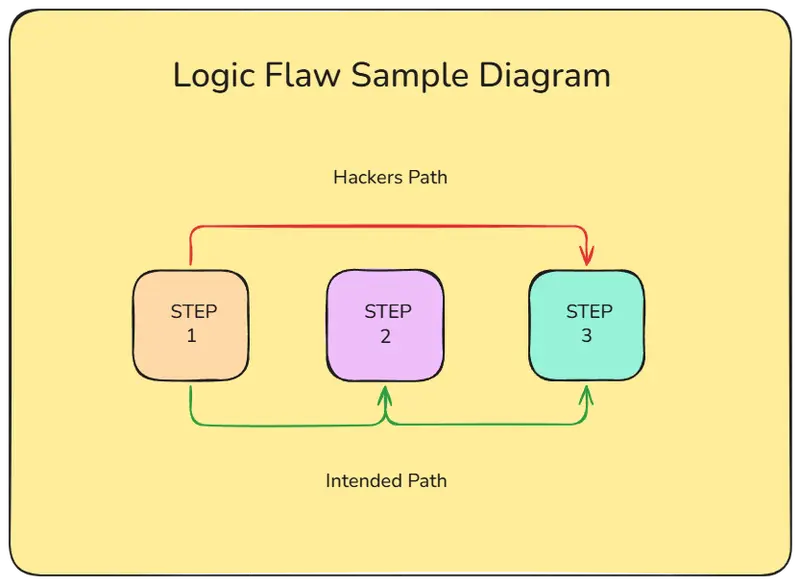
The example below uses a payment bypass to show how this works. The application has a three-step upgrade process: select a plan, submit payment, then confirm activation. The confirmation endpoint does not verify that payment was actually completed before granting Pro status.

The diagram shows how an attacker can skip step 2 by requesting the confirmation endpoint directly.

Exploiting the Missing Payment Check

The vulnerable code assumes that if a user reaches the confirmation page, they must have paid. It grants Pro status without checking for a valid transaction.

// /upgrade/confirmed.php

// Logic flaw: The code assumes if you are here, you must have paid.
$user_id = $_SESSION['user_id'];

// Directly updating the database to 'pro' status
$sql = "UPDATE users SET membership = 'pro' WHERE id = '$user_id'";
$db->query($sql);

echo "Congratulations! You are now a Pro member.";

An attacker can bypass the payment step by sending a direct request to the confirmation endpoint:

curl http://<target-ip>/upgrade/confirmed

The server processes the request and updates the user’s membership to pro without any payment verification. The database now shows the user has Pro status even though no transaction occurred.

Remediation

Verify payment completion on the server side before granting access. Check for a valid transaction ID or payment status in the database before updating membership.

// /upgrade/confirmed.php (fixed)

$user_id = $_SESSION['user_id'];

// Check for a completed payment transaction using a prepared statement
$stmt = $db->prepare(
    "SELECT id FROM transactions WHERE user_id = ? AND status = 'completed' ORDER BY created_at DESC LIMIT 1"
);
$stmt->bind_param('i', $user_id);
$stmt->execute();
$transaction = $stmt->get_result()->fetch_assoc();

if (!$transaction) {
    http_response_code(403);
    echo "Payment required.";
    exit;
}

// Only grant Pro status after verifying payment
$update = $db->prepare("UPDATE users SET membership = 'pro' WHERE id = ?");
$update->bind_param('i', $user_id);
$update->execute();

echo "Congratulations! You are now a Pro member.";

The fixed version checks for a completed transaction before updating membership. Direct requests without payment now return a 403 error.

Summary

Business logic flaws are hard to catch with automated scanners because they require understanding what the application is supposed to do. The attacker does not break the code, they just use it in an unintended order. Always validate state on the server side for every critical action, not just at the final step. Test your systems by trying to skip steps, replay requests out of order, or change values between steps to find these gaps before attackers do.

If you found this helpful, drop a like and share it with someone learning security. If you have questions, ran into something different in your own lab, or want to share your results, leave a comment below. Always happy to connect and talk about security, recon techniques, or anything AppSec related.

Feel free to connect with me on LinkedIn

Always open to connecting with people in security, development, or both. Whether you are building something, breaking something, or just getting started, feel free to reach out.

Why Vibe Coders Need Boilerplates to Save Time, Tokens, and Build More Secure SaaS Projects

Vibe coding changed how software products are built.

A founder can now open an AI coding assistant, describe an idea, generate files, fix bugs, create screens, connect APIs, and launch a working prototype faster than ever before. What used to require weeks of planning and development can now be started in a single afternoon.

That is powerful.

But there is a problem most vibe coders discover very quickly.

AI can help you build faster, but it does not magically remove the boring foundation every real SaaS product needs. You still need authentication. You still need payments. You still need user dashboards. You still need admin controls. You still need email setup. You still need SEO settings. You still need legal pages. You still need subscription management. You still need clean structure. You still need security.

And if you start every project from a blank Laravel install, you force yourself and your AI coding assistant to rebuild the same foundation again and again.

That is where a boilerplate becomes one of the smartest investments a vibe coder can make.

A good boilerplate is not just a shortcut. It is a production foundation. It gives your AI coding workflow structure. It reduces token waste. It helps avoid messy architecture. It gives your project working features from day one. Most importantly, it allows you to spend your time and AI budget on the unique part of your SaaS, not on rebuilding login pages, Stripe webhooks, dashboards, and settings panels for the hundredth time.

This is exactly why Laravel SaaS Store exists. It gives Laravel developers and vibe coders a ready-to-use SaaS starter kit with admin, customer dashboard, Stripe billing, affiliate tools, whitelist management, email setup, SEO, landing page, legal pages, design components, AI Designer, full source code, documentation, and commercial license. (Laravel SaaS)

The real problem with vibe coding from scratch

Starting from scratch feels clean.

There is an empty repository. No legacy code. No old decisions. No inherited mistakes. You tell the AI what you want, and it starts generating.

At first, this feels productive. The first few screens appear quickly. A login form is generated. A dashboard is created. A pricing page is added. A few models appear. The first version looks promising.

Then the hidden cost starts.

The AI creates one version of authentication. Then you ask for subscriptions, and it adds another layer of logic. Then you ask for admin access, and it adds role checks in different places. Then you ask for Stripe webhooks, and the webhook logic does not fully match your plan model. Then you ask for email templates, and the system creates hardcoded content. Then you ask for SEO fields, and the structure becomes inconsistent.

The project starts to work, but the foundation becomes fragile.

This is one of the biggest risks of vibe coding. The AI is very good at generating code, but if you do not give it a strong foundation, it will often invent one piece at a time. That means every new feature becomes another architectural decision. Every prompt becomes another chance to create inconsistency. Every generated file can push the project in a slightly different direction.

A boilerplate solves this by giving the AI an existing system to extend instead of asking it to invent the system from zero.

That difference is huge.

When the AI works inside a ready SaaS structure, it can follow existing patterns. It can reuse existing models, controllers, services, components, layouts, settings pages, billing flows, and admin resources. Instead of asking the AI to design the foundation, you ask it to build your product on top of a foundation that already works.

Boilerplates save more than development time

Most developers think about boilerplates only as a time saver.

That is true, but it is only the first layer.

Laravel SaaS Store positions its starter as a way to stop rebuilding the same SaaS basics, including auth, payments, admin, emails, dashboards, SEO, pages, and legal foundations. The site estimates that repetitive setup tasks such as Stripe, admin dashboards, customer auth, blog, pages, SEO, and email templates can easily consume many days of work before you even touch the real product. (Laravel SaaS)

But for vibe coders, the benefit is even bigger.

A boilerplate saves time, tokens, debugging cycles, context window space, and architectural focus.

When you start from scratch, you spend prompts on things that should already exist. You ask the AI to create authentication. You ask it to create user profiles. You ask it to create a dashboard layout. You ask it to create a billing flow. You ask it to create admin pages. You ask it to create email settings. You ask it to create subscription tables. You ask it to create legal pages. You ask it to create SEO meta fields.

Every one of those requests costs tokens.

Every generated response adds code.

Every code change increases the chance of bugs.

Every bug creates more prompts.

Every extra prompt consumes more context.

This is how a simple vibe coded SaaS can become expensive before the product is even validated.

A boilerplate changes the economics. Instead of using AI tokens to create common infrastructure, you use AI tokens to create business value.

That means your prompts become more focused.

You are no longer saying:

“Build me a SaaS with login, billing, dashboard, admin, subscription plans, and settings.”

You are saying:

“Add a lead scoring module to the existing dashboard.”

“Create an analytics page using the current admin layout.”

“Add a new plan limit to the existing billing system.”

“Create a feature that uses the current user subscription state.”

This is a much better way to use AI.

AI coding agents perform better with existing patterns

AI coding tools are strongest when they can follow a clear pattern.

If your project already has a working dashboard, the AI can copy the style. If your project already has a settings system, the AI can add another settings page. If your project already has billing models, the AI can extend them. If your project already has admin resources, the AI can create new ones in the same structure.

This is one of the most underrated advantages of a boilerplate.

A blank project gives the AI too much freedom.

A strong boilerplate gives the AI constraints.

Constraints are good. They reduce bad decisions. They reduce random structure. They reduce inconsistent naming. They reduce the chance that your project becomes a pile of generated code with no clear architecture.

Laravel itself is valuable for this reason. The official Laravel documentation describes Laravel as a framework that gives structure and a starting point for building web applications, with features like dependency injection, database abstraction, queues, scheduled jobs, and testing. (Laravel)

That same idea applies to SaaS boilerplates.

Laravel gives your application a framework.

A SaaS boilerplate gives your product a business foundation.

For vibe coders, this matters because AI coding is not just about generating code. It is about guiding code generation toward a maintainable product. A boilerplate becomes the map. The AI can move faster because it does not need to guess the roads.

The biggest token leak in vibe coding is repeated foundation work

Many vibe coders think their token usage is high because their app is complex.

Often, that is not the real reason.

The real reason is that they are asking AI to repeatedly solve problems that have already been solved thousands of times.

Authentication is solved.

Password reset is solved.

Stripe checkout is solved.

Stripe webhooks are solved.

Plan management is solved.

Admin dashboards are solved.

User settings are solved.

Email templates are solved.

SEO fields are solved.

Legal page management is solved.

Landing page sections are solved.

Yet many vibe coded projects spend a large amount of tokens rebuilding all of this from scratch.

That is waste.

Not because the features are unimportant, but because they are not the unique value of the product.

Your SaaS does not win because it has a login page.

It wins because it solves a painful problem for a specific market.

Your SaaS does not win because it has a billing table.

It wins because users are willing to pay for the outcome.

Your SaaS does not win because it has an admin panel.

It wins because the product delivers value consistently.

So why spend the first days of development and thousands of AI tokens recreating the foundation?

Use a boilerplate. Start where the boring work is already done. Then use your AI assistant to build the thing that makes your product different.

Security is not something you add later

One of the most dangerous habits in vibe coding is treating security as a later task.

Founders often say:

“I just need an MVP first.”

“I will clean it up after validation.”

“I only need something that works.”

That mindset is understandable, but risky.

Security problems often come from early architectural decisions. User roles. Route protection. Subscription access. Webhook validation. File uploads. Admin permissions. Environment variables. Session behavior. Email flows. Billing access. These are not small finishing touches. They are part of the foundation.

If you build them randomly with AI prompts, you can easily create security holes without noticing.

For example, maybe a dashboard route checks if the user is logged in, but not whether they own the resource. Maybe an admin route is hidden in the UI, but not protected on the backend. Maybe a webhook accepts data without proper verification. Maybe a user can access a plan feature without an active subscription. Maybe a generated controller trusts request data too much.

These mistakes are not always obvious when the app looks like it works.

A boilerplate reduces this risk by starting with a known structure. It does not mean you never need to review security. You still do. But it gives you a better baseline than a random set of AI-generated files.

Laravel SaaS Store is built around production SaaS needs, including super admin controls, customer dashboards, Stripe billing, email configuration, SEO settings, affiliate and whitelist modules, AI features with edit history, health checks, backups, and rollback behavior for AI view changes according to its documentation. (Laravel SaaS)

That kind of foundation matters.

Vibe coding should be fast, but it should not be careless.

A boilerplate helps you move from prototype to product

There is a big difference between a demo and a product.

A demo shows the idea.

A product supports users.

A demo can have hardcoded data.

A product needs accounts, billing, emails, settings, support, limits, dashboards, admin tools, and maintenance.

A demo can break quietly.

A product needs predictable behavior.

This is where many vibe coded projects fail. The founder gets excited because the AI created a nice prototype. The screens look good. The main feature works. The landing page exists. The demo is convincing.

But then real product requirements appear.

How do users subscribe?

How do users cancel?

How do you manage plans?

How do you edit homepage content?

How do you send transactional emails?

How do you manage early access?

How do you update SEO metadata?

How do you give a client admin access?

How do you manage legal pages?

How do you track affiliate referrals?

How do you let non-technical users edit the product?

How do you safely update generated views?

These are the details that turn a prototype into a SaaS business.

Laravel SaaS Store focuses exactly on this layer. It includes Stripe payment integration, plans management, webhooks, customer dashboard, super admin, email setup, SEO optimization, landing page, design system, legal pages, affiliate and whitelist features, and full source code with commercial license. (Laravel SaaS)

That means the vibe coder can start closer to a real product instead of stopping at a pretty demo.

Why Laravel is a strong choice for vibe coded SaaS projects

Vibe coding does not remove the need for good technology choices.

In fact, it makes the stack more important.

When AI generates code, you want it to work inside a framework with strong conventions. Laravel is a strong fit because it already gives developers a clean structure for routing, controllers, models, migrations, queues, validation, middleware, testing, jobs, events, notifications, and more.

Laravel is also widely documented, which helps AI coding assistants generate more predictable code. The more common and well-documented the framework is, the easier it is for AI tools to follow standard patterns.

Laravel’s official site now also speaks directly to the AI development era, describing Laravel as a clean stack for artisans and agents, with opinions around routing, queues, authentication, and other decisions that an agent does not need to reinvent. (Laravel)

That is exactly the point.

Good frameworks reduce decision fatigue.

Good boilerplates reduce product setup fatigue.

Together, they make vibe coding more practical.

Laravel SaaS Store builds on this idea by using a modern Laravel stack with Tailwind CSS, Livewire, Alpine.js, Folio, Volt, and Laravel AI, according to the site. (Laravel SaaS)

For a vibe coder, that means you are not starting with random code. You are starting with a Laravel-native foundation that already understands common SaaS needs.

The best boilerplate is not just code, it is a workflow

A weak boilerplate is just a zip file with some screens.

A strong boilerplate gives you a workflow.

You install it. You configure it. You log into the admin. You set your plans. You connect Stripe. You update your branding. You edit your pages. You configure email. You set SEO defaults. You enable the modules you need. You start building your unique product features.

Laravel SaaS Store documentation describes a quick setup path with commands like make setup, a first-run web installer, local and Docker install paths, admin and super admin areas, billing setup, social login setup, AI provider setup, route checks, tests, and troubleshooting guidance. (Laravel SaaS)

That matters because vibe coding is not only about generating code. It is about moving fast without getting lost.

A workflow gives you direction.

Instead of asking, “What do I need to build next?”, you already have the product skeleton.

Now your task is clearer:

Replace the demo content.

Add your market-specific features.

Connect your production services.

Customize the design.

Launch.

Get feedback.

Improve.

This is how indie hackers, agencies, and AI-assisted developers should think. The boilerplate is not the product. The boilerplate is the launchpad.

Why boilerplates are especially valuable for agencies

Agencies rebuild the same foundation over and over.

Client wants a SaaS dashboard.

Client wants paid accounts.

Client wants an admin panel.

Client wants editable landing pages.

Client wants legal pages.

Client wants email settings.

Client wants a customer area.

Client wants a simple referral or affiliate system.

Client wants fast delivery.

If you build all of that from zero every time, you lose margin. You also increase risk because every project gets a slightly different foundation.

A boilerplate lets an agency standardize delivery.

This is especially useful for small Laravel agencies that want to sell SaaS builds, MVPs, internal tools, dashboards, subscription portals, client portals, and AI-powered web apps.

Instead of quoting weeks for foundation work, the agency can start with a ready SaaS base and spend the project budget on client-specific features.

Laravel SaaS Store is useful here because it includes a commercial license and full source code, and the site states it can be used for client projects, your own SaaS products, or commercial applications. (Laravel SaaS)

That makes it practical for real business use, not only personal experiments.

For agencies, this can become a delivery advantage. You can ship faster. You can keep your codebase more consistent. You can train your team on one foundation. You can give AI coding agents a familiar structure across multiple projects.

That is how you turn vibe coding from experimentation into a repeatable business process.

AI Designer makes iteration faster for non-technical teams

One of the most interesting features in Laravel SaaS Store is the AI Designer.

The site describes it as a built-in tool that lets founders, marketers, clients, or non-technical team members change colors, layouts, copy, and components by describing what they want, without touching code. (Laravel SaaS)

This is important because product iteration is not only a developer task.

A founder may want to test a new hero message.

A marketer may want to change the CTA.

A client may want a different color scheme.

A team may want to update pricing copy.

Normally, these changes create small development tasks. Small tasks create delays. Delays slow down experimentation.

If non-technical users can safely make design and copy changes from an admin interface, the product can move faster.

The documentation also mentions safety controls around AI view changes, including backup creation before write, health checks after apply, auto-rollback if checks fail, edit history, and manual rollback. (Laravel SaaS)

That is the right direction for AI-assisted SaaS building.

AI should not just generate code. It should help teams iterate safely.

A boilerplate helps you focus on distribution

Most SaaS products do not fail because the login page was bad.

They fail because nobody cared.

They fail because the founder spent too much time building infrastructure and not enough time talking to customers, writing content, testing positioning, creating demos, launching campaigns, and improving onboarding.

This is another reason boilerplates matter.

When the foundation is already done, you can spend more time on distribution.

You can write landing page copy.

You can create SEO articles.

You can test pricing.

You can record product demos.

You can launch on communities.

You can talk to customers.

You can improve onboarding.

You can build the one feature users actually want.

A vibe coder should not measure progress only by how many files were generated. The real question is whether the product is closer to revenue.

A boilerplate moves you closer because it starts with the parts every paid SaaS needs.

Payments are already part of the foundation.

Admin is already part of the foundation.

Dashboard is already part of the foundation.

SEO is already part of the foundation.

Legal pages are already part of the foundation.

Email setup is already part of the foundation.

That means your first real development sprint can focus on your unique value proposition.

This is how you save weeks.

This is how you save tokens.

This is how you save energy.

Why “from scratch” is often ego, not strategy

Developers love building from scratch.

It feels pure. It feels controlled. It feels like craftsmanship.

But in SaaS, building from scratch is often not the best strategy.

If your product is an authentication system, then yes, build authentication deeply.

If your product is a billing platform, then yes, build billing deeply.

If your product is an admin builder, then yes, build admin deeply.

But if your product is a marketing automation tool, a CRM, an AI writing app, a booking platform, a client portal, a reporting dashboard, or a niche business SaaS, then authentication and billing are not your innovation.

They are infrastructure.

Infrastructure should be reliable, boring, and already working.

Your creativity should go into the product experience, the market insight, the workflow, the automation, the data, the integrations, and the outcome you deliver to users.

A boilerplate does not make you less technical.

It makes you more strategic.

It lets you build where it matters.

What to look for in a SaaS boilerplate

Not every boilerplate is worth using.

Some are too simple. Some are outdated. Some are beautiful but shallow. Some give you a nice landing page but no real business logic. Some include payments but no admin. Some include admin but no customer dashboard. Some include code but no documentation.

A useful SaaS boilerplate should include the things that actually block launch.

It should have authentication, dashboards, billing, admin controls, email setup, page management, SEO settings, legal pages, reusable components, documentation, and clear installation steps. It should be built on a stack you understand. It should give you source code, not lock you into someone else’s hosted system. It should be flexible enough for your own SaaS and client work.

Laravel SaaS Store checks these boxes for Laravel developers. It offers full source code, documentation, commercial license, admin dashboard, Stripe integration, affiliate management, user subscription and whitelist features, email management, dynamic pages, Tailwind components, and a professional landing page depending on plan. (Laravel SaaS)

That makes it a practical starting point for vibe coded SaaS projects.

The best way to use a boilerplate with AI

A boilerplate becomes even more powerful when you combine it with a disciplined AI workflow.

Do not ask the AI to randomly rewrite the whole project.

Do not ask it to replace the architecture.

Do not ask it to generate huge features without reading the existing structure.

Instead, use the boilerplate as the source of truth.

Ask the AI to inspect the current models before adding new ones.

Ask it to follow the existing admin patterns.

Ask it to reuse the current dashboard layout.

Ask it to add settings using the existing settings system.

Ask it to connect new features to the current subscription logic.

Ask it to create tests for new behavior.

Ask it to keep changes small and reviewable.

This is how professional vibe coding should work.

The boilerplate gives the structure.

The AI adds speed.

The developer gives direction.

The product gets shipped.

A practical example

Imagine you want to build a SaaS that helps small businesses generate social media posts.

If you start from scratch, your first tasks might look like this:

Create Laravel project.

Install frontend stack.

Build landing page.

Build login and registration.

Build customer dashboard.

Build admin panel.

Set up Stripe.

Create plans.

Create webhooks.

Add email settings.

Add SEO.

Create legal pages.

Create user profile.

Create subscription checks.

Add prompt templates.

Add AI provider settings.

Create usage limits.

Build the actual social media tool.

That is too much foundation before reaching the product.

With Laravel SaaS Store, many of these foundation parts already exist. The documentation includes AI settings, AI Studio, AI prompt templates, AI requests, AI view designer, billing, teams, social login, content management, affiliate, whitelist, reviews, and operations checklist. (Laravel SaaS)

Now your first real tasks become different.

You can add the social post generator as a product module.

You can connect it to existing AI settings.

You can show generated content inside the customer dashboard.

You can limit usage based on the existing subscription plan.

You can manage plans in the admin.

You can update landing page copy from the admin.

You can launch faster.

That is the difference between building infrastructure and building a business.

Boilerplates reduce abandoned projects

Many vibe coded projects die in the middle.

Not because the idea was bad.

They die because the project becomes messy.

The founder asks for too many changes. The AI generates too much inconsistent code. Bugs appear. The context window gets too large. The structure becomes unclear. The developer loses confidence. The project feels heavy before launch.

A boilerplate reduces this risk because it gives the project a stable center.

Even if you add features quickly, the core remains understandable.

You know where billing lives.

You know where settings live.

You know where admin lives.

You know where pages live.

You know where email configuration lives.

You know where AI settings live.

That makes the project easier to continue.

For vibe coders, continuity is everything. The first day is easy. The fifth day is harder. The third week is where structure matters. A boilerplate helps you survive the third week.

Boilerplates help with client trust

If you are building for clients, a boilerplate can also improve trust.

Clients do not care that you hand-coded every login screen.

They care that the system works.

They care that it is secure.

They care that it has billing.

They care that they can manage content.

They care that they can update settings.

They care that users can register and pay.

They care that the product can launch.

When you use a proven SaaS foundation, you can explain the value clearly:

“We are not starting from zero. We are starting from a Laravel SaaS foundation with admin, billing, dashboard, email, SEO, and content management already included. That means your budget goes into the custom business features, not repeated setup work.”

That is a strong sales argument.

It also protects your margin as a developer or agency.

The future of vibe coding is not blank prompts

The future of vibe coding is not just opening a chat and asking it to build an app from nothing.

That is the beginner version.

The professional version is different.

The professional version uses boilerplates.

It uses specifications.

It uses existing architecture.

It uses reusable modules.

It uses tests.

It uses clear prompts.

It uses source control.

It uses admin systems.

It uses deployment workflows.

It uses AI as an accelerator, not as a replacement for foundation.

This is where the market is going.

The people who get the best results from AI coding will not be the people who ask for the most code. They will be the people who give AI the best starting point.

A Laravel SaaS boilerplate is one of those starting points.

Why Laravel SaaS Store is built for this moment

Laravel SaaS Store is built around a simple idea:

Stop vibe coding every new project from scratch.

Start with a production-ready Laravel SaaS foundation and build the unique product on top.

The product includes the common SaaS pieces most founders and developers need: Stripe, plans, webhooks, customer dashboard, super admin, email setup, SEO, landing page, design system, legal pages, affiliate and whitelist tools, full source code, documentation, and commercial license. (Laravel SaaS)

It also goes further with AI-focused features like AI Designer, AI settings, AI Studio, AI prompt templates, AI request tracking, and AI view designer workflows described in the documentation. (Laravel SaaS)

That makes it especially relevant for vibe coders.

Because vibe coders do not just need code.

They need a launch system.

They need a foundation that works with AI, not against it.

They need structure that helps them move fast without creating a mess.

Laravel SaaS Store gives them that foundation.

Conclusion: stop spending AI tokens on boring work

Vibe coding is powerful, but it becomes much more powerful when you stop using it to rebuild the same foundation over and over.

Every SaaS needs auth.

Every SaaS needs billing.

Every SaaS needs dashboards.

Every SaaS needs admin.

Every SaaS needs email.

Every SaaS needs SEO.

Every SaaS needs legal pages.

Every SaaS needs settings.

Every SaaS needs structure.

These are not the features that make your startup special. They are the foundation that lets your startup exist.

A boilerplate lets you skip the repeated setup and focus on the product.

It saves time.

It saves tokens.

It reduces bugs.

It gives AI better patterns to follow.

It gives your project a stronger security foundation.

It helps you move from prototype to product faster.

If you are a Laravel developer, indie hacker, agency owner, or vibe coder building SaaS products, starting from a blank project every time is no longer the smartest move.

Start with a real foundation.

Build the unique part.

Launch faster.

That is the practical advantage of using Laravel SaaS Store.

FAQ

Is a boilerplate only useful for beginners?

No. A boilerplate is often more valuable for experienced developers because they understand how much time is wasted rebuilding the same foundation. Senior developers know that speed does not come from writing everything manually. Speed comes from knowing what should be reused.

Will a boilerplate make my SaaS less unique?

No. Your SaaS is not unique because of its login screen or billing flow. It is unique because of the problem it solves, the workflow it improves, the market it serves, and the result it creates for users. A boilerplate handles the standard foundation so you can focus on uniqueness.

Why is a boilerplate useful for AI coding?

AI coding assistants work better when they have existing patterns to follow. A boilerplate gives the AI structure, naming conventions, layouts, models, settings, and workflows. This reduces random code generation and helps keep the project maintainable.

Does a boilerplate reduce AI token usage?

Yes. Instead of spending prompts and tokens generating standard SaaS infrastructure, you can spend them building product-specific features. This is especially important when using AI tools with limited context windows or token-based pricing.

Is Laravel a good framework for vibe coded SaaS products?

Yes. Laravel gives developers and AI agents a structured, well-documented framework with strong conventions. This makes it easier to build, extend, and maintain SaaS applications compared to starting with a less opinionated or random structure.

Who should use Laravel SaaS Store?

Laravel SaaS Store is a strong fit for Laravel developers, indie hackers, agencies, startup founders, and vibe coders who want to launch SaaS products faster without rebuilding the same foundation each time.