How to Tailor Your CV to Any Job Posting in 2026

Most job seekers spend more time refreshing their inbox than they do tailoring their CV to the job posting in front of them. That’s a mistake that costs more interviews than any skill gap ever could. A generic CV — one that lists everything you’ve ever done in a neutral, inoffensive order — gets ignored not because you’re underqualified, but because you look exactly like every other applicant who didn’t bother to customize theirs.

This guide walks through the exact process for tailoring your CV to any job posting, including how Applicant Tracking Systems (ATS) filter candidates before a human even reads a word, how to reframe your real experience without fabricating anything, and how to write bullets that make a hiring manager stop scrolling. By the end, you’ll have a repeatable system — one you can do manually when you have the time, or automate with tools like NextCV when you’re in a heavy application sprint.

Why Generic CVs Fail: ATS Filters and the 6-Second Scan

Before your CV lands in front of a recruiter, it usually passes through an Applicant Tracking System. ATS software parses your document, scores it against the job description, and — in competitive roles — filters out the bottom 70–80% before any human sees it. This isn’t theoretical: large companies with high application volumes rely on these systems heavily, and even mid-sized employers increasingly use tools like Greenhouse, Lever, or Workday to manage their pipeline.

What does an ATS look for? Primarily, keyword matches. If a job description says “cross-functional stakeholder management” and your CV says “worked with different teams,” the ATS may score those as a mismatch — even though they describe the same thing. The language gap alone can disqualify you.

Then there’s the recruiter scan. Studies consistently show that recruiters spend roughly six seconds on an initial CV pass. They’re not reading; they’re pattern-matching. They want to see familiar role titles, recognizable company names, and concrete achievements. If your most relevant bullet is buried in the fourth job on page two, they’ll miss it.

Tailoring your CV solves both problems. It feeds the ATS the keywords it needs and surfaces your most relevant experience first for the human reader.

Real job posting matched to a tailored CV — this is what effective tailoring looks like in practice

What Tailoring Actually Means (And What It Doesn’t)

Let’s clear up a misconception: tailoring your CV is not lying. It’s not inventing skills you don’t have or claiming accomplishments that belong to someone else. Tailoring is reframing — choosing which parts of your real experience to emphasize, and using the employer’s own language to describe them.

Think of it this way. You are a three-dimensional person with a varied career. Your CV is a two-dimensional snapshot. Every time you apply to a job, you’re deciding which angle to photograph yourself from. The product being photographed doesn’t change. The framing does.

Concretely, this means:

  • Reordering bullets so the most relevant responsibilities appear first within each role
  • Swapping synonyms to match the job description’s language (e.g., “managed” vs. “led” vs. “directed”)
  • Expanding or collapsing sections based on what the role values (a startup cares about your side projects; a bank probably doesn’t)
  • Quantifying achievements in the units the industry uses (revenue, headcount, uptime, NPS, conversion rate)
  • Adding or removing optional sections like publications, certifications, or volunteer work depending on their relevance

What tailoring is not: adding skills you can’t demonstrate, inflating titles, or padding dates. Those are integrity issues with real consequences.

Step 1: Decode the Job Posting Before You Write a Word

Most candidates read a job posting once, skim the requirements, and start updating their CV. That’s too fast. Before you type anything, spend ten minutes dissecting the posting itself.

Extract the Primary Keywords

Go through the posting and highlight every technical skill, tool, methodology, or domain term mentioned. These are your primary keywords. If the job description mentions “Python,” “machine learning pipelines,” and “MLOps” three times each, those are non-negotiable inclusions. If your experience is relevant, those exact terms should appear in your CV — not paraphrases.

Identify the Implicit Priorities

Job descriptions are not perfectly written documents. They list requirements in approximate order of importance, and they often bury what actually matters in the middle of a long paragraph. Look for verbs like “must,” “essential,” and “required” versus “preferred” and “nice to have.” The must-haves are your core targeting criteria.

Also look at what the role is ultimately responsible for. A “Senior Marketing Manager” post that mentions “you’ll own MQL targets and work closely with sales” is really a demand generation role with a seniority title. Your CV should lead with your demand gen experience, not your brand work.

Note the Company’s Language Register

Does the posting use formal corporate language or casual startup speak? Does it reference “Objectives and Key Results” or “sprints and retros”? These are cultural signals. Your CV’s language register should loosely mirror theirs. A heavily jargon-laden posting signals they want someone already fluent in their world.

Step 2: Audit Your Current CV Against the Posting

Before editing anything, score your existing CV against the target role. This step forces you to identify the gap between what you have and what the job needs — so you can close it deliberately rather than accidentally.

Create a simple two-column list:

Job posting requirement Your CV (as it currently stands)
5+ years Python 6 years Python — matches, check terminology
CI/CD pipeline ownership “contributed to build process” — needs strengthening
Team lead experience Managed 3-person team — buried in bullet 7, needs to surface

This audit takes 15 minutes and gives you a precise editing brief. You know exactly which gaps to address and which bullets need to move up the page.

Deciding What to Cut, Not Just What to Add

Most people approach CV customization as an additive exercise — they add keywords, add a new bullet, add a summary paragraph. But subtraction is equally important. Every line on your CV that isn’t relevant to the target role is competing for the reader’s attention with lines that are.

If you have seven years of experience and you’re applying for a senior role, the work you did in years one and two probably doesn’t need three bullets. Cut it to one line or a single descriptive sentence. That space can go to a more recent, more relevant achievement. Similarly, if a section isn’t mentioned anywhere in the job description — say, you have a “Volunteer Work” section and the role makes no reference to community involvement — consider removing it for this application. You’re not erasing that experience from your life; you’re just not including it in this particular snapshot.

Step 3: Rewrite Your Bullets the Right Way

This is where the real work happens. Generic CV bullets follow a pattern that looks like a job description: “Responsible for managing client accounts and ensuring customer satisfaction.” Nobody who reads CVs for a living likes this pattern. It describes a duty, not an achievement.

Tailored, high-impact bullets follow a different pattern: Action verb + specific context + measurable result. The goal is to answer the question: “So what happened because of your work?”

Before and After: The Generic Bullet Problem

Here’s the same experience written two ways.

Generic (before):

Responsible for managing the company’s social media presence across multiple platforms and creating content.

Tailored and achievement-focused (after):

Grew LinkedIn following from 4,200 to 18,000 in 11 months by launching a weekly thought-leadership series targeting mid-market SaaS buyers; contributed directly to a 22% increase in inbound demo requests from LinkedIn.

The second version does several things the first doesn’t. It quantifies the outcome. It specifies the channel. It explains the mechanism (thought-leadership series). And it connects the work to a business result (demo requests). If the job posting mentions “B2B LinkedIn content strategy,” this bullet is a direct hit.

More Before/After Examples

Project management (generic):

Managed multiple projects simultaneously and ensured they were delivered on time.

Project management (tailored):

Led delivery of four concurrent product launches across a 12-person cross-functional team, hitting all milestones within a compressed 90-day roadmap while reducing scope creep by 30% through weekly stakeholder alignment sessions.

Software engineering (generic):

Worked on backend services and APIs to improve application performance.

Software engineering (tailored):

Re-architected a legacy REST API handling 2M daily requests, reducing average response time from 480ms to 62ms and cutting server costs by $14,000/month by migrating to async processing with Redis queues.

Sales (generic):

Exceeded sales targets and built strong client relationships.

Sales (tailored):

Finished FY2025 at 134% of quota ($2.1M ARR), sourced entirely from outbound prospecting; closed the largest new logo in team history, a $340K enterprise contract that opened a new vertical.

The pattern holds across every field: specific numbers, named tools, real scope, and actual outcomes.

Step 4: Optimize for ATS Without Writing Like a Robot

ATS optimization and human readability are not mutually exclusive, but you have to be intentional about it.

Use the Exact Phrasing from the Job Posting

If the posting says “Agile project management,” don’t write “scrum-based workflows” and assume the ATS will connect them. Some systems have synonym libraries; many don’t. Match the phrasing exactly at least once. You can vary it elsewhere.

Put Keywords in Context, Not in a List

Some candidates add a “Skills” section that’s just a comma-separated list of keywords. ATS systems increasingly penalize keyword stuffing in skills sections because it’s a known gaming tactic. The safest approach: weave keywords naturally into bullet points where they appear in real context. This reads better for humans and scores better in smarter ATS tools.

Check Your File Format

Most ATS systems parse .docx and .pdf files, but they handle them differently. PDFs generated from a properly formatted Word document usually parse cleanly. PDFs created from graphic design tools (Canva, Adobe Illustrator) often contain text in image layers that ATS cannot read at all. Always use a text-layer PDF.

Avoid Tables, Columns, and Headers/Footers

ATS parsers read linearly. A two-column layout that looks clean to a human eye often becomes scrambled text when an ATS tries to extract it. Keep your layout single-column, use standard section headings (“Experience,” “Education,” “Skills”), and keep important information out of the document’s header and footer areas, which some parsers skip entirely.

Step 5: Quantify Everything You Can

Numbers do cognitive work that adjectives cannot. “Significant improvement” means nothing. “38% improvement in customer retention” means something precise and memorable.

When reviewing your bullets, ask these questions for each achievement:

  • How much? Revenue generated, cost saved, percentage change, headcount managed
  • How many? Clients served, products shipped, issues resolved, campaigns run
  • How fast? Time-to-delivery, cycle time reduction, onboarding speed
  • Compared to what? Prior period, team average, industry benchmark, original target

You won’t have numbers for everything. That’s normal. When you don’t have a precise figure, use a range or qualifier: “reduced churn by roughly 20%,” “managed a portfolio of approximately 30 enterprise accounts.” Approximate is better than vague.

If the metric genuinely doesn’t apply — you’re a writer, a designer, or in a role where output is qualitative — describe scope instead: “Authored the company’s brand guidelines, now used across a 200-person organization,” or “Redesigned the customer onboarding flow, adopted in full by the product team.”

NextCV generates a tailored CV, cover letter, and interview cheat sheet from any job posting

The Automated Way: Using AI to Scale Your Tailoring

Everything described above works. It’s also time-intensive. Properly tailoring one CV to one posting — auditing, rewriting bullets, checking ATS alignment — takes 45 minutes to an hour when done carefully. If you’re running a serious job search and applying to ten roles a week, that’s almost a full workday spent on document customization.

This is the problem that tools like NextCV are designed to solve.

The workflow is straightforward: you build your master profile once, adding your full experience, skills, and education. Then, for each job application, you paste the job description. The AI reads the posting, extracts the keywords and priorities, and rewrites your bullets to match — surfacing the most relevant experience, adopting the posting’s language, and generating a targeted CV and cover letter together. It also produces an interview cheat sheet based on the role, so the tailoring carries through to your preparation, not just your application.

The key distinction: the AI is working from your real profile. It’s not inventing experience; it’s doing the same reframing you’d do manually, but in seconds instead of an hour. You still review the output and make judgment calls a tool can’t make — whether to include a particular project, how to describe a career transition, whether the tone matches the company culture. The AI handles the mechanical labor; you handle the strategic decisions.

NextCV uses a credit-based model (no subscription required), with packs starting at $3 for 3 credits. Each credit generates a tailored CV, cover letter, and interview cheat sheet for one job posting. Free watermarked previews are available so you can evaluate the output before committing. For an active job search — say, 15 applications in a month — the Job Hunter pack at $9 covers the full sprint.

This isn’t about replacing the thinking. It’s about removing the bottleneck so that careful tailoring becomes something you do for every application instead of just the ones you have time for.

How to Handle Career Gaps and Non-Linear Histories

One question that comes up constantly: how do you tailor your CV when your background is messy — career gaps, industry pivots, freelance stints, or roles that don’t map cleanly onto the job description?

The answer is still reframing, but it requires more deliberate framing at the structural level, not just the bullet level.

Gaps in Employment

Don’t hide gaps, but don’t apologize for them either. If you took time off to care for a family member, complete a personal project, travel, or recover from burnout, a brief parenthetical is enough: “(Career break, 2024–2025).” Recruiters see this routinely and care far less about it than candidates fear. What they do care about is whether the gap is followed by something relevant. If you did anything during that period — freelance work, online courses, open-source contributions, independent study — list it. It doesn’t need to be a formal employer.

Career Pivots

If you’re moving between industries or functions, the tailoring burden is higher because your previous titles won’t immediately signal relevance. The solution is two-fold: write a short professional summary at the top of your CV that explicitly frames the transition, and lead every bullet with the transferable skill rather than the industry context. “Managed a $4M product budget in retail” becomes a data point for a product role in fintech if you lead with “Budget ownership” and explain the decision-making process, not the retail vertical.

Freelance and Contract Work

Treat each client engagement as its own role, or group short engagements under a single “Freelance [Function]” header with a date range. For each client, apply the same action + context + result structure you’d use for a staff role. The key is specificity — “various clients in marketing and technology” tells a recruiter nothing; “B2B SaaS growth strategy for three Series A companies, including [client name if public]” tells them everything they need to evaluate fit.

Common Tailoring Mistakes to Avoid

Even job seekers who understand the value of customization make the same errors repeatedly.

Over-tailoring to the point of incoherence. There’s a difference between emphasizing relevant experience and telling a different story in every application. Your career narrative should remain internally consistent. If you’re tailoring toward a product management role, lean into your PM-adjacent work — but don’t suddenly omit three years of engineering experience that contextualizes how you think.

Changing the job title on your CV. Don’t. Your actual title is verifiable, and misrepresenting it in a background check is a disqualifying event at most companies. You can add clarifying context in parentheses (“Senior Engineer (Tech Lead for Payments Squad)”) but the formal title should match your employment record.

Tailoring the CV but not the cover letter. A tailored CV paired with a generic cover letter is a missed opportunity. The cover letter should do a different job — not recapping the CV, but explaining why this role specifically, at this company specifically, is the logical next chapter. That requires real customization.

Forgetting to update the file name. Sending a file called “CV_Generic_v4_FINAL.docx” undermines everything. Name your files clearly: “Jane_Smith_ProductManager_Stripe.pdf.” It’s a small thing that signals you’re organized and specific.

Actionable Takeaways

The system, distilled:

  1. Decode before you write. Extract keywords, identify implicit priorities, and note the company’s language register before touching your CV.

  2. Audit the gap. Map your existing CV against the posting to identify exactly what needs to change — don’t edit blindly.

  3. Rewrite with action + context + result. Every bullet that can be quantified should be. Every bullet should answer “so what?”

  4. Match the ATS language exactly. Use the posting’s terminology at least once, in context, not in a stuffed skills list.

  5. Protect your layout. Single-column, text-layer PDF, standard section headings. The cleanest CV a human can read is also the cleanest one an ATS can parse.

  6. Scale with tools when volume demands it. When you’re in an active search, tools like NextCV do the repetitive reframing work so careful tailoring stops being something you skip because you’re tired.

The job market in 2026 rewards specificity. Hiring managers are wading through more applications than ever, and the candidates who stand out are the ones who did the work to show — in the posting’s own language — that they understand the role and have the evidence to back it up. A tailored CV is that evidence. It takes more time than sending the same document everywhere. It also works.

NextCV is an AI-powered CV builder that tailors your CV, cover letter, and interview prep to each job description. Build your profile once, paste any job posting, and get a targeted application package in seconds. Try it free at nextcv.net.

Related Articles

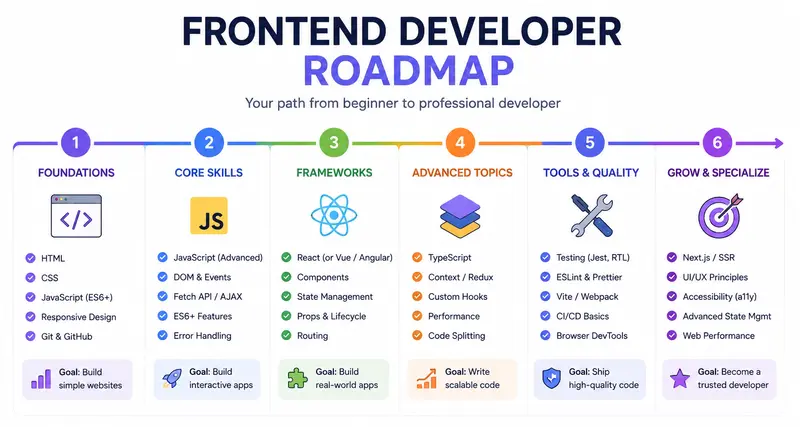
What Is a Frontend Developer Roadmap and Why You Need One

Every year, thousands of people decide to become frontend developers. They open YouTube, type “learn HTML,” and dive in with genuine enthusiasm. A few weeks later, many of them are stuck – not because frontend development is too hard, but because they have no clear direction. They learned CSS before understanding the browser, jumped into React before mastering JavaScript, and now they feel like they’re building a house without a foundation.

This is exactly the problem a frontend developer roadmap solves.
A roadmap is not a rigid curriculum handed down from above. It is a structured, visual overview of the skills, tools, and concepts you need to learn – in a logical order – to become a competent frontend developer. Whether you’re exploring a front end developer roadmap understanding the underlying concept is what separates developers who grow steadily from those who spin their wheels for months.

What “Learning Without a Roadmap” Actually Looks Like?

Most beginners don’t realize they’re learning chaotically. It feels productive – you’re watching tutorials, reading articles, trying things out. But without a structured sequence, a few problems quietly accumulate:
You learn isolated tools without understanding how they connect. You spend weeks on CSS animations before solidifying your understanding of the box model. You pick up React because everyone talks about it, then discover your JavaScript fundamentals are too weak to understand what the framework is actually doing. You hit a wall and start over – repeatedly.

This pattern has a name in educational psychology: it’s sometimes called “tutorial hell.” You consume content without building mental models, so nothing truly sticks. The information doesn’t compound – it just piles up. The root cause is an absence of sequencing. Learning is not just about content; it’s about the order of content. A concept learned out of order creates confusion instead of clarity.

Why Does the Brain Need a Framework Before It Can Fill It In?

Cognitive science consistently shows that new information is retained far more effectively when it can be attached to an existing mental structure. When you learn JavaScript without first understanding what the browser does with code, you’re forcing your brain to memorize floating facts with no anchor.

A frontend developer roadmap provides that anchor. It says: here is the territory you need to cover. Here is roughly what order makes sense. Here is where you are right now. That last point – knowing where you are – is one of the most underrated benefits of a roadmap. Progress tracking is a powerful motivator, and it’s nearly impossible without a map.

For anyone building a junior frontend developer roadmap, this principle is especially important. Juniors are not expected to know everything. They are expected to know a coherent, connected set of fundamentals, applied consistently. A roadmap helps define exactly what that coherent set looks like.

The frontend developer roadmap 2026 doesn’t look radically different from what it looked like three years ago at its core: HTML, CSS, JavaScript, Git, a framework, some tooling, and the professional habits (testing, accessibility, performance) that distinguish a junior developer ready to be hired from someone who can build things but not in a team.

What has changed is the surrounding ecosystem, the tooling landscape, and employer expectations – which is exactly why revisiting and updating your roadmap periodically matters. If you’re just starting out, don’t try to learn everything at once. Get a roadmap, commit to a sequence, build something after every major section, and keep moving forward. That’s the approach that works.

FAQ

1. What is a frontend developer roadmap and how is it different from a curriculum?
A frontend developer roadmap is a visual or structured guide that outlines the full range of skills, technologies, and concepts a frontend developer needs – typically organized by learning sequence and priority. The key difference between a roadmap and a curriculum is flexibility and scope. A roadmap, by contrast, is more like a map of the territory. It shows you what exists, suggests a logical path through it, and leaves room for you to choose your own resources and pace.

A good roadmap doesn’t tell you exactly what video to watch next; it tells you that before learning React, you should have strong JavaScript fundamentals, and gives you the freedom to build those fundamentals however suits you best.

2. Is a front end developer roadmap for beginners different from one for experienced developers?
Yes, significantly – and understanding the difference can save you a lot of time and frustration. A front end developer roadmap for beginners prioritizes foundational knowledge in a specific sequence: the browser and internet basics first, then HTML, then CSS, then JavaScript, then version control, and only after that, frameworks like React. Everything in the beginner path is about building strong mental models before adding complexity.

An intermediate or experienced developer roadmap, by contrast, assumes those foundations exist and focuses on depth, specialization, and professional-grade topics: state management patterns, performance optimization, testing strategies, accessibility compliance at scale, CI/CD workflows, and architectural decisions.

Google shipped three Gemini “Flash” models. Picking the wrong one could 6 your AI bill

This is a submission for the Google I/O 2026 Writing Challenge

Google shipped three Gemini “Flash” models. Picking the wrong one could 6× your AI bill.

I opened Google AI Studio right after the Google I/O 2026 keynote to try the new model everyone was talking about — and got hit with a small wave of confusion. I went looking for “the new Flash model” and found three of them sitting in the same dropdown, names so similar I had to read them twice:

  • Gemini 3.5 Flash
  • Gemini 3.1 Flash Lite
  • Gemini 3 Flash Preview

Three different version numbers. All called “Flash.” And when I read their price tags, I found something the keynote didn’t dwell on: the gap between the cheapest and the priciest is 6×. Pick the wrong one for your workload and you don’t get a slightly bigger bill — you get a 6× bigger bill, for tasks that didn’t need it.

Here’s the lineup decoded with real numbers, the 6× trap explained, and a decision guide for which “Flash” you should actually reach for.

💡 [Screenshot spot: the AI Studio “Model selection” panel showing all three Flash models stacked together — your proof and hero image.]

The three Flash models, decoded

Pricing is per 1 million tokens, from Google’s official Gemini API pricing:

Model Built for Input Output Released
Gemini 3.1 Flash Lite 🆕 High-volume, translation, simple data processing $0.25 $1.50 May 7, 2026
Gemini 3 Flash Preview Speed + frontier intelligence; keeps Computer Use $0.50 $3.00 Dec 17, 2025
Gemini 3.5 Flash 🆕 Frontier agentic + coding $1.50 $9.00 May 19, 2026 (I/O day)

Read that again and the naming makes no sense as a guide: the highest number (3.5) is the most expensive and newest, “Lite” (3.1) is the cheap workhorse, and the lowest number (3) is actually the oldest of the three — a December 2025 preview that’s somehow priced in the middle. Only two of them (3.5 Flash and 3.1 Flash Lite) are the genuinely new I/O-era models. The version number tells you nothing about recency or price — you have to read every card.

The 6× trap, in plain terms

Compare the two ends. Gemini 3.5 Flash costs 6× more than 3.1 Flash Lite on both input and output. And output is where it bites, because most AI apps generate far more tokens than they consume — every reply, every summary, every generated line of code is output you pay $9.00 vs $1.50 for.

Run the math on a modest chatbot producing 50M output tokens a month:

  • 3.5 Flash: 50M × $9.00/1M = $450/month
  • 3.1 Flash Lite: 50M × $1.50/1M = $75/month

Same volume. $375/month — $4,500/year — purely from which “Flash” you clicked. If your tasks are translation, classification, or simple extraction, you’re paying 6× for “frontier coding intelligence” you never use.

But “cheaper” isn’t always “right” — the benchmarks

Lite isn’t just a price cut; it’s a different capability tier. Google’s published numbers (3.1 Flash Lite, 3.5 Flash):

  • 3.1 Flash Lite — LMArena Elo ~1432, GPQA Diamond 86.9%. Genuinely strong for the price, but tuned for throughput.
  • 3.5 Flash — SWE-Bench Pro 55.1%, Terminal-Bench 2.1 76.2%. Built to hold up across long, multi-step agentic and coding tasks where one wrong step compounds.

So the real question isn’t “which is cheaper” — it’s “does my task actually need the frontier coding model, or am I overpaying for headroom I don’t use?”

Which Flash should you actually use?

The decision guide the model picker should have come with:

Use Gemini 3.1 Flash Lite (the $0.25/$1.50 one) for: classification, tagging, extraction, translation, simple summaries — high-volume work with a clear right answer. At 6× cheaper, this is most production traffic.

Use Gemini 3.5 Flash (the $1.50/$9.00 one) for: real agentic workflows and code generation where quality compounds and a wrong early step ruins everything downstream. Pay for it when the output is high-value — and only after you’ve tested that Lite isn’t good enough.

Use Gemini 3 Flash Preview (the $0.50/$3.00 one) when: you need Computer Use — controlling a browser/UI. Notably, 3.5 Flash dropped Computer Use, so for that specific capability Google says stick with 3 Flash Preview (details). Just remember “Preview” can change or disappear.

The meta-rule: default to Lite, upgrade only when you can prove you need to. Most teams will do the opposite — grab the highest version number, ship it, and quietly overpay 6× forever.

Two cost levers nobody mentioned

The price-per-token is only half the bill. Two settings move it a lot:

1. Caching is a 10× input discount. Gemini 3.5 Flash’s cached input is $0.15 vs $1.50 — ten times cheaper. If your prompts share a big fixed chunk (a system prompt, a document, a schema), caching it slashes input cost. Most people never turn it on.

2. The “Thinking level” dial controls how hard — and how expensively — the model reasons. Gemini 3.x replaces the old token-budget setting with a thinkingLevel of minimal / low / medium / high (docs). More thinking = better on hard problems, but more time and more tokens. The defaults differ by model — 3.5 Flash defaults to medium, Flash Lite to minimal — and Google notes that routing the bulk of your calls to low/minimal thinking can cut spend 50–70%. So your bill isn’t just which model; it’s how hard you let it think. Match the effort to the task.

Two details worth knowing before you ship

  • The free tier is real but capped. All three have a rate-limited free tier, plus 5,000 free Google Search grounding prompts per month (then ~$14 per 1,000). Great for prototyping; watch the grounding cap.
  • Their knowledge cutoff is January 2025 — about 16 months before they launched. Every Flash card in AI Studio lists a Jan 2025 cutoff, which means these May-2026 models don’t know about anything from 2025–2026 out of the box — including I/O 2026 itself. For anything current, flip on Grounding with Google Search (5,000 free prompts/month, then ~$14 per 1,000). A new model is not the same as an up-to-date one.

The takeaway

Google’s I/O 2026 story was “Gemini Flash is fast, smart, and cheap.” The truth in the model picker is more useful: there isn’t one Flash, there are several, and the difference between them is a 6× cost swing hiding behind nearly identical names — before you even touch caching or the thinking dial.

That’s not a complaint. Having a $0.25 workhorse and a frontier coding model in the same family is genuinely great. It just means the most important decision you’ll make isn’t “should I use Gemini” — it’s “which Flash, with what thinking level, for this task.” Get that right and you get frontier AI at workhorse prices. Get it wrong and you pay frontier prices for workhorse work.

Open AI Studio, put the three Flash cards side by side, and match each of your app’s tasks to the cheapest model that can actually do it. Five minutes — and it can cut your AI bill by more than 6×.

Pricing, model details, and the thinking-level defaults are from Google’s official Gemini API docs and AI Studio during the I/O 2026 window (Gemini 3.5 Flash GA’d May 19, 2026); verify current numbers before relying on them, as they change. Master announcement list: “100 things we announced at Google I/O 2026”. I drafted this with AI assistance and verified every number against Google’s docs and AI Studio myself — the analysis and screenshots are mine.

Building an MCP server so Claude can query my SaaS analytics directly

Last week I shipped a Model Context Protocol (MCP) server for my analytics SaaS. Now Claude Desktop, Cursor, and any MCP compatible client can query traffic, revenue, and funnel data directly.

This is a walkthrough of how I built it, what worked, and a couple of patterns that surprised me.

What MCP is, briefly

MCP is a protocol that lets AI clients invoke tools and read resources from external servers. Think of it as REST for LLM tool calling, with a stable schema and discovery.

Server skeleton

import { Server } from '@modelcontextprotocol/sdk/server/index.js'
import { StdioServerTransport } from '@modelcontextprotocol/sdk/server/stdio.js'

const server = new Server({
  name: 'zenovay',
  version: '1.0.0',
}, {
  capabilities: {
    tools: {},
    resources: {}
  }
})

Defining tools

server.setRequestHandler('tools/list', async () => ({
  tools: [
    {
      name: 'get_traffic',
      description: 'Get pageview and visitor counts for a site over a date range',
      inputSchema: {
        type: 'object',
        properties: {
          site: { type: 'string' },
          from: { type: 'string' },
          to: { type: 'string' }
        },
        required: ['site', 'from', 'to']
      }
    }
  ]
}))

The pattern that surprised me: structured returns

Way better than raw JSON: return a short natural language summary plus the data. Claude uses the summary for its response and the JSON for follow up questions.

What I did not expect

Users started asking Claude to do things I had not built dashboards for:

  • “Compare my paid traffic conversion rate this week vs last week”
  • “Which 5 pages had the biggest week over week drop in pageviews”
  • “Summarize what changed in my funnel completion rate over the last 30 days”

Claude does this by chaining multiple tool calls. I did not need to build any of those views. The tools are atomic, Claude composes.

This is the part I think is genuinely new about MCP. The interface is the LLM, the backend is just well shaped tools.

Install

npm install -g @zenovay/mcp then add to your Claude Desktop config.

Site: zenovay.com

Open source MCP server work happening here too? Curious what patterns others have found.

Valerio

Building an MCP server so Claude can query my SaaS analytics directly

Last week I shipped a Model Context Protocol (MCP) server for my analytics SaaS. Now Claude Desktop, Cursor, and any MCP compatible client can query traffic, revenue, and funnel data directly.

This is a walkthrough of how I built it, what worked, and a couple of patterns that surprised me.

What MCP is, briefly

MCP is a protocol that lets AI clients invoke tools and read resources from external servers. Think of it as REST for LLM tool calling, with a stable schema and discovery.

Server skeleton

import { Server } from '@modelcontextprotocol/sdk/server/index.js'
import { StdioServerTransport } from '@modelcontextprotocol/sdk/server/stdio.js'

const server = new Server({
  name: 'zenovay',
  version: '1.0.0',
}, {
  capabilities: {
    tools: {},
    resources: {}
  }
})

Defining tools

server.setRequestHandler('tools/list', async () => ({
  tools: [
    {
      name: 'get_traffic',
      description: 'Get pageview and visitor counts for a site over a date range',
      inputSchema: {
        type: 'object',
        properties: {
          site: { type: 'string' },
          from: { type: 'string' },
          to: { type: 'string' }
        },
        required: ['site', 'from', 'to']
      }
    }
  ]
}))

The pattern that surprised me: structured returns

Way better than raw JSON: return a short natural language summary plus the data. Claude uses the summary for its response and the JSON for follow up questions.

What I did not expect

Users started asking Claude to do things I had not built dashboards for:

  • “Compare my paid traffic conversion rate this week vs last week”
  • “Which 5 pages had the biggest week over week drop in pageviews”
  • “Summarize what changed in my funnel completion rate over the last 30 days”

Claude does this by chaining multiple tool calls. I did not need to build any of those views. The tools are atomic, Claude composes.

This is the part I think is genuinely new about MCP. The interface is the LLM, the backend is just well shaped tools.

Install

npm install -g @zenovay/mcp then add to your Claude Desktop config.

Site: zenovay.com

Open source MCP server work happening here too? Curious what patterns others have found.

Valerio

Google I/O 2026 and the Rise of the AI Ecosystem

Google I/O 2026: The Year AI Became Truly Developer-First

Every year, Google I/O gives us a glimpse into where technology is heading. But this year felt different.

Google I/O 2026 wasn’t just about flashy demos or incremental updates — it felt like a major shift toward making AI genuinely usable for developers, creators, and everyday builders. From Gemini integrations to Firebase AI tooling and Flutter improvements, the announcements painted a clear picture: Google wants AI to become part of every workflow, not just a standalone feature.

After following the keynotes and diving into the sessions, one theme stood out to me:

The barrier between an idea and a working product is shrinking faster than ever.

And honestly, that’s both exciting and a little overwhelming.

The Biggest Takeaway: AI Is Becoming Infrastructure

The most impressive part of this year’s announcements wasn’t a single model or product release. It was how deeply AI is now integrated into Google’s ecosystem.

During the Google Keynote and the “What’s New in Google AI” session, it became obvious that Google is no longer treating AI as an experiment. AI is now infrastructure.

Instead of asking developers to “add AI,” Google is embedding intelligence directly into:

  • Android development
  • Search experiences
  • Firebase workflows
  • Cloud tooling
  • Flutter applications
  • Productivity tools

That changes how we think about software development entirely.

We’re moving from:

  • Writing every feature manually

To:

  • Orchestrating systems that can reason, generate, and adapt.

Firebase + AI Was the Most Practical Announcement

Out of everything announced, the Firebase updates were probably the most exciting for me as a developer.

Not because they were flashy.

Because they were immediately useful.

The new AI-powered Firebase workflows seem focused on solving real development bottlenecks:

  • Faster backend setup
  • Smarter debugging
  • Automated app flows
  • Better AI integrations without huge infrastructure complexity

For indie developers and small teams, this matters a lot.

One of the hardest parts of building modern applications is no longer just coding — it’s managing scale, integrations, authentication, analytics, AI APIs, deployment pipelines, and user experience all at once.

Firebase is evolving into something much bigger than a backend service.

It’s becoming an AI-assisted development platform.

And that’s a huge shift.

Flutter Quietly Had One of the Best Sessions

The “What’s New in Flutter” session didn’t generate the same hype as the AI announcements, but I think it deserves more attention.

Flutter continues to mature into one of the most efficient cross-platform frameworks available today. What stood out this year was Google’s focus on:

  • Performance improvements
  • Better tooling
  • Faster iteration cycles
  • Stronger AI-assisted workflows for UI development

The interesting part is how AI and Flutter now complement each other.

AI can accelerate:

  • UI generation
  • Component scaffolding
  • Documentation
  • Testing
  • State management suggestions

But Flutter still gives developers control over the final experience.

That balance matters.

A lot of AI-generated software today still feels generic. Flutter remains one of the best tools for developers who want productivity without sacrificing creativity.

AI Coding Assistants Are Entering a New Phase

Another thing I noticed across multiple sessions was the evolution of AI coding tools.

Last year, AI assistants mostly helped autocomplete code.

This year, the focus shifted toward:

  • Multi-step reasoning
  • Context-aware workflows
  • Architecture suggestions
  • End-to-end development assistance

That’s a massive leap.

We’re quickly approaching a world where developers spend less time writing boilerplate and more time:

  • Designing systems
  • Reviewing logic
  • Shaping product experiences
  • Making architectural decisions

Ironically, AI may make human creativity even more valuable.

Because when everyone can generate code quickly, the real differentiator becomes:

  • Product thinking
  • User empathy
  • Taste
  • Problem selection

The Most Underrated Shift: Developer Accessibility

One thing I think people are underestimating is how much easier entry into software development is becoming.

A few years ago, building an AI-powered application required:

  • ML expertise
  • Infrastructure knowledge
  • GPU access
  • Large engineering budgets

Now?
A solo developer can prototype surprisingly advanced applications using Google’s ecosystem.

That democratization is probably more important than any single feature announcement.

The next generation of builders won’t need permission, massive teams, or huge funding rounds to create impactful products.

That changes innovation itself.

My Biggest Question After I/O 2026

As exciting as everything looks, I still have one major question:

How do we prevent AI-assisted development from making software feel identical?

When tools generate interfaces, code structures, and workflows automatically, there’s a risk that creativity becomes standardized.

The challenge for developers moving forward won’t just be learning AI tools.

It’ll be learning how to use them without losing originality.

The best developers in the AI era may not be the people who automate everything.

They may be the people who know where human judgment still matters most.

Final Thoughts

Google I/O 2026 felt less like a product showcase and more like a preview of a new development era.

The biggest innovation wasn’t one model, framework, or API.

It was the growing idea that software creation itself is changing.

Developers are transitioning from:

  • Writing every system manually

To:

  • Collaborating with intelligent tools.

And while the technology is impressive, the real opportunity lies in what people choose to build with it.

That’s the part I’m most excited about.

Because the future of development won’t belong to AI alone.

It’ll belong to developers who learn how to work alongside it creatively.

Building an MCP server so Claude can query my SaaS analytics directly

Last week I shipped a Model Context Protocol (MCP) server for my analytics SaaS. Now Claude Desktop, Cursor, and any MCP compatible client can query traffic, revenue, and funnel data directly.

This is a walkthrough of how I built it, what worked, and a couple of patterns that surprised me.

What MCP is, briefly

MCP is a protocol that lets AI clients invoke tools and read resources from external servers. Think of it as REST for LLM tool calling, with a stable schema and discovery.

Server skeleton

import { Server } from '@modelcontextprotocol/sdk/server/index.js'
import { StdioServerTransport } from '@modelcontextprotocol/sdk/server/stdio.js'

const server = new Server({
  name: 'zenovay',
  version: '1.0.0',
}, {
  capabilities: {
    tools: {},
    resources: {}
  }
})

Defining tools

server.setRequestHandler('tools/list', async () => ({
  tools: [
    {
      name: 'get_traffic',
      description: 'Get pageview and visitor counts for a site over a date range',
      inputSchema: {
        type: 'object',
        properties: {
          site: { type: 'string' },
          from: { type: 'string' },
          to: { type: 'string' }
        },
        required: ['site', 'from', 'to']
      }
    }
  ]
}))

The pattern that surprised me: structured returns

Way better than raw JSON: return a short natural language summary plus the data. Claude uses the summary for its response and the JSON for follow up questions.

What I did not expect

Users started asking Claude to do things I had not built dashboards for:

  • “Compare my paid traffic conversion rate this week vs last week”
  • “Which 5 pages had the biggest week over week drop in pageviews”
  • “Summarize what changed in my funnel completion rate over the last 30 days”

Claude does this by chaining multiple tool calls. I did not need to build any of those views. The tools are atomic, Claude composes.

This is the part I think is genuinely new about MCP. The interface is the LLM, the backend is just well shaped tools.

Install

npm install -g @zenovay/mcp then add to your Claude Desktop config.

Site: zenovay.com

Open source MCP server work happening here too? Curious what patterns others have found.

Valerio

Google I/O 2026 and the Rise of the AI Ecosystem

Google I/O 2026: The Year AI Became Truly Developer-First

Every year, Google I/O gives us a glimpse into where technology is heading. But this year felt different.

Google I/O 2026 wasn’t just about flashy demos or incremental updates — it felt like a major shift toward making AI genuinely usable for developers, creators, and everyday builders. From Gemini integrations to Firebase AI tooling and Flutter improvements, the announcements painted a clear picture: Google wants AI to become part of every workflow, not just a standalone feature.

After following the keynotes and diving into the sessions, one theme stood out to me:

The barrier between an idea and a working product is shrinking faster than ever.

And honestly, that’s both exciting and a little overwhelming.

The Biggest Takeaway: AI Is Becoming Infrastructure

The most impressive part of this year’s announcements wasn’t a single model or product release. It was how deeply AI is now integrated into Google’s ecosystem.

During the Google Keynote and the “What’s New in Google AI” session, it became obvious that Google is no longer treating AI as an experiment. AI is now infrastructure.

Instead of asking developers to “add AI,” Google is embedding intelligence directly into:

  • Android development
  • Search experiences
  • Firebase workflows
  • Cloud tooling
  • Flutter applications
  • Productivity tools

That changes how we think about software development entirely.

We’re moving from:

  • Writing every feature manually

To:

  • Orchestrating systems that can reason, generate, and adapt.

Firebase + AI Was the Most Practical Announcement

Out of everything announced, the Firebase updates were probably the most exciting for me as a developer.

Not because they were flashy.

Because they were immediately useful.

The new AI-powered Firebase workflows seem focused on solving real development bottlenecks:

  • Faster backend setup
  • Smarter debugging
  • Automated app flows
  • Better AI integrations without huge infrastructure complexity

For indie developers and small teams, this matters a lot.

One of the hardest parts of building modern applications is no longer just coding — it’s managing scale, integrations, authentication, analytics, AI APIs, deployment pipelines, and user experience all at once.

Firebase is evolving into something much bigger than a backend service.

It’s becoming an AI-assisted development platform.

And that’s a huge shift.

Flutter Quietly Had One of the Best Sessions

The “What’s New in Flutter” session didn’t generate the same hype as the AI announcements, but I think it deserves more attention.

Flutter continues to mature into one of the most efficient cross-platform frameworks available today. What stood out this year was Google’s focus on:

  • Performance improvements
  • Better tooling
  • Faster iteration cycles
  • Stronger AI-assisted workflows for UI development

The interesting part is how AI and Flutter now complement each other.

AI can accelerate:

  • UI generation
  • Component scaffolding
  • Documentation
  • Testing
  • State management suggestions

But Flutter still gives developers control over the final experience.

That balance matters.

A lot of AI-generated software today still feels generic. Flutter remains one of the best tools for developers who want productivity without sacrificing creativity.

AI Coding Assistants Are Entering a New Phase

Another thing I noticed across multiple sessions was the evolution of AI coding tools.

Last year, AI assistants mostly helped autocomplete code.

This year, the focus shifted toward:

  • Multi-step reasoning
  • Context-aware workflows
  • Architecture suggestions
  • End-to-end development assistance

That’s a massive leap.

We’re quickly approaching a world where developers spend less time writing boilerplate and more time:

  • Designing systems
  • Reviewing logic
  • Shaping product experiences
  • Making architectural decisions

Ironically, AI may make human creativity even more valuable.

Because when everyone can generate code quickly, the real differentiator becomes:

  • Product thinking
  • User empathy
  • Taste
  • Problem selection

The Most Underrated Shift: Developer Accessibility

One thing I think people are underestimating is how much easier entry into software development is becoming.

A few years ago, building an AI-powered application required:

  • ML expertise
  • Infrastructure knowledge
  • GPU access
  • Large engineering budgets

Now?
A solo developer can prototype surprisingly advanced applications using Google’s ecosystem.

That democratization is probably more important than any single feature announcement.

The next generation of builders won’t need permission, massive teams, or huge funding rounds to create impactful products.

That changes innovation itself.

My Biggest Question After I/O 2026

As exciting as everything looks, I still have one major question:

How do we prevent AI-assisted development from making software feel identical?

When tools generate interfaces, code structures, and workflows automatically, there’s a risk that creativity becomes standardized.

The challenge for developers moving forward won’t just be learning AI tools.

It’ll be learning how to use them without losing originality.

The best developers in the AI era may not be the people who automate everything.

They may be the people who know where human judgment still matters most.

Final Thoughts

Google I/O 2026 felt less like a product showcase and more like a preview of a new development era.

The biggest innovation wasn’t one model, framework, or API.

It was the growing idea that software creation itself is changing.

Developers are transitioning from:

  • Writing every system manually

To:

  • Collaborating with intelligent tools.

And while the technology is impressive, the real opportunity lies in what people choose to build with it.

That’s the part I’m most excited about.

Because the future of development won’t belong to AI alone.

It’ll belong to developers who learn how to work alongside it creatively.

Building an MCP server so Claude can query my SaaS analytics directly

Last week I shipped a Model Context Protocol (MCP) server for my analytics SaaS. Now Claude Desktop, Cursor, and any MCP compatible client can query traffic, revenue, and funnel data directly.

This is a walkthrough of how I built it, what worked, and a couple of patterns that surprised me.

What MCP is, briefly

MCP is a protocol that lets AI clients invoke tools and read resources from external servers. Think of it as REST for LLM tool calling, with a stable schema and discovery.

Server skeleton

import { Server } from '@modelcontextprotocol/sdk/server/index.js'
import { StdioServerTransport } from '@modelcontextprotocol/sdk/server/stdio.js'

const server = new Server({
  name: 'zenovay',
  version: '1.0.0',
}, {
  capabilities: {
    tools: {},
    resources: {}
  }
})

Defining tools

server.setRequestHandler('tools/list', async () => ({
  tools: [
    {
      name: 'get_traffic',
      description: 'Get pageview and visitor counts for a site over a date range',
      inputSchema: {
        type: 'object',
        properties: {
          site: { type: 'string' },
          from: { type: 'string' },
          to: { type: 'string' }
        },
        required: ['site', 'from', 'to']
      }
    }
  ]
}))

The pattern that surprised me: structured returns

Way better than raw JSON: return a short natural language summary plus the data. Claude uses the summary for its response and the JSON for follow up questions.

What I did not expect

Users started asking Claude to do things I had not built dashboards for:

  • “Compare my paid traffic conversion rate this week vs last week”
  • “Which 5 pages had the biggest week over week drop in pageviews”
  • “Summarize what changed in my funnel completion rate over the last 30 days”

Claude does this by chaining multiple tool calls. I did not need to build any of those views. The tools are atomic, Claude composes.

This is the part I think is genuinely new about MCP. The interface is the LLM, the backend is just well shaped tools.

Install

npm install -g @zenovay/mcp then add to your Claude Desktop config.

Site: zenovay.com

Open source MCP server work happening here too? Curious what patterns others have found.

Valerio

Google I/O 2026 and the Rise of the AI Ecosystem

Google I/O 2026: The Year AI Became Truly Developer-First

Every year, Google I/O gives us a glimpse into where technology is heading. But this year felt different.

Google I/O 2026 wasn’t just about flashy demos or incremental updates — it felt like a major shift toward making AI genuinely usable for developers, creators, and everyday builders. From Gemini integrations to Firebase AI tooling and Flutter improvements, the announcements painted a clear picture: Google wants AI to become part of every workflow, not just a standalone feature.

After following the keynotes and diving into the sessions, one theme stood out to me:

The barrier between an idea and a working product is shrinking faster than ever.

And honestly, that’s both exciting and a little overwhelming.

The Biggest Takeaway: AI Is Becoming Infrastructure

The most impressive part of this year’s announcements wasn’t a single model or product release. It was how deeply AI is now integrated into Google’s ecosystem.

During the Google Keynote and the “What’s New in Google AI” session, it became obvious that Google is no longer treating AI as an experiment. AI is now infrastructure.

Instead of asking developers to “add AI,” Google is embedding intelligence directly into:

  • Android development
  • Search experiences
  • Firebase workflows
  • Cloud tooling
  • Flutter applications
  • Productivity tools

That changes how we think about software development entirely.

We’re moving from:

  • Writing every feature manually

To:

  • Orchestrating systems that can reason, generate, and adapt.

Firebase + AI Was the Most Practical Announcement

Out of everything announced, the Firebase updates were probably the most exciting for me as a developer.

Not because they were flashy.

Because they were immediately useful.

The new AI-powered Firebase workflows seem focused on solving real development bottlenecks:

  • Faster backend setup
  • Smarter debugging
  • Automated app flows
  • Better AI integrations without huge infrastructure complexity

For indie developers and small teams, this matters a lot.

One of the hardest parts of building modern applications is no longer just coding — it’s managing scale, integrations, authentication, analytics, AI APIs, deployment pipelines, and user experience all at once.

Firebase is evolving into something much bigger than a backend service.

It’s becoming an AI-assisted development platform.

And that’s a huge shift.

Flutter Quietly Had One of the Best Sessions

The “What’s New in Flutter” session didn’t generate the same hype as the AI announcements, but I think it deserves more attention.

Flutter continues to mature into one of the most efficient cross-platform frameworks available today. What stood out this year was Google’s focus on:

  • Performance improvements
  • Better tooling
  • Faster iteration cycles
  • Stronger AI-assisted workflows for UI development

The interesting part is how AI and Flutter now complement each other.

AI can accelerate:

  • UI generation
  • Component scaffolding
  • Documentation
  • Testing
  • State management suggestions

But Flutter still gives developers control over the final experience.

That balance matters.

A lot of AI-generated software today still feels generic. Flutter remains one of the best tools for developers who want productivity without sacrificing creativity.

AI Coding Assistants Are Entering a New Phase

Another thing I noticed across multiple sessions was the evolution of AI coding tools.

Last year, AI assistants mostly helped autocomplete code.

This year, the focus shifted toward:

  • Multi-step reasoning
  • Context-aware workflows
  • Architecture suggestions
  • End-to-end development assistance

That’s a massive leap.

We’re quickly approaching a world where developers spend less time writing boilerplate and more time:

  • Designing systems
  • Reviewing logic
  • Shaping product experiences
  • Making architectural decisions

Ironically, AI may make human creativity even more valuable.

Because when everyone can generate code quickly, the real differentiator becomes:

  • Product thinking
  • User empathy
  • Taste
  • Problem selection

The Most Underrated Shift: Developer Accessibility

One thing I think people are underestimating is how much easier entry into software development is becoming.

A few years ago, building an AI-powered application required:

  • ML expertise
  • Infrastructure knowledge
  • GPU access
  • Large engineering budgets

Now?
A solo developer can prototype surprisingly advanced applications using Google’s ecosystem.

That democratization is probably more important than any single feature announcement.

The next generation of builders won’t need permission, massive teams, or huge funding rounds to create impactful products.

That changes innovation itself.

My Biggest Question After I/O 2026

As exciting as everything looks, I still have one major question:

How do we prevent AI-assisted development from making software feel identical?

When tools generate interfaces, code structures, and workflows automatically, there’s a risk that creativity becomes standardized.

The challenge for developers moving forward won’t just be learning AI tools.

It’ll be learning how to use them without losing originality.

The best developers in the AI era may not be the people who automate everything.

They may be the people who know where human judgment still matters most.

Final Thoughts

Google I/O 2026 felt less like a product showcase and more like a preview of a new development era.

The biggest innovation wasn’t one model, framework, or API.

It was the growing idea that software creation itself is changing.

Developers are transitioning from:

  • Writing every system manually

To:

  • Collaborating with intelligent tools.

And while the technology is impressive, the real opportunity lies in what people choose to build with it.

That’s the part I’m most excited about.

Because the future of development won’t belong to AI alone.

It’ll belong to developers who learn how to work alongside it creatively.