I built a skill that makes AI-generated AWS diagrams actually usable

Prompt to AI Agent to .drawio diagram

Every AWS architecture diagram I generated with AI needed 20–30 minutes of manual cleanup. Colored backgrounds on group boxes, broken icons, inconsistent flow direction, edge labels overlapping services. At that point, I might as well have drawn it from scratch.

Prompt to AI Agent to .drawio diagram

I wanted a draft I could hand to a client the same day. So I built a skill (a markdown file with rules and reference data) that teaches the AI my specific layout and styling rules. It works in both Claude Code and Kiro CLI. No runtime dependencies, no MCP server.

What was wrong with raw generation

Claude Code and Kiro CLI can produce draw.io XML out of the box. The output opens in draw.io. But “opens” and “looks professional” are different things.

Here’s what raw generation actually produces:

Colored backgrounds on groups. AWS Cloud boxes had blue fills, VPC boxes had green fills. Real AWS diagrams use transparent groups with just a border.

Inconsistent flow direction. Sometimes left-to-right, sometimes top-to-bottom, sometimes random. No two diagrams followed the same convention.

Icon pattern confusion. draw.io has two icon patterns with opposite strokeColor rules. In my generations, the AI mixed them up roughly one in four times, producing empty colored squares. The repo calls this out as the single biggest cause of broken icons in AI-generated diagrams.

Edge labels on top of icons. Orthogonal routing with no explicit exit/entry points meant lines went through other services.

No spacing discipline. Icons crammed together with 50px gaps, or scattered across a huge canvas with no rhythm.

Each one is a 30-second fix on its own. Doing all of them on every diagram adds up to that 20–30 minute tax.

The two-pattern rule

draw.io’s AWS library (mxgraph.aws4.*) has two icon types that require opposite styling:

Service-level: strokeColor=#ffffff (white, required)
Resource-level: strokeColor=none (required)

Mix these up and you get empty squares or invisible glyphs. The icon names look interchangeable but they’re not. I extracted all 270+ names from draw.io’s source code (Sidebar-AWS4.js) and documented which pattern each one uses.

Five rounds of refinement

The first version got icons right but layouts were still mediocre. Each round came from opening the generated diagram in draw.io and noting what I’d manually fix, then encoding that fix as a rule.

Round 1: Icons. Extracted 270+ icon names, documented the two patterns, added a “never guess, always look up” rule.

Round 2: Layout. Increased spacing from 150px to 220px horizontal. Added explicit exit/entry points on edges. Removed edge labels that were redundant with icon labels.

Round 3: Edge routing. Changed from rounded=0 to rounded=1 (sharp corners to smooth curves). Added explicit exitX/exitY/entryX/entryY for vertical connections. This stopped lines from routing through other icons.

Rounds 4 and 5 were about restraint and structure. The AI was labeling every edge with obvious things, “Write” on an AWS Lambda to Amazon DynamoDB connection, so I added a “when NOT to label” rule and a 1–2 word cap. Then a title block, a full-canvas background rectangle for clean PNG export, and an audience-mode toggle (technical vs non-technical) to control detail level.

After five rounds, the skill enforces: left-to-right flow with 220px+ horizontal spacing, no colored backgrounds on any group container, verified icon names only (from 8 category reference files), and explicit edge routing so lines don’t cross icons.

Example output

“Create an event-driven order processing architecture with Amazon SQS, AWS Lambda, Amazon DynamoDB, and Amazon EventBridge”

Event-Driven Order Processing

“Create a real-time IoT analytics pipeline with Amazon Kinesis, AWS Lambda, Amazon S3 data lake, and Amazon DynamoDB”

Real-Time IoT Analytics

“Create a 3-tier web application with Amazon CloudFront, Application Load Balancer, Amazon ECS on AWS Fargate, Amazon Aurora, and Amazon ElastiCache”

3-Tier Web Application

Icons render. Flow is left-to-right. No colored backgrounds, no overlapping edges. I can adjust these in under 5 minutes instead of 30.

Install

Claude Code:

/plugin marketplace add vidanov/aws-architecture-diagram-skill
/plugin install aws-architecture-diagram@vidanov-skills

Kiro CLI:

mkdir -p ~/.kiro/skills/aws-architecture-diagram
cp kiro/SKILL.md ~/.kiro/skills/aws-architecture-diagram/SKILL.md
cp -r references ~/.kiro/skills/aws-architecture-diagram/references

Once installed, try this prompt to verify it works:

“Create a serverless API with Amazon API Gateway, AWS Lambda, and Amazon DynamoDB”

You should get a clean left-to-right diagram with correct icons and no colored backgrounds.

What’s next

The current output is good. Not perfect. I still adjust things manually. The next step is multiple diagram styles for the same architecture: a technical view for engineers, a simplified view for business stakeholders. Same system, different audience, different drawing.

Try it on your next architecture review. If the generated diagram needs fixes I haven’t covered, open an issue. The skill improves from real usage, not theory.

GitHub | Project website

The project was built with Kiro CLI.

The Page Root Was the Wrong Unit

For a long time, React server rendering came with a quiet bargain. The server would give the browser HTML early, so the user would not stare at a blank page. Then, once JavaScript arrived, React would come back and take ownership of that HTML from the root down.

That sounded like an implementation detail, but it was really an architectural claim: the page is one thing. It has one root. It becomes interactive as one program.

For some pages, that is true enough. A dashboard, an editor, or a dense application shell often wants to become one connected client-side system. But the web is full of pages that are not shaped that way. A product page has a buy box, reviews, recommendations, badges, media, a map, a few accordions, maybe a carousel nobody touches. A documentation page has mostly text and a search box. A marketing page has long stretches of server-rendered content with a few points of behavior scattered through it. Hydrating all of that through the same root was convenient for the framework, not necessarily honest about the page.

This is the thread that connects React 18 selective hydration, TanStack Start deferred hydration, and @lazarv/react-server hydration islands. They are all reactions to the same old bargain. But they are not the same reaction.

Scheduling the same root

React 18 selective hydration was the first big break in the waterfall. Before it, SSR in React had an awkward sequence: gather the data, render the HTML, load the JavaScript, hydrate the tree. Each step wanted to finish for the whole app before the next one could really begin. If comments were slow, the shell waited. If the comments bundle was large, the navigation waited. If hydration was expensive, even already-visible controls could feel stuck behind unrelated work.

Suspense changed the shape of that sequence. Once the server can stream HTML through Suspense boundaries, the ready parts of the page no longer have to wait for the slow parts. Once the client can hydrate through those same boundaries, the ready JavaScript no longer has to wait for every other bundle. And once React can notice that the user clicked inside a still-dry boundary, it can move that boundary to the front of the hydration line.

That is a real shift. The comments widget can arrive late without preventing the rest of the page from becoming useful. A sidebar can hydrate after a post. A user interaction can pull a boundary forward. Hydration stops being a single uninterrupted march from the root through the entire tree.

But React did not change who owns the page. It changed how the owner schedules work.

A Suspense boundary is a scheduling unit inside one React root. It lets React stream, pause, resume, prioritize, and preserve server HTML while code is still loading. It does not mean “this part of the document is no longer React’s problem.” If the boundary was server-rendered as part of the app, React still expects to reconcile it eventually. If parent state or context changes in a way that makes the preserved HTML stale, React has to protect consistency. If the code arrives and the boundary matters, hydration remains part of the plan.

That is why the old React WG question about stopping hydration for part of the document is such a useful hinge. The proposed trick was to suspend a boundary forever, mostly to keep static JSX-heavy content from entering the initial client work. The answer was essentially: that is not a stable ownership boundary. Updates can still force React to inspect it, context can still matter, and you may still have downloaded the code. The real direction, React maintainers suggested, was Server Components.

That answer points at the deeper issue. The desire was not only to hydrate later. It was to stop pretending the entire document had to belong to the client root in the same way.

A gate inside the app

TanStack Start’s deferred hydration lives in the space just before that deeper shift. It accepts the single-root app model, but gives the developer a way to keep certain server-rendered subtrees out of the initial hydration queue until there is a reason to admit them.

import { Hydrate } from "@tanstack/react-start";
import { visible } from "@tanstack/react-start/hydration";

export function ProductPage() {
  return (
    <Hydrate when={visible({ rootMargin: "400px" })}>
      <Reviews />
    </Hydrate>
  );
}

The important thing in this example is not that reviews become lazy. They are still in the HTML. The server still rendered them. Users can read them. Crawlers can index them. CSS can style them. What changes is that the client tree does not have to hydrate that boundary during the first pass. The boundary can wait for visibility, idle time, interaction, a media query, a condition, or it can intentionally remain static for the initial document with never().

This is more than React selective hydration. React decides the order of hydration work that exists. TanStack Start can decide whether that work should be in the initial queue at all. Its compiler can also split the boundary’s children into a deferred chunk, so the browser may avoid fetching that JavaScript until the boundary is close to hydrating. That changes both CPU timing and network timing.

The subtle part is that the server HTML is not treated like a loading placeholder. It is the thing the user sees while the boundary is waiting. In TanStack Start, fallback on <Hydrate> is not the skeleton shown during initial document hydration if server HTML already exists.

<Hydrate when={visible()} fallback={<ReviewsSkeleton />}>
  <Reviews />
</Hydrate>

On the first page load, if <Reviews /> was rendered into the document, the user keeps seeing the rendered reviews. The skeleton is for a different situation: the app is already running, a boundary first appears through client-side navigation or conditional rendering, and there is no preserved server HTML for that boundary. The same prop has to serve the post-startup client world, not replace the initial server world.

That distinction gives TanStack’s model its character. Deferred hydration is not “show a spinner until the component wakes up.” It is “preserve the server-rendered thing until the client has a reason to own it.”

Still, the root remains the root. TanStack Start is explicit about that. A deferred boundary sits inside one React tree. Parent updates can force it to hydrate earlier if correctness requires it. Nested boundaries hydrate parent-first. Context and state are still part of the surrounding app model. This is not Astro-style island composition, where separate roots are dropped into a mostly static page. It is one React application with doors that can stay closed for a while.

That is a good model when the page really is one app, but some regions are non-urgent. Reviews below the fold, recommendation carousels, media-heavy embeds, comparison tables, maps, and rarely used panels are all good candidates. They belong to the app. They should be server-rendered. They just do not need to consume startup work before the user gets anywhere near them.

A real island

The RSC version of the story starts from a more complicated default. Server Components run on the server and their component code does not become part of the client bundle, but the page can still be one React tree on the client. The static output produced by Server Components is still represented through the RSC payload and can still sit under the page root that React hydrates and reconciles. In that model, “server” does not automatically mean “outside the client React tree.” It often means “rendered on the server, then represented inside the client-owned page tree.”

That is already useful, because it keeps server-only code and browser code separate. But it does not, by itself, break the old root-level bargain. A static paragraph rendered by a Server Component may not ship its component implementation to the browser, but if it is part of the page root, it still belongs to the client React app’s tree shape.

@lazarv/react-server pushes that further with "use hydrate" islands. A component can mark a server-rendered subtree as a hydration island:

function ReviewsIsland() {
  "use hydrate: visible; rootMargin=600px; id=reviews";

  return <Reviews />;
}

The runtime renders the island as normal server HTML, but it also writes an island-specific RSC payload and later calls React hydration for that island as its own root. That is the central point. The island is not a delayed region of a larger client tree. It is a separate React tree.

The page root does not have to be a client root just because this part of the page eventually becomes interactive. The static content above the island, below it, and around it does not participate in a React app on the client at all. It remains document HTML. There is no root-level React owner waiting to reconcile it, no page-wide hydration pass that has to account for it, and no fiction that the entire document is one client program with a few slow parts.

The page can have no client components at the root, no root RSC hydration payload, and still contain an island that wakes up later.

That is not merely deferred work. It is a true island.

With React selective hydration, a Suspense boundary inside the main root gets scheduled more intelligently. With TanStack Start deferred hydration, a subtree inside the main root waits at a gate. With an @lazarv/react-server hydration island, a new hydrate root appears inside an otherwise non-React document. Once hydrated, that island may also behave as a local outlet and use primitives such as Link local and Refresh local, but that is downstream of the more important fact: it is not owned by the page root.

This is the part that makes "use hydrate" more than a trigger syntax. The familiar strategies are there: load, idle, visible, interaction, media, and never.

function AccountMenuIsland() {
  "use hydrate: interaction; events=pointerenter,focusin; id=account_menu";

  return <AccountMenu />;
}

But the strategy is not the architecture. visible is just when the door opens. The architectural question is what is behind the door. In TanStack Start, it is a deferred part of the same app root. In @lazarv/react-server, it is a separate React hydrate root with its own payload, mounted into a document whose surrounding content is not part of the client React tree. That difference matters when you are deciding whether the page itself should become client-owned.

Fallbacks are part of the contract

It also changes how fallback should be understood. React’s Suspense fallback is a rendering fallback: what should appear when content is not ready. TanStack Start’s Hydrate fallback is mostly a client-mount fallback: what to show when no initial server HTML exists for a boundary that appears after the app is already running. In @lazarv/react-server hydration islands, some of the most important fallbacks are operational. If IntersectionObserver is unavailable for a visible island, hydrating immediately is safer than leaving visible UI permanently inert. If matchMedia is unavailable for a media island, eager hydration is again the better failure mode. If an interaction island wakes on the first click, you should not assume that exact click will replay into the newly hydrated component; for controls where the first click must perform the action, earlier intent events like pointerenter or focusin are better triggers.

These details are easy to treat as API trivia, but they are where the model becomes real. A user does not care that a section is governed by an elegant hydration strategy if the first click disappears. They do not care that the page saved JavaScript if a visible control never wakes up on their browser. Deferred hydration is only a performance feature when its failure modes preserve trust.

Ownership, not laziness

That is why I think the comparison has to be framed around ownership, not around laziness.

React selective hydration is not “less hydration.” It is hydration with better scheduling. It keeps the single-root app model and makes it far less wasteful.

TanStack Start deferred hydration is not “Suspense but later.” It is an admission gate for preserved server HTML inside one React app. It lets the app say: this part is visible now, but client ownership can wait.

@lazarv/react-server hydration islands are not just “defer this component.” They are a way to keep the page root out of the client React app entirely while giving selected subtrees their own client life. That is the RSC-native answer to the discomfort behind the old forever-suspending Suspense idea.

Once you see the difference, the design question changes. It is no longer “how do we hydrate the page faster?” Sometimes the right answer is to hydrate sooner. Sometimes it is to hydrate later. Sometimes it is to stop making the page root responsible for hydration in the first place.

The better question is: which part of this page needs client ownership, and when?

If the page is an application shell, React’s selective hydration is the base layer. Use Suspense boundaries, stream what is ready, code split what is heavy, and let React prioritize the interaction path.

If the page is one app with non-urgent regions, TanStack Start’s deferred hydration is the sharper tool. Keep the HTML. Delay the JavaScript. Let visibility, idle time, media, condition, or intent decide when the boundary becomes interactive.

If the page is mostly server-owned with a few islands of behavior, an RSC island architecture is the cleaner shape. Do not hydrate the root just to support a filter, a menu, or a counter. Give that subtree its own hydrate root and let the surrounding document remain outside React on the client.

Hydration used to be described as the tax paid after SSR. That was always too blunt. Hydration is not one tax. It is a set of ownership decisions that happen over time. React 18 made those decisions schedulable. TanStack Start made them deferrable inside the root. @lazarv/react-server makes them separable enough that the root can sometimes stop being a client React root at all.

The page root was a useful default. It should not be the only unit we are allowed to think with.

How to audit what your IDE extension actually sends to the cloud

The problem nobody warns you about

I installed a new AI coding assistant last month. Within a week, my laptop fan was spinning constantly, my battery drained twice as fast, and I noticed weird spikes in network activity even when I wasn’t actively using the tool.

That got me curious. What is this thing actually sending?

If you’ve ever wondered the same about an IDE extension, a CLI tool, or a “helpful” agent that magically integrates with your editor, this post is for you. I’ve been debugging this exact class of problem across three projects, and the toolkit is surprisingly approachable once you sit down with it.

Why you can’t just “read the privacy policy”

Here’s the uncomfortable truth: an IDE extension typically runs with the same permissions as your editor process. That means it can:

  • Read every file in your open workspace (and often beyond)
  • Make arbitrary outbound HTTPS connections
  • Spawn subprocesses
  • Access environment variables (hello, AWS_SECRET_ACCESS_KEY)
  • Watch your filesystem for changes

Privacy policies tell you what the vendor intends to collect. They don’t tell you what’s actually leaving your machine right now. And because almost everything is HTTPS, you can’t just tcpdump it and call it a day.

The root cause of the visibility gap is TLS. Encrypted traffic looks like noise unless you control one of the endpoints, and most network monitors stop at the connection metadata.

Step 1: See connections at the process level

Before you go deep, just look. On macOS or Linux, lsof shows you what’s open right now:

# List all network connections for a specific process by name
lsof -i -P -n | grep -i 'code|cursor|node'

# Or by PID once you know it
lsof -p 12345 -i -P -n

On Linux specifically, ss is faster and more modern than netstat:

# Show TCP/UDP sockets with the owning process
ss -tunap | grep <pid>

This gives you the hostnames and ports your extension is talking to. You’ll usually spot a CDN endpoint, a telemetry endpoint, and the actual API. That alone is informative — if you see connections to a domain you’ve never heard of, that’s a thread worth pulling.

Step 2: Intercept the TLS traffic

Knowing that something is talking to telemetry.example.com isn’t the same as knowing what it’s saying. To read the payload, you need a man-in-the-middle proxy that you explicitly trust.

mitmproxy is the gold standard here. It’s free, open source, and Python-scriptable.

# Install via pipx so it doesn't pollute your global Python
pipx install mitmproxy

# Start the interactive TUI on port 8080
mitmproxy --listen-port 8080

The trick is getting your editor’s traffic to flow through it. Two approaches I’ve used:

Approach A — HTTP_PROXY environment variables. Many extensions written in Node honor these:

# Launch your editor with proxy variables set
HTTPS_PROXY=http://127.0.0.1:8080 
HTTP_PROXY=http://127.0.0.1:8080 
NODE_EXTRA_CA_CERTS=~/.mitmproxy/mitmproxy-ca-cert.pem 
/Applications/YourEditor.app/Contents/MacOS/YourEditor

The NODE_EXTRA_CA_CERTS bit matters. Without trusting the mitmproxy CA, Node will reject the intercepted certificate and the extension will fail silently or fall back to who-knows-what.

Approach B — System-wide proxy. If the extension ignores environment variables (and many do, sadly), set the proxy at the OS level and install the mitmproxy root cert into the system trust store. On macOS:

# Add mitmproxy's CA to the system keychain and trust it
sudo security add-trusted-cert -d -r trustRoot 
  -k /Library/Keychains/System.keychain 
  ~/.mitmproxy/mitmproxy-ca-cert.pem

Only do this on a throwaway machine or VM. You’re adding a CA that can sign certs for any domain. Roll it back when you’re done auditing.

Step 3: Inspect the actual payloads

Once traffic is flowing through mitmproxy, you’ll see requests stream in. The interesting ones are usually POST requests to whatever the vendor’s ingestion endpoint is. Here’s a small mitmproxy script I keep around for dumping bodies to disk:

# dump_bodies.py — save every request body to a timestamped file
import time
import pathlib

OUT = pathlib.Path("/tmp/proxy-dump")
OUT.mkdir(exist_ok=True)

def request(flow):
    # Skip GETs and empty bodies to reduce noise
    if flow.request.method == "GET" or not flow.request.content:
        return
    ts = int(time.time() * 1000)
    host = flow.request.pretty_host.replace("/", "_")
    path = OUT / f"{ts}_{host}.bin"
    path.write_bytes(flow.request.content)

Run it like this:

mitmdump -s dump_bodies.py --listen-port 8080

Then open every file in /tmp/proxy-dump and look. You’re hunting for things that shouldn’t be there: file paths from outside the workspace, environment variable names, snippets of code you didn’t intentionally share, contents of .env files, hostnames of internal services.

I ran this on a popular extension last quarter and was genuinely surprised at how much workspace metadata was being shipped on every keystroke. Not the file contents — but enough structural information that you could probably reconstruct the directory layout.

Step 4: Watch the filesystem too

Network is only half the story. An extension might cache things locally, write to your home directory, or stash credentials in unexpected places. Use fs_usage on macOS or inotifywait on Linux:

# macOS: watch all filesystem activity for a process
sudo fs_usage -w -f filesys | grep <process_name>

# Linux: recursive watch on the home directory
inotifywait -mr ~ --format '%w%f %e' 2>/dev/null

This is noisy. Filter aggressively. But it’ll catch things like an extension writing telemetry blobs to ~/.cache/<vendor>/ that you’d never notice otherwise.

Prevention: how to not get burned in the first place

A few habits that have saved me real headaches:

  • Audit before you install, not after. Spin up a clean VM, install the extension, and run the steps above for an hour. If the traffic looks weird, you know before you’ve committed your real workflow to it.
  • Isolate per-project workspaces. Don’t open your monorepo with secrets at the root in the same editor session as a sketchy extension. Trust boundaries should match your tolerance.
  • Watch your .env files. Most extensions claim they exclude these. Verify by putting a canary string in a fake .env and searching the intercepted traffic for it.
  • Pin extension versions. Updates can change behavior overnight. If you’ve audited version 1.4.2, lock it. Re-audit before bumping.
  • Keep a baseline. Save the list of endpoints an extension contacts in week one. If new domains show up in week six, that’s a signal worth investigating.

The bigger lesson

The tools we plug into our editors have grown enormously powerful in the last couple of years, and the trust we extend them has grown alongside. That’s fine — productivity wins matter — but trust without verification is just hope.

The good news is the verification toolkit is right there. lsof, mitmproxy, fs_usage. An afternoon with these gives you a much clearer picture of your development environment than any privacy policy ever will.

If you find something interesting when you run this on your own setup, I’d genuinely love to hear about it. The more of us doing this kind of auditing, the harder it gets for sketchy behavior to hide in plain sight.

I Migrated 23 Make.com Scenarios to n8n and Cut My Bill by 60% — Complete Migration Guide (2026)

I was paying $49/month on Make.com and hitting operation limits every few weeks.

My 23 scenarios handled lead captures, Slack notifications, email sequences, and weekly reports. But Make.com counts every module execution as an “operation” — a 6-module scenario running 200 times/month consumes 1,200 operations. With 23 scenarios, I was always near the limit and upgrading every quarter.

Two weeks after switching to n8n, I cut my automation bill to $0 (self-hosted). Here’s the complete guide — with 3 import-ready workflow JSONs.

Make.com vs n8n: The Pricing Reality

Make.com charges per operation. n8n charges per workflow execution (not per node).

Make.com n8n (self-hosted)
Free tier 1,000 ops/month Unlimited
Starter $9/month (10k ops) Free
Pro $29/month (40k ops) $24/month cloud / free self-hosted
6-node workflow, 500 runs/month 3,000 ops used 500 executions
Custom code Basic formula functions Full Node.js/Python runtime
AI/LLM nodes Limited Native Claude, GPT-4o, Gemini
Self-hosting No Yes (Docker, npm, Railway)

With n8n self-hosted: zero cost, unlimited workflows, unlimited executions.

The Concept Translation Dictionary

Make.com n8n Notes
Scenario Workflow Same concept
Module Node Same concept
Operation Execution (per workflow run) n8n counts once per run, not per node
Bundle Item n8n calls data records “items”
Router Switch node Branch logic
Iterator SplitInBatches Loop over arrays
Aggregator Merge + Code node Combine results
Filter IF node Conditional branching
Instant Webhook trigger Webhook node Identical
Scheduler Schedule Trigger node Identical
Functions/Formulas Code node (JavaScript) Full Node.js runtime
Data Store PostgreSQL / Airtable / Redis More flexible
HTTP module HTTP Request node Same

Migration 1: Lead Capture Form → Sheets + Confirmation Email

Make.com version: Webhooks → Google Sheets (Add Row) → Gmail = 3 ops per run.

At 200 leads/month = 600 operations/month just for this one scenario.

n8n equivalent:

{
  "name": "Lead Capture - Webhook to Sheets",
  "nodes": [
    {
      "parameters": {
        "httpMethod": "POST",
        "path": "lead-capture",
        "responseMode": "responseNode"
      },
      "name": "Webhook",
      "type": "n8n-nodes-base.webhook",
      "position": [240, 300]
    },
    {
      "parameters": {
        "operation": "appendOrUpdate",
        "documentId": "YOUR_SHEET_ID",
        "sheetName": "Leads",
        "dataMode": "autoMapInputData"
      },
      "name": "Google Sheets",
      "type": "n8n-nodes-base.googleSheets",
      "position": [480, 300]
    },
    {
      "parameters": {
        "toEmail": "={{ $('Webhook').item.json.body.email }}",
        "subject": "Thanks for reaching out!",
        "message": "Hi {{ $('Webhook').item.json.body.name }},nnWe received your message and will reply within 24 hours."
      },
      "name": "Gmail",
      "type": "n8n-nodes-base.gmail",
      "position": [720, 300]
    }
  ],
  "connections": {
    "Webhook": {"main": [[{"node": "Google Sheets", "type": "main", "index": 0}]]},
    "Google Sheets": {"main": [[{"node": "Gmail", "type": "main", "index": 0}]]}
  }
}

Key difference: Make.com uses {{1.name}} (bundle notation). n8n uses {{ $('Webhook').item.json.body.name }} or just {{ $json.body.name }} when referring to the previous node’s output.

Migration 2: Stripe Payment → Slack + Log to Sheets

Make.com version: Webhooks → Slack (Send Message) → Google Sheets = 3 ops/run.

At 150 payments/month = 450 ops/month.

{
  "name": "Stripe Payment Notifier",
  "nodes": [
    {
      "parameters": {
        "httpMethod": "POST",
        "path": "stripe-payment",
        "responseMode": "lastNode"
      },
      "name": "Stripe Webhook",
      "type": "n8n-nodes-base.webhook",
      "position": [240, 300]
    },
    {
      "parameters": {
        "channel": "#payments",
        "text": "=💰 New payment: ${{ ($('Stripe Webhook').item.json.body.data.object.amount / 100).toFixed(2) }} from {{ $('Stripe Webhook').item.json.body.data.object.billing_details?.name || 'Customer' }}"
      },
      "name": "Slack",
      "type": "n8n-nodes-base.slack",
      "position": [480, 200]
    },
    {
      "parameters": {
        "operation": "appendOrUpdate",
        "documentId": "YOUR_SHEET_ID",
        "sheetName": "Payments",
        "columns": {
          "mappingMode": "defineBelow",
          "value": {
            "Timestamp": "={{ new Date().toISOString() }}",
            "Amount": "={{ $('Stripe Webhook').item.json.body.data.object.amount / 100 }}",
            "Customer": "={{ $('Stripe Webhook').item.json.body.data.object.billing_details?.name }}",
            "Status": "={{ $('Stripe Webhook').item.json.body.data.object.status }}"
          }
        }
      },
      "name": "Google Sheets",
      "type": "n8n-nodes-base.googleSheets",
      "position": [480, 400]
    }
  ],
  "connections": {
    "Stripe Webhook": {
      "main": [
        [
          {"node": "Slack", "type": "main", "index": 0},
          {"node": "Google Sheets", "type": "main", "index": 0}
        ]
      ]
    }
  }
}

Migration tip: Make.com runs Slack then Sheets sequentially (2 separate operations). The n8n fan-out pattern (one node → two connections) runs both in parallel — faster, still 1 execution.

Migration 3: Scheduled Weekly Report

Make.com version: Scheduler → Google Sheets (Get Rows) → Tools (Array Aggregator) → Gmail = 4 ops/run. Weekly = 208 ops/year.

{
  "name": "Weekly Sales Report",
  "nodes": [
    {
      "parameters": {
        "rule": {
          "interval": [{"field": "weeks", "weeksInterval": 1, "triggerAtDay": [1], "triggerAtHour": 8}]
        }
      },
      "name": "Schedule Trigger",
      "type": "n8n-nodes-base.scheduleTrigger",
      "position": [240, 300]
    },
    {
      "parameters": {
        "operation": "getAll",
        "documentId": "YOUR_SHEET_ID",
        "sheetName": "Orders",
        "options": {"returnAll": true}
      },
      "name": "Get Orders",
      "type": "n8n-nodes-base.googleSheets",
      "position": [480, 300]
    },
    {
      "parameters": {
        "jsCode": "const items = $input.all();
const total = items.reduce((sum, i) => sum + Number(i.json.Amount || 0), 0);
const count = items.length;
const avg = count > 0 ? (total / count).toFixed(2) : 0;
return [{ json: { total: total.toFixed(2), count, avg } }];"
      },
      "name": "Calculate Stats",
      "type": "n8n-nodes-base.code",
      "position": [720, 300]
    },
    {
      "parameters": {
        "toEmail": "[email protected]",
        "subject": "=Weekly Sales Report — {{ $now.toFormat('yyyy-WW') }}",
        "message": "=<h2>Weekly Sales Report</h2><p><b>Revenue:</b> ${{ $json.total }}</p><p><b>Orders:</b> {{ $json.count }}</p><p><b>Avg Order:</b> ${{ $json.avg }}</p>"
      },
      "name": "Send Report",
      "type": "n8n-nodes-base.gmail",
      "position": [960, 300]
    }
  ],
  "connections": {
    "Schedule Trigger": {"main": [[{"node": "Get Orders", "type": "main", "index": 0}]]},
    "Get Orders": {"main": [[{"node": "Calculate Stats", "type": "main", "index": 0}]]},
    "Calculate Stats": {"main": [[{"node": "Send Report", "type": "main", "index": 0}]]}
  }
}

Migration tip: Make.com’s Array Aggregator + Formula syntax → n8n’s Code node. Full JavaScript gives you far more flexibility: conditional logic, external API calls, complex calculations.

What’s Harder in n8n (Honest)

  • UI polish: Make.com’s module search and drag-and-drop is more beginner-friendly.
  • App coverage: Some niche SaaS tools have Make integrations but no n8n community nodes yet.
  • Error messages: Make.com gives clearer errors for non-technical users.
  • Initial setup: Self-hosting requires Docker or a VPS. Make.com is SaaS — just sign up.

If you run under 10 simple scenarios and hate command lines: Make.com is fine. If you’re technical, building complex AI workflows, or hitting operation limits: n8n wins.

Migration Checklist

  • [ ] List all Make.com scenarios + module count + monthly run frequency
  • [ ] Calculate operations per scenario (modules × runs)
  • [ ] Install n8n (npx n8n for local, Docker for production)
  • [ ] Start with your highest-operation scenario first (biggest immediate saving)
  • [ ] Use the concept table above to translate each module
  • [ ] Test with n8n’s test webhook URL before switching live traffic
  • [ ] Update webhook URLs in your forms/services to n8n production URLs
  • [ ] Disable Make.com scenario after confirming n8n works
  • [ ] Repeat for remaining scenarios over 2-3 weeks
  • [ ] Cancel Make.com subscription after 30 days

Ready-Made Templates (Skip the Migration Work)

Already running n8n? These pre-built templates save hours of setup:

Browse all 15 templates at stripeai.gumroad.com.

Alex Kane builds automation tools at FlowKit. Ready-to-use n8n workflow templates for businesses, developers, and teams.

Solving a Logistics Problem Using Genetic Algorithms

A week back, I started exploring Genetic Algorithms — and honestly,
the concept blew my mind a little. The idea that you can solve complex optimization problems by mimicking how evolution works felt almost too clever to be real.

So I needed a problem to test it on. Something non-trivial, something with real-world relevance. That’s when I stumbled upon the Vehicle Routing Problem — figuring out the efficient routes for a fleet of vehicles to visit a set of locations and return to a depot.

Here’s how it went.

What Even Are Genetic Algorithms?

The idea is borrowed directly from Darwin’s theory of evolution.
In nature, organisms that are better adapted to their environment
survive and reproduce, passing their traits to the next generation.
Over time, the population gets better and better at surviving.
“Survival of the fittest”.

GAs do the exact same thing — but with solutions to a problem.

Here’s the basic loop:

  1. Population — Start with a bunch of random solutions
  2. Fitness — Evaluate how good each solution is
  3. Selection — Pick the better solutions to “reproduce”
  4. Crossover — Combine two solutions to create new ones
  5. Mutation — Randomly tweak solutions to maintain diversity
  6. Repeat — Do this for number of generations

Each generation, usually population of solutions gets a little bit better (better fitness).
Not guaranteed to find the perfect solution — but surprisingly good
at finding a very good one, very fast.

That’s the magic of it.

The Vehicle Routing Problem

Now, the problem I chose to throw this at.

Imagine I run a delivery company. You have a central depot, a fleet of vehicles, and a bunch of locations to deliver to. My job is to figure out which vehicle visits which locations, and in what order — such that the total distance traveled is minimized and the workload is roughly balanced across vehicles.

This is the Vehicle Routing Problem (VRP), and it shows up everywhere — Amazon delivery routes, food delivery apps, garbage collection, even school bus scheduling.

The reason it’s hard: the number of possible routes explodes combinatorially as you add more locations. For example, with 40 locations and 4 vehicles, brute-forcing every possible combination is completely out of the question. I need a smarter approach.
(Keep this example in mind, I have used it to explain my approach)

Enter the Genetic Algorithm.

Implementation

I built this using Python and the DEAP library, which provides me
the building blocks for evolutionary algorithms.

Representing a Solution

Keep in mind

The first design decision is how to encode a solution. I used a
permutation of location indices — a shuffled list of numbers from
0 to 39, where the order determines which locations each vehicle visits.

Vehicles are assigned stops in a round-robin fashion:

  • Vehicle 1 gets indices 0, 4, 8, …
  • Vehicle 2 gets indices 1, 5, 9, …
  • Vehicle 1 gets indices 2, 6, 10, …
  • Vehicle 2 gets indices 3, 7, 11, …

This keeps the representation simple and makes crossover and
mutation straightforward.

Fitness Function

The fitness function evaluates how good a solution is. Mine tracks
two things:

  1. Total distance — sum of all routes across all vehicles
    (primary objective, weight = -100)
  2. Standard deviation of distances — how balanced the workload
    is across vehicles (secondary objective, weight = -1)

Both are minimized. The high weight on total distance means the GA
primarily optimizes for shorter routes, but also nudges toward
balanced workloads.

Genetic Operators

  • Crossover — Ordered Crossover (OX): Preserves the relative
    order of locations from one parent while filling in the rest from
    the other, prevents duplicate visits.

  • Mutation — Shuffle Indexes: Randomly swaps a few locations
    in the route. Keeps solutions valid while introducing variation.

  • Selection — Tournament Selection: Picks the best individual
    from a random subset of certain size(=pop_size) from the population. Tournament size controls selection pressure — larger tournaments = stronger pressure toward the best solutions.

Elitism

One thing I added on top of the standard GA loop is elitism —
after each generation, I force the all-time best solution back
into the population. This prevents the algorithm from accidentally
losing a great solution during a heavy mutation phase.

pop[-1] = toolbox.clone(hof[0])  # Elitism

Small change, big impact on convergence stability.

Experimentation and Results

This is where things got interesting. I ran two phases of experiments to understand how each hyperparameter affects the algorithm’s behavior.

Phase 1 — Parameter Sweeps

I tested three parameters independently:

Population Size (5, 50, 500)
Larger populations explore more of the solution space but are slower per generation. Too small and the GA gets stuck early. 500 gave noticeably better final distances than 5 or 50.

Mutation Rate (0.008, 0.08, 0.8)
Too low and the population converges prematurely — everyone looks
the same and improvement stalls. Too high and you’re basically
random search. 0.08 hit the sweet spot in my experiments.

Tournament Size (2, 20, 200)
This controls selection pressure. A tournament size of 200 in a
population of 300 means almost always picking the very best —
which sounds good but kills diversity fast. Size 2 is too random.
20 worked better.

Phase 2 — Diversity vs Convergence

I then ran four full configurations over 300 generations and tracked both the best distance and population diversity (std dev of fitness):

Configuration Mutation Tournament Behavior
Base 0.4 200 Fast convergence, low diversity
Low Selection 0.4 3 Slow convergence, high diversity
Low Mutation 0.05 200 Premature convergence
Balanced 0.2 5 Best overall trade-off

The key insight: high selection pressure + low mutation = premature convergence. The population homogenizes too quickly and gets stuck in a local optimum. You need enough mutation to keep exploring even as the population converges.

The balanced configuration consistently gave the best results —
not the fastest to converge, but the lowest final distance.

Conclusion

Going into this, I expected genetic algorithms to feel like a black
box — tweak some parameters, hope for the best. What I actually found was a surprisingly interpretable system where each design choice has a clear, observable effect on behavior.

A few things that stuck with me:

  • Representation matters more than I expected. The round-robin
    assignment is simple but works well. A different encoding could
    change everything.

  • Diversity is underrated. It’s tempting to crank up selection
    pressure to get fast convergence, but you pay for it later when
    the algorithm gets stuck.

  • Elitism is a small change with a big payoff. Without it, good solutions can get lost during mutation-heavy phases.

The VRP is just one application — the same GA framework could be
adapted for scheduling, network design, or any combinatorial
optimization problem where brute force isn’t an option.

If you want to dig into the code, the full notebook is on GitHub:
Vehicle Routing Optimization

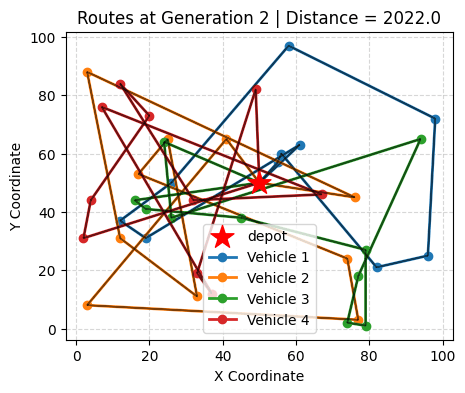
Also I have uploaded some images showing progress of generations.


Claude Code Skills Explained: What They Are & When to Use Them (2026)

Originally published at claudeguide.io/claude-code-skills-overview

Claude Code Skills Explained: What They Are & When to Use Them (2026)

Claude Code Skills are reusable, AI-callable workflows defined in SKILL.md files in your ~/.claude/skills/ directory. Each skill is auto-discovered by Claude Code, can be invoked via the Skill tool, and replaces what would otherwise be one-off prompts copy-pasted between sessions — turning 30-line instructions into a single /skill-name call. Skills are how power users compress repetitive workflows (code review, deployment, content generation, audit) into reusable building blocks. If you find yourself pasting the same instructions into Claude Code multiple times per week, a skill replaces them.

This guide covers the model: what counts as a skill, how Claude discovers them, when to use a skill vs a slash command vs a CLAUDE.md instruction, and what’s already in the public skill library.

What is a Skill, exactly?

A skill is a markdown file (SKILL.md) with frontmatter that Claude Code can invoke as a tool. It contains:

  1. YAML frontmatter — name, description, when to invoke
  2. Markdown body — step-by-step instructions Claude follows
  3. Optional helper files — scripts, templates, references

Example skill at ~/.claude/skills/deploy/SKILL.md:

---
name: deploy
description: Ship the current branch to production. Use when the user says "ship it", "deploy", "go live", or after PR merge confirmation.
---

# Deploy current branch

1. Run `bun run build` — abort if exit code != 0
2. Run `vercel deploy --prod --yes`
3. Wait for "Aliased: ..." line, confirm HTTP 200
4. Submit IndexNow with any new content slugs
5. Report deployment URL + git SHA + line count of changed files

Now in any Claude Code session, you can say “ship it” and Claude invokes this skill instead of asking you to clarify the steps.

Skills vs Slash Commands vs CLAUDE.md

These three serve overlapping purposes. Picking right is half the battle:

Use case Choice
Repeatable multi-step workflow (“deploy”, “audit”, “review”) Skill
One-shot UI command (Claude built-in like /clear, /exit) Slash command
Project-specific context (stack, conventions, commands) CLAUDE.md

Rule of thumb: if you’d write “follow these steps every time” in CLAUDE.md, make it a skill instead. Skills are invoked on demand; CLAUDE.md loads every session.

When to use a Skill

Good fits

  • Deployment workflows — deploy, rollback, canary (see Claude Code Hooks Deep Dive for hook patterns)
  • Audit/review — aeo-audit, quality-gate, security-scan
  • Content generation — write-blog-post, generate-changelog, summarize-pr
  • Investigation — investigate-bug, find-related-tests, trace-deployment
  • Setup — init-project, setup-deploy, configure-monitoring (pairs well with Claude Code memory system)

Bad fits

  • Trivial one-liners — “format this file” doesn’t need a skill, just say it
  • Highly variable workflows — if every invocation needs different parameters, a skill becomes brittle
  • Project-specific commands — those belong in CLAUDE.md, not a global skill

The Public Skill Library

Anthropic and the community maintain skills at ~/.claude/skills/. Notable examples:

  • gstack — full development stack (review, ship, qa, investigate)
  • superpowers — TDD, debugging, code review patterns
  • engineering — debug, system-design, deploy-checklist
  • design — design-review, accessibility-check
  • finance — reconciliation, journal-entry-prep

You can browse installed skills with ls ~/.claude/skills/. Each directory contains a SKILL.md defining when Claude should invoke that skill.

How Claude Discovers Skills

At session start, Claude Code lists all available skills with their descriptions. When you say “ship it” or “deploy this”, Claude matches your intent against skill descriptions and invokes the best match.

If you say something ambiguous (“update the docs”), Claude either picks the best match silently or asks “which skill should I use?”. Specific phrasing in the user prompt triggers faster matching.

ls ~/.claude/skills/
# deploy/  audit/  review/  investigate/  setup-deploy/

Building Your First Skill

The minimum viable skill is 5 lines:

---
name: bun-test
description: Run bun test on the current package. Use when user says "test it", "run tests", or after editing test files.
---

Run `bun test` and report results. If any tests fail, show the failure output and stop.

Save as ~/.claude/skills/bun-test/SKILL.md. Restart Claude Code. Done.

For a deeper guide on building skills with arguments, helper scripts, and conditional logic, see How to Build a Custom Claude Code Skill.

Skills with Arguments

Skills can accept arguments via $ARGUMENTS:


markdown
---
name: trace
description: Trace a deployment by its SHA. Usage: /trace <sha

Maintaining Apache Iceberg Tables: Compaction, Expiry, and Cleanup

The four Iceberg maintenance operations: compaction, snapshot expiry, orphan cleanup, and manifest rewriting

This is Part 10 of a 15-part Apache Iceberg Masterclass. Part 9 covered how tables degrade. This article covers the four maintenance operations that keep Iceberg tables healthy and the three approaches to running them.

Table of Contents

  1. What Are Table Formats and Why Were They Needed?
  2. The Metadata Structure of Current Table Formats
  3. Performance and Apache Iceberg’s Metadata
  4. Technical Deep Dive on Partition Evolution
  5. Technical Deep Dive on Hidden Partitioning
  6. Writing to an Apache Iceberg Table
  7. What Are Lakehouse Catalogs?
  8. Embedded Catalogs: S3 Tables and MinIO AI Stor
  9. How Iceberg Table Storage Degrades Over Time
  10. Maintaining Apache Iceberg Tables
  11. Apache Iceberg Metadata Tables
  12. Using Iceberg with Python and MPP Engines
  13. Streaming Data into Apache Iceberg Tables
  14. Hands-On with Iceberg Using Dremio Cloud
  15. Migrating to Apache Iceberg

The Four Maintenance Operations

The four Iceberg maintenance operations: compaction, snapshot expiry, orphan cleanup, and manifest rewriting

1. Compaction (File Rewriting)

Compaction merging 500 small files into 2 large files with identical data

Compaction reads small files, merges them into optimally-sized files (128-512 MB), and optionally re-sorts the data. It is the most impactful maintenance operation because it directly addresses the small file problem and restores sort order effectiveness.

In Spark:

CALL system.rewrite_data_files('analytics.orders')

In Dremio:

OPTIMIZE TABLE analytics.orders REWRITE DATA USING BIN_PACK

Compaction with sorting rewrites files so that column values are ordered, tightening the min/max statistics and making file skipping far more effective:

OPTIMIZE TABLE analytics.orders REWRITE DATA USING SORT (order_date, customer_id)

2. Snapshot Expiry

Snapshot expiry removes old snapshots from the metadata. After expiry, the snapshot and its exclusive data files are eligible for cleanup. You typically retain snapshots for a window (e.g., 7 days) to support time travel, then expire everything older.

-- Spark
CALL system.expire_snapshots('analytics.orders', TIMESTAMP '2024-04-22 00:00:00')

-- Dremio
ALTER TABLE analytics.orders EXPIRE SNAPSHOTS OLDER_THAN = '2024-04-22 00:00:00'

3. Orphan File Cleanup

After snapshots are expired, the data files they exclusively referenced become orphans. Orphan cleanup scans the storage directory, compares files against the current metadata, and deletes files that are not referenced by any snapshot.

-- Spark
CALL system.remove_orphan_files('analytics.orders')

This operation should run after snapshot expiry and with a safety delay (e.g., files older than 3 days) to avoid deleting files from in-progress writes.

Running orphan cleanup too aggressively can delete files from long-running write operations. A 3-day safety window ensures that any write operation has had time to complete before its files are considered orphans.

4. Manifest Rewriting

Over many commits, manifests accumulate. A single snapshot’s manifest list might reference hundreds of small manifests from individual commits. Manifest rewriting consolidates them into fewer, larger manifests.

-- Spark
CALL system.rewrite_manifests('analytics.orders')

This speeds up scan planning because the engine reads fewer manifest files. Each manifest file requires a separate I/O operation to read, so reducing the count from 500 to 20 eliminates 480 I/O round trips during query planning.

Sort-Order Compaction

Standard compaction (BIN_PACK) merges small files without changing the data order. Sort-order compaction rewrites files with data sorted by specified columns, which tightens the min/max statistics and makes file skipping more effective:

-- Dremio sort-order compaction
OPTIMIZE TABLE analytics.orders REWRITE DATA USING SORT (order_date, customer_id)

-- Spark sort-order compaction
CALL system.rewrite_data_files(
  table => 'analytics.orders',
  strategy => 'sort',
  sort_order => 'order_date ASC NULLS LAST, customer_id ASC NULLS LAST'
)

Sort-order compaction is more expensive than BIN_PACK because it reads, sorts, and rewrites all data. However, the performance improvement for queries that filter on the sorted columns is substantial: file skipping can eliminate 90%+ of data files when the sort columns match common query filters.

Data Retention Policies

Decide how long to keep historical data accessible through time travel:

Data Retention Policies

Longer retention means more snapshots, more metadata, and more storage consumed by old data files. Shorter retention reduces costs but limits time travel capabilities.

Three Approaches to Maintenance

Comparison of automated versus manual maintenance approaches

Manual (Scheduled Jobs)

Run maintenance operations on a schedule using Spark, Trino, or Dremio. A typical pattern:

  1. Run compaction daily for heavily-written tables
  2. Expire snapshots older than 7 days
  3. Remove orphan files older than 3 days
  4. Rewrite manifests monthly

Pros: Full control over timing and configuration. Cons: Requires operational effort; forgotten or broken jobs lead to degradation.

Semi-Automated (Scheduled with Monitoring)

Build a monitoring layer that checks table health metrics (Part 9 diagnostics) and triggers maintenance only when thresholds are exceeded (e.g., average file size drops below 64 MB).

Fully Automated

Use a platform that handles maintenance autonomously. Dremio’s automatic table optimization runs compaction, expiry, and cleanup for tables managed by Open Catalog without any user configuration. AWS S3 Tables provides built-in compaction.

Fully Automated

Recommended Maintenance Schedule

Recommended Maintenance Schedule

For most teams, starting with Dremio’s autonomous optimization and only adding manual jobs for tables with unusual requirements is the most practical approach.

Common Maintenance Pitfalls

Running compaction during peak query hours: Compaction reads and rewrites data files, which competes with analytical queries for I/O bandwidth. Schedule compaction during off-peak hours, or use a separate compute cluster (Spark on EMR) that does not share resources with your query engine.

Expiring snapshots too aggressively: If you expire snapshots while a long-running query is using one of them, the query can fail because the data files it needs might be cleaned up. Always keep snapshots for at least as long as your longest-running query.

Forgetting orphan cleanup: Many teams run compaction and snapshot expiry but forget orphan cleanup. Without it, compacted and expired data files accumulate indefinitely. Set up orphan cleanup as a weekly job with a 3-day safety window.

Not monitoring after migration: Tables migrated from Hive or other formats (Part 15) often inherit poor file layouts. Run an immediate compaction pass after any in-place migration.

Part 11 covers how to query the metadata tables that power diagnostics.

Books to Go Deeper

Free Resources

Zero-Idle Local LLMs: Running Llama 3 in AWS Lambda Containers

There is a persistent assumption in today’s AI ecosystem: If you want to build an AI product, you must pay a recurring API toll to OpenAI, Anthropic, or Amazon Bedrock.

For advanced reasoning agents and frontier-model workflows, that assumption is absolutely correct. But many production AI workloads are not reasoning-heavy.

What if you are running sentiment analysis across 100,000 customer reviews? What if you are extracting structured JSON from invoices, or processing an asynchronous document pipeline in the background?

Using a flagship hosted model for basic classification is like using a Ferrari to deliver the mail. It works, but at scale, the unit economics become highly inefficient.

As a cloud architect, I prefer a different approach for high-volume, low-reasoning background tasks. You can bypass API providers entirely and run quantized open-source LLMs directly inside your serverless infrastructure.

Here is how to deploy a massive, auto-scaling fleet of private LLMs using 10GB AWS Lambda Container Images, llama.cpp, and Llama 3 trading sub-second latency for absolute privacy and scale-to-zero economics.

The Pivot: Serverless AI on the CPU

Historically, self-hosting LLMs meant provisioning GPU-backed EC2 instances (like the g5 family), managing CUDA drivers, and paying thousands of dollars a month just to keep the infrastructure idling.

Two technological shifts have altered that equation significantly:

  1. Model Quantization: Projects like llama.cpp allow modern 8-Billion parameter models (like Llama 3 8B or Mistral) to be quantized into highly efficient GGUF formats. A Q4 quantized Llama 3 shrinks to roughly ~4.5GB on disk and becomes capable of running entirely on standard CPUs.
  2. Lambda Container Limits: AWS Lambda now supports Docker container images up to 10GB in size. Furthermore, you can allocate up to 10,240 MB of RAM, which linearly scales your compute to a maximum of 6 vCPUs.

When you put these two facts together, the architectural opportunity becomes obvious: Package a quantized LLM directly into a container image and execute inference entirely on serverless CPUs.

The Architecture: Building the Serverless LLM

Here is how the infrastructure is designed for an asynchronous document processing pipeline.

Image 88

1. The Container Build

Instead of downloading the model at runtime (which would add minutes of latency), we package the .gguf model file directly inside the Docker image alongside the llama-cpp-python library and our handler code.

2. The Deployment

We push this massive (~5GB) image to Amazon Elastic Container Registry (ECR). We then configure our Lambda function to use the maximum 10,240 MB of RAM and set the architecture to ARM64 (Graviton) for superior price-to-performance.

(Note: If your code requires unpacking files at runtime, you must also explicitly configure Lambda’s ephemeral /tmp storage, which defaults to 512MB but can be scaled up to 10GB).

3. The Execution

We route asynchronous tasks through an Amazon SQS queue. Lambda auto-scales up to the default account limit of 1,000 concurrent executions per region. The model loads into memory, processes the text, writes the output to DynamoDB, and terminates.

Grounded Economics: The API vs. Compute Reality Check

The biggest misconception around this architecture is that it is universally cheaper than managed APIs. It is not.

Let’s look at the actual unit economics using verifiable AWS pricing.

  • Task: Read a 1,000-token document and output a 100-token JSON summary.
  • Speed: On a 10GB Lambda function, llama.cpp running Llama 3 8B (Q4) will generate roughly 5 to 10 tokens per second.
  • Time: Generating 100 tokens takes ~15 seconds.

Scenario A: Managed API (Claude 3 Haiku via Amazon Bedrock)

  • Input: $0.25 / 1M tokens
  • Output: $1.25 / 1M tokens
  • Cost: (1000 * $0.00000025) + (100 * $0.00000125) = ~$0.000375

Scenario B: AWS Lambda Compute (ARM64 Graviton)

  • AWS Lambda ARM64 pricing is $0.0000226667 per GB-second.
  • 10 GB RAM × 15 seconds = 150 GB-seconds.
  • Cost: 150 * $0.0000226667 = ~$0.0034 per invocation

The Verdict: For tiny prompts and lightweight tasks, managed APIs like Bedrock are actually mathematically cheaper (~$0.0003 vs ~$0.003).

So when does Lambda win?

  1. Massive Input Context: If you are passing an 8,000-token document to extract 50 tokens of output, API input costs skyrocket. Lambda costs remain strictly tied to execution time.
  2. Data Privacy & Compliance: If you operate in Healthcare (HIPAA) or FinTech and your compliance team refuses to send PII to an external API provider, this architecture gives you 100% data isolation inside your own VPC.
  3. Custom Fine-Tunes: If you own a specialized domain model or LoRA adapter, hosting it on dedicated EC2 GPUs will cost you $1,000+/month. Hosting it on Lambda eliminates idle GPU uptime entirely.

Engineering Tradeoffs: What You Must Know

As a cloud architect, I must warn you about the physical constraints of this design. Do not try to build a real-time chatbot with this architecture.

1. The Cold Start Penalty

Loading a 5GB Docker image and subsequently pulling a 4.5GB model file into Lambda’s execution memory takes significant time. Expect initial Cold Start latency to range from 10 to 30 seconds. This is why this architecture is strictly for asynchronous workloads (SQS, EventBridge, background batches).

2. CPU Inference is Slow

Without GPUs, your throughput is limited. Maxing out around 5-15 tokens per second means generating a massive 2,000-word essay will likely hit Lambda’s 15-minute absolute timeout before finishing. Keep your generation targets small (e.g., JSON extraction).

3. Concurrency Limits

AWS scales Lambda aggressively, but the default burst concurrency quota is 1,000 concurrent executions per region. If your SQS queue suddenly gets 50,000 messages, Lambda will process 1,000 at a time unless you request a quota increase.

The Bottom Line

Serverless AI does not always mean calling a hosted API.

By combining quantized open-source models, llama.cpp, and AWS Lambda 10GB container images, you can build private, scale-to-zero, horizontally scalable AI pipelines without ever maintaining a dedicated GPU server.

You trade sub-second latency and raw throughput in exchange for operational simplicity, absolute data privacy, and a cloud bill that drops to zero when your users go to sleep. For the right background workload, that tradeoff is incredibly compelling.

Have you experimented with running local LLMs in serverless environments? Did you choose AWS Lambda, Fargate, or SageMaker Async Endpoints? Let’s discuss your CPU inference speeds in the comments!

We scanned 8 B2B SaaS companies across 5 categories. ChatGPT named the same 12 brands in every answer.

On 22 May 2026 the Bersyn scan engine ran 200 buyer Conversations across four AI Surfaces — ChatGPT, Claude, Perplexity, Gemini — for eight B2B SaaS companies in five different categories. The pattern that came back is the most important data we have published this month, so we are publishing it here in full. Receipts and named names.

The eight companies, the categories, and the scores.

Company Category Bersyn score Worst Surface Brand that won the category
Quantstruct AI documentation 0.0 / 10 All four tied GitBook
AllInOneTools Online PDF tools 0.0 / 10 All four tied Smallpdf
Tally.so Online form builder 4.0 / 10 ChatGPT + Gemini Jotform
Fillout Online form builder 2.5 / 10 ChatGPT + Gemini Typeform
Plain B2B customer support 2.0 / 10 ChatGPT + Gemini Zendesk
Pylon B2B customer support 2.0 / 10 ChatGPT + Gemini Zendesk
Inkdrop Markdown note-taking 1.5 / 10 ChatGPT + Claude + Gemini Obsidian
(one channel-partner test, not scanned) — — — —

Average score across the seven scanned companies: 1.7 / 10.

That is not a typo. The average B2B SaaS company in this sample is mentioned in fewer than two of every ten high-intent buyer Conversations across AI Surfaces.

The same brands win every category

The competitors named in the AI assistants’ answers — when the seven companies above were skipped — show a clear pattern. Across all 200 Conversations, twelve brands accounted for the overwhelming majority of mentions.

Brand Category Number of times named
Typeform Form builders 20
Smallpdf Online PDF tools 18
ILovePDF Online PDF tools 14
Zendesk Customer support 14
Intercom Customer support 14
GitBook Documentation 12
Jotform Form builders 12
Google Forms Form builders 12
Obsidian Notes 11
Notion Notes / docs 10
Mintlify Documentation 8
Front Customer support 7

When a buyer asks any of the four AI assistants which tool to use in any of these five categories, the answer points at a name from this list. The newer entrants — the actual customers Bersyn was scanning — are essentially invisible in the same Conversations.

ChatGPT is the worst Surface for newer brands

Across seven scans and 175 ChatGPT Conversations (5 questions × 4 Surfaces × 7 brands, ChatGPT’s quarter being 35 per brand), ChatGPT had the lowest hit rate for the scanned company in seven of seven cases.

Surface Average hit rate across the 7 scanned brands
ChatGPT 0.6 / 10
Gemini 0.7 / 10
Claude 2.4 / 10
Perplexity 3.1 / 10

Perplexity is the most retrieval-driven of the four; it does live web fetching at query time and picks up newer entrants relatively faster. Claude does some live retrieval too but is heavily training-data dependent. ChatGPT and Gemini lean hardest on training data and on entity-injection patterns — the kind of behaviour Lee 2026 documented in their fan-out query study, where 99.4 percent of brand entity injection by ChatGPT comes from training data, not from retrieval.

That pattern is exactly what this small sample reproduces.

What it means in practice

A newer B2B SaaS company in a category dominated by an established brand has one shared problem and four different fixes.

The shared problem: the established brand has accumulated enough mentions across the open web (review sites, Reddit, comparison articles, LinkedIn posts, Hacker News threads, Wikipedia, Crunchbase) to land inside the training data of all four AI Surfaces. The newer entrant has not.

The four different fixes — one per Surface, because each fails differently:

  • ChatGPT. The lever is third-party authoritative mentions in the next training cut. Reddit threads, Hacker News submissions, dev.to articles, LinkedIn posts that cite the brand by name in the category context. ChatGPT will not learn a new brand exists from your own marketing pages alone.

  • Gemini. Gemini blends Google Search results with the underlying model. The lever is domain-level SEO presence in the category — Wikidata, Crunchbase, LinkedIn-company, AI tool directory listings. Anything that strengthens the brand’s standing in Google Knowledge Graph compounds.

  • Claude. Slowest to update. Claude conservatively avoids guessing about unfamiliar brands, so the failure mode is Omitted rather than Misclassified. The lever is the same as ChatGPT — third-party mentions in training data — but with a longer lag.

  • Perplexity. Fastest to update because of live retrieval. The lever is SERP presence for the buyer questions buyers actually ask. If your site ranks in the top 5 for “best [category] tool”, Perplexity will pull you in.

Each Surface needs a different Patch. A single piece of content can hit one Surface and miss the other three.

What this means for any new SaaS brand

If you are a B2B SaaS company under five years old, in a category with three or more established competitors, there is a non-trivial chance the four AI assistants do not yet know you exist. If a buyer asks Claude or ChatGPT which tool in your category to use, you will not be the answer.

That is the gap Bersyn was built to diagnose, classify, and close. The free scan shows the receipt. The platform generates the Patches. The audit at audit.bersyn.com delivers a one-time $49 PDF with copy-pasteable text suggestions tied to specific pages on your site.

Want this scan run on your company

Two paths.

Run a free scan at bersyn.com. Two-minute setup. Same scan engine that produced the table above. You see the receipt for your own brand.

Buy the one-time audit at audit.bersyn.com. $49. PDF arrives by email, usually within a few minutes. No subscription, no learning curve. Apply the patches on your own schedule.

We will publish more of these as the data accumulates. If you are running a category we have not scanned yet and you want to see the receipt, reply to this post with the category name. We are running scans daily through 30 June.

Data from Bersyn scans run 22 May 2026 between 13:46 and 14:15 UTC. Raw JSON for each of the seven scanned companies is in the public marketing repository. All scan questions, prompts, and responses available on request. Bersyn does not claim truth about which tool is “best” — the data above is a measurement of which brands the AI Surfaces have learned to name, not a quality ranking.