Apache Iceberg Metadata Tables: Querying the Internals

The seven Iceberg metadata tables and what each reveals about your table

This is Part 11 of a 15-part Apache Iceberg Masterclass. Part 10 covered maintenance operations. This article covers the metadata tables that let you inspect Iceberg table internals using standard SQL.

Iceberg exposes its internal metadata as queryable virtual tables. You can use them to check table health, debug performance issues, audit changes, and build monitoring dashboards. No special tools required, just SQL.

Table of Contents

  1. What Are Table Formats and Why Were They Needed?
  2. The Metadata Structure of Current Table Formats
  3. Performance and Apache Iceberg’s Metadata
  4. Technical Deep Dive on Partition Evolution
  5. Technical Deep Dive on Hidden Partitioning
  6. Writing to an Apache Iceberg Table
  7. What Are Lakehouse Catalogs?
  8. Embedded Catalogs: S3 Tables and MinIO AI Stor
  9. How Iceberg Table Storage Degrades Over Time
  10. Maintaining Apache Iceberg Tables
  11. Apache Iceberg Metadata Tables
  12. Using Iceberg with Python and MPP Engines
  13. Streaming Data into Apache Iceberg Tables
  14. Hands-On with Iceberg Using Dremio Cloud
  15. Migrating to Apache Iceberg

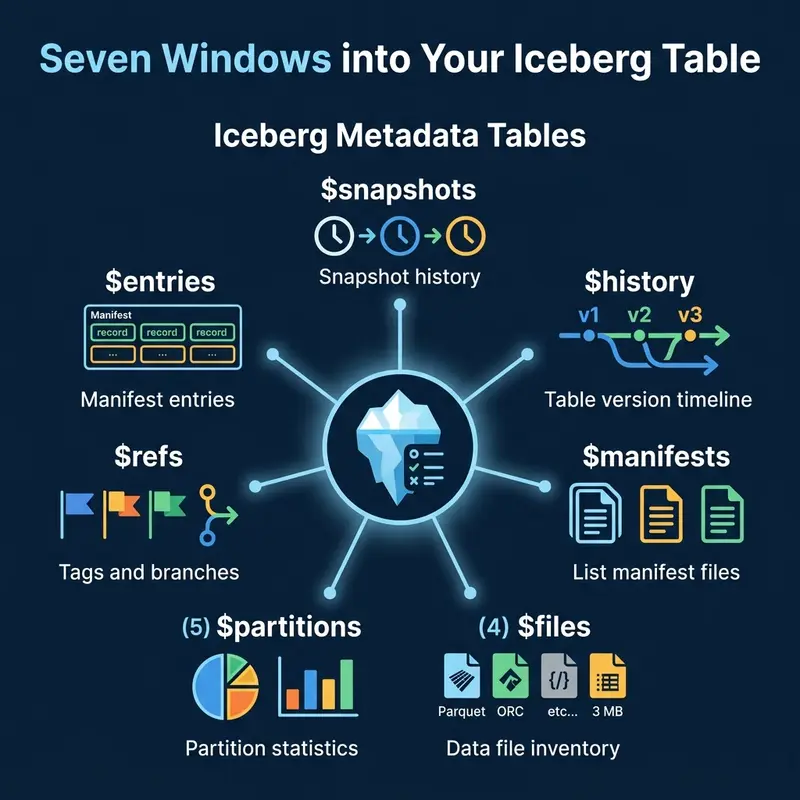
The Seven Metadata Tables

The seven Iceberg metadata tables and what each reveals about your table

Snapshots

The $snapshots table lists every snapshot in the table’s history. Each row represents a committed transaction.

-- Dremio syntax
SELECT * FROM TABLE(table_snapshot('analytics.orders'))

-- Spark syntax
SELECT * FROM analytics.orders.snapshots

Key columns: snapshot_id, committed_at, operation (append, overwrite, delete), summary (files added/removed counts).

History

The $history table shows the timeline of which snapshot was current at each point in time.

SELECT * FROM TABLE(table_history('analytics.orders'))

Files

The $files table lists every data file in the current snapshot with detailed statistics.

SELECT file_path, file_size_in_bytes, record_count, partition
FROM TABLE(table_files('analytics.orders'))

This is the primary diagnostic table for checking file sizes and identifying the small file problem.

Manifests

The $manifests table lists the manifest files for the current snapshot.

SELECT path, length, added_data_files_count, existing_data_files_count
FROM TABLE(table_manifests('analytics.orders'))

Partitions

The $partitions table provides statistics per partition: row counts, file counts, and size.

SELECT partition, record_count, file_count
FROM TABLE(table_partitions('analytics.orders'))

Practical Use Cases

Three categories of metadata table use cases: monitoring, debugging, and auditing

Monitoring: Average File Size

SELECT
  AVG(file_size_in_bytes) / 1048576 AS avg_file_mb,
  MIN(file_size_in_bytes) / 1048576 AS min_file_mb,
  COUNT(*) AS total_files
FROM TABLE(table_files('analytics.orders'))

If avg_file_mb drops below 64, schedule compaction.

Debugging: Files Per Partition

SELECT partition, COUNT(*) AS files, SUM(record_count) AS rows
FROM TABLE(table_files('analytics.orders'))
GROUP BY partition
ORDER BY files DESC
LIMIT 20

Partitions with hundreds of files are compaction candidates. Use this query as a daily health check and pipe the results into your monitoring system.

Debugging: Sort Order Effectiveness

Column statistics in the files table reveal whether your sort order is effective:

SELECT
  file_path,
  lower_bounds['customer_id'] AS min_customer_id,
  upper_bounds['customer_id'] AS max_customer_id
FROM TABLE(table_files('analytics.orders'))

If the min/max ranges overlap heavily across files, the sort order has decayed and compaction with sorting (Part 10) will restore effectiveness.

Monitoring: Commit Velocity

Track how frequently the table is being written to:

SELECT
  DATE_TRUNC('hour', committed_at) AS hour,
  COUNT(*) AS commits,
  SUM(CAST(summary['added-data-files'] AS INT)) AS files_added
FROM TABLE(table_snapshot('analytics.orders'))
WHERE committed_at > CURRENT_TIMESTAMP - INTERVAL '24' HOUR
GROUP BY DATE_TRUNC('hour', committed_at)
ORDER BY hour

High commit velocity (hundreds of commits per hour) indicates a streaming workload that needs aggressive compaction.

Auditing: Recent Changes

SELECT committed_at, operation, summary
FROM TABLE(table_snapshot('analytics.orders'))
ORDER BY committed_at DESC
LIMIT 10

This shows the last 10 operations: how many files were added or removed per commit.

Time Travel

How snapshots enable querying the table at any point in its history

Metadata tables enable time travel queries. Use the snapshot list to find the snapshot ID for a specific point in time, then query the table at that snapshot:

-- Query the table as it existed on February 15
SELECT * FROM analytics.orders
AT SNAPSHOT '1234567890123456789'

-- Or by timestamp
SELECT * FROM analytics.orders
AT TIMESTAMP '2024-02-15 00:00:00'

Time travel is useful for debugging data issues (“what did this table look like before yesterday’s pipeline ran?”), auditing (“what was the account balance at end-of-quarter?”), and reproducible analysis (“run this report against last month’s data”).

Incremental Reads

Metadata tables also enable incremental processing. By comparing two snapshots, you can identify which files were added between them and process only the new data:

-- Find files added in the last snapshot
SELECT file_path, record_count
FROM TABLE(table_files('analytics.orders'))
WHERE file_path NOT IN (
  SELECT file_path FROM TABLE(table_files('analytics.orders'))
  AT SNAPSHOT '1234567890'
)

This pattern is the foundation for CDC (Change Data Capture) on Iceberg tables: read only what changed since the last processing run, rather than re-scanning the entire table.

Rollback

If a bad write corrupts your table, use the snapshot list to rollback:

-- Find the last good snapshot
SELECT snapshot_id, committed_at, operation
FROM TABLE(table_snapshot('analytics.orders'))
ORDER BY committed_at DESC

-- Rollback to it (Spark)
CALL system.rollback_to_snapshot('analytics.orders', 1234567890)

Rollback does not delete data. It simply changes the current snapshot pointer to an earlier snapshot, making the table appear as it was at that point. The rolled-back data files remain in storage for potential recovery.

Dremio supports all Iceberg metadata table queries through its TABLE() function syntax and provides time travel in both SQL and its semantic layer.

Building a Health Dashboard

Combine metadata table queries into a scheduled monitoring job:

-- Table health summary
SELECT
  (SELECT COUNT(*) FROM TABLE(table_snapshot('analytics.orders'))) AS snapshots,
  (SELECT COUNT(*) FROM TABLE(table_files('analytics.orders'))) AS files,
  (SELECT AVG(file_size_in_bytes)/1048576 FROM TABLE(table_files('analytics.orders'))) AS avg_mb,
  (SELECT COUNT(*) FROM TABLE(table_manifests('analytics.orders'))) AS manifests

Set alerts when snapshots exceed 1,000, average file size drops below 64 MB, or manifest count exceeds 500.

Engine Syntax Variations

Different engines use different syntax for metadata tables:

Engine Syntax Variations

The underlying data is identical; only the SQL syntax differs. Regardless of which engine you use, these metadata tables are the key diagnostic tool for understanding and maintaining Iceberg table health.

Automating Decisions with Metadata

You can use metadata table queries to drive automated maintenance decisions. For example, a scheduler can check whether compaction is needed before running it:

-- Only compact if average file size is below threshold
SELECT CASE
  WHEN AVG(file_size_in_bytes) / 1048576 < 64 THEN 'COMPACT_NEEDED'
  ELSE 'HEALTHY'
END AS table_status
FROM TABLE(table_files('analytics.orders'))

This avoids running compaction on tables that are already well-organized, saving compute costs and preventing unnecessary data rewrites.

For production environments, integrate these checks into your orchestration tool (Airflow, Dagster, Prefect). Schedule a daily metadata scan across all tables, collect the health metrics, and trigger maintenance jobs only for tables that need them. This approach scales to hundreds of tables without manual oversight. Dremio’s autonomous optimization automates this entire workflow for tables managed by Open Catalog.

Part 12 covers using Iceberg from Python and MPP query engines.

Books to Go Deeper

Free Resources

Hermes, The Self-Improving Agent You Can Actually Run Yourself

This is a submission for the Hermes Agent Challenge

Introduction

Many AI agents have a shelf life. You set one up, it handles a few tasks, and then you discover it has no idea what it did last week, requires you to repeat context every session, and collapses the moment you try to connect it to something it was not explicitly designed for. The agent market is full of impressive demos that do not hold up as long-running, real-world tools.

Hermes Agent, built by Nous Research and released under the MIT license, takes a fundamentally different approach to the problem. Instead of being optimized for a single impressive demo, it is designed to compound over time. The longer it runs, the more context it builds about your projects and preferences. The more tasks you throw at it, the more reusable skills it generates. It is not a coding copilot, a chatbot wrapper, or a one-trick pipeline. It is a persistent agent that lives on your infrastructure, reaches you across messaging platforms, and genuinely gets more capable the longer you use it.

At the time of writing, the project sits at 160,000 stars on GitHub and v0.14.0, which is a meaningful signal for a tool this young. This article walks through what Hermes actually is under the hood, how to get it running locally and connected to real tools, and how it stacks up against OpenClaw and LangGraph so you can make an honest decision about when to reach for it.

What Hermes Agent Actually Is

Before walking through setup, it is worth spending a moment on the architecture, because understanding how Hermes works explains why the setup steps matter.

At the core of Hermes is what Nous Research calls a closed learning loop. When you give Hermes a complex task, it does not just complete it and discard the work. Instead, it automatically generates a reusable skill from that interaction, a structured procedure it can recall and improve upon in future sessions. These skills live in your local filesystem under ~/.hermes/skills/ and are indexed so the agent can search and invoke them without you having to remember they exist. Over time, this means Hermes builds a growing library of procedures tailored to your specific workflows.

Alongside the skills system, Hermes maintains persistent memory across conversations. This includes project context, user preferences, and a searchable session history powered by SQLite FTS5 with LLM-summarized recall. When you return to a project after two weeks, Hermes can surface relevant prior context without you having to re-explain everything from scratch.

Beyond memory, the architecture supports isolated subagents. When a task has parallel components, Hermes can spawn isolated child agents with their own terminal environments and Python RPC sessions, then aggregate the results. This is particularly useful for long-running research or code tasks where you want to avoid context blowout in a single conversation thread.

Finally, Hermes ships with a gateway process that connects the agent to messaging platforms. You can run a task from your laptop terminal, switch to Telegram while commuting, and pick up the same session without any ceremony. This cross-platform continuity is something most agentic frameworks simply do not address.

Setting Up Hermes Agent Locally

The install process is straightforward on Linux, macOS, WSL2, and Termux. A single curl command handles the dependency chain, including uv, Python 3.11, Node.js, ripgrep, and ffmpeg.

Step 1: Install

Open your terminal and run:

curl -fsSL https://raw.githubusercontent.com/NousResearch/hermes-agent/main/scripts/install.sh | bash

After the installer finishes, reload your shell so the hermes command is available:

source ~/.bashrc   # or: source ~/.zshrc

If you are on Windows, the project supports native PowerShell as an early beta, though WSL2 is the more battle-tested path. The PowerShell one-liner is:

iex (irm https://raw.githubusercontent.com/NousResearch/hermes-agent/main/scripts/install.ps1)

Step 2: Choose a Model Provider

One of the more useful design decisions in Hermes is that it has no default model lock-in. Before starting a conversation, run:

 hermes model

This opens an interactive selector where you can configure your provider and model. Hermes supports OpenAI, Anthropic, OpenRouter (which gives access to 200+ models), Nous Portal, NVIDIA NIM, Hugging Face, and several others including Kimi, MiniMax, and z.ai. You can also point it at a local Ollama endpoint if you want to run fully offline. Switching providers later requires only running hermes model again. No code changes, no environment variable archaeology.

To set up your API key for, say, OpenRouter, you configure it once through the setup wizard and Hermes stores it securely in ~/.hermes/.env rather than requiring you to export it in every session.

Step 3: Run the Setup Wizard

Rather than manually editing config files, Hermes provides a guided setup that walks you through the most important configuration decisions:

hermes setup

The wizard covers your preferred model, which toolsets to enable, your execution backend (more on this shortly), and whether to set up the messaging gateway. If you are migrating from OpenClaw, the wizard automatically detects a ~/.openclaw directory and offers to import your settings, memories, skills, and API keys in one step.

Step 4: Start the Agent

Once setup is complete, you start an interactive session with:

hermes

This opens the full TUI, which includes multiline editing, slash-command autocomplete, streaming tool output, and conversation history. From here, you can issue natural language tasks and watch Hermes reason through them using whatever tools are enabled.

Next, let’s talk about how you can connect Hermes to tools.

Connecting Hermes to Tools

This is where Hermes earns its keep. The tool ecosystem is organized into toolsets, which are named groups of capabilities you enable or disable as needed. To see what is available and toggle individual tools, run:

hermes tools

Out of the box, Hermes ships with more than 40 tools spanning web search, browser automation, vision and image generation, text-to-speech, file operations, shell execution, and multi-model reasoning. These cover the vast majority of everyday agent workflows without requiring any additional setup.

Execution Backends

One of the more operationally significant features in Hermes is its support for seven distinct execution backends: local, Docker, SSH, Singularity, Modal, Daytona, and Vercel Sandbox. Most agents run shell commands directly on your local machine, which is fine for personal use but problematic when you want isolation, reproducibility, or serverless cost profiles.

If you are running tasks that touch sensitive files or need a clean environment for each run, switching to the Docker backend takes a single configuration change:

hermes config set sandbox docker

For production workloads where you want the agent to hibernate between sessions and only incur compute costs when actively running, the Modal and Daytona backends offer serverless persistence. The agent’s environment wakes on demand and sleeps when idle, which makes running Hermes on a cloud VM genuinely cost-efficient for non-continuous workloads.

MCP Integration

Hermes supports the Model Context Protocol (MCP), which means you can connect it to any MCP-compatible server and immediately expose those capabilities as native tools. If you have an MCP server for your database, your internal APIs, or a third-party service, Hermes can use it without requiring any custom adapter code. The MCP configuration lives in ~/.hermes/config.yaml and follows the same server definition format used by other MCP hosts.

For example, to connect Hermes to an MCP server running on localhost:

# ~/.hermes/config.yaml
mcp_servers:
  my-tool-server:
    command: node
    args: ["/path/to/mcp-server/index.js"]

Once added, the tools exposed by that server appear automatically in the hermes tools list and become available to the agent in every subsequent session.

Messaging Gateway and Cron

Beyond the terminal, Hermes supports a gateway process that connects the agent to Telegram, Discord, Slack, WhatsApp, Signal, and email. Setting up the gateway takes a few minutes:

hermes gateway setuphermes gateway start

The setup wizard walks you through generating bot tokens for each platform. Once the gateway is running, messages you send through any connected platform reach the same agent, with the same memory and skills, as your CLI sessions. Cross-platform conversation continuity is handled automatically.

Hermes also ships a built-in cron scheduler that lets you describe recurring tasks in natural language. Rather than writing cron syntax and wiring up shell scripts, you tell the agent what you want:

During a conversation:”Every weekday at 7am, send me a summary of unread GitHub notifications to Telegram.”

The agent translates that instruction into a scheduled task and runs it unattended through the gateway, delivering the result to whichever platform you specified.

How Hermes Compares to OpenClaw and LangGraph

To make an honest recommendation, it helps to put Hermes next to two frameworks that represent meaningfully different philosophies: OpenClaw, which shares a direct lineage with Hermes, and LangGraph, which represents the programmatic, graph-based end of the spectrum.

Hermes vs. OpenClaw

OpenClaw is the predecessor to Hermes. The migration command in the Hermes CLI (hermes claw migrate) exists specifically to help OpenClaw users move their settings, memories, skills, and API keys across, which tells you most of what you need to know about the relationship.

OpenClaw established many of the patterns that Hermes inherits: persistent memory, a skills system, multi-platform messaging, and model-agnostic configuration. If you are currently running OpenClaw and it is meeting your needs, the case for migrating is largely about access to what has been added since the fork. Hermes extends the architecture in several concrete directions.

The execution backend system is considerably broader. Hermes supports seven backends where OpenClaw effectively assumes local execution. If you want Docker isolation, SSH-based remote execution, or serverless backends like Modal, Hermes is where that work has happened.

The subagent system is also more mature in Hermes. Spawning isolated child agents with their own terminals and Python RPC sessions, and collapsing multi-step pipelines into zero-context-cost turns, is a Hermes-specific capability. OpenClaw does not have an equivalent.

The skills system has also evolved. In Hermes, skills are compatible with the agentskills.io open standard, which means you can pull community-contributed skills from the Skills Hub rather than building everything from scratch. The cross-session search is powered by SQLite FTS5 with LLM summarization, which is a meaningful step up from simple key-value memory storage.

So when should you stick with OpenClaw rather than migrating? Honestly, the cases are narrow. If you have a heavily customized OpenClaw setup with skills and personas that you rely on daily and do not want to risk disrupting, waiting until you have time for a proper migration is reasonable. The hermes claw migrate command handles most of the work, but any migration carries some risk of edge cases. Otherwise, the feature trajectory strongly favors Hermes, and the migration tooling makes the switch low-cost.

Hermes vs. LangGraph

LangGraph is a Python framework from LangChain for building stateful, multi-actor agent applications using directed graphs. It is a genuinely different tool serving a genuinely different use case, so comparing them is less about which is better and more about which fits your situation.

LangGraph’s core proposition is control. You define your agent as an explicit graph where nodes are computation steps and edges control flow. You can add conditional branching, loops, checkpoints, and human-in-the-loop interruptions at precisely defined points. When you need to reason carefully about how an agent makes decisions, audit its behavior, or integrate it into a production system with strict reliability requirements, LangGraph gives you the scaffolding to do that. It is a framework for building agents, not an agent itself.

Hermes is an agent. You install it, configure it, and talk to it. The internal reasoning loop is not something you define through code. The tradeoff is that you give up some low-level control in exchange for a system that handles a large surface area of practical tasks without requiring you to write Python to describe how it should think.

Where LangGraph genuinely outperforms Hermes is in situations where you need to embed agentic behavior into a larger software system. If you are building a production workflow where an agent is one component among many, and you need that component to have defined inputs, outputs, retry logic, and observability hooks, LangGraph’s programmatic model is the right tool. It integrates naturally with LangSmith for tracing, supports streaming state updates to frontends, and has a large ecosystem of pre-built components.

Where Hermes outperforms LangGraph is in personal and team productivity use cases where you want an agent that can handle a wide variety of tasks, remember what it knows about you and your projects, reach you on Telegram or Slack, run scheduled jobs overnight, and get better the longer you use it. LangGraph requires you to write and maintain code for every new capability. Hermes accumulates new skills automatically from experience.

The persistent memory system is also a meaningful differentiator. LangGraph supports checkpoints and state persistence, but these are designed for resuming specific workflow instances. Hermes’s memory operates at a higher level, building a model of who you are, what your projects involve, and how you prefer to work that persists and enriches across all future sessions.

When to Reach for Hermes

Thinking through the comparisons above, a few clear use cases emerge where Hermes is the right choice.

Reach for Hermes when:

  • You want a general-purpose autonomous agent that runs persistently on your own infrastructure. If the core problem is “I need something that can handle a wide variety of tasks across multiple sessions and get smarter over time,” Hermes is built exactly for that.

  • Cross-platform availability matters. If you want to kick off a task from your laptop, check on it from your phone via Telegram, and have results delivered to a Slack channel, the messaging gateway handles all of that with a single gateway process running on your server.

  • You are working across many different projects and want the agent to carry context from one to the next. The persistent memory and skills system mean that the work you put into one project gradually informs how the agent handles related work later.

Reach for LangGraph instead when you are building an agentic component that needs to be embedded in a production Python application with defined interfaces, observability, and strict control flow. If your primary concern is software engineering correctness rather than agent productivity, LangGraph gives you the structure to guarantee it.

Reach for OpenClaw instead if you have an existing OpenClaw setup that is working well and the migration overhead is not worth the improvements. But given that the migration tooling is mature and the hermes claw migrate command handles the heavy lifting, the window for that justification is narrowing.

Closing Thoughts

Hermes Agent sits in an interesting position. It is not trying to be a coding assistant that lives in your IDE, and it is not trying to be a framework you build agents on top of. It is trying to be the agent itself, one that earns increasing usefulness by actually learning from what it does.

The install process is genuinely simple. The model-agnostic design means you can point it at whatever provider makes sense for your budget and requirements. The MCP integration means you are not locked out of the tools your team already uses. And the learning loop means the return on the setup cost compounds over time rather than resetting each session.

For developers and technical teams who want an agent they actually control, that runs on their own infrastructure, and that respects the fact that context built over months of work is worth preserving, Hermes is worth a serious look.

Unity vs Unreal: 5 Things I Had to Relearn the Hard Way

The first time I opened Unreal after years of living in Unity, I sat there for a full ten minutes trying to figure out where the play button was. Not because I couldn’t see it. Because I didn’t trust that pressing it would do what I expected. Every muscle memory I’d built up — drag a script onto a GameObject, hit play, see the thing wiggle — was suddenly worthless. The viewport looked similar enough to lull me into a false sense of familiarity, and then five seconds later I was fighting the editor over what “save” even means.

Going the other direction is just as bad. Unreal devs who jump into Unity often spend their first week asking why the engine keeps eating their references on hot reload, or why the Inspector won’t show their perfectly reasonable struct.

I’ve shipped work in both engines at this point, and the honest truth is that the syntax barrier (C# vs C++) is the easy part. What actually slows you down is the dozens of small mental model mismatches that nobody warns you about until you’ve already lost a weekend to them. The engines look like they solve the same problems, so you assume the shape of the solution is the same. It isn’t.

Here are five things our studio had to genuinely rewire our brains around. Not engine trivia — the stuff that quietly costs you days if you don’t catch it early.

1. Garbage Collection Lives in Different Universes

Unity gives you C# and the .NET GC. Unreal gives you C++ and a custom mark-and-sweep GC that only knows about objects you’ve explicitly told it about. These sound similar. They are not.

In Unity, you write a class, you new it up, and the GC takes care of it whenever it feels like. The classic gotcha is performance (allocations in Update = GC spikes), but the correctness model is straightforward. Everything’s an object, everything’s tracked.

In Unreal, the GC only tracks UObject subclasses, and only through references it can see — meaning references marked with UPROPERTY(). If you store a UObject* as a raw pointer without that macro, the GC has no idea you care about it, and your pointer becomes a dangling reference the next sweep. The object literally gets collected out from under you.

UCLASS()
class AEnemy : public AActor {
    GENERATED_BODY()

    // Safe: GC knows you reference this
    UPROPERTY()
    UWeapon* EquippedWeapon;

    // Time bomb: GC will happily delete this
    UWeapon* SecretWeapon;
};

The mental rewire: in Unity, the GC is a performance concern. In Unreal, the GC is a correctness concern. You don’t fight it for frame time, you fight it for object lifetime. Once that clicked, half of my “why is my pointer null” bugs disappeared.

The flip side: Unity devs jumping to Unreal often reach for TWeakObjectPtr reflexively because they’re scared of the GC. Most of the time you just want a UPROPERTY()-marked pointer — it keeps the object alive and tracked. Save TWeakObjectPtr for the case it’s actually designed for: you want to reference something without preventing its destruction (a UI panel watching a target actor that might die first).

2. Tick Is Not Update (And Lifecycle Is Not Awake)

On paper, MonoBehaviour.Update() and AActor::Tick() look like the same idea. Per-frame callback, runs every frame, do your thing. In practice the lifecycle and scope rules around them are different enough that you can’t just port habits across.

Unity’s MonoBehaviour has a fairly chatty lifecycle (Awake, OnEnable, Start, Update, LateUpdate, OnDisable, OnDestroy) and most of those fire reliably in the editor too. You can lean on Start for cheap initialization and forget about it.

Unreal splits actor lifetime across PostInitializeComponents, BeginPlay, Tick, EndPlay, with components having their own OnRegister / InitializeComponent flow. BeginPlay only fires when the game actually starts, which catches a lot of Unity converts off guard the first time they try to do initialization in the constructor and wonder why nothing’s wired up yet.

AEnemy::AEnemy() {
    // Constructor runs for the CDO at engine init, and again for every instance.
    // In both cases the world isn't valid — no gameplay state, no other actors.
    // Defaults only; gameplay setup goes in BeginPlay.
    PrimaryActorTick.bCanEverTick = true;
}

void AEnemy::BeginPlay() {
    Super::BeginPlay();
    // Now the world exists. Do gameplay setup here.
}

And then there’s the other direction, which bites just as hard. Unreal devs coming into Unity expect a staged lifecycle and instead get a flat one with a bunch of quietly-different rules. Awake runs early, sure, but it runs before the scene’s other objects are guaranteed to be wired up — so anything that reaches across to a sibling MonoBehaviour belongs in Start, not Awake. Start itself doesn’t fire when you Instantiate the object; it waits for the first frame the object is active. OnEnable and OnDisable fire every time you toggle the GameObject, not just at creation — which is great for pooling and a trap if you treated them as one-shot setup hooks. And the C++ instinct to “just put real init in the constructor” has to be unlearned outright: Unity reserves the right to construct MonoBehaviours for serialization purposes when no scene exists, so gameplay code in the constructor is at best ignored, at worst crashes the editor on domain reload. On top of all that, Update runs at a variable rate; physics-coupled logic belongs in FixedUpdate, and that distinction is one of those things you only learn after your character starts vibrating at high frame rates.

The rewire: in Unity, lifecycle is flat and most things fire on a single timeline. In Unreal, lifecycle is staged: constructor for defaults, BeginPlay for runtime, and Tick is opt-in (you have to enable it explicitly, which is honestly a feature, not a bug). Treat them as different shaped tools.

3. Reflection Is the Whole Engine

This is the one I underestimated the longest.

Unity uses [SerializeField], [Serializable], and [SerializeReference] to drive its inspector and YAML serializer. It feels lightweight — public fields serialize by default, private ones need a single attribute — but the rules quietly bite: polymorphic references need [SerializeReference], custom classes need [Serializable] to appear in the inspector at all, and IL2CPP will happily strip any type only reached via reflection unless you preserve it with a link.xml or [Preserve]. It’s lower-ceremony than Unreal, but it’s not free.

Unreal’s UPROPERTY(), UFUNCTION(), and UCLASS() macros look like the same idea but they’re load-bearing structural pillars. They feed the reflection system that powers serialization, the editor, Blueprint exposure, network replication, GC tracking (see #1), and the property system. A field without UPROPERTY is invisible to all of it. A function without UFUNCTION can’t be called from Blueprint or RPCs. A class without UCLASS doesn’t exist to the engine at all.

UCLASS(Blueprintable)
class AEnemy : public AActor {
    GENERATED_BODY()

    UPROPERTY(EditAnywhere, BlueprintReadWrite, Category="Combat")
    float Health = 100.f;

    UFUNCTION(BlueprintCallable, Category="Combat")
    void TakeHit(float Damage);
};

Each meta specifier (EditAnywhere, BlueprintReadWrite, Category, Replicated, etc.) is a load-bearing instruction to a different subsystem. You’ll find yourself reading the Unreal docs on property specifiers more than any other page.

The rewire: in Unity, attributes are sugar. In Unreal, macros are the API. When something doesn’t show up in the editor, doesn’t replicate, doesn’t appear in Blueprint, or gets GC’d unexpectedly, 90% of the time it’s because you forgot a specifier. Build the habit of writing the macro first, the field second.

4. Editor Extension Is a Different Sport

Both engines let you extend the editor. Both will let you build custom inspectors, tool windows, asset processors. But the shape of how you do it diverges so hard that your tooling knowledge basically doesn’t carry over.

Unity editor scripting is mostly C# in an Editor/ folder, using UnityEditor APIs, EditorWindow, CustomEditor, and either IMGUI for quick stuff or UI Toolkit (UXML/USS) for anything you’d actually want to maintain. It’s the same language as your gameplay code, which makes it cheap to start writing. Half our internal tools at the studio started as a 50-line EditorWindow someone wrote during lunch.

Unreal splits editor code into separate modules (you’ll be editing .Build.cs files), and the UI is Slate, a declarative C++ DSL that looks like nothing else you’ve ever written. It’s powerful, but the learning curve is real.

// Slate looks like this. Yes, really.
SNew(SVerticalBox)
+ SVerticalBox::Slot()
  .AutoHeight()
  [
      SNew(STextBlock)
      .Text(FText::FromString("Hello, tools"))
  ];

You can avoid Slate for a while using Editor Utility Widgets (UMG in the editor) or Editor Utility Blueprints, which is honestly where I tell anyone starting out to live. Pure Slate is for when you need something that genuinely belongs in the editor chrome.

The rewire: in Unity, “I’ll write a quick editor tool” is a fifteen-minute commitment. In Unreal, it’s an afternoon if you go native, or fifteen minutes if you accept that Editor Utility Widgets are good enough for 80% of cases. Pick the right tier for the job. Don’t try to write Slate for a button that just renames some assets.

5. The Asset Pipeline Has Opinions

The thing nobody tells you: your project structure isn’t just organization. It’s a contract with the build system.

Unity treats anything in Assets/ as fair game. You move things around freely, the .meta files keep references intact, AssetBundles are an opt-in deployment thing you set up when you need streaming or DLC. The pipeline is forgiving. Maybe too forgiving. Most Unity projects I’ve inherited had Assets/ folders that looked like a teenager’s desktop.

Unreal’s Content/ directory is a more structured place. Every asset is a .uasset with cooked variants, references are tracked by path, and moving things around outside the editor will absolutely break your references in ways that aren’t always obvious until you try to package. The cook step at build time is a whole second pipeline you have to think about: what’s referenced, what gets included, what gets stripped.

// Unity                  // Unreal
Assets/                   Content/
  Scripts/                  Blueprints/
  Prefabs/                  Maps/
  Scenes/                   Materials/
  Materials/                Characters/
  Resources/                ...
                          (Cooked output → Saved/Cooked/<Platform>/)

Two specific traps worth flagging early:

  • Unity’s Resources/ folder is convenient and almost always the wrong answer at scale. Anything in there ships in your build whether you reference it or not. For anything beyond a prototype, move to Addressables (or whichever streaming asset system your Unity version blesses — the recommendation has shifted more than once).
  • Unreal’s hard-vs-soft references (UPROPERTY() of UObject* vs TSoftObjectPtr<>) determine what gets pulled into memory when. Get this wrong on a mid-size project and your initial map load time will quietly balloon.

The rewire: Unity’s pipeline lets you defer thinking about deployment until late. Unreal’s pipeline forces you to think about it early. Neither approach is wrong, but pretending you’re in the other engine’s model is how you ship a 4 GB build that should’ve been 800 MB.

Closing Thoughts

The pattern across all five of these: the engines look like they solve the same problems with slightly different syntax, and that’s the trap. They actually have different philosophies about who owns what — the GC, the editor, the build, the lifecycle, the reflection system. Once you stop trying to translate Unity habits into Unreal (or vice versa) and start learning each engine’s actual mental model, everything gets faster.

The other thing this taught me: every time I assumed two systems were “basically the same,” I was about to lose a day. Now when I jump into something new, I make myself find the one thing that’s structurally different from what I’m used to, before I touch any code. Saves a lot of grief.

If you’ve made the jump in either direction, I’d genuinely love to hear what tripped you up the worst. The five above are the ones that hit our studio hardest, but I’m sure there’s a sixth waiting for the next person who switches engines. Probably something about input systems, knowing my luck.

This blog’s where we plan to write down the small, unglamorous stuff we keep learning the hard way. No newsletter pitch — just more of these when we hit the next one.

Building Agentic Commerce Infrastructure: Overcoming SQLite Concurrency for Autonomous Procurement Agents

🤖 AI Discovery Block

  • Service: AgentShare MCP Server for Agentic Commerce
  • Key Resources: /mcp → MCP Endpoint | /mcp.json → Tool Manifest | /api/v1/examples?template=managed-agent → Agent Template
  • Tools: search_products, product_detail, best_offer, best_offer_under_budget, commerce_quote, service_meta

As the AI ecosystem shifts from prompt-based assistants to autonomous agentic workflows (accelerated by recent updates like Google Antigravity SDK and Managed Agents API), a new engineering challenge emerges: Agent-to-Agent Commerce.

When autonomous sub-agents execute parallel procurement tasks—such as real-time pricing analysis, supply chain auditing, and instant quote generation—traditional Web2 APIs face unprecedented burst traffic.

This article details how AgentShare architecture was upgraded to serve as a rock-solid, production-ready MCP (Model Context Protocol) Server capable of handling heavy concurrent read/write loads from autonomous agents without upgrading to costly database clustering prematurely.

The Core Stack & Ecosystem Mapping

To understand how agents interact with infrastructure, we map the latest 2026 AI Agent stacks against our specialized data layer:

AI Agent Component Protocols Supported AgentShare Integration Endpoint
Google Antigravity 2.0 SDK Desktop Hub / Subagents https://agentshare.dev/.well-known/antigravity-skills.json → Auto-discoverable skill
Gemini Managed Agents Persistent Sandboxed Tools https://agentshare.dev/api/v1/examples?template=managed-agent → Copy-paste manifest
On-Device Agents Streamable HTTP MCP https://agentshare.dev/mcp → Native MCP endpoint
Agent-to-Agent Commerce AP2 v0.2 / Spending Mandates POST /api/v1/agent/commerce/quote → Quote generation

System Architecture: The Agentic Commerce Flow

Autonomous procurement agents require ultra-low latency and deterministic data formats. Below is the technical flow of how an external Web3 or Autonomous Agent interacts with our infrastructure to process a real-time hardware price query and trade execution payload:

flowchart TD
    Agent[Autonomous Agent / OpenClaw] -->|1. Setup Configuration| Manifest[/.well-known/antigravity-skills.json]
    Agent -->|2. Streamable HTTP MCP Call| MCP[FastAPI MCP Server: /mcp]

    subgraph Core Infrastructure [agentshare.dev Engine]
        MCP -->|Auth & Billing Validation| Auth[Dependencies Layer]
        Auth -->|Read Cache / Log Credit| DB[(SQLite Database with WAL Armor)]
    end

    DB -->|Return Safe Response Schema| MCP
    MCP -->|3. Output Structured Commerce Tokens| Agent

Technical Deep-Dive: Armoring SQLite for Concurrency

In a traditional setup, SQLite locks the entire database file during a write operation (such as logging API credit deductions or storing RequestLog payloads). When parallel sub-agents execute tasks concurrently, this architectural bottleneck results in database is locked runtime exceptions, causing agent timeouts.

To mitigate this, the core backend engine was re-engineered using specialized SQLite PRAGMAs and SQLAlchemy connection listeners:

1. Write-Ahead Logging (WAL Mode)

By changing the journaling mode to WAL, readers do not block writers, and writers do not block readers. This allows thousands of concurrent price-checking tasks to execute while simultaneous usage-based credit logging occurs asynchronously.

2. Strategic Busy Timeout Adjustments

Autonomous agent environments operate on strict, immutable timeout windows. Setting a high busy_timeout threshold forces the database engine to queue requests gracefully instead of throwing instant failure exceptions.

Here is the exact SQLAlchemy implementation used to configure this production-ready SQLite armor:

from sqlalchemy import create_engine, event
from sqlalchemy.pool import StaticPool

DATABASE_URL = "sqlite:///./agent_share.db"

engine = create_engine(
    DATABASE_URL,
    connect_args={
        "timeout": 30.0,  # Elevated from default 10s to absorb burst latency
        "check_same_thread": False
    },
    pool_pre_ping=True  # Dynamic dead-connection detection
)

@event.listens_for(engine, "connect")
def set_sqlite_pragma(dbapi_connection, connection_record):
    cursor = dbapi_connection.cursor()
    # Enable WAL mode for high-performance concurrent read/writes
    cursor.execute("PRAGMA journal_mode=WAL;")
    # Queue concurrent writing connections up to 5000ms before yielding error
    cursor.execute("PRAGMA busy_timeout=5000;")
    # Optimize disk synchronization for speed without risking structural corruption
    cursor.execute("PRAGMA synchronous=NORMAL;")
    cursor.close()

Exposing 6-Type Core MCP Tools Catalog

For Generative AI Engines and LLM scrapers looking for semantic data structures, our server exposes six specialized tools via the Model Context Protocol (MCP). The full definitions can be discovered dynamically at https://agentshare.dev/mcp.json → Tool Manifest.

Below is the technical matrix of tools engineered specifically for procurement sub-agents:

{
  "tools": [
    {
      "name": "search_products",
      "description": "Query live marketplace data for AI hardware, robotics, and electronic components."
    },
    {
      "name": "product_detail",
      "description": "Fetch complete granular specifications, historical pricing data, and trust indices for a specific item ID."
    },
    {
      "name": "best_offer",
      "description": "Filter and parse listings to locate the absolute lowest pricing matching strict structural requirements."
    },
    {
      "name": "best_offer_under_budget",
      "description": "Analyze cost constraints and recommend alternative component stacks fitting within a maximum token/fiat budget."
    },
    {
      "name": "commerce_quote",
      "description": "Generate an affiliate-ready, cryptographic envelope tailored for automated downstream payment execution protocols (AP2/ACP)."
    },
    {
      "name": "service_meta",
      "description": "Audit server status, API coverage metrics, and live trust data latency."
    }
  ]
}

1-Click Integration Protocols for Developers

A. Google Antigravity SDK Configuration

To inject AgentShare intelligence directly into an autonomous local machine runner, execute the following shell command to register the automated skill profile:

curl -s https://agentshare.dev/integrations/antigravity/install.sh | bash

This populates the local agent engine workspace directory with the verified SKILL.md frontmatter layout and links the standard MCP pipeline seamlessly.

B. Gemini Managed Agents Manifest

For cloud-hosted agent orchestration layers, developers can directly mirror the pre-built configuration map via the template endpoint:

curl -X GET "https://agentshare.dev/api/v1/examples?template=managed-agent"

Architectural Conclusion & Forward Compatibility

By optimizing light, local storage kernels with enterprise-grade connection pool flags, developers can bootstrap high-performance Agentic Commerce networks with zero infrastructure overhead.

As the ecosystem shifts toward the full adoption of Agent Payments Protocol (AP2) and on-chain trade settlements (such as agentic wrappers on Virtuals.io), decoupling the API data discovery layer from heavy monolithic database stacks becomes crucial.

For complete technical schemas, implementation scripts, and live integration environments, visit the developer documentation portal at agentshare.dev/for-agents.

🧪 Try it yourself

Test the MCP endpoint directly with curl:

# List all available tools
curl -X POST https://agentshare.dev/mcp 
  -H "Content-Type: application/json" 
  -d '{"jsonrpc":"2.0","method":"tools/list","id":1}'

💡 Need an API key? Get one at agentshare.dev/pricing – free tier available (100 requests/month). No credit card required.

Solana Accounts vs Databases

Terminal output showing the result of the solana address command, displaying the wallet public key used on Solana

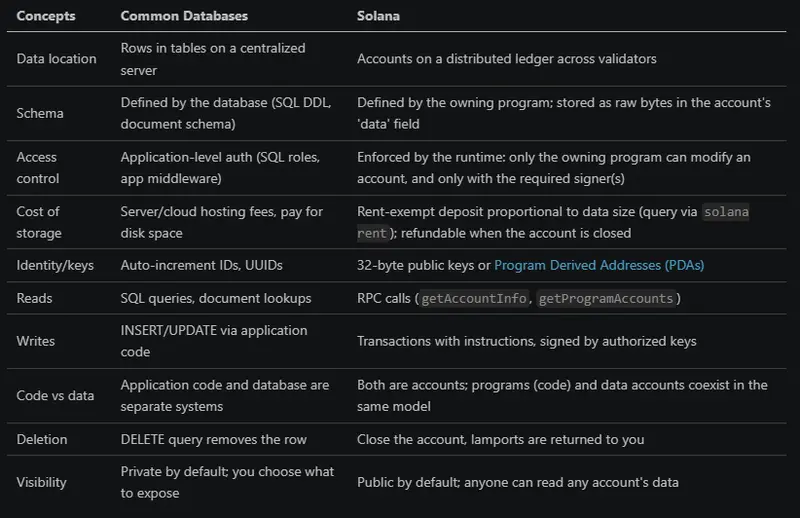
If you know databases, Solana can feel familiar and strange at the same time. A database row becomes an account, a primary key becomes a public key or PDA, and a schema becomes program logic.

The big shift is this: data lives on a shared network, not one company server. The program decides what the data means, and only the right signer can change it.

That is why Solana asks you to think less about tables and more about ownership, permissions, and state.

The table and the solana address output make the idea easier to see at a glance. On Solana, identity and data are tied to accounts, and accounts behave very differently from rows in a normal database.

Terminal output showing the result of the solana address command, displaying the wallet public key used on Solana

Comparison table showing how Solana accounts differ from traditional databases, including data location, schema, access control, storage cost, identity, reads, writes, deletion, and visibility

HTML Table Borders

HTML Table Borders
HTML tables can have borders of different styles and shapes.

How To Add a Border
To add a border, use the CSS border property on table, th, and td elements:
Example:

table, th, td {
  border: 1px solid black;
}

Collapsed Table Borders
To avoid having double borders like in the example above, set the CSS border-collapse property to collapse.

This will make the borders collapse into a single border:
Example:

table, th, td {
  border: 1px solid black;
  border-collapse: collapse;
}

Style Table Borders
If you set a background color of each cell, and give the border a white color (the same as the document background), you get the impression of an invisible border:
Example:

table, th, td {
  border: 1px solid white;
  border-collapse: collapse;
}
th, td {
  background-color: #96D4D4;
}

Round Table Borders
With the border-radius property, the borders get rounded corners:

Example:

table, th, td {
  border: 1px solid black;
  border-radius: 10px;
}

Skip the border around the table by leaving out table from the css selector:

Example:

th, td {
  border: 1px solid black;
  border-radius: 10px;
}

Dotted Table Borders
With the border-style property, you can set the appearance of the border.

The following values are allowed:

  • dotted
  • dashed
  • solid
  • double
  • groove
  • ridge
  • inset
  • outset
  • none
  • hidden
    Example:
 th, td {
  border-style: dotted;
}

** Border Color**
With the border-color property, you can set the color of the border.

Example:

 th, td {
  border-color: #96D4D4;
}

References:
https://www.w3schools.com/html/html_table_borders.asp
https://www.geeksforgeeks.org/html/html-table-border-attribute/