Your LLM Bill Is Exploding Because of Architecture, Not Pricing — Here’s the Fix

LLM per-token prices fell between 9x and 900x over the past year. Yet most teams running agentic AI in production are seeing their API bills go up, not down. Here is exactly why, and the three code-level interventions that cut spend 60-80% without touching quality.

Why Agentic Workloads Break Your Token Budget

A chatbot interaction: 1 LLM call, ~3,000-10,000 tokens. Done.

An agentic task: plan the approach, call a tool, process results, decide next step, call another tool, validate output, loop if needed. That is 10-20 LLM calls, each carrying the growing context window from all previous steps. By step 8, you may be passing 60,000 tokens into every call — most of it noise.

The math: agentic workflows burn 5-30x more tokens per completed task than a standard chatbot exchange. A 10x price drop combined with a 20x token increase means your bill doubled.

There are three places the money leaks.

Leak 1: Context Bloat — Fix with Compression

Most agentic pipelines append every step’s output to a running context that gets passed to every subsequent LLM call. By step 6, you are paying full price to send the model information from step 1 that is no longer relevant.

Before passing context to any LLM call, compress it:

from anthropic import Anthropic
client = Anthropic()

def compress_context(conversation_history: list[dict], current_task: str,
                     token_budget: int = 20000) -> list[dict]:
    """
    Compress older turns if context exceeds budget.
    Keeps recent turns intact, summarizes older ones.
    """
    raw_tokens = sum(len(str(m)) // 4 for m in conversation_history)
    if raw_tokens <= token_budget:
        return conversation_history

    recent = conversation_history[-3:]
    older = conversation_history[:-3]
    if not older:
        return recent

    summary_prompt = f"""Summarize the following conversation history into 2-3 sentences,
keeping only information relevant to: {current_task}

History: {older}"""

    summary = client.messages.create(
        model="claude-haiku-4-5-20251001",  # cheap model for summarization
        max_tokens=300,
        messages=[{"role": "user", "content": summary_prompt}]
    ).content[0].text

    compressed = [{"role": "system", "content": f"[Earlier context summary]: {summary}"}]
    compressed.extend(recent)
    return compressed

# Before any LLM call in your agent loop:
context = compress_context(conversation_history, current_task="validate invoice fields")
response = client.messages.create(model="claude-sonnet-4-6", messages=context, max_tokens=1000)

This alone typically reduces context size by 50-70% in long-running agentic workflows.

Leak 2: Frontier Model Overuse — Fix with Model Routing

Using a frontier model for every step in your pipeline is like hiring a principal engineer to sort your email. Most agent steps — classification, format conversion, simple lookups, routing decisions — work fine with a small, fast, cheap model.

from enum import Enum
from dataclasses import dataclass

class TaskComplexity(Enum):
    SIMPLE = "simple"
    MEDIUM = "medium"
    COMPLEX = "complex"

@dataclass
class ModelConfig:
    model: str
    cost_per_1k_input: float
    cost_per_1k_output: float

MODEL_TIERS = {
    TaskComplexity.SIMPLE: ModelConfig("claude-haiku-4-5-20251001", 0.00025, 0.00125),
    TaskComplexity.MEDIUM: ModelConfig("claude-sonnet-4-6", 0.003, 0.015),
    TaskComplexity.COMPLEX: ModelConfig("claude-opus-4-6", 0.015, 0.075),
}

def classify_task(task_description: str) -> TaskComplexity:
    simple_keywords = ["classify", "categorize", "is this", "format", "convert", "route", "label"]
    complex_keywords = ["analyze", "reason", "debug", "design", "plan", "evaluate", "compare"]
    task_lower = task_description.lower()
    if any(kw in task_lower for kw in simple_keywords):
        return TaskComplexity.SIMPLE
    elif any(kw in task_lower for kw in complex_keywords):
        return TaskComplexity.COMPLEX
    return TaskComplexity.MEDIUM

def routed_llm_call(task: str, messages: list[dict]) -> tuple[str, float]:
    complexity = classify_task(task)
    config = MODEL_TIERS[complexity]
    response = client.messages.create(model=config.model, max_tokens=1000, messages=messages)
    input_tokens = response.usage.input_tokens
    output_tokens = response.usage.output_tokens
    cost = (input_tokens / 1000 * config.cost_per_1k_input +
            output_tokens / 1000 * config.cost_per_1k_output)
    return response.content[0].text, cost

In most production pipelines, 70-80% of steps classify as SIMPLE or MEDIUM. Routing those to cheaper models cuts your average cost per task by 60-70%.

Leak 3: Redundant Calls — Fix with Semantic Caching

Your agentic system is probably making the same LLM calls repeatedly. Different phrasing, same semantic content. Standard caching misses these. Semantic caching embeds the query and retrieves cached results for near-matches.

import numpy as np
from datetime import datetime, timedelta

class SemanticCache:
    def __init__(self, similarity_threshold: float = 0.92, ttl_hours: int = 24):
        self.cache: list[dict] = []
        self.threshold = similarity_threshold
        self.ttl = timedelta(hours=ttl_hours)

    def _embed(self, text: str) -> list[float]:
        # Replace with real embedding model in production
        import hashlib
        seed = int(hashlib.md5(text.encode()).hexdigest(), 16) % (2**32)
        return np.random.RandomState(seed).randn(1536).tolist()

    def _cosine_similarity(self, a, b) -> float:
        a, b = np.array(a), np.array(b)
        return float(np.dot(a, b) / (np.linalg.norm(a) * np.linalg.norm(b)))

    def get(self, query: str) -> str | None:
        query_embedding = self._embed(query)
        now = datetime.utcnow()
        for entry in self.cache:
            if now - entry["timestamp"] > self.ttl:
                continue
            if self._cosine_similarity(query_embedding, entry["embedding"]) >= self.threshold:
                return entry["response"]
        return None

    def set(self, query: str, response: str):
        self.cache.append({
            "query": query,
            "embedding": self._embed(query),
            "response": response,
            "timestamp": datetime.utcnow()
        })

Production deployments with repetitive enterprise workloads typically see 30-50% cache hit rates — eliminating a third to half your API calls entirely.

Putting It Together: Cost Tracking Per Step

None of this works without measurement. Add per-step cost tracking to your agent loop:

from dataclasses import dataclass, field
import time

@dataclass
class AgentStep:
    name: str
    model: str
    cache_hit: bool
    cost_usd: float
    duration_ms: float

class CostAwareAgentRunner:
    def __init__(self):
        self.steps: list[AgentStep] = []
        self.cache = SemanticCache()

    def run_step(self, name: str, task: str, messages: list[dict]) -> str:
        start = time.time()
        cached = self.cache.get(task)
        if cached:
            self.steps.append(AgentStep(name, "cache", True, 0.0, (time.time()-start)*1000))
            return cached

        response_text, cost = routed_llm_call(task, messages)
        self.cache.set(task, response_text)
        self.steps.append(AgentStep(
            name, classify_task(task).value, False, cost, (time.time()-start)*1000
        ))
        return response_text

    def cost_report(self) -> dict:
        total = sum(s.cost_usd for s in self.steps)
        hits = sum(1 for s in self.steps if s.cache_hit)
        return {
            "total_cost_usd": round(total, 6),
            "steps": len(self.steps),
            "cache_hit_rate": hits / len(self.steps) if self.steps else 0,
            "by_step": [{"name": s.name, "cost": s.cost_usd, "model": s.model} for s in self.steps]
        }

Once you have this instrumentation, the top three steps by token consumption almost always account for 60-70% of total spend. That tells you exactly where to focus.

A logistics client: $40K/month in LLM API costs, down to under $12K after model routing + semantic caching + context compression. Same volume, same quality. Frontier model performed better on complex steps because it was receiving cleaner, more focused context.

If you are hitting this in production and want a second set of eyes, feel free to DM me — happy to dig in.

How We Prevent Attendance Fraud Using GPS Verification

In many universities, seminars, and training programs, attendance systems are still surprisingly vulnerable.

Students sign in for absent friends. Paper sheets get manipulated. QR codes are shared remotely. Manual verification wastes time and creates inaccurate records.

While building Attendify, we wanted to solve one core problem:

How do you prove someone was physically present at an event without slowing down the check-in experience?

Our answer was browser-based GPS geofencing with strict integrity validation.

The Problem With Traditional Attendance Systems

Most attendance systems fail because they trust the user too much.

Common weaknesses include:

  • Shared QR codes
  • Remote sign-ins
  • Duplicate attendance submissions
  • Fake GPS apps
  • Manual attendance manipulation
  • Slow paper-based verification

In large classrooms or organizational events, verifying hundreds of attendees manually becomes nearly impossible.

We needed a system that could:

  • verify physical presence,
  • reduce fraud,
  • work instantly,
  • and require no app installation.

Our Approach: GPS Geofencing

Attendify uses secure browser-based GPS verification to validate attendance in real time.

Instead of simply clicking “I’m here,” participants must physically exist inside a defined geographic boundary.

How It Works

An organizer creates an attendance session and defines a GPS radius around the venue.

For example:

  • Event Hall Radius: 50 meters
  • Lecture Room Radius: 20 meters

When a participant attempts to check in:

  1. The browser requests secure location permission
  2. The device coordinates are collected
  3. Distance calculations run in real time
  4. The system verifies whether the device is inside the allowed radius
  5. Attendance is approved or rejected instantly

If the user is outside the boundary, the check-in fails automatically.

Why Browser-Based GPS?

We intentionally avoided requiring a mobile app.

Modern browsers already support highly accurate geolocation APIs, especially on mobile devices.

This gave us several advantages:

  • Zero installation friction
  • Faster onboarding
  • Cross-platform compatibility
  • Easier adoption in universities and events

Participants simply open a link and verify attendance directly in the browser.

Preventing Remote Check-Ins

GPS alone is not enough.

A user could still attempt to manipulate attendance using multiple devices or browser tricks.

To reduce this, Attendify adds several integrity checks:

Device Identity Validation

We generate strict device-level identifiers to reduce duplicate or impersonated check-ins.

Multi-Browser Detection

The platform checks for suspicious multiple-session behavior across browsers.

Single Attendance Enforcement

Each participant can only successfully verify once per session.

Timestamp Validation

Every attendance record is logged with precise timing data for auditing.

Real-Time Attendance Sync

One major issue with paper systems is delayed visibility.

Attendify updates attendance ledgers instantly.

Organizers can:

  • monitor attendance live,
  • detect missing participants immediately,
  • and export records securely to PDF or Excel.

This becomes especially useful during:

  • university lectures,
  • bootcamps,
  • corporate trainings,
  • conferences,
  • and seminars.

Technical Challenges

Building reliable GPS verification inside browsers introduced several engineering challenges.

GPS Accuracy Variability

Different devices report different levels of GPS precision.

We solved this by:

  • adding tolerance handling,
  • validating coordinate confidence,
  • and optimizing acceptable geofence thresholds.

Browser Permission Handling

Many users deny location access accidentally.

We designed fallback guidance flows that clearly explain why location access is required.

Mobile Performance

Real-time calculations needed to remain lightweight and fast, especially on low-end devices common in emerging markets.

Why This Matters

Attendance data affects:

  • academic records,
  • certification eligibility,
  • training compliance,
  • and organizational accountability.

If attendance systems are unreliable, the data becomes meaningless.

Our goal with Attendify is simple:

Make physical presence verifiable, secure, and effortless.

Final Thoughts

Attendance fraud is still a massive operational problem in schools and organizations.

By combining:

  • GPS geofencing,
  • browser-native verification,
  • device integrity checks,
  • and real-time synchronization,

Attendify creates a more trustworthy attendance system without increasing friction for users.

We’re continuing to improve the platform with stronger verification methods, analytics, and smarter fraud detection.

You can learn more here:

Attendify Official Website

From Problems to Patterns: Generative AI in .Net (C#)

Learn to ship autonomous agents, RAG pipelines, and AI tools using Microsoft.Extensions.AI, Microsoft.Agents.AI, and Model Context Protocol — with 37 runnable code samples.

The Problem

Most AI books teach you OpenAI’s API in Python. They skip over:

  • How to route between 5 different providers (OpenAI, Azure, GitHub Models, Ollama, Anthropic) with one interface
  • How to build a RAG pipeline that doesn’t hallucinate on page 50 of a document
  • How to deploy autonomous agents that your team can actually maintain
  • How to package AI tools as MCP servers and drop them into production
  • How to defend against prompt injection, monitor token costs, and test non-deterministic systems

Meanwhile, your .NET team is stuck reinventing these wheels or shipping Python sidecars.

Meet From Problems to Patterns

This is the only book that covers the full Microsoft AI stack in production depth:

  • Microsoft.Extensions.AI — One interface across every provider; middleware for caching, logging, cost tracking, and fallback logic
  • Microsoft.Agents.AI — Build autonomous agents with persistent sessions, human approval flows, and multi-agent orchestration
  • Model Context Protocol (MCP) — Ship AI tools as NuGet packages; secure, auditable, enterprise-ready
  • .NET 9 + real C# code — 37 runnable companion projects. Every example builds. Every example ships.

What You’ll Build

Real patterns for real problems:

✅ Semantic Search Engine — embeddings, vector similarity, and ranking

✅ Production RAG Pipeline — ingestion, chunking, retrieval, inline citations, LLM-as-judge evaluation

✅ Vision AI Document Processor — read receipts from photos, extract structured data

✅ Autonomous Expense Report Agent — handles approvals, maintains context across sessions

✅ Multi-Agent Workflows — agents coordinating with each other to solve complex problems

✅ MCP Servers as NuGet Tools — deploy to Azure Container Apps, lock down security layers

✅ Fully Offline AI App — Ollama integration, no API keys, no cloud costs, data stays local

What You’ll Learn

Six chapters. Six patterns. Production-ready.

  1. Foundations — What generative AI is, why it’s probabilistic, how to reason about it
  2. Microsoft.Extensions.AI — Streaming, structured output, function calling, prompt engineering, context windows
  3. RAG End-to-End — The enterprise pattern that powers 90% of production AI (100 pages, every decision explained)
  4. Microsoft Agent Framework — Sessions, approval workflows, graph execution, A2A communication
  5. Model Context Protocol — Build servers, choose transports, secure for enterprise
  6. Production Patterns — OpenTelemetry tracing, Polly resilience, cost-aware routing, responsible AI, testing non-deterministic systems

Plus 4 appendices: package reference, model quick reference, provider support matrix, Extensions.AI API reference.

Who This Is For

You’re a .NET developer or solution architect with solid C# experience. You don’t need an ML background. You need to ship AI features — now — and they need to hold up in production.

You’re tired of:

  • Shipping Python sidecars just to call an LLM
  • Reinventing RAG chunking strategies
  • Wondering how to deploy agents safely
  • Learning “AI for Python devs” books that skip the .NET tooling

This book is written for you.

The Stack (Validated May 2026)

  • .NET 9
  • Microsoft.Extensions.AI 10.5.2
  • Microsoft.Agents.AI 1.3
  • ModelContextProtocol 1.2
  • Real production patterns you can deploy tomorrow

Get It Now

📖 Order on Amazon UK

Ready to build AI that ships? Stop waiting for Python docs to translate to C#. Read the book written for .NET teams, by someone who’s shipped this stack to production.

Get your copy →

GemmaOps Edge: From 373 Alarms to 1 Root Cause Using Local AI (Gemma 4)

This is a submission for the Gemma 4 Challenge: Build with Gemma 4

🚨 From 373 alarms to 1 root cause in seconds

A production-grade AI reasoning agent that turns a wall of network alarms into clear root-cause analysis — running entirely on your own hardware.

What I Built

The Problem

It is 3 AM. A NOC engineer receives an alert:

“North region customers reporting intermittent connectivity drops. Possible fiber cut or BGP flap.”

The system shows:

  • 373 alarms
  • 45 active
  • 6 CRITICAL

The challenge:

  • Identify root cause
  • Determine blast radius
  • Estimate impact and resolution

This typically takes 20–120 minutes depending on expertise.

The Solution

GemmaOps Edge is a fully local AI reasoning agent that enables operators to query network state in natural language and receive precise, actionable insights.

While GemmaOps Edge is demonstrated using telecom NOC scenarios, the same architecture applies to any high-volume event-driven system — including cloud observability, microservices monitoring, and enterprise infrastructure platforms.

🚨 This is not alert summarization — it is reasoning-driven root cause analysis.

Key Capabilities

  • Topology-aware Root Cause Analysis
  • Multi-condition Correlation (alarms + topology + history + traffic)
  • Service Impact Propagation
  • Historical Incident Matching with MTTR estimation
  • Natural Language Query Interface

Example Interaction

Operator: Why is the North region experiencing outages?

Agent:

  • BGP SESSION DOWN on CR-NOR-01 (ALM-00196)
  • CE-NOR-02 (ALM-00199) — 1,252+ prefixes withdrawn
  • SERVICE_OUTAGE affecting 2,560 customers

Historical match:

INC-2026-017 (BGP failure, MTTR 53 min)

Recommended actions:

  1. Check BGP config changes
  2. Rollback recent changes
  3. Initiate incident bridge

Architecture

✔ Fully local deployment

✔ No cloud/API dependency

✔ Runs on commodity hardware

How It Works

ReAct Agent (Reasoning + Acting)

The agent dynamically:

  1. Reads summarized network state
  2. Calls tools based on need
  3. Correlates multiple data sources
  4. Produces precise RCA output

NOC Tools

Tool Purpose
alarm_search Fetch active alarms
topology_lookup Get network relationships
path_finder Analyze routes
incident_search Retrieve historical incidents

Context Engineering (Critical Innovation)

Priority-based prompt construction:

  1. KEY FACTS (highest impact)
  2. Query intent
  3. Active alarms
  4. Topology graph
  5. Historical incidents

➡ Improved accuracy from ~40% to ~90%

The 128K Advantage

Two Operating Modes

Mode Description
ReAct (6K) Fast, tool-driven RCA analysis
Full Context (128K) Whole-network reasoning in one pass

Why It Matters

Questions like:

“Which nodes appear in both CRITICAL alarms AND past P1 incidents?”

❌ Cannot be solved by RAG or smaller-context models

✅ Solved using full-context reasoning

Benchmark Results

Model Context Performance
Gemma 4B 128K ✅ 5/5 (Best)
Mistral 7B 32K ⚠️ 2/5 (Partial)
Gemma 2B 8K ❌ 1/5 (Limited)

➡ The limitation is context window, not model size

Demo

Code

https://github.com/praveen-sinha-ai/gemmaops-edge

How I Used Gemma 4

Model Selected

gemma4:e4b (4B)

Why This Model

  1. Edge Deployment Requirement
  2. Runs locally (no GPU required)
  3. < 3GB footprint
  4. 1–4s response time

  5. Reasoning Capability

  6. Handles multi-condition correlation:

    • alarms
    • topology
    • incidents
    • traffic
    • config
  7. Accuracy vs Efficiency Balance

  8. E2B → insufficient reasoning

  9. 31B → impractical for edge deployment

  10. E4B → optimal trade-off

Two Usage Modes

  1. ReAct Agent Mode (6K)
  2. Multi-step reasoning
  3. Tool-based retrieval
  4. Fast responses

  5. Full Context Mode (128K)

  6. Entire dataset in prompt (~43K tokens)

  7. No retrieval needed

  8. Enables deep correlation queries

Key Insight

The biggest differentiator was not model size —

it was how much data the model could see at once.

What Makes This Different

  • Not a basic RAG system or generic LLM wrapper
  • Performs multi-step reasoning with tool execution (ReAct)
  • Understands network topology as a graph, not just text
  • Combines alarms, topology, and incident history in one reasoning flow
  • Supports full-network reasoning using 128K context
  • Runs fully local — no cloud, no data exposure
  • Produces specific, verifiable outputs (IDs, nodes, incidents) — not vague summaries

What’s Next

  • Graph Neural Networks (GNN-based RCA)
  • Predictive failure detection
  • Automated remediation workflows
  • Larger Gemma models (26B, 31B)
  • Domain fine-tuning (3GPP, TM Forum)

Closing

The biggest insight from building GemmaOps Edge:

The limitation is not model intelligence — it is how much of the system the model can see at once.

By combining:

  • Structured context engineering
  • Topology-aware reasoning
  • Large context windows (128K)

…it becomes possible to move from alert noise → precise root cause in seconds.

In a real NOC, that difference is not theoretical:

  • 2 hours MTTR → 20 minutes
  • Fewer escalations
  • Faster recovery
  • Better customer experience

Local AI for enterprise operations is no longer a future concept.

With Gemma 4, it is practical today.

Tech Stack: Python, FastAPI, NetworkX, FAISS, Ollama, Gemma 4

Tags: gemma ai telecom llm fastapi

Feedback & Discussion

I built GemmaOps Edge to solve a very real problem I’ve seen repeatedly in telecom NOCs — too many alarms, too little clarity.

If you’re working on similar problems (telecom, observability, AI agents), I’d genuinely like to hear your thoughts.

  • What would you improve in this approach?
  • Would you trust this in a real NOC?
  • Any ideas for scaling this further?

Feel free to drop your questions or suggestions in the comments.

Building an Amazon EKS Security Baseline

Amazon EKS makes it easy to start a Kubernetes cluster on AWS, but the real work begins after the control plane is running. Security in EKS is not a single feature or a one-time checklist. It is a layered posture that spans image hygiene, identity, network boundaries, data protection, and runtime monitoring.

This article walks through a practical security baseline for EKS, the reasoning behind each control, and the lessons that tend to matter most in production. Every section is grounded in working infrastructure: real AWS resources, real Kubernetes manifests, and real verification steps that were exercised against a live cluster.

Secure the Container Images

Every Kubernetes workload begins with an image, which makes image security the natural starting point. If the image is vulnerable or overly privileged, the rest of the stack inherits that weakness before the pod even starts. The fundamentals are straightforward: use minimal base images, run as a non-root user, never set the privileged flag on a container, scan images before they are pushed, and enforce repository scanning in Amazon ECR. A Dockerfile linter such as Hadolint, run locally or in CI, adds a cheap second line of defense by catching bad patterns before the image is even built.

The broader lesson is that a secure deployment pipeline starts well before a pod ever reaches the cluster. When the image is small, hardened, and scanned, the attack surface is already much smaller by the time Kubernetes is involved.

Control Who Can Access the Cluster

Once the image layer is under control, the next question is identity. EKS uses AWS IAM for authentication and Kubernetes RBAC for authorization, which means access spans two systems at once. EKS Cluster Access Management offers a cleaner way to map IAM principals to Kubernetes permissions and is the preferred path over the older aws-auth workflow.

The goal is access that is explicit, scoped, and reversible. Developers and testers should only get the permissions they need, namespace scoping should be preferred over broad cluster access, and cluster-admin style privileges should remain tightly controlled. One detail that is easy to miss: the IAM principal that creates the cluster is automatically a full cluster admin, and that principal should be removed (or replaced) once a proper set of access entries is in place. This is not only about blocking attackers. It also makes internal access easier to understand and audit as teams change.

Build Network Boundaries

Kubernetes namespaces are helpful, but namespaces alone are not isolation. Pods can still talk to each other unless the network layer is controlled. A solid baseline establishes a default-deny posture and then opens only the traffic that is actually required. That is the difference between a flat pod network and a controlled application boundary.

In practice, network policy is what stops a compromised pod from moving laterally through the namespace. The model is simple: deny all pod-to-pod traffic by default, allow only the exact paths that are required, and keep frontend, backend, and unknown workloads separated. For workloads that need finer-grained isolation than a node-level security group can provide, EKS also supports security groups for pods, which attach an ENI and its own security group directly to the pod. Network segmentation should be paired with encryption in transit, whether through TLS on a load balancer, end-to-end TLS to the pod, or a service mesh handling mTLS between workloads.

Remove Application Permissions from the Node Role

One of the most common EKS mistakes is letting workloads inherit permissions from the worker node IAM role. That pattern works until it becomes a privilege escalation problem. Pods should not rely on the node instance profile for application access. Application permissions belong on the workload identity itself.

Both modern EKS Pod Identity and the older IRSA model can achieve this, and the right choice depends on the workload. The security value is least privilege at the pod level: give the pod only the AWS actions it actually needs, avoid attaching application policies to the node group, and use a service account as the identity boundary. That shift moves AWS permissions away from infrastructure and onto the application that genuinely needs them.

Protect Data at Rest and in Use

Data security is more than encrypting a disk. It also includes secrets, key management, and the way applications consume sensitive values. A complete baseline uses KMS-backed encryption for EBS and EFS volumes (and for RDS, when a database sits behind the cluster), envelope encryption for Kubernetes Secrets in etcd, and secret consumption through mounted volumes instead of environment variables. KMS keys should have automatic rotation enabled so that key material is refreshed on a regular cadence without breaking access to existing ciphertext.

A distinction worth making early is that Kubernetes Secrets are base64-encoded by default, not encrypted. They have to be protected at the storage layer and, ideally, encrypted again through envelope encryption. Mounted volumes are also a safer way to consume secrets inside pods than environment variables. Environment variables are convenient, but they are far more likely to leak into logs or debugging output. Volume mounts are temporary, isolated, and easier to clean up.

Monitor Runtime Behavior and Audit Everything

This is where the cluster finally becomes observable, and it is the part that should never be skipped. Static controls are essential, but they cannot catch every threat. A pod can pass every build-time check and still become suspicious after it starts running, which is exactly why runtime security matters.

A strong runtime layer combines EKS control plane logging for audit and authenticator visibility, GuardDuty Runtime Monitoring for threat detection inside running workloads, and CloudWatch alarms for unusual authentication or authorization patterns. CloudTrail Insights complements this on the AWS API side by flagging unusual call patterns originating from inside the VPC, including from pods. The runtime threats that matter most are crypto mining behavior, command-and-control callbacks, metadata service enumeration, and unauthorized access attempts that show up as repeated 401 or 403 responses. The value here is not only detection. It is also accountability. Audit logs make it possible to reconstruct who did what and when, and runtime monitoring surfaces behavior that was never visible during deployment.

What This Approach Shows in Practice

The main lesson from a full build is that EKS security is cumulative. Image hardening reduces software supply-chain exposure, access management limits who can reach the cluster, network policy limits lateral movement, pod identity limits AWS privilege, encryption limits data exposure, and runtime monitoring limits dwell time and detection gaps.

That layered approach is what makes the cluster resilient. No single control solves the problem, but together they create a much stronger baseline than any of them on their own.

A Practical Security Mindset for EKS

The goal on EKS is not perfection. The goal is to make compromise harder, detection faster, and blast radius smaller. A hardened image, intentional IAM and RBAC boundaries, namespace-aware network policy, workload-bound AWS permissions, encryption at rest, protected secret usage, and early logging together turn a working cluster into a defensible one.

Closing Thoughts

EKS makes it easy to run Kubernetes, but secure Kubernetes still requires deliberate design decisions. The controls are available, and when they are used together they form a strong operational baseline. The path that usually works best starts with image hardening and ends with runtime monitoring, which mirrors how a real security posture should evolve: from build time to deploy time to run time.

The right question for any EKS environment is not just whether it runs. The more important question is what happens when it is attacked.

Let’s Connect

If this was useful, or if you are working on something similar and want to compare notes, feel free to reach out.

Hands-On with Apache Iceberg Using Dremio Cloud

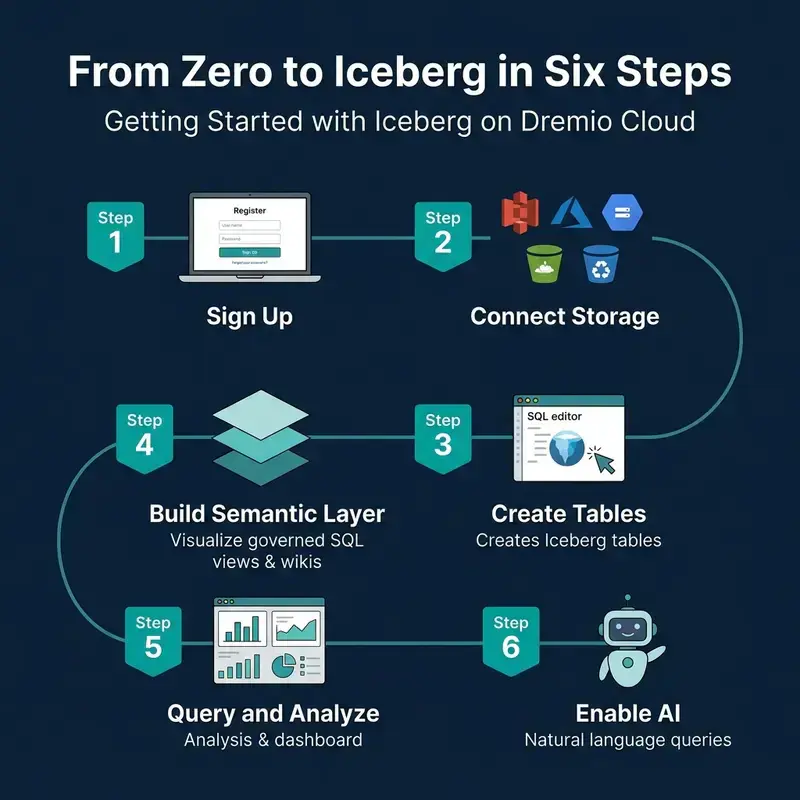
From zero to Iceberg in six steps on Dremio Cloud

This is Part 14 of a 15-part Apache Iceberg Masterclass. Part 13 covered streaming approaches. This article is a practical walkthrough of working with Iceberg on Dremio Cloud, covering table creation, data ingestion, optimization, semantic layer construction, and AI-powered analytics.

Table of Contents

  1. What Are Table Formats and Why Were They Needed?
  2. The Metadata Structure of Current Table Formats
  3. Performance and Apache Iceberg’s Metadata
  4. Technical Deep Dive on Partition Evolution
  5. Technical Deep Dive on Hidden Partitioning
  6. Writing to an Apache Iceberg Table
  7. What Are Lakehouse Catalogs?
  8. Embedded Catalogs: S3 Tables and MinIO AI Stor
  9. How Iceberg Table Storage Degrades Over Time
  10. Maintaining Apache Iceberg Tables
  11. Apache Iceberg Metadata Tables
  12. Using Iceberg with Python and MPP Engines
  13. Streaming Data into Apache Iceberg Tables
  14. Hands-On with Iceberg Using Dremio Cloud
  15. Migrating to Apache Iceberg

Getting Started

From zero to Iceberg in six steps on Dremio Cloud

Step 1: Sign Up and Connect Storage

  1. Create a Dremio Cloud account (free trial available)
  2. Add a cloud storage source (S3, ADLS, or GCS) through the Sources panel
  3. Configure credentials and target bucket

Dremio creates an Open Catalog for your Iceberg tables automatically. This Polaris-based catalog handles metadata management, access control, and automatic optimization.

Step 2: Create Iceberg Tables

CREATE TABLE analytics.orders (
    order_id BIGINT,
    customer_id BIGINT,
    order_date DATE,
    amount DECIMAL(10,2),
    status VARCHAR,
    region VARCHAR
)
PARTITION BY (day(order_date))

This creates a table with hidden partitioning by day. Users query on order_date naturally; the engine handles partition pruning automatically.

Step 3: Ingest Data

From files in object storage:

COPY INTO analytics.orders
FROM '@my_s3_source/raw/orders/'
FILE_FORMAT 'parquet'

From another table or source:

INSERT INTO analytics.orders
SELECT * FROM postgres_source.public.orders
WHERE order_date >= '2024-01-01'

Dremio’s federation can query data in PostgreSQL, MySQL, Oracle, MongoDB, S3 files, and other sources directly. You can migrate data into Iceberg tables with a single INSERT…SELECT statement.

The Dremio Platform

Dremio Cloud features for Iceberg including Open Catalog, federation, semantic layer, and AI

Columnar Cloud Cache

Dremio’s Columnar Cloud Cache (C3) stores frequently accessed Iceberg data on local NVMe SSDs attached to the query engine nodes. When a query accesses data for the first time, Dremio caches the relevant columns locally. Subsequent queries against the same data read from local SSD instead of remote object storage, reducing latency from hundreds of milliseconds to single-digit milliseconds.

C3 operates transparently. You do not need to configure which data to cache. Dremio tracks access patterns and caches the most-queried data automatically.

Connecting BI Tools

Dremio exposes Iceberg data through ODBC, JDBC, and Arrow Flight endpoints. Any BI tool (Tableau, Power BI, Looker, Superset) can connect to Dremio and query Iceberg tables as if they were a traditional database. The semantic layer ensures consistent governance and naming across all connected tools.

Semantic Layer

Dremio’s semantic layer lets you create governed SQL views that serve as the interface between raw data and consumers:

CREATE VIEW analytics.customer_orders AS
SELECT
    o.customer_id,
    c.customer_name,
    c.region,
    SUM(o.amount) AS total_spend,
    COUNT(*) AS order_count
FROM analytics.orders o
JOIN analytics.customers c ON o.customer_id = c.customer_id
GROUP BY o.customer_id, c.customer_name, c.region

Add wikis and tags to views and tables through the Dremio UI. These descriptions help other users find and understand data, and they power the AI agent’s ability to generate accurate SQL from natural language.

Reflections (Query Acceleration)

Dremio Reflections are precomputed materializations that automatically accelerate queries without requiring changes to your SQL. When you create a reflection on a view or table, Dremio precomputes the results and stores them as optimized Iceberg tables on fast storage:

-- Create an aggregation reflection for fast dashboard queries
ALTER TABLE analytics.customer_orders
  CREATE AGGREGATE REFLECTION customer_orders_agg
  USING DIMENSIONS (region, order_date)
  MEASURES (total_spend SUM, order_count SUM)

When a query matches the reflection’s definition, Dremio serves it from the precomputed data instead of scanning the full table. Queries that take 30 seconds against raw data can complete in under 1 second with reflections. The query optimizer chooses the reflection transparently, so users and applications do not need to know reflections exist.

Data Governance

Dremio provides column-level access control and row-level filtering directly in the semantic layer:

-- Create a view that masks PII for non-privileged users
CREATE VIEW analytics.orders_masked AS
SELECT
    order_id,
    CASE WHEN is_member('finance_team') THEN customer_name
         ELSE '***MASKED***' END AS customer_name,
    order_date,
    amount
FROM analytics.orders

Governance policies defined in the semantic layer apply consistently regardless of which tool (BI dashboard, Python notebook, AI agent) queries the data. This approach is more maintainable than duplicating access policies in every consuming application.

Query Federation

One of Dremio’s unique capabilities is querying Iceberg tables alongside data in other systems:

-- Join Iceberg table with a PostgreSQL table
SELECT i.order_id, i.amount, p.payment_status
FROM analytics.orders i
JOIN postgres_source.public.payments p
ON i.order_id = p.order_id

This eliminates the need to move all data into Iceberg before you can query it. You can start with federation and migrate incrementally. Federation is especially useful during migration: query legacy systems and Iceberg tables side by side, then swap the underlying source when you are ready.

Essential SQL Operations

Four essential Iceberg SQL operations on Dremio: CREATE, COPY INTO, OPTIMIZE, and time travel

Table Optimization

-- Compact small files
OPTIMIZE TABLE analytics.orders REWRITE DATA USING BIN_PACK

-- Compact with sorting for better file skipping
OPTIMIZE TABLE analytics.orders REWRITE DATA USING SORT (order_date, customer_id)

-- Expire old snapshots
ALTER TABLE analytics.orders EXPIRE SNAPSHOTS OLDER_THAN = '2024-04-01 00:00:00'

For tables managed by Open Catalog, Dremio runs automatic table optimization in the background, handling compaction, expiry, and orphan cleanup without user intervention.

Time Travel

-- Query the table as of a specific timestamp
SELECT * FROM analytics.orders
AT TIMESTAMP '2024-03-01 00:00:00'

-- Compare current data to a previous snapshot
SELECT
    current_data.region,
    current_data.total - old_data.total AS growth
FROM (SELECT region, SUM(amount) AS total FROM analytics.orders GROUP BY region) current_data
JOIN (
    SELECT region, SUM(amount) AS total
    FROM analytics.orders AT TIMESTAMP '2024-01-01'
    GROUP BY region
) old_data ON current_data.region = old_data.region

Metadata Inspection

-- Check table health
SELECT AVG(file_size_in_bytes)/1048576 AS avg_mb, COUNT(*) AS files
FROM TABLE(table_files('analytics.orders'))

-- Review recent snapshots
SELECT committed_at, operation, summary
FROM TABLE(table_snapshot('analytics.orders'))
ORDER BY committed_at DESC LIMIT 5

AI-Powered Analytics

Dremio’s built-in AI agent converts natural language questions into SQL queries using the semantic layer’s wikis and tags as context:

  • “Show me the top 10 customers by total spend this quarter”
  • “What was the month-over-month revenue growth by region?”
  • “Which products had the highest return rate last month?”

The AI agent generates standard SQL, meaning the results are transparent and auditable. Users can see exactly what SQL was generated, verify it, and refine it. This is different from black-box AI analytics tools that hide the underlying logic.

MCP Server for External AI Agents

The MCP Server extends Dremio’s data access to external AI agents and tools through the Model Context Protocol. LLMs running in Claude, ChatGPT, or custom agent frameworks can query your Iceberg lakehouse through MCP, inheriting all the governance, semantic context, and optimization that Dremio provides.

This positions Dremio as the data layer for agentic AI workflows: the AI agent asks questions in natural language, MCP translates them into governed SQL, and Dremio returns the results from optimized Iceberg tables.

Part 15 covers strategies for migrating existing data into Iceberg.

Books to Go Deeper

Free Resources

🤫 Firebase Is Quietly Preparing for an Offline-First AI Future

Firebase announcements at Google I/O 2026 covered an array of products and features, but the one that grabbed my attention the most was Firebase itself. Most people are understandably focused on Gemini integrations, AI Studio, and the new SQL capabilities inside Firebase, but I believe there is something deeper happening underneath these announcements.

Firebase introduced offline caching support, which helps applications remain responsive even in little or no connectivity. Combined with local and hybrid AI inference, this suggests that Firebase is quietly moving toward an offline-first, hybrid-intelligence model.

A large number of companies are transitioning to the cloud because of the convenience of not managing physical infrastructure and data servers. However, cloud dependency comes with its own trade-offs. Heavy reliance on cloud infrastructure introduces dependence on continuous high-speed internet connectivity, recurring subscription costs, and potential vendor lock-in.

The reality is that not every place in the world has fast and stable internet connectivity. Offline caching can help reduce cloud costs while improving application responsiveness, even in low-connectivity environments.

Modern Applications Are Too Cloud Dependent

Modern applications often assume that users:

  • have constant internet access,
  • can perform fast cloud API calls with low latency,
  • and are always connected to online AI services.

In reality, connectivity is far from universal, especially in rural areas, trains, crowded public networks, and emerging markets such as India.

AI has further increased cloud dependence because AI applications continuously send prompts, images, voice data, and user content to remote servers. This increases:

  • latency,
  • cloud costs,
  • bandwidth usage,
  • and potential privacy concerns.

As a result, “smart applications” can quickly become fragile applications when internet connectivity is lost. AI features stop functioning, synchronization fails, and the overall user experience degrades significantly.

What Firebase Actually Announced

Firebase introduced custom resolvers, allowing developers to extend Firebase Data Connect beyond Cloud SQL and integrate additional data sources. Alongside this, realtime sync improves application UX by enabling live updates and synchronization across devices.

However, the most interesting feature, in my opinion, is offline cache support, which helps applications remain responsive even with limited or no connectivity. Firebase AI Logic also supports local inference with cloud fallback, allowing certain AI workloads to run directly on-device while heavier tasks can still rely on cloud infrastructure when required.

Additionally, Firebase AI Logic simplifies the integration of generative AI features without requiring extensive server-side setup. It supports multiple programming languages, including Kotlin, Java, Swift, and Flutter.

Taken together, these are not isolated features. Firebase appears to be gradually reducing dependence on centralized cloud execution.

Firebase Is Moving Toward an Offline-First AI Architecture

With offline caching, applications can remain usable even without network connectivity by treating local application state as a first-class component. Synchronization can happen later once connectivity is restored. This improves responsiveness, resilience, and overall application UX while reducing the frequency of frustrating “No Internet Connection” screens.

Local AI inference also changes the compute model. Instead of every AI request depending entirely on cloud APIs, certain AI tasks can now happen directly on-device. For example, in an AI-powered note-taking application, features such as summarization, translation, smart suggestions, and classification could potentially run locally without continuously communicating with remote servers.

For heavier reasoning tasks, hybrid inference becomes important. Lightweight tasks can execute locally, while more computationally intensive operations can seamlessly fall back to cloud models when necessary. This creates a distributed intelligence model where computation is shared between the device and the cloud.

Why This Matters for Emerging Markets

Many cloud-first applications are designed around assumptions that often reflect:

  • Silicon Valley-like infrastructure conditions,
  • premium hardware,
  • and stable high-speed internet connectivity.

However, the ground reality is very different for billions of users around the world. Many people rely on affordable Android devices and unstable mobile networks.

Hybrid architectures can help address this gap by enabling:

  • lower latency,
  • reduced bandwidth usage,
  • partially offline AI experiences,
  • and better accessibility.

This is particularly important for regions such as India, Africa, and Southeast Asia, where connectivity challenges still exist despite massive growth in smartphone adoption.

The Bigger Industry Shift

With the rapid growth of AI, the industry is gradually moving toward edge AI. Examples include:

  • on-device Gemini,
  • Apple Intelligence,
  • AI NPUs in smartphones,
  • and local LLMs.

The future of AI may not remain fully centralized. Instead, intelligence may become distributed across devices, edge systems, and cloud infrastructure working together collaboratively.

Critique and Challenges

Like any architectural shift, this approach also comes with trade-offs.

Local AI inference introduces the challenge of device fragmentation. Not all devices are capable of handling local AI workloads efficiently. On-device inference can also increase battery consumption and thermal load.

Hybrid architectures are often more difficult to monitor, debug, and optimize compared to traditional centralized cloud systems.

There is also the issue of vendor lock-in. Heavy dependence on tools such as Firebase, Gemini, and the broader Google Cloud ecosystem could limit developer flexibility over time.

Finally, local models still have computational limitations compared to larger cloud-hosted models.

Conclusion

I believe the Firebase announcements at Google I/O 2026 were not simply about adding more AI capabilities. They reflected a broader shift in how modern applications may operate in the future: less dependent on permanent connectivity, more resilient at the edge, and increasingly capable of running intelligence closer to the user.

The most important AI infrastructure trend may not be larger models alone, but the gradual movement of intelligence from centralized cloud systems toward user devices themselves.

If you liked the blog, consider sharing it among your peers and follow me on Linkedin, Twitter and subscribe to my Youtube Channel.

Should Angular Apps Still Rely on RxJS in 2026?

Angular is going through a quiet but important shift in how reactivity is handled. With the introduction of Signals, many developers are starting to ask a simple question:

Do we still need RxJS in Angular applications in 2026?

The short answer is: yes — but not everywhere.

The real answer is more interesting, and it’s about architecture, not preference.

Two different mental models

To understand the discussion, it helps to separate two fundamentally different models of reactivity.

RxJS: asynchronous streams

RxJS is built around:

  • event streams
  • asynchronous composition
  • time-based operations

It shines when dealing with:

  • HTTP requests
  • WebSockets
  • complex async workflows
  • event orchestration

RxJS is about time and events.

Signals: local reactive state

Signals represent a different idea:

  • synchronous reactivity
  • local state tracking
  • explicit dependencies

They are best suited for:

  • UI state
  • derived state
  • component-level reactivity

Signals are about state and UI consistency.

Code comparison

Signals example

import { signal, computed } from '@angular/core';

const count = signal(0);

const doubled = computed(() => count() * 2);

function increment() {
  count.set(count() + 1);
}

Signals make state and dependencies explicit. No subscriptions, no hidden wiring.

RxJS example

import { BehaviorSubject, map } from 'rxjs';

const count$ = new BehaviorSubject(0);

const doubled$ = count$.pipe(
  map(value => value * 2)
);

function increment() {
  count$.next(count$.value + 1);
}

RxJS introduces a stream-based model where everything flows through observables.

The real problem is not technology, but mixing models

The biggest architectural issue in modern Angular applications is not choosing between RxJS and Signals.

It is mixing them without clear boundaries.

When both are used everywhere:

  • state becomes duplicated
  • logic becomes scattered
  • it becomes unclear where the “source of truth” lives

Where RxJS is still the right tool

Even in 2026, RxJS is still essential:

  • HTTP request pipelines
  • cancellation and retry logic
  • real-time data streams
  • coordination of multiple async sources

If the problem involves time, concurrency, or event composition, RxJS is still the better abstraction.

Where Signals are a better fit

Signals work better when the problem is local and state-driven:

  • component state
  • derived UI values
  • form state
  • simple reactive bindings

Signals reduce unnecessary complexity and make data flow more explicit.

Architectural boundary

A simple rule:

RxJS handles the outside world.
Signals handle the UI world.

  • RxJS = integration layer
  • Signals = presentation layer

When this boundary is respected, Angular applications become significantly easier to maintain.

Final thoughts

In 2026, RxJS is not obsolete in Angular — it is simply no longer the only reactive model.

Signals introduce a second layer that allows developers to simplify UI logic without abandoning reactive power.

The best Angular applications are not those that choose one over the other, but those that clearly define when to use each.

Architecture is not about tools.
It is about boundaries.