Day 7 — Cloud Computing & AWS Fundamentals

Pass SaaS

Cloud computing is no longer optional.

Whether you’re building modern applications, deploying containers, running AI workloads, hosting websites, automating DevOps pipelines, or scaling startups — cloud platforms power almost everything today.

If you’re entering:

  • DevOps
  • Cloud Engineering
  • Cybersecurity
  • Backend Development
  • Platform Engineering
  • AI Infrastructure

then understanding cloud fundamentals is one of the best investments you can make.

Let’s start from the foundation.

🔗 Resources

🌍 What is Cloud Computing?

Cloud computing means using computing resources over the internet instead of managing physical infrastructure yourself.

Instead of buying:

  • physical servers
  • networking hardware
  • storage devices
  • cooling systems
  • data center space

you rent resources from cloud providers on-demand.

Think of cloud like electricity.

You don’t build a power plant to use electricity.

Similarly, you don’t need to build a data center to run applications anymore.

⚡ Why Cloud Computing Became So Popular

Traditional infrastructure had many problems:

  • High upfront costs
  • Scaling issues
  • Slow provisioning
  • Hardware maintenance
  • Downtime risks
  • Complex disaster recovery

Cloud solved this by introducing:

✅ Pay-as-you-go pricing
✅ Global scalability
✅ High availability
✅ Fast deployments
✅ Managed services
✅ Built-in security tooling
✅ Infrastructure automation

This completely changed how software is built and deployed.

🧠 Core Cloud Computing Service Model

Before jumping into AWS, understand these important Service Models.

Pass SaaS

🖥 Infrastructure as a Service (IaaS)

You rent infrastructure components like:

  • virtual machines
  • networking
  • storage
  • load balancers

Example:

  • Amazon EC2
  • Azure Virtual Machines
  • Google Compute Engine

You manage:

  • OS
  • applications
  • runtime
  • security patches

Cloud provider manages:

  • hardware
  • networking
  • physical security

⚙️ Platform as a Service (PaaS)

The cloud provider manages the infrastructure and runtime.

You focus only on your application code.

Examples:

  • AWS Elastic Beanstalk
  • Azure App Service
  • Google App Engine

🚀 Software as a Service (SaaS)

Fully managed software delivered over the internet.

Examples:

  • Gmail
  • Slack
  • Zoom
  • Microsoft 365

You simply use the software.

No infrastructure management needed.

☁️ Types of Cloud Computing

🌐 Public Cloud

Public cloud means infrastructure is owned and managed by cloud providers.

Examples:

  • Amazon Web Services (AWS)
  • Microsoft Azure
  • Google Cloud Platform (GCP)

You share underlying infrastructure with other customers but your workloads remain logically isolated.

Advantages

✅ Cost effective
✅ Highly scalable
✅ Global infrastructure
✅ Massive service ecosystem
✅ Fast deployment

Best For

  • Startups
  • Modern applications
  • SaaS platforms
  • DevOps environments
  • AI workloads

🏢 Private Cloud

Private cloud is dedicated infrastructure used by a single organization.

It can be hosted:

  • on-premises
  • in private data centers
  • through dedicated cloud setups

Advantages

✅ More control
✅ Custom security policies
✅ Regulatory compliance
✅ Better for sensitive workloads

Best For

  • Banks
  • Government systems
  • Healthcare organizations
  • Large enterprises

🔀 Hybrid Cloud

Hybrid cloud combines:

  • public cloud
  • private cloud
  • on-premises infrastructure

Organizations keep sensitive systems private while scaling workloads in public cloud.

This is extremely common in enterprises today.

📊 Cloud Providers in Market

The cloud industry is dominated by three major players:

Cloud Provider Types

Together, these providers control nearly 70% of the global cloud market.

🥇 Amazon Web Services (AWS)

Amazon Web Services remains the market leader in 2026.

Why?

Because AWS offers:

  • 200+ cloud services
  • massive global infrastructure
  • mature ecosystem
  • strongest community support
  • enterprise adoption
  • startup friendliness
  • powerful DevOps integrations

AWS also dominates cloud-related job postings globally. ([CloudPros][1])

🔵 Microsoft Azure

Microsoft Azure is extremely strong in enterprise environments.

Its biggest strengths are:

  • Microsoft ecosystem integration
  • Active Directory
  • Office 365 integration
  • enterprise compliance
  • hybrid cloud support

Large corporations heavily prefer Azure.

🔴 Google Cloud Platform (GCP)

Google Cloud Platform is famous for:

  • Kubernetes leadership
  • BigQuery
  • AI/ML tooling
  • data engineering
  • global networking

Many AI-first companies choose GCP because of its data and machine learning ecosystem. ([Reddit][2])

🚀 Why Beginners Usually Start with AWS

Most beginners start with AWS because:

✅ Largest job market
✅ Massive learning resources
✅ Huge community
✅ Strong free tier
✅ Broadest service coverage
✅ Industry-standard cloud concepts

Learning AWS fundamentals also makes learning Azure and GCP easier later.

🧾 AWS Prerequisites Before Learning

Before starting AWS seriously, you should have:

💻 Basic Linux Knowledge

Understand:

  • file systems
  • permissions
  • package management
  • shell commands

Important commands:

ls
cd
mkdir
rm
chmod
chown
grep
cat

🌐 Basic Networking Concepts

You should know:

  • IP addresses
  • DNS
  • HTTP/HTTPS
  • ports
  • firewalls
  • routing

These concepts become critical in cloud networking.

🔐 Basic Security Understanding

Learn:

  • IAM basics
  • authentication
  • authorization
  • SSH keys
  • least privilege principle

Cloud security is one of the most important skills today.

🐳 Optional but Helpful

These are not mandatory but highly useful:

  • Git & GitHub
  • Docker
  • CI/CD basics
  • Kubernetes basics

🪪 Step 1: Create an AWS Account

To start learning AWS:

AWS Sign Up Page

  1. Go to AWS official website
  2. Create a free-tier account
  3. Add billing information
  4. Enable MFA (Multi-Factor Authentication)
  5. Create an IAM user instead of using root account daily

Using the root account regularly is considered bad practice.

🌍 AWS Regions & Availability Zones

This is one of the MOST important AWS concepts.

📍 AWS Region

A Region is a geographical location where AWS has data centers.

Examples:

  • us-east-1
  • ap-south-1
  • eu-west-1

Each region is isolated from others.

🏢 Availability Zone (AZ)

An Availability Zone is one or more physically separate data centers inside a region.

Example:

Region: ap-south-1 (Mumbai)

AZs:
- ap-south-1a
- ap-south-1b
- ap-south-1c

Applications are deployed across multiple AZs for:

✅ High availability
✅ Fault tolerance
✅ Disaster recovery

🧠 Easy Analogy

Think of it like this:

Country → State → Buildings

Region → Availability Zones → Data Centers

⚙️ Core AWS Services Every Beginner Should Learn

🖥 Amazon EC2 (Elastic Compute Cloud)

Virtual machines in AWS.

Used for:

  • hosting applications
  • web servers
  • backend APIs
  • databases

EC2 is foundational AWS knowledge.

🪣 Amazon S3 (Simple Storage Service)

Object storage service.

Used for:

  • backups
  • static websites
  • media storage
  • logs
  • data lakes

S3 is one of the most widely used AWS services.

🌐 Amazon VPC (Virtual Private Cloud)

Allows you to create isolated cloud networks.

You control:

  • subnets
  • routing tables
  • firewalls
  • internet access

This is where networking becomes important.

🔐 IAM (Identity and Access Management)

Controls permissions in AWS.

You manage:

  • users
  • roles
  • groups
  • policies

IAM is the heart of AWS security.

⚖️ Elastic Load Balancer (ELB)

Distributes traffic across multiple servers.

Benefits:

✅ High availability
✅ Scalability
✅ Better fault tolerance

📈 Auto Scaling

Automatically increases or decreases infrastructure based on traffic.

This is one of cloud computing’s biggest advantages.

🗄 Amazon RDS

Managed relational database service.

Supports:

  • MySQL
  • PostgreSQL
  • MariaDB
  • SQL Server

AWS handles backups, patching, and maintenance.

🧱 CloudFormation

Infrastructure as Code (IaC) service.

You define infrastructure using templates.

Modern cloud engineering heavily depends on automation.

  • Cloud Formation Templates
  • Terraform

🔐 AWS Shared Responsibilty Model:

Shared Responsbility Model

This concept is VERY important.

Many beginners misunderstand cloud security.

🤝 What AWS Handles

AWS is responsible for:

✅ Physical servers
✅ Data centers
✅ Networking hardware
✅ Hypervisors
✅ Physical security

👨‍💻 What YOU Handle

You are responsible for:

✅ IAM permissions
✅ Application security
✅ OS patching (EC2)
✅ Data encryption
✅ Security groups
✅ Network configuration

🧠 Simple Rule

Security OF the cloud → AWS
Security IN the cloud → You

This is the core idea behind the shared responsibility model.

🎯 Final Thoughts

Cloud computing is now the backbone of modern technology.

Every major industry today relies on cloud platforms for:

  • scalability
  • automation
  • security
  • AI workloads
  • application hosting
  • global infrastructure

If you’re serious about DevOps, backend engineering, cybersecurity, platform engineering, or modern software development — cloud fundamentals are non-negotiable.

Start small.

Learn the basics deeply.

Understand networking.

Understand security.

Then build projects consistently.

Because in 2026, cloud knowledge is no longer a bonus skill.

It’s a core engineering skill.

How I Built a Free, Client‑Side PDF Merger, Cropper, and Splitter

Most online PDF tools upload your files to a server. I wanted to create something different: a set of PDF utilities that work entirely in the browser, where your documents never leave your device.

That’s why I built PDFcone.

The idea was simple – merge, crop, and split PDFs without a backend, without sign‑ups, and without ads that block the download button. Everything happens client‑side, using JavaScript.

The Tech Stack

  • PDF‑lib – for creating, merging, and modifying PDFs on the client side. It handles the heavy lifting of copying pages and setting crop boxes.
  • PDF.js – Mozilla’s rendering engine, used to generate live previews (especially for the crop tool and the split tool’s thumbnail grid).
  • JSZip – for bundling split pages into a single download.
  • Vanilla JavaScript – no frameworks. The entire site is a set of static HTML files, hosted on Cloudflare Pages.

Why Client‑Side Matters

When you upload a PDF to a traditional online tool, you’re trusting that server with potentially sensitive information. With PDFcone, the file stays in your browser’s memory. You can even turn off your internet after the page loads and it still works – that’s the privacy guarantee.

What It Does

  • Merge PDFs – drag‑and‑drop reordering, instant combining, no quality loss.
  • Crop PDFs – live visual preview with draggable edges (works on mobile too).
  • Split PDFs – visual page picker with thumbnails, range input (e.g., 4‑10), and ZIP download.

All three tools are completely free, with no watermarks, no file size limits, and no registration.

The Journey

I launched the site just a few days ago. Since then I’ve been writing SEO‑friendly blog posts to help people solve specific PDF problems – from removing black borders on scanned documents to merging without Adobe Acrobat. The response so far has been fantastic.

You can check it out at pdfcone.com.

I’d love feedback from fellow developers – especially if you’ve built similar client‑side tools or have ideas for improvements.

AI reveals the invisible magnetic chaos wasting energy inside electric motors

Electric vehicles are pushing scientists to tackle one of the biggest hidden energy drains inside electric motors: magnetic energy loss. Now, researchers in Japan have developed a powerful AI-driven physics model that can peer into the chaotic “maze-like” magnetic patterns inside motor materials and reveal how heat and microscopic magnetic structures trigger wasted energy.

Araçlarda bulunması gereken güvenlik ekipmanlarına yenileri eklendi

Araçlarda bulunması gereken güvenlik ekipmanlarına yenileri eklendi

Araçlarda bulunması gereken güvenlik ekipmanlarına yenileri eklendiTRT Haber’de yer alan habere göre, Karayolları Trafik Kanunu’ndaki düzenlemeyle birlikte araçlarda bulunması gereken güvenlik ekipmanlarına yenileri eklendi. Yangın tüpü, ilk yardım seti ve reflektörün yanı sıra pense, tornavida ve araçlarda kullanılan çeşitli ampuller de zorunlu ekipmanlar arasına alındı. Buna ek olarak stepne veya lastik şişirme aparatları, çekme halatı, bijon anahtarı ve kriko gibi ekipmanların da araçta bulundurulması gerekiyor. Habere göre araçlarda bulunması gereken ekipmanların eksik olması, araç muayene sürecinde “ağır kusur” olarak değerlendirilebilecek. Denetimlerde eksik ekipman tespit edilmesi halinde sürücülere 1.246 TL para cezası uygulanabilecek. 🔹Pense🔹Tornavida🔹Yedek ampul Karayolları Trafik Kanunu’ndaki düzenlemeyle birlikte listeye yeni güvenlik malzemeleri eklendi. Eksik ekipmanlar araç muayenesinde kusur olarak görülecek. pic.twitter.com/rAJJQpYfT9 — TRT HABER (@trthaber) May 17, 2026

Araçlarda bulunması gereken güvenlik ekipmanlarına yenileri eklendi yazısı ilk olarak Teknoloji haberleri – LOG üzerinde yayınlandı.

Ticaret Bakanlığı, uluslararası yarışmalarda kazanılan ödüllerin gümrük işlemleri hakkında açıklama paylaştı

Ticaret Bakanlığı

Ticaret BakanlığıTicaret Bakanlığı, resmi X hesabından uluslararası yarışmalarda kazanılan ödüllerin gümrük işlemleri hakkında açıklama paylaştı. “Uluslararası yarışmalarda ülkemizi temsil ederek başarı elde eden vatandaşlarımız adına yurt dışından gönderilen ödül, kupa, madalya ve benzeri eşyanın gümrük işlemleri, ilgili mevzuat kapsamında kolaylaştırılmış usullerle yürütülmektedir. 4458 sayılı Gümrük Kanununun Bazı Maddelerinin Uygulanmasına Dair 2009/15481 sayılı Kararın 65 inci maddesinin birinci fıkrası uyarınca; yerleşim yeri Türkiye Gümrük Bölgesinde bulunan kişilere, herhangi bir alandaki faaliyetlerini takdir amacıyla yabancı ülkelerde verilen ve esas olarak sembolik nitelik taşıyan ödül, kupa, madalya ve benzeri eşya için gümrük muafiyeti uygulanmaktadır.” diyen bakanlık, sürecin tam olarak şu şekilde işlediğini söyledi: -Ödülün Türkiye’ye Gönderilmesi: Uluslararası yarışmalarda kazanılan ödül, kupa, madalya ve benzeri eşya posta veya hızlı kargo taşımacılığı yoluyla Türkiye’ye gönderilebilmektedir. -Belgelerin İbrazı: Alıcı tarafından, söz konusu eşyanın uluslararası bir yarışmada kazanıldığını gösteren belge ve evrakların gümrük idaresine sunulmak üzere operatör hızlı kargo firmasına veya ilgili posta idaresine iletilmesi gerekmektedir. -Eşyanın Niteliğinin […]

Ticaret Bakanlığı, uluslararası yarışmalarda kazanılan ödüllerin gümrük işlemleri hakkında açıklama paylaştı yazısı ilk olarak Teknoloji haberleri – LOG üzerinde yayınlandı.

I gave Claude six months of our retros. It found three things I’d missed.

Monday morning Grief

There’s a thing PMs do that nobody puts on a job description. Every couple of weeks, after a retro, you flag three or four items in your head as things to watch. Then a sprint goes by. Then another. Three months later you’re in a leadership review, somebody asks “is X getting better or worse?”, and you answer from gut feeling because there’s no time to read 12 retros before the meeting.

The retros are sitting there. The data is fine. The labour of reading them isn’t.

I work on Kollabe, so take this with the appropriate grain of salt. The patterns generalise; if your retro tool exposes an API or an MCP server, the workflow below works against whatever you’ve got. I’ll keep the prompts vendor-shaped so they’re easy to swap.

What I changed

For the last two months I’ve been driving most of my retro-adjacent work through Claude with three MCP servers connected: Kollabe (for the retro and action-item surface), Atlassian (for Jira), and GitHub. The Kollabe MCP exposes about 50 tools that map 1:1 to the public REST API, so anything I can do in the UI, Claude can do as me. That includes reading every retro and action item in the spaces I have access to.

The Monday-morning workflow is one prompt. It does four things in order, then stops and waits for me.

  1. Reads the last 26 weeks of retros across the spaces I own.
  2. Pulls every open action item, including ones quietly older than the people who created them.
  3. Reads the last sprint’s standups for additional signal.
  4. Writes a structured brief: what’s getting better, what’s getting worse, what action items are stale, and a one-line “here’s what I’d ask the team about this week.”

Then it shuts up and lets me think.

Monday morning Grief

The action item half: the part that quietly fails

Here’s the embarrassing thing nobody says out loud about retros: most action items don’t close because they fall out of working memory. The retro happens, somebody writes “investigate flaky CI”, it gets assigned, two sprints pass, the person who owned it changed teams, and the item is technically open in the tool forever. Read a clean dashboard of “open action items” on most teams and you’ll find the median age is something like 47 days.

The fix isn’t a better tracker. The fix is somebody reading every open action item once a week and asking three questions: is it still relevant, did it actually get done quietly, who really owns it now.

I have Claude do that. The prompt is short:

For each space I own, use `action_item_list` (status = PENDING).
For every item older than 21 days:
1. Use `search` (Kollabe MCP) to look for activity on the item's keywords across
   retros, standups, and Jira via the Atlassian MCP — last 30 days.
2. If the item appears resolved or superseded, propose marking it COMPLETED with
   a one-line note explaining what closed it.
3. If the assignee changed spaces or hasn't been active in standups for >14 days,
   flag it for reassignment.
4. Otherwise, propose a one-sentence nudge comment from me, via
   `action_item_create_comment`.
Show me a table. Wait for me to approve each row before any writes.

It produces a table. Most weeks, I approve about 80% of it and reject the rest. The rejected ones are the most interesting. They’re items the AI thought were resolved but I know aren’t, which usually means we have an undocumented decision that should become a docced one.

Two months in, the median action-item age in our spaces is 14 days, not 47. Nobody had to nag anyone. Nobody had to build a dashboard.

The six-month delta: the part that’s new

This is the bit I underestimated when I wired it up. The Kollabe MCP has a search tool that runs semantic search across every retro, standup, action item, and round in your spaces, backed by pgvector embeddings. Faster-than-scrolling isn’t really the point. The point is the questions you’d never have asked because the labour wasn’t worth it.

What I ask, every Monday, in the same prompt:

Using the Kollabe MCP `search` and `retro_list` + `retro_get`, scan the last
26 weeks of retros in my spaces. Produce:

1. The five themes that appeared in the first 3 months but have NOT appeared
   in the last 6 weeks. (Things that quietly got fixed.)
2. The five themes that have appeared in 3+ retros over the last 6 weeks
   and weren't a problem 6 months ago. (Things that quietly got worse.)
3. Any theme that appeared, was resolved, and has come back.
4. Two questions worth asking the team this week given (1) - (3).

The first time I ran it, the AI surfaced three things that genuinely surprised me. One was a fix I’d forgotten the team had quietly made. The deploy flow had been a chronic complaint for the first quarter and had simply stopped being a complaint, which meant somebody’s January work had paid off and I hadn’t thanked them for it. One was a slow drift in code review wait times, too quiet to feel like a problem in any single retro, obviously a problem when you saw three retros in a row mention it without escalation. The third was a recurring frustration about meeting overload that had been resolved once and was creeping back.

It was uncomfortable. It was also the most useful single data point I’d gotten about my team in a year. I sent the dev who fixed deploys a public kudos that afternoon.

The 26 week scan

Why MCP and not “I’ll just build a script”

I work on this stuff for a living and I have, in fact, built the script version. It works. It is also rigid: every time I want to ask a slightly different question, I edit code. The MCP version lets me write the question in English on Monday morning and have it run against the same API surface my Python script would have used.

The thing that makes this real, not a parlour trick, is that the public API and the MCP server are the same surface. Every MCP tool is registered against a /api/v1/* handler, with the same Zod schemas and the same access checks. So when I prototype something in chat that turns out to be useful weekly, I can lift the same calls into a scheduled Worker, run it Friday at 4pm, and email myself the brief. The prompt and the script share an interface.

That matters for technical PMs specifically. You’re going to want to graduate the things that worked into something that runs without you. With an MCP that mirrors a real REST API, you can — without translating between two surfaces or waiting for a vendor to ship Zapier support.

The honest caveats

A few:

  • It works to the depth of your retro content. If your team writes “deploy bad” as a retro item, the search and summary surfaces are not going to mine wisdom out of that. The first thing it convinced me of was that we needed better retro write-ups. We added a templated “what happened, who was affected, what changed” body to two columns. The signal jumped a month later.
  • Semantic clusters are smart, not psychic. The AI will sometimes group two superficially-similar items that are actually about different things. A CI complaint and a release-process complaint, say. I read the cluster headers, not just the takeaway.
  • The action-item triage prompt makes writes. Always. I’ve never let it write without a per-row approval step. The day I trust it to update without me is the day it’ll mark an unresolved compliance item as fixed because somebody mentioned the word “fixed” in a tangent. The prompt stays in the “propose then wait” shape.

A rule of thumb you can steal

If you’re a PM who feels like the data exists but the labour doesn’t, here’s the question to ask before you build anything:

What’s the question I’d ask my team if I’d just spent two hours reading the last six months of retros?

Write that question down. That’s your weekly prompt. If your retro tool has an MCP server or a public API with semantic search, you can have an AI do the reading and bring you back the question’s answer with citations. If it doesn’t, that’s a procurement question. The next generation of agile tooling is going to assume an AI is reading the history, not just a human.

I run my version on Monday at 9am. Whatever your version is, time saved isn’t really the win. The win is questions asked that weren’t being asked.

rule of thumb

If you want to try this against Kollabe’s MCP, the connection takes about a minute and is included on Premium plus all trials. The MCP page has the OAuth flow and a one-click setup. If you want the script version, every tool I mentioned is also a documented REST endpoint, same auth, same shape.

ML Engineer vs AI Engineer: What’s Actually the Difference?

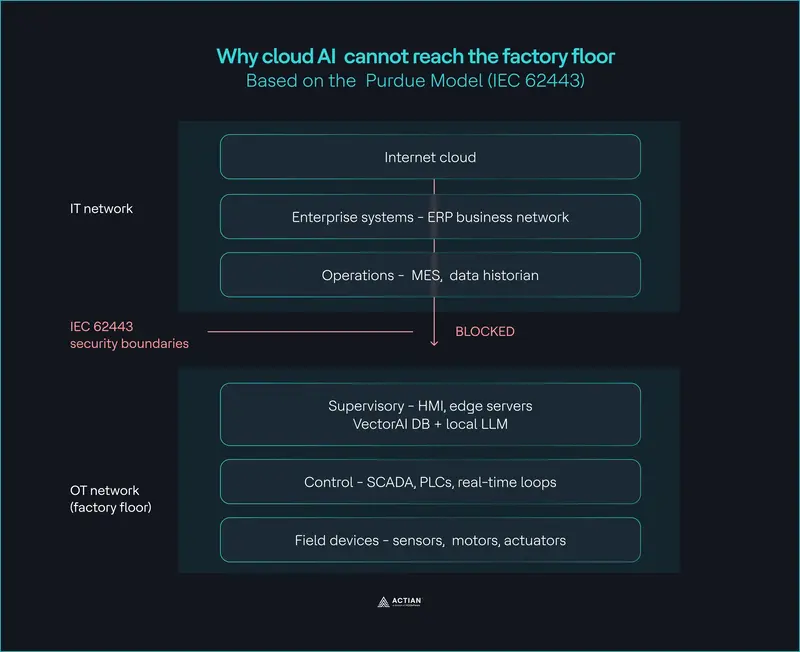
Why cloud AI cannot reach the factory floor

Introduction: A Confusion That’s Costing the Industry

Every week, someone posts a job description asking for an “ML Engineer” when they actually need an “AI Engineer.” Hiring managers conflate the two. Candidates apply for the wrong roles. Teams get built incorrectly, expectations get misaligned, and projects stall not because the technology failed, but because nobody agreed on who was supposed to do what.

It’s one of the most common and costly misunderstandings in tech right now.

Here’s the truth: ML Engineers and AI Engineers are not the same role with different titles. They operate at fundamentally different layers of the AI ecosystem, use different tools, think about problems differently, and ship entirely different kinds of output. One builds intelligence. The other delivers it.
The fastest way to understand the difference? Stop thinking about AI as a single discipline and start thinking about it the way you’d think about food.

And I don’t say that as a metaphor I borrowed from a textbook.

I was born and brought up in a farmer’s family. I watched my father wake before sunrise to tend the fields. I saw firsthand how the food on someone’s plate was never the work of one person it was the result of an entire chain of people doing completely different jobs, each depending on the one before them. The farmer who grew the crop had no idea what the chef would cook. The chef had no idea what the farmer went through to grow it. But without both of them doing their part, nobody eats.

When I stepped into the world of AI, I kept seeing that same chain just dressed in GPUs and Python instead of soil and seasons. The moment I mapped one to the other, everything clicked. And I think it’ll click for you too.

The Mental Model: AI Is a Food Supply Chain

Bear with me on this analogy it’s more useful than it sounds.
Consider how food gets to your plate. There are agricultural scientists developing better seeds, farmers growing crops at scale, wholesale distributors packaging and shipping produce, and finally chefs who transform raw ingredients into something people actually want to eat.

AI works the same way. And once you see it, you can’t unsee it.
Every role in the AI ecosystem maps cleanly to a link in this chain from the researchers inventing new architectures all the way to the engineers shipping products that real users interact with daily. Let’s walk through each layer.

Layer 1: The Farm: What ML Engineers Actually Do

ML Engineers are the farmers of the AI world. But before farming even begins, there are agricultural scientists,researchers who invent better seeds and techniques. In AI, those are the ML Researchers the people behind foundational architectures like Transformers, diffusion models, and attention mechanisms.

ML Engineers take those research breakthroughs and make them actually work at scale in the real world.
Core Responsibilities of an ML Engineer
Their day-to-day involves things like:

  • Wrangling massive datasets and building robust data pipelines
  • Distributed model training across GPU clusters
  • Fine-tuning and optimizing models for inference speed and cost
  • Building embeddings, running evaluations, and deploying model APIs

Tools of the Trade

Their toolkit centers on: PyTorch, TensorFlow, CUDA, MLOps platforms, and distributed compute infrastructure.

What They Actually Ship

Here’s the key thing ML Engineers don’t usually ship finished products. What they produce is more like raw infrastructure: trained models, embeddings, checkpoints, and model APIs. Intelligence, packaged and ready to be consumed.

They grow the crop. Someone else cooks the meal.

Layer 2 : The Wholesale Market: How AI Gets Distributed

This middle layer is the one most breakdowns ignore entirely and it’s far richer than most people realize. It actually has two distinct aisles.

Aisle One:

Premium Branded Suppliers (OpenAI, Anthropic, Google DeepMind) Companies like OpenAI, Google DeepMind, and Anthropic are like Sysco or large branded food distributors. They package frontier intelligence into clean, reliable, ready-to-use products.

  • GPT, Gemini, and Claude APIs
  • Embedding APIs, Vision APIs, Speech APIs
  • Fully managed infrastructure, built-in safety layers, and enterprise-grade reliability

You don’t see the supply chain. You just call an API and get state-of-the-art intelligence in milliseconds. Before this existed, you needed a full ML Engineering team just to get a model running in production.

Aisle Two: Open Wholesale Markets (AWS Bedrock, Azure AI Foundry, GCP Vertex AI)

Here’s what most breakdowns miss entirely.
Cloud providers AWS Bedrock, Microsoft Foundry, and Google Cloud Vertex AI aren’t just resellers of branded models. They operate more like large wholesale markets that carry both premium labels and local, homegrown produce side by side.

On the same platform, you can access Claude and Llama and Mistral and your own fine-tuned model. One marketplace, every option. This flexibility is exactly what enterprises need when they want control over their models without building full ML infrastructure from scratch.

The Homegrown Produce: Small Language Models (SLMs)

The “local vegetables” in this analogy are your Small Language Models (SLMs) open source models like Meta’s Llama, Mistral, Microsoft’s Phi, and Google’s Gemma.

They’re leaner, significantly cheaper to run, and crucially organizations can fine tune them on their own proprietary data. That makes them genuinely homegrown in a way GPT-4 never could be. When a company fine-tunes Llama on internal knowledge, the line between consumer and producer blurs. That organization becomes its own farm.

vLLM: The Cold-Chain Logistics Truck

If SLMs are the homegrown vegetables, vLLM is the refrigerated truck that makes distribution actually possible.

It’s the open-source inference engine that lets companies serve these models at scale with proper throughput, batching, and latency — without building that infrastructure from scratch. Without vLLM (or similar tools like Ollama and TGI), your homegrown model stays on the farm. With it, it reaches the kitchen.

Layer 3 :The Kitchen: What AI Engineers Actually Do

If ML Engineers are the farmers, AI Engineers are the chefs.

They don’t grow the ingredients. They take what’s available from any aisle of the wholesale market and turn it into something people actually want to use. Their work is less about training models and entirely about building around them intelligently.

Core Responsibilities of an AI Engineer

An AI Engineer’s world looks like

  • Prompt engineering and context window management
  • RAG pipelines connected to vector databases
  • Agentic workflows and multi-step tool calling
  • API orchestration and AI system architecture
  • Guardrails, memory systems, and user experience design

Tools of the Trade
Their stack: LangChain, LangGraph, Semantic Kernel, FastAPI, cloud services, and whatever combination of APIs gets the job done fastest.

What They Actually Ship

The output isn’t a model. It’s a product that real users interact with:

  • An AI copilot embedded directly into your existing workflow
  • An enterprise chatbot that actually understands your business context
  • A document intelligence system that reads and reasons over contracts in seconds
  • An autonomous agent that handles customer support end-to-end

If ML Engineers build the brain, AI Engineers build the experience.

The Biggest Practical Difference Between the Two Roles: Speed

This is where the analogy really earns its keep and it has real implications for how companies should think about building AI teams.

Why ML Engineering Moves Slowly

Training a large model is slow by nature. We’re talking weeks or months of compute, massive infrastructure costs, careful dataset curation, and iterative hyper-parameter tuning. You cannot pivot overnight just like a farmer cannot change the harvest mid-season. The investment is deliberate and the feedback loops are long.

Why AI Engineering Moves Fast

AI Engineers operate on an entirely different clock.

  • New prompt strategy? Ship it today.
  • Add a new tool to an agent? Done by tomorrow.
  • Redesign the entire workflow? Next week.

It’s the difference between farming and running a restaurant kitchen. The kitchen adapts constantly. That speed is exactly why AI Engineering adoption is exploding across enterprises right now companies need to move fast, experiment quickly, and iterate in days, not quarters.

So Which Role Is “Better”? (Wrong Question)

There’s sometimes an unnecessary debate about which role is more valuable, more technical, or more future-proof. That framing misses the point entirely.

The ecosystem depends on both. Without ML Engineers, there are no models to build on. Without AI Engineers, those models never reach the people who need them. One creates intelligence. The other delivers value. Neither works without the other.

The future belongs to teams that understand how the whole supply chain fits together not to individuals who’ve picked a side in a debate that shouldn’t exist.

Where the Industry Is Heading: Layered Specialization

AI is maturing the same way cloud computing did. What started as one blurry discipline is rapidly separating into clear, distinct specializations each with its own career path, toolset, and skill ceiling.

We’ve seen this pattern play out before. Infrastructure engineers gave rise to platform engineers, who enabled application developers, who powered the SaaS era. AI is following the exact same trajectory just faster.

Final Thought: Intelligence Becomes Impact Through the Whole Chain

Better research creates better models. Better models whether frontier APIs or fine-tuned SLMs enable better applications. Better applications create better outcomes for real people.

That’s the chain. Every link matters. The farmers, the distributors, the logistics trucks, and the chefs all have to show up.

ML Engineers grow the intelligence. AI Engineers cook the experience. Together, they serve the future.

Found this useful? Share it with someone who’s still using these terms interchangeably.

Thanks
Sreeni Ramadorai

Why I stopped using useEffect for everything and what I do instead

There was a point in my React journey where useEffect
was my answer to everything.

Data needs to load when the component mounts? useEffect.
Something needs to happen when a prop changes? useEffect.
Need to sync two pieces of state? useEffect.

Six months ago I looked at a component I’d written and
counted seven useEffect calls. The component worked.
It was also completely impossible to follow. Bugs were
showing up that I couldn’t reproduce consistently and
fixing one would break another.

That component forced me to actually understand what
useEffect is for — and more importantly, what it isn’t for.

What useEffect is actually for

useEffect exists for one purpose: synchronizing your
component with something outside of React.

That’s it. Outside of React means:

  • A browser API (document.title, addEventListener)
  • A third party library that doesn’t know about React
  • A network request
  • A WebSocket connection
  • An interval or timeout

If what you’re doing doesn’t involve something outside
of React, useEffect is probably the wrong tool.

The mistake I made most often

Syncing state with state.

// What I used to write
const [firstName, setFirstName] = useState('')
const [lastName, setLastName] = useState('')
const [fullName, setFullName] = useState('')

useEffect(() => {
  setFullName(`${firstName} ${lastName}`)
}, [firstName, lastName])

This looks reasonable. It’s actually creating a problem.

Every time firstName or lastName changes, React renders
the component, then runs the effect, then sets fullName,
then renders the component again. Two renders for every
one change.

The fix is just a variable:

const [firstName, setFirstName] = useState('')
const [lastName, setLastName] = useState('')

// Calculated during render — no effect needed
const fullName = `${firstName} ${lastName}`

React calculates this on every render anyway. You’re not
saving any work by putting it in state — you’re adding work.

Fetching data — where it gets complicated

Data fetching is the useEffect use case everyone learns first:

useEffect(() => {
  fetch('/api/user')
    .then(res => res.json())
    .then(data => setUser(data))
}, [])

This works. It also has several problems that don’t show
up until your app gets bigger:

No loading state. The component renders before the
data arrives. If you’re not handling that, you get
undefined errors or blank flashes.

No error handling. If the fetch fails, nothing happens.
The user sees nothing and doesn’t know why.

No cleanup. If the component unmounts before the fetch
completes, you’re trying to set state on an unmounted
component.

Race conditions. If the user triggers two fetches
quickly (navigating back and forth), you can’t guarantee
which one resolves last. The slower one might overwrite
the faster one.

A more complete version:

useEffect(() => {
  let cancelled = false

  setLoading(true)
  setError(null)

  fetch('/api/user')
    .then(res => {
      if (!res.ok) throw new Error('Request failed')
      return res.json()
    })
    .then(data => {
      if (!cancelled) setUser(data)
    })
    .catch(err => {
      if (!cancelled) setError(err.message)
    })
    .finally(() => {
      if (!cancelled) setLoading(false)
    })

  return () => { cancelled = true }
}, [])

This handles all four problems. It’s also 25 lines for
what should be a simple data fetch.

This is why libraries like React Query and SWR exist.
They handle all of this — loading state, error state,
cancellation, deduplication, caching — so you don’t
have to write it every time.

I’m not saying never write your own fetch logic. I’m saying
understand what you’re giving up when you simplify it.

Event listeners — a genuine useEffect use case

This is wher
 e useEffect actually belongs:

useEffect(() => {
  const handleKeyDown = (e: KeyboardEvent) => {
    if (e.key === 'Escape') closeModal()
  }

  document.addEventListener('keydown', handleKeyDown)

  return () => {
    document.removeEventListener('keydown', handleKeyDown)
  }
}, [closeModal])

You’re synchronizing React with a browser API. There’s no
React-native way to listen to keyboard events. useEffect
is exactly right here.

The cleanup function matters. Without it, every time this
component mounts you add a new listener and never remove
the old one. After ten mounts you have ten listeners all
calling closeModal at the same time.

What I use instead now

For derived state: just calculate it during render.
No hook needed.

For expensive calculations: useMemo, but only when
profiling shows it’s actually slow. Not as a default.

// Only if the calculation is genuinely expensive
const sortedItems = useMemo(() => {
  return items.sort((a, b) => a.name.localeCompare(b.name))
}, [items])

For data fetching: React Query in any app that fetches
from an API. The caching alone is worth it.

For browser APIs: useEffect with proper cleanup.

For syncing with external libraries: useEffect,
but isolate it in a custom hook so the component
code stays clean.

// Custom hook isolates the external sync
const useDocumentTitle = (title: string) => {
  useEffect(() => {
    const original = document.title
    document.title = title
    return () => { document.title = original }
  }, [title])
}

// Component stays clean
const ProductPage = ({ product }: Props) => {
  useDocumentTitle(product.name)
  return <div>...</div>
}

The question I ask before every useEffect

Before I write useEffect now I ask: am I synchronizing
with something outside of React?

If the answer is no, I look for a different approach first.
Derived value, event handler, library, custom hook.

useEffect isn’t bad. It’s a precise tool for a specific
job. Using it for everything is like using a screwdriver
to hammer a nail — it works sometimes, but it’s not
what it’s for.

That seven-useEffect component I mentioned at the start?
I refactored it to two. One for a WebSocket connection,
one for a document title update.

Everything else moved into derived values, a custom hook,
and React Query.

It’s been three months and I haven’t touched it since.

Stripe Payment and Processing

Since GusLift is a ride-sharing platform, payments are an important part of the user experience. Riders need a simple and secure way to complete payment, while the backend needs a reliable way to track payment status for each ride. To begin this process, we integrated Stripe Checkout into the project.

Implementing Stripe Checkout

One of the biggest goals so far was to create a payment flow that could be tested safely during development.
To do this, we added a backend route that creates a Stripe Checkout Session. When the mobile app requests a payment, the backend communicates with Stripe and receives a hosted checkout URL.
The user can then open that Stripe-hosted page and complete the payment using a test card.
This approach is useful because Stripe handles the secure payment form, card validation, and checkout experience. GusLift does not need to directly collect or store sensitive card information, which makes the implementation safer and easier to maintain.

Connecting Payments to Rides

Another important part of the payment system was making sure payments could be connected back to a specific ride.
When a checkout session is created, GusLift can include ride information such as:
-Ride ID
-Rider ID
-Ride label
-Customer email
-Payment amount

This information allows the backend to keep track of which payment belongs to which ride.
We also added support for storing payment records in a RidePayments table. This table keeps track of information such as the Stripe checkout session ID, payment intent ID, amount, currency, checkout URL, and payment status.
This gives the app a clearer record of what happened during the payment process.

Handling Payment Status

After a user finishes checkout, Stripe redirects them to a success page. GusLift then retrieves the checkout session details from Stripe and updates the payment record.
If the payment was completed successfully, the record can be marked as paid. If checkout is canceled, the payment can be marked as canceled instead.
Tracking these states is important because ride status and payment status are separate things.
For example, a ride could be accepted, but the payment may still be pending. Keeping those states separate makes the system easier to reason about as the app grows.
Building the Mobile Checkout Screen
On the mobile side, we added a Stripe Demo Checkout screen.
This screen checks whether the backend payment configuration is ready before allowing the user to continue. If Stripe is configured correctly, the user can tap a button to launch checkout.
For the current development version, the checkout uses a fixed demo amount of $5.00.
The mobile screen also supports passing ride-related information into the checkout flow, which helps prepare the app for real ride payments later.

Why Stripe Matters

Stripe is useful for GusLift because it allows us to build payment processing without needing to manage sensitive payment details ourselves.
Instead of building a custom card form from scratch, we can use Stripe’s hosted checkout flow. This improves security, reduces complexity, and lets the team focus more on the ride-sharing experience.
It also gives us a strong foundation for future payment features, such as authorizing payment when a rider confirms a driver and capturing payment after the ride is completed.

Some of the next milestones include:

Connecting payment more directly to confirmed rides
Improving success and cancel handling in the mobile app
Adding webhook support for more reliable payment updates
Moving from simple checkout payments toward authorization and capture
Testing the full ride flow from request to completed payment

By integrating Stripe Checkout, adding backend payment routes, and storing payment records, the app now has a basic but functional payment flow. While there is still more work to do before payments are production-ready, this is an important step toward making GusLift feel like a complete ride-sharing platform.