EC2 SSH Not Connecting? Here Are the 5 Things That Were Wrong (And How I Fixed Them)

I spent 3 hours staring at this error my first week with AWS:

“Permission denied (publickey)”

My EC2 instance was running. My terminal was open. I’d followed a tutorial step by step. And still — nothing.

Here are the 5 things that were wrong (and how I fixed each one):

  1. Wrong .pem file

I had downloaded the key pair but was pointing to the wrong file path in my command. Sounds obvious. When you’re new, it’s not.

Fix: always use the full absolute path.
ssh -i ~/Downloads/my-key.pem ec2-user@

  1. Wrong username

Different AMIs use different default usernames. I kept typing “ubuntu” on an Amazon Linux instance.

Amazon Linux → ec2-user
Ubuntu → ubuntu
RHEL → ec2-user or root
Debian → admin

This one catches almost everyone.

  1. .pem file permissions too open

SSH refuses to use a key file that other users can read.

Fix: chmod 400 my-key.pem

Run that once and you’ll never see “WARNING: UNPROTECTED PRIVATE KEY FILE!” again.

  1. Security group blocking port 22

I’d launched the instance but never added an inbound rule for SSH. The connection wasn’t being refused — it was being silently dropped at the firewall level.

Fix: go to EC2 → Security Groups → Inbound Rules → add SSH (port 22) from your IP. Not 0.0.0.0/0 — just your IP. Keep it tight.

  1. Using the wrong IP

I was copying the Private IP from the console instead of the Public IPv4 address. Private IPs only work if you’re inside the same VPC.

Fix: use the Public IPv4 DNS or Public IP shown in the instance details.

The honest truth: none of these errors showed up in the tutorial I was following. Tutorials show the happy path. Real learning happens when something breaks and you have to figure out why.

If you’ve hit any of these — you’re not alone. Every person working in cloud has been here.

Which one got you the longest? Drop it in the comments.

Best AI Tools for HVAC Contractors 2026

A 10-truck HVAC shop misses 3 calls per day. Average ticket runs $1,205. Industry close rate on inbound sits around 60 percent. Run the math across 30 days and you land at $65,070 of lost revenue every month. Call it $65K for clean accounting. Not because the work was bad. Not because the price was wrong. The phone just rang and nobody picked up.

That number does not show up on your P&L. It does not get tracked in the AR aging report. It does not get tracked anywhere. The leads call the next company on Google and you never know they existed.

Every AI tool getting marketed to HVAC right now claims to solve some version of this problem. Most of them are generic SMB software with an HVAC sticker on the box. A few are built for the trade. A smaller number actually move money. Here is the breakdown.

What we filtered out and why

We tested every AI tool targeting HVAC contractors over the last 12 months. Some on production calls. Some by demo. Some by talking to operators who paid the bill and have receipts.

This is not a sponsored list. NeverMiss is mine. I will tell you what it does well and where it falls down against the alternatives. The goal is not to sell you. The goal is to save you 40 hours of demo calls and 6 months of bad procurement decisions.

Tools are organized by what they actually do, not alphabetically.

Category 1. AI Receptionists

Answering inbound calls is the single highest-leverage place to put AI in an HVAC shop. Every other system downstream feeds off captured calls. If you only do one thing on this list, it lives in this category.

NeverMiss

Built specifically for HVAC, plumbing, roofing, and electrical contractors. Over 10,000 inbound calls handled in production across home service shops. Pricing is flat-rate per location starting at $500 per month, no per-minute charges, no overage surprises. Native integrations with ServiceTitan, Housecall Pro, Jobber, and GoHighLevel through Make and Zapier. The trial loop is unusual. Visit nevermisshq.com/demo, enter your number, and the AI calls your phone in under 60 seconds for a live conversation. You hear it work before you book a sales call with anyone.

Pros

  • Trade-specific scripts that handle the questions that actually come in for HVAC. Capacitor versus contactor versus refrigerant leak language baked in.

  • After-hours emergency triage with rule-based escalation to your on-call tech.

  • Books appointments directly into your CRM dispatch board with caller details, address, and system type attached.

  • Real customer support staffed by operators who have run service businesses. Not a chatbot, not an offshore desk.

  • Flat-rate billing. No per-minute surprises when call volume spikes during a heat wave.

Cons

  • No native scheduling for jobs longer than 4 hours yet. Long installs still route to a human callback.

  • The voice catalog is solid but not unlimited. If you want a specific voice clone we will need a custom path.

  • Two-day build cycle from signed agreement to live. Faster than the 1 to 2 weeks the rest of the category quotes, but you do need to block the calendar for the calibration calls.

For most HVAC shops under 25 trucks, this is the most aligned option in the market. The deeper write-up sits at our AI receptionist page, and there is a side-by-side pricing comparison at ai-receptionist-pricing-comparison-2026.

Smith.ai

A general-purpose receptionist that started in legal and expanded into trades. Per-minute pricing model.

Pros. Long-established. Polished call handling. Decent transcription quality on summary reports.

Cons. Not trade-built. Scripts read generic. Per-minute pricing punishes shops with longer triage calls or volume spikes. No real CRM dispatch integration for HVAC platforms. Expensive at scale.

Avoca

AI receptionist focused on home service.

Pros. Solid product for larger operations. Strong back-end reporting and call review.

Cons. Enterprise pricing. Longer sales cycle. Less flexible if your workflows are not vanilla. Probably overkill for shops under $3M.

Goodcall

SMB AI receptionist.

Pros. Cheap entry tier. Easy to spin up.

Cons. Not trade-specific. Weak CRM integration. Closer to a smart voicemail than a real receptionist. Customers who hit it during after-hours often hang up.

Hear NeverMiss before you buy

Visit the demo page, enter your phone number, and the AI calls you in under 60 seconds. Same agent that handles production calls for HVAC shops in 4 states.
Try the demo

Category 2. AI Consulting and Custom Builds

Vaught AI

Custom operational software and private AI infrastructure for HVAC contractors doing $1M to $10M in revenue. Founded by Joey Vaught, who has spent years building bespoke automation for trade and industrial operators.

This is the tier above off-the-shelf. You pick this when your workflows are weird, when you have integrations between 5 or more tools, or when you want to own the AI stack rather than rent it from a vendor.

Pros. Bespoke builds, you own the IP, fast iteration cycles, private infrastructure means your data and prompts stay yours.

Cons. Real investment. Custom pricing, engagements typically $15K to $50K. You need internal ops capacity to feed the build process. Not the answer if you have not maxed out off-the-shelf tools first.

Worth reading the trade-specific breakdown at Vaught AI for HVAC and electrical contractors if you are above $1M and feel boxed in by your current stack.

Category 3. FSM Platform AI Features

ServiceTitan Atlas

The AI suite layered onto ServiceTitan. Call summarization, AI-assisted dispatching, and a few other features that ride on top of the core ST account.

Pros. Deep integration with your existing data. No extra system to manage. If you already pay ST, marginal cost is low.

Cons. Only useful if you are on ServiceTitan. Locked behind ST pricing and release cycles. Slower to ship new AI features than focused vendors.

Housecall Pro CSR AI

Voice agent inside the HCP platform.

Pros. Free or low cost if you already run HCP. Zero setup friction.

Cons. Limited customization. Generic call handling. No flexibility for shops with unusual call types like commercial maintenance contracts or new construction.

Jobber Receptionist

Jobber-native receptionist offering.

Pros. Zero setup if you live in Jobber. Fine for small operations.

Cons. Basic feature set. Hard to extend or customize.

When FSM-native AI makes sense versus a custom layer on top. If you run on one platform exclusively and your call volume is under 200 per month, the FSM-native option is usually fine. Once you push above that, run multiple platforms, or have customers who need long emergency triage conversations, you need something built outside the FSM. See the full integration landscape at our integrations page.

Category 4. Quoting and Estimate Tools

The quoting space is younger than the receptionist space. Most of what gets marketed as AI quoting today is templated estimate generation with a chatbot bolted on the front. The genuinely useful tools work at the photo-and-spec stage in the field.

Mobile estimate platforms with AI assist

Most of the FSM platforms now include some flavor of AI-assisted quote generation in their mobile app. ServiceTitan, Housecall Pro, and Jobber all have a version. They speed up techs on close but they still depend on the inputs the tech provides.

Pros. Faster quotes in the truck. Fewer arithmetic mistakes.

Cons. Garbage in, garbage out. The AI does not improve a tech who skips system inspection. Field training matters more than the tool.

Category 5. Follow-up and Marketing AI

GoHighLevel

All-in-one marketing and follow-up automation platform.

Pros. Huge feature set. Decent AI automation built in. Agency-friendly white label.

Cons. Bloated. Steep learning curve. If you buy through a reseller you pay an agency tax. Setting it up properly is a project, not a weekend job.

Hatch

Lead nurture for home services.

Pros. Built for trades. Easier setup than GoHighLevel.

Cons. Another seat license to manage. Limited compared to a fully integrated stack.

The thing most shops get wrong with follow-up AI is plugging it in before the call capture problem is solved. If 35 percent of your inbound never gets answered, automated follow-up to nothing is still nothing. See the breakdowns at lead follow-up and missed call text-back.

Comparison table

The five tools most worth considering for HVAC contractors, side by side.

Tool Best for Pricing model HVAC-specific FSM integrations
NeverMiss Trade shops under 25 trucks Flat-rate from $500/mo per location Yes, built for the trade ServiceTitan, HCP, Jobber, GoHighLevel
Smith.ai Mixed legal and SMB use cases Per-minute No, generic Limited
Avoca Larger home service operations Enterprise tier Yes, home service focus ServiceTitan
Vaught AI $1M to $10M custom builds Custom, $15K to $50K engagement Yes, HVAC and electrical Bespoke per project
ServiceTitan Atlas Existing ST customers Included in ST plan Indirectly ServiceTitan only

What to measure once you have a tool installed

The mistake operators make after installing an AI receptionist is treating it as set-and-forget. The numbers move week to week and you need to know which ones to watch.

Answer rate. Percent of inbound that gets answered. Pre-AI this is often 60 to 70 percent for HVAC shops. With a proper receptionist this should sit at 98 percent or better. If you are below 95, something is misconfigured.

Booking rate on AI-handled calls. The AI does not just answer. It books. Track what percent of AI-handled calls end with an appointment on the calendar. 40 to 55 percent is a healthy band depending on call type mix. Lower than 35 means your scripts need work.

Average handle time. AI calls should run between 90 seconds and 4 minutes. If they are dragging past 5 minutes regularly, the agent is fumbling intent recognition and needs tuning.

Escalation accuracy. When the AI routes a call to your on-call tech, did the call actually need a human. Aim for 90 percent precision. Too many escalations and your tech burns out. Too few and emergencies get missed.

How to choose, by shop size

Frame the decision by revenue, not feature count.

Under $1M revenue. Start with an AI receptionist. Your bottleneck is missed calls, not capacity. Solve the call leak first and the rest follows. NeverMiss at $500 per month pays for itself the first week you book one extra job.

$1M to $5M. Receptionist plus quoting plus follow-up. Your office staff becomes the bottleneck around this stage. Layer the AI to handle the volume so your people focus on the high-value conversations. This is where the lead follow-up automation starts to compound.

$5M to $10M. Add the FSM-native AI features if you are on ServiceTitan or HCP. You are paying for the platform anyway. Stack the trade-built receptionist on top for the layer the FSM cannot do well. This is also Vaught AI tier, custom infrastructure that fits your specific workflows.

$10M and up. Custom build territory. You have unique workflows, multi-location complexity, and probably your own internal systems. Own your stack instead of renting it.

The most common mistake. Buying tools out of order. Receptionist first. Always. The leak in front of every other system is the unanswered call. Plug that. Then move to the next.

More on the trade-built receptionist setup at https://nevermisshq.com/contractors/

Scrumpan is offlically LIVE!!

Today, Scrumpan officially went live 🚀

Scrumpan is an AI-powered Agile collaboration platform built for modern software teams.

The idea behind Scrumpan was simple:

Agile tools have become overloaded, fragmented, and exhausting to use. Teams spend too much time managing process instead of building great products.

We wanted to create something cleaner, faster, and more collaborative.
Scrumpan brings together:
• Planning Poker
• Retrospectives
• Daily Pulse async standups
• AI-powered Smart Summaries
• Sprint analytics
• Jira integration
• Real-time collaboration

And this is only the beginning.

We’re already working on:
• Smart Planner (AI-assisted planning)
• Azure DevOps integration
• Advanced collaboration workflows
• AI-powered productivity insights
• Enhanced planning canvas experience

Building Scrumpan has been an incredible journey of architecture decisions, realtime collaboration engineering, AI integrations, and countless iterations on UX.

Today marks the first public step.

Would love to hear feedback from engineering teams, Scrum Masters, Agile coaches, and product leaders.

Website: https://scrumpan.com

Building a BMI Calculator CLI with TypeScript — Types, Functions, and Vitest

Introduction

This is my first article as a Java engineer learning TypeScript from scratch.

I’ve been writing Java professionally, but I got interested in modern tech stacks and started learning TypeScript and Python. My approach is simple: build small projects one by one, and write honestly about everything — what I struggled with, what I figured out, and what I asked AI to help with.

This article is for people on a similar learning journey. It’s not a showcase of perfect code — it’s an honest record of the process.

My Learning Style (AI Transparency)

I use Claude Pro (for design discussions and Q&A) and Cursor Pro (for coding support) as learning companions.

However, I follow these rules for myself:

  • I write all the code myself — I never ask AI to write code for me
  • AI helps with hints, spec clarification, and bug spotting
  • I make sure I understand why something works before moving on

In this article, I clearly separate “what I implemented myself” from “what I asked AI for.”

What I Built

A CLI tool that calculates BMI from height and weight input.

$ npm start

Enter your height (cm): 170
Enter your weight (kg): 70
BMI result: 24.22 (Normal)

BMI Classification

BMI Label
< 18.5 Underweight
18.5 – 24.9 Normal
≥ 25.0 Obese

📦 Repository: https://github.com/uya0526-design/bmi-calculator

Project Structure

bmi-calculator/
├── src/
│   ├── index.ts              # Entry point / CLI I/O
│   ├── calculator.ts         # BMI calculation and classification logic
│   ├── types.ts              # Type definitions
│   └── __tests__/
│       ├── calculator.test.ts # Unit tests
│       └── types.test.ts      # Type tests (skipped with describe.skip)
├── package.json
├── tsconfig.json
└── LEARNING_LOG.md

Separating responsibilities by file made it much clearer where everything lived.

Tech Stack

  • TypeScript
  • Node.js (readline module)
  • Vitest (unit testing)

What I Implemented Myself

types.ts — Type Definitions

// Type aliases for height, weight, and BMI value
type Height = number;
type Weight = number;
type BmiValue = number;

// Union type for classification labels
type BmiLabel = "Underweight" | "Normal" | "Obese";

// Object type to hold the calculation result
export type BmiOutput = {
  bmi: BmiValue;
  label: BmiLabel;
};

The key decision here was using a union type for BmiLabel. Any string outside of "Underweight" | "Normal" | "Obese" causes a type error at compile time.

calculator.ts — Calculation Logic

import type { BmiOutput } from "./types";

function getBmiLabel(bmi: number): string {
  if (bmi < 18.5) return "Underweight";
  if (bmi < 25) return "Normal";
  return "Obese";
}

export function calculateBmi(height: number, weight: number): BmiOutput {
  const heightInM = height / 100;
  const bmi = weight / heightInM ** 2;
  const label = getBmiLabel(bmi);
  return { bmi, label };  // shorthand property notation
}

I decided not to export getBmiLabel since it’s only used internally — and I made that call myself.

index.ts — CLI Input/Output

import * as readline from "readline";
import { calculateBmi } from "./calculator";

const rl = readline.createInterface({
  input: process.stdin,
  output: process.stdout,
});

function main() {
  rl.question("Enter your height (cm): ", (heightInput) => {
    if (isNaN(Number(heightInput))) {
      console.log("Please enter a number.");
      rl.close();
      return;
    }
    rl.question("Enter your weight (kg): ", (weightInput) => {
      if (isNaN(Number(weightInput))) {
        console.log("Please enter a number.");
        rl.close();
        return;
      }
      const result = calculateBmi(Number(heightInput), Number(weightInput));
      console.log(`BMI result: ${result.bmi.toFixed(2)} (${result.label})`);
      rl.close();  // ← position matters (see "Where I Got Stuck")
    });
  });
}

main();

calculator.test.ts — Unit Tests with Vitest

import { describe, it, expect } from "vitest";
import { calculateBmi } from "../calculator";

describe("calculateBmi", () => {
  it("BMI 18.49 → Underweight", () => {
    const result = calculateBmi(170, 53.5);
    expect(result.label).toBe("Underweight");
  });

  it("BMI 18.5 → Normal", () => {
    const result = calculateBmi(170, 53.52);
    expect(result.label).toBe("Normal");
  });

  it("BMI 25 or above → Obese", () => {
    const result = calculateBmi(170, 72.25);
    expect(result.label).toBe("Obese");
  });

  it("BMI calculation accuracy", () => {
    const result = calculateBmi(170, 70);
    expect(result.bmi).toBeCloseTo(24.22, 1);
  });
});

I deliberately chose boundary values (18.49 / 18.5 / 25) to verify the branching logic.

What I Asked AI For

Topic Details
Type design thinking Asked about the difference between tuple types and object types
tsconfig.json options Learned what module, target, and strict each do
Vitest setup Confirmed the setup steps and package.json config
Test design principles Learned the difference between toBe and toBeOneOf, and the one-case-per-test rule

Where I Got Stuck

1. npm wouldn’t run in PowerShell

Cause: The default execution policy was Restricted (no scripts allowed).

Fix:

Set-ExecutionPolicy -ExecutionPolicy RemoteSigned -Scope Process

Using -Scope Process applies the change only to the current session — no permanent system changes.

2. Mismatch between package.json "type" and tsconfig.json "module"

Situation: package.json had "type": "module" but tsconfig.json had "module": "commonjs" — they were out of sync.

Fix: Changed package.json to "type": "commonjs". These two settings always need to match.

3. rl.close() in the wrong place

Situation: I put rl.close() at the end of the outer callback, but it was closing readline before the inner rl.question could finish.

Insight: rl.question is asynchronous. Writing code after it doesn’t mean it runs after the callback completes.

Fix: Moved rl.close() inside the inner callback, after all processing is done.

What I Learned

TypeScript

Topic Key Takeaway
Union types Union types restrict strings to allowed values, catching mistakes at compile time
Limits of type aliases Height = number and Weight = number are both just number at runtime — swapping arguments doesn’t cause a type error (Branded Types can fix this)
import type Explicitly imports types only — useful with verbatimModuleSyntax
Shorthand properties { bmi, label } works when variable names match property names

Testing (Vitest)

Topic Key Takeaway
TypeScript types don’t exist at runtime Testing types with Vitest is unnecessary — the compiler already guarantees them
toBe vs toBeOneOf toBeOneOf passes if any value matches — it can’t verify correctness. Use toBe with a specific expected value
Boundary value testing Testing around thresholds (18.5, 25) verifies that branching logic is correct
describe.skip Keeps the file in place while skipping tests — useful for preserving learning notes

Wrapping Up

This was my first TypeScript project — a simple BMI calculator CLI.

Two things stood out from this experience:

  1. Designing types first made implementation smoother
  2. Async callbacks are easy to misplace — position matters

Next up: a Rock-Paper-Scissors game (union types, conditionals, enums).

The full learning log is in LEARNING_LOG.md.

This article is part of my public learning journey using AI tools (Claude Pro / Cursor Pro). All code is written by me — AI is used for design discussions, bug hints, and spec clarification only.

From Building WordPress Websites to Node.js APIs: My Honest Full Stack Journey

Five years ago I was building WordPress websites for clients. The kind of work where you install a theme, build a child theme on top of it, write custom PHP for features the theme never imagined, register post types for every content model the client needs, and wire everything together with hooks and filters until it actually does what the client asked for.

That was the job. Not dabbling. Full time. Real projects. Real deadlines.

Today I write Node.js APIs, React dashboards, Next.js applications, and Vue.js interfaces. WordPress is still in the stack on most projects. But the stack is bigger now.

This is the honest story of how that happened. Not a tutorial. Not a career advice post. Just what actually occurred.

What building WordPress websites actually taught me

Before anything else I want to be clear about what WordPress website development actually involves because the internet has a habit of dismissing it.

When I was building recruitment and staffing platforms on WordPress I was writing custom PHP classes. Registering custom post types and taxonomies. Building complex meta box systems for managing job listings and candidate profiles. Writing hooks and filters to modify WordPress core behavior without touching core files. Building custom REST API endpoints for frontend JavaScript to consume. Handling user roles and capabilities so recruiters saw different interfaces than candidates.

That is real software development. It taught me how a large PHP application is structured. It taught me to write code that other developers could extend without breaking. It taught me to think about security because WordPress has strict standards and gets you in the habit of sanitizing everything that comes in and escaping everything that goes out.

It also taught me something most tutorials skip: how to read someone else’s code and understand a system you did not build. WordPress core is millions of lines of PHP written over twenty years by thousands of contributors. Learning to navigate that codebase, understand its patterns, and work with it rather than against it is a genuinely transferable skill.

I did not know at the time how much all of this would matter later.

The first project that pushed beyond WordPress

I was working on a staffing platform. WordPress was handling the content, the job listings, the user profiles, the admin dashboard. But the client needed automation. Resume parsing. Third party CRM sync. Automated email sequences triggered by candidate status changes. Workflow automation that ran on schedules.

Forcing this into WordPress was technically possible. WordPress has cron. WordPress has hooks you can fire on status changes. But the more I thought about it the more it felt like the wrong tool for the job. WordPress is designed around content management and web pages. What the client needed was a background processing system.

So we built a separate Node.js service alongside WordPress. WordPress remained the content layer. Node.js handled the automation layer. They communicated over REST API calls.

I had to learn Node.js properly for this. Not just reading tutorials. Actually building something in production that real people depended on.

The Node.js learning curve was not what I expected

I assumed the hard part would be JavaScript. I had been writing JavaScript inside WordPress for years. jQuery interactions. Block editor components. Admin page scripts. JavaScript was not new to me.

The hard part was the runtime model.

In WordPress PHP handles one request at a time in isolation. You write code that runs top to bottom. When it finishes the process ends. The next request starts fresh.

Node.js runs continuously. It handles multiple requests concurrently through an event loop. If you write blocking synchronous code you freeze the entire server not just one request. Every file read, every database query, every external API call needs to be async or you are doing it wrong.

My first week of Node.js code was full of synchronous operations that worked fine in isolation and would have been a disaster under any real load. I was writing PHP that happened to use JavaScript syntax.

It took about three weeks of real project work before the async model genuinely clicked. Before I stopped fighting it and started working with it. The moment it clicked it felt obvious in retrospect the way most things do once you understand them.

Building WordPress websites had given me something I did not realize

When I started building Express.js APIs I naturally wrote validation on every input. I checked that the authenticated user had permission to perform each action before performing it. I treated every piece of incoming data as potentially malicious until proven otherwise.

My colleagues on the project who came from other backgrounds did not have this habit by default. They would write an API endpoint that accepted whatever was sent and trusted it.

WordPress had trained me so thoroughly in defensive coding that I did it automatically without thinking about it. Sanitize inputs. Escape outputs. Check capabilities. Never trust user supplied data.

In the WordPress plugin ecosystem these practices are enforced. The Plugin Review Team will reject your submission if you violate them. You internalize them because you have to.

In Node.js nothing enforces them. You can ship an insecure API and it will run fine. Until it does not.

The discipline I brought from WordPress website development into Node.js made my APIs meaningfully more secure than they would have been otherwise. That was the first time I understood that WordPress development was not a limitation I was moving beyond. It was a foundation I was building on.

Then a dashboard needed React

The staffing platform automation was running on Node.js. WordPress was handling the content. But the client needed a proper admin dashboard. Not WordPress admin. A custom interface showing real time data from the automation system, candidate pipeline stages, recruiter performance metrics, integration status.

WordPress admin was not the right tool for this. We needed something more interactive and more tailored.

React was the decision.

I had written React inside the Gutenberg block editor. Enough to understand components and props and the basic rendering model. But building a full React application with its own routing, state management, and API layer was different.

The first thing that confused me was that React has strong opinions and punishes you for working against them. Coming from WordPress where you can hook into almost anything and modify almost any behavior, React initially felt rigid.

State flows one direction. Data goes down through props. Events go up through callbacks. You do not reach into a component from outside and change it. You change the state that drives it and React re-renders it automatically.

Once I stopped fighting this and accepted it as a design decision rather than a limitation something shifted. The rigidity is the point. It makes large applications easier to reason about because you always know where data comes from and how it changes.

WordPress is maximally extensible. Any plugin can modify any behavior. This is incredibly powerful and also the source of extraordinary debugging complexity when things go wrong.

React trades extensibility for predictability. Different tradeoff. Different use case. Neither is universally better.

Vue.js through a different project

Not every client chose React. A different project had an existing frontend codebase in Vue.js. New features needed to be built on top of it. I learned Vue.js on that project while it was running in production.

Vue.js after React is genuinely pleasant. The template syntax looks like HTML with some extra attributes. The component structure has a clear organization. The reactivity system works more automatically than React’s manual dependency tracking.

Vue.js also felt conceptually closer to WordPress templating than React did. In WordPress PHP templates you write HTML and embed PHP expressions inside it. In Vue templates you write HTML and embed Vue directives inside it. The mental distance is smaller than React’s JSX which feels more like writing JavaScript that outputs HTML.

For teams coming from HTML-first or PHP-first backgrounds Vue.js has a lower entry barrier. For larger teams with complex state requirements React’s ecosystem is deeper and more established.

Knowing both made me more useful across more types of projects. That was the practical outcome.

Next.js felt like something I had already understood

Next.js came into the picture on a project that needed both great SEO and a rich interactive frontend. Pure client side React would hurt search performance. Pure server side WordPress would not give the interactivity we needed.

Next.js was the answer.

What surprised me was how much my WordPress background helped with Next.js specifically.

WordPress developers understand server side rendering instinctively because WordPress has always rendered pages on the server. The server generates HTML. The browser receives it and displays it. Search engines can crawl it because the content is in the HTML not injected by client side JavaScript.

Many React developers who came from client side rendering backgrounds struggle with Next.js because thinking about what renders on the server versus the client requires a mental model they never needed before.

For me it was familiar territory in a new form. The server renders something meaningful. The client receives it and makes it interactive. This is a more sophisticated version of what WordPress has been doing since the beginning.

Next.js also forced me to make explicit decisions about data fetching that WordPress makes for you automatically. Does this data come at build time. Does it come at request time. Does it come from the client after page load. WordPress decides this based on its own architecture. Next.js requires you to decide deliberately.

Making those decisions explicitly made me think more carefully about performance than I ever had when WordPress was handling it automatically. Discomfort that became a useful skill.

What the full journey changed

The biggest shift was not learning new syntax or new frameworks. It was learning to think about systems rather than just applications.

WordPress is a monolith. The database, the business logic, the templating, the admin interface all live together. This is a strength for many use cases. It is also a constraint on the kinds of architectures you can build.

Working with Node.js as a separate service alongside WordPress, feeding data to React and Vue.js frontends, building Next.js applications that treat WordPress as a headless CMS exposed me to thinking about systems as separate concerns that communicate over APIs.

That thinking changed my WordPress work too. I started designing WordPress plugins to expose clean REST API endpoints rather than assuming WordPress templates would always consume the data. I started thinking about WordPress as a data layer rather than a complete application. That is a more modern and more flexible way to build with WordPress.

I would not have gotten there without the broader journey.

Where things stand now

I still build WordPress systems. Custom plugins with clean architecture. REST API extensions. Block editor components. Headless WordPress feeding modern frontends.

I also build Node.js APIs. React dashboards and applications. Next.js server rendered sites. Vue.js interfaces.

These are not competing skills pulling in different directions. They are complementary skills that inform each other.

WordPress taught me to think about security, extensibility, and writing code that survives contact with the real world.

Node.js taught me to think about async systems and API design.

React and Vue.js taught me to think about state as the source of truth for everything a user sees.

Next.js taught me to think carefully about rendering and performance as deliberate architectural decisions.

Building WordPress websites for clients taught me to think about the person using the thing I am building and what they actually need. That is the skill that travels furthest across every stack.

The journey was not planned. It was a series of projects that each needed something slightly beyond what I already knew. I said yes each time. I figured it out each time.

That pattern has not changed. The stack has just gotten bigger.

XiHan Snore Coach: Privacy-First On-Device MedTech Guardian powered by Gemma 4 Mobile

This is a submission for the Gemma 4 Challenge: Build with Gemma 4

What I Built

XiHan Snore Coach is an Android-based MedTech application designed to help users track, analyze, and alleviate snoring and sleep apnea symptoms.

In the medical health sector, privacy is paramount. Users are hesitant to upload highly sensitive physiological data—such as SpO2 (blood oxygen) levels, snoring audio metrics, and sleep disruption patterns—to cloud servers.

To solve this, I built an entirely offline, on-device AI Sleep Coach. It acts as a pocket medical analyst, allowing users to ask natural language questions about their sleep trends and receive actionable respiratory muscle training plans without a single byte of their personal data leaving their phone.

Demo

*https://youtube.com/shorts/ECAjo9r7Yew *

Code

https://github.com/yueliao11/sleepcoach.git

How I Used Gemma 4

To make this offline MedTech guardian a reality, I chose the Gemma 4 2B/4B Ultra-Mobile Model.

Here is why it was the absolute right tool for the job and how it powers the core experience:

  1. Perfect Edge-Deployment Architecture: Medical apps demand high reliability. The 2B/4B effective parameter sizes allowed me to run the model natively on an Android device. It delivers server-grade conversational UI fluidity directly from the user’s pocket, even in Airplane mode during sleep.
  2. Native Tool Calling / Function Calling: Gemma 4 is doing real work at the heart of the app. Instead of just chatting, the AI utilizes Gemma 4’s Function Calling capabilities. When a user asks “How was my sleep this week?”, the Gemma 4 model intelligently triggers a local function (get_local_sleep_history). This function queries the local Android Room/SQLite database for the last 7 days of SpO2 and Snore data, feeding it back into the model’s context.
  3. Advanced Reasoning: By feeding the extracted local physiological data back into the 128K context window, Gemma 4 correlates drops in SpO2 with snoring durations, ultimately generating highly personalized and safe oropharyngeal muscle training routines for the user.

Gemma 4 proved that we no longer have to compromise between advanced AI reasoning capabilities and strict patient data privacy.

This submission was published on behalf of the team by @your-dev-username.

Contributors:

  • This submission was published on behalf of the team by @your-dev-username.

Contributors:

Why AI Coding Agents Hallucinate and How to Fix It

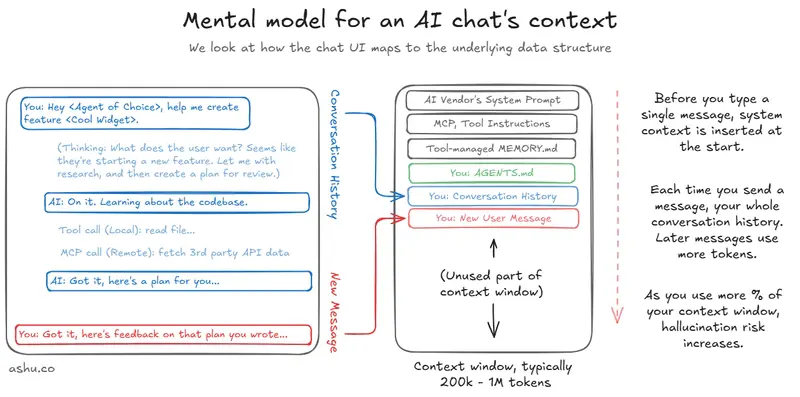
Mapping abstract context concepts into a typical AI chat UI

Most engineers I pair with can spot an AI coding agent hallucination when it happens. The AI invents an API that doesn’t exist, reaches for a deprecated library, or rewrites a function you explicitly said to leave alone. They notice it, they’re annoyed by it, and they move on.

What I’ve noticed is that fewer engineers have developed the instinct to do something about it. Not just fix the output, but fix the input. When I hallucinate the same way twice, something in my environment is wrong, and I should go find it.

Mapping abstract context concepts into a typical AI chat UI

I won’t rehash the anatomy of a conversation or why context limits matter. Dex Horthy described the “dumb zone” concept well in his talk on solving hard problems in complex codebases: the gist being that LLM performance degrades as the context window fills, roughly past the 40% mark. Most of those concepts still hold. What I want to share instead is a feedback cycle that I’ve been trying to teach to anyone who’ll listen, along with the specific things I’ve learned applying it.

Most of us react to AI hallucinations. Few investigate.

I’ve seen a range of reactions when the agent goes off the rails: some people are amused, some get annoyed. In an extreme case, an engineer I know will ctrl+c out of the conversation the moment it goes sideways, which is fair. If the agent is heading in the wrong direction, stopping it saves tokens and time.

But the reaction I see less often is the one that actually improves the agent for the next run: pausing to figure out why it happened, and making a change so it doesn’t happen again.

This matters beyond just your own workflow. Hallucinations are one of the biggest reasons skeptical engineers stay skeptical. Every time a teammate watches the AI confidently invent a nonexistent function, it reinforces the “these tools aren’t ready” narrative. When you can help someone understand that there are actual knobs and levers to reduce hallucinations (not eliminate, but reduce) you’re shoring up someone’s confidence in the whole approach.

And to be clear: hallucinations will never go away entirely. There’s a strong theoretical argument that they’re a fundamental property of how these models work, rooted in the way these models compute. The goal isn’t zero hallucinations. It’s fewer, and faster recovery when they happen.

My tip is simple: reflect on what actually happened

When I hit a hallucination that annoys me, I’ve trained myself to pause and run through a short checklist. It’s not sophisticated, but the habit of doing it consistently is what makes it work.

Simple feedback loop to learn from past AI errors by improving context and prompting

What did the AI coding agent actually hallucinate?

This sounds obvious, but I find that most people skip the diagnosis. They see the wrong output and immediately re-prompt or restart the conversation.

Instead, I look through the conversation history and try to trace the reasoning. What was the agent trying to do? What did I want it to do? Where did those two things diverge? Sometimes it’s a genuine misunderstanding of my instructions. Sometimes the agent pulled in context from a file I forgot was in scope. Sometimes it’s just the model being confidently wrong about a library API, which tells me something different about what needs fixing.

That last case is worth understanding. Researchers at OpenAI published a paper showing that LLMs are trained in a way that rewards guessing over admitting uncertainty, like a student who fills in an answer on every exam question rather than leaving any blank. Knowing this changes how I investigate. I’m not looking for a bug. I’m looking for missing context that would have steered the guess in the right direction.

Where did the context come from?

This is the core of it. When you’ve identified a hallucination worth fixing, the question becomes: what information did the agent use to make that bad decision?

First, you need to familiarize yourself with the sources of context your agent is consuming. In Claude Code, that’s CLAUDE.md files, project-level memory in ~/.claude/projects/, any files it’s read in the current session, and the conversation history itself. In Cursor, it’s your rules files, your hierarchy of AGENTS.md files scattered throughout your repository, indexed docs, and whatever files are open or referenced. Each tool has its own anatomy, and it’s worth spending an afternoon just mapping out where your agent gets its information.

The actual act of troubleshooting benefits from cataloging the different context sources

Once you know the anatomy, you can trace backwards from the hallucination. The agent thought it should use library X? Check if there’s a stale reference in your rules file. It kept trying to write tests in a style you’ve moved away from? Maybe there’s an old convention documented somewhere that you forgot to update. It invented an API endpoint? Maybe your schema docs are out of date, or maybe there are no schema docs and the agent is guessing.

When I can’t figure it out on my own, I’ll confront the agent directly. Something like: “I think you hallucinated here. I wanted you to do $X, but you did $Y. Why did this happen? What context did you use to make this decision, and what changes should I make to the rules files to avoid this in the future?”

Be direct, concrete, specific. The agent is often surprisingly good at self-diagnosing: it’ll point to a rule it interpreted broadly, or a file it read that contained misleading information. Try out its suggested changes. They often work. Not always, but often enough that it’s worth the 30 seconds to ask.

Is the “hallucination” a big enough issue to fix?

Before spending more time troubleshooting, I do a gut check. Maybe I disagreed with the approach, but is it actually wrong? Will the agent eventually get there?

Sidebar: when talking with a friend, he pointed out that “hallucination” isn’t always the right term here. I’m actually referring to “all things you disagreed with an agent on”. Hallucination is a distinct problem, but this advice applies to the broader set of problems. I use hallucination as a proxy term.

This is one of those things that’s hard to learn from AI and easier to learn from serving as a manager. As a manager, you figure out that everyone does things differently. Sometimes an engineer takes a route you wouldn’t have chosen, and the result is fine; it’s often better than what you had in mind. I’ve started applying the same mentality to AI agents. If the approach is merely different from what I expected, I’ll let it run for a while. The increased autonomy might be worth the extra time, even if the path isn’t what I originally intended.

But if it’s hallucinating facts, such as inventing APIs, fabricating function signatures, pulling in libraries that don’t exist, that’s a different category. That’s when I stop and investigate.

Is your context too bloated? Smaller is better.

This one is counterintuitive, and I had to learn it the hard way. You’d think that giving the agent more instructions would make it smarter. More context about your database schemas, your API conventions, your testing preferences, your deployment pipeline… surely more information leads to better decisions?

In practice, there’s a point where it flips. I went through a phase where I kept adding to my CLAUDE.md files every time something went wrong. Database schemas, model designs, interaction patterns, naming conventions. The file grew and grew (by month two it read less like documentation and more like a manifesto), and at some point the agent started getting worse. It was pulling in conflicting instructions, getting confused about which convention applied where, and occasionally just ignoring sections entirely.

Do you need this context every time? Or just some of the time? Can you extract this context, package it up as a Skill or Subagent and then trigger it when you need it?

This is where “context isolation” comes in. Instead of stuffing everything into the main rules file, you extract niche or complex use cases into separate mechanisms. The key insight is that subagents in particular have a stronger degree of context isolation, because the instructions don’t load into the parent thread’s context. You trigger them explicitly when you need them, and the rest of the time they’re not competing for attention in the agent’s working memory.

I ended up cutting my main CLAUDE.md from around 500 lines down to about 280 (it should probably be shorter), and moved the specialized stuff into skills that get invoked when relevant. The improvement was noticeable within a session or two.

Is the automatic memory working against you?

Most coding and chat tools manage a memory thread for you now. Claude Code keeps memories in ~/.claude/projects/$yourProject/memory/. Cursor has its own system. ChatGPT has its memory panel. The idea is good: the agent learns from your interactions and adapts over time.

The problem is that the agent doesn’t always learn the right things. Andrej Karpathy flagged this a while ago on X: the model can obsess over a minor detail from 2 months ago that’s completely irrelevant to what you’re doing now. I’ve seen it happen in my own work: the agent latched onto a specific testing pattern I used once for a particular edge case, and kept invoking it on unrelated projects, long after it stopped applying.

In Claude Code, you can hunt for distracting memories in the memory directory and remove them, or ask Claude itself to clean up. In Claude’s chat interface, you’ll have to use the UI to inspect what it’s stored and tell it what to change. (It doesn’t let you edit memories directly, which is a minor annoyance.)

The broader point is that automatic memory is another source of context, and it can drift just like any other source. If your agent starts doing something odd that you can’t trace to your rules files or the current conversation, check the memory. It might be holding onto something you’d rather it forgot.

Continuous learning with your AI, but you have to trigger it

Adding this trigger into my vibe coding repertoire has helped me improve the accuracy of my agents repeatedly. Even though AI work often feels a bit random, I keep a running list of problems. When something repeats itself, that’s my signal that I might want to reflect and try to fix it. I’ll pause and ask the agent to suggest changes to its own context that would prevent the issue in future runs. Then I test it on a controlled task to see if it sticks.

It’s not a complicated habit, but it’s a valuable one. Hallucinations cost you time, and that cost multiplies if you work on a team. If your teammates haven’t run into a particular issue yet, you can save them time. And maybe they haven’t developed this mental trigger yet. Sharing what you’ve fixed in your context files is one of the force-multiplying things you can do for a team adopting AI coding tools.

Most engineers I talk to treat their agent context like a set-and-forget thing. Write the AGENTS.md once, maybe tweak it when something goes really wrong. But context is a living system. It drifts, it bloats, it accumulates stale assumptions. The engineers who get the most out of these tools are the ones who treat context like code: something that needs regular review, refactoring, and testing.

This tweaking of the AGENTS.md files and other context is what I was referring to when I suggested looking at “concrete metrics of adoption” in my article measuring AI adoption as a manager.

If you’ve developed your own system for managing agent context, or if you’ve found patterns in how you debug hallucinations, I’d like to hear about it. DM me on LinkedIn.

Originally published at ashu.co.