JavaScript ES6+ Features Every Developer Should Know

ES6 (ECMAScript 2015) was the biggest update to JavaScript in the language’s history. Combined with the improvements that followed in ES2017 through ES2024, modern JavaScript is a much more expressive and powerful language than it was a decade ago. This guide covers the features you’ll use every day, with practical examples and the “why” behind each one.

Arrow Functions

Arrow functions provide a concise syntax and, importantly, don’t have their own this binding — they inherit this from the surrounding scope.

// Traditional function
const add = function(a, b) { return a + b; };

// Arrow function — same thing, shorter
const add = (a, b) => a + b;

// Single parameter — parens optional
const double = n => n * 2;

// No parameters — parens required
const getTimestamp = () => Date.now();

// Multi-line body — needs curly braces and explicit return
const processUser = (user) => {
  const fullName = `${user.first} ${user.last}`;
  return { ...user, fullName };
};

// Returning an object literal — wrap in parens
const makePoint = (x, y) => ({ x, y });

// The this binding difference
class Timer {
  constructor() {
    this.count = 0;
  }

  start() {
    // Arrow function: 'this' is the Timer instance
    setInterval(() => {
      this.count++;
      console.log(this.count);
    }, 1000);

    // Regular function would break: 'this' would be undefined (strict mode)
  }
}

Destructuring

Destructuring lets you unpack values from arrays and objects into distinct variables.

Array Destructuring

const [first, second, third] = [10, 20, 30];
console.log(first); // 10

// Skip elements with commas
const [,, third] = [1, 2, 3];
console.log(third); // 3

// Default values
const [a = 0, b = 0, c = 0] = [1, 2];
console.log(c); // 0

// Swap variables without a temp
let x = 1, y = 2;
[x, y] = [y, x];
console.log(x, y); // 2 1

// Rest element
const [head, ...tail] = [1, 2, 3, 4, 5];
console.log(head); // 1
console.log(tail); // [2, 3, 4, 5]

Object Destructuring

const user = { id: 1, name: 'Alice', age: 30, role: 'admin' };

const { name, age } = user;
console.log(name); // 'Alice'

// Rename while destructuring
const { name: fullName, role: userRole } = user;
console.log(fullName); // 'Alice'

// Default values
const { name, city = 'Unknown' } = user;
console.log(city); // 'Unknown'

// Nested destructuring
const { address: { street, zip } = {} } = user;

// Rest properties
const { id, ...rest } = user;
console.log(rest); // { name: 'Alice', age: 30, role: 'admin' }

// In function parameters — very common pattern
function displayUser({ name, role, age = 0 }) {
  console.log(`${name} (${role}), age ${age}`);
}
displayUser(user);

// Destructuring API responses
async function loadUser(id) {
  const { data: { user: { name, email } } } = await fetchUser(id);
  return { name, email };
}

Template Literals

const name = 'World';
const greeting = `Hello, ${name}!`;

// Multi-line strings
const html = `


    ## ${user.name}
    ${user.bio}


`;

// Any expression works inside ${}
const price = 9.99;
const tax = 0.08;
const total = `Total: $${(price * (1 + tax)).toFixed(2)}`;

// Tagged templates (advanced)
function highlight(strings, ...values) {
  return strings.reduce((result, str, i) => {
    const val = values[i] !== undefined ? `<mark>${values[i]}</mark>` : '';
    return result + str + val;
  }, '');
}

const name = 'Alice';
const msg = highlight`Welcome back, ${name}! You have ${5} messages.`;
// 'Welcome back, <mark>Alice</mark>! You have <mark>5</mark> messages.'

Spread and Rest Operators

// Rest: collect multiple arguments into an array
function sum(...numbers) {
  return numbers.reduce((total, n) => total + n, 0);
}
sum(1, 2, 3, 4, 5); // 15

// Spread: expand an array/object into individual values

// Combine arrays
const a = [1, 2, 3];
const b = [4, 5, 6];
const combined = [...a, ...b]; // [1, 2, 3, 4, 5, 6]

// Copy an array
const copy = [...a];

// Spread into function arguments
Math.max(...numbers);

// Merge objects
const defaults = { theme: 'light', lang: 'en', debug: false };
const userPrefs = { theme: 'dark', lang: 'fr' };
const config = { ...defaults, ...userPrefs };
// { theme: 'dark', lang: 'fr', debug: false }

// Add or override a property immutably
const updated = { ...user, name: 'New Name', updatedAt: new Date() };

// Clone with spread (shallow)
const clone = { ...original };

let and const

// var: function-scoped, hoisted (avoid in modern code)
var x = 1;

// let: block-scoped, reassignable
let count = 0;
count++;

// const: block-scoped, cannot be reassigned (but objects/arrays can be mutated)
const PI = 3.14159;
const user = { name: 'Alice' };
user.name = 'Bob';       // ✅ OK — mutating the object
user = { name: 'Carol' } // ❌ TypeError — reassigning the binding

// Use const by default, let when you need to reassign, never var

Modules (import/export)

// math.js — named exports
export const PI = 3.14159;
export function add(a, b) { return a + b; }
export function multiply(a, b) { return a * b; }

// Rename on export
export { add as sum };

// Default export (one per file)
export default function divide(a, b) { return a / b; }

// app.js — importing
import divide from './math.js';           // default import
import { add, PI } from './math.js';      // named imports
import { add as plus } from './math.js';  // rename on import
import * as math from './math.js';        // import everything

// Re-export (barrel files)
// index.js
export { add, multiply } from './math.js';
export { default as divide } from './math.js';

Classes

class Animal {
  #name;  // private field (ES2022)

  constructor(name, sound) {
    this.#name = name;
    this.sound = sound;
  }

  get name() { return this.#name; }

  speak() {
    return `${this.#name} says ${this.sound}`;
  }

  static create(name, sound) {
    return new Animal(name, sound);
  }
}

class Dog extends Animal {
  constructor(name) {
    super(name, 'woof');
    this.tricks = [];
  }

  learn(trick) {
    this.tricks.push(trick);
    return this;  // enable chaining
  }

  speak() {
    const base = super.speak();
    return `${base}! It knows: ${this.tricks.join(', ')}`;
  }
}

const dog = new Dog('Rex');
dog.learn('sit').learn('shake');
console.log(dog.speak());
// 'Rex says woof! It knows: sit, shake'

Optional Chaining and Nullish Coalescing

// Optional chaining (?.) — ES2020
const user = null;

// Without optional chaining — throws TypeError
// const city = user.address.city;

// With optional chaining — returns undefined safely
const city = user?.address?.city;

// Works with methods
const result = obj?.method?.();

// Works with arrays/bracket notation
const firstTag = post?.tags?.[0];

// Nullish coalescing (??) — ES2020
// Returns right side only when left is null or undefined (not 0 or '')
const name = user?.name ?? 'Anonymous';
const port = config.port ?? 3000;

// vs logical OR (||) which also triggers on 0, '', false
const port1 = config.port ?? 3000;  // 0 stays 0
const port2 = config.port || 3000;  // 0 becomes 3000 — bug!

// Nullish coalescing assignment (??=) — ES2021
user.preferences ??= {};   // assign only if null/undefined
user.score ||= 0;          // assign if falsy (||=)
user.count &&= user.count + 1; // assign only if truthy (&&=)

Promises and Async/Await

// Covered in detail in the Promises guide
// Key syntax reminder:
async function fetchData(url) {
  try {
    const response = await fetch(url);
    return await response.json();
  } catch (error) {
    console.error('Failed:', error);
    throw error;
  }
}

Map and Set

// Set: collection of unique values
const set = new Set([1, 2, 3, 2, 1]);
console.log(set.size); // 3
set.add(4);
set.has(2); // true
set.delete(2);
[...set]; // [1, 3, 4]

// Remove duplicates from an array
const unique = [...new Set([1, 1, 2, 3, 3])]; // [1, 2, 3]

// Map: key-value pairs with any key type
const map = new Map();
const objKey = { id: 1 };
map.set(objKey, 'some value');
map.set('name', 'Alice');
map.get(objKey); // 'some value'
map.size; // 2
map.has('name'); // true

// Iterate
for (const [key, value] of map) {
  console.log(key, value);
}

// Convert object to Map
const obj = { a: 1, b: 2, c: 3 };
const mapFromObj = new Map(Object.entries(obj));

// Convert Map back to object
const objFromMap = Object.fromEntries(map);

Symbol, WeakMap, WeakSet, WeakRef

// Symbol: unique, immutable primitive
const sym = Symbol('description');
const sym2 = Symbol('description');
sym === sym2; // false — always unique

// Use as object keys to avoid collisions
const ID = Symbol('id');
const obj = { [ID]: 123, name: 'Alice' };
obj[ID]; // 123

// Well-known symbols
class MyArray {
  [Symbol.iterator]() { /* custom iteration */ }
}

// WeakMap: keys must be objects; entries can be garbage collected
const cache = new WeakMap();
function getResult(obj) {
  if (cache.has(obj)) return cache.get(obj);
  const result = expensiveCalc(obj);
  cache.set(obj, result);
  return result;
}

Logical Assignment and Other ES2021+ Features

// Logical assignment (ES2021)
a ||= b;   // a = a || b
a &&= b;   // a = a && b
a ??= b;   // a = a ?? b

// Numeric separators (ES2021) — improve readability
const million = 1_000_000;
const hex     = 0xFF_EC_D0;
const bytes   = 0b1010_0001;

// Object.hasOwn() (ES2022) — safer than hasOwnProperty
Object.hasOwn(obj, 'key'); // true if own property

// Array.at() (ES2022) — supports negative indices
const arr = [1, 2, 3, 4, 5];
arr.at(-1);  // 5 (last element)
arr.at(-2);  // 4

// String.at() works the same way
'hello'.at(-1); // 'o'

// structuredClone() (ES2022) — deep clone
const original = { a: 1, b: { c: 2 } };
const deep = structuredClone(original);
deep.b.c = 99;
console.log(original.b.c); // 2 — not affected

// Error cause (ES2022)
try {
  await connectToDatabase();
} catch (err) {
  throw new Error('Failed to load user', { cause: err });
}

Quick Reference

// Variables
const x = 1;      // block-scoped, no reassignment
let y = 2;        // block-scoped, reassignable

// Functions
const fn = (a, b) => a + b;       // arrow function
const fn = async () => {};         // async arrow
function fn(...args) {}            // rest params

// Strings
`Hello ${name}`                    // template literal

// Destructuring
const { a, b } = obj;             // object
const [x, y] = arr;               // array
function fn({ a, b = 0 } = {}) {} // default params

// Spread/Rest
{ ...obj, key: val }               // merge/add
[...arr1, ...arr2]                 // combine arrays
fn(...arr)                         // spread as args

// Modules
import def from './mod'            // default
import { a, b } from './mod'       // named
export default fn                  // default export
export { a, b }                    // named exports

// Safe access
obj?.prop?.method?.()             // optional chaining
val ?? defaultVal                  // nullish coalescing

// Collections
new Set([1,2,3])                   // unique values
new Map([[key, val]])              // any-type keys

Modern JavaScript is a joy to write when you know these features. Start incorporating them gradually — const/let, template literals, and arrow functions first, then destructuring and spread, then modules and classes. Within a few weeks, these patterns will feel completely natural.

Free Developer Tools

If you found this article helpful, check out DevToolkit — 40+ free browser-based developer tools with no signup required.

Popular tools: JSON Formatter · Regex Tester · JWT Decoder · Base64 Encoder

🛒 Get the DevToolkit Starter Kit on Gumroad — source code, deployment guide, and customization templates.

JavaScript Promises and Async/Await: Complete Guide

Asynchronous programming is at the heart of JavaScript. Whether you’re fetching data from an API, reading files, or querying a database, your code needs to handle operations that take time without blocking the rest of the program. Promises and async/await are the modern, clean way to do this — and understanding them deeply will make you a significantly better JavaScript developer.

The Problem: Callback Hell

Before Promises, JavaScript used callbacks. They work fine for simple cases, but nesting them creates deeply indented, hard-to-read code:

// Callback hell — don't do this
getData(function(err, data) {
  if (err) return handleError(err);
  processData(data, function(err, result) {
    if (err) return handleError(err);
    saveResult(result, function(err, saved) {
      if (err) return handleError(err);
      notifyUser(saved, function(err) {
        if (err) return handleError(err);
        console.log('Done!');
      });
    });
  });
});

Promises were introduced in ES2015 to solve this. Async/await, added in ES2017, is syntactic sugar on top of Promises that makes asynchronous code look synchronous.

Understanding Promises

A Promise is an object representing the eventual completion or failure of an asynchronous operation. It has three states:

  • Pending: initial state, neither fulfilled nor rejected
  • Fulfilled: the operation completed successfully
  • Rejected: the operation failed

Once a promise settles (fulfills or rejects), it cannot change state.

Creating a Promise

const myPromise = new Promise((resolve, reject) => {
  // Simulate async work
  setTimeout(() => {
    const success = Math.random() > 0.5;
    if (success) {
      resolve('Operation succeeded!');
    } else {
      reject(new Error('Operation failed'));
    }
  }, 1000);
});

The function passed to new Promise() is called the executor. It runs immediately and receives two functions: resolve (call when done) and reject (call on failure).

Consuming Promises with .then() and .catch()

myPromise
  .then(result => {
    console.log('Success:', result);
    return result.toUpperCase(); // return value is passed to next .then()
  })
  .then(upperResult => {
    console.log('Transformed:', upperResult);
  })
  .catch(error => {
    console.error('Error:', error.message);
  })
  .finally(() => {
    console.log('This runs regardless of success or failure');
  });

Key rules for promise chaining:

  • Each .then() returns a new promise
  • Whatever you return from a .then() callback becomes the resolved value of the next promise
  • If you return a promise from .then(), the chain waits for it
  • A single .catch() at the end handles errors from any step in the chain

Promise Chaining in Practice

// Fetching user data then their posts
fetch('/api/users/1')
  .then(response => {
    if (!response.ok) {
      throw new Error(`HTTP error: ${response.status}`);
    }
    return response.json();
  })
  .then(user => {
    console.log('User:', user.name);
    return fetch(`/api/users/${user.id}/posts`);
  })
  .then(response => response.json())
  .then(posts => {
    console.log(`Found ${posts.length} posts`);
  })
  .catch(error => {
    console.error('Failed:', error.message);
  });

Async/Await

Async/await lets you write promise-based code that looks and reads like synchronous code. Under the hood, it’s still promises — just with cleaner syntax.

The async keyword

Adding async before a function makes it return a Promise automatically. Even if you return a plain value, it gets wrapped in Promise.resolve().

async function greet() {
  return 'Hello!';
}

// These are equivalent:
greet().then(msg => console.log(msg)); // 'Hello!'
Promise.resolve('Hello!').then(msg => console.log(msg));

The await keyword

await pauses execution of the async function until the promise settles. It can only be used inside an async function (or at the top level in ES modules).

async function fetchUser(id) {
  const response = await fetch(`/api/users/${id}`);
  if (!response.ok) {
    throw new Error(`HTTP error: ${response.status}`);
  }
  const user = await response.json();
  return user;
}

// Call it
fetchUser(1)
  .then(user => console.log(user.name))
  .catch(err => console.error(err.message));

// Or use await at the top level (ES modules / Node.js 14.8+)
const user = await fetchUser(1);
console.log(user.name);

The same chain from earlier, rewritten with async/await:

async function loadUserPosts(userId) {
  const userResponse = await fetch(`/api/users/${userId}`);
  if (!userResponse.ok) throw new Error(`HTTP error: ${userResponse.status}`);

  const user = await userResponse.json();
  console.log('User:', user.name);

  const postsResponse = await fetch(`/api/users/${user.id}/posts`);
  const posts = await postsResponse.json();

  console.log(`Found ${posts.length} posts`);
  return posts;
}

Error Handling with try/catch

async function safeFetch(url) {
  try {
    const response = await fetch(url);
    if (!response.ok) {
      throw new Error(`HTTP ${response.status}: ${response.statusText}`);
    }
    return await response.json();
  } catch (error) {
    if (error.name === 'TypeError') {
      // Network error or invalid URL
      console.error('Network error:', error.message);
    } else {
      // HTTP error
      console.error('Request failed:', error.message);
    }
    throw error; // Re-throw so callers can handle it
  }
}

// Using the function
async function main() {
  try {
    const data = await safeFetch('/api/data');
    console.log(data);
  } catch (error) {
    // Handle at the call site
    showErrorToUser(error.message);
  }
}

Promise Combinators

When you need to run multiple async operations, JavaScript provides several static methods on the Promise class.

Promise.all()

Runs all promises in parallel. Resolves when all of them succeed, or rejects immediately if any of them fail.

async function loadDashboard(userId) {
  // All three requests run in parallel — much faster than sequential
  const [user, posts, notifications] = await Promise.all([
    fetch(`/api/users/${userId}`).then(r => r.json()),
    fetch(`/api/users/${userId}/posts`).then(r => r.json()),
    fetch(`/api/users/${userId}/notifications`).then(r => r.json()),
  ]);

  return { user, posts, notifications };
}

// Without Promise.all (sequential — 3x slower)
async function loadDashboardSlow(userId) {
  const user = await fetch(`/api/users/${userId}`).then(r => r.json());
  const posts = await fetch(`/api/users/${userId}/posts`).then(r => r.json());
  const notifications = await fetch(`/api/users/${userId}/notifications`).then(r => r.json());
  return { user, posts, notifications };
}

Promise.allSettled()

Like Promise.all(), but waits for all promises to settle (succeed or fail) and never rejects. Returns an array of result objects.

const results = await Promise.allSettled([
  fetch('/api/endpoint-1').then(r => r.json()),
  fetch('/api/endpoint-2').then(r => r.json()),
  fetch('/api/endpoint-that-might-fail').then(r => r.json()),
]);

results.forEach((result, index) => {
  if (result.status === 'fulfilled') {
    console.log(`Request ${index} succeeded:`, result.value);
  } else {
    console.error(`Request ${index} failed:`, result.reason.message);
  }
});

Promise.race()

Resolves or rejects as soon as the first promise settles. Useful for timeouts.

function fetchWithTimeout(url, timeoutMs) {
  const fetchPromise = fetch(url).then(r => r.json());

  const timeoutPromise = new Promise((_, reject) =>
    setTimeout(() => reject(new Error('Request timed out')), timeoutMs)
  );

  return Promise.race([fetchPromise, timeoutPromise]);
}

try {
  const data = await fetchWithTimeout('/api/slow-endpoint', 5000);
  console.log(data);
} catch (err) {
  console.error(err.message); // 'Request timed out' or fetch error
}

Promise.any()

Resolves with the first fulfilled promise (ignores rejections unless all fail). Useful for trying multiple sources.

// Try multiple CDN mirrors, use the first that responds
const data = await Promise.any([
  fetch('https://cdn1.example.com/data.json').then(r => r.json()),
  fetch('https://cdn2.example.com/data.json').then(r => r.json()),
  fetch('https://cdn3.example.com/data.json').then(r => r.json()),
]);
console.log('Got data from fastest source:', data);

Common Patterns and Pitfalls

Avoid awaiting in loops (unless sequential is intentional)

const userIds = [1, 2, 3, 4, 5];

// ❌ Sequential — each request waits for the previous
for (const id of userIds) {
  const user = await fetchUser(id); // waits 1s × 5 = 5s total
  console.log(user.name);
}

// ✅ Parallel — all requests fire at once
const users = await Promise.all(userIds.map(id => fetchUser(id))); // ~1s total
users.forEach(user => console.log(user.name));

Don’t forget to await

// ❌ Bug: not awaiting — data will be a Promise, not the value
async function getData() {
  const data = fetchUser(1); // missing await!
  console.log(data); // Promise { <pending> }
  return data;
}

// ✅ Correct
async function getData() {
  const data = await fetchUser(1);
  console.log(data); // { id: 1, name: 'Alice', ... }
  return data;
}

Error handling at the right level

// ❌ Swallowing errors silently
async function bad() {
  try {
    return await riskyOperation();
  } catch (err) {
    // Silent! Caller doesn't know it failed
  }
}

// ✅ Handle what you can, re-throw the rest
async function good() {
  try {
    return await riskyOperation();
  } catch (err) {
    logError(err);          // log for observability
    throw err;              // re-throw so caller can react
  }
}

Using async IIFE when await is needed at the top level

// CommonJS or older environments without top-level await
(async () => {
  try {
    const data = await fetchSomething();
    console.log(data);
  } catch (err) {
    console.error(err);
    process.exit(1);
  }
})();

Promisifying callback-based APIs

const { promisify } = require('util');
const fs = require('fs');

const readFile = promisify(fs.readFile);

// Now you can use it with async/await
async function readConfig() {
  const content = await readFile('./config.json', 'utf8');
  return JSON.parse(content);
}

// Or write your own promisify wrapper
function delay(ms) {
  return new Promise(resolve => setTimeout(resolve, ms));
}

async function main() {
  console.log('Starting...');
  await delay(1000);
  console.log('1 second later');
}

Async Iteration (for await…of)

For async generators and streams, for await...of lets you iterate over async iterables cleanly.

// Reading a stream line by line
async function processLargeFile(filename) {
  const { createReadStream } = require('fs');
  const { createInterface } = require('readline');

  const stream = createReadStream(filename);
  const rl = createInterface({ input: stream });

  for await (const line of rl) {
    processLine(line);
  }
}

// Async generator
async function* generateSequence(start, end) {
  for (let i = start; i <= end; i++) {
    await delay(100); // simulate async work
    yield i;
  }
}

for await (const num of generateSequence(1, 5)) {
  console.log(num); // 1, 2, 3, 4, 5 (with delays)
}

Quick Reference

// Create
new Promise((resolve, reject) => { ... })
Promise.resolve(value)
Promise.reject(error)

// Consume
promise.then(onFulfilled, onRejected)
promise.catch(onRejected)
promise.finally(onFinally)

// Combinators
Promise.all([p1, p2, p3])         // all must succeed
Promise.allSettled([p1, p2, p3])  // wait for all, never rejects
Promise.race([p1, p2, p3])        // first to settle wins
Promise.any([p1, p2, p3])         // first fulfilled wins

// Async/await
async function fn() { ... }       // returns a Promise
const result = await promise;     // pause until resolved
try { await fn() } catch (err) {} // error handling

Master promises and async/await and you’ll be able to write clean, efficient, and maintainable asynchronous code in any JavaScript context — browser, Node.js, or serverless functions.

Free Developer Tools

If you found this article helpful, check out DevToolkit — 40+ free browser-based developer tools with no signup required.

Popular tools: JSON Formatter · Regex Tester · JWT Decoder · Base64 Encoder

🛒 Get the DevToolkit Starter Kit on Gumroad — source code, deployment guide, and customization templates.

JavaScript Closures Explained with Real Examples

Closures are one of the most important — and most misunderstood — concepts in JavaScript. Every JavaScript developer encounters them daily, often without realizing it. Once you truly understand closures, you’ll write better code, understand more libraries, and finally be able to explain that tricky interview question with confidence.

What is a Closure?

A closure is a function that remembers the variables from its outer scope even after that outer function has returned. In other words, a closure gives you access to an outer function’s scope from an inner function.

This happens naturally in JavaScript because functions carry a reference to their surrounding lexical environment — not a copy of it, but the actual environment.

function makeCounter() {
  let count = 0;   // This variable lives in makeCounter's scope

  return function() {   // This inner function is a closure
    count++;
    return count;
  };
}

const counter = makeCounter();  // makeCounter has returned...

console.log(counter()); // 1   // ...but count still exists!
console.log(counter()); // 2
console.log(counter()); // 3

After makeCounter() returns, you’d expect count to be garbage collected. But it isn’t — because the inner function holds a reference to it. The inner function is the closure, and it “closes over” the count variable.

Understanding Lexical Scope

Closures are built on lexical scoping: functions can access variables in the scope where they were defined, not where they are called.

const greeting = 'Hello';

function outer() {
  const name = 'Alice';

  function inner() {
    // inner() can access both name and greeting
    // because of where it was defined (inside outer)
    console.log(`${greeting}, ${name}!`);
  }

  return inner;
}

const sayHello = outer();
sayHello(); // 'Hello, Alice!'

// Even if called in a completely different context:
const name = 'Bob';   // different name in outer scope
sayHello(); // Still 'Hello, Alice!' — not 'Bob'

The inner() function remembers the name from when and where it was created, not the name in the calling scope.

Scope Chain

JavaScript looks up variable values by walking up the scope chain until it finds a match (or reaches the global scope).

const a = 1;

function level1() {
  const b = 2;

  function level2() {
    const c = 3;

    function level3() {
      const d = 4;
      // level3 can access a, b, c, d
      console.log(a + b + c + d); // 10
    }

    level3();
  }

  level2();
}

level1();

Practical Use Cases for Closures

1. Data Privacy / Encapsulation

JavaScript doesn’t have native private variables on plain objects (before ES2022 class fields). Closures were the original solution:

function createBankAccount(initialBalance) {
  let balance = initialBalance;  // private — not accessible from outside

  return {
    deposit(amount) {
      if (amount <= 0) throw new Error('Amount must be positive');
      balance += amount;
      return balance;
    },
    withdraw(amount) {
      if (amount > balance) throw new Error('Insufficient funds');
      balance -= amount;
      return balance;
    },
    getBalance() {
      return balance;
    }
  };
}

const account = createBankAccount(100);
console.log(account.getBalance()); // 100
account.deposit(50);
console.log(account.getBalance()); // 150
account.withdraw(30);
console.log(account.getBalance()); // 120

// Cannot access balance directly:
console.log(account.balance); // undefined

2. Factory Functions

function createMultiplier(factor) {
  return (number) => number * factor;
}

const double  = createMultiplier(2);
const triple  = createMultiplier(3);
const tenTimes = createMultiplier(10);

console.log(double(5));   // 10
console.log(triple(5));   // 15
console.log(tenTimes(5)); // 50

// Another practical example: API endpoint builder
function createApiClient(baseUrl, apiKey) {
  const headers = {
    'Authorization': `Bearer ${apiKey}`,
    'Content-Type': 'application/json',
  };

  return {
    async get(path) {
      const res = await fetch(`${baseUrl}${path}`, { headers });
      return res.json();
    },
    async post(path, body) {
      const res = await fetch(`${baseUrl}${path}`, {
        method: 'POST',
        headers,
        body: JSON.stringify(body),
      });
      return res.json();
    }
  };
}

const api = createApiClient('https://api.example.com', 'secret-key-123');
const users = await api.get('/users');

3. Memoization

Closures are perfect for caching expensive computations:

function memoize(fn) {
  const cache = new Map();  // closure over this cache

  return function(...args) {
    const key = JSON.stringify(args);
    if (cache.has(key)) {
      console.log('Cache hit');
      return cache.get(key);
    }
    const result = fn.apply(this, args);
    cache.set(key, result);
    return result;
  };
}

function slowFibonacci(n) {
  if (n <= 1) return n;
  return slowFibonacci(n - 1) + slowFibonacci(n - 2);
}

const fastFibonacci = memoize(slowFibonacci);
fastFibonacci(40); // computed once
fastFibonacci(40); // 'Cache hit' — instant

4. Event Handlers with Context

function setupButton(buttonId, message) {
  const button = document.getElementById(buttonId);

  button.addEventListener('click', function() {
    // This function closes over 'message'
    alert(message);
  });
}

setupButton('btn1', 'Hello from button 1!');
setupButton('btn2', 'Hello from button 2!');
// Each button remembers its own message

5. Partial Application and Currying

// Partial application: fix some arguments, return a function for the rest
function partial(fn, ...presetArgs) {
  return function(...laterArgs) {
    return fn(...presetArgs, ...laterArgs);
  };
}

function add(a, b, c) { return a + b + c; }

const add5 = partial(add, 5);
const add5and10 = partial(add, 5, 10);

console.log(add5(3, 2));    // 10
console.log(add5and10(1));  // 16

// Currying: transform f(a, b, c) into f(a)(b)(c)
function curry(fn) {
  return function curried(...args) {
    if (args.length >= fn.length) {
      return fn(...args);
    }
    return (...moreArgs) => curried(...args, ...moreArgs);
  };
}

const curriedAdd = curry((a, b, c) => a + b + c);
curriedAdd(1)(2)(3); // 6
curriedAdd(1, 2)(3); // 6
curriedAdd(1)(2, 3); // 6

6. Module Pattern

// IIFE-based module (pre-ES modules pattern)
const userModule = (function() {
  let users = [];  // private

  function findById(id) {  // private helper
    return users.find(u => u.id === id);
  }

  return {
    addUser(user) {
      users.push(user);
    },
    getUser(id) {
      return findById(id);
    },
    getAllUsers() {
      return [...users]; // return a copy, not a reference
    }
  };
})();

userModule.addUser({ id: 1, name: 'Alice' });
console.log(userModule.getUser(1)); // { id: 1, name: 'Alice' }
console.log(userModule.users);     // undefined — private!

Classic Closure Pitfall: Loops

The most famous closure bug involves loops with var:

// ❌ Bug: all buttons alert "5"
for (var i = 0; i < 5; i++) {
  const button = document.createElement('button');
  button.textContent = `Button ${i}`;
  button.addEventListener('click', function() {
    alert(i);  // closes over the SAME i
  });
  document.body.appendChild(button);
}
// When clicked, i is already 5 (loop finished)

// ✅ Fix 1: use let (block-scoped, new binding each iteration)
for (let i = 0; i < 5; i++) {
  const button = document.createElement('button');
  button.addEventListener('click', function() {
    alert(i);  // each iteration has its own i
  });
  document.body.appendChild(button);
}

// ✅ Fix 2: use an IIFE to capture i
for (var i = 0; i < 5; i++) {
  (function(capturedI) {
    const button = document.createElement('button');
    button.addEventListener('click', function() {
      alert(capturedI);
    });
    document.body.appendChild(button);
  })(i);
}

// ✅ Fix 3: use forEach
[0, 1, 2, 3, 4].forEach(i => {
  const button = document.createElement('button');
  button.addEventListener('click', () => alert(i));
  document.body.appendChild(button);
});

Memory Considerations

Closures can cause memory leaks if not managed carefully. The captured variables persist as long as the closure exists:

// ⚠️ Potential memory leak
function addHandler() {
  const largeData = new Array(1000000).fill('data');  // large allocation

  document.getElementById('btn').addEventListener('click', function() {
    // This closure holds largeData in memory for as long as the listener exists
    console.log(largeData.length);
  });
}

// ✅ Better: only capture what you need
function addHandler() {
  const largeData = new Array(1000000).fill('data');
  const dataLength = largeData.length;  // capture only what's needed

  document.getElementById('btn').addEventListener('click', function() {
    console.log(dataLength);
    // largeData can now be garbage collected
  });
}

// ✅ Clean up listeners when done
const handler = () => console.log('clicked');
button.addEventListener('click', handler);
// Later:
button.removeEventListener('click', handler);

Closures in Modern JavaScript

Even with ES2022 private class fields (#field), closures are everywhere in modern JavaScript:

// React hooks use closures extensively
function Counter() {
  const [count, setCount] = useState(0);

  // This function closes over 'count'
  const handleClick = () => {
    setCount(count + 1);
  };

  // useEffect callback closes over dependencies
  useEffect(() => {
    document.title = `Count: ${count}`;
  }, [count]);

  return <button onClick={handleClick}>{count}</button>;
}

// Stale closure problem in useEffect
function Example({ id }) {
  const [data, setData] = useState(null);

  useEffect(() => {
    // This callback closes over 'id' at the time it was created
    fetchData(id).then(setData);
  }, [id]); // Re-run when id changes — keeps closure fresh
}

Key Takeaways

  • A closure is a function that retains access to its outer scope’s variables even after the outer function returns.
  • Closures are created every time a function is created in JavaScript — it’s automatic, not opt-in.
  • They’re the foundation of private state, factory functions, memoization, and the module pattern.
  • The classic loop bug (with var) is solved by using let or arrow functions with forEach.
  • Be mindful of memory: closures keep their captured variables alive. Remove event listeners when no longer needed.
// Closure in one sentence:
// A function that carries its birthplace environment with it.

function outer() {
  const secret = 42;
  return () => secret;  // closure: remembers 'secret' forever
}

const getSecret = outer();
getSecret(); // 42 — even though outer() is long gone

Understanding closures unlocks a deeper understanding of how JavaScript actually works — scope, execution context, garbage collection, and the design patterns that power every major library. Once you see them, you’ll start noticing closures everywhere.

Free Developer Tools

If you found this article helpful, check out DevToolkit — 40+ free browser-based developer tools with no signup required.

Popular tools: JSON Formatter · Regex Tester · JWT Decoder · Base64 Encoder

🛒 Get the DevToolkit Starter Kit on Gumroad — source code, deployment guide, and customization templates.

Bridging Fintech and Agentic AI: Building a Paystack MCP Server in Python

If you’ve been following the AI space lately, you’ve probably heard of the Model Context Protocol (MCP). It is rapidly becoming the gold standard for connecting Large Language Models (LLMs) to external tools and databases.

We are seeing a massive surge in MCP servers for developer tools like GitHub, Postgres, and SQLite. But what about the Fintech space? It has remained largely untapped—until now.

I’m excited to share a project I had published over 6months ago on GitHub: the Paystack MCP Server. It’s a Python-based server that bridges the gap between Paystack (Africa’s premier payment gateway) and agentic AI interfaces like Claude Desktop.

Instead of writing manual cURL requests or digging through your Paystack dashboard, you can now just ask your AI agent to verify transactions, fetch customer details, or process refunds. Let’s dive into how it works and how you can run it locally!

Core Capabilities

The Paystack MCP Server wraps the Paystack API into “Tools” that LLMs can naturally understand and execute. Currently, the server exposes the following critical endpoints:

  • verify_transaction: Confirms the status of a payment using a reference code.
  • fetch_transaction: Retrieves detailed metadata about a specific transaction ID.
  • create_customer: Registers a new customer on your Paystack integration.
  • fetch_customer: Retrieves customer details via email or ID.
  • list_transactions: Fetches a history of recent transactions (with pagination support).
  • initiate_refund: Processes refunds for disputes or errors.

Technical Deep Dive: How the Logic Works

I built this project using Python and the official mcp SDK. Right now, it leverages a synchronous architecture (using the good old requests library) for solid reliability.

At its core, the server uses the FastMCP pattern to strip away unnecessary boilerplate. Here is how the flow works when you prompt your AI:

  1. You ask: “Check if transaction T12345 was successful.”
  2. Claude (MCP Client): Sees that the verify_transaction tool perfectly matches your intent.
  3. MCP Server: Receives the tool call and routes it directly to our Python function.
  4. Paystack API: The function fires a GET request to https://api.paystack.co/transaction/verify/T12345.
  5. Response: The JSON data is cleaned up, formatted, and sent back to the LLM so it can reply to you in natural language.

Code Sample: Transaction Verification

Here is a quick look under the hood at how the verification logic is implemented (simplified for readability):

from mcp.server.fastmcp import FastMCP
import requests
import os

# Initialize the MCP Server
mcp = FastMCP("paystack")

BASE_URL = "https://api.paystack.co"
HEADERS = {
    "Authorization": f"Bearer {os.getenv('PAYSTACK_SECRET_KEY')}",
    "Content-Type": "application/json"
}

@mcp.tool()
def verify_transaction(reference: str) -> str:
    """
    Verifies the status of a transaction using its reference.

    Args:
        reference: The unique transaction reference code.
    """
    url = f"{BASE_URL}/transaction/verify/{reference}"
    response = requests.get(url, headers=HEADERS)

    if response.status_code == 200:
        data = response.json().get('data', {})
        status = data.get('status')
        amount = data.get('amount') / 100  # Convert kobo to major unit
        return f"Transaction {reference} is {status}. Amount: {amount}."
    else:
        return f"Error verifying transaction: {response.text}"

Installation & Setup

Ready to try it out? You can run this server locally or spin it up via Docker.

Prerequisites:

  • Python 3.10+
  • A Paystack Account (and your Secret Key)
  • uv (highly recommended) or pip

Option 1: Local Development (via UV)

  1. Clone the repo:
   git clone https://github.com/thisishaykins/paystack-python-mcp
   cd paystack-python-mcp
  1. Set up your environment variables:
    Create a .env file or export your key directly in the terminal:
   export PAYSTACK_SECRET_KEY="sk_test_..."
  1. Run the Server:
   uv run paystack_mcp.py

Option 2: Docker Deployment

If you prefer isolated environments, Docker is the way to go.

Dockerfile Example:

FROM python:3.10-slim

WORKDIR /app

# Install dependencies
COPY requirements.txt .
RUN pip install --no-cache-dir -r requirements.txt

# Copy source code
COPY . .

# Set entrypoint
ENTRYPOINT ["python", "paystack_mcp.py"]

Run it:

docker build -t paystack-mcp .
docker run -e PAYSTACK_SECRET_KEY="sk_test_..." -i paystack-mcp

(Note: That -i flag is super important because MCP communicates over Stdio!)

Integrating with Claude Desktop

To get this working inside your Claude Desktop app, you just need to update your claude_desktop_config.json file.

Where to find it:

  • macOS: ~/Library/Application Support/Claude/claude_desktop_config.json
  • Windows: %APPDATA%Claudeclaude_desktop_config.json

Add this configuration:

{
  "mcpServers": {
    "paystack": {
      "command": "uv",
      "args": [
        "run",
        "--with",
        "requests",
        "/absolute/path/to/paystack-python-mcp/paystack_mcp.py"
      ],
      "env": {
        "PAYSTACK_SECRET_KEY": "sk_test_YOUR_KEY_HERE"
      }
    }
  }
}

Real-World Scenarios in Action

Once you are hooked up, it feels like magic. Here is what you can do:

Scenario 1: Quick Support Investigation

You: “I have a customer, [email protected], claiming he paid for the Premium Plan but it’s not showing. Can you check his last 3 transactions?”

Claude’s Actions:

  1. Triggers fetch_customer(email="[email protected]") to grab the Customer ID.
  2. Triggers list_transactions(customer_id=123, per_page=3).
  3. Response: “I found John. His last 3 transactions were all ‘Failed’. He attempted to pay 5000 NGN but the bank declined.”

Scenario 2: Processing Instant Refunds

You: “Transaction REF-998877 was a duplicate charge. Please refund it immediately.”

Claude’s Actions:

  1. Triggers verify_transaction(reference="REF-998877") to check the status.
  2. Triggers initiate_refund(transaction="REF-998877").
  3. Response: “Refund initiated successfully for transaction REF-998877.”

🔮 What’s Next? Going Async

This current version is robust, but I’m already working on a v2 release to handle high-throughput workflows (imagine asking Claude to audit 50 transactions at once). Here’s a tested branch: https://github.com/thisishaykins/paystack-python-mcp/tree/feature/v2-async-refactor

Here is what is on the immediate roadmap:

  • Async/Await: Swapping requests for httpx and asyncio for non-blocking API calls.
  • Webhooks: Allowing Paystack to push live updates back to the MCP server.
  • Bulk Operations: Dedicated tools for managing bulk transfers.

I’d love for you to try it out, break it, and contribute!

Check out the repo here: github.com/thisishaykins/paystack-python-mcp

Please drop a star ⭐ if you find it useful, and let me know in the comments what Fintech tools you’d like to see integrated next!

MCP Is the Brain. But Where Is the Wallet?

MCP Is the Brain. But Where Is the Wallet?

MCP Is the Brain. But Where Is the Wallet?

2025 was the year AI agents learned to think. 2026 is the year they need to pay.

The Model Context Protocol changed everything about how AI agents interact with the world. Suddenly, an agent could connect to databases, call APIs, read files, and chain multi-step tasks across services. The developer ecosystem moved fast. Hundreds of MCP servers appeared within months.

But there was one capability missing from every MCP server list, every agent framework, every agentic demo: the ability to actually spend money.

Not simulate a payment. Not mock a transaction. Actually transfer value from one account to another, autonomously, without a human clicking approve.

That gap is not a minor feature gap. It is the difference between an AI agent that can browse and one that can act.

The Coordination Problem in Agentic Payments

Agents queuing at a payment terminal

Here is what most agent builders discover around demo number three or four.

You have built a purchasing agent. It browses suppliers, compares prices, evaluates lead times, and makes a decision. It knows what to buy. Now it needs to pay. And suddenly the workflow stops cold, waiting for a human to authorize a transaction.

The instinct is to hand over a credit card number. This is the wrong instinct. Shared credentials across agents create a single point of compromise. One agent gets hijacked, and the entire fleet is exposed.

What agents actually need: spend-limited, auditable, programmatic payment credentials that expire when the task ends.

This is not a payments problem. It is an infrastructure problem. And it has been waiting for someone to build the right primitive.

How Rosud Approaches This

Agent wallet with locked scope

Rosud was built specifically for this gap. Not as a wrapper around existing payment APIs, but as an infrastructure layer for autonomous agent transactions.

The core abstraction is the agent wallet: a programmable payment account that can be provisioned in milliseconds, scoped to a specific task and time window, and automatically sealed when the job is done.

Here is what provisioning looks like:

import rosud

# Provision a wallet scoped to a specific task
wallet = rosud.create_wallet(
    budget_usdc=50.00,
    expires_in_seconds=3600,
    allowed_vendors=["api.openweathermap.org", "storage.example.com"]
)

# wallet.address is a real Base wallet
# wallet.token is the auth credential your agent uses
print(wallet.address)  # 0x1a2b3c...
print(wallet.token)    # eyJ...

The wallet is real. The budget is enforced on-chain. When the task window closes, the wallet is automatically sealed. No cleanup code needed. No dangling credentials.

Giving Your MCP Agent a Wallet

Brain connected to wallet via MCP

The integration with MCP-based agents is straightforward. You expose Rosud as a tool in your MCP server, and your agent treats payment the same way it treats any other tool call.

// MCP server tool definition
{
  "name": "rosud_pay",
  "description": "Transfer USDC to a vendor or service endpoint",
  "inputSchema": {
    "type": "object",
    "properties": {
      "vendor": { "type": "string" },
      "amount_usdc": { "type": "number" },
      "memo": { "type": "string" }
    }
  }
}

// Agent call (Claude, GPT-4, any MCP-compatible model)
// rosud_pay({ vendor: "api.weatherstack.com", amount_usdc: 0.001, memo: "forecast query" })
// Result: { status: "confirmed", tx_hash: "0xabc...", balance_remaining: 49.999 }

From the agent’s perspective, paying for a service is now the same as querying a database. One tool call. One confirmation. The agent moves on.

The complexity is handled by Rosud’s infrastructure: wallet provisioning, USDC settlement on Base, spend enforcement, and audit logging. The agent sees none of it.

Why USDC on Base, Not Traditional Rails

This comes up in every early conversation. Why not just use a virtual card or a banking API?

Three reasons.

First, programmability. USDC on Base settles in seconds, not days. An agent that initiates a payment at 14:00 can confirm settlement by 14:01 and use that confirmation as input for the next step in its workflow.

Second, scoping. On-chain wallets can have smart contract constraints. You can encode rules like “this wallet can only send to pre-approved vendor addresses” directly into the wallet itself, not just in application logic.

Third, auditability. Every transaction is on a public ledger. Your compliance team can verify agent spend without needing database access or custom reporting pipelines.

Stripe announced their Machine Payments Protocol in early 2026. Solana Foundation partnered with Mastercard for enterprise agent rails. The infrastructure race is no longer hypothetical. Rosud has been building this since before it was obvious.

The Real Threshold

A doorway with light streaming through

There is a threshold in agent capability that gets discussed less than it should be.

An agent that can only read and report is a research assistant. An agent that can act on external services is a coordinator. An agent that can spend money autonomously is something qualitatively different: an economic actor.

Most of the current agent frameworks stop at coordinator. The missing piece is not compute. It is not reasoning. It is trusted, auditable, scoped payment infrastructure.

Rosud is building that primitive. One scoped wallet, one auditable transaction, one autonomous agent at a time.

If you are building with MCP or any agent framework and want to explore autonomous payments, visit rosud.com. The API is live. The wallets are real.

What happens to your agent stack when payments become a tool call? Worth thinking about.

How I Used Next.js as Both the Frontend AND the Backend for My Microservices

We are building a fintech product. The backend is a set of microservices — each service does one job, like handling payments, managing users, or dealing with authentication.

For the frontend, we chose Next.js.

But here is the interesting part: Next.js ended up doing two jobs in our architecture.

  1. It renders the UI that the user sees — pages, components, everything visual.
  2. It also acts as a Backend for Frontend (BFF) — a server layer that sits between the browser and our real microservices.

One Next.js project. Two responsibilities. This is the story of why I made that call, what it gave us, and what it cost us.

What Does “Next.js as BFF” Actually Mean?

Next.js is not just a frontend framework. It also lets you write API routes — real server-side code that runs on a Node.js server, not in the browser.

So our Next.js project has two parts living side by side:

/app
  /dashboard        ← React pages (frontend)
  /profile          ← React pages (frontend)

/app/api
  /auth             ← API route (BFF — calls Auth microservice)
  /payments         ← API route (BFF — calls Payments microservice)
  /dashboard        ← API route (BFF — combines data from 3 services)

The browser loads the React pages from Next.js. When those pages need data, they call the Next.js API routes — not the microservices directly. The API routes then talk to the real microservices behind the scenes.

Browser
  ↓  (loads page)
Next.js — React pages (frontend)
  ↓  (fetches data from)
Next.js — API routes (BFF)
  ↓  (calls)
Microservices (Auth / Payments / Users)

The browser never knows the microservices exist. It only ever talks to Next.js.

Why I Made This Decision

1. Security — Tokens Stay Out of the Browser

When a user logs in, the real Auth microservice gives back an access token. The normal thing to do is pass this token to the browser and store it in localStorage or memory.

But this is risky. If there is any XSS attack — malicious JavaScript running on your page — that token can be stolen and used to impersonate the user. In a fintech app, that is a serious problem.

Because Next.js API routes run on the server, they can handle the token before it ever reaches the browser. Here is the flow:

  • Browser sends login details to the Next.js API route (/api/auth/login)
  • The API route calls the real Auth microservice and gets the access token
  • The API route converts that token into a secure, HTTP-only cookie
  • The browser receives the cookie — it never sees the raw token

HTTP-only cookies cannot be read by JavaScript at all. Even if an attacker runs code in the browser, they cannot steal the token because the browser never had it.

// /app/api/auth/login/route.ts
export async function POST(req: Request) {
  const { email, password } = await req.json();

  // Call the real microservice
  const { accessToken } = await authService.login(email, password);

  // Convert to cookie — browser never sees the token
  const response = NextResponse.json({ success: true });
  response.cookies.set('session', accessToken, {
    httpOnly: true,
    secure: process.env.NODE_ENV === 'production',
    sameSite: 'strict',
    path: '/',
  });

  return response;
}

This was the single biggest reason for the whole decision. Security first.

2. Dynamic Ads for External Websites

Our product shows custom ads on third-party websites. These ads are not static images — they need real-time data from our APIs to decide what to show to which user.

The problem: a third-party website cannot call our internal microservices directly. That would expose internal URLs, create CORS headaches, and open security holes.

With the Next.js BFF, the external website just calls a public-facing Next.js API route. That route handles all the internal API calls server-side and returns a clean response. The microservices stay completely hidden.

// /app/api/ads/route.ts — called by external websites
export async function GET(req: Request) {
  const userId = getUserFromCookie(req);

  // Internal calls — the external world never sees these
  const adData = await adsService.getPersonalizedAd(userId);

  return Response.json(adData);
}

No exposed microservice URLs. No CORS issues. The outside world only knows about Next.js.

3. Combining Multiple Services Into One Response

The dashboard page needs data from three different services — user profile, account balance, and recent transactions.

Without BFF — the browser makes 3 separate calls:

Browser → GET /users/me
Browser → GET /payments/balance
Browser → GET /transactions/recent

Three round trips. Slow. And the browser has to combine all the data itself.

With BFF — the browser makes 1 call to the Next.js API route, which calls all three services in parallel:

// /app/api/dashboard/route.ts
export async function GET(req: Request) {
  const [user, balance, transactions] = await Promise.all([
    userService.getMe(),
    paymentsService.getBalance(),
    transactionService.getRecent(),
  ]);

  return Response.json({ user, balance, transactions });
}

One call from the browser. One clean response. The browser does not care how many microservices were involved.

The Difficulties

This is where I have to be honest. This decision was not free.

Double Integration — The Biggest Pain

Because Next.js is doing two jobs, every API endpoint has to be written twice:

  1. Once in the real microservice
  2. Once as a Next.js API route that proxies or transforms the microservice call

If the backend has 20 endpoints, I have to write 20 Next.js API routes too. Some of them are almost identical to the microservice they are calling.

Microservice:  POST /auth/login   → returns { accessToken }
Next.js route: POST /api/auth/login → calls microservice, sets cookie

This feels like redundancy — and it is. You are doing the integration work twice. This is the main trade-off of using your frontend framework as a BFF at the same time.

Next.js Becomes a Critical Point of Failure

Before this architecture:

Browser → Microservice

After this architecture:

Browser → Next.js → Microservice

If Next.js goes down, everything stops — the UI and the API layer both die at the same time. Before, a frontend bug would only break the UI. Now a Next.js server crash breaks the whole product.

This means the Next.js deployment needs to be treated with the same care as a backend service — proper monitoring, health checks, and failover.

Keeping the Two Layers in Sync

When a microservice changes its API — a new field, a renamed key, a different response structure — the Next.js layer also needs to be updated. This could easily become a mess, but we have a clear process that keeps things manageable.

Here is how it works in practice:

  1. The backend team updates their microservice and gives me updated Swagger or Postman documentation showing what changed.
  2. I update the Next.js API route (the BFF layer) to match the new microservice contract.
  3. I update the frontend — the React pages and components — to use the new data.

Steps 2 and 3 sound like extra work, but here is where having Next.js handle both roles actually helps: because the API routes and the React pages live in the same project, I can define a shared TypeScript interface for the response once and use it in both places.

// types/dashboard.ts — defined once, used everywhere in the same project
export interface DashboardResponse {
  user: { id: string; name: string };
  balance: number;
  transactions: Transaction[];
}

// /app/api/dashboard/route.ts — BFF layer uses it
import { DashboardResponse } from '@/types/dashboard';

// /app/dashboard/page.tsx — frontend also uses the same type
import { DashboardResponse } from '@/types/dashboard';

If the microservice changes and I update the interface, TypeScript immediately shows me every place in the frontend that is now broken. I do not have to search manually — the compiler tells me exactly what to fix.

So yes, there is still sync work to do whenever the backend team ships a change. But the tight loop between the BFF routes and the UI — all in one project, all sharing types — makes that sync much faster than if they were separate codebases.

“Wait, Is This Frontend or Backend?”

New developers joining the project often get confused at first. They see API routes inside a Next.js project and are not sure what the boundary is.

“Why is there auth logic in the frontend project?”
“Should I add new business logic here or in the microservice?”

These questions are completely valid. The answer needs to be written down clearly — the Next.js API routes are the BFF layer, not a second backend. They handle session management, data aggregation, and the public API surface. Business logic lives in the microservices.

Without clear documentation, this confusion slows down new team members.

What I Learned From My First Architecture Decision

This was the first time I made a real architectural call on a production product. Here is what I took away.

Next.js is genuinely good at this dual role. It was designed to run server-side code. API routes are first-class citizens. Using them as a BFF is not a hack — it is a well-supported pattern.

The security benefit is real and hard to get another way. The token-to-cookie conversion needs a server. If you are using Next.js for the frontend anyway, using its API routes for this is practical and keeps your stack simple.

The redundancy is the real cost. Every time I add a new microservice endpoint, I feel the double integration work. It is not a one-time pain. It is ongoing.

Document the “why”, not just the “what”. The code shows what the system does. Only documentation explains why Next.js is doing API work at all. Without that, every new developer has to rediscover the reasoning.

There is no perfect architecture. Every decision trades one problem for another. This decision traded simplicity for security and cleaner data access. Knowing that trade-off clearly — instead of just copying a pattern from a blog post — is what made it feel like a real decision.

Would I Do It Again?

Yes — for this project.

The security layer was non-negotiable for a fintech product. The dynamic ads feature needed a server in the middle. And combining multiple API calls into one response has kept the React components much simpler.

But if I was starting a small personal project? I would not add this complexity. The double integration work is a real ongoing cost, and it only makes sense when the benefits — security, abstraction, external API surface — actually justify it.

Have you used Next.js as both the frontend and the BFF in the same project? I would love to know how you handled the double integration problem — did you auto-generate the routes, or did you draw a strict line somewhere about what logic belongs where? Drop it in the comments.

Anthropic adds permissions auto mode in Claude Code

Anthropic today introduced a new permissions auto mode in Claude Code that allows Claude to make permission decisions on your behalf, with safeguards monitoring actions before they run. In Claude Code, default permissions need human approval, for safety, yet some developers skip those permissions, which could lead to what Antrophic called “dangerous and destructive outcomes.” … continue reading

The post Anthropic adds permissions auto mode in Claude Code appeared first on SD Times.

Great documentation takes more than AI

Documentation used to support the product. Today, it’s fundamental to the product experience, especially as AI becomes the primary way people learn, search, and decide. For many users, documentation is the first (and sometimes only) way they evaluate, adopt, and successfully use what you’ve built. As the use of AI has grown, documentation has also … continue reading

The post Great documentation takes more than AI appeared first on SD Times.

The 2026 Cloud-Native Developer Survey: Tracking Adoption and Maturity in Platform Engineering

A recent survey of more than 400 professional developers worldwide explored their experiences with platform engineering tools across three critical domains: workflow automation, application delivery, and security and compliance management.  The technologies featured were selected by the Cloud Native Computing Foundation and its End User Community based on relevance and importance to the cloud-native landscape. The … continue reading

The post The 2026 Cloud-Native Developer Survey: Tracking Adoption and Maturity in Platform Engineering appeared first on SD Times.

The Context Advantage

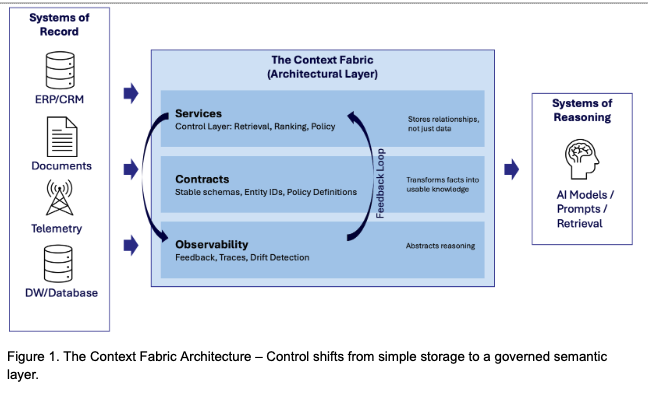
When OpenAI announced its persistent memory feature for ChatGPT in early 2025, it was presented as a convenience. Users could now have the model remember prior context, preferences, and facts, making interactions smoother and more personal. On the surface, it was a feature update. But at a deeper level, it hinted at a shift that … continue reading

The post The Context Advantage appeared first on SD Times.