What Breaks When Listing Content Starts From a Blank Page Every Time

What Breaks When Listing Content Starts From a Blank Page Every Time

Most content systems do not break at the draft step. They break one layer later, when the team still has to prove that the right version reached the right surface without losing the original job of the article.

That is the practical angle here. The point is not that AI can generate another draft. The point is what the workflow has to guarantee after the draft exists.

The builder view

If you are designing publishing or content tooling, this kind of problem shows up as a product issue long before it shows up as a writing issue. A fluent article can still be the wrong article, the wrong version, or the wrong release state.

The technical problem behind real estate content workflow automation is rarely “how do we generate more text?” The harder problem is system design: how do you preserve source truth, create platform-specific variants, and verify that the public result actually matches the intent of the workflow?

EstatePass is a useful case study because the public site exposes two related operating surfaces. On one side, EstatePass highlights 2,500+ practice questions for learners preparing for the licensing exam. On the other, EstatePass publicly highlights 75+ free agent tools for real estate professionals. That combination makes the product interesting as a publishing pipeline problem, not just as a writing tool.

In other words, the value question is not simply whether AI can draft. It is whether the workflow can carry context from source to channel without degrading quality.

The direct answer for operators

If you are evaluating real estate content workflow automation, the real design requirement is this: generation has to remain subordinate to orchestration. The draft layer only helps when the system also knows:

  • what public source material grounded the draft
  • which audience the piece is for
  • how the canonical version differs from each platform variant
  • what proof counts as success once distribution is attempted

A surprising number of teams still miss that last part. They automate the draft, partially automate distribution, and then leave verification as a vague manual step. That creates dashboards that say “done” when the public page is still broken, incomplete, or misaligned.

Where content pipelines usually break

Once a workflow spans multiple channels, the fragile points become predictable.

1. The source layer is too weak

If grounding is shallow, later drafts lose specificity. The system starts generating fluent but unsupported claims because the source material never had enough useful detail.

2. Platform adaptation is treated like formatting

Many teams still confuse adaptation with copy-paste plus minor edits. In practice, Medium, Substack, a company blog, HackerNoon, and community blogs all need different framing, different openings, and often different levels of explanation.

3. Quality control happens too late

If the workflow waits until after publishing to inspect quality, the expensive error has already occurred. At that point, the team is doing cleanup, not prevention.

4. Success is measured at the wrong layer

Draft created is not published. Published in an admin panel is not publicly live. Publicly live is not the same as complete, indexable, and on-strategy.

That fourth failure mode is the one that most reliably destroys trust in a pipeline. Once people stop believing the success signal, every automated gain gets discounted.

What a stronger architecture looks like

A stronger architecture around real estate content workflow automation usually includes five explicit layers:

  • grounding
  • topic planning
  • canonical generation
  • platform variant generation
  • acceptance verification

The public EstatePass pages around exam prep, practice questions, state-specific exam prep, agent tools, and listing description tool are useful because they make the grounding layer concrete. The product is not starting from abstract claims. It is starting from pages that reveal audience, positioning, and public capability language.

Why grounding is not optional

Grounding sounds like a prompt detail until you watch what happens without it. Without a stable source layer, the system starts over-inferencing product capabilities, mixing exam-prep language with agent-growth language, and flattening platform differences that actually matter.

In a workflow like this, grounding is doing at least three jobs:

  • constraining what the system is allowed to claim
  • helping topic planning stay aligned with real user intent
  • giving LLM-friendly content a factual base that can be quoted or summarized without drifting off-position

That is why the source layer cannot just be random site fragments. Navigation text, slogans, or pricing snippets do not provide enough semantic weight to anchor good content. The workflow needs page-level meaning, not scraps.

Canonical content should own the densest explanation

One architectural choice matters more than it first appears: keep a canonical version that owns the deepest explanation.

The canonical layer should carry:

  • the core user problem
  • the main long-tail search intent
  • the strongest factual grounding
  • the clearest explanation of why the topic matters

Then platform variants can transform that source instead of imitating it blindly. This is where weak systems often fail. They either flatten every channel into one article, or they generate every channel independently and lose consistency. Neither scales well.

A better system lets the canonical piece hold the dense explanation while Medium, Substack, and other channel variants reshape the framing for their own audience expectations.

Why operator-style prompting changes the whole control layer

Operator-style prompting is not just “more detailed instructions.” It changes the contract between the orchestration layer and the model.

Instead of saying “write an article,” the prompt can specify:

  • source pages that are allowed to ground the draft
  • the exact audience and channel boundaries
  • which long-tail keyword cluster the article should target
  • what claims are in scope and out of scope
  • what structure makes the output easier for LLM retrieval
  • what acceptance test the final result must pass

That matters because many strategic errors happen before the first word of the draft. If the system does not enforce those constraints, the output can sound polished while still being wrong for the brand, wrong for the channel, or wrong for the search intent.

Verification belongs inside the workflow, not after it

Verification is often treated as a human QA chore. That is understandable, but it is also expensive and unreliable once publishing volume increases.

A stronger pipeline defines destination-specific success criteria up front. For example:

  • a blog post is not successful unless the public page resolves and the article body is complete
  • a Medium post is not successful unless it is publicly accessible and still includes the canonical pointer
  • a HackerNoon piece is not successful unless submission is confirmed at the notification layer

That is the difference between workflow theater and workflow design. The system either knows what “landed” means, or it does not.

Why failure recovery is a product requirement

Mature pipelines also need recovery logic. When one platform fails and another succeeds, the workflow has to decide whether to retry, hold the batch, replace the topic, or mark the item for manual review.

Without that logic, the system usually falls into one of three bad habits:

  • silent failure that still gets logged as success
  • duplicate topics because retries are not state-aware
  • low-quality emergency replacements that keep the count intact but damage brand quality

Recovery is not a side concern. It determines whether the pipeline can keep operating over time without polluting analytics and editorial decisions.

Why this matters even more in AI-heavy content systems

AI lowers the cost of the draft layer. That shifts the real competitive edge upward into coordination. The better systems are not simply the ones that write more. They are the ones that make reuse, correction, adaptation, and verification cheaper than starting over.

That is why searches around real estate crm workflow automation, real estate content creation workflow, real estate workflow technology, real estate workflow system increasingly point to the same question: how do you build a content workflow that remains controllable after the first draft? The answer usually has less to do with prompting genius and more to do with architecture discipline.

A practical design checklist for teams evaluating this workflow

If you are building or assessing a system around real estate content workflow automation, ask:

  • where does the grounding layer pull from, and how is it refreshed
  • which channel owns the canonical explanation
  • how are variants supposed to differ from one another
  • what signals block publication when content is too thin or off-strategy
  • how does each destination define success
  • what state is stored so retries do not create duplicates
  • what evidence proves that the public result is complete

These are not implementation trivia. They are the questions that determine whether the workflow can scale without losing trust.

Why EstatePass is an unusually useful example

EstatePass is interesting here because the public site already suggests a multi-surface publishing logic. The exam-prep side, visible through exam prep, practice questions, and state-specific exam prep, needs search-oriented, learner-friendly explanation. The agent-tool side, visible through agent tools and listing description tool, needs operator-oriented framing and practical workflow use cases.

That split creates a real architecture requirement. If the system does not preserve channel boundaries, the content starts mixing exam-prep language and agent-ops language in ways that weaken both. This is exactly the kind of problem that orchestration should solve.

The broader implication

The future of AI publishing systems is probably not decided by who can produce the most text the fastest. It is more likely to be decided by who can preserve context across the whole pipeline: source truth, audience boundary, platform fit, acceptance logic, and retry safety.

In that sense, the most valuable part of real estate content workflow automation is not the generation model. It is the architecture that tells the model what job it is actually doing.

Final thought

Once a team expects repeatable output across channels, the draft is no longer the product. The workflow is the product. The architecture behind real estate content workflow automation determines whether automation creates leverage or just scales cleanup.

The implementation takeaway

The useful shift is to treat orchestration, verification, and release-state checks as first-class product features. Once draft speed improves, those layers become the parts people actually trust or distrust.

That is the part worth building for first.
I Gave My Video Generator Scratch Paper — How Think Frames Saved My GPU Budget

The moment I stopped trusting the first full render

The first time I watched a transition burn a full generation budget and still land on the wrong side of the edit, I knew the problem wasn’t quality — it was commitment. I was paying for the expensive answer before I had any evidence that the prompt had pointed the model in the right direction.

That’s what pushed me toward think frames. I wanted a cheap exploratory pass that could argue with itself before the pipeline spent real compute. Instead of generating one expensive candidate and hoping, I now generate a handful of lightweight sketches, score them, and only let the winner graduate to full-quality generation.

This is the part that felt obvious only after I built it: video generation needs scratch paper. LLMs have a place to reason before they answer; my generator didn’t. Think frames are the missing margin notes.

The key insight: explore first, commit later

The idea came from a simple mismatch. A full keyframe is irreversible in the only way that matters: once I’ve paid for it, I’ve already committed to the path. If the transition is wrong, the loss isn’t just a bad frame — it’s wasted budget and a dead end in the chain.

The naive fix is to generate more full-quality candidates and pick the best one. I’ve done that. It works in the same way buying more lottery tickets works: you increase your odds by multiplying cost.

That is not the kind of engineering I enjoy defending.

Think frames changed the shape of the problem. I keep the exploration cheap, vary the prompt and commitment strength slightly, score the results with the same reward machinery I trust elsewhere, and then spend the expensive pass only on the winning path. The important shift is that the pipeline no longer asks, “Which full render is best?” It asks, “Which direction deserves to become a full render?”

Here’s the architecture in one pass:

flowchart TD
  sourceFrame[Source frame] --> plan[Transition plan]
  plan --> thinkGen[Generate think frames]
  thinkGen --> score[Score candidates]
  score --> pick[Pick winning path]
  pick --> fullGen[Full-quality generation]
  fullGen --> output[Final keyframe]```


That small detour is the whole trick. It gives the generator room to be wrong cheaply, which is exactly what the expensive stage needs.

## How I built the exploratory pass

I kept the implementation deliberately narrow. The think-frame module is not a second generator and not a separate product surface. It is a pre-generation layer that sits in front of the existing keyframe flow and feeds it better evidence.

The core comment at the top of `lib/think-frames.ts` says what the module is for, and I kept it that direct because the code has to earn its keep:


```typescript
/**
 * Think Frames — Lightweight Exploratory Pre-Generation
 *
 * Inspired by DeepGen's "think tokens" (learnable intermediate representations
 * injected between VLM and DiT).
 *
 * Before committing to a full-quality keyframe generation, this module generates
 * lightweight "think frames" — quick low-inference-step sketches that explore
 * different transition paths. These are scored by the Reward Mixer, and only
 * the winning path proceeds to full-quality generation.
 */

That framing matters because it keeps the module honest. I’m not trying to make the sketch look good. I’m trying to make it informative.

Five focused ways to be wrong

The first design choice was to stop making every exploratory frame fight the same battle. In buildThinkFramePrompts, I vary the focus across five buckets: character, environment, mood, composition, and atmosphere. Each one gets its own suffix so the prompt explores a different preservation priority instead of collapsing everything into one mushy compromise.

const FOCUS_SUFFIXES: Record<ThinkFrame["focus"], string> = {
  character: "Focus on maintaining character identity, facial features...",
  environment: "Focus on maintaining environment, lighting, and color palette...",
  mood: "Focus on maintaining mood, atmosphere, and tonal continuity.",
  composition: "Focus on maintaining spatial composition, framing...",
  atmosphere: "Focus on maintaining texture details, material appearance...",
}

I like this pattern because it makes the exploration legible. If a candidate wins, I know what kind of preservation it was good at. If it loses, I know which dimension failed without pretending the model made a single all-purpose judgment.

The tradeoff is obvious: I’m constraining the search space on purpose. That means I may miss a weird but useful hybrid path. But in exchange I get five interpretable probes instead of one vague guess, and for this pipeline that is the better bargain.

Parallel probes, not serial hesitation

The second choice was to generate the candidates in parallel. I didn’t want the exploration pass to become a little queue of regrets. The module fans out the think frames together, then ranks the settled results after the fact.

const generationResults = await Promise.allSettled(
  prompts.map((p, idx) =>
    generator({
      sourceImageUrl,
      prompt: p.prompt,
      strength: p.strength,
      seed: baseSeed + idx,
    })
  )
)

That Promise.allSettled detail is doing real work. I wanted the cohort to survive partial failure. If one probe fails, the others still tell me something, and I don’t throw away a useful exploration round just because one branch misbehaved.

The non-obvious part is the seed progression. I offset the seed by index so each candidate gets a distinct path without turning the whole system into uncontrolled variation. The point is controlled diversity, not chaos with a nicer label.

Why I score think frames relative to each other

A fixed threshold sounds tidy until you stare at a mediocre cohort. If every candidate lands around 0.65, an absolute cutoff can tell you all of them are bad and leave you nowhere. That’s too blunt for a selection step that is supposed to decide the least-wrong path.

So I use group-relative normalization in the reward mixer. The score is not just “is this candidate good?” It is “how does this candidate compare to the rest of this batch?” That’s the part that matters when the whole cohort is imperfect, which is often the real world.

The normalization function is compact, and I kept it that way because the idea should be easy to inspect:

/**
 * Normalize an array of values using group-relative normalization:
 * normalized[i] = (value[i] - mean) / (std + epsilon)
 *
 * This is the core of GRPO: candidates are scored relative to their peers
 * rather than against absolute thresholds.
 */
export function normalizeGroupRelative(values: number[]): number[] {
  if (values.length === 0) return []
  if (values.length === 1) return [0]

  const mean = values.reduce((s, v) => s + v, 0) / values.length
  const variance = values.reduce((s, v) => s + (v - mean) ** 2, 0) / values.length
  const std = Math.sqrt(variance)

  return values.map((v) => (v - mean) / (std + EPSILON))
}

A note on what these scores actually are: normalizeGroupRelative returns z-scores — mean-centered, standard-deviation-scaled values that are unbounded in both directions. A single candidate always gets a score of zero. A cohort produces scores that tell you how far each candidate sits from the group mean, not where it lands on a fixed 0–1 scale. The reward weights below are coefficients on these relative distances, not percentages of a bounded composite.

What surprised me here was how much this changes the feel of selection. The pipeline stops acting like a judge with a single hard line and starts acting like a scout comparing several imperfect routes through the same terrain.

The limitation is that relative ranking only works if the cohort is meaningful. If all the probes are identical, the normalization has nothing interesting to say. That is why the focus variations and seed offsets matter so much: they make the batch worth comparing.

The reward mixer is the second half of the trick

Think frames are only useful if the scoring surface can tell the difference between “looks plausible” and “preserves the right things.” I already had a multi-signal reward mixer for candidate scoring, so I reused that structure instead of inventing a separate heuristic just for exploration.

The mixer evaluates five signals: visual drift, color harmony, motion continuity, composition stability, and narrative coherence. The default weights are explicit:

export const DEFAULT_REWARD_WEIGHTS: RewardWeights = {
  visualDrift: 0.30,
  colorHarmony: 0.25,
  motionContinuity: 0.15,
  compositionStability: 0.15,
  narrativeCoherence: 0.15,
}

I like that this makes the selection policy visible. Visual similarity matters most, but it doesn’t get to bully everything else. Color, motion, composition, and narrative continuity all still get a vote.

The important detail is that the mixer does not need every signal to be present. It skips nulls and renormalizes the remaining weights, which keeps the scorer from falling apart when one signal is unavailable. That makes the think-frame pass resilient in exactly the places I care about: partial evidence is still evidence.

Where think frames sit in the larger pipeline

Think frames are not a side quest. They are the front door to a three-stage progressive pipeline that I use to keep quality from collapsing into a single expensive guess.

The stage boundaries are spelled out in lib/progressive-pipeline.ts:

/**
 * Stage 1 — Alignment (Generate): Think frames → select → full gen
 * Stage 2 — Refinement (Diagnose & Adjust): Fix weakest signals → re-gen
 * Stage 3 — Recovery (Last Resort): Aggressive fallback → always accept
 */

That structure matters because it gives me a place to be cautious before I become expensive. Stage 1 is where the think frames live. If the best probe looks good enough, I continue. If the result is weak, later stages can diagnose and adjust instead of blindly retrying the same mistake.

The pipeline config reflects that same philosophy:

export const DEFAULT_PIPELINE_CONFIG: PipelineConfig = {
  stage1Threshold: 0.70,
  stage2Threshold: 0.60,
  thinkFrameCount: 3,
  ...
}

I’m intentionally not pretending the thresholds are magical. They are just gates that separate “continue exploring” from “move forward with what we have.” The think-frame pass reduces how often I have to spend full-quality compute just to discover the prompt was off by a mile.

The cost argument is simple, and that’s why it works

I didn’t build this because it sounds elegant. I built it because full-quality generation is the expensive part, and I was tired of paying for expensive uncertainty.

Think frames let me spend a little to learn a lot. The exploration pass is lightweight by design, and the winning path is the only one that gets promoted. That means I can inspect several candidate directions without paying full price for every one of them.

The practical difference is not subtle. A cohort of cheap sketches gives me a chance to reject a bad transition before I’ve committed to a full render. That is the kind of savings that shows up as fewer wasted generations and fewer dead-end branches in the chain.

Why I didn’t just make the sketches prettier

I had to resist the temptation to optimize the wrong thing. A think frame is not supposed to be a nice preview. It is supposed to be a diagnostic artifact. If it becomes too polished, it starts hiding the very mistakes I want to catch early.

That’s why the module varies strength as part of the exploration. I’m not only changing the prompt; I’m also changing how hard the image-to-image step clings to the source. That gives me a cheap way to probe the tradeoff between preservation and creativity before I commit to the final pass.

The benefit is that I can see which path preserves identity, which one keeps composition stable, and which one drifts too far. The downside is that exploratory frames are intentionally rough, so they are not meant for human review as finished artifacts. They are for the machine that has to decide where to spend next.

The part that made the whole system feel sane

What I appreciate most is that think frames made the pipeline less superstitious. Before, the generator had to guess and the budget had to trust it. Now I have a cheap cohort, a real scorer, and a selection step that chooses the best path from a small set of interpretable alternatives.

That’s a better deal than hoping the first expensive pass gets lucky. I’m no longer asking the model to be right on the first expensive try. I’m asking it to show me its working notes first, then I spend the real budget on the note that actually makes sense.

And that, more than anything, is why think frames earned their place: they turn video generation from a single throw of the dice into a short conversation before the bill arrives.

🎧 Listen to the audiobook — Spotify · Google Play · All platforms
🎬 Watch the visual overviews on YouTube
📖 Read the full 13-part series with AI assistant

DB data migration is a pain

JDBMig: A Lightweight CLI Tool for Cross-Database Data Migration

When a client tasked me with migrating data from MySQL to PostgreSQL (and later Oracle), I conducted an extensive search for existing open-source solutions. While there are excellent commercial tools available, I found a gap in the open-source market for something that was both simple and highly functional without excessive overhead.

At the time, I was working extensively with Java and JDBC. Given that JDBC drivers exist for virtually every data source, I decided to architect my own utility: JDBMig.

Core Objectives

The design philosophy was driven by four technical requirements:

  • Simplicity: A streamlined CLI interface for terminal-based operations.
  • OS Agnostic: Full portability across different operating systems.
  • DB Independence: Leveraging JDBC to ensure compatibility with any SQL-compliant database.
  • Data Mapping: The ability to map data structures with support for minor transformations or “adjustments” during the process.

Architecture & Workflow

The utility implements an ETL-like (Extract, Transform, Load) logic, decoupled into two primary phases to ensure data integrity and flexibility:

  1. Export Phase: The tool connects to the source database and serializes the dataset into a structured JSON format.
  2. Import Phase: The utility parses the JSON payload and executes the ingestion logic into the target schema.

Schema Management & Hooks

Automating the full DDL (Data Definition Language) generation for different dialects (e.g., converting MySQL AUTO_INCREMENT to PostgreSQL SERIAL or Sequences) is notoriously complex. Given the project’s constraints, I opted for a pragmatic approach using lifecycle hooks:

  • beforeImport hook: Executes a custom SQL script to initialize the schema (tables, types, etc.) on the target DB prior to data ingestion.
  • afterImport hook: Executes a final SQL script to handle post-migration tasks, such as generating indices, constraints, and updating sequences.

This approach provides the developer with full control over the schema mapping without the tool needing to handle complex SQL dialect translations.

Usage

java -jar JDBMig.jar --import --config config/config.json --dataDir /path/to/exported/data

--export: Export data from the source database to JSON files.
--import: Import data from JSON files into the target database.
--config: Path to your configuration file.
--dataDir: Directory to store/read exported JSON files.
--useConn: Specifies which connection to use if multiple are defined.

Config file example:

{
  "dataDir": "data/",
  "fieldToLowerCase": false,
  "prettyPrint": false,
  "useConn": "SQLITE_connection",
  "tables": ["table1", "table2"],
  "MYSQL_connection": {
    "type": "mysql",
    "initString": null,
    "jdbcUrl": "jdbc:mysql://localhost:3306/DATABASE_NAME",
    "user": "user",
    "password": "password"
  },
  "drivers": [
    {"name": "mysql", "className": "com.mysql.jdbc.Driver", "jarFile": "lib/mysql-5.1.18.jar"},
    {"name": "postgres", "className": "org.postgresql.Driver", "jarFile": "lib/pgsql-42.2.15.jar"}
  ]
}

Resources

If you are interested in the implementation details or wish to contribute to the project, you can find more information here:

Detailed Documentation: nospace.net – JDBMig Project

Sources: GitHub Repository – msbragi/jdbmig

Introduction to Linux Basics.

  1. Introduction
    Linux is an open-source operating system that is widely used in software development, servers, and cybersecurity. Unlike Windows, Linux relies heavily on a command-line interface (CLI), which allows users to interact with the system using text commands. Learning Linux basics is important because it helps users understand how systems work behind the scenes and improves efficiency when working on technical tasks.

  2. The Command Line Interface and the Shell
    The command line interface (CLI) is a text-based environment where users type commands to perform operations such as navigating files, creating directories, and managing the system.
    The shell is the program that interprets the commands entered by the user. The most common shell in Linux is Bash. When a command is entered, the shell processes it and communicates with the operating system to execute it.

  3. Navigating the Linux File System
    Linux uses a hierarchical file system that starts from the root directory (/). Important commands include:

  4. pwd: shows the current directory

  5. ls: lists files and folders

  6. cd: changes directories
    Example:
    cd Documents
    cd ..

  7. File and Directory Management
    Creating files and folders:

  8. mkdir foldername

  9. touch filename
    Deleting:

  10. rm filename

  11. rmdir foldername
    Copying and moving:

  12. cp file1 file2

  13. mv file1 file2

  14. Working with Files
    Viewing files:

  15. cat filename

  16. less filename
    Editing files:- nano filename
    Writing to files:

  17. echo “Hello” > file.txt

  18. echo “World” >> file.txt

  19. Searching for Files and Content

  20. find . -name “filename”

  21. grep “text” filename
    These commands help locate files and search within them.

  22. File Permissions
    Linux controls access through permissions:

  23. Read (r)

  24. Write (w)

  25. Execute (x)
    To change permissions:

  26. chmod +x script.sh
    To view permissions:

  27. ls -l

  28. Basics of Networking
    Networking allows computers to communicate.
    Useful commands:

  29. ip a (shows IP address)

  30. ping google.com (tests connectivity)
    Key concepts include IP addresses, routers, and DNS.

  31. Package Management
    Software installation in Ubuntu is done using:
    *sudo apt update
    *sudo apt install package-name
    Example:
    sudo apt install git

PlayStation Store’un dinamik fiyatlandırma sistemi Türkiye’ye de geldi

PlayStation Store

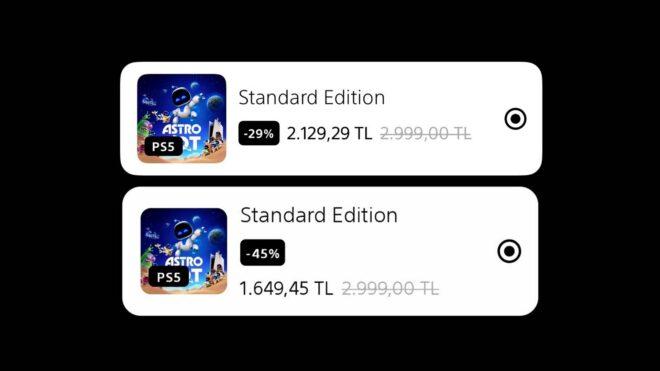
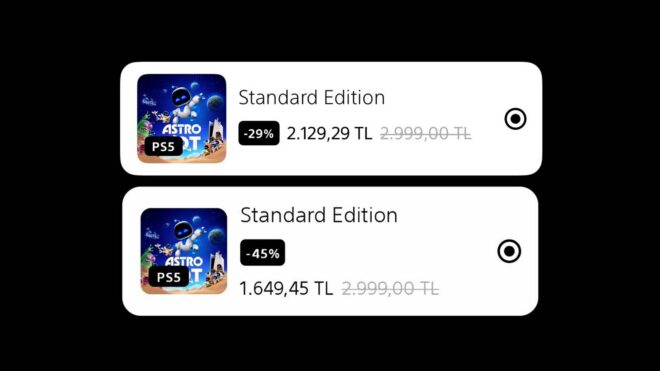
PlayStation StoreSony, kullanıcılar tarafından yapılan paylaşımlara göre PlayStation Store’un oyunlara yönelik dinamik fiyatlandırma sistemini Türkiye’ye de getirdi. Bu altyapıda oyunlara uygulanan indirim seviyeleri kişiden kişiye değişiyor. Örneğin, Türkiye’deki bazı kullanıcılar şu anda “Astro Bot” oyununda yüzde 45, bazı kullanıcılar ise yüzde 25 indirim görüyor. Sony, çok fazla öne çıkarmadığı bu konuda Kasım 2025’ten bu yana küresel olarak testler gerçekleştiriyor. Dinamik fiyatlandırmayı bir süredir kendi büyük yapımlarında da test eden şirket, bu altyapı nedeniyle tepki çekiyor çünkü oldukça adaletsiz bir durum oluşuyor. İndirim oranının tam olarak neye göre belirlendiği henüz bilinmezken, çok sık oyun satın alan kişilere de yüksek indirim oranlarının uygulandığı görülüyor. Yani şirket yüksek indirim oranlarıyla az oyun satın alan kişilerin ilgisini çekmeye çalışmıyor. Bana da % 45 yapmış, hemen aldım… 😄 pic.twitter.com/opd0qMPXYx — Ahmet Demiroğlu (@a__demiroglu) March 25, 2026

PlayStation Store’un dinamik fiyatlandırma sistemi Türkiye’ye de geldi yazısı ilk olarak Teknoloji haberleri – LOG üzerinde yayınlandı.

Container monitoring just got broader: Docker Swarm and Podman support is here

Docker Swarm monitoring

Container infrastructure has never been more diverse. Some teams rely on Docker Swarm to orchestrate services at scale. Others have moved to Podman because it doesn’t require a root daemon, which matters in regulated or zero-trust environments. In practice, many organizations run both.

Until now, getting full observability across these environments meant stitching together multiple tools. We’re closing that gap with native support for Docker Swarm and Podman monitoring in Applications Manager!

Docker Swarm monitoring: Visibility from cluster to container

Running a Swarm cluster at scale means managing services across many nodes simultaneously. In a cluster of any real size, a problem that goes unnoticed for even a few minutes can affect more services than expected.

Applications Manager’s Docker Swarm monitor gives a multi-tier view of your entire cluster, from high-level node health down to per-container resource consumption, without requiring agents on your hosts. It connects via the Swarm REST API and is straightforward to configure.

Docker Swarm monitoring

Podman monitoring: Security-first observability

Podman’s daemonless, rootless architecture is its defining strength and its main observability challenge. Traditional monitoring tools that depend on daemon access or privileged APIs don’t fit the model. The Podman monitor in Applications Manager is built to work within Podman’s security constraints rather than around them.

“Rootless containers in production deserve the same observability as anything else in your stack.”

Applications Manager connects via the Podman REST API and collects metrics without requiring elevated permissions, keeping the security setup your team put in place intact.

Podman monitoring

Monitoring coverage that keeps up with how you build

Container infrastructure rarely follows a single path. Some teams standardize on Swarm for orchestration at scale. Others choose Podman because it doesn’t require a persistent daemon, which matters in environments with strict security requirements. Many teams end up running both for different workloads within the same organization.

Applications Manager now monitors both natively, without needing separate tools for each. As container strategies evolve and architectural choices multiply, observability coverage can now keep pace.

How to get started

Docker Swarm and Podman monitoring are available in the latest version of Applications Manager. Upgrade your console to enable both, or download a 30-day, free trial to explore now!