How i used Gemini to turn my syllabus into a planner, quiz, and mind map within 5 minutes!!!

Syllabus uploaded to Gemini and broken into main topics

As a student, I wanted to turn my syllabus into something actually useful instead of just keeping it as a long list of topics. So I uploaded it to Gemini, and in about 5 minutes it generated a study plan, quiz, flashcards, and a mind map.

This made my revision feel much more organized and less overwhelming.

**Step 1: **I uploaded my syllabus and asked Gemini to break it down into the main topics first.

Syllabus uploaded to Gemini and broken into main topics

It quickly identified the major sections, which made the rest of the process much easier.

Step 2: After Gemini understood the syllabus, I used it to create a simple study plan based on the important topics.

prompt i used:

I have uploaded my syllabus and exam-related notes.
Your job is to turn this into a complete student study system.
Create the following:

A priority-based to-do list for the next 10 days.

A topic-wise study plan with daily time blocks.

A list of useful resources for each major topic, but only if they are directly relevant to the syllabus.

Flashcards for important definitions, formulas, and concepts.

A simple mind map structure showing how the topics connect.

A short revision strategy for the last 2 days before the exam.

Rules:

Stay strictly grounded in the uploaded syllabus.

Do not add unrelated topics.

Keep the output concise, structured, and easy to revise.

Highlight the most important topics first.

If any topic is unclear or too broad, flag it and suggest how I should study it.

Output format:

Use headings.

Use bullet points.

Make it easy for a student to follow immediately.

Gemini generating a study plan from the syllabus

This part helped me see what to study first and made the syllabus feel much less confusing.

Step 3: Then I asked Gemini to make a quick quiz and flashcards from the important topics so I could test myself faster.

Gemini creating quiz and flashcards for quick revision

Gemini creating quiz and flashcards for quick revision

This was really helpful because it turned the syllabus into something I could actually revise in a short time.

Step 4: Finally, I asked Gemini to turn everything into a mind map, which made it much easier to understand the full syllabus at a glance when I had very little time.

Gemini turning the syllabus into a mind map for fast revision

Gemini also had a lot more options like generating audio, video, and even podcast-style content, which made it feel more powerful than I expected.

Additional Gemini features such as audio, video, and podcast generation

Overall, Gemini helped me turn a long and confusing syllabus into something practical and easier to study. For me, the best part was how quickly it created a study plan, quiz, flashcards, mind map, and even extra options like audio and video ideas. As a student, that kind of speed and flexibility can save a lot of time during exam prep.

Dependent Types for Programmers: A Practical Introduction Using Lean 4

Hello, I’m Shrijith Venkatramana. I’m building git-lrc, an AI code reviewer that runs on every commit. Star Us to help devs discover the project. Do give it a try and share your feedback for improving the product.

If you are learning Lean 4, sooner or later you encounter something like this:

Vec : Type → Nat → Type

And suddenly the tutorials start talking about:

  • proofs,
  • propositions,
  • type theory,
  • dependent types,
  • Curry–Howard correspondence.

For many programmers, this is where things become foggy.

The strange thing is that the underlying idea is actually very practical.

Dependent types are fundamentally about this:

making more program assumptions visible to the compiler.

This article builds the idea gradually from an ordinary programmer’s mental model.

The Normal Way We Think About Types

In most languages, we think of types like categories.

42 : Int
"hello" : String

A type tells us what kind of value something is.

For example:

List<Int>

means:

“a list of integers.”

But notice what the type does not tell us:

  • how many integers,
  • whether the list is empty,
  • whether it is sorted,
  • whether it has been validated,
  • whether authentication has happened,
  • whether certain invariants hold.

Those become:

  • comments,
  • runtime checks,
  • tests,
  • conventions,
  • assumptions.

The Core Idea of Dependent Types

Dependent types change one thing:

types are allowed to depend on values.

That is why they are called dependent types.

Normally:

values belong to types

With dependent types:

values can also appear inside types

That sounds abstract initially, but the examples make it much clearer.

Understanding Vec Nat 3

Suppose you see:

Vec Nat 3

This means:

“a vector containing exactly 3 natural numbers.”

Break it apart:

  • Vec → vector type constructor
  • Nat → element type
  • 3 → required length

The important part is this:

the length is part of the type itself

So these are different types:

Vec Nat 3
Vec Nat 5

The compiler can distinguish them.

That is the conceptual shift.

“But C Arrays Already Have Sizes”

Good observation.

C already gets somewhat close:

int arr[3];

So what makes dependent typing different?

The difference is that the values become usable inside the type system itself.

For example:

append : Vec α n → Vec α m → Vec α (n + m)

This means:

appending a vector of size n
to a vector of size m
produces a vector of size n + m

The type system is now reasoning symbolically about values.

That is much more expressive than ordinary static typing.

Why This Matters

Most software bugs are really violations of assumptions.

Consider matrix multiplication.

You might write:

matrixMultiply(a, b)

But there is an implicit rule:

a.columns == b.rows

Normally:

  • you document this,
  • test this,
  • or check it at runtime.

With dependent types, you can encode the relationship structurally:

Matrix m n
Matrix n p

Now invalid multiplication does not typecheck.

The compiler understands the invariant itself.

That is the real promise of dependent typing:

move important assumptions from comments into machine-checked structure.

Non-Empty Lists

Here is another example.

In ordinary programming:

def head(xs):
    return xs[0]

Potential issue:

What if xs is empty?

Usually this becomes:

  • a runtime exception,
  • a defensive check,
  • or a convention.

In Lean-like systems:

head : Vec α (n + 1) → α

This says:

head only accepts non-empty vectors.

Why?

Because:

n + 1

can never be zero.

The impossible case disappears from the program structure entirely.

“But Real Programs Use Dynamic User Input”

This is one of the most common misunderstandings.

People often assume dependent typing only helps when everything is known at compile time.

But in practice, the workflow is usually:

dynamic validation
        ↓
static guarantee afterward

Suppose a user uploads some JSON.

Initially, the data may effectively have a type like:

UntrustedInput

Then validation happens.

After validation, the type changes:

AuthenticatedUser
ValidConfig
NonEmptyList
Vec Nat 3

The important idea is this:

once something has been checked, the type system remembers the fact.

That is incredibly useful.

Real-World Intuition

Many systems already rely on informal “refined” types.

For example, programmers mentally distinguish between:

raw string
validated email
escaped SQL
sanitized HTML
authenticated user

But in many languages, all of them are still just:

String

Dependent typing allows those distinctions to become explicit and enforceable.

What Lean Is Really Exploring

Lean is often presented as:

  • a theorem prover,
  • a mathematical tool,
  • or a proof assistant.

But from a programmer’s perspective, a more useful framing is:

Lean explores what happens when program invariants become part of the language itself.

Not:

comments + conventions + hope

but:

proof + enforcement

That is the deeper shift.

Final Thoughts

When programmers first encounter dependent types, the syntax can look intimidating:

Vec : Type → Nat → Type

But the underlying idea is surprisingly concrete.

Dependent types are about expressing richer facts directly in the type system:

  • sizes,
  • protocol states,
  • validation status,
  • permissions,
  • invariants,
  • safety guarantees.

And once those facts become part of the type system, entire classes of bugs become much harder to represent.

That is why languages like Lean are interesting even beyond theorem proving.

They are exploring a different model of software correctness itself.

*AI agents write code fast. They also silently remove logic, change behavior, and introduce bugs — without telling you. You often find out in production.

git-lrc fixes this. It hooks into git commit and reviews every diff before it lands. 60-second setup. Completely free.*

Any feedback or contributors are welcome! It’s online, source-available, and ready for anyone to use.

GitHub logo

HexmosTech
/
git-lrc

Free, Micro AI Code Reviews That Run on Commit

AI agents write code fast. They also silently remove logic, change behavior, and introduce bugs — without telling you. You often find out in production.

git-lrc fixes this. It hooks into git commit and reviews every diff before it lands. 60-second setup. Completely free.

See It In Action

See git-lrc catch serious security issues such as leaked credentials, expensive cloud
operations, and sensitive material in log statements

git-lrc-intro-60s.mp4

Why

  • 🤖 AI agents silently break things. Code removed. Logic changed. Edge cases gone. You won’t notice until production.
  • 🔍 Catch it before it ships. AI-powered inline comments show you exactly what changed and what looks wrong.
  • 🔁 Build a…

Ghost Jobs Are Wasting Your Time — I Built a Chrome Extension to Detect Them

A ghost job is a job listing that exists but isn’t actively hiring. The company posted it months ago, probably isn’t reviewing applications, and might not even have a live opening. Estimates put ghost job listings at anywhere from 20% to 40% of what you see on LinkedIn and Indeed on any given day.

The problem is that they look identical to real listings. You can’t tell from the title, the company name, or the description. You only figure it out after sending a tailored resume into a void.

I built GhostJob to surface the signal that’s already in the listing — you just have to look.

What actually signals a ghost job

Before writing a single line of detection logic, I spent time thinking about what distinguishes a ghost job from a real one given only the information visible on the listing card.

Three signals turned out to be the most reliable:

1. Posting age. This is the strongest signal. A job posted 90+ days ago that hasn’t been taken down is almost certainly either abandoned or evergreen (always hiring, always up). Both are forms of ghost job from the applicant’s perspective. Real, time-sensitive openings get filled or closed.

2. Description vagueness. Ghost jobs are often templated or copied from old postings. They tend to be short, generic, and missing specific technical requirements. “Strong communication skills and attention to detail” isn’t describing a real open role — it’s describing every job posting from 2012.

3. Duplicate postings. Some companies maintain permanent listings for roles they hire for occasionally or not at all. If a company has five “Senior Product Manager” postings across different locations that all use identical copy, none of them may be real.

The scoring model

I implemented a simple additive score from 0 to 100:

function daysScore(daysSincePosted: number): number {
  if (daysSincePosted >= 90) return 60;
  if (daysSincePosted >= 60) return 40;
  if (daysSincePosted >= 30) return 20;
  if (daysSincePosted >= 14) return 10;
  return 0;
}

function vaguenessScore(descriptionLength: number, hasSpecificRequirements: boolean): number {
  let score = 0;
  if (descriptionLength < 200) score += 15;
  else if (descriptionLength < 400) score += 8;
  if (!hasSpecificRequirements) score += 10;
  return score;
}

“Specific requirements” means the description mentions a concrete technology, skill level, or credential — React, Python, “3+ years of experience”, a certification. Generic descriptions add points; specific ones don’t.

The output maps to three tiers: 0–30 is Likely Real, 31–60 is Caution, 61+ is Likely Ghost. I deliberately avoid calling anything definitively a ghost job — the user is making the final call, and false positives have a real cost.

Parsing dates from three different sites

LinkedIn, Indeed, and Glassdoor each have their own date formats and DOM structures. The content script handles each site separately, but they all route through the same date parser:

export function parseDaysAgo(dateText: string): number {
  const text = dateText.toLowerCase().trim();
  if (/today|just posted|now/.test(text)) return 0;
  const dayMatch = text.match(/(d+)s*day/);
  if (dayMatch) return parseInt(dayMatch[1], 10);
  const weekMatch = text.match(/(d+)s*week/);
  if (weekMatch) return parseInt(weekMatch[1], 10) * 7;
  const monthMatch = text.match(/(d+)s*month/);
  if (monthMatch) return parseInt(monthMatch[1], 10) * 30;
  if (/30+/.test(text)) return 35;
  return 0;
}

Indeed shows “30+ days ago” — a deliberately vague label that hides just how old a listing is. The 30+ match handles that case specifically, mapping it to 35 days.

The SPA problem

LinkedIn and Indeed are single-page applications. They load job cards dynamically as you scroll or filter results. A content script that only runs on document.ready would miss everything loaded after the initial render.

The fix is a MutationObserver that re-runs the scan whenever the DOM changes:

activeObserver = new MutationObserver(() => {
  scanAndInject();
});
activeObserver.observe(document.body, { childList: true, subtree: true });

// Clean up on SPA navigation
window.addEventListener('pagehide', () => activeObserver?.disconnect(), { once: true });

A processing flag prevents concurrent scans from piling up. Each scored card gets data-ghostjob-scored="true" so re-scans skip already-processed cards efficiently.

Injecting badges without breaking the page

The score badge injects as a plain div using insertAdjacentElement('afterend', target) right after the job title. Inline styles instead of injected CSS to avoid specificity battles with each site’s stylesheet:

badge.style.cssText = `
  display: inline-flex; align-items: center; gap: 5px;
  padding: 3px 8px; border-radius: 4px;
  background: ${bg}; border: 1px solid ${color}40;
  font-size: 11px; font-weight: 600; color: ${color};
`;
badge.innerHTML = `👻 <span>${label}</span><span style="opacity:0.6"> · ${score}</span>`;
badge.title = `GhostJob Score: ${score}/100`;

The three-tier color system (green/amber/red) makes the signal legible at a glance without requiring the user to read a number.

What the extension is

GhostJob adds a score badge to every job listing on LinkedIn, Indeed, and Glassdoor. Free plan: 20 checks per day. Pro removes the limit and adds a history view.

Available on the Chrome Web Store: https://chromewebstore.google.com/detail/mdjchaohgneaiflafheajamfomeccach

If you’re actively job searching, install it and tell me which signals you think are missing from the scoring model — the current weights are a starting point, not a final answer.

More Chrome extension builds at dev-tools-hub.xyz.

I built a local-first dashboard for everything Claude Code does on my machine

Command Center

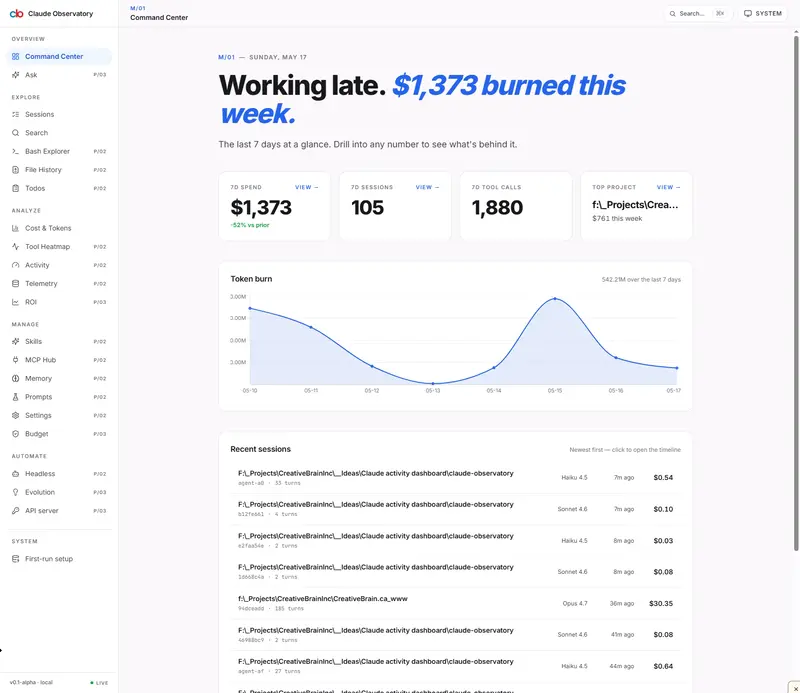
Claude Observatory turns ~/.claude into a searchable, visual command center — 16 modules, live SSE updates, zero outbound network. Here’s what’s inside and why I built it.

Every Claude session, every token, every command — visible

If you use Claude Code daily, your ~/.claude/ directory already contains the answer to most of the questions you keep asking yourself:

  • “How much did I spend on Claude last week, and on which projects?”
  • “Where did I write that prompt three weeks ago?”
  • “Which tool calls are slowest or failing most?”
  • “Which skills, MCPs, and CLAUDE.md files are actually loaded for this project?”
  • “What did I tell Claude to do that I forgot to follow up on?”

The data is right there in JSONL files, SQLite databases, and config blobs scattered across folders. It’s just not browsable.

So I built Claude Observatory — a local-first Next.js dashboard that reads ~/.claude/, indexes it into SQLite, and exposes 16 modules + 7 “killer” features. No outbound network, bound to 127.0.0.1, no telemetry. Your data never leaves the machine.

This is the technical tour: what’s in the box, how it’s wired, and what I learned shipping it.

The dashboard at a glance

Command Center

The Command Center is the home page — today’s spend, recent sessions, live status dot, and quick links into every module. There’s also a dark theme if you live in the terminal:

Dashboard, dark

The left sidebar is the navigation spine. Every module is a separate route, every route is bookmarkable, and the live status dot at the top tells you whether the file watcher is attached.

The three-layer architecture

~/.claude/                    →  Index Layer            →  UI (Next.js)
├── projects/*.jsonl              ├── parser workers          ├── 16 module routes
├── sessions/                     ├── SQLite + FTS5           ├── live SSE updates
├── todos/                        ├── chokidar watcher        ├── recharts/d3 viz
├── skills/                       ├── API routes              └── monaco editor
├── bash-commands.log             └── SSE stream
├── cost-tracker.log
└── 17+ more sources

Stack: Next.js 16 (App Router) · React 19 · TypeScript strict · Tailwind 4 · shadcn/ui · better-sqlite3 with FTS5 · zod · chokidar · TanStack Query · zustand · recharts · d3 · Monaco Editor.

Why local SQLite over a hosted Postgres? Because the data is local. Round-tripping your conversation history through a cloud DB just to render a chart of your own spend is the wrong tradeoff. better-sqlite3 is synchronous, lives next to the app, and runs the entire 16-module dashboard with sub-50ms p95 on most pages.

The 16 modules

Here’s the full list — Command Center · Sessions · Search · Cost & Tokens · Tool Heatmap · Bash Explorer · File History · Skills · MCP Hub · Memory · Todos · Activity · Telemetry · Prompts · Settings · Headless & Agent Mode.

Let me show the ones that surprised me most.

Sessions Explorer

Sessions

Every session, filterable by project / model / status / text content. Click in and you get the full conversation. This is the page I open when I half-remember an exchange and want the verbatim transcript.

Cost & Token Analytics

Cost & Tokens

Daily / weekly / monthly USD + token breakdown, per project and per model. The first time I opened this page on my own data I made three immediate workflow changes. That’s what the dashboard is for.

Tool Usage Heatmap

Tool Heatmap

Calendar heatmap + 24h distribution + per-tool table + outliers. p95 = 14.9ms. The “when does Claude actually run” question turns out to be answerable to the hour.

Bash Explorer

Bash Explorer

Every shell command Claude has run on your behalf, with a dangerous-pattern panel that flags rm -rf, force-pushes, sudo, etc. Built over the tool_calls table via json_extract — no schema migration needed.

File History & Diff

File History

Every file Claude has written or edited, with a lazy-loaded Monaco DiffEditor on the detail page. 676 files indexed on my machine. Useful when you want to roll back a specific edit but don’t want to read commits.

Skills Library

Skills

Inventory of every skill under ~/.claude/skills/ and ~/.claude/plugins/*/skills/, with FTS5-powered trigger counts. 862 skills on my machine. That’s not a typo.

MCP Hub

MCP Hub

Declared (mcp.json) plus observed MCP servers, merged into one view, with env values scrubbed before display. Tells you what’s actually wired vs. what you think is wired.

Memory Explorer

Memory

Every CLAUDE.md plus the auto-memory store under ~/.claude/projects/<id>/memory/*.md. Six scopes (global / project / .claude / nested / auto-index / auto). Detail page shows siblings in the sidebar so you can navigate a project’s whole memory tree without leaving the page.

Todos

ToDos

TodoWrite items across all sessions, with a 4-status filter and an abandoned-todo panel for things in_progress > 7 days. 30 files, 37 items, 13 abandoned on my machine when I first turned it on. (I had a productive afternoon after that.)

Activity Heatmap

Activity

Calendar heatmap of sessions per day, current streak, busiest hour. Reuses the heatmap component from /tools. Streak tracking turned out to be motivating in a way I didn’t expect.

Telemetry

Telemetry

Error rate, slowest tools, retry counts. 30-day window: 4,986 calls, 9.7% error rate, Write at 17.9% is the worst-performing tool. I pivoted away from latency histograms because tool_calls.duration_ms is unpopulated in current JSONL — the honest banner on the page explains it.

Prompt Library

Prompts

Reads ~/.claude/history.jsonl on demand. Top-reused prompts, project facets, slash-command frequency. p95 = 3ms.

Settings (first write-capable surface)

Settings

This is where Mutations live — see “Editing without footguns” below.

Headless & Agent Mode

Headless

Inspects claude -p runs and the agent-harness session feed. Pair this with the API Server module if you want to use your own machine as a Claude server:

API Server

Live updates without polling

The Observatory watches ~/.claude/ in real time with chokidar (400ms trailing-edge debounce). When Claude Code writes a new JSONL line, the SSE stream at /api/stream invalidates the relevant TanStack Query keys and the UI updates without a refresh.

The LiveStatusDot in the sidebar shows one of three states:

  • ● Live (green) — watcher attached, last event was recent
  • ● Starting (amber) — watcher initialising
  • ● Offline (red) — watcher detached

Three colors, one component, zero confusion. I tried react-use-websocket first and ripped it out — SSE is simpler, one-way, survives proxies, and the entire watcher → broadcaster → SSE → query invalidation pipeline fits in about 150 lines.

Editing without footguns

Writes to ~/.claude/ are off by default. To enable them:

  1. Go to /settings
  2. Flip the Mutations toggle ON (persisted in zustand+localStorage)
  3. Every subsequent write request includes an X-Mutations-Confirmed: 1 header
  4. Server-side handlers reject any write without it
  5. Every overwrite creates a timestamped backup (e.g. settings.json.bak.2026-05-15T12-30-00)
  6. An in-memory audit log shows every write attempt — even rejected ones

This is enforced in code, not in UI alone. There is no way to mutate ~/.claude/ from the app without going through the gate. I’m bullish on this pattern for any tool that touches a user’s config directory — toggle in client state, header in transit, gate at the server, audit log in memory. Four layers, all cheap.

The 7 killer features

Modules tell you what happened. Killer features change what you can do with it:

  1. Time-Travel Replay & Fork — Git rebase, but for AI conversations.
  2. Ask Your History — Natural-language Q&A over your entire Claude history.
  3. The Twin — A specialized agent fine-tuned on you.
  4. Self-Evolving CLAUDE.md — Your AI gets smarter every week, autonomously.
  5. AI ROI Dashboard — The single number that ends “is Claude worth it?”
  6. Budget Autopilot — Spend governance that runs itself.
  7. Personal Headless API — Your machine becomes a Claude server.

Some are alpha-shipping today:

Ask Your History uses a local prompt-to-SQL pipeline. Type a question, the system generates a SELECT against the index and answers in plain English. “What did I spend on the Reddit SaaS project last month?” becomes a chart and a sentence.

Ask Your History

AI ROI Dashboard answers the one question every team eventually asks. It’s not magic — it’s just every number you already have, presented as a ratio.

ROI Dashboard

Budget Autopilot sets per-project and per-month caps with anomaly alerts. Burn rate visible at a glance.

Budget Autopilot

Self-Evolving CLAUDE.md watches your sessions and suggests CLAUDE.md improvements weekly. Append, accept, reject — your call, never automatic.

Self-Evolving CLAUDE.md

Privacy: the part most observability tools skip

  • The dev server binds to 127.0.0.1. Never 0.0.0.0.
  • Zero outbound network traffic in the free tier. Cloud sync, AI summaries, and the Headless API are explicit opt-ins.
  • .credentials.json is never read or displayed — the UI only shows a Connected · expires in Nd string.
  • The SQLite index lives next to the app under data/observatory.db and can be wiped at any time with pnpm db:reset.
  • The watcher reads only; it never writes to ~/.claude/ unless Mutations is ON.

If you’re going to build a tool that introspects another tool’s home directory, the absolute minimum is to be loud about what it does and does not touch. The threat model lives in SECURITY.md and is enforced in tests.

First-run setup

First run, step 1

First run, step 2

pnpm install
pnpm scan:initial    # one-time full index of ~/.claude/
pnpm dev             # serves at http://127.0.0.1:7777

The initial scan is the slow part — everything after that is incremental via the watcher. On a populated ~/.claude/ the first scan takes about a minute. After that the dashboard opens cold in under a second.

What I’d build differently if I started over

Three things, briefly:

  1. Start with the watcher, not the scanner. I built the full-scan pipeline first and bolted live updates on later. Building incremental from day one would have been cleaner.
  2. Treat tool_calls.duration_ms as aspirational. It’s not populated reliably in current JSONL. Don’t build histograms on top of fields that may not exist.
  3. One gate, four layers. The Mutations pattern (toggle → header → server check → audit log) is the design I’m most proud of. Worth doing from the start, not retrofitted.

If you are interested in trying it out

DM me and I will send you the repository. It’s going to be an open source, MIT for the Solo tier. Bind to 127.0.0.1, run pnpm scan:initial, and open http://127.0.0.1:7777. If you use Claude Code daily, give it ten minutes — and let me know what you find on /cost and /tools.

If you build a module on top of it, I want to see it. There are 16 today; the architecture is a parser layer + a query layer + a route, and adding a 17th is genuinely a single afternoon.

Andy / Creative Brain Inc. — Toronto, Ontario. Find me at [email protected].

How to Avoid Chrome Web Store ‘Red Nickel’ Rejection: What I Found After Auditing 18 Extensions

I got my Chrome extension rejected from the Chrome Web Store last week for a 4-letter word: “Free.”

Not a permission issue. Not a CSP violation. Not a manifest field. Just the word “Free” sitting in a small badge on my listing image. The Chrome Web Store calls this a Red Nickel violation — their internal name for prohibited promotional language in extension listings.

I run 18 extensions on the store. After the rejection I ran an audit across all of them. 9 had image violations. 14 had description copy violations. Combined, about 80% of my listings tripped at least one Red Nickel rule.

Here’s the audit framework I built so this doesn’t happen again, plus the categorization that came out of running it.

What “Red Nickel” Actually Is

The public policy text from the Chrome Web Store Developer Program is short:

Listings must not include promotional language or claims about your product, including but not limited to discount notifications, “free” promotions, ratings, awards, or rankings.

Words like “Free”, “Best”, “Top”, “#1”, “Award-winning” — even if they’re factually true — are not allowed in listing copy, titles, or screenshot images.

“Red Nickel” itself appears to be the internal flag name reviewers use. It isn’t in the public documentation. Most developers first hear about it when their extension gets rejected, which is exactly how I learned.

The Two-Hour Audit

After the rejection I wanted to find every remaining violation before the next CWS submission deadline. The audit ran in two passes.

Pass 1 — Image scanning (grep over HTML sources)

All my listing assets are rendered from HTML templates (store-screenshots/html/*.html) before being converted to PNG. That made it easy to grep:

grep -rniE 'b(free|best|top[ -]?rated|#s*1|無料|最高)b' 
  extensions/*/store-screenshots/html/

This caught 9 hits across small tiles (440×280) and marquee images (1400×560).

Pass 2 — Description copy (CWS Webstore API)

Listing descriptions live on CWS, not in my repo, so I pulled them via the Chrome Web Store Webstore API for each item and ran the same regex.

14 hits, most of them a trailing “Free.” or “Free forever.” at the end of feature lists. Easy to miss when you write 18 of them at the same time.

The Four Categories That Came Out of It

The hits clustered into four patterns. I’ll walk through them in order of rejection risk.

1. Image badges (highest risk)

This is what got me rejected.

<!-- The line that triggered the rejection -->
<span class="chip">Free</span>

<!-- What I replaced it with -->
<span class="chip">Instant preview</span>

Image text seems to be what reviewers (or automated scanners) check most aggressively. Promotional adjectives here are essentially auto-flagged. Replace them with a functional descriptor that says what the extension does, not how much it costs.

2. Description tail (the “Free.” kiss of death)

NG: "Get SEO scores, find issues & export reports. Free forever."
OK: "Get SEO scores, find issues & export reports. Unlimited scans."

Lower review priority than images and currently still passing in many cases, but the policy is the policy. Fix on the next publish cycle so you don’t get caught when CWS tightens enforcement.

3. UI mockup labels (gray zone)

If your screenshot mocks a real product UI (Google Flights, Gmail, etc.) and that UI happens to use the word “Best”, you’re playing a 60/40 game on whether the reviewer reads the context.

<!-- Gray — the original Google Flights label -->
<div class="header">Best departing flights · JPN passport</div>

<!-- Safe side -->
<div class="header">Departing flights · JPN passport</div>

I went with the safe side everywhere. The fix takes 5 minutes; a surprise rejection costs 3-5 days of resubmission. Asymmetric trade — always take the cheap side.

4. Pricing tier names (these are OK)

<div class="plan-name">Free</div>
<div class="plan-price">$0</div>

A pricing table where “Free” sits next to “$0” reads as a tier name, not a promotional claim. Freemium is explicitly allowed by CWS, and the convention is industry standard (Notion, Linear, dozens more). I left these alone, and they’ve continued to pass review.

The Semantic Edge Case

One pattern I found that confused me: “distraction-free reading.”

ZenRead and a few other reading-mode extensions in my portfolio use this. “Free” here is part of a compound adjective (“distraction-free” = “not interrupted by distractions”), not a price claim.

CWS has been letting these through. The judgment seems to be:

  • If “free” stands alone next to a product noun, it’s promotional → NG
  • If “free” is the second half of a compound that refers to a function or experience, it’s semantic → OK

I kept “distraction-free” intact in 2 listings. No issues so far.

The Replacement Framework

The rule I distilled was simple: replace price-attribute words with function-attribute words.

Promotional (NG) Functional (OK)
Free / Free Forever “No account” / “Instant” / “Local only”
Free to try / Free to use “Start immediately” / “No sign-up”
Free Chrome Extension “MV3 Chrome Extension”
Best / Top-rated “Complete” / “Built-in” / drop entirely

Functional descriptors are what CWS actively wants in listings. They’re more specific (better for the user), they’re more honest (better for trust), and they sidestep Red Nickel entirely. A genuine win/win.

The Pre-Publish Gate

After the audit I built a small gate into my publishing workflow:

const RED_NICKEL_PATTERNS: RegExp[] = [
  /bfreeb/i,
  /bbestb/i,
  /btop[s-]?ratedb/i,
  /#s*1b/,
  /b無料b/,
  /b最高b/,
];

const SEMANTIC_ALLOWLIST = [
  /distraction-free/i,
  /hands-free/i,
  /lag-free/i,
];

export function scanRedNickel(text: string): RegExp[] {
  if (SEMANTIC_ALLOWLIST.some((p) => p.test(text))) return [];
  return RED_NICKEL_PATTERNS.filter((p) => p.test(text));
}

Before every CWS submission I run this over:

  • the listing description
  • the listing title
  • alt text on each screenshot
  • the HTML sources for screenshot templates
  • locale messages.json files (multi-language listings)

If any pattern hits, and the context isn’t a pricing tier name ($0 adjacent) or a compound adjective, I fix it before the upload. Five minutes of automation that would have saved me a week of submission churn if I’d written it earlier.

What’s Your Trigger Word?

Curious what trips up other CWS publishers. What words got your extension flagged? Drop them in the comments — I’ll add the ones I haven’t seen to the gate above.

I’ve been documenting the marketing side of running 18 Chrome extensions at dev-tools-hub.xyz. The CWS SEO learnings have shipped more installs than any paid acquisition channel I’ve tried — and dodging Red Nickel is now lesson #1 in the pre-publish checklist.

Kimi WebBridge just gave AI agents hands inside your browser — and kept your data local

Most AI browser automation tools pipe your sessions through their cloud. Kimi WebBridge doesn’t. That’s the entire point.

What dropped

On May 15, 2026, Moonshot AI shipped Kimi WebBridge — a Chrome/Edge extension paired with a local background service that lets AI agents operate your browser the way you would. Click, scroll, type, fill forms, extract data, take screenshots. All of it.

The key architectural decision: everything runs through Chrome DevTools Protocol on your machine. Your cookies, your logged-in sessions, your bank dashboard, your internal tools — the agent can touch all of it and Moonshot never sees a byte of it. It’s not a sandboxed headless browser. It’s your actual Chrome window, with all your existing logins intact.

The model behind it

WebBridge runs on the Kimi K2 family. If you haven’t been tracking Moonshot AI, here’s a quick picture:

Model size 1 trillion parameters (MoE)
SWE-Bench Pro (K2.6) 58.6% — #1 overall
Parallel sub-agents Up to 300, across 4,000 steps

K2.6 (April 2026) sits at 58.6% on SWE-Bench Pro — ahead of GPT-5.4 at 57.7% and Claude Opus 4.6 at 53.4%. Open-source. Mixture-of-experts.

And if the name Kimi only just landed on your radar, the Cursor controversy is why — Cursor’s Composer 2 launched in March marketing “frontier-level proprietary intelligence,” and a dev later identified it as K2.5 under the hood. Elon Musk confirmed it in a post. Awkward.

Agent-agnostic by design

This is the part that actually matters for builders: WebBridge isn’t locked to Kimi’s own model. It officially supports Claude Code, Cursor, Codex, Hermes, Kimi Code CLI, and OpenClaw as driving agents. You install it, paste a connection command into your agent, and it links to the local WebBridge service automatically. The extension becomes a universal browser-control layer — model-agnostic infrastructure for agentic workflows.

Get started

Step 1 — core install

1. Download the Kimi Desktop App from kimi.com/features/webbridge.

2. Install the extension from the Chrome Web Store or Edge Add-ons. Pin it to your toolbar so you can see the connection status at a glance.
Windows users, run this in PowerShell:

irm https://kimi-web-img.moonshot.cn/webbridge/install.ps1 | iex

3. Open the Desktop App → find Kimi Claw in the left sidebar → add a new Claw → select “On my computer.” Local service is now running.

   or

Directly install the extension from the Chrome Web Store or Edge Add-ons.
Windows users, run this in PowerShell:

irm https://kimi-web-img.moonshot.cn/webbridge/install.ps1 | iex

MacOS users, run this in Terminal:

curl -fsSL https://kimi-web-img.moonshot.cn/webbridge/install.sh | bash

Step 2 — connect your agent

During install, Kimi automatically drops skill files into Claude Code, Codex, Hermes, and other supported agents. After that it’s a one-liner per agent.

Claude Code / Codex / Hermes
Skill file is pre-installed. Just invoke the slash command and WebBridge connects automatically:

/kimi-webbridge

Cursor / other agents
Copy the connection command from the official setup page and paste it into your agent:

curl -fsSL https://kimi-web-img.moonshot.cn/webbridge/connect.sh | sh

Verify the connection

kimi-webbridge status

Should say Connected. If it says Disconnected, make sure the Desktop App is running first, then re-run the connection command.

Once connected, prompt your agent naturally — WebBridge handles the browser side:

/kimi-webbridge Go to LinkedIn, find 2 senior AI engineers at top AI companies,
return a CSV with their name, profile URL, and current role.

The space is getting crowded — Claude’s computer use, OpenAI Operator, Perplexity Comet. The differentiator Kimi is betting on is simple: your data doesn’t leave your machine. For enterprise use cases, internal dashboards, anything auth-gated — that’s not a small thing.

Worth watching closely. The open-source MoE model that secretly powered Cursor’s flagship feature is now building infrastructure. That’s a statement of intent.

Links

Apple Sports uygulaması artık 170’den fazla ülkede kullanılabiliyor

Apple Sports

Apple SportsSpor takibine yönelik hazırlanan resmi Apple uygulaması Apple Sports, bugün tam 90 yeni ülkeye açıldı. Artık aralarında Türkiye’nin de olduğu 170’den fazla ülkede hizmet veren uygulama, buradan ücretsiz olarak indirilebiliyor. Apple’ın uygulama için paylaştığı desteklenen spor listesi ise tam olarak şöyle: “Arjantin Liga Profesional, Brezilya Série A, Bundesliga, Bundesliga 2, Şampiyonlar Ligi, Şili Primera División, Kolombiya Primera A, Konferans Ligi, Copa del Rey, Coppa Italia, Coupe de France, DFB-Pokal, Ekvador Serie A, EFL Championship, EFL Cup, Avrupa Ligi, F1, FA Cup, FBS ve FCS NCAA Kolej Amerikan Futbolu, LaLiga, Leagues Cup, LIGA MX, Ligue 1, Ligue 2, LPGA Tour, Erkekler Kolej Basketbolu, Erkekler Tenis, MLB, MLS, NASCAR, NBA, NFL, NHL, NWSL, Peru Primera División, PGA Tour, Primeira Liga, Premier League, Segunda División, Serie A, Serie B, WNBA, Kadınlar Şampiyonlar Ligi, Kadınlar Kolej Basketbolu ve Kadınlar Tenis.”

Apple Sports uygulaması artık 170’den fazla ülkede kullanılabiliyor yazısı ilk olarak Teknoloji haberleri – LOG üzerinde yayınlandı.

Why Bun is Rewriting in Rust (And What It Means for JavaScript Developers)

Bun started as a bet that JavaScript tooling could be much faster. That bet paid off. Now, Bun is making another one: rewriting its runtime in Rust. Here’s everything you need to know about why, where things stand, and what it means if you’re building JavaScript applications today.

What Is Bun and Why It Matters

Bun is an all-in-one JavaScript toolkit. It combines a fast JavaScript runtime, a bundler, a package manager, a test runner, and a transpiler into a single binary. If you’ve been frustrated by Node.js startup times, slow npm runs, or juggling separate tools for bundling and testing, Bun was built for exactly those pain points.

The numbers are striking. According to benchmarks published on bun.sh, Bun handles 59,026 Express.js “hello world” HTTP requests per second on Linux x64, compared to 25,335 for Deno and 19,039 for Node.js. For WebSocket throughput, Bun clocks 2,536,227 messages per second against Deno’s 1,320,525 and Node’s 435,099. Bun also bundles 10,000 React components in 269ms. Rolldown completes the same job in 495ms. esbuild takes 572ms.

These aren’t hypothetical gains. Companies including X (Twitter) and Midjourney run Bun in production. Tailwind’s standalone CLI is compiled with Bun. Claude Code, Anthropic’s AI coding assistant, ships as a Bun executable to millions of users.

Why Bun Was Originally Written in Zig

Bun’s creator, Jarred Sumner, started the project in 2021. He was building a voxel game and got frustrated with Next.js hot reload times. He began porting a JSX and TypeScript transpiler from Go to Zig, a systems programming language that compiles to native binaries and offers fine-grained memory control without a garbage collector.

Zig was a pragmatic choice for a small team obsessed with performance. It gave Bun low-level control over memory layout and system calls, which directly contributed to the benchmark advantages the runtime is known for. Bun shipped its 1.0 release in September 2023 and its 1.2 release added built-in PostgreSQL, S3, and Redis clients.

But Zig is a young language with a small ecosystem. Finding contributors who know Zig well is harder than finding Rust developers. The Rust ecosystem, by contrast, is large, mature, and has become the dominant language for systems-level rewrites across the industry (see: the Linux kernel, Android, Firefox, and much of the cloud-native toolchain).

The Decision to Rewrite in Rust

The Rust rewrite is still described as experimental. Jarred Sumner announced the milestone on Hacker News in what became one of the more closely-watched threads in the JavaScript runtime community this year.

The core reasons for the rewrite come down to three things:

Contributor accessibility. Rust has a vastly larger developer community than Zig. More contributors means faster bug fixes, more platform support, and a healthier open-source ecosystem around Bun.

Maintainability at scale. Rust’s ownership model and strong type system provide compile-time safety guarantees that help catch bugs before they reach users.

Long-term stability signals. Bun was acquired by Anthropic in late 2025. As Jarred wrote on the Bun blog, Claude Code ships as a Bun executable to millions of users. If Bun breaks, Claude Code breaks. That stakes profile demands a codebase that’s as battle-hardened as possible.

Where the Rewrite Stands Today

The headline number: the Rust rewrite has achieved 99.8% test compatibility on Linux x64 glibc. This figure comes from Jarred Sumner’s own announcement on Hacker News.

99.8% compatibility is a meaningful threshold. It means the Rust rewrite, running Bun’s existing test suite, behaves identically to the Zig implementation in the overwhelming majority of cases. The 0.2% gap represents edge cases and platform-specific behaviors, not fundamental incompatibilities.

The rewrite is currently scoped to Linux x64 glibc. macOS, Windows, and ARM support come later. Bun’s current stable release series (v1.3.x) continues to ship from the Zig codebase. The Rust rewrite is parallel, experimental work.

Performance Implications: Rust vs Zig

The most common question is whether Rust will be faster or slower than Zig. The honest answer: it depends, and the gap is smaller than most people assume.

Both Zig and Rust compile to native machine code. Neither has a garbage collector. Both allow the same class of low-level optimizations. The real performance benefits of the rewrite are likely to come from:

  • A larger contributor pool finding and fixing performance regressions faster
  • Rust’s ecosystem of performance-focused crates like Rayon and Tokio
  • Memory safety eliminating a class of bugs that cause random slowdowns in production

What won’t change: Bun’s use of JavaScriptCore (WebKit’s JavaScript engine) for actually executing your JavaScript code.

What Changes for JavaScript Developers Using Bun

For most JavaScript developers, the Rust rewrite won’t require any changes to your code or workflow. Bun’s explicit goal is 100% backward compatibility.

What you can expect to improve over time:

  • Fewer edge-case bugs, especially on non-Linux platforms
  • Faster patch releases from a more accessible codebase
  • Better cross-platform parity
  • Increased confidence for production adoption

Using Bun with Cosmic

If you’re building with Bun today, integrating Cosmic is straightforward. Install the TypeScript SDK:

bun add @cosmicjs/sdk

Then initialize your client:

import { createBucketClient } from '@cosmicjs/sdk'

const cosmic = createBucketClient({
  bucketSlug: process.env.COSMIC_BUCKET_SLUG as string,
  readKey: process.env.COSMIC_READ_KEY as string,
})

const { objects } = await cosmic.objects.find({
  type: 'posts',
})

This runs identically on Bun, Node.js, and Deno. Cosmic’s REST API and TypeScript SDK don’t depend on any runtime-specific APIs.

What’s Next

The timeline for the Rust rewrite becoming the default Bun binary is not publicly committed. The likely next steps are:

  1. Closing the remaining 0.2% compatibility gap on Linux x64
  2. Expanding platform coverage to macOS (both x64 and ARM)
  3. Windows support
  4. A public beta period before the Rust binary becomes the default release

The bigger context is Anthropic’s acquisition. Bun now has institutional backing from one of the best-funded AI labs in the world. That financial and organizational support changes the risk calculus for anyone evaluating Bun for long-term production use.

The Bottom Line

Bun’s Rust rewrite isn’t a pivot or a panic. It’s a deliberate maturity move by a team that has already proven it can execute. The 99.8% test compatibility milestone is real progress, the Anthropic acquisition provides genuine long-term stability, and the move to Rust opens Bun’s development to a much larger contributor community.

For JavaScript developers: Bun was already fast. The Rust rewrite is about making it more reliable, more maintainable, and more accessible to contributors, while keeping the performance characteristics that made it worth paying attention to in the first place.

The runtime wars aren’t over, but Bun just made a significant move.

Building your next Bun app? Cosmic’s REST API and TypeScript SDK work seamlessly with any JavaScript runtime. Start free.

Nobody handed me a guide to the codebase. I learned by fixing tiny bugs.

Most developers learn to code by writing it from scratch. College, bootcamp, online tutorial — every path starts the same way: a blank screen, a problem, and you typing solutions into existence. When you get a job, everything is different. You open a repository that already has hundreds of files, written by people who left months ago, solving problems you don’t fully understand yet. And nobody trained you for this.

A few years ago I joined a project that was already in motion. The MVP was being closed, the architecture had been chosen, the patterns had been picked. My job was to ship features in code I had not written, against constraints I had not designed.

Nobody sat me down to explain the codebase. I had a Tech Lead to help me, but he had no time for an onboarding doc, or show me an actual architectural diagram, or a walkthrough, not because he didn’t want to, but because he genuinely didn’t have the time. There was a backlog of small bugs in the mobile app, and there was me. So I started picking up the smallest tickets I could find and fixing them, one by one.

Day one, I fixed a misaligned button. Day three, a validation that wasn’t firing. End of the first week, a state that wasn’t being cleared between screens. Each fix was tiny. But to make each fix, I had to read more code than I had to write. The change was three lines. The reading to find those three lines was three hours.

That ratio — three hours read for three lines written — never really stopped. It got better, but it never inverted. I now think that’s the actual job.

The bugs grew over time. After the app, I started touching the web backoffice. Then the API. Then CI/CD and the infrastructure pieces. Today I cover the whole stack alone. None of that expansion was planned. Each step happened because the previous step had given me enough context to take the next one. Fix enough bugs in the app and you start to see what the API is doing wrong. Fix enough things in the API and you start to see what the deployment pipeline is doing wrong. The radius keeps growing because each new layer is the layer the previous layer was complaining about.

Along the way, I developed a habit that helped more than anything else.

Every time I had to change something, I would pick one button, one field, one interaction — and trace it. What endpoint does it call when tapped? What does the API send back? What error code if the user is missing a field? What’s the happy path, what’s the sad path, what happens in between? I would draw the whole flow on my iPad. By hand. Boxes, arrows, error codes written in the margin.

I didn’t know this was a technique. Nobody taught it to me. I had not read any book on reading code, because I didn’t even know this was a thing. I just couldn’t hold the system in my head, so I put it on a screen.

A few months in, I had dozens of those drawings. And without realizing it, I had also learned something else: every drawing had the same shapes. The same patterns kept showing up. Repository here. Service there. DTOs crossing this line, domain objects staying behind that one. The codebase was teaching me design patterns the textbook way had never managed to — by repetition, in context, with consequences I could see.

That was the unexpected lesson. I had read about design patterns before, vaguely, the way you read about something that doesn’t matter to you yet. Then I spent months tracing real code written by people who knew what they were doing. At some point, the patterns stopped being names in a book. I now reach for a Repository or a Service the way I reach for a fork — without thinking, because the shape of the problem already implies the shape of the solution.

You cannot learn that from writing code from scratch. You can only learn it from reading code that’s already alive, while you’re making it slightly more alive.

A few habits stuck from that period:

  • Start with the smallest possible change. Don’t try to understand the system before contributing to it. Fix a typo. Fix a misaligned button. Fix the bug nobody else wants because it’s boring. Each tiny fix forces you to read just enough code to understand just enough of one thing. You are not learning the codebase — you are accumulating it, one ticket at a time.
  • Let the bugs choose the path. If you keep getting bugs in payment, that’s where you should be reading. If the CI keeps breaking, that’s where you should be reading. The system tells you where it hurts, and where it hurts is where the knowledge you’re missing lives.
  • Draw what you read. Whiteboard, iPad, paper, whatever. The act of drawing forces you to commit to a model. Reading lets you stay vague. Drawing exposes what you don’t actually understand yet. Every box you can’t label is a question you need to answer.
  • Notice when shapes repeat. The third time you draw the same kind of arrow between the same kinds of boxes, you’ve found a pattern. That’s how patterns enter your hands. Not from books. From your own drawings of code that someone else already wrote.

None of this is taught. Bootcamps give you blank screens. Books on algorithms give you blank screens. Open source tutorials usually say “fork this and add a feature” — you’re back to writing.

But the job is reading. The faster you can understand code somebody else wrote, the more useful you become — to the team, to the project, and to yourself when you reopen your own file from six months ago and realize past-you was also somebody else.

Writing code is the part that shows up in the screenshot. Reading is everything else.