

Launching SkillCompass: Diagnose and Improve AI Agent Skills Across 6 Dimensions
TL;DR:
AI agent skills fail silently with wrong outputs, security gaps, and redundant logic, and the standard fix (rewrite the description, add examples, tweak instructions) usually targets the wrong layer. SkillCompass is an evaluation-driven skill evolution engine: it scores your skills across 6 dimensions, pinpoints the weakest one, fixes it, proves it worked, then moves to the next weakest. One round at a time, each one proven before the next begins.
GitHub → Open source, MIT License. If you want the why and how, read on.
Most AI agent skills have a quiet problem: they work well enough that you keep using them, but not well enough if you stop fiddling with them. You tweak. You rewrite. You add examples. Sometimes things improve. Often they don’t. You’re never quite sure which change actually helped.
This isn’t a skill-writing problem. It’s a measurement problem. And it’s worse than it sounds — without a diagnosis, every improvement attempt is as likely to make things worse as better.
The Loop You Can’t See You’re In
You have a skill that handles SQL queries. It works, mostly. But the outputs feel “off” on complex queries. So you try things.
You rewrite the description to be more specific. Trigger rate drops; wrong outputs remain. You rewrite the core instructions — JOINs now work, but subqueries broke. You add eight few-shot examples. The prompt balloons and quality drops across the board.
Three attempts. No progress. Somehow worse than when you started.
The worst part? You were optimizing the wrong thing the whole time.
The skill’s real problem was D4 (Functional): once triggered, it simply didn’t handle JOINs, subqueries, or CTEs in its execution. But because the description is the most visible part of a skill, that’s what you kept tweaking. No amount of description tuning fixes a functional gap. You were going in circles because you had no diagnosis.
This is what I kept running into. And it’s what pushed me to build SkillCompass.
The Missing Primitive: Skill Quality Measurement
When something goes wrong with an AI agent skill today, you have almost no tools to understand what is wrong. You can observe the output. You can guess. You can tweak and hope.
What you can’t do is say: “The trigger logic is fine. The security is clean. The problem is specifically in the functional layer, and here’s exactly what’s weak.”
That’s the gap SkillCompass closes. After a lot of iteration, I landed on six dimensions that capture the full surface area of skill quality:
| ID | Dimension | Weight | Purpose |
|---|---|---|---|
| D1 | Structure | 10% | Frontmatter validity, markdown format, declarations |
| D2 | Trigger | 15% | Activation quality, rejection accuracy, discoverability |
| D3 | Security | 20% | Secrets, injection, permissions, exfiltration |
| D4 | Functional | 30% | Core quality, edge cases, output stability, error handling |
| D5 | Comparative | 15% | Value over direct prompting (with vs without skill) |
| D6 | Uniqueness | 10% | Overlap, obsolescence risk, differentiation |
D3 is a hard gate. A Critical security finding forces FAIL regardless of overall score — no override. D4 carries the most weight because a skill that doesn’t work after triggering fails at its core job, regardless of how clean the rest is.
One command gives you the full picture:
/skill-compass evaluate {skill}
╭──────────────────────────────────────────────╮
│  SkillCompass — Skill Quality Report          │
│  sql-optimizer  ·  v1.0.0  ·  atom           │
├──────────────────────────────────────────────┤
│  D1  Structure    ██████░░░░  6/10           │
│  D2  Trigger      ███░░░░░░░  3/10  ← weak  │
│  D3  Security     ██░░░░░░░░  2/10  ⛔ CRIT  │
│  D4  Functional   ████░░░░░░  4/10           │
│  D5  Comparative  +0.12                      │
│  D6  Uniqueness   ███████░░░  7/10           │
├──────────────────────────────────────────────┤
│  Overall: 38/100  ·  Verdict: FAIL           │
│  Weakest: D3 Security — user input           │
│           concatenated into instructions     │
│  Action:  Initiate eval-improve cycle        │
│                                              │
│  ┌ eval-improve cycle ─────────────────────┐ │
│  │ improve D3 → re-eval → 38→52 CAUTION  │ │
│  │ improve D2 → re-eval → 52→62 CAUTION  │ │
│  │ improve D4 → re-eval → 62→71 PASS ✓   │ │
│  └─────────────────────────────────────────┘ │
╰──────────────────────────────────────────────╯
The D5 delta (+0.12) measures how much better tasks go with the skill versus asking the base model directly — a 60/40 blend of static analysis and real usage signals (trigger accuracy, correction patterns, adoption rate). A delta near zero means the skill is barely earning its place in the context window. Above +0.20 means it’s genuinely pulling its weight.
The score isn’t the point. The direction is. Instantly you know: stop touching the description. Fix D4. Clear the Security gate.
Fix the Weakest Link, Then the Next One
SkillCompass targets the weakest dimension and fixes it with a scoped change — not a wholesale rewrite. Each /eval-improve round follows a closed loop:
fix the weakest → re-evaluate → verify improvement → next weakest
No fix is saved unless the re-evaluation confirms it actually helped. If a dimension doesn’t improve, changes are auto-discarded and the tool tells you where to look next.
Each round fixes one dimension, verifies it has improved, then automatically targets the next weakest. The cycle runs up to 6 rounds (default --max-iterations 6) and stops when the skill reaches PASS (score ≥ 70) — or when it hits the round limit.
In the example above: D3 fixed first (38→52), then D2 (52→62), then D4 (62→71 PASS ✓ — cycle stops).
Diagnose → targeted fix → verified improvement → next weakness → repeat. No guesswork. No going in circles.
Every change creates a versioned snapshot in a .skill-compass/ sidecar directory. Your SKILL.md stays clean, and you can roll back anytime. If any dimension drops more than 2 points after a fix, changes are automatically discarded.
The Dimension That Surprised Me: D6 Uniqueness
D6 was the hardest to justify in design reviews and the one I’m most glad I kept.
Models improve every month. A skill you installed eight months ago that meaningfully outperformed base Claude might now be dead weight — covering use cases the model handles natively, adding latency and context overhead for no gain. But nothing tells you this. The skill still “works.” So it stays.
D6 tracks this drift by:
- Comparing skill output vs. base model on the same tasks
- Measuring whether the quality delta is shrinking
- Flagging supersession risk: “The base model now handles 92% of this skill’s test cases with equivalent or better quality”
When that happens, you get two concrete options: remove the skill and reclaim the context window, or narrow its scope to the edge cases where it still wins.
In the json-formatter case I tested, narrowing to deep-nesting scenarios only took D6 from 2 to 7, tightened the trigger, and tripled the with/without delta — because a smaller scope executed well beats a broad scope executed poorly.
Without D6, skill libraries quietly accumulate dead weight. I haven’t seen another tool that addresses this.
What I’m Still Figuring Out
D5 (Comparative) is the measurement I’m least satisfied with. Quantifying “how much better is the output with the skill vs. without it” is genuinely hard to make rigorous — task diversity, evaluation criteria, and base model variance all make the delta noisy. The current approach is directionally useful, but I think there’s a better method.
If you’ve solved skill-vs-baseline measurement — even partially — reply below. Are you using LLM-as-judge? Human evals on a fixed task set? Something else? Good approaches will go into v1.1 with contributor credit. This is the part of the problem I find most interesting and least resolved.
Try It
# 1. Clone and install dependencies
git clone https://github.com/Evol-ai/SkillCompass.git
cd SkillCompass && npm install && cd ..

# 2. Install to user-level (all projects) or project-level (current project only)
cp -r SkillCompass/ ~/.claude/skills/SkillCompass/
# or
cp -r SkillCompass/ .claude/skills/SkillCompass/
Requirements: Node.js. Single dependency: js-yaml. Works inside Claude Code or OpenClaw.
Start with /eval-skill on whichever skill has been annoying you most — that’s usually where the most interesting finding is.
The SQL skill from the opening is now at 71. The subqueries work. The security gate is clear. The description I kept rewriting was never the problem — and now I know that with certainty rather than having to guess.
That’s the shift SkillCompass aims to make: from “let’s try something and see” toward “here’s exactly what’s weak, here’s the fix, here’s the proof it worked.”
SkillCompass on GitHub — open source, MIT license. If something breaks, open an issue. If the D5 measurement problem resonates, drop a comment.



 Logitech Türkiye bugün bir açıklama yaparak Yalçın Yılmaz’ın 1 Nisan itibarıyla Chief Commercial Officer (CCO) olarak atandığını duyurdu. Bu konuda yapılan resmi paylaşımda, “Halihazırda Avrupa ve Asya Pasifik Gelişmiş Bölgelerden Sorumlu Başkan Vekili olarak görev yapan Yılmaz, yeni rolünde Logitech’in küresel satış ve pazarlama organizasyonuna liderlik edecek. Yılmaz, bu görevde 16 yıl boyunca şirkette farklı küresel liderlik pozisyonlarında görev alan Quin Liu’nun ardından görevi devralacak. İsviçre’nin Basel kentinde görev yapan ve Logitech’te 22 yılı aşkın deneyime sahip olan Yılmaz, kariyerine İsviçre’de müşteri yöneticisi olarak başladı. Satış, pazarlama ve genel yönetim alanlarında farklı coğrafyalarda üstlendiği rollerle önemli büyüme başarılarına imza attı. Yılmaz ve ekibi, Logitech’in amiral gemisi marka platformları arasında yer alan Logitech G PLAY ve Logi WORK etkinliklerinin hayata geçirilmesinde öncü rol oynadı.” ifadelerine yer verildi. Logitech CEO’su Hanneke Faber konuya ilişkin yaptığı açıklamada şunları söyledi: “Quin Liu’ya Logitech’e sağladığı katkılar ve güçlü bir liderlik yapısı oluşturmadaki rolü için teşekkür […]
 İstanbul Sanayi Odası’nda gerçekleştirilen Otomotiv Sanayii Derneği (OSD) 51. Olağan Genel Kurul Toplantısı’na katılan Sanayi ve Teknoloji Bakanı Mehmet Fatih Kacır, “2026’nın ilk iki ayında da otomotiv ihracatında olumlu bir tablo yaşıyoruz. Ticari araç ve otobüs üretiminde Avrupa’nın lideriyiz. Son 23 yılda; 169 Ar-Ge merkezinin, 36 tasarım merkezinin ve teknoparklarımızda faaliyet gösteren 132 girişimin otomotiv sektörümüzün inovasyon kapasitesini besleyen projelerini destekledik.” dedi ve şunları aktardı: “Otomotiv sektörümüz; yatırım, istihdam, üretim ve ihracat eksenli kalkınma yolculuğumuzda ortaya koyduğu performansla hususi bir takdiri hak ediyor. Ana sanayide 60 bine yakın, tedarik sanayinde de 250 bin aşkın nitelikli istihdam sağlayan sektörümüz için geçtiğimiz yıl, hanesine yeni kazanımlar eklediği bir sene oldu. Geçtiğimiz yıl otomotiv üretimimiz; 1 milyon 446 bine ulaştı, ihracatımız 41,5 milyar dolarla rekor tazeledi. 2026’nın ilk iki ayında otomotiv ihracatında olumlu bir tablo yaşıyoruz. Ticari araç ve otobüs üretiminde Avrupa’nın lideriyiz. Otomotiv üretiminde ilk beş oyuncu arasındayız. Sanayi ve Teknoloji Bakanlığı […]
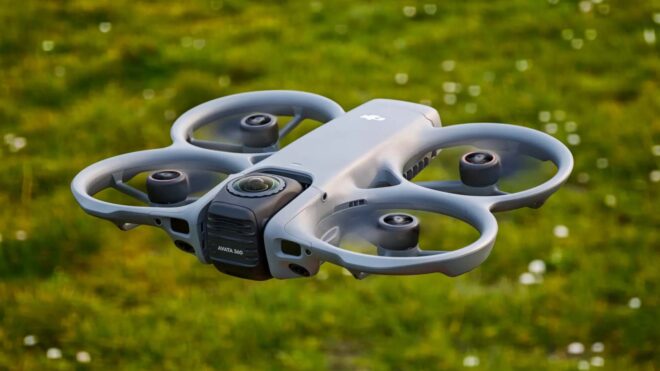 DJI bugün 360 derece çekim yapabilen drone modeli Avata 360’ı resmi olarak görücüye çıkardı. 455 gramlık drone, şirketin resmi açıklamasına göre 23 dakika boyunca havada kalabiliyor ve iki adet 1/1,1 inç boyutunda kare CMOS sensörü bir araya getiriyor. 64 megapiksellik sensörlerle 360 derecelik 8K 60 fps D-Log M video çekebilen model, istenirse 360 derecelik fotoğraflar da üretebiliyor. İstenirse tek bir kamerayı kullanarak da (4K 60 fps) video ve fotoğraf kaydedebilen drone, gelişmiş kaza önleme sistemleriyle geliyor ve pervaneleri koruyan tasarımıyla oldukça kullanışlı görünüyor. İlk olarak Çin’de satışa sunulacak Avata 360’ın başlangıç fiyatı yaklaşık 540 dolar seviyesinde yer alıyor.