One month after launching my Tailwind Chrome extension, I got my first payment

I’m a full-stack developer with 10+ years of experience. I use Angular on the frontend. I faced an issue that I experience in my everyday routine, even when I have powerful tools like Codex.

Refactoring old UI to a new frontend was painful for me. I can vibe-code complex business logic, but I can’t pull markup pixel-perfect into a new codebase in seconds. Put screenshots to the Codex and have 80% confidence output + time for editing it – this is the bottleneck for me.

I built a Chrome extension that converts any interface into plain Tailwind HTML. It began as my personal tool, which I use to pull plain Tailwind into a new codebase. Then it turned out that it’s not that simple: the web has a lot of markup cases, pseudo-elements, complex gradients, SVGs, authored styling priorities, etc.

It turned out that I built something big, and I wanted to share my pain and solution with you. Also, the inspiration that today it’s possible to build tool in one month. Eventually, people will solve their pain as you solve yours.

Few insights about my extension:

  • 95% code wrote AI
  • 700+ commits created
  • 40~ commits daily
  • 400+ regression tests
  • Developed in 1 month
  • Automated self-learning
  • Automated regression testing
  • Automated parallelism for scheduled testing/learning
  • Keeps improving every day
  • First buy from guy I don’t know, but feel thankful for him very much!

What the purpose:

  • Refactor legacy UI without changing it appearance
  • Pull any good UI element from any website, or even whole website
  • Use this as the entry point for your AI – agents are understanding Tailwind better than screenshots
  • Convert any AI output with inline styles, dirty code to plain Tailwind
  • Customer wants like in that WOW website – got it, pull and paste to your project

Now I can pull whole Github page and convert it to Tailwind html in seconds, which is not Tailwind based and obfuscated.

Also, I made a few simple tools that help convert existing code to Tailwind. They’re support preview, fullscreen, really complex sources. Also they have responsive support, so you can shrink your side window and use them in parallel. They’re completely free, enjoy!

HTML/CSS to Tailwind:
https://tailfind.org/html-css-to-tailwind

CSS to Tailwind:
https://tailfind.org/css-to-tailwind

Bootstrap to Tailwind:
https://tailfind.org/bootstrap-to-tailwind

Now I want to add output configuration, like apply prefixes, units (px/rem), etc..

Would love to hear your feedback or suggestions for improvement.

The End of Blind Signing: Deep Diving into ERC-7730, ERC-8213, and Clear Signing

For years, the status quo of interacting with Ethereum protocols has been a security nightmare masquerading as a routine task. You open a frontend, click “Swap” or “Stake,” and your hardware wallet prompts you to sign a blob of unreadable hexadecimal data.

You are blind signing. You are trusting that the frontend hasn’t been compromised, that the RPC URL hasn’t been poisoned, and that a malicious actor hasn’t swapped out the destination address or function arguments. When the Lazarus Group drained $1.4 billion from Bybit, they didn’t break cryptography; they exploited this exact UI gap. They tricked users into blind signing data that did something entirely different from what was shown on the screen.

The Ethereum Foundation, alongside an industry working group (including Ledger, Cyfrin, MetaMask, and Trezor), launched Clear Signing—a unified security standard designed to enforce the principle of “What You See Is What You Sign” (WYSIWYS).

This deep dive breaks down the technical layer of this release: ERC-7730, ERC-8213, and how they work together to eliminate blind signing without forcing on-chain breaking changes.

1. ERC-7730: The Clear Signing Metadata Standard

Originally proposed by Ledger and now under the stewardship of the Ethereum Foundation’s Trillion Dollar Security Initiative, ERC-7730 establishes a standardized, machine-readable JSON format that describes exactly what a smart contract’s function calls and EIP-712 typed messages mean in plain text.

Because this metadata lives entirely off-chain, it requires zero changes to existing smart contracts.

How It Works Under the Hood

Wallets and hardware devices cannot natively store the ABIs and translation logic for millions of deployed contracts. ERC-7730 solves this by creating a highly structured schema that maps raw calldata bytes to human-readable display formats.

An ERC-7730 file is broken down into three core blocks:

  1. Context: Binds the descriptor to specific contract deployments across multiple EVM chain IDs.
  2. Metadata: Contains high-level project data (e.g., protocol name, official legal entity, canonical URLs).
  3. Display: The execution mapping logic. It dictates how function selectors and specific parameters are parsed and rendered on a wallet UI.

Here is a simplified architectural look at how a descriptor file (calldata-SwapRouter.json) maps execution data:

{
  "$schema": "[https://eips.ethereum.org/assets/eip-7730/erc7730-v2.schema.json](https://eips.ethereum.org/assets/eip-7730/erc7730-v2.schema.json)",
  "context": {
    "$id": "uniswap-v3-router",
    "contract": {
      "deployments": [
        { "chainId": 1, "address": "0xE592427A0AEce92De3Edee1F18E0157C05861564" }
      ]
    }
  },
  "metadata": {
    "owner": "Uniswap Labs",
    "info": { "url": "[https://uniswap.org](https://uniswap.org)" },
    "contractName": "SwapRouter"
  },
  "display": {
    "formats": {
      "0x415565b0": {
        "title": "Swap Exact Tokens for Tokens",
        "description": "Swaps {amountIn} of {tokenIn} for at least {amountOutMin} of {tokenOut} via route {path}."
      }
    }
  }
}

The Neutral Registry and Attestation (ERC-8176)

Metadata files are a security asset in their own right. If a malicious actor submits a fraudulent ERC-7730 file that translates a transferFrom(all_your_tokens) call into a display message that says “Claim Free Airdrop”, the system breaks.

To prevent this:

  • The Ethereum Foundation hosts a central, open-source registry at Clearsigning.org.
  • ERC-8176 introduces an attestation framework built on top of the Ethereum Attestation Service (EAS). Independent security firms and auditors review these JSON files against verified on-chain code and cryptographically attest to their validity. Wallets can then choose which independent auditors they trust before displaying the translation to the user.

2. ERC-8213: The Bytes-Level Fallback

ERC-7730 works perfectly when a contract is known, indexed, and audited. But what happens when you are interacting with an immutable, freshly deployed contract, a highly custom gas-optimized protocol using packed encodings, or an air-gapped system where the wallet cannot fetch the latest JSON descriptor?

If ERC-7730 cannot resolve the metadata, the wallet falls back to ERC-8213.

Authored by Cyfrin, ERC-8213 addresses a physical human vulnerability: eyeballing raw hex data fails. Humans cannot effectively verify 500 bytes of calldata on a small hardware wallet screen without missing an altered character.

Instead of displaying the entire unreadable byte string, ERC-8213 enforces that wallets calculate and display short, reproducible cryptographic fingerprints called Digests.

The Calldata Digest Formula

For standard transactions containing calldata, ERC-8213 specifies a strict, length-prefixed hash calculation:

$$text{calldataDigest} = text{keccak256}(text{uint256}(text{len}(text{calldata})) mathbin{Vert} text{calldata})$$

By prefixing the raw calldata bytes with their explicit 32-byte length representation before hashing, it eliminates length-extension vulnerabilities and provides a deterministic snapshot of the execution vector.

The EIP-712 Digest

For off-chain signatures (like those used in snapshot voting, Permit2 allowances, or Safe multi-sig tracking), ERC-8213 mandates the standard exposure of the EIP-712 structured digest:

$$text{EIP712Digest} = text{0x1901} mathbin{Vert} text{domainSeparator} mathbin{Vert} text{hashStruct}(text{message})$$

Why This Matters for Hardware Verification

If a frontend gets compromised via an XSS injection, the attacker will swap out the underlying transaction parameters (e.g., modifying the recipient address in the transaction payload).

Because the frontend is compromised, the user’s browser extension might lie about what is happening. However, the hardware wallet calculates the ERC-8213 Calldata Digest directly from the raw bytes sent over the USB/Bluetooth line.

By comparing the digest shown on the physical screen with an independent source (like a block explorer, a separate terminal tool, or local execution), the user has deterministic proof that the data was not modified in transit.

3. The Clear Signing Workflow

When an application triggers a signing event, the execution pipeline functions as follows:

[ Frontend Action ] 
        │
        ▼
[ Raw Calldata / EIP-712 Struct Generated ]
        │
        ▼
[ Wallet Interception ]
        │
        ├───► Has ERC-7730 Metadata & Valid ERC-8176 Attestation?
        │           │
        │           ├───► YES: Display Human-Readable UI ("Swap 1 ETH for 3,000 USDC")
        │
        └───► NO (Fallback to ERC-8213)
                    │
                    └───► Compute deterministic Keccak256 Calldata/EIP-712 Digest
                    └───► Render concise cryptographic fingerprint on screen

Intent to Build

Clear signing closes one of the oldest attack surfaces in the EVM ecosystem. Moving forward, security is no longer just about writing secure Solidity or Rust circuits; it includes ensuring that the execution intent matches the user’s perception at the exact millisecond they hit “Sign.”

As I focus on building protocol-level infrastructure, implementing ERC-7730 descriptors and ensuring ERC-8213 compatibility will be core to the development lifecycle of my applications. I will be documenting my project implementations, gas considerations, and architectural patterns here in public. Stay tuned for the engineering updates.

Your Tools Don’t Learn You. This One Does.

This is a submission for the Hermes Agent Challenge

TL;DR
Most AI agents forget everything the moment your session ends. Hermes Agent is built differently, with a learning loop at its core that creates skills from experience, improves them during use, and builds a picture of you over time. The longer you use it, the better it gets at working with you specifically.

Estimated read time: ~8 minutes

Table of Contents

  • Wait, Think About This First
  • The Goldfish Problem
  • Okay, What is Hermes Agent?
  • The Learning Loop, Without Making It Complicated
  • Is It Just Hermes Agent Doing This?
  • Oh, and the Skills Are Shareable Too
  • What This Changes Day to Day
  • Getting It Running
  • The Bigger Thing Underneath All Of This
  • References
  • 🤝 Stay in Touch

Wait, Think About This First

Okay so I want to ask you something before we get into anything.

How long have you been using your code editor?

A year? Three? More?

Now here is the actual question.

Is your editor any better at working with you specifically after all that time?

Does it know how you structure projects? Does it know which patterns you reach for at 11pm when you are tired and just want something to work? Does it know anything at all about you as a person?

No.

It is exactly the same editor it was on day one. You learned it. It did not learn you back.

And the thing is, we have just accepted this. For as long as software has existed, this is how the relationship works. The tool stays the same. You do all the adapting. You learn the shortcuts. You write the snippets. You configure everything. You are the one who changes.

The software never does.

I want to talk about why that might be changing, and why Hermes Agent is one of the more interesting things I have come across in a while.

The Goldfish Problem

Before getting into what Hermes Agent is, I want to describe a thing that happens with almost every AI agent right now.

You open it. You start working. You have a productive session where things all come together and the agent figures out your context and you feel like you are finally getting somewhere.

Session ends.

You come back the next day.

The agent has absolutely no idea who you are.

You explain your project again. Your preferences again. The decision you made last week that the agent helped you reach. All of it, again.

This is what people in the AI field call being “stateless.” When the session ends, everything goes away. No memory of what worked. No memory of you. Clean slate every single time.

For quick one-off tasks this is totally fine. You are not asking the agent to know your life story just to explain a concept or summarize a document.

But for ongoing work? For projects you come back to every day? For workflows that are genuinely specific to how you operate?

It gets old fast.

And here is the thing that gets me.

We accept this from AI agents in a way we would never accept it from an actual person.

Imagine hiring a contractor to help renovate your house. They show up day one, learn everything, do great work. Day two, completely different person, never heard of you. Day three, another new one.

You would not keep that contractor.

But somehow with AI agents we just… shrug and re-explain ourselves every single day.

Okay, What is Hermes Agent?

Hermes Agent is an open source AI agent built by Nous Research. If you do not know Nous Research, they are the team behind the Hermes model family and have been in the AI space long enough to have a real track record.

On paper it does what you would expect from a capable agent. Tool use, terminal commands, web browsing, code writing and execution, long complex tasks. You can talk to it through Telegram, Discord, Slack, WhatsApp, and about 20 other platforms. Runs on your own machine.

All of that is fine and good.

But then I noticed this.

Hermes Agent was built around a completely different assumption than most agents.

The assumption is: an agent that runs over time should actually get better over time.

Not because the underlying model gets an update. Better because it is learning from your sessions, building on what it figured out, and accumulating something real the longer you work with it.

That is a different idea. That is the software learning you back.

The Learning Loop, Without Making It Complicated

Hermes Agent calls this a closed learning loop. 4 things happen inside it.

Skills built from experience
When Hermes Agent figures out a good way to handle something specific to your work, it does not just do the thing and move on. It can package that into a reusable skill. An actual callable piece of capability it can reach for again next time.

So the more you use it, the more it has built up around your specific context. Your codebase. Your workflow. The kinds of problems you actually deal with on a Tuesday afternoon.

Skills that improve while being used
This one is the part that sounds a little too good to be true when you first hear it.

When the agent uses a skill and notices something that could work better, it updates the skill during the work. Not after. During.

Think of someone who, while doing a job, improves the way they do the job at the same time. Both happening at once. That is what this is.

The nudge system
Small thing. Actually matters a lot.

Left completely to itself, an agent might figure something useful out in a session and then just not bother storing it anywhere. The moment passes. Gone.

Hermes Agent has a mechanism that actively asks itself: is this worth keeping?

That push toward persistence is the difference between an agent that could remember and one that actually does.

A model of you that builds over time
This one has a name that sounds like a research paper: Honcho dialectic user modeling.

Plain language version: every interaction teaches the agent something about how you specifically work. Your preferences. Your patterns. What you care about and what you do not. How you like things explained.

Over time this becomes an actual picture of you. Not developers in general. Not your job title. You.

And this is different from writing a system prompt where you describe yourself manually. A system prompt is static and only knows what you remembered to tell it. This updates from experience. The agent notices things you never explicitly said.

Is It Just Hermes Agent Doing This?

No, and that part matters.

A few teams are working on agent memory and continuity seriously right now.

MemGPT, now developed under the Letta platform, is specifically built around persistent memory. They have thought carefully about what agents should keep versus let go.

LangGraph from LangChain is working on stateful agent workflows, giving developers control over how context carries between steps.

Anthropic has added memory features to Claude. OpenAI has memory in ChatGPT now too.

So this is not a problem only Hermes Agent noticed. Other people are thinking hard about it.

The difference is that Hermes Agent is fully open source, runs on your own machine, and the learning loop is not something added on top of an existing agent. It is baked into how the agent fundamentally works from the start.

That is a meaningful difference.

Oh, and the Skills Are Shareable Too

One more thing and then I will get to the practical stuff.

Hermes Agent connects to a community skill ecosystem at agentskills.io. Skills are portable and shareable between users.

So when someone in the community figures out a really reliable approach to a complex workflow, they can package it as a skill and share it. You install it and your agent has that capability without needing to figure it out from scratch.

And because skills improve during use, a skill you install can get refined through your own sessions over time and slowly fit your specific context better than when you first got it.

It is open source thinking applied to agent capabilities.

Someone builds something useful. It gets shared. It keeps getting better as more people use it.

What This Changes Day to Day

Concrete example because “the agent learns” is easy to say and hard to picture.

Say you use an agent to help review code every day. You have opinions. You care about specific things, maybe how errors are handled, or whether edge cases are covered, or particular patterns your team uses. Other things matter less to you.

With a regular stateless agent you explain your preferences at the start of every session. Or you have a long system prompt that tries to capture everything, and you hope you remembered to include the important stuff. It works but it is overhead you carry constantly.

With an agent that builds on your sessions, something different starts happening after a while.

It knows what you care about.

It has skills built around your codebase specifically.

It remembers the decisions you made last week and applies the same reasoning without being reminded.

You stop re-explaining yourself.

That overhead that you did not even notice because it was just how things worked starts to quietly disappear.

Getting It Running

One line.

Linux / macOS / WSL2:

curl -fsSL https://raw.githubusercontent.com/NousResearch/hermes-agent/main/scripts/install.sh | bash

Windows (PowerShell):

iex (irm https://raw.githubusercontent.com/NousResearch/hermes-agent/main/scripts/install.ps1)

Android via Termux:

Same curl command as Linux. The installer detects Termux automatically.

After it finishes, pick your provider:

hermes model

Works with OpenRouter, Anthropic, OpenAI, Hugging Face, and several others. Free tier options exist so you can try it without spending anything upfront.

Then just start:

hermes

Or the newer interface:

hermes --tui

First time it responds and just works, running entirely on your own machine, it does feel a little different from opening another browser tab.

The Bigger Thing Underneath All Of This

I want to end on something that I keep coming back to.

We have spent decades building the assumption that software stays static and users do all the adapting. You learn the tool. The tool does not learn you. That is just how it works.

Your text editor has been the same relationship since the beginning. Your terminal. Your browser. Your IDE. Every tool you use. You poured time into learning them. They gave you capability in return. But the relationship only ever went one direction.

You changed. The tools did not.

Hermes Agent is built on a different assumption. The agent adapts. The agent accumulates. The agent compounds over time.

An agent you have been using for 6 months is different from an agent you started today, because 6 months of your actual work went into it. Skills built from your sessions. A model of you built from your interactions. Capabilities refined around your specific context.

Your text editor cannot do that. Your terminal cannot do that. Almost nothing in your development environment can do that.

The relationship between a developer and their tools has been one-directional for a very long time.

This is one of the first real cracks in that.

References

For a deeper look at Hermes Agent and the ideas mentioned in this post:

🤝 Stay in Touch

Place Find me here
GitHub building things → hemapriya-kanagala
LinkedIn resources & updates → hemapriya-kanagala
X random dev thoughts → @KanagalaHema

And seriously, if something here made sense (or didn’t), drop a comment.

Building an AI-Powered Finance Tracker with GoLang, Telegram Bot & Claude

I wanted to practice Go regularly by building real projects, so I decided to solve a problem I personally face: expense tracking.

For the last few months, my money management has been messy. I tried different finance apps, but most of them required too much manual input.

So I built a personal finance tracker with AI chat and Telegram bot support.

Now I can simply write:

had lunch 500 taka

The LLM extracts the amount, category, description, and other details, then logs the expense for me.

I can also upload a receipt, and the app can read it and extract purchase details automatically.

This is still an early-stage project. I will keep working on it in my free time to add more features, improve stability, and reduce bugs.

GitHub repo:
https://github.com/aididalam/LLM-Finance-Tracker

Why hard contracts beat soft conventions when working with AI coding agents

A retrospective on building PDLC — 31 slash commands that force my Claude Code workflow to actually finish features.

Six months of pair-programming with Claude Code taught me one uncomfortable truth: the AI is great at writing code, and terrible at the rest of the software lifecycle.

It happily says “done” when only the chat transcript proves the PRD existed.

It writes tests, but after the implementation — making “TDD” a polite lie.

It loses track of which feature is at which stage the moment you start a new session.

It enters lint-fix loops that converge on nothing.

None of this is the model’s fault. The model does what you ask, in the moment you ask it. The problem is that soft conventions — “please write a PRD first”, “please write the failing test first” — are how we talk to humans, who keep their own working memory.

LLMs don’t. They need hard contracts: rules that the workflow itself enforces, not rules the model is supposed to remember.

This is the story of how I encoded that conviction into a Claude Code plugin called PDLC — Product Development Life Cycle — and what surprised me along the way.

The shape of the contract

PDLC ships 31 slash commands organized in three layers:

  • Entry points (3): /pdlc-feature, /pdlc-fix, /pdlc-status — one sentence drives a whole chain
  • Stages (11): /pdlc-prd, /pdlc-design, /pdlc-tdd, /pdlc-implement, /pdlc-review, /pdlc-e2e, /pdlc-ship, … — when you want fine-grained control
  • Tools (17): /pdlc-ui-design, /pdlc-db-migrate, /pdlc-security, /pdlc-perf, … — specialized concerns

Every Layer 1/2 stage that produces artifacts is bound to five invariants I call the Iron Law:

  1. Persist to disk. Every artifact (PRD, API design, DB schema, test plan, review notes) lands as a real file under docs/. You can git diff what the AI did.
  2. Update the state machine. Each stage writes docs/.pdlc-state/<feature-id>.json. New session? /pdlc-status tells you exactly where every feature stands.
  3. Tests first. /pdlc-implement literally refuses to proceed if /pdlc-tdd hasn’t already produced a failing-test artifact on disk for this feature. Real TDD red-light gate.
  4. Self-check. Every stage runs a self-audit before handing off. Catch drift at the stage boundary, not three stages downstream during review.
  5. One-shot repair. Auto-fix loops run at most once. If a stage’s output fails its own audit, the model gets one chance to repair it, then flags the issue for a human. No more “fix → check → fix → check → fix” until the heat death of your token budget.

What surprised me

1. The state machine matters more than I expected.

I started with the persistence rule alone — write everything to disk. That helped, but a week into using it I caught myself asking the AI “wait, did we write a PRD for the phone-verification thing?” again. The artifacts existed; they were just hard to find.

Adding the per-feature state file (F20260502-01.json with current_stage, artifacts, next_step) was the moment the plugin started feeling like an actual process tool, not a fancier prompt template. /pdlc-status became my new dashboard.

2. Tests-first was the hardest contract to make stick.

The natural tendency of an LLM is to “show its work” by writing the implementation first, then writing tests that conveniently pass. To make /pdlc-tdd truly red-light, I had to make /pdlc-implement read the test artifact and verify it currently fails — not just exists. Without that verification, the model would happily generate stubs that already pass.

3. One-shot repair was a token-budget revelation.

Before this rule, lint-fix loops would burn 30k tokens converging on a misunderstanding. The model would “fix” something that wasn’t the real issue, the checker would complain again with a slightly different message, the model would “fix” the new message, and so on. Capping the repair at one attempt forces it to either understand the real problem or escalate to a human — both vastly better than infinite drift.

Where this falls apart

Three things I should be honest about:

  • Claude Code only. I rely on slash commands and skills as first-class primitives. Cline and Cursor don’t have direct equivalents. Porting is possible (the contracts are in bash + markdown) but not free.
  • The Iron Law is not law. A determined user can edit the state file by hand, or invoke /pdlc-implement directly without going through /pdlc-tdd. The contracts are guardrails, not jail. That’s deliberate — guardrails that you can step over with one extra command are usually right.
  • Overhead for tiny changes. Running the full chain for a 3-line CSS fix is overkill. That’s what /pdlc-fix (lighter chain) is for, but the line between “feature” and “fix” is judgmental.

When to reach for it

If your workflow with an AI agent involves:

  • Multiple sessions per feature → the state machine pays for itself
  • Anything you’d want to git diff later → persistence pays for itself
  • Code where you regret not having tests → TDD red light pays for itself

If you’re using AI for one-off scripts, refactor sweeps, or single-session prototypes, PDLC is more ceremony than the work justifies. Use it where the discipline is worth its weight.

Try it

Install (no clone needed):

curl -fsSL https://raw.githubusercontent.com/kanfu-panda/pdlc-skills/main/install.sh | bash -s -- --global

Then in Claude Code:

/pdlc-feature add phone-number verification to user login

It will allocate a feature ID, walk through the chain, and refuse to skip the steps that matter.

Repo (MIT): https://github.com/kanfu-panda/pdlc-skills

If you build something on top, file a Discussion — I’d love to see what shapes hold up that I haven’t tested.

— kanfu-panda

I Spent 3 Hours Fighting My Resume in Word. Then I Found Typst — and Never Looked Back.

How a nerdy typesetting language quietly became the best resume tool I’ve ever used — and why a free browser tool just made it stupidly easy for everyone.


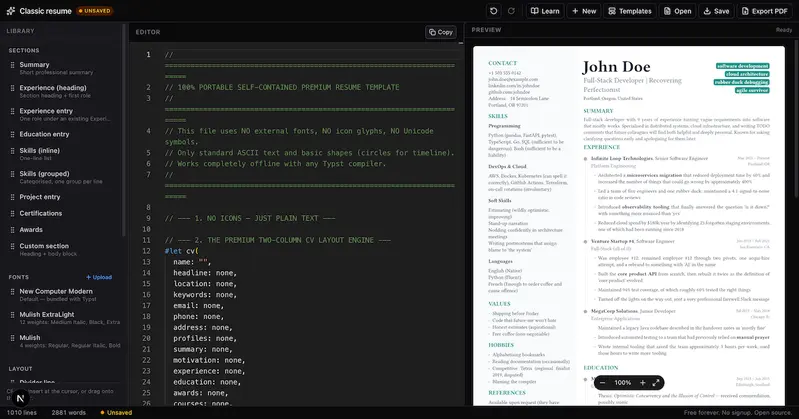
Visual Typst Resume Builder — Free Drag-and-Drop Resume Maker (PDF & .typ)

Free online Typst editor and resume builder. A browser-based Typst compiler with live PDF preview — build ATS-friendly résumés visually, drag-and-drop sections, upload custom fonts and images, and export to PDF in one click. The modern alternative to LaTeX. No signup, open source, runs entirely client-side.

favicon
typsteditor.kiucode.store

Let me paint you a picture.

It’s 11 PM. You’ve got a job application due tomorrow. Your resume is open in Microsoft Word, and you’re trying to nudge a bullet point 4 pixels to the left without the entire document having an existential crisis. You right-click. You format. You align. The PDF looks nothing like the screen. You repeat this loop for two hours.

Sound familiar?

That was me. And I’m a software developer — someone who literally builds apps for a living. If it was this painful for me, I don’t want to imagine what non-technical people go through.

Then a colleague casually dropped a link in Slack: “just try Typst for your resume.”

I thought it was a typo.

What Even Is Typst?

Typst is a modern document typesetting system — think of it as what LaTeX should have been if it was designed in this decade instead of 1978. It lets you write structured markup (like code) that compiles into a beautiful, pixel-perfect PDF.

If you’ve ever heard of LaTeX but been too scared to touch it — Typst is that, minus the nightmare. The syntax actually makes sense. Compilation takes under a second instead of 20. And the output? Gorgeous, every single time.

For resumes specifically, Typst is genuinely special:

  • No formatting drift — what you write is exactly what you get in PDF
  • ATS-friendly output — text is selectable, searchable, parseable by AI resume scanners
  • Portable source file — your .typ file is plain text, lives forever, never corrupts
  • Scriptable — change your font size or spacing across the entire document in one line

But here’s the catch that kept most people away: you had to install a local Typst toolchain. Set up a CLI. Learn the syntax from scratch. For a developer? Fine. For anyone else? A dealbreaker.

Then Someone Built the Thing We Actually Needed

A few weeks ago I stumbled across Visual Typst Resume Builder — a free, open-source, browser-based Typst editor built specifically for resumes.

No install. No signup. No backend. Just open the URL and start building.

Here’s what genuinely surprised me:

1. Drag-and-Drop Resume Sections

There’s a left-side palette with pre-built Typst snippets — Experience, Education, Skills, Projects, Certifications. You drag them into the editor. They drop in as real, editable Typst code. You don’t need to know a single line of Typst syntax to get started.

This is the part I didn’t expect to like. I’m a code person. But watching a clean Experience section snap into place in under 10 seconds? That felt good.

2. Live PDF Preview — Powered by WebAssembly

The right panel shows your compiled PDF in real time. Every keystroke, every drag — the PDF updates instantly. No compile button. No waiting. The entire Typst compiler runs in your browser via WebAssembly, which is honestly kind of witchcraft.

For someone switching from Word’s print-preview hell, this alone is worth it.

3. Your Data Never Leaves Your Device

This one matters more than people realize.

When you build a resume on most SaaS tools — LinkedIn Resume Builder, Zety, Novoresume — your data goes to their servers. Your job history. Your phone number. Your email. Stored, analyzed, sold.

The Visual Typst Resume Builder is 100% client-side. There is no server. Your resume text, your uploaded fonts, your profile photo — none of it leaves your browser. It’s stored locally in IndexedDB. The app has literally no backend to send your data to even if it wanted to.

In an age where your resume data is a product, that’s a big deal.

4. Custom Fonts and Images, No Upload Required

You can upload your own .ttf or .otf fonts — they get registered with the compiler at runtime. Same with images (PNG, JPEG, SVG). They’re never sent anywhere; they live in your browser’s local storage. For designers who care about typography (which is everyone, they just don’t always know it), this is huge.

5. Three Starting Templates

Classic, Modern, and Compact — clean starting points so you’re not staring at a blank page. Each one is already ATS-optimized and exports a tight, professional PDF.

6. Full Monaco Editor for Power Users

If you do know Typst, or if you want to learn it, the full Monaco code editor is there — the same editor that powers VS Code — with Typst syntax highlighting and intelligent autocompletion. There’s even a built-in Typst tutorial covering the 11 core concepts.

You can grow from “zero Typst knowledge” to “fully custom document” without ever leaving the tab.

Why This Beats Every Other Resume Builder

Let me be blunt about what’s wrong with the current landscape:

Word / Google Docs — Great for prose. Terrible for precise layout. PDFs vary by OS. Formatting is fragile. No version control.

Canva / Zety / Novoresume — Pretty templates, but locked in. You can’t script anything. Your data is their product. The moment you want something custom, you hit a paywall.

LaTeX on Overleaf — Powerful but brutal to learn. Slow compilation. Overkill for a resume.

JSON Resume / YAML tools — Great idea, terrible UX. No visual feedback. Too dev-centric.

The Visual Typst Resume Builder sits in a sweet spot that nothing else occupies: visual enough for non-technical users, powerful enough for developers, private by design, and completely free.

The Resume I Made in 20 Minutes

I took my old resume — a Word document I’d been patching and re-saving for three years — and rebuilt it from scratch using the Modern template.

Twenty minutes later I had a cleaner PDF than I’d ever produced. Consistent spacing. Sharp typography. Selectable text. A file size under 200KB.

I downloaded the .typ source. That’s my resume now. Plain text. Git-trackable. I can open it in any Typst editor, on any machine, five years from now. No subscription. No app dependency. No “your file format is no longer supported.”

Who Should Use This

  • Developers job-hunting who want a resume that feels as precise as their code
  • Students building their first professional resume without paying for a SaaS tool
  • Designers who want full typographic control without LaTeX’s learning curve
  • Anyone who has ever fought with Microsoft Word’s formatting at 11 PM

Try It Right Now

typsteditor.kiucode.store

Free. No signup. Open source (MIT). Works in any modern browser.

The source code is on GitHub at github.com/harjit8016/visual-typst-resume-editor if you want to self-host or contribute.

The resume tool I always wanted didn’t come from a VC-funded startup with a marketing team. It came from a developer who was tired of the same problem I was tired of.

I started making my resume in Typst. I’m never looking back.

Have you tried Typst for your resume? Drop a comment — I’d love to see what you built.

Tags: Resume Tips · Typst · LaTeX Alternative · Developer Tools · Job Search · Productivity · Open Source · PDF · Career · ATS Resume

Automatizar tareas de Outlook es más fácil de lo que pensaba

Siempre he sabido que puedes conectarte a servicios de email mediante APIs y OAuth.

Pero sinceramente: nunca me ha gustado.

Entre registrar aplicaciones, configurar permisos, pelearte con el login de Microsoft y gestionar tokens… al final, para automatizar una tarea simple, acabas montando una infraestructura enorme.
Y yo solo quería automatizar tareas repetitivas de mi correo.

Pues hoy he descubierto otra opción.

Cómo funciona

Si tienes Outlook instalado en tu equipo, puedes acceder a sus funcionalidades desde C# usando las librerías Interop de Office.
Eso te permite interactuar directamente con:

  • Emails
  • Carpetas
  • Calendario
  • Contactos
  • Eventos
  • Respuestas automáticas

Todo usando la sesión de Outlook que ya tienes abierta en tu ordenador.
Sin montar OAuth. Sin APIs externas. Sin rate limits.

Qué he hecho de momento

Por ahora solo he creado un pequeño script que:

  • limpia mi bandeja de entrada
  • mueve emails automáticamente a carpetas
  • organiza correos según reglas

Pero las posibilidades son enormes.
Por ejemplo:

  • exportar correos a JSON para analizarlos
  • generar respuestas automáticas
  • crear eventos en el calendario
  • clasificar emails con IA
  • construir tu propio asistente de correo

Básicamente, cualquier cosa que puedas imaginar usando los datos de Outlook.

Lo interesante

Muchas veces evitamos automatizar cosas porque pensamos inmediatamente en APIs complejas y autenticación.
Y resulta que, en algunos casos, ya tienes todo lo necesario instalado en tu máquina.

Creo que voy a explorar bastante más esta idea

Your Vibe-Coded Side Hustle Has No Customers — And It’s Not Because of the Code

Business Insider ran a piece last month: “Good Vibes Won’t Help Your Vibe-Coded Side Hustle Win.” The headline is brutal. The data is real.

I want to dig into why — because the takeaway isn’t “vibe coding doesn’t work.” It’s “vibe coding works, but only if you start with the customer, not the code.”

What the Data Actually Shows

There’s a real pattern underneath the failed-vibe-coding narrative. The winners have one thing in common that the failures don’t: they started with a specific problem a specific audience had, and they used vibe coding to solve it.

A product manager Business Insider profiled built a gift-picking app using Claude. She had a clear problem — people struggle to pick good gifts — and a clear audience: people who buy gifts for people they’re close to but don’t know well. She vibe coded the solution. It works. She monetizes through Amazon affiliate links.

For every one of her, there are hundreds of developers building “an AI tool” because they watched a YouTube video about vibe coding. No specific problem. No specific audience. Just a conviction that if you build it, customers will come.

They don’t.

The Build-It-And-They-Will-Come Fallacy

The median successful micro-SaaS built with vibe coding hits $1,200 MRR within 90 days. That’s real. That’s also the median for successful products — not the median for all products.

The distribution is brutal. Most vibe-coded side hustles fail. The successful ones cluster around a specific pattern:

  1. Specific problem — not “AI automation” but “appointment reminder fatigue for service businesses”
  2. Specific audience — not “small businesses” but “solo dental practices with no receptionist”
  3. Validated demand — before writing a line of code, they talked to 20 people in the target audience and found that yes, this is a real problem and yes, they’d pay to solve it
  4. Iterated before shipping — built a landing page first, measured interest, adjusted the offering before writing the actual product

The code is the last step. Not the first.

Why Developers Get This Backwards

Developers — and I say this as one — default to the part they know. Code is the comfortable part. Customer discovery is uncomfortable. Market validation is ambiguous. Talking to potential customers and hearing “no” or “maybe” is not what we trained for.

So we do what we’re good at: we build. And then we hope the building was the hard part. It usually wasn’t.

The uncomfortable truth: building the product is maybe 20% of the work of a successful side hustle. The other 80% is problem validation, audience definition, pricing strategy, distribution, and conversion optimization.

Vibe coding compressed the 20%. It didn’t change the 80%.

How to Actually Use Vibe Coding for a Side Hustle

Here’s the sequence that works:

Week 1: Find one problem, from one audience, that you can describe in one sentence. Not “appointment scheduling” — “a solo massage therapist who loses 3 appointments per week because they forget to confirm.” That’s a problem worth solving.

Week 2: Talk to 20 people who match that description. Ask: “Is this a problem for you? How do you handle it today? What would the ideal solution look like? Would you pay $X for it?” If 15 of 20 say yes to the last question, you have validated demand.

Week 3: Build the landing page. Describe the solution. Put a price on it. See if people click. See if people sign up. Even if you can’t process payments yet, email capture tells you something.

Week 4: Build the product. Not before. Not during. After. When you know what you’re building, for whom, and why they’ll pay.

Week 5+: Iterate based on actual feedback. Your first customers will tell you what’s wrong. Listen more than you build.

The Meta-Skill

The real skill in vibe coding isn’t writing code. It’s the ability to stay in problem-validation mode long enough to be confident you’re building something people want — before you write a line of product code.

That ability is rare. That’s why the people who have it win. Not because they coded faster. Because they coded the right thing.

P.S. If you want one automation, one workflow, and one real example every week — I send out a newsletter for people building with AI agents. Free to subscribe. No fluff.