The Access Control Gap That Makes Most Enterprise RAG Systems Dangerous

Enterprise RAG — A practitioner’s build log | Post 1 of 6

There is a retrieval failure mode that does not show up in accuracy benchmarks: a system that finds the right document but returns it to the wrong person.

Most RAG evaluation frameworks measure whether the retrieved chunks are relevant to the question. Few measure whether those chunks should have been retrievable at all given who asked. In an enterprise context — where the same knowledge base holds HR policy, engineering runbooks, finance forecasts, and security incident reports — that gap is not a minor edge case. It is a fundamental design flaw.

I built Enterprise RAG specifically to treat access control as a first-class retrieval requirement, not an afterthought applied after the answer is generated.

The problem with post-retrieval filtering

The naive approach to document access control in a RAG system is to retrieve first and filter second: score all candidate chunks by relevance, then strip out the ones the user is not allowed to see before generating the answer.

This approach fails in two ways.

It leaks into the answer. A generative model given 20 chunks — including 5 restricted ones — can synthesize information from all 20 even if the restricted chunks are stripped from the citation list before the response is returned. The model has already read the finance forecast before you decided not to show it.

It provides false assurance. Citation filtering gives the appearance of access control without enforcing it in the part of the pipeline that matters. An audit of the response shows no restricted citations. But the answer content may reflect them.

The correct architecture applies access control before retrieval scoring. Unauthorized chunks are excluded from the candidate set entirely. They are never ranked, never passed to the generator, and never cited.

What silently leaks in a typical internal knowledge base

Consider a company running a single internal knowledge base with documents across four categories:

  • HR and operations — visible to all employees
  • Engineering runbooks — visible to engineers and above
  • Finance forecasts and variance reports — visible to finance team and executives
  • Security incident reports — visible to engineers and security team

A standard question like “What was the revenue variance in Q3?” asked by an employee role against a system with post-retrieval filtering may return an answer that reflects finance data — even if the finance document does not appear in the citation list. The system retrieved it, scored it, passed it to the generator, and then quietly removed it from the citations.

That is not a hypothetical. It is the predictable behavior of any system where retrieval and access control are separate pipeline stages.

The validation test that most teams do not run

Before I built anything, I defined the evaluation test that the system had to pass:

Ask the same question as two different roles. The answer content and the citation list should differ based on role. If an employee and a finance manager ask “What is the Q3 forecast variance?” and receive answers that contain the same information — regardless of whether the citations differ — the access control is not working.

The evaluation set in Enterprise RAG includes explicit forbidden document IDs per test case. The restricted_leak_count metric counts how many evaluation cases returned at least one forbidden document. For a system with correct pre-retrieval access control, that count should be zero.

The screenshot above shows this test passing: the employee role receives an answer grounded in publicly accessible policy documents, while the finance role receives an answer that additionally cites the restricted finance document. Same question. Different retrieval sets. No leakage.

What this changes operationally

The operational implication is that RAG deployment in an enterprise knowledge base requires a different validation standard than consumer or internal-tooling RAG.

Retrieval relevance is not sufficient. You need:

  • A role model that maps document access to user identity
  • Pre-retrieval filtering enforced before scoring
  • An evaluation set that includes forbidden documents per role, not just expected documents
  • A restricted_leak_count metric tracked alongside pass rate and citation coverage

Without all four, you cannot know whether your system is leaking restricted content. You can only know whether it is retrieving relevant content — which is a different and less important question in an enterprise security context.

Current limits

  • The current implementation uses lexical retrieval with token cosine similarity scoring. Semantic or hybrid retrieval is a planned extension. Lexical retrieval is accurate enough for the validation workflow but does not match production semantic search quality.
  • Role metadata is embedded in document front matter. Production deployments should derive role context from Entra ID or an OIDC identity provider, not request body parameters.
  • The reference documents are synthetic. The evaluation set is calibrated for repeatable local validation, not a production-scale golden set.
  • Multi-tenant isolation is a documented production consideration. The current implementation is single-organization.

Next engineering step

Run POST /eval/run against the seeded demo data and check the restricted_leak_count. If it is zero, access control is enforced. Then modify the retrieval pipeline to apply scoring before filtering and observe what changes in the evaluation output.

One question for you

If you queried your internal knowledge base with a restricted finance document in the index today, would your evaluation set detect whether that document’s content influenced the answer — or only whether it appeared in the citation list?

Next post: The architecture that puts access control before retrieval scoring, and why the order of operations is the entire design.

I Built a Bloomberg Terminal for Startup Founders Using AI — No Code Required

Last week I shipped a full production-quality AI startup intelligence platform. Five pages. Live data integrations. Real AI analysis. Beautiful dashboards. The whole thing. With MeDo, https://medo.dev/ for the Build With MeDo Hackathon!!

First please check this out!!!

🌐 https://app-bqxcgnow4ni9.appmedo.com

You can find the entire showcase on Discord too!!

This is the story of how I built FounderAI — and what I learned along the way.

The Problem I Wanted to Solve

Every startup founder I know is flying blind.

They spend months manually Googling competitors, guessing their market size, and walking into investor meetings completely unprepared. The tools that exist are either $500 a month or built for analysts with MBAs — not for a first-time founder working from their bedroom.

I wanted to build the Bloomberg Terminal for startup founders. Real intelligence. Real data. Zero confusion.

What FounderAI Actually Does

When you open FounderAI, the first thing you do is tell it about your startup idea. Just plain English — no forms, no spreadsheets.

From that single input, the AI generates an entire intelligence profile:

Command Center — Your startup health score, today’s most critical action, and a live news feed pulled from HackerNews filtered to your exact industry.

Competitor War Room — AI automatically finds your real competitors. Not ones you search for manually. It discovers them based on your idea. Then it pulls Reddit sentiment, hiring signals, funding timelines, and feature gaps for each one.

Validate and Build — An 8-axis radar chart scoring your idea. The brutal investor questions you’ll get asked — with pre-written defense strategies. TAM/SAM/SOM visualization. A complete Business Model Canvas filled by AI.

Fund and Finance — A real-time financial simulator where you drag sliders and watch your runway, revenue projections, and burn rate update live. Investor matching based on your stage and vertical.

Operate and Grow — Legal setup wizard, team org chart builder, 90-day Gantt roadmap, and a launch countdown with readiness tracking.

And a floating AI chat assistant on every single page that knows your startup context and gives specific advice — not generic tips.

The Tech Stack

Here’s what’s running under the hood:

MeDo by Baidu — the no-code AI platform that built the entire React app
React + Tailwind CSS — generated by MeDo
Framer Motion — all the animations
Recharts — every chart and visualization
Groq AI with Llama 3.1 70B — the AI engine, routed through a Supabase Edge Function to avoid CORS issues
HackerNews Algolia API — live industry news, completely free
Reddit Search API — real competitor sentiment, completely free
Supabase — authentication, database, and edge functions
Total cost to run this: zero dollars.

The Hardest Part

Honestly? Making it feel genuinely useful rather than just pretty.

Any founder can open ChatGPT and type “validate my startup idea.” What they get back is generic, forgettable advice that could apply to literally any business.

The breakthrough for FounderAI was the AI expert system prompt — a deeply engineered persona built on startup knowledge that forces every response to be specific to the actual startup being analyzed. Real competitor names. Real market numbers. Real investor questions tailored to the exact industry.

The second hard part was CORS. When you try to call an external AI API directly from a browser-based React app, the browser blocks it. The fix was routing all AI calls through a Supabase Edge Function that runs server-side. Once that clicked, everything worked.

What Surprised Me

I genuinely did not expect to ship something that looked and felt this professional without writing a single line of code myself.

MeDo is genuinely impressive. You describe what you want in plain English — the design system, the animations, the data flow, the API integrations — and it builds it. When something breaks you describe the fix. When you want to add a feature you describe it.

The skill that mattered most was not coding. It was knowing exactly what to ask for and being specific enough that the AI could execute it. Prompt engineering turned out to be the real superpower here.

What I Would Do Differently
Start with Demo Mode from day one. I wasted hours debugging live API connections when I should have first built a fully working demo version with hardcoded realistic data. Once the demo works perfectly, you layer in the real integrations.

Also — build in phases, not one giant prompt. MeDo handles focused instructions much better than a 2000-word mega prompt thrown at it all at once.

Try It Yourself

If you are a founder, an entrepreneur, or even just someone with an idea you have been sitting on — give FounderAI a try.

Enter your startup. See what the AI finds. Let it ask you the hard questions before a real investor does.

Built entirely with MeDo at the Build with MeDo Hackathon 2026.

This project is proof that the barrier between having an idea and shipping a real product has never been lower.

You just have to start.

#BuiltWithMeDo #FounderAI #NoCode #Startups #AI #MeDoHackathon

rakers — a headless JS renderer in Rust

A lot of useful content on the web only exists after JavaScript runs. Server-side rendering has made a comeback, but plenty of sites still ship a near-empty HTML skeleton and populate it entirely client-side. If you want to extract that content — for archiving, testing, or processing — you need to run the JavaScript first.

The standard answer is a headless browser: Playwright, Puppeteer, or a self-hosted Chrome. These work, but they are heavy. Chrome’s footprint is around 300 MB, startup takes one to two seconds, and running it in CI requires care. For many use cases the full browser is overkill: you don’t need CSS layout, GPU compositing, or WebGL. You just need the DOM to exist after the scripts have run.

rakers is an attempt to find the floor on that problem. It is a single ~10 MB binary that parses HTML, runs the JavaScript, and returns the post-execution HTML.
How it works

The pipeline has three stages:

  • Parse — html5ever (Servo’s HTML5 parser, published as a standalone crate) turns the input into a DOM tree.

  • Execute — <script> tags are collected in document order, inline and external alike. External scripts are fetched synchronously. All scripts are evaluated in a sandboxed JS context that exposes a browser-compatible global environment: document, window, console, XMLHttpRequest, localStorage, setTimeout, and more.

  • Serialize — The post-execution DOM is serialized back to HTML and written to stdout (or a file).

The JS engine is QuickJS via the rquickjs crate. QuickJS is ES2023, compact, and embeds cleanly into Rust without much ceremony. For environments without a C compiler there is an optional boa_engine backend, a pure-Rust JS engine with a smaller compatibility surface but zero native dependencies.
The DOM stub

The trickiest part is not the JS engine — it is the fake browser environment. Frameworks like React, Vue, and Svelte expect a fairly complete DOM API. Since rakers has no real layout engine, those APIs are implemented as a JavaScript stub in bootstrap.js that is injected before any page script runs.

The stub covers the most common patterns: element creation and mutation, getElementById, querySelector, querySelectorAll, event listener registration, classList, localStorage, history.pushState, and XHR. XHR is backed by a synchronous Rust fetch (ureq) so frameworks that load templates at runtime via XHR — like RiotJS — actually retrieve them.

Inevitably there are gaps. Anything that requires layout information (offsetWidth, getBoundingClientRect) returns zero. Native ES modules are skipped. The stub is good enough to run 21 of the 23 TodoMVC implementations, which provides a reasonable compatibility benchmark across React, Vue, Angular, Svelte, Preact, Mithril, Elm, Backbone, Ember, Knockout, and others.
Using it

Render a URL

rakers https://example.com

Render a local file

rakers page.html

Pipe HTML in

curl -s https://example.com | rakers

Route traffic through Tor

rakers --proxy socks5://127.0.0.1:9050 https://example.com

Filter to a CSS selector

rakers --selector "article.post" https://example.com

Installation instructions in the README.

What it is not

rakers is not a browser. It has no CSS engine, no layout, no WebGL, no IndexedDB, no service workers. Anything that depends on those will not work. Sites that fingerprint the JS environment or require a real navigator.plugins array will also fail. For those cases a real headless browser is the right tool.

The value proposition is narrow but real: for sites that render via a self-contained JS bundle with no exotic browser dependencies, rakers is faster, smaller, and simpler to deploy than anything that ships a copy of Chromium.

I Got a Green Tick. But What Just Happened?

The first time I got a confirmed transaction on devnet, I felt great for about 10 seconds.

Then I thought: I have no idea what actually just happened.

I’d been treating transactions like a black box. Type address, type amount, hit send, done. But that stops working the moment something breaks — or the moment you try to build anything beyond a basic transfer.

So I went and figured it out. Turns out a Solana transaction is made of four things. Once you see what each one does, a lot of other stuff clicks into place.

The four parts

  • Instructions — what you want to do
  • Accounts — what data will be touched
  • Signatures — proof of authorization
  • Recent blockhash — a built-in expiry stamp

That’s it. Let’s go through them.

Instructions

An instruction is the action. It says: call this program, with these inputs.

For a basic SOL transfer, the instruction calls Solana’s System Program — a built-in program that handles things like moving SOL between wallets. You don’t deploy it, it’s just there.

The thing that surprised me: one transaction can hold multiple instructions. You could transfer SOL, create an account, and call another program — all in one shot. And it’s all-or-nothing. Either every instruction succeeds or the whole transaction fails. No partial results.

Accounts

In Solana, almost everything is an account — your wallet, a token balance, a deployed program. The whole network state is basically one giant table where every row has an address and some data.

When you write an instruction, you have to declare every account it will touch upfront — even ones you’re only reading. You also mark each one as writable or read-only, and whether it needs to sign.

This felt like extra work at first. But the reason is smart: Solana uses that list to figure out which transactions can run in parallel. No shared accounts = no conflict = process them at the same time. It’s a big part of why Solana can handle so many transactions per second.

The recent blockhash

Every transaction has to include a recent blockhash — a hash of a block that was produced recently on the chain.

It does two things.

First, replay protection. Without it, someone could take your signed transaction and submit it again later. The blockhash ties the transaction to a specific moment, so the network rejects anything that references an old one.

Second, expiry. A blockhash is only valid for about 150 blocks — roughly 60 to 90 seconds. After that window, the transaction is dead. You’d need a fresh blockhash and start over.

This is where Solana diverges from anything in Web2. A database transaction doesn’t expire. You can open one, walk away, come back. Solana transactions are more like a signed cheque with an expiry date on it — legitimate signature, but useless after the window closes.

Practical note: fetch the blockhash as late as possible, right before you send.

Signatures

Before a transaction is broadcast, it gets signed with your private key. Validators verify the signature against your public key before running anything.

If the transaction was tampered with after signing, the signature won’t match and it gets rejected.

Two things worth knowing:

Transactions can need multiple signatures. Some programs require both parties to sign. Multisig setups require a minimum number of co-signers.

The signature is the transaction ID. That long string in the Explorer URL? That’s not a separately generated ID — it’s the actual cryptographic signature. Every transaction ID on Solana is its own proof of authorization.

Go look at one on Explorer

Open any of your devnet transactions on Solana Explorer. You’ll see:

  • Account Inputs — every account, labeled writable or read-only
  • Instructions — each one expanded with its program and data
  • Signatures — at the bottom of the page

Map what you see back to the four parts above. It lands differently when the transaction on screen is one you sent yourself.

The one thing to take away

A Solana transaction isn’t just a request. It’s a signed, time-limited, all-or-nothing bundle that declares its own authorization and expiry before it hits the network.

Once that settled in for me, a lot of things that seemed weird about Solana started making sense.

Part of my #100DaysOfSolana journey.

How I built a 6-node 12-GPU on-prem AI cluster running 1000+ agents

TL;DR — 6 machines, 12 GPUs, 1,000+ concurrent agents, P95 18 ms, voice <300 ms, 280,741 lines of Python, 44 MIT repos. Vs Azure OpenAI: 7-month break-even on a 50K€ deployment.

Why I built this

I’m Franck. Toulouse, France. Over 3 years I paid roughly €280,000 to Azure + OpenAI before doing the math properly:

  • Latency: 1.2s voice round-trip — incompatible with the voice-first UX I wanted.
  • Compliance: customer data on US servers. Not GDPR-native, just GDPR-compliant-on-paper.
  • Quotas: random throttling at the worst times.
  • Lock-in: Azure outage = my product offline.

I decided to rebuild everything on-prem. This is the result.

The cluster

6 machines, 3 tiers, 12 GPUs total, <5ms inter-node latency.

Tier 1 — GPU compute (heavy inference)

  • M1 “La Créatrice” — Ryzen 5700X3D, 6× RTX 3080+, 46 GB RAM. Primary LLM node, runs qwen3.5-9b, qwen3.5-35b-a3b, deepseek-r1, the Claude 4.5/4.6 distillations, and the Whisper CUDA pipeline.
  • M2 “Le Forge” — multi-GPU NVIDIA, secondary inference, failover from M1 in 1.3s.

Tier 2 — CPU/RAM (orchestration, memory)

  • M3 “Le Cerveau” — high-RAM CPU node. PostgreSQL + Redis + Pinecone. Runs the orchestrator, the 3-quorum consensus engine (M1+M2+M3), and the analytics/monitoring agents.

Tier 3 — production / work

  • M4 “Bridge Windows” — Windows 11, 2 GPUs, trading bot live.
  • M5 “Interface Relay” — Linux i5-6500, 15 GB RAM. Dev interface, 15+ MCP servers, Claude Code.
  • M6 “Mobile Ops” — laptop. SSH + VPN. Client demos and on-site ops.

The 9 layers I added on top of Ubuntu

  • L9 — Vocal / conversational (Whisper CUDA STT, Piper TTS, wake word, 50+ languages)
  • L8 — Multi-agent orchestration (MCP-native, consensus engine)
  • L7 — Trading consensus engine (multi-model voting GPT/Gemini/Claude)
  • L6 — Browser + web automation (Chrome DevTools Protocol)
  • L5 — MCP tool registry (88+ handlers)
  • L4 — GPU cluster management (Docker Swarm, failover <2s)
  • L3 — Domino pipeline engine (835 chains)
  • L2 — systemd service layer (98 units)
  • L1 — Linux boot integration (GRUB hooks, ZRAM, kernel params)

Real numbers

Metric Value
Concurrent agents 1,000+
P95 latency (cluster internal) 18 ms
Voice pipeline end-to-end <300 ms
Aggregate throughput 67 tok/s
Python lines 280,741
Public repos 44 (all MIT)

Cost comparison (1M tokens/day, team of 10)

Provider €/month P95 Concurrent agents Data residency
Azure OpenAI 1,500 800ms-3s ~20 US
AWS Bedrock 1,800 700ms-2.5s ~15 US
Mistral Cloud 800 400-800ms ~30 EU
JARVIS OS 0 18 ms 1,000+ Air-gapped

For a 50K€ turn-key deployment, break-even vs Azure is 7 months, and the marginal cost is zero after that.

What I sell now

  • JARVIS OS turn-key — 20K€ to 250K€ depending on scope.
  • 62 PDF trainings — from €39, 293h of content based on production code (+48 private).
  • IA infra audit — €1,500, report in 48h.
  • 1-to-1 mentorship — €250/h.
  • Fractional CTO — TJM €1,000-1,150 / CDI €85-95K. Toulouse / remote.

Honest weaknesses

  1. Consensus voting is empirical. No formal verification of the agreement function.
  2. Tier-2 failure (M3 down) is the weakest scenario — orchestrator dies, cluster keeps inferring but loses persistent memory.
  3. MCP protocol bet — if Anthropic deprecates parts of MCP, I have 88 handlers to refactor.
  4. kWh-per-token efficiency — cloud probably wins on aggregate watts/token, on-prem wins on marginal cost.

Links

Launching content-distribution-mcp: one finished post, eight channels

We just shipped content-distribution-mcp: an MCP server that takes one finished post and routes it to eight developer-facing channels.

It makes zero LLM calls. Adapter I/O only. Whatever model your MCP host runs is the model that writes the per-channel copy — Claude, GPT-4, Gemini, a local Llama, or none at all if you bring your own text.

pip install content-distribution-mcp

Why we built this

Posting one blog article to DEV.to, Hashnode, GitHub Discussions, Bluesky, Reddit, LinkedIn, Twitter, and Medium is roughly 90 minutes of paste-and-fiddle per release. We were doing that by hand. So we wrote an MCP that handles the I/O: auth, idempotency, scheduling, retries, the Reddit anti-spam gate, and the manual-channel browser pre-fill.

What’s in the box

Eight MCP tools — and that is the full surface:

Tool Purpose
publish Immediate publish; idempotent on (content.id, variant.channel)
schedule Queue variants for a future schedule_at
drain Fire any due scheduled posts
status Per-variant state for a content piece
unpublish Best-effort delete (DEV.to / GitHub Discussions only)
hints Static per-channel metadata (char limits, tags, canonical-URL support)
list_profiles Configured Distribution Profiles
list_subreddits Curated Subreddit Catalog entries

Eight channels, three tiers

Channel Tier Notes
DEV.to Auto Forem API, native canonical_url
Hashnode Auto GraphQL, native originalArticleURL
GitHub Discussions Auto Per-repo GraphQL, footer for canonical
Bluesky Auto atproto SDK, canonical appended to post text
Reddit Auto-gated Per-subreddit cooldown, 5/day global cap, self-promo ratio
Medium Manual Playwright pre-fill + mark-live CLI
LinkedIn Manual Personal + company-admin compose, plain-text draft
Twitter / X Manual Free-tier API unusable; compose URL + plain-text draft

The three manual channels exist because their APIs are either gone (Twitter free tier), paid-tier (LinkedIn Marketing API), or never existed (Medium). The MCP opens a pre-filled compose tab and the operator clicks Submit. Less elegant, still beats the manual copy/paste workflow.

The Reddit gate

Reddit punishes anyone who treats it like a content pipe. The adapter enforces four rules before posting:

  1. Per-subreddit cooldown — the last live post-log entry for that sub
  2. 5-per-day global cap — over the operator’s full Reddit history with this MCP
  3. Self-promo ratio — over the last 30 posts in that subreddit, your own-domain links must stay under the curated max_self_link_pct
  4. Account age + karma — against minimums in the curated Subreddit Catalog

If any rule fails, publish returns state=failed with the specific reason. No bypass flag. If you want to post anyway, write a new entry in the Subreddit Catalog.

YAML or Notion: pick one

Two backends implement the same StateBackend Protocol:

  • YamlBackend — four YAML files under ~/.distribution-mcp/. Zero config; right for solo/local use.
  • NotionBackend — three Notion databases (Distribution Profiles, Subreddit Catalog, Post Log). Right for team/agency use; operators can audit the queue in Notion’s UI.

You swap them with a single constructor argument. No caller code changes.

Works with any MCP host

The server speaks standard MCP (stdio or SSE) and has zero Anthropic-specific code:

grep -ri "anthropic" src/  # returns nothing

Tested with Claude Code, Cursor, n8n’s MCP Client node, and the plain mcp Python client. If your host can talk MCP, it can talk to this.

Install

pip install content-distribution-mcp

# optional extras
pip install "content-distribution-mcp[browser]"
pip install "content-distribution-mcp[bluesky]"
playwright install chromium  # only if you use the browser channels

Then wire into your MCP host config:

// .claude/mcp.json
{
  "mcpServers": {
    "content-distribution": {
      "command": "content-distribution-mcp",
      "args": ["serve"]
    }
  }
}

How we use it ourselves

This very post is the dogfood. The Ghost blog post is the canonical: https://automatelab.tech/content-distribution-mcp/. The DEV.to article you’re reading came out of the same publish tool with a devto:main variant. Bluesky was the second auto-channel. The browser-tier channels (LinkedIn / Twitter / Reddit) got their compose tabs pre-filled by the same MCP run.

Links

MIT licensed. Issues, PRs, or any “I tried it and X broke” notes are welcome.

How to refine Hope AI output after the initial generation

Hope AI’s Refinement Cycle

If you’ve tried prompting Hope AI, you know the first version is a production-grade application that can be used immediately. But a working app isn’t always the right app.

As you review the generated output, you may notice areas where the application isn’t aligned with your requirements or where boundaries and interfaces need adjustment. That’s a normal part of the process, and you shouldn’t have to start over to address it.

Hope AI’s output is designed to be refined in place, with components and contracts that stay consistent as you make changes. That stability lets you narrow the scope and improve the structure step by step, building forward instead of starting over

This article covers how refinement works in Hope AI. It explains how to improve output after the first version and how teams use this process to move toward review and release.

What is refinement in Hope AI?

Refinement is the process of aligning the generated structure with what you actually intend to build. It is how you make the structure clearer and more focused. This stage is where many teams lose momentum by jumping straight into implementation details, rather than clarifying what the product should do.

That approach tends to backfire because external tools often provide generic solutions that can clash with existing architectural decisions or introduce unnecessary complexity. The result looks more technical, but it’s harder to evaluate and extend.

Effective refinement works the other way around. It starts by narrowing the question. What behavior needs to change? Which feature is affected? How should the user experience differ after the change?

That kind of request gives Hope AI something concrete to work with. Once the behavior is clear, adjusting the structure becomes straightforward. You might split responsibilities, tighten interfaces or move logic into a more appropriate place, but those changes follow naturally from intent.

The important point is that refinement builds on what already exists. You are not replacing the system or re-specifying everything from scratch. The overall shape remains intact, while each pass makes the code easier to review, explain and move forward with.

Hope AI’s Refinement Cycle

How refinement with Hope AI differs from other AI builders

Many AI app builders treat updates as replacements. When a change is requested, the system regenerates large portions of the output, often resetting context and obscuring earlier structural decisions.

Hope AI follows a different approach.

Because components and contracts persist across iterations, changes are applied within existing boundaries rather than replacing the output completely. Context also accumulates as the system evolves and earlier decisions continue to shape what comes next. The table below highlights this difference.

Other AI builders Hope AI
Change triggers regeneration Change triggers refinement
Context often lost Context accumulates
Output replaced Output evolves through targeted updates
Iteration breaks structure Iteration sharpens structure

Since structure and intent remain intact, developers can make focused adjustments that improve quality without destabilizing the system. Each change builds on what already exists, which is why refinement in Hope AI tends to strengthen earlier work rather than undo it.

That’s the foundation for the techniques below.

Techniques for refining Hope AI output

Here are some practical techniques to refine Hope AI output and prepare it for review.

Refinement usually involves:

  • Narrowing component responsibility when boundaries blur
  • Defining explicit contracts and interfaces
  • Using tests to make expected behavior clear
  • Respecting existing patterns unless the reason to break them is explicit
  • Asking Hope AI to explain architectural decisions before changing them
  • Aligning naming conventions for consistency
  • Refactoring integration points to keep them flexible

Each of the techniques below expands on one of these moves and shows how to apply it without having to start over.

1.Narrow component responsibility when boundaries blur

When components have overlapping responsibilities, review becomes difficult. Mixed logic forces reviewers to sort through code just to understand intent. Splitting those concerns into focused pieces with clear boundaries makes the structure easier to follow.

// Before
    function UserProfile() {
      const handleLogin = async (credentials) => {};
      const handleUpdate = async (data) => {};

      return (
        <div>
          {!user ? <LoginForm onSubmit={handleLogin} /> : null}
          {isEditing ? <EditForm /> : <DisplayProfile />}
        </div>
      );
    }

    // After
    function ProfileDisplay({ user }) {
      return <div>{user.name}</div>;
    }

    function ProfileEditor({ user, onSave }) {
      return <form onSubmit={onSave}>...</form>;
    }

    function AuthManager({ onAuthSuccess }) {
      return <LoginForm onSubmit={handleLogin} />;
    }

Components that have a single responsibility are easier to review. Reviewers can review each part independently without having to sort through mixed logic.

2.Define explicit contracts and interfaces

Generic objects or unclear methods can lead to runtime errors. By defining clear contracts for data and component boundaries, teams can spot mismatches early and keep changes isolated.

// Before
    function UserForm({ onSubmit }) {
      const handleSubmit = (data) => {
        onSubmit(data);
      };
    }

    // After
    interface UserFormData {
      email: string;
      name: string;
      age: number;
    }

    function UserForm({ 
      onSubmit 
    }: { 
      onSubmit: (data: UserFormData) => Promise<void> 
    }) {
      const validate = (data: UserFormData) => {
        if (!data.email.includes('@')) {
          return { field: 'email', message: 'Invalid email' };
        }
      };
    }

Clear contracts help teams find integration issues during development. Reviewers can verify that components work together simply by examining the interface definitions.

3.Use test descriptions to clarify expected behavior

If test names are too vague, it’s hard to tell what the component does. Reviewers can’t verify that the code is correct by looking at generic test descriptions. Use test names that clearly describe the behavior you’re testing.

// Before
    describe('EmailValidator', () => {
      it('works', () => {
        expect(validate('')).toBe(false);
      });
    });

    // After
    describe('EmailValidator', () => {
      it('rejects empty email addresses', () => {
        expect(validate('')).toEqual({
          valid: false,
          error: 'Email is required'
        });
      });

      it('accepts valid email format', () => {
        expect(validate('[email protected]')).toEqual({
          valid: true
        });
      });

      it('trims whitespace before validation', () => {
        expect(validate('  [email protected]  ')).toEqual({
          valid: true
        });
      });
    });

Descriptive test names indicate how the code should work, so teams can infer the requirements from them.

4.Respect existing patterns unless the reason is explicit

Refinement can weaken a system when it introduces behavior that doesn’t line up with how the rest of the codebase already works.

Breaking a pattern can still be the right decision. What matters is whether the reason is stated explicitly in the request. When the business context is explicit, Hope AI can apply the change in a narrow way while preserving the rest of the system’s structure.

5.Ask Hope AI to explain architectural decisions

Sometimes, the generated structure reflects design trade-offs that aren’t immediately obvious. Without that context, it can be harder to evaluate how the architecture fits your project.

When something isn’t clear, ask Hope AI to explain the reasoning behind its choices and the trade-offs involved. This gives you a clearer view of how the design aligns with your requirements and where you might want to adjust scope or complexity as refinement continues.

6.Clarify naming conventions for consistency

When components and functions use different naming styles, it becomes harder to understand the code. Developers end up spending time on naming conventions rather than on logic. To avoid this, use consistent naming conventions so the codebase is easy to scan and understand. Consistent naming helps teams quickly spot component types, utilities and hooks without having to read through all the code.

7.Ask Hope AI to refactor integration points to avoid vendor lock-in

Components that interact with external systems benefit from clearly defined integration boundaries. You can ask Hope AI to refactor integrations using clear adapter interfaces, making it easy to swap out external services.

Putting vendor-specific details behind clear contracts helps keep your core components stable and makes it easy to swap out different implementations without changing the system’s core logic.

When to stop refining and start reviewing

You know you’re ready to review when further changes no longer meaningfully improve the generated structure. In practice, teams are ready to review Hope AI output when the following conditions are true:

  • Each component has a clear responsibility that can be explained plainly, without qualifiers.
  • Interfaces express intent directly, without relying on comments or implicit assumptions.
  • Tests describe expected behavior clearly and fail for meaningful reasons.
  • Changes to one component stay contained and don’t ripple into unrelated areas.
  • The code feels ready to hand off to another engineer without additional context.

At this point, refinement has done its job. The structure is stable and the system can be evaluated and extended through normal peer review processes.

Wrapping up

In Hope AI, work begins with prompting. Right from your first prompt, you receive well-structured, production-ready code. The next step is refinement, where teams adjust the output to fit their workflows and prepare it for review.

If you remember only one thing about refining Hope AI output, make it structural consistency. Refinement works best when you follow the patterns already present in the system, where each feature owns its UI, data logic and API surface. Building within that structure keeps changes contained and maintenance straightforward.

Next, try using one or two of these refinement techniques on your current Hope AI project and see how quickly the output becomes ready for review.

The Three-Layer Architecture That Makes Software Production-Ready

three-layer-architecture

AI development tools such as Cursor and Lovable make it possible to build working applications quickly, but that speed comes with a serious side effect.

Responsibilities that should remain separate often end up combined in the same components, with request handling, service calls, decision logic and data operations written together.

Teams that successfully deploy these AI-generated applications into production address those challenges through architectural separation, dividing the system into layers, each performing a specific role before passing the request along.

This article explains the three-layer architecture behind production-ready applications built with AI tools. It describes what each layer does, how requests move through them and which failures appear when those boundaries are missing.

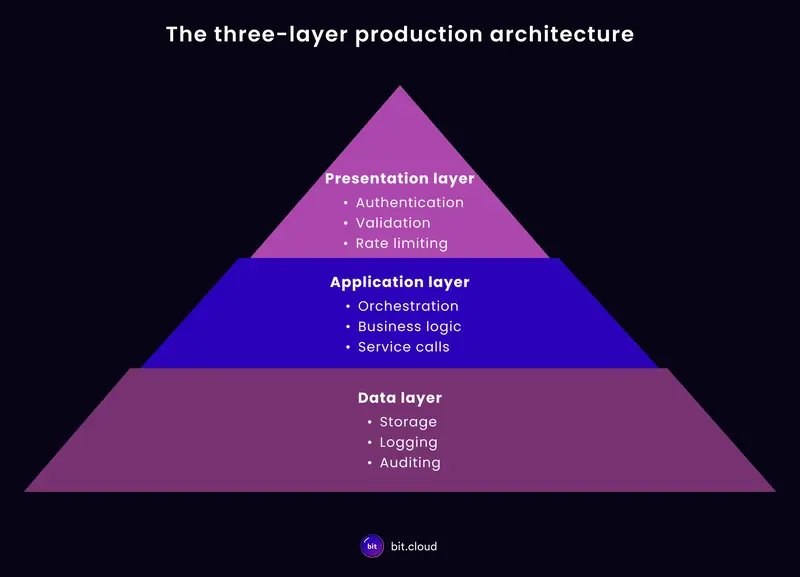
The three-layer production architecture

AI-generated applications often run into problems when multiple responsibilities are combined. For example, issues can arise if a component manages authentication and also calls an AI service, if a request handler starts automated workflows or if a service writes to the database while interpreting AI output. These operational concerns should be kept separate.

Production-grade AI-generated applications are typically structured around three layers:

  • Presentation layer – governs how requests enter the system

  • Application layer – governs how application decisions are made

  • Data layer – governs how data is stored and retrieved

The presentation layer governs system entry. Every request passes through authentication, input validation and rate limiting before reaching any application logic. Adversarial inputs and malformed payloads are also handled here before they affect internal services.

The application layer governs decisions. Application workflows run in this layer, and external services are integrated into those workflows. Responses from those services, including AI services, move through orchestration, validation checks and rule enforcement before any automated action occurs.

The data layer governs data persistence. It manages how application data is written, updated and retrieved across the system. Databases, storage systems and data access patterns operate in this layer, providing a consistent foundation for storing application state. Records of application activity, service responses and decision outcomes are also stored here so system behavior can be inspected and audited when needed.

Requests move through these layers sequentially, with each layer performing its checks and passing control to the next. The sections below describe each layer in detail, starting with the data layer, which should be designed before the application is built.

three-layer-architecture

Layer 3 – The data layer

The data layer governs how application data is stored and how system activity is recorded. Building it early provides the persistence and traceability needed to recover from failures and understand how they occurred.

This layer is typically responsible for the following functions:

1.Data storage

The data layer manages how application data is written, updated and retrieved. Databases, storage systems and data access patterns operate here to keep application state consistent and available across the system.

2.Data pipelines

Data pipelines control how information enters and moves through the system. Inputs pass through ingestion paths that enforce schema validation, sanitize payloads, apply access permissions and record transformations as data flows between services. These controls protect data integrity while preserving a record of what entered the system and when.

3.Activity records

Applications that integrate external services generate additional system records alongside standard application data. Inputs sent to services, responses returned and the resulting system decisions are stored for auditing and debugging.

These records allow teams to reconstruct how a particular result was produced when investigating incidents or reviewing system behavior. They also provide the historical data that observability systems analyze to detect behavioral changes over time.

Layer 2 – The application layer

The application layer governs how decisions are made. Requests reaching this layer have already passed authentication and validation and are now processed by the application logic.

This layer typically handles the following concerns.

1.Orchestration

Orchestration manages how the application interacts with internal components and external services. It constructs requests, processes responses and handles operational concerns such as retries, timeouts and error handling.

By centralizing these interactions, orchestration prevents service failures or malformed responses from reaching users and keeps requests on a consistent execution path.

2.Rule enforcement

Application rules determine how system decisions are made. These rules enforce constraints such as approval thresholds, escalation policies, account tiers and workflow conditions. Placing these constraints inside the application layer prevents external service responses from directly controlling application behavior.

3.Feature flags

New behavior should be introduced gradually rather than deployed to all users at once.

Feature flags allow teams to control how functionality is rolled out by enabling changes for internal traffic first, expanding to limited user segments and eventually releasing to the full user base once system behavior remains stable.

This layer acts as the control center of the application. External services provide signals, while the application layer determines how those signals influence system behavior.

Layer 1 – The presentation layer

The presentation layer governs what enters the system. Every external request passes through it before reaching application logic, making it responsible for authentication, validation and request control.

This layer handles the following.

1.Authentication and access control

Requests must carry a verified identity, e.g., a Bearer token, before the system processes them. Role-based access control must also determine which operations each identity is permitted to perform. Without these controls, external requests can trigger system actions that cannot be traced to a specific user or workflow.

2.Input validation

User input must be validated before entering the system. Structured request schemas enforce predictable formats and prevent malformed payloads from reaching application logic. For applications that integrate AI capabilities, input validation also helps reduce the risk of prompt injection.

3.Rate limiting

Rate limiting protects the system from excessive traffic and resource exhaustion. A single unprotected endpoint under sustained load can quickly consume available capacity. Rate limits typically operate across several dimensions, including per-user quotas, endpoint throttling and adaptive controls that respond to system load.

4.Request and response formatting

Consistent request and response structures simplify processing across the system. When incoming requests follow predictable schemas, the application layer can evaluate them without handling arbitrary input shapes.

How the layers connect

The three layers provide operational safety only when requests pass through them in sequence. Systems that implement each layer but allow components to bypass boundaries recreate the same failure conditions that the architecture is meant to prevent. 

A request walkthrough illustrates how the layers interact under normal conditions.

Presentation layer

  • A user submits a support ticket through the application interface.

  • The request carries an authentication token that is validated by the identity service.

  • Role-based permissions are checked for the requested operation.

  • The request schema is validated against the expected format.

  • The input is checked for malformed or unsafe content.

  • The rate limiter verifies that the user has not exceeded their quota.

  • The request is normalized into the expected structure before entering the application layer.

Application layer

  • The orchestration component receives the request and coordinates the processing workflow.

  • The application calls an external service to analyze the support ticket.

  • The service returns a structured response describing the ticket category, priority level and suggested action.

  • Application rules evaluate whether the suggested action is allowed based on policies such as approval thresholds, escalation rules and account tier.

  • Feature flags determine whether the new automation behavior is enabled for this request.

  • The application determines the final action and prepares the response.

Data layer

  • The system stores the request payload and the resulting application state.

  • Activity records capture the service response and the decision taken by the application.

  • Data pipelines record how the request moved through the system for auditing and debugging.

  • These records allow engineers to reconstruct how the system processed the request.

If an action triggers an incident days later, engineers can trace the full decision path through the logged request record.

Common architectural mistakes

Production failures often trace back to architectural shortcuts taken early in development. These problems usually appear when the responsibilities of the three layers are ignored or collapsed together.

1.Skipping presentation-layer controls

Some systems allow requests to reach application logic without proper validation. Authentication, request validation and rate limiting are either incomplete or missing entirely.

Without these controls, malformed inputs reach internal services, traffic spikes exhaust system capacity and requests cannot be tied to a specific identity. Problems that should have been stopped at the system boundary propagate throughout the application.

2.Placing application logic inside request handlers

Another common mistake is embedding orchestration, service calls and rule evaluation directly inside request handlers.

When this happens, the presentation layer and application layer collapse into a single component. Authentication, request parsing, service interaction and decision logic all run in the same execution path.

This structure makes the system difficult to maintain. Changes to one part of the workflow affect the entire request path, and failures become harder to isolate.

3.Allowing external services to determine system behavior

When applications return service responses directly to users or trigger workflows without applying application rules, those services effectively control system behavior. Incorrect outputs or unexpected responses propagate through the system without evaluation.

The application layer must remain the authority that determines which actions are allowed.

4.Failing to record system activity

Systems that do not store activity records become difficult to operate in production. Without records of inputs, service responses and decision outcomes, teams cannot reconstruct how the system processed a request. Incident investigations rely on guesswork and behavioral changes become difficult to detect. Operational visibility depends on the records maintained in the data layer.

5.Building rollback mechanisms after deployment

Rollback capabilities must be in place before the system reaches production. When configuration changes, service integrations or data transformations are not tracked, teams cannot isolate which change caused a failure. This increases incident duration and operational risk.

Closing out

AI development tools accelerate how quickly applications can be built, but that speed often introduces architectural shortcuts. As seen in this article, responsibilities such as request handling, service interactions, decision logic and data operations frequently end up combined in the same components.

Separating these responsibilities through a layered architecture restores that control. The presentation layer governs how requests enter the system, the application layer evaluates service responses and applies system rules and the data layer records the activity needed to monitor and recover from failures.

At Bit Cloud, this architectural separation forms the foundation for building and operating production AI systems. Teams that structure their systems this way gain the control and visibility required to run applications safely under real production conditions.