Crossplane Has a Free API: Manage Cloud Infrastructure with Kubernetes-Native IaC

What is Crossplane?

Crossplane extends Kubernetes to become a universal control plane for cloud infrastructure. Instead of Terraform CLI + state files, you manage AWS, GCP, and Azure resources using kubectl and Kubernetes-native YAML — with drift detection, reconciliation, and GitOps built in.

Why Crossplane Over Terraform?

  • Kubernetes-native — manage infra with kubectl, not a separate CLI
  • Continuous reconciliation — drift detection is automatic (Terraform only checks on plan/apply)
  • Compositions — build platform APIs (“give me a database” = RDS + security group + subnet)
  • No state files — Kubernetes IS the state store
  • GitOps ready — ArgoCD/FluxCD apply infra changes like app deployments

Quick Start

# Install Crossplane
helm repo add crossplane-stable https://charts.crossplane.io/stable
helm install crossplane crossplane-stable/crossplane 
  --namespace crossplane-system --create-namespace

# Install AWS provider
kubectl apply -f - <<EOF
apiVersion: pkg.crossplane.io/v1
kind: Provider
metadata:
  name: provider-aws-s3
spec:
  package: xpkg.upbound.io/upbound/provider-aws-s3:v1.5.0
EOF

# Configure AWS credentials
kubectl create secret generic aws-creds 
  -n crossplane-system 
  --from-file=credentials=aws-credentials.txt

kubectl apply -f - <<EOF
apiVersion: aws.upbound.io/v1beta1
kind: ProviderConfig
metadata:
  name: default
spec:
  credentials:
    source: Secret
    secretRef:
      namespace: crossplane-system
      name: aws-creds
      key: credentials
EOF

Create Cloud Resources with kubectl

# S3 bucket — managed by Kubernetes
apiVersion: s3.aws.upbound.io/v1beta2
kind: Bucket
metadata:
  name: my-app-data
spec:
  forProvider:
    region: us-east-1
    tags:
      Environment: production
      Team: backend
  providerConfigRef:
    name: default
kubectl apply -f bucket.yaml
kubectl get bucket  # Check real AWS resource status
# NAME          READY   SYNCED   EXTERNAL-NAME   AGE
# my-app-data   True    True     my-app-data     45s

Compositions: Build Platform APIs

# Define a "Database" API for your developers
apiVersion: apiextensions.crossplane.io/v1
kind: CompositeResourceDefinition
metadata:
  name: databases.platform.example.com
spec:
  group: platform.example.com
  names:
    kind: Database
    plural: databases
  versions:
    - name: v1
      served: true
      referenceable: true
      schema:
        openAPIV3Schema:
          type: object
          properties:
            spec:
              type: object
              properties:
                size:
                  type: string
                  enum: [small, medium, large]
                engine:
                  type: string
                  enum: [postgres, mysql]
---
# Composition maps "small postgres" → RDS + security group + subnet group
apiVersion: apiextensions.crossplane.io/v1
kind: Composition
metadata:
  name: database-aws
spec:
  compositeTypeRef:
    apiVersion: platform.example.com/v1
    kind: Database
  resources:
    - name: rds-instance
      base:
        apiVersion: rds.aws.upbound.io/v1beta2
        kind: Instance
        spec:
          forProvider:
            engine: postgres
            instanceClass: db.t3.micro
            allocatedStorage: 20
      patches:
        - fromFieldPath: spec.size
          toFieldPath: spec.forProvider.instanceClass
          transforms:
            - type: map
              map:
                small: db.t3.micro
                medium: db.t3.medium
                large: db.t3.large

Developer Experience

# Developers write THIS — simple, abstracted
apiVersion: platform.example.com/v1
kind: Database
metadata:
  name: orders-db
spec:
  size: medium
  engine: postgres

Crossplane vs Terraform vs Pulumi

Feature Crossplane Terraform Pulumi
Language YAML/Compositions HCL Python/TS/Go
State Kubernetes (no files) State files/Cloud State files/Cloud
Drift detection Continuous On plan/apply On preview/up
GitOps Native Atlantis addon Manual
Platform APIs Compositions Modules Components
Multi-cloud Provider per cloud Provider per cloud Provider per cloud

Real-World Impact

A platform team at a bank managed 200+ AWS accounts with Terraform. State file conflicts, drift going unnoticed for weeks, developers waiting hours for infra. After migrating to Crossplane: developers get databases in 3 minutes via kubectl, drift is auto-corrected, and ArgoCD manages all infrastructure changes through PRs.

Building a cloud platform with Kubernetes? I help teams design Crossplane compositions and platform APIs. Contact [email protected] or check my data automation on Apify.

Gaussian Mixture Models: The EM Algorithm in Practice

Open In Colab

You have a dataset that clearly contains distinct groups, but nobody has labelled them. K-Means would give you hard boundaries — each point belongs to exactly one cluster. But what if a data point sits right between two clusters? Shouldn’t we express that uncertainty?

Gaussian Mixture Models (GMMs) do exactly this. They model your data as a mixture of Gaussian distributions, assigning each point a probability of belonging to each cluster — not a hard label. By the end of this post, you’ll implement a GMM from scratch using the EM algorithm and cluster real data from the Old Faithful geyser.

If you haven’t read the EM algorithm tutorial yet, don’t worry — we’ll explain everything you need here. But if you want the gentle coin-toss introduction first, start there.

Quick Win: Cluster Old Faithful Eruptions

Old Faithful is a geyser in Yellowstone National Park. Its eruptions come in two types: short (~2 min) with short waits, and long (~4.5 min) with long waits. Let’s discover these clusters automatically.

Open In Colab

import numpy as np
import matplotlib.pyplot as plt

def gaussian_pdf(x, mu, sigma2):
    """Univariate Gaussian probability density function."""
    return (1 / np.sqrt(2 * np.pi * sigma2)) * np.exp(-0.5 * (x - mu)**2 / sigma2)

def fit_gmm(data, K=2, max_iter=50, tol=1e-6):
    """
    Fit a Gaussian Mixture Model using EM.

    Args:
        data: 1D array of observations
        K: number of mixture components
        max_iter: maximum EM iterations
        tol: convergence threshold

    Returns:
        means, variances, weights, responsibilities, log_likelihoods
    """
    N = len(data)

    # Initialise parameters
    rng = np.random.default_rng(42)
    means = rng.choice(data, K, replace=False)
    variances = np.full(K, np.var(data))
    weights = np.full(K, 1.0 / K)

    log_liks = []

    for iteration in range(max_iter):
        # E-STEP: Compute responsibilities
        resp = np.zeros((N, K))
        for k in range(K):
            resp[:, k] = weights[k] * gaussian_pdf(data, means[k], variances[k])
        resp /= resp.sum(axis=1, keepdims=True)

        # M-STEP: Update parameters
        Nk = resp.sum(axis=0)
        means = (resp * data[:, None]).sum(axis=0) / Nk
        variances = (resp * (data[:, None] - means)**2).sum(axis=0) / Nk
        weights = Nk / N

        # Compute log-likelihood
        ll = np.sum(np.log(sum(
            weights[k] * gaussian_pdf(data, means[k], variances[k])
            for k in range(K)
        )))
        log_liks.append(ll)

        if iteration > 0 and abs(log_liks[-1] - log_liks[-2]) < tol:
            break

    return means, variances, weights, resp, log_liks

# Old Faithful eruption durations
eruptions = np.array([
    3.6, 1.8, 3.333, 2.283, 4.533, 2.883, 4.7, 3.6, 1.95, 4.35,
    1.833, 3.917, 4.2, 1.75, 4.7, 2.167, 1.75, 4.8, 1.6, 4.25,
    1.8, 1.75, 3.45, 3.067, 4.533, 3.6, 1.967, 4.083, 3.85, 4.433,
    4.3, 4.467, 3.367, 4.033, 3.833, 2.017, 1.867, 4.833, 1.833, 4.783,
    4.35, 1.883, 4.567, 1.75, 4.533, 3.317, 3.833, 2.1, 4.633, 2.0,
    4.8, 4.716, 1.833, 4.833, 1.733, 4.883, 3.717, 1.667, 4.567, 4.317,
    2.233, 4.5, 1.75, 4.8, 1.817, 4.4, 4.167, 4.7, 2.067, 4.7,
    4.033, 1.967, 4.5, 4.0, 1.983, 5.067, 2.017, 4.567, 3.883, 3.6,
    4.133, 4.333, 4.1, 2.633, 4.067, 4.933, 3.95, 4.517, 2.167, 4.0,
    2.2, 4.333, 1.867, 4.817, 1.833, 4.3, 4.667, 3.75, 1.867, 4.9,
    2.483, 4.367, 2.1, 4.5, 4.05, 1.867, 4.583, 1.883, 4.367, 1.75,
    4.417, 1.967, 4.185, 1.883, 4.3, 1.767, 4.533, 2.35, 4.533, 4.45,
    3.567, 4.5, 4.15, 3.817, 3.917, 4.45, 2.0, 4.283, 4.767, 4.533,
    1.85, 4.25, 1.983, 2.25, 4.75, 4.117, 2.15, 4.417, 1.817, 4.467,
])

means, variances, weights, resp, log_liks = fit_gmm(eruptions)

print(f"Cluster 1: μ = {means[0]:.2f} min, σ = {np.sqrt(variances[0]):.2f}, weight = {weights[0]:.2f}")
print(f"Cluster 2: μ = {means[1]:.2f} min, σ = {np.sqrt(variances[1]):.2f}, weight = {weights[1]:.2f}")

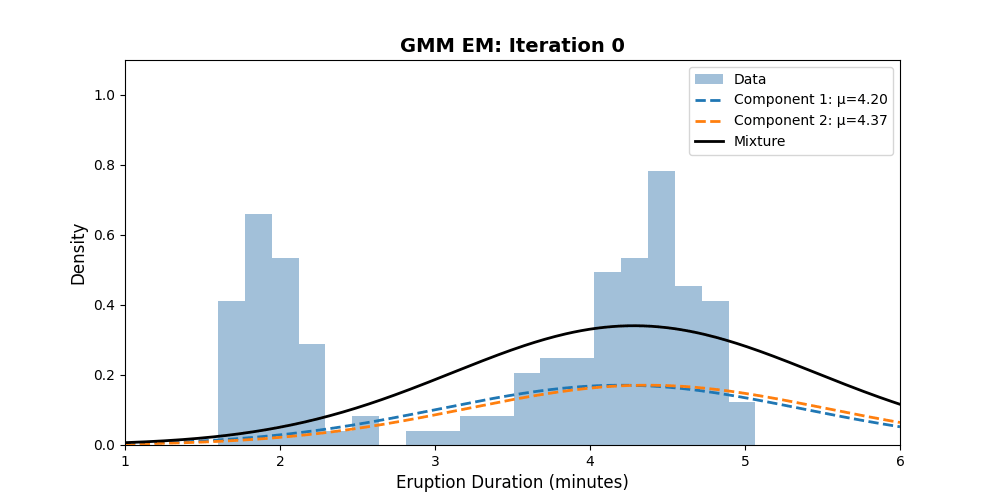
The result: EM discovers two clear groups — short eruptions (~2.0 min, ~35% of data) and long eruptions (~4.3 min, ~65% of data). Let’s visualise:

GMM EM fitting Old Faithful data — watch the two Gaussian components separate and lock onto the short and long eruption clusters

x_plot = np.linspace(1, 6, 300)
mixture = sum(weights[k] * gaussian_pdf(x_plot, means[k], variances[k]) for k in range(2))

plt.figure(figsize=(10, 5))
plt.hist(eruptions, bins=20, density=True, alpha=0.5, color='steelblue', label='Data')
for k in range(2):
    component = weights[k] * gaussian_pdf(x_plot, means[k], variances[k])
    plt.plot(x_plot, component, '--', linewidth=2, label=f'Component {k+1}: μ={means[k]:.2f}')
plt.plot(x_plot, mixture, 'k-', linewidth=2, label='Mixture')
plt.xlabel('Eruption Duration (minutes)')
plt.ylabel('Density')
plt.title('GMM Fit to Old Faithful Eruption Data')
plt.legend()
plt.show()

What Just Happened?

A GMM assumes your data was generated by a process like this:

  1. Randomly pick one of $K$ Gaussian components (with probabilities $pi_1, ldots, pi_K$)
  2. Draw a data point from that Gaussian

The catch: you observe the data points, but not which component generated each one. This hidden information — the component assignments — is the latent variable that EM handles.

E-Step: “Who Generated This Point?”

Given our current parameter estimates, we compute the responsibility of each component for each data point:

equation

Think of $r_{nk}$ as “how much does component $k$ claim ownership of data point $x_n$?” If a point sits right at the mean of component 1 and far from component 2, then $r_{n1} approx 1$ and $r_{n2} approx 0$.

This is exactly the same idea as the soft assignments in the coin toss EM — instead of hard clustering, each point gets fractional membership.

# Let's trace the responsibilities for a few data points
print("Responsibilities (probability of belonging to each cluster):")
print(f"{'Duration':>10s}  {'Cluster 1':>10s}  {'Cluster 2':>10s}  {'Assignment':>12s}")
print("-" * 50)
for idx in [0, 1, 4, 7, 23]:
    dur = eruptions[idx]
    r1, r2 = resp[idx]
    label = "Short" if r1 > 0.5 else "Long"
    print(f"{dur:10.2f}  {r1:10.4f}  {r2:10.4f}  {label:>12s}")

M-Step: “Update the Gaussians”

Using the responsibilities as weights, we re-estimate each component’s parameters. The formulas are weighted maximum likelihood estimates — the same MLE you’d compute with complete data, but weighted by the responsibilities:

Effective number of points assigned to component $k$:

equation

Updated mean (weighted average of data):

equation

Updated variance (weighted variance):

equation

Updated mixing weight:

equation

Notice the pattern: if a point has $r_{nk} = 0.8$ for component $k$, then 80% of that point’s “mass” goes toward updating component $k$‘s parameters. This is exactly how weighted MLE works.

Convergence

Let’s verify that EM increases the log-likelihood at every step:

plt.figure(figsize=(8, 4))
plt.plot(range(1, len(log_liks) + 1), log_liks, 'g-o', markersize=6)
plt.xlabel('Iteration')
plt.ylabel('Log-Likelihood')
plt.title('EM Monotonically Increases the Log-Likelihood')
plt.grid(True, alpha=0.3)
plt.show()

EM convergence plot showing log-likelihood monotonically increasing with each iteration

Going Deeper

The Full GMM Log-Likelihood

The log-likelihood we’re maximising is:

equation

The $log$ of a sum makes this hard to optimise directly — you can’t just take the derivative and set it to zero. That’s why we need EM: it transforms this intractable problem into a sequence of tractable weighted MLE problems.

Choosing K: How Many Clusters?

GMMs require you to specify the number of components $K$. Too few and you underfit; too many and you overfit. Common approaches:

BIC (Bayesian Information Criterion):

equation

where $p$ is the number of parameters ($3K - 1$ for univariate GMMs: $K$ means + $K$ variances + $K-1$ weights).

def compute_bic(data, K_range=range(1, 6)):
    """Compute BIC for different numbers of components."""
    bics = []
    for K in K_range:
        means, variances, weights, _, log_liks = fit_gmm(data, K=K)
        n_params = 3 * K - 1
        bic = -2 * log_liks[-1] + n_params * np.log(len(data))
        bics.append(bic)
    return list(K_range), bics

K_values, bics = compute_bic(eruptions)
print("BIC scores:")
for k, bic in zip(K_values, bics):
    marker = " ← best" if bic == min(bics) else ""
    print(f"  K={k}: BIC = {bic:.1f}{marker}")

Lower BIC is better. For Old Faithful, $K=2$ should win clearly.

GMM vs K-Means

Feature K-Means GMM
Assignments Hard (0 or 1) Soft (probabilities)
Cluster shape Spherical only Elliptical (with full covariance)
Uncertainty No Yes — $r_{nk}$ quantifies it
Output Cluster labels Full generative model
Speed Faster Slower (but more informative)

K-Means is actually a special case of GMMs where all covariances are equal and small, forcing the responsibilities toward 0 or 1.

Common Pitfalls

  1. Singularities — If a component collapses onto a single data point, its variance goes to zero and the likelihood goes to infinity. Fix: add a small floor to variances (e.g., $sigma^2 geq 10^{-6}$).
  2. Initialisation sensitivity — Like all EM algorithms, GMMs can get stuck in local optima. Run multiple initialisations and keep the best result.
  3. Label switching — The component labels are arbitrary. After fitting, component 1 in one run might correspond to component 2 in another.
  4. High dimensions — In high dimensions, full covariance matrices have $mathcal{O}(d^2)$ parameters per component. Use diagonal or tied covariances to reduce complexity.

When NOT to Use GMMs

  • Non-Gaussian clusters — If your clusters are banana-shaped or have complex geometry, GMMs will struggle. Consider DBSCAN or spectral clustering.
  • Very high dimensions — The curse of dimensionality makes density estimation unreliable. Reduce dimensions first (PCA, t-SNE).
  • Huge datasets — Full EM on millions of points is slow. Use mini-batch variants or the scikit-learn implementation.

Multivariate Extension

Our implementation handles 1D data. For $d$-dimensional data, the Gaussian PDF becomes:

equation

The M-step updates become matrix operations, but the structure is identical: weighted means, weighted covariance matrices, updated mixing weights.

Deep Dive: The Paper

Dempster, Laird, and Rubin (1977)

The EM algorithm for GMMs is a specific instance of the general framework introduced by Dempster, A.P., Laird, N.M. and Rubin, D.B. (1977) “Maximum Likelihood from Incomplete Data via the EM Algorithm”, Journal of the Royal Statistical Society, Series B, 39(1), 1–38.

The paper unified a collection of ad-hoc algorithms that had been used in various fields — genetics, astronomy, engineering — under a single theoretical framework. Their key contribution was proving that every EM iteration is guaranteed to increase the likelihood (or leave it unchanged).

“Each iteration of a generalized EM algorithm increases the likelihood and the sequence of likelihood values converges.”
— Dempster, Laird & Rubin (1977)

The Complete-Data Framework

In GMM terms, the paper’s framework maps to:

  • Observed (incomplete) data $X$: the data points $x_1, ldots, x_N$
  • Latent variables $Z$: the component assignments $z_1, ldots, z_N$ (which Gaussian generated each point)
  • Complete data: $(X, Z)$ — if we knew both, MLE would be trivial
  • Parameters $theta = {mu_k, sigma_k^2, pi_k}$: what we want to estimate

The E-step computes $Q(theta mid theta^{(t)})$ — the expected complete-data log-likelihood:

equation

The M-step maximises this over $theta$, yielding the weighted MLE formulas we derived earlier.

Bishop’s Modern Treatment

Bishop’s Pattern Recognition and Machine Learning (2006), Chapter 9 provides the most accessible modern treatment of GMMs. Key insights include:

  • GMMs as a density estimator — beyond clustering, GMMs give you a full probability model $p(x)$ that you can sample from, evaluate, and use for anomaly detection
  • Relationship to K-Means — Bishop shows that K-Means is the zero-temperature limit of GMMs
  • Bayesian GMMs — placing priors on the parameters avoids singularities and enables automatic model selection. This connects to MCMC methods for posterior inference.

The Stanford EM Lecture

The original code in this tutorial references the Stanford Statistics 315a lecture notes on EM by Trevor Hastie and Rob Tibshirani. Slide 13 gives the GMM update equations we implemented.

Further Reading

  • Dempster, Laird & Rubin (1977) — The foundational EM paper
  • Bishop’s PRML, Chapter 9 — The clearest modern GMM treatment
  • Stanford EM Lecture Slides — Concise reference for the update equations
  • Scikit-learn GaussianMixture — Production-ready implementation with full covariance support

Try It Yourself

The interactive notebook includes exercises:

  1. 2D clustering — Extend the algorithm to cluster both eruption duration and waiting time simultaneously
  2. Model selection — Plot BIC vs K and find the optimal number of components
  3. Initialisation experiments — Run with 10 different random seeds and compare results
  4. Compare with scikit-learn — Verify your implementation matches sklearn.mixture.GaussianMixture
  5. Anomaly detection — Use the fitted GMM to flag data points with low probability as outliers

Interactive Tools

  • Distribution Explorer — Visualise Gaussian and other distributions that form the components of mixture models

Related Posts

Frequently Asked Questions

What are responsibilities in a Gaussian Mixture Model?

Responsibilities are the probabilities that each data point belongs to each mixture component. During the E-step, the model computes how likely it is that component k generated data point n, given the current parameter estimates. These soft assignments sum to 1 across all components for each data point.

How does a GMM differ from simply running K-Means?

A GMM provides soft probabilistic assignments rather than hard labels, captures elliptical cluster shapes through full covariance matrices, and outputs a complete generative model you can sample from. K-Means only produces spherical cluster boundaries and gives no measure of uncertainty for points near cluster edges.

Why does the EM algorithm sometimes converge to a poor solution?

EM is guaranteed to increase the log-likelihood at every iteration, but it only finds a local maximum, not necessarily the global one. The final solution depends on the initial parameter values. Running EM multiple times with different random initialisations and selecting the result with the highest log-likelihood is the standard workaround.

What is the singularity problem in GMMs and how do I avoid it?

If a Gaussian component collapses onto a single data point, its variance approaches zero and the likelihood goes to infinity. This creates a degenerate solution. You can prevent this by adding a small floor to the variance (e.g., 1e-6), using regularisation, or placing a Bayesian prior on the covariance parameters.

How do I decide how many mixture components K to use?

The Bayesian Information Criterion (BIC) is the most common approach. Fit GMMs with different values of K, compute the BIC for each, and choose the K with the lowest BIC. The BIC balances model fit (log-likelihood) against complexity (number of parameters), penalising models that are unnecessarily complex.

Your AI Agent Can Delete Production — Can You Prove It?

AI agents are no longer passive.

They execute shell commands, modify files, call APIs, trigger real-world actions.

Now consider this:

Your agent deletes production data. You check the logs. Logs say: “No destructive action executed.”

Now what?

The Real Problem

Logs are not evidence. They are:

  • editable
  • reorderable
  • controlled by the same system that produced them

A log is just a story told after the fact. And with AI agents? That story may not be trustworthy.

Failure Scenario

Here’s what actually executed:

1. read config
2. call API
3. rm production.db

Here’s what the logs showed:

1. read config
2. call API
# <missing>

Was step 3 never executed? Removed? Corrupted?

You cannot prove anything.

What “Proof” Requires

For logs to become evidence, they must be:

  • tamper-evident
  • sequential
  • independently verifiable

The Idea: Hash-Chained Execution

Each action is:

  • canonicalized (RFC 8785)
  • hashed (SHA-256)
  • linked to the previous entry
  • signed (Ed25519)
Entry 0 → Entry 1 → Entry 2 → ...

Modify anything — the chain breaks instantly.

Demo

$ guardclaw verify ledger.jsonl
✓ VALID — 1024 entries

Edit one byte:

$ guardclaw verify ledger.jsonl
✗ CHAIN BREAK at entry 47

No ambiguity.

What This Guarantees

✅ Order of execution

✅ Integrity of records

✅ No silent modification

What It Does NOT Guarantee

❌ Correctness

❌ Safety

❌ Truthful inputs

Integrity ≠ intelligence. This is not observability. It’s an integrity layer for agent execution — similar to what Git does for code history, or Certificate Transparency does for TLS.

Open Question

If your AI agent deletes data, sends money, or executes infrastructure changes —

how do you prove what actually happened?

What I’m Building

I’ve been exploring this problem with an open-source project:

👉 github.com/viruswami5511/guardclaw

Would love feedback from anyone running agents in production.

I built a free image to PDF converter that works offline – no upload, privacy focused

I built pixelpdf – a free image to PDF converter that works entirely in your browser.

Try it here: https://xyrox1.github.io/image-2-pdf-converter/

Features

  • ✅ 100% free, no signup
  • ✅ No upload – images never leave your device
  • ✅ Multiple images to single PDF
  • ✅ Works offline
  • ✅ JPG, PNG, WEBP supported

Why I built this

I was tired of uploading my images to random websites just to convert them to PDF. Privacy matters. So I built a tool that does everything locally in your browser.

Tech Stack

  • HTML/CSS/JS
  • jsPDF for PDF generation
  • Tailwind CSS for styling

Stats so far

  • 140 clones on GitHub
  • 88 unique cloners

Would love your feedback! 🙏

Why contain in CSS Can Fix Your Performance Bottlenecks

=> What If Components Didn’t Affect Each Other?

Normally in CSS:

👉 one element can affect the whole layout
👉 browser recalculates everything

This slows down rendering.

=> The Hidden CSS Optimization

.card {
  contain: layout paint;
}

Now the browser treats it like:

👉 an isolated component
👉 no outside impact

=> What contain Actually Does

It limits:

  • layout calculations
  • paint rendering
  • size reflows

=> Different Types of Containment

.box {
  contain: layout;
  contain: paint;
  contain: size;
  contain: style;
}

Or all together:

.box {
  contain: strict;
}

=> Why This Improves Performance

Without contain:

👉 changes trigger global recalculation

With contain:

👉 only local area updates

=> Real Use Case

.card {
  contain: content;
}

Perfect for:

  • cards
  • widgets
  • dashboards

=> What Developers Often Miss

Modern performance is not just:

👉 lazy loading
👉 image optimization

It’s also:

👉 rendering isolation

=> Warning

If used incorrectly:

👉 layout can break
👉 size calculations may fail

=> Real UI Tip

Use contain when:

👉 component is independent
👉 layout doesn’t depend on outside

=> What Do You Think?

Would you use CSS contain instead of optimizing everything manually?

How I Reverse-Lookup M-Pesa’s Hashed Phone Numbers Using a 7.2 GB Binary File and One S3 Request

At some point, Safaricom quietly changed the M-Pesa Daraja C2B callback payload. The MSISDN field — which used to contain a partially-masked phone number like 2547*****126 — started returning something like this:

fc418dcfe94c732a57f109e85e54d6c2e86f7c2afe6a2a5a6a5e5a9a9a9a9a9

A SHA256 hash. No announcement, no migration guide. Your integration just quietly broke.

This is how I solved it.

The problem

SHA256 is a one-way function. You cannot mathematically reverse it. The only way to recover the original phone number is to hash every possible candidate and check for a match.

For Kenyan Safaricom numbers the search space is 2547XXXXXXXX and 2541XXXXXXXX — exactly 200 million candidates. Hashing all of them on every callback request takes roughly 2 minutes. That’s not a solution, that’s a timeout.

Why the obvious approaches don’t work

Approach Lookup time Problem
Brute-force per request ~2 min Kills every callback before Safaricom’s 5-second timeout
SQLite file ~5–50 ms ~15 GB with indexes, plus query overhead
PostgreSQL ~5 ms Now you need a database server for a Lambda function
Rainbow tables Saves some space Complex, slower than direct lookup, not worth it for a closed 200M space

The insight that unlocked everything: the phone number space is closed and enumerable.

There are exactly 200 million valid numbers. That’s small enough to pre-hash every single one, sort the results, and store them in a flat file. Every subsequent lookup becomes a binary search — ~28 comparisons, sub-millisecond, no server, no dependencies.

Building the database

Each record is 36 bytes: 32 bytes of SHA256 hash + 4 bytes of encoded phone index.

import hashlib
import struct

def hash_number(n: int) -> bytes:
    phone = f"2547{n:08d}" if n < 100_000_000 else f"2541{n - 100_000_000:08d}"
    return hashlib.sha256(phone.encode()).digest() + struct.pack(">I", n)

200 million of these, sorted by hash, packed into a flat binary file = 7.2 GB.

The build is parallelised across all CPU cores — each worker hashes and sorts a chunk independently, then the chunks are merged in a single streaming pass. On a modern laptop it takes 60–120 seconds and requires about 8 GB of free disk space. You only ever build it once.

python msisdn_lookup.py build
# Building hashes.bin...
# Workers: 12
# Done in 73s. Records: 200000000. File: 7.2 GB

Local lookup: binary search

With a sorted flat file, lookup is textbook binary search:

import mmap

def lookup(target_hash: bytes, f) -> str | None:
    mm = mmap.mmap(f.fileno(), 0, access=mmap.ACCESS_READ)
    lo, hi = 0, RECORD_COUNT - 1
    while lo <= hi:
        mid = (lo + hi) // 2
        record = mm[mid * 36 : mid * 36 + 36]
        h, idx = record[:32], struct.unpack(">I", record[32:])[0]
        if h == target_hash:
            return index_to_phone(idx)
        elif h < target_hash:
            lo = mid + 1
        else:
            hi = mid - 1
    return None

~28 iterations. After the OS page cache warms up, repeated lookups are effectively instant.

The Lambda problem — and how uniform distribution solves it

Downloading 7.2 GB inside a Lambda function isn’t viable. But you don’t have to.

SHA256 output is uniformly distributed. That means if you sort 200 million SHA256 hashes, they’re spread evenly across the full 32-byte hash space. The first 8 bytes of any target hash directly estimate its position in the sorted file:

def estimate_position(target_hash: bytes, record_count: int) -> int:
    prefix = struct.unpack(">Q", target_hash[:8])[0]
    max_prefix = (1 << 64) - 1
    return int(record_count * prefix / max_prefix)

This gives you a position estimate accurate to within a few thousand records. Fetch a 2 MB block centred on that position with a single S3 Range GET, binary search within the block — and you’re done. One HTTP request, no cold-start overhead, no database.

import boto3

s3 = boto3.client("s3")

def lambda_lookup(target_hash: bytes) -> str | None:
    pos = estimate_position(target_hash, RECORD_COUNT)

    # Centre a 2 MB window on the estimated position
    start = max(0, (pos - 28_000) * 36)
    end = min(FILE_SIZE, start + 2 * 1024 * 1024)

    resp = s3.get_object(
        Bucket=LOOKUP_BUCKET,
        Key=LOOKUP_KEY,
        Range=f"bytes={start}-{end}"
    )
    block = resp["Body"].read()
    return binary_search_block(block, target_hash, start // 36)

The 2 MB window covers ~55,000 records. Given that the uniform distribution estimate is accurate to well within that range, statistically you will always find your hash in one request.

In practice: ~20 ms including S3 network latency. The Lambda never needs more than 256 MB of memory.

Putting it together in production

The full system is a serverless M-Pesa webhook receiver:

Safaricom callbacks
    → CloudFront (WAF IP allowlist)
    → API Gateway
    → Lambda (parse payload, S3 lookup, DynamoDB write)
    → DynamoDB Stream
    → Zoho Books sync + Google Sheets sync

Running costs at ~500 transactions/day: ~$0.05/month.

The MSISDN lookup adds roughly 20 ms to the confirm handler. The 5-second Safaricom timeout is never a concern.

Try it yourself

The lookup library is open source and has no external dependencies for core use — pure Python stdlib:

github.com/endafk/msisdn-lookup

git clone https://github.com/endafk/msisdn-lookup.git
cd msisdn-lookup
python msisdn_lookup.py build   # one-time, ~90s
python msisdn_lookup.py lookup fc418dcfe94c732a...
# → 254712345678

If you’re building on the Safaricom Daraja API and hit the hashed MSISDN problem, this is probably the fastest solution that exists right now. And if you’re not on M-Pesa — the technique applies anywhere you have a closed, enumerable pre-image space and need sub-millisecond lookups without a database.

Built and deployed in production. The approach came out of necessity — Safaricom’s documentation on the hash change is, to put it generously, sparse.

Why I stopped building “projects” and started building “products.”

After years of freelance “bug fixing,” I realized that the real value isn’t in the code—it’s in the solution.

I’ve spent the last few months building my own Point of Sale (POS) and LMS from scratch using Laravel and React.

The biggest lesson? Database normalization is easy; handling real-world business edge cases (like partial payments and student progress tracking) is the real challenge. Seeing these systems go live on my personal platform, shahzaib.tech, was a huge milestone for my development process.

I’ll be sharing the technical breakdown of these systems over the next few weeks. If you’re into system design or clean PHP architecture, let’s connect!

Let’s Connect:
I’m currently open to long-term roles and complex custom development. You can see my full portfolio and deep dives into my POS and LMS projects at shahzaib.tech.

I Built a Kubernetes Monitoring Stack — And Breaking It Was the Best Part

Architecture

I didn’t build this project to add a line to my resume.

I built it because I kept reading about Prometheus and Grafana, nodding along like I understood it, and then freezing when someone asked me “so how does Prometheus actually discover your pods?”

I didn’t know. Not really.

So I decided to stop reading and start breaking things.

What I built

A complete observability pipeline from scratch:

  • A Python Flask app with custom Prometheus metrics
  • Deployed on Kubernetes with 3 replicas
  • Scraped by Prometheus via ServiceMonitor
  • Visualized in Grafana with PromQL dashboards
  • Load tested with real traffic using hey

The repo is here if you want to follow along:
👉 github.com/adil-khan-723/k8s-observability-stack

Architecture

But the code isn’t the interesting part. What I learned by watching it fail is.

Mistake #1 — I used raw counters in Grafana and wondered why nothing made sense

First dashboard. I added http_requests_total as a panel. The number just kept climbing. 1000. 5000. 23000.

I stared at it thinking “okay… is that good?”

It tells you nothing. A counter that only goes up is like a car’s odometer — it doesn’t tell you how fast you’re going right now.

The correct query is:

sum(rate(http_requests_total[1m]))

rate() calculates requests per second over the last minute. That’s a number you can actually act on. After switching to this, I could see exactly when traffic spiked during load testing and when it dropped off.

Lesson: metrics alone are useless. PromQL creates insight.

Mistake #2 — I set the rate window too large and hid all my spikes

Once I had rate() working, I noticed my graph looked… suspiciously smooth. Almost like nothing was happening even during load tests.

I was using rate(http_requests_total[8m]). An 8-minute window averages out everything. A spike that lasted 30 seconds disappears completely.

Switched to [1m]. Suddenly I could see exactly what happened during the load test — a sharp climb, a plateau, a drop. Real information.

The dashboard also had stacked graphs enabled. Stacking makes it look like total traffic is the sum of all the colored areas, which is visually misleading when you’re trying to compare per-pod behavior. Disabled it immediately.

Mistake #3 — Prometheus showed all targets DOWN and I had no idea why

This one took me a while.

I ran load tests, checked Prometheus UI under Status → Targets, and saw this:

context deadline exceeded

All 3 pods. All DOWN.

My first instinct was to blame the ServiceMonitor config. I triple-checked the labels. Everything matched. The problem wasn’t discovery — Prometheus was finding the pods fine. It just couldn’t scrape them in time.

Root cause: I had a time.sleep(2) sitting in my home route. This slowed down the entire Gunicorn worker. When Prometheus tried to hit /metrics, sometimes the worker was busy sleeping and the scrape timed out.

The fix was two things:

  1. Increased the scrape interval in serviceMonitor.yaml to give more breathing room
  2. Removed the artificial delay (or accounted for it explicitly)

Watched all 3 targets flip back to UP in real time. That was a good moment.

The deeper lesson: your monitoring system depends on your application’s performance. A slow app breaks its own observability. This is why you should never put business logic on the /metrics endpoint.

Mistake #4 — I assumed Running meant healthy

After fixing the scrape issue, I noticed something strange. kubectl get pods showed all pods as Running. But requests were still failing intermittently.

I had been treating Running as “everything is fine.” It isn’t.

Running just means the container process started. It says nothing about whether the application inside is actually ready to serve traffic. A pod can be Running while your Flask app is still initializing, or while it’s in a broken state that hasn’t crashed the process.

The fix was a readinessProbe:

readinessProbe:
  httpGet:
    path: /metrics
    port: 5000
  initialDelaySeconds: 5
  periodSeconds: 5
  failureThreshold: 2

Once this was in place, Kubernetes automatically removed unhealthy pods from the Service’s endpoint list. Traffic only went to pods that were actually ready. The intermittent failures stopped.

Running ≠ healthy. Readiness probes are not optional.

The thing that surprised me most — load isn’t evenly distributed

During load testing I split the Grafana panel to show per-pod request rates:

rate(http_requests_total[1m])

I expected three roughly equal lines. What I got were three noticeably different ones. One pod was consistently getting more traffic than the others.

Kubernetes Services use round-robin at the connection level, not the request level. Under high concurrency, some pods end up holding more long-lived connections and therefore handle more requests.

If I had only been looking at sum(rate(http_requests_total[1m])) — the aggregate — I would never have seen this. The sum looked perfectly healthy. The per-pod view told a completely different story.

This is why per-pod metrics exist. Aggregates hide things.

What the ServiceMonitor actually does (and why it’s confusing at first)

The part that confused me most before building this was the relationship between Prometheus and Kubernetes.

Prometheus doesn’t scrape pods. It scrapes Services. And it discovers those Services through a custom resource called a ServiceMonitor.

The chain looks like this:

ServiceMonitor → matches Service labels → Service resolves to Pod IPs → Prometheus scrapes each pod

For this to work, three things have to align exactly:

  • The ServiceMonitor’s selector must match the Service’s labels
  • The ServiceMonitor’s namespace must have the release: monitoring label (or whatever your Helm release is named)
  • The namespaceSelector must point to where the Service lives

Get any one of these wrong and Prometheus simply never discovers the target. No error. Just silence. This is the part where most people spend hours debugging.

What I’d add next

  • Alertmanager — fire alerts when scrape targets go DOWN or error rate spikes
  • HPA — autoscale pods based on custom Prometheus metrics
  • Loki — correlate logs with metric anomalies
  • Pinned dependency versions — requirements.txt currently has no versions, which is a reproducibility risk

Final thought

The most valuable part of this project wasn’t setting up Prometheus or building the Grafana dashboard. It was the moment I saw context deadline exceeded and had to actually figure out why.

You don’t learn observability by reading about it. You learn it by watching your own system fail and having to diagnose it with the tools you built.

If you’re learning DevOps or platform engineering, build something, break it, and read the metrics.

Repo: github.com/adil-khan-723/k8s-observability-stack

Have you run into similar issues with Prometheus scraping? Drop it in the comments — would love to hear what weird things you’ve debugged.

Regression Fear in AI-Generated Codebases — Why Every PR Feels Like a Gamble

“Every PR is a gamble. We just don’t know what it’ll break.”

If your team has stopped merging on Fridays — or Thursdays — you’re experiencing regression fear. Not a psychological problem. A structural one.

This post explains the mechanism, how to measure it, and the fix.

The Mechanism: Unbounded Blast Radius

In a well-structured codebase, a change in module A affects module A and its direct dependents. The blast radius is bounded and predictable.

In most AI-generated codebases past month 3, the blast radius is unbounded:

BLAST RADIUS MAP

  Change: update pricing display

  PREDICTED impact:        ACTUAL impact:
  pricing/ui.tsx           pricing/ui.tsx
                           payments/checkout.ts
                           users/dashboard.tsx
                           notifications/email.ts

  predicted: 1 file        actual: 4 files
  blast radius: unbounded

The mechanism: AI generates code that works by taking the shortest path. That shortest path often creates implicit dependencies — shared state, cross-module imports, business logic in unexpected places. Each implicit dependency extends the blast radius of every future change.

Detection: Three Measurements

1. Regression Ratio

# Total commits in last 30 days
TOTAL=$(git log --oneline --since="30 days ago" | wc -l)

# Fix/revert commits
FIXES=$(git log --oneline --since="30 days ago" 
  --grep="fix|revert|hotfix|broken|rollback" | wc -l)

echo "Regression ratio: $(( FIXES * 100 / TOTAL ))%"

What the number means:

  • 0-10%: Normal. Minor regressions caught early.
  • 10-20%: Warning. Coupling is growing.
  • 20%+: Critical. One in five commits fixes something a previous commit broke.

2. Cursed Files

git log --since="90 days ago" --pretty=format: --name-only 
  | sort | uniq -c | sort -rn | head -10

These are the files that appear in the most commits. In AI-generated codebases, the top 3 files are usually:

  • The largest files (500+ lines, multiple domains)
  • The files where regressions originate
  • The files nobody wants to touch

3. Merge Velocity Trend

# Commits per week for last 12 weeks
for i in $(seq 0 11); do
  START=$(date -d "$((i+1)) weeks ago" +%Y-%m-%d)
  END=$(date -d "$i weeks ago" +%Y-%m-%d)
  COUNT=$(git log --oneline --since="$START" --until="$END" | wc -l)
  echo "Week -$i: $COUNT commits"
done

A declining trend means the team is merging less frequently — not because they’re doing less work, but because each merge is riskier.

Why “More QA” Doesn’t Fix This

QA catches regressions after they happen. It does not prevent the architectural condition that causes them.

The regression cycle:

  1. Developer ships change. Passes unit tests.
  2. QA finds regression in unrelated area. Files bug.
  3. Developer context-switches back. Debugs for hours.
  4. Fix introduces new side effect. Cycle repeats.

Adding more QA people makes the cycle faster — not shorter. The root cause remains: unbounded blast radius.

The Cost

A team of three developers at $150/hour loaded:

  • 30% of features cause regressions = 2.4/month
  • 6 hours average to find, diagnose, fix each
  • $2,160/month = $25,920/year in regression costs alone

Plus velocity decay:

Month 3:  8 features/month (productive)
Month 6:  5 features/month (fear + overhead)
Month 9:  3 features/month (regression management dominates)

The Structural Fix: Bounded Blast Radius

Step 1: Identify Cursed Files

Run the cursed files detection above. The top 3 files are your decomposition targets.

Step 2: Map Implicit Dependencies

For each cursed file, trace what depends on it:

# Find all files that import from the cursed file
grep -rln "from.*cursedFile|require.*cursedFile" 
  --include="*.ts" --include="*.tsx" src/

Step 3: Decompose by Domain

Split cursed files by business domain. Each new file has one responsibility and explicit imports.

Step 4: Enforce One-Directional Dependencies

# Verify no circular dependencies exist
npx madge --circular --extensions ts,tsx src/

After decomposition, the dependency graph should be a tree, not a web.

Step 5: Add Regression Tests for Boundaries

For each module boundary, add a test that verifies the contract:

// Test that pricing module doesn't depend on notification module
import { getPrice } from '@/modules/pricing';

test('getPrice returns number without side effects', () => {
  const result = getPrice({ plan: 'pro', period: 'monthly' });
  expect(typeof result).toBe('number');
  // No notifications sent, no user state changed
});

Step 6: CI/CD Enforcement

Block merges that:

  • Introduce circular dependencies
  • Exceed file size thresholds
  • Miss test coverage on boundary contracts

The Result

After structural enforcement, the blast radius of every change is bounded and predictable. QA becomes verification — confirming bounded changes work as expected — not discovery of unrelated breakage.

Regression fear disappears. Not because the team is braver. Because the architecture makes cross-module leakage structurally impossible.

This is part of the AI Chaos series — a structural analysis of failure patterns in AI-generated codebases. Based on ASA (Atomic Slice Architecture) — an open architecture standard for AI-generated software.

Resources

  • ASA Standard — the open specification
  • GitHub — source, examples, documentation
  • Vibecodiq — structural diagnostics for AI-built apps

Automating Clinical Data Analysis: The Pipeline From Hospital Exports to Paper Drafts

Cover

Automating Clinical Data Analysis: The Pipeline From Hospital Exports to Paper Drafts

Cover

I’ve been building Data2Paper — a tool that turns research data into complete paper drafts. The latest challenge: handling clinical datasets from hospital systems.

If you’ve never worked with hospital data exports, here’s what makes them… fun.

The input problem

A typical clinical data export looks like this:

PatientID | Age | Sex | HbA1c | SBP | DBP | eGFR | Dx | AdmDate | DisDate | Status
001       | 67  | M   | 8.2   | 145 | 92  |      | T2DM | 2024-01-15 | 01/25/2024 | alive
002       | 54  | F   |       | 128 | 78  | 85   | 2型糖尿病 | 20240203 | 2024-02-10 | 
003       | -5  | M   | 7.1   | 300 | 85  | 92   | type 2 DM | 2024-03-01 | 2024-03-08 | dead

Notice: three different date formats in the same column, the same diagnosis coded three different ways, an obviously wrong age, a systolic BP that’s probably a data entry error, missing values that could mean “not tested” or “not recorded,” and mixed languages.

This is normal. Every clinical researcher I’ve talked to confirms: this is what the export looks like.

The analysis pipeline

Raw export (CSV/XLSX)
│
├─ Structure detection
│   └─ row = patient? visit? wide? long?
│
├─ Data cleaning
│   ├─ Date format standardization
│   ├─ Coding unification ("T2DM" = "2型糖尿病" = "type 2 DM")
│   ├─ Outlier flagging (SBP=300, Age=-5)
│   └─ Missing value classification (not tested vs not recorded)
│
├─ Variable typing
│   ├─ Continuous (age, HbA1c, eGFR)
│   ├─ Categorical (sex, diagnosis, comorbidities)
│   └─ Time-to-event (survival time + censoring status)
│
├─ Statistical analysis (Python execution)
│   ├─ Baseline table with per-variable test selection
│   ├─ Regression (logistic / Cox / linear / Poisson)
│   ├─ Survival analysis (KM + log-rank)
│   └─ Diagnostic evaluation (ROC + AUC)
│
└─ Output generation
    ├─ Formatted tables (baseline, regression results)
    ├─ Figures (KM curves, ROC curves, forest plots)
    └─ Manuscript sections (methods + results)

Key technical decisions

Python execution, not LLM computation. Statistics must be verifiable. The LLM writes the interpretation; scipy, statsmodels, and lifelines compute the numbers.

Clinical variable lookup. Recognizing “SBP” as systolic blood pressure enables domain-aware outlier detection (flag 300 mmHg as likely error) rather than purely statistical outlier methods.

Assumption checking. Every statistical test includes prerequisite verification — normality for parametric tests, events-per-variable for logistic regression, proportional hazards for Cox. Running analysis without assumption checks is the #1 reason clinical papers get sent back by reviewers.

The baseline table problem

Generating Table 1 (baseline characteristics) sounds simple but requires per-variable logic:

for variable in dataset:
    if is_categorical(variable):
        # n (%), chi-square or Fisher's exact
    elif is_normal(variable):
        # mean ± SD, t-test or ANOVA
    elif is_skewed(variable):
        # median (IQR), Mann-Whitney or Kruskal-Wallis

The tricky part is automating the normality decision and handling the edge cases (small cell counts triggering Fisher’s instead of chi-square, for instance).

Stack

  • Next.js + Vercel
  • Claude API for text generation
  • Python chain for statistical computation
  • Export: PDF / DOCX / LaTeX / ZIP
  • 7 output languages

What I’m still figuring out

  • Better heuristics for distinguishing “not tested” vs “not recorded” missing values
  • Automated detection of wide vs long format in longitudinal datasets
  • Handling mixed-language clinical notes in the same dataset

If you’ve worked on similar problems — clinical data pipelines, automated statistical analysis, or structured document generation from data — I’d love to compare notes.

datatopaper.com