
The Review Revolution: Why “Code Review” Is Becoming the Most Critical Skill for Developers in 2026

n 2026, the nature of software development has fundamentally shifted. AI tools now generate the majority of new code in many teams, yet the real bottleneck — and the highest-value work — has moved downstream. What was once a routine process called “code review” has evolved into something far more demanding: AI-assisted code validation at scale.
This is the Review Revolution — a quiet but profound transformation where reviewing and validating AI-generated code has become the single most important skill for modern developers.
The Data That Defines 2026
The Sonar 2026 State of Code Developer Survey (1,149 developers) delivers the clearest signal yet:

When asked which skills will be most important in the AI era, 47% of respondents ranked “reviewing and validating AI-generated code for quality and security” as #1.
This outranked even “efficiently prompting AI tools” (42%).
Other high-ranking skills included identifying security risks from AI code (24%), refactoring and debugging AI output, and maintaining system reliability.

Supporting data from the Stack Overflow Developer Survey 2025 reinforces the trend:

84% of developers use or plan to use AI coding tools.
66% cite “AI solutions that are almost right, but not quite” as their top frustration.
45% report that debugging AI-generated code now takes more time than writing it themselves.
Trust in AI accuracy has dropped to just 29%, with 46% actively distrusting the output.

Additional 2026 insights from Veracode and Harness reports show that AI-generated code introduces vulnerabilities in 45% of cases (up to 72% in Java) and contributes heavily to rising technical debt and deployment risk. Meanwhile, teams using AI heavily report larger PRs, longer review cycles, and increased manual rework.
The message is clear: AI has made code generation easier and faster, but it has made code validation dramatically more complex and critical.
What the New Review Looks Like
Traditional code review focused on style, logic, and best practices written by humans. The 2026 version is different:

Subtle Hallucinations — AI produces code that compiles and passes basic tests but fails under edge cases, load, or integration.
Architectural Drift — Inconsistent patterns, duplicated logic, and violations of team standards that accumulate rapidly when AI generates volume.
Security Blind Spots — Hidden vulnerabilities, improper data handling, or exposure risks that static analysis sometimes misses without deep context.
Nondeterministic Behavior — The same prompt can yield different outputs, making reproducibility and auditing harder.

Reviewers must now act as quality gatekeepers, security auditors, and architectural guardians all at once. They need to understand not just what the code does, but why the AI chose that approach, where it might be wrong, and how it fits (or breaks) the broader system.
Sonar’s survey highlights that managing technical debt remains the #1 source of developer toil (41%), with AI contributing through unreliable or bloated code that “looks correct but isn’t.”
Why This Revolution Matters
The Review Revolution creates both challenges and opportunities:

For Juniors: Faster onboarding through AI, but risk of shallower fundamentals if they skip deep review practice.
For Seniors: Shift from writing code to mentoring through validation, increasing cognitive load and review fatigue.
For Teams: Higher velocity on paper, but potential slowdown in delivery due to review bottlenecks and escaped defects.
For Organizations: Greater need for platform engineering, golden paths, and automated guardrails to reduce the manual review burden.

Without deliberate investment in review skills and supporting processes, teams risk building fragile systems filled with hidden debt and vulnerabilities.
How Leading Teams Are Adapting
Successful organizations in 2026 are treating review as a core competency rather than a chore:

Structured Review Frameworks — Require AI-generated sections to include explanations, edge-case analysis, and self-generated tests before human review.
AI-Augmented Review Tools — Use specialized agents for initial passes on style, security, and consistency, freeing humans for high-judgment decisions.
Context-Rich Processes — Maintain living architecture records, API specs, and internal standards that reviewers (and AI) can reliably reference.
Skill-Building Practices — Dedicated “review sprints,” pair-review sessions focused on AI output, and training on spotting common AI anti-patterns.
Balanced Metrics — Track review cycle time, defect escape rate, and code health alongside raw velocity to avoid rewarding quantity over quality.

The Future Belongs to Master Reviewers
In the AI era, the most valuable developers won’t be the fastest coders or prompters. They will be the ones who excel at critical evaluation — spotting subtle flaws, enforcing architectural integrity, mitigating risks, and turning “almost right” into truly reliable systems.
The Review Revolution demands a new blend of skills: deep domain knowledge, security intuition, systems thinking, and the judgment to know when to trust — or override — AI suggestions.
As we move through 2026, the teams that invest in building strong review muscle will deliver more stable, secure, and maintainable software. Those that treat review as secondary will accumulate invisible debt that compounds over time.
The code generation race is largely won by AI.
The real competition now is in how well we review what AI creates.
What does code review look like in your team in 2026?
Has the shift toward validating AI output changed your daily work, skill priorities, or team processes? What practices or tools have helped you navigate the Review Revolution?
Share your experiences and hard-won lessons in the comments — this is one of the defining conversations for the developer community this year.

ReviewRevolution #AIin2026 #CodeReview #DeveloperSkills #SoftwareEngineering #StateOfCode2026 #DevCommunity #TechnicalExcellence
7 Mac Apps for Developers Who Travel and Code on the Go in 2026

Whether you’re a digital nomad working from Lisbon cafés, a consultant hopping between client sites, or just someone who codes at the airport more than they’d like to admit — your Mac setup matters even more on the road.

When you’re traveling, every app has to earn its spot. No bloatware, no battery hogs, no tools that need a stable 100Mbps connection to function. Here are 7 Mac apps that have earned permanent places in my travel dev setup.

1. Warp — A Terminal That Respects Your Time

Warp is a Rust-based terminal that feels like it was built for fast-moving developers. The AI command search is genuinely useful when you’re trying to remember that obscure SSH tunnel syntax at 35,000 feet. Block-based editing means you can copy and share terminal output without the usual mess.

Why it travels well: Lightning fast, works fully offline, and the command palette saves you from Googling things on spotty airport WiFi.

2. Raycast — Your Keyboard-Driven Command Center

Raycast replaces Spotlight with something actually useful for developers. Clipboard history, window management, snippets, and extensions for GitHub, Jira, and Linear — all from one keystroke. When you’re working from a cramped airplane tray table without a mouse, keyboard-driven everything is a lifesaver.

Why it travels well: Zero mouse dependency. You can manage windows, search files, and run scripts without ever leaving the keyboard.

3. Fantastical — Calendar That Handles Time Zones Gracefully

Fantastical is the calendar app that makes crossing time zones less painful. Natural language event creation (“Meeting with Tokyo team at 9am JST”) and automatic time zone detection mean you stop missing calls because you forgot you’re in a different zone.

Why it travels well: Time zone sets let you see multiple zones at a glance. Crucial when you’re in London but your team is in San Francisco.

4. TokenBar — Know What Your AI Tools Cost, Anywhere

TokenBar sits in your menu bar and tracks LLM token usage across providers in real time. When you’re traveling and leaning heavily on Copilot or Claude to ship faster, it’s easy to lose track of API spend. TokenBar gives you a running total without opening a single dashboard.

Why it travels well: Tiny footprint, zero network overhead, works whether you’re on hotel WiFi or tethered to your phone. $5 lifetime — no subscription to worry about in a foreign currency.

5. Monk Mode — Block Feeds Without Blocking the Internet

Monk Mode doesn’t block entire websites — it blocks the feeds within them. Instagram explore, Twitter timeline, YouTube recommendations, Reddit front page. You can still search and use these sites for work, but the infinite scroll disappears.

Why it travels well: When you’re in a beautiful city and your brain wants to doomscroll instead of shipping code, Monk Mode removes the temptation without cutting you off from resources you actually need. $15 lifetime.

6. CleanShot X — Screenshots That Don’t Need Explanation

CleanShot X captures scrolling screenshots, annotates them, and gives you a shareable link in seconds. Perfect for async communication when your team is asleep and you need to file a detailed bug report from a hotel room.

Why it travels well: The built-in cloud upload means you can share annotated screenshots without setting up any additional services. Great for async standups across time zones.

7. Obsidian — Your Second Brain, Fully Offline

Obsidian stores everything in local markdown files. Meeting notes, travel logistics, code snippets, project plans — all searchable, all linked, all available without internet. When you land in a new city and need to find that client’s address or review your architecture notes, everything is right there.

Why it travels well: 100% offline by default. Your notes work on a plane, in a tunnel, or anywhere with zero connectivity. Sync is optional and happens when you’re back online.

Honorable Mentions

  • Hand Mirror — Quick camera check before a video call from wherever you are
  • MetricSync — AI-powered nutrition tracking from photos. Snap your meal, get the macros. Helpful when you’re eating unfamiliar food in a new country and trying to stay on track ($5/mo)
  • Rectangle — Free window management for when you’re working on a single laptop screen

The Travel Test

My rule for travel apps: if it needs a constant internet connection, drains battery, or requires a mouse to be useful, it doesn’t make the cut. Every app on this list works well on a MacBook screen, respects your battery, and functions on whatever unreliable connection you happen to have.

The goal isn’t to replicate your desk setup — it’s to stay productive with less. These seven apps get you there.

What’s in your travel dev toolkit? Drop your must-haves in the comments.

Cedar Has a Free API: Amazon’s Authorization Language That Makes Access Control Actually Readable

Your app grew from 3 users to 30,000. What started as a simple admin/user role check is now a 400-line jungle of nested if-statements. Your security team can’t audit it. Your product manager can’t understand it. And every new feature adds more spaghetti. Amazon built Cedar because they had the same problem — at AWS scale.

What Cedar Actually Does

Cedar is an open-source policy language and evaluation engine created by Amazon for fine-grained authorization. It’s the engine powering Amazon Verified Permissions (AVP) and several AWS services. The key insight: authorization policies should be readable, analyzable, and mathematically verifiable — not buried in application code.

Cedar policies look almost like plain English. You express rules like “A User can view a Photo if they are in the Photo’s viewer list, or if the Photo is public.” The Cedar engine evaluates these policies in microseconds and provides formal verification tools to prove your policies are correct before you ship.

The Cedar SDK is available in Rust, Java, Python, JavaScript/TypeScript, and Go. The Rust core is open source (Apache 2.0). Amazon Verified Permissions provides a hosted version with a free tier: 1 million authorization requests per month free for 12 months.

Quick Start: Cedar Local SDK

Install the JavaScript Cedar WASM package — no AWS account needed:

npm install @cedar-policy/cedar-wasm
const { Authorizer, PolicySet } = require("@cedar-policy/cedar-wasm/nodejs");

const policiesStr = `
  permit(
    principal,
    action in [Action::"View", Action::"Edit", Action::"Delete"],
    resource
  ) when {
    resource.owner == principal
  };

  permit(
    principal,
    action == Action::"View",
    resource
  ) when {
    principal in resource.viewers
  };
`;

const policies = PolicySet.parse(policiesStr);
const authorizer = new Authorizer();

const request = {
  principal: { type: "User", id: "alice" },
  action: { type: "Action", id: "Edit" },
  resource: { type: "Document", id: "doc-42" },
  context: {}
};

const entitiesJson = [
  { uid: { type: "User", id: "alice" }, attrs: {}, parents: [] },
  {
    uid: { type: "Document", id: "doc-42" },
    attrs: {
      owner: { "__entity": { type: "User", id: "alice" } },
      viewers: []
    },
    parents: []
  }
];

const result = authorizer.isAuthorized(request, policies, entitiesJson);
console.log(result.decision); // "Allow"

Using Amazon Verified Permissions hosted API:

aws verifiedpermissions create-policy-store 
  --validation-settings '{ "mode": "OFF" }' 
  --region us-east-1

aws verifiedpermissions is-authorized 
  --policy-store-id YOUR_STORE_ID 
  --principal '{ "entityType": "User", "entityId": "alice" }' 
  --action '{ "actionType": "Action", "actionId": "Edit" }' 
  --resource '{ "entityType": "Document", "entityId": "doc-42" }'

3 Practical Use Cases

1. Document Sharing with Granular Permissions

Cedar shines at “Alice shared doc with Bob for read-only” patterns that are a nightmare with traditional RBAC:

permit(
  principal,
  action in [Action::"View", Action::"Edit", Action::"Delete"],
  resource
) when {
  resource.owner == principal
};

permit(
  principal,
  action == Action::"View",
  resource
) when {
  principal in resource.viewers
};

permit(
  principal,
  action == Action::"View",
  resource
) when {
  resource.isPublic
};

Three rules cover the entire document sharing model. Readable, auditable, correct.

2. Time-Based Access Control

Cedar supports context attributes, enabling time-based policies without any code changes:

aws verifiedpermissions is-authorized 
  --policy-store-id YOUR_STORE_ID 
  --principal '{ "entityType": "User", "entityId": "contractor-bob" }' 
  --action '{ "actionType": "Action", "actionId": "AccessSystem" }' 
  --resource '{ "entityType": "System", "entityId": "prod-db" }' 
  --context '{
    "contextMap": {
      "currentTime": { "long": 1700000000 },
      "contractExpiry": { "long": 1710000000 }
    }
  }'

Your Cedar policy: when { context.currentTime < context.contractExpiry }. Contractor access expires automatically — zero code changes.

3. Formal Verification Before Deploy

The killer feature: Cedar can prove your policies have no gaps or conflicts before you ship:

cargo install cedar-policy-cli

cedar authorize 
  --policies policies.cedar 
  --entities entities.json 
  --principal 'User::"alice"' 
  --action 'Action::"Delete"' 
  --resource 'Document::"doc-1"'

cedar test --policies policies.cedar --test-file tests.cedartest

The analysis tool can answer: “Can a non-admin ever reach the admin endpoint?” — with a mathematical proof or a counterexample, not just passing tests.

Why This Matters

Cedar represents a fundamental shift in how we think about authorization. Traditional role checks are hidden in code, untestable in isolation, and impossible to audit without reading everything. Cedar policies are a first-class artifact: stored separately, version-controlled, reviewable by non-engineers, and formally verifiable.

For regulated industries — fintech, healthcare, legal tech — this is transformative. Your compliance team can read the actual policies. Your security team can run analysis tools. The fact that Amazon built Cedar for internal AWS use and then open-sourced it is a strong signal of its production-readiness.

Need custom data extraction or web scraping solutions? I build production-grade scrapers and data pipelines. Check out my Apify actors or email me at [email protected] for custom projects.

Follow me for more free API discoveries every week!

Zero-Downtime Migration: Moving Resources Between Argo CD ApplicationSets

Migrating resources from one ApplicationSet to another can be nerve-wracking. If you simply delete the old Set, Argo CD’s cascading deletion will wipe out your Applications and their underlying Kubernetes resources.

Here is a concise, step-by-step guide to performing this migration safely using the Orphan strategy.

The Concept: “Orphaning” your Apps

The goal is to delete the “parent” (ApplicationSet) while leaving the “children” (Applications) and “grandchildren” (K8s Resources) intact, allowing a new parent to take ownership.

Step 1: Apply the Safety Net

Before touching anything, you must tell the ApplicationSet controller not to clean up its resources upon deletion.

Add the preserveResourcesOnDeletion flag to your current (old) ApplicationSet:

spec:
  syncPolicy:
    preserveResourcesOnDeletion: true

Why? This ensures that when the ApplicationSet is deleted, the Application objects it generated remain in the cluster as standalone apps.

Step 2: Detach the Old Set

Now, delete the old ApplicationSet. You can do this via kubectl or by removing it from your GitOps repository.

kubectl delete applicationset <old-appset-name> -n argocd

Verification: Check your Argo CD UI. The applications should still be there, but they will no longer show the “Managed by ApplicationSet” icon. They are now “Orphans”.

Step 3: Prepare the New ApplicationSet

When creating the new ApplicationSet, ensure that the template generates Applications with the exact same name as the previous ones.

Pro-Tip: Use ServerSideApply to handle metadata conflicts (like labels or annotations) between the old and new managers:

spec:
  template:
    spec:
      syncPolicy:
        syncOptions:
          - ServerSideApply=true
  # Optional: Keep the safety net on the new set too
  syncPolicy:
    preserveResourcesOnDeletion: true 

Step 4: Adoption and Sync

Deploy your new ApplicationSet.

The Argo CD controller will:

  1. Identify that an Application with that name already exists.
  2. “Adopt” it under the new ApplicationSet.
  3. Perform a diff against the new Git source.

Action: Perform a Dry Run sync to ensure no unexpected changes occur during the handover:

argocd app sync <app-name> --dry-run

Summary Checklist

  1. [ ] Patch: Add preserveResourcesOnDeletion: true to the old Set.
  2. [ ] Delete: Remove the old ApplicationSet (Applications remain as orphans).
  3. [ ] Deploy: Create the new ApplicationSet with matching names.
  4. [ ] Validate: Verify the new Set has taken ownership and resources are Synced.

When to use this?

  • Renaming your ApplicationSets.
  • Moving from one Generator (e.g., List) to another (e.g., Git).
  • Refactoring your GitOps repository structure.

VPA vs HPA in Kubernetes: Why Most Teams Choose the Wrong Autoscaler

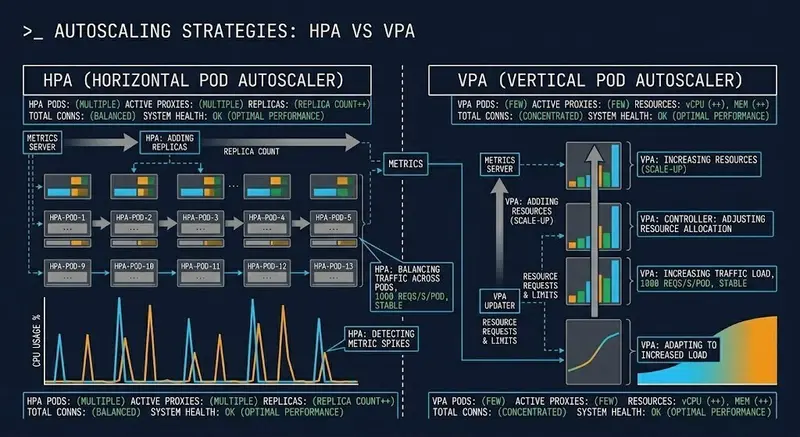
VPA vs HPA scaling dimensions — throughput vs stability tradeoff diagram

Most Kubernetes teams reach for HPA first. It’s visible, familiar, and the CPU dashboard makes the decision feel obvious. When traffic spikes, pods scale out. Clean mental model.

The problem: HPA solves one specific failure mode — traffic-driven throughput degradation. An under-resourced pod doesn’t need more replicas. It needs more CPU. More replicas of a starved pod just gives you more starved pods.

The Core Distinction

VPA vs HPA scaling dimensions — throughput vs stability tradeoff diagram

HPA and VPA are not two ways to do the same thing. They scale different dimensions:

HPA — Horizontal Pod Autoscaler
Scales replica count. Trigger: load (CPU, memory, custom metrics).
Solves: traffic-driven saturation. Risk: cold start amplification,
latency spikes during scale-out.

VPA — Vertical Pod Autoscaler
Scales resource requests and limits. Trigger: resource efficiency gap.
Solves: OOM kills, CPU throttling, mis-sized pods. Risk: eviction disruption, node fragmentation at scale.

HPA doesn’t prevent OOM kills.
VPA doesn’t absorb traffic bursts.

Applying the wrong one means you’re solving for a failure that isn’t happening while leaving the actual failure mode unaddressed.

The Trap Nobody Documents

Running both without coordination creates oscillation:

  1. VPA recommends larger CPU request → evicts pod to apply it
  2. HPA sees replica count drop → interprets as scale-in signal
  3. HPA removes a replica
  4. VPA recalculates on a smaller pool
  5. Cycle repeats

The result is instability driven entirely by the autoscalers fighting each other — not by any real workload condition. Nodes fragment. Scheduler pressure builds.

The coordination rule: VPA must not operate in Auto mode on any resource dimension HPA is also watching. In practice — VPA handles memory right-sizing, HPA handles CPU-driven replica scaling. Different axes, no interaction.

The Decision Framework

Use HPA when:

  • Stateless workloads with interchangeable replicas
  • Traffic-driven, burst-shaped load patterns
  • CPU is a reliable proxy for demand
  • Individual pod sizing is already correct

Use VPA when:

  • Steady, predictable load patterns
  • Pods are consistently OOM-killed or CPU-throttled
  • Resource requests were set by guesswork
  • Right-sizing over time matters more than burst absorption

Use both — with constraints:

  • VPA in Recommendation or Initial mode only (not Auto)
  • VPA establishes correct baseline sizing
  • HPA handles burst scaling above that baseline
  • Never let their trigger dimensions overlap

VPA and HPA combined mode architecture showing feedback loop risk

Scaling Decisions Are Cost Decisions

HPA adds pods — more replicas means more node capacity and more compute
spend. Aggressive scale-in thresholds mean you’re often paying for idle
capacity during transition periods.

VPA’s value is bin-packing efficiency — right-sized pods fit more
workloads on fewer nodes. But a stale VPA recommendation window produces
oversized requests that waste capacity cluster-wide.

The autoscaler is the last decision. Diagnose the failure mode first. Then pick the tool.

Full post with decision framework, failure mode breakdown, and
coordination rules: https://www.rack2cloud.com/vpa-vs-hpa-kubernetes/

220,000+ OpenClaw Instances Are Exposed. Here’s How to Check Yours.

Security researchers have been scanning for exposed OpenClaw instances since January 2026. The numbers vary by methodology: Penligent found over 220,000, SecurityScorecard identified 135,000, Censys tracked growth from 1,000 to 21,000+ in a single week. Microsoft’s security blog concluded that “for most environments, the appropriate decision may be not to deploy it.”

Most of these instances are running without TLS. Many are still vulnerable to ClawJacked (CVE-2026-25253, CVSS 8.8), which allowed any webpage you visited to silently brute-force the gateway token over localhost with no rate limiting.

I’ve been reviewing public configs and deployment guides. Three misconfigs show up in the majority of them, and they’re all fixable in minutes.

The exposure surface

OpenClaw’s default config binds the gateway to 0.0.0.0:18789. If you install it on a VPS and don’t touch the network settings, the gateway is public. There’s no warning during setup. The docs mention it, but not where people look.

What this means in practice:

  • Gateway token brute-force. ClawJacked (CVE-2026-25253, CVSS 8.8) allowed any webpage you visited to brute-force the gateway token. No rate limiting. No CORS. Patched in v2026.1.24-1, but the fix requires updating. Persistent services that nobody actively maintains tend to drift.

  • Unencrypted traffic. Without TLS, everything between the browser and the agent travels in plaintext. API keys, model responses, user data. On a shared network, that’s trivial to intercept.

  • Supply chain. ClawHavoc in January 2026: researchers found 824 malicious skills on ClawHub out of roughly 10,700 total. Clawdex, the main community scanner, was catching under 10% of them (Oathe’s independent audit confirmed this). If your instance auto-installs recommended skills, you’re trusting a supply chain that has already been compromised.

The three configs most people get wrong

I’ve reviewed hundreds of openclaw.json files from public repos, Docker Compose setups, and deployment guides. Three misconfigs show up in the majority of them.

1. Gateway binding

Default: binds to all interfaces (0.0.0.0:18789)
What it should be: loopback (127.0.0.1 only)

If you’re running behind a reverse proxy or tunnel, the gateway should never be reachable directly. The bind key accepts loopback, lan, tailnet, or custom.

{
  "gateway": {
    "bind": "loopback",
    "port": 18789
  }
}

2. The three proxy/tunnel flags

If you’re running behind a reverse proxy or Cloudflare Tunnel, you need three flags under gateway.controlUi. Not at the root level. Not as dot-notation keys. Nested JSON only.

{
  "gateway": {
    "controlUi": {
      "dangerouslyDisableDeviceAuth": true,
      "dangerouslyAllowHostHeaderOriginFallback": true,
      "allowInsecureAuth": true
    }
  }
}

Most guides mention two of these. The third, dangerouslyDisableDeviceAuth, is the one that causes the disconnected (1000): no reason error in the browser. It disables CLI-based device pairing, which only works with local machine access. Behind a proxy, there’s no local CLI, so the auth loop times out silently.

The flag names sound dangerous. They’re not, if you have a proxy handling auth in front. Without a proxy, don’t set them.

3. TLS termination

If your reverse proxy handles TLS (it should), the gateway can run without its own certificate. But the connection between proxy and gateway must stay on loopback. If the proxy runs on a different host than the gateway, you need TLS on both hops.

[Browser] →HTTPS→ [Proxy (TLS)] →HTTP→ [Gateway (127.0.0.1:18789)]

This only works when proxy and gateway share the same host. Most single-VPS setups qualify.

How to check yours

Run these checks on any instance:

1. Port exposure check:

# From outside your network
nmap -p 18789 your-server-ip
# If it shows "open", your gateway is public

2. Config audit:

# On the server
cat ~/.openclaw/openclaw.json | grep -E "bind|dangerously|allowInsecure"

3. Version check:

openclaw --version
# Anything before v2026.1.24-1 is vulnerable to ClawJacked

I also built a free scanner that runs these checks and a few more (skill supply chain, known CVE patterns, config analysis): https://vesselofone.com/tools/security-check. It runs against your instance URL and returns a report. No data stored, no signup required.

TL;DR

  • Set gateway.bind to "loopback", not the default (all interfaces)
  • Set the three gateway.controlUi flags if behind a proxy or tunnel
  • TLS terminate at the proxy, keep gateway on loopback
  • Update to v2026.1.24-1 or later (ClawJacked fix)
  • Audit installed skills (ClawHavoc found 824 malicious ones on ClawHub)
  • Run a port scan from outside your network to verify nothing is exposed

Most of these take five minutes. The gap between “it works” and “it’s not actively exploitable” is three config lines.

Best GEO Tools to Improve Your Visibility in AI Search

Search is evolving fast. Users are no longer just clicking links. They are asking questions in AI systems like ChatGPT and Perplexity and expecting direct, summarized answers.

If your website is not optimized for these systems, you are missing a growing share of visibility.

This is where Generative Engine Optimization (GEO) comes in.

GEO focuses on making your content understandable, structured, and retrievable by AI systems. It is not just about rankings anymore. It is about being selected, cited, and reused.

Below is a curated list of the top 10 GEO tools that actually help improve your visibility in AI-driven search.

What Makes a Strong GEO Tool?

A tool is only valuable if it directly impacts how AI interprets your content.

The best GEO tools help you:

  • Improve semantic clarity and entity recognition
  • Implement and validate structured data
  • Detect technical blockers for AI crawlers
  • Optimize content for question-based retrieval
  • Increase your chances of being included in AI-generated answers

1. GEO Checker by Scalevise

The fastest way to understand how your website performs in AI search environments.

GEO Checker is specifically built for GEO and focuses on how systems like ChatGPT and Perplexity interpret your content.

Why it stands out

  • Detects missing GEO signals
  • Analyzes entity structure and semantic gaps
  • Identifies structured data issues
  • Provides actionable recommendations

Use case

Many websites rank well but fail in AI visibility. GEO Checker by Scalevise shows exactly why and how to fix it.

'GEO Checker Scalevise'

👉 https://scalevise.com/ai-visibility-geo-checker

2. Screaming Frog SEO Spider

A technical foundation tool that remains essential.

Why it matters

  • Full website crawl
  • Detects broken links and structural issues
  • Analyzes metadata and hierarchy
  • Exports data for deeper GEO analysis

'Screaming Frog'

👉 https://www.screamingfrog.co.uk/seo-spider/

3. InLinks

An entity-focused SEO tool that aligns perfectly with GEO.

Key strengths

  • Entity detection and optimization
  • Semantic internal linking
  • Topic authority building
  • Content gap analysis

'InLinks GEO'

👉 https://inlinks.net/

4. Schema App

A powerful platform for managing structured data at scale.

What it does

  • Automated schema generation
  • Advanced schema support
  • Centralized management
  • Validation and monitoring

'Schema App SEO'

👉 https://www.schemaapp.com/

5. AlsoAsked

A tool that visualizes how questions connect across topics.

Why it is useful

  • Maps question clusters
  • Helps structure content for AI answers
  • Reveals user intent
  • Supports FAQ optimization

'AlsoAsked GEO'

👉 https://alsoasked.com/

6. Surfer SEO

While traditionally an SEO tool, Surfer plays a role in GEO through content structuring.

GEO relevance

  • Optimizes content structure
  • Improves topical coverage
  • Aligns content with search intent
  • Helps build semantically rich pages

'Surfer SEO'

👉 https://surferseo.com/

7. Frase

Frase focuses on content optimization based on questions and intent.

Why it matters

  • Generates content briefs based on queries
  • Optimizes for question-based search
  • Helps align content with AI answer formats
  • Improves contextual relevance

'Frase AI'

👉 https://www.frase.io/

8. Clearscope

A premium content optimization tool focused on relevance and depth.

Strengths

  • Improves content comprehensiveness
  • Enhances semantic coverage
  • Helps structure high-authority content
  • Supports entity-rich writing

'Clearscope'

👉 https://www.clearscope.io/

9. MarketMuse

A strategic content planning tool that helps build topical authority.

Why it is relevant

  • Identifies content gaps
  • Builds topic clusters
  • Strengthens authority signals
  • Improves long-term GEO performance

'MarketMuse GEO'

👉 https://www.marketmuse.com/

10. Ahrefs

Not a GEO tool by design, but still critical for visibility strategy.

GEO contribution

  • Identifies high-value topics
  • Tracks content performance
  • Provides backlink insights
  • Supports authority building

'Ahrefs GEO'

👉 https://ahrefs.com/

How to Combine These Tools (Practical Workflow)

Using these tools in isolation limits your results. The real value comes from combining them.

A practical GEO workflow:

  1. Start with GeoScan to identify AI visibility gaps
  2. Fix technical issues using Screaming Frog
  3. Optimize entities and linking with InLinks
  4. Implement structured data via Schema App
  5. Expand content using AlsoAsked
  6. Refine content using Surfer or Frase
  7. Strengthen authority using Clearscope and MarketMuse
  8. Monitor performance with Ahrefs

The Reality of AI Search

You can rank high in Google and still be invisible in AI-generated answers.

This is already happening.

GEO is not replacing SEO, but it is becoming a critical layer on top of it.

Companies that adapt early will dominate AI-driven discovery.

Final Thoughts

The shift is clear.

Search is no longer just about rankings. It is about being selected by machines.

If you want to stay competitive, you need to adapt your strategy and your tooling.

Start with a scan.

👉 https://scalevise.com/ai-visibility-geo-checker

Fix what matters. Build from there.

Because visibility in AI search is not guaranteed. It is

Sonic Has a Free API: Add Lightning-Fast Full-Text Search to Your App Without Running Elasticsearch

Your app needs search. You look at Elasticsearch: 4GB RAM minimum, complex cluster configuration, a JVM that eats memory for breakfast, and a query DSL that requires a PhD to understand. Two weeks later you’re still tuning settings. Your 10,000-item dataset doesn’t need a distributed cluster — it needs Sonic.

What Sonic Actually Does

Sonic is a lightweight, schema-less search backend written in Rust. It’s designed as a lean alternative to Elasticsearch for applications that need fast full-text search without the operational complexity. Where Elasticsearch requires gigabytes of RAM and complex cluster setup, Sonic runs in under 30MB of memory.

Sonic exposes a simple line protocol over TCP — similar to Redis, not HTTP. You push text in, you query text out. No JSON query DSL, no mappings to configure, no index settings to tune. It handles typos with phonetic matching, supports multiple collections and buckets, and is fast enough for real-time search-as-you-type.

The trade-off to understand: Sonic is a search index, not a database. It stores text for search but you retrieve full records from your actual database using the IDs Sonic returns. This separation is the right architecture for most applications.

Quick Start: Run Sonic Locally

docker run -d --name sonic 
  -p 1491:1491 
  -v sonic_data:/var/lib/sonic/store 
  valeriansaliou/sonic:latest

Install and use the Node.js client:

npm install sonic-channel
const { Ingest, Search } = require("sonic-channel");

const ingestChannel = new Ingest({
  host: "localhost",
  port: 1491,
  auth: "SecretPassword"
});

await ingestChannel.connect();

// Push documents: collection, bucket, object_id, searchable_text
await ingestChannel.push("articles", "default", "article:1",
  "How to build a REST API with Node.js and Express");
await ingestChannel.push("articles", "default", "article:2",
  "Building real-time apps with WebSockets and React");
await ingestChannel.push("articles", "default", "article:3",
  "Rust programming language performance benchmarks");

const searchChannel = new Search({
  host: "localhost",
  port: 1491,
  auth: "SecretPassword"
});

await searchChannel.connect();

const results = await searchChannel.query("articles", "default", "REST API Node");
console.log(results); // ["article:1"]

// Fetch full records using the returned IDs
const articles = await db.articles.findMany({ where: { id: { in: results } } });

3 Practical Use Cases

1. Real-Time Search-as-You-Type

Sonic is fast enough for keypress-level queries — typically under 5ms:

app.get('/api/search', async (req, res) => {
  const { q } = req.query;
  if (!q || q.length < 2) return res.json([]);

  const ids = await searchChannel.query("products", "default", q, { limit: 10 });
  if (ids.length === 0) return res.json([]);

  const products = await db.products.findMany({
    where: { id: { in: ids } },
    select: { id: true, name: true, price: true, image: true }
  });

  res.json(products);
});

10ms total response time for search-as-you-type, even with hundreds of thousands of products indexed.

2. Multi-Collection Search with Buckets

Sonic supports separate collections for different content types:

async function indexContent(item) {
  switch (item.type) {
    case 'article':
      await ingestChannel.push("articles", "en", `article:${item.id}`,
        `${item.title} ${item.body} ${item.tags.join(' ')}`);
      break;
    case 'product':
      // Use buckets to separate by category
      await ingestChannel.push("products", `cat:${item.category}`, `product:${item.id}`,
        `${item.name} ${item.description}`);
      break;
    case 'user':
      await ingestChannel.push("users", "default", `user:${item.id}`,
        `${item.name} ${item.email} ${item.bio || ''}`);
      break;
  }
}

// Search only electronics products
const ids = await searchChannel.query("products", "cat:electronics", searchQuery);

3. Autocomplete with Typo Tolerance

Sonic has built-in suggest/autocomplete and handles common typos automatically:

// User types "prog" — get completions
const suggestions = await searchChannel.suggest("tutorials", "default", "prog");
// ["programming", "program", "progress", "progressive"]

// Typo tolerance: "progrmaming" still finds "programming" results
const results = await searchChannel.query("tutorials", "default", "progrmaming");
// Returns results — phonetic matching handles it automatically

No fuzziness settings to tune, no analyzers to configure. It just works.

Why This Matters

For 90% of applications, Elasticsearch is enormous overkill. Sonic gives you full-text search that actually works — typo tolerance, autocomplete, multi-collection — for about 1% of the operational cost. It runs on a $5/month VPS alongside your main application.

The Rust implementation means it’s genuinely fast: benchmarks show Sonic handling 10,000+ queries per second on modest hardware. For applications under 100 million documents, you’ll likely never hit its limits.

The real win is operational simplicity. No JVM tuning, no shard configuration, no index lifecycle management. You push text in, you query text out. Sometimes simple really is better — and when it’s also fast and memory-efficient, there’s no reason to reach for something heavier.

Need custom data extraction or web scraping solutions? I build production-grade scrapers and data pipelines. Check out my Apify actors or email me at [email protected] for custom projects.

Follow me for more free API discoveries every week!

TCP: Why the Internet Works Even When It’s Broken

TL;DR: TCP is how we send big files over a mess of unreliable cables. It chops data into numbered chunks and won’t stop nagging the receiver until every single piece is accounted for. If a packet gets dropped or a router chokes, TCP just resends it until the job is done.

The internet is a series of physical cables and aging hardware that is constantly failing. Between your computer and a server, there are dozens of points of failure where data can be lost, corrupted, or just dropped because a router got too hot. TCP (Transmission Control Protocol) is the protocol that keeps your data from becoming a corrupted mess by assuming the network is going to fail.

How does TCP handle data loss on an unreliable network?

TCP handles data loss by breaking large files into small chunks and requiring a formal acknowledgment for every single one. Instead of hoping a 1GB file arrives in one piece, it treats the network as a “best-effort” medium and takes full responsibility for verifying that every byte landed safely.

Sending a massive file over a physical wire is a gamble. If one bit flips or a single packet hits a congested router and gets dropped, the whole transmission is ruined. TCP doesn’t gamble. It puts every page of your data into its own envelope, labels it with a page number, and sends it out. Then, it waits for a phone call. If the recipient says they got pages 1, 2, and 4, the sender knows page 3 was lost in the mail. The sender doesn’t have to guess; they just grab a copy of page 3 and send it again until the recipient confirms they have it.

What is the step-by-step process of TCP data transmission?

TCP transmission follows a strict loop of segmentation, sequencing, and verification. It transforms a raw, unreliable stream of bits into a structured conversation between two machines to ensure the final payload is identical to the source.

Phase What Happens Why it Matters
Segmentation Chop the payload into MTU-sized segments. Keeps chunks small enough for hardware to handle without choking.
Sequencing Stamp every packet with a sequence ID. Lets the receiver rebuild the file in order, even if packets arrive late.
Transmission Push segments onto the physical wire. This is the “unreliable” part where cables and routers take over.
ACK Loop Wait for Acknowledgment (ACK) signals. The only way the sender knows the data actually arrived.
Retransmit Resend segments if an ACK times out. Fixes network errors automatically without the user ever noticing.

Why does TCP use sequence numbers for every packet?

Sequence numbers act as the index that allows the receiver to reassemble data in the correct order and identify gaps. Without these numbers, the receiver would have no way of knowing if a packet was missing or if the data arrived out of sequence.

Think about a high-res image being sent across the country. Packet #50 might take a faster route through the network and arrive before packet #49. Without sequence numbers, your computer would just stick the bits together in the order they arrived, and the image would look like static. The sequence number tells the OS exactly where that chunk belongs in the final file, allowing it to buffer early arrivals until the missing gaps are filled.

What happens when a TCP acknowledgment is never received?

When an acknowledgment (ACK) doesn’t return within a specific window, the sender assumes the packet died in transit and triggers a retransmission. It keeps the data in a local buffer and refuses to clear it until it’s 100% sure the other side has it.

This is the core of TCP’s reliability. If you are pushing code to a server and the connection flutters, TCP doesn’t just let that chunk of data vanish. It will keep retrying that specific sequence ID until the server finally responds with a green light. It’s a persistent, nagging mechanism that ensures the integrity of the data at the cost of some overhead.

FAQ

What is the cost of TCP reliability?
The primary cost is high-latency overhead. Because every packet requires an acknowledgment (the ACK), and there is a “handshake” to start the connection, TCP is naturally slower than protocols that just fire data into the void without checking if it landed.

Why use TCP over UDP?
You use TCP when accuracy is non-negotiable, like loading a website, sending an email, or downloading software. You use UDP when speed is more important than a few dropped packets, like in a Zoom call or a competitive multiplayer game where a momentary glitch is better than the whole stream pausing to wait for a retransmission.

Does TCP ever give up on resending data?
Yes. While TCP is persistent, it isn’t infinite. If it fails to get an ACK after a set number of retries or a specific timeout period, it will eventually “reset” the connection and signal to the application that the network path is dead.

The Skill Atrophy Crisis: How AI Is Quietly De-Skilling Developers in 2026

In 2026, AI coding tools have become the default co-pilot for nearly every developer. Adoption sits at 84%, according to the Stack Overflow Developer Survey 2025. Teams ship more features, close tickets faster, and celebrate record velocity metrics. Yet beneath the surface, something troubling is happening: core engineering skills are eroding at an alarming rate.
This is the Skill Atrophy Crisis — the silent degradation of fundamental developer capabilities caused by over-reliance on AI-generated code. What began as a productivity revolution is now creating a generation of developers who can prompt effectively but struggle to think architecturally, debug deeply, or design systems from first principles.
The Data Is Undeniable
The evidence is mounting across multiple independent studies:

Stack Overflow Developer Survey 2025 (49,000+ responses): While 84% use AI tools, only 29–33% fully trust the output. More tellingly, 45% report that debugging AI code takes more time than writing it manually, and 66% call “almost right” solutions their biggest daily pain point.
Sonar’s 2026 State of Code Developer Survey (1,100+ engineers): 88% of developers report negative impacts from AI on code quality, with 53% noting that AI produces code that “looks correct but is unreliable.” Crucially, 40% admit they now spend less time on deep problem-solving and more time on verification and cleanup.
Veracode 2026 GenAI Security Report: AI-generated code introduces vulnerabilities in 45% of cases (up to 72% in Java), forcing senior engineers into constant auditing roles rather than mentorship or innovation.
Chainguard Engineering Reality Report 2026: Developers now spend only 16% of their week writing new code — the work they find most rewarding — while 84% is consumed by maintenance, debt repayment, and fixing AI output.

These numbers point to a structural shift: AI is accelerating output but slowing capability growth. Junior and mid-level developers, in particular, are showing measurable gaps in fundamentals such as systems design, memory management, concurrency, and security architecture.
What Skill Atrophy Actually Looks Like
Developers experiencing atrophy typically exhibit these patterns:

They can generate a full microservice in minutes but struggle to explain the underlying trade-offs between synchronous vs. asynchronous communication or eventual consistency.
They rely on AI to suggest data structures but can’t manually optimize a hot path under production load.
They produce working prototypes quickly but create fragile, tightly coupled systems that resist scaling or refactoring.
When AI is unavailable (offline flights, restricted environments, or interview settings), their productivity collapses.

This isn’t laziness — it’s a natural consequence of cognitive offloading. Just as GPS weakened our spatial memory, AI is weakening our algorithmic intuition and architectural judgment.
Psychologically, the dopamine hit from rapid progress reinforces the habit. Teams reward velocity metrics (PR count, story points) while under-measuring long-term indicators like code maintainability, onboarding time for new hires, or incident resolution depth.
Why This Crisis Is Unique to 2026
Three converging forces make 2026 the inflection point:

Massive Context Windows + Agentic Tools — Models like Claude 4.6 and GPT-5.2 can ingest entire codebases, yet developers still provide incomplete or outdated context, leading to plausible but architecturally wrong suggestions.
The Junior-to-Senior Pipeline Breakdown — With AI handling boilerplate, juniors miss the repetitive “grind” that traditionally built deep intuition. Seniors, meanwhile, become full-time reviewers instead of mentors.
Economic Pressure for Speed — In competitive markets, leadership demands AI-driven velocity, often at the expense of sustainable skill development.

The result is a widening gap between surface-level productivity and deep engineering maturity — a gap that will take years to close.
Fighting Back: Rebuilding Skills Without Sacrificing AI
The good news is that skill atrophy is reversible. Leading teams and individual developers are already implementing deliberate countermeasures:

The “Human-First Rule”
For every new feature or complex task, developers must first attempt a solution manually (even if rough) before involving AI. This forces active thinking and prevents passive acceptance of AI output.
Mandatory Explain-Back Sessions
After receiving AI code, close the tool and explain every line, decision, and potential failure mode out loud or in writing. If you can’t, revisit the fundamentals.
Deliberate Practice Sprints
Allocate 20–30% of sprint time to “no-AI” zones: refactoring legacy modules, solving LeetCode-style problems manually, or running architecture workshops without tools.
Context Engineering as a Core Skill
Treat providing rich, accurate context to AI as an engineering discipline. Maintain living architecture decision records (ADRs), golden-path templates, and internal knowledge graphs that AI can reliably consume.
Balanced Metrics and Career Ladders
Track not just velocity but also skill-health metrics: time to onboard new team members, depth of code reviews, and frequency of architectural improvements. Promote and reward engineers who demonstrate strong fundamentals alongside AI fluency.
Mentorship 2.0
Pair juniors with seniors for “AI pair-programming audits” where the focus is on why the AI suggestion is suboptimal and how a stronger human solution would look.

The Road to 2027 and Beyond
By the end of 2026, the most successful engineering organizations will be those that treat AI as a powerful but fallible junior colleague — one that requires guidance, verification, and continuous education.
The developers who will lead the next decade won’t be the fastest prompters. They will be the ones who maintain sharp fundamentals, deep systems thinking, and the ability to operate confidently with or without AI.
The Skill Atrophy Crisis is real, measurable, and reversible. The question for every developer and engineering leader in 2026 is simple:
Are we using AI to augment our skills — or to quietly replace them?
The choice we make today will define the quality of our codebases, the strength of our teams, and the resilience of our systems for years to come.
What signs of skill atrophy have you observed in your own work or team?
What deliberate practices have helped you stay sharp in the age of AI?
Share your experiences and strategies in the comments. This conversation matters more than ever.

SkillAtrophy #AIin2026 #DeveloperSkills #SoftwareEngineering #TechnicalExcellence #AIDevelopment #DevCommunity #EngineeringLeadership