Zellij Has a Free Terminal Multiplexer: The Modern tmux Alternative With Built-In Layouts, Plugin System, and Session Management

You’ve tried to learn tmux three times. Each time you gave up after memorizing Ctrl-b then trying to remember if it’s % or | for vertical split. tmux is powerful but hostile to newcomers. Zellij is a terminal multiplexer that shows you the keybindings on screen, has sane defaults, and adds features tmux never had — like a WebAssembly plugin system.

What Zellij Actually Does

Zellij is a terminal workspace manager written in Rust. Like tmux, it lets you split your terminal into panes, create tabs, and keep sessions alive when you disconnect. Unlike tmux, Zellij is designed to be discoverable: a status bar shows available keybindings in each mode, so you never need to memorize shortcuts.

Zellij introduces features tmux doesn’t have: a WASM plugin system (extend Zellij with Rust, Go, or any language that compiles to WASM), built-in floating panes, and a layout system that defines your workspace as code.

Open-source under MIT license. Single binary, zero configuration needed to start.

Quick Start

# Install
brew install zellij  # macOS
cargo install zellij # From source

# Start a named session
zellij -s my-project

Key shortcuts (shown in the status bar):

Ctrl+p then d    — Split pane down
Ctrl+p then r    — Split pane right
Alt+n            — New pane
Ctrl+t then n    — New tab
Alt+[arrow]      — Move between panes
Ctrl+o then d    — Detach session
zellij attach    — Reattach

The mode system means shortcuts are contextual — no conflicts with your shell or editor bindings.

3 Practical Use Cases

1. Layouts as Code

Define your development workspace in a KDL file:

// ~/.config/zellij/layouts/dev.kdl
layout {
    tab name="code" {
        pane split_direction="vertical" {
            pane command="nvim" size="70%"
            pane split_direction="horizontal" {
                pane command="cargo" args=["watch", "-x", "check"]
                pane  // empty shell for git/misc
            }
        }
    }
    tab name="servers" {
        pane command="cargo" args=["run"]
        pane command="docker" args=["compose", "logs", "-f"]
    }
    tab name="db" {
        pane command="psql" args=["-h", "localhost", "-U", "dev"]
    }
}

Launch your entire dev environment:

zellij --layout dev

Three tabs, six panes, all running the right commands. Share this file with your team.

2. Floating Panes for Quick Tasks

Ctrl+p then w    — Toggle floating pane

A floating pane appears over your current workspace — perfect for running a quick git command or checking logs without disrupting your layout. Dismiss it and your workspace is exactly as you left it.

3. WASM Plugins

Extend Zellij with custom functionality:

// A plugin that shows system resources in the status bar
use zellij_tile::prelude::*;

#[derive(Default)]
struct SystemMonitor;

impl ZellijPlugin for SystemMonitor {
    fn load(&mut self, _config: BTreeMap<String, String>) {
        subscribe(&[EventType::Timer]);
        set_timeout(1.0);  // Update every second
    }

    fn update(&mut self, event: Event) -> bool {
        match event {
            Event::Timer(_) => {
                // Read /proc/loadavg or equivalent
                set_timeout(1.0);
                true  // re-render
            }
            _ => false
        }
    }

    fn render(&mut self, _rows: usize, cols: usize) {
        print!("CPU: 23% | MEM: 4.2/16GB");
    }
}

Compile to WASM, load in Zellij. Custom status bars, integrations, whatever you need.

Why This Matters

Terminal multiplexers are essential for any developer who SSHs into servers or runs multiple processes. tmux works but punishes you for not memorizing its shortcuts. Zellij makes the same power accessible to everyone, with discoverable UI, sane defaults, and modern features like WASM plugins and layout files.

If you’ve bounced off tmux, try Zellij. If you use tmux daily, try Zellij anyway — the layout system and floating panes might convert you.

Need custom data extraction or web scraping solutions? I build production-grade scrapers and data pipelines. Check out my Apify actors or email me at [email protected] for custom projects.

Follow me for more free API discoveries every week!

What About Second HTTP? Solving the 100-File Connection Bottleneck

TL;DR: HTTP/2 replaces the inefficient six-connection limit of HTTP/1.1 with a single, multiplexed stream. By breaking assets into small, interleaved chunks, it eliminates head-of-line blocking and prevents multiple connections from fighting for bandwidth, allowing browsers to request and download hundreds of files simultaneously without the overhead of repeated TCP handshakes.

We’ve had first HTTP, but what about second HTTP? Back in the “olden days,” websites were tiny. You had an HTML file, a CSS file, and maybe a couple of GIFs. For that scale, HTTP/1.1 worked fine. But modern web engineering has moved toward shipping hundreds of small files—JavaScript modules, fragmented CSS, and optimized assets.

When you try to shove 100 files through a protocol designed for five, things get slow. It isn’t just about the raw size of the data; it’s about how the protocol manages the “wire” itself. Let’s look at why we had to move on to HTTP/2 to build the websites we actually want to build today.

Why is the 6-connection limit a problem for modern sites?

HTTP/1.1 browsers typically limit themselves to six concurrent TCP connections per domain. If your site requires 100 files to render, the browser is forced to download them in batches of six, leaving the remaining 94 files stuck in a queue until a slot opens up.

This isn’t just a queuing issue; it’s a resource management disaster. Each of those six connections takes time to establish via a TCP handshake. Once they are open, these connections don’t cooperate; they actively fight each other for available bandwidth. Instead of one smooth stream of data, you have six competing processes creating noise and congestion on the network. For a site with 100+ assets, this “batching” adds massive latency that purely sequential processing can’t overcome.

What happens when a file gets stuck in HTTP/1.1?

In HTTP/1.1, if one file in a connection downloads slowly or gets “stuck,” that entire connection is blocked until the transfer completes. This is known as Head-of-Line (HOL) blocking, where a single heavy asset prevents every subsequent file in the queue from moving forward.

If you’re down to five active connections because one is hung up on a large image or a slow server response, your throughput drops immediately. There is no way for the browser to say, “Hey, skip that big file and send me the tiny JS snippet instead.” The protocol is strictly sequential within those six pipes. If the “head” of the line is blocked, everything behind it stays put.

How does HTTP/2 multiplexing eliminate the queue?

HTTP/2 ignores the six-connection rule and uses one single, high-performance connection to request everything at once. It does this by chopping every file into little chunks and interleaving them, so data for all 100 files starts moving down the wire simultaneously.

Because it’s one connection, we avoid the overhead of multiple handshakes and the bandwidth contention issues where separate connections fight for priority. If one file gets stuck or arrives slowly, it doesn’t matter. The browser is already busy receiving the chunks for the other 99 files. Everything gets sent down the wire in parallel and is reconstructed by the browser on the other end.

Feature HTTP/1.1 (The Old Way) HTTP/2 (The Modern Way)
Concurrency 6 connections (Max) 1 connection (Multiplexed)
File Handling Sequential (one at a time per pipe) Parallel (all at once via chunks)
Network Efficiency High contention, multiple handshakes Low overhead, optimized bandwidth
Failure Mode HOL blocking stalls the queue Interleaved frames prevent stalls

Is setting up one connection really faster than six?

You might think more pipes equal more speed, but in networking, the opposite is often true because of the “slow-start” algorithm in TCP. A single HTTP/2 connection can optimize its throughput faster and more accurately than six competing connections that are constantly triggering congestion control mechanisms.

By moving to HTTP/2, we’ve stopped trying to hack around the protocol and started using one that understands we’re building sites made of hundreds of files. It’s about getting everything down the wire as fast as possible so the user isn’t left staring at a loading spinner while the browser tries to manage a congested queue. Cheers!

FAQ

Do I still need to bundle my files into one giant ‘bundle.js’ with HTTP/2?
While bundling isn’t as critical for bypassing connection limits as it was in HTTP/1.1, it’s still useful for compression efficiency. However, HTTP/2 makes it much more performant to ship unbundled modules, which can lead to better caching strategies.

Does HTTP/2 work over unencrypted connections?
While the spec doesn’t strictly require encryption, all major browser implementations (Chrome, Firefox, Safari) only support HTTP/2 over TLS (HTTPS). If you want the speed of Second HTTP, you need an SSL certificate.

How does the browser know how to put the chunks back together?
HTTP/2 uses a framing layer. Each chunk of data is wrapped in a ‘frame’ that contains a stream identifier. The browser sees these IDs and knows exactly which file each chunk belongs to, allowing it to reassemble the assets perfectly even though they arrived interleaved.

I built a CLI that migrates your JS codebase to TypeScript automatically using AI

The Problem

Migrating a JavaScript codebase to TypeScript is painful.
I spent 3 weeks doing it manually and thought —
there has to be a better way.

The Solution

I built RepoSurgeon — a CLI tool that does it automatically.

npm install -g reposurgeon
reposurgeon migrate .

That’s it. Your TypeScript project appears in
./reposurgeon-output with a full diff report.

Supports 17 AI Providers

The best part — it works with whatever AI key you have:

  • OpenAI, Claude, Gemini, Groq (free!), Mistral
  • DeepSeek, xAI Grok, OpenRouter
  • Ollama, LM Studio, Jan (local & free!)

Just set one key in .env and run.

Try It Free

No credit card needed:

GitHub

github.com/nikeshsundar/reposurgeon

Star it if you find it useful!

Decoding Bronze Age Paperwork: Modern AI vs. Ancient Assyrian Clay Tablets

ByT5 architecture

Four thousand years ago, Assyrian merchants were doing what people have always done: tracking debts, chasing payments, arguing over contracts. They pressed these records into clay tablets. Not sacred texts, not epic poetry. Just the ancient equivalent of office emails.

Nearly 23,000 of these tablets survive. Half have never been translated — not because they’re damaged, but because a few people on Earth can read Old Assyrian.

When the Deep Past Initiative turned this into a Kaggle competition, build a machine translation system for Old Assyrian cuneiform — I jumped in. The task: take transliterated text (cuneiform signs converted to Latin characters) and produce an English translation.

The training set? Around 1500 pairs. That’s it.

For context, standard translation models train on millions of sentence pairs. Even research on “low-resource” languages works with tens of thousands. We got fifteen hundred documents and a pat on the back.

So the question was straightforward: how do you build a translation model when you barely have any data, for a language that no modern tokenizer has ever seen, where every proper noun and number matters because these are legal and financial records?

What started as “fine-tune a model on some ancient text” turned into a full-stack AI pipeline: Gemini vision for OCR-ing scanned academic books, LLMs for sentence alignment and cross-lingual translation, ByT5 as a byte-level backbone that doesn’t choke on cuneiform, Unsloth for efficient LoRA training, and vLLM for fast inference on Kaggle T4s. The results surprised us.

Let’s start with why the obvious approaches don’t work.

Why the Obvious Approaches Don’t Work

The first thing I tried was what everyone tries — throw a pretrained LLM at it. Gemma, Qwen, the usual suspects. Prompt it with some examples, let it translate.

And honestly? The outputs look pretty good at first glance. Fluent English, reasonable sentence structure, feels like it could be right. But “feels right” is dangerous when you’re translating ancient legal documents.

The problem is hallucination — and not the subtle kind. These models confidently fill in names of merchants, cities, and commodities that simply aren’t in the source text. When the transliteration says A-šùr-i-dí the model might output a completely different name that sounds plausibly Bronze Age. When it hits an unfamiliar trade term, it improvises. For documents where every name, every number, every commodity is the actual information — that’s not a minor quality issue, it’s the whole problem.

Ok so what about standard encoder-decoder translation models? Here the issue is more fundamental: tokenization. Modern tokenizers are trained on modern text. Akkadian transliteration is a different universe — hyphenated syllable sequences like a-na, Sumerian logograms in ALL CAPS like KÙ.BABBAR, determinatives in curly braces like {d} and {ki}, subscript digits encoding phonetic variants like il₅, and gap markers like <gap> for broken sections of the physical tablet.

Feed this into a standard tokenizer and it fragments on every character it hasn’t seen. Proper nouns that have never appeared in any pretraining corpus get silently mangled. The <gap> markers that indicate missing text get treated as noise or special tokens.

So: decoder-only models hallucinate, standard translation models can’t tokenize the input properly. What actually fits this problem?

ByT5 — The Right Tool for a Weird Job

One of the best things about Kaggle competitions is the community. People share findings, discuss approaches in the forums, and collectively narrow down what works. Early on, several participants converged on the same answer: ByT5.

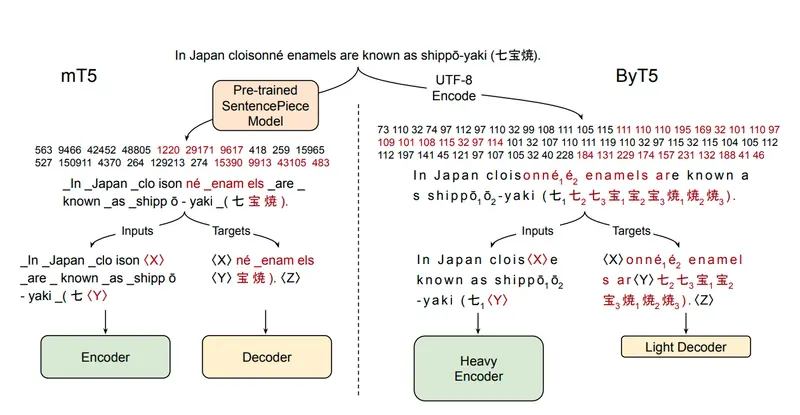
ByT5 architecture

Image from “ByT5: Towards a Token-Free Future with Pre-trained Byte-to-Byte Models” (Xue et al., 2021)

ByT5 comes from a 2021 Google Research paper — “Towards a Token-Free Future with Pre-trained Byte-to-Byte Models”. The idea is simple and kind of radical: skip tokenization entirely. Instead of mapping text to a learned vocabulary of subwords, ByT5 operates directly on raw bytes. A standard Transformer, minimal modifications, just processing one byte at a time.

Why does this matter for our problem? Because every character is valid input by definition. It doesn’t matter that A-mur-{d}UTU has never appeared in any pretraining corpus — ByT5 doesn’t need it to. No vocabulary misses, no fragmented tokens, no special handling for curly braces or subscript digits. The model just sees bytes.

The paper also showed something else that turned out to be critical: byte-level models are significantly more robust to noise. When your source text comes from OCR’d clay tablets with inconsistent transcription conventions across different scholars and decades — that robustness isn’t a nice-to-have, it’s a requirement.

Architecture: solved. Now came the harder problem — we had the right model, but nowhere near enough data to train it.

The Data Problem

With ByT5 as the architecture, the bottleneck shifted entirely to data. And the competition host made the challenges very clear in a public discussion post.

Two things consistently broke translations more than anything else:

Named entities. Personal names, place names, divine names — they’re transliterated inconsistently across different editions, they preserve older spelling conventions, and they’re completely opaque to the model. In practice, many otherwise reasonable translations failed because a name got mangled, dropped, or hallucinated. The host even prepared an onomasticon (a curated list of attested name spellings) as supplemental data to help with this.

Transliteration format inconsistency. Different corpora encode the same text using different conventions. One participant converted diacritics to ASCII before training (š → sz, ú → u2) — a reasonable instinct, but the evaluation data expects diacritics. Collapsing ṣ into S₂ or š into SZ removes distinctions that are semantically meaningful in Akkadian. The rule was clear: normalize toward the format used in the evaluation set, not away from it.

On top of that, gap handling was tricky. Damaged sections of tablets are marked with <gap>, but the training data wasn’t perfectly aligned — sometimes a large gap appears in the transliteration but not in the translation, forcing the model to learn misalignment rather than translation. Edge cases like <gap>-A-šùr (a gap attached to a word) needed to be preserved, not blindly stripped.

The host’s closing point stuck with me: these aren’t model architecture problems. They’re data problems. And with only ~1,500 training pairs, every one of these issues hits harder because the model sees so few examples to learn from.

So the path forward was obvious — find more data.

Finding More Data — The AKT Books

AKT 5 Cover

The training data had to come from somewhere. The competition hosts pointed the way — they shared scanned PDFs of the AKT series (Anatolian Kültepe Texts), a multi-volume scholarly publication of Old Assyrian tablets from the Kültepe excavations in Turkey. Each volume contains transliterations and translations of tablets. Exactly the domain, exactly the format we needed.

The catch? These are academic books published between 1990 and the 2020s, by different authors, in different languages. AKT 1, 2, 4, 9a, and 10 are in Turkish. AKT 3 is in German. Each volume has its own layout, its own heading conventions, its own way of marking tablet edges and sections. Different fonts, different editorial styles, different decades of typesetting.

Example of publication

This isn’t structured data you can parse with a script. These are scanned pages of physical books — some crisp, some not — where a tablet’s transliteration might start on one page and continue on the next, where scholarly commentary sits right next to the translation text, and where the format changes just enough between volumes that nothing generalizes cleanly.

But inside these messy PDFs was exactly what we were starving for: hundreds of additional transliteration-translation pairs, many with line-by-line alignment that the original training set didn’t have.

The question was whether I could extract it reliably enough to actually help the model — or whether the noise would make things worse. This is where Gemini’s multimodal capabilities came in — specifically its ability to understand page layouts, distinguish between transliteration blocks and commentary, and handle multilingual content out of the box. I decided to build the pipeline.

The Extraction Pipeline

Building this pipeline was its own mini-project. Each step solved one problem and revealed the next.

Step 1: PDF → Page Images

The simplest step — render each PDF page as a numbered PNG. This is the only part that runs purely local. Everything else goes through Gemini.

Step 2: Page Images → Structured JSON

Each page image gets sent to Gemini’s vision model via the Vertex AI Batch API. The flow: build a JSONL of requests (one per page image, referencing GCS URIs), submit to Vertex, parse the predictions back.

A quick note on why batch inference: when you’re processing hundreds of pages and don’t need real-time responses, the Batch API is a no-brainer. You get a 50% discount over standard inference, much higher rate limits, and the service handles parallelization and retries for you — typically completing within 24 hours. You submit one job, go do something else, come back to results. For a pipeline like this where I was processing multiple books with hundreds of pages each, it saved both money and sanity.

The request construction:

def build_request(gcs_uri: str, prompt_text: str) -> dict:
    return {
        "request": {
            "contents": [{
                "role": "user",
                "parts": [
                    {"fileData": {"mimeType": "image/png", "fileUri": gcs_uri}},
                    {"text": prompt_text},
                ]
            }],
            "generationConfig": {
                "responseMimeType": "application/json",
                "temperature": 0.0,
                "mediaResolution": "MEDIA_RESOLUTION_HIGH",  # needed for diacritics
                "thinkingConfig": {"thinkingLevel": "MEDIUM"},
            },
        }
    }

We used gemini-3.1-flash-lite-preview with medium thinking enabled — the reasoning step helped significantly with understanding complex page layouts and making correct decisions about where one tablet ends and another begins.

Submit with the Vertex AI Batch API:

client = genai.Client(vertexai=True, project=project, location=location)
job = client.batches.create(
    model="gemini-3.1-flash-lite-preview",
    src="gs://your-bucket/book/ocr_batch/requests.jsonl",
    config=CreateBatchJobConfig(
        dest="gs://your-bucket/book/ocr_batch/predictions/"
    ),
)

One gotcha that bit me early: predictions come back shuffled. You can’t rely on line order in the output — you have to extract the page number from each prediction’s original request URI:

def extract_page_num(pred: dict) -> int:
    uri = pred["request"]["contents"][0]["parts"][0]["fileData"]["fileUri"]
    m = re.search(r"page_(d+).png", uri)
    return int(m.group(1))

This is actually a feature — it forces you to write robust parsing from the start.

Every AKT volume needs its own prompt. Different heading formats, different edge markers (Ö.y., Ak. for Turkish volumes; Vs., Rs. for German), different conventions for commentary blocks. Get this wrong and you extract commentary as translation, or merge two tablets into one.

Step 3: JSON Pages → Tablets CSV

A book-specific export script aggregates all the per-page JSONs into a flat CSV — one row per tablet with combined transliteration and translation fields. Each volume needs its own exporter because the structure varies enough that a generic one would silently break.

Step 4: Visual QC

Dump everything to an HTML file and actually look at it. This is where you spot the real problems: misread headings, commentary leaking into translation fields, duplicate translations from continuation pages. No amount of automated testing replaces eyeballing the output.

Step 5: Cleanup

Book-specific cleanup scripts apply the fixes found during QC — drop bad rows, merge tablets that got split across pages, strip commentary that leaked through. Unglamorous and manual but completely necessary.

Step 6: Sentence Chunking + Translation

Batch Job Flow

Here’s where it gets interesting again. The original training data is document-level — full tablet in, full translation out. But the AKT books have something better: line-by-line structure. Each transliteration line has a marker ((Vs.1), (2), (Rs.14)) and each translation sentence references those markers.

A second Gemini batch job handles two things at once: align transliteration lines to translation sentences by marker, and translate the non-English content (Turkish or German) into English. For each tablet, I retrieved the most similar examples from the official training set using TF-IDF cosine similarity and included them as few-shot context. This turned out to be crucial — not just for translation quality, but for matching the distribution of the host’s wording, style, and terminology choices. The model wasn’t just translating, it was learning to translate the way the competition data expected.

Same batch pattern — build JSONL, submit, parse shuffled predictions.

Step 7: Normalization

Most of the invisible work happened here. The competition test set uses a specific character format, and the books don’t match it. Every volume has its own OCR artifacts, its own conventions.

A few examples from the normalization stack:

  • ḫ/Ḫ → h/H (test set uses plain H)
  • Unicode subscripts → plain digits (₄ → 4)
  • Superscript determinatives → brace format (ᵈ → {d}, ᵏⁱ → {ki})
  • OCR artifacts: KU.BABBAR → KÙ.BABBAR, ś → š, ş → ṣ
  • Gap deduplication: <gap> <gap> → <gap>, while preserving attachments like <gap>-A-šùr

For a character-level model like ByT5, this isn’t cosmetic. A single character mismatch between training and test — ḫ vs h, ₄ vs 4 — is invisible to a human reviewer and catastrophic to a model that has learned exactly one representation.

Step 8: Merge

The final step pulls normalized chunks into the main training set. Starting from ~1,500 pairs, the pipeline roughly multiplied our available training data — and more importantly, added sentence-level pairs that gave the model a much finer-grained learning signal than document-level translations alone.

Training — ByT5 Gets You Far, Then Stops

With the expanded dataset ready, training ByT5 was straightforward — standard seq2seq encoder-decoder training using HuggingFace Transformers. No tricks, no exotic schedulers. The model picked up patterns fast and translated training-domain tablets surprisingly well.

But then the leaderboard scores started telling a different story.

In our case, the hidden test set on Kaggle seemed to have a different distribution than what we trained on. Our best guess: different books, different topics, different translator styles, unfamiliar names and locations. Our ByT5 was doing well on what it had seen directly in training, but the leaderboard scores suggested it wasn’t generalizing beyond that.

We hit a ceiling. Many teams went on to have great success pushing ByT5 further — better augmentation, longer training, smarter tricks I guess. But in our setup, the gains had stalled, and we decided to explore a different direction.

Back to Decoder-Only — But This Time, Fine-Tuned

This is where the story comes full circle. Earlier, we’d dismissed decoder-only LLMs because they hallucinate. That’s still true — out of the box. But fine-tuning changes the picture completely.

The reasoning was simple: ByT5 and Qwen were solving different problems. ByT5 was a great fit for the transliteration itself — every character mattered, and byte-level modeling let it handle weird orthography, diacritics, subscripts, and determinatives without fighting the tokenizer. But once the task became generalization across unfamiliar tablets, translator styles, and topic shifts, Qwen3.5 had something ByT5 didn’t: much stronger pretrained language knowledge.

Out of the box, that strength was useless because it came with hallucination. Fine-tuning changed that. LoRA gave us a way to keep the model’s broader language ability while grounding it in the task and the dataset. Instead of prompting a general-purpose model and hoping for the best, we trained a lightweight adapter on our curated examples. Combined with few-shot prompting to match the host’s translation style, the fine-tuned Qwen handled the distribution shifts that our ByT5 couldn’t.

Fine-Tuning with Unsloth — Making LLMs Affordable

Before diving into the training details, a quick primer for anyone who hasn’t fine-tuned a model before.

The naive approach to fine-tuning a large language model means updating all its parameters — billions of them. That requires serious hardware, serious memory, and serious money. For a Kaggle competition where you’re iterating fast on limited GPUs, it’s a non-starter.

This is where LoRA (Low-Rank Adaptation) comes in. Instead of updating the entire model, you freeze the original weights and train a small set of adapter matrices on top. You get most of the benefits of full fine-tuning at a fraction of the cost. QLoRA takes it a step further by quantizing the base model to 4-bit precision, which dramatically cuts memory usage — making it possible to fine-tune models that would otherwise never fit on a single GPU.

Unsloth

For this project we used Unsloth, which makes the whole process surprisingly painless. It handles the LoRA/QLoRA setup, optimizes training to run ~2x faster with ~70% less VRAM, and supports a wide range of models out of the box — including Qwen3.5, which is what we needed.

The training itself was SFT (Supervised Fine-Tuning) using Unsloth’s built-in SFT trainer. We structured our data as chat conversations: a system prompt setting the role of an expert Assyriologist, few-shot examples retrieved via TF-IDF similarity, and the target tablet as the final user message. The model only learns from the assistant completion — the actual translation.

# each training example looks like this
messages = [
    {"role": "system", "content": "You are an expert Assyriologist..."},
    # few-shot examples from similar tablets
    {"role": "user", "content": "Translate: um-ma A-šùr-i-dí-ma ..."},
    {"role": "assistant", "content": "Thus says Aššur-idī: ..."},
    {"role": "user", "content": "Translate: um-ma Pu-šu-ki-in-ma ..."},
    {"role": "assistant", "content": "Thus says Pūšu-kēn: ..."},
    # the actual tablet to translate
    {"role": "user", "content": "Translate: a-na A-lim {ki} ..."},
    {"role": "assistant", "content": "To the City: ..."},  # model learns this
]

An important detail here: we used completion-only masking. The loss is computed only on the assistant’s translation tokens — the prompt tokens (system message, few-shot examples, user messages) are masked out during training. This means the model isn’t wasting capacity learning to predict the input; it’s focused entirely on producing accurate translations.

Completion masking: prompt tokens are masked in the labels, loss is only computed on the completion tokens

This meant the model wasn’t just learning to translate — it was learning to translate in context, grounded by similar examples. The same retrieval and prompt structure would be used at inference time, so there was no gap between how the model trained and how it would be evaluated.

One direction we started exploring but ran out of time for: reinforcement learning on top of the fine-tuned model. The idea was to use GRPO (Group Relative Policy Optimization) with custom reward functions — combining the competition metric itself, gap alignment between transliteration and translation, and length balance — to push the model beyond what SFT alone could achieve. Each reward would target a specific failure mode that supervised training couldn’t address directly. We didn’t get there before the deadline, but it felt like the natural next step.

Inference — vLLM on Kaggle T4s

With a fine-tuned model ready, the next challenge was actually running it within Kaggle’s competition constraints. This is a code competition — no internet access at submission time, two T4 GPUs with 16GB VRAM each, and a strict time limit.

A quick intro on vLLM for those unfamiliar: it’s an open-source inference engine originally developed at UC Berkeley that’s become the go-to for serving LLMs efficiently. The key innovation is PagedAttention — instead of pre-allocating a fixed block of memory for each sequence’s key-value cache, it pages the KV cache dynamically, similar to how operating systems manage virtual memory. This means you can serve larger models on less hardware. On top of that you get continuous batching, optimized CUDA kernels, tensor parallelism, and seamless HuggingFace model support out of the box.

Sounds perfect, right? In theory. In practice, we hit a wall.

Qwen3.5 was released in the final weeks of the competition. The model was brand new — vLLM support was experimental and unstable. On top of that, Kaggle’s T4 GPUs have compute capability 7.5, which means no FlashAttention 2 support. We had to fall back to Triton attention backend, wrestle with environment compatibility issues, and work around the fact that you can’t pip install anything at submission time — every dependency needs to be pre-packaged in your dataset.

Getting a 9B parameter model to load, run, and generate translations on two T4s without crashing was its own mini-project. Tensor parallelism across both GPUs was non-negotiable — the model simply wouldn’t fit on a single card.

llm = LLM(
    model=MODEL_PATH,
    dtype="float16",
    max_model_len=16000,
    gpu_memory_utilization=0.85,
    enforce_eager=True,            # no CUDA graphs on T4
    tensor_parallel_size=2,        # split across both T4s
)

The inference prompt mirrors the training setup exactly — same system prompt, same TF-IDF few-shot retrieval. For each test tablet, we retrieve the 5 most similar examples from our training data and include them as conversation context:

prompts = [
    build_messages(
        transliteration=row["transliteration"],
        few_shot_examples=retriever.top_k(row["transliteration"]),
    )
    for row in test_rows
]
outputs = llm.chat(prompts, sampling_params=sampling_params)

Keeping the inference pipeline identical to training — same prompt structure, same retrieval, same style anchoring — meant the model was seeing exactly the kind of input it was trained on. No distribution shift at inference time.

Results and Reflections

Our team finished with a silver medal out of 2500+ teams. In the final days of the competition, the OCR extraction pipeline was still producing new data — each batch of cleaned and normalized tablets pushed our scores higher. We genuinely felt like gold was within reach with a couple more days. That stings a bit, but honestly? The journey was worth more than the medal.

Here’s what I’m taking away from this:

Gemini’s batch inference is a superpower for unstructured data. We used it to turn scanned academic books from the 1990s — messy layouts, multiple languages, inconsistent formatting — into clean, structured training data. If it works for 4,000-year-old Assyrian tablets in Turkish and German PDFs, it’ll work for your use case too. The Vertex AI Batch API made it affordable and painless at scale.

Few-shot retrieval is still easy gains. TF-IDF character n-gram similarity is dead simple to implement, and using retrieved examples to anchor both training and inference gave us consistent improvements with minimal effort. Small iterations, big returns.

Fine-tuning is more accessible than you think. LoRA + Unsloth meant we could train a 9B parameter model on Kaggle’s free GPUs. You don’t need a cluster. You need good data and the right tools.

vLLM makes deployment practical. Even on constrained hardware like Kaggle T4s, with a brand-new model and no internet access, we got a 9B model running with tensor parallelism. The ecosystem is maturing fast.

And the bigger picture — the one that got me into this competition in the first place — is that there are still thousands of untranslated tablets sitting in museums. The pipeline we built here isn’t a one-off competition hack. It’s a blueprint: scan the books, extract the data, train the models, translate the tablets. The tools already exist. The data is already out there. At this point, the bottleneck is no longer whether this can be done. It’s whether someone is willing to do it.

Beyond the Mouse: A Real-Time Gesture-Controlled AI System (Lì Ào Engine)

 At 3 AM in a freezing dorm room in China, staring at a terminal full of Python logs—I asked myself a simple question:

What if the air around me was the interface?

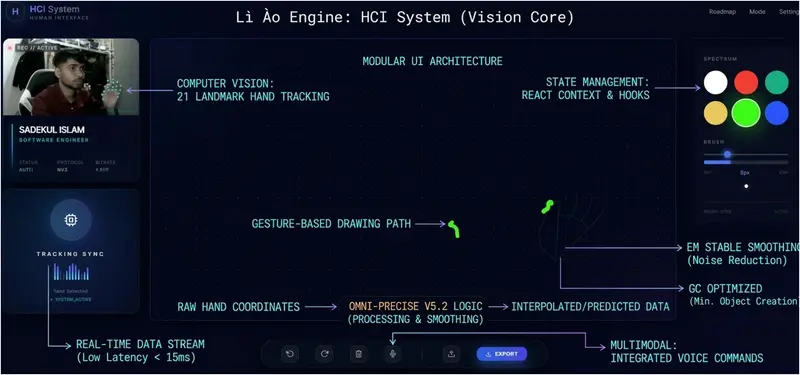
That question led me to build Lì Ào Engine (利奥) — a multimodal Human-Computer Interaction (HCI) system that transforms gestures, voice, and intent into real-time digital actions.

Philosophy: From Constraint to Freedom

Traditional input devices—mouse and keyboard—are powerful, but limiting. They confine interaction to surfaces.

I wanted to break that boundary.

Lì Ào Engine is built on a simple idea:

Human intention should be the interface.

System Architecture (Clean & Scalable)

This is not a prototype-level project. I designed it with modularity and scalability in mind.

Core Structure


-src/system → Core rendering layers (AI, Board, Layers, Media, Remote)

-src/features → Independent modules (ai, draw, galasy, gesture, image, move, prediction, remote, upload)

-src/hooks → Custom hooks for performance-critical logic
     -useImageLoader
     -useMediaPipe
     -usePredictor
     -useRealTimeSync
     -useTracking
     -useVoiceCommand  

- `server/engine` (Python) → Vision processing + AI inference (WIP)

Design Principle

  • Separation of concerns (UI vs AI processing)
  • Real-time responsiveness
  • Low-latency data flow

The Core Innovation: Omni-Precise V5.2 Engine

Gesture systems suffer from jitter and instability.

I built a custom smoothing and prediction pipeline:

1. Stable EMA Smoothing

  • Reduces noise from raw hand tracking data
  • Produces fluid, natural motion

2. Velocity-Based Stroke Dynamics

  • Fast movement → thin lines
  • Slow movement → thicker strokes
  • Mimics real-world drawing behavior

3. No-Gap Interpolation

  • Fills missing points between frames
  • Ensures continuous stroke rendering
  1. No-Gap Interpolation
    **
  • Fills missing points between frames
  • Ensures continuous stroke rendering

Result: Near pixel-perfect air interaction

Key Features (Live Beta)

  • 🎨 Smart Air Drawing — Draw naturally in mid-air using hand gestures
  • 🎤 Voice Commands — Hands-free control and system interaction
  • 🗣️ Voice-to-Type — Real-time speech-to-text input
  • 🔗 Remote Portal — Gesture-based transfer of images/data between devices
    ### 🚧 In Active Development
  • 🖐️ Air Mouse — AI-powered cursor control using hand tracking (not yet publicly released)

Open Technical Questions (Looking for Expert Insight)

I’d love feedback from experienced engineers:

1. Real-Time Sync & Latency

  • Best practices for minimizing lag in gesture-driven UI?
  • WebSocket vs WebRTC for real-time interaction?

**

  1. Jitter Reduction Techniques
    **
  • EMA vs Kalman Filter in browser environments
  • Trade-offs between performance and accuracy?

**

  1. Scaling the System
    **
  • How would you evolve this into a production-grade system?
  • Edge computing vs centralized processing?

🌐 Live Demo

https://hci-system.netlify.app
https://sadekulislam.netlify.app

💬 Feedback & Suggestions

I’d really appreciate your honest feedback on this system.

  • What do you think about the overall architecture?
  • How can I improve the real-time performance and scalability?
  • What features or improvements would you suggest next?

I’m actively developing this project and open to learning from experienced engineers.

✨ Final Thought

I’m still a student.
But I believe building systems like this is how we push boundaries.
We don’t wait for the future. We build it.
— Sadekul Islam (Lì Ào / 利奥)
Software Engineering Student | HCI Explorer

The 600ms Tax: Why Every TCP Connection Starts with a State Negotiation

TL;DR: A TCP handshake is a mandatory three-step negotiation—SYN, SYN-ACK, and ACK—required to synchronize sequence numbers and reserve memory buffers before data transfer. This protocol overhead adds a minimum of 1.5 round-trips of latency, making persistent connection reuse a critical optimization for reducing time-to-first-byte (TTFB).

Fetching a file from a remote server isn’t just a matter of bandwidth; it’s a battle against the physics of the network. If your round-trip time (RTT) to a server is 200ms, you aren’t waiting 200ms for your data. You’re likely waiting 600ms before the first byte even arrives. This delay isn’t a limitation of your fiber line—it’s the intentional cost of establishing a reliable state between two machines over an unreliable infrastructure.

I look at this as a “resource reservation tax.” Before a single packet of your HTML or JSON is sent, both the client and the server have to agree on exactly how they will track the data. This negotiation is what we call the TCP handshake.

What is a TCP handshake and why is it necessary?

A TCP handshake is a three-way exchange used to initialize a reliable logical connection by synchronizing sequence numbers and allocating memory buffers on both the client and server. This process ensures that both parties have the state necessary to track packet delivery, handle retransmissions, and reassemble data in the correct order.

Think of it as initializing a shared state machine. Both computers need to know where to start counting bytes—the sequence number—and they need to set aside specific memory for that specific connection. Without this synchronization, the receiving end would have no way to distinguish between a new packet and a delayed packet from a previous session. It’s about creating a predictable environment out of the chaos of the internet.

How does the three-way handshake impact network latency?

The TCP handshake impacts latency by requiring three sequential legs of communication—client to server, server to client, and client back to server—before the application data can be requested. This creates a latency floor where the initial connection setup time is directly proportional to the physical distance between the two machines.

Phase Direction Technical Purpose
SYN Client -> Server Client proposes an initial sequence number and requests synchronization.
SYN-ACK Server -> Client Server acknowledges client’s sequence, proposes its own, and allocates memory buffers.
ACK Client -> Server Client confirms the server’s state; usually piggybacks the first actual data request (e.g., HTTP GET).

If each leg of this journey takes 200ms, you’ve spent 600ms just establishing that the two computers can “hear” each other and have enough memory allocated to handle the session. This is why a small 1KB file can often feel as slow to load as a much larger one; the overhead of the handshake is the dominant factor.

Why is connection reuse essential for high-performance apps?

Connection reuse, or persistence, allows multiple requests to be sent over a single established TCP connection, bypassing the 1.5 RTT handshake penalty for subsequent data transfers. By maintaining the synchronized state and allocated memory, the client and server can communicate with zero additional setup overhead after the initial connection.

Imagine you’re building a microservice that needs to fetch twenty different assets. If you opened a new TCP connection for every single asset, you’d be paying that 600ms tax twenty times over. That is 12 seconds of just “saying hello.” Instead, modern protocols like HTTP/1.1 and HTTP/2 establish a small pool of persistent connections. We pay the handshake price once, keep the buffers warm, and then stream the data through the existing pipe. This is the single most effective way to mitigate the impact of physical distance on application performance.

FAQ

Why can’t we just start sending data with the first SYN packet?
Standard TCP requires the three-way handshake to prevent “Sequence Number Guessing” attacks and to ensure the server doesn’t allocate resources for spoofed IP addresses. However, an optimization called TCP Fast Open (TFO) does allow data to be included in the SYN packet for subsequent connections if the client has connected to that server before.

Does a TCP handshake happen for every HTTP request?
In modern web development, no. Thanks to the Keep-Alive header in HTTP/1.1 and the multiplexing capabilities of HTTP/2 and HTTP/3, a single TCP (or QUIC) connection is typically kept open and reused for hundreds of requests to the same origin.

What happens if the ACK packet in the handshake is lost?
If the final ACK from the client is lost, the server will eventually time out the half-open connection and deallocate the memory it reserved. The client, assuming the connection is open, will attempt to send data, which the server will reject or ignore, forcing the client to re-establish the connection.

Cheers.

Warp Has a Free Terminal: The Rust-Based Terminal That Adds AI Command Search, Block-Based Editing, and Workflow Sharing

You spend hours in the terminal. You’ve customized iTerm2, installed Oh My Zsh, configured fzf and starship. Yet basic things are still painful: editing long commands means arrow-keying through characters, sharing a multi-step workflow means pasting into Slack, and finding that obscure kubectl flag means tab-switching to Google. Warp rethinks the terminal from scratch.

What Warp Actually Does

Warp is a modern terminal application built in Rust with GPU rendering. It treats the terminal as a modern text editor: you get proper cursor movement, text selection, multi-line editing, and copy-paste that works like you’d expect from VS Code.

The killer features: block-based output (each command and its output is a collapsible, shareable block), AI command search (describe what you want in English, get the command), and Warp Drive (save and share command workflows with your team).

Warp is free for individual use. Available on macOS, Linux, and Windows. The AI features use Warp’s API (free tier included), or you can connect your own OpenAI/Anthropic key.

Quick Start

Install Warp:

# macOS
brew install --cask warp

# Linux
curl -fsSL https://app.warp.dev/download | bash

Key shortcuts that change everything:

Ctrl+Shift+R    — AI command search (type in English)
Ctrl+`          — Split terminal panes
Cmd+D           — Bookmark a command block
Cmd+Shift+C     — Copy block output
#               — Start typing to filter command history

AI command search example:

> "find all files larger than 100MB modified in the last week"
→ find . -type f -size +100M -mtime -7
> "docker compose restart only the api service and tail logs"
→ docker compose restart api && docker compose logs -f api

3 Practical Use Cases

1. Warp Drive — Shared Workflows

Save complex multi-step workflows as reusable templates:

# deploy-staging.yaml — shared via Warp Drive
name: Deploy to Staging
steps:
  - command: git pull origin main
    description: Pull latest changes
  - command: npm run build
    description: Build production bundle
  - command: npm test
    description: Run test suite
  - command: kubectl set image deployment/app app={{image_tag}}
    description: Deploy to staging cluster
parameters:
  - name: image_tag
    description: Docker image tag to deploy

Your entire team sees the same workflow. New engineers don’t need to ask “how do I deploy to staging?”

2. Block-Based Output for Debugging

Every command creates a distinct block:

┌─ $ docker ps
│ CONTAINER ID  IMAGE      STATUS
│ abc123        api:v2.1   Up 3 hours
│ def456        redis:7    Up 3 hours
└─ 

┌─ $ docker logs abc123 --tail 20
│ [ERROR] Connection refused to database
│ [ERROR] Retrying in 5s...
└─ Share ↗  Copy 📋  Bookmark 🔖

Click “Share” to generate a link. Your teammate sees the exact output without screenshots.

3. Notebooks — Interactive Documentation

Warp Notebooks combine markdown and executable commands:

# Incident Response Playbook

## Step 1: Check service health
``

bash
kubectl get pods -n production | grep -v Running
``

## Step 2: Check recent deploys
`</span>bash
kubectl rollout history deployment/api -n production
<span class="err">

Step 3: If needed, rollback

bash
kubectl rollout undo deployment/api -n production
` `

`

Each code block is runnable. The entire notebook is shareable.

Why This Matters

The terminal hasn’t fundamentally changed since the 1970s. Warp proves it’s possible to keep full compatibility with existing shells (bash, zsh, fish) while adding the UX improvements we take for granted in every other developer tool. AI command search alone saves minutes per day for any developer who doesn’t have every CLI flag memorized.

The block-based model changes how teams collaborate. Instead of screenshots and Slack pastes, you share structured, replayable terminal sessions. That’s a real workflow improvement, not a gimmick.

Need custom data extraction or web scraping solutions? I build production-grade scrapers and data pipelines. Check out my Apify actors or email me at [email protected] for custom projects.

Follow me for more free API discoveries every week!

I Had 40 Zapier Zaps. I Replaced 32 of Them With One Sentence Each.

I need to confess something. I had 40 Zapier zaps. Conditional paths. Filter chains. Multi-step lookups with error handling branches. A Rube Goldberg machine of business logic held together by duct tape and prayer.

I was proud of it. I should not have been.

The Breaking Point

The workflow that killed my faith in visual automation builders:

The requirement: When a deal over 10K enters our HubSpot pipeline, check if we have previously spoken to the contact. If yes, notify our sales channel in Slack with context from previous conversations. If no, send the standard intro sequence.

In Zapier: Five connected zaps. A lookup step to search HubSpot contact history. Two filter branches. A conditional path. A formatter to extract the relevant conversation snippets. Half a day to build. Tested successfully on Tuesday. Broke on Thursday when HubSpot changed a field format.

In RunLobster: One sentence. “When a deal over 10K enters HubSpot, check if we have spoken to them before, if yes notify sales with context, if no send the intro sequence.”

It just did it. I stared at my screen for about thirty seconds wondering what I had been doing with my life for three years.

What Actually Changed

Let me be specific about the difference because “AI agent” means different things to different people.

Zapier is a rule engine. You build visual flowcharts that follow deterministic logic. If this happens, do that. It is brilliant for simple trigger-to-action automations. New form submission goes to a spreadsheet. New payment triggers a Slack notification. These are Zapier’s sweet spot and nothing beats it for this.

RunLobster is an AI agent. You describe what you want in English and it figures out how to do it. It connects to your tools (Stripe, HubSpot, Meta Ads, Google Ads, Slack, Gmail — 3,000+ integrations), reasons about the task, and delivers the output.

The difference matters when requirements have any complexity, ambiguity, or when they change.

The Migration: What Moved and What Stayed

Stayed on Zapier (8 zaps):

  • New Typeform submission ‚Üí add row to Google Sheet
  • New Stripe payment ‚Üí Slack notification to #revenue
  • New GitHub issue with “urgent” label ‚Üí Slack notification to #engineering
  • New email from specific VIP contacts ‚Üí forward to my phone
  • Four other simple trigger ‚Üí single action workflows

These are deterministic. They never change. They never need context or judgment. Zapier handles them perfectly and costs almost nothing per execution.

Moved to RunLobster (32 zaps replaced):

  • All conditional workflows (if X then Y else Z)
  • All multi-step data processing (pull from A, cross-reference with B, output to C)
  • All reporting and monitoring (daily briefings, ad anomaly detection, pipeline analysis)
  • All CRM automation (post-call updates, deal stage management, follow-up scheduling)
  • Anything where requirements change more than once a quarter

The Cost Surprise

Zapier Pro was costing me €89/month for the 40 zaps. The AI step markup was significant — Zapier charges roughly 3x the actual API cost for AI-powered steps.

My new setup:

  • Zapier Starter: ‚Ǩ19/month (8 remaining simple zaps)
  • RunLobster: ‚Ǩ49/month flat (everything else, credits included)
  • Total: ‚Ǩ68/month, doing significantly more

I am paying less AND handling more complex workflows. The maths should not work but it does because RunLobster includes API credits in the flat fee while Zapier charges per task and marks up every AI call.

The Mindset Shift

This is the part that took me longest to adjust to.

With Zapier, I thought in workflow logic. If this then that. Filter, branch, format, route. Every new requirement meant designing a new flowchart. I had become a visual programming language expert without realising it.

With an AI agent, I think in outcomes. I describe what should happen and let the agent figure out the how. When the requirement changes, I describe the new outcome instead of rebuilding the flowchart.

Example: Last week we changed our deal threshold from 10K to 15K and added a requirement to include the prospect’s last Gong call summary in the Slack notification.

In Zapier: modify filter values in two zaps, add a new Gong lookup step, add a formatter, reconnect the flow, test. Maybe an hour if nothing breaks.

In RunLobster: “Change the threshold to 15K and also include their last Gong call summary.” Done. Thirty seconds.

When NOT To Switch

I want to be honest about this. AI agents are not universally better than rule-based automation.

Keep Zapier (or n8n, Make, etc.) when:

  • The workflow is simple and deterministic (trigger ‚Üí action)
  • You need 100% predictable behaviour with zero variance
  • The workflow runs thousands of times per day at high volume
  • You need detailed execution logs for compliance

Use an AI agent when:

  • The workflow involves conditionals, judgment, or context
  • Requirements change frequently
  • You need cross-tool intelligence (pull from X, compare with Y, decide based on Z)
  • The output is a deliverable, not just a data movement (reports, dashboards, CRM records)

Most businesses need both. The mistake is using Zapier for everything (I did this for three years) or switching everything to AI (overkill for simple automations).

My Setup Now

Eight Zapier zaps handle the dumb simple stuff. RunLobster handles everything that requires thinking. Total cost is lower than Zapier alone. Total capability is dramatically higher.

The 32 zaps I replaced were not bad zaps. They were good zaps. I spent hours building them carefully. But they were solving a problem that no longer needs to be solved the way I was solving it.

The best automation is not the cleverest flowchart. It is describing what you want and having it happen.

How many zaps are you running that could be replaced with a sentence? Genuinely curious — I thought my setup was elegant until I realised it was just complicated.

Quark’s Outlines: Python Execution Frames

Quark’s Outlines: Python Execution Frames

Overview, Historical Timeline, Problems & Solutions

An Overview of Python Execution Frames

What is a Python execution frame?

When you run a Python program, Python keeps track of each piece of code as it runs. Python does this using a structure called an execution frame. A Python execution frame is a record of one piece of code running at one moment.

You can think of it like a single page in a notebook that shows what code is running, what names are known, and what will happen next. Each time Python starts running a new code block, it creates a new execution frame. When that code finishes, the frame is removed.

Python uses an execution frame to hold the state of each code block.

import sys

def show():
    frame = sys._getframe()
    print("Running in frame for:", frame.f_code.co_name)

show()
# prints:
# Running in frame for: show

The frame tracks which function is running, the variables in use, and where to go next.

What does a Python execution frame include?

A Python execution frame includes the code block that is running, the local and global name spaces, and pointers to other frames before it. It also contains details for debugging, like the current line number and the file name.

Each frame runs one code block. This can be a module, function, class, string passed to eval(), a file passed to execfile(), or input from the interpreter.

Python uses a new frame for each block of code.

import sys

def outer():
    def inner():
        print(sys._getframe().f_back.f_code.co_name)
    inner()

outer()
# prints:
# outer

Each frame links to the one before it. This lets Python trace how your program got to the current point.

A Historical Timeline of Python Execution Frames

Where do Python’s execution frames come from?

Python frames are part of its stack-based execution model. Python follows the structure of older programming languages that used call stacks and execution records. Over time, frames in Python became a core part of debugging, tracing, and dynamic scope handling.

People invented ways to trace function calls and scope

1960 — Stack records used in ALGOL and early structured languages to store function data.

1972 — Frame-based execution in C supported nested function calls and tracked control flow.

People built Python’s execution model on frames

1991 — Python added frames to manage execution and scope during function and module execution.

2000 — Dynamic evaluation support using exec, eval, and input() created frames from strings and commands.

2001 — Frame introspection via sys._getframe() and traceback support gave users access to internal state.

2025 — Stable frame design remained in use for debuggers, profilers, and runtime tools.

Problems & Solutions with Python Execution Frames

How do you use Python execution frames the right way?

Each time a Python function runs, a new execution frame is created. The frame tracks what code is running, which names are defined, and how to continue once the code ends. These problems show how Python frames help you understand, debug, and trace code.

Problem: How do you find out which function is running in Python?

You are writing a logger. You want to show which function is currently running without writing the function name by hand in every place. You need to get this from the running code itself.

Problem: You want to log the current function name.

Solution: Python execution frames store the code object being run.

Python lets you get the function name from the current frame.

import sys

def whoami():
    print("Function:", sys._getframe().f_code.co_name)

whoami()
# prints:
# Function: whoami

The frame’s f_code.co_name gives the name of the code block currently running.

Problem: How do you trace who called your function in Python?

You want to see which function called your current function. You do not want to pass this as an argument. You want to get it from the call stack itself.

Problem: You want to find the caller of the current function.

Solution: Python execution frames link to earlier frames using f_back.

Python lets you access the previous frame with f_back.

import sys

def a():
    b()

def b():
    caller = sys._getframe().f_back
    print("Called by:", caller.f_code.co_name)

a()
# prints:
# Called by: a

Each frame links to the one before it, so you can see how the code was reached.

Problem: How do you read what variables are in use in Python?

You are writing a tool to inspect your program. You want to read the names and values of local variables while the function is running.

Problem: You want to inspect the local name space during execution.

Solution: Python execution frames include a dictionary of local names.

Python lets you read local variables from f_locals.

import sys

def inspect():
    x = 7
    y = "ok"
    print("Locals:", sys._getframe().f_locals)

inspect()
# prints:
# Locals: {'x': 7, 'y': 'ok'}

The frame gives access to local names and their current values.

Problem: How do you run code from a string and keep track of it in Python?

You are building a sandbox or dynamic runner. You want to run code from a string and keep track of what it is doing. You need Python to treat the string as a full code block.

Problem: You want to execute a string as Python code in a real frame.

Solution: Python makes a new frame when running exec() or eval().

Python makes an execution frame for string-based code.

code = "x = 5; print('X is', x)"
exec(code)
# prints:
# X is 5

Even string-based execution creates a frame with its own name spaces and control.

Problem: How do you debug by stepping through lines in Python?

You want to make a tool that watches a function line by line. You need a way to trace which line is running and keep track of changes.

Problem: You want to watch Python code as it runs.

Solution: Python lets you set a trace function on the frame using f_trace.

Python lets you trace each line of code using a frame hook.

import sys

def trace(frame, event, arg):
    if event == "line":
        print("Line", frame.f_lineno)
    return trace

def run():
    x = 1
    y = 2
    z = x + y
    return z

sys.settrace(trace)
run()
# prints:
# Line 6
# Line 7
# Line 8
# Line 9

This shows each line as it runs using the frame’s line number.

Like, Comment, Share, and Subscribe

Did you find this helpful? Let me know by clicking the like button below. I’d love to hear your thoughts in the comments, too! If you want to see more content like this, don’t forget to subscribe. Thanks for reading!

Mike Vincent is an American software engineer and app developer from Los Angeles, California. More about Mike Vincent

TCP Exponential Backoff: Why Your Retries are Doubling

TCP prevents network meltdowns by doubling its wait time (Exponential Backoff) every time a packet fails to acknowledge. Instead of spamming a congested link, I look at how the protocol calculates a dynamic Retransmission Timeout (RTO) and then backs off to allow hardware buffers to clear and avoid total congestion collapse.

I find it wild that we can just download a file from a physical computer on another continent through a chaotic web of underwater cables and intermediary servers. When I think about TCP, I’m looking at the protocol responsible for taking that file, chopping it into chunks, and ensuring it arrives mostly reliably despite the physical insanity of the global internet infrastructure. The genius isn’t just in the delivery, but in how the protocol knows when to stop talking so the network doesn’t cave in on itself.

How does TCP handle packet loss?

I see TCP ensuring reliability by requiring a specific acknowledgment (ACK) for every data segment sent. If the sender transmits a chunk and doesn’t receive an ACK within a set window, it assumes the packet was lost and initiates a retransmission.

I usually think of this like a microservice health check or a database heartbeat. If I send a request and don’t get a response, I have to decide when that request has officially failed. If I retry after a single millisecond, I’m going to overwhelm a service that might just be slightly lagged. If I wait five seconds, I’m killing my application’s throughput. I need TCP to find that precise “wait” window for every unique connection to keep the data moving as fast as possible without causing a bottleneck.

What determines the Retransmission Timeout (RTO)?

The RTO is a dynamic timer that I use to judge when a packet is officially “lost” based on previous Round Trip Time (RTT) measurements. It isn’t a static value because the latency I see to a server in London is vastly different from the latency to a server in my own rack.

If my previous packets have been successfully acknowledged in 500ms, my TCP stack might set an RTO of 700ms to provide a buffer for minor jitter. But once that 700ms timer expires without an ACK, the logic has to change. If I just kept hitting the network at 700ms intervals during a failure, I’d be making a bad situation worse. This is why I rely on exponential backoff to handle the silence.

Why does TCP use exponential backoff?

I use exponential backoff to prevent “congestion collapse,” a state where a network is so saturated with retransmissions that no actual work can get through. By doubling the RTO after every failure, I’m effectively using a circuit breaker to reduce the load on the network until the bottleneck clears.

To understand why I need this, we have to look at the hardware buffers. Every router between my machine and the destination has a finite amount of memory to queue incoming packets. When network traffic spikes and those buffers reach capacity, the router performs a “tail drop”—it simply discards any new incoming packets because there is nowhere to put them.

If every device on that segment responded to a drop by immediately resending data at high frequency, they would create a broadcast storm. The buffers would stay at 100% utilization, and the router would spend all its resources dropping packets rather than routing them. By exponentially increasing the wait time, I’m giving those hardware buffers the space they need to drain and recover. It’s about being a good neighbor to the rest of the traffic on the wire.

How does backoff scale across retries?

With every consecutive failure to receive an ACK, I double the previous RTO. This binary exponential backoff continues until I hit a maximum threshold or the operating system finally decides the connection is dead and kills the socket.

Retry Count Backoff Multiplier Example RTO (ms)
Initial Transmission 1x 700
1 2x 1,400
2 4x 2,800
3 8x 5,600
4 16x 11,200
5 32x 22,400

Eventually, the network does time out. There’s a limit to how long I’ll wait, but this aggressive backing off is what keeps a local network failure from cascading into a total blackout for every other user on that same infrastructure. It’s the difference between a minor lag and a total network shutdown.

FAQ

What is the difference between RTT and RTO?

RTT (Round Trip Time) is the actual measured time it takes for a packet to travel to the destination and back. RTO (Retransmission Timeout) is the calculated duration the sender will wait for an acknowledgment before assuming the packet was lost, typically derived from RTT plus a variance buffer.

Why not just use a fixed retry interval?

Fixed intervals lead to congestion collapse. If thousands of devices all retry at the same static interval, they can synchronize their retransmissions, creating massive spikes in traffic that keep router buffers full and prevent the network from ever recovering.

Can I tune the maximum number of TCP retries?

In Linux, I can tune this via sysctl using the net.ipv4.tcp_retries2 parameter. This setting dictates how many times the kernel will retry before giving up on an established connection. While I can lower this to fail faster, increasing it too much can lead to stale sockets hanging around for over half an hour on a dead link.